EP0645932B1 - Méthode et dispositif pour l'affichage d'images vidéo dans un système de vidéo conférence - Google Patents
Méthode et dispositif pour l'affichage d'images vidéo dans un système de vidéo conférence Download PDFInfo
- Publication number
- EP0645932B1 EP0645932B1 EP94307043A EP94307043A EP0645932B1 EP 0645932 B1 EP0645932 B1 EP 0645932B1 EP 94307043 A EP94307043 A EP 94307043A EP 94307043 A EP94307043 A EP 94307043A EP 0645932 B1 EP0645932 B1 EP 0645932B1
- Authority
- EP
- European Patent Office
- Prior art keywords
- window
- video
- image
- computer
- displaying
- Prior art date
- Legal status (The legal status is an assumption and is not a legal conclusion. Google has not performed a legal analysis and makes no representation as to the accuracy of the status listed.)
- Expired - Lifetime
Links
Images


Classifications
-
- H—ELECTRICITY
- H04—ELECTRIC COMMUNICATION TECHNIQUE
- H04N—PICTORIAL COMMUNICATION, e.g. TELEVISION
- H04N7/00—Television systems
- H04N7/14—Systems for two-way working
- H04N7/15—Conference systems
Definitions
- the present invention relates to a system in which both graphics and video images are transferred between users of remotely located computers. More, particularly, it relates to the relationship between the graphics and video images and how these images are displayed.
- Collaborative computing involves the generation of data such as a graphical image by an application running on one of the computers and the replication of that image on the displays of the other computers.
- the system also involves the control of the common image including the ability of different users to change and/or annotate the image.
- Another feature of this collaborative computing system is the generation of a video image of a user of one of the computers and the transfer and display of that image at remote locations.
- the present collaborative computing system involves the interrelationship of the graphics and video images transferred between computers.
- 'PERSONAL MULTIMEDIA-MULTIPOINT TELECONFERENCING SYSTEM' discloses a personal multimedia-multipoint teleconference system which allows conferences using voice, video and graphics to be established using a broad band ISDN. NTT REVIEW, vol.4, no.4, July 1992, TOKYO, JP pages 81 - 85 MASAKI ET AL.
- PMTC' discloses a multimedia teleconference system with a multiwindow display having text graphics, telewriting, telepointing and high quality full motion video and voice facilities.
- a method of displaying a video image in a computer having the ability to simultaneously display multiple windows comprising the steps:
- a computer system comprising one or more computers, each having the ability to simultaneously display multiple windows, comprising:
- graphics image refers to an image generated by a computer program. It is generally time independent, meaning that any changes that are made in the image can occur at irregular intervals without significantly degrading its performance.
- graphics images include alphanumeric characters as generated by a word processing application, graphical data as generated by a spread sheet application, drawings as generated by a paint or design program, etc.
- video image refers to a time dependent image generated by a motion picture camera. It is time dependent because the image must be continually updated at regular intervals in order for any motion in the image to be perceived by a viewer as smooth.
- window means a region (usually rectangular) of a computer display screen which the operating system of the computer grants use of to an application.
- the window has associated controls which direct the actions of the application.
- the size and location of the window on the display screen can also be changed by the user of the computer.
- a computer having the ability to display multiple windows provides visual access to the application running in each of the windows.
- the user of the computer can scale, move and otherwise arrange the windows on the screen.
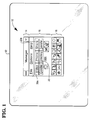
- Figure 1 is a view of a manager window 10 as displayed on a computer display screen 12 associated with a computer.
- the computer (which is not shown) is equipped with a video camera.
- the camera may be mounted on an edge surface of the display screen and will be pointed in the direction of the user of the computer.
- Manager window 10 controls the main functions associated with a video conferencing system.
- This video conferencing system provides video images of the participants and allows sharing of documents.
- the communications are provided over telephone lines having ISDN (Integrated Systems Digital Network) capabilities.
- ISDN Integrated Systems Digital Network
- Manager window 10 includes a title region 14, a control region 16, and an annotation region 18.
- Control region 16 includes various control elements (selectively marked as 20a, 20b, ).
- Control elements 20 may be selected and activated with a pointing device, such as a mouse or through a keyboard.
- Control elements 20 perform a number of functions related to the establishment and control of a communications link with a remotely located computer. (The remotely located computer will be similarly configured with a video camera.)
- control element 20a labeled "Video” allows the user of the computer to make a video call to a remotely located computer.
- the Video control element 20a has other functions - one of which will be discussed in more detail later.
- Another control element 20b labeled "Share,” allows the user of the computer to establish a video conference call with a participant at a remotely located computer.
- the Share control element 20b allows the user of the computer to share both a video image and a graphics image with a remote participant.
- Figure 2 is a diagram showing changes in views of two different computer display screens according to one embodiment of the present invention. Starting with the selection of Share control element 20b by the user of the computer, hereinafter referred to as the local computer, the successive views on local computer display screen 12a and remote computer display screen 12b are shown.
- the successive views of local computer display screen 12a are shown by local branch 22.
- a first view 12a-1 of the computer display screen "only" the manager window 10a, as described with respect to Figure 1, is active.
- there may be other windows displayed on the screen as is commonly known in the art.
- several windows associated with various parts of a video conferencing system may be generated. These windows will be collectively referred to herein as "video conferencing windows.” These video conferencing windows are shown in Figure 2 and will be described shortly.
- the statement that "only" manager window 10a is active in first view 12a-1 means that manager window 10a is the only video conferencing window that is active on the screen. However, other non-video conferencing windows may be displayed, at the option of the user of the computer.
- manager window 10a is displayed. As shown in more detail in Figure 1, manager window 10 has a control element 20b which allows the local user to establish a video conferencing session.
- a video window 26 is generated, and a video image taken by the video camera on the local computer is displayed therein, as shown in the second view 12a-2.
- the local video image i.e., the image of the user of the local computer, which is displayed in video window 26 is labeled as "Local.”
- the user of the remote computer has the option of accepting or rejecting the call. If the call is accepted or answered and the video camera on the remote computer is active, the video image from the remote computer is transferred to the local computer and displayed in video window 26, as shown in the third view 12a-3. It is expected that the remote video image will be the image of the user of the remote computer. This image automatically replaces the local video image.
- the local user also has the option of sharing a graphics image.
- video conferencing to describe the subject system broadly encompasses both the video images being exchanged between the local and remote computers, as well as the sharing of graphics images generated by a computer program resident on only one of the computers. If the local user starts a program to generate a graphics image to be shared with the remote computer, the associated graphics image of the application is displayed in an application window 28, as shown in fourth view 12a-4. When the graphics image is displayed, the video image is automatically transferred from the video window 26 into the manager window 10a, and the video window 26 closed.
- FIG 3 is a more detailed view of the manager window 10a in Figure 2. It may be helpful to compare manager window 10a in Figure 3 with the manager window 10 in Figure 1.
- the windows are similar with the exception that manager window 10a is somewhat larger than window 10 in order to accommodate the video image.
- the user By displaying the video image within the manager window 10a, the user is provided with a significant advantage in using the video conferencing system. The video image remains visible to the user during a conferencing session.
- the various controls and annotation tools (to be described later) are also readily available. The user can position the manager window at any location on the screen that is convenient. However, at the same time, the user does not have to contend with positioning the video window - the video image being part of the manager window.
- Figure 2 also shows a series of computer screen views on the remote computer shown by path 24.
- a window 30 indicating an incoming call "pops up" on the screen of the remote user. Control elements in window 30 allow the remote user to reject or accept the incoming call.
- a second view 12b-2 is generated in which a video window 32 is displayed on the screen.
- video window 32 displays an image of the user of the remote computer (labeled "local").
- local and remote as used herein to describe the origin of video images are with respect to the user of the specific computer.
- the term “local” when used in the views of path 22 refers to the user of the local computer.
- the term “local” when used in the views of path 24 refers to the user of the remote computer.
- the video image from the camera associated with computer screen 12a is transferred to the remote computer. This video image is then displayed in video window 32, as shown in the third view 12b-3. This image automatically replaces the video image shown in view 12b-2.
- the associated graphics image of the application is transferred to the remote computer.
- the graphics image is then displayed in an application window 34, as shown in fourth view 12b-4. Because the remote user has not opened a manager window, both the video and application window are displayed. (The manager window for the remote computer must be active - however, it is not necessary that it be displayed.)
- both the remote and local computers must run video conferencing software.
- video conferencing software includes the manager window and functions, described above.
- the remote user has the option of opening a manager window 36 in the remote computer, as shown in the fifth view 12b-5.
- manager window 36 is opened, the video image is automatically transferred from the video window 34 into the manager window 36, and the video window 32 closed.
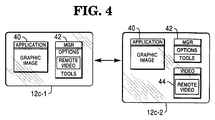
- View 12c-1 is similar to that shown in views 12a-4 and 12b-5 in Figure 2. Namely, two windows - an application window 40 with a graphics image, and a manager window 42 including a video image are displayed. View 12c-2 shows three windows - application window 40, manager window 42 and a video window 44. In view 12c-2, the video image has been moved from the manager window 42 into its own video window. This move occurs in response to a command from the user of the computer.
- this transfer can be completed either by activating a control (such as Video control element 20a) in manager window 42 or by establishing a fast transfer command, such as using a mouse to point at the video image and double clicking.
- a control such as Video control element 20a
- a fast transfer command such as using a mouse to point at the video image and double clicking.
- the video image in view 12c-2 can be moved back into the manager window 42 by a predetermined control in either the video or manager window.
- Region 18 includes a number of controls or tools for annotating a graphics image, such as shown in application windows 28 or 34 in Figure 2, or for annotating a video image, such as shown in video windows 26 or 32 in Figure 2.
- Some of the tools provide the capability of generating straight, curved or freehand lines and text; the ability to selectively or universally erasing the annotations; and a palette for changing the colors of the annotations.
- Each of these tools has the ability to change the appearance of the image in another window.
- annotating when used herein with respect to a graphics or video image means to add a second image over the graphics or video image.
- the second image is generated by a different program than generates the graphics image.
- underlining and overstriking which may be available within a word processing program are not considered “annotating" within this definition.
- underlining, highlighting, commenting, etc. are annotations if they are provided by a separate program. Such annotations are displayed by logically combining the annotations with the graphics images in the video display memory.
- This Table describes a specific embodiment of the invention which uses the following terms and phrases: "TeleGraphics” is a trade name used to describe the overall collaborative video conferencing system described in the subject case and those cross-referenced herein. "TeleMedia Manager” is a trade name used to describe a specific implementation of manager window 10. "Annotation toolbar” refers to annotation region 18.
- anntb.c Functions to display the annotation toolbar (the bottom half of the TeleMedia Manager screen) anntb.h Data structures and prototypes needed to display the annotation toolbar annvid.c Functions to display video when it is inserted in the annotation toolbar annvid.h Data structures and prototypes needed by annvid.c televid.c Functions to display the portion of the annotation toolbar that appears under the video portion of the toolbar televid.h Data structures (named identifiers) and function prototypes needed by televid.c tmscreen.c Functions to support the TeleMedia Manager screen and controls (e.g. the buttons). The functions handle the buttons, the changing of the button states, etc.
- umb.c Functions to display the main portion of the TeleMedia Manager screen Contains the main program for the TeleMedia Connection and its window procedure umb.h Named identifiers and function prototypes needed by umb.c vidwin.c Functions to interface with the video device driver vidwin.h Prototypes and data structures needed to interface with the video device driver
Landscapes
- Engineering & Computer Science (AREA)
- Multimedia (AREA)
- Signal Processing (AREA)
- Two-Way Televisions, Distribution Of Moving Picture Or The Like (AREA)
- Information Transfer Between Computers (AREA)
- User Interface Of Digital Computer (AREA)
- Data Exchanges In Wide-Area Networks (AREA)
- Computer And Data Communications (AREA)
Claims (6)
- Une méthode d'affichage d'une image vidéo dans un ordinateur ayant la capacité d'afficher simultanément des fenêtres multiples, la méthode comprenant les étapes suivantes:a) l'affichage d'une image graphique dans une première fenêtre (28), etb) l'affichage d'une image vidéo dans une deuxième fenêtre (26, 44), caractérisé par les étapes suivantes:c) l'affichage dans une troisième fenêtre (10a) d'éléments de contrôle pour annoter ladite image graphique dans ladite première fenêtre (28); etd) lorsque ladite image graphique est affichée, le transfert automatique de ladite image vidéo de ladite deuxième fenêtre (26, 44) dans ladite troisième fenêtre (10a) et la fermeture de ladite deuxième fenêtre (26, 44).
- Une méthode conformément à la revendication 1, caractérisée en ce que ladite image vidéo est transférée audit ordinateur à partir d'un ordinateur éloigné.
- Une méthode conformément aux revendications 1 ou 2, caractérisée en ce que ladite image graphique est transférée audit ordinateur à partir d'un ordinateur éloigné.
- Une méthode conformément à la revendication 1, caractérisée par l'étape supplémentaire suivante:
l'actionnement d'un élément de contrôle (20) dans ladite troisième fenêtre (10a) pour recréer la deuxième fenêtre (26, 44) et déplacer ladite image vidéo de ladite troisième fenêtre (10a) à ladite deuxième fenêtre (26, 44). - Un système informatique comprenant un ou plusieurs ordinateurs, chacun ayant la capacité d'afficher simultanément des fenêtres multiples, comprenant:a) un moyen pour l'affichage d'une image graphique dans une première fenêtre (28);b) un moyen pour l'affichage d'une image vidéo dans une deuxième fenêtre (26, 44), caractérisé parc) un moyen pour l'affichage dans une troisième fenêtre (10a) d'éléments de contrôle pour annoter ladite image graphique dans ladite première fenêtre (28); etd) un moyen pour le transfert automatique de ladite image vidéo de la deuxième fenêtre (26, 44) dans la troisième fenêtre (10a) lorsque ladite image graphique est affichée et pour la fermeture de ladite deuxième fenêtre (26, 44).
- Un système informatique conformément à la revendication 5, caractérisé par deux ordinateurs ou plus, chacun des ordinateurs ayant une seule fenêtre dans laquelle une application commune est partagée, comprenant
un moyen pour afficher des fenêtres multiples dans un premier desdits ordinateurs, comprenant:un moyen pour afficher ladite fenêtre partagée; un moyen pour afficher une fenêtre directrice ayant des outils pour changer l'aspect de l'application dans la fenêtre partagée; etun moyen pour afficher une image vidéo reçue d'un deuxième desdits ordinateurs dans ladite fenêtre directrice.
Applications Claiming Priority (2)
| Application Number | Priority Date | Filing Date | Title |
|---|---|---|---|
| US12801793A | 1993-09-28 | 1993-09-28 | |
| US128017 | 1993-09-28 |
Publications (2)
| Publication Number | Publication Date |
|---|---|
| EP0645932A1 EP0645932A1 (fr) | 1995-03-29 |
| EP0645932B1 true EP0645932B1 (fr) | 1999-06-09 |
Family
ID=22433187
Family Applications (1)
| Application Number | Title | Priority Date | Filing Date |
|---|---|---|---|
| EP94307043A Expired - Lifetime EP0645932B1 (fr) | 1993-09-28 | 1994-09-27 | Méthode et dispositif pour l'affichage d'images vidéo dans un système de vidéo conférence |
Country Status (4)
| Country | Link |
|---|---|
| US (1) | US6292204B1 (fr) |
| EP (1) | EP0645932B1 (fr) |
| JP (1) | JP3628729B2 (fr) |
| DE (1) | DE69418956T2 (fr) |
Families Citing this family (43)
| Publication number | Priority date | Publication date | Assignee | Title |
|---|---|---|---|---|
| USRE43462E1 (en) | 1993-04-21 | 2012-06-12 | Kinya (Ken) Washino | Video monitoring and conferencing system |
| US6122005A (en) * | 1995-04-14 | 2000-09-19 | Canon Kabushiki Kaisha | Camera control system having list of camera names updated in accordance with frequency of use and other ease of use features |
| EP0824820B1 (fr) * | 1995-05-03 | 2003-11-05 | Siemens Aktiengesellschaft | Appareil de communication radio portable a camera et afficheur integres |
| JPH09101767A (ja) * | 1995-07-31 | 1997-04-15 | Canon Inc | 端末装置、端末の制御方法、会議システム、およびコンピュータ可読メモリ |
| KR19980701471A (ko) * | 1995-11-15 | 1998-05-15 | 이데이 노부유키 | 다지점 비디오 회의 장치(Multipoint video conference apparatus) |
| US7130888B1 (en) * | 1996-02-16 | 2006-10-31 | G&H Nevada-Tek | Method and apparatus for controlling a computer over a TCP/IP protocol network |
| US7100069B1 (en) | 1996-02-16 | 2006-08-29 | G&H Nevada-Tek | Method and apparatus for controlling a computer over a wide area network |
| JP3787404B2 (ja) * | 1997-02-24 | 2006-06-21 | キヤノン株式会社 | カメラ制御システム及びその制御方法 |
| JP3337986B2 (ja) * | 1998-09-01 | 2002-10-28 | キヤノン株式会社 | 購買依頼システム及び購買依頼装置 |
| US6025871A (en) * | 1998-12-31 | 2000-02-15 | Intel Corporation | User interface for a video conferencing system |
| US7363589B1 (en) * | 2000-07-28 | 2008-04-22 | Tandberg Telecom A/S | System and method for generating invisible notes on a presenter's screen |
| JP4902904B2 (ja) * | 2000-10-06 | 2012-03-21 | ソニー株式会社 | 情報処理方法、並びにプログラムを格納している媒体 |
| US7069334B2 (en) | 2000-12-27 | 2006-06-27 | Intel Corporation | Image restoration and reconfiguration support for crashed devices |
| US7069298B2 (en) | 2000-12-29 | 2006-06-27 | Webex Communications, Inc. | Fault-tolerant distributed system for collaborative computing |
| US7203755B2 (en) * | 2000-12-29 | 2007-04-10 | Webex—Communications, Inc. | System and method for application sharing in collaborative setting |
| US20030164853A1 (en) * | 2000-12-29 | 2003-09-04 | Min Zhu | Distributed document sharing |
| WO2002054264A1 (fr) | 2000-12-29 | 2002-07-11 | Webex Communications, Inc. | Architecture de systeme de reseau distribue pour l'informatique de groupe |
| US6901448B2 (en) * | 2000-12-29 | 2005-05-31 | Webex Communications, Inc. | Secure communications system for collaborative computing |
| US20030167418A1 (en) * | 2000-12-29 | 2003-09-04 | Min Zhu | Fault-tolerant server for collaborative computing |
| US6922718B2 (en) * | 2002-02-01 | 2005-07-26 | Dell Products L.P. | Method and system for participating locations in a multi-point video conference |
| US20030232648A1 (en) * | 2002-06-14 | 2003-12-18 | Prindle Joseph Charles | Videophone and videoconferencing apparatus and method for a video game console |
| US7343566B1 (en) | 2002-07-10 | 2008-03-11 | Apple Inc. | Method and apparatus for displaying a window for a user interface |
| US7391910B2 (en) * | 2003-07-31 | 2008-06-24 | Seiko Epson Corporation | LAPE: layered presentation system utilizing compressed-domain image processing |
| US7692683B2 (en) * | 2004-10-15 | 2010-04-06 | Lifesize Communications, Inc. | Video conferencing system transcoder |
| US20060248210A1 (en) * | 2005-05-02 | 2006-11-02 | Lifesize Communications, Inc. | Controlling video display mode in a video conferencing system |
| USD550234S1 (en) * | 2005-11-15 | 2007-09-04 | Microsoft Corporation | Portion of a display screen |
| US8769019B2 (en) * | 2006-05-04 | 2014-07-01 | Citrix Systems, Inc. | Methods and systems for managing shared state within a distributed system with varying consistency and consensus semantics |
| US8839142B2 (en) | 2007-06-08 | 2014-09-16 | Apple Inc. | Desktop system object removal |
| US8319814B2 (en) * | 2007-06-22 | 2012-11-27 | Lifesize Communications, Inc. | Video conferencing system which allows endpoints to perform continuous presence layout selection |
| US8139100B2 (en) * | 2007-07-13 | 2012-03-20 | Lifesize Communications, Inc. | Virtual multiway scaler compensation |
| GB2451819A (en) * | 2007-08-13 | 2009-02-18 | Mavcast Ltd | Transmitting a message across a communications network to a variety of different display devices |
| US8514265B2 (en) * | 2008-10-02 | 2013-08-20 | Lifesize Communications, Inc. | Systems and methods for selecting videoconferencing endpoints for display in a composite video image |
| US20100110160A1 (en) * | 2008-10-30 | 2010-05-06 | Brandt Matthew K | Videoconferencing Community with Live Images |
| US8456510B2 (en) * | 2009-03-04 | 2013-06-04 | Lifesize Communications, Inc. | Virtual distributed multipoint control unit |
| US8643695B2 (en) * | 2009-03-04 | 2014-02-04 | Lifesize Communications, Inc. | Videoconferencing endpoint extension |
| US8350891B2 (en) * | 2009-11-16 | 2013-01-08 | Lifesize Communications, Inc. | Determining a videoconference layout based on numbers of participants |
| US9292196B2 (en) | 2010-10-19 | 2016-03-22 | Apple Inc. | Modifying the presentation of clustered application windows in a user interface |
| US9658732B2 (en) | 2010-10-19 | 2017-05-23 | Apple Inc. | Changing a virtual workspace based on user interaction with an application window in a user interface |
| US10740117B2 (en) | 2010-10-19 | 2020-08-11 | Apple Inc. | Grouping windows into clusters in one or more workspaces in a user interface |
| US9542202B2 (en) | 2010-10-19 | 2017-01-10 | Apple Inc. | Displaying and updating workspaces in a user interface |
| US10152192B2 (en) | 2011-02-21 | 2018-12-11 | Apple Inc. | Scaling application windows in one or more workspaces in a user interface |
| USD696678S1 (en) * | 2011-06-15 | 2013-12-31 | Samsung Electronics Co., Ltd. | Display screen or portion thereof with a graphical user interface |
| CN113805825B (zh) * | 2021-08-20 | 2022-09-23 | 荣耀终端有限公司 | 设备之间的数据通信方法、设备及可读存储介质 |
Family Cites Families (12)
| Publication number | Priority date | Publication date | Assignee | Title |
|---|---|---|---|---|
| US4112252A (en) * | 1976-10-20 | 1978-09-05 | Omnitext, Inc. | Multi-terminal serially communicating shared logic text editing system |
| JPH01233869A (ja) * | 1988-03-15 | 1989-09-19 | Nippon Telegr & Teleph Corp <Ntt> | 画像通信方式 |
| EP0410378A3 (en) | 1989-07-26 | 1992-08-05 | Hitachi, Ltd. | Multimedia telemeeting terminal device, communication system and manipulation method thereof |
| EP0439087B1 (fr) * | 1990-01-25 | 1996-12-11 | Radius Inc. | Méthode pour changer les dimensions des fenêtres d'affichage d'ordinateur et pour les déplacer |
| US5195086A (en) * | 1990-04-12 | 1993-03-16 | At&T Bell Laboratories | Multiple call control method in a multimedia conferencing system |
| US5193110A (en) * | 1990-10-09 | 1993-03-09 | Boston Technology, Incorporated | Integrated services platform for telephone communication system |
| US5283638A (en) * | 1991-04-25 | 1994-02-01 | Compuadd Corporation | Multimedia computing and telecommunications workstation |
| JP3308562B2 (ja) * | 1991-07-15 | 2002-07-29 | 株式会社日立製作所 | テレビ会議端末 |
| US5311577A (en) * | 1992-03-06 | 1994-05-10 | International Business Machines Corporation | Data processing system, method and program for constructing host access tables for integration of telephony data with data processing systems |
| US5375068A (en) * | 1992-06-03 | 1994-12-20 | Digital Equipment Corporation | Video teleconferencing for networked workstations |
| US5544300A (en) * | 1993-11-12 | 1996-08-06 | Intel Corporation | User interface for dynamically converting between a single top level window and multiple top level windows |
| US5530795A (en) * | 1994-02-15 | 1996-06-25 | Wan; Hong K. | Computer conferencing |
-
1994
- 1994-09-22 JP JP22782994A patent/JP3628729B2/ja not_active Expired - Fee Related
- 1994-09-27 EP EP94307043A patent/EP0645932B1/fr not_active Expired - Lifetime
- 1994-09-27 DE DE69418956T patent/DE69418956T2/de not_active Expired - Fee Related
-
1995
- 1995-06-08 US US08/481,230 patent/US6292204B1/en not_active Expired - Lifetime
Also Published As
| Publication number | Publication date |
|---|---|
| DE69418956T2 (de) | 1999-12-02 |
| JPH07177486A (ja) | 1995-07-14 |
| DE69418956D1 (de) | 1999-07-15 |
| US6292204B1 (en) | 2001-09-18 |
| EP0645932A1 (fr) | 1995-03-29 |
| JP3628729B2 (ja) | 2005-03-16 |
Similar Documents
| Publication | Publication Date | Title |
|---|---|---|
| EP0645932B1 (fr) | Méthode et dispositif pour l'affichage d'images vidéo dans un système de vidéo conférence | |
| Mantei et al. | Experiences in the use of a media space | |
| US5724508A (en) | Apparatus for collaborative computing | |
| EP0645931B1 (fr) | Système de vidéo conférence collaborant | |
| US7209948B2 (en) | Collaborative review of distributed content | |
| Ishii et al. | Integration of interpersonal space and shared workspace: ClearBoard design and experiments | |
| Gajewska et al. | Argo: A system for distributed collaboration | |
| Brinck et al. | A collaborative medium for the support of conversational props | |
| US5889945A (en) | System for dynamically updating information in panels within an attendee bar corresponding to a conference session when selected information regarding to conferencing participants changes | |
| US20030025786A1 (en) | Method and system for saving and applying a video address from a video conference | |
| EP0717544A2 (fr) | Interface utilisateur graphique pour système de conférence multi-médias | |
| JPH03119476A (ja) | 共用画面制御方式 | |
| CN1825808B (zh) | 向用户提供另一类用户的视觉体验内容视图的系统和方法 | |
| EP0717546A2 (fr) | Interface utilisateur multimédia pour l'accès à une conférence multipoint basée sur un réseau | |
| Angiolillo et al. | Video telephony | |
| Ishii et al. | Beyond Videophones: Team Workstation-2 for Narrowband ISDN | |
| Harrison et al. | Studying collaborative design to build design tools | |
| Robinson et al. | A multimedia interactive conferencing application for personal workstations | |
| Hoshi et al. | B-ISDN multimedia communication and collaboration platform using advanced video workstations to support cooperative work | |
| CN118732896A (zh) | 用于管理虚拟电话会议的图形用户界面(gui)的方法 | |
| JPH07284076A (ja) | 電子会議表示方式 | |
| JPH07175733A (ja) | ビデオ会議データの直接捕捉 | |
| JPH03119477A (ja) | 分散型コンピュータシステム | |
| Baldwin et al. | A design for multimedia desk-to-desk conferencing | |
| Russ | Desktop conversations—the future of multimedia conferencing |
Legal Events
| Date | Code | Title | Description |
|---|---|---|---|
| PUAI | Public reference made under article 153(3) epc to a published international application that has entered the european phase |
Free format text: ORIGINAL CODE: 0009012 |
|
| AK | Designated contracting states |
Kind code of ref document: A1 Designated state(s): DE FR GB |
|
| 17P | Request for examination filed |
Effective date: 19950929 |
|
| RAP1 | Party data changed (applicant data changed or rights of an application transferred) |
Owner name: NCR INTERNATIONAL, INC. |
|
| 17Q | First examination report despatched |
Effective date: 19980707 |
|
| GRAG | Despatch of communication of intention to grant |
Free format text: ORIGINAL CODE: EPIDOS AGRA |
|
| GRAG | Despatch of communication of intention to grant |
Free format text: ORIGINAL CODE: EPIDOS AGRA |
|
| GRAH | Despatch of communication of intention to grant a patent |
Free format text: ORIGINAL CODE: EPIDOS IGRA |
|
| GRAH | Despatch of communication of intention to grant a patent |
Free format text: ORIGINAL CODE: EPIDOS IGRA |
|
| GRAA | (expected) grant |
Free format text: ORIGINAL CODE: 0009210 |
|
| AK | Designated contracting states |
Kind code of ref document: B1 Designated state(s): DE FR GB |
|
| REF | Corresponds to: |
Ref document number: 69418956 Country of ref document: DE Date of ref document: 19990715 |
|
| ET | Fr: translation filed | ||
| PLBE | No opposition filed within time limit |
Free format text: ORIGINAL CODE: 0009261 |
|
| STAA | Information on the status of an ep patent application or granted ep patent |
Free format text: STATUS: NO OPPOSITION FILED WITHIN TIME LIMIT |
|
| 26N | No opposition filed | ||
| REG | Reference to a national code |
Ref country code: GB Ref legal event code: IF02 |
|
| REG | Reference to a national code |
Ref country code: GB Ref legal event code: 746 Effective date: 20030624 |
|
| REG | Reference to a national code |
Ref country code: FR Ref legal event code: D6 |
|
| PGFP | Annual fee paid to national office [announced via postgrant information from national office to epo] |
Ref country code: GB Payment date: 20040628 Year of fee payment: 11 |
|
| PGFP | Annual fee paid to national office [announced via postgrant information from national office to epo] |
Ref country code: FR Payment date: 20040723 Year of fee payment: 11 |
|
| PGFP | Annual fee paid to national office [announced via postgrant information from national office to epo] |
Ref country code: DE Payment date: 20040827 Year of fee payment: 11 |
|
| PG25 | Lapsed in a contracting state [announced via postgrant information from national office to epo] |
Ref country code: GB Free format text: LAPSE BECAUSE OF NON-PAYMENT OF DUE FEES Effective date: 20050927 |
|
| PG25 | Lapsed in a contracting state [announced via postgrant information from national office to epo] |
Ref country code: DE Free format text: LAPSE BECAUSE OF NON-PAYMENT OF DUE FEES Effective date: 20060401 |
|
| GBPC | Gb: european patent ceased through non-payment of renewal fee |
Effective date: 20050927 |
|
| PG25 | Lapsed in a contracting state [announced via postgrant information from national office to epo] |
Ref country code: FR Free format text: LAPSE BECAUSE OF NON-PAYMENT OF DUE FEES Effective date: 20060531 |
|
| REG | Reference to a national code |
Ref country code: FR Ref legal event code: ST Effective date: 20060531 |