EP0660220B1 - Opérations de déplacement et de tombée dans une interface utilisateur graphique - Google Patents
Opérations de déplacement et de tombée dans une interface utilisateur graphique Download PDFInfo
- Publication number
- EP0660220B1 EP0660220B1 EP94309363A EP94309363A EP0660220B1 EP 0660220 B1 EP0660220 B1 EP 0660220B1 EP 94309363 A EP94309363 A EP 94309363A EP 94309363 A EP94309363 A EP 94309363A EP 0660220 B1 EP0660220 B1 EP 0660220B1
- Authority
- EP
- European Patent Office
- Prior art keywords
- drag
- window
- target window
- graphical object
- target
- Prior art date
- Legal status (The legal status is an assumption and is not a legal conclusion. Google has not performed a legal analysis and makes no representation as to the accuracy of the status listed.)
- Expired - Lifetime
Links
Images




Classifications
-
- G—PHYSICS
- G06—COMPUTING OR CALCULATING; COUNTING
- G06F—ELECTRIC DIGITAL DATA PROCESSING
- G06F3/00—Input arrangements for transferring data to be processed into a form capable of being handled by the computer; Output arrangements for transferring data from processing unit to output unit, e.g. interface arrangements
- G06F3/01—Input arrangements or combined input and output arrangements for interaction between user and computer
- G06F3/048—Interaction techniques based on graphical user interfaces [GUI]
- G06F3/0484—Interaction techniques based on graphical user interfaces [GUI] for the control of specific functions or operations, e.g. selecting or manipulating an object, an image or a displayed text element, setting a parameter value or selecting a range
- G06F3/0486—Drag-and-drop
-
- G—PHYSICS
- G06—COMPUTING OR CALCULATING; COUNTING
- G06F—ELECTRIC DIGITAL DATA PROCESSING
- G06F3/00—Input arrangements for transferring data to be processed into a form capable of being handled by the computer; Output arrangements for transferring data from processing unit to output unit, e.g. interface arrangements
- G06F3/01—Input arrangements or combined input and output arrangements for interaction between user and computer
- G06F3/048—Interaction techniques based on graphical user interfaces [GUI]
- G06F3/0484—Interaction techniques based on graphical user interfaces [GUI] for the control of specific functions or operations, e.g. selecting or manipulating an object, an image or a displayed text element, setting a parameter value or selecting a range
- G06F3/0485—Scrolling or panning
Definitions
- This invention relates generally to a graphical user interface of a data processing system. More particularly, the invention relates to a drag and drop operations in a graphical user interface.
- GUI Graphical User Interface
- a graphical user interface is used to present items which may be selected by the user and the results of such selection on the display.
- applications and data files are generally represented by a plurality of graphical objects such as windows or icons.
- graphical objects such as windows or icons.
- drag and drop operation the user selects an item such as a data file, represented by a graphical object such as an icon by moving the mouse pointer to the graphical object in the interface.
- buttons on the mouse are depressed and held while the user moves the mouse pointer through the GUI to the desired change of position.
- the desired change of position may simply be for a more aesthetically pleasing arrangement of the interface, or, in the case of a transfer between windows, may represent a transfer of data between applications or data files.
- the user then releases the button or buttons and the graphical object is "dropped" and placed at the new position in the interface.
- Logical changes are also made as a result of this operation such as storing the new position in the data structures which support the GUI as well as placing the data file represented by the icon into a new file structure, represented by the window to which the icon was moved.
- a drag and drop technique of this general type is described in EP-A-514307.
- the drag and drop operation involves a transfer from window to window and the space allocated for each window is not sufficient to display the entire window user interface
- the drag and drop operation is somewhat cumbersome, particularly when the desired location in the target window is not displayed.
- the user can use the scroll bar in the target window to move the desired position into the target window's display space. Then, the object to be moved is dragged and dropped from the source location onto the target position.
- the icon may be dropped at an arbitrary position in the target window. Then the user may use the scroll bar and drag and drop techniques together to move the icon to the target position.
- a method for transferring graphical objects from a source window to a target window of a graphical user interface on a computer display the method being characterised by the steps of: during a first drag a drop operation in a first mode, determining that a first graphical object has hit an interior boundary of the target window, scrolling the target window so long as the first graphical object continues to hit the interior boundary and locating the first graphical object at the target location at a conclusion of the first drag and drop operation; and during a second drag and drop operation in a second mode, which prevents the scrolling of the target window, dragging a second graphical object from the source window past an interior boundary of the target window.
- a system for carrying out the claimed method is also provided.
- a preferred method and system operate in a mixed graphical user interface wherein some target windows are scrollable during a drag and drop operation with a graphical object from a foreign window, while some windows are not.
- a determination is made as to whether the target window is scrollable during a drag and drop operation.
- a scrollable window can be determined to be scrollable either by referring to a class of the target window or by referring to a list of scrollable target windows.
- the invention may be run on a collection of computers under a number of different operating systems.
- the computers in the network could be, for example, a personal computer, a mini computer, mainframe computer or a computer running in a distributed network of other computers.
- computers in the IBM PS/2 (TM) series of computers could be used in the present invention.
- IBM PS/2 series of computers the reader is referred to Technical Reference Manual Personal Systems/2 Model 50, 60 systems IBM Corporation, Part No. 68X2224 Order Number S68X-2224 and Technical Reference Manual Personal Systems/2 (Model 80) IBM Corporation Part No. 68X 2256 Order Number S68X-2254.
- IBM's OS/2 2.0 TM
- OS/2 2.0 Technical Library, Programming Guide Vol. 1, 2, 3 Version 2.00 Order Nos. 10G6261, 10G6495, 10G6494.
- the computer system might be in the IBM RISC System/6000 (TM) line of computers which run on the AIX (TM) operating system.
- TM IBM RISC System/6000
- TM AIX
- the various models of the RISC System/6000 are described in many publications of the IBM Corporation, for example, RISC System/6000, 7073 and 7016 POWERstation and POWERserver Hardware Technical reference, Order No. SA23-2644-00.
- the AIX operating system is described in General Concepts and Procedure--AIX Version 3 for RISC System/6000 Order No. SC23-2202-00 as well as other publications of the IBM Corporation.
- a computer 10 comprising a system unit 11, a keyboard 12, a mouse 13 and a display 14 are depicted.
- the screen 16 of display device 14 is used to present the graphical user interface (GUI).
- GUI graphical user interface
- the graphical user interface supported by the operating system allows the user to use a point and shoot method of input, i.e., by moving the mouse pointer 15 to an icon representing a data object at a particular location on the screen 16 and pressing one of the mouse buttons to perform a user command or selection.
- FIG. 2 shows a block diagram of the components of the personal computer shown in FIG. 1.
- the system unit 11 includes a system bus or plurality of system buses 21 to which various components are coupled and by which communication between the various components is accomplished.
- the microprocessor 22 is connected to the system bus 21 and is supported by read only memory (ROM) 23 and random access memory (RAM) 24 also connected to system bus 21.
- ROM read only memory
- RAM random access memory
- a microprocessor in the IBM multimedia PS/2 series of computers is one of the Intel family of microprocessors including the 386 or 486 microprocessors.
- microprocessors included, but not limited to, Motorola's family of microprocessors such as the 68000, 68020 or the 68030 microprocessors and various Reduced Instruction Set Computer (RISC) microprocessors manufactured by IBM, Hewlett Packard, Sun, Intel, Motorola and others may be used in the specific computer.
- RISC Reduced Instruction Set Computer
- the ROM 23 contains among other code the Basic Input-Output system (BIOS) which controls basic hardware operations such as the interaction with the disk drives and the keyboard.
- BIOS Basic Input-Output system
- the RAM 24 is the main memory into which the operating system and application programs are loaded.
- the memory management chip 25 is connected to the system bus 21 and controls direct memory access operations including, passing data between the RAM 24 and hard disk drive 26 and floppy disk drive 27.
- the CD ROM 32 also coupled to the system bus 21, is used to store a large amount of data, e.g., a multimedia program or large database.
- the keyboard controller 28 provides the hardware interface for the keyboard 12
- the mouse controller 29 provides the hardware interface for mouse 13
- the video controller 30 is the hardware interface for the display 14
- the audio controller 31 is the hardware interface for the speakers 15a and 15b.
- the speakers 15a and 15b may be used to present audio objects to the user.
- An I/O controller 40 such as a Token Ring Adapter enables communication over a network 46 to other similarly configured data processing systems.
- a preferred method of the present invention is implemented by means of a set of instructions in a code module resident in the random access memory 24.
- the set of instructions may be stored in another computer memory, for example, in the hard disk drive 26, in an optical disk for eventual use in the CD ROM 32 or in a floppy disk for eventual use in the floppy disk drive 27.
- the operating system 50 and presentation manager 52 are resident in RAM 24.
- the instructions are embodied as an adjunct module onto the operating system.
- the graphical user interface could be incorporated into a standalone application 54, e.g., a monitor program 54 which monitors a database 56.
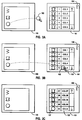
- FIGs. 3A, 3B and 3C illustrate a source window 100 and a target window 101.
- the invention finds particular application in a database where each column of data is represented by an icon. By dragging the icon from source 100 to target window 101 which graphically represent two database tables within the database that column of data from the source window is added to the database table represented by the target window 101.
- target window 101 has been designated as providing scrolling capability during the drag-drop operation according to the principles of the invention.
- the target window may be so designated by a classification of window type in the GUI or by use of the list structure depicted in FIG. 5. Other windows in the GUI may not support scrolling during drag-drop operations if not deemed appropriate by the developer.
- the user drags the icon 103 from the source window 100 to the target window 101.
- the icon 103 hits the boundary 105 of the target window 101 which causes scrolling until the user finds the target position 107 in the target window as shown in FIG. 3C.
- the user then drops the icon 103 on this position 107 to complete the operation.
- the GUI may include an indicia 109 such as an icon which can indicate to the user that the window behaves in this manner.
- a mouse is used to perform the drag and drop operation, but those skilled in the art will recognize that other pointing devices such a trackball or stylus can be employed.
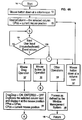
- FIGs. 4A-4D depict the process of the preferred embodiment.
- step 150 begins in step 150 and proceeds to step 151, where a mouse button down event on an icon, in this case a column icon, is detected.
- step 153 the variable Source Column is set to the selected column indicated by the mouse button down event and the variable CPos is set to the current mouse position.
- step 155 the system loops in step 155 until the next user input such as a keyboard or mouse event occurs. If the event is a mouse drag event, as detected by step 157, the drag operation variables are set in step 159.
- the Drag Drop variable is set to "on” and the Entered variable is set to "off”.
- the selected column icon is duplicated and displayed at the current mouse position, the variable PPos is set to the mouse position when the drag-drop operation began and CPos is allowed to vary according to the current mouse position.
- step 163 If other types of operations are detected in step 163 such as keyboard input the normal default processing is performed by the operating system in step 165. The process returns, step 166. If a mouse button down event at a column icon was detected again indicating selection of a different icon, in step 167, the process returns to step 153.
- Fig. 4B The drag operation is continued in Fig. 4B where the mouse enters a target window and the mouse pointer hits an inside window boundary.
- the fact that the mouse is entering a window is determined by the saved position of the mouse position when the drag-drop operation began in the source window and its current position in the target window.
- the fact that the mouse pointer has hit the window boundary is determined by the coordinates of the current position of the mouse pointer and those of the window boundary.
- the Entered variable is set to "on”.
- step 181 a test is performed to determine whether the window is scrollable.
- step 183 the Scroll Move variable is set to "on".
- step 183 the Scroll Move variable is set to "on".
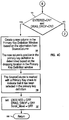
- step 171 a test is performed to determine whether the Entered variable is set to "on”. If so, a test in step 173, determines whether the mouse pointer has hit the target window boundary. If the mouse pointer has hit the primary key definition window boundary, in step 175 a test is performed to determine whether the window is scrollable, e.g., if the Scroll_Move variable is "on". If so, the flow continues to FIG. 4D. If the process fails any of these tests, in step 177, the default behavior defined by the operating system is carried out.
- step 191 a test is performed to determine whether the Entered and Drag-Drop variables are set to "on". If they are, it means that the user has dragged an icon into a moveable target window and is now ready to drop that icon on the target position.
- step 193 a new object is created in the target window such as a new column of data in a database table, based on the information from the selected icon from the source window. The new column's position in the target window is determined based on the dropping location.
- step 195 the source object column is marked to indicate that it has been selected.
- step 197 the Entered, Drag-Drop, and Scroll move variables are set to "off". The process returns, step 199.
- step 201 determines whether the keystroke for non-scrolling is on.
- Step 201 provides an escape mechanism so that the mouse pointer can be dragged out of a target window or an intermediate window located between the source and target windows which also behaves according to the principles of the present invention. If the keystroke for non-scrolling is on, normal operations as defined by the operating system are, performed in step 177. Assuming, however, that the keystroke for non-scrolling is not on, the target window is scrolled according to the boundary value.
- the CPos variable is set to equal PPos, which was the position at the scrolling the drag-drop operation started.
- the mouse position is known by querying the window management system.
- the previous mouse position must be stored to restrain the real mouse position.
- the mouse pointer hits the boundary of a target window, even though the user is dragging the mouse away from the window, the dragging operation will not trigger the redisplay of the mouse icon with the dragging operation while the window is scrolling.
- the mouse position is reset each time, if the mouse is being detected as hitting the window boundary as long as the mouse button is still down, it will be determined as a drag operation, even though there is no mouse movement.
- the user still has the freedom to move the mouse out of the target window by pressing a predefined key, e.g., the control key, while dragging.
- the invention can be applied not only to windows of a certain class such as a primary key definition window in the example above, but also those windows which have been selected to have the behavior of the present invention.
- a user may be specify that the method described in this invention should be used when an icon is dragged into it, i.e., scrolling while dragging.
- the data structure depicted in FIG. 5, is a simple list of window ids with pointers for the next window id in the list. This data structure can be used by the operating system to identify whether the behavior of this invention should be provided.
- the window id is generally used as a key to access any of the information about a window in most operating systems or window management systems. Thus, the window id will allow the code to access any required information. Any window in the GUI which is neither a designated class of windows nor is in the list structure will exhibit the normal, default behaviour of the operating system.
- the invention has the advantage over the prior art in direct manipulation techniques can be used more effectively.
- the user can drag and drop an icon to a target position in a single operation.
Landscapes
- Engineering & Computer Science (AREA)
- General Engineering & Computer Science (AREA)
- Theoretical Computer Science (AREA)
- Human Computer Interaction (AREA)
- Physics & Mathematics (AREA)
- General Physics & Mathematics (AREA)
- User Interface Of Digital Computer (AREA)
- Digital Computer Display Output (AREA)
Claims (12)
- Un procédé de transfert d'objets graphiques depuis une fenêtre source (100) vers une fenêtre cible (101) d'une interface utilisateur graphique sur un visuel d'affichage d'ordinateur, le procédé étant caractérisé par les étapes consistant à :durant une première opération glisser-déplacer dans un premier mode, déterminer (175) ou'un premier objet graphique a atteint une frontière intérieure de la fenêtre cible, dérouler (203) la fenêtre cible tant que le premier objet graphique continue à toucher la frontière intérieure et placer le premier objet graphique à l'emplacement cible, à la conclusion de la première opération glisser-déplacer; etdurant une deuxième opération glisser-déplacer dans un deuxième mode, qui empêche le défilement de la fenêtre cible, faire glisser un deuxième objet graphique depuis la fenêtre source, en passant la frontière intérieure de la fenêtre cible.
- Un procédé selon la revendication 1, comprenant en outre l'étape consistant à déterminer (181) si la fenêtre cible est susceptible d'un défilement durant une opération glisser-déplacer.
- Un procédé selon la revendication 1 ou la revendication 2, comprenant en outre les étapes consistant à :stocker une position initiale d'un pointeur au commencement de l'opération glisser-déplacer, afin de déterminer que l'objet graphique avait son origine dans la fenêtre source; etrafraíchir une position de frontière du pointeur lorsque l'objet graphique continue à atteindre la frontière intérieure.
- Un procédé selon la revendication 2, dans lequel la fenêtre cible est déterminée pour pouvoir défiler, en se référant à une classe de fenêtre cible.
- Le procédé selon la revendication 2, dans lequel la fenêtre cible est déterminée pour pouvoir subir un défilement, par référence à une liste de fenêtres cible susceptibles d'un défilement.
- Un système pour transférer un objet graphique, dans une opération glisser-déplacer, depuis une fenêtre source à une fenêtre cible d'une interface utilisateur graphique, sur un visuel d'affichage d'ordinateur, le système étant caractérisé en ce qu'il comprend :des moyens pour déterminer qu'un objet graphique a atteint une frontière intérieure d'une fenêtre cible;des moyens réagissant à la détermination du fait que l'opération glisser-déplacer se trouve dans un premier mode de défilement de la fenêtre cible tant que l'objet graphique continue à atteindre la frontière intérieure, dans lequel l'objet graphique est situé à l'emplacement cible à la conclusion de l'opération glisser-déplacer; etdes moyens réagissant à une détermination dictant que l'opération glisser-déplacer se trouve dans un deuxième mode, empêchant le défilement de la fenêtre cible, pour faire glisser l'objet graphique au-delà de la frontière intérieure de la fenêtre cible.
- Le système selon la revendication 6, comprenant en outre des moyens pour déterminer si la fenêtre cible est susceptible d'un défilement durant une opération glisser-déplacer.
- Un système selon la revendication 6, comprenant en outre :des moyens pour stocker une position initiale d'un pointeur au commencement de l'opération glisser-déplacer, afin de déterminer que l'objet graphique a eu son origine dans la fenêtre source; etdes moyens pour rafraíchir une position frontière du pointeur lorsque l'objet graphique continue à atteindre la frontière intérieure.
- Un système selon la revendication 7, dans lequel la fenêtre cible est déterminée pour pouvoir défiler, en se référant à une classe de fenêtre cible.
- Un système selon la revendication 7, dans lequel la fenêtre cible est déterminée comme étant susceptible de pouvoir défiler, en se référant à une liste de fenêtres cibles susceptibles de défilement.
- Un système selon l'une quelconque des revendications 6 à 10, comprenant en outre :une mémoire couplée à un bus système pour stocker des jeux d'instructions pour faire fonctionner le système;un processeur couplé au bus système, pour exécuter les jeux d'instructions; etun visuel d'affichage, couplé au bus système, pour afficher l'interface utilisateur graphique.
- Un produit de programme d'ordinateur, dans une mémoire d'ordinateur, pour transférer un objet graphique, dans une opération glisser-déplacer, depuis une fenêtre source à une fenêtre cible d'une interface utilisateur graphique, sur un visuel d'affichage d'ordinateur, le produit de programme d'ordinateur étant caractérisé en ce qu'il comprend :des moyens de code de programme d'ordinateur, pour faire exécuter par l'ordinateur une procédure visant à déterminer qu'un objet graphique a atteint une frontière intérieure d'une fenêtre cible;des moyens de code de programme d'ordinateur, réagissant à la détermination dictant que l'opération glisser-déplacer se trouve dans un premier mode, pour faire exécuter par l'ordinateur une procédure de défilement de la fenêtre cible, tant que l'objet graphique continue à atteindre la frontière intérieure, à l'intérieur de laquelle l'objet graphique est situé, à l'emplacement cible, à la conclusion de l'opération glisser-déplacer ; etdes moyens de code de programme d'ordinateur, réagissant à la détermination dictant que l'opération glisser-déplacer se trouve dans un deuxième mode, empêchant le défilement de la fenêtre cible, pour faire exécuter par l'ordinateur une procédure de glissement de l'objet au-delà de la frontière intérieure de la fenêtre cible.
Applications Claiming Priority (2)
| Application Number | Priority Date | Filing Date | Title |
|---|---|---|---|
| US08/174,507 US5548702A (en) | 1993-12-23 | 1993-12-23 | Scrolling a target window during a drag and drop operation |
| US174507 | 1993-12-23 |
Publications (2)
| Publication Number | Publication Date |
|---|---|
| EP0660220A1 EP0660220A1 (fr) | 1995-06-28 |
| EP0660220B1 true EP0660220B1 (fr) | 2000-03-08 |
Family
ID=22636419
Family Applications (1)
| Application Number | Title | Priority Date | Filing Date |
|---|---|---|---|
| EP94309363A Expired - Lifetime EP0660220B1 (fr) | 1993-12-23 | 1994-12-14 | Opérations de déplacement et de tombée dans une interface utilisateur graphique |
Country Status (7)
| Country | Link |
|---|---|
| US (2) | US5548702A (fr) |
| EP (1) | EP0660220B1 (fr) |
| JP (1) | JP2603446B2 (fr) |
| KR (1) | KR0167466B1 (fr) |
| CN (1) | CN1106607C (fr) |
| DE (1) | DE69423312D1 (fr) |
| TW (1) | TW300294B (fr) |
Families Citing this family (98)
| Publication number | Priority date | Publication date | Assignee | Title |
|---|---|---|---|---|
| US5548702A (en) * | 1993-12-23 | 1996-08-20 | International Business Machines Corporation | Scrolling a target window during a drag and drop operation |
| JP3014286B2 (ja) * | 1994-12-16 | 2000-02-28 | インターナショナル・ビジネス・マシーンズ・コーポレイション | 直接操作のための補助装置及び方法 |
| US5611060A (en) * | 1995-02-22 | 1997-03-11 | Microsoft Corporation | Auto-scrolling during a drag and drop operation |
| US5982371A (en) * | 1996-01-29 | 1999-11-09 | Sun Microsystems, Inc. | Method and apparatus for executing and displaying output of an environment in a host environment |
| US5889519A (en) * | 1996-03-26 | 1999-03-30 | International Business Machines Corp. | Method and system for a multimedia application development sequence editor using a wrap corral |
| US5884022A (en) * | 1996-06-03 | 1999-03-16 | Sun Microsystems, Inc. | Method and apparatus for controlling server activation in a multi-threaded environment |
| US5715413A (en) * | 1996-06-25 | 1998-02-03 | International Business Machines Corporation | Dragging and dropping with an instantiation object |
| US5930478A (en) * | 1996-07-02 | 1999-07-27 | International Business Machines Corporation | System for starting transmission assuming one file format, automatically detecting whether proper format used, and aborting and restarting transmission if original format incorrect |
| US7155451B1 (en) * | 1996-09-03 | 2006-12-26 | Torres Damon C | Automated browsing system for publishers and users on networks serving internet and remote devices |
| US5739821A (en) * | 1997-01-30 | 1998-04-14 | Primax Electronics Ltd. | Method for pointing a window frame or an icon of a window interface |
| JP3586351B2 (ja) * | 1997-03-21 | 2004-11-10 | インターナショナル・ビジネス・マシーンズ・コーポレーション | ウインドウ表示装置および方法、並びにウインドウ表示制御プログラムを記録した記録媒体 |
| US6097391A (en) * | 1997-03-31 | 2000-08-01 | Menai Corporation | Method and apparatus for graphically manipulating objects |
| US6326970B1 (en) * | 1997-05-16 | 2001-12-04 | Liberate Technologies | TV centric layout |
| US6323864B1 (en) | 1997-06-30 | 2001-11-27 | Sun Microsystems, Inc. | Using and accessing information from fonts in multiple formats |
| US6271864B1 (en) | 1997-06-30 | 2001-08-07 | Sun Microsystems, Inc. | Representing a path as an object with transformation capability |
| US6320592B1 (en) | 1997-06-30 | 2001-11-20 | Sun Microsystems, Inc. | Method and apparatus for separating image data from a color system in image processing |
| US6034694A (en) | 1997-06-30 | 2000-03-07 | Sun Microsystems, Inc. | Method and apparatus for pixel composition |
| CN1273655A (zh) * | 1997-09-02 | 2000-11-15 | 戴蒙·C·托里斯 | 自动内容调度程序及显示程序 |
| US6412021B1 (en) | 1998-02-26 | 2002-06-25 | Sun Microsystems, Inc. | Method and apparatus for performing user notification |
| US6859213B1 (en) | 1998-03-23 | 2005-02-22 | Sun Microsystems, Inc. | Method and apparatus for selecting attachments |
| US6594708B1 (en) | 1998-03-26 | 2003-07-15 | Sun Microsystems, Inc. | Apparatus and method for object-oriented memory system |
| US6055526A (en) * | 1998-04-02 | 2000-04-25 | Sun Microsystems, Inc. | Data indexing technique |
| US6223289B1 (en) | 1998-04-20 | 2001-04-24 | Sun Microsystems, Inc. | Method and apparatus for session management and user authentication |
| US6438141B1 (en) | 1998-04-20 | 2002-08-20 | Sun Microsystems, Inc. | Method and management of communications over media of finite bandwidth |
| US6675054B1 (en) | 1998-04-20 | 2004-01-06 | Sun Microsystems, Inc. | Method and apparatus of supporting an audio protocol in a network environment |
| US6230296B1 (en) | 1998-04-20 | 2001-05-08 | Sun Microsystems, Inc. | Method and apparatus for providing error correction |
| US6434694B1 (en) | 1998-06-29 | 2002-08-13 | Sun Microsystems, Inc. | Security for platform-independent device drivers |
| GB2339128A (en) | 1998-06-30 | 2000-01-12 | Ibm | Meyhod and system for transfering data using a graphical user interface |
| US6618767B1 (en) | 1998-11-17 | 2003-09-09 | Sun Microsystems, Inc. | Mechanism by which devices on unforeseen platform variants may be supported without re-release of core platform kernel software |
| US6442633B1 (en) | 1999-03-23 | 2002-08-27 | Sun Microsystems, Inc. | Reduced transistors data switch port wherein each of a plurality of transmission gates is coupled to both first and second control signals for selectively enabling |
| AUPQ027799A0 (en) | 1999-05-10 | 1999-06-03 | Canon Information Systems Research Australia Pty Ltd | Altering the shape of an artwork |
| WO2000077974A1 (fr) | 1999-06-11 | 2000-12-21 | Liberate Technologies | Delegation et acquisition d'informations hierarchiques ouvertes de securite |
| US7065785B1 (en) | 1999-06-15 | 2006-06-20 | Siemens Communications, Inc. | Apparatus and method for TOL client boundary protection |
| WO2000079799A2 (fr) * | 1999-06-23 | 2000-12-28 | Sarnoff Corporation | Procede et appareil de composition et de visualisation de sequences d'image |
| US6381712B1 (en) | 1999-06-30 | 2002-04-30 | Sun Microsystems, Inc. | Method and apparatus for providing an error messaging system |
| US6731315B1 (en) | 1999-11-30 | 2004-05-04 | International Business Machines Corporation | Method for selecting display parameters of a magnifiable cursor |
| US6727921B1 (en) | 2000-03-20 | 2004-04-27 | International Business Machines Corporation | Mixed mode input for a graphical user interface (GUI) of a data processing system |
| US7055105B2 (en) * | 2000-10-27 | 2006-05-30 | Siemens Aktiengesellschaft | Drop-enabled tabbed dialogs |
| EP1248206A1 (fr) * | 2001-04-05 | 2002-10-09 | Sun Microsystems, Inc. | Méthode et appareils pour la définition des tables de base de données |
| AUPR788101A0 (en) * | 2001-09-24 | 2001-10-18 | Canon Information Systems Research Australia Pty Ltd | Scanning and detecting a number of images |
| US7296243B2 (en) | 2002-03-19 | 2007-11-13 | Aol Llc | Animating display motion |
| CN1301455C (zh) * | 2004-04-21 | 2007-02-21 | 腾讯科技(深圳)有限公司 | 一种树状结构的子项拖放方法 |
| US8281241B2 (en) | 2004-06-28 | 2012-10-02 | Nokia Corporation | Electronic device and method for providing extended user interface |
| EP1667034A3 (fr) * | 2004-11-30 | 2007-02-28 | Oculus Info Inc. | Système et procédé pour la représentation visuelle multidimensionnelle interactive de contenus et de propriétés d'informations |
| CA2500573A1 (fr) * | 2005-03-14 | 2006-09-14 | Oculus Info Inc. | Ameliorations du systeme nspace et methode d'analyse d'information |
| JP4805633B2 (ja) | 2005-08-22 | 2011-11-02 | 任天堂株式会社 | ゲーム用操作装置 |
| JP2007058785A (ja) * | 2005-08-26 | 2007-03-08 | Canon Inc | 情報処理装置及び前記装置におけるドラグオブジェクトの操作方法 |
| US8225231B2 (en) | 2005-08-30 | 2012-07-17 | Microsoft Corporation | Aggregation of PC settings |
| US20080229254A1 (en) * | 2006-03-24 | 2008-09-18 | Ervin-Dawson Warner | Method and system for enhanced cursor control |
| US8793605B2 (en) * | 2006-03-29 | 2014-07-29 | Yahoo! Inc. | Smart drag-and-drop |
| US8351713B2 (en) | 2007-02-20 | 2013-01-08 | Microsoft Corporation | Drag-and-drop pasting for seamless image composition |
| US20080235609A1 (en) * | 2007-03-19 | 2008-09-25 | Carraher Theodore R | Function switching during drag-and-drop |
| US8619038B2 (en) * | 2007-09-04 | 2013-12-31 | Apple Inc. | Editing interface |
| US8117556B2 (en) * | 2008-03-31 | 2012-02-14 | Vistaprint Technologies Limited | Target-alignment-and-drop control for editing electronic documents |
| JP4171770B1 (ja) * | 2008-04-24 | 2008-10-29 | 任天堂株式会社 | オブジェクト表示順変更プログラム及び装置 |
| JP5448576B2 (ja) * | 2008-06-03 | 2014-03-19 | キヤノン株式会社 | 表示制御装置、表示制御方法及びプログラム |
| US9703443B2 (en) | 2008-09-25 | 2017-07-11 | Oracle America, Inc. | Method and system for creating a free-form visual user interface element |
| US8863007B2 (en) * | 2009-04-03 | 2014-10-14 | International Business Machines Corporation | Programmatic information transfer |
| KR101588242B1 (ko) * | 2009-07-13 | 2016-01-25 | 삼성전자주식회사 | 휴대 단말기의 스크롤 방법 및 장치 |
| US8812985B2 (en) * | 2009-10-30 | 2014-08-19 | Motorola Mobility Llc | Method and device for enhancing scrolling operations in a display device |
| US9119925B2 (en) | 2009-12-04 | 2015-09-01 | Covidien Lp | Quick initiation of respiratory support via a ventilator user interface |
| US8335992B2 (en) * | 2009-12-04 | 2012-12-18 | Nellcor Puritan Bennett Llc | Visual indication of settings changes on a ventilator graphical user interface |
| US8924878B2 (en) | 2009-12-04 | 2014-12-30 | Covidien Lp | Display and access to settings on a ventilator graphical user interface |
| US9262588B2 (en) | 2009-12-18 | 2016-02-16 | Covidien Lp | Display of respiratory data graphs on a ventilator graphical user interface |
| US8499252B2 (en) | 2009-12-18 | 2013-07-30 | Covidien Lp | Display of respiratory data graphs on a ventilator graphical user interface |
| JP5353777B2 (ja) * | 2010-03-15 | 2013-11-27 | アイシン・エィ・ダブリュ株式会社 | 地図表示装置、地図表示方法及びプログラム |
| CH703725A1 (de) * | 2010-09-15 | 2012-03-15 | Ferag Ag | Grafische benutzerschnittstelle. |
| WO2012034245A1 (fr) | 2010-09-15 | 2012-03-22 | Ferag Ag | Interface utilisateur graphique |
| JP5732218B2 (ja) * | 2010-09-21 | 2015-06-10 | 任天堂株式会社 | 表示制御プログラム、表示制御装置、表示制御システム、および表示制御方法 |
| US20120159395A1 (en) | 2010-12-20 | 2012-06-21 | Microsoft Corporation | Application-launching interface for multiple modes |
| US8612874B2 (en) | 2010-12-23 | 2013-12-17 | Microsoft Corporation | Presenting an application change through a tile |
| US8689123B2 (en) | 2010-12-23 | 2014-04-01 | Microsoft Corporation | Application reporting in an application-selectable user interface |
| US9423951B2 (en) | 2010-12-31 | 2016-08-23 | Microsoft Technology Licensing, Llc | Content-based snap point |
| US9383917B2 (en) | 2011-03-28 | 2016-07-05 | Microsoft Technology Licensing, Llc | Predictive tiling |
| US9158445B2 (en) | 2011-05-27 | 2015-10-13 | Microsoft Technology Licensing, Llc | Managing an immersive interface in a multi-application immersive environment |
| US20120304132A1 (en) | 2011-05-27 | 2012-11-29 | Chaitanya Dev Sareen | Switching back to a previously-interacted-with application |
| US9104307B2 (en) | 2011-05-27 | 2015-08-11 | Microsoft Technology Licensing, Llc | Multi-application environment |
| US9658766B2 (en) | 2011-05-27 | 2017-05-23 | Microsoft Technology Licensing, Llc | Edge gesture |
| US9728164B2 (en) * | 2011-05-31 | 2017-08-08 | Lenovo (Singapore) Pte. Ltd. | Moving a tile across multiple workspaces |
| US9035967B2 (en) | 2011-06-30 | 2015-05-19 | Google Technology Holdings LLC | Method and device for enhancing scrolling and other operations on a display |
| US20130057587A1 (en) | 2011-09-01 | 2013-03-07 | Microsoft Corporation | Arranging tiles |
| US8922575B2 (en) | 2011-09-09 | 2014-12-30 | Microsoft Corporation | Tile cache |
| US9557909B2 (en) | 2011-09-09 | 2017-01-31 | Microsoft Technology Licensing, Llc | Semantic zoom linguistic helpers |
| US10353566B2 (en) | 2011-09-09 | 2019-07-16 | Microsoft Technology Licensing, Llc | Semantic zoom animations |
| US9146670B2 (en) | 2011-09-10 | 2015-09-29 | Microsoft Technology Licensing, Llc | Progressively indicating new content in an application-selectable user interface |
| US9244802B2 (en) | 2011-09-10 | 2016-01-26 | Microsoft Technology Licensing, Llc | Resource user interface |
| US20130067392A1 (en) * | 2011-09-12 | 2013-03-14 | Microsoft Corporation | Multi-Input Rearrange |
| US9005026B2 (en) | 2011-12-20 | 2015-04-14 | Wikipad, Inc. | Game controller for tablet computer |
| US9114319B2 (en) | 2012-06-12 | 2015-08-25 | Wikipad, Inc. | Game controller |
| CN103543904A (zh) * | 2012-07-13 | 2014-01-29 | 汉王科技股份有限公司 | 将应用程序图标移动到目标分屏的方法及装置 |
| JP5928286B2 (ja) * | 2012-10-05 | 2016-06-01 | 富士ゼロックス株式会社 | 情報処理装置及びプログラム |
| US9075519B2 (en) | 2012-10-11 | 2015-07-07 | Apple Inc. | System and method for interacting with a displayed work space |
| KR20150086367A (ko) * | 2012-11-19 | 2015-07-27 | 위키패드 인코포레이티드 | 가상의 멀티 사이드의 가상의 회전가능한 사용자 인터페이스 아이콘 큐 |
| US9612732B2 (en) * | 2014-11-13 | 2017-04-04 | Microsoft Technology Licensing, Llc | Content transfer to non-running targets |
| US10353548B2 (en) * | 2016-07-11 | 2019-07-16 | International Business Machines Corporation | Random access to properties for lists in user interfaces |
| CN107861104A (zh) * | 2017-10-31 | 2018-03-30 | 北京无线电测量研究所 | 一种基于拖拽的雷达目标开窗跟随显示方法及系统 |
| US20210397316A1 (en) * | 2020-06-22 | 2021-12-23 | Viktor Kaptelinin | Inertial scrolling method and apparatus |
| CN114661278A (zh) * | 2022-03-28 | 2022-06-24 | 北京有竹居网络技术有限公司 | 信息显示方法、装置、电子设备和存储介质 |
Family Cites Families (14)
| Publication number | Priority date | Publication date | Assignee | Title |
|---|---|---|---|---|
| US4813013A (en) * | 1984-03-01 | 1989-03-14 | The Cadware Group, Ltd. | Schematic diagram generating system using library of general purpose interactively selectable graphic primitives to create special applications icons |
| US4774661A (en) * | 1985-11-19 | 1988-09-27 | American Telephone And Telegraph Company, At&T Information Systems | Database management system with active data dictionary |
| US5040131A (en) * | 1987-12-23 | 1991-08-13 | International Business Machines Corporation | Graphical processing |
| US4862390A (en) * | 1987-12-24 | 1989-08-29 | Hewlett-Packard Company | Method and apparatus for selection of one from a plurality of entries listed on a computer display |
| US4866638A (en) * | 1988-03-04 | 1989-09-12 | Eastman Kodak Company | Process for producing human-computer interface prototypes |
| US5333247A (en) * | 1988-06-10 | 1994-07-26 | International Business Machines Corporation | Scrolling tool for text and graphics in a display system |
| US5371851A (en) * | 1989-04-26 | 1994-12-06 | Credence Systems Corporation | Graphical data base editor |
| US5075673A (en) * | 1989-06-16 | 1991-12-24 | International Business Machines Corp. | Variable speed, image pan method and apparatus |
| US5212770A (en) * | 1989-12-06 | 1993-05-18 | Eastman Kodak Company | Data-handling and display system capable of supporting multiple application programs and output devices |
| JP3024012B2 (ja) * | 1990-07-27 | 2000-03-21 | インターナショナル・ビジネス・マシーンズ・コーポレイション | 直接入力操作方法 |
| US5196838A (en) * | 1990-12-28 | 1993-03-23 | Apple Computer, Inc. | Intelligent scrolling |
| JPH0772858B2 (ja) * | 1991-05-17 | 1995-08-02 | インターナショナル・ビジネス・マシーンズ・コーポレイション | 図形利用者インターフェースを介し縦横方向移動操作により表示窓掩蔽部を選択的に露出する方法及び装置 |
| JPH05257635A (ja) * | 1992-03-16 | 1993-10-08 | Matsushita Electric Ind Co Ltd | ウィンドウシステム |
| US5548702A (en) * | 1993-12-23 | 1996-08-20 | International Business Machines Corporation | Scrolling a target window during a drag and drop operation |
-
1993
- 1993-12-23 US US08/174,507 patent/US5548702A/en not_active Expired - Fee Related
-
1994
- 1994-11-22 JP JP6288386A patent/JP2603446B2/ja not_active Expired - Fee Related
- 1994-12-14 EP EP94309363A patent/EP0660220B1/fr not_active Expired - Lifetime
- 1994-12-14 DE DE69423312T patent/DE69423312D1/de not_active Expired - Lifetime
- 1994-12-19 CN CN94119747A patent/CN1106607C/zh not_active Expired - Fee Related
- 1994-12-21 KR KR1019940035584A patent/KR0167466B1/ko not_active Expired - Fee Related
-
1995
- 1995-04-11 TW TW084103514A patent/TW300294B/zh active
-
1996
- 1996-05-14 US US08/647,504 patent/US5740389A/en not_active Expired - Fee Related
Also Published As
| Publication number | Publication date |
|---|---|
| JP2603446B2 (ja) | 1997-04-23 |
| DE69423312D1 (de) | 2000-04-13 |
| JPH07200236A (ja) | 1995-08-04 |
| CN1106607C (zh) | 2003-04-23 |
| TW300294B (fr) | 1997-03-11 |
| KR0167466B1 (ko) | 1999-01-15 |
| CN1113021A (zh) | 1995-12-06 |
| US5740389A (en) | 1998-04-14 |
| EP0660220A1 (fr) | 1995-06-28 |
| US5548702A (en) | 1996-08-20 |
Similar Documents
| Publication | Publication Date | Title |
|---|---|---|
| EP0660220B1 (fr) | Opérations de déplacement et de tombée dans une interface utilisateur graphique | |
| US5377317A (en) | Method and apparatus for distinctively displaying windows on a computer display screen | |
| US8140971B2 (en) | Dynamic and intelligent hover assistance | |
| US5390295A (en) | Method and apparatus for proportionally displaying windows on a computer display screen | |
| EP0702811B1 (fr) | Interface utilisateur graphique et procede d'ouverture selective d'icones contenant des objets pendant les operations de trainee et de lachage | |
| US5699534A (en) | Multiple display pointers for computer graphical user interfaces | |
| US5546521A (en) | Dynamic presentation of contextual help and status information | |
| US6163317A (en) | Method and apparatus for dynamically grouping objects | |
| US5874961A (en) | Scroll bar amplification apparatus and method | |
| EP0677803B1 (fr) | Méthode et système pour faciliter la sélection des icônes | |
| US5384910A (en) | Method and apparatus for facilitating operator reconfiguration of a graphical user interface in a data processing system | |
| US5046001A (en) | Method for accessing selected windows in a multi-tasking system | |
| JP2659917B2 (ja) | グラフィック操作方法及び装置、グラフィック・ユーザ・インターフェースを提供する方法並びにユーザ操作可能多重オーバラップ・オブジェクトの選択された1つへのアクセスを提供する装置 | |
| EP0660219B1 (fr) | Affichage des données dynamiques dans une interface utilisateur graphique | |
| US20050125739A1 (en) | Virtual desktop manager system and method | |
| US5680560A (en) | Method and device for graphically setting multiple parameter ranges | |
| US20020118227A1 (en) | Graphical user interface | |
| GB2360921A (en) | Tabbed notebook having a common registry | |
| JPH04318619A (ja) | マルチウィンドウシステムにおけるウィンドウ表示制御装置 |
Legal Events
| Date | Code | Title | Description |
|---|---|---|---|
| PUAI | Public reference made under article 153(3) epc to a published international application that has entered the european phase |
Free format text: ORIGINAL CODE: 0009012 |
|
| AK | Designated contracting states |
Kind code of ref document: A1 Designated state(s): DE FR GB |
|
| 17P | Request for examination filed |
Effective date: 19951024 |
|
| 17Q | First examination report despatched |
Effective date: 19990203 |
|
| GRAG | Despatch of communication of intention to grant |
Free format text: ORIGINAL CODE: EPIDOS AGRA |
|
| GRAG | Despatch of communication of intention to grant |
Free format text: ORIGINAL CODE: EPIDOS AGRA |
|
| GRAH | Despatch of communication of intention to grant a patent |
Free format text: ORIGINAL CODE: EPIDOS IGRA |
|
| GRAH | Despatch of communication of intention to grant a patent |
Free format text: ORIGINAL CODE: EPIDOS IGRA |
|
| GRAA | (expected) grant |
Free format text: ORIGINAL CODE: 0009210 |
|
| AK | Designated contracting states |
Kind code of ref document: B1 Designated state(s): DE FR GB |
|
| REF | Corresponds to: |
Ref document number: 69423312 Country of ref document: DE Date of ref document: 20000413 |
|
| PG25 | Lapsed in a contracting state [announced via postgrant information from national office to epo] |
Ref country code: DE Free format text: LAPSE BECAUSE OF FAILURE TO SUBMIT A TRANSLATION OF THE DESCRIPTION OR TO PAY THE FEE WITHIN THE PRESCRIBED TIME-LIMIT Effective date: 20000609 |
|
| ET | Fr: translation filed | ||
| PGFP | Annual fee paid to national office [announced via postgrant information from national office to epo] |
Ref country code: FR Payment date: 20001220 Year of fee payment: 7 |
|
| PLBE | No opposition filed within time limit |
Free format text: ORIGINAL CODE: 0009261 |
|
| STAA | Information on the status of an ep patent application or granted ep patent |
Free format text: STATUS: NO OPPOSITION FILED WITHIN TIME LIMIT |
|
| 26N | No opposition filed | ||
| PGFP | Annual fee paid to national office [announced via postgrant information from national office to epo] |
Ref country code: GB Payment date: 20011210 Year of fee payment: 8 |
|
| REG | Reference to a national code |
Ref country code: GB Ref legal event code: IF02 |
|
| PG25 | Lapsed in a contracting state [announced via postgrant information from national office to epo] |
Ref country code: FR Free format text: LAPSE BECAUSE OF NON-PAYMENT OF DUE FEES Effective date: 20020830 |
|
| REG | Reference to a national code |
Ref country code: FR Ref legal event code: ST |
|
| PG25 | Lapsed in a contracting state [announced via postgrant information from national office to epo] |
Ref country code: GB Free format text: LAPSE BECAUSE OF NON-PAYMENT OF DUE FEES Effective date: 20021214 |
|
| GBPC | Gb: european patent ceased through non-payment of renewal fee |
Effective date: 20021214 |