EP0697647A1 - Système de présentation multimédia avec feuilles numériques - Google Patents
Système de présentation multimédia avec feuilles numériques Download PDFInfo
- Publication number
- EP0697647A1 EP0697647A1 EP95305468A EP95305468A EP0697647A1 EP 0697647 A1 EP0697647 A1 EP 0697647A1 EP 95305468 A EP95305468 A EP 95305468A EP 95305468 A EP95305468 A EP 95305468A EP 0697647 A1 EP0697647 A1 EP 0697647A1
- Authority
- EP
- European Patent Office
- Prior art keywords
- foils
- indicator
- digital
- presentation
- foil
- Prior art date
- Legal status (The legal status is an assumption and is not a legal conclusion. Google has not performed a legal analysis and makes no representation as to the accuracy of the status listed.)
- Withdrawn
Links
Images











Classifications
-
- G—PHYSICS
- G06—COMPUTING OR CALCULATING; COUNTING
- G06F—ELECTRIC DIGITAL DATA PROCESSING
- G06F3/00—Input arrangements for transferring data to be processed into a form capable of being handled by the computer; Output arrangements for transferring data from processing unit to output unit, e.g. interface arrangements
- G06F3/01—Input arrangements or combined input and output arrangements for interaction between user and computer
- G06F3/048—Interaction techniques based on graphical user interfaces [GUI]
- G06F3/0481—Interaction techniques based on graphical user interfaces [GUI] based on specific properties of the displayed interaction object or a metaphor-based environment, e.g. interaction with desktop elements like windows or icons, or assisted by a cursor's changing behaviour or appearance
- G06F3/0483—Interaction with page-structured environments, e.g. book metaphor
Definitions
- This invention relates to the area of multimedia digital foil presentation system. More specifically, the invention is directed to a method and apparatus for displaying and navigating a plurality of digital foils having multimedia objects from a range of presentation source materials.
- An overhead foil projector for example a 3M® Overhead Projector Model 213, provides a light source and lens to focus a beam of light on a screen in a room.
- a transparent plastic foil or overhead "transparency" having textual or diagrammatic information over a holder, the information from the foil is readily available and readable by an audience from the screen.
- the presenter then manually selects and places a single transparent foil from a larger set of foils. This manual selection occurs until the last foil in the set has been displayed.
- the selection of foils may be dynamic with the presenter deciding to leave foils out of the presentation or skip sections of foils.
- the presenter typically speaks and interacts with the visual representation of each transparency on a screen.
- Digital foils can be transformed into digital foils for use in a computer system.
- the textual and diagrammatic information is retained in the transformation process. It is also possible to create new and original digital foils directly in a computer system.
- Digital foils may also be supplemented with the addition of complex objects to include multimedia objects such as digital audio (voice, music, and sound effects), digital video, animation, and bitmap graphics (also known as multimedia components).
- a portable computer coupled to a projection device can deliver a digital foil presentation to a larger audience.
- a presentation panel simply diverts the contents of a display screen to another reception device like a screen on a wall in a conference room.
- a portable computer or notebook for example the IBM® 750C ThinkPad®, may be used to hold several hundred digital foils for use in a live presentation.
- a number of different modules and sections could make up many different presentations, making the task of presenting much larger and more complex.
- Gaining and providing dynamic access, in a non-linear sense, to a large set of digital foils is difficult, and is further complicated where the digital foils have complex multimedia objects.
- 'linear navigation' refers to sequential navigation permitting a single page up or down function.
- 'Non-linear navigation' allows a presenter to redefine the presentation sequence of digital foils by permitting changes in flow between different modules, sections and units.
- the presenter In sharp contrast to a person searching for information, the presenter generally has in-depth knowledge of the substance of the presentation material and wants to scan quickly for a particular foil from a larger set of foils for greater flexibility during the act of presenting.
- the non-linear navigation should permit a presenter to jump around within the presentation without computer generated distractions.
- a primary object of the present invention is to provide a method and system for presenting and navigating digital foils, specifically a non-distracting on-screen indicator or monolith for use in navigating digital foils.
- Another object of the present invention is to provide a navigation monolith having a visual indication of where a presenter is with respect to the sequence of the presentation.
- Further objects of the present invention are to provide a navigation monolith having active functional areas in which a presenter may select and change the order of the digital foil presentation, and to provide a method to communicate with a navigation monolith having active functional areas wherein a presenter may select and change the order of the digital foil presentation.
- the present invention provides a method of navigating a plurality of digital foils that includes the computer-implemented steps of storing a first variable of a total number of the plurality of foils and a second variable of a currently displayed foil, displaying an indicator having a listing of at least a portion of the plurality of foils, incrementing or decrementing the second variable to correspond to a selected digital foil in response to user selection of one of said portion of the plurality of foils, and accessing and displaying the selected digital foil from the second variable.
- the present invention also provides a navigator for random selection of digitized foils for display on a presentation medium in a presentation system.
- the navigator includes an on-screen indicator means identifying at least a portion of the digitized foils.
- the indicator means are adapted to be displayed within a narrow field on the presentation medium.
- the navigator also includes selection means for selecting a digitized foil from the digitized foils identified in the indicator means, and display means for retrieving and displaying the selected digitized foil.
- the on-screen indicator is adapted to be displayed within a narrow field on a displayed digitized foil, and even to be displayed in a colour corresponding to a background colour of the displayed digitized foil.
- the navigator also includes means for retaining a pre-defined hierarchical presentation sequence of the digital foils, and the on-screen indicator has fields for listing each level of the hierarchical presentation sequence of said at least a portion of the digitized foils.
- the selection means would then preferably include means for incrementing and decrementing the fields for listing each level of the hierarchical presentation sequence in order to alter the portion of the digitized foils identified in the on-screen indicator.
- the present invention is also directed to improvements in a presentation system that has memory means for holding digitized foils and means for displaying the digitized foils from the memory on a presentation medium.
- the improvements include sequencing means for grouping the digital foils into at least one presentation sequence, and navigation means for selecting digital foils for linear and non-linear display from said at least one presentation sequence that preferably has an on-screen indicator listing the digital foils in one presentation sequence.
- a presentation system apparatus is shown in diagrammatic form.
- a computer system 10 is preferably a portable system such as an IBM ThinkPad 750C, although it may also be a stationary type of personal computer.
- a pointing device 12 is attached to the computer 10 through link 18.
- the pointing device 12 provides control of the system to the operator (presenter) and may be a mouse, trackball or IBM trackpoint.
- a projection device 14 interfaces to the computer 10 through link 20.
- the projection device may be an overhead LCD projection panel such as a PROXIMA Color Works SX Model A502C or an external BARCO RGB television projector.
- the projection device projects an image onto a reception device 16, such as a screen, white board, or wall.
- An operating system 30 resides in the computer 10 of Figure 1 and performs well known system functions.
- Presentation software 32 also resides in the computer 10 and communicates with the operating system 30 at 36.
- Examples of presentation software include, but are not limited to, Lotus Freelance, Harvard Graphics, Asymetrix Multimedia Toolbook and Asymetrix Compel. The last two computer programs are known in the art as authoring systems but also have slide show capability.
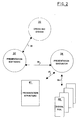
- a presentation navigator 34 resides in the computer 10 as an interface and communicates through first link 38 with the presentation software 32, through second link 37 with a presentation structure 41 and through third link 39 with a set of digital foils 40.
- the presentation structure 41 provides a predefined structure for the presentation and defines the navigation links for manual selection by a presenter from the plurality of presentation digital foils 40.
- Each presentation navigator 34 is shown interacting with a presentation structure 41 and a number of presentation data sets 40a, 40b and 40c in a schematic representation.
- Each presentation data set is defined as a modules and may contain a plurality of sections and units each having digital foils.
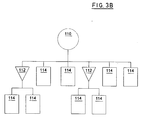
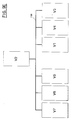
- FIG 3B a hierarchical presentation structure as defined by a presenter is schematically illustrated.
- a complete module structure is defined as having two sections 112 and eight presentation units 114.
- the presentation structure 41 of Figure 3A defines the predefined display sequence and range of permissible navigation.
- FIG. 3C The result of combining the presentation structure of Figure 3B with the sets of digital foils of Figure 3A yields the schematic diagram of Figure 3C.
- the presenter has defined a module and has selected presentation data set number 1 (40a) for review with an audience.
- presentation data set number 1 40a
- the presenter has included digital foil set numbers 2 and 3, that are now defined under a separate section 42.
- the presentation navigator of the present invention permits predefined linear navigation of digital foil set number 1 (40a) and dynamic non-linear navigation access to the remaining digital foils (40b and 40c) from within the three data sets.
- FIG. 4 An example of a digital foil 50 is shown in Figure 4 enabled with default linear navigation means.
- the presenter can activate the scrolling arrows to move the foil up (in the case of arrow 54) or down (in the case of arrow 52).
- the scrolling arrows 52 and 54 provide linear movement of one foil within the presentation; pointing device access is through placement of a pointer with a button click to activate navigation and keyboard access is through a keystroke, such as the left and right cursor keys.
- the digital foil 50 is also shown in Figure 5 enabled, in this figure, with a non-linear navigator indicator or monolith 56 according to the invention.
- the monolith 56 has a default state of hidden and may be shown or activated on the display by either a keyboard command or dragging a pointer functionally connected to a pointing device into a predefined area, preferably at the bottom of the display screen.
- the colour and composition of the monolith 56 should be such to blend in with the background color of the digital foil in order to prevent distracting the audience.
- the bottom area of all digital foils where the monolith 56 would appear may be permanently obscured from audience view by the presentation panel, so that the monolith is only visible to the presenter working at the computer.
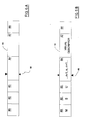
- the navigator monolith 56 appears with structural indicators 60, 62, and 63 and visual indicators 64 and 67, as illustrated in Figures 6A and 6B.
- the first structural indicator is a module indicator 60 that activates and illustrates the current module and the range of other modules, and permits module navigation to other modules within the presentation (module navigation).
- the second structural indicator is a section indicator 62 that activates and illustrates the current section and the range of other sections, and permits section navigation to other sections within the module (section navigation).
- the third structural indicator area is a unit indicator 64 that activates and illustrates the current unit and the range of other units, and permits unit navigation to other units within the module (skip navigation).
- a sequence indicator 64 provides the list of navigatable digital foils within the unit, and in one embodiment, the current digital foil for the structural indicators is visually indicated by a marker 68 located on the sequence indicator 64. In alternative embodiments, a visual highlight or change in shape or change in colour may be applied within the digital foil list to indicate the current digital foil.
- the second visual indicator in the navigation monolith is a detail indicator 67 that provides a short description of either a module, section or foil to assist a presenter in finding a particular foil.
- an activate detail search button 66 is provided to assist a presenter who cannot find a particular foil.
- the search button is analogous to a help button, but the context of the help is a list of all modules, sections, and foils. Use of the search button, while generating a slight visual distraction to the audience, provides the presenter with complete access to all of the digital foils, even where the presenter has not fully prepared for the presentation.
- an example list of symbols is located within five of the six functional areas.
- the choice of visual indicator may be text, numbers, a combination of text and numbers, or symbols.
- the current presentation is in module 'M', section 'S', unit 'U' on digital foil 'n' with skip navigation to foil '...n-1,n,n+1...'.
- the sequence indicator 64 and detail indicator 67 will reflect information about module.
- the sequence indicator 64 and detail indicator 67 will provide the section information.
- the sequence indicator 64 and detail indicator 67 will provide the unit information.
- the visual indicator 67 may be designed to indicate the presence and type of compound object.
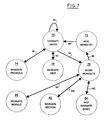
- Figure 7 illustrates a state graph representation of the method.
- Each circle represents a state of the presentation navigator.
- the arrows indicate the state sequence with the exception of arrow 86 which denotes the initial and idle state.
- the arrows provide for state transitions depending on a defined event that permits a transition.
- the logic of the navigator is shown starting at the initial state of navigate linear 70.
- the presenter has access to linear navigation.
- Linear navigation provides two states.
- the navigate previous state 74 may be accessed 90 from the linear state 70 by either a point and click operation on button 52 of Figure 4 or a keystroke operation.
- the navigate next state 76 may be accessed 92 from the linear state 70 by either a point and click operation on button 54 of Figure 4 or a keystroke operation.
- Either linear navigation state provides a single digital foil movement from the currently displayed digital foil (i.e., one foil up or one foil down in the pre-established sequence).
- the presenter may optionally activate non-linear navigation from the navigate linear state 70 at 94.
- the show monolith state 78 is accessed 94 from the navigate linear state 70.
- the show monolith state is accessed by keyboard entry, by placing a pointer at a predefined location, or by point and click as controlled by a pointing device.
- the navigation monolith 56 as shown in Figure 5 is visible and operational in this state.
- the show monolith state 78 provides access to three non-linear navigation states.
- the navigate module state 80 may be accessed 98 to provide the presenter with the ability to move between various modules in a presentation. It can be accessed by placing a pointer over the module indicator 60 of Figure 6A or, optionally, by a keystroke sequence, and permits communication with the module indicator 60. Module selection may be made, for example, by clicking the left mouse button for module down and clicking the right mouse button for module up when a pointer is over the module indicator 60.
- control is transferred back to the show monolith state 78.
- the monolith provides visual feedback to the presenter with the sequence indicator 64 and detail indicator 67 which are updated as a result of the module change.
- the navigate section state 82 may be accessed 100 to provide the presenter with the ability to move to another section within a module. It is accessed by placing a pointer over the section indicator 62 of Figure 6A, or optionally, by keystroke sequence, and permits communication with the section indicator 62. Section selection may be made, for example, by clicking the left mouse button for module down and clicking the right mouse button for module up when a pointer is over the section indicator 62. When a presenter has completed section selection, control is returned back to the show monolith state 78. The monolith provides visual feedback to the presenter with the sequence indicator 64 and detail indicator 67 which are updated as a result of the section change.
- the navigate skip state 84 may be accessed 102 to provide the presenter with the ability to proceed non-sequentially through a set of digital foils. It is accessed by placing a pointer over the unit indicator 63 of Figure 6A or, optionally, by keystroke sequence and permits communication the unit indicator 63. Unit selection may be made, for example, by clicking the left mouse button for module down and clicking the right mouse button for module up when a pointer is over the unit indicator 63. When the presenter has completed unit selection, control is returned back to the show monolith state 78. The monolith provides visual feedback to the presenter with the sequence indicator 64 and detail indicator 67.
- the show monolith state 78 updates the digital foil and display order sequence and transfers 96 to the hide monolith state 72 which in turn transfers 88 control back to the navigate linear state 70. Resumption of the presentation by the presenter continues with an updated display of the new digital foil.
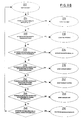
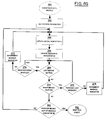
- System variables are initialized (block 172) to establish access to the required data sets. This would include setting up pointers to the structure file and individual digital foils and setting temporary variables to zero.
- the total number of foils is then placed into a variable (block 174). This variable is used throughout various routines in determining a navigation end point.
- the current page number of the first digital foil is also placed into a variable (block 176) that will be updated as navigation progresses to keep a record the currently displayed digital foil.
- a difference variable is established (block 178) for later navigation parameters.
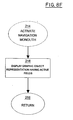
- Figure 8B the wait for event sequence is described starting at block 222.
- a check is made for linear navigation (block 224). If a point and click action on button 54 of Figure 4 by the presenter operating a pointing device is received, control is passed to foil next event (block 226). A second check is made for linear navigation (block 228). If a point and click action on button 52 of Figure 4 by the presenter operating a pointing device is found, then control is passed to the foil previous event (block 230). A check is then made for pointer location (block 232). If the pointer is placed by the presenter over an activation zone of the display screen for activation of the navigation monolith, then control is passed to the activate navigation monolith (block 234).
- a fourth check is made for module navigation (block 236). If the navigation monolith is active and the pointer is placed by the presenter over the module indicator 60 of Figure 6A, then control is passed to the event navigate module (block 238).
- a fifth check is made for section navigation (block 240). If the navigation monolith is active and the pointer is placed by the presenter over the section indicator 62 of Figure 6A, then control is passed to the event navigate section (block 242).
- a sixth check is made for skip navigation (block 244). If the navigation monolith is active and the pointer is placed by the presenter over the unit indicator 63 of Figure 6A, then control is passed to the event navigate unit (block 246).
- foil next event starting at block 182 is described.
- the first step in the process is to get the current foil number and place it into a variable (block 184).
- a check is made for the last foil (block 186) to determine if there is another foil to navigate to in the series. This check determines if the last foil in the current presentation has been reached. If the foil number is the last foil, then a return is executed (block 188) and control is passed back to the wait for event (block 222 of Figure 8B) routine. If the foil number is not the last foil, then the foil number is incremented (block 190) followed by a display update of the new digital foil (block 192) and a return (block 188) to wait for event (block 222).
- foil previous event starting at block 194 is described.
- the first step in the process is to get the current foil number (block 196) and place it into a variable.
- a check is made for the first foil (block 198) to determine if there is another foil to navigate to in the series. This check determines if the first foil in the current presentation has been reached. If the foil number is the first foil, then a return is executed (block 200) and control is passed back to the wait for event (block 222 of Figure 8B) routine. If the foil number is not the first foil, then the foil number is decremented (block 202) followed by a display update of the new digital foil (block 204) and a return (block 200) to the wait for event (block 222) module.
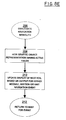
- activate navigation monolith block 214.
- the graphic object representation of the navigation monolith with active fields is shown at block 216.
- the active fields are filled with module, section, and unit information.
- the current digital foil parameters such as foil number and visual descriptor are also respectively placed in the detail indicator 67 and sequence indicator 64 as shown in Figure 6A.
- event navigate module (block 260) is described.
- the navigation monolith must be active before entering this routine and a pointer has been placed over the module indicator 60 of the monolith 56.
- the system parameters are obtained (block 262), including the current digital foil number, permissible range of navigation, and structure information.
- the detail indicator 67 from Figure 6A is updated (block 264) to reflect the title of the current digital foil.
- the sequence indicator 64 from Figure 6A is updated (block 266) to indicate to the presenter the current digital foil.
- a check is made for use of the left mouse button (block 268). The left mouse button navigates to previous modules one click at a time.
- a final check is made to determine if the pointer has been moved by a presenter out of the module indicator 60 area (block 280). If it has not been moved, then control is returned back (block 264); otherwise control is passed back to wait for event (block 282).
- event navigate section (block 290) is described.
- the navigation monolith must be active before entering this routine and a pointer has been placed over the section indicator 62 of the monolith 56 from Figure 6A.
- the system parameters are obtained (block 292), including the current digital foil number, permissible range of navigation, and structure information.
- the detail indicator 67 from Figure 6A is updated (block 294) to reflect the title of the current digital foil.
- the sequence indicator 64 from Figure 6A is updated (block 296) to indicate to the presenter the current digital foil.
- a check is made for use of the left mouse button (block 298). The left mouse button navigates to previous sections one click at a time.
- FIG. 304 Another check is made for use of the right mouse button (block 304).
- the right mouse button navigates to next sections one click at a time. If the right mouse button has been clicked by a presenter, a check is made (block 306) to determine if the last section in the presentation has been reached. If the last section has been reached, then no further navigation is possible and control loops back to block 298. If the last section has not been reached, then the section indicator is incremented (block 308) and control is looped back to enter the first of two updates again (block 294).
- a final check is made (block 310) to determine if the pointer has been moved by a presenter out of the section indicator 62 area. If not, then control is returned back (block 294); otherwise control is passed back to the wait for event routine (block 312).
- event navigate unit (block 314) is described.
- the navigation monolith must be active before entering this routine and a pointer has been placed over the unit indicator 63 of the monolith 56.
- the system parameters are obtained (block 316) and include the current digital foil number, permissible range of navigation, and structure information.
- the detail indicator 67 from Figure 6A is updated (block 318) to reflect the title of the current digital foil.
- the sequence indicator 64 from Figure 6a is updated (block 320) to indicate to the presenter the current digital foil.
- the left mouse button navigates to previous units one click at a time. If the left mouse button has been clicked by a presenter, a check is made (block 322) to determine if the first unit in the presentation has been reached. If the first unit has been reached, then no further navigation is possible and a control loop back to block 392 is made. If the first unit has not been reached, then no further navigation is possible, the unit indicator is decremented (block 326) and control is looped back to enter the first of two updates (block 318).
- a check is made for use of the right mouse button (block 328).
- the right mouse button navigates to next units one click at a time. If the right mouse button has been clicked by a presenter, a check is made (block 330) to determine if the last unit in the presentation has been reached. If the last unit has been reached, then no further navigation is possible and control loops back to block 322. If the last unit has not been reached, then the unit indicator is incremented (block 332) and control is looped back to enter the first of two updates again (block 318).
- a final check is made (block 334) to determine if the pointer has been moved by a presenter out of the unit indicator 63 area. If not, then control is returned back (block 318); otherwise control is passed back to the wait for event routine (block 336).
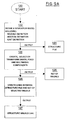
- FIG. 9A the process to create a structure with a set of digital foils for a presentation is described.
- the process starts at block 120 and ends at block 127 with a set of visuals linked to a defined structure.
- the order of the steps is arbitrary in that creation of the structure file 123 and set of digital foils 125 are not dependent on each other.
- a navigation model is defined by a presenter.
- the model includes module definition, section definition and unit definition.
- a structure file 123 is output from this step.
- a set of digital foils, optionally having multimedia components, are created, or selected or transformed from existing transparent foils.
- the output from this step is a set of digital foils 125 which is typically placed into a multimedia database.
- links are created between the defined structure file 123 and set of digital foils 125 to provide a structural digital foil link having a predefined presentation sequence.
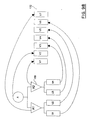
- FIG. 9B an example structure generally indicated at 130 is shown having one module 'A', two sections 'A1 and A2' and four units 'U1, U2, U3, U4'. Each element of the structure is linked to a single digital foil from the set of digital foils generally indicated at 132.
- the resulting predefined sequence for this example presentation is generally shown at 134 in Figure 9C is a pre-defined sequence V2, V7, V6, V5, V1, V4, and V3.
- This pre-defined sequence may be navigated in a linear sense and in a non-linear sense at the section or unit level as the structure does not have multiple modules.
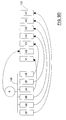
- a second example structure generally indicated at 136 having one module 'B' with six units 'U1, U2, U3, U4, U5, and U6'. Each element of the structure is linked to a single digital foil from the same set of digital foils generally indicated at 132.
- the resulting predefined sequence for this example presentation is generally shown at 138 in Figure 9E as a pre-defined sequence V2, V7, V7, V5, V1, V4 and V3.
- This pre-defined sequence may be navigated in a linear sense and in a non-linear unit sense as the structure does not have multiple modules or sections.
- a presenter is delivering a live presentation using the hardware and software of the present invention.
- the presenter is located on a digital foil somewhere in the presentation and decides to perform a non-linear navigation, unit navigation from unit number '5', to unit number '4'.
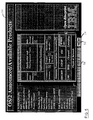
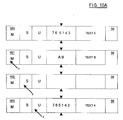
- the presenter activates the navigation monolith 56 as previously described, and its contents are displayed to the presenter as shown at 160 of Figure 10A.
- the sequence indicator shows a '5' as current with a range of other units and the visual descriptor has a brief textual description relating to unit '5'.
- the presenter then moves the pointer 3 into the module indicator as shown at 161 to check for module navigation.
- the sequence indicator now shows a 'B' with a range of other modules and the visual descriptor has a brief textual description relating to module 'B'.
- the presenter moves the pointer 3 into the unit indicator as shown at 163 to perform unit navigation.
- the right mouse button is clicked twice to move the current unit to '4'.
- the visual descriptor also updates to provide a brief textual description relating to unit '4'.
- the presenter decides to perform a non-linear section navigation from section number '7', to section number '1'.
- the presenter activates the navigation monolith 56 in the manner previously described, its contents are displayed to the presenter as shown at 164 of Figure 10B.
- the sequence indicator shows a '6' as current with a range of other units and the visual descriptor has a brief textual description relating to unit '6'.
- the presenter then moves the pointer 3 into the module indicator as shown at 165 to check for module navigation.
- the sequence indicator now shows an 'A' with a range of other modules and the visual descriptor has a brief textual description relating to module 'A'.
- the presenter next moves the pointer 3 into the section indicator as shown at 166 to check for section navigation.
- the sequence indicator now shows a '7' with a range of other sections and the visual descriptor has a brief textual description relating to section '7'.
- the sequence indicator now shows a '1' as the current section and the visual descriptor has a brief textual description relating to section '7'.
- the presenter then moves the pointer 3 into the unit indicator as shown at 168 to check for unit navigation.
- the sequence indicator now shows a '1' as the current unit with a range of other units and the visual descriptor has a brief textual description relating to unit '1'. This is the first unit in section '7' which automatically displays unless changed by the presenter.
- the navigator monolith is deactivated, so that the monolith disappears from the display screen and the display screen is updated with the contents of the next digital foil.
Landscapes
- Engineering & Computer Science (AREA)
- General Engineering & Computer Science (AREA)
- Theoretical Computer Science (AREA)
- Human Computer Interaction (AREA)
- Physics & Mathematics (AREA)
- General Physics & Mathematics (AREA)
- User Interface Of Digital Computer (AREA)
- Digital Computer Display Output (AREA)
- Processing Or Creating Images (AREA)
- Controls And Circuits For Display Device (AREA)
Applications Claiming Priority (2)
| Application Number | Priority Date | Filing Date | Title |
|---|---|---|---|
| CA002130077A CA2130077A1 (fr) | 1994-08-12 | 1994-08-12 | Systeme de presentation multimedia a transparents numeriques |
| CA2130077 | 1994-08-12 |
Publications (1)
| Publication Number | Publication Date |
|---|---|
| EP0697647A1 true EP0697647A1 (fr) | 1996-02-21 |
Family
ID=4154171
Family Applications (1)
| Application Number | Title | Priority Date | Filing Date |
|---|---|---|---|
| EP95305468A Withdrawn EP0697647A1 (fr) | 1994-08-12 | 1995-08-04 | Système de présentation multimédia avec feuilles numériques |
Country Status (4)
| Country | Link |
|---|---|
| US (1) | US6037943A (fr) |
| EP (1) | EP0697647A1 (fr) |
| JP (1) | JPH0869524A (fr) |
| CA (1) | CA2130077A1 (fr) |
Families Citing this family (24)
| Publication number | Priority date | Publication date | Assignee | Title |
|---|---|---|---|---|
| US7330875B1 (en) * | 1999-06-15 | 2008-02-12 | Microsoft Corporation | System and method for recording a presentation for on-demand viewing over a computer network |
| US6545660B1 (en) | 2000-08-29 | 2003-04-08 | Mitsubishi Electric Research Laboratory, Inc. | Multi-user interactive picture presentation system and method |
| US6642918B2 (en) | 2001-04-23 | 2003-11-04 | Canon Kabushiki Kaisha | Control of digital projection system |
| US7131068B2 (en) * | 2001-05-25 | 2006-10-31 | Learning Tree International | System and method for electronic presentations having simultaneous display windows in a control screen |
| EP1393256A4 (fr) * | 2001-05-25 | 2007-09-19 | Learning Tree Int Inc | Systeme et procede pour presentations electroniques |
| US7454708B2 (en) * | 2001-05-25 | 2008-11-18 | Learning Tree International | System and method for electronic presentations with annotation of preview material |
| US20020184312A1 (en) * | 2001-05-31 | 2002-12-05 | International Business Machines Corproration | Computer networks simultaneously sharing images and data with individual scan and reset by a plurality of users - systems, methods & program products |
| US7398214B2 (en) | 2001-11-29 | 2008-07-08 | International Business Machines Corporation | Method for translating slide presentations into different languages |
| US20030122863A1 (en) * | 2001-12-28 | 2003-07-03 | International Business Machines Corporation | Navigation tool for slide presentations |
| US8234574B2 (en) | 2002-01-31 | 2012-07-31 | International Business Machines Corporation | Method and system for navigating through a repository of displays |
| WO2003093940A2 (fr) * | 2002-04-30 | 2003-11-13 | University Of Southern California | Preparation et presentation de contenu |
| US7434165B2 (en) * | 2002-12-12 | 2008-10-07 | Lawrence Charles Kleinman | Programmed apparatus and system of dynamic display of presentation files |
| US7672997B2 (en) | 2003-11-12 | 2010-03-02 | International Business Machines Corporation | Speaker annotation objects in a presentation graphics application |
| US20050099432A1 (en) * | 2003-11-12 | 2005-05-12 | International Business Machines Corporation | Multi-value hidden object properties in a presentation graphics application |
| US7620896B2 (en) * | 2004-01-08 | 2009-11-17 | International Business Machines Corporation | Intelligent agenda object for showing contextual location within a presentation application |
| US7746321B2 (en) | 2004-05-28 | 2010-06-29 | Erik Jan Banning | Easily deployable interactive direct-pointing system and presentation control system and calibration method therefor |
| US20060080610A1 (en) * | 2004-10-12 | 2006-04-13 | Kaminsky David L | Methods, systems and computer program products for outline views in computer displayable presentations |
| US9285897B2 (en) | 2005-07-13 | 2016-03-15 | Ultimate Pointer, L.L.C. | Easily deployable interactive direct-pointing system and calibration method therefor |
| US20100218100A1 (en) * | 2009-02-25 | 2010-08-26 | HNTB Holdings, Ltd. | Presentation system |
| CA2707286A1 (fr) * | 2009-06-11 | 2010-12-11 | X2O Media Inc. | Systeme et methode de production dd presentations multimedias |
| US20120102383A1 (en) * | 2010-10-20 | 2012-04-26 | Jerald Liu | Creating, Sharing and Modifying Documents That Include Content and an Integrated Software Application |
| US20140113268A1 (en) * | 2012-10-22 | 2014-04-24 | Microsoft Corporation | Interactive visual assessment after a rehearsal of a presentation |
| US20140185830A1 (en) * | 2012-12-27 | 2014-07-03 | Daniel Avrahami | Methods, systems, and apparatus for audio backtracking control |
| CN112286400A (zh) * | 2020-09-24 | 2021-01-29 | 杭州易现先进科技有限公司 | 投影交互方法、装置、电子设备及计算机存储介质 |
Family Cites Families (12)
| Publication number | Priority date | Publication date | Assignee | Title |
|---|---|---|---|---|
| JPS6347791A (ja) * | 1986-08-15 | 1988-02-29 | 株式会社東芝 | 情報表示説明装置 |
| US4821211A (en) * | 1987-11-19 | 1989-04-11 | International Business Machines Corp. | Method of navigating among program menus using a graphical menu tree |
| US5101197A (en) * | 1988-08-17 | 1992-03-31 | In Focus Systems, Inc. | Electronic transparency method and apparatus |
| KR100220042B1 (ko) * | 1990-06-07 | 1999-09-01 | 가부시키가이샤 히타치 세이사쿠쇼 | 발표지원방법 및 그 장치 |
| US5204768A (en) * | 1991-02-12 | 1993-04-20 | Mind Path Technologies, Inc. | Remote controlled electronic presentation system |
| WO1993015455A1 (fr) * | 1992-01-24 | 1993-08-05 | Interactive Media Corporation | Systeme appliquant une fonction a une seconde zone suite a l'activation d'une premiere zone associee |
| US5526480A (en) * | 1992-12-28 | 1996-06-11 | International Business Machines Corporation | Time domain scroll bar for multimedia presentations in a data processing system |
| US5500936A (en) * | 1993-03-12 | 1996-03-19 | Asymetrix Corporation | Multi-media slide presentation system with a moveable, tracked popup menu with button and title bars |
| US5469192A (en) * | 1993-03-12 | 1995-11-21 | Allen; Paul G. | Method and apparatus for increasing the functionality of computer system pointing devices by simultaneous actuation of buttons thereon |
| US5640522A (en) * | 1994-12-05 | 1997-06-17 | Microsoft Corporation | Method and system for previewing transition effects between pairs of images |
| US5539658A (en) * | 1995-05-16 | 1996-07-23 | Minnesota Mining And Manufacturing Company | Electronic presentation system using portable storage media |
| US5917480A (en) * | 1996-06-04 | 1999-06-29 | Microsoft Corporation | Method and system for interacting with the content of a slide presentation |
-
1994
- 1994-08-12 CA CA002130077A patent/CA2130077A1/fr not_active Abandoned
-
1995
- 1995-05-26 JP JP7127721A patent/JPH0869524A/ja active Pending
- 1995-08-04 EP EP95305468A patent/EP0697647A1/fr not_active Withdrawn
- 1995-08-10 US US08/514,017 patent/US6037943A/en not_active Expired - Fee Related
Non-Patent Citations (6)
| Title |
|---|
| ANONYMOUS: "Pager Bar", IBM TECHNICAL DISCLOSURE BULLETIN, vol. 37, no. 1, NEW YORK, US, pages 483 - 484 * |
| ANONYMOUS: "TV Foils", RESEARCH DISCLOSURE, vol. 345, no. 079, 10 January 1993 (1993-01-10), EMSWORTH, GB * |
| DATABASE INSPEC INSTITUTE OF ELECTRICAL ENGINEERS, STEVENAGE, GB; HOFSTETTER F T: "PODIUM: presentation overlay display for interactive uses of media" * |
| PROCEEDINGS. SHARE EUROPE ANNIVERSARY MEETING. OPEN SYSTEMS, PARIS, FRANCE, 1-5 OCT. 1990, SWITZERLAND, pages 193 - 200 vol.1 * |
| ROGERS E H: "NOTEMAKER: A HYPER-DESIGN NOTEBOOK TO SUPPORT INFORMAL COMMUNICATION IN THE ENGINEERING DESIGN PROCESS", ENGINEERED COMMUNICATION, ORLANDO, OCT. 30 - NOV. 1, 1991, vol. 1, 30 October 1991 (1991-10-30), INSTITUTE OF ELECTRICAL AND ELECTRONICS ENGINEERS, pages 141 - 144, XP000319134, DOI: doi:10.1109/IPCC.1991.172754 * |
| RYUSAKU IMAI ET AL: "MULTIMEDIA COMMUNICATION TECHNOLOGY", FUJITSU-SCIENTIFIC AND TECHNICAL JOURNAL, vol. 28, no. 2, 1 January 1992 (1992-01-01), pages 172 - 179, XP000312058 * |
Also Published As
| Publication number | Publication date |
|---|---|
| CA2130077A1 (fr) | 1996-02-13 |
| JPH0869524A (ja) | 1996-03-12 |
| US6037943A (en) | 2000-03-14 |
Similar Documents
| Publication | Publication Date | Title |
|---|---|---|
| US6037943A (en) | Multimedia digital foil presentation system | |
| US5297253A (en) | Computer user interface navigational tool | |
| US6774914B1 (en) | Navigation method in 3D computer-generated pictures by hyper 3D navigator 3D image manipulation | |
| US6966037B2 (en) | Method and apparatus for scrollable cross-point navigation in a calendar user interface | |
| Ahlberg et al. | The alphaslider: a compact and rapid selector | |
| US5140677A (en) | Computer user interface with window title bar mini-icons | |
| US6275227B1 (en) | Computer system and method for controlling the same utilizing a user interface control integrated with multiple sets of instructional material therefor | |
| US6831666B1 (en) | Application selection window in a windows operation system | |
| US5704051A (en) | Hierarchical menu bar system with dynamic graphics and text windows | |
| US5204947A (en) | Application independent (open) hypermedia enablement services | |
| US5550967A (en) | Method and apparatus for generating and displaying visual cues on a graphic user interface | |
| US5450539A (en) | Apparatus and method of dynamically displaying a graphic button on a monitor | |
| US6523048B2 (en) | Computer system and method for abstracting and accessing a chronologically-arranged collection of information | |
| US5450538A (en) | Graphical user interface control for expansion and re-sizing of data fields in forms | |
| US5559945A (en) | Dynamic hierarchical selection menu | |
| US5867678A (en) | Method and system for searching and retrieving specific types of objects contained within a compound document | |
| US6664983B2 (en) | Method and apparatus for configuring sliding panels | |
| US6016146A (en) | Method and apparatus for enhancing template creation and manipulation in a graphical user interface | |
| JP3176541B2 (ja) | 情報検索装置および情報検索方法 | |
| US6209006B1 (en) | Pop-up definitions with hyperlinked terms within a non-internet and non-specifically-designed-for-help program | |
| EP0317479A2 (fr) | Dispositif et méthode flexible d'information en ligne pour unités de traitement de données | |
| EP0483577A2 (fr) | Agencement hypermedia avec des informations de liaison, fenêtres, résumés et des services de recherche | |
| US20020054148A1 (en) | GUI control method and apparatus and recording medium | |
| JP2005339560A (ja) | ジャストインタイムのユーザ支援を提供する手法 | |
| US6252592B1 (en) | Systems, methods and computer program products for scanning graphically represented elements |
Legal Events
| Date | Code | Title | Description |
|---|---|---|---|
| PUAI | Public reference made under article 153(3) epc to a published international application that has entered the european phase |
Free format text: ORIGINAL CODE: 0009012 |
|
| AK | Designated contracting states |
Kind code of ref document: A1 Designated state(s): DE FR GB |
|
| STAA | Information on the status of an ep patent application or granted ep patent |
Free format text: STATUS: THE APPLICATION IS DEEMED TO BE WITHDRAWN |
|
| 18D | Application deemed to be withdrawn |
Effective date: 19960822 |