EP0713182A1 - Methode zur Informationspräsentation und System zur Übertragung und Präsentation von Information - Google Patents
Methode zur Informationspräsentation und System zur Übertragung und Präsentation von Information Download PDFInfo
- Publication number
- EP0713182A1 EP0713182A1 EP95610057A EP95610057A EP0713182A1 EP 0713182 A1 EP0713182 A1 EP 0713182A1 EP 95610057 A EP95610057 A EP 95610057A EP 95610057 A EP95610057 A EP 95610057A EP 0713182 A1 EP0713182 A1 EP 0713182A1
- Authority
- EP
- European Patent Office
- Prior art keywords
- presentation
- data
- client
- attributes
- identifier
- Prior art date
- Legal status (The legal status is an assumption and is not a legal conclusion. Google has not performed a legal analysis and makes no representation as to the accuracy of the status listed.)
- Withdrawn
Links
Images














Classifications
-
- G—PHYSICS
- G06—COMPUTING OR CALCULATING; COUNTING
- G06F—ELECTRIC DIGITAL DATA PROCESSING
- G06F9/00—Arrangements for program control, e.g. control units
- G06F9/06—Arrangements for program control, e.g. control units using stored programs, i.e. using an internal store of processing equipment to receive or retain programs
- G06F9/44—Arrangements for executing specific programs
- G06F9/451—Execution arrangements for user interfaces
Definitions
- the present invention relates to a method for the presentation of information in a presentation system, data being transferred from a data processing system to the presentation system, said data being transferred using the "by-name" convention, in which data is transferred as data strings comprising at least one data element.
- Each data element comprises identifiers and the data element unambiguously represents the information to be presented.
- the invention also relates to a system for the transfer and presentation of information, said system comprising a data processing system and a presentation system.
- At least one identifier will be associated with each data element.
- This identifier may contain a piece of information in itself but in most cases, a data element will also contain a value.
- a data element may also contain presentation parameters or attributes and a data element can thus contain one or more identifiers as well as a value and/or one or more attributes. Both an identifier, a value and an attribute can contribute to the information of the data field.
- the data elements can have an arbitrary order in the data string.
- attributes mentioned below denotes attributes corresponding to presentation parameters.
- the above-mentioned problems are solved using a method for presentation of information in a presentation system, said method comprising:
- Presentation systems according to the invention may be designed such that when reading an identifier, a search in a presentation table can be made; this will provide information as to how the associated information is to be presented in a screen display.
- the presentation parameters or the attributes are identified or determined on the basis of a set of presentation parameters or attributes comprising at least one static and at least one dynamic presentation parameter or attribute. Moreover, it is preferred that for at least one identifier, a plurality of attributes is identified or determined.
- the invention also relates to a system for transfer and presentation of information, said system comprising a presentation system and a data processing system, wherein
- the presentation system is adapted to identify or determine the presentation parameters or attributes on the basis of a set of presentation parameters or attributes comprising at least one static and at least one dynamic presentation parameter or attribute.
- the tables comprise a first and a second table, the first table indicating the connection between the static attributes and the identifiers, and the second table indicating the connection between the dynamic attributes and the identifiers.
- at least one identifier corresponds to a plurality of attributes.
- the concept underlying the present invention will be referred to as the FLEX concept having FLEX interface, programmes, clients, data server, application server, etc.
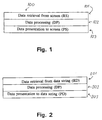
- Figure 1 shows an existing mainframe programme 100 for use in a data network without FLEX interface.
- a programme typically comprises: a screen retrieval part 101 (RS), a data processing part 102 (DP) and a screen presentation part 103 (PS).
- the programme receives a request from the user terminal via the screen retrieval part, data is then processed and/or retrieved via the data processing part and in the screen presentation part, a formatted screen display is designed which is sent to the user terminal.
- Data can also be stored via a storage part. In this type of data transmission, in which data is transferred as formatted screen displays, the user terminal need not "think" about how to present data since this has been determined in the presentation part of the mainframe programme.
- a data processing system be it a mainframe or a server programme, must be equipped with a data string retrieval part 201 (RD) adapted to retrieve data in the form of data strings or "streams" and a data string presentation part 203 (PD) adapted to enable the presentation of data strings to a presentation system which may be a client.
- RD data string retrieval part
- PD data string presentation part 203
- the server programme should be initially designed hereto.
- mainframe programmes in which formatted screen displays are transferred, the most essential and most comprehensive part of the programme is constituted by the data processing part (DB).
- DB data processing part
- FIG. 3a a client is connected to an application server containing the data processing programme 300.
- the programme in Figure 3a thus comprises an RS, 301, RD, 302, DP, 303, PS, 304 and a PD, 305, part.
- a request is sent from the client 306 to the server 307 and from this request, the server can determine whether data is to be transferred as formatted screen displays or as data strings.
- Figure 3b shows a situation corresponding to that shown in Figure 3a, but in this case the programme in the server is designed such that data is retrieved, data is processed, new data is retrieved, new data is processed, and correspondingly part of the processed data is presented, new data is processed, new data is presented, etc.
- Programmes of this type require a comprehensive adaptation work since a corresponding data string part must be designed for each retrieval part and presentation part.
- Figure 3b uses the same numbering as in Figure 3a.
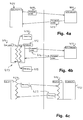
- Figure 4a shows an existing solution with a mainframe computer 401 and a 3270-type terminal 402 in which the data processing programme in the mainframe corresponds to the programme in Figure 1. In this case, data is only transferred in the form of formatted screen displays 403.
- Figure 4b shows a Client/Server solution according to the invention with a 3270-type terminal 411.
- a special client denoted 3270FLEX 412 has been designed which has been implemented on the mainframe 413 which also comprises the server 414.
- the 3270FLEX client is designed so as to be able to transmit and receive data in the form of data strings 415 to the server ("by-name" data transfer) and so as to be able to receive and transmit formatted screen displays 416 to the 3270-type terminal.
- a database will normally be attached to the client in which database one or more tables having attributes or presentation parameters can be stored.
- Figure 4c shows a Client/Server solution according to the invention with a work station as the terminal in which the client has been implemented on the work station and in which the server has been implemented on the mainframe.
- the work station shown in this Figure has a graphical platform of the type Windows 421 and a special client denoted WinFLEX 422 has been designed.
- Data is transferred as data strings 423 between the client 422 and the server 424 and in this case, the server is implemented on the mainframe and the client is implemented on the work station.
- a database for storing presentation profiles can be attached to the client.
- the server in a Client/Server network becomes independent of the terminal or platform used by the individual user as the server can understand and service different clients in the same way. However, it is necessary to develop clients that correspond to the different platforms with which to communicate. Examples hereof are Windows client 501 (WinFLEX), OS/2 client 502 (OS2FLEX), IBM 3270 client 503 (3270FLEX) and UNIX client 504 (UNIFLEX). This is illustrated in Figure 5 in which the server is designated 505.
- the server is implemented on a mainframe but in a Client/Server system the server is simply required to be implemented on a computer having suitable processing power; accordingly, it is required that the client be implemented on a computer having suitable processing power which is why both the server and the client can be implemented on a work station in a Client/Server system.
- a work station may for instance be a PC work station.
- FIG 5 an example of a server coupled to several clients is shown; similarly a network can be designed in which a client can call various application servers or data servers.
- the application servers can be implemented in different computer units but they may also be implemented in the same computer unit.
- Figure 6 illustrates the use of communication modules in a Client/Server solution. For each platform having an associated FLEX client, an associated communication modulus should likewise exist.
- Figure 6 shows a WinFLEX client 601 in this case being performed on a PC work station and which communicates via a communication module 602 with the server 603 which is here performed on a mainframe.
- the communication module can communicate with the server through a terminal emulator which can support an EHLLAPI or an APPC interface.
- FIG 6 it is also illustrated that several applications can be performed at the same client.
- each data element contains at least one identifier and will normally also contain a value; in addition hereto, a data element can also contain a series of presentation information also termed attributes or presentation parameters.
- the information in a data element can be displayed in one or more fields at the client which is why the data string is also said to contain a number of fields; in the case in which the data field contains a value, the value is termed a field value and the associated identifier can be termed a field identifier.
- the identifier is an unambiguous identification which the client can use for a search in a table for the determination of where and how to present the information.
- An identifier can be constructed with a structure having several components.
- An identifier having no structure and therefore not comprising several components is termed a simple identifier herein.
- a simple identifier herein.
- several data corresponding to several values with the same identifier may occur, a user can for instance have more values with a field identifier corresponding to the field "interest paid". It may therefore be necessary to expand the identifier with an extra component, for instance an index.
- the identifier can be expand with several indexes, each index corresponding to a component.
- An identifier expand with indexes is called a composite identifier.
- a need may exist for attaching different values to fields with fundamentally the same identifier.
- To the value should be attached a further identification recognizable by the application server which can be done using position numbers.
- An identifier comprising one or more components that correspond to positions or position numbers is called an expanded identifier. It will naturally also be possible to have identifiers which are both expanded and composite in which case the identifier is called a complex identifier.
- the identifiers described herein can also comprise a component corresponding to a version number or a version. In the following, identifiers having more than one component collectively are referred to as multi-component identifiers.
- Table I shows examples of a simple, composite, expanded and complex identifiers, the identifiers being combined with an associated value. The value is indicated after an equation mark.
- the number 1001 indicates a simple identifier and 2000 indicates the value.
- a multi-component identifier always contains a simple identifier and a version number.
- a table will normally be associated, said table having stored attributes or presentation parameters with an unambiguous connection between the identifier and the attributes to be used in connection with the presentation of the information.
- attributes that can be stored in a Table will be given below in the present specification.
- the attributes are divided into a static part and a dynamic part, the static attributes being stored in a first Table, termed the Field Table, and the dynamic attributes being stored in the second Table, termed the Screen Field Table.
- the static attributes are normally entered in the field table when a field is defined in this table whereas the dynamic attributes can be entered in the screen field table when a screen display is designed or adapted at the client.
- a set of default dynamic attributes may also have been offered.
- the individual user may design a profile or a screen profile which can be stored in the second table and which comprises the user-adapted indication of the dynamic attributes. An example of the construction of a profile is given below in the present specification.
- the data elements can also contain attributes.
- these transferred attributes can be used in a preferred embodiment of the invention for overwriting attributes stored in one table.
- the table may in this case be the first table corresponding to the static attributes but it may also be the second table corresponding to the dynamic attributes.
- the attribute tables are stored in one or more databases associated with the presentation system. This refers to a "logical" association as the databases need not be physically implemented on the presentation system but this system must have access to the databases.
- the first table is thus preferably stored in a centrally located database which can be located together with the data processing system and the second table can be located decentrally with the presentation system. Both the first and the second table may also be stored in the same database.
- the profile may also include a connection between one or more components and associated attributes; thus, in a preferred embodiment a first combination of components is used for determining the static attributes associated with the identifier; likewise, a second combination of components may be used for determining the dynamic attributes associated with the identifier.
- the second combination may be a combination of the first combination and one or more components not involved in the first combination.
- the first combination of the components simple identifier and version is formed, whereas the second combination may for instance be formed by the components simple identifier, version and position.
- Figure 7 shows an example of the connection between identifiers and attributes.
- 701 is an example of a first table in which for each field identifier or each simple identifier, the static attributes have been indicated, said attributes being a prefix and a suffix.
- 702 indicates an example of a second table in which the dynamic attributes are stated for expanded identifiers comprising both the components: simple identifier or field identifier and position.
- the dynamic attributes order and width are stated.
- 703 indicates a composite attribute profile for a data element having the identifier 4107.2 corresponding to the simple identifier 4107 and the position 2.
- the data element contains the value 52400 and by means of the attribute profile, the value may be presented on a screen 704. Since many different identifiers may occur, it will also be possible to combine many different attribute profiles based on searches in the static and dynamic attribute tables.
- the tables designed and stored in a first client database can be transferred to a central database, from where they can be transferred to a second client database, the first and the second client being of the same type.
- client database is intended herein to refer to a database associated with the client and in which the client has a storage of the attribute tables.
- a data element may also comprise attributes.
- data elements can thus be sent from the data processing system to the client in which one or more data elements comprise attributes capable of overwriting attributes or presentation parameters indicated in one or more tables associated with the presentation system.
- the tables may be stored in a database associated with the presentation system.
- FLEX is described from a technical aspect. The purpose is to describe the concepts and the architecture associated with FLEX.
- FLEX is a tool under permanent development. Consequently, FLEX is largely developed through prototyping and many technical details may therefore be added continually. This document is therefore revised as the project progresses and FLEX obtains increased functionality.
- FLEX is a concept offering increased flexibility compared with existing mainframe programmes and simultaneously utilizing the graphical user interface offered by Windows. FLEX may preferably also require a structured logical division in the server programmes.
- the flexibility is manifested in the users being given the possibility of adapting the presentation of information in the programmes.
- the adaptation may be carried out in many different levels ranging from the individual user to an entire department.
- a user may, if assigned rights thereto, freely adapt the presentation in the programmes. Other users may likewise freely adapt the presentation without overwriting the first user's adaptations. All this is controlled by maintaining different profiles in a database for the different users.
- the users may perform a continuous adaptation of the programmes. Adaptation can be performed via "point and click" with few menu commands and takes only very few seconds to perform.
- the adaptation of programmes is, inter alia, performed by displaying or saving different information.
- Pieces of information can be displayed or saved individually or together with other pieces of information in groups. The users are thereby offered the possibility of displaying the particular information of interest to them.
- the adaptation of programmes may also take place by moving information.
- Pieces of information may be located on absolute coordinates or relatively with respect to other pieces of information.
- the user selects an order for the information and the system determines the actual coordinates.
- Information may be moved individually or together with other pieces of information in groups. The users are thereby offered the possibility of displaying information in a context relevant to the particular task presently performed by the users.
- the adaptation of programmes may finally take place by changing the parameters used for controlling the presentation in the programmes.
- Such parameters may, for instance, be parameters stating the layout strategy to be used by the system when information is to be located relatively in relation to other information.
- a programme may thus be presented in many different ways each complying with specific or general needs. This renders the programmes more useful for the individual users.
- the users not assigned any rights will experience programmes working more or less as the existing programmes. Those users assigned rights to adapt the programmes will experience a substantially increased functionality.
- FLEX data server programmes may be performed in different types of machines and thereby under different user interfaces.
- the FLEX programmes will be used on PCs with Windows and on the mainframe with 3270-type terminals.
- WinFLEX is not a screen scraping solution simply attempting to read existing 3270 displays and presenting these graphically including the shortcomings naturally found under 3270.
- WinFLEX becomes the client in a Client/Server solution which on requests sent to the Server can obtain the data to be presented.
- WinFLEX then controls the presentation of the requested data by means of a description capable of being saved/residing in a database.
- WinFLEX An example of Windows look-and-feel: In WinFLEX, the users are inter alia given the possibility of choosing between several options by selecting a descriptive text from a pick list instead of having to enter a less descriptive programming code as is the case with traditional 3270 programmes.
- 3270FLEX The 3270 version, also termed 3270FLEX, will likewise be the client in a Client/Server solution which sends requests to the Server for retrieving data to be presented.
- the presentation in 3270FLEX is not graphical but character-based for obvious reasons.
- the FLEX concept envisages the support of other platforms in the course of time. If this is desired, clients corresponding to the individual platform can be developed. For instance, a (general) client can be developed for the OS/2 platform which means that all data servers will hereinafter be able to communicate with this platform.
- the development of a new FLEX programme may take place in three phases.
- the planner specifies the information to be processed and how to process it.
- a set of FLEX requests are thereby defined.
- the programmer can then implement a number of routines on the mainframe servicing the FLEX requests.
- the designer will describe the presentation of the FLEX programme in a designer tool.
- the planner can analyse the users' needs and describe these needs; the programmer writes a PL/1 code, for instance, which retrieves and saves information in registers or makes complex calculations; and the designer deals with the presentation of the programme such that the programmes will be uniform and comply with a user-friendly standard.
- the programmer can rewrite the existing programmes so that they do not present the information any longer.
- the programmes should, however, still collect, calculate and save the information as hitherto but should now undertake these tasks on the basis of requests from the client.
- the existing mainframe programmes should be reused to the highest extent possible. However, it is important to emphasize that some mainframe programmes are not suitable for modifications and must thus be rewritten.
- the designer can also describe the presentation in a designer tool in the case of existing programmes.
- FLEX solutions are by nature Client/Server solutions. Clients may be developed for various types of machines, firstly for Windows on PCs and for 3270 on the mainframe. In addition, a number of servers can be developed on the mainframe - one for each existing mainframe programme - which services all types of clients.
- the client's task is to collect and present data.
- the client may also provide the user with the possibility of modifying and saving data.
- the client may perform these tasks by sending requests - hereinafter also termed transactions - to the Server.
- a transaction is a data string.
- a data string is a sequence of characters consisting of a transaction code, identification of the function to be performed on the data server, optionally - but not necessarily - an error code, optionally - but not necessarily - some status information, optionally - but not necessarily - information on the version number for the transaction, a colon (":”), an - optionally empty - list of fields and - as the end character - a hatch mark ("#”).”
- the client may also use the Server for collecting, calculating and saving data. It is interesting to note that the client need not itself calculate data . It is a deliberate strategy that all calculations are only made on the mainframe and thereby the Server. Should this strategy, however, be changed at a later stage, it will be relatively easy to implement in FLEX.
- Requests for data - i.e. transactions collecting data from the data server - are characterized by a specific function identification/request code, SELECT.
- select- data string trans code ",SELECT” [",” status] [”,” version] ":” field list "#”.
- the result of a SELECT request is also a data string. This will be provided with an error code and will contain the list of fields selected by the calling SELECT request.
- Transactions making calculations or updating data on the data server may have different function identification/request codes. These codes may be arranged between the designer of the FLEX client and the constructor of the data server.
- the server is a "classical" database server.
- the language of the request is not SQL but a proprietary language briefly described above.
- the server handles requests from the client and thereby gives the client the possibility of, inter alia, reading, calculating (however, no actual calculations are made in FLEX as is the case with decentral solutions) and writing information.
- the decisive feature is that in principle, the data retrieval, the data processing and the dialogue are separated.
- Certain existing programmes may have a structure which will only be reprogrammable for use in FLEX with much difficulty. If it is desired that these programmes be changed to FLEX programmes, the so-called "Muck-up" is a possibility. In this way, a portion of programming codes is inserted directly by the programmer into the existing programmes in those positions where the individual data fields are processed. By parameter controlling the programme, it is possible to let the programme act as a traditional programme as well as a data server with respect to a 3270 client or a windows client.
- the above method is not an ideal solution but may be chosen if a rapid result is to be obtained from existing programmes.
- Requests and the results of the requests can be communicated between the client and the server by means of a communication module.
- a communication module For each platform supported by FLEX there is a dedicated client, and a dedicated communication module may be associated.
- the data server can communicate directly with a FLEX presentation programme which, i.a. from a database, designs a traditional CICS map which is sent to the screen.
- the communication module initially communicates with the Server through a terminal emulator supporting the EHLLAPI interface.
- the format on the requests and the results to be sent through the communication module are the same irrespective of the type of client.
- the data server understands and services Win-FLEX, 3270 FLEX and 'YouNameIt FLEX' in the same way.
- a "FLEX programme” may comprise a profile for use by the client as well as a data server. Information corresponding to the profile may reside in a local database associated with the client. The profile may indicate where and how specific information is to be displayed via the client. The profile is set up by means of a designer tool allowing a person to design the display directly by means of different functions, e.g. drawing tools.
- a transaction code e.g. B354
- the transaction code is later used for designing a request to the data server.
- the FLEX programme will typically work with information delimited by a search criterion which may include one or more fields termed input fields.
- the delimitation may e.g. be tax information associated with a particular civil registration number for one particular year. In this hypothetical example, tax information is involved which is why it is relevant to insert two input fields in the empty display; one for the civil registration number and one for the year. (The limitation that the search should be based on 'Tax information' is implicitly vested in the transaction code B354 and a corresponding field for this criterion should therefore not be indicated).
- the fields may be marked as input fields and are then assigned the identifiers 4000 and 99, respectively, (these are randomly selected). Please note that only the field identifiers have been indicated but since information on the prefix is found in the local field database, this is stated automatically hereinafter. In this case as "CPR" (civil registration number) and "YEAR".
- CPR civil registration number
- YEAR YEAR
- the other attributes of the fields may similarly with the prefix also be read automatically from the database and be associated with the field. Such attributes, however, may be changed later as required.
- the identifier 4000 may also contain the prefix "CPR" (civil registration number).
- the selection of the prefix may also be controlled by means of an attribute.
- the data server may directly indicate which fields to use for input during communication with the client.
- the identifiers in the examples are randomly selected. But the designer should, of course, select the identifiers carefully.
- the fields may be described with appropriate prefixes.
- the identifiers 4000 and 99 are described by "CPR" (civil registration number) and "YEAR", respectively.
- the data server which later delivers data to the FLEX profile, B354 will expect to delimit its delivery on the basis of the information contained in fields with the identifiers 4000 and 99.
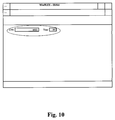
- the display is as shown in Figure 10.
- the prefixes in front of the fields can be collected from the client's database.
- the client's prefix may be located directly in front of the field. Thus, it is not necessarily the designer who has entered the prefixes.
- chapter 7, The Presentation. The entering of the labels in the profile will be shown below.
- the values in the fields now illustrate the identifiers of the fields.
- the FLEX client may present the received data.
- a number of output fields are used which can be stated in the profile.
- the locations of the fields are indicated and can then be marked as output fields and be provided with relevant identifiers.
- the identifiers reflect the identifiers expected by the FLEX client to be found in the data returned by the data server. Consequently, it is necessary for the designer and the data server constructor to decide the information to be returned and accordingly the identifiers to be used.
- the client can present the relevant prefixes.
- the prefixes and other types of presentation information for the fields are obtained from the client's database by means of the associated identifiers.
- the identifiers 1713, 1720 and 1812 to 1818 are used.
- the prefixes located in front of the fields have been obtained from the client's database.
- the client's prefixes may be located directly in front of the field.
- the fields themselves are in turn located in two columns. The designer can determine the number of possible columns for one field and state the column in which to enter the value. A further description of the above is given in chapter 7, The Presentation.
- the values in the fields now illustrate the identifiers of the fields. The identifiers have been randomly selected.
- Some data elements are naturally connected in groups.
- a citizen's name and address is one example of such data.
- Another example is information on a citizen's income and property. It is desirable to be able to process these groups of data collectively. It should, for instance, be possible to move them together, display or conceal them and provide them with a common heading. For this purpose, a group may be inserted in the design profile. Later, the fields to be processed together may be entered in the group.
- the designer may enter a prefix and a suffix for the group.
- the prefix "Income and Property” is entered whereas the suffix is omitted. It should be noted that when established, the group does not describe the fields it contains. It is the designer's task to enter fields in the group and assign identifiers to the fields. The prefixes for the fields appear automatically when the field identifiers are assigned.
- 4 output fields are placed in one group.
- the fields have the identifiers 1550, 1551, 1560 and 1561.
- a list is like a group but differs by containing several occurrences of the same type of information.
- a group contains only one occurrence of the same type of information.
- lists may provide the user with the possibility of processing collections of data collectively.
- Data elements in lists may i.a. be moved, displayed or concealed in conjunction and be provided with a common heading.
- a list contains a fixed number of lines acting as a "window" and in the case of further data, the arrows may be used for paging up and down.
- Lists may for instance be used if the data contains information on a citizen's interest earned.
- the information for instance, comprises an entry text and an amount. Few citizens have no entries in that account, some have few entries whereas others have many entries. Therefore, it is not appropriate for a profile to contain a fixed number of fields for the information but should instead contain a list. The designer is then to enter a field in the list for the entry text and a field for the amount. Since the fields occur in a list, the client will automatically repeat the fields by the number received from the data server.
- the designer can enter a prefix and a suffix for the list.
- the prefix "Res. of previous statements" is entered whereas the suffix is omitted.
- the list when established, does not describe the fields it contains. It is the designer's task to insert fields in the list and assign identifiers to the fields. The prefixes for the fields appear automatically when the field identifiers are assigned.
- a list is inserted for collecting information on a citizen's previous yearly statements.
- the example is hypothetical but nevertheless illustrates the concept of the lists.
- two output data fields are placed in a list.
- the fields have the identifiers 1001 and 4108. It should be noted that each field is only placed once.
- the list handles the display of many data which are identified by the identifiers 1001 and 4108, respectively.
- the values in the fields now illustrate the identifiers possessed by the fields.
- the display In order to make a FLEX programme more legible, it is favourable to provide the display with some indicative headings.
- the headings are constituted by the prefixes of the groups and the lists but in special cases, it may be necessary to use other types of texts and thereby utilize alternative methods.
- Prefixes for fields may fall into the following categories: Prefixes for fields, fields of the type of text, and labels.
- Prefixes for fields may be used as alternative headings by inserting a field and providing it with a suitable identifier.
- the identifier corresponds to the text in the client's database, which the designer wants to display.
- the field is then set to display the prefix only and neither the value nor the suffix. This setting takes place by modifying one of the attributes of the field.
- the attributes are described in chapter 7, The Presentation.
- Fields of the type of text may be used as headings by inserting a field and providing it with a general identifier.
- the general identifier may, of course, be defined as a text in the field table of the client's database.
- the field is then set to display the value and display only and to display neither the prefix nor the suffix. This setting takes place by modifying one of the attributes of the field.
- the data server In order for the headings to be seen, it will now be necessary for the data server to send a text value to the client with the agreed general identifier. This is a somewhat more troublesome method for making alternative headings but the advantage is based on the data server being able to dynamically select a heading which matches the data basis.
- the labels constitute the last method of making alternative headings. It simply involves the insertion by the designer of a field in the display and the definition of this field as a field of labels.
- the text will always be present in the display irrespective of the data basis. This is the easiest solution but at the same time the least flexible.
- 3 labels are located in the display. The texts have no identifiers.
- a number of menu items and a status line will generally be associated with the client. These menu items can have an administrative character and can be used for configuring the client.
- the status line can be used for displaying the client status and in many situations for displaying help texts.
- Each FLEX profile may furthermore be associated with a number of specific menu items and function keys or buttons.
- a one-to-one connection between the specific menu items and function keys or buttons and a menu selection may exist or pressing a corresponding function key may initiate a transaction towards the data server.
- the designer may select a super set of menu items/function keys or buttons associated with a FLEX profile.
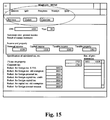
- This selection i.a. comprises the selection of function names and the selection of function text. It will later be shown how a data server at given points in time communicates to the client which of the selected function names are useful. In the example in Figure 15, a design display with menus and keys or buttons is shown.
- the attributes of the individual fields were briefly mentioned.
- the attributes are the modifiable parameters on each field, group or list for providing the designer with the possibility of controlling the presentation.
- the attributes are individually described in details in chapter 7, The Presentation.
- One example cannot, of course, cover all combinations of values for the attributes.
- good understanding of the value set of each attribute and the influence of these values on the presentation will provide the user with good understanding of the multiplicity thereof.
- the data exchange takes place by means of special data packages or data strings, to which they will be referred in the following.
- These data strings are collections of interrelated data elements having the information associated with the transaction in question. These constitute the common language - the interface - between the client and the data server.
- the contents of the data strings depend on the transaction for which they are used. For instance, the contents of the string for B354 and B299 will be entirely different. This is due to the two transactions processing data having entirely different contents of information: the first processes tax statement data - the other processes data concerning orders of batch runs for performing print jobs.
- the syntax is the formal definition of the rules describing how to structure and combine the individual data elements in the data string.
- a data string may consist of a number of data elements.
- Each data element may typically contain a value and may contain presentation information called attributes.
- the data elements contain an indent which is more or less complex.
- In one end of the scale are simple identifiers such as information without any particular interrelation. In the other end are the combined identifiers which identify the pieces of information having a kind of interrelationship.
- Information sets packed in data elements in the data strings are, thus, individually identifiable with one more or less complex identifier.
- the combined identifiers may be used for separating several occurrences of uniform types of information.
- One example of several occurrences of uniform types of information could be the collection of interest earned for a number of citizens. Some interest earnings belong to one citizen whereas others belong to another citizen. The information is, thus, said to have a structure.
- Each element may contain one value and optionally a number of identifiers.
- the value may be displayed in one field on the client and the data string is thus also said to contain a number of fields.
- the fields describe independent information and may e.g. contain information on the value of a citizen's income taxed at source.
- a field may furthermore also contain other information on the type , colour , location , prefix, display format , etc. of the field.
- the value will typically always follow the field whereas the remaining information is only included in the data string when it is not known by the client or is to be updated.
- This type of information is called attributes.
- the attributes for the fields may be saved in a local database associated with the individual clients.
- the field identifier is an unambiguous identification used by the client for a search in the database in order to determine where and how to present the field value. Fields not included in any structure have simple identifiers.
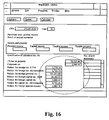
- Figure 16 shows an example of a screen display having filled-in fields. It is assumed that the user has filled in the civil registration number with the value 251287-1243 and the year with the value 93 and has received a data string from the data server.
- the screen display shown in Figure 16 is filled in incompletely.
- the purpose is to focus on the filled-in fields.
- the data basis for the filled-in fields is a section of a larger data string which would have caused the entire screen display to be filled in.
- field identifiers shown are merely examples. A description of all the field identifiers should be elaborated. It should be noted that all the field identifiers are simple and that the order is not necessarily as shown in the display.
- the data server would have omitted the field identifier 1814 with the associated value 36165100 from the data string.
- the client's task is in that case to avoid displaying the empty field and the associated prefix.
- the section of the data string only contains field identifiers and field values.
- attributes are initially vested in a database associated with the client but they may be overwritten. If, in very specific cases, the data server desires that a prefix for a field be something specific, the data server may in such cases include this attribute in the data string.
- the attributes are used temporarily in the client and therefore do not overwrite the corresponding attributes in the client's database.
- the attribute shown merely serves as an example. A description of attributes and of their value options are found in chapter 7, The Presentation.
- Groups are collections of interrelated pieces of information. It should, however, be emphasized that the relations are determined by the client only. In other words, the data server does not determine whether a piece of information is to be grouped or not. The data server, therefore, processes fields in exactly the same way as described in the previous paragraph.
- a field value is sent from the data server to the client, it is ALWAYS accompanied by a field identifier.
- the field identifier is an unambiguous identification used by the client to perform a search in the local database in order to determine where and how to present the field value. It should be noted that a simple identifier is also involved.
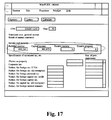
- the screen display shown in Figure 17 is filled in incompletely.
- the purpose is to focus on the filled-in fields in the group.
- the data basis for the filled-in fields is a section of a larger data string which would have caused the entire screen to be filled in.
- field identifiers shown merely serve as examples. A description of all the field identifiers should be elaborated.
- the data server expands the identifier for each occurrence of the field with an index. If the information occurs a number of times in several levels, the data server adds more indexes. Lists of lists of information are involved, for instance a list of citizens, each containing a list of interest earned.
- Identifiers expanded with indexes, are called composite/complex identifiers.
- Complex identifiers are obtained by placing simple identifiers having an index value and a ':' in front. In case of several indexes, the simple identifier having all the index values separated by ':' is placed in front. The value for the most significant index is placed in front. In the example with the list of citizens with lists of interest earned, the index controlling the citizen list is the most significant and the index controlling the income list is the least significant.
- the identifier 2:3:3389 indicates the second entry in the above-mentioned citizen list and the third entry in the above income list. 3389 indicates for example that the information concerns interest earned.
- This notation form requires for the data server to index all the fields found in several occurrences. However, the fields need not be sent in an index order. An easier way for the data server to choose index is to provide the index with the value of 0 every time. On the other hand, this requires the data server to send fields in the desired order since in that case, the client will insert the fields at the end of the list after the already received fields.
- lists require special handling.
- the length is typically dynamic, depending on the number of elements included in the list (this number will typically - but not always be variable) and this should be considered when designing requests, allocating data areas, structuring screen displays, etc.
- the screen display in Figure 18 is filled in incompletely.
- the purpose is to focus on the filled-in fields of the list.
- the data basis for the filled-in fields is a section from a larger data string which would have caused the entire screen display to be filled in.
- the field identifiers of the example are all complex.
- the simple field identifiers are placed in the front with an index.
- the abbreviation '0:' has been chosen.
- the data server When using the abbreviation, it is necessary for the data server to send fields in a certain order. Since the data server in this example sends the field identifier 0:1001 five times and correspondingly sends the field identifier 0:4108 five times, it will be necessary to synchronize the fields belonging together in one list element.
- the first 0:1001 field sent out is compared by the client with the first 0:4108 field sent out.
- the following 0:1001 and 0:4108 fields are combined.
- the field with the identifier 3:4108 is not found in this section of the data string. Furthermore, fields are sent with falling indexes in the identifiers.
- Figure 19 shows a screen display filled in with a complete data string. Said screen display is now entirely filled in.
- the purpose is to provide an overview of the three previous examples.
- the data string starts with the name of the data server with a postpositive exclamation mark ("B354!).
- the purpose is to allow the client to identify the data string.
- a version code stating the version number of the data server may also placed at the beginning of the data string but is so far optional.
- a hatch mark As the end character, a hatch mark ("#") is used.
- a need may in principle exist for attaching different values to fields having the same identifier. This may for instance be the case if it is desired to compare data from two spouses in a profile. To such fields, a further identification known by the data server may be attached so as to be able to separate them from each other. Failing this, the same value would occur in both fields.
- Correlation between the client and the data server may exist for such fields, as the designer places several fields with the same identifier in the client but simultaneously adds different position numbers to each field.
- the data server may then send fields with identifiers unambiguously stating the position to be used. If a data server, for instance, sends uniform information on a married couple, it will be necessary to separate the man's information from that of the woman. This is performed using position numbers.
- Identifiers expanded with position numbers are called expanded identifiers.
- Expanded identifiers are obtained by postpositioning simple identifiers with an '.' and an integer. In practice, this expansion of the identifiers means that the identifiers become even further unambiguous if the concept of degrees of unambiguity was involved. On the face of it, it would seem that the forming of more and totally unambiguous identifiers, for instance 4108M and 4108K for men and women, respectively, would be necessary. However, it would not be appropriate to differentiate to that extent. Such differentiation would only cause larger overheads in the administration of field descriptions and would require that the data servers become unnecessarily specific.
- identifiers may be both expanded and complex identifiers. Only, this means that the data string can contain lists of uniform fields for one citizen and correspondingly for another citizen.
- the data string is prefixed with 2 pieces of information: a transaction code and a - for the present optional - version identifier useful in connection with updates/download of the local field and screen display database on the FLEX client.
- the data string ends with a special mark (in this case "#") in order to indicate the end of data.
- a special mark in this case "#"
- the full syntax for the contents of a data string is hereinafter - in EBNF notation - as follows:
- the example describes a user's dialogue with FLEX, i.e. what happens - both on the client and on the Server - from the point in time when the user logs on until he terminates the FLEX client and logs off.
- WinFLEX from a group in Programme Control. This is done in an ordinary Windows manner by double-clicking a WinFLEX icon.
- WinFLEX now starts and the screen display shown in Figure 20 can be seen by the user.
- WinFLEX looks like an ordinary Windows application.
- the display is empty.
- WinFLEX is an MDI application which in this case means that several displays may be open at the same time completed with data from the mainframe.
- a B354 application in one window and a B270 in another may e.g. be performed simultaneously.
- the client When the client is started towards the mainframe, it first logs itself onto the mainframe and then collects information on the user on the LOS system.
- the logon display is automatically shown in the WinFLEX display just after start up as shown in Figure 21.
- logon to the mainframe is made via the normal Logon display.
- the existing security functions are thereby used.
- the existing LOS system is called and LOS information of the user are thereby obtained.
- Such information is, inter alia, LOS user id, LOS department id and LOS municipality id.
- this information is returned to the client to be stored locally.
- the information is to be used for selecting the FLEX data server programmes for which the user in question has profiles.
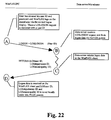
- the communication between the client and the data server in connection with the logon procedure may be illustrated as shown in Figure 22.
- the client may now select the FLEX programmes (profiles) to which the user in question has no access.
- This is not an actual security function but a function implemented in order to make the system as user-friendly as possible.
- the user is only to see the profiles used in his or her municipality, his or her department or those tailored for use by the user himself or herself.
- B354 from the list containing the application profiles of the municipality as indicated above. This is done by double-clicking B354 in the appropriate list box.
- the client finds the appropriate profile in the local database and prepares for displaying it in a window on the screen.
- the profile only contains information on the presentation logic in B354.
- the client does not know the data of the programme - they are found via the data server on the mainframe. This will be described in a subsequent paragraph.
- the screen display may have a number of data fields.
- CPR civil registration number
- YEAR are input fields used when data is to be obtained from the data server on the mainframe within short. This is indicated in the screen display by underligning the prefix.
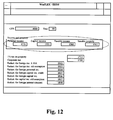
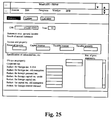
- Unearned income, Taxable income, Taxable property, etc. up to and including the field Reduction for foreign interest transact., are output fields used for displaying data received from the data server or - for some of the fields - for updating data via the data server. It should be noted that the fields have not been completed with values. The reason for this is that the client has not obtained data from the mainframe.
- the screen display - like many other screen displays under Windows - may have a title line, a menu line and a status line. These are used and act in the same way as in other Windows applications.
- the B354 application used as an example herein has two input fields: CPR (civil registration number) and YEAR. As is the case with the existing B354, these fields should be filled in and sent to the mainframe. They act as selection criteria for the data to which the user desires to have access.
- the user fills in the two fields. Then he presses the key Retrieve and a transaction is sent to the mainframe for further processing.
- the screen display appears as is shown in Figure 25 when the user presses the Retrieve key.
- the client establishes a SELECT transaction.
- This transaction consists of the transaction code "B354", the function identifier "SELECT” due to the request being a SELECT type request, and the delimiting fields CPR (civil registration number) and YEAR including their contents.
- the transaction is now sent to the data server on the mainframe through a communication module in the client.
- the transaction is received by the B354 programme which is the existing B354 programme rewritten to a FLEX data server.
- a totally new programme has optionally been written in order not to interfere with the existing B354 production environment.
- the new B354 Data Server is capable of processing the received transaction since the constructor of the data server and the designer of B354 on the client have coordinated the parameters to be sent with a 'SELECT'.
- the data server finds the requested data - from CPR (civil registration number) and YEAR - and returns the data to the client.
- CPR civil registration number
- YEAR YEAR-
- the client awaits a reply to its SELECT request.
- the data server When the data server has finished its processing of the transaction, it returns the result to the client. Not until then will the client be able to continue.
- the communication between the client and the server is in other words synchronous.
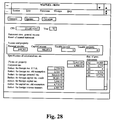
- the data may be displayed in the B354 application profile on the screen as shown in Figure 27.
- press keys Update and Calculate are now accessible.
- the data server on the mainframe has told the client that these keys may now be used. This makes sense since the screen now contains data that can be updated and fields that can be calculated.
- the main task of the client is to offer a collection of strategies and attributes capable of providing the designers and the users with the presentation options desired when designing or correcting their programmes.
- FLEX should have a minimum of presentation strategies sufficiently meeting the demands. New strategies may be added hereto and existing strategies may be elaborated by adding new attributes.
- the philosophy of FLEX is in that respect highly scalable.
- a field, group or list is associated with a set of attributes controlling that particular element.
- the set of relevant attributes varies from fields over lists to groups.
- Some attributes are static. This means that they cannot be modified from profile to profile.
- Other attributes are dynamic. This, however, means that they may be modified from profile to profile.
- Some of the dynamic attributes may even be modified by the individual user who performs a FLEX programme. The attributes may in this way also be changed over time.
- the field type is static.
- the field type may assume one of the following values: Group, List, Amount, Number, Text, Date, Civil registration number, Municipality, Code
- the medium prefix is static.
- the short prefix may assume a text value with a maximum length of 20 characters. This prefix is only presented together with the value of the field if the attribute Choice_of_prefix is set to 'Short' and the attribute Choice_of_components is set to 'Prefix'.
- This attribute may assume one of the following values: Long, Medium, Short
- prefix is only shown if the attribute Choice_of_components is set to 'Prefix'.
- the long suffix may assume a text value with a maximum length of 78 characters. This suffix is only presented together with the value of the field if the attribute Choice_of-suffix is set to 'Long' and the attribute Choice_of_components is set to 'Suffix'.
- the medium suffix is static.
- the short suffix may assume a text value with a maximum length of 20 characters. This suffix is only presented together with the value of the field if the attribute Choice_of_suffix is set to 'Short' and the attribute Choice_of_components is set to 'Suffix'.
- This attribute may assume one of the following values: Long, Medium, Short
- the standard value is 'Long'.
- the help text describes the general use of the field in short terms.
- the help text is displayed in the client's status line when the field is in focus.
- This attribute may assume one of the following values: Physical, Vertical_Dynamic, Dynamic with the associated effects:
- the field column is dynamic.
- the field row is dynamic.
- the field width is dynamic.
- the field width is used for stating the width of the field.
- the field width is character based; in the Windows client, the field width is based on units.
- the field height is dynamic.
- the field height is used for stating the height of the field.
- the field height is character based; in the Windows client, the field height is based on units.
- the field height is only relevant for groups and lists.
- the prefix column is dynamic.
- the prefix column is used for stating the horizontal location of the prefix of the field. If the attribute Layout on the container is assigned the value 'Physical' or 'Vertical_Dynamic', the location is absolute. Otherwise, the location is relative to the location of the field.
- the absolute location indicates the beginning of the prefix.
- the relative location is calculated dependently of the value in the attribute Prefix_location :
- the standard value is 0.
- the prefix row is dynamic.
- the prefix row is used for indicating the vertical location of the prefix of the field. If the attribute Layout on the container is assigned the value 'Physical', the location is absolute. Otherwise, the location is relative to the location of the field.
- the relative location is calculated depending on the value in the attribute Prefix_location :
- the standard value is 0.
- the location of the prefix is dynamic.
- the suffix column is used for indicating the horizontal location of the suffix of the field. If the attribute Layout on the container is assigned the value 'Physical' or 'Vertical_Dynamic', the location is absolute. Otherwise, the location is relative to the location of the field.
- the absolute location indicates the beginning of the suffix.
- the relative location is calculated depending on the value in the attribute Suffix_location :
- the standard value is 0.
- the suffix row is dynamic.
- the suffix row is used in order to indicate the vertical location of the suffix of the field. If the attribute Layout on the container is assigned the value 'Physical', the location is absolute. Otherwise, the location is relative to the location of the field.
- the relative location is calculated depending on the value in the attribute suffix_location :
- the standard value is 0.
- the location of the suffix is dynamic.
- the order indicates a mutual order between fields in the same group or list.
- the order is used by the client in order to place the fields in relation to each other if the attribute Layout assumes one of the values 'Vertical_Dynamic' or 'Dynamic'. If the same attribute assumes the value 'Physical', the order is not used for locating the fields.
- the order is ALWAYS used for determining an inputting order for the fields, independent of the layout.
- the attribute Display is used for determining whether a field with or without contents is to be displayed.
- the attribute may assume the following values: Always, Filled-in, None with the associated effects:
- the standard value is 'Filled-in'.
- the state is dynamic.
- the state determines how to display a group or a list.
- the state only has an effect if the field is displayed, i.e. that the attribute Display assumes the values 'Always' or 'Filled-in' and that the data server sends a value to the field for the latter value.
- the attribute State may assume the following values: Open, Closed, Static with the associated effects:
- the standard value is 'Open'.
- the attribute Field_active may assume the following values Input, Output, System with the associated effects:
- presentation options For each type of fields, there is a set of presentation options. These options are described with values simultaneously assignable to this attribute. The values are OR'ed together. For the following types of fields, the following presentation options exist:
- the number of columns is dynamic.
- the number of columns determines the number of columns into which a field may be divided.
- Columns are useful when several fields are placed below each other and their field values belong to different columns, e.g. income column, expenditure column and sum column.
- the column number is dynamic.
- the column number determines the column in which the value of the field is to be presented.
- the number of columns is determined by the attribute Column_number .
- the standard value is 1.
- the colour is dynamic.
- the standard value is black.
- the font face is dynamic.
- the standard value is 'Normal'.
- the client's database is a collection of tables describing partly the profiles for the FLEX programmes and partly the information displayed in the programmes.
- an extra dimension has been added to the client's database, a user dimension.
- Each profile for a FLEX programme is consequently described for each set up user who needs to use the programme in question.
- the programmes may, thus, be saved with different user profiles.
Landscapes
- Engineering & Computer Science (AREA)
- Software Systems (AREA)
- Theoretical Computer Science (AREA)
- Human Computer Interaction (AREA)
- Physics & Mathematics (AREA)
- General Engineering & Computer Science (AREA)
- General Physics & Mathematics (AREA)
- Information Retrieval, Db Structures And Fs Structures Therefor (AREA)
Applications Claiming Priority (2)
| Application Number | Priority Date | Filing Date | Title |
|---|---|---|---|
| DK132394 | 1994-11-18 | ||
| DK1323/94 | 1994-11-18 |
Publications (1)
| Publication Number | Publication Date |
|---|---|
| EP0713182A1 true EP0713182A1 (de) | 1996-05-22 |
Family
ID=8103581
Family Applications (1)
| Application Number | Title | Priority Date | Filing Date |
|---|---|---|---|
| EP95610057A Withdrawn EP0713182A1 (de) | 1994-11-18 | 1995-11-17 | Methode zur Informationspräsentation und System zur Übertragung und Präsentation von Information |
Country Status (1)
| Country | Link |
|---|---|
| EP (1) | EP0713182A1 (de) |
Cited By (1)
| Publication number | Priority date | Publication date | Assignee | Title |
|---|---|---|---|---|
| WO2001011462A3 (en) * | 1999-08-04 | 2001-11-08 | 724 Solutions Inc | Dynamic client system |
Citations (4)
| Publication number | Priority date | Publication date | Assignee | Title |
|---|---|---|---|---|
| EP0399822A2 (de) * | 1989-05-26 | 1990-11-28 | Hewlett-Packard Company | Verfahren und Vorrichtung zur Verkapselung von Rechnerprogrammen |
| US5165020A (en) * | 1987-03-27 | 1992-11-17 | Digital Equipment Corporation | Terminal device session management protocol |
| US5262964A (en) * | 1991-04-10 | 1993-11-16 | International Business Machines Corporation | Method and apparatus for variable playback speed of multimedia data interchange within a data processing system |
| US5265250A (en) * | 1990-03-29 | 1993-11-23 | At&T Bell Laboratories | Apparatus and methods for performing an application-defined operation on data as part of a system-defined operation on the data |
-
1995
- 1995-11-17 EP EP95610057A patent/EP0713182A1/de not_active Withdrawn
Patent Citations (4)
| Publication number | Priority date | Publication date | Assignee | Title |
|---|---|---|---|---|
| US5165020A (en) * | 1987-03-27 | 1992-11-17 | Digital Equipment Corporation | Terminal device session management protocol |
| EP0399822A2 (de) * | 1989-05-26 | 1990-11-28 | Hewlett-Packard Company | Verfahren und Vorrichtung zur Verkapselung von Rechnerprogrammen |
| US5265250A (en) * | 1990-03-29 | 1993-11-23 | At&T Bell Laboratories | Apparatus and methods for performing an application-defined operation on data as part of a system-defined operation on the data |
| US5262964A (en) * | 1991-04-10 | 1993-11-16 | International Business Machines Corporation | Method and apparatus for variable playback speed of multimedia data interchange within a data processing system |
Cited By (1)
| Publication number | Priority date | Publication date | Assignee | Title |
|---|---|---|---|---|
| WO2001011462A3 (en) * | 1999-08-04 | 2001-11-08 | 724 Solutions Inc | Dynamic client system |
Similar Documents
| Publication | Publication Date | Title |
|---|---|---|
| CA1300274C (en) | Bill of material interface to cad/cam environment | |
| US5428791A (en) | Configuration mechanism for a computer system having generic user interface and component-specific builder modules | |
| US5361360A (en) | Method for generating software development environment | |
| US4845665A (en) | Simulation of computer program external interfaces | |
| US5774887A (en) | Customer service electronic form generating system | |
| US6466973B2 (en) | Method and system for managing storage devices over a network | |
| US6356920B1 (en) | Dynamic, hierarchical data exchange system | |
| US6134549A (en) | Client/server computer system having personalizable and securable views of database data | |
| KR940002235B1 (ko) | 프로그램 패키지 및 소프트웨어 어플리케이션 패키지 작성 방법과, 이들 패키지를 구비한 컴퓨터 프로그램 작성 방법 | |
| US7085803B1 (en) | Platform-independent programmable batch processing engine | |
| US6348934B1 (en) | Method for enabling rapid modification of a display controlled by a computer program | |
| US6836780B1 (en) | Method and system for accessing data in legacy applications | |
| US20010016803A1 (en) | Design system and method for designing or constructing new parts | |
| WO2001065364A1 (en) | System and method for common code generation | |
| US6636774B2 (en) | CAD supporting apparatus, and CAD supporting program storage medium | |
| WO1991009365A2 (en) | Computer-assisted software engineering for cooperative processing | |
| US7139768B1 (en) | OLE DB data access system with schema modification features | |
| CN111784108B (zh) | 一种主数据管理平台的建模方法和装置 | |
| EP1895407A1 (de) | Vorrichtung, Verfahren und Programm zur Unterstützung der Entwicklung einer Mensch-Maschine-Schnittstelle | |
| GB2278468A (en) | Configuring computer programs. | |
| US6542901B1 (en) | Formatting input data file compatible with workstation application into formatted input data file compatible with second application utilizing user-customized settings | |
| US20040039743A1 (en) | Message analysis tool | |
| JP4995009B2 (ja) | Pod画面生成装置、そのプログラム | |
| US20070113173A1 (en) | Method and system for generating a technical manual | |
| US20070094289A1 (en) | Dynamic, hierarchical data exchange system |
Legal Events
| Date | Code | Title | Description |
|---|---|---|---|
| PUAI | Public reference made under article 153(3) epc to a published international application that has entered the european phase |
Free format text: ORIGINAL CODE: 0009012 |
|
| AK | Designated contracting states |
Kind code of ref document: A1 Designated state(s): AT BE CH DE DK ES FR GB GR IE IT LI LU MC NL PT SE |
|
| AX | Request for extension of the european patent |
Free format text: LT PAYMENT 951128;LV PAYMENT 951128;SI PAYMENT 951128 |
|
| RAX | Requested extension states of the european patent have changed |
Free format text: LT PAYMENT 951128;LV PAYMENT 951128;SI PAYMENT 951128 |
|
| RIN1 | Information on inventor provided before grant (corrected) |
Inventor name: ILSOEE, LARS Inventor name: LYNGSOE, POUL Inventor name: BRINCK, POUL JOERGEN |
|
| STAA | Information on the status of an ep patent application or granted ep patent |
Free format text: STATUS: THE APPLICATION IS DEEMED TO BE WITHDRAWN |
|
| 18D | Application deemed to be withdrawn |
Effective date: 19961123 |