EP0745927A2 - Méthode et système d'édition pour fixer un bouton d'outil - Google Patents
Méthode et système d'édition pour fixer un bouton d'outil Download PDFInfo
- Publication number
- EP0745927A2 EP0745927A2 EP96303163A EP96303163A EP0745927A2 EP 0745927 A2 EP0745927 A2 EP 0745927A2 EP 96303163 A EP96303163 A EP 96303163A EP 96303163 A EP96303163 A EP 96303163A EP 0745927 A2 EP0745927 A2 EP 0745927A2
- Authority
- EP
- European Patent Office
- Prior art keywords
- tool button
- parameters
- editing
- specified
- tool
- Prior art date
- Legal status (The legal status is an assumption and is not a legal conclusion. Google has not performed a legal analysis and makes no representation as to the accuracy of the status listed.)
- Granted
Links
Images



Classifications
-
- G—PHYSICS
- G06—COMPUTING OR CALCULATING; COUNTING
- G06F—ELECTRIC DIGITAL DATA PROCESSING
- G06F3/00—Input arrangements for transferring data to be processed into a form capable of being handled by the computer; Output arrangements for transferring data from processing unit to output unit, e.g. interface arrangements
- G06F3/01—Input arrangements or combined input and output arrangements for interaction between user and computer
- G06F3/048—Interaction techniques based on graphical user interfaces [GUI]
- G06F3/0481—Interaction techniques based on graphical user interfaces [GUI] based on specific properties of the displayed interaction object or a metaphor-based environment, e.g. interaction with desktop elements like windows or icons, or assisted by a cursor's changing behaviour or appearance
Definitions
- the present invention relates to a method and system for setting tool buttons, and more particularly, to a method and system in which tool buttons can be arbitrarily set with user's operation.
- Command means a standard command that a system executes. More specifically, there are commands for generation of a graphic object, change of a graphic object, and synthesis of graphic objects. Also, the parameters of an editing object are referred to parameters representative of the kind (for example, circle or rectangle), color, line kind, line width, and existence of hatching of an object to be generated.
- a circle of a thin line is made with a solid line, a user needs to specify a command for "generation of a circle” and also specify parameters for "solid line” and "thin line.”
- a conventional user's interface there is a method of providing fixed tool buttons which cannot be changed.
- the user's interface can be realized relatively simply, but in application programs which are userd in different ways, it cannot be said that they are convenient for all users. This is because there are some cases where a function a user uses many times is not so often needed by other users.
- a system itself has the limitation that users cannot freely change the settings of a tool button.
- this conventional interface is not always friendly to users.
- the conventional tool buttons are not always easy to use. Accordingly, it would be desirable to make it possible to set both a command and each parameter of an editing object to a tool button by directly operating the object being displayed on the screen. Also, it would be desirable to provide tool buttons which users can easily customize visually. Further, it would be desirable to provide flexible tool buttons where the commands and the parameters of an editing object, set in some tool button, can be easily reset visually.
- a method of flexibly setting a tool button with user's operation comprising the steps of: specifying commands for making a desired editing object and also specifying parameters of the editing object; generating on a display screen the editing object based on the specified commands and the specified parameters; selecting the object on said display screen by a user; specifying a predetermined tool button displayed on said display screen by the user so that the selected object is related to said predetermined tool button; and setting the specified commands and the specified parameters of the object to the related tool button.
- Preferred embodiments of the present invention may further comprise the step of changing a display form of the tool button displayed on the display screen to a display form corresponding to the parameters that are set.
- the editing object and the tool button can be related by moving a pointer around on the display with a pointing device and performing a drag operation.
- a method of flexibly setting a tool button with user's operation comprising the steps of: specifying commands for making a desired editing object and also specifying parameters of the editing object; generating on a display screen the editing object based on the specified commands and the specified parameters; selecting the object displayed on the display screen, with a pointing device; specifying a tool button, displayed at its first display form on said display screen, with the pointing device so that the selected object is related to the tool button; setting the specified commands and the specified parameters of the object to the related tool button; and changing the first display form of the tool button to a second display form corresponding to the specified commands or the specified parameters and displaying the tool button at the second display form.
- an editing system comprising: displaying means for displaying on a display screen at least one tool button and an editing object, the object being generated with a predetermined command and having at least one parameter; input means for specifying the object displayed on the display screen and specifying one of said at least one tool button; operation storage means for storing the command and data on a desired parameter of said at least one parameter so that they are related; and processing means which, when the editing object and the tool button are specified by the input means, obtains the command with which the object is generated and obtains the desired parameter the object has and which writes in the command and data on the desired parameter stored in the operation storage means so that they are related.
- the editing system may further comprise means for changing a display form of the tool button displayed on said display screen to a display form corresponding to said command and data on said parameter stored in said operation storage means.
- FIG. 1 is a block diagram showing a system embodying the present invention.
- a processor 11 controls the execution of processing programs for performing the generation and editing of a graphic object.
- a storage device 12 To the processor 11 there are connected a storage device 12, a display unit 13, a temporary storage device 14, an operation storage device 15, and a tool button display unit 16.
- An edit operation and tool button definition operation by a user are performed with a pointing device 17.
- the storage device 12 stores the processing programs for executing the generation and editing of a graphic object.
- the display unit 13 displays a graphic object, which is generated with a predetermined command and is an editing object having a plurality of parameters.
- the display unit 13 also displays a plurality of tool buttons. Further, a pointer, which can be moved and specified with the pointing device 17, is displayed on the display unit 13.
- the temporary storage device 14 is a device for temporarily storing data being displayed, such as data on a graphical object.
- the operation storage device 15 stores commands and desired parameters of an editing object, when a user sets the content of a tool button.
- the processor 11 obtains the command with which the editing object was generated and also obtains the data on desired parameters of the editing object, and writes the command and the data on desired parameters, which have been stored in the operation storage device 15, so that they are related. Further, the tool button display device 16 changes the display form of a tool button which is displayed on the screen, according to the edit mode stored in the operation storage device 15.
- FIG. 2 is a flowchart showing the editing procedure in the embodiment of the present invention.
- a description will be made of a case where some edit mode has been set in the tool button and where the editing procedure is started from the user's operation waiting state (step 21). Note that the data on this edit mode has been stored in the operation storage device 15 but does not need to be set initially.
- a user generates a desired graphic object by inputting a command, specifying it, and specifying parameters of an editing object.
- step 22 it is decided if the tool button being displayed on the screen of the display unit 13 has been clicked with the pointer (step 22).
- the edit mode of an editing system is changed according to the edit mode which was set in that tool button (step 23). Thereafter, step 23 returns to the user's operation waiting state (step 21).
- step 24 it is decided if the editing object being displayed on the screen has been dropped to the tool button (step 24). This is usually done by specifying a predetermined area on the display screen with the pointing device 17, specifying an editing object contained in that area, and dropping the specified object to a tool button with a drag operation.
- the command on the editing object and the data on the parameters of the object are stored in the temporary storage device 14.
- a drop operation to a desired tool button these are related to the tool button.
- a desired command is executed with a desired parameter, according to the edit mode at that time and the user's operation performed (step 25). Thereafter, step 25 returns to the user's operation waiting state (step 21).
- corresponding predetermined data is extracted by the processor 11 from the specified editing object (step 26). More specifically, this is attained by extracting by the processor 11 the information on a command and the data on the parameter of an editing object, from the graphic object specified by a user.
- the command used herein means a standard command that a system executes, and more specifically, there are commands for generation of a graphic object, change of a graphic object, and synthesis of graphic objects.
- the parameters of an editing object are referred to parameters representative of the kind (for example, circle or rectangle), color, line kind, line width, and existence of hatching of an object to be generated.
- a new tool is obtained (step 27).
- the screen display of the tool button is changed to a display form corresponding to the data that has been set. This is for making it possible for a user to easily recognize the content set in the tool button visually. This point will be further described later.
- a change in the display of this tool button is performed by the tool button display unit 16. After this tool button is obtained, step 26 returns to the user's operation waiting state (step 21).
- FIG. 3 there is shown an example of the editing window displayed on the screen.
- a menu bar 32 On a display screen 31 there are displayed a menu bar 32, a palette area 33 with a plurality of tool buttons, and an editing area 34 ( Figure 3(a)).
- an editing object is generated in the editing area 34. More specifically, a command for "generation of Triangle” is selected from the menu of the "Edit” of the menu bar 32.
- the "Triangle" in the pull-down menu (not shown) is selected.
- parameters representative of a line width, a line kind, and an existence of hatching are specified to generate a triangle of predetermined size at a predetermined place on the editing area 34.
- the triangle is related to the tool button 35 in the palette area 33 with a drag operation.
- this tool button 35 there are set the command for "generation of Triangle” and the specified parameters for a line width and a line kind ( Figure 3(b)).
- the display form of the tool button 35 is changed from the state where nothing has been displayed to the state where "Triangle" is displayed. If this setting is completed, thereafter a user will be able to generate a triangle having the set parameters at any time by clicking the tool button 35, as is a conventional tool button.
- parameters to be set in a tool button all of a plurality of parameters, which an editing object has, may be set, or only some of them may be set. For example, in the case of the triangle described above, parameters representative of the line width and line kind of an editing object are set, but a parameter representative of an existence of hatching does not always need to be set in a tool button. Further, as to which parameter is set in a tool button, parameters may arbitrarily be set from a setting menu by a user. If done in this manner, user's edit efficiency will be further enhanced.
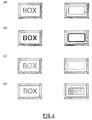
- Figure 4 illustrates the different display forms of a tool button for a rectangle where different parameters have been set.
- Figure 4(a) illustrates a case where "normal” has been set for a line width
- Figure 4(b) a case where "bold” has been set for a line width
- Figure 4(c) a case where "broken line” has been set for a line kind
- Figure 4(d) a case where a rectangle has been hatched.
- Figure 5 illustrates a case where the set content of one tool button is copied to another tool button. Since in this case a tool button 51 for generating a circle has been set, it can be easily copied with a drag operation to a tool button 51 where nothing has been set. In this manner, another tool button having the same function can be set easily.
- Figure 6 shows a case where the parameter that was set in a tool button is changed.
- a pull-down menu 61 will be displayed if "Tool" is selected from a menu bar.
- "Thin” 62 is related with the drag operation to a tool button 63 which has already been set.
- the parameter for a line width, which has been set in this tool button is changed to a thin line.
- the parameter set in the above- described tool button can be easily changed to other parameter.
- a user can directly operate an editing object being displayed on the screen so that both of a command and each parameter of the editing object can be set to a tool button.
- the user can easily customize the tool button visually.
- the command set in the tool button and the parameter of the editing object can be easily reset visually, a flexible user's interface can be provided.
Landscapes
- Engineering & Computer Science (AREA)
- General Engineering & Computer Science (AREA)
- Theoretical Computer Science (AREA)
- Human Computer Interaction (AREA)
- Physics & Mathematics (AREA)
- General Physics & Mathematics (AREA)
- Processing Or Creating Images (AREA)
- User Interface Of Digital Computer (AREA)
- Digital Computer Display Output (AREA)
Applications Claiming Priority (3)
| Application Number | Priority Date | Filing Date | Title |
|---|---|---|---|
| JP7133743A JPH08328795A (ja) | 1995-05-31 | 1995-05-31 | ツールボタンの設定のための方法及び編集装置 |
| JP133743/95 | 1995-05-31 | ||
| JP13374395 | 1995-05-31 |
Publications (3)
| Publication Number | Publication Date |
|---|---|
| EP0745927A2 true EP0745927A2 (fr) | 1996-12-04 |
| EP0745927A3 EP0745927A3 (fr) | 1997-12-03 |
| EP0745927B1 EP0745927B1 (fr) | 1999-11-24 |
Family
ID=15111893
Family Applications (1)
| Application Number | Title | Priority Date | Filing Date |
|---|---|---|---|
| EP96303163A Expired - Lifetime EP0745927B1 (fr) | 1995-05-31 | 1996-05-03 | Méthode et système d'édition pour fixer un bouton d'outil |
Country Status (5)
| Country | Link |
|---|---|
| US (1) | US5812805A (fr) |
| EP (1) | EP0745927B1 (fr) |
| JP (1) | JPH08328795A (fr) |
| KR (1) | KR100246862B1 (fr) |
| DE (1) | DE69605247T2 (fr) |
Families Citing this family (19)
| Publication number | Priority date | Publication date | Assignee | Title |
|---|---|---|---|---|
| US6621532B1 (en) * | 1998-01-09 | 2003-09-16 | International Business Machines Corporation | Easy method of dragging pull-down menu items onto a toolbar |
| US6232972B1 (en) * | 1998-06-17 | 2001-05-15 | Microsoft Corporation | Method for dynamically displaying controls in a toolbar display based on control usage |
| US7434177B1 (en) | 1999-12-20 | 2008-10-07 | Apple Inc. | User interface for providing consolidation and access |
| US6686938B1 (en) * | 2000-01-05 | 2004-02-03 | Apple Computer, Inc. | Method and system for providing an embedded application toolbar |
| US6574527B1 (en) * | 2000-10-05 | 2003-06-03 | Kennametal Inc. | Method of selecting a cutting system |
| US7895530B2 (en) * | 2000-11-09 | 2011-02-22 | Change Tools, Inc. | User definable interface system, method, support tools, and computer program product |
| AU2002226886A1 (en) * | 2000-11-09 | 2002-05-21 | Change Tools, Inc. | A user definable interface system, method and computer program product |
| JP2003168125A (ja) * | 2001-11-29 | 2003-06-13 | Aakitekku:Kk | 描画装置及び描画プログラム |
| US20030122877A1 (en) * | 2001-12-31 | 2003-07-03 | International Business Machines Corporation | Graphical user interface tools for specifying preferences in e-commerce applications |
| US7170429B2 (en) * | 2002-03-15 | 2007-01-30 | Kabushiki Kaisha Toshiba | Keypad indicating arrangement including virtual key |
| US7130400B2 (en) * | 2002-04-27 | 2006-10-31 | Bellsouth Intellectual Property Corporation | Graphical animation and sound for Internet Call-Waiting messages |
| US7565625B2 (en) * | 2004-05-06 | 2009-07-21 | Pixar | Toolbar slot method and apparatus |
| JP2006133520A (ja) * | 2004-11-05 | 2006-05-25 | Fuji Xerox Co Ltd | 画像形成装置、画像形成装置における表示画面カスタマイズ方法、表示画面カスタマイズプログラム |
| US20070061743A1 (en) * | 2005-09-15 | 2007-03-15 | International Business Machines Corporation | Customization of visual editing elements |
| US20070143662A1 (en) * | 2005-12-15 | 2007-06-21 | Microsoft Corporation | Inserting user interface elements into native applications |
| USD550236S1 (en) * | 2006-05-22 | 2007-09-04 | Microsoft Corporation | User interface for a portion of a display screen |
| JP5164399B2 (ja) * | 2007-03-12 | 2013-03-21 | 京セラドキュメントソリューションズ株式会社 | 画像形成システムおよび画像形成プログラム |
| US20090093901A1 (en) * | 2007-10-03 | 2009-04-09 | International Business Machines Corporation | Method and apparatus for using design specifications and measurements on manufactured products in conceptual design models |
| US9262065B2 (en) | 2011-02-24 | 2016-02-16 | Red Hat, Inc. | Time based touch screen input recognition |
Family Cites Families (4)
| Publication number | Priority date | Publication date | Assignee | Title |
|---|---|---|---|---|
| US5365360A (en) * | 1991-11-15 | 1994-11-15 | International Business Machines Corporation | Method and apparatus for presenting information contained within a data icon by assigning attributes to various dimensions of the data icon |
| US5450539A (en) * | 1992-07-09 | 1995-09-12 | Apple Computer, Inc. | Apparatus and method of dynamically displaying a graphic button on a monitor |
| US5500936A (en) * | 1993-03-12 | 1996-03-19 | Asymetrix Corporation | Multi-media slide presentation system with a moveable, tracked popup menu with button and title bars |
| US5490245A (en) * | 1993-08-12 | 1996-02-06 | Ast Research, Inc. | Component-based icon construction and customization system |
-
1995
- 1995-05-31 JP JP7133743A patent/JPH08328795A/ja active Pending
-
1996
- 1996-03-18 US US08/617,463 patent/US5812805A/en not_active Expired - Fee Related
- 1996-05-03 EP EP96303163A patent/EP0745927B1/fr not_active Expired - Lifetime
- 1996-05-03 DE DE69605247T patent/DE69605247T2/de not_active Expired - Lifetime
- 1996-05-17 KR KR1019960016560A patent/KR100246862B1/ko not_active Expired - Fee Related
Also Published As
| Publication number | Publication date |
|---|---|
| JPH08328795A (ja) | 1996-12-13 |
| DE69605247T2 (de) | 2000-05-31 |
| EP0745927A3 (fr) | 1997-12-03 |
| US5812805A (en) | 1998-09-22 |
| DE69605247D1 (de) | 1999-12-30 |
| KR100246862B1 (ko) | 2000-03-15 |
| EP0745927B1 (fr) | 1999-11-24 |
Similar Documents
| Publication | Publication Date | Title |
|---|---|---|
| EP0745927A2 (fr) | Méthode et système d'édition pour fixer un bouton d'outil | |
| US5555357A (en) | Computer system and method for generating and manipulating charts and diagrams | |
| US7930699B2 (en) | Task roster | |
| US5828376A (en) | Menu control in a graphical user interface | |
| JP4255511B2 (ja) | 対話型ユーザ・インタフェース | |
| JPH04267426A (ja) | 複数の選択されたオブジェクトの位置表示方法 | |
| US9195365B2 (en) | Automatic configurator of display objects | |
| JP2007304669A (ja) | 電子機器の制御方法およびプログラム | |
| CN110874085B (zh) | 数值控制装置 | |
| JP2014032529A (ja) | Plcシステム、その作画エディタ装置、プログラマブル表示器 | |
| JPH0588837A (ja) | ウインドウ管理情報入出力装置 | |
| JPH1145334A (ja) | 画像の比較表示方法及び記録媒体 | |
| JP2000056888A (ja) | ユーザーインターフェイス設定方法及びその装置 | |
| US7739620B1 (en) | Method of setting alternate style assignments to menu elements of an application | |
| JP5762257B2 (ja) | プラント監視制御装置 | |
| JPH09319555A (ja) | アイコン起動におけるパラメータの指定方法 | |
| US5812113A (en) | Picture forming device | |
| JPH07182502A (ja) | ビットマップイメージデータの縮小方式 | |
| JP3319713B2 (ja) | データ抽出装置 | |
| JPH05143589A (ja) | 文書処理装置及びその制御方法 | |
| US20140365926A1 (en) | Apparatus and method for providing graphic editors | |
| KR20040018663A (ko) | 디스플레이 시스템의 아이콘 제어방법 | |
| JPH05134832A (ja) | メニユー表示装置 | |
| JP2003208252A (ja) | リアルタイム情報監視装置及びリアルタイム情報監視方法 | |
| JPH04312164A (ja) | イメージ編集システム |
Legal Events
| Date | Code | Title | Description |
|---|---|---|---|
| PUAI | Public reference made under article 153(3) epc to a published international application that has entered the european phase |
Free format text: ORIGINAL CODE: 0009012 |
|
| AK | Designated contracting states |
Kind code of ref document: A2 Designated state(s): DE FR GB |
|
| 17P | Request for examination filed |
Effective date: 19970325 |
|
| PUAL | Search report despatched |
Free format text: ORIGINAL CODE: 0009013 |
|
| AK | Designated contracting states |
Kind code of ref document: A3 Designated state(s): DE FR GB |
|
| 17Q | First examination report despatched |
Effective date: 19980604 |
|
| GRAG | Despatch of communication of intention to grant |
Free format text: ORIGINAL CODE: EPIDOS AGRA |
|
| GRAG | Despatch of communication of intention to grant |
Free format text: ORIGINAL CODE: EPIDOS AGRA |
|
| GRAH | Despatch of communication of intention to grant a patent |
Free format text: ORIGINAL CODE: EPIDOS IGRA |
|
| GRAH | Despatch of communication of intention to grant a patent |
Free format text: ORIGINAL CODE: EPIDOS IGRA |
|
| GRAA | (expected) grant |
Free format text: ORIGINAL CODE: 0009210 |
|
| AK | Designated contracting states |
Kind code of ref document: B1 Designated state(s): DE FR GB |
|
| REF | Corresponds to: |
Ref document number: 69605247 Country of ref document: DE Date of ref document: 19991230 |
|
| ET | Fr: translation filed | ||
| PLBE | No opposition filed within time limit |
Free format text: ORIGINAL CODE: 0009261 |
|
| STAA | Information on the status of an ep patent application or granted ep patent |
Free format text: STATUS: NO OPPOSITION FILED WITHIN TIME LIMIT |
|
| 26N | No opposition filed | ||
| PGFP | Annual fee paid to national office [announced via postgrant information from national office to epo] |
Ref country code: FR Payment date: 20010516 Year of fee payment: 6 |
|
| REG | Reference to a national code |
Ref country code: GB Ref legal event code: IF02 |
|
| PGFP | Annual fee paid to national office [announced via postgrant information from national office to epo] |
Ref country code: GB Payment date: 20020501 Year of fee payment: 7 |
|
| PG25 | Lapsed in a contracting state [announced via postgrant information from national office to epo] |
Ref country code: FR Free format text: LAPSE BECAUSE OF NON-PAYMENT OF DUE FEES Effective date: 20030131 |
|
| REG | Reference to a national code |
Ref country code: FR Ref legal event code: ST |
|
| PG25 | Lapsed in a contracting state [announced via postgrant information from national office to epo] |
Ref country code: GB Free format text: LAPSE BECAUSE OF NON-PAYMENT OF DUE FEES Effective date: 20030503 |
|
| GBPC | Gb: european patent ceased through non-payment of renewal fee |
Effective date: 20030503 |
|
| PGFP | Annual fee paid to national office [announced via postgrant information from national office to epo] |
Ref country code: DE Payment date: 20100521 Year of fee payment: 15 |
|
| REG | Reference to a national code |
Ref country code: DE Ref legal event code: R119 Ref document number: 69605247 Country of ref document: DE |
|
| REG | Reference to a national code |
Ref country code: DE Ref legal event code: R119 Ref document number: 69605247 Country of ref document: DE |
|
| PG25 | Lapsed in a contracting state [announced via postgrant information from national office to epo] |
Ref country code: DE Free format text: LAPSE BECAUSE OF NON-PAYMENT OF DUE FEES Effective date: 20111130 |