EP0772116A1 - Computerverfeinerung eines Farbdruckbildes unter Benutzung aufeinanderfolgender Verfeinerungen - Google Patents
Computerverfeinerung eines Farbdruckbildes unter Benutzung aufeinanderfolgender Verfeinerungen Download PDFInfo
- Publication number
- EP0772116A1 EP0772116A1 EP96307907A EP96307907A EP0772116A1 EP 0772116 A1 EP0772116 A1 EP 0772116A1 EP 96307907 A EP96307907 A EP 96307907A EP 96307907 A EP96307907 A EP 96307907A EP 0772116 A1 EP0772116 A1 EP 0772116A1
- Authority
- EP
- European Patent Office
- Prior art keywords
- image
- values
- property
- variable
- range
- Prior art date
- Legal status (The legal status is an assumption and is not a legal conclusion. Google has not performed a legal analysis and makes no representation as to the accuracy of the status listed.)
- Granted
Links
Images




Classifications
-
- H—ELECTRICITY
- H04—ELECTRIC COMMUNICATION TECHNIQUE
- H04N—PICTORIAL COMMUNICATION, e.g. TELEVISION
- H04N1/00—Scanning, transmission or reproduction of documents or the like, e.g. facsimile transmission; Details thereof
- H04N1/46—Colour picture communication systems
- H04N1/56—Processing of colour picture signals
- H04N1/60—Colour correction or control
- H04N1/6011—Colour correction or control with simulation on a subsidiary picture reproducer
- H04N1/6013—Colour correction or control with simulation on a subsidiary picture reproducer by simulating several colour corrected versions of the same image simultaneously on the same picture reproducer
-
- G—PHYSICS
- G06—COMPUTING OR CALCULATING; COUNTING
- G06F—ELECTRIC DIGITAL DATA PROCESSING
- G06F3/00—Input arrangements for transferring data to be processed into a form capable of being handled by the computer; Output arrangements for transferring data from processing unit to output unit, e.g. interface arrangements
- G06F3/12—Digital output to print unit, e.g. line printer, chain printer
- G06F3/1201—Dedicated interfaces to print systems
- G06F3/1202—Dedicated interfaces to print systems specifically adapted to achieve a particular effect
- G06F3/1203—Improving or facilitating administration, e.g. print management
- G06F3/1208—Improving or facilitating administration, e.g. print management resulting in improved quality of the output result, e.g. print layout, colours, workflows, print preview
-
- G—PHYSICS
- G06—COMPUTING OR CALCULATING; COUNTING
- G06F—ELECTRIC DIGITAL DATA PROCESSING
- G06F3/00—Input arrangements for transferring data to be processed into a form capable of being handled by the computer; Output arrangements for transferring data from processing unit to output unit, e.g. interface arrangements
- G06F3/12—Digital output to print unit, e.g. line printer, chain printer
- G06F3/1201—Dedicated interfaces to print systems
- G06F3/1223—Dedicated interfaces to print systems specifically adapted to use a particular technique
- G06F3/1237—Print job management
- G06F3/1253—Configuration of print job parameters, e.g. using UI at the client
- G06F3/1256—User feedback, e.g. print preview, test print, proofing, pre-flight checks
-
- G—PHYSICS
- G06—COMPUTING OR CALCULATING; COUNTING
- G06F—ELECTRIC DIGITAL DATA PROCESSING
- G06F3/00—Input arrangements for transferring data to be processed into a form capable of being handled by the computer; Output arrangements for transferring data from processing unit to output unit, e.g. interface arrangements
- G06F3/12—Digital output to print unit, e.g. line printer, chain printer
- G06F3/1201—Dedicated interfaces to print systems
- G06F3/1278—Dedicated interfaces to print systems specifically adapted to adopt a particular infrastructure
- G06F3/1284—Local printer device
-
- G—PHYSICS
- G06—COMPUTING OR CALCULATING; COUNTING
- G06K—GRAPHICAL DATA READING; PRESENTATION OF DATA; RECORD CARRIERS; HANDLING RECORD CARRIERS
- G06K15/00—Arrangements for producing a permanent visual presentation of the output data, e.g. computer output printers
- G06K15/02—Arrangements for producing a permanent visual presentation of the output data, e.g. computer output printers using printers
-
- H—ELECTRICITY
- H04—ELECTRIC COMMUNICATION TECHNIQUE
- H04N—PICTORIAL COMMUNICATION, e.g. TELEVISION
- H04N1/00—Scanning, transmission or reproduction of documents or the like, e.g. facsimile transmission; Details thereof
- H04N1/40—Picture signal circuits
- H04N1/407—Control or modification of tonal gradation or of extreme levels, e.g. background level
-
- G—PHYSICS
- G06—COMPUTING OR CALCULATING; COUNTING
- G06K—GRAPHICAL DATA READING; PRESENTATION OF DATA; RECORD CARRIERS; HANDLING RECORD CARRIERS
- G06K2215/00—Arrangements for producing a permanent visual presentation of the output data
- G06K2215/0082—Architecture adapted for a particular function
- G06K2215/0085—Error recovery
Definitions
- the present invention relates generally to color print imaging.
- the invention relates to a system and method for calibrating a computer print image by successively displaying and refining the print image properties.
- Video displays generate color according to the RGB model. According to the RGB model, all colors of visible light may be made by combining within a single pixel red, green, and blue light of select intensities. The ratios of red, green and blue light to each other determine the color of the pixel.
- printers generate color using the CMY model. According to the CMY model, all colors of light may be made by combining cyan, magenta, and yellow.
- Cyan, magenta and yellow are the complements to red, green and blue, respectively, and are based on the rule that color is specified by what is removed or subtracted from white light.
- Printers use the CMY model instead of the RGB model due to the subtractive qualities of ink from white paper. For example, cyan is considered to subtract red from white light, while in the RGB model cyan is considered the addition of blue and green.
- yellow absorbs blue light, and is the combination of red and green.
- a surface coated with cyan and yellow ink absorbs red and blue, leaving only green to be reflected. Realistically, displaying green on a video display does not provide the identical color of cyan and yellow on white paper. Thus, because video and printers use different color models, it is even more difficult for a user to anticipate optimum color schemes.
- the present invention overcomes the limitations and deficiencies of the prior art with a system and method for calibrating a computer print image by successively displaying and refining the print image properties.
- the system includes a central processing unit (CPU) that connects with a display device, and input device, a data storage device, a printer and memory.
- the memory advantageously stores a page driver, a journal file, a journal file processor, a user interface, a rendering driver, and a driver settings file.
- the routines in the memory are used by the CPU to provide a system that calibrates a computer print image.
- the page driver receives an image having image properties, such as color scheme, image resolutions, contrast, etc., and sends it to the journal file for storage.
- the user interface enables selection of a property of the image, and a range of values for controlling the characteristics of the selected property.
- the journal file processor generates specific values for the selected property based on the selected range.
- the rendering driver renders a modified version of the image for each generated value, and sends the modified versions of the image to printer 180.
- the user interface enables the selection of a preferred image from the rendered modified. images.
- the journal file processor sends the values of the selected image to the driver settings file for storage.
- the user interface enables printing of the image using the values stored in the driver settings file, repetition of the above process for more specific range of values about the value of the selected image, or repetition of the process for a different property.
- the present invention also comprises a method for successively refining a computer print image by generating sets of thumbnail images based on variable property values.
- the method starts by receiving a computer print image and a variable property range to be used for generating the first set of thumbnail images.
- a set of property values are generated based on the number of thumbnail images to be generated within the variable property range. For example, if the size of the set is three, and the variable property ranges from -50 to +50, the property values generated will account for three values across the range, such as -33, 0 and +33.
- a thumbnail image is rendered using each of the values for the variable property.
- thumbnail images After the thumbnail images are rendered, a preferred thumbnail image from the set may be selected and printed, or a preferred thumbnail image and a variable property may be selected for rendering a new set of thumbnail images. In a successive rendering, when the same property is selected the generated values will account for the range of values about the value of the selected thumbnail image, thereby refining the particular property.
- Fig. 1 is a block diagram of a preferred computer system having a printer driver, in accordance with the present invention.
- Fig. 2 is a block diagram of the printer driver of Fig. 1.
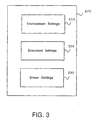
- Fig. 3 is a schematic diagram of the driver settings file of Fig. 2.
- Fig. 4 is a window illustrating a two-dimensional array of images based on the thumbnail user interface.
- Fig. 5 is a flowchart illustrating the preferred method 500 for generating thumbnail versions of a page image.
- Fig. 6 is a window illustrating a two-dimensional array of thumbnail images for a first set of values.
- Fig. 7 is a window illustrating a two-dimensional array of thumbnail images for a second set of values.
- Fig. 8 is a window illustrating a two-dimensional array of thumbnail images for a third set of values.
- Computer system 100 preferably a microprocessor personal computer, such as the Pentium-based, Epson Action Tower 8200 computer, manufactured by Seiko Epson Corporation of Japan.
- Computer system 100 includes a CPU 120.
- An input device 110 such as a keyboard and mouse, and an output device 105, such as a CRT, are coupled to a CPU 120.
- computer system 100 further comprises a block of conventional random access memory (RAM) 155, a printer 180, communications interface 185, and floppy disk drive 190 are also coupled via signal bus 115 to CPU 120.
- RAM random access memory
- the RAM 155 is used to store operating instructions and data which control and facilitate operation of the CPU 120.
- Operating system 160 preferably contained within RAM 155 consist of sequences of programmed instructions which when executed by CPU 120, enable operation by the CPU 120 on stored data.
- Printer driver 165 is a programmed sequence of instructions which when executed by CPU 120 allows stored data to be formatted and printed at printer 180.
- Page image data 170 is stored data, waiting to be processed by printer driver 165 for printing at printer 180.
- Page image data 170 is conventionally formatted in page length blocks.
- Printer driver 165 may be initially stored in disk storage 175 and loaded into RAM 155 prior to execution by CPU 120.
- Disk storage 175 has a spooler 177 for storing documents waiting to be printed at printer 180.
- Floppy disk drive 190 enables storing printer driver 165 onto a removable storage medium.
- Printer driver 165 of FIG. 1 is illustrated.
- Printer driver 165 is a program comprising several routines, including a page driver 220, a journal file 230, a journal file processor 240, a user interface 250, a rendering driver 260, and a driver settings file 270.
- page image data 170 is transmitted by the CPU 120 along the signal bus 115 to the printer driver 165.
- Page image data 170 is conventionally received by the page driver 220 as a conventional series of image portions. These image portions are to be transferred to the print medium (such as paper) by printer 180.
- Page driver 220 gathers the image portions, places the portions into a single page format that represents each page of an image, and then sends the formatted page image data 170 to the journal file 230.
- Journal file 230 is a collection of the formatted page image data 170 and the drawing commands needed to render a printed image from the data 170.
- the drawing commands include conventional pointers to program subroutines that specify the text font, object color, object size, object alignment, etc.
- Journal file processor 240 gathers the formatted page image data 170 and all requisite drawing commands from the journal file 230, and sends the gathered information to rendering driver 260.
- Rendering driver 260 applies the drawing commands to page image data 170 and generates pixel data, thereby rendering the image.
- Rendering driver 260 then sends the rendered image to the journal file processor 240, which in turn sends the image to the user.
- User interface 250 is a programmed software routine, which enables the user to view the image prior to printing and to request user instructions related to specific printing options. After viewing the image on the screen, the user can instruct rendering driver 260 to send the image to the spooler 177, and consequently to printer 180.
- the user can instruct the printer driver 165 to enter a color calibration process which enables successive refinement of the printed image.
- This successive refinement process consists of printing a set of reduced size (“thumbnail”) images at printer 180 based on a set of variable properties. For example, a preferred thumbnail image is selected from the set and while a subset of the variable properties associated with the preferred image is held constant, a second set of thumbnail images is printed.
- a preferred thumbnail image is selected and while a second subset of the variable properties is additionally held constant, a third set of thumbnail images is printed. The process repeats until a set of variable properties is determined and a refined image can be printed at printer 180. The determined set of variable properties is sent to driver settings file 270.
- rendering driver 260 retrieves printer driver settings information from the driver settings file 270.
- File 270 contains information for controlling such driver settings as image resolution, color information, printable area, and other printer options, such as image quality to print (i.e. "draft,” "normal,” or “high-resolution”).
- the driver settings contained in file 270 control all viewing modes of driver 165, including “initial”, “thumbnail” and “final” view modes.
- journal file processor 240 gathers the selected settings information for the image from journal file 230, including an initial color scheme, initial resolution, etc., and transmits the initial information to driver settings file 270.
- Rendering driver 260 uses the initial driver settings to render the image without image refinement on printer 180 using conventional imaging techniques.
- journal file processor 240 In "thumbnail” mode, journal file processor 240 generates "thumbnail” driver settings, and transmits them to rendering driver 260 and driver settings file 270.
- Rendering driver 260 uses the thumbnail driver settings to render the thumbnail versions of the image to be printed.
- the thumbnail driver settings include a minimum value "A” and a maximum value "B.”
- the range from A to B specify the total range of a particular variable property, as limited by the video and computer hardware. For example, Contrast having a value of A has minimum Contrast, and Contrast having a value of B has maximum Contrast.
- A may equal -50 and B may equal +50, with 0 being the median contrast.
- the preferred six variable properties of an image contained in driver settings file 270 include Red Bias, Green Bias, Blue Bias, Brightness, Saturation, and Contrast.
- Red Bias, Green Bias, and Blue Bias control the visible color of emitted light.
- Brightness is the luminosity or amount of light incident upon a specified area.
- the RGB values are conventionally modified by a constant so that the ratios among the three colors of light remain unmodified.
- Saturation The richness or purity of a particular color is referred to as Saturation, and can also be controlled by modifying the RGB values in a conventional manner.
- Contrast refers to how far the whitest whites are from the blackest blacks in a video waveform, and can be conventionally controlled by modifying the range of possible RGB values.
- Journal file processor 240 varies the value of at least one selected property. By varying a property and transmitting the values to rendering driver 260, journal file processor 240 generates a set of modified thumbnail versions of an image. By varying two of the properties across a selected range of values (R), journal file processor 240 generates a two-dimensional array of thumbnail images. Initially, a selected property is modified across the entire range from the minimum value A to the maximum value B. The dimensions of an array, and thus the increment between contiguous thumbnail versions, are controlled by matrix dimensions X(max) and Y(max). Matrix dimensions X(max) and Y(max) are contained in driver settings file 270.
- the preferred matrix dimensions X(max) and Y(max) both equal five, thereby presenting twenty-five thumbnail images in the array.
- user interface 250 enables user selection of other matrix dimensions.
- the incremental modification (IM) between contiguous versions is preferably equal to the range B-A divided by a matrix dimension X or Y.
- the starting value equals to A + IM/2.
- the values used for the thumbnail images equal -40, -20, 0, +20, +40, respectively.
- the modification value for each thumbnail image can be determined using a different algorithm, such as a logarithmic scale.
- Rendering driver 260 uses these values to render the thumbnail images.
- Journal file processor 240 determines the size of thumbnail images by reducing the image enough so that an X by Y array of images will print on a single sheet of paper. As the array of images becomes larger, the size of an individual thumbnail image is made smaller. The preferred minimum dimensions of a thumbnail image is about two inches by one inch. Alternatively, the size of a thumbnail image may be reduced using a scaling factor.
- the array of thumbnail images is sent to user interface 250 and printer 180, and the user selects the preferred version from the array via user interface 250 and input device 110. Based on the suitability of the selected thumbnail image, the user can either repeat the thumbnail mode for a new set of values based on the selected image, or enter a "final" mode. In final mode, rendering driver 260 uses the driver settings specified in the final iteration of the thumbnail mode in order to print the refined image. If the user does not consider the selected thumbnail image to be suitable, the thumbnail mode can be repeated and a second set of modified thumbnail images can be generated based on the selected image.
- Journal file processor 240 generates a new set of thumbnail driver settings by holding constant the matrix values selected by the user from the first array and by incrementally varying one or more additional variable properties of the selected image.
- a new IM and starting point is determined, as described in detail with reference to FIGs. 7 and 8 below.
- rendering driver 260 Based on the new set of values, rendering driver 260 generates a successive array of modified thumbnail images. The process repeats until a suitably refined image is generated.
- Driver settings file 270 includes program data comprising a conventional environment settings 310, a conventional document settings 320, and a driver settings 330.
- Environment settings 310 conventionally includes the default parameters required by the environment specifying page size, resolution, driver version information, imagable area, device capabilities, color mode, imaging mode, etc.
- Document settings 320 includes the information for printing a particular document, including page margins, printable area, page layout, etc.
- driver settings 330 includes information for controlling printer options, color information (such as Red Bias, Green Bias, Blue Bias, Brightness, Saturation and Contrast), user interface options (such as window size, placement, whether a pull-down menu or dialog box is to be used, etc.) as well as manufacturer and model number of the printer 180.
- color information such as Red Bias, Green Bias, Blue Bias, Brightness, Saturation and Contrast
- user interface options such as window size, placement, whether a pull-down menu or dialog box is to be used, etc.
- a window 400 based on user interface 250 illustrating an array 420 of thumbnail images 410 is shown.
- X coordinates refer to the level of Brightness
- Y coordinates refer to the level of Red Bias.
- X coordinates refer to the level of Brightness
- Y coordinates refer to the level of Red Bias.
- the Brightness value increases.
- Y the Red Bias increases.
- the incremental modifications are determined by X(max), Y(max) and the range R1 to R2 over which variable properties of Brightness and Red Bias are being modified.
- the range R1 to R2 is the preferred range from -50 to +50
- the preferred Brightness values in the array are -40, -20, 0, 20, 40.
- a user prints the array 420 of thumbnail images 410 to determine a preferred image.
- the preferred image can be selected from the array 420 using any selection technique, such as positioning the cursor over the preferred image 410 and performing a mouse-down operation, or typing into a dialog box (not shown) a character string pertaining to the selected image 410, such as "C2.”
- the user can then instruct the printer driver 165 to print the refined image 410 or repeat the thumbnail mode based on the selected thumbnail image 410.
- Method 500 starts by defining 505 the matrix size X(max) by Y(max) and additional parameters.
- the additional parameters include which properties are to be modified when generating thumbnail versions of an image, and the range of values over which to modify each property.
- the Saturation values in each of the thumbnail images 410 is -20, 0, and +20, respectively.
- the page image data is read back 515 from the journal file, and transmitted 520 to the rendering driver 260 with the set of values and parameters.
- the rendering driver uses the page image data, the set of values, and parameters, the rendering driver renders 525 each thumbnail image 410.
- the data is read back 515 and transmitted 520 until each of the thumbnail images 410 has been rendered 525 by the rendering driver 260.
- the page image data 170 is read back three times using the Saturation values of -20, 0, +20.
- the rendering driver 260 presents 535 the thumbnail images 410 to the user via printer 180.
- the user After presenting 535 the thumbnail images 410 to the user, the user examines the images 410 image array 420 and selects 540 the preferred image from the set of displayed images.
- the driver settings i.e. the values and parameters of the selected thumbnail image 410, are stored 545 in the driver settings file 270.
- method 500 repeats. If the settings for the selected image are suitable for printing, the image is printed at printer 180 using those settings, and the method 500 ends.
- FIG. 6 a two-dimensional image array of thumbnail images 610 is shown following a first iteration of method 500, in accordance with the preferred embodiment.
- the two properties Brightness and Green Bias are selected, while limiting the dimensions of the image array to three by three.
- the values for each of the properties in the array are -20, 0, and +20, respectively.
- the bottom left version has a Brightness of -20 and a Green Bias of -20. Brightness increases in increments of +20 as X increases (i.e. to the right), and Green Bias increases in increments of +20 as Y increases (i.e. upward).
- the thumbnail images 610 are printed at printer 180, and the user selects a preferred image 630 using user interface 250 and input device 110. Assuming that the image 630 at B3 is selected, the Brightness value of zero and the Green Bias of -20 are stored in driver settings 330. If the user considers the image 630 suitable, i.e. sufficiently refined for its intended purpose, the image 630 is printed in final form with proper size and quality, using stored driver settings 330. Otherwise, the thumbnail mode is preferably repeated for at least one newly selected variable property. If a newly selected property is not the same as a previously selected property, then the range and incremental value is as determined above, namely, -30 to +30 with an IM of twenty, starting at a value of -20. If a newly selected property is the same as the selected property of the previous iteration, the range of values for modifying the image is adjusted about the value of the property of the selected version. These two possibilities are illustrated in FIGs. 7 and 8.
- FIG. 7 a two-dimensional array 720 of thumbnail images 710 for a second iteration is shown.
- User interface 250 and input device 110 generate the selection of two variable properties, namely, Brightness and Red Bias.
- Brightness is being reselected, and Red Bias is being selected for the first time.
- Green Bias remains constant at -20. Since Red Bias is being modified for the first time, the range of values over which to modify Red Bias is the same as the range determined for Brightness and Green Bias in FIG. 6. However, since the value for Brightness has already gone through a previous iteration, the range and incremental modification for Brightness must be adjusted.
- the range and incremental modification for the second iteration of Brightness accounts for the range of possibilities between the previous array 620 of thumbnail images 610.
- the range is preferably equal to the previous incremental modification, with the center value at the Brightness value of the selected image 630. That is, the previous incremental modification was twenty, and the selected Brightness value is zero.
- the range for the second iteration is preferably twenty with a center Brightness of zero.
- thumbnail images 710 of this second iteration are printed at printer 180, and the user selects a preferred thumbnail image 730 using user interface 250 and input device 110. If the image 730 at C2 is selected, the Brightness value of ten and the Red Bias of zero are stored in driver settings 330. The user can print the image, or can repeat the thumbnail mode for a new set of properties.
- FIG. 8 a two-dimensional array 820 of thumbnail images 810 for a third iteration is shown.
- Brightness and Blue Bias are being modified to generate thumbnail images 810. Green bias remains constant at -20, and Red Bias now remains constant at zero.
- Blue Bias is being selected for the first time, Blue Bias is modified over the range -30 to +30, with an IM equal to twenty and starting at -20.
- the range is the previous IM, or ten
- the center Brightness value is the Brightness value of the second selected image 730, also ten
- the incremental modification equals ten divided by two total increments, or five.
- Brightness values for the third array 820 equal +5, +10, +15, respectively.
- the thumbnail images 810 of the third iteration are printed at printer 180, the user selects the preferred thumbnail image 830, and those values are sent to drivers settings 330. If the version at C2 is selected and considered sufficiently refined, the user prints the image in final form, with actual size and quality and using driver settings 330, namely, Green Bias equal to -20, Red Bias equal to zero, Blue Bias equal to zero, and Brightness equal to +15. Since Saturation and Contrast have not been adjusted, values for Saturation and Contrast equal zero.
Landscapes
- Engineering & Computer Science (AREA)
- Theoretical Computer Science (AREA)
- General Engineering & Computer Science (AREA)
- Physics & Mathematics (AREA)
- General Physics & Mathematics (AREA)
- Human Computer Interaction (AREA)
- Signal Processing (AREA)
- Multimedia (AREA)
- Quality & Reliability (AREA)
- Image Processing (AREA)
- Record Information Processing For Printing (AREA)
- Color, Gradation (AREA)
- Editing Of Facsimile Originals (AREA)
Applications Claiming Priority (3)
| Application Number | Priority Date | Filing Date | Title |
|---|---|---|---|
| US08/550,915 US5717838A (en) | 1995-10-31 | 1995-10-31 | Computer calibration of a color print image using successive refinement |
| US550915 | 1995-10-31 | ||
| US550749 | 1995-10-31 |
Publications (2)
| Publication Number | Publication Date |
|---|---|
| EP0772116A1 true EP0772116A1 (de) | 1997-05-07 |
| EP0772116B1 EP0772116B1 (de) | 2003-10-15 |
Family
ID=24199093
Family Applications (1)
| Application Number | Title | Priority Date | Filing Date |
|---|---|---|---|
| EP96307907A Expired - Lifetime EP0772116B1 (de) | 1995-10-31 | 1996-10-31 | Computerverfeinerung eines Farbdruckbildes unter Benutzung aufeinanderfolgender Verfeinerungen |
Country Status (4)
| Country | Link |
|---|---|
| US (1) | US5717838A (de) |
| EP (1) | EP0772116B1 (de) |
| JP (2) | JP3496741B2 (de) |
| DE (1) | DE69630353T2 (de) |
Cited By (7)
| Publication number | Priority date | Publication date | Assignee | Title |
|---|---|---|---|---|
| EP1006712A1 (de) * | 1998-12-05 | 2000-06-07 | Agfa Corporation | Verfahren und Vorrichtung zur Abbildung von Bildparametern |
| WO2000036819A1 (en) * | 1998-12-16 | 2000-06-22 | Electronics For Imaging, Inc. | Visual calibration |
| AU760440B2 (en) * | 2000-03-10 | 2003-05-15 | Canon Kabushiki Kaisha | Automatic adjustment of document styles for different media |
| EP1035727A3 (de) * | 1999-03-05 | 2003-10-08 | Sony Corporation | Drucker und Druckverfahren |
| EP1311112A3 (de) * | 2001-11-13 | 2004-08-25 | Eastman Kodak Company | Digitale Bildoptimierung |
| EP1906648A3 (de) * | 2006-09-28 | 2009-06-03 | Brother Kogyo Kabushiki Kaisha | Bilderzeugendes System |
| US9179044B2 (en) | 2007-07-13 | 2015-11-03 | Hewlett-Packard Development Company, L.P. | Color calibration |
Families Citing this family (29)
| Publication number | Priority date | Publication date | Assignee | Title |
|---|---|---|---|---|
| US20010038719A1 (en) * | 1996-10-14 | 2001-11-08 | Nikon Corporation | Information processing apparatus |
| US6701011B1 (en) * | 1997-01-20 | 2004-03-02 | Canon Kabushiki Kaisha | Image processing apparatus and image processing method and storage medium |
| JPH10210269A (ja) * | 1997-01-20 | 1998-08-07 | Canon Inc | 画像処理装置及び方法 |
| JPH10226139A (ja) * | 1997-02-14 | 1998-08-25 | Canon Inc | 画像形成システム及び画像形成装置及び媒体 |
| EP0886437B1 (de) * | 1997-06-17 | 2004-11-24 | Seiko Epson Corporation | Verfahren und Vorrichtung zum Einstellen der Farbe |
| US5999175A (en) * | 1997-07-03 | 1999-12-07 | Hewlett-Packard Co. | User interface for selecting scanner sensitivity |
| JP3039473B2 (ja) * | 1997-09-05 | 2000-05-08 | 日本電気株式会社 | プリンタドライバ |
| US6856427B1 (en) | 1999-05-20 | 2005-02-15 | Eastman Kodak Company | System for printing correct exposure in a rendered digital image |
| US6760485B1 (en) | 1999-05-20 | 2004-07-06 | Eastman Kodak Company | Nonlinearly modifying a rendered digital image |
| US6781713B1 (en) * | 1999-05-20 | 2004-08-24 | Eastman Kodak Company | Correcting exposure in a rendered digital image |
| EP1085749B1 (de) * | 1999-09-17 | 2011-01-12 | Canon Kabushiki Kaisha | Verfahren und Gerät zur Bildverarbeitung |
| JP4499258B2 (ja) * | 2000-08-04 | 2010-07-07 | オリンパス株式会社 | 電子カメラ |
| EP1184777B1 (de) * | 2000-08-30 | 2004-05-06 | Hewlett-Packard Company, A Delaware Corporation | Rechnersystem und Verfahren um dieses zu betreiben |
| US7139095B1 (en) * | 2000-09-28 | 2006-11-21 | Hewlett-Packard Development Company, L.P. | User interface for instant and full-featured index page printing from a direct-connect printer |
| US7333242B2 (en) * | 2000-10-27 | 2008-02-19 | Fujifilm Corporation | Test print producing method and photograph image printing method using the same |
| US20040056900A1 (en) * | 2002-09-23 | 2004-03-25 | Blume Leo R | System and method for window priority rendering |
| JP2004215235A (ja) * | 2002-12-18 | 2004-07-29 | Seiko Epson Corp | 出力画像の記憶色調整 |
| JP2004226912A (ja) * | 2003-01-27 | 2004-08-12 | Fuji Xerox Co Ltd | 画像表示装置及び画像形成装置 |
| US20050094161A1 (en) * | 2003-11-05 | 2005-05-05 | Do Tae-Hoi | Image forming method and image forming apparatus |
| US7593600B2 (en) * | 2004-03-04 | 2009-09-22 | International Business Machines Corporation | Black white image scaling for optical character recognition |
| US7573596B2 (en) * | 2005-05-05 | 2009-08-11 | Sharp Laboratories Of America, Inc. | Systems and methods for facilitating user adjustment of print settings |
| WO2007002406A2 (en) * | 2005-06-20 | 2007-01-04 | The Trustees Of Columbia University In The City Of New York | Interactive diagnostic display system |
| US9754629B2 (en) | 2010-03-03 | 2017-09-05 | Koninklijke Philips N.V. | Methods and apparatuses for processing or defining luminance/color regimes |
| RU2576484C2 (ru) | 2010-03-03 | 2016-03-10 | Конинклейке Филипс Электроникс Н.В. | Устройства и способы для определения цветовых режимов |
| JP5896610B2 (ja) * | 2011-03-14 | 2016-03-30 | キヤノン株式会社 | 装置、方法およびプログラム |
| JP2015011206A (ja) * | 2013-06-28 | 2015-01-19 | 株式会社沖データ | 画像形成装置及び制御プログラム |
| US9396409B2 (en) * | 2014-09-29 | 2016-07-19 | At&T Intellectual Property I, L.P. | Object based image processing |
| US10390787B2 (en) * | 2016-09-27 | 2019-08-27 | Varian Medical Systems, Inc. | Optimization of image acquisition parameters for registration with reference image |
| JP7323989B2 (ja) * | 2018-04-27 | 2023-08-09 | 大日本印刷株式会社 | コンピュータプログラム、記録媒体、表示装置及び表示方法 |
Citations (4)
| Publication number | Priority date | Publication date | Assignee | Title |
|---|---|---|---|---|
| EP0182042A2 (de) * | 1984-10-24 | 1986-05-28 | International Business Machines Corporation | Wechselwirkende Bedienerauswahl von alternativen Ausführungen von Druckerfunktionen |
| EP0366427A2 (de) * | 1988-10-24 | 1990-05-02 | Xerox Corporation | Bildverarbeitung |
| US4962421A (en) * | 1987-11-11 | 1990-10-09 | Ricoh Company, Ltd. | Color image generating apparatus |
| US5119182A (en) * | 1989-02-23 | 1992-06-02 | Minolta Camera Kabushiki Kaisha | Image forming apparatus comprising sample image printing mode and image forming method therefor |
Family Cites Families (4)
| Publication number | Priority date | Publication date | Assignee | Title |
|---|---|---|---|---|
| US4763186A (en) * | 1984-04-09 | 1988-08-09 | Corporate Communications Consultants, Inc. | Color correction system with monitor for use in recalling color corrections and corresponding method |
| JPH0659085B2 (ja) * | 1988-07-12 | 1994-08-03 | 大日本スクリーン製造株式会社 | 画像シミュレーション方法 |
| CA2093448C (en) * | 1992-07-17 | 1999-03-09 | Albert D. Edgar | Expert system for image enhancement |
| US5528734A (en) * | 1994-05-31 | 1996-06-18 | Canon Information Systems, Inc. | Printer control system with copier type document handling |
-
1995
- 1995-10-31 US US08/550,915 patent/US5717838A/en not_active Expired - Lifetime
-
1996
- 1996-09-20 JP JP25074696A patent/JP3496741B2/ja not_active Expired - Lifetime
- 1996-10-31 EP EP96307907A patent/EP0772116B1/de not_active Expired - Lifetime
- 1996-10-31 DE DE69630353T patent/DE69630353T2/de not_active Expired - Fee Related
-
2003
- 2003-09-16 JP JP2003322771A patent/JP3675461B2/ja not_active Expired - Lifetime
Patent Citations (4)
| Publication number | Priority date | Publication date | Assignee | Title |
|---|---|---|---|---|
| EP0182042A2 (de) * | 1984-10-24 | 1986-05-28 | International Business Machines Corporation | Wechselwirkende Bedienerauswahl von alternativen Ausführungen von Druckerfunktionen |
| US4962421A (en) * | 1987-11-11 | 1990-10-09 | Ricoh Company, Ltd. | Color image generating apparatus |
| EP0366427A2 (de) * | 1988-10-24 | 1990-05-02 | Xerox Corporation | Bildverarbeitung |
| US5119182A (en) * | 1989-02-23 | 1992-06-02 | Minolta Camera Kabushiki Kaisha | Image forming apparatus comprising sample image printing mode and image forming method therefor |
Cited By (14)
| Publication number | Priority date | Publication date | Assignee | Title |
|---|---|---|---|---|
| EP1006712A1 (de) * | 1998-12-05 | 2000-06-07 | Agfa Corporation | Verfahren und Vorrichtung zur Abbildung von Bildparametern |
| WO2000036819A1 (en) * | 1998-12-16 | 2000-06-22 | Electronics For Imaging, Inc. | Visual calibration |
| US6215562B1 (en) | 1998-12-16 | 2001-04-10 | Electronics For Imaging, Inc. | Visual calibration |
| AU753164B2 (en) * | 1998-12-16 | 2002-10-10 | Electronics For Imaging, Inc. | Visual calibration |
| US7397572B1 (en) | 1999-03-05 | 2008-07-08 | Sony Corporation | Printer having selectable printing parameters and a method therefor |
| EP1035727A3 (de) * | 1999-03-05 | 2003-10-08 | Sony Corporation | Drucker und Druckverfahren |
| US7349111B2 (en) | 1999-03-05 | 2008-03-25 | Sony Corporation | Printer for printing sets of color adjusted images |
| US7394556B2 (en) | 1999-03-05 | 2008-07-01 | Sony Corporation | Printer and printing method |
| KR100939388B1 (ko) * | 1999-03-05 | 2010-01-28 | 소니 주식회사 | 프린터 및 인쇄 방법 |
| AU760440B2 (en) * | 2000-03-10 | 2003-05-15 | Canon Kabushiki Kaisha | Automatic adjustment of document styles for different media |
| EP1311112A3 (de) * | 2001-11-13 | 2004-08-25 | Eastman Kodak Company | Digitale Bildoptimierung |
| EP1906648A3 (de) * | 2006-09-28 | 2009-06-03 | Brother Kogyo Kabushiki Kaisha | Bilderzeugendes System |
| US8437042B2 (en) | 2006-09-28 | 2013-05-07 | Brother Kogyo Kabushiki Kaisha | Image forming system |
| US9179044B2 (en) | 2007-07-13 | 2015-11-03 | Hewlett-Packard Development Company, L.P. | Color calibration |
Also Published As
| Publication number | Publication date |
|---|---|
| DE69630353D1 (de) | 2003-11-20 |
| JP3675461B2 (ja) | 2005-07-27 |
| JP2004094960A (ja) | 2004-03-25 |
| US5717838A (en) | 1998-02-10 |
| DE69630353T2 (de) | 2004-08-19 |
| JPH09138742A (ja) | 1997-05-27 |
| JP3496741B2 (ja) | 2004-02-16 |
| EP0772116B1 (de) | 2003-10-15 |
Similar Documents
| Publication | Publication Date | Title |
|---|---|---|
| US5717838A (en) | Computer calibration of a color print image using successive refinement | |
| US7298522B2 (en) | Print control system and medium | |
| US6798530B1 (en) | Systems, methods and graphical user interfaces for printing object optimized images using virtual printers | |
| JP4091670B2 (ja) | 装置の出力モードに基づく出力装置に対する自動較正法 | |
| US6751346B2 (en) | Image processing method and apparatus, and recording medium | |
| US8730524B2 (en) | Image processing apparatus to correct an image during double-sided printing | |
| US20030001860A1 (en) | Medium recording color transformation lookup table, printing apparatus, printing method, medium recording printing program, color transformation apparatus, and medium recording color transformation program | |
| US20030002060A1 (en) | Apparatus for generating two color printing data, a method for generating two color printing data and recording media | |
| US6879416B2 (en) | Image processing apparatus, image processing method, and storage medium | |
| JP6824052B2 (ja) | 画像処理装置、その制御方法、及びプログラム | |
| US5751470A (en) | Method for enhanced print quality on print engines with at least one high resolution dimension | |
| JP2010003078A (ja) | 画像形成システム、画像形成方法、印刷プログラム、及び画像形成装置 | |
| JP3649606B2 (ja) | 画像処理方法及びその画像処理装置 | |
| CA2215656C (en) | Printing system with print job programming capability | |
| US20070253009A1 (en) | User generated tonal reproduction curve (trc) control for monochrome printers | |
| JP2002016814A (ja) | 画像処理装置、画像処理方法及びプログラム | |
| JP2003300342A (ja) | 画像形成装置,及び画像形成方法 | |
| EP1906648A2 (de) | Bilderzeugendes System | |
| US7142316B2 (en) | Supporting multiple print engine configurations through compatible delay window storage modes | |
| JP2005125552A (ja) | 画像処理装置 | |
| JP2004243632A (ja) | カラー印刷装置およびその制御方法 | |
| JP7005796B2 (ja) | 画像形成装置、その制御方法、及びプログラム | |
| KR100571788B1 (ko) | 문서의 지정영역을 확대 출력하는 방법 | |
| JP2004164276A (ja) | 赤目修正装置、赤目修正方法および赤目修正プログラム | |
| US20100007897A1 (en) | Document processing method and apparatus |
Legal Events
| Date | Code | Title | Description |
|---|---|---|---|
| PUAI | Public reference made under article 153(3) epc to a published international application that has entered the european phase |
Free format text: ORIGINAL CODE: 0009012 |
|
| AK | Designated contracting states |
Kind code of ref document: A1 Designated state(s): DE FR GB |
|
| RIN1 | Information on inventor provided before grant (corrected) |
Inventor name: LECLAIR, GREGORY A. |
|
| 17P | Request for examination filed |
Effective date: 19971106 |
|
| 17Q | First examination report despatched |
Effective date: 20020115 |
|
| GRAH | Despatch of communication of intention to grant a patent |
Free format text: ORIGINAL CODE: EPIDOS IGRA |
|
| GRAS | Grant fee paid |
Free format text: ORIGINAL CODE: EPIDOSNIGR3 |
|
| GRAA | (expected) grant |
Free format text: ORIGINAL CODE: 0009210 |
|
| AK | Designated contracting states |
Kind code of ref document: B1 Designated state(s): DE FR GB |
|
| REG | Reference to a national code |
Ref country code: GB Ref legal event code: FG4D |
|
| REF | Corresponds to: |
Ref document number: 69630353 Country of ref document: DE Date of ref document: 20031120 Kind code of ref document: P |
|
| ET | Fr: translation filed | ||
| PLBE | No opposition filed within time limit |
Free format text: ORIGINAL CODE: 0009261 |
|
| STAA | Information on the status of an ep patent application or granted ep patent |
Free format text: STATUS: NO OPPOSITION FILED WITHIN TIME LIMIT |
|
| 26N | No opposition filed |
Effective date: 20040716 |
|
| PGFP | Annual fee paid to national office [announced via postgrant information from national office to epo] |
Ref country code: DE Payment date: 20071025 Year of fee payment: 12 |
|
| PGFP | Annual fee paid to national office [announced via postgrant information from national office to epo] |
Ref country code: GB Payment date: 20071031 Year of fee payment: 12 Ref country code: FR Payment date: 20071009 Year of fee payment: 12 |
|
| GBPC | Gb: european patent ceased through non-payment of renewal fee |
Effective date: 20081031 |
|
| REG | Reference to a national code |
Ref country code: FR Ref legal event code: ST Effective date: 20090630 |
|
| PG25 | Lapsed in a contracting state [announced via postgrant information from national office to epo] |
Ref country code: DE Free format text: LAPSE BECAUSE OF NON-PAYMENT OF DUE FEES Effective date: 20090501 |
|
| PG25 | Lapsed in a contracting state [announced via postgrant information from national office to epo] |
Ref country code: FR Free format text: LAPSE BECAUSE OF NON-PAYMENT OF DUE FEES Effective date: 20081031 |
|
| PG25 | Lapsed in a contracting state [announced via postgrant information from national office to epo] |
Ref country code: GB Free format text: LAPSE BECAUSE OF NON-PAYMENT OF DUE FEES Effective date: 20081031 |