EP0820024A2 - Système et méthode permettant des tours structurés de fichiers hypertextes - Google Patents
Système et méthode permettant des tours structurés de fichiers hypertextes Download PDFInfo
- Publication number
- EP0820024A2 EP0820024A2 EP97112054A EP97112054A EP0820024A2 EP 0820024 A2 EP0820024 A2 EP 0820024A2 EP 97112054 A EP97112054 A EP 97112054A EP 97112054 A EP97112054 A EP 97112054A EP 0820024 A2 EP0820024 A2 EP 0820024A2
- Authority
- EP
- European Patent Office
- Prior art keywords
- tour
- user
- page
- displaying
- pages
- Prior art date
- Legal status (The legal status is an assumption and is not a legal conclusion. Google has not performed a legal analysis and makes no representation as to the accuracy of the status listed.)
- Withdrawn
Links
Images








Classifications
-
- G—PHYSICS
- G06—COMPUTING OR CALCULATING; COUNTING
- G06Q—INFORMATION AND COMMUNICATION TECHNOLOGY [ICT] SPECIALLY ADAPTED FOR ADMINISTRATIVE, COMMERCIAL, FINANCIAL, MANAGERIAL OR SUPERVISORY PURPOSES; SYSTEMS OR METHODS SPECIALLY ADAPTED FOR ADMINISTRATIVE, COMMERCIAL, FINANCIAL, MANAGERIAL OR SUPERVISORY PURPOSES, NOT OTHERWISE PROVIDED FOR
- G06Q30/00—Commerce
- G06Q30/06—Buying, selling or leasing transactions
- G06Q30/0601—Electronic shopping [e-shopping]
-
- G—PHYSICS
- G06—COMPUTING OR CALCULATING; COUNTING
- G06F—ELECTRIC DIGITAL DATA PROCESSING
- G06F16/00—Information retrieval; Database structures therefor; File system structures therefor
- G06F16/90—Details of database functions independent of the retrieved data types
- G06F16/95—Retrieval from the web
- G06F16/954—Navigation, e.g. using categorised browsing
Definitions
- This invention relates to providing a structured tour of hypertext files, and particularly to a system and method for providing a cogent, coherent, and social experience of hypertext files related to each other by a common theme.
- a hypertext file is a file stored on a computer that, when displayed, contains areas known as links which when selected by a user cause another page (the linked page) to be displayed, or else cause another part of the same page to be displayed.
- a typical application in which hypertext files are used is on a website.
- a website is a logical grouping of hypertext files. These files are written in a programming language such as Hypertext Markup Language (HTML).
- Website files may reside on a single stand-alone computer, on computers linked via an intra network (a Local Area or Wide Area Network), or on a computer with an Internet address, known as a host. Websites linked together over the Internet are known collectively as the World Wide Web (WWW).
- WWW World Wide Web
- a hypertext file is loaded and displayed on a user's computer by software called a browser.
- a loaded and displayed hypertext file is called a page.
- Almost every hypertext file contains at least one link that is usually presented on a page by textual or graphic information.
- a link describes the location of a hypertext file other than the one on which the link is displayed, called the linked file, or else it describes another location within the same page on which it is displayed, called the linked location.
- the browser When a link is selected by a user, the browser either loads and displays the linked file (also known as the linked page), or else displays the linked location of the same page (i.e., it jumps to the linked location in the same page).
- the linked page may reside on the same computer as the user, another computer intranetworked to the user's computer, or a host internetworked to the user's computer.
- a newly displayed linked page also contains links to yet other hypertext files.
- surfing is accelerated when the user is presented with too much information on a site, or when the length of time demanded by a site exceeds the user's patience or attention span.
- Surfing generally results in a serendipitous journey across pages that often lacks any common theme or cogency. Surfing often leaves the user with little to show for his time and effort looking at pages. Even returning to a previously viewed page can be difficult.
- known browsers incorporate a feature called a Go List wherein the user is presented with a list of his recently loaded pages upon request. When the user selects a page on the list, the browser reloads and redisplays the page. This list is erased each time the user exits the browser.
- Known browsers also provide a bookmark feature that stores the location of a visited page when commanded by a user.
- the list is maintained from session to session. The user can return to a page on this list by selecting it.
- Some websites provide audio programs using streamed, real-time audio data and software.
- the user may select an audio piece, such as a news story, whereupon it will be loaded and played to the user.
- Some of these audio pieces are arranged by a common theme on a page. For example, a page may contain a series of news stories that have been formerly been presented on public radio. A user may select a series of such audio stories to assemble a coherent program of information centered around a common theme.
- audio sites suffer from the same drawbacks as conventional text and graphics pages.
- the audio sites contain links to other sites which tempt the user leave the site to surf, with no provision to bring him back to the audio site when he is done exploring.
- every audio file has to be activated by the user one at a time. Little accompanying information is provided to indicate the content of these audio files, leaving the user to guess if the audio file is genuinely of interest.
- the audio files are only loosely related by theme, and generally fail to tell a story or present a program as a whole. Further, little or no information is provided linking one audio file with another. They exist essentially independently from each other.
- What is needed is a way to have a cogent, structured experience on one or more websites wherein the user is presented with useful information centered around a common theme. Unlike surfing, such an experience would constitute an organized four of predetermined pages, informing and entertaining the user about a topic about which the user has expressed an interest.
- the tour may be almost entirely passive, only requiring the user to select a theme and begin the experience.
- the tour may involve varying amounts of interactivity between the user and the provider of the tour. This interactivity may vary the order or content of the tour, or enable the user to purchase items displayed on the tour.
- the experience would be a social one, providing the user with the opportunity to communicate interactively with others who may be experiencing the tour at the same time.
- the present invention provides a system and method for providing a structured, organized tour of Hypertext files for at least one user at a time.
- the tour is selected by a user from a tour service page, and is comprised of a set of predetermined pages and an automated tour guide.
- a predetermined page may reside on the same server as the tour service page, or on another computer to which the user's computer has access through a network.
- a tour of pages concerning France may contain predetermined pages concerning both French cities and the French countryside.
- the user is solicited for his preference for a cities-only tour, a countryside-only tour, or both. If the user indicates he wants a city-only tour, only the predetermined city pages will be displayed to the user.
- the tour is selected from a tour service page, which lists the available tours as links.
- the links may be represented by one or more of graphic, audio, text, video and animation components.
- a tour may be experienced by a user alone, or along with other users. Users on a multi-user tour may communicate with each other by various means during the tour.
- a user may initiate a group tour, in which a group of users begin and participate in a tour together. This is especially advantageous for members of a club, a family, or group of friends who wish to experience a tour together.
- the initiating user is designated the tour proctor, and is able to specify the time the tour starts, when other users may enroll in the tour, and may exclude certain users from participating.
- the automated tour guide may be represented by an animated figure who appears on the user's screen periodically to provide or solicit information.
- the guide makes introductory remarks about the structure and content of the tour, narrates the display of an itinerary page that lists some or all of the predetermined pages to be visited on the tour, and provides transitionary information from page to page.
- the guide may also appear as a video figure, provide textual information, and play audio pieces such as narration and music.
- the guide may also solicit information from the user.
- the user may have the opportunity to make purchases during the tour, whereupon the guide may ask the user to provide credit card and shipping information.
- the guide may also ask the user to state a preference for more specific content or for information on a new topic.
- the user is afforded the opportunity to provide such information by means such as selecting items displayed on a page, using a keyboard, speaking into a microphone connected to a computer and the like.
- a page scheduled to be shown is unavailable, the tour can skip that page and continue on seamlessly.
- a page may be unavailable because the server from which it is loaded is broken or disconnected from the network.
- the tour may display the page later in the tour if it becomes available.
- the tour will display predetermined padding information, the guide will provide padding, or both.
- Padding is predetermined content, usually of a general nature, that may be inserted seamlessly anywhere in a tour. For example, padding in an education tour may consist of a discussion of general trends in the cost and financing of tuition. This discussion may consist of graphs and charts accompanied by narration.
- a page may be delayed because it must be loaded from a server that is overburdened and slow.
- a user is afforded the opportunity to leave the tour for independent exploration for predetermined amounts of time. During this free time, the user may explore the page or surf by selecting links. At the end of the predetermined time, the guide announces the tour is resuming and displays the next scheduled page in the tour to the user. This advantageously maintains the cogency of the user's experience while affording him the flexibility and freedom to cater to his own interests in a way that the structured tour may not otherwise be able to accommodate. A user is also afforded the opportunity to leave the tour permanently by selecting a different leave tour option.
- a user may elect to take a snapshot of a presently displayed page for a souvenir.
- the tour saves a picture of the displayed page along with its URL in a file which it presents to the user at the end of the tour.
- the user is also given the opportunity to send a postcard of any given snapshot to another user. This may be implemented using an e-mail facility, or other suitable means.
- the user also receives a list of all pages displayed during the tour. This includes all predetermined pages displayed as well as those pages displayed during the user's independent exploration.
- the user is returned to his browser.
- the browser may display the tour service page, giving the user the option to select and participate in another tour.
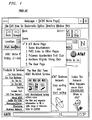
- FIG 1 shows a feature of a known browser that presents the user with a list of page titles he has already visited during the present session in Go list 11. If the user wishes to return to a page displayed earlier, he may select its title from the Go list 11 and the browser will display the previously viewed page. By viewing a series of pages according to a theme, the user may construct a viewing program, any page to which he may return later in the same session by selecting it from the Go list 11.
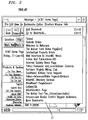
- FIG 2 shows a feature of a known browser that presents a list of bookmarks 21 saved by the user from the present or earlier browser sessions.
- a user can construct a viewing program by storing bookmarks for pages according to a theme, and may revisit any page in the program by selecting its title from the list of bookmarks 21. This is also entirely driven by the user, provides no information relating the successive pages, and is subject to the same problems of surfing.
- FIG 3 shows a page presenting links by which the user may select audio files that are played in real time through the user's browser.
- NPR Archives 31 Upon selecting NPR Archives 31, the user is presented with a series of story titles accompanied by short descriptions.
- the story titles are links which, when selected, will cause the user's browser to play the audio of a story formerly presented on National Public Radio. When the story is completed, no further audio is played until the user selects another link. In this way, a user may engage in audio surfing within this website, or to other websites. No information is provided that relates one story to another. Nor is there an introduction, conclusion, or summary of stories played at the end of the session.
- the present invention provides a system and method for touring a set of pages according to a theme. This is implemented with software that functions in conjunction with a known browser, which in turn operates on a computer which is stand-alone, intranetworked, or internetworked with other computers or hosts.
- the set of pages included in a tour are predetermined by the tour service provider.
- the tour is presided over by an automated tour guide that provides information about the tour, generally in an entertaining fashion.
- the information provided by the tour guide includes introductory remarks about the overall structure, theme, and content of the tour. It also includes information that augments and complements the information provided in the content of pages displayed on the tour.
- the guide smoothes the transition between pages displayed on the tour, provides instructions to the user for using the tour service, and queries the user regarding the user's preferences, personal data, and the like.
- the guide provides closing remarks, narrates a summary of the tour, directs the user to other resources, and the user is returned to the browser.
- the browser may display the tour service page so the user can select another tour.
- FIG 10 which shows the steps of carrying out an embodiment of a tour, shows this initial step as box 101.
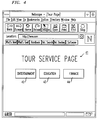
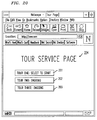
- FIG 4 shows an embodiment of a tour service page 41 that has graphics selectable by a user indicating the categories of Entertainment 42, Education 43, and Finance 44. Upon selecting the Education link 43, the user is presented with a new page 51 shown in FIG 5.
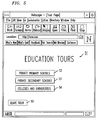
- the page 51 shown in FIG 5 shows a selection of tours.
- the tours are of Private Primary Schools 52, Private Secondary Schools 53, and Colleges and Universities 54.
- This page also contains a Leave Tour graphic 55 which, when selected by the user, returns the user to the tour service page shown in FIG 4.
- a user initiates a tour by selecting one of the tour options. This step is shown as box 102 in FIG 10.
- a tour is launched in conjunction with the user's browser.
- the software required to run the tour may be a part of the browser itself or may be downloaded from a tour service provider host by the user on demand.
- an introductory screen is displayed to the user, and introductory information is provided through the automated tour guide. This is shown as step 103 in FIG 10.
- FIG 6 shows a generic introductory screen 61 with an animated representation of an automated tour guide 62.
- the tour guide 62 appears as a bus driver, and the motif of a bus tour is presented in the rest of the screen 61.
- the tour guide 62 presents audio introductory remarks to the user that describe the tour and states that the tour will visit websites developed and operated by colleges and universities. As he is making these remarks, his mouth and facial expressions are animated.
- FIG 7 shows an embodiment of such a page 76.
- the guide 71 queries the user for additional information regarding the user's interests to further tailor the content or order of the tour. This query is supported by information about the contents of each of three options available to the user: colleges generally, ivy league universities only, or public universities only. Each of these options is supported by a corresponding graphic representing All Colleges 72, Ivy League Universities Only 73 and Public Universities 74. When selected, a graphic leads to a different subset of the tour specifically tailored to the declared interest of the user. Alternatively, the user may select the graphic 75 to leave the tour. In this embodiment, the user selects Ivy League Universities Only 74.
- FIG 10 this is shown as the user having selected Tour A.
- the ensuing portion of the flow chart has two branches.
- the branch on the left shows actions by the tour guide.
- the branch on the right shows pages displayed.
- the two are shown in a parallel fashion because the events in the left (tour guide) branch narrate and correspond to events in the right hand (page display) branch.
- the tour next shows 106 and narrates 105 the itinerary for the tour.
- the narration in the this embodiment is comprised of audio information regarding the number of ivy league schools, their locations, the average tuition rate, and minimum entry requirements.
- the itinerary includes a list of the principal pages to be displayed during the tour.
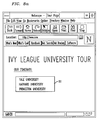
- the itinerary page is shown in FIG 8a.
- the itinerary 81 is presented as a textual list of school pages to be visited.
- the list may be comprised of at least one of graphic, video or audio components.
- the guide After the itinerary page is narrated, the next page is displayed 108 (FIG 10) and narrated 109.
- the guide provides transitionary remarks 107.
- these remarks pertain to the content of the upcoming page.
- these remarks address the location, cost and entry requirements of Yale University.
- These remarks may also concern the tour in general, such as where in the tour the upcoming page appears (e.g., stating this is the second page in a four page tour).
- the narration 109 accompanying the new page further explains its contents.
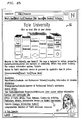
- FIG 8b An embodiment of this page, called the second page 82 (the first page is considered to be that on which is listed the itinerary)is shown in FIG 8b.
- the guide 83 appears and narrates the page in a way that complements and augments the content of the page 82.
- the guide 83 gives further background information about Yale University, including information about its environs, student body, and teaching staff.
- the guide 83 indicates that the tour will proceed to examine some highlights of campus and community life at Yale 81, a link presented on the page 82.
- the third page is then displayed 110 and narrated 111 (FIG 10).
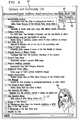
- This third page 91 may be loaded from the Yale University website host, or else loaded from the tour service provider host.
- the third page has links to a variety of topics, including, for example, administrative services 92 and dining at Yale 93.
- the guide queries 112 the user if he wants to continue to learn more about Yale, continue to another university on the tour, or explore independently. The user responds by selecting one option 113. If the user indicates he wants to move on to the next university, the tour proceeds to display pages on another ivy league school 114 and narrate them 117. If the user indicates he wants to tour more of Yale, the tour proceeds to display additional Yale pages 115. Otherwise, the user may elect to explore independently 116.
- the means for the user to select these options are shown in FIG 9.
- the user Upon receiving the query from the guide 94, the user is presented with selectable graphics to choose to learn more about Yale 95, move on to the next university 96, or explore 97.
- the user may temporarily leave the tour and select links on his own and display pages independently of the tour 116 (FIG 10). This may even involve leaving the Yale website.
- the explore feature is documented in FIG 11.
- the tour service Upon selecting the option to explore 1101, the tour service allows the user to select links independently 1102 as long as a predetermined amount of time has not expired 1103. When the predetermined amount of time has expired, the tour guide will announce that it is time to resume the tour, and will display the next page on the tour to the user, thus resuming the tour 1104.
- the tour is resumed by displaying a page on the next school 114.
- a closing sequence of pages 118 that are narrated 119 ends the tour, and the user is returned to the browser.
- the browser may display the tour service page, so the user may select another tour.
- the user selectable option to proceed vertically into greater depth into a single website on a tour, to proceed horizontally across websites on a tour, or to explore independently may be offered to the user at any time during a tour. Conversely, these options may not be offered to the user at all on a given tour.
- the tour may be dynamically reordered, and the presently unavailable page may be deferred until later in the tour, or else skipped entirely.
- the information provided by the tour guide is adapted to accommodate this contingency.
- FIG. 12 An embodiment of this process of reordering is shown in FIG 12. Unless the pages in the tour have been exhausted 126, after requesting page N 121, the tour service inquires whether the page is presently available for display 122. If the page is available, it is displayed 123, N is incremented 124, and the next page is requested 121. If the page is not presently available 122, N is incremented 124, and the next page is displayed 121. In this way, the unavailable page is skipped. If the number of pages has been exhausted, the tour displays the closing sequence 125.
- the tour service skips an unavailable page to a predetermined page that is not the next page.
- the tour service stores a list of skipped pages and again requests and attempts to display them later during the tour.
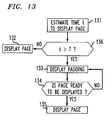
- the tour may provide predetermined padding material to keep the user entertained while the page is being loaded.
- This padding may take the form of audio remarks, video clips, graphics, textual material, animation, or any combination thereof.
- the tour service estimates the time t needed to display the page 131. If the time t does not exceed a predetermined time T 136, the page is displayed 132. If the time t does exceed a predetermined time T, padding is displayed 133. This padding may take the form of at least one of video, audio, graphic, textual or animated components generated from the guide, on a page, or both. The padding is stored in segments. After displaying a padding segment, the page is again checked to see if it is ready to be displayed 134. If it is not, another padding segment is displayed 133. If the page is ready to be displayed, it is displayed 135.
- a user may take a "snapshot" of a page as it is displayed. This snapshot is stored along with the URL of the page in a tour album which the user can take with him after the end of the tour.
- the tour album is comprised of at least one file, and is generally stored on the user's computer.
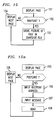
- FIG 14. An embodiment of the snapshot feature is shown in FIG 14.
- the guide 141 asks the user if he wants to take a snapshot of the presently displayed page 142, and the user is presented with a selectable graphic 143, labeled snapshot.
- a selectable graphic 143 labeled snapshot.
- Upon selecting the snapshot graphic 143 a picture of the page 142 and its URL is stored in the user's tour snapshot file.
- the next page is displayed without storing a picture or the URL of the presently displayed page.
- the tour service After displaying the page 151, the tour service accepts input from the user as to whether to store a picture and URL of the page in the snapshot file. If the user indicates he wants a snapshot, a picture and URL of the displayed page is stored 153 and the next page is displayed 154. If the user indicates he does not want a snapshot, the next page is displayed 154 without storing a picture or the URL of the presently displayed page.
- FIG 15a shows and embodiment of the postcard feature of the present invention.
- the user has the option to send a graphic of the presently displayed page to another user as a postcard.
- a user is presented with a postcard graphic 145 (FIG 14); 155 (FIG 15a). If the user selects the postcard graphic, he is asked to enter the e-mail address of the intended recipient 156. Then he is prompted to enter a brief message 157 to accompany the postcard. When he is done entering the message, the user sends the message 158. A graphic of the page along with the message is then sent to the recipient, and the tour is resumed 159.
- a user may be presented with an opportunity to make a purchase.
- An embodiment of a page 162 displaying a purchase opportunity is shown in FIG 16.
- the guide 161 tells the user about the product, which is displayed on the page 162.
- the user is presented with selectable graphics by which to make 162 or decline 163 the purchase.
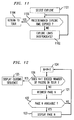
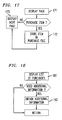
- FIG 17. An embodiment of the purchase process is shown in FIG 17.
- the item that may be purchased is displayed to the user on a page 171. If the user indicates he wants to make the purchase, a description of the item is stored in a purchase file 172, and the next page is displayed 173. If the user decides not to purchase the item, the next page on the tour is displayed 173 without storing the item in the purchase file.
- the user is presented with a list of his purchases 181 at the end of the tour (FIG 18). If additional information from the user is needed to complete the purchases, such as credit card numbers, shipping addresses, an electronic signature and the like, this information is obtained 182 from the user. If no further information is needed, the user is returned to the tour.
- the purchase list is often shown during the closing sequence 118 (FIG 10) of the tour.
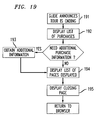
- FIG 19. An embodiment of a closing sequence 118 is shown in FIG 19.
- the closing sequence begins when the guide announces that the tour is coming to an end 191.
- the guide then presents a list of purchases made during the tour in accordance with the process shown in FIG 18. If additional information is needed to complete the purchases, it is obtained from the user 193.
- the user is next presented with a list of pages visited during the tour 194.
- This list includes all predetermined pages displayed to the user on the tour as well as any pages visited by the user during independent exploration.
- this list is an ordered list, arranged in the chronological order in which the pages were visited from the top of the list to the bottom.
- a closing page is presented 195, and the user is returned to the browser.
- the browser may display the tour service page where the user may select another tour.
- more than one user may join a tour in a multi-user tour.
- the users on a multi-user tour communicate with each other by means of at least one of voice, textual or video media.
- a user joins a tour by first displaying the tour service page 204.
- This tour service page lists a tour 201 that has yet to be initiated, and two tours 202 and 203 that are presently ongoing.
- the user selects an ongoing tour, he joins the tour at the page presently displayed on the tour.
- the new user may communicate with other users on the tour.
- a group of users may choose to participate in a tour from beginning to end together.
- the initiating user selects a tour that is not ongoing 201. This step is shown as 211 in FIG 21. The user is asked if he wants the tour to be a group tour 212. If the user does not want a group tour, the tour proceeds with the user as its sole participant 213. If the initiating user selects the group tour option, the initiating user is designated the tour proctor 214, named the tour 215, and specifies a window of time 216 during which others may join the tour.
- the graphic showing the tour indicates whether the tour is open 252 and anybody can join; or closed 253 and the tour proctor only wishes to proceed on the tour with members of a prearranged group.
- the graphic also contains a countdown timer 254.
- the countdown timer 254 displays how much time remains before the time to join the tour expires and the tour starts.
- Other users select the group tour 217 (FIG 21). As each additional user is added, the new users name is added to a tour participant list visible to the tour proctor 218.
- the tour proctor has the ability to remove users from the list 219.
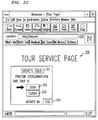
- FIG 23 An embodiment of the page 2305 presenting the tour participant list 2301 is shown in FIG 23.
- a user who has selected the tour may be removed by the tour proctor when the tour proctor selects the name of a participant 2302 on the list 2301 he wishes to remove, whereupon it is highlighted.
- the proctor selects the delete graphic 2303 and the highlighted user is precluded from participating in the tour.
- participants on a tour may be limited, for example to a group of close friends, or members of a club.
- the tour proctor initiates the tour by selecting the Go graphic 2304.
- the tour is automatically initiated when the time window for other users to join expires.
- the tour then proceeds essentially as a single user tour would, except that the several participants on the tour communicate with each other.
- one member of the tour may communicate this fact and his location to his peers. This is carried out by speaking into a microphone on the user's computer.
- the tour participants are essentially participating in the equivalent of a voice conference call, and each can hear what each of the others is saying throughout the tour.
- each user's voice is attenuated according to his distance from each user to a predetermined page on the tour. This distance is calculated as the least number of links that must be selected in order to display a page being viewed by a user from the predetermined page presently displayed on the tour.
- the voice of a user viewing a page five links away from the tour page will sound fainter to a tour participant viewing the tour page than the voice of a user viewing a page two links away. This conveys valuable information about how complicated it would be for one user to move to a different page being extolled by another user.
- the single user or multi-user tour may be used to explore existing pages on websites across the Internet, explore the offerings of a corporate intranet, or provide instructional services based upon curricula embodied in Hypertext files resident on a single computer.
- the tour service is provided by means of tour service software, which is comprised of instructions and data relating to the order, presentation, and content of the tour.
- the tour service software resides on a single stand-alone computer, at least one intranetworked computer, or at least one internetworked computer.
- the tour service software resides on a single stand-alone computer, users who participate in a tour must do so through the same computer on which the tour service page resides. That is, in this embodiment, users must use input/output devices directly connected to the stand-alone computer to participate in a tour. Examples of such input/output devices include a display screen, a keyboard, a mouse, a microphone, and a joystick.
- Tour service software may also be distributed on one or more intranetworked computers (i.e., a computer networked with other computers using a local or wide area network) or internetworked computers (i.e., a computer networked with other computers on other networks).
- tour service software occurs in two forms: primary and secondary.
- Primary tour service software comprises at least one tour service page; instructions and data on the overall organization and structure of the tour; and instructions and data that relate to the automated guide.
- Secondary tour service software mostly comprises data and subroutines that are needed to carry out the tour determined by the primary tour service software.
- a primary tour server is a computer having hypertext transport protocol (HTTP) server software and on which primary tour software resides.
- HTTP server software enables the primary server to exchange data with other computers that present data and accept user input through Hypertext pages.
- a computer on which secondary tour software resides is called a secondary tour server. There is generally one primary tour server, whereas there may be from none to many secondary tour servers.
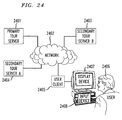
- FIG 24 An embodiment of such a distributed, networked tour service is shown in FIG 24.
- Primary tour service software resides on primary tour server 2401, which is connected through a network 2402 with secondary tour server A 2403, secondary tour server B 2404, and a user's computer 2405, known as a user client.
- the network 2302 may be an intranetwork, such as a local or wide area network, or an internetwork, such as the Internet.
- the user 2406 participates in the tour through input/output devices directly connected to the user client. In this embodiment, such devices include a display screen 2407 and a mouse 2408.
- the user requests the primary tour server to provide a tour service page, such as that shown as 41 in FIG 4.
- This request is sent to the primary tour server through the network in a manner that is known in the art.
- the primary tour server 2401 responds by transmitting tour service page Hypertext data through the network 2402 to the user client.
- the tour service page Hypertext data is displayed to the user by the browser through a display screen 2407.
- Step 108 (FIG 10) is carried out in accordance with the present invention by the client transmitting a request for page two to secondary server A, which then sends page two 82 (FIG 8b) to the user client 2403.
- a request for page three 91 (FIG 9) Hypertext data is sent from the user client to secondary tour server B 2404, using the secondary server B address as the location of tour page three that was previously sent to the user client from the primary server.
- the primary tour server 2401 is a computer on a local area network of computers located at educational institutions in New Haven, Connecticut, which is the location of Yale University.
- the user client 2403 is a computer in a New Haven high school guidance counseling office, and the user 2406 is a graduating senior in the process of selecting a college to attend.
- Secondary server A 2403 is a computer in the Yale University Office of Admissions, and has general information about Yale, including the Hypertext file that comprises page two, shown as 82 in FIG 8b.
- secondary server B 2404 is another computer in the Yale University Office of Student Life, which has specific information about campus and community life, including the Hypertext file that comprises page three, shown as 91 in FIG 9.
- the closing sequence is composed and transmitted to the user client exclusively by the primary tour server 2401.
- the primary tour server 2401 also prompts and accepts input from the user 2406 by querying the user 2406 and displaying possible responses in the form of selectable graphics on the user's display screen 2407.
- the user 2406 provides input by selecting a graphic that corresponds best to his response using his mouse 2408.
Landscapes
- Engineering & Computer Science (AREA)
- Theoretical Computer Science (AREA)
- Business, Economics & Management (AREA)
- Finance (AREA)
- Accounting & Taxation (AREA)
- Databases & Information Systems (AREA)
- Physics & Mathematics (AREA)
- General Physics & Mathematics (AREA)
- Data Mining & Analysis (AREA)
- General Engineering & Computer Science (AREA)
- Remote Sensing (AREA)
- Radar, Positioning & Navigation (AREA)
- Development Economics (AREA)
- Economics (AREA)
- Marketing (AREA)
- Strategic Management (AREA)
- General Business, Economics & Management (AREA)
- Information Transfer Between Computers (AREA)
Applications Claiming Priority (2)
| Application Number | Priority Date | Filing Date | Title |
|---|---|---|---|
| US672222 | 1991-03-20 | ||
| US08/672,222 US5760771A (en) | 1996-07-17 | 1996-07-17 | System and method for providing structured tours of hypertext files |
Publications (2)
| Publication Number | Publication Date |
|---|---|
| EP0820024A2 true EP0820024A2 (fr) | 1998-01-21 |
| EP0820024A3 EP0820024A3 (fr) | 1998-06-17 |
Family
ID=24697661
Family Applications (1)
| Application Number | Title | Priority Date | Filing Date |
|---|---|---|---|
| EP97112054A Withdrawn EP0820024A3 (fr) | 1996-07-17 | 1997-07-15 | Système et méthode permettant des tours structurés de fichiers hypertextes |
Country Status (3)
| Country | Link |
|---|---|
| US (1) | US5760771A (fr) |
| EP (1) | EP0820024A3 (fr) |
| CA (1) | CA2208874C (fr) |
Cited By (7)
| Publication number | Priority date | Publication date | Assignee | Title |
|---|---|---|---|---|
| WO1999041683A1 (fr) * | 1998-02-17 | 1999-08-19 | Intergraph Corporation | Appareil et procede de transmission de documents entre un ordinateur serveur et un ordinateur client |
| EP0957437A3 (fr) * | 1998-05-15 | 2000-08-23 | International Business Machines Corporation | Tours de la toile Internet personalisés dynamiquement |
| EP1079287A1 (fr) * | 1999-08-24 | 2001-02-28 | SEW-EURODRIVE GMBH & CO. | Méthode de diagnostic en ligne pour un appareil de diagnostic et appareil de diagnostic |
| WO2002007004A1 (fr) * | 2000-07-14 | 2002-01-24 | Spoton, Inc. | Procede et systeme servant a acceder a des emplacements de reseau |
| WO2001016791A3 (fr) * | 1999-08-30 | 2002-06-27 | Datango Ag | Procede et dispositif pour la reproduction automatique d'ensembles de donnees electroniques |
| WO2002003247A3 (fr) * | 2000-06-30 | 2004-06-10 | Gate42 Technologies Inc | Systeme et procede se rapportant a des sequences multimedia a guidage |
| EP1365330A4 (fr) * | 2001-02-28 | 2005-05-18 | Sony Computer Entertainment Inc | Dispositif de fourniture d'informations, dispositif de traitement d'informations, procede de fourniture d'informations, procede de traitement d'informations, programme et support enregistre de ce programme |
Families Citing this family (149)
| Publication number | Priority date | Publication date | Assignee | Title |
|---|---|---|---|---|
| US5832448A (en) | 1996-10-16 | 1998-11-03 | Health Hero Network | Multiple patient monitoring system for proactive health management |
| US7624028B1 (en) | 1992-11-17 | 2009-11-24 | Health Hero Network, Inc. | Remote health monitoring and maintenance system |
| US5307263A (en) | 1992-11-17 | 1994-04-26 | Raya Systems, Inc. | Modular microprocessor-based health monitoring system |
| US9215979B2 (en) | 1992-11-17 | 2015-12-22 | Robert Bosch Healthcare Systems, Inc. | Multi-user remote health monitoring system |
| US8027809B2 (en) | 1992-11-17 | 2011-09-27 | Health Hero Network, Inc. | Home power management system |
| US5951300A (en) | 1997-03-10 | 1999-09-14 | Health Hero Network | Online system and method for providing composite entertainment and health information |
| US6968375B1 (en) | 1997-03-28 | 2005-11-22 | Health Hero Network, Inc. | Networked system for interactive communication and remote monitoring of individuals |
| US20030212579A1 (en) * | 2002-05-08 | 2003-11-13 | Brown Stephen J. | Remote health management system |
| US20010011224A1 (en) | 1995-06-07 | 2001-08-02 | Stephen James Brown | Modular microprocessor-based health monitoring system |
| WO2001037174A1 (fr) | 1992-11-17 | 2001-05-25 | Health Hero Network, Inc. | Procede et systeme pour ameliorer l'observance d'un programme dietetique ou de tout autre regime medical |
| US8095340B2 (en) | 1992-11-17 | 2012-01-10 | Health Hero Network, Inc. | Home power management system |
| US5956501A (en) | 1997-01-10 | 1999-09-21 | Health Hero Network, Inc. | Disease simulation system and method |
| US7613590B2 (en) | 1992-11-17 | 2009-11-03 | Health Hero Network, Inc. | Modular microprocessor-based power tool system |
| US8626521B2 (en) * | 1997-11-21 | 2014-01-07 | Robert Bosch Healthcare Systems, Inc. | Public health surveillance system |
| US6196970B1 (en) | 1999-03-22 | 2001-03-06 | Stephen J. Brown | Research data collection and analysis |
| US6330426B2 (en) | 1994-05-23 | 2001-12-11 | Stephen J. Brown | System and method for remote education using a memory card |
| US8078431B2 (en) | 1992-11-17 | 2011-12-13 | Health Hero Network, Inc. | Home power management system |
| US7970620B2 (en) * | 1992-11-17 | 2011-06-28 | Health Hero Network, Inc. | Multi-user remote health monitoring system with biometrics support |
| US8078407B1 (en) | 1997-03-28 | 2011-12-13 | Health Hero Network, Inc. | System and method for identifying disease-influencing genes |
| US7849393B1 (en) * | 1992-12-09 | 2010-12-07 | Discovery Communications, Inc. | Electronic book connection to world watch live |
| US7509270B1 (en) | 1992-12-09 | 2009-03-24 | Discovery Communications, Inc. | Electronic Book having electronic commerce features |
| US7835989B1 (en) | 1992-12-09 | 2010-11-16 | Discovery Communications, Inc. | Electronic book alternative delivery systems |
| US8073695B1 (en) | 1992-12-09 | 2011-12-06 | Adrea, LLC | Electronic book with voice emulation features |
| US7861166B1 (en) | 1993-12-02 | 2010-12-28 | Discovery Patent Holding, Llc | Resizing document pages to fit available hardware screens |
| US7865567B1 (en) | 1993-12-02 | 2011-01-04 | Discovery Patent Holdings, Llc | Virtual on-demand electronic book |
| US9053640B1 (en) | 1993-12-02 | 2015-06-09 | Adrea, LLC | Interactive electronic book |
| US8095949B1 (en) | 1993-12-02 | 2012-01-10 | Adrea, LLC | Electronic book with restricted access features |
| US8015033B2 (en) * | 1994-04-26 | 2011-09-06 | Health Hero Network, Inc. | Treatment regimen compliance and efficacy with feedback |
| TW250616B (en) * | 1994-11-07 | 1995-07-01 | Discovery Communicat Inc | Electronic book selection and delivery system |
| US5774670A (en) * | 1995-10-06 | 1998-06-30 | Netscape Communications Corporation | Persistent client state in a hypertext transfer protocol based client-server system |
| US7305348B1 (en) | 1996-02-20 | 2007-12-04 | Health Hero Network, Inc. | Aggregating and pooling health related information in a communication system with feedback |
| US8229844B2 (en) | 1996-06-05 | 2012-07-24 | Fraud Control Systems.Com Corporation | Method of billing a purchase made over a computer network |
| US20030195848A1 (en) | 1996-06-05 | 2003-10-16 | David Felger | Method of billing a purchase made over a computer network |
| US7555458B1 (en) | 1996-06-05 | 2009-06-30 | Fraud Control System.Com Corporation | Method of billing a purchase made over a computer network |
| US5943410A (en) * | 1996-08-02 | 1999-08-24 | Siemens Information And Communications Networks, Inc. | Automated calling of multiple numbers using directory assistance |
| US7155451B1 (en) * | 1996-09-03 | 2006-12-26 | Torres Damon C | Automated browsing system for publishers and users on networks serving internet and remote devices |
| US6584498B2 (en) | 1996-09-13 | 2003-06-24 | Planet Web, Inc. | Dynamic preloading of web pages |
| US7058892B1 (en) | 1996-11-08 | 2006-06-06 | America Online, Inc. | Displaying content from multiple servers |
| US5796393A (en) | 1996-11-08 | 1998-08-18 | Compuserve Incorporated | System for intergrating an on-line service community with a foreign service |
| US20060195595A1 (en) * | 2003-12-19 | 2006-08-31 | Mendez Daniel J | System and method for globally and securely accessing unified information in a computer network |
| US7590549B2 (en) | 1996-12-23 | 2009-09-15 | Health Hero Network, Inc. | Network media access control system for encouraging patient compliance with a treatment plan |
| US6032119A (en) | 1997-01-16 | 2000-02-29 | Health Hero Network, Inc. | Personalized display of health information |
| US6091930A (en) * | 1997-03-04 | 2000-07-18 | Case Western Reserve University | Customizable interactive textbook |
| US6452614B1 (en) * | 1997-04-14 | 2002-09-17 | Siements Information And Communication Networks, Inc. | Organizing a user interface using different personae |
| US5880727A (en) * | 1997-04-15 | 1999-03-09 | Xerox Corporation | Reprographic system for arranging presets locations in a multi-level user interface |
| US7155677B2 (en) * | 1997-04-25 | 2006-12-26 | Diane Kessenich | Portal for supplying supplementary information for printed books |
| US6034680A (en) * | 1997-04-25 | 2000-03-07 | Foundation For Concepts In Education, Inc. | Supplying supplementary information for printed books |
| US7251784B2 (en) * | 1997-04-25 | 2007-07-31 | Winslowhouse International, Inc. | Supplying supplementary information for printed books |
| US6339780B1 (en) * | 1997-05-06 | 2002-01-15 | Microsoft Corporation | Loading status in a hypermedia browser having a limited available display area |
| US6086377A (en) * | 1997-05-09 | 2000-07-11 | Nortel Networks Corporation | System and method for product and service configuration |
| US5933140A (en) * | 1997-06-30 | 1999-08-03 | Sun Microsystems, Inc. | Child window containing context-based help and a miniaturized web page |
| US6195097B1 (en) | 1997-07-08 | 2001-02-27 | International Business Machines Corporation | Web-based DCE management |
| CN1273655A (zh) * | 1997-09-02 | 2000-11-15 | 戴蒙·C·托里斯 | 自动内容调度程序及显示程序 |
| US6023701A (en) * | 1997-09-25 | 2000-02-08 | International Business Machines Corporation | Skeleton page retrieval mode for web navigation |
| US6600496B1 (en) * | 1997-09-26 | 2003-07-29 | Sun Microsystems, Inc. | Interactive graphical user interface for television set-top box |
| US5940075A (en) * | 1997-09-30 | 1999-08-17 | Unisys Corp. | Method for extending the hypertext markup language (HTML) to support enterprise application data binding |
| US6594682B2 (en) * | 1997-10-28 | 2003-07-15 | Microsoft Corporation | Client-side system for scheduling delivery of web content and locally managing the web content |
| US6195679B1 (en) * | 1998-01-06 | 2001-02-27 | Netscape Communications Corporation | Browsing session recording playback and editing system for generating user defined paths and allowing users to mark the priority of items in the paths |
| US6456303B1 (en) | 1998-02-09 | 2002-09-24 | Microsoft Corporation | Method and system for access of online information |
| US6421065B1 (en) * | 1998-02-09 | 2002-07-16 | Microsoft Corporation | Access of online information featuring automatic hide/show function |
| US6819345B1 (en) * | 1998-02-17 | 2004-11-16 | Microsoft Corporation | Managing position and size for a desktop component |
| JP2000056895A (ja) * | 1998-08-11 | 2000-02-25 | Fujitsu Ltd | データ保存方法とデータ保存制御装置およびそのための記録媒体 |
| US8521546B2 (en) | 1998-09-25 | 2013-08-27 | Health Hero Network | Dynamic modeling and scoring risk assessment |
| US6772139B1 (en) * | 1998-10-05 | 2004-08-03 | Smith, Iii Julius O. | Method and apparatus for facilitating use of hypertext links on the world wide web |
| US6145000A (en) | 1998-10-06 | 2000-11-07 | Ameritech Corporation | System and method for creating and navigating a linear hypermedia resource program |
| US6252594B1 (en) | 1998-12-11 | 2001-06-26 | International Business Machines Corporation | Method and system for aiding a user in scrolling through a document using animation, voice cues and a dockable scroll bar |
| JP2000207328A (ja) | 1999-01-11 | 2000-07-28 | Matsushita Electric Ind Co Ltd | エ―ジェントプレゼンテ―ション装置及びその方法 |
| US6993531B1 (en) | 1999-02-04 | 2006-01-31 | Naas Aaron J | System and method of routine navigation |
| US6224387B1 (en) * | 1999-02-11 | 2001-05-01 | Michael J. Jones | Pictorial tour process and applications thereof |
| US6519628B1 (en) | 1999-03-24 | 2003-02-11 | Live Person, Inc. | Method and system for customer service using a packet switched network |
| US9811237B2 (en) * | 1999-04-06 | 2017-11-07 | Iii Holdings 2, Llc | Visual navigation of virtual environments through logical processes |
| US20080201168A1 (en) * | 1999-05-03 | 2008-08-21 | Brown Stephen J | Treatment regimen compliance and efficacy with feedback |
| US8438487B1 (en) * | 1999-05-24 | 2013-05-07 | Catherine Lin-Hendel | Method and system for one-click navigation and browsing of electronic media and their category structure as well as tracking the navigation and browsing thereof |
| US6404441B1 (en) * | 1999-07-16 | 2002-06-11 | Jet Software, Inc. | System for creating media presentations of computer software application programs |
| US8296228B1 (en) * | 1999-11-22 | 2012-10-23 | Harry Thomas Kloor | Dual transaction authorization system and method |
| US6833847B1 (en) * | 1999-12-21 | 2004-12-21 | International Business Machines Corporation | Visual wizard launch pad |
| US6507349B1 (en) * | 2000-01-06 | 2003-01-14 | Becomm Corporation | Direct manipulation of displayed content |
| US6725238B1 (en) * | 2000-01-06 | 2004-04-20 | International Business Machines Corporation | Method, system, and program for using a remotely accessed desktop interface and network drive to access a shared file system |
| US9246975B2 (en) | 2000-03-17 | 2016-01-26 | Facebook, Inc. | State change alerts mechanism |
| US7624172B1 (en) | 2000-03-17 | 2009-11-24 | Aol Llc | State change alerts mechanism |
| US6683633B2 (en) | 2000-03-20 | 2004-01-27 | Incontext Enterprises, Inc. | Method and system for accessing information |
| AU2001289064A1 (en) * | 2000-09-15 | 2002-03-26 | Learnframe, Inc. | Extensible software development using asynchronous messaging |
| US6788316B1 (en) | 2000-09-18 | 2004-09-07 | International Business Machines Corporation | Method of designating multiple hypertext links to be sequentially viewed |
| US8868448B2 (en) | 2000-10-26 | 2014-10-21 | Liveperson, Inc. | Systems and methods to facilitate selling of products and services |
| US9819561B2 (en) | 2000-10-26 | 2017-11-14 | Liveperson, Inc. | System and methods for facilitating object assignments |
| US7349988B1 (en) * | 2000-11-16 | 2008-03-25 | International Business Machines Corporation | Linking a user selected sequence of received world wide web documents into a stored document string available to the user at receiving web station |
| US20020107002A1 (en) * | 2001-02-08 | 2002-08-08 | David Duncan | Personalised alerting and response system and method |
| US20030002072A1 (en) * | 2001-06-29 | 2003-01-02 | Berkema Alan C. | Print by reference communication methods for portable wireless device printing |
| US20030192688A1 (en) * | 2002-04-10 | 2003-10-16 | Thomson Michael A. | Tubing saver rotator and method for using same |
| US7370276B2 (en) * | 2002-05-17 | 2008-05-06 | Sap Aktiengesellschaft | Interface for collecting user preferences |
| US6687485B2 (en) | 2002-05-21 | 2004-02-03 | Thinksmark Performance Systems Llc | System and method for providing help/training content for a web-based application |
| AU2003298622A1 (en) * | 2002-11-12 | 2004-06-03 | Anthony J. Guerra | Educational institution selection system and method |
| CA2506585A1 (fr) | 2002-11-18 | 2004-06-03 | Valerie Kucharewski | Listes de personnes |
| US8965964B1 (en) | 2002-11-18 | 2015-02-24 | Facebook, Inc. | Managing forwarded electronic messages |
| US8005919B2 (en) | 2002-11-18 | 2011-08-23 | Aol Inc. | Host-based intelligent results related to a character stream |
| US7428580B2 (en) | 2003-11-26 | 2008-09-23 | Aol Llc | Electronic message forwarding |
| US7590696B1 (en) | 2002-11-18 | 2009-09-15 | Aol Llc | Enhanced buddy list using mobile device identifiers |
| US8701014B1 (en) | 2002-11-18 | 2014-04-15 | Facebook, Inc. | Account linking |
| US7899862B2 (en) | 2002-11-18 | 2011-03-01 | Aol Inc. | Dynamic identification of other users to an online user |
| US7640306B2 (en) | 2002-11-18 | 2009-12-29 | Aol Llc | Reconfiguring an electronic message to effect an enhanced notification |
| US8122137B2 (en) | 2002-11-18 | 2012-02-21 | Aol Inc. | Dynamic location of a subordinate user |
| US8302012B2 (en) * | 2002-12-02 | 2012-10-30 | Sap Aktiengesellschaft | Providing status of portal content |
| US8028237B2 (en) * | 2002-12-02 | 2011-09-27 | Sap Aktiengesellschaft | Portal-based desktop |
| US7603417B2 (en) | 2003-03-26 | 2009-10-13 | Aol Llc | Identifying and using identities deemed to be known to a user |
| US7260480B1 (en) | 2003-04-07 | 2007-08-21 | Health Hero Network, Inc. | Method and system for integrating feedback loops in medical knowledge development and healthcare management |
| US7399276B1 (en) | 2003-05-08 | 2008-07-15 | Health Hero Network, Inc. | Remote health monitoring system |
| AU2004246432A1 (en) * | 2003-05-14 | 2004-12-16 | Gautam Dharamdas Goradia | Interactive system for building, organising, and sharing one's own databank of questions and answers in a variety of questioning formats, on any subject in one or more languages |
| US7653693B2 (en) | 2003-09-05 | 2010-01-26 | Aol Llc | Method and system for capturing instant messages |
| US7669213B1 (en) | 2004-10-28 | 2010-02-23 | Aol Llc | Dynamic identification of other viewers of a television program to an online viewer |
| US8131736B1 (en) | 2005-03-01 | 2012-03-06 | Google Inc. | System and method for navigating documents |
| US20060259239A1 (en) * | 2005-04-27 | 2006-11-16 | Guy Nouri | System and method for providing multimedia tours |
| US8521763B1 (en) * | 2005-09-09 | 2013-08-27 | Minnesota Public Radio | Computer-based system and method for processing data for a journalism organization |
| US9432468B2 (en) | 2005-09-14 | 2016-08-30 | Liveperson, Inc. | System and method for design and dynamic generation of a web page |
| US8738732B2 (en) | 2005-09-14 | 2014-05-27 | Liveperson, Inc. | System and method for performing follow up based on user interactions |
| US20080086696A1 (en) * | 2006-03-03 | 2008-04-10 | Cadcorporation.Com Inc. | System and Method for Using Virtual Environments |
| US20070260631A1 (en) * | 2006-03-09 | 2007-11-08 | Microsoft Corporation | Embedded decision support |
| US20080098304A1 (en) * | 2006-11-29 | 2008-04-24 | Coutts Daryl D | Methods and systems for prompting users of computing devices |
| US20080091542A1 (en) * | 2006-11-29 | 2008-04-17 | Coutts Daryl D | Advertising intermediation server |
| KR20080073480A (ko) * | 2007-02-06 | 2008-08-11 | 삼성전자주식회사 | 플랫케이블 및 이를 갖는 전자장치 |
| US9588783B1 (en) * | 2007-05-24 | 2017-03-07 | Avaya Inc. | Method and apparatus for referencing between three dimensional computer-generated virtual environments |
| USD620020S1 (en) * | 2007-06-23 | 2010-07-20 | Apple Inc. | Graphical user interface for a display screen or portion thereof |
| US20090055201A1 (en) * | 2007-08-21 | 2009-02-26 | Washington Jamaal L | Virtual Reality Location Information System |
| US8799200B2 (en) | 2008-07-25 | 2014-08-05 | Liveperson, Inc. | Method and system for creating a predictive model for targeting webpage to a surfer |
| US8762313B2 (en) | 2008-07-25 | 2014-06-24 | Liveperson, Inc. | Method and system for creating a predictive model for targeting web-page to a surfer |
| US8805844B2 (en) | 2008-08-04 | 2014-08-12 | Liveperson, Inc. | Expert search |
| US9892417B2 (en) | 2008-10-29 | 2018-02-13 | Liveperson, Inc. | System and method for applying tracing tools for network locations |
| USD607897S1 (en) * | 2008-11-24 | 2010-01-12 | Microsoft Corporation | Icon for a portion of a display screen |
| US9880619B2 (en) | 2010-02-23 | 2018-01-30 | Muy Interactive Ltd. | Virtual reality system with a finger-wearable control |
| CA2828222A1 (fr) * | 2010-02-23 | 2011-09-01 | Muv Interactive Ltd. | Systeme destine a projeter un contenu sur une surface d'affichage dont la taille, la forme et l'emplacement/l'orientation peuvent etre parametres par un utilisateur, et appareil et procedes utiles associes a celui-ci |
| JP5941903B2 (ja) | 2010-04-07 | 2016-06-29 | ライブパーソン, インコーポレイテッド | カスタマイズされたウェブコンテンツおよびアプリケーションを動的にイネーブルにするためのシステムおよび方法 |
| USD666209S1 (en) | 2010-06-05 | 2012-08-28 | Apple Inc. | Display screen or portion thereof with graphical user interface |
| US9350598B2 (en) | 2010-12-14 | 2016-05-24 | Liveperson, Inc. | Authentication of service requests using a communications initiation feature |
| US8918465B2 (en) | 2010-12-14 | 2014-12-23 | Liveperson, Inc. | Authentication of service requests initiated from a social networking site |
| US8943002B2 (en) | 2012-02-10 | 2015-01-27 | Liveperson, Inc. | Analytics driven engagement |
| US8805941B2 (en) | 2012-03-06 | 2014-08-12 | Liveperson, Inc. | Occasionally-connected computing interface |
| US9563336B2 (en) | 2012-04-26 | 2017-02-07 | Liveperson, Inc. | Dynamic user interface customization |
| US9672196B2 (en) | 2012-05-15 | 2017-06-06 | Liveperson, Inc. | Methods and systems for presenting specialized content using campaign metrics |
| US20180150921A1 (en) | 2012-07-26 | 2018-05-31 | Nearby Coolleges LLC | Travel planning application resulting in efficient customized grouping and coordination of selected locations and destinations based on the combination of user selected important criteria, radius searching, and real time simultaneous multi-source data gathering, analysis, and derivation executed by and presented on a computer and/or smart device for user preference |
| US9265458B2 (en) | 2012-12-04 | 2016-02-23 | Sync-Think, Inc. | Application of smooth pursuit cognitive testing paradigms to clinical drug development |
| US9817632B2 (en) * | 2013-02-19 | 2017-11-14 | Microsoft Technology Licensing, Llc | Custom narration of a control list via data binding |
| US9380976B2 (en) | 2013-03-11 | 2016-07-05 | Sync-Think, Inc. | Optical neuroinformatics |
| US11386442B2 (en) | 2014-03-31 | 2022-07-12 | Liveperson, Inc. | Online behavioral predictor |
| JP6762963B2 (ja) | 2015-06-02 | 2020-09-30 | ライブパーソン, インコーポレイテッド | 一貫性重み付けおよびルーティング規則に基づく動的通信ルーティング |
| USD778941S1 (en) | 2016-01-08 | 2017-02-14 | Apple Inc. | Display screen or portion thereof with graphical user interface |
| CN109844717B (zh) | 2016-08-14 | 2023-05-23 | 利维帕尔森有限公司 | 用于移动应用程序的实时远程控制的系统和方法 |
| USD844637S1 (en) | 2018-01-17 | 2019-04-02 | Apple Inc. | Electronic device with animated graphical user interface |
| US11940282B2 (en) * | 2020-10-12 | 2024-03-26 | Naver Corporation | Apparatus and method for hybrid navigation of a pedestrian tour |
| USD1117313S1 (en) * | 2024-09-20 | 2026-03-10 | Signode Industrial Group Llc | Display screen or a portion thereof with a graphical user interface |
| USD1117312S1 (en) * | 2024-09-20 | 2026-03-10 | Signode Industrial Group Llc | Display screen or a portion thereof with a graphical user interface |
Family Cites Families (10)
| Publication number | Priority date | Publication date | Assignee | Title |
|---|---|---|---|---|
| US5408655A (en) * | 1989-02-27 | 1995-04-18 | Apple Computer, Inc. | User interface system and method for traversing a database |
| US5353219A (en) * | 1989-06-28 | 1994-10-04 | Management Information Support, Inc. | Suggestive selling in a customer self-ordering system |
| US5442759A (en) * | 1992-03-26 | 1995-08-15 | International Business Machines Corporation | Interactive online tutorial system with user assistance function for software products |
| US5310349A (en) * | 1992-04-30 | 1994-05-10 | Jostens Learning Corporation | Instructional management system |
| US5388993A (en) * | 1992-07-15 | 1995-02-14 | International Business Machines Corporation | Method of and system for demonstrating a computer program |
| US5539869A (en) * | 1992-09-28 | 1996-07-23 | Ford Motor Company | Method and system for processing and presenting on-line, multimedia information in a tree structure |
| US5528735A (en) * | 1993-03-23 | 1996-06-18 | Silicon Graphics Inc. | Method and apparatus for displaying data within a three-dimensional information landscape |
| US5422809A (en) * | 1993-08-25 | 1995-06-06 | Touch Screen Media, Inc. | Method and apparatus for providing travel destination information and making travel reservations |
| CA2140850C (fr) * | 1994-02-24 | 1999-09-21 | Howard Paul Katseff | Systeme en reseau pour l'affichage de presentations multimedia |
| US5607356A (en) * | 1995-05-10 | 1997-03-04 | Atari Corporation | Interactive game film |
-
1996
- 1996-07-17 US US08/672,222 patent/US5760771A/en not_active Expired - Lifetime
-
1997
- 1997-06-24 CA CA002208874A patent/CA2208874C/fr not_active Expired - Fee Related
- 1997-07-15 EP EP97112054A patent/EP0820024A3/fr not_active Withdrawn
Cited By (9)
| Publication number | Priority date | Publication date | Assignee | Title |
|---|---|---|---|---|
| WO1999041683A1 (fr) * | 1998-02-17 | 1999-08-19 | Intergraph Corporation | Appareil et procede de transmission de documents entre un ordinateur serveur et un ordinateur client |
| US6615233B1 (en) | 1998-02-17 | 2003-09-02 | Intergraph Hardware Technologies Company | Apparatus and method for transmitting documents between a server computer and a client computer |
| EP0957437A3 (fr) * | 1998-05-15 | 2000-08-23 | International Business Machines Corporation | Tours de la toile Internet personalisés dynamiquement |
| US6572662B2 (en) | 1998-05-15 | 2003-06-03 | International Business Machines Corporation | Dynamic customized web tours |
| EP1079287A1 (fr) * | 1999-08-24 | 2001-02-28 | SEW-EURODRIVE GMBH & CO. | Méthode de diagnostic en ligne pour un appareil de diagnostic et appareil de diagnostic |
| WO2001016791A3 (fr) * | 1999-08-30 | 2002-06-27 | Datango Ag | Procede et dispositif pour la reproduction automatique d'ensembles de donnees electroniques |
| WO2002003247A3 (fr) * | 2000-06-30 | 2004-06-10 | Gate42 Technologies Inc | Systeme et procede se rapportant a des sequences multimedia a guidage |
| WO2002007004A1 (fr) * | 2000-07-14 | 2002-01-24 | Spoton, Inc. | Procede et systeme servant a acceder a des emplacements de reseau |
| EP1365330A4 (fr) * | 2001-02-28 | 2005-05-18 | Sony Computer Entertainment Inc | Dispositif de fourniture d'informations, dispositif de traitement d'informations, procede de fourniture d'informations, procede de traitement d'informations, programme et support enregistre de ce programme |
Also Published As
| Publication number | Publication date |
|---|---|
| CA2208874A1 (fr) | 1998-01-17 |
| EP0820024A3 (fr) | 1998-06-17 |
| US5760771A (en) | 1998-06-02 |
| CA2208874C (fr) | 2001-05-29 |
Similar Documents
| Publication | Publication Date | Title |
|---|---|---|
| US5760771A (en) | System and method for providing structured tours of hypertext files | |
| US6767212B2 (en) | Network-assisted behavior management system | |
| Howard | Speaking theatre/doing pedagogy: re‐visiting theatre of the oppressed | |
| CA2349887C (fr) | Classes virtuelles multimedia interactives exigeant une faible largeur de bande de reseau en ligne | |
| O'Brien et al. | What is user engagement? A conceptual framework for defining user engagement with technology | |
| Gray | The Internet in lifelong learning: liberation or alienation? | |
| Ramsay et al. | WAP usability deja vu: 1994 all over again | |
| US20010032244A1 (en) | Internet based help system | |
| US20070162933A1 (en) | Dynamicaly mixing and streaming media files | |
| JP2001524238A (ja) | 印刷本用の追補情報提供方法及び装置 | |
| WO2002035372A1 (fr) | Procede et systeme permettant de generer et presenter de maniere interactive un cursus d'apprentissage specialise sur un reseau informatique | |
| JP2006518892A (ja) | 個人広告のための音声及びビデオによるグリーティングシステム及びその方法 | |
| US20060204943A1 (en) | VOIP e-learning system | |
| JP2004054533A (ja) | 案内情報提供システム、案内情報提供方法、案内情報提供プログラム及びそのプログラムを記録した記録媒体 | |
| WO2000065773A2 (fr) | Systeme de portail et procede associe | |
| Gore Jr et al. | Information technology for career assessment on the Internet | |
| US20020018075A1 (en) | Computer-based educational system | |
| Cooper et al. | Harnessing the power of the Internet to improve sexual relationships | |
| JP2008532141A (ja) | 複数の参加者の間の体系的リアルタイム会話を可能にする方法及びシステム | |
| US20020133551A1 (en) | Information presentation system, information processing system, method for providing information, method for processing information, and data storage | |
| JP2002117153A (ja) | 遠隔講演システム | |
| Ebersole | Adolescents' use of the World-Wide Web in ten public schools: A uses and gratifications approach | |
| KR20010057155A (ko) | 인터넷에서의 저작물 전시방법 | |
| Trott | Advising readers online: a look at internet-based reading recommendation services | |
| US7197532B2 (en) | Electronic leaflet distribution/browsing method and electronic leaflet system |
Legal Events
| Date | Code | Title | Description |
|---|---|---|---|
| PUAI | Public reference made under article 153(3) epc to a published international application that has entered the european phase |
Free format text: ORIGINAL CODE: 0009012 |
|
| AK | Designated contracting states |
Kind code of ref document: A2 Designated state(s): DE FR GB IT |
|
| AX | Request for extension of the european patent |
Free format text: AL;LT;LV;RO;SI |
|
| PUAL | Search report despatched |
Free format text: ORIGINAL CODE: 0009013 |
|
| AK | Designated contracting states |
Kind code of ref document: A3 Designated state(s): AT BE CH DE DK ES FI FR GB GR IE IT LI LU MC NL PT SE |
|
| AX | Request for extension of the european patent |
Free format text: AL;LT;LV;RO;SI |
|
| AKX | Designation fees paid |
Free format text: DE FR GB IT |
|
| RBV | Designated contracting states (corrected) |
Designated state(s): DE FR GB IT |
|
| 17P | Request for examination filed |
Effective date: 19981211 |
|
| 17Q | First examination report despatched |
Effective date: 20000809 |
|
| STAA | Information on the status of an ep patent application or granted ep patent |
Free format text: STATUS: THE APPLICATION IS DEEMED TO BE WITHDRAWN |
|
| 18D | Application deemed to be withdrawn |
Effective date: 20011012 |