EP0821309A1 - Processeur d'informations, procede de modification de noms de fichiers, et support d'enregistrement sur lequel un programme de changement de nom de fichier est enregistre - Google Patents
Processeur d'informations, procede de modification de noms de fichiers, et support d'enregistrement sur lequel un programme de changement de nom de fichier est enregistre Download PDFInfo
- Publication number
- EP0821309A1 EP0821309A1 EP97902622A EP97902622A EP0821309A1 EP 0821309 A1 EP0821309 A1 EP 0821309A1 EP 97902622 A EP97902622 A EP 97902622A EP 97902622 A EP97902622 A EP 97902622A EP 0821309 A1 EP0821309 A1 EP 0821309A1
- Authority
- EP
- European Patent Office
- Prior art keywords
- file name
- operating system
- file
- name
- recording medium
- Prior art date
- Legal status (The legal status is an assumption and is not a legal conclusion. Google has not performed a legal analysis and makes no representation as to the accuracy of the status listed.)
- Withdrawn
Links
Images










Classifications
-
- G—PHYSICS
- G06—COMPUTING OR CALCULATING; COUNTING
- G06F—ELECTRIC DIGITAL DATA PROCESSING
- G06F16/00—Information retrieval; Database structures therefor; File system structures therefor
- G06F16/10—File systems; File servers
- G06F16/16—File or folder operations, e.g. details of user interfaces specifically adapted to file systems
- G06F16/164—File meta data generation
- G06F16/166—File name conversion
-
- Y—GENERAL TAGGING OF NEW TECHNOLOGICAL DEVELOPMENTS; GENERAL TAGGING OF CROSS-SECTIONAL TECHNOLOGIES SPANNING OVER SEVERAL SECTIONS OF THE IPC; TECHNICAL SUBJECTS COVERED BY FORMER USPC CROSS-REFERENCE ART COLLECTIONS [XRACs] AND DIGESTS
- Y10—TECHNICAL SUBJECTS COVERED BY FORMER USPC
- Y10S—TECHNICAL SUBJECTS COVERED BY FORMER USPC CROSS-REFERENCE ART COLLECTIONS [XRACs] AND DIGESTS
- Y10S707/00—Data processing: database and file management or data structures
- Y10S707/99931—Database or file accessing
Definitions
- the present invention relates to an information processor, a method of information processing, and a recording medium recorded a file name conversion program thereon, which are suitably applied to have file names recorded, for example, on a write-once disc recording medium accessed by a plurality of operation system.
- OS operation systems
- OS operation systems
- OS operation systems
- OS operation systems
- MS-DOS Microsoft Disk Operating system
- Windows trademark of Microsoft
- Unix trademark
- System 7.5 of Macintosh allows to designate a file name up to a maximum of 31 characters
- MS-DOS of Microsoft only allows to designate a file name up to a maximum of eight characters and additional three characters of extension.
- the conventional file management method individually manages files created on a plurality of registered different operating systems without considering differences in the specifications among these operating systems, so that the user must take part in the file management.
- a problem arises that the user cannot create a file commonly usable among a plurality of operating systems unless he knows the difference in the specifications of the respective operating systems.
- the respective operating systems may set identical attributes to files but in a different management method. Thus, even if a write to a file is disabled on a certain operating system, a write to the file may be enabled on a different operating system.
- the present invention has been made in view of the problems mentioned above, and its object is to propose a recording/reproducing apparatus and a file management method therefor which facilitate the file management among different operating systems.
- the present invention is relates to an information processing apparatus having a recording medium recorded file names thereon and working by at least first operating system, which provides a file name conversion method for converting a first file name which can be distinguished by the first operating system to at least second file name which can be distinguished by a second operating system, comprising a step for transferring the first file name from the first operating system, a first same file name searching step for searching whether or not there exists the first file name on the recording medium on the first operating system, a first file name writing step for writing the first file name on the recording medium in the case where no same file name is found at the first file name searching step, a first file name conversion step for converting the first file name to a third file name in correspondence to a second operating system, a second same file name searching step for converting the file name in conformity with the second operating system and searching whether or not the file name exists on the recording medium, and a recording step for recording the third file name as a second file name on the recording medium in the case where no same file name is found at the second same
- the present invention provides storing means for storing the first operating system, inputting means for inputting a file name from the first operating system, first same file name searching means for searching whether or not there exists the first file name on the recording medium on the first operating system, first file name writing means for writing the first file name on the recording medium in the case where no same file name is found in the first file name searching means, first file name conversion means for converting the first file name to a third file name in correspondence to a second operating system, second same file name searching means for converting the file name in conformity with the second operating system and searching whether or not the file name exists on the recording medium, and recording means for recording the third file name as a second file name on the recording medium in the case where no same file name is found at the second same file name searching means.
- the present invention relates to an information processing apparatus having a recording medium recorded file names thereon and working by at least first operating system, the recording medium being recorded a file name conversion program thereon for converting a first file name which can be distinguished by the first operating system to at least second file name which can be distinguished by a second operating system, wherein the program comprising a step for transferring the first file name from the first operating system, a first same file name searching step for searching whether or not there exists the first file name on the recording medium on the first operating system, a first file name writing step for writing the first file name on the recording medium in the case where no same file name is found at the first file name searching step, a first file name conversion step for converting the first file name to a third file name in correspondence to a second operating system, a second same file name searching step for converting the file name in conformity with the second operating system and searching whether or not the file name exists on the recording medium, and a recording step for recording the third file name as a second file name on the recording medium in the case where no
- an information processing apparatus for accessing a file recorded on a recording medium in conformity to specifications defined by a plurality of operating systems means for converting a first file name based on the specifications of an operating system used for file creation/file name change to a second file name based on the specifications of an operating system used for accessing the file is provided for all of the plurality of operating systems, thereby file accesses among a plurality of different plurality of operating systems can be realized.
- a file name converting step is provided for converting a first file name set on any of the plurality of operating system to second file names corresponding to the specifications of all of the plurality of operating systems at the time of accessing a file recorded on a recording medium in conformity to specifications defined by the plurality of operating systems. Therefore it becomes possible to simplify the file access among a plurality of different operating systems having different specifications.
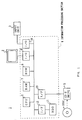
- Fig. 1, 1 generally shows a CD-R disc device containing an information processing section 4 for processing a data to be written on a CD-R disc DISC or a data read out from the CD-R disc DISC, a display unit 2 comprising such members as a cathode ray tube or a liquid crystal display for supplying the user with processed data, processing state of the information of the information processing section 4, an input device 3 comprising a keyboard and the like for inputting data to the information processing section 4, and a CD-R drive device 5 for writing in and reading out data to and from the CD-R disc DISC.
- a CD-R disc device containing an information processing section 4 for processing a data to be written on a CD-R disc DISC or a data read out from the CD-R disc DISC, a display unit 2 comprising such members as a cathode ray tube or a liquid crystal display for supplying the user with processed data, processing state of the information of the information processing section 4, an input device 3 comprising a keyboard
- the information processing section 4 has respectively a CPU (Central Processing Unit) 6 for managing entire operation of a system, a RAM (Random Access Memory) 7 for temporarily storing all kinds of information and various programs, a ROM (Read Only Memory) 8 in which a basic program necessary for the CPU 6 to operate is stored, an input/output (I/O) circuit 9 for outputting information to the display unit 2, an input/output (I/O) circuit 10 for capturing information from the input device 3, a hard desk drive (HDD) 11 for accessing a hard disk in which various programs are stored, an interface (I/F) circuit 12 for accessing the hard disc drive 11, and an interface (I/F) circuit 13 for accessing the CD-R drive 5.
- the RAM 7 functions as a cache buffer besides a simple memory.
- the CPU 6 reads out program of the file system for CD-R (CDRFS: Compact Disc Recordable File System) from the hard disk 11 via the interface (I/F) 12 based on the program stored in the ROM 8, and then stores it in the RAM 7. The CPU 6 then starts CDRFS read out so as to start the entire system.
- CD-R Compact Disc Recordable File System
- the CPU 6 In order to record data in the CD-R disc DISC in the CD-R disc device 1 started up, the CPU 6 divides the data made by the user into blocks according to a predetermined format under the control of CDRFS. Then the CPU 6 transmits the divided data and an instruction to the CD-R drive 5 so as to write the data via the interface circuit 13. When receiving the instruction, the CD-R drive 5 sequentially records the data for the data unit referred to as packet on the CD-R disc DISC.
- the CPU 6 of the information processing section 4 gives a reading instruction to the CD-R drive 5 via the interface circuit 13.
- the CD-R drive 5 accesses the CD-R disc DISC so as to read out the data recorded for packet, and then transmits the data to the RAM 17 via the interface circuit 13.
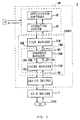
- Fig. 2 shows the entire structure of a software SW by which it seems as if the CD-R disc DISC is a recording medium capable of rewriting to the user.
- the instruction from the user input via I/O is interpreted in an application software AP and an operating system OS, and the instruction is delivered to a file manager FLM of the file system for CD-R CDRFS.
- the file system CDRFS comprises the file manager FLM constituting upper layer part and a virtual device manager IMM constituting lower layer part.
- the file manager FLM manages directories and files.
- the file manager FLM specifies correspondent virtual address space formed in a virtual device manager IMM based on the file name specified by the instruction.
- the virtual device manager IMM provides a plurality of virtual address space CVx (CV1, CV2, CV3, ...) to the file manager FLM.
- Each virtual address space CVx is constituted by a data block array comprising single or a plurality of data block.
- the data block array is referred to as a sequence and corresponds to each file managed by the file manager FLM.
- the file manager FLM specifies the sequence number of the virtual device manager IMM so as to specify the virtual address space CVx of the target file.
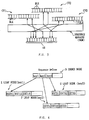
- the file manager FLM can specify each virtual address space CVx in block units according to 64-bit logical address called sequence key SQK (Fig. 2).
- each virtual address space CVx is managed by the sequence key SQK in block units.
- the particular sequence number for the virtual address space CVx is allotted to the upper 32 bits of the sequence key SQK, and the lower 32 bits are the sequence block number for specifying blocks BLK (Fig. 3) in the sequence (virtual address space) specified by the upper 32 bits. Consequently, 2 32 blocks per one virtual address space (one sequence) can be managed by the sequence block number; namely, each virtual address space CVx are adopted to include 232 blocks.
- Each block BLK is 2048 bytes in agreement with CD-R disc format, which enables the virtual device manager IMM to manage 8 tera bytes at the most for one sequence, namely one file.
- each virtual address space CVx is provided corresponding to the files so as to constitute a file. Consequently, the virtual device manager IMM can immediately access the file without executing such complicated procedure as converting the position of the file to the logical address and retrieving.
- the sequence manager SQM of the virtual device manager IMM makes the logical address shown by the sequence key SQK correspond to the physical address on the CD-R disc by using the retrieving method by means of the multiway tree referred to as B*tree (B Star-tree).
- B*tree (B Star-tree) of the sequence manager SQM has a tree structure which is constituted by an index node K as an intermediate node (branch) and leaf nodes E, F and G which actually contain the extent (EXTx) showing correspondence between the logical address and the physical address.
- Each leaf node E, F, and G stores single or a plurality of extent EXTx representing the relation between the logical address and the physical address LBA, which is shown by the sequence key SQK, in the ascending order of the sequence key SQK. More specifically, the extent EXTx manages (or represents) a block array in which the sequence key SQK continues in the ascending order as one unit out of the blocks sequentially in array on physical location on the CD-R disc.
- the extent EXTx consists of the sequence key SQK in the head block of sequential physical block managed by the extent EXTx, the physical address LBA corresponding to the sequence key SQK, and length.
- the extent EXTx is (0,0 56 5)
- the data for example, two blocks
- the extent EXTx (0,0 56 7) is provided with the result that the extent EXTx as the management data does not increase.
- the sequence manager SQM searches the head key (sequence key SQM) in a range in which the sequence key SQK is included from the index node D. For example, when the target sequence key SQK is a value between the first sequence key key1 and the second sequence key key2 stored in the index node D, the sequence manager SQM selects the leaf node E starting from the extent EXT11 having the first sequence key SQK key1 so as to search the inside of the leaf node E sequentially.
- Fig. 5 shows a searching method by means of the real B*tree (B star-tree) so that the physical address LBA (H, I, J, ...) on the target CD-R disc is searched from the super block (referred to as SVD) A, the node table (Node Table) B, the index node D and leaf nodes E, F and G which are recorded on the CD-R disc.
- the sequence manager SQM refers to the node table B on the CD-R disc on the basis of the physical address LBA on the node table B which is recorded in the super block.
- the sequence manager SQM calculates the physical address LBA of the index node D from the node number of the node table B designated by the root node number which is recorded in the super block.
- the sequence manager SQM can refer to the index node D on the CD-R disc so that the node number corresponding to the desired sequence key SQK in the index node D, as described above with respect to Fig. 4.
- the node number corresponding to the sequence key SQK is read out so that the leaf nodes E, F and G corresponding to the node number read out the physical address LBA in the node table B.
- the target leaf nodes E, F and G can be read out from the CD-R disc so that the extent EXTx corresponding to the sequence key SQK designated at this time can be read out.
- this extent EXTx it is possible to obtain the position (H, I, J, %) on the CD-R disc in the target data block line with this extent EXTx.
- Fig. 6 shows an example of a correspondence relation between the sequence number and the physical address LBA.
- These four correspondence relations can be represented by one extent EXTx represented by the sequence number (123456781h), LBA (1000h), and the length.
- Each management data constituting B*tree (B star-tree) is recorded on the CD-R disc with the result that there arises a need of rewriting data along with the renewal of the content. Consequently, the correspondence table between the logical address and the physical address LBA and the management structure thereof are provided with respect to the data block constituting B*tree (B star-tree).
- DCRFS the 32 bit-long logical address referred to as the node number as mentioned in regard to Fig. 5 is attached to the block constituting B*tree (B star-tree) so as to manage the correspondence table between the logical address and the physical address as an array table in which the logical address is used as a subscript.
- Fig. 7 shows an example of a node table which shows that B*tree (B star-tree) of the node number "0" is recorded on the position where the physical address LBA is located at a position of "30".
- B*tree B star-tree
- Two data are attached in addition to the array table of the node table.
- the "number of entry” designates the number of elements in the arrangement whereas "free” shows the head of the used elements in the arrangement.
- the list of unused elements refers to the management mechanism of the unused element in the arrangement. With the mechanism, the reuse of the arrangement element can be simplified.
- the content of the last unused elements contains the subscript of the next unused element in place of the block address.
- table 2 is placed at the head of the unused element list followed by the following table 4 and table 1.
- the node table is constituted so that a mechanism for managing the node table is omitted by recording the node table on a continuous area on the CD-R disc.
- B*tree B star tree
- the block constituting B*tree B star tree
- the renewed node table is written on the CD-R disc.
- the maximum number of the block number of B*tree (B star tree) required for managing one giga byte-long data becomes 8095 blocks as shown in Fig. 8 because it is favorable to consider that each extent EXTx refers to one block and only a half of each node is used.
- the continuous area required as a management table of B*tree is 16 blocks at most.
- a packet comprising 32 blocks is used as a recording unit for recording on the CD-R disc.
- the node table comprising 16 blocks at most is housed in one packet. Consequently, in the CDRFS this node table is housed together with other management information in the last packet which is written in the CD-R disc at the time of the flash operation which will be described later.
- the logical and physical address management mechanism of the data block has a dual structure comprising B*tree (B star tree) and the node table.
- B*tree B star tree
- the node of B*tree (B star tree) is referred to with the physical address LBA with the result that the rewriting of the reference affects the node of other B*tree (B star tree) every time the node of B*tree (B star tree) is renewed. Consequently, in the CDRFS, the logical and physical address management mechanism has a dual structure comprising B*tree (B star tree) and the node table.
- the sequence manager SQM when the physical address LBM having the sequence recorded is obtained from the searching method (B*tree (B star tree)) described above with respect to Figs. 4 and 5, the physical address LBA is delivered to the cache manager CAM shown in Fig. 2 together with the sequence key SQK.
- the cache manager CAM reads and writes data from the CD-R disc of the data block corresponding to the designated physical address LBA via a cache buffer referred to as cache block.
- the cache manager CAM determines whether or not the data block represented by the designated physical address LBA is already present in the cache buffer.
- the cache manager CAM reads data from the block (cache block) in the cache buffer, and stores the data in the block in the cache buffer so as to allocate the temporary physical address (Temporary LBA) to the housed data block.
- the sequence manager SQM can access the data block without considering as to whether the position of the physical address is real or temporary by managing the address with the temporary physical address (Temporary LBA).
- the cache manager CAM memorizes the sequence key SQK (delivered from the sequence manager SQM) with respect to the data block to deliver the data pointer with respect to the cache block having the block data housed and the temporary physical address to the sequence manager SQM.
- the sequence manager SQM registers the correspondence relation between the temporary address (Temporary LBA) and the sequence key SQK in B*tree (B Star-tree).
- the data pointer of the cache block delivered from the cache manager CAM is delivered from the sequence manager SQM to the file manager FLM so that the data designated by the user is renewed.
- the data block which is rewritten in this manner is delivered to the cache manager CAM so that the block is managed as a renewed block which is called dirty block in the Write Cache Block which comprises a high speed memory.
- the dirty block is either renewed or created only in the cache buffer and is not yet recorded in the CD-R disc. Consequently when the dirty block reaches a predetermined number (32 blocks), the cache manager CAM writes the dirty block on the CD-R disc DISC via a device driver as one packet.
- the aforementioned explanation is concerned with a processing for rewriting the data block which exits already on the CD-R disc.
- the file manager FLM rewrites data while looking at only the temporary address by means of the temporary device manager IMM (Fig. 2). Consequently, even when a write once type CD-R disc is used as a recording medium, the file manager FLM can rewrite data in the temporary address space like an operation with respect to the rewritable media.
- the sequence manager SQM requests the cache manager CAM to generate a block by delivering the sequence key SQM of the block to be generated.
- the cache manager CAM allocates the block in the cache and allocates a temporary physical address (Temporary LBA) to deliver the address to the sequence manager SQM.
- Temporal LBA temporary physical address
- the sequence key SQK delivered to the cache manager CAM from the sequence manager SQM is memorized in the management table of the cache buffer in the cache manager CAM and the sequence key SQK is used at the time of the writing operation on the actual CD-R disc.
- the sequence manager registers the correspondence between the sequence key SQM of the block which is to be generated and the physical address brought back from the cache manager CAM in the management structure comprising B*tree (B star tree).
- the sequence manager SQM determines the physical address of the designated sequence key from B*tree (B star tree) to designate the ensure to the cache manager CAM.
- the cache manager CAM performs no processing when the block of the physical address LBA does not exist in the cache buffer.
- the cache manager CAM nullifies the cache block (namely, the block in the cache buffer managed by the cache manager CAM). Then, lastly, the sequence manager SQM erases the entry of the sequence key SQK to be erased from B*tree (B star tree) to complete the erasure thereof.
- an operation of writing data of the write cache block on the CD-R disc is referred to as a "flash".
- the flash operation is carried out.
- the system is completed and the external factor constitutes a trigger of the CDRFS.
- an internal factor constitutes a trigger thereof.
- the case in which the number of reusable blocks in the cache does not satisfy the least number required for ensuring the operation of the CDRFS refers to a case in which the reusable blocks sufficient for writing, generating, renewing and eliminating of the sequence block which is a basic operation of the sequence manager SQM are not secured in the cache block. Consequently, when sufficient reusable blocks are not secured in the cache block, the reusable blocks are secured in the flash operation.
- the reusable blocks are a general name of write cache blocks (referred to as read cache blocks) obtained by writing the data of the write cache blocks on the CD-R disc and cache blocks (referred to as Free Cache Blocks) in which no effective data is stored.
- the extent EXTx is generated and is inserted into B*tree (B star tree).
- B*tree B star tree
- the leaf node is divided and one data block is generated for a new leaf node.
- no allowance is generated in the index node to which the leaf node is inserted at the time of inserting into the index node the generated leaf node for the division, a new leaf node is generated for dividing the index node.
- CBCmax (N) N + 2 (N/96)/113 + (N/96) wherein N represents the number of data blocks which are to be originally renewed.
- the work is the same as the case of the block generation except for the work of removing the extent EXTx.
- the number of the extent EXTx will sometimes increase by one extent.
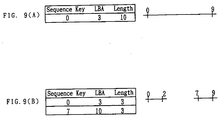
- this extent will be exchanged by two extents as shown in Fig. 9(A) by removing the data block from the extent to renew the data blocks from the sequence keys "3" to "6".
- MBCmax (N) N + 2 + ((N + 1)/96)/113 + ((N + 1)/96) wherein N represents the number of data blocks which are to be originally renewed.
- a flash operation for writing the data in the write cache block on the CD-R disc DISC will be explained.
- the sequence manager SQM requests the cache manager CAM to collect n packets of write cache blocks in the cache buffer.
- the number n of packets in this case depends on the setting of the cache manager CAM.
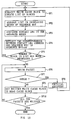
- the cache manager CAM creates a list of blocks to be written on the CD-R disc DISC in accordance with a predetermined priority from among the write cache block in accordance with the request at step SP1 of Fig. 10. This priority is determined by using a so-called LRU (Least Recently Used) algorithm in which a priority is given to the block having less access to the target block with the result that cache out block (to be written on the CD-R disc) is determined in the order of higher priority.
- LRU Least Recently Used
- the cache manager CAM refers to the cache management table at step SP2 with respect to the write cache block which is selected in this manner so that the block list of the write cache blocks are arranged in order so that the sequence key SQK is placed in order which corresponds to the write cache block.
- scheduled physical address (Contact LBA) on the CD-R disc where each block is written from the block list is assigned like the write start physical address LBA and the write start address LBA+1.
- This scheduled physical address (Contact LBA) will become an actual address (Real LBA) which is established on the CD-R disc when the writing is normally completed. When the writing is failed, the aforementioned temporary physical address will be provided.
- step SP3 a probability will become high that the block of the same sequence will be arranged on the continuous area on the CD-R disc by assigning the writing position to the order of the SQM in order with respect to each write cache block.
- the block can be continuously read from the CD-R disc at the time of reading with the result that the reading performance will be heightened.
- an increase in the number of elements of B star tree can be prevented in which physical continuous block of the same sequence (files) are managed with one extent EXTx.
- the sequence manager SQM receives a correspondence table of the sequence key SQK and the scheduled physical address (Contact LBA) assigned from the cache manager CAM so that B*tree (B star tree) is renewed at step SP4.
- the temporary physical address (Temporary LBA) of the extent EXTx created by assigning the temporary physical address at the time of the data renewal in advance is replaced with the scheduled physical address (Contact LBA; Temporary Actual address).
- the scheduled physical address (Contact LBA) is assigned with the sequence key SQK in order so that some extent EXTx is summarized by the execution of a plurality of such renewal thereby reducing the number of the extent EXTx of B*tree (B star tree) as a whole.
- a part of the nodes (leaf nodes and intermediate nodes) which constitute B*tree (B star tree) will be eliminated. Consequently, at step SP5, the sequence manager SQM judges whether or not the number of blocks which constitute B*tree (B star tree) has been decreased or not.
- step SP5 a negative result will be obtained at step SP5.
- the cache manager CAM moves to step SP6 to send the packet data comprising a plurality of blocks collected in the write cache buffer to the CD-R disc via a device driver with the result that the data is written on the CD-R disc in a new writing area in the packet unit.
- step SP7 an writing error to the CD-R disc is generated, an affirmative result is obtained at the subsequent step SP7.
- the sequence manager SQM and the cache manager CAM moves to step SP8 to perform a physical restoration to the CD-R disc.
- the data is written in the packet unit. It becomes necessary to embed the packet with dummy data with respect to the packet in which a writing error is generated and the record data is interrupted.
- the sequence manager SQM and the cache manager CAM restores incomplete packets with dummy data and record again data that should be recorded as the packet with the dummy data.
- the physical address LBA of the data to be written is changed so that the sequence manager SQM and the cache CAM manager returns to the aforementioned step SP1 where the data of the unwritten write cache block is collected again and a new scheduled physical address (Contact LBA) is assigned to the new scheduled physical address (Contact LBA).
- Contact LBA new scheduled physical address
- the data included in the packet is already changed into a unrenewed data block called read cache block in the cache buffer so that the data block does not become an object to be recollected by the write cache block after step S8. Consequently, every time the packet writing is succeeded, the data scheduled to be written (write cache block) decreases so that all the data blocks will be finally written on the CD-R disc.
- step SP7 the cache manager CAM change the write cache block corresponding to the cache buffer into a read cache block with respect to the packet in which a negative result is obtained (packet in which writing has been succeeded).
- step SP10 the processing at steps SP6 through SP9 is repeated until the result having all the packet written is obtained.
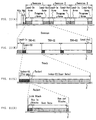
- Fig. 11 shows a recording state of the data onto the CD-R disc.
- a plurality of sessions Session 1, Session 2,
- PCA power calibration area
- PMA program memory area
- Each session comprises a program area in which block data of the sequence (file) created and renewed by the user, and a lead-in area in which lead-in information representative of the start of the session and lead-out information representative of the end of the session is recorded.
- the lead-in information and the lead-out information is to be recorded after one session portion of the file data is recorded in the program area.
- the information is intended to have compatibility with the CD-ROM.
- the program area is further divided.
- the program area is divided into three tracks.
- the head of each track is provided with an index area (Index) and index information of the track is recorded on this part.
- the track comprises a collection of packet which constitutes a basic unit of data writing.
- this packet is divided into four parts, a link block, a run in block, a user data block having user data such as file information or the like and a run out block.
- a data management structure is present in addition to the block data (user data) of the sequence (file) created by the user.
- a primary volume descriptor PVD
- a super block a super block
- a node table a B star tree index node
- a sequence B star tree index node a sequence B star tree leaf node.
- all the data management structure excluding the node table has a size of one block (2048 bytes) and is recorded in the block boundary.
- the node table is a variable length data structure having a size of one block or more and the head of the node table starts from the block boundary.
- the primary volume descriptor PVD is information which is recorded on the 16th block from the head of the session. At the head 1152 bytes of the 16th block, one which is the same as the 1S09660 PVD is recorded and information peculiar to CDRFS shown in Fig. 11 is contained.
- the Super Block Search Method shows a position where the most recent super block is stored. In other words, the super block is constituted so as to be written on the CD-R disc every time the flash all operation is performed. With the Super Block Search Method of the PVD, the latest position can be detected.
- Super Block Area refers to the total blocks sandwiched between the block represented by the Start LBA of Super Block Area and a block represented by the End LBA of Super Block Area.
- the Packet Size shown in the PVD of Fig. 12 shows the block number of the user data in the fixed length packet.
- this field is effective only when the "Addressing Method II" is used.
- the "Volume Capacity" shown in the PVD of Fig. 12 shows the total number of blocks which can be recorded on the CD-R disc after the format. Incidentally, this value is a reference value which is used at the time of returning the information on the total volume of the CD-R disc with respect to the operation system.
- Fig. 13 shows a structure of the super block.
- information representing that the block is a super block is recorded on the first "Super Block Header”.
- the "Super Block Flags" represents whether or not data effective for the session is recorded or not.
- "Node Table LBA” shows the block in which the node table is recorded. When the size of the node table is two blocks or more, "Node Table LBA” is sequentially recorded from the block represented by the Node Table LBA.
- the "Previous Super Block” shows the position of the Super Block which has been previously recorded. In the case of the CD-R disc, the data which has been previously recorded will not be lost from the disc. Consequently, it is possible to know the state of the past volume by keeping track of the "Previous Super Block".
- the "Sequence B star tree Root Node Number” shows the node number of the management structure (Sequence S Star Tree) comprising the aforementioned B Star Tree with respect to Fig. 5.
- the "Directory B Star Tree Root Node Number” shows the node number of the node of the Directory B Star Tree managed by the File Manager FLM.
- the "Serial Number” refers to a sequential number of the super block. Incidentally, the "Serial Number" of the super block generated at the time of the format is "0".
- the "Super Block List” is a table in which 50 Previous Super Blocks LBA" are collected in the past.
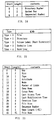
- the "Super Block List” comprises a repetition of Super Block List Entry as shown in Fig. 14.
- the first entry of the Super Block List shows the super block one block before the super block in which the Super Block List is housed.
- the entry is filled from the bead thereof and the unused entry is filled with "0".
- the "Super Block Tag List” is a table of the name label of the past super block.
- the "Super Block Tag List” comprises a repetition of a tag entry as shown in Fig. 15. In this CDRFS, 24 tags at most can be attached to one CD-R disc. At this time, when the tag is less than 24, the entry is filled from the head and the unused entry is filled with "0".
- the Node Table refers to a correspondence table between the node number of each node of the management table (Sequence B Star Tree) comprising the B Star Tree) and the physical address thereof as described above in Fig. 5.
- the Node Table has a structure as shown in Fig. 16. This Node Table is recorded sequentially from the head of the data block. When the Node Table cannot be housed in one data block, a sequel to the next data block is recorded.
- the index node is a node other than the leaf node of the management structure comprising the B Star Tree.
- Information shown in Fig. 17 is recorded in the index node.
- the "Number of Record” shown in Fig. 17 shows the number of index records housed in the leaf node.
- this index record has a structure shown in Fig. 18, and the index record is sorted in the ascending order of the key and is filled from the "Index Record [0]" in order to be recorded.
- sequence B Star Tree Leaf Node refers to the node of the B Star Tree for housing the correspondence relation between the sequence key SQM and the physical address LBA
- Sequence B Star Tree Leaf Node has a structure as shown in Fig. 19.
- the extent EXTx in this leaf node has a structure shown in Fig. 20, and is sorted in an ascending order to be filled from the Extent Record [0] to be recorded.
- the number of the extents EXTx in the node is recorded in the Number of Records.
- the Directory B Star Tree Leaf Node h is the node of the B Star Tree for housing the file name, the sequence key SQK, a correspondence relation between the directory name and the directory number, and attribute information of the file and the directory, and has a structure shown in Fig. 21.
- the "Node Number” in this leaf node the "Node Number” of the leaf node added with [0x80000000] is housed.
- the "Number of Records” shows the number of directory records housed in this leaf node.
- "Previous Node Number” and “Next Node Number” show the Node Number of the leaf node having the least key and the leaf node having the largest key.
- [0xffffffffffffff] is recorded.
- the Total Size of Record the total byte number of the Index Records Offset and the directory record is recorded.
- the Directory Record Area is used as shown in Fig. 22.
- "PosX” is referred to as "Index Record Offset", and shows the position where the directory record is recorded is shown with the byte offset from the head of the directory record area. Incidentally, this "PosX” is one byte. Incidentally, the PosX is sorted in the order of the key held by the directory record shown by the PosX. The PosX is filled from the head and is recorded.
- RecX is a main body of the directory record.
- the position is not particularly limited. However, when the algorithm adopted in the CDRFS is used, the directory record which has been recently created as a result of the processing is housed at a position most adjacent to the head of the directory area.
- the value housed in the "Number of Records" is set to "Nrj"
- an area between "PosNr-1" and “PosNr-2” is an unused area. This area is used for the renewal and the preparation of the directory record. Incidentally, the unused area is used from the head, and the unused area is from the rear in "RecX".
- the directory record refers to the correspondence relation between the file name, the sequence key SQK, the directory name and the directory number, and a variable length data for housing the attribute information of the file and the directory.
- the directory record has a structure shown in Fig. 23. Incidentally, the directory record is recorded on the directory record area described above.
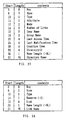
- the key in the directory record is assigned to the directory record, and the key is constituted as shown in Fig. 4.
- Fig. 24 the directory number is a number peculiarly attached to each of the directory. All the directory in the same directory has the same directory number.
- the size shows a byte number of the directory record including the key and the size itself.
- the type is a field for showing the type of the directory record. There are five kinds as shown in Fig. 25. Furthermore, apart from this, it is shown that when the bit 7 of the type is erected, the directory record is referred to from one or more Hard Link Directory Record.
- the super block contains the physical address LBA of the block housing the node table, and the route node number of the management structure (Fig. 5) comprising the B Star Tree, and is constituted so that the link to all the data on the CD-R disc excluding the PVD begins with the super block until reaching the file content from the management information.
- the node table is required to refer to the node of the management structure comprising the B Star Tree.
- the Super Block constituting such management structure is written at the time of the flash all operation to the last block one block before the next time writing position of the user area.
- the timing at which the flash all is carried out is when the predetermined time which is set has elapsed, and more than the predetermined amount of data is written on the CD-R disc.
- management information (super block) is written on the CD-R disc in a predetermined interval.
- Fig. 29 shows an operation procedure of the flash all.
- the sequence manager SQM and the cache manager CAM enters into the processing procedure from step SP20.
- a list is created in the same manner as the case of the flash operation described above in Fig. 10 with respect to the write cache block in the case buffer.
- the sequence manager SQM demands the cache manager CAM to collect all the write cache blocks in the cache buffer.
- the cache management table is referred to arrange so that the sequence key SQK is put in an ascending order.
- the scheduled physical address (Contact LBA) is assigned in an order such as the physical address LBA with which the writing is started from the head block of the list thus arranged, and the physical address LBA + 1 with which the writing begins.
- the sequence manager SQM renews the B Star Tree on the basis of the sequence key SQK and the physical address. The processing up this step is repeated until the block elimination is generated by the renewal of the B Star Tree.
- the sequence manager SQM demands the cache manager CAM to generate the data block for housing the node block and the super block in the same procedure as the normal block generation. As a consequence, the cache manager CAM generates the super block and the block for the node table in the cache buffer.
- the cache manager CAM creates a list again with respect to the write cache block at step SP23.
- the sequence manager SQM demands the cache manager CAM to collect all the write cache blocks in the cache buffer.
- the data block is collected again.
- a series of processing is performed as usual such as the preparation of the block list by the cache manager, the determination of the physical address LBA and the renewal of the B Star Tree by the cache manager CAM, each content is filled in the super block and the block for the node table at step SP24.
- steps SP25 through SP29 are the same as steps SP6 through SP10, explanation thereof is omitted.
- the largest value such as [fffffffffffffffffffffffffff(hex)] is assigned to the super blocks as the sequence key.
- such large and continuous values as [fffffffff00000000(hex)], [ffffffff00000001(hex)] and ... are assigned to the node table as the sequence key.
- continuous values such as [fffffffe00000000 (hex)], [fffffffe00000001(hex)] and ... apparently different from the node table are assigned to the leaf node as the sequence key SQM.
- a reference relation is established only in a direction from the block which is written on the CD-R disc later toward the block which is written on the CD-R disc earlier. Consequently, as shown in Fig. 30(A), when an attempt is made to write data in the packet unit sequentially from the left (the CD-R disc on the inner circumference) to the right (CD-R disc on the outer circumference), a reference relation is established only in one direction so that the packet data b (for example, the super block) which are about to be written on a new unwritten area refers to the packet data a (for example, node table) which is written on the forward part of the physical address. As a consequence, in the case where the packet data b is failed to be written as shown in Fig.
- the flash operation is carried out without fail at the time of taking out the CD-R disc from the CD-R driver 5 so that the super block is written on the last packet. Consequently, when the CD-R disc is inserted into the CD-R drive again, the CDRFS retries the super block from the outermost circumference.
- data written on the forward part (inner circumference side) of the super block is referred to.
- the CDRFS searches a super block one block before toward the inner circumference sequentially from the super block.
- the flash all operation at the time of writing data on the CD-R disc is carried out when a predetermined time has elapsed and an amount of data which exceeds the predetermined amount is written from the cache manager CAM to the CD-R disc.
- the super block is written on the CD-R disc relatively frequently with the result that even in the case where the super block which should exist on the last packet fails to be written on the last packet, it becomes possible to avoid the loss of a large amount of user data by reading the super block one block before which is written relatively near to the target super block.
- the CDRFS which operates as described above stores file information such as file name for each file in the storage area corresponding to the file when generating the file.
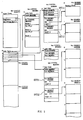
- the file entry is dealt with as the file managed at the aforementioned CDRFS.
- the file entry has an area for recording the size of file entry, a key management area for recording the information on key referred to as key " , and an area referred to as Object Name Area for managing file name.
- Directory Number In the key management area, Directory Number, search key CRC (Cyclic Redundancy Check Code), and District Number are recorded.
- Object Name Area the file name designated under the operating system OS which comes under when the file is generated, the information for managing the file name, and length of the file name, etc., are stored.
- the file name written on the CD-R disc DISC as a file entry is converted to the file name to which a plurality of operating systems can accessed. Consequently, in the case where the file written in the CD-R disc DISC is accessed through each operating system OS, the CDRFS converts the file name read out from the CD-R disc DISC to the file name recognizable by the operating system OS used at accessing. Thus the operating system OS presently being used can recognize the file name on the CD-R disc DISC within the language environment.
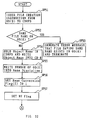
- the operating system OS(0) start processing the procedure as shown in Fig. 32.
- the operating system OS(0) issues the command for preparing the file by using the designated desired file name.
- the CDRFS reads the file entry already written in the CD-R disc DISC on the RAM 7 (Fig. 1).
- the operating system OS(0) retrieves whether or not there exists the file having same file name as designated under the operating system OS(0) in the file entry on the RAM 7 (Fig. 31) throughout all the files on the CD-R disc DISC.
- the file entry is read out from the CD-R disc DISC if necessary and expanded on the RAM 7 under the control of the CDRFS.
- the CDRFS converts the file name designated under the operating system OS(0) to the search key CRC at aforementioned step SP51.
- the file name is converted in accordance with the predetermined retrieve key conversion method and then top four characters of the converted file name are picked up. Then, character codes representing top four characters are divided by a predetermined number, so that the search key CRC can be obtained.
- MS-DOS operating system
- the latter four characters out of top eight characters in the file name comprising eight characters + three characters (extension) are replaced with the following Distinct Number, the remaining top four characters can be used for retrieving by the search key CRC.
- the CDRFS also converts the top four characters of all file names written on the CD-R disc DISC out of the file entry to the search key CRC and compares them with the search key CRC of the file name to be created which is designated under the operating system OS(0).
- one of the file name at least whose search key CRC is corresponds with the search key CRC of the file name designated under the operating system OS(0) is retrieved out of the file name already written on the CD-R disc DISC.
- the CDRFS converts the file name whose search key CRC corresponds to the file name readable under the operating system OS(0). More specifically, on the CD-R disc DISC, there may exist the file name created another operating systems OS(1) to OS(N), which makes it difficult for the operating system OS(0) presently being used to read the file name as it is. Thus the CDRFS converts (conversion of the number and type of the characters) file name whose search key CRC corresponds out of the file names of the file entry which are read from the CD-R disc DISC on the RAM 7 to the file name readable by the operating system OS(0) presently being used.
- the file name converted in such manner is compared with the file name designated under the operating system OS(0) at aforementioned step SP51. This enables the CDRFS to determine whether or not there exists the corresponding file name through the operating system OS(0).
- the CDRFS proceeds to step SP53 so as to inform the operating system OS(0) of the existence of the same file name by delivering the pointer. Then the CDRFS executes such error process as error display on aforementioned display unit 2 so as to terminate the file name conversion procedures.
- the CDRFS proceeds to step SP54 so as to write the file name designated at the operating system OS(0) in storing area in the file entry as Object Name with no change and also write the Object Name in the CD-R disc DISC if necessary.
- the CDRFS executes the file management normally in the virtual address space extended on the cache buffer (the RAM 7).
- the write-in/read out process of the file name is executed to the virtual address space on the cache buffer. If the residual quantity in the cache buffer is reduced or the CD-R disc DISC is took out from the CD-R drive 5 (Fig. 1), the data in the cache buffer (the file entry, the file management data, etc.) is written in the CD-R disc DISC.
- step SP55 the CDRFS proceeds to step SP55 so as to write the number of the operating system OS(0) presently being used in the storing area referred to as Name Discipline provided in the Object Name Area.
- Name Discipline provided in the Object Name Area.
- the CDRFS proceeds to step SP56 so as to set Name Conversion Flag provided in Object Name Area of the file entry (Fig. 31) as 1 " .
- the name conversion flag decides the necessity of further conversion (namely, whether or not the same file name exists through each operating system (OS(X)). If it is necessary, the same conversion flag is set as 0 " ; if it is not necessary, the same conversion flag is set as 1 " . In this manner, the name conversion flag is set as 0 " when it is necessary.
- step SP56 it has been already known that the same file name does not exist through the operating system OS(0) at step SP52. Consequently, conversion is not necessary through the operating system OS(0) so that the name conversion flag is set as 1 " .
- the CDRFS proceeds to next step SP57 to set HT flag provided in the object name area of the file entry (Fig. 21) to 1 " or 0 " .
- Tilda a mark referred to as Tilda.
- 1 " is set; when the tilda mark is not used, 0 " is set.
- the HT flag is set for the sake of determination whether or not the file name coincides with a Distinct Name which will be mentioned later.
- the file name may coincide with the distinct name; if the HT flag is 0 " (namely, the tilda mark is not used), the file name and the distinct name are not same.
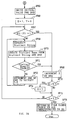
- the CDRFS determines whether or not it is necessary to change the file name decided at steps SP51 to SP57 as described above when seeing through the other operating systems OS(1) to OS(N). Then the processes according to the result of the determination are executed at the processes after step SP58 in Figs. 33 and 34.
- the Object Name set at aforementioned step SP54 is AAA/// and the operating system OS(1) is MS-DOS, a slash mark / cannot be used in the operating system OS(1) so that all the slash mark / is replaced with the underbar.
- a file name permitted on the operating system OS(1) is limited to eight characters plus three characters (extension) at maximum, so that the CDRFS regards top eight characters of the Object Name and extension (three characters) as the Simple Name(1).
- Simple Name(1) is reduced to ABCDEFGH.TXT.
- extension shown in three characters below the dot mark represents file type for MS-DOS, by which the application soft AP is executed. Consequently, the extension remains as the Simple Name(1).
- step SP60 If a negative result is obtained at step SP60, this means that there exists no file name coincident with Simple Name (1) when the file names written on the CD-R disc DISC are converted to the file names readable by the first operating system OS(1) so that it is not necessary to convert the Simple Name (1).
- the CDEFS proceeds to step SP61 to set Name Conversion Flag (1) (NC(1)), which is set corresponding to the first operating system OS(1), to 1 " .
- step SP60 if an affirmative result is obtained at step SP60, this means that there exists the file name coincident with Simple Name (1) when the file names written on the CD-R disc DISC are converted to the file names readable by the first operating system OS(1) so that it is necessary to convert the Simple Name (1).
- the CDEFS proceeds to step SP62 to set Name Conversion Flag (1) (NC(1)), which is set corresponding to the first operating system OS(1), to 0 " .
- the CDRFS executes the processes of aforementioned steps SP60 to SP63 also for the Simple Name (2) created as described above. Thereby when all the file names on the CD-R disc DISC are converted to the file names readable by the operating system OS(2), the search is executed about whether or not there exists the file readable by the operating system OS(2), which coincides with the Simple Name (2). Also, the CDRFS sets the Name Conversion Flag (2) set corresponding to the operating system OS(2) to 1 " or 0 " in accordance with the existence of coincidence.
- the Name Conversion Flag (2) is set corresponding to the operating system OS(2), the CDRFS adds 1 to X at step SP64 and sets the Name Conversion Flag (3) corresponding to new operating system OS(3).
- the CDRFS searches, in the operating system OS(1) to OS(N), whether or not the Simple Name (X) created corresponding to each operating system OS(X) coincides with the file name already written on the CD-R disc DISC.
- the CDRFS sets each Name Conversion Flag (X), which is set related to each Simple Name (X) corresponding to each operating system OS(X), to 1 " or 0 " .
- step SP63 When finishing setting the Name Conversion Flag (X) corresponding to all operating systems OS(1) to OS(N), the CDRFS obtains a negative result at step SP63 and proceeds to step SP65 shown in Fig. 34.
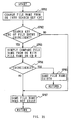
- the processes after step SP65 shown in Fig. 34 are as follows: based on each Name Conversion Flag (1) to Name Conversion Flag (N) set related to each Simple Name (1) to Simple Name (N), the latter four characters of the Simple Name (X) which is necessary to convert are replaced with the tilda mark ⁇ and the number represented by three characters (Distinct Number), so that the Simple Name (X) is converted to the Distinct Name (X).
- the CDRFS obtains an initial value of the Distinct Number (DNO) from the search key CRC at step SP65. More specifically, the CDRFS manages each file name in each number of search key CRC, which lines up the file names having same search key CRC as the internal management information. This enables to search easily.
- DNO Distinct Number
- the CDRFS have the maximum value of which the last file name is the Distinct Number out of a plurality of file names having the coincident search key CRC at step SP60.
- the value following the maximum value is set as initial value at step SP65.
- the Distinct Name (X) is the file name that, when the Simple Name (X) cannot be used, predetermined number of latter character string of the Simple Name (X) (in this embodiment, four characters) is replaced with the Distinct Number so as to the file names on the operating system (X) does not coincide with each other.
- the Distinct Name (X) is used as the file name for the operating system OS(X).
- former four characters remained at replacement is referred to as Distinct String.
- the String converted from the Distinct Number is obtained by the following equations: If DNO is 0 to 35, ⁇ m[DNO mod36] If DNO is 36 to 1331, ⁇ m[(DNO-36)/36] m[(DNO-36)mod 36] If DNO is 1332 to 47988, ⁇ m[(DNO-1332)/1296] m[((DNO-1332)-((DNO-1332)mod 1296))/36] m[((DNO-1332)-((DNO-1332)mod 1296))mod/36]
- m[X] represents x-th character of the 0123456789ABCDEFGHIJKLMNOPQRSTUVWXYZ " .
- m[0] represents 0 "
- m[10] represents A "
- Xmod Y represents the remainder when X is divided by Y.
- the CDRFS then proceeds to step SP69 to add 1 to X.
- step SP73 the CDRFS determines whether or not the value X exceeds the preset number N.
- step SP73 If a negative result is obtained at step SP73, this shows that preset search processes corresponding all the operating systems OS(1) to OS(N) is not finished yet.
- the CDRFS proceeds to step SP75 to compare the value X with the value Y. In this case, unfinished search process makes the value X not to coincides with the value Y, so that the CDRFS obtains a negative result and then returns to aforementioned step SP67 to determine the Name Conversion Flag (2) for next operating system OS(2).
- step SP73 which shows that the preset search processes corresponding to all the operating system OS(1) to OS(N) are done
- step SP75 the CDRFS proceeds to step SP75 to compare the value X with the value Y.
- the value X is returned to the initial value 1 " , which gives the CDRFS an affirmative result, so that the CDRFS proceeds to step SP76.
- the new file name (Object Name) which is specified by the operating system OS(0) and written on the file entry and the CD-R disc DISC at aforementioned step SP1 is converted by the CDRFS to the Simple Name (X) readable by all the operating system OS(X) so as to be accessed when each operating system OS(1) to OS(N) accesses the file name.
- step SP67 which shows that it is necessary to convert the Simple Name (X) created corresponding to the operating system (X) which is the object for determination at that time.
- the CDRFS proceeds to step SP69 to generate the Distinct String from the former characters of the Simple Name (X) which are remained by removing the latter four characters in order to add the Distinct Number.
- the Simple Name (1) consists of eight characters + three characters (extension) and the four characters remained by removing four characters from the former eight characters (namely, top four characters) is set as a Distinct String.
- length of the Simple Name (X) differs depending on the operating system OS(X), so that length of the Distinct String differs depending on the operating system OS(X).
- the Distinct Name (X) is created by arranging the Distinct String at the top portion and the Distinct Number next to the Distinct String. Incidentally, the Distinct Number is converted to be a String.
- the initial value of the Distinct Number set at aforementioned step SP65 is used in the Distinct Name (1) created as described above, which prevents from coincident with the other file name. If, however, the user already creates a file name through a operating system OS(X) by using the tilda mark ⁇ , there may exist a file name coincident. Thus the CDRFS proceeds to succeeding step SP71 to determine whether or not the created Distinct Name (1) can be used (namely, the Distinct Name (1) coincides with the other file name).
- DNO Distinct Number
- the CDRFS repeats the processes of aforementioned steps SP69, 70, 71 and 72 till the Distinct Name (1) does not coincide. In this manner, Since the Distinct Number is renewed till it does not coincide in the same operating system OS(X), the search time can be reduced considerably, comparing with the case of returning to the first operating system OS(X).
- step SP71 shows that there exists no file name coincident with the Distinct Name (1) using the set Distinct Number and the Distinct Name (1) can be used.
- the CDRFS examines the Name Conversion Flag (2) set corresponding to the operating system OS(2) so as to determine whether or not the Simple Name (2) corresponding to the operating system OS(2). If a negative result is obtained here, the CDRFS repeats the processes of steps SP69, SP70, SP71 and SP72 till the Distinct Name (2) of the operating system OS(2) does not coincide with the other file names.
- step SP71 the CDRFS proceeds to step SP69 to add 1 " to X, which changes the search object to new operating system OS(3).
- step SP75 the CDRFS determines whether or not the operating system OS(3) is set as an operating system OS(X) at starting at step SP72. The processes of steps SP69, SP70, SP71 and SP72 are repeated till the operating system OS(X) which is set as the operating system comes out again.
- the CDRFS determines to use properly the Simple Name (X) or the Distinct Name (X) created corresponding to each operating system OS(1) to OS(N) based on the Name Conversion Flag (1) to the Name Conversion flag (N) set corresponding to which it is usable or unusable at step SP76, and set it in the file entry. Then the CDRFS finishes the file name conversion process.
- the new file name (Object Name) specified by the operating system OS(0) and written in the file entry the CD-R disc DISC at step SP1 is converted to the Simple Name (X) or the Distinct Name (X) by the CDRFS so as to be accessed when each operating system OS(1) to OS(N) accesses the file name.
- Fig. 35 shows the search process executed at aforementioned step SP52.
- the CDRFS converts a new file name received from the operating system OS to the search key CRC at step SP81, and, at next step SP82, determines whether or not the search key CRC of the file entry coincide with the search key CRC obtained at step SP81.
- step SP83 the CDRFS proceeds to step SP83 to compare the new file name received from the operating system OS with all the existing file names written in the CD-R disc DISC. At that time, the existing file names are read out via the file entry and are converted to the form which is readable by the operating system OS which specifies the new file name.
- step SP83 the file names are compared with each other at step SP83 and are determined whether or not they coincide with each other. If a negative result is obtained here, the CDRFS proceeds to step SP87 to determine that there in no same file name seeing from the present operating system OS. Then the CDRFS obtains a negative result at step SP52 of Fig. 32 and proceeds to step SP54 (Fig. 32).
- step SP82 if a negative result is obtained at step SP82, this means that the search key CRC of the file name on the CD-R disc DISC read out via the file entry does not coincide with the search key CRC of a new file name received from the operating system OS.
- the CDRFS proceeds to step SP54 of Fig. 32 via step SP87.
- step SP84 If an affirmative result is obtained at step SP84, this means that not only the search key CRC but the file name itself coincide.
- the CDRFS proceeds to step SP85 to determine that there exists same file name as new file name seeing from the operating system OS. Then, the CDRFS proceeds to step SP53 of Fig. 32.
- the search time can be reduced comparing the case of comparing file name itself on all the file name.
- the search processes shown in Fig. 35 are executed also similarly at step SP60 aforementioned about Fig 33.
- Fig. 36 shows details of the processes of searching the Distinct Name (X) at step SP71 aforementioned about Fig. 34.
- the search key CRC of new file name coincides and a tilda mark ⁇ is included, an affirmative result is obtained at step SP91.
- the CDRFS proceeds to step SP93 via step SP92 to see the Name Discipline. Further, the CDRFS determines corresponding Name Conversion Flag (X) from the Name Discipline at step SP94.
- step SP95 the CDRFS proceeds to step SP95 to compare whether or not the file name coincides by using the Distinct Name. If the comparing result shows that there is no coincidence, the CDRFS obtains an affirmative result at step SP71 aforementioned about Fig. 34 and proceeds to step SP69.
- step SP71 aforementioned about Fig. 34 and proceeds to step SP72.
- step SP96 the CDRFS proceeds to step SP96 to compare whether or not the file name coincides by using the Simple Name (X). If the comparing result shows that there is no coincidence, the CDRFS obtains an affirmative result at step SP71 aforementioned about Fig. 34 and proceeds to step SP69.
- step SP96 determines whether there is no coincidence. If the comparing result at step SP96 shows that there is no coincidence, the CDRFS obtains a negative result at step SP71 aforementioned about Fig. 34 and proceeds to step SP72.
- step SP91 of Fig. 36 this means that the Distinct Name (X) created based on the new file name does not coincide with the file names already exist on the CD-R disc DISC.
- the CDRFS obtains an affirmative result at step SP71 aforementioned about Fig. 34 via step SP94.
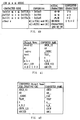
- Fig. 37 the number given as the Distinct Number (DNO) is converted to a String for using the Distinct Name (X). More specifically, the String shows the Distinct Number by numerals and alphabets and 0 to 9 themselves in the Distinct Number consists the String. In addition, in 10 to 36 in the Distinct Number, 10 is replaced with A of alphabet, 11 is replaced with B of alphabet, and the following numbers to 36 are successively replaced with alphabets. Thus 36 in the Distinct Number becomes Z of alphabet.
- Distinct Number becomes a number of two figures 00 as a String; 38 in the Distinct Number becomes a number 01 as a String; the Distinct Number increases one by one till 09 as a String.
- 09 in the String is 46 in the Distinct Number.
- 47 in the Distinct Number becomes 0A in a String; the Distinct Number increases one by one alphabetically. Consequently, 36 3 types of numbers can be represented by the String of three figures consisting of number and alphabet.
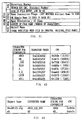
- the search key CRC is created in such a way as shown in Fig. 38 that first an extension of the file name to which the search key CRC is added and depending on the position of ".” included in the file name is divided. More specifically, when ".” is positioned in the middle of the file name other than at the top or end of the file name, characters behind ".” are treated as an extension of the file. For example, a file name "test.” does not have any character behind ".”, so that this file name is regarded as having no extension. Also, with a file named "a.b.c.d”, "d” is regarded as an extension of the file.
- the first four characters of Object Name are all converted to numerals 0 to 9, capital letters of alphabet, or an underbar "_" in accordance with the method as shown in Figs. 39 and 40.
- the Object Names are all treated using unicode (Unicode) in the CDRFS . Since the unicode represents all kinds of characters with a single fixed-length code, a conversion between different characters can be readily made.
- the unicode cannot be used as the character code representing the file name in, for example, the MS-DOS.
- the file name consists of Kanji or Hiragana
- one Kanji is counted as two alphabets. Consequently, if the Distinct Name on the MS-DOS is created by the file name such as on the System 7.5, the file is
- top four characters of the file name from the operating system OS is read in order to create the search key CRC, so that the search key CRC is created according to on the System 7.5.
- the MS-DOS it is created according to on the MS-DOS, which makes the search difficult. Accordingly, one Kanji is converted to two alphabets by assuming that all the characters after 128 (0x0080) of the unicode needs 2 bytes although there are the characters which can show by one byte.
- the search key CRC created from the file on the System 7.5 is created from i.e., CUCW " .
- the search key CRC created from on MS-DOS is also created from i.e., CUCW " .
- search key CRC is created by adding an underline mark (underbar) after the Object Name.
- the search key CRC is set as shown in Fig. 43.
- a file name derived after converting Object Name for example, "Abcd#123.efg” is "ABCD_123_EFG”, where a character string for conversion is "ABCD” and the search key CRC is "0x3b3a", as shown in Fig. 44.
- creation of the search key CRC by only four characters makes the search easier than the case of creation of the search key CRC by eight characters because the coincident of the characters decreases.
- Fig. 44 when the Object Name consists of less than four characters, for example "ab", a file name is converted to "AB " (space after AB is blank), and two underlines (underbars) are added after the resulting character string to produce a character string for conversion "AB__”.
- the search key CRC using a cyclic code is "0xde7e”.
- quite different search keys CRCs are derived even from similar file names, so that a file name can be searched easily.
- search keys CRCs are made commonly usable on a plurality of operating systems OSs to eliminate the need for storing a large number of search keys CRCs, thus making it possible to reduce a storage capacity for the search keys.
- the information on the search keys CRCs, the Object Name, and the Distinct Name is stored in a file entry.
- the CDRFS checks the first four characters of each file name received from the operating system OS(0) and compares file names of files having the same search key CRC. As a result of the comparison, if it is revealed that a file named "ABCDEFGHIJK.TXT" already exists on the CD-R disc DISC, the CDRFS notifies the operating system OS that the same file name is already present, and terminates the file name conversion procedure as an input error.
- the Object Name is written into the CD-R disc DISC.
- the CDRFS next writes a number corresponding to the operating system OS(0) into the Name Dicipline of a file entry, and sets the Name Conversion Flag (0) to "1".
- the Object Name includes " ⁇ " (Tilda), and a HT Flag which is a flag indicative of the presence or absence of tilda is set to 1 or 0. In this way, a file name conversion method is determined for creating a file on the operating system OS(0).
- the file name is converted from the Object Name to the Simple Name (1) such that it can be accessed on the operating system OS(1), for example, MS-DOS.
- the file name of the Object Name is first reduced simply to the form of eight characters plus three characters in conformity to MS-DOS to generate the Simple Name (1) "ABCDEFG.TXT".
- files on MS-DOS are searched to see whether or not a file having the same file name is present. If no file having the same file name is found, the Name Conversion Flag (1) is set to "1".
- the CDRFS sets the Name Conversion Flag (1) to "0". Subsequently, it is determined for each of other operating systems OS(2) - OS(N) registered as the operating system OS whether or not a file having the same Simple Name (X) is present. As a result, at the time the number X exceeds the number of operating systems registered in the OS 6, it is revealed from the determination results that the Simple Name (X) is usable on all operating systems OS(X) or the Simple Name (X) is not usable on any operating system OS(X).
- the CDRFS If the Simple Name (X) is not usable on any operating system OS(X), the CDRFS generates Distinct String and String to set the Distinct Name (X). For setting the Distinct Name (X), "ABCDEFGHIJK.TXT" or the Object Name is first assigned the Distinct Number as a unique number. Then, a flag of the Distinct Number associated with MS-DOS is set on for Distinct Number and the file "ABCDEFGHIJK.TXT".
- the Distinct Name (X) in MS-DOS is created by adding a character string such as " ⁇ 0:” created in accordance with the Object Number (here it is assumed to be "0") to the Object Name to have the number of characters complying with the specifications of the operating system OS(X), i.e., MS-DOS, such as "ABCDEF ⁇ 0.TXT".
- Distinct Name (1) it is determined whether or not a file having the same name as the Distinct Name (1) exists on MS-DOS. If a file named "ABCDEF ⁇ 0.TXT" exists on the CD-R disc DISC, the Distinct Number is incremented by one to change the Distinct Name (1) to "ABCDEF ⁇ 1.TXT". Then, files on the CD-R disc DISC is searched to see whether or not a file named "ABCDEF ⁇ 1.TXT" is present on the CD-R disc DISC viewed from the operating system OS(1). Subsequently, the Distinct Number is incremented until no file having the same Distinct Name (1) is found on the operating system OS(1), thus determining Distinct Name (1) which ends up to be a unique file name on the operating system OS(1).
- Distinct Names are determined for Windows 95 as the operating system OS(2), UNIX as the operating system OS(3), and so on following the Distinct Name created for the operating system OS(1).
- the Simple Name is used when being usable for each operating system.
- Distinct Number when the Distinct Number is changed in the course of determining a reference method, a search is executed from a file name created on OS which imposes the most strict limitation on the number of characters. Specifically, within System7.X, Windows 95, UNIX, and MS-DOS, a search is started with a file name created on MS-DOS. When reference methods for referencing a file name on all the operating systems registered in the CDRFS are determined as described above, the Distinct Number is simultaneously determined, so that Distinct Name is also determined.
- Distinct Number For example, if the Distinct Number has eventually reached ten, the Distinct Name used for referencing "ABCDEFGHIJK.TXT" on MS-DOS is changed to "ABCDEF ⁇ A.TXT".
- the search key CRC, the Distinct Number, and the Object Name thus determined are recorded in the file entry.
- the search method such as that found in the procedure for determining a file name converting method can be used to search for a file required by the operating system OS.
- the file itself can be located by the aforementioned search method, so that a file entry associated therewith may only be deleted.
- This pointer also includes attributes, Object Name and so on of the file.
- a file name it is searched in accordance with the file name conversion procedure whether or not a changed file name is used by any file on an associated operating system, in a manner similar to the creation of a file. Then, the Object Name is generated, file name conversion methods are determined for all the operating systems OS(0), (1), (2), ...., (N), and a subsequent file search is executed using the Object Name and the file name conversion methods.
- the CDRFS having a plurality of operating systems OS(0), (1), (2), ...., (N) registered therein sets a file name comprising Simple Name or Distinct Name universally adapted to the respective specifications imposed by all the operating systems OS(0), (1), (2), ...., (N) in correspondence to the Object Name, so that even if the user determines a name and/or an attribute for a file based on file specifications managed only by, for example, the operating system OS(0), a file name can be readily created for the file and the file be accessed by any other operating systems OS(1), (2), ...., (N), as shown in Fig. 45 (in the figure, OS(0) is assumed to be Macintosh), irrespective of the respective specifications imposed by all the operating systems OS(0), (1), (2), ...., (N).
- the burden on the user can be reduced, for example, when the CD-R disc DISC or the like is used as a removable storage medium, because the user is not required to perform operations for confirming an operating system which manages the storage medium, and so on.
- file names Simple Name or Distinct Name
- the file names can be statically derived from the Object Name. In other words, it is possible to prevent a file name from changing each time the file name is referenced. Also, sine a file name converting method is recorded instead of recording file names corresponding to the respective operating systems OS, the storage capacity can be reduced for managing the file names.
- Simple Name or Distinct Name is generated by modifying part of a character string forming the basic Object Name, so that the user can readily predict the contents of a file from the file name since Simple Name or Distinct Name allows the user to quickly recognize the Object Name which is the original file name.
- the plurality of operating systems when a plurality of operating systems OS(0), (1), (2), ...., (N) are registered in a single computer, the plurality of operating systems can be installed in the same management region of a storage medium without partitioning the management region into dedicated subregions for each of the different operating systems having their own specifications, thus making it possible to save the storage region. Also, when this file management method is applied to a network server, the server need not have a management mechanism for each operating system.
- the present invention can also be utilized as file transfer means.
- the search method and the procedure for determining a file name conversion method may be utilized to create a link file which can be used by all registered operating systems.
- a so-called link file contains file names of other files written therein such that a file management program, upon receiving a file read instruction from an operating system OS, passes the contents of a file, essentially desired by the operating system OS to reference, to the operating system OS based on the information written in the link file.
- link file cannot be utilized by a plurality of operating systems because file names differ from one operating system to another, thus causing a phenomenon, for example, where a link file created by an operating system OS(A) can be utilized exclusively by the operating system OS(A), and a link file created by an operating system OS(B) can be utilized exclusively by the operating system OS(B).
- link file when such a link file is utilized in the CDRFS, a file entry is referenced to determine on which operating system OS the link file was created, and a file name conversion method suitable for the operating system, on which the file link was created, may be used to convert a file name in the link file to specify a desired file. In this way, the link file can be utilized on all registered operating systems OSs.
- the file search method of the CDRFS is used to determine that the link file was created on System 7.5. Then the file search method is employed in order to determine the file name not by searching the file name on MS-DOS but by checking a file conversion flag of System 7.5 on a file entry. Therefore it can be find out that "a file named hijklmn in a folder named abcdefg" have been changed to "a file named HIJKLMN in a folder named ABCDEFG". In this way, the contents of "a file named HIJKLMN in a folder named ABCDEFG" can be returned to the operating system.
- CD-R disc DISC which is a write-once disc
- the present invention is not only limited to this, but can be applied to a wide variety of general recording media, such as a floppy disk, CD (Compact Disc), and so on.
- storage media other than disk-type ones, for example, card-type ones can also be used.
- CD-ROM Compact Disc-Read Only Memory
- CD-ROM Compact Disc-Read Only Memory
- an information processing apparatus for accessing a file recorded on a recording medium in conformity to specifications defined by a plurality of operating systems means for converting a first file name based on the specifications of an operating system used for file creation/file name change to a second file name based on the specifications of an operating system used for accessing the file is provided for all of the plurality of operating systems, thereby file accesses among a plurality of different plurality of operating systems can be realized.
- a file name converting step is provided for converting a first file name set on any of the plurality of operating system to second file names corresponding to the specifications of all of the plurality of operating systems at the time of accessing a file recorded on a recording medium in conformity to specifications defined by the plurality of operating systems. Therefore it becomes possible to simplify the file access among a plurality of different operating systems having different specifications.
- the present invention can be utilized to a system for processing information and recording it on a recording medium, for example an information processing apparatus using a write-once disc type of recording medium.
- 1...CD-R disc device 1...CD-R disc device, 2...display unit, 3... input device, 4...information processing section, 5...CD-R driver, 6...CPU, DISC...CD-R disc, CDRFS...file system, IMM...virtual device manager, FLM...file manager, SQM...sequence manager, CAM... cache manager, SQK...sequence key, LBA...physical address, OS...operating system, CRC...search key
Landscapes
- Engineering & Computer Science (AREA)
- Theoretical Computer Science (AREA)
- Human Computer Interaction (AREA)
- Data Mining & Analysis (AREA)
- Databases & Information Systems (AREA)
- Physics & Mathematics (AREA)
- General Engineering & Computer Science (AREA)
- General Physics & Mathematics (AREA)
- Information Retrieval, Db Structures And Fs Structures Therefor (AREA)
Applications Claiming Priority (3)
| Application Number | Priority Date | Filing Date | Title |
|---|---|---|---|
| JP48211/96 | 1996-02-09 | ||
| JP4821196 | 1996-02-09 | ||
| PCT/JP1997/000321 WO1997029426A1 (fr) | 1996-02-09 | 1997-02-07 | Processeur d'informations, procede de modification de noms de fichiers, et support d'enregistrement sur lequel un programme de changement de nom de fichier est enregistre |
Publications (2)
| Publication Number | Publication Date |
|---|---|
| EP0821309A1 true EP0821309A1 (fr) | 1998-01-28 |
| EP0821309A4 EP0821309A4 (fr) | 2008-02-27 |
Family
ID=12797077
Family Applications (1)
| Application Number | Title | Priority Date | Filing Date |
|---|---|---|---|
| EP97902622A Withdrawn EP0821309A4 (fr) | 1996-02-09 | 1997-02-07 | Processeur d'informations, procede de modification de noms de fichiers, et support d'enregistrement sur lequel un programme de changement de nom de fichier est enregistre |
Country Status (3)
| Country | Link |
|---|---|
| US (1) | US6144969A (fr) |
| EP (1) | EP0821309A4 (fr) |
| WO (1) | WO1997029426A1 (fr) |
Cited By (3)
| Publication number | Priority date | Publication date | Assignee | Title |
|---|---|---|---|---|
| US6216162B1 (en) * | 1998-10-19 | 2001-04-10 | International Business Machines Corp. | Extending alias support to heterogeneous servers |
| WO2001018642A3 (fr) * | 1999-09-09 | 2002-05-30 | Emc Corp | Procede et appareil de synchronisation de valeurs de fonction dans un systeme a multiples protocoles |
| EP1336923A3 (fr) * | 2002-02-18 | 2004-06-30 | Riso Kagaku Corporation | Système de téléchargement de fichiers, programme pour téléchargement de fichiers et système de création de fichiers |
Families Citing this family (88)
| Publication number | Priority date | Publication date | Assignee | Title |
|---|---|---|---|---|
| US6275953B1 (en) * | 1997-09-26 | 2001-08-14 | Emc Corporation | Recovery from failure of a data processor in a network server |
| US6424429B1 (en) * | 1997-11-14 | 2002-07-23 | Ricoh Company, Ltd. | File system and a recording medium with a program used in the system stored therein |
| US6457130B2 (en) * | 1998-03-03 | 2002-09-24 | Network Appliance, Inc. | File access control in a multi-protocol file server |
| KR100306195B1 (ko) * | 1998-08-18 | 2001-11-30 | 구자홍 | 재기록가능기록매체의내비게이션데이터관리방법 |
| US6330669B1 (en) * | 1998-11-30 | 2001-12-11 | Micron Technology, Inc. | OS multi boot integrator |
| US6260140B1 (en) | 1998-11-30 | 2001-07-10 | Micron Electronics, Inc. | Operating system multi boot integrator |
| US6434574B1 (en) * | 1998-12-17 | 2002-08-13 | Apple Computer, Inc. | System and method for storing and retrieving filenames and files in computer memory using multiple encodings |
| US6895418B1 (en) * | 1999-04-28 | 2005-05-17 | Emc Corporation | Versatile indirection in an extent based file system |
| US6654772B1 (en) * | 1999-04-28 | 2003-11-25 | Emc Corporation | Multi-volume extent based file system |
| US7143445B1 (en) * | 1999-05-31 | 2006-11-28 | Sony Corporation | Information processing apparatus, information processing method, and program storage medium |
| JP4629173B2 (ja) * | 1999-09-17 | 2011-02-09 | ソニー株式会社 | 記録装置および記録方法、並びに記録媒体 |
| US6714952B2 (en) * | 1999-11-10 | 2004-03-30 | Emc Corporation | Method for backup and restore of a multi-lingual network file server |
| JP2001331362A (ja) * | 2000-03-17 | 2001-11-30 | Sony Corp | ファイル変換方法、データ変換装置及びファイル表示システム |
| US6948135B1 (en) | 2000-06-21 | 2005-09-20 | Microsoft Corporation | Method and systems of providing information to computer users |
| US7000230B1 (en) | 2000-06-21 | 2006-02-14 | Microsoft Corporation | Network-based software extensions |
| US7624356B1 (en) | 2000-06-21 | 2009-11-24 | Microsoft Corporation | Task-sensitive methods and systems for displaying command sets |
| US7191394B1 (en) | 2000-06-21 | 2007-03-13 | Microsoft Corporation | Authoring arbitrary XML documents using DHTML and XSLT |
| US7155667B1 (en) | 2000-06-21 | 2006-12-26 | Microsoft Corporation | User interface for integrated spreadsheets and word processing tables |
| US6874143B1 (en) | 2000-06-21 | 2005-03-29 | Microsoft Corporation | Architectures for and methods of providing network-based software extensions |
| US7117435B1 (en) | 2000-06-21 | 2006-10-03 | Microsoft Corporation | Spreadsheet fields in text |
| US6883168B1 (en) | 2000-06-21 | 2005-04-19 | Microsoft Corporation | Methods, systems, architectures and data structures for delivering software via a network |
| US7346848B1 (en) | 2000-06-21 | 2008-03-18 | Microsoft Corporation | Single window navigation methods and systems |
| JP4522650B2 (ja) | 2000-06-21 | 2010-08-11 | マイクロソフト コーポレーション | スプレッドシートとワードプロセッシングの表を統合するシステムと方法 |
| JP3899795B2 (ja) * | 2000-09-21 | 2007-03-28 | 日本電気株式会社 | ファイル管理システムおよび方法 |
| US6854109B2 (en) * | 2001-06-07 | 2005-02-08 | International Business Machines Corporation | Tool for converting .MAP file formats |
| US7222129B2 (en) * | 2002-03-29 | 2007-05-22 | Canon Kabushiki Kaisha | Database retrieval apparatus, retrieval method, storage medium, and program |
| JP4532815B2 (ja) * | 2002-09-20 | 2010-08-25 | キヤノン株式会社 | デジタル情報入力システム、情報生成装置、情報管理方法、プログラム、及びコンピュータ読み取り可能な記憶媒体 |
| JP4022755B2 (ja) * | 2003-01-21 | 2007-12-19 | ソニー株式会社 | 記録装置、再生装置、ファイル管理方法及びファイル再生方法 |
| US20040162917A1 (en) * | 2003-02-19 | 2004-08-19 | Riso Kagaku Corporation | File download system, program for downloading file and file creating system |
| US7275216B2 (en) | 2003-03-24 | 2007-09-25 | Microsoft Corporation | System and method for designing electronic forms and hierarchical schemas |
| US7415672B1 (en) | 2003-03-24 | 2008-08-19 | Microsoft Corporation | System and method for designing electronic forms |
| US7370066B1 (en) * | 2003-03-24 | 2008-05-06 | Microsoft Corporation | System and method for offline editing of data files |
| US7913159B2 (en) | 2003-03-28 | 2011-03-22 | Microsoft Corporation | System and method for real-time validation of structured data files |
| US7296017B2 (en) | 2003-03-28 | 2007-11-13 | Microsoft Corporation | Validation of XML data files |
| US7516145B2 (en) | 2003-03-31 | 2009-04-07 | Microsoft Corporation | System and method for incrementally transforming and rendering hierarchical data files |
| US20040199906A1 (en) * | 2003-04-01 | 2004-10-07 | Mcknight Russell F. | Systems and methods for saving files having different media types |
| US7330862B1 (en) * | 2003-04-25 | 2008-02-12 | Network Appliance, Inc. | Zero copy write datapath |
| US7168035B1 (en) | 2003-06-11 | 2007-01-23 | Microsoft Corporation | Building a view on markup language data through a set of components |
| US7451392B1 (en) | 2003-06-30 | 2008-11-11 | Microsoft Corporation | Rendering an HTML electronic form by applying XSLT to XML using a solution |
| US7197515B2 (en) | 2003-06-30 | 2007-03-27 | Microsoft Corporation | Declarative solution definition |
| US7581177B1 (en) | 2003-08-01 | 2009-08-25 | Microsoft Corporation | Conversion of structured documents |
| US7406660B1 (en) | 2003-08-01 | 2008-07-29 | Microsoft Corporation | Mapping between structured data and a visual surface |
| US7334187B1 (en) | 2003-08-06 | 2008-02-19 | Microsoft Corporation | Electronic form aggregation |
| US7346904B2 (en) * | 2003-08-07 | 2008-03-18 | International Business Machines Corporation | Systems and methods for packaging files having automatic conversion across platforms |
| US9053239B2 (en) | 2003-08-07 | 2015-06-09 | International Business Machines Corporation | Systems and methods for synchronizing software execution across data processing systems and platforms |
| JP4476594B2 (ja) * | 2003-10-17 | 2010-06-09 | 淳二 城戸 | 有機エレクトロルミネッセント素子 |
| US8819072B1 (en) | 2004-02-02 | 2014-08-26 | Microsoft Corporation | Promoting data from structured data files |
| US7430711B2 (en) | 2004-02-17 | 2008-09-30 | Microsoft Corporation | Systems and methods for editing XML documents |
| US7318063B2 (en) | 2004-02-19 | 2008-01-08 | Microsoft Corporation | Managing XML documents containing hierarchical database information |
| US7496837B1 (en) | 2004-04-29 | 2009-02-24 | Microsoft Corporation | Structural editing with schema awareness |
| US7568101B1 (en) | 2004-05-13 | 2009-07-28 | Microsoft Corporation | Digital signatures with an embedded view |
| US7281018B1 (en) | 2004-05-26 | 2007-10-09 | Microsoft Corporation | Form template data source change |
| US7774620B1 (en) | 2004-05-27 | 2010-08-10 | Microsoft Corporation | Executing applications at appropriate trust levels |
| US7692636B2 (en) | 2004-09-30 | 2010-04-06 | Microsoft Corporation | Systems and methods for handwriting to a screen |
| US7516399B2 (en) | 2004-09-30 | 2009-04-07 | Microsoft Corporation | Structured-document path-language expression methods and systems |
| US8487879B2 (en) | 2004-10-29 | 2013-07-16 | Microsoft Corporation | Systems and methods for interacting with a computer through handwriting to a screen |
| US20060098673A1 (en) * | 2004-11-09 | 2006-05-11 | Alcatel | Input queue packet switch architecture and queue service discipline |
| US7584417B2 (en) | 2004-11-15 | 2009-09-01 | Microsoft Corporation | Role-dependent action for an electronic form |
| US7712022B2 (en) | 2004-11-15 | 2010-05-04 | Microsoft Corporation | Mutually exclusive options in electronic forms |
| US7509353B2 (en) | 2004-11-16 | 2009-03-24 | Microsoft Corporation | Methods and systems for exchanging and rendering forms |
| US7721190B2 (en) | 2004-11-16 | 2010-05-18 | Microsoft Corporation | Methods and systems for server side form processing |
| DE102004059045B4 (de) * | 2004-12-07 | 2008-01-24 | Hiflex Software Gmbh | Verfahren zur Kommunikation zwischen einem Management Information System und einem ausführenden System und Kommunikationsmodul |
| US7904801B2 (en) | 2004-12-15 | 2011-03-08 | Microsoft Corporation | Recursive sections in electronic forms |
| US8606830B2 (en) | 2004-12-17 | 2013-12-10 | Microsoft Corporation | Contiguous file allocation in an extensible file system |
| US8321439B2 (en) * | 2004-12-17 | 2012-11-27 | Microsoft Corporation | Quick filename lookup using name hash |
| US9639554B2 (en) * | 2004-12-17 | 2017-05-02 | Microsoft Technology Licensing, Llc | Extensible file system |
| US7873596B2 (en) | 2006-05-23 | 2011-01-18 | Microsoft Corporation | Extending cluster allocations in an extensible file system |
| US7437376B2 (en) | 2004-12-20 | 2008-10-14 | Microsoft Corporation | Scalable object model |
| US7937651B2 (en) | 2005-01-14 | 2011-05-03 | Microsoft Corporation | Structural editing operations for network forms |
| US7725834B2 (en) | 2005-03-04 | 2010-05-25 | Microsoft Corporation | Designer-created aspect for an electronic form template |
| US8010515B2 (en) | 2005-04-15 | 2011-08-30 | Microsoft Corporation | Query to an electronic form |
| US7543228B2 (en) | 2005-06-27 | 2009-06-02 | Microsoft Corporation | Template for rendering an electronic form |
| US8200975B2 (en) | 2005-06-29 | 2012-06-12 | Microsoft Corporation | Digital signatures for network forms |
| US7613996B2 (en) | 2005-08-15 | 2009-11-03 | Microsoft Corporation | Enabling selection of an inferred schema part |
| US8001459B2 (en) | 2005-12-05 | 2011-08-16 | Microsoft Corporation | Enabling electronic documents for limited-capability computing devices |
| JP4829256B2 (ja) * | 2006-01-24 | 2011-12-07 | 富士通株式会社 | 情報処理プログラム及び情報処理装置 |
| US7779343B2 (en) | 2006-01-30 | 2010-08-17 | Microsoft Corporation | Opening network-enabled electronic documents |
| GB2439578B (en) * | 2006-06-30 | 2011-11-09 | Data Equation Ltd | Data processing |
| WO2008056593A1 (fr) * | 2006-11-06 | 2008-05-15 | Panasonic Corporation | Dispositif d'enregistrement |
| CN101589372B (zh) * | 2007-01-09 | 2016-01-20 | 日本电信电话株式会社 | 编码解码装置、方法、程序、记录介质 |
| JP2009054038A (ja) * | 2007-08-28 | 2009-03-12 | Seiko Epson Corp | 情報編集装置、情報編集方法、および、情報編集プログラム |
| JP4999791B2 (ja) * | 2008-06-30 | 2012-08-15 | キヤノン株式会社 | 情報処理装置、その制御方法、及びプログラム |
| US20100006136A1 (en) * | 2008-07-08 | 2010-01-14 | University Of Delaware | Multijunction high efficiency photovoltaic device and methods of making the same |
| US8839102B2 (en) * | 2010-11-30 | 2014-09-16 | International Business Machines Corporation | Method to automatically display filenames encoded in multiple code sets |
| JPWO2013128788A1 (ja) * | 2012-03-02 | 2015-07-30 | 日本電気株式会社 | データ管理装置、データ管理方法およびプログラム |
| US10802713B2 (en) * | 2017-09-29 | 2020-10-13 | International Business Machines Corporation | Requester-associated storage entity data |
| CN110879687B (zh) * | 2019-10-18 | 2021-03-16 | 蚂蚁区块链科技(上海)有限公司 | 一种基于磁盘存储的数据读取方法、装置及设备 |
| US12573315B2 (en) * | 2023-01-06 | 2026-03-10 | The Boeing Company | Training lesson authoring and execution |
Family Cites Families (11)
| Publication number | Priority date | Publication date | Assignee | Title |
|---|---|---|---|---|
| US5307494A (en) * | 1987-08-05 | 1994-04-26 | Fuji Xerox Co., Ltd. | File name length augmentation method |
| US5359725A (en) * | 1991-10-15 | 1994-10-25 | Time Warner Interactive Group, Inc. | Method of creating CD-ROM image of files of different format with proper directories to be read by respective operating systems |
| US5745902A (en) * | 1992-07-06 | 1998-04-28 | Microsoft Corporation | Method and system for accessing a file using file names having different file name formats |
| US5627996A (en) * | 1992-08-19 | 1997-05-06 | At&T | Method and apparatus for accessing the same computer file using different file name formats |
| DE69429378T2 (de) * | 1993-04-01 | 2002-05-23 | Microsoft Corp., Redmond | Gemeinsamer Speicherbereich für lange und kurze Dateinamen |
| JPH06231023A (ja) * | 1993-10-19 | 1994-08-19 | Olympus Optical Co Ltd | 情報記録装置 |
| US5745752A (en) * | 1994-12-13 | 1998-04-28 | Microsoft Corporation | Dual namespace client having long and short filenames |
| US5608905A (en) * | 1995-04-25 | 1997-03-04 | Software Architects, Inc. | DOS and Macintosh preformatted computer storage media |
| DE69623227T2 (de) * | 1995-10-27 | 2003-04-17 | Ncr International, Inc. | Verfahren und System zur Berechnung von Dateinamen mit hoher Wahrscheinlichkeit der Eindeutigkeit |
| US5761675A (en) * | 1996-03-19 | 1998-06-02 | Symantec Corporation | Diagnosis and repair of defective long filenames |
| US5754848A (en) * | 1996-09-11 | 1998-05-19 | Hewlett-Packard Co. | Apparatus and method for disaster recovery of an operating system utilizing long file and directory names |
-
1997
- 1997-02-07 EP EP97902622A patent/EP0821309A4/fr not_active Withdrawn
- 1997-02-07 WO PCT/JP1997/000321 patent/WO1997029426A1/fr not_active Ceased
- 1997-02-07 US US08/930,820 patent/US6144969A/en not_active Expired - Lifetime
Cited By (3)
| Publication number | Priority date | Publication date | Assignee | Title |
|---|---|---|---|---|
| US6216162B1 (en) * | 1998-10-19 | 2001-04-10 | International Business Machines Corp. | Extending alias support to heterogeneous servers |
| WO2001018642A3 (fr) * | 1999-09-09 | 2002-05-30 | Emc Corp | Procede et appareil de synchronisation de valeurs de fonction dans un systeme a multiples protocoles |
| EP1336923A3 (fr) * | 2002-02-18 | 2004-06-30 | Riso Kagaku Corporation | Système de téléchargement de fichiers, programme pour téléchargement de fichiers et système de création de fichiers |
Also Published As
| Publication number | Publication date |
|---|---|
| US6144969A (en) | 2000-11-07 |
| WO1997029426A1 (fr) | 1997-08-14 |
| EP0821309A4 (fr) | 2008-02-27 |
Similar Documents
| Publication | Publication Date | Title |
|---|---|---|
| US6144969A (en) | File name conversion | |
| RU2182722C2 (ru) | Устройство и способ обработки информации | |
| US5978812A (en) | Information processor and method of information processing | |
| US6460054B1 (en) | System and method for data storage archive bit update after snapshot backup | |
| US5579516A (en) | Method for storing data files on a multiple volume media set | |
| US7987190B2 (en) | Filesystem having a filename cache | |
| KR100546524B1 (ko) | 파일 관리 방법 | |
| US6311193B1 (en) | Computer system | |
| US5590320A (en) | Computer file directory system | |
| US7934064B1 (en) | System and method for consolidation of backups | |
| US7836029B2 (en) | Systems and methods of searching for and determining modified blocks in a file system | |
| US7085781B2 (en) | Multi-volume extent based file system | |
| US5742817A (en) | Method and apparatus for file server addressing | |
| US8341123B2 (en) | Event structured file system (ESFS) | |
| US20050165853A1 (en) | Method and apparatus for localized protected imaging of a file system | |
| US6636941B1 (en) | Enhanced stable disk storage | |
| CA2549917A1 (fr) | Systeme d'archivage stockant des enregistrements de transaction sur un support de donnees | |
| US20020184184A1 (en) | Virtual file system for dynamically-generated web pages | |
| US7526622B1 (en) | Method and system for detecting and correcting data errors using checksums and replication | |
| US7509473B2 (en) | Segmented storage system mapping | |
| KR100927282B1 (ko) | 기록 방법, 기록 장치 및 기록 매체 | |
| US6631468B1 (en) | Bootable packet written re-writable optical disc and methods for making same | |
| US20050152251A1 (en) | Method and apparatus for recording check data of file system on recording medium | |
| JP3796391B2 (ja) | 多用途な間接指定又は複数ボリュームを有するエクステント・ベース・ファイルシステム | |
| US5608905A (en) | DOS and Macintosh preformatted computer storage media |
Legal Events
| Date | Code | Title | Description |
|---|---|---|---|
| PUAI | Public reference made under article 153(3) epc to a published international application that has entered the european phase |
Free format text: ORIGINAL CODE: 0009012 |
|
| AK | Designated contracting states |
Kind code of ref document: A1 Designated state(s): DE FR GB |
|
| 17P | Request for examination filed |
Effective date: 19971215 |
|
| A4 | Supplementary search report drawn up and despatched |
Effective date: 20080125 |
|
| RIC1 | Information provided on ipc code assigned before grant |
Ipc: G06F 17/30 20060101ALI20080121BHEP Ipc: G06F 12/00 20060101AFI19970913BHEP |
|
| 17Q | First examination report despatched |
Effective date: 20080523 |
|
| STAA | Information on the status of an ep patent application or granted ep patent |
Free format text: STATUS: THE APPLICATION IS DEEMED TO BE WITHDRAWN |
|
| 18D | Application deemed to be withdrawn |
Effective date: 20140902 |