EP0827064A2 - Dispositif de sélection pour écran tactile - Google Patents
Dispositif de sélection pour écran tactile Download PDFInfo
- Publication number
- EP0827064A2 EP0827064A2 EP97480050A EP97480050A EP0827064A2 EP 0827064 A2 EP0827064 A2 EP 0827064A2 EP 97480050 A EP97480050 A EP 97480050A EP 97480050 A EP97480050 A EP 97480050A EP 0827064 A2 EP0827064 A2 EP 0827064A2
- Authority
- EP
- European Patent Office
- Prior art keywords
- touchscreen
- items
- touchscreen device
- touchpad
- action
- Prior art date
- Legal status (The legal status is an assumption and is not a legal conclusion. Google has not performed a legal analysis and makes no representation as to the accuracy of the status listed.)
- Granted
Links
Images


Classifications
-
- G—PHYSICS
- G06—COMPUTING OR CALCULATING; COUNTING
- G06F—ELECTRIC DIGITAL DATA PROCESSING
- G06F3/00—Input arrangements for transferring data to be processed into a form capable of being handled by the computer; Output arrangements for transferring data from processing unit to output unit, e.g. interface arrangements
- G06F3/01—Input arrangements or combined input and output arrangements for interaction between user and computer
- G06F3/048—Interaction techniques based on graphical user interfaces [GUI]
- G06F3/0487—Interaction techniques based on graphical user interfaces [GUI] using specific features provided by the input device, e.g. functions controlled by the rotation of a mouse with dual sensing arrangements, or of the nature of the input device, e.g. tap gestures based on pressure sensed by a digitiser
- G06F3/0488—Interaction techniques based on graphical user interfaces [GUI] using specific features provided by the input device, e.g. functions controlled by the rotation of a mouse with dual sensing arrangements, or of the nature of the input device, e.g. tap gestures based on pressure sensed by a digitiser using a touch-screen or digitiser, e.g. input of commands through traced gestures
Definitions
- the present invention relates to touchscreen systems and, more particularly, but without limitation, pointers for touchscreen systems.
- mouse Conventionally, users interface with the desktop and operating system of their computer system using a "mouse".
- the mouse has one or more push buttons on its top and a roller on its bottom designed to roll along a surface next to the computer system.
- a mouse pointer positioned on the computer system's display tracks the movement of the mouse's roller.
- mice suffer certain disadvantages and limitations. For example, mice are bulky, fixed in size so that very small hands or very large hands alike do not properly fit over the mice, not permanently attached to the computer system, subject to corrosion, and require the user to know the specific mouse behavior (e.g., which mouse button and how many clicks invoke a function). Accordingly, many customer oriented systems (e.g., ATM machines) and multi-user systems do not use mice. Rather, the trend for multi-user systems is to use touchscreens.
- customer oriented systems e.g., ATM machines
- multi-user systems do not use mice. Rather, the trend for multi-user systems is to use touchscreens.
- Conventional touchscreens allow the user's finger or a stylus, collectively referred to a "selection device", to replace the conventional mouse and mouse cursor.
- Conventional touchscreens utilize, for example, heat sensitive, sound sensitive, pressure sensitive, or motion sensitive grids/detectors to detect a hand, finger, or object placed on the touchscreen.
- a user can initiate the display of a large pull down menu by touching the touchscreen, and then selecting an object within that large menu by dragging a finger down the menu.
- an apparatus, method, and memory direct a computer system, having at least a processor, memory, and touchscreen device (e.g., a touchscreen, or a touchpad and display device) to execute at least one action on an object and/or text.
- the method includes the steps of detecting at least one item (e.g., fingers, stylus) placed on the touchscreen device counting the number of items placed on the touchscreen device, determining if an associated action corresponds to the number of counted items, and if an associated action corresponds to the number of counted items, executing the associated action.
- Fig. 1 illustrates a conventional hardware configuration for use with the present invention.
- Fig. 2 illustrates a selection device in accordance with the present invention.
- Fig. 3 illustrates a view of the selection device illustrated in Fig. 2.
- Fig. 4 illustrates another view of the selection device.
- Fig. 5 illustrates a variation of the selection device illustrated in Fig. 2.
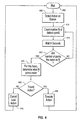
- Fig. 6 illustrates detailed logic in the form of a flowchart for performing the steps in accordance with the present invention.
- Computing system 100 includes any suitable central processing unit 10, such as a standard microprocessor, and any number of other objects interconnected via system bus 12.
- computing system 100 includes memory, such as read only memory (ROM) 16, random access memory (RAM) 14, and peripheral memory devices (e.g., disk or tape drives 20) connected to system bus 12 via I/O adapter 18.
- Computing system 100 further includes a touchscreen display adapter 36 for connecting system bus 12 to a conventional touchscreen display device 38.
- user interface adapter 22 could connect system bus 12 to other user controls, such as keyboard 24, speaker 28, mouse 26, and a touchpad 32 (not shown).
- touchscreen/touchpad technology includes electronic sensors positioned inside a flexible membrane covering a screen, a grid of infrared signals, or a method of detecting a touch by sensing a change in reflected sound waves through glass or plastic.
- a user can initiate the display of a pull down menu by touching and moving a finger over the touchpad to move a mouse cursor on a display screen. The user can then select an object within that menu by dragging the mouse cursor down the pull down menu by moving his finger in a downward motion on the touchpad.
- GUI graphical user interface
- OS operating system
- GUI graphical user interface
- Any suitable computer-readable media may retain the GUI and operating system, such as ROM 16, RAM 14, disk and/or tape drive 20 (e.g., magnetic diskette, magnetic tape, CD-ROM, optical disk, or other suitable storage media).
- the COSETM (Common Operating System Environment) desktop GUI interfaces the user to the AIXTM operating system.
- the GUI may be viewed as being incorporated and embedded within the operating system.
- any suitable operating system or desktop environment could be utilized.
- Examples of other GUls and/or operating systems include X11TM (X Windows) graphical user interface, Sun's SolarisTM operating system, and Microsoft's Windows 95TM operating system. While the GUI and operating system merely instruct and direct CPU 10, for ease in explanation, the GUI and operating system will be described as performing the following features and functions.
- a computer system (e.g., see Fig. 1) includes a display screen 210 for displaying document 240.
- the computer system further includes conventional touchpad 200 which is sensitive to, for example, heat, pressure, or the sound of palm and fingerprints.
- display screen 210 and touchpad 200 could be replaced with one conventional touchscreen. While any suitable touchscreen technology may be used, for ease in explanation, the preferred embodiment will be described as using a touchpad that detects sound patterns.
- the OS displays menu bar 220, which includes various conventional selections 230-234.
- Next to each selection is a box containing a number. The number corresponds to the number of fingers needed to invoke the selection. For example, box 222 indicates that one finger would need to be placed on touchpad 200 to select "file" 230. Similarly, box 225 indicates that 4 fingers would need to be simultaneously placed on touchpad 200 to select "view” 233.
- the number placed in each box is user programmable, and may be in any order. Further, the user can use up to ten fingers to make selections. For more than ten selections, the user could use a stylus, or some other conventional means for selection.
- Fig. 3 illustrates a user having placed two fingers 201 and 202 on touchpad 200.
- the OS displays drop-down "edit” menu 300 because two fingers corresponds to "edit” 231 (see box 223).
- boxes 302-305 display numbers representing the number of fingers/thumb that must be placed on touchpad 200 to invoke a selection in menu 300.
- box 303 indicates that one finger must be placed on touchpad 200 to invoke a "cut" menu.
- Fig. 6 illustrates a flow chart containing detailed logic for implementing the preferred embodiment.
- touchpad 200 waits to detect sound/heat/pressure, etc., from one or more fingers/thumb (or object).
- touchpad 200 detects the sound pattern of the user's fingers.
- a unique object e.g., stylus
- touchpad 200 detects one or more fingerprints
- the OS counts the number of distinct fingerprints.
- the OS waits a certain amount of time (e.g., 1 second).
- the OS re-counts the number of fingerprints on touchpad 200 and compares that number to the previous number counted at 610. If the count is different, control returns to 610. If the count is the same, at 625, the OS determines what function should be invoked based on the number of points (e.g., fingerprints) counted. To do this, the OS examines a look up table (not shown) at 630. If the number of counts is found in the look-up table, at 635, the action associated with the counted points is invoked. If the action is not found, at 640, the previous action, if any, is cancelled and control returns to 600.
- a look up table not shown
Landscapes
- Engineering & Computer Science (AREA)
- General Engineering & Computer Science (AREA)
- Theoretical Computer Science (AREA)
- Human Computer Interaction (AREA)
- Physics & Mathematics (AREA)
- General Physics & Mathematics (AREA)
- Position Input By Displaying (AREA)
- User Interface Of Digital Computer (AREA)
Applications Claiming Priority (2)
| Application Number | Priority Date | Filing Date | Title |
|---|---|---|---|
| US705026 | 1996-08-29 | ||
| US08/705,026 US5896126A (en) | 1996-08-29 | 1996-08-29 | Selection device for touchscreen systems |
Publications (3)
| Publication Number | Publication Date |
|---|---|
| EP0827064A2 true EP0827064A2 (fr) | 1998-03-04 |
| EP0827064A3 EP0827064A3 (fr) | 1999-08-04 |
| EP0827064B1 EP0827064B1 (fr) | 2003-01-08 |
Family
ID=24831758
Family Applications (1)
| Application Number | Title | Priority Date | Filing Date |
|---|---|---|---|
| EP97480050A Expired - Lifetime EP0827064B1 (fr) | 1996-08-29 | 1997-08-19 | Dispositif de sélection pour écran tactile |
Country Status (3)
| Country | Link |
|---|---|
| US (1) | US5896126A (fr) |
| EP (1) | EP0827064B1 (fr) |
| DE (1) | DE69718259T2 (fr) |
Cited By (6)
| Publication number | Priority date | Publication date | Assignee | Title |
|---|---|---|---|---|
| WO2008085744A1 (fr) * | 2007-01-07 | 2008-07-17 | Apple Inc. | Dispositif multifonctionnel portable, procédé et interface utilisateur graphique pour déplacer un contenu affiché |
| WO2008085404A3 (fr) * | 2007-01-03 | 2009-01-15 | Apple Inc | Discrimination d'entrée d'écran tactile multipoint |
| US7479949B2 (en) | 2006-09-06 | 2009-01-20 | Apple Inc. | Touch screen device, method, and graphical user interface for determining commands by applying heuristics |
| US8130203B2 (en) | 2007-01-03 | 2012-03-06 | Apple Inc. | Multi-touch input discrimination |
| USRE45559E1 (en) | 1997-10-28 | 2015-06-09 | Apple Inc. | Portable computers |
| US9448712B2 (en) | 2007-01-07 | 2016-09-20 | Apple Inc. | Application programming interfaces for scrolling operations |
Families Citing this family (35)
| Publication number | Priority date | Publication date | Assignee | Title |
|---|---|---|---|---|
| US6229529B1 (en) * | 1997-07-11 | 2001-05-08 | Ricoh Company, Ltd. | Write point detecting circuit to detect multiple write points |
| US6072482A (en) * | 1997-09-05 | 2000-06-06 | Ericsson Inc. | Mouse mode manager and voice activation for navigating and executing computer commands |
| IL137478A (en) | 1998-01-26 | 2005-11-20 | Westerman Wayne | Method and apparatus for integrating manual input |
| US6741235B1 (en) | 2000-06-13 | 2004-05-25 | Michael Goren | Rapid entry of data and information on a reduced size input area |
| US6646633B1 (en) * | 2001-01-24 | 2003-11-11 | Palm Source, Inc. | Method and system for a full screen user interface and data entry using sensors to implement handwritten glyphs |
| US7730401B2 (en) * | 2001-05-16 | 2010-06-01 | Synaptics Incorporated | Touch screen with user interface enhancement |
| US7190351B1 (en) | 2002-05-10 | 2007-03-13 | Michael Goren | System and method for data input |
| US7023427B2 (en) | 2002-06-28 | 2006-04-04 | Microsoft Corporation | Method and system for detecting multiple touches on a touch-sensitive screen |
| US7436535B2 (en) * | 2003-10-24 | 2008-10-14 | Microsoft Corporation | Real-time inking |
| US6856259B1 (en) | 2004-02-06 | 2005-02-15 | Elo Touchsystems, Inc. | Touch sensor system to detect multiple touch events |
| DE102005007642B4 (de) | 2005-02-19 | 2018-07-19 | Volkswagen Ag | Eingabevorrichtung für ein Kraftfahrzeug mit einem Touchscreen |
| WO2007127258A2 (fr) * | 2006-04-27 | 2007-11-08 | Wms Gaming Inc. | jeu de paris avec dispositif de détection de geste multipoint |
| WO2008045464A2 (fr) | 2006-10-10 | 2008-04-17 | Wms Gaming Inc. | Table à joueurs multiples et à points tactiles multiples destinée à des systèmes de jeu de mises |
| US8269727B2 (en) | 2007-01-03 | 2012-09-18 | Apple Inc. | Irregular input identification |
| US9965067B2 (en) | 2007-09-19 | 2018-05-08 | T1V, Inc. | Multimedia, multiuser system and associated methods |
| US20130342489A1 (en) * | 2008-08-13 | 2013-12-26 | Michael R. Feldman | Multimedia, multiuser system and associated methods |
| US8583491B2 (en) * | 2007-09-19 | 2013-11-12 | T1visions, Inc. | Multimedia display, multimedia system including the display and associated methods |
| US9953392B2 (en) | 2007-09-19 | 2018-04-24 | T1V, Inc. | Multimedia system and associated methods |
| US20100179864A1 (en) | 2007-09-19 | 2010-07-15 | Feldman Michael R | Multimedia, multiuser system and associated methods |
| US8600816B2 (en) * | 2007-09-19 | 2013-12-03 | T1visions, Inc. | Multimedia, multiuser system and associated methods |
| US20090189869A1 (en) * | 2007-12-20 | 2009-07-30 | Seiko Epson Corporation | Touch panel input device, control method of touch panel input device, media stored control program, and electronic device |
| KR20090085470A (ko) * | 2008-02-04 | 2009-08-07 | 삼성전자주식회사 | 아이템 또는 바탕화면에서 복수의 터치방식을 감지하는터치 ui 제공방법 및 이를 적용한 멀티미디어 기기 |
| US8241912B2 (en) * | 2008-06-26 | 2012-08-14 | Wms Gaming Inc. | Gaming machine having multi-touch sensing device |
| CN102414649B (zh) | 2009-04-30 | 2015-05-20 | 辛纳普蒂克斯公司 | 按照多个规则集合来操作触摸屏控制系统 |
| WO2011026186A1 (fr) * | 2009-09-04 | 2011-03-10 | Rpo Pty Limited | Procédés de mappage de gestes à des instructions d'interface graphique d'utilisateur |
| US20110148436A1 (en) * | 2009-12-18 | 2011-06-23 | Synaptics Incorporated | System and method for determining a number of objects in a capacitive sensing region using signal grouping |
| US20110148438A1 (en) * | 2009-12-18 | 2011-06-23 | Synaptics Incorporated | System and method for determining a number of objects in a capacitive sensing region using a shape factor |
| DE102009059869A1 (de) | 2009-12-21 | 2011-06-22 | Volkswagen AG, 38440 | Verfahren zum Bereitstellen einer Benutzerschnittstelle und Bedienvorrichtung |
| US20110179381A1 (en) * | 2010-01-21 | 2011-07-21 | Research In Motion Limited | Portable electronic device and method of controlling same |
| US8959459B2 (en) | 2011-06-15 | 2015-02-17 | Wms Gaming Inc. | Gesture sensing enhancement system for a wagering game |
| US9086732B2 (en) | 2012-05-03 | 2015-07-21 | Wms Gaming Inc. | Gesture fusion |
| US9576422B2 (en) | 2013-04-18 | 2017-02-21 | Bally Gaming, Inc. | Systems, methods, and devices for operating wagering game machines with enhanced user interfaces |
| JP6525504B2 (ja) * | 2014-04-20 | 2019-06-05 | アルパイン株式会社 | 入力装置および操作入力方法 |
| US20180349691A1 (en) * | 2017-05-31 | 2018-12-06 | Lenovo (Singapore) Pte. Ltd. | Systems and methods for presentation of handwriting input |
| US12282364B2 (en) | 2021-01-04 | 2025-04-22 | Microsoft Technology Licensing, Llc | Posture probabilities for hinged touch display |
Family Cites Families (9)
| Publication number | Priority date | Publication date | Assignee | Title |
|---|---|---|---|---|
| EP0156593A3 (fr) * | 1984-03-22 | 1985-12-27 | AMP INCORPORATED (a New Jersey corporation) | Méthode et appareil pour des changements de mode et/ou contrôle tactile du type souris |
| US4914624A (en) * | 1988-05-06 | 1990-04-03 | Dunthorn David I | Virtual button for touch screen |
| FR2658675B1 (fr) * | 1990-02-19 | 1994-09-16 | Techniphone | Dispositif formant ecran tactile du type capacitif. |
| US5341133A (en) * | 1991-05-09 | 1994-08-23 | The Rowland Institute For Science, Inc. | Keyboard having touch sensor keys for conveying information electronically |
| US5483261A (en) * | 1992-02-14 | 1996-01-09 | Itu Research, Inc. | Graphical input controller and method with rear screen image detection |
| US5612719A (en) * | 1992-12-03 | 1997-03-18 | Apple Computer, Inc. | Gesture sensitive buttons for graphical user interfaces |
| DE69422323T2 (de) * | 1993-04-01 | 2000-06-21 | Ibm | Dynamische Anpassungseinrichtung für Berührungsanzeigeknöpfe |
| TW237588B (fr) * | 1993-06-07 | 1995-01-01 | Microsoft Corp | |
| JPH07281810A (ja) * | 1994-04-02 | 1995-10-27 | Wacom Co Ltd | マルチデバイス入力システムを有するコンピュータシステム |
-
1996
- 1996-08-29 US US08/705,026 patent/US5896126A/en not_active Expired - Lifetime
-
1997
- 1997-08-19 EP EP97480050A patent/EP0827064B1/fr not_active Expired - Lifetime
- 1997-08-19 DE DE69718259T patent/DE69718259T2/de not_active Expired - Fee Related
Cited By (25)
| Publication number | Priority date | Publication date | Assignee | Title |
|---|---|---|---|---|
| USRE46548E1 (en) | 1997-10-28 | 2017-09-12 | Apple Inc. | Portable computers |
| USRE45559E1 (en) | 1997-10-28 | 2015-06-09 | Apple Inc. | Portable computers |
| US8564544B2 (en) | 2006-09-06 | 2013-10-22 | Apple Inc. | Touch screen device, method, and graphical user interface for customizing display of content category icons |
| US12236080B2 (en) | 2006-09-06 | 2025-02-25 | Apple Inc. | Device, method, and medium for sharing images |
| US7479949B2 (en) | 2006-09-06 | 2009-01-20 | Apple Inc. | Touch screen device, method, and graphical user interface for determining commands by applying heuristics |
| US11029838B2 (en) | 2006-09-06 | 2021-06-08 | Apple Inc. | Touch screen device, method, and graphical user interface for customizing display of content category icons |
| US9952759B2 (en) | 2006-09-06 | 2018-04-24 | Apple Inc. | Touch screen device, method, and graphical user interface for customizing display of content category icons |
| US9335924B2 (en) | 2006-09-06 | 2016-05-10 | Apple Inc. | Touch screen device, method, and graphical user interface for customizing display of content category icons |
| US8791921B2 (en) | 2007-01-03 | 2014-07-29 | Apple Inc. | Multi-touch input discrimination |
| US9778807B2 (en) | 2007-01-03 | 2017-10-03 | Apple Inc. | Multi-touch input discrimination |
| US8542210B2 (en) | 2007-01-03 | 2013-09-24 | Apple Inc. | Multi-touch input discrimination |
| US8384684B2 (en) | 2007-01-03 | 2013-02-26 | Apple Inc. | Multi-touch input discrimination |
| WO2008085404A3 (fr) * | 2007-01-03 | 2009-01-15 | Apple Inc | Discrimination d'entrée d'écran tactile multipoint |
| US9024906B2 (en) | 2007-01-03 | 2015-05-05 | Apple Inc. | Multi-touch input discrimination |
| US8243041B2 (en) | 2007-01-03 | 2012-08-14 | Apple Inc. | Multi-touch input discrimination |
| US9256322B2 (en) | 2007-01-03 | 2016-02-09 | Apple Inc. | Multi-touch input discrimination |
| EP2485136A1 (fr) * | 2007-01-03 | 2012-08-08 | Apple Inc. | Discrimination d'entrées multi-touches d'états de préhension de doigts |
| US8531425B2 (en) | 2007-01-03 | 2013-09-10 | Apple Inc. | Multi-touch input discrimination |
| US7855718B2 (en) | 2007-01-03 | 2010-12-21 | Apple Inc. | Multi-touch input discrimination |
| US8130203B2 (en) | 2007-01-03 | 2012-03-06 | Apple Inc. | Multi-touch input discrimination |
| US9448712B2 (en) | 2007-01-07 | 2016-09-20 | Apple Inc. | Application programming interfaces for scrolling operations |
| US7966578B2 (en) | 2007-01-07 | 2011-06-21 | Apple Inc. | Portable multifunction device, method, and graphical user interface for translating displayed content |
| US10817162B2 (en) | 2007-01-07 | 2020-10-27 | Apple Inc. | Application programming interfaces for scrolling operations |
| US9760272B2 (en) | 2007-01-07 | 2017-09-12 | Apple Inc. | Application programming interfaces for scrolling operations |
| WO2008085744A1 (fr) * | 2007-01-07 | 2008-07-17 | Apple Inc. | Dispositif multifonctionnel portable, procédé et interface utilisateur graphique pour déplacer un contenu affiché |
Also Published As
| Publication number | Publication date |
|---|---|
| US5896126A (en) | 1999-04-20 |
| EP0827064A3 (fr) | 1999-08-04 |
| DE69718259D1 (de) | 2003-02-13 |
| DE69718259T2 (de) | 2003-09-25 |
| EP0827064B1 (fr) | 2003-01-08 |
Similar Documents
| Publication | Publication Date | Title |
|---|---|---|
| US5896126A (en) | Selection device for touchscreen systems | |
| US5835079A (en) | Virtual pointing device for touchscreens | |
| EP0817000B1 (fr) | Dispositif de pointage déformable pour écrans tactiles | |
| US6067079A (en) | Virtual pointing device for touchscreens | |
| US5790104A (en) | Multiple, moveable, customizable virtual pointing devices | |
| US5870083A (en) | Breakaway touchscreen pointing device | |
| US5933134A (en) | Touch screen virtual pointing device which goes into a translucent hibernation state when not in use | |
| US5872559A (en) | Breakaway and re-grow touchscreen pointing device | |
| EP0810515B1 (fr) | Dispositif de pointage virtuel pour écrans tactiles | |
| US5808605A (en) | Virtual pointing device for touchscreens | |
| US5812118A (en) | Method, apparatus, and memory for creating at least two virtual pointing devices | |
| EP3232315B1 (fr) | Dispositif et procédé pour fournir une interface utilisateur | |
| US9348458B2 (en) | Gestures for touch sensitive input devices | |
| US5874948A (en) | Virtual pointing device for touchscreens | |
| JP5456529B2 (ja) | グラフィカル・ユーザ・インターフェース・オブジェクトを操作する方法及びコンピュータシステム | |
| US20110012856A1 (en) | Methods for Operation of a Touch Input Device | |
| JP2999947B2 (ja) | 表示画面上に表示されているオブジェクトの操作方法及び装置 | |
| US20030193481A1 (en) | Touch-sensitive input overlay for graphical user interface | |
| US9239673B2 (en) | Gesturing with a multipoint sensing device | |
| KR20070006477A (ko) | 가변적 메뉴 배열 방법 및 이를 이용한 디스플레이 장치 | |
| HK1103143B (en) | Gestures for touch sensitive input devices | |
| HK1103143A (en) | Gestures for touch sensitive input devices |
Legal Events
| Date | Code | Title | Description |
|---|---|---|---|
| PUAI | Public reference made under article 153(3) epc to a published international application that has entered the european phase |
Free format text: ORIGINAL CODE: 0009012 |
|
| AK | Designated contracting states |
Kind code of ref document: A2 Designated state(s): DE FR GB |
|
| AX | Request for extension of the european patent |
Free format text: AL;LT;LV;RO;SI |
|
| PUAL | Search report despatched |
Free format text: ORIGINAL CODE: 0009013 |
|
| AK | Designated contracting states |
Kind code of ref document: A3 Designated state(s): AT BE CH DE DK ES FI FR GB GR IE IT LI LU MC NL PT SE |
|
| AX | Request for extension of the european patent |
Free format text: AL;LT;LV;RO;SI |
|
| 17P | Request for examination filed |
Effective date: 19990826 |
|
| AKX | Designation fees paid |
Free format text: DE FR GB |
|
| 17Q | First examination report despatched |
Effective date: 20020125 |
|
| GRAH | Despatch of communication of intention to grant a patent |
Free format text: ORIGINAL CODE: EPIDOS IGRA |
|
| GRAH | Despatch of communication of intention to grant a patent |
Free format text: ORIGINAL CODE: EPIDOS IGRA |
|
| GRAA | (expected) grant |
Free format text: ORIGINAL CODE: 0009210 |
|
| AK | Designated contracting states |
Kind code of ref document: B1 Designated state(s): DE FR GB |
|
| PG25 | Lapsed in a contracting state [announced via postgrant information from national office to epo] |
Ref country code: FR Free format text: LAPSE BECAUSE OF FAILURE TO SUBMIT A TRANSLATION OF THE DESCRIPTION OR TO PAY THE FEE WITHIN THE PRESCRIBED TIME-LIMIT Effective date: 20030108 |
|
| REG | Reference to a national code |
Ref country code: GB Ref legal event code: FG4D |
|
| REF | Corresponds to: |
Ref document number: 69718259 Country of ref document: DE Date of ref document: 20030213 Kind code of ref document: P |
|
| PGFP | Annual fee paid to national office [announced via postgrant information from national office to epo] |
Ref country code: DE Payment date: 20030820 Year of fee payment: 7 |
|
| PLBE | No opposition filed within time limit |
Free format text: ORIGINAL CODE: 0009261 |
|
| STAA | Information on the status of an ep patent application or granted ep patent |
Free format text: STATUS: NO OPPOSITION FILED WITHIN TIME LIMIT |
|
| EN | Fr: translation not filed | ||
| 26N | No opposition filed |
Effective date: 20031009 |
|
| PGFP | Annual fee paid to national office [announced via postgrant information from national office to epo] |
Ref country code: GB Payment date: 20040803 Year of fee payment: 8 |
|
| PG25 | Lapsed in a contracting state [announced via postgrant information from national office to epo] |
Ref country code: DE Free format text: LAPSE BECAUSE OF NON-PAYMENT OF DUE FEES Effective date: 20050301 |
|
| PG25 | Lapsed in a contracting state [announced via postgrant information from national office to epo] |
Ref country code: GB Free format text: LAPSE BECAUSE OF NON-PAYMENT OF DUE FEES Effective date: 20050819 |
|
| GBPC | Gb: european patent ceased through non-payment of renewal fee |
Effective date: 20050819 |