EP0831409A2 - Elektronisches Nachrichtensystem auf Basis eines Browsers - Google Patents
Elektronisches Nachrichtensystem auf Basis eines Browsers Download PDFInfo
- Publication number
- EP0831409A2 EP0831409A2 EP97115923A EP97115923A EP0831409A2 EP 0831409 A2 EP0831409 A2 EP 0831409A2 EP 97115923 A EP97115923 A EP 97115923A EP 97115923 A EP97115923 A EP 97115923A EP 0831409 A2 EP0831409 A2 EP 0831409A2
- Authority
- EP
- European Patent Office
- Prior art keywords
- message
- extension
- file
- browser
- extension program
- Prior art date
- Legal status (The legal status is an assumption and is not a legal conclusion. Google has not performed a legal analysis and makes no representation as to the accuracy of the status listed.)
- Withdrawn
Links
Images


Classifications
-
- G—PHYSICS
- G06—COMPUTING OR CALCULATING; COUNTING
- G06Q—INFORMATION AND COMMUNICATION TECHNOLOGY [ICT] SPECIALLY ADAPTED FOR ADMINISTRATIVE, COMMERCIAL, FINANCIAL, MANAGERIAL OR SUPERVISORY PURPOSES; SYSTEMS OR METHODS SPECIALLY ADAPTED FOR ADMINISTRATIVE, COMMERCIAL, FINANCIAL, MANAGERIAL OR SUPERVISORY PURPOSES, NOT OTHERWISE PROVIDED FOR
- G06Q10/00—Administration; Management
- G06Q10/10—Office automation; Time management
- G06Q10/107—Computer-aided management of electronic mailing [e-mailing]
Definitions
- the present invention relates generally to electronic messaging, and more particularly to messaging using the Internet.
- IP Internet Protocol
- IP protocols For example, Internet telephone software applications implement real-time synchronous two-way voice communications between users using Internet TCP/IP protocols.
- the users at both ends of the communications link need a suitably equipped PC including the same proprietary software.
- the person for whom the message is intended must be available to answer the call at the time the call is placed, otherwise two-way communications cannot take place.
- Some electronic mail products can asynchronously send non-textual information, e.g., voice messages, via the Internet.
- voice message is first recorded in a file using a specialized application program. Then, the file is converted to a corresponding Multipurpose Internet Mail Extension (MIME) format.
- MIME Multipurpose Internet Mail Extension
- the voice message can be forwarded to the intended recipient by attaching the MIME encoded file to an outgoing message using some MIME enabled e-mail application program.
- Voice messages have also become a standard feature of many World-Wide-Web (WWW or Web) pages.
- WWW World-Wide-Web
- an Internet user locates a Web page using a Web browsing application such as Netscape Navigator, or Microsoft Internet Explorer.
- a Web browsing application such as Netscape Navigator, or Microsoft Internet Explorer.
- audio content associated with the page can be displayed by the browser after the page is delivered.
- the audio message is a predetermined and embedded part of the Web page with no specific recipient indicated.
- the audio content can be delivered to the browsers in a number of ways, ranging from simple audio (.wav) file transfer to proprietary streaming technologies, such as in RealAudio.
- the transfer is one way, from content provider, e.g., the web server, to the client browser.
- the delivery mechanism be based on standard, non-proprietary, Internet protocols, such that the intended recipient may receive and process such a message using any e-mail client program that supports these protocols.
- a Web page In a computerized method for sending multimedia messages, a Web page includes a tag specifying a browser extension program, and a location of the extension program.
- the Web page is accessible by a Web server computer.
- the Web page is requested by a Web browser of a first client computer connected to the Web server computer by a communications network.
- the extension program is retrieved from the location specified in the tag of the Web page, and extends the Web browser.
- the extension program is executed to record a multimedia message as digital signals in a file of the client computer.
- the file can be sent to a second client computer as an encoded electronic mail message.
- the invention in its broad form, resides in a computerized method and apparatus for sending a multimedia message, as recited in claims 1 and 8 respectively.
- an audio message may be recorded using a microphone and a sound card; alternatively, the message may be recorded using a camera and a video card.
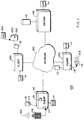
- FIG. 1 shows a messaging system 100 according to a preferred embodiment of the invention.
- the system 100 includes client computers 110, 120, and 130, and a server computer 140 connected to each other by a communications network 150.
- the client computers 110, 120, and 130 can be portable computers, e.g., lap-tops, PCs, workstations, or larger computer systems.
- the server computer 140 is usually configured as a workstation, or larger computer.
- the computers are standardly configured with dynamic random access memories (DRAM) connected to one or more processors via a bus.
- the computers can include input/output devices (I/O) 111 such as a mouse, keyboard, display terminal, printer, and network interface.
- the systems can also include local storage such as floppies and hard disk drives 112 for persistently storing programs and data.
- Application programs can execute under the control of system software such as Microsoft Windows 95, or NT O/S. Programs and data can also be loaded into the computers via the network 150.
- the client computer 110 includes a microphone 116 connected to a soundboard 117.
- the soundboard 117 can convert analog acoustic signals 102 to digital signals.
- the client computer 120 includes application programs for generating World-Wide-Web (WWW) pages, e.g., page 200, described in further detail below.
- the client computer 130 includes a standard MIME enabled electronic mail (e-mail) application, for example Microsoft Exchange.
- the client 130 also includes a speaker 118 connected to a soundboard 119.
- the soundboard 119 can convert digital signals to analog acoustic signals 103.
- the server 140 includes Web server software for delivering Web pages, such as page 200, to requesting client computers.
- the network 150 uses Internet TCP/IP communications protocols at the logical levels.
- a user of the client computer 110 activates a browser application program 101 using, for example, the mouse.
- the browser 101 can be stored on the disk 112 of the client 110.
- the browser 101 can be the Netscape Navigator, or the Microsoft Internet Explorer.
- the browser 101 is used for locating and requesting Web pages, such as page 200.
- the Web page 200 is identified by its unique addresses known as Universal Resource Locators (URL) 201, for example, "www.digital.com/user/my-home-page.html.”
- URL Universal Resource Locators
- the user of the client computer 120 can create the page 200 using the HyperText Markup Language (HTML).
- HTML HyperText Markup Language
- the page 200 can be posted on the server 140 for general access by any of the users of the network 150.
- the page 200 can be stored on the disk 112 of the client computer 120 in a directory which is known to the server 140 as a repository of Web pages.
- the server 140 executes "httpd" web server software to deliver Web pages to client computers using the HyperText Transport Protocol (HTTP). For example, using the browser 101, the user of the client 110 can access the page 200 by specifying the URL 201 of the page 200 in a request messages such as "www.digital.com/user/my-home-page.html.” In response, the server 140 delivers the page 200 to the client 110. Once the page 200 arrives at the client 110, it can be stored locally on the disk 112, and/or viewed on an a display terminal using the browser 101.
- HTTP HyperText Transport Protocol
- the web page 200 includes an embedded HTML tag 210.
- the tag 210 specifies parameters for a "browser extension.”
- a browser extension is a program which extends the capabilities of the browser application program 101.
- the specified extension can dynamically be retrieved by the client computer 110 via the network 150 and stored in the memory of the client.
- the extension is executed from within the application environment of the browser. However, the extension cannot run as stand-alone application software.
- the extension can be a "plug-in," or an "applet.”
- a plug-in extension is a hardware/software platform-specific program written in native executable code.
- a plug-in can essentially do anything the browser can do.
- a plug-in is loaded and permanently installed in the client 110.
- An applet extension is a platform-independent program written in JAVA code, and interpreted by the JAVA virtual machine (JVM). Security features limit the capabilities of the applet browser extension. The code of the applet is temporarily loaded along with the page 200. The code of the JAVA applet is discarded with the page.
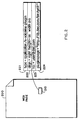
- Figure 2 generally shows the form of a tag 210 specifying a browser extension in the form of a plug-in.
- the tag 210 of the page 200 includes field 221-224.
- the field 221 specifies a MIME "type" of the plug-in. In this case, the standard type is "application”, and an "extra” (x) user defined sub-type is "x-voiceme-plugin.”
- the field 222 specifies the alignment and dimensions of the display "window" within which the graphic user interface (GUI) of the extension is to operate.
- GUI graphic user interface
- the field 223 specifies a default e-mail address which is to receive messages generated by the extension.
- the field 224 specifies the location where the extension is stored.
- the user of the browser can retrieve the extension from the location specified in field 224, and install the extension in the browser 101.
- the location can be any computer accessible via the network 150.
- HTML code for a comparable tag specifying an applet extension may be specified, in part, as the code in Table 1.
- Figure 3 generally shows the processing of the browser 101 with respect to extensions.
- step 305 the page 200 is displayed.
- step 310 the browser makes a determination if the page 200 includes a tag specifying an extension, step 310. If a page does not include an extension tag, then the browser waits for the next user command, step 301.
- the browser 101 makes a determination if the browser extension is an applet or plug-in.
- the extension can be fetched and executed immediately.
- a plug-in a check is made to see if the extension (e.g., the dynamic link library (DLL) corresponding to the type 221 has already been installed by consulting its internal table. If the extension has been installed, then continue with step 510 of Figure 5.
- DLL dynamic link library
- step 330 determines if the extension has not been installed. If the extension has not been installed, then display a plug-in installation icon in step 330. This is a signal to the user that the MIME type required to process the page 200 is not recognized. In step 340, determine if the user requests installation of the extension, or not. If the user does not request installation, continue as for step 301.
- step 350 retrieve the extension from the location specified in field 224 of the tag 210, and install the DLL for the extension in step 360.
- the user must exit and restart the browser 101 in step 370 so that the requisite MIME type, e.g., "application/x-voice-plugin" is recognized.
- step 380 the page is requested again, so the process can now proceed with step 501 of Figure 5.
- the applet is automatically downloaded into the client computer 110.
- the applet extension is discarded with the page.
- FIG. 4A, 4B shows graphic user interfaces (GUI) which will be displayed in the window specified in field 222 of the tag 210.
- GUI 400 includes a record button 410 depicting a microphone icon, and a default "To:" field 420, e.g., as specified in field 223 of tag 210, and a volume field 430.
- the user of the browser 101 "clicks" on the record button 410 to activate recording, step 510 of Figure 5.
- the relative volume is indicated by a sliding bar 431 during the recording step 520.
- the signal is processed by the soundboard 117, and the digital signal is stored as a temporary file 113 on the disk 112 of the client computer 110.
- the GUI 440 includes Send, Play, and Cancel buttons 441-443, as well as the default "To:” field 420.
- Sending the file 113 involves the sub-steps of a process 600 of Figure 6. Read the file 113 from the disk 119, step 610. Encode the file using, for example, a Base64 Content-transfer-Encoding , see RFC 1521, N. Bernstein, N. Freed, MIME (Multipurpose Internet Mail Extension) Part one: Mechanism for Specifying and describing the format of Internet Message Bodies , 09/23/1993, step 620.
- a Base64 Content-transfer-Encoding see RFC 1521, N. Bernstein, N. Freed, MIME (Multipurpose Internet Mail Extension) Part one: Mechanism for Specifying and describing the format of Internet Message Bodies , 09/23/1993, step 620.
- Pressing the Play button 442 plays back the recorded message from the temporary file 113, step 542.
- the GUI 440 does not change state during play-back. Clicking on the cancel button 443, step 543, deletes the temporary file 113, and overlays the GUI 400 in the window.
- the To: field 710 can be used to change the default recipient(s) who are to receive the message.
- a Subject field 720 can be used to enter a default "subject" header associated with the message.
- a field 730 is the default X-URL field of the message, for example "http://www.dec.com/ ⁇ user/home.html.”
- a confirm send button 740 can be used to toggle automatic sending or not. If confirmation is disabled, then the message is sent as soon as recording has been stopped. The message is sent using the current default values as they would be displayed in the context menu 700. If confirmation is enabled, this is the normal state, the message must be sent by clicking on the Send button 441.
- the About button 750 displays administrative information about the extension, such as date, version number, and the like.
- the sender of the message e.g., the user of the client computer 110 does not need any special software other than a standard Web browser. All message preparation and processing takes place within the application environment of the browser. To enable messaging, the sender only needs to locate, using the browser, any Web page that is enabled with a extension tag as described herein. This can be the page 200 created by the user of the client 120, or any other user, including the user of the client 110 or the client 130.
- the recipient of the message e.g., the user of the client 130, or any other user having a computer connected to the Internet, does not need any additional software other than a standard MIME enabled e-mail application.
- the choice of hardware and operating system is entirely independent of message extension as described herein.
- the message can also be configured to communicate using other multimedia modalities.
- the microphone 116 and soundcard 117 can be replaced by a video camera and video card.
- the extensions type can be "image" and the message encoded in the temporary file 113 has the corresponding MIME type. Images will be recorded and encoded when clicking on the record button 410 of Figure 4, perhaps showing a camera icon. The recipient of the message will need a computer equipped with a video card to display the "image" MIME file.
- a client computer equipped with both audio and image devices can simultaneously record sound and image data if both "audio" and "image” extensions are executed by the browser.
- the recipients of messages will receive messages having both sound and image signals.
- browser extensions can also be configured to perform text messaging, or still picture messaging, e.g., graphics.
- clicking on the record button 410 permits the entry of a text message with the extension.
- the message in this case is simply sent as a "text" MIME type.
Landscapes
- Engineering & Computer Science (AREA)
- Business, Economics & Management (AREA)
- Human Resources & Organizations (AREA)
- Entrepreneurship & Innovation (AREA)
- Strategic Management (AREA)
- Marketing (AREA)
- Physics & Mathematics (AREA)
- Economics (AREA)
- Computer Hardware Design (AREA)
- Operations Research (AREA)
- Quality & Reliability (AREA)
- Tourism & Hospitality (AREA)
- Data Mining & Analysis (AREA)
- General Business, Economics & Management (AREA)
- General Physics & Mathematics (AREA)
- Theoretical Computer Science (AREA)
- Information Transfer Between Computers (AREA)
- Computer And Data Communications (AREA)
- Data Exchanges In Wide-Area Networks (AREA)
Applications Claiming Priority (2)
| Application Number | Priority Date | Filing Date | Title |
|---|---|---|---|
| US710696 | 1996-09-19 | ||
| US08/710,696 US6212535B1 (en) | 1996-09-19 | 1996-09-19 | Browser-based electronic messaging |
Publications (1)
| Publication Number | Publication Date |
|---|---|
| EP0831409A2 true EP0831409A2 (de) | 1998-03-25 |
Family
ID=24855133
Family Applications (1)
| Application Number | Title | Priority Date | Filing Date |
|---|---|---|---|
| EP97115923A Withdrawn EP0831409A2 (de) | 1996-09-19 | 1997-09-12 | Elektronisches Nachrichtensystem auf Basis eines Browsers |
Country Status (3)
| Country | Link |
|---|---|
| US (1) | US6212535B1 (de) |
| EP (1) | EP0831409A2 (de) |
| JP (1) | JP3469057B2 (de) |
Cited By (7)
| Publication number | Priority date | Publication date | Assignee | Title |
|---|---|---|---|---|
| EP1056257A1 (de) * | 1999-05-25 | 2000-11-29 | France Telecom | Rundfunksystem von Multimedia-Daten mittels Elektronisches Postsystem |
| WO2001039013A3 (en) * | 1999-11-22 | 2002-05-10 | Avenue A Inc | Sending an email message in response to selected web browsing activity |
| EP1149335A4 (de) * | 1998-12-10 | 2003-06-18 | Intellinet Inc | E-mail erstellung mit modularen komponenten |
| EP0987869A3 (de) * | 1998-09-18 | 2003-07-16 | Deutsche Telekom AG | Vorrichtung und Verfahren zur Generierung und Verbreitung von individuellen Multimediabotschaften |
| US6954777B1 (en) * | 1999-07-29 | 2005-10-11 | International Business Machines Corporation | Method for extending capabilities of an arbitrary web server |
| EP1612660A1 (de) * | 2004-06-29 | 2006-01-04 | GMB Tech (Holland) B.V. | Kommunikationssystem und Verfahren für Tonaufzeichnung |
| EP1612659A1 (de) * | 2004-06-29 | 2006-01-04 | GMB Tech (Holland) B.V. | System und Verfahren für Tonaufzeichnung |
Families Citing this family (62)
| Publication number | Priority date | Publication date | Assignee | Title |
|---|---|---|---|---|
| US6584498B2 (en) | 1996-09-13 | 2003-06-24 | Planet Web, Inc. | Dynamic preloading of web pages |
| US8516132B2 (en) | 1997-06-19 | 2013-08-20 | Mymail, Ltd. | Method of accessing a selected network |
| US6571290B2 (en) | 1997-06-19 | 2003-05-27 | Mymail, Inc. | Method and apparatus for providing fungible intercourse over a network |
| US7325077B1 (en) | 1997-08-21 | 2008-01-29 | Beryl Technical Assays Llc | Miniclient for internet appliance |
| US6542923B2 (en) * | 1997-08-21 | 2003-04-01 | Planet Web, Inc. | Active electronic mail |
| JPH11212892A (ja) * | 1998-01-26 | 1999-08-06 | Brother Ind Ltd | インターネットファクシミリ装置 |
| EP1086560A1 (de) | 1998-06-19 | 2001-03-28 | Netsafe, Inc. | Verfahren und einrichtung zur herstellung von verbindungen über ein netz |
| US6223213B1 (en) * | 1998-07-31 | 2001-04-24 | Webtv Networks, Inc. | Browser-based email system with user interface for audio/video capture |
| US6421708B2 (en) * | 1998-07-31 | 2002-07-16 | Glenayre Electronics, Inc. | World wide web access for voice mail and page |
| GB9903032D0 (en) * | 1999-02-11 | 1999-03-31 | Symbian Ltd | Messaging architecture |
| FR2793576B1 (fr) * | 1999-05-11 | 2001-11-16 | Gemplus Card Int | Terminal radiotelephonique avec une carte a puce dotee d'un navigateur |
| US6662341B1 (en) * | 1999-05-20 | 2003-12-09 | Microsoft Corporation | Method and apparatus for writing a windows application in HTML |
| US6507817B1 (en) * | 1999-09-03 | 2003-01-14 | Cisco Technology, Inc. | Voice IP approval system using voice-enabled web based application server |
| US8448059B1 (en) * | 1999-09-03 | 2013-05-21 | Cisco Technology, Inc. | Apparatus and method for providing browser audio control for voice enabled web applications |
| US6564249B2 (en) * | 1999-10-13 | 2003-05-13 | Dh Labs, Inc. | Method and system for creating and sending handwritten or handdrawn messages |
| US6763373B2 (en) * | 1999-10-13 | 2004-07-13 | Datahouse Labs, Inc. | Method and system for creating and sending handwritten or handdrawn messages |
| US6304898B1 (en) * | 1999-10-13 | 2001-10-16 | Datahouse, Inc. | Method and system for creating and sending graphical email |
| US6999993B1 (en) * | 1999-12-15 | 2006-02-14 | Microsoft Corporation | Methods and systems for end-users extensible electronic mail |
| EP1113361A1 (de) * | 2000-01-03 | 2001-07-04 | Wimba.Com S.A. | Kommunikationsverfahren zwischen einem Applet und einem lokalen Agent über einen Socket-Kommunikationskanal |
| KR20000030181A (ko) * | 2000-01-26 | 2000-06-05 | 강구태 | 인터넷을 이용한 음성카드자동발송시스템 |
| US7325029B1 (en) * | 2000-08-08 | 2008-01-29 | Chang Ifay F | Methods for enabling e-commerce voice communication |
| US7023970B1 (en) * | 2001-01-30 | 2006-04-04 | Cisco Technology, Inc. | Arrangement in a local computer for sending voice messages to a unified communications system |
| GB2373120A (en) * | 2001-03-07 | 2002-09-11 | Hewlett Packard Co | Viewing digital images via a games console |
| WO2002093849A2 (en) * | 2001-05-16 | 2002-11-21 | Kasten Chase Applied Research Limited | System for secure electronic information transmission |
| US20020049817A1 (en) * | 2001-07-12 | 2002-04-25 | Eatamar Drory | Storageless system and method for unified messaging on existing mail accounts via standard internet mail protocols |
| US20030123431A1 (en) * | 2001-12-28 | 2003-07-03 | Bertram Geck | Methods and apparatus for providing internet messaging on the screen of a digital telephone |
| US7895283B1 (en) * | 2002-03-08 | 2011-02-22 | Robert Joseph Hazy | Audio message driven customer interaction queuing system |
| JP3942941B2 (ja) | 2002-04-22 | 2007-07-11 | 三菱電機株式会社 | 通信装置及びプラグインモジュール制御方法及びコンピュータに実行させるためのプログラム及びコンピュータに実行させるためのプログラムを記録したコンピュータ読み取り可能な記録媒体 |
| JP2004046817A (ja) * | 2002-05-23 | 2004-02-12 | Ricoh Co Ltd | プログラム、記憶媒体、データ管理装置及びデータ管理システム |
| US7376126B1 (en) | 2002-09-06 | 2008-05-20 | At&T Delaware Intellectual Property, Inc. | Systems and methods for messaging using a broadband connection |
| US20040254832A1 (en) * | 2003-06-12 | 2004-12-16 | Michael Harkin | Integrated browser plug-in and user defined database |
| EP1652070A2 (de) * | 2003-07-10 | 2006-05-03 | Computer Associates Think, Inc. | System und verfahren zur erzeugung eines web-fähigen graphischen benutzeroberflächen-plugin |
| WO2005008469A2 (en) * | 2003-07-11 | 2005-01-27 | Computer Associates Think, Inc. | System and method for generating a graphical user interface (gui) element |
| US20050010877A1 (en) * | 2003-07-11 | 2005-01-13 | Arthur Udler | System and method for dynamic generation of a graphical user interface |
| FI117313B (fi) * | 2004-04-05 | 2006-08-31 | Nokia Corp | Viestinkäsittely |
| US7849412B2 (en) * | 2004-05-21 | 2010-12-07 | Computer Associates Think, Inc. | System and method for generating a web control in a Windows development environment |
| US8037123B2 (en) * | 2004-08-27 | 2011-10-11 | Microsoft Corporation | Securely and efficiently extending data processing pipeline functionality |
| US20060168056A1 (en) * | 2004-12-20 | 2006-07-27 | Yahoo!, Inc. | System and method for providing improved access to SPAM-control feature in mail-enabled application |
| JP2008539470A (ja) * | 2005-02-09 | 2008-11-13 | ソフトウェアオンライン・エルエルシー | オンラインディスカッションの円滑化 |
| US7433935B1 (en) * | 2005-04-29 | 2008-10-07 | Hewlett-Packard Development Company, L.P. | Self-adapting plug-in service |
| US20070199057A1 (en) * | 2005-10-14 | 2007-08-23 | Softwareonline, Llc | Control of application access to system resources |
| US8020190B2 (en) * | 2005-10-14 | 2011-09-13 | Sdc Software, Inc. | Enhanced browser security |
| US20070199072A1 (en) * | 2005-10-14 | 2007-08-23 | Softwareonline, Llc | Control of application access to system resources |
| US8060371B1 (en) * | 2007-05-09 | 2011-11-15 | Nextel Communications Inc. | System and method for voice interaction with non-voice enabled web pages |
| US9178916B2 (en) * | 2007-06-28 | 2015-11-03 | Voxer Ip Llc | Real-time messaging method and apparatus |
| US8180029B2 (en) | 2007-06-28 | 2012-05-15 | Voxer Ip Llc | Telecommunication and multimedia management method and apparatus |
| US8825772B2 (en) * | 2007-06-28 | 2014-09-02 | Voxer Ip Llc | System and method for operating a server for real-time communication of time-based media |
| US20110019662A1 (en) * | 2007-06-28 | 2011-01-27 | Rebelvox Llc | Method for downloading and using a communication application through a web browser |
| US11095583B2 (en) | 2007-06-28 | 2021-08-17 | Voxer Ip Llc | Real-time messaging method and apparatus |
| US8688789B2 (en) * | 2009-01-30 | 2014-04-01 | Voxer Ip Llc | Progressive messaging apparatus and method capable of supporting near real-time communication |
| US8645477B2 (en) * | 2009-01-30 | 2014-02-04 | Voxer Ip Llc | Progressive messaging apparatus and method capable of supporting near real-time communication |
| US20100198922A1 (en) | 2009-01-30 | 2010-08-05 | Rebelvox Llc | Methods for using the addressing, protocols and the infrastructure of email to support near real-time communication |
| US8660669B2 (en) * | 2007-09-05 | 2014-02-25 | Biolectrics Llc | Concurrent treatment of oral maladies using direct current electricity |
| US9314321B2 (en) | 2007-09-05 | 2016-04-19 | Biolectrics Llc | Concurrent treatment of oral and systemic maladies in animals using electrical current |
| US9168370B2 (en) | 2007-09-05 | 2015-10-27 | Biolectrics Llc | Concurrent treatment of oral and systemic maladies using direct current electricity |
| US8849927B2 (en) * | 2009-01-30 | 2014-09-30 | Voxer Ip Llc | Method for implementing real-time voice messaging on a server node |
| US9589254B2 (en) | 2010-12-08 | 2017-03-07 | Microsoft Technology Licensing, Llc | Using e-mail message characteristics for prioritization |
| US10372779B2 (en) * | 2012-09-13 | 2019-08-06 | Lenovo Enterprise Solutions (Singapore) Pte. Ltd. | Frequent content continuity visual assistance in content browsing |
| AU2015204825A1 (en) | 2014-01-07 | 2016-07-28 | Animal Oralectrics Llc | Treatment of oral maladies using electrical current |
| US10108735B2 (en) * | 2014-02-25 | 2018-10-23 | Esna Technologies Inc. | System and method of embedded application tags |
| US11048853B2 (en) * | 2016-10-31 | 2021-06-29 | Servicenow, Inc. | System and method for resource presentation |
| JP7843746B2 (ja) | 2020-07-28 | 2026-04-10 | バイオレクトリクス エルエルシー | 口腔内電気刺激に関連するシステムおよび方法 |
Family Cites Families (15)
| Publication number | Priority date | Publication date | Assignee | Title |
|---|---|---|---|---|
| US5191410A (en) * | 1987-08-04 | 1993-03-02 | Telaction Corporation | Interactive multimedia presentation and communications system |
| JP2783630B2 (ja) * | 1990-02-15 | 1998-08-06 | キヤノン株式会社 | 端末装置 |
| DE69031491T2 (de) * | 1990-04-10 | 1998-03-26 | Ibm | Hypertextdatenverarbeitungssystem und Verfahren |
| US5210825A (en) * | 1990-04-26 | 1993-05-11 | Teknekron Communications Systems, Inc. | Method and an apparatus for displaying graphical data received from a remote computer by a local computer |
| US5459826A (en) * | 1990-05-25 | 1995-10-17 | Archibald; Delbert M. | System and method for preparing text and pictorial materials for printing using predetermined coding and merging regimen |
| JPH05324287A (ja) * | 1991-12-17 | 1993-12-07 | Texas Instr Inc <Ti> | 分散環境下で他の部分からデータ及び情報収集部分を分離する方法とシステム |
| US5513126A (en) * | 1993-10-04 | 1996-04-30 | Xerox Corporation | Network having selectively accessible recipient prioritized communication channel profiles |
| US5493692A (en) * | 1993-12-03 | 1996-02-20 | Xerox Corporation | Selective delivery of electronic messages in a multiple computer system based on context and environment of a user |
| US5495565A (en) * | 1994-06-21 | 1996-02-27 | Wang Laboratories, Inc. | Integrated form document editor with form descriptor table, background bitmap, graphics editor and text editor, composite image generator and intelligent autofill |
| US5530852A (en) * | 1994-12-20 | 1996-06-25 | Sun Microsystems, Inc. | Method for extracting profiles and topics from a first file written in a first markup language and generating files in different markup languages containing the profiles and topics for use in accessing data described by the profiles and topics |
| US5790793A (en) * | 1995-04-04 | 1998-08-04 | Higley; Thomas | Method and system to create, transmit, receive and process information, including an address to further information |
| US5678041A (en) * | 1995-06-06 | 1997-10-14 | At&T | System and method for restricting user access rights on the internet based on rating information stored in a relational database |
| US5572643A (en) * | 1995-10-19 | 1996-11-05 | Judson; David H. | Web browser with dynamic display of information objects during linking |
| US5835712A (en) * | 1996-05-03 | 1998-11-10 | Webmate Technologies, Inc. | Client-server system using embedded hypertext tags for application and database development |
| JP2879547B2 (ja) * | 1996-08-26 | 1999-04-05 | 尚五 中村 | 電子メールシステムおよび電子メールの処理方法 |
-
1996
- 1996-09-19 US US08/710,696 patent/US6212535B1/en not_active Expired - Lifetime
-
1997
- 1997-09-12 JP JP24824297A patent/JP3469057B2/ja not_active Expired - Fee Related
- 1997-09-12 EP EP97115923A patent/EP0831409A2/de not_active Withdrawn
Cited By (7)
| Publication number | Priority date | Publication date | Assignee | Title |
|---|---|---|---|---|
| EP0987869A3 (de) * | 1998-09-18 | 2003-07-16 | Deutsche Telekom AG | Vorrichtung und Verfahren zur Generierung und Verbreitung von individuellen Multimediabotschaften |
| EP1149335A4 (de) * | 1998-12-10 | 2003-06-18 | Intellinet Inc | E-mail erstellung mit modularen komponenten |
| EP1056257A1 (de) * | 1999-05-25 | 2000-11-29 | France Telecom | Rundfunksystem von Multimedia-Daten mittels Elektronisches Postsystem |
| US6954777B1 (en) * | 1999-07-29 | 2005-10-11 | International Business Machines Corporation | Method for extending capabilities of an arbitrary web server |
| WO2001039013A3 (en) * | 1999-11-22 | 2002-05-10 | Avenue A Inc | Sending an email message in response to selected web browsing activity |
| EP1612660A1 (de) * | 2004-06-29 | 2006-01-04 | GMB Tech (Holland) B.V. | Kommunikationssystem und Verfahren für Tonaufzeichnung |
| EP1612659A1 (de) * | 2004-06-29 | 2006-01-04 | GMB Tech (Holland) B.V. | System und Verfahren für Tonaufzeichnung |
Also Published As
| Publication number | Publication date |
|---|---|
| JPH10124415A (ja) | 1998-05-15 |
| US6212535B1 (en) | 2001-04-03 |
| JP3469057B2 (ja) | 2003-11-25 |
Similar Documents
| Publication | Publication Date | Title |
|---|---|---|
| US6212535B1 (en) | Browser-based electronic messaging | |
| US10530727B2 (en) | Electronic mail messaging system | |
| US6489980B1 (en) | Software apparatus for immediately posting sharing and maintaining objects on a web page | |
| US6549612B2 (en) | Unified communication services via e-mail | |
| US8326632B2 (en) | Application server providing personalized voice enabled web application services using extensible markup language documents | |
| US6954896B1 (en) | Browser-based arrangement for developing voice enabled web applications using extensible markup language documents | |
| EP1173977B1 (de) | Videokonferenzsystem | |
| US7596606B2 (en) | Message publishing system for publishing messages from identified, authorized senders | |
| US7032030B1 (en) | Message publishing system and method | |
| AU755321B2 (en) | Systems and methods for managing messages | |
| US7089279B1 (en) | Method and system for collaborating among interconnected client terminals | |
| US7844670B2 (en) | Method and computer program product for establishing real-time communications between networked computers | |
| US20010014839A1 (en) | Remote communication and information management system | |
| US20050210393A1 (en) | Asynchronous collaboration via audio/video annotation | |
| EP0844573A2 (de) | Verfahren und System zur Wiedergabe von Hyperlinkinformationen in einem druckbaren Medium | |
| JP2002325106A (ja) | 標準電子メールクライアントを介しての統一メッセージングシステムユーザデータへのアクセス | |
| Flynn et al. | The satchel system architecture: mobile access to documents and services | |
| JPH11306116A (ja) | 1サイト複数表示システム | |
| EP0909420A3 (de) | System zum komposieren von multimedia briefen | |
| KR20020008982A (ko) | 인터넷을 통해 지원되는 동영상 전자메일 서비스 시스템및 그 운영방법 |
Legal Events
| Date | Code | Title | Description |
|---|---|---|---|
| PUAI | Public reference made under article 153(3) epc to a published international application that has entered the european phase |
Free format text: ORIGINAL CODE: 0009012 |
|
| AK | Designated contracting states |
Kind code of ref document: A2 Designated state(s): AT BE CH DE DK ES FI FR GB GR IE IT LI LU MC NL PT SE |
|
| AX | Request for extension of the european patent |
Free format text: AL;LT;LV;RO;SI |
|
| RIN1 | Information on inventor provided before grant (corrected) |
Inventor name: EBERMAN, BRIAN S. Inventor name: ALDEN, KENNETH Inventor name: GOSH, DEBAJIT Inventor name: GOLDENTHAL, WILLIAM D. Inventor name: WEIKART, CHRISTOPHER M. |
|
| RIN1 | Information on inventor provided before grant (corrected) |
Inventor name: EBERMAN, BRIAN S. Inventor name: ALDEN, KENNETH Inventor name: GOSH, DEBAJIT Inventor name: GOLDENTHAL, WILLIAM D. Inventor name: WEIKART, CHRISTOPHER M. |
|
| STAA | Information on the status of an ep patent application or granted ep patent |
Free format text: STATUS: THE APPLICATION IS DEEMED TO BE WITHDRAWN |
|
| 18D | Application deemed to be withdrawn |
Effective date: 20000331 |