EP0835484B1 - Procede et systeme d'empilement de barres d'outils dans un affichage informatique - Google Patents
Procede et systeme d'empilement de barres d'outils dans un affichage informatique Download PDFInfo
- Publication number
- EP0835484B1 EP0835484B1 EP96916716A EP96916716A EP0835484B1 EP 0835484 B1 EP0835484 B1 EP 0835484B1 EP 96916716 A EP96916716 A EP 96916716A EP 96916716 A EP96916716 A EP 96916716A EP 0835484 B1 EP0835484 B1 EP 0835484B1
- Authority
- EP
- European Patent Office
- Prior art keywords
- toolbar
- stack
- user
- graphic
- toolbars
- Prior art date
- Legal status (The legal status is an assumption and is not a legal conclusion. Google has not performed a legal analysis and makes no representation as to the accuracy of the status listed.)
- Expired - Lifetime
Links
Images




Classifications
-
- G—PHYSICS
- G06—COMPUTING OR CALCULATING; COUNTING
- G06F—ELECTRIC DIGITAL DATA PROCESSING
- G06F3/00—Input arrangements for transferring data to be processed into a form capable of being handled by the computer; Output arrangements for transferring data from processing unit to output unit, e.g. interface arrangements
- G06F3/01—Input arrangements or combined input and output arrangements for interaction between user and computer
- G06F3/048—Interaction techniques based on graphical user interfaces [GUI]
- G06F3/0481—Interaction techniques based on graphical user interfaces [GUI] based on specific properties of the displayed interaction object or a metaphor-based environment, e.g. interaction with desktop elements like windows or icons, or assisted by a cursor's changing behaviour or appearance
Definitions
- This invention generally pertains to a method and system for displaying graphic controls on a computer screen, and more specifically, to the configuration and properties of toolbars comprising a plurality of graphic icons that are displayed for interactive control by a user.
- Graphics user interface operating systems such as Microsoft Corporation's WINDOWSTM and related products, have greatly improved the ease with which tasks can be accomplished on the computer. Instead of requiring the user to remember the file name and path of an application program in order to execute it, as has conventionally been the case in text-based operating systems, in a graphic operating system, the user need only activate an icon that represents the application.
- the graphic icon is activated by positioning a cursor over it and then "double-clicking" on the icon with a pointing device that is used to control the cursor. Since the properties assigned to the graphic icon link it to the executable file and specify its complete directory path, there is no need for the user to recall that information after the icon properties are initially setup to run the program.
- each application is represented by a graphic icon.
- the graphic icons representing different applications are arranged in panels of buttons that can be configured in different rectangular shapes by dragging on a side of the panel with the cursor using the pointing device.
- Graphic icons are also commonly used within applications to represent different tools, controls, commands, macros, or procedures.
- Microsoft Corporation's Word for Windows includes several toolbars, each comprising a plurality of different graphic icon buttons that can be selected to carry out various tasks in the word processing system.
- the user can customize a toolbar or build a new one by adding or deleting graphic icon buttons.
- the appearance of any graphic icon button can be altered by editing the bitmap that appears on it in an icon editing utility.
- Toolbars are thus well known in the art and frequently used because they enable a user to immediately access tools within applications, just as the panels of graphic icon buttons that represent different applications or programs enable those applications to be immediately selected on the desktop of the graphic user interface.
- the toolbars can be docked to one side or to the top or bottom of the screen so that they are not floating over and obscuring a document, the area that they occupy is not available to display the text of the document. Consequently, the user is forced to choose between the convenience of readily accessing tools and applications by simply activating the corresponding graphic icons on the toolbars, or of having more display screen area available for text and other data. It would clearly be preferable to provide an alternative approach that enables the user to quickly access multiple toolbars without unduly limiting the screen area that is available for displaying text and graphics. Any such solution should allow the user the same kinds of flexibility in configuring toolbars and in positioning them at different points in the display as is presently available. The prior art does not appear to provide an acceptable solution to this problem.
- a method for providing access to a plurality of graphic objects in a computer display.
- the method includes the step of organizing the plurality of graphic objects into a plurality of generally quadrilaterally shaped toolbars.
- Each toolbar comprises a group of associated graphic objects organized in an array (one or two-dimensional).
- a stack of the plurality of toolbars is created on the computer display, so that any selected toolbar is fully visible and hides a substantial portion of any non-selected toolbar. (Note that the invention contemplates having more than one toolbar selected and fully visible.)
- a graphic object in any selected toolbar that is fully visible to a user on the computer display is directly selectable by the user to activate the graphic object.
- the user is enabled to choose any non-selected toolbar from among the plurality of toolbars, causing the toolbar that is thus chosen by the user to become a selected toolbar.
- the graphic objects on the chosen toolbar then become fully visible to the user on the computer display.
- a previously selected toolbar also then becomes a non-selected toolbar that is no longer fully visible, because a substantial portion of the previously selected toolbar is substantially hidden by the toolbar just chosen by the user.
- the graphic objects include buttons that are activated when the user clicks a select button on a pointing device while a cursor controlled by the pointing device is positioned over the button.
- each of the toolbars is provided with a characteristic identification that distinguishes that toolbar from at least some of the other toolbars disposed in the stack.
- the characteristic identification includes at least one alphanumeric character and/or logo that is disposed on the toolbar in a position remaining visible when a substantial portion of the toolbar is hidden by a selected toolbar.
- a separate toolbar is added to the stack by enabling the user to select the separate toolbar with a pointing device and then to drag the separate toolbar onto the stack.
- the method preferably further comprises the step of enabling the user to unstack the plurality of toolbars by selecting one of the toolbars comprising the stack and dragging that toolbar away from the stack. The toolbar dragged away becomes a separate toolbar that is no longer a part of the stack.
- the method preferably includes the step of enabling the user to select the stack with a pointing device and to drag the stack to an edge of a window on the computer display screen, docking the stack at the edge.
- the user is also preferably enabled to change an orientation of the stack between vertical and horizontal, where the orientation relates to a longitudinal dimension of the plurality of toolbars comprising the stack.
- the method also includes the step of causing one of the toolbars to slide in order to enable the toolbar chosen by the user to become fully visible.
- an auto-hide mode the user is enabled to selectively hide the stack along an edge of a window on the computer display. In this mode, only a line of pixels comprising a border of the stack is visible at the edge of the window. Similarly, the user is enabled to selectively fully display the stack that is hidden in the auto-hide mode.
- another feature enables the user to selectively autosize the stack to encompass a largest toolbar within the stack.
- Yet another sizing feature of the method enables a user to selectively move the stack into a border region of a window on the computer display.
- the stack is caused to auto-fit within the border by adjusting dimensions of the stack and of the graphic objects that are fully displayed within any selected toolbar.
- the stack is positioned adjacent a window control in the border region.
- the user is enabled to selectively float the stack on the computer display, and while the stack is floating, can modify a width and a length of the stack.
- the user is enabled to use a pointing device to select a graphic object appearing on the computer display outside of the stack.
- the graphic object that is selected can be dragged onto a toolbar comprising the stack, thereby adding the graphic object to the group of graphic objects within the toolbar.
- the user can select one of the graphic objects comprising a toolbar and drag the graphic object to another toolbar for association with the group of graphic objects comprising the other toolbar.
- the user can select one of the graphic objects comprising a toolbar and drag the graphic object to a position outside of the stack, onto the computer display, causing the graphic object to become separated from the stack.
- the user is further enabled to select an object visible on the computer display with the pointing device; the object can then be dragged and dropped onto one of the graphic objects that is fully visible on any selected toolbar.
- the graphic object is activated, and the object dropped serves as an input to an action that occurs as a result of the activation.
- the user can select a plurality of properties for the stack.
- a label identifying an object represented by each graphic object is displayed when the user moves a cursor over the graphic object. Furthermore, the label identifies a non-selected toolbar when the user moves the cursor over a visible portion of any non-selected toolbar.
- the graphic operating system includes graphic objects that appear on a computer display and comprises a plurality of means for implementing functions that are generally consistent with the steps of the method described above.
- a generally conventional personal computer 10 is shown, which is suitable for implementing the present invention.
- Personal computer 10 includes a processor chassis 12 in which are disposed a mother board and a plurality of other circuit boards (neither separately shown) of the type conventionally used in a personal computer.
- the mother board includes a central processing unit (CPU) 23 and memory 21, including both read only memory (ROM) and random access memory (RAM) that are coupled to the CPU through a data bus 13, as shown in FIGURE 1B.
- CPU central processing unit
- RAM random access memory
- Also coupled to the CPU through the data bus are a display interface 15, a hard drive and floppy drive interface 17, a serial/mouse port 19, and a keyboard interface 25.
- processor chassis 12 many other internal components of processor chassis 12 are not shown, those of ordinary skill in the art will appreciate that such components and their interconnection are well known. Accordingly, further details concerning the internal construction of personal computer 10 need not be disclosed in connection with the present invention.
- Personal computer 10 includes a floppy drive 14 and a hard drive 16 that are driven through the corresponding interface noted above, for use in writing and reading files stored on magnetic media.
- An operating system can thus be readily loaded on hard drive 16 by copying the necessary files from floppy disks that are inserted into floppy drive 14.
- the program instructions comprising these files are loaded into memory 21 and executed by CPU 23, causing graphic elements of the operating system to be displayed to a user on a display 18.
- the user interacts with programs executing on personal computer 10 by entering instructions or selections on a keyboard 20, and/or through use of a mouse 22 (or other pointing device suitable for maneuvering a cursor on computer display 18) to select and activate objects that are graphically displayed thereon.
- programs executing on personal computer 10 by entering instructions or selections on a keyboard 20, and/or through use of a mouse 22 (or other pointing device suitable for maneuvering a cursor on computer display 18) to select and activate objects that are graphically displayed thereon.
- the preferred embodiment of the present invention is designed to operate within a graphic operating system, such as Microsoft Corporation's WINDOWSTM operating system.
- a graphic operating system enables the user to select objects using mouse 22 or other suitable pointing device, thereby minimizing textual input required of the user on keyboard 20.
- a graphic operating system provides graphic objects that can be activated when the user moves the cursor over a graphic object and selects it by clicking on the select button on the pointing device (typically, the left mouse button unless changed by the user). For example, if a graphic object represents a word processing program, double clicking on the graphic object causes the word processing program to be executed by the computer.
- a graphic object includes virtually any object that can be graphically displayed on a toolbar.
- graphic icons such as buttons that represent tools, hardware, programs, and controls
- the preceding definition of graphic objects is intended to encompass, without limitation, other objects such as drop-down boxes, list boxes, and spinners.
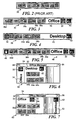
- FIGURE 2 illustrates a typical toolbar on which a plurality of graphic objects are arranged in a linear array 28.
- This example of a prior art toolbar which comprises a plurality of buttons linearly arrayed in a line, side-by-side, has previously been used in such applications as WordTM for WindowsTM 6 and ExcelTM 5, both distributed by Microsoft Corporation.
- Other applications have also used either a vertical or horizontal array of graphic objects that present various tools, controls, or programs that can be selected by the user with a pointing device.
- each toolbar or array of graphic objects displayed on the screen takes up space that is needed for the text, data, and/or images of applications in which the user is working.
- some prior art designs have displayed a single toolbar and used tabs extending along the side of the toolbar that enable a user to selectively open other toolbars.
- Each tab is associated with a different toolbar or menu that is displayed when the tab is selected by a user.
- the tabs are not part of the toolbar that is already open.
- the tabs typically use space in the screen or window that would normally be available to an application. Examples of a tabbed toolbar appear in DELPHITM, a development program marketed by Borland Corporation.
- the present invention substantially reduces the space required to provide access to a plurality of different toolbars, by stacking the toolbars so that typically only the graphic objects associated with one or more of the toolbars are visible at a time.
- the embodiments shown in FIGURES 3 through 5 all contain only a single toolbar in which the graphic objects are fully visible, it is also contemplated that a plurality of toolbars in a stacked toolbar might be fully visible, for example, in a side-by-side configuration.
- a stacked toolbar 30 in FIGURE 3 illustrates how a plurality of graphic objects including buttons 36a, 36b, 36c, and 36d are fully visible on the toolbar that is currently selected.
- This visible group of graphic objects is on a toolbar identified both with a text label 34 reading "Office” and by a distinctive logo 32, which is also a control button. It will be apparent that the graphic objects visible on stacked toolbar 30 look similar to those on the prior art toolbar shown in FIGURE 2. However, stacked toolbar 30 differs substantially from the prior art toolbar, because a logo 42 (also a control button) is visible at one end of the stacked toolbar, but is not evident in the prior art toolbar.
- Logo 42 is associated with the graphic objects grouped on a "non-selected toolbar," i.e., a toolbar that is not fully visible. The graphic objects on the non-selected toolbar are on a portion of that toolbar that is hidden by the selected Office toolbar.
- a stacked toolbar 38 shown in FIGURE 4 the graphic objects associated with the toolbar identified by logo 42 and a text label 40 reading "Desktop" are fully visible. Note that in stacked toolbar 38, the graphic objects associated with the Office toolbar are now hidden by the Desktop toolbar, so that only the logo 32 is displayed at one end.
- a stacked toolbar 48 is shown in which the graphic objects comprising the Office toolbar are fully visible on a stack of toolbars that includes two other toolbars with groups of graphic objects.
- the first of these other toolbars is the Desktop toolbar.
- the logo associated with the Desktop toolbar appears at one end of the stack.
- a different group of graphic objects is disposed on a toolbar associated with a mouse logo 46 (also a control button), which is visible at the opposite end of the stack from the logo 42.
- the graphic objects associated with the Mouse toolbar are used for setting parameters that control the interactive operation of mouse 22.
- a logo and/or text may be assigned to a class of toolbars, rather than to a single toolbar.
- a logo will be used with a toolbar or class of toolbars that logically represents the type of graphic objects: included thereon.
- the border color of a toolbar is helpful in distinguishing one toolbar from another.
- a "tooltip” feature (discussed below) also helps to identify the various toolbars in a stack, in the event that a user is unfamiliar with or forgets the types of toolbars that are included in a stack.
- the Z order i.e., stacking order
- the Z order remains constant as the selected (fully visible) toolbar is changed in response to a user's choice, to enable the graphic objects on a different toolbar to become visible.
- the toolbars that must move to reveal the graphic objects on a newly selected toolbar depends on the relative position of the newly selected toolbar in the stacking order. A simple example will illustrate the simplicity with which the stacked toolbars move to enable access of any graphic object on any toolbar in the stack.
- Stacked toolbars on which the graphic objects are arranged in a horizontally extending array are typically docked or anchored at the edge of the display screen or window so that the central portion of the display screen or window is available for any application that is then running on the computer.
- FIGURE 13 shows a toolbar 48' docked at the bottom of a window 70.
- the user simply moves the stack until it is proximate the edge of the display screen or window. For example, as the stacked toolbar approaches the top or bottom edge, the stacked toolbar will automatically change to the single horizontal row array of graphic objects as shown in FIGURES 3 through 5 and anchor itself to the edge of the display screen or window as shown in FIGURE 13.
- a stacked toolbar can also be docked on the left or right edges of the display screen or window to convert it to a vertical toolbar, such as a toolbar 30', which is shown in FIGURE 8.
- Toolbar 30' includes the same graphic objects as toolbar 30 in FIGURE 3.
- vertical stacked toolbar 30' also includes a portion at its upper end on which is disposed logo 42.
- logo 42 is selected with the cursor and mouse 22 or other pointing device, the graphic objects of the Desktop toolbar, which corresponding to those in stacked toolbar 38 (in FIGURE 4), are displayed vertically.
- the stacked toolbars are described as floating, because they can be readily moved about.
- a stacked toolbars When floating away from the screen or window edge, a stacked toolbars can be readily resized by the user. It is contemplated that a docked toolbar might also be resizeable; however, the preferred embodiment does not permit resizing of a docked toolbar.
- a floating stacked toolbar can also extend in a single row/column array of graphic objects if so sized by the user, a floating stacked toolbar is typically sized into a rectangular panel array of graphic objects (multiple columns and multiple rows of graphic objects), as shown in FIGURES 6 and 7, and the rectangular panel can be oriented with its long dimension extending from left to right or from top to bottom.
- the rectangular panel includes a title bar 54, a minimize button 56 that minimizes the stacked toolbar to form a single graphic object on the display screen, and an option button 58 that is selected to display a menu of options or doubled clicked to close the stacked toolbar.
- a minimize button 56 that minimizes the stacked toolbar to form a single graphic object on the display screen
- an option button 58 that is selected to display a menu of options or doubled clicked to close the stacked toolbar.
- the side or end of the stacked toolbar selected by the sizing tool is caused to move away from the respective opposite side or end, changing the shape of the stacked toolbar.
- Resizing is limited or controlled by a resizing algorithm to ensure that the area of the floating toolbar is sufficient to display all of the graphic objects on any toolbar in the stack.
- the user decrease the length of the floating stacked toolbar, its width will increase automatically by an amount that accommodates the minimum area required by any toolbar in the stack.
- a flowchart in FIGURE 17 illustrates the steps involved in resizing a floating stacked toolbar, beginning with a block 320.
- the user drags an outer border of the stacked toolbar with the resizing tool by manipulating the mouse while the select button is depressed with cursor positioned on the border of the stacked toolbar.
- the system processes each of the toolbars in the stack when the resizing movement is complete, to determine how the stacked toolbar will be displayed.
- a decision block 324 determines if all of the graphic objects fit on a toolbar currently being processed. If not, a decision block 326 determines if the current toolbar needs to be taller (i.e., from top to bottom).
- the logic in a block 328 increases the number of rows of graphic objects in the current toolbar so that all of the graphic objects will fit on the toolbar.
- the procedure then advances to a decision block 330.
- the logic proceeds to a block 332, which decreases the number of rows of graphic objects, thereby making the current toolbar wider to accommodate all of the graphic objects on it.
- the logic thereafter proceeds to decision block 330. Assuming that all graphic objects fit on the current toolbar being evaluated in decision block 324, the logic simply drops to decision block 330 without changing the number of rows of graphic objects on the current toolbar.
- decision block 330 the system determines if there are more toolbars to be processed, and if so, proceeds to a block 334. At this point, the next toolbar in the stack is fetched for evaluation, returning to decision block 324. Once all of the toolbars in the stack have been evaluated in this manner, the logic proceeds with a block 336 following decision block 330.
- Block 336 forms a union of all of the graphic objects on all of the toolbars in the stack. This step makes it possible to determine if changes that may have been made in the relative dimensions of the toolbars in blocks 328 and/or 332 will require a change in the layout of the stacked toolbar. Based on the requirements of the union formed of all of the graphic objects, a decision block 338 determines if the relative dimensions of the stacked toolbar must be changed. In other words, has the change made by the user resizing the stacked toolbar border caused the stacked toolbar to be wider than it is taller (compared to its relative orientation before resizing) or vice versa. If a change of this sort has occurred, a block 340 changes the orientation of the stacked toolbar accordingly. If no change is required, or after a change in orientation has been made, the logic continues with a block 342.
- Block 342 sets the dimensions of all toolbars in the stack based upon the orientation and layout of the graphic objects on the toolbars following the resizing operation by the user.
- the stacked toolbar must accommodate the size requirements of the graphic objects on all of the toolbars, and thus will typically have an orientation and layout determined by the toolbar in the stack having the most graphic objects.
- a block 344 provides for setting the dimensions of the outer border of the stacked toolbar accordingly. The resizing procedure concludes in a block 346.
- a stacked toolbar 50 is arranged as a panel on which are disposed graphic objects 44a and 44b (among others).
- a text label 52 and logo 42 appear at the top of the selected Desktop toolbar.
- text label 34 which identifies the hidden toolbar panel on which the graphic objects comprising the Office group are disposed, is displayed at the left side, in a vertical orientation, with corresponding logo 32.
- the graphic objects comprising the Desktop group are then hidden by the Office toolbar and are not visible.
- the user moves the cursor to the right end of stacked toolbar 60, so that it is on the portion in which text 52 and logo 42 are disposed, and then activates the select button on the pointing device.
- the graphic objects in the Desktop group are then fully revealed, as shown on stacked toolbar 50 in FIGURE 6.
- a floating stacked toolbar is moved by selecting its title bar 54 with the cursor and then moving the cursor with the select button on the pointing device held depressed.
- the stacked toolbar moves with the cursor and can be repositioned on the screen or window in the floating configuration or docked where desired along one of the edges.
- FIGURE 13 illustrates another option in which a stacked toolbar 72 has been moved into the title bar of a window.
- An auto-fit algorithm sizes the stacked toolbar to fit within the title bar, adjusting the height of the graphic objects to equal the height of the title bar and strips away the border around the stacked toolbar.
- the auto-sized toolbar is docked in the title bar just to the left of the WINDOWSTM control buttons.
- a graphic object 37 that represents an object such as a file is shown to illustrate how it can be dragged about on the display screen using the mouse to select and move it and then dropped upon one of the displayed graphic objects within stacked toolbar 30'.
- object 37 represents a document that the user wants to print. This document will be printed when it is dragged and dropped onto graphic object 36b, which corresponds to a printer (not shown) that is connected to the personal computer (or to a local area network to which the personal computer is coupled).
- the printer is activated, causing it to print the document represented by graphic object 37.
- a different type of drag-and-drop operation is used for adding graphic objects to a stacked toolbar.
- a graphic object that is dragged and dropped onto a toolbar in the stack while the ALT key is depressed is added to the group of graphic objects associated with that toolbar, at approximately the position where the graphic object is dropped.
- the graphic objects that are on the toolbar can be shifted left or right to create a space between existing graphic objects.
- the stacked toolbar is resized to accommodate additional graphic objects, since the stacked toolbar has a size determined by the toolbar or group of graphic objects in the stack that requires the most space.
- a graphic object can also be moved from a toolbar and positioned in the window or display screen as a free floating graphic object.
- graphic object 36b which represents a printer, is shown as it is moved from the Office toolbar. It can be dropped in the position shown in the Figure, or moved onto the Desktop toolbar. A graphic object 74, representing a folder can then be dragged and dropped onto the Office toolbar to replace the printer.
- FIGURE 9 a portion of a vertical stacked toolbar 110 is shown (similar to vertical stacked toolbar 30').
- a cursor 112 is positioned so that it partly overlies logo 42, which is associated with the graphic objects comprising the Desktop toolbar. Accordingly, a text box 114 appears with the word "Desktop” displayed within it, identifying the toolbar represented by logo 42 for the user.
- a similar text box 115 is displayed in FIGURE 8 as cursor 112 is moved over a graphic object on the displayed Office toolbar, indicating that the graphic object activates the AutoFormat function.
- a further option provided for the stacked toolbars of FIGURES 3 through 5 is an auto-hide mode wherein the stacked toolbar is completely hidden except for a line a few pixels wide that extends vertically along the edge of the display screen.
- the stacked toolbar is again fully displayed, enabling the user to select any of the graphic objects on the selected toolbar or to choose a hidden toolbar so that its graphic objects are displayed.
- the user moves the cursor off the fully displayed toolbar, it returns to the hidden position, i.e., appears to move off the screen or window.
- the user can elect to have the fully hidden stacked toolbar "pop" into the fully displayed position, or can elect to have the hidden toolbar slide into the fully disclosed position, in an animated fashion.
- the auto-hide mode uses the least amount of display screen area, but the graphic objects on the selected toolbar are not available until the stacked toolbar is selectively displayed.
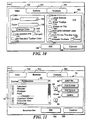
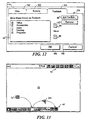
- a properties dialog box 160 that is shown in FIGURES 10 through 12.
- a tab 162 is presently selected within dialog box 160, enabling the user to control the "View" properties of the stacked toolbar.
- a tab 163 labeled “Buttons” is selected in FIGURE 11 to enable a user to configure the graphic objects used on a selected toolbar, and a tab 164 labeled "Toolbars" can be selected to enable a user to choose the specific toolbars that are included in a stack.
- the user can select toolbar from a drop down box 165 and then set a Toolbar background color for the selected toolbar.
- the currently selected background color appears in a box 166.
- the user selects a Change Color button 168, causing a screen with a color palette (not shown in the Figure) to be displayed, from which the user can select the desired background color.
- a check box 170 also enables the user to indicate whether a gradient fill should be added to the text on the stacked toolbars.
- grade fill refers to a color scheme in which the background color gradually varies from a dark to a lighter intensity in the area where the text label for the toolbar is disposed (for example, on the right side of floating stacked toolbars 50 and 60 in FIGURES 6 and 7).
- a smooth characteristic for the background color is selected by placing a check in a check box 171.
- a check box 172 enables the user to selectively indicate that a Standard Toolbar Color should be used.
- the Standard Toolbar Color is determined by defaults for the desktop set in the graphic operating system.
- a check box 176 allows the user to selectively indicate if large buttons are to be included on the stacked toolbars. Large buttons occupy more space but are easier to identify at higher screen resolutions, at which the graphics icons can be relatively small.
- a check box 178 provides for selectively indicating whether the Tooltips box (i.e., the label box identifying the graphic object or toolbar) is displayed when the user moves the cursor with the pointing device so that it is over one of the graphic objects or logos on the stacked toolbars.
- a check box 180 the user can indicate if the stacked toolbars are always visible on top of the current window, whether docked or floating. Alternatively, the user can check a box 182 to enable the auto-hide mode for the stacked toolbars discussed above, so that only a line a few pixels wide appears along the edge of the screen when stacked toolbars are fully hidden.
- a check box 184 the user can elect to enable the auto fit option that enables toolbars to be docked in the title bar of the display screen or window.
- a check box 185 selectively enables animation of the toolbars so that one or more toolbars slide to disclose the graphic objects on a newly selected toolbar.
- a check box 187 can be selected to enable sound to accompany the animation.
- buttons 186 Two additional buttons are included within the dialog box, inside its bottom edge.
- An "OK" button 186 is the default that. is highlighted, enabling the user to indicate that all of the toolbar properties have been set as desired.
- a Cancel button 188 closes the properties dialog box without changing any of the current properties that were previously selected by the user.
- a set of control 78 include a drop-down box 80 to enable the user to select a toolbar on which the buttons or other graphic objects are to be modified.
- an Accessories toolbar has been selected.
- the graphic objects within the Accessories toolbar are shown in a list box 82. Any of the listed graphic objects can selectively be activated or deactivated to appear in the toolbar, as indicated by a check mark or absence of a check mark in a box adjacent the graphic object.
- "Move" control buttons 84 or 86 can be selected to shift any graphic object selected in list box 82 up or down within the list, thereby changing the relative position of the graphic object on the toolbar.
- Controls 88, 90, 92, and 94 respectively enable a user to add a file, folder, or space, or delete a graphic object from the list displayed in list box 82.
- controls 100 are provided to enable a user to specify the toolbars that are to be included in the stack.
- a list of the toolbars are provided in a box 96. Any of these listed toolbars can be activated for inclusion in the stack by selectively indicating the toolbar with a check mark in an adjacent check box.
- "Move" control buttons 84 and 86 are provided to change the relatively Z (stacking) order of the toolbars in the stack, by moving a selected toolbar up or down in the list.
- Controls 98 and 102 respectively enable a user to add a toolbar to the list or remove a selected toolbar from the list.
- FIGURE 14 The steps implemented by a user to change the state of a stacked toolbar are shown in FIGURE 14, beginning at a start block 200.
- a decision block 210 the user determines if a desired set of graphic objects in a toolbar are visible. If the toolbar desired by the user is visible, the user can select one of the graphic objects in the group of graphic objects associated with that toolbar. Accordingly, a block 216 indicates that the desired toolbar is revealed. Thereafter, the logic concludes in a stop block 218. However, if the desired toolbar is hidden by a different selected toolbar, a block 212 indicates that the user scans the displayed text/logos of the other toolbars in the stack, to identify the desired toolbar.
- the user selects and clicks on the desired toolbar in the stack using the cursor and pointing device. That action causes the graphic objects on the newly selected toolbar that were previously hidden to be revealed, as noted in block 216. The user can then select any of the graphic objects on the newly selected toolbar with the pointing device.
- a decision block 220 determines if the stacked toolbar is in a desired orientation, and if so, proceeds to the result shown in a block 222. At this point, no change in the orientation (or configuration) of the stacked toolbar is required. However, if the stacked toolbar is not in the desired orientation, a decision block 224 determines if the user wants to undock the stacked toolbar from the edge of the display screen or window, where it has previously been anchored. If so, the user selects the stacked toolbar with the cursor and pointing device and drags the stacked toolbar away from the edge of the screen or window. This step is indicated in a block 226. A block 228 indicates that the stacked toolbar automatically forms a rectangular panel (a stacked toolbar like those shown in FIGURES 6 and 7) as it is moved away from the edge of the display screen.
- a decision block 230 determines if the user intends to dock a stacked toolbar that is floating. For an affirmative response, the logic flows to a block 232, which indicates that the user has clicked the selector of the mouse or other pointing device while the cursor is on the title bar or background of the stacked toolbar. In a block 234, the user drags the stacked toolbar, causing the stacked toolbar to automatically form a one-dimensional rectangle (single row or column of graphic objects) that snaps into a docked position at the adjacent edge of the display screen or window.
- a decision block 236 determines if the user wants to resize a floating stacked toolbar. If so, a block 238 indicates that the user is clicking and dragging the border of the floating stack which has been selected after the cursor has changed to a resizing mode. In a block 240, the user drags the border of the stacked toolbar to achieve the desired two-dimensional size and shape, subject to the autosizing limitations that ensure the area is sufficient to display the graphic objects included within any of the toolbars comprising the stacked toolbar.
- a negative response to decision block 236 leads to a decision block 237, which determines if the users wants to auto-fit the stacked toolbar within the title bar at the top of the display screen or window. If so, a block 239 provides for enabling the auto-fit feature so that the use can click on the stacked toolbar title bar or background and then drag the stacked toolbar onto the title bar of the display screen or window. As the user drags the stacked toolbar onto the title bar, a block 241 indicates that the stacked toolbar becomes one-dimensional, forming a horizontal line of graphic objects in the title bar.
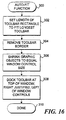
- FIGURE 16 Details of the logic implemented in auto-fitting a stacked toolbar within the title bar are shown in FIGURE 16, beginning at a block 300.
- the logic sets the width of the stacked toolbar one-dimensional rectangle to fit the largest (i.e., the longest) toolbar in the stack.
- the border of the stacked toolbar is stripped away.
- the graphic objects in the stacked toolbar are sized to equal the WINDOWSTM control button size, enabling them to fit within the title bar.
- a block 308 provides for docking the stacked toolbar at the top right comer of the window or display screen, right justified left of the WINDOWSTM controls in the title bar.
- the logic concludes in a block 310.
- a negative response to decision block 237 leads a decision block 242.
- the graphic operating system determines if the user wants to remove a toolbar from the stack. If so, the user presses a designated control key (e.g., the SHIFT key) on keyboard 20 while selecting the background of the top toolbar and then drags the selected toolbar with the pointing device to remove the selected toolbar from the stack, as indicated in a block 244. As shown in a block 246, the user drags the toolbar away from the stack to form a separate two-dimensional rectangle (multiple rows/columns) that is not stacked with any other toolbar.
- a designated control key e.g., the SHIFT key
- a negative response to decision block 242 leads to a decision block 248, which determines if the user wants to add an additional toolbar to the stack. If so, as indicated in a block 250, the user does so by clicking and dragging the background of a floating toolbar that is not part of the stack, so that as indicated in a block 252, the floating toolbar overlaps the stack. At this point, the toolbar that has been dragged into contact with the stacked toolbar snaps to the stack size and the graphic objects on the newly added toolbar are fully displayed.
- a negative response to decision block 248 returns to decision block 220.
- These nodes represent the state of the stacked toolbar following the change caused by the actions of the user. Any further changes to the state of the stacked toolbar are made by returning to decision block 220 to repeat the logic just disclosed.
- the most direct technique to accomplish this task would be to simply replace the image of the graphic objects on the previously selected toolbar with the image of the graphic objects on the newly selected toolbar that was just chosen by the user, so that the graphic objects on the newly selected toolbar are fully displayed.
- the portion of the previously selected toolbar that includes the text and/or logo would then appear at one end of the stack after it is thus redrawn on the display screen.
- a different approach was adopted for replacing the graphic objects previously selected toolbar with the graphic objects of a newly selected and previously hidden toolbar.
- a new toolbar when the user selects a new toolbar by clicking on its logo, text, or on the exposed background area adjacent the logo or text, one or more toolbars appear to slide toward an end of the stack, exposing the graphic objects on the new selected toolbar.
- the sliding animation employed to expose the graphic objects on the newly selected toolbar is made even more realistic by providing an audible "swooshing" sound that accompanies the slide, and by causing any toolbar that is moving to decelerate as it approaches its final rest position and to appear to "bump" before settling to rest at that position.
- the first method is called a "synchronous slide", as indicated in a block 270 within FIGURE 18, because once the user initiates the sliding motion, it cannot be interrupted until the animation sequence is complete.
- the term "synchronous” is appropriate, because the animated sequence is performed as a singular operation that cannot change direction in mid-animation.
- the graphic operating system handles the apparent sliding motion, starting from an initial position in a block 272.
- a value for the current position of the moving toolbar(s) is first determined in a block 282.
- That position which is represented by the variable POS', is equal to a function F A (POS, END) in a block 282, where END is the final position after the slide is completed, and POS is the current position of the moving toolbar(s).
- the animation is done by successively changing the displayed position of the moving toolbar(s) on the display screen each time that a predefined delay time has elapsed, as indicated in a block 286, so that the position of the moving toolbar(s) is adjusted, as indicated in a block 284. With rapid successive redraws of the display screen at a rate at least equal 15 times/second, the toolbar(s) appear to slide smoothly across the display screen.
- F A is an acceleration/deceleration function that modifies the apparent degree to which the position of the toolbar(s) changes after each successive predefined time delay.
- a termination function F C (POS, END, BUMP) controls the position of the sliding toolbar as it approaches the END position to implement the BUMP effect.
- a block 276 implements the apparent BUMP at the end of the slide by adjusting the position of the moving toolbar, as noted in a block 280, after successive time delays, as indicated in a block 278.
- F A determines the next position of the moving toolbar(s) by taking the previous position and adding the minimum of the constant "2" (pixels) and the function (END-POS/4).
- F C the moving toolbar is shifted to a position, POS ⁇ END (or BUMP).
- the value of BUMP is a constant "4" (pixels) on the display screen.
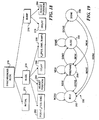
- a better way to handle the animation uses an asynchronous method, which is illustrated in the state machine diagram of FIGURE 19.
- the user is able to change the choice of a selected toolbar, before the graphic objects comprising the newly selected toolbar are fully exposed, and can instead select another toolbar.
- the asynchronous animation involves exposing the graphic objects on a newly selected toolbar and hiding the graphic objects on another toolbar that was previously selected.
- a change of state occurs with respect to the toolbar that includes the graphic objects to be displayed based upon events caused by user input. The user input thus controls how the graphic objects on a toolbar are exposed.
- the states and events illustrated in state machine 290 are defined by the following Table 1.
- the state machine starts in an initial IDLE state 292. A time interval elapses between each change of state, and the changes are dependent upon the current input event. While in IDLE state 292, state machine 290 takes no action if no user input occurs. If the user selects a new panel, the state changes to a PREPARE state in a block 294. At this point, the user can select the originally selected toolbar (which corresponds to a NONE action), thereby returning to IDLE state 292, or can select a NEW toolbar to be displayed, which leaves the state machine in the PREPARE state. If the user does not change the original selection, the state changes to SLIDE in a block 296.
- the appropriate toolbar(s) starts sliding by incrementally changing position in subsequent screen redraws, in order to display the graphic objects on the newly selected toolbar.
- the user can select a NEW toolbar to be displayed, returning to the PREPARE state in block 294, or can select the original toolbar to continue to be displayed (NONE), causing a return to the IDLE state, or can allow the slide to continue until it is DONE, as indicated in a block 298.
- the user can select yet another NEW toolbar to be displayed, returning to the PREPARE state in block 294 or can select no further action, leaving the state machine in the IDLE state in block 292.
Landscapes
- Engineering & Computer Science (AREA)
- General Engineering & Computer Science (AREA)
- Theoretical Computer Science (AREA)
- Human Computer Interaction (AREA)
- Physics & Mathematics (AREA)
- General Physics & Mathematics (AREA)
- User Interface Of Digital Computer (AREA)
Claims (33)
- Procédé de fourniture d'accès à une pluralité d'objets graphiques (36) dans un visuel d'affichage d'ordinateur (18), comprenant les étapes consistant à :(a) organiser la pluralité d'objets graphiques en une pluralité de barres d'outils de forme globalement quadrilatérale, chaque barre d'outils comprenant un groupe d'objets graphiques (36) associés organisés en un tableau ;
caractérisé par le fait qu'il comprend en outre les étapes consistant à :(b) créer une pile (50) avec la pluralité de barres d'outils sur le visuel d'affichage d'ordinateur, de manière que toute barre d'outils sélectionnée soit complètement visible et cache une partie substantielle de toute barre d'outils non sélectionnée parmi la pluralité de barres d'outils ; un objet graphique dans toute barre d'outils sélectionnée, qui est complètement visible pour un utilisateur sur le visuel d'affichage d'ordinateur, étant directement sélectionnable par l'utilisateur dans le but d'activer ledit objet graphique ; et(c) permettre à l'utilisateur de choisir toute barre d'outils non sélectionnée parmi la pluralité de barres d'outils d'objets graphiques, pour que la barre d'outils non sélectionnée, qui est ainsi choisie par l'utilisateur, devienne une barre d'outils sélectionnée qui soit complètement visible pour l'utilisateur sur le visuel d'affichage d'ordinateur, faisant que la barre d'outils antérieurement sélectionnée devienne une barre d'outils non sélectionnée qui ne soit plus complètement visible, une partie substantielle de la barre d'outils antérieurement sélectionnée étant sensiblement cachée par la barre d'outils venant juste d'être choisie par l'utilisateur. - Procédé selon la revendication 1, selon lequel les objets graphiques (36) comprennent des boutons (42) qui sont activés lorsque l'utilisateur clique sur un bouton de sélection sur un dispositif de pointage, tandis qu'un curseur commandé par le dispositif de pointage est positionné sur le bouton.
- Procédé selon la revendication 1, dans lequel chacune des barres d'outils (30) est munie d'une identification caractéristique (40) qui distingue cette barre d'outils d'au moins certaines autres barres d'outils disposées dans la pile.
- Procédé selon la revendication 3, dans lequel l'identification caractéristique comprend au moins un caractère alphanumérique (40) disposé sur la barre d'outils en une position telle que ledit au moins un caractère alphanumérique soit visible lorsqu'une partie substantielle de la barre d'outils est cachée par une barre d'outils sélectionnée.
- Procédé selon la revendication 3, dans lequel l'identification caractéristique comprend un logo (42) qui est disposé sur la barre d'outils en une position telle que le logo (42) soit visible lorsqu'une partie substantielle de la barre d'outils est cachée par une barre d'outils sélectionnée.
- Procédé selon la revendication 5, dans lequel le logo (42) comprend au moins un caractère alphanumérique (40).
- Procédé selon la revendication 1, dans lequel une barre d'outils séparée est ajoutée à la pile en permettant à l'utilisateur de sélectionner la barre d'outils séparée au moyen d'un dispositif de pointage et ensuite de faire glisser la barre d'outils séparée sur la pile.
- Procédé selon la revendication 1, comprenant en outre l'étape consistant à permettre à l'utilisateur de sélectionner la pile au moyen d'un dispositif de pointage et de faire glisser la pile sur un bord d'une fenêtre sur l'écran d'affichage d'ordinateur, en faisant accoster la pile audit bord.
- Procédé selon la revendication 1, comprenant en outre l'étape consistant à permettre à l'utilisateur de modifier l'orientation de la pile entre une orientation verticale et une orientation horizontale, ladite orientation concernant une dimension longitudinale de la pluralité de barres d'outils comprenant la pile.
- Procédé selon la revendication 1, comprenant en outre l'étape consistant à faire glisser l'une des barres d'outils en une position différente pour permettre à la barre d'outils choisie par l'utilisateur de devenir complètement visible.
- Procédé selon la revendication 10, comprenant en outre les étapes visant à faire décélérer ladite une parmi les barres d'outils qui est en glissement, lorsqu'elle s'approche d'une position de repos ; et de faire en sorte que ladite barre d'outils qui est en glissement bondisse avant de s'immobiliser.
- Procédé selon la revendication 10, comprenant en outre l'étape de fourniture d'un son audible associé au glissement de ladite une des barres d'outils.
- Procédé selon la revendication 1, comprenant en outre l'étape consistant à permettre à l'utilisateur de désempiler la pluralité de barres d'outils, en sélectionnant l'une des barres d'outils comprenant la pile et en faisant glisser ladite barre d'outils à l'écart de la pile, faisant que ladite barre d'outils devient une barre d'outils séparée qui ne fasse plus partie de la pile.
- Procédé selon la revendication 1, comprenant en outre les étapes consistant à permettre à l'utilisateur de cacher sélectivement la pile le long d'un bord d'une fenêtre dans le visuel d'affichage d'ordinateur, en un mode d'escamotage automatique dans lequel seule une ligne de pixels comprenant un bord de la pile est visible au bord de la fenêtre, et à permettre à l'utilisateur de sélectivement afficher complètement la pile qui est cachée en mode d'escamotage automatique.
- Procédé selon la revendication 1, comprenant en outre l'étape consistant à dimensionner automatiquement la pile pour qu'elle englobe le groupe d'objets graphiques de dimensions maximales dans la pile.
- Procédé selon la revendication 1, comprenant les étapes consistant à permettre à l'utilisateur de déplacer sélectivement la pile dans une zone de bordure d'une fenêtre sur le visuel d'affichage de l'ordinateur ; et, en réponse à cela, provoquer un auto-ajustement de la pile dans les limites de la bordure, par ajustement des dimensions de la pile et des objets graphiques intégralement affichés dans une barre d'outils sélectionnée quelconque, ladite pile étant positionnée de façon adjacente à une commande de fenêtre dans la zone de bordure.
- Procédé selon la revendication 1, comprenant en outre l'étape consistant à permettre à l'utilisateur de faire sélectivement flotter la pile sur le visuel d'affichage d'ordinateur et, tandis que la pile flotte, de permettre à l'utilisateur de modifier la largeur et la longueur de la pile.
- Procédé selon la revendication 1, comprenant en outre l'étape consistant à permettre à l'utilisateur d'utiliser un dispositif de pointage pour sélectionner un objet graphique apparaissant sur le visuel d'affichage d'ordinateur, à l'extérieur de la pile ; et de faire glisser l'objet graphique qui est sélectionné sur une barre d'outils comprenant la pile, de manière à ajouter l'objet graphique au groupe des objets graphiques placés à l'intérieur de la barre d'outils.
- Procédé selon la revendication 1, comprenant en outre l'étape visant à permettre à l'utilisateur de sélectionner l'un des objets graphiques comprenant une barre d'outils et de faire glisser ledit objet graphique sur une autre barre d'outils pour une association avec le groupe d'objets graphiques y étant contenus.
- Procédé selon la revendication 19, comprenant en outre l'étape consistant à permettre à l'utilisateur de sélectionner l'un des objets graphiques comprenant une barre d'outils et de faire glisser ledit objet graphique en une position extérieure à la pile du visuel d'affichage d'ordinateur, provoquant la séparation dudit objet graphique par rapport à la pile.
- Procédé selon la revendication 1, comprenant en outre l'étape consistant à permettre à l'utilisateur de sélectionner un objet visible sur le visuel d'affichage de l'ordinateur au moyen d'un dispositif de pointage ; et, de faire glisser et de déposer l'objet sur l'un des objets graphiques comprenant la barre d'outils sélectionnée qui est complètement visible, de manière à activer ledit objet parmi les objets graphiques et de le faire servir d'entrée à une action qui se produit, lorsque ledit objet parmi les objets graphiques est activé.
- Procédé selon la revendication 1, comprenant en outre l'étape consistant à permettre à l'utilisateur de sélectionner une pluralité de propriétés pour la pile.
- Procédé selon la revendication 1, comprenant en outre l'étape consistant à afficher une étiquette identifiant un objet représenté par chaque objet graphique, lorsque l'utilisateur déplace un curseur sur l'objet graphique.
- Procédé selon la revendication 1, comprenant en outre l'étape consistant à afficher une étiquette identifiant une barre d'outils non sélectionnée, lorsque l'utilisateur déplace le curseur sur une partie visible de toute barre d'outils non sélectionnée.
- Système d'exploitation graphique mis en oeuvre sur un ordinateur, ledit système d'exploitation graphique comprenant des objets graphiques qui apparaissent sur un visuel d'affichage d'ordinateur (18), comprenant :(a) des moyens pour organiser la pluralité d'objets graphiques (36) en une pluralité de barres d'outils (38) à forme globalement quadrilatérale, chaque barre d'outils (38) comprenant un groupe d'objets graphiques (36) associés organisés en un tableau ;
caractérisé en outre par le fait qu'il comprend :(b) des moyens pour créer une pile (50) des barres d'outils sur le visuel d'affichage d'ordinateur (18), de manière que toute barre d'outils sélectionnée cache pratiquement une partie substantielle de toute barre d'outils non sélectionnée dans la pile, ledit groupe d'objets graphiques (3) dans toute barre d'outils sélectionnée étant complètement visible pour un utilisateur sur le visuel d'affichage de l'ordinateur, de manière qu'un objet graphique situé dans ledit groupe est directement sélectionnable et activable par l'utilisateur ; et(c) des moyens permettant à l'utilisateur de choisir une barre d'outils non sélectionnée pour qu'elle devienne une barre d'outils sélectionnée, incluant des moyens pour faire en sorte que la barre d'outils non sélectionnée ainsi choisie devienne complètement visible, de manière que les objets graphiques la comprenant soient visibles pour l'utilisateur sur le visuel d'affichage de l'ordinateur, et de manière qu'une partie substantielle d'une barre d'outils sélectionnée antérieurement soit cachée par la barre d'outils qui vient d'être choisie par l'utilisateur, ledit système d'exploitation graphique réduisant de cette manière la surface du visuel d'affichage de l'ordinateur nécessaire pour afficher les groupes d'objets graphiques comprenant les barres d'outils dans la pile. - Système d'exploitation graphique selon la revendication 25, comprenant en outre une unité de traitement centrale (23) couplée au visuel d'affichage d'ordinateur (18), et une mémoire (21) pour stocker une pluralité d'instructions de programmes, dans lequel les moyens pour organiser, les moyens pour créer, et les moyens pour permettre sont mis en oeuvre sur l'ordinateur par exécution de la pluralité des instructions de programmes par l'unité de traitement centrale (23).
- Système d'exploitation graphique selon la revendication 25, comprenant en outre des moyens d'accostage pour permettre à l'utilisateur de sélectionner la pile et de la positionner sur un bord d'une fenêtre sur le visuel d'affichage d'ordinateur, lorsqu'elle reste en position d'accostage.
- Système d'exploitation graphique selon la revendication 25, comprenant en outre des moyens de dimensionnement permettant à l'utilisateur de modifier graphiquement les dimensions de la pile.
- Système d'exploitation graphique selon la revendication 25, dans lequel les moyens de dimensionnement permettent en outre à l'utilisateur de faire flotter la pile et de changer ses dimensions horizontales et verticales relatives, tandis qu'elle flotte.
- Système d'exploitation graphique selon la revendication 25, comprenant en outre des moyens pour animer l'une des barres d'outils afin de permettre à la barre d'outils choisie par l'utilisateur de devenir complètement visible, de manière que ladite barre d'outils parmi les barres d'outils glisse sur la pile et décélère jusqu'à l'immobilisation, en produisant un son audible d'accompagnement.
- Système d'exploitation graphique selon la revendication 25, comprenant en outre des moyens pour ajouter et supprimer un objet graphique sélectionné, respectivement à et depuis les groupes d'objets graphiques comprenant les barres d'outils dans la pile, en faisant glisser et en déposant l'objet graphique sélectionné.
- Système d'exploitation graphique selon la revendication 25, comprenant en outre des moyens pour ajouter et supprimer une barre d'outils spécifique, respectivement à et depuis la pluralité de barres d'outils dans la pile, en faisant glisser et en déposant la barre d'outils spécifique.
- Système d'exploitation graphique selon la revendication 25, comprenant en outre des moyens pour dimensionner automatiquement la pile pour accepter le maximum de la pluralité de barres d'outils comprenant la pile.
Applications Claiming Priority (3)
| Application Number | Priority Date | Filing Date | Title |
|---|---|---|---|
| US08/466,611 US5644737A (en) | 1995-06-06 | 1995-06-06 | Method and system for stacking toolbars in a computer display |
| PCT/US1996/007868 WO1996039654A1 (fr) | 1995-06-06 | 1996-05-29 | Procede et systeme d'empilement de barres d'outils dans un affichage informatique |
| US466611 | 1999-12-17 |
Publications (3)
| Publication Number | Publication Date |
|---|---|
| EP0835484A1 EP0835484A1 (fr) | 1998-04-15 |
| EP0835484A4 EP0835484A4 (fr) | 1998-11-25 |
| EP0835484B1 true EP0835484B1 (fr) | 2002-02-27 |
Family
ID=23852439
Family Applications (1)
| Application Number | Title | Priority Date | Filing Date |
|---|---|---|---|
| EP96916716A Expired - Lifetime EP0835484B1 (fr) | 1995-06-06 | 1996-05-29 | Procede et systeme d'empilement de barres d'outils dans un affichage informatique |
Country Status (4)
| Country | Link |
|---|---|
| US (1) | US5644737A (fr) |
| EP (1) | EP0835484B1 (fr) |
| DE (1) | DE69619524T2 (fr) |
| WO (1) | WO1996039654A1 (fr) |
Cited By (1)
| Publication number | Priority date | Publication date | Assignee | Title |
|---|---|---|---|---|
| EP2392132A4 (fr) * | 2009-04-02 | 2013-02-20 | Sony Corp | Organisation d'un contenu multivue comprenant des composants d'interface graphique sur un poste de télévision |
Families Citing this family (232)
| Publication number | Priority date | Publication date | Assignee | Title |
|---|---|---|---|---|
| US6094529A (en) * | 1995-09-19 | 2000-07-25 | Jeffries; Robin | Method, apparatus and computer program product for linking stack messages to relevant information |
| US5933841A (en) * | 1996-05-17 | 1999-08-03 | Ameritech Corporation | Structured document browser |
| US5859639A (en) * | 1996-07-17 | 1999-01-12 | International Business Machines Corporation | Mechanism to control visible presence of desktop objects in a graphical user interface |
| US5986657A (en) * | 1996-08-02 | 1999-11-16 | Autodesk, Inc. | Method and apparatus for incorporating expandable and collapsible options in a graphical user interface |
| US5808610A (en) * | 1996-08-28 | 1998-09-15 | Macromedia, Inc. | Method and system of docking panels |
| US5870091A (en) * | 1996-11-07 | 1999-02-09 | Adobe Systems Incorporated | Combining palettes on a computer display |
| US5883626A (en) * | 1997-03-31 | 1999-03-16 | International Business Machines Corporation | Docking and floating menu/tool bar |
| US6057836A (en) * | 1997-04-01 | 2000-05-02 | Microsoft Corporation | System and method for resizing and rearranging a composite toolbar by direct manipulation |
| US6026233A (en) * | 1997-05-27 | 2000-02-15 | Microsoft Corporation | Method and apparatus for presenting and selecting options to modify a programming language statement |
| US5923326A (en) * | 1997-06-13 | 1999-07-13 | International Business Machines Corporation | Edge docking foster window |
| US6571290B2 (en) | 1997-06-19 | 2003-05-27 | Mymail, Inc. | Method and apparatus for providing fungible intercourse over a network |
| US8516132B2 (en) | 1997-06-19 | 2013-08-20 | Mymail, Ltd. | Method of accessing a selected network |
| US6177941B1 (en) * | 1997-08-25 | 2001-01-23 | International Business Machine Corporation | Representative mapping between toolbars and menu bar pulldowns |
| US6005571A (en) * | 1997-09-30 | 1999-12-21 | Softline, Inc. | Graphical user interface for managing security in a database system |
| US6613100B2 (en) * | 1997-11-26 | 2003-09-02 | Intel Corporation | Method and apparatus for displaying miniaturized graphical representations of documents for alternative viewing selection |
| US6072486A (en) * | 1998-01-13 | 2000-06-06 | Microsoft Corporation | System and method for creating and customizing a deskbar |
| US6108003A (en) * | 1998-03-18 | 2000-08-22 | International Business Machines Corporation | Maintaining visibility and status indication of docked applications and application bars |
| US6396487B1 (en) * | 1998-03-23 | 2002-05-28 | International Business Machines Corporation | User interface enhancement for windows-based operating systems |
| US6232972B1 (en) * | 1998-06-17 | 2001-05-15 | Microsoft Corporation | Method for dynamically displaying controls in a toolbar display based on control usage |
| US6121968A (en) * | 1998-06-17 | 2000-09-19 | Microsoft Corporation | Adaptive menus |
| US6133915A (en) * | 1998-06-17 | 2000-10-17 | Microsoft Corporation | System and method for customizing controls on a toolbar |
| EP1086560A1 (fr) | 1998-06-19 | 2001-03-28 | Netsafe, Inc. | Procede et appareil permettant d'effectuer des connexions sur un reseau |
| US6049336A (en) * | 1998-08-12 | 2000-04-11 | Sony Corporation | Transition animation for menu structure |
| JP4077996B2 (ja) * | 1998-09-18 | 2008-04-23 | キヤノン株式会社 | データ処理装置およびデータ処理方法およびコンピュータが読み出し可能なプログラムを格納した記憶媒体 |
| US6502233B1 (en) * | 1998-11-13 | 2002-12-31 | Microsoft Corporation | Automated help system for reference information |
| US6966038B1 (en) | 1998-12-14 | 2005-11-15 | International Business Machines Corporation | System and method for improved navigation using bookmarks for movement between locations in a windows environment |
| US6489975B1 (en) | 1998-12-14 | 2002-12-03 | International Business Machines Corporation | System and method for improved navigation between open windows in an application program using window tabs |
| US7119819B1 (en) | 1999-04-06 | 2006-10-10 | Microsoft Corporation | Method and apparatus for supporting two-dimensional windows in a three-dimensional environment |
| AU4059600A (en) * | 1999-04-06 | 2000-10-23 | Microsoft Corporation | A method and apparatus for providing and accessing hidden tool spaces |
| US6909443B1 (en) | 1999-04-06 | 2005-06-21 | Microsoft Corporation | Method and apparatus for providing a three-dimensional task gallery computer interface |
| US6765567B1 (en) | 1999-04-06 | 2004-07-20 | Microsoft Corporation | Method and apparatus for providing and accessing hidden tool spaces |
| WO2000060443A1 (fr) * | 1999-04-06 | 2000-10-12 | Microsoft Corporation | Procede et appareil de manipulation de boites de dialogues non disponibles |
| US7281199B1 (en) | 1999-04-14 | 2007-10-09 | Verizon Corporate Services Group Inc. | Methods and systems for selection of multimedia presentations |
| US6515656B1 (en) * | 1999-04-14 | 2003-02-04 | Verizon Laboratories Inc. | Synchronized spatial-temporal browsing of images for assessment of content |
| US6710771B1 (en) * | 1999-05-13 | 2004-03-23 | Sony Corporation | Information processing method and apparatus and medium |
| US6307573B1 (en) * | 1999-07-22 | 2001-10-23 | Barbara L. Barros | Graphic-information flow method and system for visually analyzing patterns and relationships |
| US6448986B1 (en) | 1999-09-07 | 2002-09-10 | Spotware Technologies Llc | Method and system for displaying graphical objects on a display screen |
| US6839702B1 (en) | 1999-12-15 | 2005-01-04 | Google Inc. | Systems and methods for highlighting search results |
| US7434177B1 (en) | 1999-12-20 | 2008-10-07 | Apple Inc. | User interface for providing consolidation and access |
| US6686938B1 (en) * | 2000-01-05 | 2004-02-03 | Apple Computer, Inc. | Method and system for providing an embedded application toolbar |
| GB0000541D0 (en) * | 2000-01-11 | 2000-03-01 | Research Machines Plc | Display system |
| US20030174154A1 (en) * | 2000-04-04 | 2003-09-18 | Satoru Yukie | User interface for interfacing with plural real-time data sources |
| KR20000030847A (ko) * | 2000-03-21 | 2000-06-05 | 전대식 | 인터넷 통합서비스 시스템 및 이 시스템에 접근하는 것을용이하게 하기 위한 사용자 인터페이스장치 |
| US20020044161A1 (en) * | 2000-05-22 | 2002-04-18 | Kazuaki Sugai | Multi-window display system and method for displaying video data and storage medium |
| US7127704B2 (en) * | 2000-06-02 | 2006-10-24 | Sun Microsystems, Inc. | Interactive software engineering tool with support for embedded lexical contexts |
| EP1354263A2 (fr) * | 2000-07-07 | 2003-10-22 | Openwave Systems Inc. | Caracteristiques d'interface graphique d'un explorateur utilisees dans un dispositif de communication sans fil portatif |
| US7113168B2 (en) * | 2000-09-12 | 2006-09-26 | Canon Kabushiki Kaisha | Compact information terminal apparatus, method for controlling such apparatus and medium |
| GB0025331D0 (en) * | 2000-10-16 | 2000-11-29 | Canon Kk | Control apparatus |
| US6624831B1 (en) * | 2000-10-17 | 2003-09-23 | Microsoft Corporation | System and process for generating a dynamically adjustable toolbar |
| US7036087B1 (en) * | 2000-11-06 | 2006-04-25 | Gary Odom | Toolbar manipulations |
| US7895530B2 (en) * | 2000-11-09 | 2011-02-22 | Change Tools, Inc. | User definable interface system, method, support tools, and computer program product |
| AU2002226886A1 (en) * | 2000-11-09 | 2002-05-21 | Change Tools, Inc. | A user definable interface system, method and computer program product |
| US7493568B2 (en) * | 2001-01-26 | 2009-02-17 | Microsoft Corporation | System and method for browsing properties of an electronic document |
| US9256356B2 (en) * | 2001-03-29 | 2016-02-09 | International Business Machines Corporation | Method and system for providing feedback for docking a content pane in a host window |
| US6771292B2 (en) * | 2001-03-29 | 2004-08-03 | International Business Machines Corporation | Method and system for providing feedback concerning a content pane to be docked in a host window |
| US8069419B2 (en) * | 2001-04-18 | 2011-11-29 | Sas Institute Inc. | Graphical user interface check-list button control and method |
| JP2002334221A (ja) * | 2001-05-09 | 2002-11-22 | Sony Corp | 画像提供装置、画像提供方法、記録媒体、演算表示プログラム、演算表示プログラムを提供するサーバ、並びに演算表示プログラムを記録した情報記録媒体 |
| US20020186257A1 (en) * | 2001-06-08 | 2002-12-12 | Cadiz Jonathan J. | System and process for providing dynamic communication access and information awareness in an interactive peripheral display |
| US6826729B1 (en) * | 2001-06-29 | 2004-11-30 | Microsoft Corporation | Gallery user interface controls |
| US7765490B2 (en) * | 2001-07-18 | 2010-07-27 | International Business Machines Corporation | Method and system for software applications using a tiled user interface |
| US7117479B2 (en) * | 2001-10-01 | 2006-10-03 | Sun Microsystems, Inc. | Language-sensitive whitespace adjustment in a software engineering tool |
| US7549129B2 (en) * | 2001-10-31 | 2009-06-16 | Microsoft Corporation | Computer system with enhanced user interface for images |
| US7421661B1 (en) * | 2002-04-30 | 2008-09-02 | Aol Llc | Instant messaging interface having an informational tool tip |
| US7281215B1 (en) | 2002-04-30 | 2007-10-09 | Aol Llc | IM conversation counter and indicator |
| US7127685B2 (en) | 2002-04-30 | 2006-10-24 | America Online, Inc. | Instant messaging interface having a tear-off element |
| US20080040675A1 (en) * | 2002-04-30 | 2008-02-14 | Aol Llc | Instant messaging interface having a tear-off element |
| US20040001109A1 (en) * | 2002-06-27 | 2004-01-01 | International Business Machines Corporation | Drop down checklist control |
| US7386834B2 (en) * | 2002-06-28 | 2008-06-10 | Sun Microsystems, Inc. | Undo/redo technique for token-oriented representation of program code |
| US20040003373A1 (en) * | 2002-06-28 | 2004-01-01 | Van De Vanter Michael L. | Token-oriented representation of program code with support for textual editing thereof |
| US20040003374A1 (en) * | 2002-06-28 | 2004-01-01 | Van De Vanter Michael L. | Efficient computation of character offsets for token-oriented representation of program code |
| CA2393887A1 (fr) * | 2002-07-17 | 2004-01-17 | Idelix Software Inc. | Ameliorations de l'interface utilisateur pour presentation de donnees a details en contexte |
| US20040036680A1 (en) * | 2002-08-26 | 2004-02-26 | Mark Davis | User-interface features for computers with contact-sensitive displays |
| US7913183B2 (en) * | 2002-10-08 | 2011-03-22 | Microsoft Corporation | System and method for managing software applications in a graphical user interface |
| TW594573B (en) * | 2002-12-02 | 2004-06-21 | Tatung Corp | Method for building up customized desktop of web page |
| US7593868B2 (en) * | 2003-01-29 | 2009-09-22 | Innovation Interactive Llc | Systems and methods for providing contextual advertising information via a communication network |
| US20040186778A1 (en) * | 2003-01-29 | 2004-09-23 | Margiloff William A. | Systems and methods for selecting advertisements to be provided to users via a communication network |
| US20040186775A1 (en) * | 2003-01-29 | 2004-09-23 | Margiloff William A. | Systems and methods for providing an improved toolbar |
| US7355586B2 (en) * | 2003-03-28 | 2008-04-08 | General Electric Co. | Method for associating multiple functionalities with mouse buttons |
| US7609931B2 (en) * | 2003-04-18 | 2009-10-27 | Enablence, Inc. | Planar waveguide structure with tightly curved waveguides |
| US7343567B2 (en) * | 2003-04-25 | 2008-03-11 | Microsoft Corporation | System and method for providing dynamic user information in an interactive display |
| US20040225997A1 (en) * | 2003-05-06 | 2004-11-11 | Sun Microsystems, Inc. | Efficient computation of line information in a token-oriented representation of program code |
| US20040225998A1 (en) * | 2003-05-06 | 2004-11-11 | Sun Microsystems, Inc. | Undo/Redo technique with computed of line information in a token-oriented representation of program code |
| US7409646B2 (en) * | 2003-06-17 | 2008-08-05 | Microsoft Corporation | System and method for manipulating toolbar component dimensions |
| US9715678B2 (en) | 2003-06-26 | 2017-07-25 | Microsoft Technology Licensing, Llc | Side-by-side shared calendars |
| US7707255B2 (en) | 2003-07-01 | 2010-04-27 | Microsoft Corporation | Automatic grouping of electronic mail |
| US7716593B2 (en) * | 2003-07-01 | 2010-05-11 | Microsoft Corporation | Conversation grouping of electronic mail records |
| US7634742B2 (en) * | 2004-04-07 | 2009-12-15 | Adobe Systems Incorporated | Graphical user interface buttons and toolbars |
| US7694233B1 (en) | 2004-04-30 | 2010-04-06 | Apple Inc. | User interface presentation of information in reconfigured or overlapping containers |
| US8181119B1 (en) * | 2004-06-02 | 2012-05-15 | Apple Inc. | User interface with inline customization |
| US9027015B2 (en) * | 2004-06-04 | 2015-05-05 | Steelcase, Inc. | Interactive communication system having an integrated key drive system |
| EP1759267A2 (fr) * | 2004-06-04 | 2007-03-07 | Polyvision Corporation | Systemes de communication interactifs |
| US7490295B2 (en) | 2004-06-25 | 2009-02-10 | Apple Inc. | Layer for accessing user interface elements |
| US8302020B2 (en) | 2004-06-25 | 2012-10-30 | Apple Inc. | Widget authoring and editing environment |
| US8566732B2 (en) | 2004-06-25 | 2013-10-22 | Apple Inc. | Synchronization of widgets and dashboards |
| US8453065B2 (en) | 2004-06-25 | 2013-05-28 | Apple Inc. | Preview and installation of user interface elements in a display environment |
| US8281241B2 (en) | 2004-06-28 | 2012-10-02 | Nokia Corporation | Electronic device and method for providing extended user interface |
| US8255828B2 (en) | 2004-08-16 | 2012-08-28 | Microsoft Corporation | Command user interface for displaying selectable software functionality controls |
| US8146016B2 (en) | 2004-08-16 | 2012-03-27 | Microsoft Corporation | User interface for displaying a gallery of formatting options applicable to a selected object |
| US7703036B2 (en) | 2004-08-16 | 2010-04-20 | Microsoft Corporation | User interface for displaying selectable software functionality controls that are relevant to a selected object |
| US7895531B2 (en) | 2004-08-16 | 2011-02-22 | Microsoft Corporation | Floating command object |
| US8117542B2 (en) | 2004-08-16 | 2012-02-14 | Microsoft Corporation | User interface for displaying selectable software functionality controls that are contextually relevant to a selected object |
| US9015621B2 (en) | 2004-08-16 | 2015-04-21 | Microsoft Technology Licensing, Llc | Command user interface for displaying multiple sections of software functionality controls |
| US7747966B2 (en) | 2004-09-30 | 2010-06-29 | Microsoft Corporation | User interface for providing task management and calendar information |
| US20060156135A1 (en) * | 2004-12-16 | 2006-07-13 | Marek Sikora | Tabbed form with error indicators |
| US7797645B2 (en) * | 2005-01-21 | 2010-09-14 | Microsoft Corporation | System and method for displaying full product functionality using minimal user interface footprint |
| DE102005003680A1 (de) * | 2005-01-21 | 2006-07-27 | Siemens Ag | Verfahren zur Steuerung eines Geräts |
| JP4281700B2 (ja) * | 2005-03-23 | 2009-06-17 | ヤマハ株式会社 | 複数のウィンドウを管理する方法 |
| US7512898B2 (en) * | 2005-04-07 | 2009-03-31 | Microsoft Corporation | User interface with multi-state menu |
| US7530029B2 (en) * | 2005-05-24 | 2009-05-05 | Microsoft Corporation | Narrow mode navigation pane |
| US20060277478A1 (en) * | 2005-06-02 | 2006-12-07 | Microsoft Corporation | Temporary title and menu bar |
| US8543931B2 (en) | 2005-06-07 | 2013-09-24 | Apple Inc. | Preview including theme based installation of user interface elements in a display environment |
| US7886290B2 (en) | 2005-06-16 | 2011-02-08 | Microsoft Corporation | Cross version and cross product user interface |
| KR100727945B1 (ko) * | 2005-06-29 | 2007-06-14 | 삼성전자주식회사 | 도구단추를 이용하여 인쇄하는 장치 및 방법 |
| WO2007008248A2 (fr) * | 2005-07-11 | 2007-01-18 | Voicedemand, Inc. | Systeme, procede et produit de programme informatique permettant d'ajouter une activation et une commande vocales a un lecteur multimedia |
| US8578290B2 (en) * | 2005-08-18 | 2013-11-05 | Microsoft Corporation | Docking and undocking user interface objects |
| US8239882B2 (en) | 2005-08-30 | 2012-08-07 | Microsoft Corporation | Markup based extensibility for user interfaces |
| US8689137B2 (en) | 2005-09-07 | 2014-04-01 | Microsoft Corporation | Command user interface for displaying selectable functionality controls in a database application |
| US9542667B2 (en) | 2005-09-09 | 2017-01-10 | Microsoft Technology Licensing, Llc | Navigating messages within a thread |
| US8627222B2 (en) | 2005-09-12 | 2014-01-07 | Microsoft Corporation | Expanded search and find user interface |
| US7627561B2 (en) * | 2005-09-12 | 2009-12-01 | Microsoft Corporation | Search and find using expanded search scope |
| US7739259B2 (en) * | 2005-09-12 | 2010-06-15 | Microsoft Corporation | Integrated search and find user interface |
| JP4755874B2 (ja) * | 2005-09-27 | 2011-08-24 | シスメックス株式会社 | 検体分析装置、検体分析用処理コンピュータ、検体分析装置における操作用画面の表示方法、及び検体分析装置用処理コンピュータのためのコンピュータプログラム |
| US7743336B2 (en) | 2005-10-27 | 2010-06-22 | Apple Inc. | Widget security |
| US7954064B2 (en) | 2005-10-27 | 2011-05-31 | Apple Inc. | Multiple dashboards |
| US8543824B2 (en) | 2005-10-27 | 2013-09-24 | Apple Inc. | Safe distribution and use of content |
| US7752556B2 (en) | 2005-10-27 | 2010-07-06 | Apple Inc. | Workflow widgets |
| US9104294B2 (en) | 2005-10-27 | 2015-08-11 | Apple Inc. | Linked widgets |
| US7707514B2 (en) | 2005-11-18 | 2010-04-27 | Apple Inc. | Management of user interface elements in a display environment |
| US8806363B1 (en) * | 2005-11-22 | 2014-08-12 | Google Inc. | Framed user interface |
| US7882448B2 (en) * | 2005-12-29 | 2011-02-01 | Sap Ag | Taskbar configuration tool for computer systems |
| US20070186183A1 (en) * | 2006-02-06 | 2007-08-09 | International Business Machines Corporation | User interface for presenting a palette of items |
| US20070186176A1 (en) * | 2006-02-09 | 2007-08-09 | Taiwan Semiconductor Manufacturing Company, Ltd. | System and method for window tab organization |
| US8042060B1 (en) | 2006-04-07 | 2011-10-18 | Google Inc. | Mini toolbar user interface |
| US7783990B2 (en) * | 2006-05-05 | 2010-08-24 | Microsoft Corporation | Association of display elements |
| USD550690S1 (en) * | 2006-05-22 | 2007-09-11 | Microsoft Corporation | User interface for a portion of a display screen |
| USD546342S1 (en) * | 2006-05-22 | 2007-07-10 | Microsoft Corporation | User interface for a portion of a display screen |
| US8605090B2 (en) | 2006-06-01 | 2013-12-10 | Microsoft Corporation | Modifying and formatting a chart using pictorially provided chart elements |
| US9727989B2 (en) | 2006-06-01 | 2017-08-08 | Microsoft Technology Licensing, Llc | Modifying and formatting a chart using pictorially provided chart elements |
| US8869027B2 (en) | 2006-08-04 | 2014-10-21 | Apple Inc. | Management and generation of dashboards |
| KR20080063982A (ko) * | 2007-01-03 | 2008-07-08 | 삼성전자주식회사 | 영상처리장치, 영상표시제어장치 및 그 제어방법 |
| US7779367B2 (en) * | 2007-02-08 | 2010-08-17 | Microsoft Corporation | Dynamic control configuration |
| US8628150B2 (en) * | 2007-02-28 | 2014-01-14 | Optionsxpress Holdings, Inc. | Trading system and methods |
| US9032329B2 (en) * | 2007-03-23 | 2015-05-12 | Siemens Product Lifecycle Management Software Inc. | System and method for dialog position management |
| KR101382504B1 (ko) * | 2007-05-21 | 2014-04-07 | 삼성전자주식회사 | 매크로 생성 장치 및 방법 |
| US20080295019A1 (en) * | 2007-05-21 | 2008-11-27 | Microsoft Corporation | Document with Sidebars |
| US20080307350A1 (en) * | 2007-06-09 | 2008-12-11 | Alessandro Francesco Sabatelli | Method and Apparatus for Improved Desktop Arrangement |
| US8484578B2 (en) | 2007-06-29 | 2013-07-09 | Microsoft Corporation | Communication between a document editor in-space user interface and a document editor out-space user interface |
| US8201103B2 (en) | 2007-06-29 | 2012-06-12 | Microsoft Corporation | Accessing an out-space user interface for a document editor program |
| US8762880B2 (en) | 2007-06-29 | 2014-06-24 | Microsoft Corporation | Exposing non-authoring features through document status information in an out-space user interface |
| US8954871B2 (en) | 2007-07-18 | 2015-02-10 | Apple Inc. | User-centric widgets and dashboards |
| US8667415B2 (en) | 2007-08-06 | 2014-03-04 | Apple Inc. | Web widgets |
| US20090132939A1 (en) * | 2007-11-19 | 2009-05-21 | International Business Machines Corporation | Method and apparatus for a floating island for user navigation in an interactive environment |
| US8234575B2 (en) * | 2007-11-30 | 2012-07-31 | Microsoft Corporation | Dynamic updateable web toolbar |
| US8484574B2 (en) * | 2007-12-06 | 2013-07-09 | Microsoft Corporation | Rule-based multi-pane toolbar display |
| US20090164922A1 (en) * | 2007-12-20 | 2009-06-25 | Ouneheuane Phakousonh | Auto toolbar |
| US8117225B1 (en) | 2008-01-18 | 2012-02-14 | Boadin Technology, LLC | Drill-down system, method, and computer program product for focusing a search |
| US8117242B1 (en) | 2008-01-18 | 2012-02-14 | Boadin Technology, LLC | System, method, and computer program product for performing a search in conjunction with use of an online application |
| US20090228814A1 (en) * | 2008-03-07 | 2009-09-10 | Lunarr, Inc. | Systems and methods for providing a multifunctional bottom toolbar for a user interface |
| KR101012300B1 (ko) | 2008-03-07 | 2011-02-08 | 삼성전자주식회사 | 터치스크린을 구비한 휴대 단말기의 사용자 인터페이스장치 및 그 방법 |
| US9588781B2 (en) | 2008-03-31 | 2017-03-07 | Microsoft Technology Licensing, Llc | Associating command surfaces with multiple active components |
| US9053196B2 (en) * | 2008-05-09 | 2015-06-09 | Commerce Studios Llc, Inc. | Methods for interacting with and manipulating information and systems thereof |
| US9665850B2 (en) | 2008-06-20 | 2017-05-30 | Microsoft Technology Licensing, Llc | Synchronized conversation-centric message list and message reading pane |
| US8402096B2 (en) | 2008-06-24 | 2013-03-19 | Microsoft Corporation | Automatic conversation techniques |
| US8826174B2 (en) * | 2008-06-27 | 2014-09-02 | Microsoft Corporation | Using visual landmarks to organize diagrams |
| US9015631B2 (en) * | 2008-08-07 | 2015-04-21 | Dassault Systemes | Animated icons to preview transformations related to 3D models |
| USD602028S1 (en) * | 2008-08-07 | 2009-10-13 | Dassault Systemes | Animated image for a portion of a display screen |
| USD602027S1 (en) * | 2008-08-07 | 2009-10-13 | Dassault Systemes | Portion of a screen display with an animated image |
| US8073590B1 (en) | 2008-08-22 | 2011-12-06 | Boadin Technology, LLC | System, method, and computer program product for utilizing a communication channel of a mobile device by a vehicular assembly |
| US8265862B1 (en) | 2008-08-22 | 2012-09-11 | Boadin Technology, LLC | System, method, and computer program product for communicating location-related information |
| US8190692B1 (en) | 2008-08-22 | 2012-05-29 | Boadin Technology, LLC | Location-based messaging system, method, and computer program product |
| US8078397B1 (en) | 2008-08-22 | 2011-12-13 | Boadin Technology, LLC | System, method, and computer program product for social networking utilizing a vehicular assembly |
| US8131458B1 (en) | 2008-08-22 | 2012-03-06 | Boadin Technology, LLC | System, method, and computer program product for instant messaging utilizing a vehicular assembly |
| USD593111S1 (en) * | 2008-10-24 | 2009-05-26 | Microsoft Corporation | User interface for a display screen |
| USD599362S1 (en) * | 2008-10-24 | 2009-09-01 | Microsoft Corporation | User interface for a display screen |
| US20100153884A1 (en) * | 2008-12-12 | 2010-06-17 | Yahoo! Inc. | Enhanced web toolbar |
| US8799353B2 (en) | 2009-03-30 | 2014-08-05 | Josef Larsson | Scope-based extensibility for control surfaces |
| US8181120B2 (en) * | 2009-04-02 | 2012-05-15 | Sony Corporation | TV widget animation |
| US9046983B2 (en) | 2009-05-12 | 2015-06-02 | Microsoft Technology Licensing, Llc | Hierarchically-organized control galleries |
| KR101601040B1 (ko) * | 2009-05-19 | 2016-03-09 | 삼성전자주식회사 | 휴대 단말기의 화면 표시 방법 및 이를 지원하는 휴대 단말기 |
| CN101582030A (zh) * | 2009-06-15 | 2009-11-18 | 中兴通讯股份有限公司 | 一种实现动态调整工具条按钮显示的方法和系统 |
| US20110029864A1 (en) * | 2009-07-30 | 2011-02-03 | Aaron Michael Stewart | Touch-Optimized Approach for Controlling Computer Function Using Touch Sensitive Tiles |
| US8656314B2 (en) | 2009-07-30 | 2014-02-18 | Lenovo (Singapore) Pte. Ltd. | Finger touch gesture for joining and unjoining discrete touch objects |
| US20110029904A1 (en) * | 2009-07-30 | 2011-02-03 | Adam Miles Smith | Behavior and Appearance of Touch-Optimized User Interface Elements for Controlling Computer Function |
| US8762886B2 (en) * | 2009-07-30 | 2014-06-24 | Lenovo (Singapore) Pte. Ltd. | Emulating fundamental forces of physics on a virtual, touchable object |
| CN105278963A (zh) * | 2009-09-10 | 2016-01-27 | 联想(北京)有限公司 | 一种任务栏按钮的管理方法及装置 |
| US20110113352A1 (en) * | 2009-11-06 | 2011-05-12 | Research In Motion Limited | Portable electronic device and method of web page rendering |
| US20110109634A1 (en) * | 2009-11-06 | 2011-05-12 | Research In Motion Limited | Portable electronic device and method of information rendering on portable electronic device |
| US20220129126A9 (en) * | 2009-12-20 | 2022-04-28 | Benjamin Firooz Ghassabian | System for capturing event provided from edge of touch screen |
| US9189090B2 (en) * | 2010-03-26 | 2015-11-17 | Salesforce.Com, Inc. | Techniques for interpreting signals from computer input devices |
| US9058186B2 (en) | 2010-04-07 | 2015-06-16 | Apple Inc. | Device, method, and graphical user interface for managing concurrently open software applications |
| US9823831B2 (en) * | 2010-04-07 | 2017-11-21 | Apple Inc. | Device, method, and graphical user interface for managing concurrently open software applications |
| US20150074561A1 (en) * | 2010-05-07 | 2015-03-12 | Google Inc. | Customizable themes for browsers and web content |
| US8856682B2 (en) * | 2010-05-11 | 2014-10-07 | AI Squared | Displaying a user interface in a dedicated display area |
| US8302014B2 (en) | 2010-06-11 | 2012-10-30 | Microsoft Corporation | Merging modifications to user interface components while preserving user customizations |
| US20120036471A1 (en) * | 2010-08-04 | 2012-02-09 | Misys | Tool bars along lateral edges of a mobile computing device display |
| US20120179994A1 (en) * | 2011-01-12 | 2012-07-12 | Smart Technologies Ulc | Method for manipulating a toolbar on an interactive input system and interactive input system executing the method |
| US20120185805A1 (en) * | 2011-01-14 | 2012-07-19 | Apple Inc. | Presenting Visual Indicators of Hidden Objects |
| US20120297345A1 (en) * | 2011-05-19 | 2012-11-22 | Apple Inc. | Three-Dimensional Animation for Providing Access to Applications |
| CN102915228A (zh) * | 2011-08-02 | 2013-02-06 | 鸿富锦精密工业(深圳)有限公司 | 菜单工具条整合系统及方法 |
| US20130067394A1 (en) * | 2011-09-12 | 2013-03-14 | Microsoft Corporation | Pointer invocable navigational user interface |
| US9424439B2 (en) | 2011-09-12 | 2016-08-23 | Microsoft Technology Licensing, Llc | Secure data synchronization |
| JP2012074052A (ja) * | 2011-11-04 | 2012-04-12 | Toshiba Corp | 表示制御装置、画像処理装置、表示制御方法 |
| US9213482B2 (en) * | 2011-11-11 | 2015-12-15 | Elan Microelectronics Corporation | Touch control device and method |
| JP5849673B2 (ja) * | 2011-12-09 | 2016-02-03 | 株式会社リコー | 電子情報ボード装置 |
| US9928562B2 (en) | 2012-01-20 | 2018-03-27 | Microsoft Technology Licensing, Llc | Touch mode and input type recognition |
| EP2642376B1 (fr) | 2012-03-21 | 2018-11-07 | Sony Mobile Communications Inc. | Appareil de traitement d'informations |
| JP6253222B2 (ja) * | 2012-07-09 | 2017-12-27 | キヤノン株式会社 | 表示制御装置、表示制御方法、及びプログラム |
| TW201405408A (zh) * | 2012-07-27 | 2014-02-01 | Hon Hai Prec Ind Co Ltd | 功能方塊實現方法及系統 |
| CN103729113B (zh) * | 2012-10-16 | 2017-03-22 | 中兴通讯股份有限公司 | 一种虚拟导航条的切换控制方法及装置 |
| US9477404B2 (en) | 2013-03-15 | 2016-10-25 | Apple Inc. | Device, method, and graphical user interface for managing concurrently open software applications |
| US10474319B2 (en) * | 2013-04-25 | 2019-11-12 | Tencent Technology (Shenzhen) Company Limited | Methods and instant messaging client devices for performing IM using menu option |
| US9547525B1 (en) | 2013-08-21 | 2017-01-17 | Google Inc. | Drag toolbar to enter tab switching interface |
| US9569004B2 (en) | 2013-08-22 | 2017-02-14 | Google Inc. | Swipe toolbar to switch tabs |
| US9805016B2 (en) * | 2013-10-22 | 2017-10-31 | Microsoft Technology Licensing, Llc | Techniques to present a dynamic formula bar in a spreadsheet |
| US10067651B2 (en) * | 2013-11-15 | 2018-09-04 | Thomson Reuters Global Resources Unlimited Company | Navigable layering of viewable areas for hierarchical content |
| KR102155484B1 (ko) * | 2014-03-26 | 2020-09-14 | 삼성전자 주식회사 | 사용자단말기 및 그 제어방법 |
| CN106456860B (zh) * | 2014-03-31 | 2019-08-30 | 甘布罗伦迪亚股份公司 | 体外血液处理报警停靠 |
| US10078411B2 (en) | 2014-04-02 | 2018-09-18 | Microsoft Technology Licensing, Llc | Organization mode support mechanisms |
| GB201414781D0 (en) * | 2014-08-20 | 2014-10-01 | Jaguar Land Rover Ltd | Improvements related to user interfaces |
| US10474310B2 (en) * | 2015-04-27 | 2019-11-12 | Adobe Inc. | Non-modal toolbar control |
| US10318125B2 (en) * | 2016-08-29 | 2019-06-11 | Sap Se | Graphical user interface magnetic panel |
| US10732996B2 (en) | 2016-09-23 | 2020-08-04 | Apple Inc. | Dynamic function row constraints |
| US10223128B2 (en) | 2016-09-23 | 2019-03-05 | Apple Inc. | Booting and power management |
| US10261667B2 (en) * | 2016-09-23 | 2019-04-16 | Apple Inc. | Dynamic function row item discovery and context |
| US10394449B2 (en) | 2016-09-23 | 2019-08-27 | Apple Inc. | Dynamic function row management |
| CN107015721A (zh) * | 2016-10-20 | 2017-08-04 | 阿里巴巴集团控股有限公司 | 一种应用界面的管理方法和装置 |
| JP6901347B2 (ja) * | 2017-08-10 | 2021-07-14 | 東芝テック株式会社 | 情報処理装置およびプログラム |
| US11366571B2 (en) * | 2018-05-04 | 2022-06-21 | Dentma, LLC | Visualization components including sliding bars |
| CN115562533A (zh) | 2020-02-03 | 2023-01-03 | 苹果公司 | 光标与触摸屏用户界面的集成 |
| US12248653B2 (en) * | 2020-05-11 | 2025-03-11 | Basf Coatings Gmbh | Adaptable GUI for dashboard software |
| USD983813S1 (en) | 2020-11-12 | 2023-04-18 | Life Technologies Corporation | Cell counter display screen with graphical user interface |
| US11886685B1 (en) | 2022-10-20 | 2024-01-30 | Stardock Corporation | Desktop container peek interface |
Family Cites Families (2)
| Publication number | Priority date | Publication date | Assignee | Title |
|---|---|---|---|---|
| US5500936A (en) * | 1993-03-12 | 1996-03-19 | Asymetrix Corporation | Multi-media slide presentation system with a moveable, tracked popup menu with button and title bars |
| US5506952A (en) * | 1994-01-03 | 1996-04-09 | International Business Machines Corporation | Method and system for guiding the formation of a correctly structured instruction for data processing systems |
-
1995
- 1995-06-06 US US08/466,611 patent/US5644737A/en not_active Expired - Lifetime
-
1996
- 1996-05-29 WO PCT/US1996/007868 patent/WO1996039654A1/fr not_active Ceased
- 1996-05-29 DE DE69619524T patent/DE69619524T2/de not_active Expired - Lifetime
- 1996-05-29 EP EP96916716A patent/EP0835484B1/fr not_active Expired - Lifetime
Cited By (1)
| Publication number | Priority date | Publication date | Assignee | Title |
|---|---|---|---|---|
| EP2392132A4 (fr) * | 2009-04-02 | 2013-02-20 | Sony Corp | Organisation d'un contenu multivue comprenant des composants d'interface graphique sur un poste de télévision |
Also Published As
| Publication number | Publication date |
|---|---|
| EP0835484A4 (fr) | 1998-11-25 |
| US5644737A (en) | 1997-07-01 |
| WO1996039654A1 (fr) | 1996-12-12 |
| DE69619524D1 (de) | 2002-04-04 |
| EP0835484A1 (fr) | 1998-04-15 |
| DE69619524T2 (de) | 2002-08-08 |
Similar Documents
| Publication | Publication Date | Title |
|---|---|---|
| US5644737A (en) | Method and system for stacking toolbars in a computer display | |
| CA2512102C (fr) | Interface utilisateur amelioree pour l'affichage de commandes de fonctionnalites logicielles contextuelles selectionnables pour un objet selectionne | |
| US6057836A (en) | System and method for resizing and rearranging a composite toolbar by direct manipulation | |
| US5870091A (en) | Combining palettes on a computer display | |
| EP1637986B1 (fr) | Interface utilisateur pour afficher des commandes de fonctionnalité de logiciel sélectionnables appropriées à un objet choisi | |
| US6072486A (en) | System and method for creating and customizing a deskbar | |
| EP0689133B1 (fr) | Procédé d'affichage d'une pluralité de groupes d'information dans la même région d'un écran d'ordinateur | |
| US6008809A (en) | Apparatus and method for viewing multiple windows within a dynamic window | |
| US5602997A (en) | Customizable program control interface for a computer system | |
| US7373592B2 (en) | Modeless child windows for application programs | |
| US11474665B2 (en) | Multiple menus for use with a graphical user interface | |
| US5664128A (en) | Object storage apparatus for use with data sets in computer applications | |
| US9015621B2 (en) | Command user interface for displaying multiple sections of software functionality controls | |
| US6636244B1 (en) | Pointing device selection method | |
| US6040833A (en) | Method and system for display manipulation of multiple applications in a data processing system | |
| US20070162844A1 (en) | Automatic layout of objects | |
| JP2003529818A (ja) | グラフィックユーザインタフェース | |
| JP2001195393A (ja) | 複数ページの印刷におけるページ特有の特徴を要約する方法 | |
| HK1222729A1 (zh) | 用於多显示区的用户界面 | |
| CA2092506A1 (fr) | Systeme et methodes pour ameliorer les interfaces de tableur contenant des objets familiers | |
| JP2001092914A (ja) | 異なるモードによるセル名前付き範囲内の新しい要素の導入のための電子スプレッドシート内の方法およびシステム | |
| US6993709B1 (en) | Smart corner move snapping | |
| EP0344082B1 (fr) | Méthode pour accéder à des données cachées à la vue dans un système multitâches | |
| JPH04337798A (ja) | ディスプレイ・ウィンドウを備えたデータ処理システム | |
| JP3617198B2 (ja) | 図形編集装置 |
Legal Events
| Date | Code | Title | Description |
|---|---|---|---|
| PUAI | Public reference made under article 153(3) epc to a published international application that has entered the european phase |
Free format text: ORIGINAL CODE: 0009012 |
|
| 17P | Request for examination filed |
Effective date: 19971230 |
|
| AK | Designated contracting states |
Kind code of ref document: A1 Designated state(s): DE FR GB |
|
| A4 | Supplementary search report drawn up and despatched |
Effective date: 19981006 |
|
| AK | Designated contracting states |
Kind code of ref document: A4 Designated state(s): DE FR GB |
|
| GRAG | Despatch of communication of intention to grant |
Free format text: ORIGINAL CODE: EPIDOS AGRA |
|
| 17Q | First examination report despatched |
Effective date: 20010423 |
|
| GRAG | Despatch of communication of intention to grant |
Free format text: ORIGINAL CODE: EPIDOS AGRA |
|
| GRAH | Despatch of communication of intention to grant a patent |
Free format text: ORIGINAL CODE: EPIDOS IGRA |
|
| GRAH | Despatch of communication of intention to grant a patent |
Free format text: ORIGINAL CODE: EPIDOS IGRA |
|
| REG | Reference to a national code |
Ref country code: GB Ref legal event code: IF02 |
|
| GRAA | (expected) grant |
Free format text: ORIGINAL CODE: 0009210 |
|
| AK | Designated contracting states |
Kind code of ref document: B1 Designated state(s): DE FR GB |
|
| REF | Corresponds to: |
Ref document number: 69619524 Country of ref document: DE Date of ref document: 20020404 |
|
| REG | Reference to a national code |
Ref country code: FR Ref legal event code: RN |
|
| REG | Reference to a national code |
Ref country code: FR Ref legal event code: FC |
|
| EN | Fr: translation not filed | ||
| ET | Fr: translation filed | ||
| PLBE | No opposition filed within time limit |
Free format text: ORIGINAL CODE: 0009261 |
|
| STAA | Information on the status of an ep patent application or granted ep patent |
Free format text: STATUS: NO OPPOSITION FILED WITHIN TIME LIMIT |
|
| 26N | No opposition filed |
Effective date: 20021128 |
|
| REG | Reference to a national code |
Ref country code: DE Ref legal event code: R082 Ref document number: 69619524 Country of ref document: DE Representative=s name: KLUNKER, SCHMITT-NILSON, HIRSCH, DE |
|
| REG | Reference to a national code |
Ref country code: GB Ref legal event code: 732E Free format text: REGISTERED BETWEEN 20150108 AND 20150114 |
|
| REG | Reference to a national code |
Ref country code: DE Ref legal event code: R082 Ref document number: 69619524 Country of ref document: DE Representative=s name: KLUNKER, SCHMITT-NILSON, HIRSCH, DE Effective date: 20150126 Ref country code: DE Ref legal event code: R081 Ref document number: 69619524 Country of ref document: DE Owner name: MICROSOFT TECHNOLOGY LICENSING, LLC, REDMOND, US Free format text: FORMER OWNER: MICROSOFT CORP., REDMOND, WASH., US Effective date: 20150126 |
|
| REG | Reference to a national code |
Ref country code: FR Ref legal event code: PLFP Year of fee payment: 20 |
|
| PGFP | Annual fee paid to national office [announced via postgrant information from national office to epo] |
Ref country code: GB Payment date: 20150424 Year of fee payment: 20 Ref country code: DE Payment date: 20150601 Year of fee payment: 20 |
|
| PGFP | Annual fee paid to national office [announced via postgrant information from national office to epo] |
Ref country code: FR Payment date: 20150424 Year of fee payment: 20 |
|
| REG | Reference to a national code |
Ref country code: FR Ref legal event code: TP Owner name: MICROSOFT TECHNOLOGY LICENSING, LLC, US Effective date: 20150724 |
|
| REG | Reference to a national code |
Ref country code: DE Ref legal event code: R071 Ref document number: 69619524 Country of ref document: DE |
|
| REG | Reference to a national code |
Ref country code: GB Ref legal event code: PE20 Expiry date: 20160528 |
|
| PG25 | Lapsed in a contracting state [announced via postgrant information from national office to epo] |
Ref country code: GB Free format text: LAPSE BECAUSE OF EXPIRATION OF PROTECTION Effective date: 20160528 |