EP0843269A2 - Netzwerksbrowser - Google Patents
Netzwerksbrowser Download PDFInfo
- Publication number
- EP0843269A2 EP0843269A2 EP97308669A EP97308669A EP0843269A2 EP 0843269 A2 EP0843269 A2 EP 0843269A2 EP 97308669 A EP97308669 A EP 97308669A EP 97308669 A EP97308669 A EP 97308669A EP 0843269 A2 EP0843269 A2 EP 0843269A2
- Authority
- EP
- European Patent Office
- Prior art keywords
- url
- list
- content
- browser
- working
- Prior art date
- Legal status (The legal status is an assumption and is not a legal conclusion. Google has not performed a legal analysis and makes no representation as to the accuracy of the status listed.)
- Granted
Links
Images




Classifications
-
- H—ELECTRICITY
- H04—ELECTRIC COMMUNICATION TECHNIQUE
- H04L—TRANSMISSION OF DIGITAL INFORMATION, e.g. TELEGRAPHIC COMMUNICATION
- H04L61/00—Network arrangements, protocols or services for addressing or naming
- H04L61/30—Managing network names, e.g. use of aliases or nicknames
-
- G—PHYSICS
- G06—COMPUTING OR CALCULATING; COUNTING
- G06F—ELECTRIC DIGITAL DATA PROCESSING
- G06F16/00—Information retrieval; Database structures therefor; File system structures therefor
- G06F16/90—Details of database functions independent of the retrieved data types
- G06F16/95—Retrieval from the web
- G06F16/957—Browsing optimisation, e.g. caching or content distillation
-
- H—ELECTRICITY
- H04—ELECTRIC COMMUNICATION TECHNIQUE
- H04L—TRANSMISSION OF DIGITAL INFORMATION, e.g. TELEGRAPHIC COMMUNICATION
- H04L9/00—Cryptographic mechanisms or cryptographic arrangements for secret or secure communications; Network security protocols
- H04L9/40—Network security protocols
Definitions
- This invention relates to computer workstations, communication networks and the world wide web in general, but more particularly, it relates to an improved browser and user interface capable of managing multiple, concurrently active URLs necessary to support the functioning of a network computer.
- URL Uniform Resource Locator
- HTML HyperText Markup Language
- a URL might easily point to a text file or a spreadsheet of data, another application program, a library, a file, or a database.
- any of the elements that a personal computer user normally accesses from their desktop environment can easily be made available over a communications network from servers or web sites for downloading and use at the user's workstation instead of being stored in memory or on a high density magnetic disk residing at the workstation.
- a browser is itself an application program or facility that normally resides on a user's workstation and which is invoked when the user decides to access the communications network known as the web.
- a prior art browser program typically sends and receives URL requests and responses to and from the communications network which forms the web.
- the browser also processes each type of data which is presented to it, and forwards and receives data to and from the web.
- a typical example is an HTML renderer function in the browser equipped computer system that displays an HTML page of data.
- a spreadsheet program in a typical user's computer may manipulate a spreadsheet. Interaction between the browser application and the spreadsheet application is facilitated at a user's computer to allow downloaded data, for example, to be forwarded by the browser internally to the spreadsheet application.
- the URL contents are considered active when they are currently being processed by the user's computer processor, while its contents are being presented by the browser application.
- An active URL might constitute an HTML page of data being displayed by the browser or a spreadsheet that a user might be currently editing using a spreadsheet application program to edit data content of a URL accessed over the web.
- the prior art browsers make a URL active only when the user types the URL manually or selects a URL link in a hypertext page environment, or selects a URL from a history list or a hot list, as these are known.
- the browser application program typically only has a single URL active at a given time.
- the user may start multiple application instances of the browser application and each application instance can have its own active URL, or the user may make active an HTML page pointed to by a given URL, and that page may have associated with it a frame which is a management technique supported for HTML pages that allows multiple active URLs to be present within a given HTML page.
- the user can move from one URL to another simply by clicking on links, but cannot change the number of URLs or frames or their arrangement on a page.
- each frame must have an active URL, the exact number and arrangement of active URLs are determined by the original author of the HTML page of data and does not affect the user's operating system or environment in a way which would allow universal arbitrary activation of any other multiple URLs by the user.
- most prior art browsers maintain a history list of URLs that have been accessed and made active over some period of time.
- the history list may keep a record of URLs that have been previously active over one or many sessions or only over a short period of time, such as since logon.
- the history list is a tool used by the prior art URL browsers for allowing a user to navigate backwards and forwards to visit a URL that has previously been seen or to return to one and then go forward.
- Such a history list is a simple one dimensional array since the prior art browsers can have only a single URL active at a given time.
- History lists may be limited in the number of URLs that are kept in the list simply by memory constraints, or may be limited in the duration of time for which previously active URLs are kept in the list.
- Such browsers typically have history lists of URLs that have been active, and also a user reference list which a user constructs, which is permanently kept, called a hot list or bookmark list.
- Such lists are commonly supported by browsers, so that when a user realizes that a currently active URL content may be useful to him or her at some time in the future, a user can set a bookmark or enter the URL into the hot list while it is active so that the URL may quickly be reaccessed by simply selecting it from the hot list or bookmark list in the future.
- the desktop operating system does not provide the hyperlink personality that is characteristic of browsers, since the desktop operating system does not follow a user specified trail from one application program or facility to the next the way that a browser follows a trail of hyperlinks from one URL to the next, since the desktop manages multiple application programs or data objects independently, and not in a fashion that links them together in a sequence.
- NC Network Computer
- An NC may not have the local hard drive or local permanent storage typically present in a personal computer or individual workstation because storage occurs at a different physical location, such as a server, available over the web and shared by many other users.
- a characteristic of a Network Computer is that users can log on at any NC in the network and access their own data, whereas PC users, or workstation users, typically must use their own PCs or workstations to access their own data.
- the popularity of the network computer architecture is partially due to the reduced cost of hardware, but also due to the reduced cost of support.
- a system administrator can make changes to a user's software configuration without having to visit the user's office or to analyze the individual user's hardware configuration, which eliminates considerable expense and confusion.
- updating of application programs used by a group of users in common such as in a corporate environment, can be simultaneously performed simply by changing the content at the server, which all share.
- HTML HyperText Markup Language
- the Internet itself is a large number of computers, which are linked together via a communications network, and which contains a large number of sites, each site having its own unique URL to identify the computer location on the Internet at which the site resides.
- a typical user accesses a site on the Internet from the personal computer or workstation via a communications adapter connected to a telephone line, and from thence to an Internet service provider which links the user to the Internet or World Wide Web.
- the user needs web browser software, such as the Netscape Corporation's Navigator or IBM's Web Explorer, as noted above.
- the browser is run as an application program on his or her workstation or personal computer to enable the user to view the world wide Web content on the Internet.
- a method of operating a network browser in a computer having associated means for accessing a communications network comprising steps by said browser of: requesting from said network the receipt at said browser of data contents for a specified Universal Resource Locator (URL) identifier; receiving at said browser said requested data contents; maintaining a working list of URLs; and for each said URL in said working list, assigning a level of activity duration permanence; and maintaining actively loaded into said computer any said URL's content that has been once loaded and which has a said activity duration permanence level that is higher than transient.
- URL Universal Resource Locator
- a network browser for use in a computer system having at least a processor and a memory in communication with said processor, said browser comprising a machine-readable medium bearing processor instructions comprising steps executable by said processor for: requesting from said network the receipt at said browser of data contents for a specified Universal Resource Locator (URL) identifier; receiving at said browser said requested data contents; maintaining a working list of URLs; and for each said URL in said working list, assigning a level of activity duration permanence; and maintaining actively loaded into said computer any said URL the content that has been once loaded and which has a said activity duration permanence level that is higher than transient.
- URL Universal Resource Locator
- a network browser control system comprising a processor, and a display, and a memory in communication with said processor, and a machine-readable medium bearing processor instructions comprising instructions executable by said processor for: setting and maintaining URL activity duration permanence level and URL listing duration permanence level indicators in accordance with a user's choice and for preventing a choice in which said URL listing duration permanence level is chosen to be greater than said activity duration permanence level.
- the invention will further be described and illustrated with respect to a preferred embodiment in which a single instance of improved browser, in accordance with the invention, is enabled to maintain multiple active URLs concurrently.
- This is facilitated by having the browser construct a working list within the browser's available memory space that contains URLs with which the user is currently working and in which plurality of URLs may be currently active.
- the working list may include a visual cue to indicate the activity status of each URL to the user.
- Each URL in the working list has assigned a listing duration level of permanence, which controls how long the URL will be kept or maintained present in the working list, as well as an indication of the circumstances under which it will be removed from the list. This level of listing duration permanence is visible to, and may be modified by, the system user.
- each URL on the working list has an assigned level of activity duration permanence for controlling how long the URL will be kept active, and of the circumstances under which it will be deactivated. This level also is visible to, and modifiable by, the user.
- the browser is configured to automatically add and remove URLs that are temporary or transient in their existence, to or from the working list.
- the position where the browser inserts a URL into the working list is determined in a fashion that indicates how the URL came to be added.
- the browser also maintains a history list for all URLs that have been active, so that a user can use navigation commands to retrace the path of links that have previously taken, i.e. to reaccess previous URLs that have been accessed.
- the invention is devised so that, at a user's request, the browser can create a history list of specific URLs in a path that is personalized for each active URL. with this capability, a user can retrace the path of links created for an individually active URL without regard to the other paths of links for other active URLs.
- any URL that has been loaded, i.e. made active, that has an activity duration permanence level higher than transient is kept loaded and active until it is removed by user choice or occurrence of some stated condition, such as logoff.
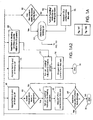
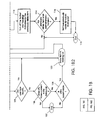
- Fig. 1 consisting of Figs. 1-A1, 1-A2, 1-B1, 1-B2 and 1-C, taken together, schematically illustrate the procedural steps in creating and maintaining and managing a history list of URLs, and of creating and maintaining and managing the working list for URLs, in accordance with a preferred embodiment of the invention.
- Fig. 2 schematically illustrates the primary components of a personal computer, workstation or network computer in which the present invention may be practiced.
- Fig. 3 schematically illustrates a data communications and computer network of the sort in which the invention may be practiced.
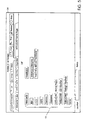
- Fig. 4 illustrates an embodiment of the invention in which the activity duration permanence level states and contents of a working list may be viewed in one portion of a display screen, while the currently active URL content is being displayed in another portion thereof.
- Fig. 5 illustrates an alternative view of the invention in which the working list itself is displayed in the display screen area in place of the URL content.
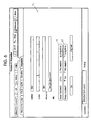
- Fig. 6 illustrates a user selection and control interface screen for setting and maintaining the list duration permanence level and the activity duration permanence level under user control.
- Fig. 2 illustrates a representative workstation or personal computer hardware environment in which the present invention may be practiced.
- a representative single user workstation 10 such as a personal computer, workstation, or network computer, which includes memory and related peripheral devices.
- the workstation 10 may include a microprocessor 12 and a bus 14, which is employed to connect and enable communication between the microprocessor 12 and the memory and other components of the workstation 10 in accordance with well known techniques.
- a workstation, network computer or personal computer 10 typically will include a user interface adapter 16 for connecting the microprocessor 12 via bus 14 to one or more of the interface devices.
- Bus 14 also connects a display device 24, such as an LCD screen or monitor, to the microprocessor 12 via a display adapter 26.
- Bus 14 also connects microprocessor 12 to memory 28 and to permanent storage 30, which can include a hard drive, tape, disk, etc.
- Workstation 10 communicates via a communications adapter 32 to a communications network, and thence to other computers or networks of computers.
- Workstation 10 may be associated with such other computers in a local area network (LAN) or wide are network (WAN), or the workstation 10 can be a client in a client/server arrangement with some other computer in the network.
- the workstation 10 can be a network computer, which might not require the hard drive or permanent storage or full operating system that is conventionally found in most computer workstations and personal computers.
- Fig. 3 illustrates a data processing network 40.
- the data processing network 40 includes a plurality of individual networks including the LANs 42 and 44, each of which includes a plurality of individual workstations 10.
- an individual LAN 42 or 44 may comprise a number of intelligent workstations or network computers coupled to a host processor.
- Multiple mainframe computers such as computer 46 may be connected to a LAN by means of communication links 48 as shown in Figure 3.
- the mainframe computer 46 may be implemented any of a variety of architectures well known in the art.
- a mainframe computer may also be coupled to a storage device 50 which may serve as a remote central storage for a LAN 44 and the LAN may be coupled to a communications link 52 through some subsystem control such as controller 54 and communications link 56 to a gateway server 58 for eventual access to other local area networks and workstations.
- the gateway server 58 is preferably an individual computer or intelligent workstation and serves to link LAN 42 in Figure 3 to LAN 44.
- the mainframe computer 46 may be located at a great geographic distance from the LAN 44 which in turn may be located a substantial distance from the LAN 42.
- a mainframe computer 46 might be located in New York, for example, while the LAN 44 might be located in Texas and LAN 42 might be located in North Carolina.
- the present invention is typically embodied as software programming code which may be stored in permanent storage of some type such as the permanent storage 30 of the workstation 10.
- software programming code could be stored with the storage associated with a server such as storage 50 associated with computer 46 operating as a server as shown in Figure 3.
- the software programming code in which the invention is embodied can itself be implemented on any of a variety of known media for use with a data processing system such as a floppy diskette, cassette tape, hard drive or CD ROM.
- the code may be distributed on such media or distributed to users from the memory or storage of one computer system over a communications network of any given type to other computer systems for use by users of such systems.
- the techniques and methods of embodying software program code on physical media and/or for distributing or embodying the code locally via networks are well known and will not be further discussed herein.
- a network computer can use an improved browser as a desktop operating environment.
- the improved browser must be capable of moving from one URL to another, of maintaining a history list of URLs that have been accessed, and of maintaining a list of URLs that have been tagged for later recall by placing of bookmarks or addition to a hot list.
- the improved browser must keep multiple entities active at a given time, i.e. these entities must be loaded into memory for execution.
- the improved browser makes use of a new history list and a new working list in order to easily support the requirement of multiple, concurrently active URLs.
- the invention provides two distinct types of information on a display screen.
- a new, selectable list of URLs called a working list
- the working list of URLs may be displayed as a list of URLs, as menu lists, as a series of overlapped folders with marked tabs, by tables or nemonic diagrams or the like.
- a contents display window which renders the content of the URLs as they are selected from the working list, should be provided. There may be more than one content window.
- a single content window 11 shows the content of a typical URL from the Internet while the members of the working list are depicted as series of overlapped, marked tabs 13 in an upper portion of the overall display screen of a display device 24.
- URLs whose titles are shown on the marked tabs 13 in Figure 4
- the space allocation between the working list display area as shown in Figure 4 and the content window may be varied by the user and other views may be chosen.
- the preferred embodiment offers a list-only view in which the working list fills the entire screen as shown in Figure 5, so that the content window is completely obliterated.
- a list-only view as shown in Figure 5 is useful for navigation purposes and for list management, although all of the navigation and list management functions can easily be performed in the split view such as shown in Figure 4.
- a content only view is also possible as will be apparent to those of skill in the art.
- Each item from a working list 13 as shown in both Figures 4 and 5 has several attributes or parameters that define the item's appearance and behavior. For purposes of the present invention, several new attributes have been defined for each item in the working list.
- the chief components of the item in the working list are its URL which is an identifier that points to the site or location having content on the web which is to be represented by this working list entry item.
- the URL is the main identifier, but not the only identifier for an item in the working list.
- each item in the working list has a content which may be an HTML page of data, a text document, a spread sheet or the like. The content is retrieved from the Web and displayed in the content window 11 in Figure 4 for example.
- an item's content is blank.
- the URL content arrives from the Web, it is assigned to the working list item content.
- some types of content support hyperlinks. For example, an HTML page can contain a defined hyperlink to another URL. If the user should select a link in the content window display from a given URL's content, then a new URL content will be requested as will be described in greater detail with reference to Figures 1A and 1B.
- a third element or parameter for an item in the working list is the title of the URL.
- An HTML title is used as the default for HTML page content being displayed. Other types of content may not have readable titles, but the user can specify a title as desired.
- Figure 6 illustrates a user selection panel with an area for entering a label or title of the user's choice for a given working list item.
- visibility is a fourth parameter or element included in an item in the working list in accordance with the invention.
- the content window 11 of Figures 4 and 5 is capable of displaying at least one URL's content from URLs in the working list. If any URL in the working list currently has its content displayed, it is said to be visible and to be visible its URL must, of course, be active. A visible URL should be highlighted in some way.
- List permanence or listed item duration permanence is a new element provided by the present invention.
- a fundamental concept which forms a part of the invention is that URLs in the working list will have multiple levels of list permanence duration and these levels are selectable by the user.
- the level of list permanence duration controls how long a given URL item will be kept in the working list. Three levels of permanence have been defined in the preferred embodiment.
- the levels of working listing duration permanence in a preferred embodiment are, first, "Transient".
- a Transient item is automatically added to the working list when it has been called for and it is removed from the working list when it is no longer active. Typically, this will occur when an HTML page presents a hyperlink and the user selects a link. Then one transient URL in the working list will be replaced by another transient URL item.
- a particular color or highlighting may be reserved for showing the list items that represent transient URL working list permanence levels.
- a second possible listing permanence duration level for the working list is "Session" permanence.
- a session permanent duration level item in the working list will be kept in the working list until the user logs off of his system. The next time that the same user logs on, the session permanence listing duration URL item will no longer be listed. This has the function of acting like a temporary bookmark or temporary hot list item.
- the third and final level of working list item duration permanence is "Permanent".
- a permanent item is kept in the working list indefinitely, including between sessions and acts much as a lasting bookmark.
- the invention can be implemented with only two levels of permanence if session and permanent levels are combined but additional levels could also be defined for unique circumstances.
- the user is provided with means for setting the level of listing duration permanence for a particular item in the working list.
- the box labelled 15 shows where the user may make a selection for a given URL entry to set its level of working list duration permanence with the selections being "no” or “none” for transient level, "session” for session level and "long time” for Permanent level of duration in the list.
- transient URLs In operation of the browser in accordance with the invention, a user will pass through transient URLs continuously.
- a transient URL is created by clicking on a link in the content window 11 or by typing the URL's identifier in an input field on the screen as is common in the prior art.
- the user can change the URL's working list permanence level to "session" or "permanent” as desired.
- a fifth item or parameter for an entry in the URL working list is also new entirely and represents the activity duration permanence level. This parameter enables the browser to decide which URLs to keep loaded and how long to keep them loaded and active.
- the three levels of permanence for working list listing duration are also available to the user for setting a URL item's activity duration level in the working list.
- the "transient” level indicates the URL will be activated when its content is delivered and becomes visible on the display and deactivated when the content is no longer visible.
- “Session” level of activity duration permanence indicates the URL will be activated when its content becomes visible and it will be kept active throughout the session until logoff.
- a "permanent" level of activity duration permanence means that the URL will be activated when each session starts and will be maintained active throughout each session.
- the box labelled 17 provides the area where the levels of activity duration permanence may be selected.
- a given URL cannot be active if it is not already listed in the working list, it follows that an important rule is that the activity permanence duration level assigned cannot exceed the listing permanence duration level.
- the user is prevented from selecting an active permanence level of duration that is higher than the listed permanence level.
- listing permanence is analogous to bookmarks of the past, active permanence levels have no such counterpart in conventional prior art browsers.
- the active duration permanence level is closely related to listing permanence duration level, however, for the reasons listed above. Consequently, as shown in Figure 6, a preferred embodiment of the invention provides a user control screen for the various duration permanence factors and shows the three levels of listing duration permanence and corresponding three levels of activity duration permanence beside one another in boxes 15 and 17 as described above.
- a final item or parameter in the working list is the current activity state of a URL.
- the working list contains an indicator for each URL showing whether that URL is currently not loading or active, is in the act of loading, or is already active.
- the title of the URL is italicized by changing the font in the list tabs to show that a given URL is active, but any other attribute such as color, font size or style, illumination intensity, brightness, etc. could be used instead to indicate that a URL is active.
- a small stop sign indicator that the item is loading, and clicking on the stop sign halts loading.
- the currently active state is shown for each URL in the active list.
- a conventional browser shows only one URL active at a given time so there is no need for multiple indicators to show the activity state for more than one URL, nor for any multiple controls to stop loading, etc.
- Another item of significance is the URL entry item's physical position in the working list.
- a URL item's initial position in the working list would be after its parent URL, which is determined by consulting a history list, but if the URL has no parent or the parent is no longer present in the working list, then the URL's entry is placed at the end of the list. This permits a user to see related URLs grouped together for convenience. Also, if a URL's parent URL is transient, it is important to position the new URL after its parent, because when the parent disappears and the new URL is added it will be equivalent to replacing the URL's parent in the working list with the new URL contents and parameters. A user can also change the position of entry items in the working list by utilizing drag and drop controls for example.
- a unique history list is also created and maintained by the preferred embodiment of the invention.
- most conventional browsers maintain a history list of all URLs that have been recently active so that the user can traverse the history list to return to a previously visited content.
- the browser in the preferred embodiment of the present invention must keep a record of the parent of each URL that has been active as well as the identifier for each URL.
- an item in the history list is shown with two properties. The URL identifier itself is placed in the history list once it has been requested and secondly, the URL's parent, if any, will also be kept in the list.
- the first URL is said to be the second URL's parent.
- the browser list-keeping function only needs to track parent relationships for the links that the user has actually selected, so it is not necessary to analyze all possible child links that could have been taken for each parent.
- an item in the history list may be a URL that has no parent URL. For instance, if a user manually enters a URL designator, the URL's parent will not be known. The only URLS with known parents are the ones that are selected from a given URL's content display window because the current URL itself will be recorded in the history list as the new URL's parent for any link selected from that content window.
- the history list facilitates the implementation of the backward and forward navigation function standard in the prior art.
- a browser using the present invention can use the accumulated data of URLs and parents to construct an individual history list for any URL that is active. This allows a user to backtrack through a series of hyperlinks that were followed to arrive at a given active URL without regard to the links that lead to other active URLs.
- the invention as embodied which will be described further with relation to Figures 1A, 1B and 1C provides a control for each active URL which creates, displays, maintains, manages and traverses the history list for that URL.
- logon occurs at the user's computer and the browser loads from storage the first saved URL and appends its URL identifier to a history list with its parent identification set to none as shown in box 61.
- the process creates a new working list item for the URL retrieved from storage.
- the working list listing permanence duration level is set to "permanent" because this URL must be a permanent one since it was retrieved from storage.
- the system loads from storage the URL's associated activity permanence duration level and appends the URL item with its parameters to the end of the working list in box 65.
- box 66 a question is asked as to whether the item's activity duration permanence level is permanent and if the answer is yes, the URL is loaded into memory and a loading indicator is turned on in the working list item parameters in box 67.
- this active URL has its content requested from the Web and in box 69 a check is made as to whether there are more listed URLs to load from storage. If the answer is yes, the routine branches back to box 60, and if it is no, it ends in box 70.
- the system branches to block 69 immediately and proceeds as described earlier from there. This is part of the process for setting up the history list and the working list for URLs that have been saved in storage for retrieval and initiation at next logon. Items of this type might be identified as permanently listed items such as from a hot list or items for which the user has set a permanent listing duration level. The item's activity permanence duration level might or might not be set to permanent; if it is "session only" or "transient", the item URL is loaded in the working list history list but it is not made active by loading the URL and contents into memory for execution.
- a second case is illustrated beginning at block 71 in Figure 1A where the user types in a requested URL after a system has been logged on.
- the new URL is appended to the history list with its parent identifier set to none.
- a new working list item for the URL is created and in box 74 the listing permanence level is set automatically to transient level.
- the activity duration permanence level is automatically set to transient and in block 76 the item's identifiers are added, with the URL, to the end of the working list since no parent is known.
- system turns on the loading indicator in the working list item parameters and in block 78 the URL's content is requested from the Web with the process ending at block 79 from which the system will await receipt of the requested URL content.
- Block 80 of Figure 1A a user might select a hypertext URL identifier from a hypertext link in a previous URL's displayed content window which must be accounted for in the listing routines.
- Block 81 appends the newly identified URL to the history list with the parent set equal to the content screen display's URL identifier.
- a new working list item is created for the linked-to URL, and in box 83 the URL's permanence level for listing is set automatically to transient.
- the new URL's activity duration permanence level is automatically set to transient, and in block 85 the new URL item is inserted into the working list immediately following placement in the list where its currently visible item, the parent, has been listed. The process then branches to block 77 and proceeds as described earlier.
- a final possibility is that the user selects a URL from an existing item in the working list itself. This is shown in block 90.
- the history list item is copied to end, keeping its parent in the list.
- the question is asked as to whether the URL's content has been received already. If the answer is yes, the item is added in the working list as shown in block 93 and the process branches to Figure 1B. If the answer is no in block 92, in block 94 the loading indicator is turned on in the working list item parameter.
- the URL's content is requested from the Web, which then passes operation to showing the item in the working list in block 93 which then branches to Figure 1B to await receipt of the URL content.
- FIG. 1B the working list maintenance routines of the preferred embodiment of the invention are illustrated.
- URL content is received from the Web because of a prior pending request and in box 101 the contents are assigned to the working list item that has the matching URL identifier to that received.
- the loading indicator in the working list is turned off and the active indicator is turned on in box 103.
- box 104 a question is asked as to whether the new URL resulted from navigation forward or backward in the history list. If the answer is yes, the item is shown in the working list in box 109 and the new working list URL item's content is displayed in place of the old URL's content in box 110.
- box 111 a question is asked as to whether the previously visible content item URL had an active duration permanence of transient.
- the system discards the contents of the previously visible item in box 112, turns off the active and/or loading indicators for the previously visible item in box 113 and in box 114 asks whether the previously visible item's listing permanence duration level was transient. If the answer is yes, block 115 removes the previously visible item from the working list and ends at block 116. If the answer is no, the previously visible item's identity is left in the working list and the process ends in block 116. Similarly, returning to block 111, if the previously visible item's activity duration permanence level was not transient, i.e. was higher than transient, the process ends in block 116 with the item being left in the list.
- block 105 is entered and the question is asked whether the user entered the URL. If the answer is yes, operation proceeds to block 109 through 116 as previously described. If the answer is no, operation proceeds to block 106 where a question is asked as to whether the URL has an identified parent in the history list. If the answer is yes, the question is asked in block 108 as to whether the URL parent is visible and if the answer is yes, operation proceeds to block 109-116 as previously described. If the answer is no or if the URL does not have a parent in the history list, operation ends in block 107.
- FIG. 1C the routine which stores permanent duration level list permanence items for recall at next logon is shown beginning with the logoff signal being received in block 117.
- block 118 the next item is retrieved from the working list and in 119 is checked to determine if the listing permanence level of this item is set to permanent. If the answer in block 119 is yes, the item's URL is stored in memory in block 120 and the item's activity permanence level as well as the item's other parameters such as title, color, etc. are all stored in memory as shown in blocks 121 and 122.
- block 123 the question is asked as to whether another item is still in the working list and proceeds to loop back to block 118 to retrieve each item from the working list in turn, check it for listing permanence level parameter, etc. The process finally ends in block 124 when there are no more items in the working list.
- the process loop which is invoked as a user requests an individual history list for a item from the working list is shown.
- the user's request starts the process which begins by creating an individual history list that is initially empty as shown in block 126.
- the working item's URL is the first entry to the history list and in block 128 the question is asked as to whether the URL at the end of the individual history list has a parent URL in the common history list. If the answer is yes, the parent URL is appended from the common history list to the end of the individual history list and the question in block 128 is asked again until all parent chains for the URL have been exhausted.
- the process then flows to block 130 for displaying the individual history list to the user and waiting for the user's input or selection.
- Block 131 determines if the user has selected an item from the individual history list and if the answer is yes, it branches to the get command in block 132 which returns to Figure 1A as shown. If the user does not select an item from the list, the process ends in block 133.
- the browser loads the working list items that were saved at the end of the last session. These are the working list items that had a listing permanence level of Permanent. In this example, there were three working list items that were saved at the end of the last session. These three items appear initially in the working list when the user logs on as shown by the following table: Title Visible Indicator URL List Perm Act Perm 3270 Yes Loading http://www.bigco.com/3270.htm Permanent Permanent Invest http://www.bigco.com/fc.ss Permanent Session Weather http://www.weather.com Permanent Transient
- the browser requests the content from the web for the "3270” URL as it loads the item from storage, because its activity duration permanence level is Permanent. Some time elapses before the network responds to the browser. During this time, the "loading" indicator remains active on the "3270” item in the working list. The "3270” item is visible, though its content is blank.
- the "3270" URL and content arrive from the web. Refer to the flowchart Fig. 1B, 100 "URL and content arrive because of prior request.”
- the browser assigns the incoming content to the "3270" item in the working list by matching its URL with the incoming content's URL.
- the browser turns off the "Loading” indicator and turns on the “Active” indicator.
- the "3270" item is already visible, so the user immediately sees the 3270 application displayed.
- the user begins using the 3270 content (an application) to manage, for example, schedules and mail.
- 3270 content an application to manage, for example, schedules and mail.
- step 2 the working list looks like this: Title Visible Indicator URL List Perm Act Perm 3270 Yes Active http://www.bigco.com/3270.htm Permanent Permanent Invest http://www.bigco.com/fc.ss Permanent Session Weather http://www.weather.com Permanent Transient
- the “Invest” content has not previously been requested during this session (since logon) from the web. Its Active Permanence is "Session”, meaning that it will be kept active-but only after the user loads it the first time. So when the user selects "Invest” from the working list, the browser requests its content from the web. The “Loading” indicator for the "Invest” item in the working list is now active.
- the browser After making the content for "Invest” visible, the browser must decide what to do with the previously visible item in the working list, in this case, the "3270" item. Since the 3270 item does not have an active permanence of Transient, the browser leaves it loaded.
- step 3 the working list looks like this: Title Visible Indicator URL List Perm Act Perm 3270 Active http://www.bigco.com/3270.htm Permanent Permanent Invest Yes Loading http://www.bigco.com/fc.ss Permanent Session Weather http://www.weather.com Permanent Transient
- the “Invest” URL is a spreadsheet in this assumed example, so the browser uses a spreadsheet viewer to display the content to the user. The browser turns off the “Loading” indicator and turns on the “Active” indicator for this item.
- step 4 the working list looks like this: Title Visible Indicator URL List Perm Act Perm 3270 Active http://www.bigco.com/3270.htm Permanent Permanent Invest Yes Active http://www.bigco.com/fc.ss Permanent Session Weather http://www.weather.com Permanent Transient
- the browser makes a new entry in the History list to record that the URL "http://www.bigco.com/stock/today.html" has the parent URL "http://www.bigco.com/fc.ss”.
- the browser will need to know about its parent URL. (The previous URLs that came in from the web were also placed in the history list, but did not have parent URLs.)
- the browser creates a new item for the working list using the URL that the user selected.
- the new item has list and active permanence levels of Transient.
- the browser inserts the new item into the working list following its parent, the currently visible item.
- the working list now looks like this: Title Visible Indicator URL List Perm 3270 Active http://www.bigco.com/3270.htm Permanent Permanent Invest Yes Active http://www.bigco.com/fc.ss Permanent Session Quote Loading http://www...today.htm1 Transient Transient Weather http://www.weather.com Permanent Transient
- the title for the new item was established by querying the content identified by the URL. For example, http://www.bigco.com/stock/today.html is an HTML page with a tag that specifies "Quote" as the content's title.
- the title of the new item is its URL until its content begins to arrive from the web, because the title is contained in the content.
- the title is changed from the URL to the content's title. The user can override this title with a user-specified title.
- the process of determining the title is standard in existing web browsers, and is not the focus of this invention.
- the browser assigns the content to the "Quote” item, turning off the “Loading” indicator and turning on the “Active” indicator.
- the "Quote” URL is an HTML page, so it is displayed with the HTML viewer.
- the browser consults the history list and finds that the "Quote” URL has a parent URL (the URL of the "Invest” item), and that the parent URL is in the working list and is visible. In response to this condition, the browser makes the "Quote” item visible. The user gets the impression of (a) clicking on the "Quote” link in “Invest”, (b) waiting for information retrieval, and (c) seeing the "Quote” HTML.
- the "Quote” URL is made visible via the process in the flowchart Fig 1A, 93 "Show Item in working list.”
- the previously visible item, “Invest” has an active permanence that is not Transient, so it is kept active in the working list.
- step 5 an entry is added to the history list to show that the new URL is the child of "Quote”.
- a new working list item is inserted after "Quote", so that the working list now looks like this:
- the working list item "MedCo” is made visible because its parent URL, in the "Quotes” item, was visible when the new URL arrived.
- the previously visible working list item, "Quotes” has an activity duration permanence level of Transient. Therefore its content is discarded and its "Active” indicator is turned off.
- the history permanence level of "Quotes” is Transient. Therefore, the working list item is removed from the working list. The impression the user receives is that the "Medco” item replaces the "Quotes” item. This is the behavior of a standard web browser.
- the browser Rather than viewing the common history list, the user has requested to view an individual history list that is constructed specifically for the currently visible working list item, "MedCo.”
- the browser first creates an individual history list 126 that is empty and initializes it, 127, with "MedCo.” Then the browser finds in the common history list 128, (shown above) that MedCo's parent is the "Quote" URL, so "Quote” and its URL are added to, 129, the individual history list. The browser next finds that the URL of "Quote” has a parent which is the URL of "Invest", so "Invest” and its URL are added.
- the browser finds that "Invest” has no parent, 128, so it is finished constructing the individual history list and displays the result, 130. If the user had selected the initial URL from the individual history list, 131, the process returns to Fig. 1A, 132, at "GET” and proceeds as already described; otherwise, the history list process ends, 133.
- an individual history list would be much shorter than the common history list.
- the common history list would only have been one item longer, but that is only because the user hasn't been using the browser for very long.
- the benefit of the individual history list is that it only shows the items that were used to reach the current item.
- the process filters out the items in the common history list that are not relevant to the currently visible item in the Working list. This allows the user to retrace the links that were used to reach the currently visible item, instead of all links that have ever been used.
- the user dismisses the history list without selecting an item in it.
- the browser displays the "MedCo" working list item again, as if nothing had happened.
- the browser requests the URL "http://www.weather.com” and turns on the Loading indicator for the "weather” item.
- the "weather” item becomes visible, though it is blank, and the previously visible item, “Invest”, is left active.
- the "weather” item's URL and content are received from the web. Refer to the "URL and content arrive because of prior request" flowchart, Fig. 1B, 100.
- the browser assigns the content to the "Weather” item in the Working list, turns off the “Loading” indicator, and turns on the “Active” indicator.
- the browser creates a new working list item with list and active permanence levels set to Transient.
- the browser inserts the new item after "weather” with its Loading indicator turned on, and requests the new URL from the web.
- the browser creates a new working list item with list and active permanence levels set to Transient.
- the browser inserts the new item after "Weather" with its Loading indicator turned on, and requests the new URL from the web.
- the browser assigns the content to the "RTP” item, and turns off the Loading indicator and turns on the "Active” indicator for the "RTP” item.
- the browser then makes the "RTP” item visible according to the flowchart "Show item in Working list” Fig. 1-B, 109.
- the "RTP” item becomes visible because in the history list, its URL has a parent (the URL for "Weather") and that parent was visible.
- the previously visible item, "weather”, has an activity duration permanence level of Transient. Therefore, since it is no longer visible, its content is discarded and its "Active” indicator is turned off.
- the "weather” item has a listing duration permanence level that is not Transient, so it is not removed from the list.
- the content is assigned to the appropriate working list item, "NYC", and its Loading indicator is turned off and its Active indicator is turned on.
- the browser finds that the "NYC” item has a parent in the history list whose URL is the "weather” item. However, the "weather” item is no longer visible. In accordance with the flowchart, the new item, "NYC”, does not become visible. It remains in the list with listing duration permanence level and activity duration permanence level set to Transient, until the user views it and then views another item.
- the first three items in the working list have a listing duration permanence level of Permanent, so their data is saved in storage. These three items will be recreated from the stored data the next time the user logs on. The remaining items do not have a listing duration permanence level of Permanent, so they are not saved.
Landscapes
- Engineering & Computer Science (AREA)
- Theoretical Computer Science (AREA)
- Databases & Information Systems (AREA)
- Signal Processing (AREA)
- Computer Networks & Wireless Communication (AREA)
- General Engineering & Computer Science (AREA)
- General Physics & Mathematics (AREA)
- Physics & Mathematics (AREA)
- Data Mining & Analysis (AREA)
- Computer Security & Cryptography (AREA)
- Computer And Data Communications (AREA)
- Information Transfer Between Computers (AREA)
- Information Retrieval, Db Structures And Fs Structures Therefor (AREA)
- Debugging And Monitoring (AREA)
- Two-Way Televisions, Distribution Of Moving Picture Or The Like (AREA)
- Financial Or Insurance-Related Operations Such As Payment And Settlement (AREA)
- Saccharide Compounds (AREA)
Applications Claiming Priority (2)
| Application Number | Priority Date | Filing Date | Title |
|---|---|---|---|
| US751830 | 1996-11-18 | ||
| US08/751,830 US6049812A (en) | 1996-11-18 | 1996-11-18 | Browser and plural active URL manager for network computers |
Publications (3)
| Publication Number | Publication Date |
|---|---|
| EP0843269A2 true EP0843269A2 (de) | 1998-05-20 |
| EP0843269A3 EP0843269A3 (de) | 1999-07-28 |
| EP0843269B1 EP0843269B1 (de) | 2004-07-21 |
Family
ID=25023678
Family Applications (1)
| Application Number | Title | Priority Date | Filing Date |
|---|---|---|---|
| EP97308669A Expired - Lifetime EP0843269B1 (de) | 1996-11-18 | 1997-10-30 | Netzwerkbrowser |
Country Status (11)
| Country | Link |
|---|---|
| US (1) | US6049812A (de) |
| EP (1) | EP0843269B1 (de) |
| JP (1) | JP3258263B2 (de) |
| KR (1) | KR100300791B1 (de) |
| CN (1) | CN1091281C (de) |
| AT (1) | ATE271702T1 (de) |
| CA (1) | CA2219563C (de) |
| DE (1) | DE69729926T2 (de) |
| ES (1) | ES2221018T3 (de) |
| MY (1) | MY118302A (de) |
| TW (1) | TW360849B (de) |
Cited By (13)
| Publication number | Priority date | Publication date | Assignee | Title |
|---|---|---|---|---|
| EP1071258A1 (de) * | 1999-07-20 | 2001-01-24 | Texas Instruments Inc. | Benutzerzugangsüberwachung in Internet |
| GB2381903A (en) * | 2001-09-01 | 2003-05-14 | Pace Micro Tech Plc | A method for expiring display portions generated via browser devices |
| WO2002089403A3 (en) * | 2001-04-27 | 2003-05-30 | Wallaware Inc | Network communication management system and method using intermediate host |
| WO2003044695A1 (en) * | 1999-06-09 | 2003-05-30 | Soederstroem Gert Peter Willia | Method for multiple task searching |
| WO2001093071A3 (en) * | 2000-05-29 | 2003-12-31 | Saora Kabushiki Kaisha | System and method for saving browsed data |
| WO2001069443A3 (en) * | 2000-03-10 | 2004-05-06 | Aether Systems Inc | System, method and apparatus for utilizing transaction databases in a client - server environment |
| US6832225B1 (en) | 1998-12-14 | 2004-12-14 | Canon Research Centre France S.A. | Method and device for recording and searching for a document on a communication network |
| US7082573B2 (en) | 2003-07-30 | 2006-07-25 | America Online, Inc. | Method and system for managing digital assets |
| EP1223503A3 (de) * | 2001-01-16 | 2006-08-09 | Siemens Medical Solutions USA, Inc. | System und Benutzerschnittstelle zur Unterstützung der Navigation und Parallelbetrieb mehrerer Anwendungen |
| US7120641B2 (en) | 2002-04-05 | 2006-10-10 | Saora Kabushiki Kaisha | Apparatus and method for extracting data |
| WO2006106031A1 (de) * | 2005-04-06 | 2006-10-12 | Siemens Aktiengesellschaft | Verfahren und dienstleistungsportal zur wahlweisen nutzung von programmanwendungen in demselben |
| US7620616B2 (en) | 2003-12-30 | 2009-11-17 | Nokia Corporation | Terminal apparatus, method and computer program for selecting a symbol string |
| US20110145750A1 (en) * | 2005-06-07 | 2011-06-16 | Sony Computer Entertainment Inc. | System and method for corresponding tabs to content information |
Families Citing this family (197)
| Publication number | Priority date | Publication date | Assignee | Title |
|---|---|---|---|---|
| US6344791B1 (en) | 1998-07-24 | 2002-02-05 | Brad A. Armstrong | Variable sensor with tactile feedback |
| US6906700B1 (en) | 1992-03-05 | 2005-06-14 | Anascape | 3D controller with vibration |
| US6347997B1 (en) | 1997-10-01 | 2002-02-19 | Brad A. Armstrong | Analog controls housed with electronic displays |
| US6222525B1 (en) | 1992-03-05 | 2001-04-24 | Brad A. Armstrong | Image controllers with sheet connected sensors |
| US6208271B1 (en) | 1998-09-04 | 2001-03-27 | Brad A. Armstrong | Remote controller with analog button(s) |
| US8674932B2 (en) | 1996-07-05 | 2014-03-18 | Anascape, Ltd. | Image controller |
| US6351205B1 (en) * | 1996-07-05 | 2002-02-26 | Brad A. Armstrong | Variable-conductance sensor |
| US8121914B1 (en) * | 1996-11-27 | 2012-02-21 | Diebold, Incorporated | Automated banking machine customer profile method |
| US7266526B1 (en) * | 1996-11-27 | 2007-09-04 | Diebold, Incorporated | Automated banking machine system with multiple browsers |
| US6785865B1 (en) | 1997-03-06 | 2004-08-31 | Microsoft Corporation | Discoverability and navigation of hyperlinks via tabs |
| EP0875845A3 (de) * | 1997-04-30 | 2000-06-07 | Sony Corporation | Browsergerät, Adressregistrierverfahren, Browsersystem und Aufzeichnungsmedium |
| US6411996B1 (en) * | 1997-06-30 | 2002-06-25 | Sun Microsystems, Inc. | Method and apparatus maintaining a to-be-visited site bookmark file |
| US6532000B2 (en) | 1997-10-01 | 2003-03-11 | Brad A. Armstrong | Analog controls housed with electronic displays for global positioning systems |
| US6415707B1 (en) | 1997-10-01 | 2002-07-09 | Brad A. Armstrong | Analog controls housed with electronic displays for coffee makers |
| US6456778B2 (en) | 1997-10-01 | 2002-09-24 | Brad A. Armstrong | Analog controls housed with electronic displays for video recorders and cameras |
| US6404584B2 (en) | 1997-10-01 | 2002-06-11 | Brad A. Armstrong | Analog controls housed with electronic displays for voice recorders |
| CA2247706C (en) * | 1998-06-23 | 2010-11-23 | Nielsen Media Research, Inc. | Use of browser history file to determine web site reach |
| US6754697B1 (en) * | 1998-06-30 | 2004-06-22 | International Business Machines Corporation | Method and apparatus for browsing and storing data in a distributed data processing system |
| US6886014B1 (en) * | 1998-07-15 | 2005-04-26 | Koninklijke Philips Electronics N.V. | Modifiable universal resource locators (MURLs) |
| US6321251B1 (en) * | 1998-10-01 | 2001-11-20 | Unisys Corporation | Gateway for dynamically providing web site status information |
| US6198473B1 (en) * | 1998-10-06 | 2001-03-06 | Brad A. Armstrong | Computer mouse with enhance control button (s) |
| JP2000122785A (ja) | 1998-10-20 | 2000-04-28 | Fujitsu Ltd | Wwwサーバおよび記録媒体 |
| US7353234B2 (en) * | 1998-12-30 | 2008-04-01 | Aol Llc, A Delaware Limited Liability Company | Customized user interface based on user record information |
| US6460060B1 (en) * | 1999-01-26 | 2002-10-01 | International Business Machines Corporation | Method and system for searching web browser history |
| JP2000222327A (ja) * | 1999-01-28 | 2000-08-11 | Nec Corp | 通信システムおよび方法 |
| US8321411B2 (en) | 1999-03-23 | 2012-11-27 | Microstrategy, Incorporated | System and method for management of an automatic OLAP report broadcast system |
| JP2000285002A (ja) * | 1999-03-30 | 2000-10-13 | Fuji Xerox Co Ltd | ハイパーテキスト空間においてユーザに固有アクセス空間を提供するための装置及び方法 |
| US6493702B1 (en) * | 1999-05-05 | 2002-12-10 | Xerox Corporation | System and method for searching and recommending documents in a collection using share bookmarks |
| US9208213B2 (en) | 1999-05-28 | 2015-12-08 | Microstrategy, Incorporated | System and method for network user interface OLAP report formatting |
| US8607138B2 (en) * | 1999-05-28 | 2013-12-10 | Microstrategy, Incorporated | System and method for OLAP report generation with spreadsheet report within the network user interface |
| US6539379B1 (en) * | 1999-08-23 | 2003-03-25 | Oblix, Inc. | Method and apparatus for implementing a corporate directory and service center |
| US6427175B1 (en) * | 1999-09-24 | 2002-07-30 | Clickmarks, Inc | Method and apparatus for collaborative remote link management using sharable online bookmarks |
| US6397264B1 (en) * | 1999-11-01 | 2002-05-28 | Rstar Corporation | Multi-browser client architecture for managing multiple applications having a history list |
| US9424240B2 (en) | 1999-12-07 | 2016-08-23 | Microsoft Technology Licensing, Llc | Annotations for electronic content |
| US7337389B1 (en) | 1999-12-07 | 2008-02-26 | Microsoft Corporation | System and method for annotating an electronic document independently of its content |
| US6714214B1 (en) | 1999-12-07 | 2004-03-30 | Microsoft Corporation | System method and user interface for active reading of electronic content |
| US6992687B1 (en) | 1999-12-07 | 2006-01-31 | Microsoft Corporation | Bookmarking and placemarking a displayed document in a computer system |
| US20040268253A1 (en) * | 1999-12-07 | 2004-12-30 | Microsoft Corporation | Method and apparatus for installing and using reference materials in conjunction with reading electronic content |
| US7028267B1 (en) | 1999-12-07 | 2006-04-11 | Microsoft Corporation | Method and apparatus for capturing and rendering text annotations for non-modifiable electronic content |
| US6957233B1 (en) | 1999-12-07 | 2005-10-18 | Microsoft Corporation | Method and apparatus for capturing and rendering annotations for non-modifiable electronic content |
| US7185274B1 (en) | 1999-12-07 | 2007-02-27 | Microsoft Corporation | Computer user interface architecture wherein users interact with both content and user interface by activating links |
| US6820111B1 (en) * | 1999-12-07 | 2004-11-16 | Microsoft Corporation | Computer user interface architecture that saves a user's non-linear navigation history and intelligently maintains that history |
| US7458014B1 (en) | 1999-12-07 | 2008-11-25 | Microsoft Corporation | Computer user interface architecture wherein both content and user interface are composed of documents with links |
| US6519616B1 (en) * | 1999-12-31 | 2003-02-11 | Qwest Communications International, Inc. | Web site quality assurance system and method |
| USD487275S1 (en) * | 2000-01-04 | 2004-03-02 | Apple Computer, Inc. | User interface for computer display |
| US20010017855A1 (en) * | 2000-02-29 | 2001-08-30 | Matsushita Electric Industrial Co., Ltd. | Portable telephone with URL accessing function |
| US6683633B2 (en) | 2000-03-20 | 2004-01-27 | Incontext Enterprises, Inc. | Method and system for accessing information |
| US7243299B1 (en) | 2000-04-21 | 2007-07-10 | Microsoft Corporation | Methods and apparatus for displaying multiple contexts in electronic documents |
| JP3479742B2 (ja) * | 2000-05-08 | 2003-12-15 | 株式会社アイディーエス | メールバック方式によるキャリアフリー端末認証システム |
| US6912532B2 (en) | 2000-05-22 | 2005-06-28 | Benjamin H. Andersen | Multi-level multiplexor system for networked browser |
| US20010047404A1 (en) * | 2000-05-24 | 2001-11-29 | Takashi Suda | Apparatus for managing web site addresses |
| US7062475B1 (en) * | 2000-05-30 | 2006-06-13 | Alberti Anemometer Llc | Personalized multi-service computer environment |
| WO2001097082A2 (en) * | 2000-06-09 | 2001-12-20 | Eclik Corporation | Network interface having client-specific information and associated method |
| US7259753B2 (en) * | 2000-06-21 | 2007-08-21 | Microsoft Corporation | Classifying, anchoring, and transforming ink |
| US7397949B2 (en) * | 2000-06-21 | 2008-07-08 | Microsoft Corporation | Serial storage of ink and its properties |
| US7006711B2 (en) * | 2000-06-21 | 2006-02-28 | Microsoft Corporation | Transform table for ink sizing and compression |
| JP2002082994A (ja) * | 2000-06-28 | 2002-03-22 | Fujitsu Ltd | インターネット・データベース |
| US7234108B1 (en) | 2000-06-29 | 2007-06-19 | Microsoft Corporation | Ink thickness rendering for electronic annotations |
| US6938207B1 (en) * | 2000-07-19 | 2005-08-30 | International Business Machines Corporation | Method and system for indicating document traversal direction in a hyper linked navigation system |
| US7171629B2 (en) * | 2000-10-20 | 2007-01-30 | Adaptive Avenue Associates, Inc. | Customizable web site access system and method therefore |
| US7428707B2 (en) | 2000-10-20 | 2008-09-23 | Adaptive Avenue Associates, Inc. | Customizable web site access system and method therefore |
| US6891551B2 (en) | 2000-11-10 | 2005-05-10 | Microsoft Corporation | Selection handles in editing electronic documents |
| US7002558B2 (en) * | 2000-12-21 | 2006-02-21 | Microsoft Corporation | Mode hinting and switching |
| KR20010044189A (ko) * | 2000-12-29 | 2001-06-05 | 유진우 | 멀티브라우즈 기능을 구비한 웹문서 처리방법 및 장치 |
| US7127609B2 (en) * | 2001-01-12 | 2006-10-24 | Siemens Medical Solutions Health Services Corporation | System and user interface for adaptively processing and communicating URL data between applications |
| US7127608B2 (en) * | 2001-01-12 | 2006-10-24 | Siemens Medical Solutions Health Services Corporation | System and user interface supporting URL processing and concurrent application operation |
| US7334031B2 (en) * | 2001-01-12 | 2008-02-19 | Siemens Medical Solutions Health Services Corporation | System and user interface supporting processing and activity management for concurrently operating applications |
| US7043752B2 (en) | 2001-01-12 | 2006-05-09 | Siemens Medical Solutions Health Services Corporation | System and user interface supporting concurrent application initiation and interoperability |
| US6707473B2 (en) * | 2001-08-01 | 2004-03-16 | Microsoft Corporation | Dynamic rendering of ink strokes with transparency |
| BR0206535A (pt) * | 2001-01-17 | 2004-03-23 | Contentguard Holdings Inc | Sistema e método para gerenciamento de direitos digitais usando um mecanismo padrão de renderização |
| US20020099552A1 (en) * | 2001-01-25 | 2002-07-25 | Darryl Rubin | Annotating electronic information with audio clips |
| US6961752B2 (en) * | 2001-02-15 | 2005-11-01 | International Business Machines Corporation | Virtual history files |
| US20020123879A1 (en) * | 2001-03-01 | 2002-09-05 | Donald Spector | Translation system & method |
| US6981223B2 (en) * | 2001-03-19 | 2005-12-27 | Ecrio, Inc. | Method, apparatus and computer readable medium for multiple messaging session management with a graphical user interface |
| US7512407B2 (en) * | 2001-03-26 | 2009-03-31 | Tencent (Bvi) Limited | Instant messaging system and method |
| US6934912B2 (en) * | 2001-06-04 | 2005-08-23 | Hewlett-Packard Development Company, L.P. | System and method for providing a history list of existing imaging compositions |
| US7346229B2 (en) * | 2001-06-27 | 2008-03-18 | Microsoft Corporation | Transform table for ink sizing and compression |
| US7168038B2 (en) * | 2001-08-01 | 2007-01-23 | Microsoft Corporation | System and method for scaling and repositioning drawings |
| US6909430B2 (en) * | 2001-08-01 | 2005-06-21 | Microsoft Corporation | Rendering ink strokes of variable width and angle |
| US20030038839A1 (en) * | 2001-08-08 | 2003-02-27 | Simpson Shell S. | Method for web-based imaging service to redirect to a preferred destination |
| US6990495B1 (en) * | 2001-09-05 | 2006-01-24 | Bellsouth Intellectual Property Corporation | System and method for finding persons in a corporate entity |
| US7110790B2 (en) * | 2001-10-03 | 2006-09-19 | Nokia Corporation | Quick access list for previously accessed network addresses |
| US7797623B1 (en) * | 2001-10-12 | 2010-09-14 | At&T Intellectual Property I, L.P. | Method for preventing inadvertent data entry in a web page |
| US8806060B2 (en) * | 2002-03-12 | 2014-08-12 | International Business Machines Corporation | Information retrieval system |
| US8635254B2 (en) | 2002-08-08 | 2014-01-21 | Axeda Corporation | Maintaining independent states for multiple web browser instances |
| US20040041841A1 (en) * | 2002-08-27 | 2004-03-04 | Lemogne Stephane | Enhanced contact navigator with interactive tabs for managing network events in real time |
| US6980406B2 (en) * | 2003-07-30 | 2005-12-27 | Hitachi Global Storage Technologies Netherlands, B.V. | Magnetic bias pinning layer for GMR sensor of a magnetic head for a hard disk drive |
| US20050204034A1 (en) * | 2004-03-12 | 2005-09-15 | Betarbet Sandeep R. | Methods, systems, and products for monitoring multiple tasks to fulfill a request originating from a web browser |
| US7424476B2 (en) * | 2004-04-16 | 2008-09-09 | Aol Llc | Categorized web browsing history |
| US7925671B2 (en) * | 2004-08-11 | 2011-04-12 | Getty Image (US), Inc. | Method and system for automatic cue sheet generation |
| US7496600B2 (en) * | 2004-12-02 | 2009-02-24 | Taiwan Semiconductor Manufacturing Co., Ltd. | System and method for accessing web-based search services |
| US7587665B2 (en) * | 2005-03-15 | 2009-09-08 | Microsoft Corporation | Method and computer-readable medium for providing spreadsheet-driven key performance indicators |
| US7712021B2 (en) * | 2005-03-25 | 2010-05-04 | Red Hat, Inc. | System, method and medium for component based web user interface frameworks |
| US8386931B2 (en) * | 2005-04-15 | 2013-02-26 | Microsoft Corporation | Method and apparatus for providing process guidance |
| US20060248471A1 (en) * | 2005-04-29 | 2006-11-02 | Microsoft Corporation | System and method for providing a window management mode |
| US8028245B2 (en) * | 2005-05-24 | 2011-09-27 | Microsoft Corporation | Method and system for operating multiple web pages with anti-spoofing protection |
| US7523409B2 (en) * | 2005-05-24 | 2009-04-21 | Microsoft Corporation | Methods and systems for operating multiple web pages in a single window |
| JP4238849B2 (ja) * | 2005-06-30 | 2009-03-18 | カシオ計算機株式会社 | Webページ閲覧装置、Webページ閲覧方法、及びWebページ閲覧処理プログラム |
| US20070022135A1 (en) * | 2005-07-25 | 2007-01-25 | Dale Malik | Systems and methods for organizing and annotating an information search |
| US7757239B2 (en) * | 2005-08-29 | 2010-07-13 | Sap Ag | Systems and methods for suspending and resuming of a stateful web application |
| EP1801689A1 (de) * | 2005-12-23 | 2007-06-27 | Sap Ag | Verfahren, Systeme und Softwareanwendungen mit Tabpanelelementen |
| JP2007226501A (ja) * | 2006-02-23 | 2007-09-06 | Nippon Telegr & Teleph Corp <Ntt> | Webページ関連履歴の提示方法および装置 |
| US7631263B2 (en) * | 2006-06-02 | 2009-12-08 | Scenera Technologies, Llc | Methods, systems, and computer program products for characterizing links to resources not activated |
| US7590998B2 (en) * | 2006-07-27 | 2009-09-15 | Sharp Laboratories Of America, Inc. | Television system having internet web browsing capability |
| US7870250B2 (en) * | 2006-09-11 | 2011-01-11 | International Business Machines Corporation | Method for continuous adaptation of user-scoped navigation topologies based on contextual information and user behavior |
| US10410748B2 (en) | 2006-10-02 | 2019-09-10 | Cerner Innovation, Inc. | System for providing an overview of patient medical condition |
| US9043711B2 (en) * | 2007-01-31 | 2015-05-26 | International Business Machines Corporation | Mirrored file manager |
| US20080215996A1 (en) * | 2007-02-22 | 2008-09-04 | Chad Farrell Media, Llc | Website/Web Client System for Presenting Multi-Dimensional Content |
| USD570363S1 (en) * | 2007-03-30 | 2008-06-03 | Adobe Systems Incorporated | Display screen with tabbed user interface |
| USD578543S1 (en) * | 2007-03-30 | 2008-10-14 | Adobe Systems Incorporated | Display screen with tabbed user interface |
| US8433995B1 (en) * | 2007-04-24 | 2013-04-30 | Google Inc. | Managing bookmarks for web pages |
| USD570364S1 (en) * | 2007-05-04 | 2008-06-03 | Adobe Systems Incorporated | Portion of a display screen with an animated image |
| USD574010S1 (en) * | 2007-05-04 | 2008-07-29 | Adobe Systems Incorporated | User interface for display screen |
| USD570365S1 (en) * | 2007-05-04 | 2008-06-03 | Adobe Systems Incorporated | User interface for display screen |
| USD569873S1 (en) * | 2007-05-04 | 2008-05-27 | Adobe Systems Incorporated | User interface for display screen |
| USD570866S1 (en) * | 2007-05-04 | 2008-06-10 | Adobe Systems Incorporated | User interface for display screen |
| WO2008146784A1 (ja) * | 2007-05-29 | 2008-12-04 | Access Co., Ltd. | 端末装置、ヒストリ管理方法、およびヒストリ管理の為のコンピュータ使用可能な記憶媒体 |
| US10019570B2 (en) * | 2007-06-14 | 2018-07-10 | Microsoft Technology Licensing, Llc | Protection and communication abstractions for web browsers |
| DE102007029586A1 (de) | 2007-06-26 | 2009-01-02 | Vodafone Holding Gmbh | Benutzerschnittstelle mit graphischer Benutzeroberfläche |
| US8201075B2 (en) * | 2008-02-29 | 2012-06-12 | Research In Motion Limited | Enhanced browser navigation |
| US20090249365A1 (en) * | 2008-03-31 | 2009-10-01 | International Business Machines Corporation | Method for goal based modality |
| US20090286219A1 (en) * | 2008-05-15 | 2009-11-19 | Kisin Roman | Conducting a virtual interview in the context of a legal matter |
| US8275720B2 (en) * | 2008-06-12 | 2012-09-25 | International Business Machines Corporation | External scoping sources to determine affected people, systems, and classes of information in legal matters |
| US9830563B2 (en) | 2008-06-27 | 2017-11-28 | International Business Machines Corporation | System and method for managing legal obligations for data |
| US8489439B2 (en) * | 2008-06-30 | 2013-07-16 | International Business Machines Corporation | Forecasting discovery costs based on complex and incomplete facts |
| US8484069B2 (en) * | 2008-06-30 | 2013-07-09 | International Business Machines Corporation | Forecasting discovery costs based on complex and incomplete facts |
| US8327384B2 (en) * | 2008-06-30 | 2012-12-04 | International Business Machines Corporation | Event driven disposition |
| US8515924B2 (en) * | 2008-06-30 | 2013-08-20 | International Business Machines Corporation | Method and apparatus for handling edge-cases of event-driven disposition |
| US20100017239A1 (en) * | 2008-06-30 | 2010-01-21 | Eric Saltzman | Forecasting Discovery Costs Using Historic Data |
| US20100031185A1 (en) * | 2008-07-31 | 2010-02-04 | International Business Machines Corporation | Web page push to new window |
| CN101504658B (zh) * | 2009-01-23 | 2011-09-28 | 北京搜狗科技发展有限公司 | 一种实现多标签应用程序中进行消息交互的方法及系统 |
| US8533582B2 (en) * | 2009-03-20 | 2013-09-10 | Xerox Corporation | Trail-based data content discovery, organization, and processing |
| US8856645B2 (en) * | 2009-03-20 | 2014-10-07 | Xerox Corporation | Generating formatted documents based on collected data content |
| US8655856B2 (en) * | 2009-12-22 | 2014-02-18 | International Business Machines Corporation | Method and apparatus for policy distribution |
| US8250041B2 (en) * | 2009-12-22 | 2012-08-21 | International Business Machines Corporation | Method and apparatus for propagation of file plans from enterprise retention management applications to records management systems |
| US8578289B2 (en) | 2010-01-28 | 2013-11-05 | Ebay Inc. | Application module for managing jobs asynchronously |
| US8321382B2 (en) * | 2010-03-25 | 2012-11-27 | Xerox Corporation | Validating aggregate documents |
| US8566903B2 (en) | 2010-06-29 | 2013-10-22 | International Business Machines Corporation | Enterprise evidence repository providing access control to collected artifacts |
| US8832148B2 (en) | 2010-06-29 | 2014-09-09 | International Business Machines Corporation | Enterprise evidence repository |
| US9619562B2 (en) * | 2010-06-30 | 2017-04-11 | Excalibur Ip, Llc | Method and system for performing a web search |
| US8402359B1 (en) * | 2010-06-30 | 2013-03-19 | International Business Machines Corporation | Method and apparatus for managing recent activity navigation in web applications |
| US9152712B2 (en) | 2010-06-30 | 2015-10-06 | Yahoo! Inc. | Method and system for performing a web search via a client-side module |
| TWI407764B (zh) * | 2010-08-16 | 2013-09-01 | Wistron Neweb Corp | 跳轉方法、人機界面及無線電話子機 |
| US8775444B2 (en) | 2010-10-29 | 2014-07-08 | Xerox Corporation | Generating a subset aggregate document from an existing aggregate document |
| USD678898S1 (en) * | 2010-11-01 | 2013-03-26 | Adobe Systems Incorporated | Context-adaptive user interface for a portion of a display screen |
| US20120166458A1 (en) * | 2010-12-23 | 2012-06-28 | Microsoft Corporation | Spam tracking analysis reporting system |
| US9621406B2 (en) | 2011-06-30 | 2017-04-11 | Amazon Technologies, Inc. | Remote browsing session management |
| US8799412B2 (en) | 2011-06-30 | 2014-08-05 | Amazon Technologies, Inc. | Remote browsing session management |
| US8577963B2 (en) | 2011-06-30 | 2013-11-05 | Amazon Technologies, Inc. | Remote browsing session between client browser and network based browser |
| US9037696B2 (en) | 2011-08-16 | 2015-05-19 | Amazon Technologies, Inc. | Managing information associated with network resources |
| US9195768B2 (en) | 2011-08-26 | 2015-11-24 | Amazon Technologies, Inc. | Remote browsing session management |
| US10089403B1 (en) | 2011-08-31 | 2018-10-02 | Amazon Technologies, Inc. | Managing network based storage |
| US9213775B2 (en) * | 2011-09-01 | 2015-12-15 | Facebook. Inc. | Domain-specific browser tab creation and management |
| US9881096B1 (en) | 2011-09-26 | 2018-01-30 | Google Llc | Web page tab management based on location |
| US8849802B2 (en) * | 2011-09-27 | 2014-09-30 | Amazon Technologies, Inc. | Historical browsing session management |
| US9641637B1 (en) | 2011-09-27 | 2017-05-02 | Amazon Technologies, Inc. | Network resource optimization |
| US9178955B1 (en) | 2011-09-27 | 2015-11-03 | Amazon Technologies, Inc. | Managing network based content |
| US9383958B1 (en) | 2011-09-27 | 2016-07-05 | Amazon Technologies, Inc. | Remote co-browsing session management |
| US8589385B2 (en) | 2011-09-27 | 2013-11-19 | Amazon Technologies, Inc. | Historical browsing session management |
| US8914514B1 (en) | 2011-09-27 | 2014-12-16 | Amazon Technologies, Inc. | Managing network based content |
| US9152970B1 (en) | 2011-09-27 | 2015-10-06 | Amazon Technologies, Inc. | Remote co-browsing session management |
| US10693991B1 (en) | 2011-09-27 | 2020-06-23 | Amazon Technologies, Inc. | Remote browsing session management |
| US8615431B1 (en) | 2011-09-29 | 2013-12-24 | Amazon Technologies, Inc. | Network content message placement management |
| US8191007B1 (en) * | 2011-10-07 | 2012-05-29 | Google Inc. | Organizing a browser environment |
| US9313100B1 (en) | 2011-11-14 | 2016-04-12 | Amazon Technologies, Inc. | Remote browsing session management |
| US8972477B1 (en) | 2011-12-01 | 2015-03-03 | Amazon Technologies, Inc. | Offline browsing session management |
| US9009334B1 (en) | 2011-12-09 | 2015-04-14 | Amazon Technologies, Inc. | Remote browsing session management |
| US9117002B1 (en) | 2011-12-09 | 2015-08-25 | Amazon Technologies, Inc. | Remote browsing session management |
| US9330188B1 (en) | 2011-12-22 | 2016-05-03 | Amazon Technologies, Inc. | Shared browsing sessions |
| US8839087B1 (en) | 2012-01-26 | 2014-09-16 | Amazon Technologies, Inc. | Remote browsing and searching |
| US9336321B1 (en) | 2012-01-26 | 2016-05-10 | Amazon Technologies, Inc. | Remote browsing and searching |
| US8627195B1 (en) | 2012-01-26 | 2014-01-07 | Amazon Technologies, Inc. | Remote browsing and searching |
| US9092405B1 (en) | 2012-01-26 | 2015-07-28 | Amazon Technologies, Inc. | Remote browsing and searching |
| US9087024B1 (en) | 2012-01-26 | 2015-07-21 | Amazon Technologies, Inc. | Narration of network content |
| US9509783B1 (en) | 2012-01-26 | 2016-11-29 | Amazon Technlogogies, Inc. | Customized browser images |
| US9183258B1 (en) | 2012-02-10 | 2015-11-10 | Amazon Technologies, Inc. | Behavior based processing of content |
| US9037975B1 (en) | 2012-02-10 | 2015-05-19 | Amazon Technologies, Inc. | Zooming interaction tracking and popularity determination |
| US9137210B1 (en) | 2012-02-21 | 2015-09-15 | Amazon Technologies, Inc. | Remote browsing session management |
| US9208316B1 (en) | 2012-02-27 | 2015-12-08 | Amazon Technologies, Inc. | Selective disabling of content portions |
| US10296558B1 (en) | 2012-02-27 | 2019-05-21 | Amazon Technologies, Inc. | Remote generation of composite content pages |
| US9374244B1 (en) | 2012-02-27 | 2016-06-21 | Amazon Technologies, Inc. | Remote browsing session management |
| US9460220B1 (en) | 2012-03-26 | 2016-10-04 | Amazon Technologies, Inc. | Content selection based on target device characteristics |
| US9307004B1 (en) | 2012-03-28 | 2016-04-05 | Amazon Technologies, Inc. | Prioritized content transmission |
| US9280608B2 (en) * | 2012-05-15 | 2016-03-08 | International Business Machines Corporation | Group bookmarks |
| US9772979B1 (en) | 2012-08-08 | 2017-09-26 | Amazon Technologies, Inc. | Reproducing user browsing sessions |
| US8943197B1 (en) | 2012-08-16 | 2015-01-27 | Amazon Technologies, Inc. | Automated content update notification |
| US10025760B2 (en) * | 2013-01-25 | 2018-07-17 | Ebay Inc. | Mapping page states to URLs |
| US10152463B1 (en) | 2013-06-13 | 2018-12-11 | Amazon Technologies, Inc. | System for profiling page browsing interactions |
| US9578137B1 (en) | 2013-06-13 | 2017-02-21 | Amazon Technologies, Inc. | System for enhancing script execution performance |
| US9483549B2 (en) * | 2013-09-30 | 2016-11-01 | Microsoft Technology Licensing, Llc | Persisting state at scale across browser sessions |
| USD789973S1 (en) * | 2013-12-20 | 2017-06-20 | Roche Diagnostics Operations, Inc. | Display screen or portion thereof with graphical user interface and computer icons |
| US9635041B1 (en) * | 2014-06-16 | 2017-04-25 | Amazon Technologies, Inc. | Distributed split browser content inspection and analysis |
| RU2633180C2 (ru) * | 2015-02-27 | 2017-10-11 | Общество С Ограниченной Ответственностью "Яндекс" | Система и способ управления браузерным приложением, постоянный машиночитаемый носитель и электронное устройство |
| US10726095B1 (en) | 2017-09-26 | 2020-07-28 | Amazon Technologies, Inc. | Network content layout using an intermediary system |
| US10664538B1 (en) | 2017-09-26 | 2020-05-26 | Amazon Technologies, Inc. | Data security and data access auditing for network accessible content |
| CN110309465B (zh) * | 2018-03-07 | 2023-07-25 | 苏州猫耳网络科技有限公司 | 一种无界面仿真浏览器组件设计方法及装置 |
| US12182035B2 (en) * | 2019-03-15 | 2024-12-31 | Intel Corporation | Systems and methods for cache optimization |
Family Cites Families (15)
| Publication number | Priority date | Publication date | Assignee | Title |
|---|---|---|---|---|
| US5260878A (en) * | 1991-09-06 | 1993-11-09 | Automation, Inc. | Web press monitoring system |
| US5388255A (en) * | 1991-12-19 | 1995-02-07 | Wang Laboratories, Inc. | System for updating local views from a global database using time stamps to determine when a change has occurred |
| US5724514A (en) * | 1994-11-25 | 1998-03-03 | Netmanage | System, method and apparatus for controlling the transfer of data objects over a communications link |
| US5855015A (en) * | 1995-03-20 | 1998-12-29 | Interval Research Corporation | System and method for retrieval of hyperlinked information resources |
| US5708780A (en) * | 1995-06-07 | 1998-01-13 | Open Market, Inc. | Internet server access control and monitoring systems |
| US5712979A (en) * | 1995-09-20 | 1998-01-27 | Infonautics Corporation | Method and apparatus for attaching navigational history information to universal resource locator links on a world wide web page |
| US5774670A (en) * | 1995-10-06 | 1998-06-30 | Netscape Communications Corporation | Persistent client state in a hypertext transfer protocol based client-server system |
| JPH09212397A (ja) * | 1996-01-31 | 1997-08-15 | Toshiba Corp | ファイル読み出し方法 |
| US5802299A (en) * | 1996-02-13 | 1998-09-01 | Microtouch Systems, Inc. | Interactive system for authoring hypertext document collections |
| US5761436A (en) * | 1996-07-01 | 1998-06-02 | Sun Microsystems, Inc. | Method and apparatus for combining truncated hyperlinks to form a hyperlink aggregate |
| JP3570154B2 (ja) * | 1996-08-08 | 2004-09-29 | 富士ゼロックス株式会社 | データ中継装置、及びデータ中継方法 |
| AU4321197A (en) | 1996-09-27 | 1998-04-17 | Aim Corporation | Terminal which stores information on communication network in local memory automatically |
| JP3048938B2 (ja) * | 1996-10-28 | 2000-06-05 | 神戸日本電気ソフトウェア株式会社 | Wwwブラウジング装置 |
| JPH10143468A (ja) * | 1996-11-07 | 1998-05-29 | Akio Ozaki | ネットワークアドレスの保存方法 |
| US6037934A (en) * | 1997-11-21 | 2000-03-14 | International Business Machines Corporation | Named bookmark sets |
-
1996
- 1996-11-18 US US08/751,830 patent/US6049812A/en not_active Expired - Lifetime
-
1997
- 1997-07-19 KR KR1019970033909A patent/KR100300791B1/ko not_active Expired - Fee Related
- 1997-10-16 MY MYPI97004872A patent/MY118302A/en unknown
- 1997-10-16 CN CN97120604A patent/CN1091281C/zh not_active Expired - Lifetime
- 1997-10-22 TW TW086115613A patent/TW360849B/zh not_active IP Right Cessation
- 1997-10-29 CA CA002219563A patent/CA2219563C/en not_active Expired - Fee Related
- 1997-10-30 DE DE69729926T patent/DE69729926T2/de not_active Expired - Lifetime
- 1997-10-30 AT AT97308669T patent/ATE271702T1/de not_active IP Right Cessation
- 1997-10-30 EP EP97308669A patent/EP0843269B1/de not_active Expired - Lifetime
- 1997-10-30 ES ES97308669T patent/ES2221018T3/es not_active Expired - Lifetime
- 1997-11-07 JP JP30612297A patent/JP3258263B2/ja not_active Expired - Lifetime
Non-Patent Citations (1)
| Title |
|---|
| BROWN M H ET AL: "DeckScape: an experimental Web browser" COMPUTER NETWORKS AND ISDN SYSTEMS, vol. 27, no. 6, 1 April 1995, page 1097-1104 XP004013211 * |
Cited By (18)
| Publication number | Priority date | Publication date | Assignee | Title |
|---|---|---|---|---|
| US6832225B1 (en) | 1998-12-14 | 2004-12-14 | Canon Research Centre France S.A. | Method and device for recording and searching for a document on a communication network |
| WO2003044695A1 (en) * | 1999-06-09 | 2003-05-30 | Soederstroem Gert Peter Willia | Method for multiple task searching |
| EP1071258A1 (de) * | 1999-07-20 | 2001-01-24 | Texas Instruments Inc. | Benutzerzugangsüberwachung in Internet |
| WO2001069443A3 (en) * | 2000-03-10 | 2004-05-06 | Aether Systems Inc | System, method and apparatus for utilizing transaction databases in a client - server environment |
| US7822735B2 (en) | 2000-05-29 | 2010-10-26 | Saora Kabushiki Kaisha | System and method for saving browsed data |
| WO2001093071A3 (en) * | 2000-05-29 | 2003-12-31 | Saora Kabushiki Kaisha | System and method for saving browsed data |
| EP1223503A3 (de) * | 2001-01-16 | 2006-08-09 | Siemens Medical Solutions USA, Inc. | System und Benutzerschnittstelle zur Unterstützung der Navigation und Parallelbetrieb mehrerer Anwendungen |
| WO2002089403A3 (en) * | 2001-04-27 | 2003-05-30 | Wallaware Inc | Network communication management system and method using intermediate host |
| GB2381903A (en) * | 2001-09-01 | 2003-05-14 | Pace Micro Tech Plc | A method for expiring display portions generated via browser devices |
| GB2381903B (en) * | 2001-09-01 | 2005-05-25 | Pace Micro Tech Plc | A method for expiring display portions generated via browser devices |
| US7120641B2 (en) | 2002-04-05 | 2006-10-10 | Saora Kabushiki Kaisha | Apparatus and method for extracting data |
| US7082573B2 (en) | 2003-07-30 | 2006-07-25 | America Online, Inc. | Method and system for managing digital assets |
| US7526728B2 (en) | 2003-07-30 | 2009-04-28 | Aol Llc | Method and system for managing digital assets |
| US8196063B2 (en) | 2003-07-30 | 2012-06-05 | Aol Inc. | Method and system for managing digital assets |
| US7620616B2 (en) | 2003-12-30 | 2009-11-17 | Nokia Corporation | Terminal apparatus, method and computer program for selecting a symbol string |
| WO2006106031A1 (de) * | 2005-04-06 | 2006-10-12 | Siemens Aktiengesellschaft | Verfahren und dienstleistungsportal zur wahlweisen nutzung von programmanwendungen in demselben |
| US20110145750A1 (en) * | 2005-06-07 | 2011-06-16 | Sony Computer Entertainment Inc. | System and method for corresponding tabs to content information |
| US8949732B2 (en) * | 2005-06-07 | 2015-02-03 | Sony Corporation | System and method for corresponding tabs to content information |
Also Published As
| Publication number | Publication date |
|---|---|
| TW360849B (en) | 1999-06-11 |
| CN1182914A (zh) | 1998-05-27 |
| ATE271702T1 (de) | 2004-08-15 |
| MY118302A (en) | 2004-09-30 |
| DE69729926T2 (de) | 2005-07-28 |
| CA2219563C (en) | 2001-04-24 |
| KR19980041790A (ko) | 1998-08-17 |
| EP0843269A3 (de) | 1999-07-28 |
| KR100300791B1 (ko) | 2001-10-26 |
| CN1091281C (zh) | 2002-09-18 |
| EP0843269B1 (de) | 2004-07-21 |
| CA2219563A1 (en) | 1998-05-18 |
| ES2221018T3 (es) | 2004-12-16 |
| JPH10207806A (ja) | 1998-08-07 |
| DE69729926D1 (de) | 2004-08-26 |
| JP3258263B2 (ja) | 2002-02-18 |
| US6049812A (en) | 2000-04-11 |
Similar Documents
| Publication | Publication Date | Title |
|---|---|---|
| EP0843269B1 (de) | Netzwerkbrowser | |
| US6665842B2 (en) | Adaptive font sizes for network browsing | |
| US9020904B2 (en) | Methods, systems and products for generating web pages | |
| US6453342B1 (en) | Method and apparatus for selective caching and cleaning of history pages for web browsers | |
| US7392303B2 (en) | Method for preserving referential integrity within web sites | |
| KR100289298B1 (ko) | 명명된 북마크 셋트 | |
| US6993531B1 (en) | System and method of routine navigation | |
| US6505230B1 (en) | Client-server independent intermediary mechanism | |
| US6072491A (en) | Method and computer program product for accessing a web site | |
| JP2565647B2 (ja) | 電子メール項目へ位置マークを挿入する方法と装置 | |
| US5937163A (en) | Method and system at a host node for hierarchically organizing the links visited by a world wide web browser executing at the host node | |
| US7028032B1 (en) | Method of updating network information addresses | |
| US20040162895A1 (en) | Web site management with electronic storefront and page categorization | |
| US20020054123A1 (en) | Access of online information featuring automatic hide/show function | |
| US20120110427A1 (en) | Method and Apparatus for Consolidating Network Information | |
| US20040215719A1 (en) | Method and system for designing, editing and publishing web page content in a live internet session | |
| US20020124022A1 (en) | Method and apparatus for processing web documents using multi-browse function | |
| JP2007133871A (ja) | ポートレット構成データを交換するための方法、ポータル、およびコンピュータ・プログラム | |
| US20040139092A1 (en) | Document access system supporting an application user in accessing external documents | |
| US20030135820A1 (en) | Method of and a system for creating a button type bookmark in a web browser | |
| US7032185B1 (en) | Graphical method and system for accessing information on a communications network | |
| KR19980086558A (ko) | 네트워크 페이지로 빠르게 복귀하기 위한 인터넷 웹 페이지 하이어라키 내의 방법 및 장치 | |
| US20050120060A1 (en) | System and method for solving the dead-link problem of web pages on the Internet | |
| US20020188671A1 (en) | Method and system for managing preferred web site links | |
| CA2393334A1 (en) | Information communication system |
Legal Events
| Date | Code | Title | Description |
|---|---|---|---|
| PUAI | Public reference made under article 153(3) epc to a published international application that has entered the european phase |
Free format text: ORIGINAL CODE: 0009012 |
|
| AK | Designated contracting states |
Kind code of ref document: A2 Designated state(s): AT BE CH DE ES FR GB IT LI NL SE |
|
| AX | Request for extension of the european patent |
Free format text: AL;LT;LV;RO;SI |
|
| PUAL | Search report despatched |
Free format text: ORIGINAL CODE: 0009013 |
|
| AK | Designated contracting states |
Kind code of ref document: A3 Designated state(s): AT BE CH DE DK ES FI FR GB GR IE IT LI LU MC NL PT SE |
|
| AX | Request for extension of the european patent |
Free format text: AL;LT;LV;RO;SI |
|
| 17P | Request for examination filed |
Effective date: 19991214 |
|
| AKX | Designation fees paid |
Free format text: AT BE CH DE ES FR GB IT LI NL SE |
|
| 17Q | First examination report despatched |
Effective date: 20030206 |
|
| GRAP | Despatch of communication of intention to grant a patent |
Free format text: ORIGINAL CODE: EPIDOSNIGR1 |
|
| GRAS | Grant fee paid |
Free format text: ORIGINAL CODE: EPIDOSNIGR3 |
|
| GRAA | (expected) grant |
Free format text: ORIGINAL CODE: 0009210 |
|
| AK | Designated contracting states |
Kind code of ref document: B1 Designated state(s): AT BE CH DE ES FR GB IT LI NL SE |
|
| PG25 | Lapsed in a contracting state [announced via postgrant information from national office to epo] |
Ref country code: NL Free format text: LAPSE BECAUSE OF FAILURE TO SUBMIT A TRANSLATION OF THE DESCRIPTION OR TO PAY THE FEE WITHIN THE PRESCRIBED TIME-LIMIT Effective date: 20040721 Ref country code: BE Free format text: LAPSE BECAUSE OF FAILURE TO SUBMIT A TRANSLATION OF THE DESCRIPTION OR TO PAY THE FEE WITHIN THE PRESCRIBED TIME-LIMIT Effective date: 20040721 Ref country code: AT Free format text: LAPSE BECAUSE OF FAILURE TO SUBMIT A TRANSLATION OF THE DESCRIPTION OR TO PAY THE FEE WITHIN THE PRESCRIBED TIME-LIMIT Effective date: 20040721 |
|
| REG | Reference to a national code |
Ref country code: GB Ref legal event code: FG4D |
|
| REG | Reference to a national code |
Ref country code: CH Ref legal event code: NV Representative=s name: INTERNATIONAL BUSINESS MACHINES CORPORATION Ref country code: CH Ref legal event code: EP |
|
| REF | Corresponds to: |
Ref document number: 69729926 Country of ref document: DE Date of ref document: 20040826 Kind code of ref document: P |
|
| PG25 | Lapsed in a contracting state [announced via postgrant information from national office to epo] |
Ref country code: SE Free format text: LAPSE BECAUSE OF FAILURE TO SUBMIT A TRANSLATION OF THE DESCRIPTION OR TO PAY THE FEE WITHIN THE PRESCRIBED TIME-LIMIT Effective date: 20041021 |
|
| REG | Reference to a national code |
Ref country code: ES Ref legal event code: FG2A Ref document number: 2221018 Country of ref document: ES Kind code of ref document: T3 |
|
| NLV1 | Nl: lapsed or annulled due to failure to fulfill the requirements of art. 29p and 29m of the patents act | ||
| ET | Fr: translation filed | ||
| PLBE | No opposition filed within time limit |
Free format text: ORIGINAL CODE: 0009261 |
|
| STAA | Information on the status of an ep patent application or granted ep patent |
Free format text: STATUS: NO OPPOSITION FILED WITHIN TIME LIMIT |
|
| 26N | No opposition filed |
Effective date: 20050422 |
|
| PGFP | Annual fee paid to national office [announced via postgrant information from national office to epo] |
Ref country code: IT Payment date: 20061031 Year of fee payment: 10 |
|
| REG | Reference to a national code |
Ref country code: GB Ref legal event code: 746 Effective date: 20080925 |
|
| REG | Reference to a national code |
Ref country code: GB Ref legal event code: S47 |
|
| REG | Reference to a national code |
Ref country code: CH Ref legal event code: PUE Owner name: WISTRON CORPORATION Free format text: INTERNATIONAL BUSINESS MACHINES CORPORATION#NEW ORCHARD ROAD#ARMONK, N.Y. 10504 (US) -TRANSFER TO- WISTRON CORPORATION#21F, 88, SEC. 1, HSIN-TAI-WU RD.#HSI-CHIH CITY, TAIPEI HSIEN 221 (TW) Ref country code: CH Ref legal event code: NV Representative=s name: E. BLUM & CO. AG PATENT- UND MARKENANWAELTE VSP |
|
| REG | Reference to a national code |
Ref country code: GB Ref legal event code: 732E Free format text: REGISTERED BETWEEN 20090319 AND 20090325 |
|
| REG | Reference to a national code |
Ref country code: GB Ref legal event code: S47 Free format text: ENTRY CANCELLED; NOTICE IS HEREBY GIVEN THAT THE ENTRY ON THE REGISTER 'LICENCES OF RIGHT' UPON THE MENTIONED PATENT WAS CANCELLED ON 31 MARCH 2009 |
|
| REG | Reference to a national code |
Ref country code: ES Ref legal event code: PC2A |
|
| REG | Reference to a national code |
Ref country code: FR Ref legal event code: TP |
|
| PG25 | Lapsed in a contracting state [announced via postgrant information from national office to epo] |
Ref country code: IT Free format text: LAPSE BECAUSE OF NON-PAYMENT OF DUE FEES Effective date: 20071030 |
|
| PGFP | Annual fee paid to national office [announced via postgrant information from national office to epo] |
Ref country code: ES Payment date: 20130911 Year of fee payment: 17 |
|
| PGFP | Annual fee paid to national office [announced via postgrant information from national office to epo] |
Ref country code: CH Payment date: 20131014 Year of fee payment: 17 |
|
| REG | Reference to a national code |
Ref country code: CH Ref legal event code: PL |
|
| PG25 | Lapsed in a contracting state [announced via postgrant information from national office to epo] |
Ref country code: LI Free format text: LAPSE BECAUSE OF NON-PAYMENT OF DUE FEES Effective date: 20141031 Ref country code: CH Free format text: LAPSE BECAUSE OF NON-PAYMENT OF DUE FEES Effective date: 20141031 |
|
| REG | Reference to a national code |
Ref country code: ES Ref legal event code: FD2A Effective date: 20151126 |
|
| PG25 | Lapsed in a contracting state [announced via postgrant information from national office to epo] |
Ref country code: ES Free format text: LAPSE BECAUSE OF NON-PAYMENT OF DUE FEES Effective date: 20141031 |
|
| REG | Reference to a national code |
Ref country code: FR Ref legal event code: PLFP Year of fee payment: 20 |
|
| PGFP | Annual fee paid to national office [announced via postgrant information from national office to epo] |
Ref country code: GB Payment date: 20160818 Year of fee payment: 20 |
|
| PGFP | Annual fee paid to national office [announced via postgrant information from national office to epo] |
Ref country code: FR Payment date: 20160818 Year of fee payment: 20 |
|
| PGFP | Annual fee paid to national office [announced via postgrant information from national office to epo] |
Ref country code: DE Payment date: 20160823 Year of fee payment: 20 |
|
| REG | Reference to a national code |
Ref country code: DE Ref legal event code: R071 Ref document number: 69729926 Country of ref document: DE |
|
| REG | Reference to a national code |
Ref country code: GB Ref legal event code: PE20 Expiry date: 20171029 |
|
| PG25 | Lapsed in a contracting state [announced via postgrant information from national office to epo] |
Ref country code: GB Free format text: LAPSE BECAUSE OF EXPIRATION OF PROTECTION Effective date: 20171029 |