EP0895155A2 - Drucker, der einen Netzwerkrechner beinhaltet und Rechnernetzwerk-System, das diesen verwendet - Google Patents
Drucker, der einen Netzwerkrechner beinhaltet und Rechnernetzwerk-System, das diesen verwendet Download PDFInfo
- Publication number
- EP0895155A2 EP0895155A2 EP98114328A EP98114328A EP0895155A2 EP 0895155 A2 EP0895155 A2 EP 0895155A2 EP 98114328 A EP98114328 A EP 98114328A EP 98114328 A EP98114328 A EP 98114328A EP 0895155 A2 EP0895155 A2 EP 0895155A2
- Authority
- EP
- European Patent Office
- Prior art keywords
- computer
- data file
- network
- subject data
- application
- Prior art date
- Legal status (The legal status is an assumption and is not a legal conclusion. Google has not performed a legal analysis and makes no representation as to the accuracy of the status listed.)
- Granted
Links
Images





Classifications
-
- G—PHYSICS
- G06—COMPUTING OR CALCULATING; COUNTING
- G06F—ELECTRIC DIGITAL DATA PROCESSING
- G06F3/00—Input arrangements for transferring data to be processed into a form capable of being handled by the computer; Output arrangements for transferring data from processing unit to output unit, e.g. interface arrangements
- G06F3/12—Digital output to print unit, e.g. line printer, chain printer
- G06F3/1293—Printer information exchange with computer
-
- G—PHYSICS
- G06—COMPUTING OR CALCULATING; COUNTING
- G06F—ELECTRIC DIGITAL DATA PROCESSING
- G06F3/00—Input arrangements for transferring data to be processed into a form capable of being handled by the computer; Output arrangements for transferring data from processing unit to output unit, e.g. interface arrangements
- G06F3/12—Digital output to print unit, e.g. line printer, chain printer
- G06F3/1201—Dedicated interfaces to print systems
- G06F3/1278—Dedicated interfaces to print systems specifically adapted to adopt a particular infrastructure
- G06F3/1285—Remote printer device, e.g. being remote from client or server
- G06F3/1288—Remote printer device, e.g. being remote from client or server in client-server-printer device configuration
-
- G—PHYSICS
- G06—COMPUTING OR CALCULATING; COUNTING
- G06F—ELECTRIC DIGITAL DATA PROCESSING
- G06F3/00—Input arrangements for transferring data to be processed into a form capable of being handled by the computer; Output arrangements for transferring data from processing unit to output unit, e.g. interface arrangements
- G06F3/12—Digital output to print unit, e.g. line printer, chain printer
- G06F3/1201—Dedicated interfaces to print systems
- G06F3/1202—Dedicated interfaces to print systems specifically adapted to achieve a particular effect
- G06F3/1211—Improving printing performance
-
- G—PHYSICS
- G06—COMPUTING OR CALCULATING; COUNTING
- G06F—ELECTRIC DIGITAL DATA PROCESSING
- G06F3/00—Input arrangements for transferring data to be processed into a form capable of being handled by the computer; Output arrangements for transferring data from processing unit to output unit, e.g. interface arrangements
- G06F3/12—Digital output to print unit, e.g. line printer, chain printer
- G06F3/1201—Dedicated interfaces to print systems
- G06F3/1223—Dedicated interfaces to print systems specifically adapted to use a particular technique
- G06F3/1224—Client or server resources management
- G06F3/1228—Printing driverless or using generic drivers
-
- G—PHYSICS
- G06—COMPUTING OR CALCULATING; COUNTING
- G06F—ELECTRIC DIGITAL DATA PROCESSING
- G06F3/00—Input arrangements for transferring data to be processed into a form capable of being handled by the computer; Output arrangements for transferring data from processing unit to output unit, e.g. interface arrangements
- G06F3/12—Digital output to print unit, e.g. line printer, chain printer
- G06F3/1201—Dedicated interfaces to print systems
- G06F3/1223—Dedicated interfaces to print systems specifically adapted to use a particular technique
- G06F3/1237—Print job management
- G06F3/1244—Job translation or job parsing, e.g. page banding
- G06F3/1247—Job translation or job parsing, e.g. page banding by conversion to printer ready format
Definitions
- the present invention relates to a data transmission method between a computer and a printer in a computer network system.
- a data file on a particular application is outputted to a printer connected to a computer network in response to the user's manipulation of a client computer
- data are sent/received in the following manner.
- the application is started up on the client computer to open a subject data file to be printed out.
- a pre-installed printer driver for the printer is retrieved from the client computer at a print command issued by the application.
- the subject data file is converted to a command exclusively used for the printer by the printer driver.
- the converted data file is sent to the printer and printed out.
- the data file opened by the application may be converted to adequate bitmap data on the client computer in response to the resolution of the printer before it is sent to the printer.
- a function for converting the subject data file to the page-description language is provided to the computer, so that the printer interprets and converts the page-description language to the bitmap data and prints out the same.
- the client computer has to run a series of jobs, such as starting up the application, opening the subject data file, issuing a print command, and converting the data by means of the printer driver.
- the CPU Central Processing Unit
- the client computer takes a while to finish these jobs, thereby reducing the user's workability.
- bitmap data sending method adopted by inexpensive printers
- a large volume of data are transmitted.
- a traffic volume in the computer network is increased, and the sending/receiving of the other data throughout the computer network is affected.
- the page-description language In case of the data sending method in the page-description language, the page-description language must be pre-installed in the client computer, while a function for interpreting the page-description language must be provided to the printer. Thus, the printer also demands a high-speed CPU, a memory and a hard disk, and consequently, becomes very expensive. Further, in case that complicated data are printed out, quite a heavy burden is applied on the client computer and the CPU in the printer while the data are converted to the page-description language. Thus, there may be some cases where the printing speed drops below the rated printing speed.
- each type of printer demands their respective printer drivers in accordance with their specifications.
- the user has to install a specific print driver for the user's printer into the client computer.
- the user has to manipulate the client computer in different manners depending on which printer the user is going to use, and this manipulation is quite a burden on the user.
- the user has to manage the version of each printer driver, which adds up a burden on the user.
- a printer of the present invention enclosing a network computer and employed on a computer network, is characterized in that the network computer is furnished with:
- the subject data file and application corresponding to the subject data file are sent to the printer enclosing the network computer as the data for the printing job.
- a volume of the subject data file and application is smaller than a volume of the conventional bitmap data.
- the job of converting the subject data file to a raster image using the application corresponding to the subject data file is carried out by the image converting section included in the printer enclosing the network computer on the application downloaded by the network control section. In other words, it is no longer necessary to provide a printer driver to the client computer or the like that issues a print command to enable the same to carry out the above converting job.
- the costs can be reduced by saving the time and money for developing the printer driver, but also a burden on the user, such as management of the version of each printer driver, can be reduced.
- a capacity of a hard disk or a memory necessary to store the printer driver and the like can be reduced, the client computer can be downsized and less expensive. Further, there is an advantage that, when the user enters a print command, the user no longer has to select an adequate printer driver for the printer the user is going to use.
- the client computer is furnished with a function for converting the data file to the page-description language and the printer is furnished with a function for interpreting the page-description language.
- the printer has to maintain and manage the application necessary for interpreting the page-description language.
- the present invention is arranged in such a manner that the network control section downloads an application necessary for converting the subject data file to a raster image from the computer network.
- the printer enclosing the network computer has to neither maintain nor manage the above application.
- the client computer since it is the image converting section provided in the printer enclosing the network computer that carries out the above converting job, the client computer only has to issue a print command to the printer enclosing the network computer. Thus, the client computer can carry out other jobs once it has issued the print command, thereby improving its operation efficiency.
- a computer network system of the present invention is a computer network system, wherein a printer enclosing a network computer is connected to a plurality of apparatuses including a computer, and characterized in that the network computer enclosed in the printer is furnished with:
- the subject data file to be printed out and the application necessary for converting the subject data file to a raster image are sent to the printer enclosing the network computer as the data for the printing job.
- the subject data file and application are smaller in size compared with the conventional bitmap data. Consequently, it has become possible to provide a computer network system, in which an increase in a traffic volume during the printing job can be suppressed.
- the image converting section provided in the printer that carries out the job of converting the subject data file to a raster image on the application downloaded by the network control section.
- the client computer can be downsized and less expensive by reducing capacities of the hard disk and memory for storing the printer driver and the like. Consequently, it has become possible to provide an inexpensive computer network system.
- the user enters a print command, the user no longer has to select an adequate printer driver for the printer the user is going to use for the printing job.
- a computer network system with excellent operability can be provided.
- the above arrangement allows the network control section to download an application necessary for converting the subject data file to be printed out to a raster image from any of the apparatuses (such as the client computer and application server) on the computer network system.
- the printer has to neither maintain nor manage the application necessary for converting the subject data file to a raster image.
- the client computer or the like that issues a print command to the printer can carry out other jobs once it has issued the print command. Consequently, not only a burden on the client computer can be reduced, but also the operation efficiency of the client computer, and hence an overall operation efficiency of the computer network system can be improved.
- a printing method of the present invention is a printing method carried out by a printer connected to a computer network, and characterized by being composed of the steps of:
- the subject data file and an application necessary for converting the subject data file to a raster image are sent to the printer as the data for the printing job.
- the subject data file and application are smaller in size compared with the conventional bitmap data. Consequently, an increase in a traffic volume in the computer network during the printing job can be suppressed.
- the printer connected to the computer network that carries out the job of converting the subject data file to a raster image.
- the printer connected to the computer network that carries out the job of converting the subject data file to a raster image.
- it is no longer necessary to provide a printer driver or the like to the client computer or the like that issues a print command.
- a burden on the user such as management of the version of each printer driver, can be reduced.
- the printer driver can be omitted, the client computer can be downsized and less expensive by reducing capacities of the hard disk and memory for storing the printer driver and the like. Further, when the user enters a print command, the user no longer has to select an adequate printer driver for the printer the user is going to use for the printing job, thereby reducing a burden on the user when the user manipulates the client computer.
- the client computer converts the data file into the page-description language and the printer interprets the page-description language and carries out the printing job.
- both the client computer and printer have to maintain and manage the page-description language.
- the network computer downloads an application necessary for converting the subject data file to be printed out to a raster image from any of the apparatuses (such as the client computer and application server) on the computer network system.
- the printer has to neither maintain nor manage the application necessary for converting the subject data file to a raster image.
- the client computer or the like that issues a print command to the printer can carry out other jobs once it has issued the print command. Consequently, not only a burden on the client computer can be reduced, but also its operation efficiency can be improved.
- a program to direct a computer to carry out the above printing method of the present invention can be recorded into a computer-readable recording medium.
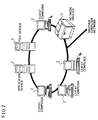
- Figure 2 is a view schematically explaining an arrangement of a computer network constructed by a typical client server system in accordance with an example embodiment of the present invention.
- the computer network is composed of a plurality of client computers 3, an application server 1, a file server 2, and a network printer 4.
- the plurality of client computers 3 are computers with which the user actually processes the data and enters various kinds of commands.
- the application server 1 stores and manages application software programs used by the client computers 3.
- the file server 2 saves and updates the data files created by each client computer 3 on the computer network, and manages all these data files collectively.
- the network printer 4 prints out a data file specified by any of the client computer 3 in a predetermined format.
- the computer network may be connected to another computer network through the LAN (Local Area Network), internet or the like.
- LAN Local Area Network
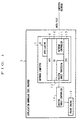
- FIG. 1 is a block diagram schematically showing an arrangement of an application download type printer 5 used as the network printer 4. In the drawing, the flow of data file processing is indicated by arrows.
- the application download type printer 5 includes a network computer 7, a raster image controller 14, and a print engine 15.
- the network computer 7 includes a CPU 13 for the network computer, an OS (Operating System) 10 (image converting means) run on the CPU 13, and an API (Application Programming Interface) (image converting means) 9 corresponding to the OS 10.
- the OS 10 includes a network controller (network control means) 11 and a raster image processor (image converting means) 12.
- the network controller 11 downloads an application 8 and a data file created by the application 8 on the computer network. Then, the application 8 is started up in the network computer 7, whereupon the data file is opened by the application 8. The data file is restored to an image in the network computer 7 and converted to a raster image by the raster image processor 12, which is sent to the print engine 15 through the raster image controller 14 to be printed out.
- the network computer is defined as a client computer which is connected to a high-speed computer network and downloads the applications and data files on the computer network when using the same.
- the network computer includes a high-speed CPU and a memory of a least necessary capacity. Since the computer network downloads a necessary application and the subject data file on the computer network to its memory for each job, it can omit a hard disk, and therefore, it can be relatively inexpensive.
- the network computer system furnished with the above network computer is characterized by the distributed data processing. More specifically, unlike a conventional system where all the jobs are carried out by a massive computer so-called as a main frame, various kinds of data processing are carried out on each network computer.
- the transmission throughout the computer network is limited to the sending/receiving of various kinds of files, namely, the download of the applications and the upload/download of the data files, and commands issued for the above sending/receiving jobs, thereby making it possible to suppress an increase of a traffic volume in the computer network.
- the applications and files are collectively managed in the application server and file server on the computer network, respectively. Thus, the managing costs, which raises a problem in the server/client method, can be saved.
- the data file created on the application 8 by the client computer 3 on the computer network is saved in a file format unique to the application 8.
- This file format can be identical with the format generally stored in a recording medium, such as the file server and floppy disk.
- the data file will not be restored to an image at the time the data file was created unless the data file is opened by the application 8 used to create the same.
- the application download type printer 5 includes the network computer 7 that performs as well as the client computer 3, so that, when the subject data file is printed out, the application download type printer 5 can download the subject data file and the application 8 used to create the same to its memory
- the subject data file is opened by the application 8 by the network computer 7 enclosed in the application download type printer 5, and restored to an image.
- the image of the subject data file thus obtained can be converted directly to a raster image which is used for the printing job.
- Each data file is stored in a format where the application information is written in the header portion.
- the application download type printer 5 may possibly download the application 8 from the application server 1 on the computer network based on the header information of the subject data file without receiving a command from the client computer 3.
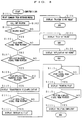
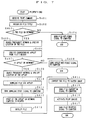
- a print command for the subject data file to be printed out is issued from the client computer 3 to the application download type printer 5 by the user's manipulation of the keyboard or mouse (Step 101, hereinafter, Step is abbreviated to S), whereupon the application download type printer 5 is called out (S102).
- the client computer 3 inquires whether the application download type printer 5 is ready or not (S103). When the application download type printer 5 is not ready (NO in S103), the client computer 3 displays a message "PRINTER IS NOT READY" on its screen to so notify the user (S104), and ends the job.
- the client computer 3 awaits until the application download type printer 5 finds the subject data file on the computer network (S105). Upon receipt of a file-not-found signal from the application download type printer 5 (NO in S105), the client computer 3 displays a message "FILE NOT FOUND" on its screen to so notify the user (S106), and ends the job.
- the client computer 3 Upon receipt of a file-found signal from the application download type printer 5 (YES in S105), the client computer 3 awaits until the application download type printer 5 finds the application 8 corresponding to the subject data file (S107). Upon receipt of an application-not-found signal from the application download type printer 5 (NO in S107), the client computer 3 displays a message "APPLICATION NOT FOUND" on its screen to so notify the user (S108), and ends the job.
- the client computer 3 Upon receipt of an application-found signal from the application download type printer 5 (YES in S107), after having confirmed the receipt of a file/application transfer signal indicating that the subject data file and the application 8 are being transferred from the application download type printer 5 (S109), the client computer 3 displays a message "TRANSFERRING FILE/APPLICATION" on its screen (S110).
- the client computer 3 displays a message "DEVELOPING FILE" on its screen (S112).
- the client computer displays a message "PRINTING FILE" on its screen (S114).
- the client computer 3 displays a message "PRINTING COMPLETED” on its screen (S116), and ends the job.
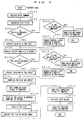
- the application download type printer 5 Upon receipt of a print command from the client computer 3 (S201), the application download type printer 5 recognizes the title of the subject data file to be printed out (S202), and further confirms whether the subject data file is on the network or not (S203). When the application download type printer 5 fails to find the subject data file (NO in S203), the application download type printer 5 sends the file-not-found signal to the client computer 3 (S204), and ends the job.
- the application download type printer 5 When the application download type printer 5 has found the subject data file (YES in S203), it sends the file-found signal to the client computer 3 and specifies the location of the subject data file on the computer network (S205). Then, the application download type printer 5 checks the header of the subject data file and specifies the application 8 corresponding to the subject data file (S206).
- the application download type printer 5 confirms whether the application 8 is on the computer network or not (S207).
- the application download type printer 5 fails to find the application 8 (NO in S207), it sends the application-not-found signal to the client computer 3 (S208), and ends the job.
- the application download type printer 5 When the application download type printer 5 has found the application 8 (YES in S207), it sends the application-found signal to the client computer 3 and specifies the location of the application 8 on the computer network (S209). Then, the application download type printer 5 downloads the subject data file and the application 8 (S210), and sends a download start signal to the client computer 3 (S211).
- the application 8 is started up on the network computer 7 enclosed in the application download type printer 5 (S212), whereupon the subject data file is developed thereon (S213).
- the subject data file restored to an image in the network computer 7 is converted to a raster image (S214). Then, the application download type printer 5 sends a file converting signal to the client computer 3 (S215). Then, the application download type printer 5 activates the print engine 15 (S216), whereby the printing job is started. Subsequently, the application download type printer 5 sends a file printing signal to the client computer 3 (S217), and ends the job.
- the subject data file to be printed out and the application 8 corresponding to the subject data file are sent to the application download type printer 5 as the data for the printing job.
- the bitmap data of a large volume do not flow throughout the computer network, thereby decreasing a traffic volume in the computer network.
- the client computer 3 can omit the printer driver and page-description language, a space secured on the recording medium to store the printer driver and page-description language can be omitted as well. Also, the user no longer has to manage the version of each printer driver and can skip the complicated manipulation associated with the printer driver and page-description language when printing out the subject data file.
- the application download type printer 5 since the application download type printer 5 does not need the page-description language, it can omit the hard disk and memory for storing the page-description language. Consequently, it has become possible to provide a downsized and less expensive application download type printer 5.
- the application download type printer 5 includes the network computer 7, the data processing, which is necessary when printing out the data file, can be carried out in the application download type printer 5, thereby reducing a burden on the client computer 3.
- FIG 2 schematically shows an arrangement of a computer network of the present embodiment, which is characterized in that a Java® applet download type printer (hereinafter, referred to simply as applet download type printer) 6 is used as the network printer 4.
- a Java® applet download type printer hereinafter, referred to simply as applet download type printer 6 is used as the network printer 4.
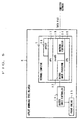
- FIG. 5 is a block diagram schematically showing an arrangement of the applet download type printer 6. In the drawing, the flow of the data file processing is indicated by arrows.
- the applet download type printer 6 includes a network computer 7, a raster image controller 14, and a print engine 15.
- the network computer 7 includes a CPU 19 for JavaOS®, a JavaOS® 18 run on the CPU 19, and an API 17 corresponding to the JavaOS® 18.
- the JavaOS® 18 includes a network controller 11 and a raster image processor 12.
- the network controller 11 downloads a Java® applet (hereinafter, referred to simply as applet) 16 and a data file created by the applet 16 on the computer network. Then, the applet 16 is started up in the network computer 7, whereby the subject data file is opened by the applet 16. The subject data file is restored to an image in the network computer 7, and converted to a raster image by the raster image processor 12. Subsequently, the raster image is sent to the print engine 15 through the raster image controller 14 to be printed out.
- applet Java® applet
- Java® is an object-oriented development language developed by Sun Microsystems, Inc. This language is an intermediate code ⁇ interpreter type language, and can be run faster than an ordinary interpreter type language and has a smaller execution file compared with a compiler type language. Thus, the application can be constructed in a size such that allows the application to move throughout the computer network.
- Java® applet is defined as an application of a small size written in the Java® language.
- the data file created with the client computer 3 on the computer network is saved in a file format unique to the applet 16 used to created the same.
- This file format can be identical with a format generally stored in a recording medium, such as the file server and floppy disk.
- the data file can not be restored to an image at the time the data file was created unless the data file is opened by the applet 16 used to create the same.
- the applet download type printer 6 includes the network computer 7 that performs as well as the client computer 3, so that, when the subject data file is printed out, the applet download type printer 6 downloads the subject data file and the applet 16 used to create the same to its memory.
- the data file is opened by the applet 16 on the network computer 7 enclosed in the applet download type printer 6, and restored to an image.
- the image of the subject data file thus obtained can be converted directly to a raster image which is used for the printing job.
- the data file is saved in a format where the applet information is written in the header portion.
- the applet download type printer 6 may possibly download the applet 16 from the application server 1 on the computer network based on the header information of the subject data file.
- a print command for the subject data file to be printed out is issued from the client computer 3 to the applet download type printer 6 by the user's manipulation of the keyboard or mouse (S301), whereupon the applet download type printer 6 is called out (S302).
- the client computer 3 inquires whether the applet download type printer 6 is ready or not (S303). When the applet download type printer 6 is not ready (NO in S303), the client computer 3 displays a message "PRINTER IS NOT READY" on its screen to so notify the user (S304), and ends the job.
- the client computer 3 awaits until the applet download type printer 6 finds the subject data file on the computer network (S305). Upon receipt of a file-not-found signal from the applet download type printer 6 (NO in S305), the client computer 3 displays a message "FILE NOT FOUND" on its screen to so notify the user (S306), and ends the job.
- the client computer 3 Upon receipt of a file-found signal from the applet download type printer 6 (YES in S305), the client computer 3 awaits until the applet download type printer 6 finds the applet 16 corresponding to the subject data file (S307). Upon receipt of an applet-not-found signal from the applet download type printer 6 (NO in S307), the client computer 3 displays a message "APPLET NOT FOUND" on its screen to so notify the user (S308), and ends the job.
- the client computer 3 Upon receipt of an applet-found signal from the applet download type printer 6 (YES in S307), after having confirmed the receipt of a file/applet transfer signal indicating that the subject data file and applet 16 are being transferred from the applet download type printer 6 (S309), the client computer 3 displays a message "TRANSFERRING FILE/APPLET" on its screen (S310).
- the client computer 3 displays a message "DEVELOPING FILE" on its screen (S312). Further, after having confirmed the receipt of a print start signal indicating that the applet download type printer 6 has started the printing job (S313), the client computer 3 displays a message "PRINTING FILE” on its screen (S314). Finally, after having confirmed the receipt of a printing-complete signal indicating that the applet download type printer 6 has finished the printing job (S315), the client computer 3 displays a message "PRINTING COMPLETED” on its screen (S316), and ends the job.
- the applet download type printer 6 Upon receipt of a print command from the client computer 3 (S401), the applet download type printer 6 recognizes the title of the subject data file to be printed out (S402), and further confirms whether the subject data file is on the network or not (S403). When the applet download type printer 6 fails to find the subject data file (NO in S403), it sends the file-not-found signal to the client computer 3 (S404), and ends the job.
- the applet download type printer 6 When the applet download type printer 6 has found the subject data file (YES in S403), it sends the file-found signal to the client computer 3 and specifies the location of the subject data file on the computer network (S405). Then, the applet download type printer 6 checks the header of the subject data file and specifies the applet 16 corresponding to the subject data file (S406).
- the applet download type printer 6 confirms whether the applet 16 is on the computer network or not (S407).
- the applet download type printer 6 fails to find the applet 16 (NO in S407), it sends the applet-not-found signal to the client computer 3 (S408), and ends the job.
- the applet download type printer 6 When the applet download type printer 6 has found the applet 16 (YES in S407), it sends the applet-found signal to the client computer 3 and specifies the location of the applet 16 on the computer network (S409). Then, the applet download type printer 6 downloads the subject data file and the applet 16 (S410), and sends a download start signal to the client computer 3 (S411).
- the applet 16 is started up on the network computer 7 enclosed in the applet download type printer 6 (S412), whereupon the subject data file is developed thereon (S413).
- the subject data file restored to an image in the network computer 7 is converted to a raster image (S414). Meanwhile, the applet download type printer 6 sends a file converting signal to the client computer 3 (S415). Then, the applet download type printer 6 activates the print engine 15 (S416). Subsequently, the applet download type printer 6 sends a file printing signal to the client computer 3 (S417), and ends the job.
- the applet 16 is OS-independent, the applet download type printer 6 can print out a data file created by computers adopting any type of OS. Consequently, the user can skip a troublesome job to manipulate the client computer 3 depending on the type of printer the user is going to use.
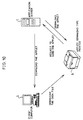
- the applet download type printer 6 prints out a subject data file by downloading the subject data file and a corresponding applet from the client computer 3.
- the applet download type printer 6 downloads a subject data file and a corresponding applet 16 from the client computer 3.
- the client computer 3 can be either a conventional client computer or the one serving as the network computer.
- the applet download type printer 6 Upon receipt of a print command from the client computer 3, the applet download type printer 6 downloads the subject data file to be printed out and the corresponding applet stored in the client computer 3. Then, the subject data file is opened by the applet 16 on the network computer 7 enclosed in the applet download type printer 6 and restored to an image. The image of the subject data file thus obtained can be converted directly to a raster image used for the printing job.
- the applet download type printer 6 Upon receipt of a print command from the client computer 3 (S501), the applet download type printer 6 recognizes the title of the subject data file to be printed out (S502), and further confirms whether the subject data file is currently open or not (S503). When the subject data file is currently open (YES in S503), the applet download type printer 6 specifies the location of the subject data file (S506).
- the applet download type printer 6 confirms whether the subject data file is on the client computer 3 (S504).
- the applet download type printer 6 searches through the client computer 3 and specifies the location of the subject data file (S507).
- the applet download type printer 6 fails to find the subject data file on the client computer 3 (NO in S504), it sends a file-not-found signal to the client computer 3 (S505), and ends the job.
- the applet download type printer 6 When the applet download type printer 6 has found the subject data file, it sends a file-found signal to the client computer 3, and checks the header of the subject data file to specify an applet 16 corresponding to the subject data file (S508).
- the applet download type printer 6 confirms whether the applet 16 is currently used or not (S509).
- the applet download type printer 6 specifies the location of the applet 16 (S512).
- the applet download type printer 6 confirms whether the applet 16 is on the client computer 3 or not (S510).
- the applet download type printer 6 fails to find the applet 16 (NO in S510), it sends an applet-not-found signal to the client computer 3 (S511), and ends the job.
- the applet download type printer 6 When the applet download type printer 6 has found the applet 16 (YES in S510), it sends an applet-found signal to the client computer 3, and specifies the location of the applet 16 on the client computer 3 (S513). Then, the applet download type printer 6 downloads the subject data file and applet 16 (S514), and sends a download start signal to the client computer 3 (S515).
- the applet 16 is started up on the network computer 7 enclosed in the applet download type printer 6 (S516), whereupon the subject data file is developed thereon (S517).
- the subject data file restored to an image in the network computer 7 is converted to a raster image (S518). Meanwhile, the applet download type printer 6 sends a file converting signal to the client computer 3 (S519). Then, the applet download type printer 6 activates the print engine 15 (S520), after which it sends a file printing signal to the client computer 3 (S521) and ends the job.
- a traffic volume in the computer network can be reduced. Also, the management of the printer driver and the page-description language, and the hard disk for storing the printer driver and page-description language can be omitted. Consequently, the applet download type printer 6 can print out a data file created by the client computer 3 adopting any type of OS.
- the applet download type printer 6 can print out the subject data file without starting up the applet 16 on the client computer 3 only if the applet 16 and the subject data file are sent to the same.
- the CPU of the client computer 3 is less occupied during the printing job.
- the user since the user does not have to start up the applet 16, the user can save the time for the start-up, and therefore, improve the workability.
- Applet download type printer 6 prints out a subject data file by downloading the subject data file and applet 16 corresponding to the subject data file from the client computer 3 and application server 1, respectively.
- the applet download type printer 6 downloads the subject data file and applet 16 corresponding to the subject data file from the client computer 3 and application server 1, respectively. Which applet 16 should be downloaded is determined based on the header information of the subject data file.
- the client computer 3 can be either a conventional client computer or the one serving as the network computer.
- the applet download type printer 6 Upon receipt of a print command from the client computer 3, the applet download type printer 6 downloads the subject data file to be printed out stored in the client computer 3 and the applet 16 corresponding to the subject data file stored in the application server 1. Then, the subject data file is opened by the applet 16 on the network computer 7 enclosed in the applet download type printer 6, and restored to an image. The restored image of the subject data file can be converted directly to a raster image used for the printing job.
- the applet download type printer 6 Upon receipt of a print command from the client computer 3 (S601), the applet download type printer 6 recognizes the title of the subject data file to be printed out (S602), and further confirms whether the subject data file is currently open or not (S603). When the subject data file is currently open (YES in S603), the applet download type printer 6 specifies the location of the subject data file (S606).
- the applet download type printer 6 confirms whether the subject data file is on the client computer 3 or not (S604).
- the applet download type printer 6 searches through the client computer 3, and specifies the location of the subject data file (S607).
- the applet download type printer 6 fails to find the subject data file on the client computer 3 (NO in S604), it sends a file-not-found signal to the client computer 3 (S605), and ends the job.
- the applet download type printer 6 When the applet download type printer 6 has found the subject data file, it sends a file-found signal to the client computer 3. Then, the applet download type printer 6 checks the header of the subject data file, and specifies the applet 16 corresponding to the subject data file (S608).
- the applet do-load type printer 6 confirms whether the applet 16 is on the application server 1 or not (S609).
- the applet download type printer 6 fails to find the applet 16 (NO in S609), it sends an applet-not-found signal to the client computer 3 (S610), and ends the job.
- the applet download type printer 6 When the applet download type printer 6 has found the subject data file (YES in S609), it sends an applet-found signal to the client computer 3 and specifies the location of the applet 16 on the application server 1 (S611). Then, the applet download type printer 6 downloads the subject data file from the client computer 3 and the applet 16 from the application server 1 (S612), and sends a download start signal to the client computer 3 (S613).
- the applet 16 is started up on the network computer 7 enclosed in the applet download type printer 6 (S614), whereupon the subject data file is developed thereon (S615).
- the subject data file restored to an image in the network computer 7 is converted to a raster image (S616).
- the applet download type printer 6 sends a file converting signal to the client computer 3 (S617).
- the applet download type printer activates the print engine 15 (S618), after which it sends a file printing signal to the client computer 3 (S619) and ends the job.
- the applet download type printer 6 downloads the applet 16 corresponding to the subject data file from the application server 1.
- the applet download type printer 6 can print out the subject data file only if the client computer 3 sends the subject data file to the same. Since the applet download type printer 6 can specify the applet 16 at this point by checking the header of the subject data file, the user does not have to specify the applet corresponding to the subject data file on the client computer 3.
- the applets 16 are stored in the application server 1, the applets 16 can be managed collectively. Consequently, the version of each applet 16 can be managed more easily and an unauthenticated use of the applets 16 can be prevented.
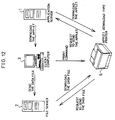
- Applet download type printer 6 prints out a subject data file by downloading the subject data file and applet 16 corresponding to the subject data file from the file server 2 and application server 1, respectively.
- a data file created using an applet on the client computer 3 is stored in the file server 2 first. Then, upon receipt of a print command from the client computer 3, the applet download type printer 6 downloads the subject data file from the file server 2, and it also downloads an applet 16 corresponding to the subject data file from the application server 1.
- the print command can be very short because it only has to specify where the subject data file to be printed out is stored.
- the client computer 3 can be either a conventional client computer or the one serving as the network computer. Also, a single computer may serve as both the application server 1 and file server 2.
- Which applet 16 should be downloaded is determined based on the header information of the subject data file. Then, the subject data file is opened by the applet 16 on the network computer 7 enclosed in the applet download type printer 6, and restored to an image. The image of the subject data file thus obtained can be converted directly to a raster image for the printing job.
- the applet download type printer 6 Upon receipt of a print command from the client computer 3 (S701), the applet download type printer 6 recognizes the title of the subject data file to be printed out (S702), and further confirms whether the subject data file is on the file server 2 or not (S703). When the applet download type printer 6 fails to find the subject data file (NO in S703), it sends a file-not-found signal to the client computer 3 (S704), and ends the job.
- the applet download type printer 6 When the applet download type printer 6 has found the subject data file (YES in S703), it sends a file-found signal to the client computer 3, and specifies the location of the subject data file (S705). Subsequently, the applet download type printer 6 checks the header of the subject data file and specifies the applet 16 corresponding to the subject data file (S706).
- the applet download type printer 6 confirms whether the applet 16 is on the application server 1 or not (S707).
- the applet download type printer 6 fails to find the applet 16 (NO in S707), it sends an applet-not-found signal to the client computer 3 (S708), and ends the job.
- the applet download type printer 6 When the applet download type printer 6 has found the applet 16 (YES in S707), it sends an applet-found signal to the client computer 3, and searches through the application server 1 to specify the location of the applet 16 (S709). Then, the applet download type printer 6 downloads the subject data file from the file server 2 and the applet 16 from the application server 1 (S710), and sends a download start signal to the client computer 3 (S711).
- the applet 16 is started up on the network computer 7 enclosed in the applet download type printer 6 (S712), whereupon the subject data file is developed thereon (S713).
- the subject data file is restored to an image and converted to a raster image in the network computer 7 (S714).
- the applet download type printer 6 sends a file converting signal to the client computer 3 (S715).
- the applet download type printer 6 activates the print engine 15 (S716), after which it sends a file printing signal to the client computer 3 (S717) and ends the job.
- the applet download type printer 6 can print out the subject data file by downloading the same from the file server 2.
- the applet download type printer 6 can print out any data file on the file server 2 without downloading the same to the client computer 3 the user is currently using.
- the client computer 3 since the client computer 3 only has to specify the subject data file to be printed out, a very small portion of the CPU is occupied during the printing job, thereby minimizing the affect on the other jobs also run by the client computer 3.
- a printer of the present invention enclosing a network computer and employed on a computer network, is characterized by enclosing said network computer including:
- the application may be Java® applet.
- the Java® applet since the Java® applet is OS-independent, a data file created by the Java® applet on any OS can be downloaded to be printed out.
- the printer enclosing the network computer can be shared by the computers adopting any OS. Also, since the user does not have to select the printer corresponding to the OS on which the subject data file was created, a burden on the user when the user enters a print command by manipulating the client computer can be reduced.
- a computer network system of the present invention is a computer network system, wherein a printer enclosing a network computer is connected to a plurality of apparatuses including a computer, characterized in that said network computer enclosed in said printer includes:
- the above computer network system may be arranged in such a manner that:
- the subject data file can be printed out only by sending the subject data file and the application corresponding to the subject data file from the client computer.
- a burden on the client computer can be reduced and the processing time by the client computer can be cut shorter, thereby making it possible to improve the work efficiency.
- the above computer network system may be arranged in such a manner that:
- the printer enclosing the network computer can download the application corresponding to the subject data file from the application server only if the client computer sends the subject data file to the same. Also, providing the application server makes it possible to manage the applications collectively. Thus, unauthenticated use of the applications can be readily prevented and the version of each application can be managed more easily.
- the above computer network system may be arranged in such a manner that:
- the printer enclosing the network computer can download the subject data file from the file server and the application from the application server only if the client computer specifies the subject data file.
- the client computer since the client computer only has to specify the subject data file, a very small portion of the CPU is occupied during the printing job.
- the above computer network system may be arranged in such a manner that said application is a Java® applet.
- the Java® applet since the Java® applet is OS-independent, a data file created by the Java® applet on any OS can be downloaded to be printed out from the printer enclosing the network computer.
Landscapes
- Engineering & Computer Science (AREA)
- Theoretical Computer Science (AREA)
- Human Computer Interaction (AREA)
- Physics & Mathematics (AREA)
- General Engineering & Computer Science (AREA)
- General Physics & Mathematics (AREA)
- Accessory Devices And Overall Control Thereof (AREA)
- Information Transfer Between Computers (AREA)
- Computer And Data Communications (AREA)
Applications Claiming Priority (3)
| Application Number | Priority Date | Filing Date | Title |
|---|---|---|---|
| JP20819997 | 1997-08-01 | ||
| JP20819997A JP3683387B2 (ja) | 1997-08-01 | 1997-08-01 | ネットワークコンピュータ内蔵プリンタおよびこれを備えたコンピュータネットワークシステム |
| JP208199/97 | 1997-08-01 |
Publications (3)
| Publication Number | Publication Date |
|---|---|
| EP0895155A2 true EP0895155A2 (de) | 1999-02-03 |
| EP0895155A3 EP0895155A3 (de) | 2002-03-27 |
| EP0895155B1 EP0895155B1 (de) | 2006-04-05 |
Family
ID=16552312
Family Applications (1)
| Application Number | Title | Priority Date | Filing Date |
|---|---|---|---|
| EP98114328A Expired - Lifetime EP0895155B1 (de) | 1997-08-01 | 1998-07-30 | Drucker, der einen Netzwerkrechner beinhaltet und Rechnernetzwerk-System, das diesen verwendet |
Country Status (4)
| Country | Link |
|---|---|
| US (1) | US6456388B1 (de) |
| EP (1) | EP0895155B1 (de) |
| JP (1) | JP3683387B2 (de) |
| DE (1) | DE69834074T2 (de) |
Families Citing this family (77)
| Publication number | Priority date | Publication date | Assignee | Title |
|---|---|---|---|---|
| US6999188B1 (en) * | 2000-10-30 | 2006-02-14 | Konica Minolta Printing Solutions U.S.A., Inc. | Dynamically configurable printer and method of use thereof |
| US20020067503A1 (en) * | 2000-12-04 | 2002-06-06 | Hiatt Brian C. | Printer with embedded computer |
| US7023566B2 (en) * | 2000-12-12 | 2006-04-04 | Xerox Corporation | Page description language on demand printing |
| US7107537B2 (en) * | 2001-01-16 | 2006-09-12 | Hewlett-Packard Development Company, L.P. | Apparatus and method for updating applications to embedded devices and peripherals within a network environment |
| US6999202B2 (en) | 2001-03-27 | 2006-02-14 | Polaroid Corporation | Method for generating a halftone of a source image |
| US6937365B2 (en) | 2001-05-30 | 2005-08-30 | Polaroid Corporation | Rendering images utilizing adaptive error diffusion |
| US20030020948A1 (en) * | 2001-07-27 | 2003-01-30 | Jarvis Daniel Cook | Dynamically loaded applications in a printer |
| US7069294B2 (en) * | 2001-11-14 | 2006-06-27 | Hewlett-Packard Development Company, L.P. | Browser based multiple file upload |
| US6722279B2 (en) * | 2001-12-05 | 2004-04-20 | Heidelberger Druckmaschinen Ag | Device and corresponding method for rapid image data transfer in printing presses |
| JP4045801B2 (ja) * | 2001-12-28 | 2008-02-13 | コニカミノルタビジネステクノロジーズ株式会社 | アプリケーションデータのプリント方法 |
| US6906736B2 (en) | 2002-02-19 | 2005-06-14 | Polaroid Corporation | Technique for printing a color image |
| US20030169297A1 (en) * | 2002-03-06 | 2003-09-11 | Lay D. Travis | Method and data processing system for notifying a user whether a printer is ready to print |
| AU2003213644A1 (en) * | 2003-02-03 | 2004-08-30 | Vincent Demarcus | Online method and system for converting any file in any format into a pdf file for various uses |
| US7283666B2 (en) | 2003-02-27 | 2007-10-16 | Saquib Suhail S | Digital image exposure correction |
| US8773685B2 (en) * | 2003-07-01 | 2014-07-08 | Intellectual Ventures I Llc | High-speed digital image printing system |
| US8559032B2 (en) * | 2003-07-14 | 2013-10-15 | Hewlett-Packard Development Company, L.P. | Automatically configuring a raster image processor |
| US7426056B2 (en) * | 2004-01-13 | 2008-09-16 | International Business Machines Corporation | Method and apparatus for a client call service |
| US20050165977A1 (en) * | 2004-01-23 | 2005-07-28 | Morawski George J. | Printing device |
| US7062402B2 (en) * | 2004-05-19 | 2006-06-13 | Microsoft Corp | System and method for automatic testing of output device capabilities via electronic document |
| JP2005349664A (ja) * | 2004-06-09 | 2005-12-22 | Sharp Corp | 画像形成方法及び画像形成装置 |
| JP4920879B2 (ja) * | 2004-08-06 | 2012-04-18 | キヤノン株式会社 | 画像処理装置及びデータ処理装置 |
| JP4738773B2 (ja) * | 2004-08-06 | 2011-08-03 | キヤノン株式会社 | 画像処理装置及びその制御方法 |
| US8006292B2 (en) | 2004-10-08 | 2011-08-23 | Sharp Laboratories Of America, Inc. | Methods and systems for imaging device credential submission and consolidation |
| US7966396B2 (en) | 2004-10-08 | 2011-06-21 | Sharp Laboratories Of America, Inc. | Methods and systems for administrating imaging device event notification |
| US8230328B2 (en) | 2004-10-08 | 2012-07-24 | Sharp Laboratories Of America, Inc. | Methods and systems for distributing localized display elements to an imaging device |
| US8001587B2 (en) | 2004-10-08 | 2011-08-16 | Sharp Laboratories Of America, Inc. | Methods and systems for imaging device credential management |
| US7870185B2 (en) | 2004-10-08 | 2011-01-11 | Sharp Laboratories Of America, Inc. | Methods and systems for imaging device event notification administration |
| US8120799B2 (en) | 2004-10-08 | 2012-02-21 | Sharp Laboratories Of America, Inc. | Methods and systems for accessing remote, descriptor-related data at an imaging device |
| US7934217B2 (en) | 2004-10-08 | 2011-04-26 | Sharp Laboratories Of America, Inc. | Methods and systems for providing remote file structure access to an imaging device |
| US7873553B2 (en) | 2004-10-08 | 2011-01-18 | Sharp Laboratories Of America, Inc. | Methods and systems for authorizing imaging device concurrent account use |
| US8120793B2 (en) | 2004-10-08 | 2012-02-21 | Sharp Laboratories Of America, Inc. | Methods and systems for displaying content on an imaging device |
| US8051140B2 (en) | 2004-10-08 | 2011-11-01 | Sharp Laboratories Of America, Inc. | Methods and systems for imaging device control |
| US7826081B2 (en) | 2004-10-08 | 2010-11-02 | Sharp Laboratories Of America, Inc. | Methods and systems for receiving localized display elements at an imaging device |
| US8001586B2 (en) | 2004-10-08 | 2011-08-16 | Sharp Laboratories Of America, Inc. | Methods and systems for imaging device credential management and authentication |
| US8115944B2 (en) | 2004-10-08 | 2012-02-14 | Sharp Laboratories Of America, Inc. | Methods and systems for local configuration-based imaging device accounting |
| US8065384B2 (en) | 2004-10-08 | 2011-11-22 | Sharp Laboratories Of America, Inc. | Methods and systems for imaging device event notification subscription |
| US8024792B2 (en) | 2004-10-08 | 2011-09-20 | Sharp Laboratories Of America, Inc. | Methods and systems for imaging device credential submission |
| US8156424B2 (en) | 2004-10-08 | 2012-04-10 | Sharp Laboratories Of America, Inc. | Methods and systems for imaging device dynamic document creation and organization |
| US8051125B2 (en) | 2004-10-08 | 2011-11-01 | Sharp Laboratories Of America, Inc. | Methods and systems for obtaining imaging device event notification subscription |
| US8006293B2 (en) | 2004-10-08 | 2011-08-23 | Sharp Laboratories Of America, Inc. | Methods and systems for imaging device credential acceptance |
| US8049677B2 (en) | 2004-10-08 | 2011-11-01 | Sharp Laboratories Of America, Inc. | Methods and systems for imaging device display element localization |
| US7920101B2 (en) | 2004-10-08 | 2011-04-05 | Sharp Laboratories Of America, Inc. | Methods and systems for imaging device display standardization |
| US7873718B2 (en) | 2004-10-08 | 2011-01-18 | Sharp Laboratories Of America, Inc. | Methods and systems for imaging device accounting server recovery |
| US8018610B2 (en) | 2004-10-08 | 2011-09-13 | Sharp Laboratories Of America, Inc. | Methods and systems for imaging device remote application interaction |
| US8171404B2 (en) | 2004-10-08 | 2012-05-01 | Sharp Laboratories Of America, Inc. | Methods and systems for disassembly and reassembly of examination documents |
| US8006176B2 (en) | 2004-10-08 | 2011-08-23 | Sharp Laboratories Of America, Inc. | Methods and systems for imaging-device-based form field management |
| US8015234B2 (en) | 2004-10-08 | 2011-09-06 | Sharp Laboratories Of America, Inc. | Methods and systems for administering imaging device notification access control |
| US8032608B2 (en) | 2004-10-08 | 2011-10-04 | Sharp Laboratories Of America, Inc. | Methods and systems for imaging device notification access control |
| US7970813B2 (en) | 2004-10-08 | 2011-06-28 | Sharp Laboratories Of America, Inc. | Methods and systems for imaging device event notification administration and subscription |
| US8115947B2 (en) | 2004-10-08 | 2012-02-14 | Sharp Laboratories Of America, Inc. | Methods and systems for providing remote, descriptor-related data to an imaging device |
| US7978618B2 (en) | 2004-10-08 | 2011-07-12 | Sharp Laboratories Of America, Inc. | Methods and systems for user interface customization |
| US8237946B2 (en) | 2004-10-08 | 2012-08-07 | Sharp Laboratories Of America, Inc. | Methods and systems for imaging device accounting server redundancy |
| US8120798B2 (en) | 2004-10-08 | 2012-02-21 | Sharp Laboratories Of America, Inc. | Methods and systems for providing access to remote, descriptor-related data at an imaging device |
| US8060921B2 (en) | 2004-10-08 | 2011-11-15 | Sharp Laboratories Of America, Inc. | Methods and systems for imaging device credential authentication and communication |
| US7969596B2 (en) | 2004-10-08 | 2011-06-28 | Sharp Laboratories Of America, Inc. | Methods and systems for imaging device document translation |
| US8115945B2 (en) | 2004-10-08 | 2012-02-14 | Sharp Laboratories Of America, Inc. | Methods and systems for imaging device job configuration management |
| US8125666B2 (en) | 2004-10-08 | 2012-02-28 | Sharp Laboratories Of America, Inc. | Methods and systems for imaging device document management |
| US8035831B2 (en) | 2004-10-08 | 2011-10-11 | Sharp Laboratories Of America, Inc. | Methods and systems for imaging device remote form management |
| US8023130B2 (en) | 2004-10-08 | 2011-09-20 | Sharp Laboratories Of America, Inc. | Methods and systems for imaging device accounting data maintenance |
| US8060930B2 (en) | 2004-10-08 | 2011-11-15 | Sharp Laboratories Of America, Inc. | Methods and systems for imaging device credential receipt and authentication |
| US8120797B2 (en) | 2004-10-08 | 2012-02-21 | Sharp Laboratories Of America, Inc. | Methods and systems for transmitting content to an imaging device |
| US8032579B2 (en) | 2004-10-08 | 2011-10-04 | Sharp Laboratories Of America, Inc. | Methods and systems for obtaining imaging device notification access control |
| US8001183B2 (en) | 2004-10-08 | 2011-08-16 | Sharp Laboratories Of America, Inc. | Methods and systems for imaging device related event notification |
| US8384925B2 (en) | 2004-10-08 | 2013-02-26 | Sharp Laboratories Of America, Inc. | Methods and systems for imaging device accounting data management |
| US8213034B2 (en) * | 2004-10-08 | 2012-07-03 | Sharp Laboratories Of America, Inc. | Methods and systems for providing remote file structure access on an imaging device |
| US8115946B2 (en) | 2004-10-08 | 2012-02-14 | Sharp Laboratories Of America, Inc. | Methods and sytems for imaging device job definition |
| US20060082826A1 (en) * | 2004-10-18 | 2006-04-20 | Christian Joly | Intelligent photo printer |
| US8428484B2 (en) | 2005-03-04 | 2013-04-23 | Sharp Laboratories Of America, Inc. | Methods and systems for peripheral accounting |
| JP2007164526A (ja) | 2005-12-14 | 2007-06-28 | Canon Inc | 情報処理装置及び方法 |
| JP4270220B2 (ja) * | 2006-04-04 | 2009-05-27 | コニカミノルタビジネステクノロジーズ株式会社 | 画像処理システム、情報処理装置および情報処理方法 |
| JP4358203B2 (ja) * | 2006-05-01 | 2009-11-04 | シャープ株式会社 | 複合機、複合機の制御方法、制御装置、制御装置の制御方法、複合機制御システム、制御プログラム、およびコンピュータ読み取り可能な記録媒体 |
| US8345272B2 (en) | 2006-09-28 | 2013-01-01 | Sharp Laboratories Of America, Inc. | Methods and systems for third-party control of remote imaging jobs |
| JP4974749B2 (ja) | 2007-04-20 | 2012-07-11 | キヤノン株式会社 | 情報処理装置、配信方法、その方法を実行する制御プログラム |
| JP4474440B2 (ja) * | 2007-06-19 | 2010-06-02 | インターナショナル・ビジネス・マシーンズ・コーポレーション | 多機能周辺装置(mfp)によるサービスの提供 |
| US20090164285A1 (en) * | 2007-12-20 | 2009-06-25 | International Business Machines Corporation | Auto-cascading clear to build engine for multiple enterprise order level parts management |
| JP2010286891A (ja) * | 2009-06-09 | 2010-12-24 | Canon Inc | デバイス管理装置、制御方法、及びプログラム |
| US9535635B2 (en) * | 2012-12-20 | 2017-01-03 | Hewlett-Packard Development Company, L.P. | Carrier images |
Family Cites Families (11)
| Publication number | Priority date | Publication date | Assignee | Title |
|---|---|---|---|---|
| JPH01204132A (ja) | 1988-02-09 | 1989-08-16 | Nec Corp | プリンタ装置 |
| EP0598502B1 (de) * | 1992-11-18 | 1998-04-29 | Canon Kabushiki Kaisha | Verfahren und Vorrichtung zur Implementierung einer Zweiwegeschnittstelle zwischen einem lokalen Netzwerk und einem Peripheriegerät |
| JPH07129343A (ja) | 1993-11-08 | 1995-05-19 | Canon Inc | 印刷システムおよび印刷システムのプリンタ管理装置 |
| DE69429761T2 (de) * | 1993-11-16 | 2002-06-06 | Fujitsu Ltd., Kawasaki | Netzwerkdrucker |
| US5583978A (en) | 1994-05-27 | 1996-12-10 | Bitstream Inc. | Apparatuses and methods for creating and using portable fonted texts with embedded automatically-created font descriptions |
| JP3285110B2 (ja) | 1994-10-21 | 2002-05-27 | セイコーエプソン株式会社 | ファームウェアの組み込み方法及びホスト装置とプリンタとからなるシステム |
| JPH09188010A (ja) | 1996-01-10 | 1997-07-22 | Ricoh Co Ltd | 画像処理装置 |
| US5884014A (en) * | 1996-05-23 | 1999-03-16 | Xerox Corporation | Fontless structured document image representations for efficient rendering |
| US5795082A (en) * | 1996-06-27 | 1998-08-18 | Seiko Epson Corporation | Printing system utilizing inks of different densities, cartridge used therefor, and method of recording images |
| US6003065A (en) * | 1997-04-24 | 1999-12-14 | Sun Microsystems, Inc. | Method and system for distributed processing of applications on host and peripheral devices |
| US6018774A (en) * | 1997-07-03 | 2000-01-25 | Yobaby Productions, Llc | Method and system for creating messages including image information |
-
1997
- 1997-08-01 JP JP20819997A patent/JP3683387B2/ja not_active Expired - Fee Related
-
1998
- 1998-07-30 DE DE69834074T patent/DE69834074T2/de not_active Expired - Lifetime
- 1998-07-30 EP EP98114328A patent/EP0895155B1/de not_active Expired - Lifetime
- 1998-07-31 US US09/127,671 patent/US6456388B1/en not_active Expired - Lifetime
Also Published As
| Publication number | Publication date |
|---|---|
| EP0895155A3 (de) | 2002-03-27 |
| DE69834074T2 (de) | 2006-11-23 |
| JP3683387B2 (ja) | 2005-08-17 |
| EP0895155B1 (de) | 2006-04-05 |
| DE69834074D1 (de) | 2006-05-18 |
| US6456388B1 (en) | 2002-09-24 |
| US20020105664A1 (en) | 2002-08-08 |
| JPH1153132A (ja) | 1999-02-26 |
Similar Documents
| Publication | Publication Date | Title |
|---|---|---|
| EP0895155B1 (de) | Drucker, der einen Netzwerkrechner beinhaltet und Rechnernetzwerk-System, das diesen verwendet | |
| US7492474B2 (en) | Information processing apparatus, distributed printing controlling method, storing medium and program | |
| US8244065B2 (en) | Information processing apparatus including print job retrieval function, information processing method, program, and recording medium | |
| US7839516B2 (en) | Printing control method and apparatus | |
| JP4371693B2 (ja) | 印刷制御装置、印刷制御方法及びコンピュータプログラム | |
| US6621589B1 (en) | Print job processing in a printer network using selected printer attributes | |
| US5987226A (en) | Printing system and method | |
| US20010048533A1 (en) | Data processing apparatus and method thereof, and memory medium | |
| US20110063668A1 (en) | Printing control apparatus, printing control method, and storage medium | |
| JP2012216166A (ja) | 情報処理装置、その方法、及びプログラム | |
| US20080007776A1 (en) | Image processing apparatus and image processing method | |
| US5617518A (en) | Output control method and system of servers | |
| US20050165979A1 (en) | Peripheral device control method, control program, and apparatus therefor | |
| JP4324118B2 (ja) | サービス処理装置およびサービス表示方法および記憶媒体およびプログラム | |
| JPH11205497A (ja) | 画像処理装置および画像処理方法 | |
| JP2018206311A (ja) | 印刷システム、サーバ及びその制御方法とプログラム | |
| JPH10187565A (ja) | データ処理装置およびデータ処理方法およびコンピュータが読み出し可能なプログラムを格納した記憶媒体 | |
| JP6115342B2 (ja) | プルプリントシステム、プルプリントサーバーおよびコンピュータープログラム | |
| JP2003050684A (ja) | 印刷システム、印刷装置、データ処理装置、それらの環境設定方法、プログラム及び記憶媒体 | |
| JPH11134119A (ja) | 情報処理装置及び画像出力装置及びそれらの方法並びにメモリ媒体 | |
| JP2003122523A (ja) | 印刷制御装置及び方法、並びに記憶媒体 | |
| JP2008195041A (ja) | 画像形成装置、情報処理方法、情報処理プログラム | |
| JP2002333964A (ja) | 分散印刷方法 | |
| JP2001282482A (ja) | データ処理装置、および、該データの処理方法 | |
| JP2000155657A (ja) | データ処理装置およびデータ処理装置のドライバ処理方法およびコンピュータが読み出し可能なプログラムを格納した記憶媒体 |
Legal Events
| Date | Code | Title | Description |
|---|---|---|---|
| PUAI | Public reference made under article 153(3) epc to a published international application that has entered the european phase |
Free format text: ORIGINAL CODE: 0009012 |
|
| AK | Designated contracting states |
Kind code of ref document: A2 Designated state(s): AT BE CH CY DE DK ES FI FR GB GR IE IT LI LU MC NL PT SE Kind code of ref document: A2 Designated state(s): DE FR GB |
|
| AX | Request for extension of the european patent |
Free format text: AL;LT;LV;MK;RO;SI |
|
| PUAL | Search report despatched |
Free format text: ORIGINAL CODE: 0009013 |
|
| AK | Designated contracting states |
Kind code of ref document: A3 Designated state(s): AT BE CH CY DE DK ES FI FR GB GR IE IT LI LU MC NL PT SE |
|
| AX | Request for extension of the european patent |
Free format text: AL;LT;LV;MK;RO;SI |
|
| 17P | Request for examination filed |
Effective date: 20020627 |
|
| AKX | Designation fees paid |
Free format text: DE FR GB |
|
| 17Q | First examination report despatched |
Effective date: 20050310 |
|
| GRAP | Despatch of communication of intention to grant a patent |
Free format text: ORIGINAL CODE: EPIDOSNIGR1 |
|
| GRAS | Grant fee paid |
Free format text: ORIGINAL CODE: EPIDOSNIGR3 |
|
| GRAA | (expected) grant |
Free format text: ORIGINAL CODE: 0009210 |
|
| AK | Designated contracting states |
Kind code of ref document: B1 Designated state(s): DE FR GB |
|
| REG | Reference to a national code |
Ref country code: GB Ref legal event code: FG4D |
|
| REF | Corresponds to: |
Ref document number: 69834074 Country of ref document: DE Date of ref document: 20060518 Kind code of ref document: P |
|
| ET | Fr: translation filed | ||
| PLBE | No opposition filed within time limit |
Free format text: ORIGINAL CODE: 0009261 |
|
| STAA | Information on the status of an ep patent application or granted ep patent |
Free format text: STATUS: NO OPPOSITION FILED WITHIN TIME LIMIT |
|
| 26N | No opposition filed |
Effective date: 20070108 |
|
| REG | Reference to a national code |
Ref country code: FR Ref legal event code: PLFP Year of fee payment: 19 |
|
| REG | Reference to a national code |
Ref country code: FR Ref legal event code: PLFP Year of fee payment: 20 |
|
| PGFP | Annual fee paid to national office [announced via postgrant information from national office to epo] |
Ref country code: GB Payment date: 20170719 Year of fee payment: 20 Ref country code: FR Payment date: 20170724 Year of fee payment: 20 Ref country code: DE Payment date: 20170724 Year of fee payment: 20 |
|
| REG | Reference to a national code |
Ref country code: DE Ref legal event code: R071 Ref document number: 69834074 Country of ref document: DE |
|
| REG | Reference to a national code |
Ref country code: GB Ref legal event code: PE20 Expiry date: 20180729 |
|
| PG25 | Lapsed in a contracting state [announced via postgrant information from national office to epo] |
Ref country code: GB Free format text: LAPSE BECAUSE OF EXPIRATION OF PROTECTION Effective date: 20180729 |