EP0929863B1 - Prozess und system für die formung von mehrfachen permanenten preemptiven dialogfenstern - Google Patents
Prozess und system für die formung von mehrfachen permanenten preemptiven dialogfenstern Download PDFInfo
- Publication number
- EP0929863B1 EP0929863B1 EP97943524A EP97943524A EP0929863B1 EP 0929863 B1 EP0929863 B1 EP 0929863B1 EP 97943524 A EP97943524 A EP 97943524A EP 97943524 A EP97943524 A EP 97943524A EP 0929863 B1 EP0929863 B1 EP 0929863B1
- Authority
- EP
- European Patent Office
- Prior art keywords
- dialog box
- thread
- modeless dialog
- preemptive modeless
- preemptive
- Prior art date
- Legal status (The legal status is an assumption and is not a legal conclusion. Google has not performed a legal analysis and makes no representation as to the accuracy of the status listed.)
- Expired - Lifetime
Links
Images


Classifications
-
- G—PHYSICS
- G06—COMPUTING OR CALCULATING; COUNTING
- G06F—ELECTRIC DIGITAL DATA PROCESSING
- G06F9/00—Arrangements for program control, e.g. control units
- G06F9/06—Arrangements for program control, e.g. control units using stored programs, i.e. using an internal store of processing equipment to receive or retain programs
- G06F9/44—Arrangements for executing specific programs
- G06F9/451—Execution arrangements for user interfaces
Definitions
- the present invention relates generally to systems having windows-based user interfaces for smooth interaction with their respective operators. More particularly, the present invention relates to a process for running a windows-based application that includes user-interactive preemptive modeless dialog boxes for performing specific functions for an application.
- a Windows® (a registered trademark of the Microsoft Corporation) based system such as a computer system running Microsoft Windows NT® (a registered trademark of the Microsoft Corporation), provides a convenient user interface for smooth interaction between a computer operator and the computer system.
- Such user interface typically provides an application with a small window, namely a dialog box, that is brought to the forefront of the application to solicit a response from the operator. Once the response is received, the dialog box is removed from view and the operation of the application continues.
- Standard software libraries such as the Microsoft Foundation Class (“MFC") library, provide standard routines for implementing and developing dialog boxes for any specific application and are readily available for use by application engineers.
- the MFC library in particular, includes software routines for developing Modal Dialog Boxes and Modeless Dialog Boxes in computer applications.
- the Modal Dialog Box runs on the main thread of program execution and requires user input before further processing can continue.
- each Modeless Dialog Box runs on a separate thread of execution and, thus, can exist in parallel with other processes.
- Standard software libraries provide an easy way to implement and develop dialog boxes for software applications, but existing implementations of dialog boxes can be cumbersome to use.
- the use of such cumbersome dialog boxes can be troubling for many computer operators, particularly for those who must use their computers quickly and efficiently.
- operators of plants or refineries use sophisticated applications running on computer networks to monitor and maintain day-to-day operations of such facilities.
- the computer network operates as a real-time database, the operator's interaction with a particular computer must be quick and responsive and should not be hindered by a cumbersome or cluttered user interface.
- an operator may mistakenly select an unwanted function or change his or her mind about selecting a particular function and pull-up its corresponding dialog box.
- dialog boxes require extra inputs, i.e., keystrokes or mouse clicks, in order to select a different function and a corresponding new dialog box.
- the Modal Dialog Box implemented by the MFC library requires that the operator cancel the previous selection before selecting a new function.
- the operator must select the area outside of the dialog box's outer boundary before another selection may be made.
- a Modeless Dialog Box is created for each selection and, thus, the display becomes crowded and blocks the operator's view of essential information.
- Fig. 1 shows a modal dialog box 10 that is implemented by the MFC library of the prior art.
- Modal dialog box 10 runs on a main thread 12 of the current application.
- modal dialog box 10 shown in Fig. 1 is a dialog box for a typical word processing program for saving a current file under a particular file name. Accordingly, the operator must either select "Cancel” button 14 or provide a file name in "File Name” field 16 and select "OK" button 18 before operation of the application may continue.
- Fig. 2 shows modeless dialog boxes (20,22) that, like modal dialog box 10 shown in Fig. 1, are implemented by the MFC library of the prior art.
- Each modeless dialog box (20,22) runs on a separate thread (24,26) of execution and, thus, other processing can continue in parallel with the existence of one or more modeless dialog boxes.
- the utilization of separate threads (24,26) requires the system to provide extra resources to the current application and, since resources are limited, this requirement for separate threads may hinder the performance of the system.
- modeless dialog boxes (20,22) are used for a typical word processing program and appear when the operator requests a find function and a replace function, respectively.
- modeless dialog box 20 When an operator requests the find function, modeless dialog box 20 will appear at the forefront of the system and have the view (i.e., its border will be bold colored). At this point, the box is ready to receive inputs, and the operator may either select the "Cancel” button 28 or provide a phrase or phrases to be found in "Find What" field 30 and select the "OK” button 32. Any other input provided when modeless dialog box 20 has the view will be ignored.
- the operator must access the main window of the application. This is typically done by clicking in some area of the main window to return it to view. After accessing the main window, the operator may then request the replace function from the main window's menu so the modeless dialog box 22 will appear at the forefront of the system and have the view. It is to be understood that both the FIND and REPLACE boxes co-exist, but the FIND box will only accept inputs when it is given the view by the mouse click, and only the REPLACE box will accept inputs when it has the view.
- the present invention pertains to a process for creating preemptive modeless dialog boxes that reduce the inputs, i.e., keystrokes or mouse clicks, required to control a particular application function and allows a user to select a new function without having to access the main window.
- the preemptive modeless dialog box receives all events as though it was the main window of the application. Thus, it is not necessary to return to the main window in order to call a new function.
- a preemptive modeless dialog box is capable of processing its own inputs, as well as interpreting requests for new functions. The latter characteristic makes it preemptive.
- a previously selected function may be preempted when a request for a new function is passed through the preemptive modeless dialog box.
- the preemptive modeless dialog box (PMDB) according to the present invention has two main advantages over conventional modal or modeless dialog boxes: (1) it minimizes user inputs; and (2) it simplifies the display (i.e., keeps it uncluttered). Accordingly, the present invention provides a simpler and faster user interface for interacting with a dialog box.
- the present invention provides a process as defined in claim 1 hereinafter.
- the process may include any one or more features as defined in dependent claims 2 to 7.
- the present invention also provides a system as defined in claim 8 hereinafter.
- the system may include any one or more features as defined in dependent claims 9 to 15.
- the present invention also provides a storage media as defined in claim 16 hereinafter.
- the storage media may include any one or more features as defined in dependent claims 17 to 23.
- the present invention is a process for minimizing operator interaction for selecting various functions of an application running on a system.
- it is directed to a process and system for managing multiple preemptive modeless dialog boxes by means of a novel intelligent worker thread (IWT) disposed between a main window thread (MWT) and at least one dialog box thread (DBT).
- IWT intelligent worker thread
- MTT main window thread
- DBT dialog box thread
- This enables an operator to select various functions of an application without having to return to the application's main window.
- the intelligent worker thread ensures that only one preemptive modeless dialog box, i.e., the preemptive modeless dialog box (PMDB) of current interest to the user, is on the display at any given point in time.
- PMDB preemptive modeless dialog box
- the main window thread comprises the steps of: creating the intelligent worker thread; checking the message queue of the main window thread for any messages; terminating the main window thread if message is "QUIT"; and sending messages to a designated and/or Window function (also referred to as a Window procedure) for processing.
- the main window thread further comprises the steps of: activating the designated Window function and then via the Window function; determining whether a preemptive modeless dialog box is needed; and sending a message to the message queue of the intelligent worker thread to create a preemptive modeless dialog box for a designated function.
- Certain Windows® software provides functions that the user can customize to enable his or her application to handle a Windows message. For example, a Windows message generated in response to a depression of a keyboard key is dispatched by the main window thread to a specific Window function which will handle this event. The user can customize the implementation of these functions according to his or her needs.
- these Microsoft® (a registered trademark of the Microsoft Corporation) functions which are user-taylorable will be referred to as Window functions.
- the user would customize the implementation of the appropriate Window function to send a WM_PMDB message to the intelligent worker thread, specifying the type of preemptive modeless dialog box desired.
- the intelligent worker thread comprises the steps of: checking the message queue of the intelligent worker thread for any messages; managing the creation and deletion of preemptive modeless dialog boxes for WM_PMDB messages (i.e., messages initiated by users in the windows application); dispatching foreign keypushes back to the parent thread (e.g., in the present invention this parent thread is referred to as the main window thread); and forwarding dialog box inputs to the dialog box thread. It further comprises the step of terminating the intelligent worker thread if message is "QUIT".
- dialog box thread The preemptive modeless dialog box's inputs are processed by a separate thread of control (hereinafter referred to as dialog box thread). This dedicated dialog box thread is managed exclusively by the Window's software.
- the present invention is also directed to a storage media used to control a processor capable of managing multiple preemptive modeless dialog boxes. This, in turn, enables an operator to select various functions of an application without having to return to the application's main window.
- the storage media comprises: a means for creating a main window thread which controls the functions; a means for creating a preemptive modeless dialog box object which comprises an intelligent worker thread which is in communication with both the main window thread and the dialog box thread; a means for creating an active preemptive modeless dialog box corresponding to a first function of the application; and a means for creating at least one subsequent preemptive modeless dialog box corresponding to a second function of the application; wherein the active preemptive modeless dialog box is terminated by the intelligent worker thread whenever a subsequent preemptive modeless dialog box is created such that the subsequent preemptive modeless dialog box then becomes the active preemptive modeless dialog box.
- the present invention is a process and system that uses preemptive modeless dialog boxes to reduce the number of inputs, such as keystrokes or mouse clicks, that are required to control a particular function or process and to simplify the display. It maintains only the preemptive modeless dialog box of current interest to the user on the display.
- the process may be used on any type of computer system or computer network having sufficient processing power and memory to run a windows-based operating system, such as Microsoft Windows NT®. Examples of such systems include, but are not limited to, personal computers or workstations having CISC or RISC type microprocessors. If an operator selects the wrong function or otherwise decides to select a different function, a new selection can be made without having to access the main window.
- the preemptive modeless dialog box receives all events in the same manner as the main window of the current application. By allowing all events to pass through the preemptive modeless dialog box, the moments to override the previous function selection can be determined.
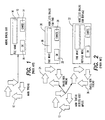
- preemptive modeless dialog boxes of the preferred embodiment that are generally represented by reference numerals (40,42).
- Preemptive modeless dialog boxes (40,42) include all functionality of modeless dialog boxes (20,22) shown in Fig. 2. However, in contrast to modeless dialog boxes (20,22), preemptive modeless dialog boxes (40,42) use a single box to handle user inputs for multiple functions and, thus, save on resources of the system.
- preemptive modeless dialog boxes (40,42) recognize and process foreign inputs as well as inputs directed to its own function. Such foreign inputs include any inputs that are recognizable by the main window of the application, such as requests for various functions which may also require a preemptive modeless dialog box.
- Fig. 3 also shows the transition from preemptive modeless dialog box 40 to preemptive modeless dialog box 42.
- the MWT is created and managed transparently by Windows when the main application window is created.
- the MWT creates a preemptive modeless dialog box object.
- a side-effect of creating this preemptive modeless dialog box object is the creation of the intelligent worker thread.
- preemptive modeless dialog boxes (40,42) are used for a typical word processing program and appear when the operator requests either the FIND function and the REPLACE function, respectively.
- preemptive modeless dialog box 40 will appear at the forefront of the system. The operator may then select the "Cancel" button 46 or provide a phrase or phrases to be found in "Find What" field 48 and select the "OK" button 50.
- preemptive modeless dialog box 40 can also respond to foreign inputs that relate to other functions.
- the operator may simply request the replace function so the preemptive modeless dialog box 42 for the replace function will appear at the forefront of the system. In doing so, the previous preemptive modeless dialog box 40 for the find function, together with its respective dialog box thread 45, will disappear, and the new preemptive modeless dialog box 42 for the replace function, together with its respective dialog box thread 45, will appear automatically. Thus, de-selection of the dialog box is not required to request a new function.
- main window thread (“MWT”) 12 of the present invention.
- the application creates a preemptive modeless dialog box object (“PMDB object”) and intelligent worker thread (“IWT”) 44 (i.e., IWT 44 is created and enters thread loop at "B” as described in Fig. 6 below), and the PMDB object starts running the thread loop procedure of its window thread which is the intelligent worker thread, as described below for Fig. 6.
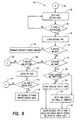
- the system continues to check the MWT's message queue until a new message is received as shown in steps 66 and 68. When a new message is received, the message type is decoded as shown in step 70.
- the system reads the message to determine whether the MWT should be terminated as shown in step 72. If so, the operation of the MWT is terminated as shown in steps 74 and 76. If the message does not indicate that the MWT should be terminated, the system dispatches the message to a designated Window function for processing as shown in step 78 as will be discussed further in Fig. 5 below.
- a generic Window function "A" of the present invention that follows the dispatch of the messages indicated in Figs. 4 and 7.
- the Window function is entered as shown in step 136 and, then the system determines whether the user needs a PMDB as part of the implementation of the Window function as shown in step 138. If so, a PMDB message is created and posted to the IWT's message queue as shown in step 140 and the processing of the Window function is completed as shown in step 142. If the user does not need a PMDB as part of the implementation of the Window function, then the system simply completes the processing of the Window function. Every modeless dialog box has a separate dialog box thread. As such, a preemptive modeless dialog box has a dialog box thread.
- This dialog box thread is created inherently by the Windows's software when the modeless dialog box is created. It is the existence of this separate or dedicated dialog box thread that distinguishes a modeless dialog box from a modal dialog box.
- This dialog box thread receives and processes the inputs for a specific modeless dialog box (e.g., OK, CANCEL, ASCII character sequences for Edit Control), and can be contrasted to the intelligent worker thread, whose main purpose is to manage preemptive modeless dialog boxes (i.e., creation, deletion, message dispatching, etc.).
- a specific modeless dialog box e.g., OK, CANCEL, ASCII character sequences for Edit Control
- preemptive modeless dialog boxes i.e., creation, deletion, message dispatching, etc.
- Fig. 6 depicts loop procedure B for the PMDB object's intelligent worker thread ("IWT") 44.
- the system continually checks the IWT's message queue until a new message is received as shown in steps 86 and 88, which originated in a Windows function (also referred to as a Windows procedure) (e.g., 140).
- the message type is decoded as shown in step 90, and the system determines whether the IWT should be terminated as shown in step 92. If so, the operation of the IWT is terminated as shown in step 94. Otherwise, the systems goes on to determine whether the message is a new PMDB type message as shown in step 96.
- the system deletes any active PMDB (i.e., the active dialog box thread (DBT)) as shown in steps 98 and 100 and creates the newly requested type of PMDB.
- DBT active dialog box thread
- a new dialog box thread 45 is created, and enters its thread loop as shown in step 102. Note that the dialog box thread's loop is not discussed herein because it is completely managed by the Windows software as known to one of ordinary skill in the art, transparent to the user.
- the system simply decodes the requested type of PMDB as shown in step 104 before creating the requested type of PMDB and enters its thread loop 45.
- step 96 of Fig. 6 if a PMDB type message is not detected, then the system determines whether the message is a key input or its equivalent as shown in step 106. If so, the system decodes the keycode as shown in step 110, and determines whether the keycode is a foreign input as shown in step 112. If the message is not a key input (or equivalent) or is not a foreign input, then the message is translated and dispatched to the PMDB's dialog box thread 45 for potential processing according to procedure "C" as described below in Fig. 7. Examples of typical keycodes destined for dialog box thread 45 for processing include ASCII characters for an edit control associated with the PMDB, an "OK" input, a "CANCEL” input or a return character.
- the system posts the message to the parent window's messagc queue as shown in step 116.
- the parent dispatches the message to the designated Windows function, which may, in turn, require a new and different preemptive modeless dialog box for its implementation. This request would then go to the intelligent worker thread, and so the cycle continues.
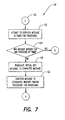
- the system attempts to dispatch the message to the PMDB for processing as shown in step 122.
- the system determines whether the message was intended for and processed by the PMDB thread 45 as shown in step 124. If so, processing of the message has already occurred by the dialog box thread 45 at a previous step and the processing is returned to procedure "B". Otherwise, the virtual key message is translated to a character message as shown in step 128, and the message is dispatched to the designated Window function "A" for processing as shown in step 130.
Landscapes
- Engineering & Computer Science (AREA)
- Software Systems (AREA)
- Theoretical Computer Science (AREA)
- Human Computer Interaction (AREA)
- Physics & Mathematics (AREA)
- General Engineering & Computer Science (AREA)
- General Physics & Mathematics (AREA)
- User Interface Of Digital Computer (AREA)
- Information Retrieval, Db Structures And Fs Structures Therefor (AREA)
- Digital Computer Display Output (AREA)
- Control By Computers (AREA)
Claims (23)
- Prozeß zur Verwaltung mehrfacher preemptiver modenloser Dialogboxen (40,42), der einen Operator in die Lage versetzt, verschiedene Funktionen einer Anwendung auszuwählen, ohne eine vorhergehende Funktion dieser Anwendung zu deselektieren, wobei die Anwendung eine Hauptfenster-Bedrohung besitzt, die die Funktion steuert und der Prozeß die Schritte aufweist:Wobei die aktive preemptive modenlose Dialogbox durch die intelligente Arbeiterbedrohung immer dann abgeschlossen ist, wenn eine nachfolgende preemptive modenlose Dialogbox gebildet ist, so daß die nachfolgende preemptive modenlose Dialogbox dann zur aktiven preemptiven modenlosen Dialogbox wird.Bildung eines preemptiven modenlosen Dialogbox-Objektes, welches eine intelligente Arbeiterbedrohung (44) umfaßt, die sich im Dialog sowohl mit der Hauptfenster-Bedrohung (12) als auch einer Dialogbox-Bedrohung (45) befindet;Bildung einer aktiven preemptiven modenlosen Dialogbox entsprechend einer ersten Funktion der Anwendung:Bildung von wenigstens einer nachfolgenden preemptiven modenlosen Dialogbox entsprechend einer zweiten Funktion der Anwendung;
- Prozeß nach Anspruch 1, wobei jede aktive und/oder nachfolgende preemptive modenlose Dialogbox (40,42) durch die intelligente Arbeiterbedrohung (44) verwaltet wird und ihre Eingänge durch ihre entsprechende Dialogbox-Bedrohung verarbeitet werden.
- Prozeß nach Anspruch 1 oder 2, wobei die intelligente Arbeiterbedrohung (44) mit der aktiven preemptiven modenlosen Dialogbox (40,42) arbeitet, um ihre Eingänge sowie fremde Tastenbetätigungen abzufertigen.
- Prozeß nach irgendeinem vorhergehenden Anspruch, wobei die intelligente Arbeiterbedrohung (44) die Schritte umfaßt:Überprüfen der Nachrichten-Warteschlange der intelligenten Arbeiterbedrohung für irgendwelche Nachrichten;Feststellung, ob die aktive preemptive modenlose Dialogbox von den Nachrichten angefordert wird;Entfernung der aktiven preemptiven modenlosen Dialogbox, wenn sie vorliegt; und Bildung der nachfolgenden preemptiven modenlosen Dialogbox.
- Prozeß nach Anspruch 4, umfassend die Übertragung von Nachrichten von der intelligenten Arbeiterbedrohung (44) zu der Hauptfenster-Bedrohung.
- Prozeß nach Anspruch 4 oder 5, umfassend die Beendigung der intelligenten Arbeiterbedrohung (44), wenn die Nachricht "quittiert" ist.
- Prozeß nach irgendeinem vorhergehenden Anspruch, wobei die Hauptfenster-Bedrohung (44) über eine Fensterfunktion feststellt, ob eine preemptive modenlose Dialogbox (40,42) gemäß den Eingaben von dem Operator benötigt wird; und eine Nachricht zu der intelligenten Arbeiterbedrohung sendet, um eine preemptive modenlose Dialogbox für eine festgelegte Funktion zu bilden.
- System, das in der Lage ist, mehrfache preemptive modenlose Dialogboxen (40,42) zu verwalten, welche einen Operator in die Lage versetzen, verschiedene Funktionen einer Anwendung auszuwählen, ohne eine vorangegangene Funktion der Anwendung zu deselektieren, wobei das System umfaßt:eine Hauptfenster-Bedrohung (12), die in der Lage ist, die Funktionen der Anwendung zu steuern;eine Einrichtung zur Bildung eines preemptiven modenlosen Dialogbox-Objektes, welches eine intelligente Arbeiterbedrohung (44) umfaßt, die sich im Dialog sowohl mit der Hauptfenster-Bedrohung als auch mit einer Dialogbox-Bedrohung befindet; eine Einrichtung zur Bildung einer aktiven preemptiven modenlosen Dialogbox entsprechend einer ersten Funktion der Anwendung; undeine Einrichtung zur Bildung wenigstens einer nachfolgenden preemptiven modenlosen Dialogbox entsprechend einer zweiten Funktion der Anwendung; wobei die aktive preemptive modenlose Dialogbox durch die intelligente Arbeiterbedrohung immer dann abgeschlossen ist, wenn eine nachfolgende premptive modenlose Dialogbox gebildet ist, so daß die nachfolgende preemptive modenlose Dialogbox sodann zur aktiven preemptiven modenlosen Dialogbox wird.
- System nach Anspruch 8, wobei jede aktive und/oder nachfolgenden preemptiven modenlosen Dialogbox (40,42) durch die intelligente Arbeiterbedrohung verwaltet wird und ihre Eingänge durch ihre entsprechende Dialogbox-Bedrohung verarbeitet werden.
- System nach Anspruch 8 oder 9, wobei die intelligente Arbeiterbedrohung (44) mit der aktiven preemptiven modenlosen Dialogbox (40,42) arbeitet, um ihre Eingänge sowie fremde Tastenbetätigungen abzufertigen.
- System nach irgendeinem der Ansprüche 8 bis 10, wobei die intelligente Arbeiterbedrohung (44) umfaßt:Mittel zur Überprüfung der Nachrichten-Warteschlange der intelligenten Arbeiterbedrohung auf irgendwelche Nachrichten;Mittel zur Feststellung, ob die aktive preemptive modenlose Dialogbox (40,42) von den Nachrichten angefordert wird;Mittel zum Entfernen der aktiven preemptiven modenlosen Dialogbox, wenn sie vorliegt; undMittel zur Bildung der nachfolgenden preemptiven modenlosen Dialogbox.
- System nach Anspruch 11, umfassend Mittel zum Übertragen von Nachrichten von der intelligenten Arbeiterbedrohung (44) zu der Hauptfenster-Bedrohung (12).
- System nach Anspruch 11 oder 12, umfassend Mittel zur Beendigung der intelligenten Arbeiterbedrohung (44), wenn die Nachricht "quittiert" ist.
- System nach irgendeinem der Ansprüche 11 bis 13, umfassend Mittel zur Beendigung der Hauptfenster-Bedrohung (12), wenn die Nachricht "quittiert" ist.
- System nach irgendeinem der Ansprüche 8 bis 14, wobei die Hauptfenster-Bedrohung (12) über eine Fensterfunktion feststellt, ob eine preemptive modenlose Dialogbox (40,42) gemäß Eingaben von dem Operator benötigt wird; und eine Nachricht zu der intelligenten Arbeiterbedrohung (44) sendet, um eine preemptive modenlose Dialogbox für eine festgelegte Funktion zu bilden.
- Speichermedium zur Steuerung eines Prozessors eines Computers, wenn es in den Computer geladen ist, um mehrere preemptive modenlose Dialogboxen (40,42) zu verwalten, die einen Operator in die Lage versetzen, verschiedene Funktionen einer Anwendung auszuwählen, ohne eine vorherige Funktion dieser Anwendung zu deselektieren, wobei das Speichermedium unfaßt:wobei die aktive preemptive modenlose Dialogbox durch die intelligente Arbeiterbedrohung immer dann abgeschlossen ist, wenn eine nachfolgende preemptive modenlose Dialogbox gebildet ist, so daß die nachfolgende preemptive modenlose Dialogbox sodann zu der aktiven preemptiven modenlosen Dialogbox wird.eine Hauptfenster-Bedrohung (12), die in der Lage ist, die Funktionen der Anwendung zu steuern;Mittel zur Bildung eines preemptiven modenlosen Dialogbox (40,42)-Objektes, welches eine intelligente Arbeiterbedrohung (44) umfaßt, die sich sowohl im Dialog mit der Hauptfenster-Bedrohung als auch mit einer Dialogbox-Bedrohung befindet; Mittel zur Bildung einer aktiven preemptiven modenlosen Dialogbox entsprechend einer ersten Funktion der Anwendung; undMittel zur Bildung wenigstens einer nachfolgenden preemptiven modenlosen Dialogbox entsprechend einer zweiten Funktion der Anwendung;
- Speichermedium nach Anspruch 16, wobei jede aktive und/oder nachfolgende preemptive modenlose Dialogbox (40,42) durch die intelligente Arbeiterbedrohung (44) verwaltet wird und ihre Eingänge durch ihre entsprechende Dialogbox-Bedrohung verarbeitet werden.
- Speichermedium nach Anspruch 16 oder 17, wobei die intelligente Arbeiterbedrohung (44) mit der aktiven preemptiven modenlosen Dialogbox arbeitet, um ihre Eingänge sowie fremde Tastenbetätigungen abzufertigen.
- Speichermedium nach irgendeinem der Ansprüche 16 bis 18, wobei die intelligente Arbeiterbedrohung (44) umfaßt:Mittel zur Überprüfung der Nachrichten-Warteschlange der intelligenten Arbeiterbedrohung auf irgendwelche Nachrichten;Mittel zur Feststellung, ob die aktive preemptive modenlose Dialogbox (40,42) von den Nachrichten angefordert wird;Mittel zum Entfernen der aktiven preemptiven modenlosen Dialogbox, wenn sie vorliegt; undMittel zur Bildung der nachfolgenden preemptiven modenlosen Dialogbox.
- Speichermedium nach irgendeinem der Ansprüche 16 bis 19, umfassend Mittel zum Übertragen von Nachrichten von der intelligenten Arbeiterbedrohung (44) zu der Hauptfenster-Bedrohung (12).
- Speichermedium nach Anspruch 19 oder 20, umfassend Mittel zur Beendigung der intelligenten Arbeiterbedrohung (12), wenn die Nachricht "quittiert" ist.
- Speichermedium nach irgendeinem der Ansprüche 19 bis 21, umfassend Mittel zur Beendigung der Hauptfenster-Bedrohung (12), wenn die Nachricht "quittiert" ist.
- Speichermedium nach irgendeinem der Ansprüche 16 bis 22, wobei die Hauptfenster-Bedrohung (12) über eine Fensterfunktion feststellt, ob eine preemptive modenlose Dialogbox (40,42) gemäß Eingaben von dem Operator benötigt wird; und eine Nachricht zu der intelligenten Arbeiterbedrohung sendet, um eine preemptive modenlose Dialogbox für eine festgelegte Funktion zu bilden.
Applications Claiming Priority (3)
| Application Number | Priority Date | Filing Date | Title |
|---|---|---|---|
| US08/725,774 US5825358A (en) | 1996-10-04 | 1996-10-04 | Process and system for forming multiple preemptive modeless dialog boxes |
| US725774 | 1996-10-04 | ||
| PCT/US1997/017073 WO1998014868A1 (en) | 1996-10-04 | 1997-09-22 | Process and system for forming multiple preemptive modeless dialog boxes |
Publications (2)
| Publication Number | Publication Date |
|---|---|
| EP0929863A1 EP0929863A1 (de) | 1999-07-21 |
| EP0929863B1 true EP0929863B1 (de) | 2000-05-10 |
Family
ID=24915914
Family Applications (1)
| Application Number | Title | Priority Date | Filing Date |
|---|---|---|---|
| EP97943524A Expired - Lifetime EP0929863B1 (de) | 1996-10-04 | 1997-09-22 | Prozess und system für die formung von mehrfachen permanenten preemptiven dialogfenstern |
Country Status (8)
| Country | Link |
|---|---|
| US (1) | US5825358A (de) |
| EP (1) | EP0929863B1 (de) |
| JP (1) | JP2001501757A (de) |
| CN (1) | CN1232563A (de) |
| AU (1) | AU721410B2 (de) |
| CA (1) | CA2264923A1 (de) |
| DE (1) | DE69702000T2 (de) |
| WO (1) | WO1998014868A1 (de) |
Families Citing this family (12)
| Publication number | Priority date | Publication date | Assignee | Title |
|---|---|---|---|---|
| US6119145A (en) * | 1997-02-28 | 2000-09-12 | Oracle Corporation | Multithreaded client application storing a separate context for each transaction thus allowing threads to resume transactions started by other client threads |
| JP3509060B2 (ja) * | 1998-05-28 | 2004-03-22 | 松下電器産業株式会社 | 表示制御装置および方法 |
| US6118451A (en) * | 1998-06-09 | 2000-09-12 | Agilent Technologies | Apparatus and method for controlling dialog box display and system interactivity in a computer-based system |
| US6239796B1 (en) * | 1998-06-09 | 2001-05-29 | Agilent Technologies, Inc. | Apparatus and method for controlling dialog box display and system interactivity in a signal measurement system |
| US6232971B1 (en) * | 1998-09-23 | 2001-05-15 | International Business Machines Corporation | Variable modality child windows |
| US6407759B1 (en) * | 1998-11-30 | 2002-06-18 | Sun Microsystems, Inc. | Method and apparatus for modal dialog box management in applets on information appliances |
| US6459440B1 (en) * | 1999-07-15 | 2002-10-01 | Motorola, Inc. | Method and apparatus for automatic deletion of a pop-up window |
| US6874130B1 (en) | 2000-02-17 | 2005-03-29 | International Business Machines Corporation | Copy/move graphical user interface apparatus and method |
| CA2364007A1 (en) * | 2001-11-28 | 2003-05-28 | Ibm Canada Limited-Ibm Canada Limitee | Graphical user interface for non-disruptively displaying messages with an indication of context |
| US7877797B2 (en) | 2006-02-23 | 2011-01-25 | Microsoft Corporation | Non-intrusive background synchronization when authentication is required |
| USD707255S1 (en) * | 2012-09-27 | 2014-06-17 | Xerox Corporation | Digital user interface screen with software application icon |
| CN104657122B (zh) * | 2013-11-21 | 2018-04-10 | 航天信息股份有限公司 | 一种针对Android系统中多个提示对话框串行显示的方法和装置 |
Family Cites Families (6)
| Publication number | Priority date | Publication date | Assignee | Title |
|---|---|---|---|---|
| US5546525A (en) * | 1989-11-13 | 1996-08-13 | Lotus Development Corporation | Computer user interface with multimode selection of displayed controls |
| US5414810A (en) * | 1990-06-28 | 1995-05-09 | International Business Machines Corporation | Method and apparatus for maintaining data integrity when displaying multiple dialog windows |
| EP0463250B1 (de) * | 1990-06-28 | 1995-02-01 | International Business Machines Corporation | Benutzerschnittstelle für Datenverarbeitungsanlage und Datenverabeitungsanlage mit einer sochen Schnittstelle |
| WO1994014115A2 (en) * | 1992-12-01 | 1994-06-23 | Microsoft Corporation | A method and system for in-place interaction with embedded objects |
| DE69310214T2 (de) * | 1992-12-23 | 1997-11-20 | Otlc, Cupertino, Calif. | Dialogsystem |
| US5675520A (en) * | 1995-03-30 | 1997-10-07 | Microsoft Corporation | Method for extending a common user interface |
-
1996
- 1996-10-04 US US08/725,774 patent/US5825358A/en not_active Expired - Lifetime
-
1997
- 1997-09-22 AU AU44975/97A patent/AU721410B2/en not_active Ceased
- 1997-09-22 CA CA002264923A patent/CA2264923A1/en not_active Abandoned
- 1997-09-22 CN CN97198450A patent/CN1232563A/zh active Pending
- 1997-09-22 EP EP97943524A patent/EP0929863B1/de not_active Expired - Lifetime
- 1997-09-22 DE DE69702000T patent/DE69702000T2/de not_active Expired - Lifetime
- 1997-09-22 JP JP10516629A patent/JP2001501757A/ja not_active Withdrawn
- 1997-09-22 WO PCT/US1997/017073 patent/WO1998014868A1/en not_active Ceased
Also Published As
| Publication number | Publication date |
|---|---|
| DE69702000D1 (de) | 2000-06-15 |
| CN1232563A (zh) | 1999-10-20 |
| US5825358A (en) | 1998-10-20 |
| AU721410B2 (en) | 2000-07-06 |
| WO1998014868A1 (en) | 1998-04-09 |
| JP2001501757A (ja) | 2001-02-06 |
| DE69702000T2 (de) | 2001-01-11 |
| CA2264923A1 (en) | 1998-04-09 |
| AU4497597A (en) | 1998-04-24 |
| EP0929863A1 (de) | 1999-07-21 |
Similar Documents
| Publication | Publication Date | Title |
|---|---|---|
| US5613058A (en) | Method and system for in-place interaction with contained objects | |
| US5497484A (en) | File menu support for encapsulated applications | |
| US5721850A (en) | Method and means for navigating user interfaces which support a plurality of executing applications | |
| JP2801009B2 (ja) | 多重処理コンピュータ・システムにおけるキーストロークからのイベントを送る方法 | |
| JP3940171B2 (ja) | 統合化アプリケーション・インタフェース・マネージャ | |
| US5551030A (en) | Method and apparatus for integrating applications in a graphical user interface environment with a rules database | |
| EP0437441B1 (de) | Arbeitsplatz und entsprechendes betriebsverfahren | |
| EP0929863B1 (de) | Prozess und system für die formung von mehrfachen permanenten preemptiven dialogfenstern | |
| US5471616A (en) | Method of and apparatus for providing existential presence acknowledgement | |
| US20020175955A1 (en) | Graphical user interface having contextual menus | |
| US5666500A (en) | Workstation user interface for use in conjunction with a host data processing system | |
| JPH08137646A (ja) | ダイアログ・ボックスの表示方法及びシステム | |
| US7114130B2 (en) | System, method, and computer-readable medium for displaying keyboard cues in a window | |
| US6008811A (en) | Drag and drop metaphors for non-programmable emulation environments | |
| EP0817997A1 (de) | Nachrichtenwarteschlange für eine graphische benutzeroberfläche | |
| WO1995031771A1 (en) | Support for custom user-interaction elements in a graphical, event-driven computer system | |
| US6124855A (en) | Just-in-time software configuration information entry | |
| US5485605A (en) | Method of and apparatus for providing a group query | |
| EP0651896B1 (de) | Automatisches umschalten zwischen graphischer benutzerschnittstellenkontrolle und befehlszeilenkontrolle | |
| US20020054104A1 (en) | Anticipatory processing for a graphical user interface | |
| EP0569902A2 (de) | Benutzerschnittstellen-System für Rechner | |
| Kacmar | Supporting hypermedia services in the user interface | |
| JP3031624B2 (ja) | マンマシンインタフェース処理装置 | |
| JPH07219753A (ja) | 会話型プログラム開発支援システム | |
| JPH06202836A (ja) | ポップアップメニューを表示するコンピュータシステムおよび方法 |
Legal Events
| Date | Code | Title | Description |
|---|---|---|---|
| PUAI | Public reference made under article 153(3) epc to a published international application that has entered the european phase |
Free format text: ORIGINAL CODE: 0009012 |
|
| 17P | Request for examination filed |
Effective date: 19990305 |
|
| AK | Designated contracting states |
Kind code of ref document: A1 Designated state(s): DE FR GB |
|
| GRAG | Despatch of communication of intention to grant |
Free format text: ORIGINAL CODE: EPIDOS AGRA |
|
| 17Q | First examination report despatched |
Effective date: 19990809 |
|
| GRAG | Despatch of communication of intention to grant |
Free format text: ORIGINAL CODE: EPIDOS AGRA |
|
| GRAH | Despatch of communication of intention to grant a patent |
Free format text: ORIGINAL CODE: EPIDOS IGRA |
|
| GRAH | Despatch of communication of intention to grant a patent |
Free format text: ORIGINAL CODE: EPIDOS IGRA |
|
| GRAA | (expected) grant |
Free format text: ORIGINAL CODE: 0009210 |
|
| AK | Designated contracting states |
Kind code of ref document: B1 Designated state(s): DE FR GB |
|
| REF | Corresponds to: |
Ref document number: 69702000 Country of ref document: DE Date of ref document: 20000615 |
|
| ET | Fr: translation filed | ||
| PLBE | No opposition filed within time limit |
Free format text: ORIGINAL CODE: 0009261 |
|
| STAA | Information on the status of an ep patent application or granted ep patent |
Free format text: STATUS: NO OPPOSITION FILED WITHIN TIME LIMIT |
|
| 26N | No opposition filed | ||
| REG | Reference to a national code |
Ref country code: GB Ref legal event code: IF02 |
|
| PGFP | Annual fee paid to national office [announced via postgrant information from national office to epo] |
Ref country code: DE Payment date: 20100930 Year of fee payment: 14 |
|
| PGFP | Annual fee paid to national office [announced via postgrant information from national office to epo] |
Ref country code: FR Payment date: 20110901 Year of fee payment: 15 Ref country code: GB Payment date: 20110826 Year of fee payment: 15 |
|
| GBPC | Gb: european patent ceased through non-payment of renewal fee |
Effective date: 20120922 |
|
| REG | Reference to a national code |
Ref country code: FR Ref legal event code: ST Effective date: 20130531 |
|
| PG25 | Lapsed in a contracting state [announced via postgrant information from national office to epo] |
Ref country code: DE Free format text: LAPSE BECAUSE OF NON-PAYMENT OF DUE FEES Effective date: 20130403 Ref country code: GB Free format text: LAPSE BECAUSE OF NON-PAYMENT OF DUE FEES Effective date: 20120922 |
|
| PG25 | Lapsed in a contracting state [announced via postgrant information from national office to epo] |
Ref country code: FR Free format text: LAPSE BECAUSE OF NON-PAYMENT OF DUE FEES Effective date: 20121001 |
|
| REG | Reference to a national code |
Ref country code: DE Ref legal event code: R119 Ref document number: 69702000 Country of ref document: DE Effective date: 20130403 |