EP0965925A2 - Überlagerte Darstellung von Text- und Grafikanmerkungen - Google Patents
Überlagerte Darstellung von Text- und Grafikanmerkungen Download PDFInfo
- Publication number
- EP0965925A2 EP0965925A2 EP99111665A EP99111665A EP0965925A2 EP 0965925 A2 EP0965925 A2 EP 0965925A2 EP 99111665 A EP99111665 A EP 99111665A EP 99111665 A EP99111665 A EP 99111665A EP 0965925 A2 EP0965925 A2 EP 0965925A2
- Authority
- EP
- European Patent Office
- Prior art keywords
- data
- annotation
- primary
- primary body
- text
- Prior art date
- Legal status (The legal status is an assumption and is not a legal conclusion. Google has not performed a legal analysis and makes no representation as to the accuracy of the status listed.)
- Ceased
Links
Images






Classifications
-
- G—PHYSICS
- G06—COMPUTING OR CALCULATING; COUNTING
- G06F—ELECTRIC DIGITAL DATA PROCESSING
- G06F3/00—Input arrangements for transferring data to be processed into a form capable of being handled by the computer; Output arrangements for transferring data from processing unit to output unit, e.g. interface arrangements
- G06F3/01—Input arrangements or combined input and output arrangements for interaction between user and computer
- G06F3/048—Interaction techniques based on graphical user interfaces [GUI]
- G06F3/0481—Interaction techniques based on graphical user interfaces [GUI] based on specific properties of the displayed interaction object or a metaphor-based environment, e.g. interaction with desktop elements like windows or icons, or assisted by a cursor's changing behaviour or appearance
- G06F3/04812—Interaction techniques based on cursor appearance or behaviour, e.g. being affected by the presence of displayed objects
-
- G—PHYSICS
- G06—COMPUTING OR CALCULATING; COUNTING
- G06F—ELECTRIC DIGITAL DATA PROCESSING
- G06F40/00—Handling natural language data
- G06F40/10—Text processing
- G06F40/103—Formatting, i.e. changing of presentation of documents
-
- G—PHYSICS
- G06—COMPUTING OR CALCULATING; COUNTING
- G06F—ELECTRIC DIGITAL DATA PROCESSING
- G06F40/00—Handling natural language data
- G06F40/10—Text processing
- G06F40/166—Editing, e.g. inserting or deleting
-
- G—PHYSICS
- G06—COMPUTING OR CALCULATING; COUNTING
- G06F—ELECTRIC DIGITAL DATA PROCESSING
- G06F40/00—Handling natural language data
- G06F40/10—Text processing
- G06F40/166—Editing, e.g. inserting or deleting
- G06F40/169—Annotation, e.g. comment data or footnotes
Definitions
- the present invention relates to methods of computer mediated text and graphic display. More particularly, the present invention relates to dynamic display of supplementary textual or graphical annotations over a primary source page.
- Footnotes, headnotes, sidenotes, or other margin-borne annotations are widely employed in books and other printed or electronically viewed publications to present supporting or supplemental information to a primary text in an easily accessible format.
- Annotations are commonly set in a smaller typesize than the primary text, and may be set in different typefaces, in bold or cursive, or have various formatting peculiarities to distinguish the annotation from the primary text.
- such annotations allow an author to provide a reader with supplementary textual or graphic explanations related to the primary text, while not requiring the reader to unnecessarily change focus (as parenthetical remarks, or lengthy subordinate explanatory clauses, so often do) from the primary text.
- the present invention provides a method for dynamically presenting a primary body of data displayable on a screen and a supporting body of data relatable to the primary body of data.
- the primary body of data can include an annotation tag associated with a specific region and referring to the supporting body of data.
- the supporting body of data is dynamically displayed (as long as user focus is maintained) and data present in the primary body of data is concurrently modified to enhance presentation of the supporting body of data.
- the annotation tag is replaced and the primary body of data reverts to its original format.
- data can include both text and graphics.
- the present invention encompasses primarily textual applications such as novels, software code, or poetry, as well as primarily graphical applications such as maps, photographs, or geographic information systems.
- Applications employing substantial amounts of both text and graphics, such as illustrated textbooks, instruction manuals, or spreadsheets, are also suitable candidates for use of the method of the present invention.
- annotation tag can be primarily textual, primarily graphical, or some mixture of textual and graphical elements.
- Contemplated annotation tags include numeric tags (e.g. footnote numerals), greeked or unreadably small interlinear or marginal text, symbols (e.g. an asterisk), hypertext links, or thumbnail graphics or drawings in the margin.
- the annotation tags can be a very small, yet still readable, version of the supporting body of data.
- lines, curves, or graphical or textual animations can allow a user reviewing a primary body of data to identify the availability of supporting data.
- annotation tags can be based on auditory or tactile feedback, with, for example, sound, operation of force feedback mice, or tactile displays providing audio or tactile annotations.
- User focus on an annotation tag can be determined by tracking the position of a conventional screen displayed pointer maneuverable by mouse, stylus, or keyboard, by use of touch sensitive overlays to a screen, eye or head tracking systems, or any other conventional mechanism for reliably determining a user focus on a region of a screen display.
- Initiating dynamic display of supporting information at the user focus can be in response to user initiated mouse clicks, keyboard input, finger taps, duration (e.g. mouse cursor held still on or adjacent to an annotation tag for one tenth of a second to about two seconds, with one second being typical), or any other suitable input scheme for confirming a user desire to view supporting bodies of data.
- Modification of the primary body of data (in response to user focus) to enhance presentation of the supporting body of data while retaining a unobstructed (or at least minimally obstructed) view of the primary body of data requires accommodating the supporting body of data within the primary body of data.
- Accommodation requires that the supporting body of data "negotiate" with the primary body of data to determine suitable adjustments to position, orientation, sizing, coloring, spatial morphology, or other typographical or graphical characteristics of the primary or supporting body of data.
- Accommodation overcomes a major problem associated with conventional hypertext window or "balloon help" techniques. Such annotation techniques simply overlay a small graphic or window over a primary body of data, often covering necessary information in the primary body of data.
- the present invention conducts a negotiation between the primary body of data and the supporting body of data to determine suitable alterations to position, size, color, or spatial morphology of text or graphics that best present salient portions of the primary body of data, while still allowing viewing of the supporting body of data.
- view obstruction of both the primary body of data and the supporting body of data can be minimized, although in certain embodiments partial obstruction of the primary body of data may be necessary to accommodate presentation of salient information.
- Accommodation of the supporting body of data can be through overlay or spatial morphing of the primary body of data.
- An overlay presentation replaces the annotation tag with supporting data, while concurrently identifying the annotated region of the primary body by suitable callouts, lines, markers, or animations that place the annotation in the margin, interline, or interparagraph region, but still direct a user's attention to the related region of the primary body.
- the region of the primary body subject to annotation can be made visually distinct by a suitable color or font change. This allows, for example, a region of the primary body to be recolored, hue adjusted, or "grayed out", with the supporting data of the annotation positioned to lay on top of the now visually distinct region.
- Overlay presentations generally do not require repositioning words, lines, or paragraphs, or graphical elements in the primary body of data, instead relying on available spaces (e.g. either "empty" marginal space or space created by "graying out” text) in the primary body of data.
- spatial morphing of the primary body of data generally requires displacement or differential resizing of lines and words in a vicinity of an annotation tag subject to user focus.
- the positions of words, lines, paragraphs, or graphical elements in the primary body of data adjust (using an animated transition) as needed to accommodate the supporting body of data.
- This allows supporting bodies of data to be presented at full readable size, while still retaining the context of the primary body of data.
- This may include dynamically decreasing typesize of lines in the region near the annotation tag, or providing intraline or interline intercalations of auxiliary symbols, words, or sentences.
- Words, lines, paragraphs, graphical elements, or margins can be moved to make room for annotations or other supporting data.
- a primary body of data is displayable on a screen, permitting a user to select a region of user focus for annotation.
- the user uses a keyboard, pen operated touchpad, voice control software, or other suitable input device, the user provides supporting data input for association with the region of user focus.
- the screen displayed body of primary data is modified. Modification can include overlay presentations in which the area to be annotated (i.e. associated with the supporting body of data input by the user) is color highlighted or grayed out, or alternatively, can include spatial morphing presentation techniques in which lines of the primary body of data are moved to accommodate positioning of textual or handwriting input.
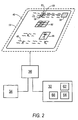
- a computer system 10 includes a computer 20 connected to at least one of a cathode ray tube (CRT) monitor 15 or flat panel display 14.
- the computer 20 is a conventional personal computer or workstation suitable for running commercial or custom software applications in accordance with the present invention, and includes a processor 21, electronic memory 22, and long term storage 23.
- Input module 28 provides input to computer 20 by pen device 13, conventional keyboard 16, two or three degree of freedom mouse device 17, pen based or gestural input, paper scanning input, microphones 18 for audio input, or any other supported input mechanism.
- output module 29 which may include but is not limited to audio output, tactile output, force feedback output (with force feedback mice or joysticks), text and graphics printers, or any other suitable output mechanism.
- the computer 20 can be connected by local network 24 with associated operating or archival storage 25, and can be further connected to any conventional internetwork 26 for retrieval or dissemination of data.
- CRT monitors for purposes of the present invention, one can use high quality CRT monitors, passive or active matrix liquid crystal flat panel displays, various plasma, electrooptical, or microoptomechanical displays, or any other conventional visual display as a display 14 and 15. Good results are obtained by use of CRT monitors that can support 1280 by 1024 pixels. Even better results can be obtained by use of amorphous silicon, active matrix flat panel displays, such as sold by dpiX, Inc. of Palo Alto, CA. For example, one suitable dpiX flat panel display has a 13.5 inch diagonal size, with viewable display area of 276 mm by 200 mm, and 3072 by 2240 pixels to support a resolution of about 300 dpi with 16 gray levels.
- Such high resolution displays are capable of legibly presenting textual information with a font pitch as low as 3 points, although 4 or 5 point text is more typically used as a lower limit of font size to minimize eyestrain.
- These displays can be connected to a PCI controller card coupled to computer 20, and currently are supported under the Windows NT computer operating system.
- any of the foregoing displays can be used in conjunction with various absolute or relative position sensitive touchpads or writing tablets (which may optionally overlay the display or be separately connected to computer 20) to allow direct annotation of the screen through conventional pen-based input techniques.
- a flat panel display 14 presents a computer-controlled graphical and textual display 40 to a user.
- the display 40 is created by negotiation (using negotiation module 36, a software module executing on computer 20 of Figure 1) between a primary body of data (represented by box 34) and a supporting body of data (generally represented by box 32, with supporting data derived from various sources of data 62, 64, or 66).
- the display 40 includes text 48 and graphics 46, tables 50, and various annotation tags (including annotation tag 52).
- the annotation tag 52 (which is associated with textual data from one of sources of data 62, 64, or 66) can be selected by moving a mouse operated cursor 58 into a region of user focus 59, initiating an animated launch sequence that results in display of a "callout" textual annotation 56.
- the expansion animation typically takes anywhere from about a quarter second to about two seconds, sufficient for allowing a user to keep visual track of the expanding annotation and maintain proper contextual focus.
- the animation speed can be fully controllable, with high speed "pop-up" display annotations being presented for brief annotations, and longer animations being used for more complex annotations positioned far from the annotation tag.
- data shown in the display 40 can include text, graphics, or mixtures of textual and graphical elements (such a spreadsheet table 50 of Figure 2).
- the present invention encompasses display of a primary body of data 34 that may be text such as electronic mailnotes, novels, software code, or poetry, as well as graphical data such as maps, photographs, or geographic information systems.
- Applications employing substantial amounts of both text and graphics, such as illustrated textbooks, instruction manuals, or spreadsheets, are also suitable display candidates.
- Supporting data 32 can include annotations consisting of a brief explanation positioned in the margin or between the lines of the displayed primary body of text.
- An annotation can include a description of a hypertext linked destination, an actual excerpt from the linked destination, the relationship of the linked destination to the source material, an annotation on the source material, meta-information such as author and creation date, hyperlink popularity or recommendation data, and combinations of these as well as other information.
- Authored annotations may include footnotes, cross-references, parenthetical statements, bibliographic references, current section, page numbers, figures, tables, sidebars, tables, copyright, or definitions.
- Personal annotations can include corrections, additions deletions, notes, reviewer's comments, or bookmarks within a page.
- Hierarchical information such as mathematical proofs, outline subheadings, tables of contents, diagram callouts, or step-by-step instructions may also be suitable for some embodiments of the invention.
- logical or relational structures such as may be provided by character or paragraph formatting, or spreadsheet constraint graph information, can be used to enhance understanding of the primary body of data 34.
- annotation tag can be primarily textual, primarily graphical, or some mixture of textual and graphical elements.
- Contemplated annotation tags include numeric tags (e.g. footnote numerals), greeked or unreadably small interlinear or marginal text, symbols (e.g. an asterisk or star shaped symbol) or thumbnail graphics or drawings in the margin.
- the annotation tags can be a very small, yet still readable, version of the supporting body of data.
- the annotation can be a clipped version of the supporting body of data, showing just the first line or first few words as 3, 4, or 5 point type, when the primary body of data is presented as 12 point type.
- the font scales up gradually over the course of a second or two, showing more and more lines in an increasing font point size.
- the information can be summarized in the annotation tag; for example, showing a summary phrase or title taken from the supporting body of data.
- the summary is replaced with the full text.
- annotation tag can be visually imperceptible to the user until a pointer or other indicator of user focus is directed at a region about the annotation tag.
- annotation tags can be based on auditory or tactile feedback such as may be provided by non-visual output module 29 of Figure 1, with, for example, sound, operation of force feedback mice, or tactile displays providing audio or tactile annotations.
- user focus can be determined by use of input module 28 and any optionally associated touch sensitive overlays to a screen display, eye or head tracking systems, audio input, or any other conventional mechanism for reliably determining a region of a screen display.
- Initiating dynamic display of supporting information at the user focus can be in response to user-initiated mouse clicks, keyboard input, finger taps, duration (e.g. mouse cursor held still on or adjacent to an annotation tag for about one tenth of a second to about two seconds, with one second being typical), or any other suitable input scheme for confirming a user desire to view supporting bodies of data.
- modification of the primary body of data (in response to user focus) to enhance presentation of the supporting body of data requires accommodating the supporting body of data within the primary body of data.
- Accommodation requires that the supporting body of data "negotiate" with the primary body of data (using negotiation module 36) to determine suitable adjustments to position, orientation, sizing, coloring, or other typographical or graphical characteristics of the primary or supporting body of data.
- a brief animation can be displayed after a user indicates interest in an annotation tag, typically involving expansion of the annotation and concurrent overlay or spatial and positional morphing of the displayed primary body of data.
- accommodation allows supporting data to be presented at full readable size, while still retaining the context of the primary data.
- methods in accordance with the present invention mediate the relative salience of primary and supporting data.
- the primary data is the focus and takes up most of the space and most of the user's attention.
- the supporting data is hinted at by graphical cues (e.g., an annotation tag).
- graphical cues e.g., an annotation tag.
- the primary data concurrently adjusts itself to become less salient by, for example, decreasing in size, moving away from the center, or fading to a lighter hue or gray level.
- multiple levels of saliency can be supported, with additional second-level supporting data linked to first-level supporting data (such as may be found, for example, in a hyperlinked document) becoming more salient than both the primary data and a first level supporting data when selected by user focus.
- the primary body of data and supporting body of data can be modified by various overlay techniques in which the primary body of data does not substantially change its original size, space, or position, or by various spatial morphing techniques in which the primary body of data does substantially change its original size, space, or position.
- Overlay techniques advantageously minimize disorientation of the user by minimizing changes to the displayed primary body of data
- spatial morphing techniques can enhance recognition of the supporting body of data and generally allow more information from both the primary body of data and supporting body of data to be concurrently presented on a display.
- Space in the primary body of text can be altered in a local area (to produce a lesser overall perturbation), or in a remote area (keeping the local area, presumably the area of interest, more recognizable, and less perturbed). Alterations to the display (e.g.
- animations of an expanding margin callout or resizing annotation text can be initiated by use of a pen stylus/mouse to click on the annotation tag to be expanded; by holding the pen stylus/mouse on the annotation tag, which grows to reveal more information taken from the supporting body of data, as well as becoming larger (as long as the pointer continues to stay over it); by moving the pen stylus/mouse pointer over the display so that when it lingers at any one point, the supporting body of data begins to expand (moving point of focus); by having the data remain expanded in response to a mouse click or keyboard input when the pen stylus/mouse moves away (allowing multiple points of user focus); or by any other suitable user initiated and controlled operation.
- the supporting data may only be available through an internetwork (such as internetwork 26) or is maintained in multiple discrete files on computer 20. This would be the case if supporting data 32 in Figure 2 was text and graphics present in a separate HTML or other similar format file from the primary body of data 34.
- a conventional "hyperlink" annotation could supply a small font type annotation composed of some data from the hyperlinked site so that a reader could learn something about the destination document before committing to leaving the current source material to go there.
- a useful variation requires excerpting a small amount of the destination (such as its title or its first sentence) and using that as the annotation.
- Such annotation links can be manually created, dynamically derived from a title of the hyperlinked destination, the first line, the first paragraph, a small image, a summary provided by the destination document's author, or even provided as an automatic summarization of the destination text. Performance can be enhanced by including specification and system support for partial node fetches, and pre-fetching all dynamically derived link annotation contents as the final step of retrieving a node's source content. Even if the annotation step is occasionally slow, it is guaranteed to be no slower than following the link in a standard way, and it has a cognitive advantage of appearing within the current context rather than requiring a full cognitive shift to the destination.
- hyperlinked annotation tags in accordance with present invention can also contain meta-information about the hyperlink and/or the destination, such as its author, creation date, size, etc.
- Link popularity and recommendation information could also be valuable to a user in considering whether or not to follow a link.
- Multiway links that present multiple hypertext URL's in response to user focus are possible, as are nested hypertext annotations that allow the reader to drill down through several nodes of hypertext in order to jump to a deeply buried destination, without taking on the overhead of changing context at each stage. If the destination material is brief enough to fit on the source page in a way that retains readability of the source and the destination, the annotation can subsume the entire destination.
- the annotation/destination may be a terminal node of the hypertext (such as a definition or annotation) that contains no further links.
- animated annotation links in accordance with the present invention can support a progressive disclosure approach to presentation.
- the annotation could begin as a dynamically-derived initial subset of the destination. As the user continued to focus on the annotation by leaving a mouse in a vicinity of an annotation tag 59, more and more of the destination would arrive and be displayed as hypertext selectable annotation 56.
- Figure 3 and 4 illustrate a text sample 100 with a primary body of text 102 having an informational annotation tag 104. Selection of the annotation tag 104 triggers an animation sequence in which the tag expands in size to present an annotation 108 in the margin of the text sample 100.
- a callout 106 is also displayed as a visual link between the position of the annotation tag with respect to an anchor position in the text 102 and the margin callout 108.
- Such a margin callout 108 does not alter the primary body of data (i.e. text 102) in order to display the annotation because the callout line travels in between text lines.
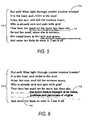
- a textual overlay expands into the space below an annotation tag 114.
- the annotation tag 114 is selected, the primary body of text 112 in that space 116 does not move away; but instead fades in color hue or lightens in gray scale as seen in Figure 6.
- the annotation tag 114 is then expanded into a full annotation 118 that lies over the grayed out space 116. The difference in brightness of the two layers of text can make the annotation readable while still preserving context with respect to the primary body of data.
- gray-out overlay technique facilitates addition of user created textual annotations to a text sample 120.
- the sample 120 is displayed on an electronic pen sensitive tablet computer that permits a user to handwrite an annotation 128.
- text 126 underlying the annotation is grayed out to enhance viewability of the annotation.
- the added text can later be marked with an annotation tag (not shown) to permit easy retrieval and viewing of the handwritten annotation.
- a text sample 130 includes text 132 having an underscore annotation tag 134. Triggering the annotation tag 134, as seen in Figure 10, causes surrounding text tines to warp outward, spatially morphing to accept an intercalatory annotation 136.
- Figures 11 and 12 illustrate a text sample 140 that includes text 142 having a star shaped symbol annotation tag 144. Triggering the annotation 144, as seen in Figure 12, causes surrounding text lines to move apart, spatially morphing by line spacing adjustments to accept an intercalatory annotation 146. To better understand operation of such interline spatial morphing, pseudocode for interline expansion is presented as follows:
- Figures 13 and 14 present an example of yet another spatial morphing technique.
- a text sample 150 includes text 152 having a tabular icon annotation tag 154. Triggering the annotation tag 154, as seen in Figure 14, causes surrounding text and graphics lines to move aside, spatially morphing to accept an intercalatory tabular annotation 146.
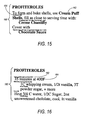
- Figure 15 illustrates a depiction of a recipe 160 having a body of text 162 and associated annotations 164.
- the relative size of text 162 and annotations 164 can be reversed to accentuate either the ingredients or the recipe needed to prepare living organs.
- a depiction of recipe 170 can have a body of text 172 in conjunction with a spatially distorted (squashed) body of text 174. If the line selection is reversed (not shown), the text 172 can be squashed while text 172 is presented in an undistorted form.
- Figure 18 illustrates a text sample 180 in which a particular line 182 is a subject of user focus, while text line 184 is marginally diminished in size to accentuate the selected line. Lines far from text line 182 (such as text line 186) can remain unchanged in size, matching the size of user selected text line 182.
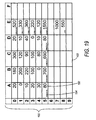
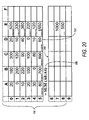
- Figures 19 and 20 illustrate operation of the present invention in conjunction with a spreadsheet, a complex arrangement of text, numerical data linked by formulas and constraints, and graphics to define cell layout.
- a spreadsheet 190 can include numeric data 192, graphical elements 193, and formula annotation tags 194 positioned adjacent to numeric data 192.
- numeric data 192 can include numeric data 192, graphical elements 193, and formula annotation tags 194 positioned adjacent to numeric data 192.
- FIG 20 when a user focuses on a particular cell (5A) the graphical elements are spatially morphed to separate, leaving a gap into which an annotation 198 can be fitted.
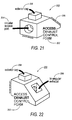
- Figures 21 and 22 illustrate a complex two dimensional display representation 200 of a three dimensional object.
- the size of the various annotations 204 and 206 increases or decreases in accordance with the user perspective on the virtual object.
- the annotation remains basically unchanged.
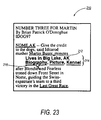
- Figures 23 and 24 show still another embodiment of the present invention.
- a textual representation 210 supports multiple nesting links functioning as an enhanced hypertext.
- selection of annotation tag 212 causes text to move apart and accommodate presentation of multiple link 214.
- selection of one of the links opens yet another link related to "Biography”.
- the multiple links 214 still remain in view, preserving context during search of the multiple links.
- This process is a "negotiation" because neither participant in the exchange has complete control over the layout and presentation decision.
- the primary object cannot dictate how the supporting object is displayed, nor can the supporting object demand a particular region into which to expand itself. Instead, the participants make requests and proposals based on the information they have of their own layout and presentation needs. The sequence of requests and responses effectively exchange enough information so that a mutually satisfactory situation can be settled upon.
- This "fluid" negotiation architecture enables a component model of fluid documents in which different fluid objects can co-exist without being designed specifically to interact with one another.
- a framework for a hierarchical graphical characteristics language allows fluid objects to gracefully handle requests from other fluid objects that present different or more complex graphical characteristics, determining which fluid objects will be affected, selecting and composing space-making strategies, ensuring salience of the expanded supporting object and protocols for multiple graphical domains, providing a negotiation sequence for resolving space allocation and presentation, and animating the expanding supporting object and the accommodating primary object
- This step simply begins the negotiation. By passing along the graphical characteristics protocol that it adheres to (see next section), the child object informs the parent object about the type of graphical object it is, and thus what presentation capabilities it can accommodate.
- a child object does not know anything about its parent's presentation. Therefore, it does not initially know if its expanded form will present an effective contrast to the surrounding parent information.
- the parent object is in charge of communicating guidelines to the child object regarding desired graphical characteristics. For example, if the parent object is a page of text, using the font Times at 12 point, and colored black, it might suggest the following guidelines to an expanding textual annotation: sans-serif font between 10 and 14 point, highly saturated in color. This ensures that the expanded annotation is of comparable size, but is distinct with a different font and a bright color.
- Child objects try to conform to the guidelines if possible, but they are not constrained to following them. This is the first evidence of negotiation in the architecture ⁇ the child object asks its parent for guidelines in preparation for expansion; the parent makes recommendations; the child takes those recommendations under advisement as it prepares its first formal request for space.
- protocol components are described as ranges, either quantitatively or qualitatively.
- step 5 when the child agrees to a proposed situation, protocol components become specific descriptions of the fluid object's intended presentation, including its size and location.
- the protocol must be known to both parties of the negotiation.
- a fluid object performing as a child object in a negotiation need only know the protocol for its graphical type.
- any fluid object may be confronted with a foreign protocol: parent objects may have children of varying types, and any object may be involved in a negotiation where it is bumped aside by a sibling object of any type.
- protocols can be arranged hierarchically, with protocols lower in the hierarchy acting as strict subsets of those above it in the hierarchy. All protocols descend from a common root, which is the basic protocol that all objects will obey: size and location.
- a fluid object confronted with a foreign protocol simply follows the protocol's parent chain until it finds a protocol it knows about. It then communicates using this simpler protocol to suggest guidelines. Because the simpler protocol will not include as many features, the guideline communication will be less rich. In the case where the root protocol must be used, no guidelines are communicated at all; later, only the size and location will be negotiated.
- Such a protocol hierarchy allows new types of fluid objects to be created and used in existing fluid documents without re-coding. A new fluid object may have graphical parameters that the existing document is not informed about, but the system is likely to still settle upon reasonable presentations.
- the child object Once the child object has the guidelines, it can determine how much it can follow the guidelines, and then create a request for space based on its choice.
- the parent has suggested that the child use a sans-serif font, at 10 to 14 point.
- the child object is a code snippet, and prefers to use Courier, which is a serif font. It selects Courier at 12 point, and then calculates how much space the text of the code snippet will need based on that font face and size.
- the space is specified as a desired quantity and a minimum and maximum the child could handle. This request implicitly asks for space near the anchor.
- some protocols allow the space to be specified as an area, with minimum width and minimum height. Textual annotations, for example, can flexibly layout by reflowing across multiple lines. Requesting an area rather than a specific width and height allows the parent more leeway in selecting an effective space.
- the selected strategy may require the parent to extend or change the guidelines it initially suggested to the child.
- the initial guidelines were based on a likely guess by the parent; the additional information provided by the child ⁇ space and its possible graphical presentation ⁇ may change the selected strategy from the one the parent initially anticipated.
- These conditions are specified in the request specification (based on a graphical characteristics protocol) that is returned to the child. For example, if the parent ends up choosing an overlay strategy, it will ask the child to present itself in a dark color in order to contrast with the light color that the parent will become. Another possibility is that the granted space will not be near the anchor, in which case the parent object alerts the child object that a connection line will be used.
- Fluid objects must be able to give space to a child object that wishes to expand.
- Each fluid object provides its own strategies for coming up with space ⁇ that is, they are designed by the developer rather than being part of the architecture. The strategies are not described declaratively; rather, they are procedures that consider how to alter the layout of the fluid object in order to accommodate an expanding child object.
- Space-making strategies can be categorized into four categories:
- the expanding child object In the first two cases, rigid movement and deformation, the expanding child object is given empty space in which to display itself. It must make itself salient only in contrast to the nearby parts of the parent object.
- the parent and child objects must work together to ensure that the child object is discernible.
- the graphical characteristics protocol for the object is used to negotiate an acceptable graphical presentation.
- the parent usually must provide some indication of the part of itself to which the child object is anchored. This is often accomplished by drawing a line connecting the anchor and the child object. Routing of these connecting "callout" lines is the responsibility of the parent object, which has the information about its own layout that can be used to best place the line.
- the foregoing space-making strategies each fluid object has are ordered, from the most preferable strategies (because they result in the most aesthetic or understandable layouts) to the least preferable. Each strategy has limitations on the maximum size it can accommodate.
- the fluid object evaluates each of the strategies in turn until it finds one that will satisfy the space requirements requested by the expanding child object.
- strategies across and within the categories are composable. If a strategy is marked (by the implementor) as composable, the architecture keeps track of how much space that the strategy would provide. Then it seeks the remaining space requested as it evaluates the next strategy. The ordering of strategies is also used to order the composition of multiple strategies.
- a first-order description of a fluid document interaction could simply be "make space for the supporting object to expand into.” To accomplish this, the application must decide which other objects must give up the space, and whether that will require yet other objects to relinquish space.
- the fluid architecture manages this problem by specifying all the fluid objects to be organized in a typical object containment hierarchy.
- the containment hierarchy partitions the space into nested bounding boxes.
- a child object C1 which is not expanded will have a bounding box corresponding to its cue, and its own child objects will usually have no spatial presence at all until C1 is expanded.
- objects can alter their presentation as necessary within their bounding box. They can also manipulate child objects, as long as the contract that expanded the child object into that position remains the same. (Otherwise another negotiation occurs.) If a negotiation between an object P1 and one of its child objects C1 suggests that the P1 must move or expand its bounding box within its parent's (P2's) region, a further negotiation between P1 and P2 must take place. All such cascaded negotiations can go no further than the root object.
- negotiation for space will result in an expanded child object moving out of the parent object's bounding box, becoming a sibling of the parent object. This can occur in callout-style fluid expansions, for example.
- the final step of the negotiation is for the child to consider the complete proposal from the parent.
- the proposal includes space, location, and potentially some conditions on its graphical presentation, usually expressed as ranges of acceptable values. It is possible that the child cannot accept the conditions, and must then reject the offer. However, this case is intended to happen only rarely, and usually does not occur because design module 36 follows permissive rather than restrictive negotiation strategies.
- design module 36 follows permissive rather than restrictive negotiation strategies.
- the child object must reject the offer ⁇ for example, if there are a great number of other already expanded child objects taking up the space ⁇ it resorts to a non-fluid fallback strategy for presenting itself (for example, opening up in a new window).
- a non-fluid fallback strategy for presenting itself (for example, opening up in a new window).
- the child object accepts the offer, it informs its parent of the precise graphical characteristics it has selected.
- the parent finalizes its own strategy and accepts offers from any negotiation it has engaged in with its own parent. As each level of the negotiation is concluded, the information needed to animate each fluid object is collected. These animations are coordinated to ensure that the entire document changes with one smooth motion.
Landscapes
- Engineering & Computer Science (AREA)
- Theoretical Computer Science (AREA)
- General Engineering & Computer Science (AREA)
- Physics & Mathematics (AREA)
- General Physics & Mathematics (AREA)
- Computational Linguistics (AREA)
- General Health & Medical Sciences (AREA)
- Health & Medical Sciences (AREA)
- Audiology, Speech & Language Pathology (AREA)
- Artificial Intelligence (AREA)
- Human Computer Interaction (AREA)
- Processing Or Creating Images (AREA)
- Information Retrieval, Db Structures And Fs Structures Therefor (AREA)
- Controls And Circuits For Display Device (AREA)
- Instructional Devices (AREA)
Applications Claiming Priority (4)
| Application Number | Priority Date | Filing Date | Title |
|---|---|---|---|
| US98451 | 1998-06-17 | ||
| US09/098,451 US6230170B1 (en) | 1998-06-17 | 1998-06-17 | Spatial morphing of text to accommodate annotations |
| US09/098,942 US6584479B2 (en) | 1998-06-17 | 1998-06-17 | Overlay presentation of textual and graphical annotations |
| US98942 | 1998-06-17 |
Publications (2)
| Publication Number | Publication Date |
|---|---|
| EP0965925A2 true EP0965925A2 (de) | 1999-12-22 |
| EP0965925A3 EP0965925A3 (de) | 2005-12-21 |
Family
ID=26794754
Family Applications (1)
| Application Number | Title | Priority Date | Filing Date |
|---|---|---|---|
| EP99111665A Ceased EP0965925A3 (de) | 1998-06-17 | 1999-06-16 | Überlagerte Darstellung von Text- und Grafikanmerkungen |
Country Status (2)
| Country | Link |
|---|---|
| EP (1) | EP0965925A3 (de) |
| JP (1) | JP4309997B2 (de) |
Cited By (8)
| Publication number | Priority date | Publication date | Assignee | Title |
|---|---|---|---|---|
| WO2002021158A3 (en) * | 2000-09-08 | 2002-06-27 | Landmark Graphics Corp | System and method for attaching drilling information to three-dimensional visualizations of earth models |
| US7103852B2 (en) | 2003-03-10 | 2006-09-05 | International Business Machines Corporation | Dynamic resizing of clickable areas of touch screen applications |
| EP2074525A4 (de) * | 2006-10-19 | 2010-01-20 | Isforu Co Ltd | System zum anzeigen und verwalten von informationen auf einer webseite unter verwendung eines indikators |
| GB2471848A (en) * | 2009-07-13 | 2011-01-19 | Thales Holdings Uk Plc | Maintaining correct position of overlaid annotations |
| US20120159329A1 (en) * | 2010-12-16 | 2012-06-21 | Yahoo! Inc. | System for creating anchors for media content |
| WO2014178816A1 (en) * | 2013-04-29 | 2014-11-06 | Landmark Graphics Corporation | Optimizing the placement of clustered textural annotations |
| KR20150097172A (ko) * | 2014-02-18 | 2015-08-26 | 삼성전자주식회사 | 링크 객체에 연결된 전자문서의 표시 방법 및 전자 장치 |
| WO2017040652A1 (en) * | 2015-09-01 | 2017-03-09 | Branchfire, Inc. | Method and system for annotation and connection of electronic documents |
Families Citing this family (24)
| Publication number | Priority date | Publication date | Assignee | Title |
|---|---|---|---|---|
| JP2001326804A (ja) * | 2000-05-16 | 2001-11-22 | Sharp Corp | 画像処理装置及び画像処理システム |
| JP2003099302A (ja) * | 2001-09-21 | 2003-04-04 | Ricoh Co Ltd | 文書変換サービス方法、文書のデータ構造、記憶媒体及び情報処理装置 |
| US20040119762A1 (en) * | 2002-12-24 | 2004-06-24 | Fuji Xerox Co., Ltd. | Systems and methods for freeform pasting |
| JP2004302578A (ja) * | 2003-03-28 | 2004-10-28 | Minolta Co Ltd | ファイル出力プログラム |
| JP4808029B2 (ja) * | 2003-08-21 | 2011-11-02 | マイクロソフト コーポレーション | 空中点を利用したフォーカス管理 |
| US7577902B2 (en) * | 2004-12-16 | 2009-08-18 | Palo Alto Research Center Incorporated | Systems and methods for annotating pages of a 3D electronic document |
| US8502856B2 (en) | 2010-04-07 | 2013-08-06 | Apple Inc. | In conference display adjustments |
| JP5720133B2 (ja) * | 2010-07-13 | 2015-05-20 | ソニー株式会社 | 情報処理装置、情報処理方法およびコンピュータプログラム |
| JP5664164B2 (ja) * | 2010-11-18 | 2015-02-04 | 株式会社リコー | 電子情報ボード装置、情報表示方法、プログラム |
| US8782513B2 (en) * | 2011-01-24 | 2014-07-15 | Apple Inc. | Device, method, and graphical user interface for navigating through an electronic document |
| US12287962B2 (en) | 2013-09-03 | 2025-04-29 | Apple Inc. | User interface for manipulating user interface objects |
| US10545657B2 (en) | 2013-09-03 | 2020-01-28 | Apple Inc. | User interface for manipulating user interface objects |
| WO2015183366A1 (en) | 2014-05-30 | 2015-12-03 | Apple, Inc. | Continuity |
| CN112199000B (zh) | 2014-09-02 | 2024-07-02 | 苹果公司 | 多维对象重排 |
| US10073590B2 (en) | 2014-09-02 | 2018-09-11 | Apple Inc. | Reduced size user interface |
| US10637986B2 (en) | 2016-06-10 | 2020-04-28 | Apple Inc. | Displaying and updating a set of application views |
| DK201670595A1 (en) | 2016-06-11 | 2018-01-22 | Apple Inc | Configuring context-specific user interfaces |
| US12242707B2 (en) | 2017-05-15 | 2025-03-04 | Apple Inc. | Displaying and moving application views on a display of an electronic device |
| US12511021B2 (en) | 2020-09-14 | 2025-12-30 | Apple Inc. | Device management user interface |
| US11907605B2 (en) | 2021-05-15 | 2024-02-20 | Apple Inc. | Shared-content session user interfaces |
| US11822761B2 (en) | 2021-05-15 | 2023-11-21 | Apple Inc. | Shared-content session user interfaces |
| US12449961B2 (en) | 2021-05-18 | 2025-10-21 | Apple Inc. | Adaptive video conference user interfaces |
| US12405631B2 (en) | 2022-06-05 | 2025-09-02 | Apple Inc. | Displaying application views |
| US12578837B2 (en) | 2022-09-23 | 2026-03-17 | Apple Inc. | User interfaces for managing sharing of content in three-dimensional environments |
Family Cites Families (3)
| Publication number | Priority date | Publication date | Assignee | Title |
|---|---|---|---|---|
| US5283560A (en) * | 1991-06-25 | 1994-02-01 | Digital Equipment Corporation | Computer system and method for displaying images with superimposed partially transparent menus |
| US5559942A (en) * | 1993-05-10 | 1996-09-24 | Apple Computer, Inc. | Method and apparatus for providing a note for an application program |
| US5621871A (en) * | 1994-08-31 | 1997-04-15 | Jaremko; Mark | Automated system and method for annotation using callouts |
-
1999
- 1999-06-10 JP JP16439399A patent/JP4309997B2/ja not_active Expired - Fee Related
- 1999-06-16 EP EP99111665A patent/EP0965925A3/de not_active Ceased
Non-Patent Citations (1)
| Title |
|---|
| ANON: "Wayback Machine entry for NiF Elastic Catalog", 20 June 1997 (1997-06-20), XP055401364, Retrieved from the Internet <URL:http://web.archive.org/web/19970620034718/http://table-saw.media.mit.edu/ecat/> [retrieved on 20170825] * |
Cited By (18)
| Publication number | Priority date | Publication date | Assignee | Title |
|---|---|---|---|---|
| US7970545B2 (en) | 2000-09-08 | 2011-06-28 | Landmark Graphics Corporation | Attaching drilling information to three-dimensional visualizations of earth models |
| US6801197B2 (en) | 2000-09-08 | 2004-10-05 | Landmark Graphics Corporation | System and method for attaching drilling information to three-dimensional visualizations of earth models |
| AU2001290739B2 (en) * | 2000-09-08 | 2005-07-28 | Landmark Graphics Corporation | System and method for attaching drilling information to three-dimensional visualizations of earth models |
| US7337067B2 (en) | 2000-09-08 | 2008-02-26 | Landmark Graphics Corporation | System and method for attaching drilling information to three-dimensional visualizations of earth models |
| WO2002021158A3 (en) * | 2000-09-08 | 2002-06-27 | Landmark Graphics Corp | System and method for attaching drilling information to three-dimensional visualizations of earth models |
| US7103852B2 (en) | 2003-03-10 | 2006-09-05 | International Business Machines Corporation | Dynamic resizing of clickable areas of touch screen applications |
| EP2074525A4 (de) * | 2006-10-19 | 2010-01-20 | Isforu Co Ltd | System zum anzeigen und verwalten von informationen auf einer webseite unter verwendung eines indikators |
| GB2471848B (en) * | 2009-07-13 | 2012-01-18 | Thales Holdings Uk Plc | Method and apparatus for viewing information |
| GB2471848A (en) * | 2009-07-13 | 2011-01-19 | Thales Holdings Uk Plc | Maintaining correct position of overlaid annotations |
| US20120159329A1 (en) * | 2010-12-16 | 2012-06-21 | Yahoo! Inc. | System for creating anchors for media content |
| WO2014178816A1 (en) * | 2013-04-29 | 2014-11-06 | Landmark Graphics Corporation | Optimizing the placement of clustered textural annotations |
| CN105210053A (zh) * | 2013-04-29 | 2015-12-30 | 兰德马克绘图国际公司 | 优化群集的结构注解的放置 |
| US10042833B2 (en) | 2013-04-29 | 2018-08-07 | Landmark Graphics Corporation | Optimizing the placement of clustered textural annotations |
| KR20150097172A (ko) * | 2014-02-18 | 2015-08-26 | 삼성전자주식회사 | 링크 객체에 연결된 전자문서의 표시 방법 및 전자 장치 |
| EP2908253A3 (de) * | 2014-02-18 | 2015-09-23 | Samsung Electronics Co., Ltd | Elektronische vorrichtung und verfahren zur anzeige elektronischer, mit link-objekten dafür verlinkter dokumente |
| US9910832B2 (en) | 2014-02-18 | 2018-03-06 | Samsung Electronics Co., Ltd. | Selecting user interface elements to display linked documents with a linking document |
| WO2017040652A1 (en) * | 2015-09-01 | 2017-03-09 | Branchfire, Inc. | Method and system for annotation and connection of electronic documents |
| US10380235B2 (en) | 2015-09-01 | 2019-08-13 | Branchfire, Inc. | Method and system for annotation and connection of electronic documents |
Also Published As
| Publication number | Publication date |
|---|---|
| EP0965925A3 (de) | 2005-12-21 |
| JP2000040158A (ja) | 2000-02-08 |
| JP4309997B2 (ja) | 2009-08-05 |
Similar Documents
| Publication | Publication Date | Title |
|---|---|---|
| US6230170B1 (en) | Spatial morphing of text to accommodate annotations | |
| US6584479B2 (en) | Overlay presentation of textual and graphical annotations | |
| EP0965925A2 (de) | Überlagerte Darstellung von Text- und Grafikanmerkungen | |
| US6185582B1 (en) | Spreadsheet view enhancement system | |
| US6256649B1 (en) | Animated spreadsheet for dynamic display of constraint graphs | |
| EP1174801B1 (de) | Klassifizieren, Verankern und Transformieren von elektronischen Notizen | |
| JP4236267B2 (ja) | 情報処理装置及び当該装置において実行されるレイアウト制御方法とそのプログラム | |
| JP4065545B2 (ja) | レイアウト制御方法及び装置とそのプログラム | |
| JP3941292B2 (ja) | ページ情報表示方法及び装置並びにページ情報表示用のプログラム又はデータを記憶した記憶媒体 | |
| US10417316B2 (en) | Emphasizing a portion of the visible content elements of a markup language document | |
| US7028256B2 (en) | Adding white space to a document generating adjusted page sizing | |
| EP1548617A2 (de) | Verfahren und Gerät zum Synchronisieren, Anzeigen und Manipulieren von Text und Bilddokumenten. | |
| US20080148147A1 (en) | Method and system for facilitating the examination of documents | |
| JP2005122728A (ja) | 可変データ文書の生成及び編集するためのユーザインターフェース | |
| Chang et al. | A negotiation architecture for fluid documents | |
| EP0965932A2 (de) | System zur Verbesserung der Darstellung eines elektronischen Tabellenblatts | |
| US8935608B2 (en) | Information processing method and apparatus | |
| US7519901B2 (en) | Methods and systems for selecting objects by grouping annotations on the objects | |
| KR100881479B1 (ko) | 정보 처리 방법 및 그 장치 | |
| JP2008146637A (ja) | ドメイン変換言語 | |
| KR101368960B1 (ko) | 전자 문서 표시 방법 및 시스템 | |
| DeRose | What is a diagram, really? | |
| Popmintchev | Engineering and Scientific Manuscripts with Microsoft Word 2024 | |
| Taras et al. | Improving screen magnification using the HyperBraille multiview windowing technique | |
| Branch | Electronic Flight and Technical Manual Design Guidelines |
Legal Events
| Date | Code | Title | Description |
|---|---|---|---|
| PUAI | Public reference made under article 153(3) epc to a published international application that has entered the european phase |
Free format text: ORIGINAL CODE: 0009012 |
|
| AK | Designated contracting states |
Kind code of ref document: A2 Designated state(s): AT BE CH CY DE DK ES FI FR GB GR IE IT LI LU MC NL PT SE |
|
| AX | Request for extension of the european patent |
Free format text: AL;LT;LV;MK;RO;SI |
|
| PUAL | Search report despatched |
Free format text: ORIGINAL CODE: 0009013 |
|
| AK | Designated contracting states |
Kind code of ref document: A3 Designated state(s): AT BE CH CY DE DK ES FI FR GB GR IE IT LI LU MC NL PT SE |
|
| AX | Request for extension of the european patent |
Extension state: AL LT LV MK RO SI |
|
| 17P | Request for examination filed |
Effective date: 20060621 |
|
| AKX | Designation fees paid |
Designated state(s): DE FR GB |
|
| 17Q | First examination report despatched |
Effective date: 20060811 |
|
| STAA | Information on the status of an ep patent application or granted ep patent |
Free format text: STATUS: THE APPLICATION HAS BEEN REFUSED |
|
| 18R | Application refused |
Effective date: 20180323 |