EP0974916A2 - Procédé et dispositif pour afficher des documents web - Google Patents
Procédé et dispositif pour afficher des documents web Download PDFInfo
- Publication number
- EP0974916A2 EP0974916A2 EP99305718A EP99305718A EP0974916A2 EP 0974916 A2 EP0974916 A2 EP 0974916A2 EP 99305718 A EP99305718 A EP 99305718A EP 99305718 A EP99305718 A EP 99305718A EP 0974916 A2 EP0974916 A2 EP 0974916A2
- Authority
- EP
- European Patent Office
- Prior art keywords
- web document
- display
- scale
- down picture
- sub
- Prior art date
- Legal status (The legal status is an assumption and is not a legal conclusion. Google has not performed a legal analysis and makes no representation as to the accuracy of the status listed.)
- Granted
Links
Images


Classifications
-
- G—PHYSICS
- G06—COMPUTING OR CALCULATING; COUNTING
- G06F—ELECTRIC DIGITAL DATA PROCESSING
- G06F16/00—Information retrieval; Database structures therefor; File system structures therefor
- G06F16/90—Details of database functions independent of the retrieved data types
- G06F16/95—Retrieval from the web
- G06F16/957—Browsing optimisation, e.g. caching or content distillation
- G06F16/9577—Optimising the visualization of content, e.g. distillation of HTML documents
Definitions
- the present invention relates to a system for displaying web documents and a method therefor, and more particularly, to a system for displaying web documents so that users can grasp the entire configuration of a web page and a method therefor.
- the World-Wide Web which will be referred to as the Web hereinafter, is the most popular information provider on the Internet.
- the Web allows information to be provided and exchanged in the forms of graphics and sound as well as text.
- Web accessible function a function accessible to the Web
- portable equipment such as a laptop computer, a notebook computer, a mobile phone, and PDAs/PCAs (Personal Digital/Communication Assistants) in addition to a desktop computer, but also home appliances having a display function such as a digital TV or an internet TV.
- PDAs/PCAs Personal Digital/Communication Assistants
- hypertext indicates text information that includes links to other on-line information therein and the term “hypermedia” indicates information that includes links to information in several forms such as images, sounds, and even motion images as well as simple characters.
- URL Universal Resource Locator
- the web documents which can be accessed via the Web are written into Hypertext Markup Language (HTML) which provides a basic document format and allows links to other servers or files to be specified.
- HTML Hypertext Markup Language
- a tag is used as a command which is inserted in the middle of a text in order to display the text on a screen or link to other web documents.
- ⁇ HTML> declares that the document is made up in the form of HTML
- ⁇ HEAD> means that information about the written time and size of the document is loaded
- ⁇ BODY> means the main text of the document.
- the HTML document requested by a web browser is provided to the web browser by a web server.
- the web browser analyzes a tag inserted in the provided document, and displays the document in an appropriate manner based on the analyzed result.
- the displayed web document is a HTML document of frame structure which is displayed as several divided screens each called a "frame" via a web browser, a ⁇ frame> or ⁇ frameset> tag indicating that a frame structure is included therein.
- the web browser grasps the frame structure of the HTML document via the frame tag.
- Figure 1a shows a conventional web document displayed on a screen according to a prior art display method.
- a scroll bar 191 is provided to allow users to scroll the remaining portions.
- Figure 1b shows web documents of frame structure displayed on a screen according to a conventional display method.
- Four frame-structured documents 100, 110, 120 and 130 are displayed on a screen. Also, if dimension of the document is beyond the frame size, respective scroll bars 101, 111, 121 and 131 are provided to the documents. A user manipulates each scroll bar 101, 111, 121 or 131 so as to see the remaining portions which are beyond the screen.
- Figure 1c shows HTML documents of frame structure displayed on a screen according to a conventional display method.
- frames 140, 150, 160 and 170 are arranged vertically in which a scroll bar 180 is provided to scroll a content or frame which has not been displayed on the screen.
- the user has the difficulty in grasping the entire structure of the document. As a result, the user cannot select a desired frame quickly. Also, a shift between frames is slow.
- a web document display system comprising: a web document retriever for retrieving a web document via a network; a main display for displaying the retrieved web document thereon; a scale-down picture generator for generating a scale-down picture obtained by scaling down the web document not more than a predetermined size; and a sub-display for displaying the scale-down picture.
- a frame structure determiner for grasping the frame structure of the retrieved web document. It is preferable that the frame structure of the web document is indicated on the scale-down picture.
- the sub-display is preferably comprised of a scale-down picture window which is formed on a portion of the main display.
- the present invention preferably further comprises a scale-down picture selector for selecting a display or a non-display of the scale-down picture window.
- the sub-display is preferably in a non-display mode if predetermined time elapses after the scale-down picture window is displayed.
- embodiments of the present invention preferably comprise: a main device including the web document retriever and the main display attached thereto, and the frame structure determiner for grasping the frame structure of the retrieved web document; a sub-device including the scale-down picture generator and the sub-display attached thereto, and a user inputter; and a communicator for allowing the main device and the sub-device to communicate with each other, thereby providing information about the frame structure grasped by the frame structure determiner to the sub-device and transferring the frame select information inputted through the user inputter to the main device.
- the sub-display displays the frame structure as provided, to thereby allow the user to select the frame through the user inputter, and for this purpose, it is more effective that the main display displays the selected frame according to the frame select information.
- the communicator is preferably a wire or wireless communicator.
- the sub-display is preferably controlled so as to emphasize and display the frame selected by the user inputter.
- the main display sequentially displays the selected frames at a predetermined interval of time.
- a web document display method comprising the steps of: displaying a web document retrieved via a network; generating a scale-down picture obtained by scaling down the web document to not more than a predetermined size; and displaying the scale-down picture.
- the scale-down picture is preferably indicated as a window which occupies a part of the screen on which the web document is displayed. Also, the present invention preferably further comprises the step of selecting a display or a non-display of the scale-down picture window.
- the present invention may further comprise the step of performing a non-display of the scale-down picture if a predetermined time elapses after the scale-down picture window is displayed.
- the scale-down picture generating step preferably comprises the steps of: storing the web document; grasping the frame structure of the web document; and generating the frame structure into the scale-down picture, in which the retrieved web document is displayed on a predetermined location of the main display.
- the scale-down picture displaying step preferably comprises the steps of: transferring the scale-down picture to a remotely located sub-display; and displaying the scale-down picture on the sub-display.
- the present invention further comprises the steps of selecting at least one frame from the scale-down pictures, and displaying the selected frame on the main display.
- Figure 2 is a block diagram of a web document display system according to a first embodiment of the present invention.
- the web document display system includes a network 310 for rendering a connection between a plurality of computers or servers, a main device 300 for retrieving web documents via the network 310 and displaying the retrieved result thereon, and a sub-device 320 for displaying information about the web document frame structure received from the main device.
- the main device 300 and the sub-device 320 are individual apparatuses which include their own communication interfacers, and thus, they perform transmission and reception of information via a wire communication or a wireless communication such as a RF communication.
- the network 310 includes the Internet for retrieving web documents
- the main device 300 can be connected to the network 310, as in home appliances having a display function such as a digital TV or an internet TV as well as portable equipment such as a desktop computer, a laptop computer, a notebook computer, a mobile phone, a web video phone and PDAs/PCAs (Personal Digital/Communication Assistants).
- the sub-device 320 is a remote control device having a display function of received data, which can perform transmission and reception of data via a wire or wireless communication with the main device 300.
- Figure 3 is a detailed block diagram of Figure 2.
- the main device 300 includes a web document retriever 301 for retrieving a web document via a network 310 based on the command received from a user, a main display 303 for displaying the retrieved web document thereon, a frame structure determiner 302 for judging whether the retrieved web document is of frame structure for and grasping the frame structure if a corresponding document has a frame structure, and a main communication interfacer 304 for communicating with the sub-device 320.
- the sub-device 320 includes a user inputter 321 for allowing a user to input a frame select command or a web document retrieving command, a scale-down picture generator 325 for generating a scale-down picture to indicate a frame structure, using frame structure information received from the frame structure determiner 302 via a user communication interfacer 326, and a sub-display 322 for displaying the scale-down picture received from the scale-down picture generator 325.
- main display 303 and the sub-display 322 respectively include controllers for controlling transmission and reception of data.
- Figure 4 is a flow-chart view showing a display method for displaying a web document of a frame structure according to the present invention.
- the web document retriever 301 receives from a user a retrieving command to retrieve a web document, receives data from the network 310, and fetches a retrieved web document (step 400).
- the user directly inputs the command for retrieval via an input device provided in the web document retriever 301.
- the user can input a retrieving command via an input device provided in a user inputter 321 of the sub-device 320 when the sub-device 320 is remote considerably far from the main device 300.
- the user retrieving command is transmitted to the web document retriever 301 of the main device 300 via an input command transceiver (not shown).
- the user inputter 321 can be implemented using various patterns such as a mouse, a track ball, a touch screen or a user button panel, with which the user can click a select panel displayed on the screen of the sub-display 322.
- the web document is made up of the HTML, including one or more commands called a tag.
- the frame structure determiner 302 judges whether or not a corresponding web document is of frame structure or not according to the judgment as to whether or not a frame tag declaring the frame structure is inserted into the web document (step 410).
- the web document is displayed on the main display 303 without any modification as it is (step 420). However, if the retrieved web document is a frame structured document, the main display 303 displays only the first frame in the retrieved web document (step 430).
- a sequence of frames is determined according to the sequence of frame tags. In this case, the user can select a frame to be displayed initially by setting an initial- value.
- the frame structure determiner 302 grasps the frame structure via the inserted tag (step 440). Then, the frame structure determiner 302 transmits the frame structure information to the sub-display 322 via the main communication interfacer 304 (step 450).
- the sub-display 322 having received the frame structure information arranges all the frames at a predetermined ratio on a self-contained screen and displays the arranged frames (step 460). In this case, the sub-display 322 displays the frames displayed on the main display 303 of the main device 300 with an emphasis among the entire frames displayed on the screen of the sub-display 322, using a highlight or motion image icon, to discriminate them from the remainders.
- the user identifies the frame structures of the web documents displayed on the sub-display 322 of the sub-device 320, and on this basis, the user selects a desired frame via the user inputter 321 (step 470).
- the sub-display 322 informs the user of which frame has been selected by placing a highlight mark on a corresponding frame or using a motion image icon.
- the sub-communication interfacer that is, the user communication interfacer 326 transmits the frame information selected by the user to the main display 303 of the main device 300 (step 480).
- the main display 303 having received the user's selected frame information updates and displays the corresponding frame on the screen (step 490).
- the user can select a plurality of frames.
- the main display 303 sequentially displays the selected frames at a predetermined interval of time on the screen.
- Figure 5a is a schematic view illustrating the states of the web documents displayed on a main device 300 and a sub-device 320, while performing step 460 of Figure 4.
- the first frame of the web document retrieved by the web document retriever 301 is displayed.
- the sub-display 322 of the sub-device 320 all the frames of the web document are arranged at a predetermined ratio on a single screen.
- the frame number is determined according to the sequence of the frame tags entered in the web document. Since the first frame is displayed on the main display 303 of the main device 300, the sub-display 322 of the sub-device 320 emphasizes the corresponding frame, to allow the user to easily see which frame has been displayed on the main display of the main device.
- Figure 5b is a schematic view illustrating the states of web documents displayed a main device 300 and a sub-device 320, while performing step 490 of Figure 4.
- the main display 303 of the main device 300 On the main display 303 of the main device 300, a frame selected by the user is displayed. On the sub-display 322 of the sub-device 320, all the frames of the web document are arranged at a predetermined ratio on a single screen. Since the third frame is displayed on the main display 303 of the main device 300, the sub-display 322 of the sub-device 320 emphasizes the corresponding frame, emphasized to allow the user to easily see which frame has been displayed on the main display of the main device.
- Figure 6 is a perspective view of a web video phone according to a second embodiment of the present invention.
- Figure 7 is a block diagram of a web document display apparatus implemented in the web video phone of Figure 6.
- a web video phone is an information terminal with which a color liquid crystal display screen 500, a key board 510, a card reader (not shown), a CCD (charge coupled device) camera 520, etc. are equipped.
- the web video phone allows users to utilize international calls or video calls at a low cost via a general public telecommunication network or the Internet.
- the web video phone which is the second embodiment of the web document display system according to the present invention, a main device and a sub-device are not separate individual devices but are incorporated into a single apparatus.
- the web video phone includes a web document retriever 601 for retrieving a web document via a network based on a user command, a main display 603 for displaying the retrieved web document, a user inputter 621 provided in a position of the web video phone, which includes an entire screen scale-down key for displaying a scale-down picture of the entire web document or non-displaying the scale-down picture, a scale-down picture generator 625 for generating a scale-down picture of the retrieved web document, and a sub-display 620 for displaying the scale-down picture received from the scale-down picture generator 625.
- the sub-display 620 includes a scale-down picture window formed on a portion of the main display 603.
- a memory 602 for storing web documents therein is included in the scale-down picture generator 625.
- Figure 8 is a flow-chart view showing a method for displaying a web document of the web video phone according to an embodiment of the present invention.
- the main display 603 displays the web document received from the web document retriever 601 (step 700) and the scale-down picture generator 625 stores the retrieved web document in the memory 602 (step 710).
- step 720 the web document stored in the memory 602 is scale-downed and the scale-downed web document is displayed on a scale-down picture window formed on a position of the screen of the main display 603 (step 730).
- the entire screen scale-down key is a button on a control panel in a conventional web video phone, which is provided in a predetermined position. As a user presses the entire screen scale-down key, the entire web document is scale-downed and displayed on a scale-down picture window. Accordingly, the user can see the entire web document, although it is beyond the screen of the main display 603.
- the scale-down picture generator 625 can generate a scale-down picture of the screen -on which the entire frame structure is displayed, so that frame structure information can be seen.
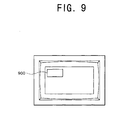
- Figure 9 shows a main display screen on which a scale-down picture window of a web document is displayed.
- a scale-down picture of the web document is moved to a predetermined position on the screen of the main display 603 according to a user's selection.
- step 750 if the user wishes to delete the scale-down picture displayed on the scale-down picture window located on the screen of the main display 603, he or she re-presses the entire screen scale-down key. If the entire screen scale-down key is re-pressed (step 740), the scale-down picture window disappears (step 750).
- the entire screen scale-down key need not be re-pressed.
- the scale-down picture of the entire document is displayed on the display screen for a predetermined time and then automatically deleted.
- the main device and the sub-device according to the present invention can be integrally implemented or separately implemented in a computer system, a mobile telecommunication terminal, etc.
- embodiments of the present invention are able to select the display of only a frame selected by a user via a sub-device such as a remote control device on a screen of a home appliance which corresponds to the main device, thereby simplifying the access to a frame.
- a sub-device such as a remote control device on a screen of a home appliance which corresponds to the main device, thereby simplifying the access to a frame.
- it is more effective where a web document has a complicated frame structure or a screen of a main device is not so large.
- Embodiments of the present invention enable the display of a web document and at the same time the display of a scale-down picture of the entire web document, to thereby allow a user to see the entire structure of the web document easily.
Landscapes
- Engineering & Computer Science (AREA)
- Databases & Information Systems (AREA)
- Theoretical Computer Science (AREA)
- Data Mining & Analysis (AREA)
- Physics & Mathematics (AREA)
- General Engineering & Computer Science (AREA)
- General Physics & Mathematics (AREA)
- Information Transfer Between Computers (AREA)
- User Interface Of Digital Computer (AREA)
- Controls And Circuits For Display Device (AREA)
- Computer And Data Communications (AREA)
- Information Retrieval, Db Structures And Fs Structures Therefor (AREA)
Applications Claiming Priority (4)
| Application Number | Priority Date | Filing Date | Title |
|---|---|---|---|
| KR10-1998-0029286A KR100374582B1 (ko) | 1998-07-21 | 1998-07-21 | 프레임 구조의 웹 문서 디스플레이 시스템 및 그 방법 |
| KR9829286 | 1998-07-21 | ||
| KR1019980034876A KR100565034B1 (ko) | 1998-08-27 | 1998-08-27 | 축소 화면 디스플레이 방법 |
| KR9834876 | 1998-08-27 |
Publications (3)
| Publication Number | Publication Date |
|---|---|
| EP0974916A2 true EP0974916A2 (fr) | 2000-01-26 |
| EP0974916A3 EP0974916A3 (fr) | 2005-08-10 |
| EP0974916B1 EP0974916B1 (fr) | 2010-10-06 |
Family
ID=36147589
Family Applications (1)
| Application Number | Title | Priority Date | Filing Date |
|---|---|---|---|
| EP99305718A Expired - Lifetime EP0974916B1 (fr) | 1998-07-21 | 1999-07-20 | Procédé et dispositif pour afficher des documents Internet |
Country Status (5)
| Country | Link |
|---|---|
| US (1) | US7032172B1 (fr) |
| EP (1) | EP0974916B1 (fr) |
| JP (1) | JP3623403B2 (fr) |
| CN (1) | CN100392634C (fr) |
| DE (1) | DE69942816D1 (fr) |
Cited By (6)
| Publication number | Priority date | Publication date | Assignee | Title |
|---|---|---|---|---|
| EP1223518A2 (fr) | 2001-01-16 | 2002-07-17 | Samsung Electronics Co., Ltd. | Système de communication d'informations ayant une fonction de vue en gros plan d'un document web, méthode et support d'enregistrement associés |
| WO2002013176A3 (fr) * | 2000-08-07 | 2003-07-03 | Zframe Inc | Exploration visuelle de contenus au moyen de representations tramees |
| EP1148703A3 (fr) * | 2000-03-31 | 2004-03-17 | Ricoh Company, Ltd. | Dispositif d'entrée d'image, programme exécuté par ordinateur, et procédé de préparation de document avec image |
| EP1381970A4 (fr) * | 2001-04-26 | 2006-03-22 | Ibm | Navigateur d'image destine a une grande image et des applications a fenetre de petites dimensions |
| EP1486888A3 (fr) * | 2003-06-03 | 2006-05-17 | Nec Corporation | Appareil pour page-navigation |
| EP1785894A1 (fr) * | 2005-10-26 | 2007-05-16 | Alcatel Lucent | Procédé pour afficher une page Web dans la fenêtre d'un navigateur |
Families Citing this family (13)
| Publication number | Priority date | Publication date | Assignee | Title |
|---|---|---|---|---|
| US8089423B1 (en) | 2000-05-12 | 2012-01-03 | Harris Scott C | Automatic configuration of multiple monitor systems |
| US7210099B2 (en) * | 2000-06-12 | 2007-04-24 | Softview Llc | Resolution independent vector display of internet content |
| JP3950776B2 (ja) * | 2002-09-30 | 2007-08-01 | 株式会社日立国際電気 | 映像配信システム、及びそれに用いる映像変換装置 |
| WO2005041029A2 (fr) * | 2003-10-24 | 2005-05-06 | Matsushita Electric Industrial Co., Ltd. | Systeme de telecommande, systeme de commande a distance d'appareil de communication et appareil d'inspection de document |
| US20070174515A1 (en) * | 2006-01-09 | 2007-07-26 | Microsoft Corporation | Interfacing I/O Devices with a Mobile Server |
| KR20080024734A (ko) * | 2006-09-14 | 2008-03-19 | 삼성전자주식회사 | 웹문서 구성 장치 및 방법과 웹문서 배열 설정 장치 |
| JP5194673B2 (ja) | 2007-09-26 | 2013-05-08 | 株式会社日立製作所 | 携帯端末、及び情報の送受信方法 |
| US20110214063A1 (en) * | 2010-03-01 | 2011-09-01 | Microsoft Corporation | Efficient navigation of and interaction with a remoted desktop that is larger than the local screen |
| JP2011215909A (ja) * | 2010-03-31 | 2011-10-27 | Toshiba Corp | 電子機器、検索制御方法、及び検索制御プログラム |
| JP2012141902A (ja) * | 2011-01-05 | 2012-07-26 | Nec Corp | 情報処理端末とその制御方法 |
| US9275142B2 (en) * | 2012-02-29 | 2016-03-01 | Nokia Technologies Oy | Method and apparatus for multi-browser web-based applications |
| KR20150016695A (ko) * | 2013-08-05 | 2015-02-13 | 삼성전자주식회사 | 디스플레이장치 및 그 제어방법 |
| CN113497888B (zh) * | 2020-04-07 | 2023-05-02 | 华为技术有限公司 | 照片预览方法、电子设备和存储介质 |
Family Cites Families (29)
| Publication number | Priority date | Publication date | Assignee | Title |
|---|---|---|---|---|
| US4715059A (en) | 1985-11-07 | 1987-12-22 | Luma Telecom, Inc. | Conversational video phone |
| KR100220042B1 (ko) * | 1990-06-07 | 1999-09-01 | 가부시키가이샤 히타치 세이사쿠쇼 | 발표지원방법 및 그 장치 |
| US5654886A (en) * | 1995-03-14 | 1997-08-05 | Wsi Corporation | Multimedia outdoor information system |
| US5717940A (en) * | 1995-04-28 | 1998-02-10 | Ricoh Company, Ltd. | Method of selecting a target document using features of an example page |
| US5724506A (en) * | 1995-05-05 | 1998-03-03 | Apple Computer, Inc. | Replaceable and extensible connection dialog component of a network component system |
| US5781189A (en) * | 1995-05-05 | 1998-07-14 | Apple Computer, Inc. | Embedding internet browser/buttons within components of a network component system |
| US5640579A (en) * | 1995-07-24 | 1997-06-17 | Microsoft Corporation | Method and system for logically partitioning a view of a document object from a frame in which the document object is displayed |
| JP2000500887A (ja) * | 1995-09-25 | 2000-01-25 | アドビ システムズ インコーポレイテッド | 電子文書への最適アクセス |
| JP3461412B2 (ja) * | 1995-10-11 | 2003-10-27 | シャープ株式会社 | データ処理装置およびデータ処理方法 |
| US5572643A (en) | 1995-10-19 | 1996-11-05 | Judson; David H. | Web browser with dynamic display of information objects during linking |
| US6072598A (en) * | 1996-02-27 | 2000-06-06 | Intel Corporation | Method for enhancing usability of fax on small device |
| JP3234148B2 (ja) * | 1996-03-07 | 2001-12-04 | シャープ株式会社 | 表示制御装置 |
| US5963964A (en) * | 1996-04-05 | 1999-10-05 | Sun Microsystems, Inc. | Method, apparatus and program product for updating visual bookmarks |
| US6421070B1 (en) * | 1996-11-12 | 2002-07-16 | Digimarc Corporation | Smart images and image bookmarking for an internet browser |
| US5784058A (en) | 1996-05-28 | 1998-07-21 | Sun Microsystems, Inc. | User-controllable persistent browser display pages |
| US6034689A (en) * | 1996-06-03 | 2000-03-07 | Webtv Networks, Inc. | Web browser allowing navigation between hypertext objects using remote control |
| JPH10124518A (ja) * | 1996-10-17 | 1998-05-15 | Nec Corp | 優先アクセスウェブブラウジング処理装置 |
| US6031989A (en) * | 1997-02-27 | 2000-02-29 | Microsoft Corporation | Method of formatting and displaying nested documents |
| US6182072B1 (en) * | 1997-03-26 | 2001-01-30 | Webtv Networks, Inc. | Method and apparatus for generating a tour of world wide web sites |
| US6023714A (en) * | 1997-04-24 | 2000-02-08 | Microsoft Corporation | Method and system for dynamically adapting the layout of a document to an output device |
| US6069606A (en) * | 1997-05-15 | 2000-05-30 | Sony Corporation | Display of multiple images based on a temporal relationship among them with various operations available to a user as a function of the image size |
| US6326970B1 (en) * | 1997-05-16 | 2001-12-04 | Liberate Technologies | TV centric layout |
| US6266684B1 (en) * | 1997-08-06 | 2001-07-24 | Adobe Systems Incorporated | Creating and saving multi-frame web pages |
| US6008809A (en) * | 1997-09-22 | 1999-12-28 | International Business Machines Corporation | Apparatus and method for viewing multiple windows within a dynamic window |
| US6526424B2 (en) * | 1997-09-29 | 2003-02-25 | Fujitsu Limited | Browser image display bookmark system |
| JP4183311B2 (ja) * | 1997-12-22 | 2008-11-19 | 株式会社リコー | 文書の注釈方法、注釈装置および記録媒体 |
| US6389437B2 (en) * | 1998-01-07 | 2002-05-14 | Ion Systems, Inc. | System for converting scrolling display to non-scrolling columnar display |
| US6209009B1 (en) * | 1998-04-07 | 2001-03-27 | Phone.Com, Inc. | Method for displaying selectable and non-selectable elements on a small screen |
| US6133916A (en) * | 1998-04-08 | 2000-10-17 | International Business Machines Corporation | Graphical user interface providing access to files downloaded over a network |
-
1999
- 1999-07-16 CN CNB991098404A patent/CN100392634C/zh not_active Expired - Fee Related
- 1999-07-19 JP JP20536699A patent/JP3623403B2/ja not_active Expired - Fee Related
- 1999-07-20 DE DE69942816T patent/DE69942816D1/de not_active Expired - Lifetime
- 1999-07-20 EP EP99305718A patent/EP0974916B1/fr not_active Expired - Lifetime
- 1999-07-21 US US09/357,985 patent/US7032172B1/en not_active Expired - Fee Related
Cited By (14)
| Publication number | Priority date | Publication date | Assignee | Title |
|---|---|---|---|---|
| EP1148703A3 (fr) * | 2000-03-31 | 2004-03-17 | Ricoh Company, Ltd. | Dispositif d'entrée d'image, programme exécuté par ordinateur, et procédé de préparation de document avec image |
| EP1583346A3 (fr) * | 2000-03-31 | 2005-10-19 | Ricoh Company, Ltd. | Dispositif d'entrée d'image, programme exécuté par ordinateur, et procédé de préparation de document avec image |
| US7961218B2 (en) | 2000-03-31 | 2011-06-14 | Ricoh Company, Ltd. | Image input apparatus, program executed by computer, and method for preparing document with image |
| US7154534B2 (en) | 2000-03-31 | 2006-12-26 | Ricoh Company, Ltd. | Image input apparatus, program executed by computer, and method for preparing document with image |
| US7907199B2 (en) | 2000-03-31 | 2011-03-15 | Ricoh Company, Ltd. | Image input apparatus, program executed by computer, and method for preparing document with image |
| US7864186B2 (en) | 2000-08-07 | 2011-01-04 | Robotham John S | Device-specific content versioning |
| WO2002013176A3 (fr) * | 2000-08-07 | 2003-07-03 | Zframe Inc | Exploration visuelle de contenus au moyen de representations tramees |
| US6704024B2 (en) | 2000-08-07 | 2004-03-09 | Zframe, Inc. | Visual content browsing using rasterized representations |
| US7688327B2 (en) | 2000-08-07 | 2010-03-30 | Robotham John S | Visual content browsing with zoom and pan features |
| EP1223518A3 (fr) * | 2001-01-16 | 2005-12-28 | Samsung Electronics Co., Ltd. | Système de communication d'informations ayant une fonction de vue en gros plan d'un document web, méthode et support d'enregistrement associés |
| EP1223518A2 (fr) | 2001-01-16 | 2002-07-17 | Samsung Electronics Co., Ltd. | Système de communication d'informations ayant une fonction de vue en gros plan d'un document web, méthode et support d'enregistrement associés |
| EP1381970A4 (fr) * | 2001-04-26 | 2006-03-22 | Ibm | Navigateur d'image destine a une grande image et des applications a fenetre de petites dimensions |
| EP1486888A3 (fr) * | 2003-06-03 | 2006-05-17 | Nec Corporation | Appareil pour page-navigation |
| EP1785894A1 (fr) * | 2005-10-26 | 2007-05-16 | Alcatel Lucent | Procédé pour afficher une page Web dans la fenêtre d'un navigateur |
Also Published As
| Publication number | Publication date |
|---|---|
| JP3623403B2 (ja) | 2005-02-23 |
| EP0974916B1 (fr) | 2010-10-06 |
| EP0974916A3 (fr) | 2005-08-10 |
| JP2000075987A (ja) | 2000-03-14 |
| CN100392634C (zh) | 2008-06-04 |
| DE69942816D1 (de) | 2010-11-18 |
| US7032172B1 (en) | 2006-04-18 |
| CN1245312A (zh) | 2000-02-23 |
Similar Documents
| Publication | Publication Date | Title |
|---|---|---|
| US7032172B1 (en) | System and method for displaying scale-down picture | |
| JP4388982B2 (ja) | 遠隔制御装置によるハイパーテキスト・オブジェクト間のナビゲーションが可能なウェブ・ブラウザ | |
| KR100459544B1 (ko) | 이동통신 단말기 및 그의 html문서 표시방법 | |
| US20060064647A1 (en) | Web browser graphical user interface and method for implementing same | |
| EP1091606B1 (fr) | Terminal portable pour la navigation sur l'Internet | |
| US20050229119A1 (en) | Method for the presentation and selection of document links in small screen electronic devices | |
| EP1026888A2 (fr) | Programme pour appareil d'internet | |
| KR20020075390A (ko) | 디스플레이 방법 및 그 관련 장치 | |
| JP2011070481A (ja) | ウェブ・ブラウザ送信サーバおよびその動作制御方法 | |
| CN100507909C (zh) | 手持设备交互式动态浏览器的显示控制方法 | |
| US20120089895A1 (en) | Mobile terminal device and recording medium | |
| EP0844572A1 (fr) | Interface utilisateur pour gérer les fonctions audios dans un browser de réseau | |
| US20020093533A1 (en) | Information communicating system having web document close-up function, close-up method thereof, and recording medium for recording the close-up method | |
| JP2012008970A (ja) | 要約情報表示装置、要約情報表示方法、要約情報表示プログラム、要約情報提供装置、要約情報提供プログラム、および、記録媒体 | |
| JP2002202935A (ja) | サーバ装置 | |
| KR100976042B1 (ko) | 터치스크린이 구비된 웹 브라우징 장치 및 그 제어방법 | |
| US20050198568A1 (en) | Table display switching method, text data conversion program, and tag program | |
| JP2005165872A (ja) | 携帯端末向けコンテンツの表示システムおよび方法、プログラムおよびプログラム記録媒体 | |
| JPH11296536A (ja) | ホームページ中の映像データの自動表示装置およびホームページ中の映像データの自動表示制御方法 | |
| KR20060074223A (ko) | 이동 단말기로 컨텐츠를 제공하는 방법 및 그 시스템 | |
| JPH11296535A (ja) | ホームページ情報の自動表示装置およびホームページ情報の自動表示制御方法ならびにホームページ情報の自動表示用プログラムを記憶した情報記憶媒体 | |
| WO2013153795A1 (fr) | Appareil terminal mobile, système de communication mobile, procédé et programme de communication mobile | |
| KR100822172B1 (ko) | 효율적인 화면 인터페이스를 제공하는 이동통신 단말기 및그 제어방법 | |
| JP2008301107A (ja) | サーバ、端末、プログラム及び方法 | |
| JP2003023423A (ja) | プレゼンテーションシステム |
Legal Events
| Date | Code | Title | Description |
|---|---|---|---|
| PUAI | Public reference made under article 153(3) epc to a published international application that has entered the european phase |
Free format text: ORIGINAL CODE: 0009012 |
|
| 17P | Request for examination filed |
Effective date: 19990803 |
|
| AK | Designated contracting states |
Kind code of ref document: A2 Designated state(s): AT BE CH CY DE DK ES FI FR GB GR IE IT LI LU MC NL PT SE |
|
| AX | Request for extension of the european patent |
Free format text: AL;LT;LV;MK;RO;SI |
|
| PUAL | Search report despatched |
Free format text: ORIGINAL CODE: 0009013 |
|
| AK | Designated contracting states |
Kind code of ref document: A3 Designated state(s): AT BE CH CY DE DK ES FI FR GB GR IE IT LI LU MC NL PT SE |
|
| AX | Request for extension of the european patent |
Extension state: AL LT LV MK RO SI |
|
| AKX | Designation fees paid |
Designated state(s): DE FR GB |
|
| 17Q | First examination report despatched |
Effective date: 20060912 |
|
| GRAP | Despatch of communication of intention to grant a patent |
Free format text: ORIGINAL CODE: EPIDOSNIGR1 |
|
| GRAS | Grant fee paid |
Free format text: ORIGINAL CODE: EPIDOSNIGR3 |
|
| GRAA | (expected) grant |
Free format text: ORIGINAL CODE: 0009210 |
|
| AK | Designated contracting states |
Kind code of ref document: B1 Designated state(s): DE FR GB |
|
| REG | Reference to a national code |
Ref country code: GB Ref legal event code: FG4D |
|
| REF | Corresponds to: |
Ref document number: 69942816 Country of ref document: DE Date of ref document: 20101118 Kind code of ref document: P |
|
| PLBE | No opposition filed within time limit |
Free format text: ORIGINAL CODE: 0009261 |
|
| STAA | Information on the status of an ep patent application or granted ep patent |
Free format text: STATUS: NO OPPOSITION FILED WITHIN TIME LIMIT |
|
| 26N | No opposition filed |
Effective date: 20110707 |
|
| REG | Reference to a national code |
Ref country code: DE Ref legal event code: R097 Ref document number: 69942816 Country of ref document: DE Effective date: 20110707 |
|
| PGFP | Annual fee paid to national office [announced via postgrant information from national office to epo] |
Ref country code: DE Payment date: 20130702 Year of fee payment: 15 |
|
| PGFP | Annual fee paid to national office [announced via postgrant information from national office to epo] |
Ref country code: FR Payment date: 20130726 Year of fee payment: 15 Ref country code: GB Payment date: 20130703 Year of fee payment: 15 |
|
| REG | Reference to a national code |
Ref country code: DE Ref legal event code: R119 Ref document number: 69942816 Country of ref document: DE |
|
| GBPC | Gb: european patent ceased through non-payment of renewal fee |
Effective date: 20140720 |
|
| REG | Reference to a national code |
Ref country code: FR Ref legal event code: ST Effective date: 20150331 |
|
| PG25 | Lapsed in a contracting state [announced via postgrant information from national office to epo] |
Ref country code: DE Free format text: LAPSE BECAUSE OF NON-PAYMENT OF DUE FEES Effective date: 20150203 |
|
| REG | Reference to a national code |
Ref country code: DE Ref legal event code: R119 Ref document number: 69942816 Country of ref document: DE Effective date: 20150203 |
|
| PG25 | Lapsed in a contracting state [announced via postgrant information from national office to epo] |
Ref country code: FR Free format text: LAPSE BECAUSE OF NON-PAYMENT OF DUE FEES Effective date: 20140731 Ref country code: GB Free format text: LAPSE BECAUSE OF NON-PAYMENT OF DUE FEES Effective date: 20140720 |