EP0987638A2 - Apparat und Methode zur Suche von Bildern und computerlesbarer Speicher - Google Patents
Apparat und Methode zur Suche von Bildern und computerlesbarer Speicher Download PDFInfo
- Publication number
- EP0987638A2 EP0987638A2 EP99306899A EP99306899A EP0987638A2 EP 0987638 A2 EP0987638 A2 EP 0987638A2 EP 99306899 A EP99306899 A EP 99306899A EP 99306899 A EP99306899 A EP 99306899A EP 0987638 A2 EP0987638 A2 EP 0987638A2
- Authority
- EP
- European Patent Office
- Prior art keywords
- image
- image data
- computing
- display
- feature amount
- Prior art date
- Legal status (The legal status is an assumption and is not a legal conclusion. Google has not performed a legal analysis and makes no representation as to the accuracy of the status listed.)
- Withdrawn
Links
Images










Classifications
-
- G—PHYSICS
- G06—COMPUTING OR CALCULATING; COUNTING
- G06F—ELECTRIC DIGITAL DATA PROCESSING
- G06F16/00—Information retrieval; Database structures therefor; File system structures therefor
- G06F16/50—Information retrieval; Database structures therefor; File system structures therefor of still image data
- G06F16/53—Querying
- G06F16/532—Query formulation, e.g. graphical querying
-
- Y—GENERAL TAGGING OF NEW TECHNOLOGICAL DEVELOPMENTS; GENERAL TAGGING OF CROSS-SECTIONAL TECHNOLOGIES SPANNING OVER SEVERAL SECTIONS OF THE IPC; TECHNICAL SUBJECTS COVERED BY FORMER USPC CROSS-REFERENCE ART COLLECTIONS [XRACs] AND DIGESTS
- Y10—TECHNICAL SUBJECTS COVERED BY FORMER USPC
- Y10S—TECHNICAL SUBJECTS COVERED BY FORMER USPC CROSS-REFERENCE ART COLLECTIONS [XRACs] AND DIGESTS
- Y10S707/00—Data processing: database and file management or data structures
- Y10S707/99931—Database or file accessing
- Y10S707/99933—Query processing, i.e. searching
-
- Y—GENERAL TAGGING OF NEW TECHNOLOGICAL DEVELOPMENTS; GENERAL TAGGING OF CROSS-SECTIONAL TECHNOLOGIES SPANNING OVER SEVERAL SECTIONS OF THE IPC; TECHNICAL SUBJECTS COVERED BY FORMER USPC CROSS-REFERENCE ART COLLECTIONS [XRACs] AND DIGESTS
- Y10—TECHNICAL SUBJECTS COVERED BY FORMER USPC
- Y10S—TECHNICAL SUBJECTS COVERED BY FORMER USPC CROSS-REFERENCE ART COLLECTIONS [XRACs] AND DIGESTS
- Y10S707/00—Data processing: database and file management or data structures
- Y10S707/99931—Database or file accessing
- Y10S707/99933—Query processing, i.e. searching
- Y10S707/99936—Pattern matching access
Definitions
- the present invention relates to an image search apparatus and method for searching an image database that stores a plurality of image data for desired image data, and a computer readable memory.
- the user must acquire image data which serve as keys by some method. For example, the user must retrieve image data which can serve as keys by a search using keywords, and must then conduct a similar image search using the retrieved image data as keys, resulting in troublesome operations.
- the present invention has been made in consideration of the conventional problems, and has as its object to provide an image search apparatus and method which can efficiently make an image search by quickly reflecting user's will, and a computer readable memory.
- an image search apparatus comprises the following arrangement.
- an image search apparatus for searching an image database that stores a plurality of image data for desired image data, comprises:
- an image search method comprises the following arrangement.
- an image search method for searching an image database that stores a plurality of image data for desired image data comprises:
- a computer readable memory comprises the following arrangement.
- a computer readable memory that stores a program code of an image search for searching an image database that stores a plurality of image data for desired image data, comprises:
- an image search apparatus comprises the following arrangement.
- an image search apparatus for searching an image database that stores a plurality of image data for desired image data, comprises:
- an image search method comprises the following arrangement.
- an image search method for searching an image database that stores a plurality of image data for desired image data comprises:
- a computer readable memory comprises the following arrangement.
- a computer readable memory that stores a program code of an image search for searching an image database that stores a plurality of image data for desired image data, comprises:
- an image search apparatus comprises the following arrangement.
- an image search apparatus for searching an image database that stores a plurality of image data for desired image data, comprises:
- an image search method comprises the following arrangement.
- an image search method for searching an image database that stores a plurality of image data for desired image data comprises:
- a computer readable memory comprises the following arrangement.
- a computer readable memory that stores a program code of an image search for searching an image database that stores a plurality of image data for desired image data, comprises:
- an image search apparatus comprises the following arrangement.
- an image search apparatus for searching an image database that stores a plurality of image data for desired image data, comprises:
- an image search method comprises the following arrangement.
- an image search method for searching an image database that stores a plurality of image data for desired image data comprises:
- a computer readable memory comprises the following arrangement.
- a computer readable memory that stores a program code of an image search for searching an image database that stores a plurality of image data for desired image data, comprises:
- an image search apparatus comprises the following arrangement.
- an image search apparatus for searching an image database that stores a plurality of image data for desired image data, comprises:
- an image search method comprises the following arrangement.
- an image search method for searching an image database that stores a plurality of image data for desired image data comprises:
- a computer readable memory comprises the following arrangement.
- a computer readable memory that stores a program code of an image search for searching an image database that stores a plurality of image data for desired image data, comprises:
- an image search apparatus comprises the following arrangement.
- an image search apparatus for searching an image database that stores a plurality of image data for desired image data, comprises:
- an image search method comprises the following arrangement.
- an image search method for searching an image database that stores a plurality of image data for desired image data comprises:
- a computer readable memory comprises the following arrangement.
- a computer readable memory that stores a program code of an image search for searching an image database that stores a plurality of image data for desired image data, comprises:
- Fig. 1 is a block diagram showing the arrangement of an image search apparatus according to the first embodiment.
- reference numeral 101 denotes a CPU for controlling the entire system.
- Reference numeral 102 denotes a keyboard; and 102a, a pointing device (mouse). The keyboard 102 is used together with the mouse for inputting data into the system and drawing an illustration which is used as a query criteria for a similar image search.
- Reference numeral 103 denotes a display unit which comprises a CRT, liquid crystal display, or the like, and displays a user interface used for drawing an image serving as a query criteria, and image data as a search result.
- Reference numeral 104 denotes a ROM; and 105, a RAM. These ROM and RAM construct a memory device of the system, and store programs executed by the system and data used by the system.
- Reference numeral 106 denotes a hard disk device; and 107, a floppy disk device.
- the hard disk device and floppy disk device construct an external storage device used as a file system of the system.
- the hard disk device 106 stores a plurality of image data serving as test images.
- Reference numeral 108 denotes a printer for recording an image or the like displayed on the display unit 103 on a recording medium.
- Fig. 2 is a flow chart showing an outline of the processes executed by the image search apparatus of the first embodiment.
- step S21 the user draws an illustration, which is similar to the image data wanted and stored on the hard disk device 106, and is used as a query criteria, on the display unit 103.
- step S22 the image feature amount of the drawn illustration is computed.
- step S23 a similar image search is made based on the computed image feature amount.
- step S24 similar images found by the search are displayed on the display unit 103.
- Fig. 3 shows the control window display on the display unit 103 in step S21 in the first embodiment of the present invention.
- Reference numeral 31 denotes a user drawing area; 32, color selection scroll bars; 33, a clear button; 34, an undo button; 35, line width selection radio buttons; 36, tool pallet buttons; and 37, a search execution button.
- the user can draw an illustration, which is similar to the image wanted and used as a query criteria, on the user drawing area 31 using the drawing tools implemented by software.
- the software process upon drawing an illustration will be briefly described below.
- the color selection scroll bars 32 are used for selecting a pen color used in drawing, and designate R, G, and B values in turn from the uppermost one.
- the line width selection radio buttons 35 are used for designating the line width of a pen upon drawing.
- the user can draw a free curve on the drawing area 31 using the pointing device 102a.
- the user can draw a straight line by designating its start and end points using the pointing device 102a.
- Upon selecting a left "circle” icon the user can draw a circle by designating its center and radius.
- step S21 ends, and the flow advances to step S22.
- step S22 the image feature amount of the illustration drawn in step S21 is computed.
- the size of the user drawing area 31 in this embodiment is defined by W pixels (horizontal) ⁇ H pixels (vertical). This area is segmented into a total of six sub-areas, i.e., 3 (horizontal) ⁇ 2 (vertical) sub-areas (0, 0), (1, 0),..., (2, 1) in turn from the upper left sub-area.
- the R, G, and B average values of these sub-areas are computed, and a total of 18 numerical values are used as the image feature amount of the drawn illustration.
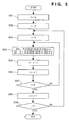
- Fig. 5 is a flow chart showing the computation process of the image feature amount in the first embodiment.
- step S51 a variable k is initialized to zero.
- step S52 a variable j is initialized to zero.
- step S53 a variable i is initialized to zero.
- step S54 the R average value of a sub-area (i, j) is substituted in the k-th element d(k) of a matrix d. Also, the G and B average values are respectively substituted in d(k+1) and d(k+2). Note that the method of computing the R, G, and B average values will be described in detail later with the aid of the flow chart in Fig. 6.
- step S55 k is incremented by "3".
- step S56 i is incremented by "1”.
- step S57 i is compared with "2". If i > 2 (YES in step S57), the flow advances to step S58. On the other hand, if i ⁇ 2 (NO in step S57), the flow returns to step S54.
- step S58 j is incremented by "1".
- step S59 j is compared with "1". If j > 1 (YES in step S59), the process ends. On the other hand, if j ⁇ 1 (NO in step S59), the flow returns to step S53.
- the computed values of the image feature amount of the drawn illustration are stored in the matrix d() having 18 elements.
- the drawn illustration (image) is segmented into six rectangular areas having equal areas to compute image feature amount values in this embodiment.
- the shape of the segmented area is not limited to a rectangle but may be other complicated shapes, and the number of segmented areas may be increased/decreased. When the number of segmented areas is increased/decreased, the number of elements of the image feature amount is not 18 but increases/decreases accordingly.
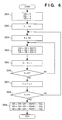
- Fig. 6 is a flow chart showing the details of the method of computing the R, G, and B average values in the first embodiment.
- image data of the drawn illustration is stored in three matrices R(X, Y), G(X, Y), and B(X, Y). Note that 0 ⁇ X ⁇ W and 0 ⁇ Y ⁇ H, and the start point (0, 0) is set at the upper left corner of the image.
- the R, G, and B average values of an area within the range of X0 ⁇ X ⁇ X1 and Y0 ⁇ Y ⁇ Y1 are calculated, and are respectively returned to variables DR, DG, and DB.
- step S61 the variables DR, DG, and DB are initialized to zero.
- step S62 a variable Y is initialized to Y0.
- step S63 a variable X is initialized to X0.
- step S64 R(X, Y) is added to the variable DR.
- G(X, Y) and B(X, Y) are respectively added to the variables DG and DB.
- step S65 the variable X is incremented by "1".
- step S67 the variable Y is incremented by "1".
- step S69 the variables DR, DG, and DB are respectively divided by (X1 - X0)*(Y1 - Y0).
- This divisor indicates the number of pixels in the area. That is, the variables DR, DG, and DB indicate the average densities obtained by dividing the sum totals of pixel densities in the area by the number of pixels.
- step S23 a similar image search is made based on the image feature amount computed in step S22.
- the hard disk device 106 stores N image data, and their image feature amounts are computed by the aforementioned process in advance and stored.
- Image data may be stored in a standard file format such as JPEG, FlashPix, or the like, which is known to those skilled in the art, or may be stored in a file format unique to a so-called RDBMS (relational database management system).
- RDBMS relational database management system
- an image distance S(n) between the drawn illustration (image data) and n-th image data stored in the hard disk device 106 is defined by: As this image distance S(n) is smaller, it is determined that image data has higher similarity.
- the image distances S(n) (for 0 ⁇ n ⁇ N) between all the N image data stored in the hard disk device 106 and the drawn illustration (image data) are computed.
- a similar image search is made by selecting M (0 ⁇ M ⁇ N) image data in ascending order of image distance S(n). The computation process of the image distance S(n), and the similar image search process for selecting M image data will be respectively described below using Figs. 7 and 8.
- Fig. 7 is a flow chart showing the computation process of the image distance S(n) in the first embodiment.
- step S71 variables min and n are initialized to zero, and a variable L is initialized to a sufficiently large value.
- variables i and S(n) are initialized to zero.
- step S73 a square of the difference between D(n, i) and d(i) is added to S(n).
- step S74 the variable i is incremented by "1".
- step S76 the variable n is incremented by "1".
- the image distances S(n) between the drawn illustration (image data) and all the image data stored in the hard disk device 106 are stored in a matrix S(n).
- a similar image search process for selecting M image data in ascending order of image distance S(n) and storing numbers corresponding to the selected image order in a matrix T() will be described in detail below using Fig. 8.
- Fig. 8 is a flow chart showing the details of the similar image search process in the first embodiment.
- step S81 a variable j is initialized to zero.
- step S82 a variable i is initialized to zero.
- step S83 a variable min is initialized to zero and a variable L is initialized to a sufficiently large value.
- step S84 S(i) is compared with L. If S(i) ⁇ L (YES in step S84), the flow advances to step S85. On the other hand, if S(i) ⁇ L (NO in step S84), the flow advances to step S86.
- step S85 the value i is substituted in the variable min, and S(i) is substituted in L.
- step S86 the variable i is incremented by "1".
- step S88 the value min is substituted in T(j).
- step S89 a sufficiently large value is substituted in S(min).
- step S810 the variable j is incremented by "1".
- the image numbers of image data stored in the hard disk device 106 are stored in the matrix T(j) (for 0 ⁇ j ⁇ M) in descending order of similarity with the drawn illustration (image data).
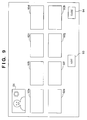
- Fig. 9 shows the control window displayed on the display unit 103 in step S24 in the first embodiment.
- An area 91 displays a reduced-scale image of the drawn illustration.
- Areas 92a to 92h display reduced-scale images of similar images retrieved by the above processes.
- the area 92a displays an image corresponding to T(0) with highest similarity
- the area 92b displays an image corresponding to T(1),...
- the area 92h displays an image with lowest similarity among these images.
- the reduced-scale display may be implemented by decoding image data stored in the hard disk device 106 and displaying the decoded image on the screen in a reduced scale.
- image data has low-resolution icon data for an icon like FlashPix as a standard image format
- a reduced-scale image may be displayed using that icon data.
- next candidates i.e., reduced-scale images of image data corresponding to T(8) to T(15) are displayed on the areas 92a to 92h. This operation can be repeated until T(M-1) is reached.
- the process in step S24 ends.
- an image drawn by the user can be used as a query criteria upon searching for desired image data, an image search that quickly reflects user's will can be made.
- a similar image search is made based on the illustration drawn by the user.
- desired image data can be efficiently found by a search by correcting the illustration drawn by the user with reference to the search results.
- Fig. 10 is a flow chart showing an outline of the processes executed in the second embodiment.
- step S101 the user draws an illustration, which is similar to the image data wanted and stored on the hard disk device 106, and is used as a query criteria, on the display unit 103.
- step S102 the image feature amount of the drawn illustration is computed.
- step S103 a similar image search is made based on the computed image feature amount.
- step S104 similar images found by the search are displayed on the display unit 103.
- step S105 a detailed image of one of the similar images displayed in step S104 is displayed. It is checked in step S106 if the detailed display process is to end. If the detailed display process is not to end (NO in step S106), the flow returns to step S105. On the other hand, if the process is to end (YES in step S106), the flow advances to step S107 to check if search operation is to end. If search operation is not to end (NO in step S107), the flow returns to step S101. On the other hand, if search operation is to end (YES in step S107), the process ends.
- steps S101 to S103 correspond to steps S21 to S23 in the first embodiment described above, and their details are as have been described in the first embodiment.
- control window displayed on the display unit 103 in step S104 is as shown in Fig. 9, and has the same functions as in the first embodiment. However, in this embodiment, one of reduced-scale images displayed on the areas 92a to 92h can be "selected" using the pointing device 102a.
- step S105 a detailed image of the reduced-scale image selected in step S104 is displayed.
- the arrangement of the display window at that time will be explained below with reference to Fig. 11.
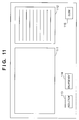
- Fig. 11 shows the control window displayed on the display unit 103 in step S105 in the second embodiment.
- Reference numeral 111 denotes an image display area, which displays a detailed image of the selected reduced-scale image.
- a reduction button 113 or enlargement button 114 an image can be confirmed by partially enlarging or reducing the image.
- Reference numeral 112 denotes a character display area for displaying character information stored in association with the image. For example, the area 112 displays the photographing date, copyright information, and the like.
- the display of the detailed image is ended, and the flow advances to step S106.
- step S106 the control window shown in Fig. 9 is displayed again. If a detailed image of another reduced-scale image is to be seen, the user repeats the above operations, i.e., selects a reduced-scale image as needed to display its detailed image. If there is no reduced-scale image, a detailed image of which is to be seen, the user presses the button 94, and the flow advances to step S107.
- step S107 The user determined in step S107 if search operation is to end. If search operation is to end, the process ends. On the other hand, if search operation is not to end, the flow returns to step S101. In this case, the screen returns to the window arrangement shown in Fig. 3.
- the user drawing area 31 displays the illustration, which is being input, so that the user can continue to draw the illustration that he or she has drawn so far.
- an image search can be repeated while gradually correcting an illustration, which is used as a query criteria, in accordance with the search result. As a result, even when a desired image cannot be found by search based on the initially drawn illustration, the user repeats operation for correcting the illustration to gradually obtain a better result, and making a search, thus finally obtaining a desired image by search.
- the drawn illustration is cleared.
- the user can clear the user drawing area 31 anytime, and can draw an illustration from the beginning.
- an image search that reflects user's will more quickly can be made in addition to the effects obtained by the first embodiment.
- step S21 or S101 described above the window layout shown in Fig. 3 is presented as an example of general image drawing software, but the window may have more functions (or fewer functions) than that shown in Fig. 3. Also, an image drawn by another software may be loaded using a so-called inter-application communication technique.
- step S24 or S104 reduced-scale images corresponding to image data as the processing result of a similar image search process are displayed in a two-dimensional matrix.
- the reduced-scale images may be lined up in a horizontal array or may be three-dimensionally displayed in consideration of information in the depth direction. For example, images with higher similarity values may be displayed on the front side (to have larger image sizes), and images with lower similarity values may be displayed on the far side (to have smaller image sizes), thus achieving a list display which is easy to understand at a glance.
- Steps S21 and S24 or steps S101 and S104 may be combined, and the illustration to be drawn and the processing results of the similar image search process may be simultaneously displayed.
- the illustration can be corrected with reference to the search result on a single window, thus further improving the processing efficiency.
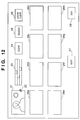
- control window to be displayed on the display unit 103 upon executing a search process in the fourth embodiment will be explained below with reference to Fig. 12.
- Fig. 12 shows the control window displayed on the display unit upon executing a search process in the fourth embodiment.
- Reference numeral 21 denotes a user drawing area; 22, a cursor; 23, color selection scroll bars; 24, a clear button; 25, a search execution button; 27, a next candidate display button; 28, a processing end button; and 29, a cache clear button.
- reference numerals 26a to 26h denote areas for displaying icon images corresponding to image data as search results.
- the user can draw an illustration, which is similar to the image wanted and used as a query criteria, on the user drawing area 21 using the drawing tools implemented by software.
- the software process upon drawing an illustration will be briefly described below.
- the color selection scroll bars 23 are used for selecting a pen color used in drawing, and designate R, G, and B values in turn from the uppermost one.
- the clear button 24 Upon pressing the clear button 24, the entire user drawing area 21 is painted in white. The user moves the cursor 22 using the pointing device 102a and can draw a free curve on the user drawing area 21.
- the processing end button 28 Upon pressing the processing end button 28, the control window is closed, and the processing ends.
- icon images cached on the RAM 105 or the like as cache data are cleared.
- Fig. 13 is a flow chart showing an outline of the processes executed by the image search apparatus of the fourth embodiment.
- step S1001 the user draws an illustration, which is similar to the image data wanted and stored on the hard disk device 106, and is used as a query criteria, on the display unit 103.
- step S1002 the image feature amount of the drawn illustration is computed.
- step S1003 a similar image search is made based on the computed image feature amount.
- step S1004 similar images found by the search are displayed on the display unit 103.
- step S1005 a detailed image of one of the similar images displayed in step S1004 is displayed. It is checked in step S1006 if the detailed display process is to end. If the detailed display process is not to end (NO in step S1006), the flow returns to step S1005. On the other hand, if the process is to end (YES in step S1006), the flow advances to step S1007 to check if search operation is to end. If search operation is not to end (NO in step S1007), the flow returns to step S1001. On the other hand, if search operation is to end (YES in step S1007), the process ends.
- step S1001 the user draws an illustration, which is used as a query criteria, on the user drawing area 21, and the flow advances to the next step S1002 at an appropriate timing.
- the process at that time will be explained below with reference to Fig. 14.
- the system monitors the movement of the mouse 102a, and every time the movement is monitored, the image feature amount of an image drawn so far is computed.
- Fig. 14 is a flow chart showing the details of the process executed in step S1001 in the fourth embodiment.
- x0 and y0 are variables for storing the previous position of the cursor 22
- x1 and y1 are variables that store the current position of the cursor 22.
- step S31 It is checked in step S31 if the user has moved the mouse 102a. If the user has not moved the mouse yet (NO in step S31), the flow returns to step S31. That is, the process in this step forms a loop for monitoring the movement of the mouse 102a. On the other hand, if the user has moved the mouse (YES in step S31), the flow advances to step S32.
- step S32 It is checked in step S32 if the mouse button of the mouse 102a is being held down. If the mouse button is not held down (NO in step S32), the flow advances to step S34 to substitute the current position (x1, y1) of the cursor 22 in (x0, y0), and the flow returns to step S31. In this manner, the cursor 22 alone can be moved without drawing any stroke.
- step S32 if the mouse button is being held down (YES in step S32), i.e., if the user is dragging the mouse, the flow advances to step S33.
- step S33 a line is drawn between the previous position (x0, y0) and the current position (x1, y1) of the cursor 22 in a color determined by the color selection scroll bars 23.
- step S35 the current position (x1, y1) of the cursor 22 is substituted in (x0, y0) to end step S1001, and the flow advances to step S1002.
- This process makes the user feel as if a search were automatically executed every time he or she adds a stroke to the illustration.
- step S1002 the image feature amount of the illustration drawn in step S1001 is computed. Since the image feature amount, the computation process of the image feature amount, and the method of computing the R, G, and B average values are the same as those shown in Figs. 4 to 6 in the first embodiment, a detailed description thereof will be omitted.
- step S1003 a similar image search is made on the basis of the image feature amount computed in step S1002. Since the similar image search process is the same as that shown in Figs. 7 and 8 in the first embodiment, a detailed description thereof will be omitted.
- the areas 26a to 26h respectively display icon images obtained by displaying similar images found by the search process in a reduced scale.
- the area 26a displays an image corresponding to T(0) with highest similarity
- the area 26b displays an image corresponding to T(1),...
- the area 26h displays an image with lowest similarity among these images.
- the reduced-scale display may be implemented by decoding image data stored in the hard disk device 106 and displaying the decoded image on the screen in a reduced scale.
- image data has low-resolution icon data for an icon like FlashPix as a standard image format
- a reduced-scale image may be displayed using that icon data.
- Each icon image can be "selected” using the pointing device 102a.
- next candidates i.e., icon images of image data corresponding to T(8) to T(15) are displayed on the areas 26a to 26h. This operation can be repeated until T(M-1) is reached.
- step S1005 a detailed image of the icon image selected in step S1004 is displayed. Since the arrangement of the display window at that time is the same as that shown in Fig. 11 of the first embodiment, a detailed description thereof will be omitted.
- step S1006 the control window shown in Fig. 12 is displayed again. If a detailed image of another icon image is to be seen, the user repeats the above operations, i.e., selects an icon image as needed to display its detailed image. If there is no desired image among the displayed icon images, the user draws an illustration on the user drawing area 21 again, and the flow advances to step S1007. The flow returns to step S1001 again to correct the illustration, and a similar image search is repeated on the basis of the corrected illustration. Upon pressing the processing end button 28 in step S1007, the processing ends.
- a search process is executed every time the user draws a stroke of an illustration, i.e., a similar image search process is executed very frequently.
- the number of times a search is made is often preferably small due to limited system performance or user's convenience. If this is the case, different operation may be implemented by changing the process in step S1001. This process will be described below as the fifth embodiment.
- step S1001 the user draws an illustration, which is used as a query criteria, on the user drawing area 21, and the flow advances to the next step S1002 at an appropriate timing.
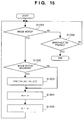
- the process at that time will be explained below with reference to Fig. 15.
- Fig. 15 is a flow chart showing the details of the process executed in step S1001 in the fifth embodiment.
- x0 and y0 are variables for storing the previous position of the cursor 22
- x1 and y1 are variables that store the current position of the cursor 22.
- step S1201 It is checked in step S1201 if the user has moved the mouse 102a. If the user has moved the mouse (YES in step S1201), the flow advances to step S1202. On the other hand, if the user has not moved the mouse (NO in step S1201), the flow advances to step S1206 to check if the search execution button 25 has been pressed. If the button 25 has been pressed (YES in step S1206), the process in step S1001 is ended, and the flow advances to step S1002. That is, the search process is started. On the other hand, if the button 25 has not been pressed yet (NO in step S1206), the flow returns to step S1201. That is, a loop for monitoring the movement of the mouse 102a and status of the search execution button 25 is formed.
- step S1201 If it is determined in step S1201 that the mouse has moved (YES in step S1201), the flow advances to step 51202 to check if the mouse button of the mouse 102a is being held down. If the mouse button is not held down (NO in step S1202), the flow advances to step S1204 to substitute the current position (x1, y1) of the cursor 22 in (x0, y0), and the flow returns to step S1201. In this manner, the cursor 22 alone can be moved without drawing.
- step S1203 a line is drawn between the previous position (x0, y0) and the current position (x1, y1) of the cursor 22 in a color determined by the color selection scroll bars 23.
- step S1205 the current position (x1, y1) of the cursor 22 is substituted in (x0, y0) to end step S1001, and the flow advances to step S1002.
- a similar image search process can be executed in response to depression of the search execution button 25, it can be done at the user's convenience. For example, after the user has drawn an illustration to some extent, he or she can start a similar image search process.
- step S1001 Another processing example in step S1001 will be explained below as the sixth embodiment.
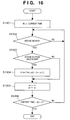
- Fig. 16 is a flow chart showing the details of the process executed in step S1001 in the sixth embodiment.
- x0 and y0 are variables for storing the previous position of the cursor 22
- x1 and y1 are variables that store the current position of the cursor 22.
- step S1301 the current time is substituted in a variable t0. It is checked in step S1302 if the user has moved the mouse 102a. If the user has not moved the mouse (NO in step S1302), the flow returns to step S1302. That is, this process forms a loop for monitoring the movement of the mouse 102a. If the user has moved the mouse (YES in step S1302), the flow advances to step S1303.
- step S1303 It is then checked in step S1303 if the mouse button of the mouse 102 is being held down. If the mouse button is not held down (NO in step S1303), the flow advances to step S1305 to substitute the current position (x1, y1) of the cursor 22 in (x0, y0). In this manner, the cursor 22 alone can be moved without drawing.
- step S1303 if the mouse button is being held down (YES in step S1303), i.e., if the user is dragging the mouse, the flow advances to step S1304.
- step S1304 a line is drawn between the previous position (x0, y0) and the current position (x1, y1) of the cursor 22 in a color determined by the color selection scroll bars 23.
- step S1305 the current position (x1, y1) of the cursor 22 is substituted in (x0, y0), and the flow advances to step S1306.
- step S1306 the difference between the current time and variable t0 is calculated, and is compared with a constant T. If the difference is larger than the constant T (YES in step S1306), i.e., if the time T has elapsed from the beginning of step S1001, the process ends, and the flow advances to the next step S1002. On the other hand, if the difference is equal to or smaller than the constant T (NO in step S1306), the flow returns to step S1302.
- a similar image search process can be executed at appropriate time intervals while the user is drawing an illustration. If a large constant T is set, a similar image search process can be executed less frequently; otherwise, it can be executed more frequently.
- the constant T may be set by the user. Or the constant T may be adaptively changed in accordance with the load on the system.
- various search execution timings can be set by changing the process in step S1001. For example, a search may be made at given time intervals without requiring user operation. On the other hand, when a search is made in response to a change in illustration, which is used as a query criteria, by the user, the number of times of change may be counted, and a search may be made every time the number of times of change exceeds a predetermined value. In this manner, by combining the processes described above, the search execution timing can be set more flexibly.
- step S1004 reduced-scale images corresponding to image data as the processing result of the similar image search process are displayed in a two-dimensional matrix.
- the reduced-scale images may be lined up in a horizontal array (one-dimensionally) or may be three-dimensionally displayed in consideration of information in the depth direction. For example, images with higher similarity values may be displayed on the front side (to have larger image sizes), and images with lower similarity values may be displayed on the far side (to have smaller image sizes), thus achieving a list display which is easy to understand at a glance.
- Fig. 17 is a flow chart showing an outline of the processes executed by the image search apparatus of the eighth embodiment.
- step S151 the user draws an illustration, which is similar to the image data wanted and stored on the hard disk device 106, and is used as a query criteria, on the display unit 103.
- step S152 the image feature amount of the drawn illustration is computed. It is checked in step S153 if a similar image search is to be executed. If the search is not to be executed (NO in step S153), the flow returns to step S151. On the other hand, if the search is to be executed (YES in step S153), the flow advances to step S154.
- step S154 a similar image search is made on the basis of the computed image feature amount.
- step S155 the computed image feature amount is stored in the RAM 105.
- the image feature amount stored in this step i.e., the one obtained upon executing the previous similar image search process, is used as a reference value upon executing step S153 again.
- step S156 similar images obtained by search are displayed on the display unit 103.
- step S157 It is checked in step S157 if search operation is to end. If search operation is not to end (NO in step S157), the flow returns to step S151. On the other hand, if search operation is to end (YES in step S157), the process ends.
- step S151 the user draws an illustration, which is used as a query criteria, on the user drawing area 21, and the flow advances to the next step S152 at an appropriate timing. Since the process at that time is the same as that shown in Fig. 14 in the fourth embodiment, a detailed description thereof will be omitted.
- step S152 the image feature amount of the illustration drawn in step S151 is computed. Since the image feature amount, the computation process of the image feature amount, and the method of computing the R, G, and B average values are the same as those shown in Figs. 4 to 6 in the first embodiment, a detailed description thereof will be omitted.
- step S153 it is determined whether or not image data as search results are displayed, by comparing an image feature amount e() of an illustration, which was used as a query criteria in the previous similar image search, with the image feature amount d() computed in step S152.
- the image feature amount e() will be described later in the paragraphs of step S155.
- step S153 The process executed in step S153 will be described in detail below with reference to Fig. 18.
- Fig. 18 is a flow chart showing the details of the process executed in step S153 in the eighth embodiment.
- step S16 variables i and V are initialized to zero.
- step S162 a square of the difference between image feature amounts e(i) and d(i) is added to the variable V.
- step S163 the variable i is incremented by "1".
- step S165 the variable V is compared with a constant V0. If V > V0 (YES in step S165), it is determined that a search is executed. On the other hand, if V ⁇ V0 (NO in step S165), it is determined that a search is not executed, and the flow returns to step S151.
- the image feature amount of an illustration, which was used as a query criteria in the previous similar image search is compared with that of an illustration obtained by modifying that query criteria, and it is determined if the illustration around the time of modification has been changed to some extent. Based on that determination result, the search process can be automatically executed.
- the value of the constant V0 may be determined in advance or may be set by the user according to his or her favor. Furthermore, the constant V0 may be adaptively changed in correspondence with the load on the system.
- step S154 a similar image search is made on the basis of the image feature amount computed in step S152. Since the similar image search process is the same as that shown in Figs. 7 and 8 in the first embodiment, a detailed description thereof will be omitted. However, in the eighth embodiment, variables min and L are not initialized in step S71 in Fig. 7.
- step S155 the respective elements of the image feature amount d(i) (for 0 ⁇ i ⁇ 18) are copied to a matrix e(i) having the same number of elements. That is, e(i) stores the image feature amount of the illustration used upon executing the previous similar image search. This value is used to check in step S153 described above if a search is executed.
- step S156 Since the processing contents in step S156 are the same as those in step S1004 in the fourth embodiment, a detailed description thereof will be omitted.
- step S157 It is checked in step S157 if the processing end button 28 has been pressed. If the button 28 has been pressed, the processing ends. On the other hand, if the button 28 has not been pressed, the flow returns to step S151, and the user can continue to draw the illustration.
- the image feature amount of the illustration which was used as a query criteria in the previous similar image search process is compared with that of the modified illustration, and a similar image search process is executed again, thus efficiently executing the similar image search process.
- a search is made.
- the flow may unconditionally advance to step S154 while skipping the checking step S153. In this manner, even when the illustration is modified only slightly to disable an automatic search, a search can be manually forcibly started.
- step S156 reduced-scale images corresponding to image data as the processing result of the similar image search process are displayed in a two-dimensional matrix.
- the reduced-scale images may be lined up in a horizontal array (one-dimensionally) or may be three-dimensionally displayed in consideration of information in the depth direction. For example, images with higher similarity values may be displayed on the front side (to have larger image sizes), and images with lower similarity values may be displayed on the far side (to have smaller image sizes), thus achieving a list display which is easy to understand at a glance.
- Fig. 19 is a flow chart showing an outline of the processes executed by the image search apparatus of the ninth embodiment.
- step S141 the user draws an illustration, which is similar to the image data wanted and stored on the hard disk device 106, and is used as a query criteria, on the display unit 103.
- step S142 the image feature amount of the drawn illustration is computed.
- step S143 a similar image search is made on the basis of the computed image feature amount.
- step S144 a variable i is initialized to zero.
- step S145 the i-th similar image is displayed on the display unit 103. It is checked in step S146 if a drawing event by the user has been detected. If a drawing event upon, e.g., operation of the pointing device 102a has been detected (YES in step S146), the processes in steps S144 to S148 are interrupted and the flow returns to step S141. On the other hand, if no drawing event has been detected (NO in step S146), the flow advances to step S147 to increment the variable i by "1".
- step S149 It is checked in step S149 if search operation is to end. If search operation is not to end (NO in step S149), the flow returns to step S141. On the other hand, if search operation is to end (YES in step S149), the processing ends.
- step S141 the user draws an illustration, which is used as a query criteria, on the user drawing area 21, and the flow advances to the next step S142 at an appropriate timing. Since the process at that time is the same as that shown in Fig. 14 in the fourth embodiment, a detailed description thereof will be omitted.
- step S142 the image feature amount of the illustration drawn in step S141 is computed. Since the image feature amount, the computation process of the image feature amount, and the method of computing the R, G, and B average values are the same as those shown in Figs. 4 to 6 in the first embodiment, a detailed description thereof will be omitted.
- step S143 a similar image search is made on the basis of the image feature amount computed in step S142. Since the similar image search process is the same as that shown in Figs. 7 and 8 in the first embodiment, a detailed description thereof will be omitted.
- the areas 26a to 26h respectively display icon images obtained by displaying the i-th similar image and subsequent seven similar images of those found by the above search process in a reduced scale.
- the reduced-scale display may be implemented by decoding image data stored in the hard disk device 106 and displaying the decoded image on the screen in a reduced scale.
- image data has low-resolution icon data for an icon like FlashPix as a standard image format
- a reduced-scale image may be displayed using that icon data.
- Each icon image can be "selected” using the pointing device 102a.
- next candidates i.e., icon images of image data corresponding to T(8) to T(15) are displayed on the areas 26a to 26h. This operation can be repeated until T(M-1) is reached.
- the list display of similar images can be interrupted by a drawing event of the user anytime, and the control can return to the process in step S141.
- step S149 It is checked in step S149 if the processing end button 28 has been pressed. If the button 28 has been pressed, the processing ends. On the other hand, if the button 28 has not been pressed, the flow returns to step S141, and the user can continue to draw the illustration.
- a list display of similar images can be interrupted.
- the computation of the image feature amount in step S142 or the similar image search in step S143 may be interrupted.
- an interrupt button may be prepared on the control window shown in Fig. 12 to clearly interrupt the search/display process.
- the display is interrupted every time a drawing event has occurred. However, if the display is interrupted too frequently, it is not often preferable. In such case, the number of drawing events may be counted, and when the number of drawing events detected has exceeded an appropriate constant P, the display may be interrupted.
- the constant P may be changed by the user or in accordance with the load on the system.
- step S145 reduced-scale images corresponding to image data as the processing result of the similar image search process are displayed in a two-dimensional matrix.
- the reduced-scale images may be lined up in a horizontal array (one-dimensionally) or may be three-dimensionally displayed in consideration of information in the depth direction. For example, images with higher similarity values may be displayed on the front side (to have larger image sizes), and images with lower similarity values may be displayed on the far side (to have smaller image sizes), thus achieving a list display which is easy to understand at a glance.
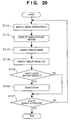
- Fig. 20 is a flow chart showing an outline of the processes executed by the image search apparatus of the 10th embodiment.
- step S111 the user draws an illustration, which is similar to the image data wanted and stored on the hard disk device 106, and is used as a query criteria, on the display unit 103.
- step S112 the image feature amount of the drawn illustration is computed.
- step S113 a similar image search is made on the basis of the computed image feature amount.
- step S114 similar images (icon images) found by search are displayed on the display unit 103.
- step S115 It is checked in step S115 if the cache clear button 29 has been pressed. If the button 29 has been pressed (YES in step S115), the flow advances to step S116, and icon images cached on the RAM 105 as cache data are cleared. On the other hand, if the button 29 has not been pressed (NO in step S115), the flow advances to step S117.
- step S117 It is checked in step S117 if search operation is to end. If search operation is not to end (NO in step S117), the flow returns to step S111. On the other hand, if search operation is to end (YES in step S117), the processing ends.
- step S111 the user draws an illustration, which is used as a query criteria, on the user drawing area 21, and the flow advances to the next step S112 at an appropriate timing. Since the process at that time is the same as that shown in Fig. 14 in the fourth embodiment, a detailed description thereof will be omitted.
- step S112 the image feature amount of the illustration drawn in step S111 is computed. Since the image feature amount, the computation process of the image feature amount, and the method of computing the R, G, and B average values are the same as those shown in Figs. 4 to 6 in the first embodiment, a detailed description thereof will be omitted.
- step S113 a similar image search is made on the basis of the image feature amount computed in step S112. Since the similar image search process is the same as that shown in Figs. 7 and 8 in the first embodiment, a detailed description thereof will be omitted.
- the areas 26a to 26h respectively display icon images obtained by displaying similar images found by the search process in a reduced scale.
- the area 26a displays an image corresponding to T(0) with highest similarity
- the area 26b displays an image corresponding to T(1),...
- the area 26h displays an image with lowest similarity among these images.
- the reduced-scale display may be implemented by decoding image data stored in the hard disk device 106 and displaying the decoded image on the screen in a reduced scale.
- image data has low-resolution icon data for an icon like FlashPix as a standard image format
- a reduced-scale image may be displayed using that icon data.
- Each icon image can be "selected” using the pointing device 102a.
- next candidates i.e., icon images of image data corresponding to T(8) to T(15) are displayed on the areas 26a to 26h. This operation can be repeated until T(M-1) is reached.
- the icon images that have been displayed once as the search results are stored as cache data in the RAM 105 or hard disk device 106. If a given icon image is required again, the cached icon image is read out, thus displaying the icon image as a search result at high speed.
- Fig. 21 is a flow chart showing the details of the similar image list display process of the 10th embodiment.
- step S121 a variable i is initialized to zero. It is checked in step S122 if the i-th icon image has been cached. If the i-th icon image has been cached (YES in step S122), the flow advances to step S123, and the i-th icon image is displayed on the corresponding area 26. On the other hand, if the i-th icon image has not been cached (NO in step S122), the flow advances to step S124 to increment the variable i by "1".
- step S126 "0" is substituted in the variable i. It is checked in step S127 if the i-th icon image has been cached. If the i-th icon image has been cached (YES in step S127), the flow advances to step S1210. On the other hand, if the i-th icon image has not been cached (NO in step S127), the flow advances to step S128.
- step S128 compressed image data corresponding to the i-th icon image is read out from the hard disk device 106, and is decoded and cached.
- step S129 the i-th icon image is displayed on the corresponding area 26.
- step S1210 the variable i is incremented by "1".
- step S115 It is checked in step S115 if the user has pressed the cache clear button 29. If the user has pressed the button 29, the flow advances to step S116. On the other hand, if the user has not pressed the button 29, the flow advances to step S117.
- step S116 cache data cached on the RAM 115 are cleared. In this case, since the user instructs cache clear, all cache data cached on the RAM 105 can be simply cleared.
- step S117 It is checked in step S117 if the processing end button 28 has been pressed. If the button 28 has been pressed, the processing ends. On the other hand, if the button 28 has not been pressed, the flow returns to step S111, and the user can continue to draw the illustration.
- the cache clear process is executed according to user's decision, but may be automatically executed. That is, the checking step S115 is skipped, and step S116 is always executed. In this case, a higher-grade cache clear process is required. Such process will be described below as the 11th embodiment.
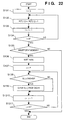
- Fig. 22 is a flow chart showing the details of step S116 in the 11th embodiment.
- step S131 "0" is substituted in the variable i.
- step S132 a T(i)-th element of a frequency histogram H(N) is incremented by "1". Note that T(i) is the i-th image computed in step S113, and is used in display in step S114. That is, the frequency histogram H(N) counts the frequency of use of each icon image.
- step S133 the variable i is incremented by "1".
- step S135 the free memory size of the RAM 105 is checked. If the free memory size is large enough (NO in step S135), i.e., since the cache need not be cleared, the processing ends. On the other hand, if the free memory size is insufficient (YES in step S135), the flow advances to step S136.
- step S136 the elements of the frequency histogram H(N) are sorted in descending order of frequency of use, and the sort results are stored in a matrix S(N).
- the sort algorithm in this sorting uses known quick sort or the like.
- An element S(0) of the matrix S(N) stores the ID of an image having the highest frequency of use, i.e., the largest H(), and the frequency of use gradually lowers in the order of S(1), S(2),....
- a constant P is substituted in a variable j.
- the constant P is a value obtained empirically, and is set to be around 1/10 to 1/100 of the number N of images stored in the hard disk device 106.
- P icon images from the highest frequency of use remain cached, and icon images having frequencies of use lower than these images are cleared from the cache.
- step S138 It is checked in step S138 if an icon image having an image number S(j) has been cached. If the icon image of interest has been cached (YES in step S138), the flow advances to step S139 to clear that image from the cache. On the other hand, if the icon image of interest has not been cached (NO in step S138), the flow advances to step S1310.
- step S1310 the variable j is incremented by "1".
- cache clear can be automatically executed independently of user's decision in addition to the effects obtained by the 10th embodiment.
- cache clear is executed manually or automatically. If the RAM 105 has a sufficiently large size, cache clear need not always be required but may be skipped.
- corresponding image data read out from the hard disk device 106 is decoded, and is then cached.
- compressed image data read out from the hard disk device 106 may be directly cached.
- cache clear is executed at a timing that the user cannot expect, and the user cannot continue drawing during the cache clear process. If this poses a problem, the cache clear process may be separated from the flow chart shown in Fig. 20, and may be executed parallelly, thus improving system response.
- the cache clear process in the 11th embodiment is merely an example, and various other algorithms that have been proposed may be used depending on applications.
- the 10th and 11th embodiments may be combined, so that whether cache clear is executed automatically or according to user's decision may be selected.
- step S114 reduced-scale images corresponding to image data as the processing result of the similar image search process are displayed in a two-dimensional matrix.
- the reduced-scale images may be lined up in a horizontal array (one-dimensionally) or may be three-dimensionally displayed in consideration of information in the depth direction. For example, images with higher similarity values may be displayed on the front side (to have larger image sizes), and images with lower similarity values may be displayed on the far side (to have smaller image sizes), thus achieving a list display which is easy to understand at a glance.
- the 12th embodiment is a modification of the similar image list display process in step S156 in Fig. 17 of the eighth embodiment.
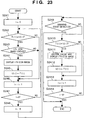
- the process in step S156 of the eighth embodiment will be described in detail below with reference to Fig. 23.
- the areas 26a to 26h respectively display icon images obtained by displaying similar images found by the search process in a reduced scale.
- the area 26a displays an image corresponding to T(0) with highest similarity
- the area 26b displays an image corresponding to T(1),...
- the area 26h displays an image with lowest similarity among these images.
- the reduced-scale display may be implemented by decoding image data stored in the hard disk device 106 and displaying the decoded image on the screen in a reduced scale.
- image data has low-resolution icon data for an icon like FlashPix as a standard image format
- a reduced-scale image may be displayed using that icon data.
- the IDs of icon images displayed on the areas 26a to 26h are stored in a corresponding matrix U(n) (0 ⁇ n ⁇ 8).
- the icon images that have been displayed once as the search results are stored as cache data in the RAM 105 or hard disk device 106. If a given icon image is required again, the cached icon image is read out, thus displaying the icon image as a search result at high speed.
- the similar image list display process is interrupted anytime by a drawing event of the user, and the flow can return to step S151.
- Fig. 23 is a flow chart showing the details of the similar image list display process in the 12th embodiment.
- step S241 a variable i is initialized to zero.
- step S243 It is checked in step S243 if the i-th icon image has been cached. If the i-th icon image has been cached (YES in step S243), the flow advances to step S244, and the i-th icon image is displayed on the corresponding area 26. In step S245, T(i) is substituted in U(i). On the other hand, if it is determined in step S143 that the i-th icon image has not been cached (NO in step S243), the flow advances to step S146 to increment the variable i by "1".
- step S248 "0" is substituted in the variable i.
- step S249 It is checked in step S249 if a drawing event by the pointing device has been detected. If a drawing event has been detected (YES in step S249), i.e., when the user adds a new stroke of the illustration on the user drawing area 21, the processing ends. In this case, the flow returns to step S151, and a similar image search process is executed again on the basis of the modified illustration. With this process, the user can proceed with drawing of the illustration before completion of the similar image list display process, thus greatly improving the processing speed.
- step S249 if it is determined in step S249 that no drawing event has been detected (NO in step S249), the flow advances to step S2410.
- step S2411 compressed image data corresponding to the i-th icon image is read out from the hard disk device 106, and is decoded and cached. Also, the i-th icon image is displayed on the corresponding area 26.
- step S2412 T(i) is substituted in U(i). The variable i is then incremented by "1".
- the mouse is used as the pointing device 102a.
- the present invention is not limited to such specific pointing device.
- a pen tablet that allows pen input the operator can efficiently draw an illustration.
- a touch screen which is integrated with the display unit 103 and allows the user to directly draw an illustration while observing the displayed window, is used, more intuitive drawing can be achieved.
- any other pointing devices may be used as long as they can input information to the computer system.
- the present invention may be applied to either a system constituted by a plurality of devices (e.g., a host computer, an interface device, a reader, a printer, and the like), or an apparatus consisting of a single equipment (e.g., a copying machine, a facsimile apparatus, or the like).
- a system constituted by a plurality of devices (e.g., a host computer, an interface device, a reader, a printer, and the like), or an apparatus consisting of a single equipment (e.g., a copying machine, a facsimile apparatus, or the like).
- the objects of the present invention are also achieved by supplying a storage medium, which records a program code of a software program that can implement the functions of the above-mentioned embodiments to the system or apparatus, and reading out and executing the program code stored in the storage medium by a computer (or a CPU or MPU) of the system or apparatus.
- the program code itself read out from the storage medium implements the functions of the above-mentioned embodiments, and the storage medium which stores the program code constitutes the present invention.
- the storage medium for supplying the program code for example, a floppy disk, hard disk, optical disk, magneto-optical disk, CD-ROM, CD-R, magnetic tape, nonvolatile memory card, ROM, and the like may be used.
- the functions of the above-mentioned embodiments may be implemented not only by executing the readout program code by the computer but also by some or all of actual processing operations executed by an OS (operating system) running on the computer on the basis of an instruction of the program code.
- OS operating system
- the functions of the above-mentioned embodiments may be implemented by some or all of actual processing operations executed by a CPU or the like arranged in a function extension board or a function extension unit, which is inserted in or connected to the computer, after the program code read out from the storage medium is written in a memory of the extension board or unit.
- the program code of the present invention may be transmitted as an electronic or other form of signal over a network or communication channel.
- An aspect of the present invention therefore comprises such a signal representative of processor implementable instructions for carrying out the above disclosed method.
Landscapes
- Engineering & Computer Science (AREA)
- Physics & Mathematics (AREA)
- Theoretical Computer Science (AREA)
- General Physics & Mathematics (AREA)
- Databases & Information Systems (AREA)
- General Engineering & Computer Science (AREA)
- Data Mining & Analysis (AREA)
- Mathematical Physics (AREA)
- Information Retrieval, Db Structures And Fs Structures Therefor (AREA)
- Processing Or Creating Images (AREA)
- User Interface Of Digital Computer (AREA)
- Image Analysis (AREA)
- Measurement Of Optical Distance (AREA)
Applications Claiming Priority (12)
| Application Number | Priority Date | Filing Date | Title |
|---|---|---|---|
| JP24458298 | 1998-08-31 | ||
| JP24458398 | 1998-08-31 | ||
| JP24457998 | 1998-08-31 | ||
| JP24458598 | 1998-08-31 | ||
| JP24458398 | 1998-08-31 | ||
| JP24458098 | 1998-08-31 | ||
| JP24457998 | 1998-08-31 | ||
| JP24458598 | 1998-08-31 | ||
| JP24458098 | 1998-08-31 | ||
| JP24458298 | 1998-08-31 | ||
| JP21426699A JP2000148795A (ja) | 1998-08-31 | 1999-07-28 | 画像検索装置及びその方法、コンピュ―タ可読メモリ |
| JP21426699 | 1999-07-28 |
Publications (2)
| Publication Number | Publication Date |
|---|---|
| EP0987638A2 true EP0987638A2 (de) | 2000-03-22 |
| EP0987638A3 EP0987638A3 (de) | 2004-01-14 |
Family
ID=27553895
Family Applications (1)
| Application Number | Title | Priority Date | Filing Date |
|---|---|---|---|
| EP99306899A Withdrawn EP0987638A3 (de) | 1998-08-31 | 1999-08-31 | Apparat und Methode zur Suche von Bildern und computerlesbarer Speicher |
Country Status (3)
| Country | Link |
|---|---|
| US (1) | US6731826B1 (de) |
| EP (1) | EP0987638A3 (de) |
| JP (1) | JP2000148795A (de) |
Families Citing this family (50)
| Publication number | Priority date | Publication date | Assignee | Title |
|---|---|---|---|---|
| US7127405B1 (en) * | 1999-12-30 | 2006-10-24 | Bellsouth Intellectual Property Corp. | System and method for selecting and protecting intellectual property assets |
| US7346518B1 (en) * | 1999-12-30 | 2008-03-18 | At&T Bls Intellectual Property, Inc. | System and method for determining the marketability of intellectual property assets |
| US7941468B2 (en) * | 1999-12-30 | 2011-05-10 | At&T Intellectual Property I, L.P. | Infringer finder |
| US7389239B1 (en) * | 1999-12-30 | 2008-06-17 | At&T Delaware Intellectual Property, Inc. | System and method for managing intellectual property |
| US7801830B1 (en) * | 1999-12-30 | 2010-09-21 | At&T Intellectual Property I, L.P. | System and method for marketing, managing, and maintaining intellectual property |
| US7624172B1 (en) | 2000-03-17 | 2009-11-24 | Aol Llc | State change alerts mechanism |
| US9246975B2 (en) | 2000-03-17 | 2016-01-26 | Facebook, Inc. | State change alerts mechanism |
| JP2003091727A (ja) * | 2001-09-17 | 2003-03-28 | Canon Inc | 画像処理装置及びその方法、プログラム |
| JP2004030122A (ja) * | 2002-06-25 | 2004-01-29 | Fujitsu Ltd | 図面検索支援装置および図面検索方法 |
| JP2004048229A (ja) * | 2002-07-10 | 2004-02-12 | Toshiba Corp | 電子機器およびデジタルスチルカメラおよび表示制御方法 |
| US8122137B2 (en) | 2002-11-18 | 2012-02-21 | Aol Inc. | Dynamic location of a subordinate user |
| US8965964B1 (en) | 2002-11-18 | 2015-02-24 | Facebook, Inc. | Managing forwarded electronic messages |
| US7590696B1 (en) | 2002-11-18 | 2009-09-15 | Aol Llc | Enhanced buddy list using mobile device identifiers |
| US7640306B2 (en) | 2002-11-18 | 2009-12-29 | Aol Llc | Reconfiguring an electronic message to effect an enhanced notification |
| US7428580B2 (en) | 2003-11-26 | 2008-09-23 | Aol Llc | Electronic message forwarding |
| US7899862B2 (en) | 2002-11-18 | 2011-03-01 | Aol Inc. | Dynamic identification of other users to an online user |
| US8701014B1 (en) | 2002-11-18 | 2014-04-15 | Facebook, Inc. | Account linking |
| US8005919B2 (en) | 2002-11-18 | 2011-08-23 | Aol Inc. | Host-based intelligent results related to a character stream |
| CA2506585A1 (en) | 2002-11-18 | 2004-06-03 | Valerie Kucharewski | People lists |
| GB2399983A (en) * | 2003-03-24 | 2004-09-29 | Canon Kk | Picture storage and retrieval system for telecommunication system |
| US7603417B2 (en) | 2003-03-26 | 2009-10-13 | Aol Llc | Identifying and using identities deemed to be known to a user |
| US7653693B2 (en) | 2003-09-05 | 2010-01-26 | Aol Llc | Method and system for capturing instant messages |
| USD534177S1 (en) * | 2005-04-22 | 2006-12-26 | Microsoft Corporation | Icon for a portion of a display screen |
| US7962504B1 (en) | 2005-05-26 | 2011-06-14 | Aol Inc. | Sourcing terms into a search engine |
| JP4700452B2 (ja) * | 2005-09-16 | 2011-06-15 | 株式会社リコー | 情報管理装置、情報管理方法、情報管理プログラムおよび記録媒体 |
| US20070098257A1 (en) * | 2005-10-31 | 2007-05-03 | Shesha Shah | Method and mechanism for analyzing the color of a digital image |
| US7831111B2 (en) * | 2005-10-31 | 2010-11-09 | Yahoo! Inc. | Method and mechanism for retrieving images |
| JP2007166357A (ja) * | 2005-12-15 | 2007-06-28 | Sony Corp | 画像記録装置および方法、プログラム、並びに記録媒体 |
| JP2007193467A (ja) * | 2006-01-18 | 2007-08-02 | Dainippon Printing Co Ltd | イメージ素材検索システム |
| JP4921202B2 (ja) * | 2006-03-15 | 2012-04-25 | キヤノン株式会社 | ジョブ履歴管理システム、その制御方法、プログラム及び記憶媒体 |
| US9129252B2 (en) * | 2006-03-31 | 2015-09-08 | At&T Intellectual Property I, L.P. | Potential realization system with electronic communication processing for conditional resource incrementation |
| US8884972B2 (en) * | 2006-05-25 | 2014-11-11 | Qualcomm Incorporated | Graphics processor with arithmetic and elementary function units |
| JP4456617B2 (ja) | 2007-04-16 | 2010-04-28 | 富士通株式会社 | 類似分析装置、画像表示装置、および画像表示プログラム |
| JP5229744B2 (ja) | 2007-12-03 | 2013-07-03 | 国立大学法人北海道大学 | 画像分類装置および画像分類プログラム |
| US8126858B1 (en) | 2008-01-23 | 2012-02-28 | A9.Com, Inc. | System and method for delivering content to a communication device in a content delivery system |
| JP5123020B2 (ja) * | 2008-03-28 | 2013-01-16 | 富士フイルム株式会社 | 画像受付方法および装置 |
| JP2010176346A (ja) * | 2009-01-29 | 2010-08-12 | Sony Corp | 撮像装置および検索方法、並びにプログラム |
| JP5525737B2 (ja) * | 2009-03-18 | 2014-06-18 | オリンパス株式会社 | サーバシステム、端末装置、プログラム、情報記憶媒体及び画像検索方法 |
| JP5629435B2 (ja) | 2009-06-30 | 2014-11-19 | キヤノン株式会社 | 情報処理装置、情報処理方法、およびプログラム |
| JP5576754B2 (ja) | 2010-09-29 | 2014-08-20 | キヤノン株式会社 | 放射線撮像装置 |
| US8463036B1 (en) * | 2010-09-30 | 2013-06-11 | A9.Com, Inc. | Shape-based search of a collection of content |
| US8990199B1 (en) | 2010-09-30 | 2015-03-24 | Amazon Technologies, Inc. | Content search with category-aware visual similarity |
| US8422782B1 (en) | 2010-09-30 | 2013-04-16 | A9.Com, Inc. | Contour detection and image classification |
| US8827710B2 (en) * | 2011-05-19 | 2014-09-09 | Microsoft Corporation | Realtime user guidance for freehand drawing |
| US9880990B2 (en) | 2013-03-14 | 2018-01-30 | Microsoft Technology Licensing, Llc | Leveraging previous instances of handwriting for handwriting beautification and other applications |
| KR102159331B1 (ko) * | 2014-02-06 | 2020-09-23 | 십일번가 주식회사 | 스케치 검색 시스템, 사용자 장치, 서비스 제공 장치, 그 서비스 방법 및 컴퓨터 프로그램이 기록된 기록매체 |
| KR102213856B1 (ko) * | 2014-02-12 | 2021-02-08 | 에스케이플래닛 주식회사 | 스케치를 통한 상품 검색 시스템, 사용자 장치, 서비스 제공 장치, 그 서비스 방법 및 컴퓨터 프로그램이 기록된 기록매체 |
| KR102213861B1 (ko) * | 2014-02-25 | 2021-02-08 | 에스케이플래닛 주식회사 | 스케치 검색 시스템, 사용자 장치, 서비스 제공 장치, 그 서비스 방법 및 컴퓨터 프로그램이 기록된 기록매체 |
| KR102207514B1 (ko) * | 2014-02-26 | 2021-01-26 | 십일번가 주식회사 | 맞춤형 필터링 기능이 구비된 스케치 검색 시스템, 사용자 장치, 서비스 제공 장치, 그 서비스 방법 및 컴퓨터 프로그램이 기록된 기록매체 |
| JP7490483B2 (ja) | 2020-07-22 | 2024-05-27 | キヤノン株式会社 | システム、情報処理方法、物品の製造方法、プログラム及び記録媒体 |
Citations (1)
| Publication number | Priority date | Publication date | Assignee | Title |
|---|---|---|---|---|
| US5751286A (en) | 1992-11-09 | 1998-05-12 | International Business Machines Corporation | Image query system and method |
Family Cites Families (14)
| Publication number | Priority date | Publication date | Assignee | Title |
|---|---|---|---|---|
| US5157773A (en) | 1986-03-14 | 1992-10-20 | Canon Kabushiki Kaisha | Image data output apparatus |
| US5038298A (en) | 1986-03-14 | 1991-08-06 | Canon Kabushiki Kaisha | Image output apparatus connectable to mutually different external data processing apparatus |
| US5060280A (en) | 1986-09-30 | 1991-10-22 | Canon Kabushiki Kaisha | Masking control for image processing systems |
| US5444550A (en) | 1989-04-28 | 1995-08-22 | Canon Kabushiki Kaisha | Image processing apparatus |
| JPH0773190A (ja) * | 1993-04-29 | 1995-03-17 | Matsushita Electric Ind Co Ltd | ペンベースコンピューターシステム用絵文字ネーミング |
| US5586198A (en) * | 1993-08-24 | 1996-12-17 | Lakritz; David | Method and apparatus for identifying characters in ideographic alphabet |
| JP3340532B2 (ja) * | 1993-10-20 | 2002-11-05 | 株式会社日立製作所 | ビデオの検索方法および装置 |
| US5623681A (en) * | 1993-11-19 | 1997-04-22 | Waverley Holdings, Inc. | Method and apparatus for synchronizing, displaying and manipulating text and image documents |
| US5873076A (en) * | 1995-09-15 | 1999-02-16 | Infonautics Corporation | Architecture for processing search queries, retrieving documents identified thereby, and method for using same |
| US5913205A (en) * | 1996-03-29 | 1999-06-15 | Virage, Inc. | Query optimization for visual information retrieval system |
| US6324536B1 (en) * | 1997-07-22 | 2001-11-27 | International Business Machines Corporation | Method and system for providing interactive electronic catalog for product and constraint information of equality and inequality search |
| EP1025517A1 (de) * | 1997-10-27 | 2000-08-09 | Massachusetts Institute Of Technology | Bildsuch- und wiederauffindungssystem |
| US5999664A (en) * | 1997-11-14 | 1999-12-07 | Xerox Corporation | System for searching a corpus of document images by user specified document layout components |
| US6415282B1 (en) * | 1998-04-22 | 2002-07-02 | Nec Usa, Inc. | Method and apparatus for query refinement |
-
1999
- 1999-07-28 JP JP21426699A patent/JP2000148795A/ja active Pending
- 1999-08-30 US US09/385,430 patent/US6731826B1/en not_active Expired - Fee Related
- 1999-08-31 EP EP99306899A patent/EP0987638A3/de not_active Withdrawn
Patent Citations (1)
| Publication number | Priority date | Publication date | Assignee | Title |
|---|---|---|---|---|
| US5751286A (en) | 1992-11-09 | 1998-05-12 | International Business Machines Corporation | Image query system and method |
Non-Patent Citations (6)
Also Published As
| Publication number | Publication date |
|---|---|
| EP0987638A3 (de) | 2004-01-14 |
| US6731826B1 (en) | 2004-05-04 |
| JP2000148795A (ja) | 2000-05-30 |
Similar Documents
| Publication | Publication Date | Title |
|---|---|---|
| EP0987638A2 (de) | Apparat und Methode zur Suche von Bildern und computerlesbarer Speicher | |
| US8086045B2 (en) | Image processing device with classification key selection unit and image processing method | |
| US5644765A (en) | Image retrieving method and apparatus that calculates characteristic amounts of data correlated with and identifying an image | |
| US6381365B2 (en) | Image data processing apparatus and image data processing method | |
| US6556710B2 (en) | Image searching techniques | |
| US5930787A (en) | Method for retrieving related word information, information processing apparatus, method for controlling related information display, and related information display apparatus | |
| US6522782B2 (en) | Image and text searching techniques | |
| US6804420B2 (en) | Information retrieving system and method | |
| JP5033724B2 (ja) | 文書検索装置及び画像形成装置、文書検索システム | |
| US7610274B2 (en) | Method, apparatus, and program for retrieving data | |
| US6718075B1 (en) | Image search method and apparatus | |
| US6704466B1 (en) | Image search system, image search apparatus, control method thereof, and computer readable memory | |
| JP2000067065A (ja) | 文書画像識別方法および記録媒体 | |
| US6968095B1 (en) | Image search apparatus and method, and computer readable memory | |
| JPH10162020A (ja) | 画像データベースのブラウジング方法 | |
| JP2011039944A (ja) | 画像処理装置、画像処理方法および画像処理プログラム | |
| JP2007226536A (ja) | 画像検索装置、画像検索方法、および、画像検索用プログラム | |
| JP2007317034A (ja) | 画像処理装置、画像処理方法、プログラムおよび記録媒体 | |
| US7194453B2 (en) | Image retrieval method and apparatus | |
| KR100608712B1 (ko) | 이미지 데이터 디스플레이 장치 및 디스플레이 방법 | |
| EP1074953A2 (de) | Apparat und Methode zur Wiederauffindung von Bildern | |
| JP2001134765A (ja) | 画像検索方法及び装置 | |
| US20040236733A1 (en) | Searching device, searching method and program | |
| JP2000076270A (ja) | 画像検索システム及びその制御方法、画像検索装置及びその制御方法、コンピュータ可読メモリ | |
| JP2011043954A (ja) | 画像処理装置、画像処理方法および画像処理プログラム |
Legal Events
| Date | Code | Title | Description |
|---|---|---|---|
| PUAI | Public reference made under article 153(3) epc to a published international application that has entered the european phase |
Free format text: ORIGINAL CODE: 0009012 |
|
| AK | Designated contracting states |
Kind code of ref document: A2 Designated state(s): AT BE CH CY DE DK ES FI FR GB GR IE IT LI LU MC NL PT SE |
|
| AX | Request for extension of the european patent |
Free format text: AL;LT;LV;MK;RO;SI |
|
| PUAL | Search report despatched |
Free format text: ORIGINAL CODE: 0009013 |
|
| AK | Designated contracting states |
Kind code of ref document: A3 Designated state(s): AT BE CH CY DE DK ES FI FR GB GR IE IT LI LU MC NL PT SE |
|
| AX | Request for extension of the european patent |
Extension state: AL LT LV MK RO SI |
|
| 17P | Request for examination filed |
Effective date: 20040611 |
|
| 17Q | First examination report despatched |
Effective date: 20040708 |
|
| AKX | Designation fees paid |
Designated state(s): DE FR GB |
|
| STAA | Information on the status of an ep patent application or granted ep patent |
Free format text: STATUS: THE APPLICATION HAS BEEN WITHDRAWN |
|
| 18W | Application withdrawn |
Effective date: 20090115 |