EP1003098B1 - Procédé et système d'affichage et d'envoi d'informations - Google Patents
Procédé et système d'affichage et d'envoi d'informations Download PDFInfo
- Publication number
- EP1003098B1 EP1003098B1 EP99308540A EP99308540A EP1003098B1 EP 1003098 B1 EP1003098 B1 EP 1003098B1 EP 99308540 A EP99308540 A EP 99308540A EP 99308540 A EP99308540 A EP 99308540A EP 1003098 B1 EP1003098 B1 EP 1003098B1
- Authority
- EP
- European Patent Office
- Prior art keywords
- message object
- sticker
- message
- information
- ticker
- Prior art date
- Legal status (The legal status is an assumption and is not a legal conclusion. Google has not performed a legal analysis and makes no representation as to the accuracy of the status listed.)
- Expired - Lifetime
Links
Images




Classifications
-
- G—PHYSICS
- G06—COMPUTING OR CALCULATING; COUNTING
- G06F—ELECTRIC DIGITAL DATA PROCESSING
- G06F9/00—Arrangements for program control, e.g. control units
- G06F9/06—Arrangements for program control, e.g. control units using stored programs, i.e. using an internal store of processing equipment to receive or retain programs
- G06F9/46—Multiprogramming arrangements
- G06F9/54—Interprogram communication
-
- G—PHYSICS
- G06—COMPUTING OR CALCULATING; COUNTING
- G06F—ELECTRIC DIGITAL DATA PROCESSING
- G06F9/00—Arrangements for program control, e.g. control units
- G06F9/06—Arrangements for program control, e.g. control units using stored programs, i.e. using an internal store of processing equipment to receive or retain programs
- G06F9/44—Arrangements for executing specific programs
- G06F9/451—Execution arrangements for user interfaces
Definitions
- the present invention relates to iconic graphical user interfaces for computers.
- the present invention may be applied to such interfaces for managing associated files using a Windows applied programming interface.
- the functionality of a computer is improved by an intuitive user interface.
- the user interface for a computer is typically a software program running on the computer's central processing unit (CPU) which responds to certain user commands.
- CPU central processing unit
- GUI graphical user interface
- Windows Windows
- a windowing interface system is a software package that allows the user to monitor and control different contexts by separating them physically onto different parts of a display screen.
- desktop metaphor which is used in MICROSOFT® Windows '95® and other common software programs
- the user can open a window to reveal files and/or application programs contained in the window. For example, to open a file the computer user simply double clicks on the icon representing that file and the file window opens.
- the desktop metaphor also typically includes icons to represent files, documents, and computer applications.
- An "icon" is a common term used to describe an image representing a file, a user, a directory, a program, or other attribute or symbol representing an object.
- a computer user can manipulate documents or files on a desktop by clicking and dragging icons across the desktop using a computer mouse or other cursor control device, such as a touchpad.
- a computer mouse or other cursor control device such as a touchpad.
- the computer user may drag the icon representing the file over an icon representing a trash receptacle and drop the icon representing the file onto the icon representing the trash receptacle.
- a common desktop icon is that of a "folder."
- a folder is an icon that is typically shaped like a conventional folder.
- a folder may be used to store documents, programs, or other types of files. The user may open the folder, typically by double-clicking upon the folder. This reveals either icons or a window listing the documents and programs contained within the folder. The user may then open the programs or documents contained within the folder, typically by double-clicking upon them.
- the click drag, and drop features of an iconic GUI interface provides a user friendly interface that is intuitive to use in many common applications. For example, computer users often have several files and documents that they desire to have easy access to as a group. One way that documents can be arranged together is by putting two or more related documents into one folder. For example a project folder may contain copies of all documents related to a particular project, such as project reports, schedule information, and related correspondence.
- 5,801,700 discloses an iconic drag and drop interface for electronic file transfer in which a user may drag a first icon representing a file and drop it onto a second file representing the recipient, after which the computer automatically sends the file to the recipient.
- the user must still individually select and send each individual file.
- the user still has the need to send information on the files that are sent, e.g., sending an e-mail message such as "John: I have sent you three files related to the Jones case, which must be completed by August 1, 1999.”
- Another drawback with conventional means to send files by e-mail is that the data in the file documents must often be converted when the information is appended to an e-mail application. This can be a slow process, particularly if large documents and/or graphics are sent. Still another problem is that there is often the need to send the same information to users who do not have access to internet/intranet communications. For example, many business people must make special arrangements to send the contents of e-mail messages to those colleagues out of the office, such as by transmitting a hard-copy version via facsimile.
- 5,649,186 discloses a system in which a computer user interface is used as part of a dynamic information clipping service to collect, categorize, filter, search, retrieve, and assemble articles of interest from a plurality of news sources that may be accessed by the World Wide Web. Consequently, computer users may regularly receive numerous e-mail messages and/or internet documents related to a project or program. It can be time-consuming to organize these messages and documents; to file them with related documents in a special folder; and to forward them to others.
- a binder is defined as a collection of programs rolled up into one "notebook”, such that documents created with each of the programs are saved together in one file. Drag-and-drop of objects from the Window desktop allows documents to be added to a binder.
- US-A-5 801 700 discloses a system using drag-and-drop to transfer files from a sender to a recipient.
- the sender at a computer with a GUI-based display, drags and drops onto an icon representing the recipient one or more icons representing files to be transmitted.
- a system for displaying iconic message objects of data files associated by a common theme in a graphical user interface on a computer with a display comprising: message object control module means for generating and editing a message object information container in response to a message object generation event; message object instance element means for storing in said information container attribute data including information attributes, display attributes, and a pointer table containing sufficient information to access associated files in said message object information container; display means for displaying said information container on said graphical user interface as a message object icon with an information description; access means for accessing said associated files of said displayed message object icon in response to an access event; iconic drag and drop data conversion and transmission means for dragging said displayed message object icon onto an address list, converting the data of said message object into a form suitable for transmission to addresses on said address list, and transmitting said converted data to individuals on said address list; ticker means for generating a ticker object based on a message received from outside the computer; and ticker conversion means responsive to a user
- the present invention comprises an iconic means for displaying data by a common theme and preferably includes a means to conveniently transmit the associated data.
- the present invention generally comprises a message object control module for generating and displaying each message object; a message object instance element means for recording display attribute information, information attribute information, and a pointer to an information table, and a message object control table means for storing control table pointing data for each said message object wherein each said message object generated by said message object control module means is associated to an individual message object instance by the control table pointing data.
- an individual object may be transmitted by dragging and dropping a message object onto an individual post office box icon of a data conversion and transmission unit.
- the data conversion and transmission unit preferably comprises iconic drag and drop data conversion and transmission means for dragging said displayed message object icon onto an address list, converting the data of said message object into a form suitable for transmission to addresses on said address list, and transmitting said converted data to individuals on said address list.
- the present invention is directed towards a computer interface system or architecture for use with a computer desktop interface which is based upon the windows approach.
- the inventors have observed that many computer users often attach a plurality of POST-ITTM notes to the sides of their computer screen to serve as a reminder of important project dates and objectives.
- POST-ITTM notes manufactured by 3M Inc., have a self-adhesive backing on one side of the note which facilitates attaching a note to hard-copy documents. Additionally, the self-adhesive backing of a POST-ITTM note enables it to be attached to other smooth surfaces, such as the frame of a computer display monitor.
- time management aids such as a DAY-TIMERTM to perform.
- Time management aids such as the popular DAY-TIMERTM books manufactured by Day-Timer, Inc., typically include spaces for users to write notes describing important things to be done by a particular date.
- a personal assistant such as a secretary, to organize and transmit associated files.
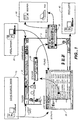
- FIG. 1 is a schematic diagram showing the computer display 5 of a computer.
- the display 5 includes what is known as a "ticker" section 10.
- the ticker 10 typically comprises an upper band-shaped section of the screen.
- the ticker 10 provides a region of the display 5 where a variety of short messages may be displayed.
- the contents of the ticker 10 preferably move in a wrap-around manner similar to stock tickers to permit the user to see a number of short messages.
- the contents of ticker 10 may include newly received information from an internet or server site 15.
- the contents of the ticker 10 may also display newly received and unread e-mail messages 20. Additionally, the ticker 10 may be programmed to display other types of data.
- the present invention is particularly well-suited to be used with a ticker 10 receiving information from other sources 15, 20. However, many of the benefits of the present invention can be achieved without a ticker 10.
- the present invention generally comprises an icon that is a displayed message object 25.
- the message object 25 is preferably displayed on the display 5 as an icon that displays a message title and/or other information related to files associated to the message object 25.
- the term "message object” describes an object whose displayed icon has a message title.
- the message title permits files associated with message object 25 to be displayed by a common theme.
- an object is an instance of a class described by its state, behavior, and identity.
- An instance is commonly defined as a specific example that conforms to a description of a class.
- a class is commonly defined as a description of the data and behavior common to a collection of objects.
- object-oriented programming is defined as a form of programming in which data are organized into classes of objects, each with a specific set of functions that can be applied to objects.
- the inventors describe the message object 25 as a "sticker.”
- the term "sticker” is descriptive of the fact that the message object 25 may perform some of the functions that computer users use self adhesive (sticky) POST-ITTM notes for.
- POST-ITTM notes are often attached to hard-copy versions of documents to provide a place to attach removable messages.
- sticker is also descriptive in the sense that several documents or files may be associated, or “stuck” together by the sticker, in analogy to the way some users of POST-ITTM notes paperclip several related documents together and then attach a POST-ITTM note onto the associated documents.
- sticker for message object 25 is partially descriptive of the function of message object 25, the message object 25 of the present invention also performs many functions that conventional POST-ITTM notes do not perform.
- the sticker 25 is an object-oriented representation of one or more computer files, documents, or e-mail messages and contains enough information to access the corresponding files/documents/messages. Another way to describe an individual sticker 25 is that a sticker 25 is a user interface container that also has an information description.
- the interface container corresponding to an individual sticker corresponds to a data element within a larger database for the entire container class. For each container there is an associated instance element with attribute data.
- each instance element has an identification reference code that helps to identify an individual instance element as corresponding to a particular sticker 25.
- means are required to generate and store information defining a container class in the memory of the operating system; means to insert and edit information for a particular container; means to insert and edit the information description of individual sticker containers; and means to access the information contained in a sticker 25 along with its associated information description.
- a container class in the memory of the operating system
- means to insert and edit information for a particular container means to insert and edit the information description of individual sticker containers; and means to access the information contained in a sticker 25 along with its associated information description.
- a plurality of stickers 25 form a container class.
- the sticker containers permit users to organize information in their desktop workspace regardless of how the information is stored in the file system of their operating system.
- a sticker container 25 may contain data or metadata.
- a sticker 25 may contain a Word document; a uniform resource locator ("URL") which specifies a particular site and a particular internet resource or file containing a document for a browser to retrieve; or a so-called "short-cut" that is a special type of file that points to another file.
- the sticker may also contain any form of reference index information that permits a link (or hyperlink) to be established to information contained in other files or documents in order to access the information itself.
- the sticker may contain a pointer table that generates a pointing signal as required to access information contained in files stored in the memory of an individual computer or on a database network.
- the information description of the sticker 25 may contain a user-defined message and/or the computer may automatically create an information description that includes information on creator, creation date, and other information.
- the sticker 25 calls application documents as required when the user double clicks or otherwise activates the sticker.
- a plurality of stickers 25 may refer to a subset of the same files, documents, or messages using pointing information.
- a sticker 25 is particularly useful in assisting a user to efficiently coordinate the use of a plurality of information files such as documents and archived e-mail messages.
- An individual sticker 25 permits two or more documents, files, or messages to be associated together by one theme.
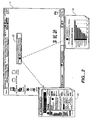
- a sticker object 25 may, for example, be used to organize several different documents around a task. For example, as indicated in FIG. 2, a sticker 25 on screen 5 may link a document 50 and graph 55. In FIG. 2, the association between sticker 25 and associated items 50, 55 is indicated by dashed lines.
- the sticker 25 may be labeled by the user with an organizational message, such as the action-item "To Do: Weekly Report.”
- the user may also include a target date, such as a sticker entitled: “To Do: Weekly Report Due 5/15/1999.”
- a target date such as a sticker entitled: "To Do: Weekly Report Due 5/15/1999.”
- the user may organize the sticker 25 on their desktop by dragging and dropping the sticker in a location that the user prefers.
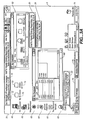
- one or more stickers may be placed in an additional display object, such as a folder that serves as a message board 60 (shown in FIG. 3).
- a message board 60 in analogy to a conventional bulletin board, permits a plurality of stickers to be stored in a window display that can be opened when the user desires to see stickers stored in the message board 60.
- the present invention is preferably practiced with the BEHALF application program of Fujitsu, Ltd.
- BEHALF is the internal development name for a message handling and message assistant application program of Fujitsu, Ltd.
- the BEHALF application includes a special window 60 that can be used to automatically store a plurality of stickers 25 and may be opened, as required, to view the stickers 25.
- the screen display 5 also has a plurality of program icons 65 and a menu button icon 70. Additionally, one or more edges of display 5 may also contain status icons 75 related to the status of one or more programs.
- the sticker 25 has a shape, color, and font size that distinguishes it from conventional folders. As indicated in FIG. 3A, the inventors believe that an object shaped like a narrow (high aspect ratio) box is a preferred shape because it is easily distinguishable from other common icons, such as conventional folder icons 72, while also efficiently using limited desktop space to display a message. Referring to FIG. 3, sticker 25 has a shape in which a large fraction of the area of sticker 25 incorporates a message.
- sticker 25 may occupy a much larger area. Moreover, sticker 25 may utilize larger fonts and include a longer string of text than the conventional text portion 73 of a conventional folder 72. Sticker 25 is thus preferably designed with a shape and area that facilitates its function as a message object displaying a thematic message text.
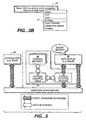
- FIG. 3B shows a sticker 25 and a corresponding sticker menu window 27 that may be triggered by double-clicking on the sticker, or by other means.
- the menu window 27 facilitates changing the display and information properties of a sticker 25.
- the content menu 27, may for example, permit cutting, copying, deletion, or pasting of the sticker 25.
- the attributes of sticker 25 preferably may be edited using a user content menu to add, delete, or change reference information attributes, such as deleting or adding a document file to a sticker 25. It is also desirable to be able to change display attributes, such as the font size, type, and color. In addition it is desirable to be able to edit the sticker 25 display color and message title.
- the sticker 25 may be moved around the display using a click and drag function. Additionally, it is desirable that the size of the sticker 25 may be adjusted using click and drag means, such as clicking and dragging on a portion of displayed sticker 25 to adjust the size of the sticker. Moreover, it is desirable that the font size of the message title of the sticker 25 automatically adjusts as the area of the sticker 25 is changed.
- the ability to conveniently edit a sticker greatly increases its function as an information management tool.
- a user who is a patent agent may initially create a sticker entitled: "Acme Widget Patent" which associates a draft of a patent application, a technical disclosure, and graphics.
- the patent agent may receive a subsequent e-mail from the inventor stating that there was a U.S. sale of the invention on October 20 th of the previous year, thereby triggering the one-year on-sale bar unless the patent is filed by October 20 th of the current year.
- the patent agent could then edit the sticker to add the new e-mail message.
- the sticker title could be changed to "Must File Acme Widget Patent by Oct.
- the message object of the present invention may have a text string that occupies a substantial width of the computer display screen.
- the font of the sticker could be changed to a red color to emphasize the importance of the filing date.
- the font size and type of the message text string of sticker 25 could be changed to emphasize the urgency of the task.
- a sticker 25 is also useful in assisting a user to rapidly convert incoming e-mail messages into message objects.
- sticker 25 is designed to work with a ticker 10.
- a ticker 10 may be used with the present invention is if incoming internet documents 15 or e-mail messages 20 displayed on the ticker 10 may be converted into stickers 25.
- a ticker 10 may display incoming news from an internet clipping service, such as a news story entitled: "Microsoft, HP exchange messages.”
- the ticker 10 is modified to permit a user to point and click to select ticker items and then have the ticker 10 item converted into a sticker 25, either automatically or by means of a menu command.
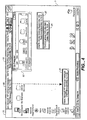
- the BEHALF application program of Fujitsu, Ltd includes the ability to access ticker items utilizing a click and drag operation. As indicated in FIG. 4, a click and drag function (indicated by the dashed line) is desirable to rapidly convert incoming ticker 10 items into message display objects 25. Moreover, it is desirable to have the capability to further edit the sticker 25, such as by associating additional documents to the sticker formed from a ticker object. For example, suppose the ticker displays an incoming e-mail message "Call Bob," from a superior regarding calling a prospective customer. The computer user may desire to edit the sticker 25 formed from the e-mail message by associating additional documents related to the upcoming telephone call to the sticker 25.
- the resulting sticker 25 is not only a reminder of an upcoming action-item but also provides the user with convenient access to the original e-mail message and related client documents when the actual telephone call is made.
- the sticker 25 combined with a ticker 10 is a preferred method to rapidly and efficiently convert incoming e-mail messages and internet documents into a more useful form.
- the Listview window 30 of FIG. 1 is part of the BEHALF application, of Fujitsu, Ltd.
- the Listview window 30 automatically stores incoming e-mail message and internet documents in the Listview window 30.
- archived documents in the Listview window 30 may be converted into stickers using a click and drag operation similar to that used on a ticker 10.
- a variety of programming methods to generate and control the placement of icons on a desktop are well-known to those of ordinary skill in the art.
- the programming methods used to generate folder icons and record the contents of a folder are well known.
- the message display object 25 of the present invention has additional features not found in conventional iconic folders.
- a sticker 25 does not contain files per se but instead contains sufficient information to access associated files. This is desirable, since it reduces the computer memory requirements and the time that it would take to store the actual files in the user interface container that comprises each sticker 25.
- sticker 25 preferably contains significantly larger amounts of textual display information than does to a conventional file folder.
- sticker 25 is also preferably designed to facilitate convenient editing of the information description and associated files contained in each sticker 25. Consequently, the inventors have developed a programming approach specifically addressed to generating and editing a sticker 25 using an application program designed to operate with a Windows standard applied operating programming interface.
- FIG. 5 is a block diagram showing a preferred method of generating and utilizing stickers.
- a conventional word processing application 99 is designed to interact with a Windows standard applied programming interface (API) 92.
- the sticker control module 90 exchanges event information with an application program 98.
- the sticker control module 90 in turn, generates message events that are sent to Windows API 92 that permit a message object to be generated on the desktop of the display 5.
- the application program may be any one of a number of conventional programs.
- the block diagram of FIG. 5 provides a general teaching applicable for a variety of object-oriented application programs that may be used with a Windows API 92.
- the BEHALF programming application of Fujitsu, Ltd. is a preferred application program.
- the BEHALF application includes a dynamic news clipping service that permits a user to clip articles of interest from a plurality of databases on the world wide web. Moreover the BEHALF includes a ticker to display incoming news articles gathered by the dynamic news clipping service. Additionally, the BEHALF application automatically accumulates and preserves down-loaded articles in a Listview window. Moreover, as indicated in FIG. 5, the program can also work directly with the Windows API 92. However, those of ordinary skill in the art of object-oriented programming are presumed capable of modifying other object-oriented application programs to achieve these functions of the BEHALF application.
- Control modules such as that of U.S. Patent No. 5,430,836, are sometimes used in Windows-based desktop applications for the limited purpose of enabling a variety of computer applications to efficiently work together around a common graphical user interface, such as by facilitating the efficient transfer, management, and display of data between different application programs.
- the control module of the present invention is used for a different function, the general principles of programming a control module are sufficiently well known that one of ordinary skill in the art could implement a control module 90 to interact with another application program besides the BEHALF application.
- the sticker control module 90 acts as a message handler between a Windows API 92 and computer application 98 to implement a sticker function in a standard Windows API.
- the sticker control module 90 requires a means to refer to data in the interface container of an individual sticker 25. As indicated by arrows 93, 95 the sticker control module 90 accesses reference data in sticker control table 94 and sticker instance element 96. Preferably, the sticker control module 90 refers to and updates sticker control table 94 and sticker instance element 96.
- the sticker control table 94 provides reference control information, which is essential since in principle a plurality of stickers 25 may be displayed on the desktop or in a message bulletin board. As shown in FIG. 6, the sticker control table 94 is a registration table to control two or more stickers 25. Sticker control table 94 contains pointing information 100 registered in the sticker control table 94. Pointing information 100 permits sticker control module 90 to access sticker instance information 102 regarding an individual sticker 25.
- An individual sticker instance element 102 contains the essential information, or substance of its corresponding message object 25. Consequently, a new individual sticker instance 102 must be created when sticker control module 90 generates a new sticker 25. Also, an individual sticker instance 102 must be updated when the corresponding sticker 25 is edited.
- the sticker instance element 96 is created as an extended class of a Windows desktop object through a standard Windows system. The sticker instance element 96 also maintains the attributes of a sticker 25.
- the sticker instance element 96 preferably includes an identification reference (ID) code 110, to enable an individual sticker instance element 102 to be referred to by sticker control table 94.
- ID code 110 attribute may be arbitrarily decided upon by the sticker control module 90.
- the sticker instance element 102 also preferably includes display attributes 112 (which are required when the sticker is displayed on the desktop).
- the display attributes 112 include the position where the sticker is displayed on the desktop.
- the display attributes 112 should be automatically updated by sticker control module 90 when the user changes the display position of the sticker 25 on the screen display 5 by dragging the sticker 25 across the screen or into a message board 60.
- the display attributes 112 also include information on the size of the sticker 25.
- the size of the sticker 25 is automatically calculated from the number of characters in its message title so that the entire message title is displayed.
- the user can also change the size of the displayed sticker 25.
- the display attributes 96 also preferably contain information on the font size, type, and color of sticker 25 in addition to the background color of the sticker.
- the sticker instance element 96 also includes information attributes 114. These information attributes 114, preferably include, but are not limited to, the creators name, which may be the user's name or it may be the name of a program that automatically creates a sticker. The information attributes 114 also preferably include the creation date of the sticker. The information attributes 114 also preferably include the message type, such as a keyword that shows the type of message displayed in the Sticker. For example, the message type may be a "memo" or some other message type. Preferably, a plurality of message types may be defined by the user.
- the information attributes 114 include a user-definable message title that is displayed in the sticker 25. Moreover, it is preferable that there is a default message title for messages created by pointing and dragging items from the ticker 10 or from archived e-mail and internet messages stored in a listview window 30. In particular, it is desirable that the default message title of ticker 10 or listview window 30 is the same as the ticker 10 title.
- a sticker 25 may be an interface container that contains the actual files, it is preferable that the sticker 25 utilizes an index, pointer, or other short-cut means to provide a means to access the associated files.
- a pointer method is preferred, since an access pointer can store a file name, URL address, or other information that permits later access to the information of an associated file.
- the sticker instance 96 thus preferably utilizes a pointer table 116 containing pointer information to access the associated files.
- the pointer of reference information table 116 contains a reference information table 118 that contains one or more indices to reference information 120. Each index of reference information 120 contains sufficient information to access the indexed file.
- the reference information table includes an opening flag, which opens reference information by an opening event such as a double click.
- the reference information table 118 also contains information on the information type, which is set by the sticker control module 90 according to the type of information set in the sticker. This is important in order that the sticker opens the correct application.
- FIG 8 is a flowchart showing a preferred sequence of steps to create a sticker 25.
- an event occurs which corresponds to a command to "create sticker " 125. This event may be triggered when a user sends the sticker control module 90 an event to create a sticker using the desktop menu 70. However, this event may be triggered by clicking and dragging upon message objects displayed in a ticker 10 or a special folder window, such as the listview window 30.
- the sticker control module 90 begins the generation and processing of a sticker 25. As shown in FIG. 8, after event 125 is received, there is an initial generation of sticker 130. The arrow 132 indicates that there is a corresponding generation of sticker instance 96 when the sticker is generated. This includes the generation of ID data 110. After the initial generation of sticker instance 130, there is an initial setting of attributes 140. For example, the user may add information attributes 114 or reference information table 116 information (e.g., associated files). As indicated by arrow 134, setting the attributes 140 leads to a change in sticker instance 96.
- a temporary sticker is displayed on the computer desktop display 5, preferably after the initial setting of attributes 140.
- the sticker title is preferably automatically the same as the ticker 10 item.
- stickers 25 that are formed by selecting from a user menu 70 will have a blank (null) message title 145. Consequently, the user needs to input a message title 150 into the keyboard.
- the message title information becomes part of the sticker instance 96, as indicated by arrow 136.
- the sticker instance 96 is registered in sticker control table 94 by control module 90, which is indicated by arrow 180. This is indicated by the step of registration to sticker control table 155.
- the sticker is then displayed 160 on the desktop in its final form.
- the sticker information is preserved 165 automatically on a hard disk or other suitable storage means.
- the preferred embodiment of a sticker 25 is one in which the sticker instance 96 utilizes a pointer table 116 that has an index entry 120 for each associated information file.
- sticker 25 is opened, such as by double clicking on the displayed sticker 25, the user has access to all associated information contained in sticker 25.
- the sticker control module 90 preferably automatically launches an application corresponding to the information type contained in reference information table 116 in order to access the information indexed in table 118 in response to a user double-clicking upon sticker 25. As indicated by the solid arrows in FIG. 5, sticker control module 90 exchanges event message information between application program 98 and Windows API 92. However, as indicated by the icons 119, each file or other form of information indexed by information table 118 may have a different application that generated the information.
- FIG. 9 is a screen display of a preferred sticker property menu window, which may be launched by clicking upon the "property" button of sticker menu 27 of FIG. 3B.
- the sticker property menu 405 includes a message title 410, which may be edited by accessing the sticker property menu.
- the sticker property menu has a display window showing the associated reference files 415 for one sticker 25.
- the sticker property menu 405 also has buttons to add or delete reference files.
- each of the reference files 415 also has a box corresponding to an open flag 420, that the user may select if they wish to open an individual reference file 415 when the sticker files are accessed. The default is preferably for all of the reference files 415 to have their corresponding open flag 420 activated when the sticker files are accessed.
- the property menu also shows the information type 425 of each file.
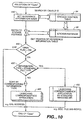
- FIG. 10 is a flowchart showing a preferred method of opening the associated files contained within a sticker.
- the control module 90 then needs to perform a step 440 to get reference information.
- the sticker control module 90 uses the reference ID code 110 to search the sticker control table 94 to find corresponding sticker instance 96 data.
- the control module then perform the step 445 of checking whether or not the opening flag is on. If the opening flag 420 of an individual reference file 415 is off, the corresponding file is not opened.
- the sticker control module 90 needs to check the information type 425 of a reference file 415, as shown by step 450. If the file is a standard file type that may be directly launched by a standard Windows API 92, then the corresponding application for the file is directly opened, as shown in step 455. For example a Word document may have its corresponding Word application program launched. However, as indicated in step 460, the information type of the reference file 415 may not be supported by a Windows standard API. For this case, the control module 90 performs the step of launching the corresponding application according to the information type registered in the sticker control table. For example, if the reference file 415 corresponds to a URL internet address the sticker may access the corresponding internet homepage.
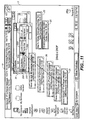
- the sticker 25 of the present invention may be used by itself as an information organization tool. However, the sticker 25 of the present invention is preferably used to facilitate the efficient transfer of associated information. As shown in FIG. 11, the transmission of the information contained in sticker 25 is facilitated by a data conversion and transmission object 35.
- Data conversion and transmission object 35 comprises a display object that may used to facilitate transmitting the contents of a sticker 25 by e-mail 40 or by non e-mail means 45, such as by FAX, the transmission of a voice synthesized message transmitted by telephone, or the transmission of text to a beeper, portable pager unit, or other unit that is designed to receive text messages sent by wireless communication means.
- Data conversion and transmission unit 35 is an object icon that can be accessed by the menu and which preferably permits the user to register a plurality of e-mail addresses to form a local mailing list.
- the data conversion and transmission unit 35 which the inventors also describe as a post-office (P.O.) box palette, preferably permits a user to drag and drop a sticker 25 onto a local user address list 200.
- P.O. palette describes an object that has a plurality of symbols that perform a post-office like function in terms of transmitting messages.
- the word "palette” refers to an object that has a range of properties, such an artist's paint palette.
- the term “P.O. palette” is thus descriptive of the function data conversion and transmission unit 35 has in transmitting stickers 25 with potentially a wide range of properties.
- a user preferably clicks on a sticker 25 and drags and drops the sticker onto a user address list 200 in data and transmission object 35.
- the P.O. palette 35 permits a user to program a plurality of different user group post boxes 200.
- the sticker 25 may be brought into one of the post boxes 200 of data conversion and transmission unit 35.
- the combination of the P.O. palette 35 and the sticker 25 facilitates sending associated information in a quick and efficient manner, particularly for groups to whom the user regularly sends information.
- Conventional e-mail systems do not permit a drag and drop mode of sending associated files to preselected user groups. Users must typically enter an e-mail program; select a user list of e-mail addressees; and then append the desired files/documents to the e-mail message by specifying the appending documents as attachments.
- the P.O. palette 35 permits a drag and drop method of sending associated files.
- box 200 may also be programmed to automatically send a comment to members on the address list of the P.O. box 200.
- a P.O. Box 200 entitled “User support group” could be addressed to members of a technical support group.
- the P.O. box 200 may be programmed to send an additional comment to members of the address list 200, such as "Enclosed are associated documents for the monthly newsletter of the user support group.”
- a sticker 25 When a sticker 25 is dragged and dropped into data conversion and transmission unit 35 the user may select that the file be transmitted to individuals on their local address list and/or to other users. If data conversion and transmission unit 35 transmits the sticker 25 information to an e-mail addressee, the contents of the sticker 25 are sent as an e-mail attachment.
- Data conversion and transmission unit 35 also preferably permits a user to transmit sticker 25 information by other than e-mail means.
- Computer users often have the need to send associated information to others in a variety of forms. For example, a manager may wish to send his employees news of an urgent upcoming meeting and also include a proposed meeting agenda and documents related to the meeting, such as a news release describing a competitor's new product line. It can be time consuming to append multiple documents to an e-mail message. Moreover, it is desirable to be able to quickly send the same information by a plurality of different transmission means. For example, in many cases a user also desires to send FAX copies of the documents to those who do not have access to e-mail.
- users often desire to send others notification that an urgent e-mail has been sent, often by a telephone call or beeper text message (e.g., a message such as "Tom: I have sent you an urgent e-mail message. Please read it ASAP").
- a telephone call or beeper text message e.g., a message such as "Tom: I have sent you an urgent e-mail message. Please read it ASAP”
- the total time required to send e-mail messages; send FAX copies to non-e-mail users; and to make confirmation calls can be significant.
- Data conversion and transmission unit 35 preferably permits a user to register information on FAX numbers, telephone numbers, and beeper numbers of addressees in one or more P.O. Boxes 200.
- the data conversion and transmission unit 35 automatically converts portions of the sticker 25, such as the message title, into a form suitable for transmission by non e-mail means for those addresses having non e-mail addresses. For example, suppose Mr. Jones sends an e-mail message on January 1, 1999 to several users. Mr. Jones can create a sticker entitled, "Urgent meeting Tuesday at 3:00 P.M.” If Mr. Jones desires, he can associate information related to the meeting to the sticker so that his e-mail addresses-receive an attached copy of the relevant materials. However, Mr.
- Mr. Jones may also want to alert colleagues that are out of the office that there is an upcoming meeting and/or that he has sent them an urgent e-mail with critical information.
- Mr. Jones may have the beeper, FAX, or telephone numbers of several of his colleagues who are out of the office. This information may be stored in one or more P.O. boxes 200 of P.O. pallette 35 or this information may be temporarily added to an address list 200 at the time the information is sent. For example, one of Mr. Jones colleagues may be staying at a hotel with a FAX machine; another colleague may be away on business but regularly checking her voicemail messages; and still another colleague may be away on local business but is accessible by a beeper with a limited text capability. All Mr.
- the data conversion and transmission unit 35 automatically converts the data of the sticker 25 into the proper form suitable for the means of transmission.
- the data conversion and transmission unit 35 preferably automatically converts the title and attached document of the sticker into a picture form suitable for FAX transmission and prepares a cover sheet with the title of the sticker and information on the creation date and the name of the sender.
- the message part of the sticker is transmitted along with information on the creation date/creator.
- a beeper recipient may receive a text message, "You have received an e-mail message from Mr. Jones sent on January 1, 1999 and entitled: Urgent meeting Tuesday at 3:00 P.M.”
- a similar message may also be created by a voice synthesizer for transmission by telephone.
- P.O. box control module 300 which is used to facilitate data conversion of a sticker 25 appropriate for the means of data transmission (i.e., e-mail, FAX, beeper, or telephone).
- the information form conversion module 310 directs the conversion of the information of the sticker 25 using information registered in a receiving device table 320.
- the receiving device table 320 contains receiving device records 330 which contain pointers 340 to the appropriate information converter 350 appropriate for a particular receiving device type 360.
- the information form conversion module 310 references the fact that the receiving device type 360 is an e-mail address.
- the pointer 340 then directs the information form conversion module 310 to access an information converter 350 appropriate for e-mail transmission (e.g., the documents of the sticker are appended to the e-mail message and/or URL addresses are converted into a form suitable for appending to the e-mail message).
- the information form conversion module 310 refers to the receiving device table 320 for a receiving device type 360 comprising a FAX machine.
- the pointer 340 directs the information form conversion module 310 to access an information converter 350 appropriate for FAX transmission (e.g., transmitting the documents as picture images).
- the information form conversion module 310 refers to the fact that the receiving device type 330 is a machine.
- the pointer 340 refers the information form conversion module 310 to an information converter 350 appropriate for a beeper (e.g., transmission of text that includes the sticker title or e-mail title plus information on creation date and creator).
- sticker 25 works together interactively with a P.O. palette 35, listview 30, message board 60, and ticker 10 as part of a larger information and message management system.
- FIG. 13 shows a preferred embodiment of a ticker 10.
- the ticker 10 preferably includes control buttons and bars 505, 510 to adjust the position and/or rate at which items move across the ticker 10.
- the ticker 10 may have a button icon 515 that automatically opens the P.O. palette 35.
- the ticker 10 preferably includes a menu button 520.
- the opened ticker menu 521 may have a command corresponding to "Create New Sticker.”
- the ticker menu 521 preferably also has commands that permit a message board to be opened up. As indicated in FIG.
- the message board 60 preferably includes files that are archived in the message board.
- one or more assistants such as a news clipping service, automatically archive files 523 in the message board for later retrieval and/or conversion into a sticker 25.
- the user can convert a file stored in the message board by doubling clicking upon the item and/or utilizing a content menu.
- a user menu permits an archived file 525 to be converted into a sticker using a menu 530.
- the BEHALF application has features that permit a user to adjust the length of time for which articles and other materials acquired by assistants, such as a news clipping service, are stored in the message board 60.
- the BEHALF application also includes a scrap-book file that, as it name implies, performs an additional storage function, such as temporarily saving "deleted" ticker items.
- the combination of features of the present invention permits the user to efficiently organize and utilize a stream of incoming information.
- the present invention permits a user to efficiently transmit received and/or processed information.
- a user may convert incoming ticker items 80 into a sticker 25.
- the user may then optionally edit the resulting sticker 25, such as by associating additional documents to the sticker 25 or by changing its message title.
- the user may then transmit the sticker to others by performing a drag and drop function onto one or more P.O. boxes 200 in the P.O. palette 35. This may comprise both e-mail and non e-mail addresses.
- the present invention performs an information organization, management, and transmission function that is more complex and more time efficient than conventional methods.
- the benefits of the present invention are particularly great for those computer users who receive a plurality of e-mail messages and internet files every day. For high-use users, such as those who receive more than about twenty e-mail messages each day and/or a corresponding number of internet files, even small reductions in the amount of time it takes to organize and/or transmit each individual incoming file have a substantial cumulative effect.
- the present invention also performs functions that are not possible with conventional iconic folders.
- the present invention performs part of the function of a conventional Post-ItTM note in terms of providing a message space.
- the ability to edit the sticker 25, such as by changing message title content dates and/or changing display attributes such as font size and color facilitates using the sticker 25 as a time-management or project-management aid, similar to a Day-TimerTM.
- the data conversion function of the P.O. palette 35 also permits the present invention to function like a personal assistant because P.O. palette 35 eliminates the need to have an individual FAX hard copies of associated files and/or make separate arrangements to contact recipients by beeper or telephone.
- the ability to rapidly convert ticker items 80 or items stored in a Listview window 30 into stickers further enhances the information management benefits of the present invention.
- the combination of features of the present invention is particularly advantageous for computer users who must efficiently organize and manage large numbers of incoming internet 15 or intranet 20 messages each day.
Landscapes
- Engineering & Computer Science (AREA)
- Software Systems (AREA)
- Theoretical Computer Science (AREA)
- Physics & Mathematics (AREA)
- General Engineering & Computer Science (AREA)
- General Physics & Mathematics (AREA)
- Human Computer Interaction (AREA)
- User Interface Of Digital Computer (AREA)
- Information Transfer Between Computers (AREA)
- Information Retrieval, Db Structures And Fs Structures Therefor (AREA)
- Processing Or Creating Images (AREA)
- Computer And Data Communications (AREA)
Claims (6)
- Système pour afficher des objets de message par icône (25) de fichiers de données qui sont associés par un thème commun dans une interface utilisateur graphique sur un ordinateur à l'aide d'un affichage (5), comprenant :un moyen de module de commande d'objet de message (90) pour générer et éditer un conteneur d'information d'objet de message en réponse à un événement de génération d'objet de message ;un moyen d'élément d'exemple d'objet de message (96) pour stocker dans ledit conteneur d'information des données d'attribut incluant des attributs d'information (114), des attributs d'affichage (112) et une table de pointeurs (116) qui contient une information suffisante pour accéder à des fichiers associés (50, 55) dans ledit conteneur d'information d'objet de message ;un moyen d'affichage pour afficher ledit conteneur d'information sur ladite interface utilisateur graphique en tant qu'icône d'objet de message (25) avec une description d'information ;un moyen d'accès pour accéder auxdits fichiers associés de ladite icône d'objet de message affichée (25) en réponse à un événement d'accès ;un moyen de conversion et de transmission de données de traínée et de lâcher par icône (35) pour traíner ladite icône d'objet de message affichée (25) sur une liste d'adresses (200), pour convertir les données dudit objet de message selon une forme qui convient pour une transmission sur des adresses sur ladite liste d'adresses et pour transmettre lesdites données converties jusqu'à des éléments individuels sur ladite liste d'adresses ;un moyen de bandeau pour générer un objet de bandeau (10) sur la base d'un message qui est reçu depuis l'extérieur de l'ordinateur ; etun moyen de conversion de bandeau qui est sensible à un effet de cliquage et de traínée par utilisateur sur un objet de bandeau (10) pour initier la génération d'un objet de message (25) en utilisant l'information qui est contenue dans l'objet de bandeau (10).
- Système selon la revendication 1, comprenant en outre :dans lequel :un moyen de table de commande d'objet de message (94) pour stocker des données de pointage de table de commande (100) pour chaque dit objet de message (25) ; etun moyen d'association pour associer chaque dit objet de message (25) qui est généré par ledit moyen de module de commande d'objet de message (90) avec un élément d'exemple d'objet de message individuel (96, 102) au moyen de données de pointage de table de commande,ledit moyen d'affichage affiche chaque dit objet de message (25) avec un titre de message qui est acquis à partir dudit élément d'exemple d'objet de message (96, 102).
- Logiciel d'ordinateur qui, lorsqu'il est chargé dans un appareil de traitement d'information, met en oeuvre un système selon la revendication 1 ou 2.
- Support de stockage lisible par ordinateur qui stocke un logiciel d'ordinateur selon la revendication 3.
- Procédé d'affichage d'objets de message par icône (25) de fichiers de données qui sont associés par un thème commun dans une interface utilisateur graphique sur un ordinateur à l'aide d'un affichage (5), comprenant :une étape de commande d'objet de message consistant à générer et à éditer un conteneur d'information d'objet de message en réponse à un événement de génération d'objet de message ;une étape d'élément d'exemple d'objet de message consistant à stocker dans ledit conteneur d'information des données d'attribut incluant des attributs d'information (114), des attributs d'affichage (112) et une table de pointeurs qui contient une information suffisante pour accéder à des fichiers associés (50, 55) dans ledit conteneur d'information d'objet de message ;une étape d'affichage consistant à afficher ledit conteneur d'information sur ladite interface utilisateur graphique en tant qu'icône d'objet de message (25) avec une description d'information ;une étape d'accès consistant à accéder auxdits fichiers associés de ladite icône d'objet de message affichée (25) en réponse à un événement d'accès ;une étape de conversion et de transmission de données de traínée et de lâcher par icône consistant à traíner ladite icône d'objet de message affichée (25) sur une liste d'adresses (200), à convertir les données dudit objet de message selon une forme qui convient pour une transmission sur des adresses sur ladite liste d'adresses (200) et à transmettre lesdites données converties à des éléments individuels sur ladite liste d'adresses ;une étape consistant à générer un objet de bandeau (10) sur la base d'un message qui est reçu depuis l'extérieur de l'ordinateur ; etune étape de conversion de bandeau consistant à, en réponse à un effet de cliquage et de traínée par l'utilisateur sur un objet de bandeau, initier la génération d'un objet de message (25) en utilisant l'information qui est contenue dans l'objet de bandeau (10).
- Procédé selon la revendication 5, comprenant en outre :dans lequel :une étape d'enregistrement d'un moyen de table de commande d'objet de message (94) qui stocke des données de pointage de table de commande (100) pour chaque dit objet de message (25) ; etune étape d'association qui associe chaque dit objet de message (25) qui est généré par ledit moyen de module de commande d'objet de message avec un élément d'exemple d'objet de message individuel (96, 102) au moyen des données de pointage de table de commande ;ladite étape d'affichage affiche chaque dit objet de message (25) avec un titre de message qui est acquis à partir dudit élément d'exemple d'objet de message (96, 102).
Applications Claiming Priority (2)
| Application Number | Priority Date | Filing Date | Title |
|---|---|---|---|
| US18315998A | 1998-10-30 | 1998-10-30 | |
| US183159 | 1998-10-30 |
Publications (3)
| Publication Number | Publication Date |
|---|---|
| EP1003098A2 EP1003098A2 (fr) | 2000-05-24 |
| EP1003098A3 EP1003098A3 (fr) | 2003-08-27 |
| EP1003098B1 true EP1003098B1 (fr) | 2005-09-07 |
Family
ID=22671695
Family Applications (1)
| Application Number | Title | Priority Date | Filing Date |
|---|---|---|---|
| EP99308540A Expired - Lifetime EP1003098B1 (fr) | 1998-10-30 | 1999-10-28 | Procédé et système d'affichage et d'envoi d'informations |
Country Status (3)
| Country | Link |
|---|---|
| EP (1) | EP1003098B1 (fr) |
| JP (1) | JP4091721B2 (fr) |
| DE (1) | DE69927114T2 (fr) |
Cited By (2)
| Publication number | Priority date | Publication date | Assignee | Title |
|---|---|---|---|---|
| US7774479B2 (en) | 2001-03-29 | 2010-08-10 | 3M Innovative Properties Company | Display of software notes accessed by content recipient from content provider site |
| US20100295802A1 (en) * | 2009-05-25 | 2010-11-25 | Lee Dohui | Display device and method of controlling the same |
Families Citing this family (20)
| Publication number | Priority date | Publication date | Assignee | Title |
|---|---|---|---|---|
| CN1437719A (zh) * | 2000-06-22 | 2003-08-20 | 英特尔公司 | 用户间的通信对象 |
| GB2370379A (en) * | 2000-12-19 | 2002-06-26 | Inventec Appliances Corp | Method for receiving electronic messages by electronic device |
| JP2002215544A (ja) * | 2001-01-24 | 2002-08-02 | Brother Ind Ltd | 通信装置および記憶媒体 |
| CA2556399A1 (fr) * | 2004-02-20 | 2005-09-29 | Dci Database For Commerce And Industry Ag | Systeme d'information |
| JP5032842B2 (ja) * | 2004-03-26 | 2012-09-26 | パナソニック株式会社 | 表示処理装置及び表示処理方法 |
| US7509588B2 (en) | 2005-12-30 | 2009-03-24 | Apple Inc. | Portable electronic device with interface reconfiguration mode |
| US10313505B2 (en) | 2006-09-06 | 2019-06-04 | Apple Inc. | Portable multifunction device, method, and graphical user interface for configuring and displaying widgets |
| US8519964B2 (en) | 2007-01-07 | 2013-08-27 | Apple Inc. | Portable multifunction device, method, and graphical user interface supporting user navigations of graphical objects on a touch screen display |
| US8619038B2 (en) | 2007-09-04 | 2013-12-31 | Apple Inc. | Editing interface |
| JP5345903B2 (ja) * | 2009-06-30 | 2013-11-20 | 株式会社富士通ソーシアルサイエンスラボラトリ | 電子付箋紙システムおよび電子付箋紙プログラム |
| US10788976B2 (en) | 2010-04-07 | 2020-09-29 | Apple Inc. | Device, method, and graphical user interface for managing folders with multiple pages |
| US9170708B2 (en) | 2010-04-07 | 2015-10-27 | Apple Inc. | Device, method, and graphical user interface for managing folders |
| US8799815B2 (en) | 2010-07-30 | 2014-08-05 | Apple Inc. | Device, method, and graphical user interface for activating an item in a folder |
| US8826164B2 (en) | 2010-08-03 | 2014-09-02 | Apple Inc. | Device, method, and graphical user interface for creating a new folder |
| EP3063608B1 (fr) | 2013-10-30 | 2020-02-12 | Apple Inc. | Affichage d'objets d'interface utilisateur pertinents |
| US12175065B2 (en) | 2016-06-10 | 2024-12-24 | Apple Inc. | Context-specific user interfaces for relocating one or more complications in a watch or clock interface |
| DK201670595A1 (en) | 2016-06-11 | 2018-01-22 | Apple Inc | Configuring context-specific user interfaces |
| US11816325B2 (en) | 2016-06-12 | 2023-11-14 | Apple Inc. | Application shortcuts for carplay |
| US10788971B2 (en) | 2017-06-28 | 2020-09-29 | Microsoft Technology Licensing, Llc | Data organizing stickers |
| US11675476B2 (en) | 2019-05-05 | 2023-06-13 | Apple Inc. | User interfaces for widgets |
Family Cites Families (2)
| Publication number | Priority date | Publication date | Assignee | Title |
|---|---|---|---|---|
| US5490244A (en) * | 1994-03-24 | 1996-02-06 | International Business Machines Corporation | System and method for transmitting a computer object |
| US5801700A (en) * | 1996-01-19 | 1998-09-01 | Silicon Graphics Incorporated | System and method for an iconic drag and drop interface for electronic file transfer |
-
1999
- 1999-10-28 EP EP99308540A patent/EP1003098B1/fr not_active Expired - Lifetime
- 1999-10-28 DE DE69927114T patent/DE69927114T2/de not_active Expired - Fee Related
- 1999-10-29 JP JP30951399A patent/JP4091721B2/ja not_active Expired - Fee Related
Cited By (3)
| Publication number | Priority date | Publication date | Assignee | Title |
|---|---|---|---|---|
| US7774479B2 (en) | 2001-03-29 | 2010-08-10 | 3M Innovative Properties Company | Display of software notes accessed by content recipient from content provider site |
| US20100295802A1 (en) * | 2009-05-25 | 2010-11-25 | Lee Dohui | Display device and method of controlling the same |
| US8854315B2 (en) * | 2009-05-25 | 2014-10-07 | Lg Electronics Inc. | Display device having two touch screens and a method of controlling the same |
Also Published As
| Publication number | Publication date |
|---|---|
| DE69927114T2 (de) | 2006-05-18 |
| JP4091721B2 (ja) | 2008-05-28 |
| JP2000172592A (ja) | 2000-06-23 |
| EP1003098A2 (fr) | 2000-05-24 |
| EP1003098A3 (fr) | 2003-08-27 |
| DE69927114D1 (de) | 2005-10-13 |
Similar Documents
| Publication | Publication Date | Title |
|---|---|---|
| EP1003098B1 (fr) | Procédé et système d'affichage et d'envoi d'informations | |
| US7503012B2 (en) | Invoking user designated actions based upon selected computer content | |
| US5949413A (en) | Database graphical user interface with tabbed user view | |
| US8584022B1 (en) | System and method for organizing, managing, and manipulating desktop objects with an activity-oriented user interface | |
| US5973693A (en) | Method and apparatus for improved information visualization | |
| US6725228B1 (en) | System for managing and organizing stored electronic messages | |
| US6014135A (en) | Collaboration centric document processing environment using an information centric visual user interface and information presentation method | |
| US5500929A (en) | System for browsing a network resource book with tabs attached to pages | |
| US6725427B2 (en) | Document stream operating system with document organizing and display facilities | |
| US6470363B1 (en) | System and method for processing ordered sections having different file formats | |
| US5874953A (en) | Database graphical user interface with outline view | |
| US7533149B2 (en) | Maintaining multiple versions of message bodies in a common database | |
| US6052121A (en) | Database graphical user interface with user frequency view | |
| US5898431A (en) | Database graphical user interface with calendar view | |
| US20070226204A1 (en) | Content-based user interface for document management | |
| US8037049B2 (en) | System for automatic data retrieval based on context-traversal history | |
| US20100191818A1 (en) | Automatic Grouping of Electronic Mail | |
| JP2007509430A (ja) | 共通のメッセージングインターフェースを介した異なる種類の電子メッセージへのアクセス処理 | |
| WO1999018526A1 (fr) | Gestion informatique de documents | |
| EP0472070A2 (fr) | Bibliothèque électronique | |
| Cheng et al. | A mobile user interface for threading, marking, and previewing email | |
| Raff | Novell GroupWise 7 User's Handbook | |
| Hamlyn | A Graphical, Personalized Environment Mail Tool. |
Legal Events
| Date | Code | Title | Description |
|---|---|---|---|
| PUAI | Public reference made under article 153(3) epc to a published international application that has entered the european phase |
Free format text: ORIGINAL CODE: 0009012 |
|
| AK | Designated contracting states |
Kind code of ref document: A2 Designated state(s): AT BE CH CY DE DK ES FI FR GB GR IE IT LI LU MC NL PT SE |
|
| AX | Request for extension of the european patent |
Free format text: AL;LT;LV;MK;RO;SI |
|
| PUAL | Search report despatched |
Free format text: ORIGINAL CODE: 0009013 |
|
| AK | Designated contracting states |
Designated state(s): AT BE CH CY DE DK ES FI FR GB GR IE IT LI LU MC NL PT SE |
|
| AX | Request for extension of the european patent |
Extension state: AL LT LV MK RO SI |
|
| 17P | Request for examination filed |
Effective date: 20040223 |
|
| AKX | Designation fees paid |
Designated state(s): DE FR GB |
|
| 17Q | First examination report despatched |
Effective date: 20040719 |
|
| GRAP | Despatch of communication of intention to grant a patent |
Free format text: ORIGINAL CODE: EPIDOSNIGR1 |
|
| GRAS | Grant fee paid |
Free format text: ORIGINAL CODE: EPIDOSNIGR3 |
|
| GRAA | (expected) grant |
Free format text: ORIGINAL CODE: 0009210 |
|
| AK | Designated contracting states |
Kind code of ref document: B1 Designated state(s): DE FR GB |
|
| REG | Reference to a national code |
Ref country code: GB Ref legal event code: FG4D |
|
| REF | Corresponds to: |
Ref document number: 69927114 Country of ref document: DE Date of ref document: 20051013 Kind code of ref document: P |
|
| ET | Fr: translation filed | ||
| PLBE | No opposition filed within time limit |
Free format text: ORIGINAL CODE: 0009261 |
|
| STAA | Information on the status of an ep patent application or granted ep patent |
Free format text: STATUS: NO OPPOSITION FILED WITHIN TIME LIMIT |
|
| 26N | No opposition filed |
Effective date: 20060608 |
|
| PGFP | Annual fee paid to national office [announced via postgrant information from national office to epo] |
Ref country code: DE Payment date: 20081027 Year of fee payment: 10 |
|
| PGFP | Annual fee paid to national office [announced via postgrant information from national office to epo] |
Ref country code: FR Payment date: 20081014 Year of fee payment: 10 |
|
| PGFP | Annual fee paid to national office [announced via postgrant information from national office to epo] |
Ref country code: GB Payment date: 20081022 Year of fee payment: 10 |
|
| REG | Reference to a national code |
Ref country code: FR Ref legal event code: ST Effective date: 20100630 |
|
| PG25 | Lapsed in a contracting state [announced via postgrant information from national office to epo] |
Ref country code: FR Free format text: LAPSE BECAUSE OF NON-PAYMENT OF DUE FEES Effective date: 20091102 Ref country code: DE Free format text: LAPSE BECAUSE OF NON-PAYMENT OF DUE FEES Effective date: 20100501 |
|
| PG25 | Lapsed in a contracting state [announced via postgrant information from national office to epo] |
Ref country code: GB Free format text: LAPSE BECAUSE OF NON-PAYMENT OF DUE FEES Effective date: 20091028 |