EP1006428A2 - Verfahren und Vorrichtung zur Navigation in angezeigten Objekten - Google Patents
Verfahren und Vorrichtung zur Navigation in angezeigten Objekten Download PDFInfo
- Publication number
- EP1006428A2 EP1006428A2 EP99123790A EP99123790A EP1006428A2 EP 1006428 A2 EP1006428 A2 EP 1006428A2 EP 99123790 A EP99123790 A EP 99123790A EP 99123790 A EP99123790 A EP 99123790A EP 1006428 A2 EP1006428 A2 EP 1006428A2
- Authority
- EP
- European Patent Office
- Prior art keywords
- displayed
- anchor
- displayed element
- elements
- user
- Prior art date
- Legal status (The legal status is an assumption and is not a legal conclusion. Google has not performed a legal analysis and makes no representation as to the accuracy of the status listed.)
- Withdrawn
Links
Images





Classifications
-
- G—PHYSICS
- G06—COMPUTING OR CALCULATING; COUNTING
- G06F—ELECTRIC DIGITAL DATA PROCESSING
- G06F3/00—Input arrangements for transferring data to be processed into a form capable of being handled by the computer; Output arrangements for transferring data from processing unit to output unit, e.g. interface arrangements
- G06F3/01—Input arrangements or combined input and output arrangements for interaction between user and computer
- G06F3/048—Interaction techniques based on graphical user interfaces [GUI]
- G06F3/0487—Interaction techniques based on graphical user interfaces [GUI] using specific features provided by the input device, e.g. functions controlled by the rotation of a mouse with dual sensing arrangements, or of the nature of the input device, e.g. tap gestures based on pressure sensed by a digitiser
- G06F3/0489—Interaction techniques based on graphical user interfaces [GUI] using specific features provided by the input device, e.g. functions controlled by the rotation of a mouse with dual sensing arrangements, or of the nature of the input device, e.g. tap gestures based on pressure sensed by a digitiser using dedicated keyboard keys or combinations thereof
-
- G—PHYSICS
- G06—COMPUTING OR CALCULATING; COUNTING
- G06F—ELECTRIC DIGITAL DATA PROCESSING
- G06F3/00—Input arrangements for transferring data to be processed into a form capable of being handled by the computer; Output arrangements for transferring data from processing unit to output unit, e.g. interface arrangements
- G06F3/01—Input arrangements or combined input and output arrangements for interaction between user and computer
- G06F3/048—Interaction techniques based on graphical user interfaces [GUI]
- G06F3/0484—Interaction techniques based on graphical user interfaces [GUI] for the control of specific functions or operations, e.g. selecting or manipulating an object, an image or a displayed text element, setting a parameter value or selecting a range
- G06F3/04842—Selection of displayed objects or displayed text elements
Definitions
- This invention relates to a method and apparatus for navigating displayed elements, such as screen elements associated with a graphical user interface.
- Many devices are arranged to present or display one or more elements to a user.
- one or more icons or windows of a graphical user interface may be displayed on a video display of a computer.
- Some devices include a pointing apparatus, sensor or other input arrangement which permits the user to indicate precisely a displayed element on the video screen, regardless of the positions of or order of the displayed elements.
- Such an apparatus commonly comprises a mouse which the user manipulates by hand to move a displayed curser or arrow. The user moves the mouse to direct the displayed arrow into a position in which it is displayed over or in contact with the displayed element. This alone or in combination with another action, such as clicking a mouse button or pressing a keyboard key, may effectuate selection of a particular displayed element. The selection of a displayed element may be visually confirmed for the user's benefit, such as by changing the color of the displayed element, highlighting it or the like.
- the display may also comprise a touch sensitive screen by which the user selects a displayed element simply by pointing to it.
- Some devices do not have an input arrangement as described above.
- a computer may not include a mouse. It may also be desirable to navigate among displayed elements in an alternate fashion even when the device includes such an input arrangement.
- a user may wish to utilize a keyboard to navigate displayed elements on a video display instead of using an attached mouse.
- Video tape players and world wide web (WWW) television display devices commonly do not include a pointing device such as a mouse or any other input arrangement which permits a user to directly "pick" a menu item, icon or the like.
- pointing device such as a mouse or any other input arrangement which permits a user to directly "pick" a menu item, icon or the like.
- This input device may comprise the "arrow" keys of a keyboard or remote control.
- a problem with these types of input devices is that they do not provide a user complete control over the selection process. Instead, a user enters a discrete control input, such as by pressing a left arrow button, and the device must determine what displayed element should be selected in response to that input.
- a user enters a discrete control input, such as by pressing a left arrow button, and the device must determine what displayed element should be selected in response to that input.
- multiple user-inputs may be required to navigate to a particular diplayed element, with the ability of the user to select a particular diplayed element dependent upon the user's navigating a path through other displayed elements.
- the invention is a method and apparatus for navigating displayed elements such as screen elements associated with a graphical user interface.
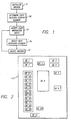
- the method comprises the steps of generating a reference anchor, accepting a user-entered navigation input, and determining a displayed element for selection dependent upon the positions of the displayed elements in relation to the anchor and the user-entered navigation input.
- the anchor is adjusted after a new displayed element is selected.
- computer hardware and/or software is arranged to perform the method of the invention.
- the invention is a method and apparatus for navigating displayed elements, such as screen elements associated with a graphical user interface (GUI).
- GUI graphical user interface
- One or more embodiments of the invention comprise a method for navigating or traversing screen elements.
- "displayed element” means an item which is associated with a video screen or other display for presentation to or use by a user.
- a displayed element may comprise a screen element such as an icon, window or button which is displayed on a video display of a computer.
- a displayed element may also comprise a holographic form, image, body or other item displayed or presented, regardless of location, such as on a screen or in free-space.
- selected when referring to or used in association or conjunction with "displayed element” means an identification of a particular displayed element.
- that a particular displayed element has been selected may be indicated to a user.
- a particular displayed element may be indicated as selected to a user on a video display by changing the color of or highlighting that displayed element as compared to its non-selected condition.
- navigation of the displayed elements is dependent upon directional input information from a user.
- This input information may be received in a variety of forms, such as voice, keystroke, hand movement or the like.
- directional input information it is meant an indication of intended movement among the displayed elements.
- the navigation method is associated with a computer having a video screen, such as described in detail below and illustrated in Figure 17.
- the computer 100 includes a keyboard 110 having one or more keys through which the user provides navigation or direction input information to the computer.
- a pseudo or reference anchor (generally referred to herein simply as “anchor”) is generated or set.
- the anchor is a reference which is used as an aid in determining the next displayed element which should be selected based on a particular user input.
- the anchor has dimensions and is not simply a point.
- the anchor is initialized to a set of default values.
- the anchor may be initialized to the size of a first selected displayed element.
- the displayed elements are listed or ordered in accordance with the position of their top left corner.
- the first displayed element of the list may comprise that displayed element having a top left corner which is closest to the top left of the screen or other display.
- a user navigation input is accepted.
- This input may comprise, for example, the pressing of a left, right, up or down arrow key of a keyboard.
- a new displayed element is selected. This process is described in more detail below. In general, however, the next displayed element which is selected is dependent upon the relationship of each displayed element to the anchor and the user-entered navigation input.
- step S5 the anchor is adjusted. The process then repeats with the input of a new navigation selection by a user in step S3.
- the anchor is a geometric reference.
- the anchor is initialized.
- the anchor may be initialized to the same geometry as the first displayed element in a list of the displayed elements.
- the displayed elements are listed in top-down order in accordance with the position of their top left corners or coordinates.
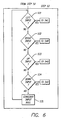
- Figure 2 illustrates a video screen 117 illustrating displayed elements DE1-DE21.
- Displayed elements DE9-DE 19 are all part of a common compartment.
- DE1 may be the first listed displayed element by reason of its having a top left comer which is both closest to the left hand edge of the screen 117 and the top of the screen.
- the anchor may be initialized to the same geometry as displayed element DE1.
- the anchor has a perimeter defined by a top edge, a bottom edge, a right edge (or side), and a left edge (or side) (generally referred to as "top,” “bottom,” “right,” and “left” herein).
- the anchor is not displayed to the user, but simply comprises a set of reference data, such as coordinates or the like.
- the anchor may have a variety of differing geometries other than a parallel-piped.
- the anchor is adjusted.
- the anchor is adjusted (i.e. its geometry or other characteristics are set) in accordance with the method illustrated in Figure 3.
- step S51 it is determined if the user navigation input was a left or right input. If so, then in a step S52 it is determined if the newly selected displayed element (selected in accordance with step S4 of Figure 1) overlaps with the current anchor.
- overlaps it is meant a condition in which a projection of the anchor in the desired direction of movement (i.e. right or left in this case) intersects with at least some portion of the next selected displayed element.
- a step S54 the left and right values of the anchor are adjusted to be the same as that of the newly selected displayed element.
- the top value of the anchor is adjusted to comprise the minimum value (i.e. vertically lowest) selected from the current anchor top value and the top value of the newly selected displayed element.
- the bottom value of the anchor is adjusted to comprise the maximum value (i.e. vertically highest) selected from the current anchor bottom value and the bottom value of the newly selected displayed element. It should be understood that in this arrangement the size of the anchor can not increase when there is an overlap condition.
- the currently selected displayed element is DE1 and the anchor currently has the same geometry as DE1.
- a user entered a right navigation input resulting in the selection of DE2 (such as in accordance with the selection process described in more detail below).
- An overlap condition exists with newly selected displayed element DE2, since DE2 lies at least partially within the projection of the anchor in the direction of movement.
- the projection of the current anchor in the direction of movement is indicated in this figure by the arrows, and comprises a band having top and bottom limits the same as the top and bottom of the anchor, and extending to the right from the right side of the anchor.
- the right and left values of the anchor are adjusted to comprise the right and left values of DE2.
- the top value of the anchor is adjusted to comprise the top value of DE2, since this value is lower than the top value of the original anchor, and the bottom value of the anchor comprises that of the original anchor, since this value is greater (i.e. higher) than the bottom value of DE2.
- a determination of an whether an overlap condition exists when the move is a right or left move depends on whether a displayed element falls at least partially within a projection of the anchor in the horizontal direction.
- a step S53 the anchor is adjusted to the geometry of the newly selected displayed element. For example, referring to Figure 4, if the last selected displayed element comprised DE20 and a right user input resulted in the selection of DE21, the new geometry of the anchor would be the same as DE21. It may thus be understood that the size of the anchor may increase when there is a no overlap condition.
- step S55 it is determined if an overlap condition exists in the direction of movement.
- overlap means whether a projection of the anchor vertically up or down intersects with at least a portion of the newly selected displayed element.
- a step S57 the top and bottom values of the anchor are adjusted to comprise the top and bottom values of the newly selected displayed element.
- the left value of the anchor is adjusted to comprise the maximum value (i.e. the right-most of the left values) of the original anchor left or newly selected displayed element left.
- the right value of the anchor is adjusted to comprise the minimum value (i.e. the left-most of the right values) of the original anchor right value or newly selected displayed element right value.
- the left and right values of the anchor comprise the left and right values of DE6, since the left value of DE6 is greater than (i.e. not as far left) as the left value of the original anchor and the right value of DE6 is less than (i.e. not as far right) as the right value of the original anchor.
- the anchor geometry is adjusted to the geometry of the newly selected displayed element, in accordance with step S56.
- the anchor geometry is adjusted to have the same geometry as the newly selected displayed element.
- step S31 it is determined if that input was a left input. If so, then the next displayed element is selected in accordance with step S4L. If not, in step S32 it is determined if the input was a right input. If so, then the next displayed element is selected in accordance with step S4R. If not, in a step S33 it is determined if the input was an up input. If so, then the next displayed element is selected in accordance with a step S4U. If not, in a step S34 it is determined if the input was a down input. If so, then the next displayed element is selected in accordance with a step S4D.
- a step S35 it is determined that the user input is an invalid or null navigation input and the process repeats upon the entry of a new user input.
- An additional step or steps may be provided for determining if the user input is an input indicating a desire to end navigation, such as the pressing of the "escape" key for exiting the navigation mode.
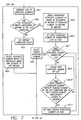
- step S4L1 a list of the displayed elements is generated.
- displayed elements which are not visible such as those fully clipped or concealed by another displayed element
- those which are disabled or are not traversable and the currently selected displayed element are not included in the list.
- the list includes only those displayed elements which, if selected, will result in visible navigation to the user.
- a step S4L2 it is determined if any of the displayed elements in the list are overlapped by the anchor in the direction of movement (i.e. left). This is accomplished by determining if any of the displayed elements in the list fall within the projection of the anchor in the left direction.
- step S4L3 it is determined that a no overlap condition exists.
- the displayed element which is selected from the list is that displayed element which is vertically above and closest to the anchor.
- the bottom right corner of each displayed element is compared to the bottom of the anchor to determine if the displayed element is vertically above the anchor and (if above) the distance it is above the anchor.
- step S4L2 it is determined that there are no displayed elements which are overlapped by the anchor in the left direction.
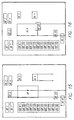
- step S4L4 it is determined that the next selected displayed element is displayed element DE7, since this displayed element is vertically above DE9 and has its bottom right comer closest to the bottom of the anchor than the other displayed element which is vertically above the anchor (i.e. the bottom right corner of DE7 is closer than the bottom right corner of DE1 to the bottom of the anchor).
- step S4L5 a list of all overlapped displayed elements is generated in order of the closeness of the displayed element to the anchor.
- the closeness is based on the vertical distance between the bottom right corner of the displayed element to the bottom right comer of the anchor.
- step S4L6 the first displayed element on this list is set as a flagged element.
- step S4L7 is determined if there are any other elements on the list. If not (i.e. there is only one displayed element on the list, and thus only one displayed element which is overlapped) then this displayed element is, in step S4L8, determined to be the next selected displayed element.
- step S4L7 it is determined that there is another element on the list, this element is chosen in step S4L9.
- step S4L10 it is determined if this next chosen displayed element both overlaps the flagged displayed element in the direction of movement (i.e. does the next element, when projected in the left direction, intersect at least a portion of the flagged displayed element) and if the next chosen displayed element is horizontally closer to the anchor. If not, then the process repeats at step S4L7. If so, then this displayed element is now set as the flag in step S4L11. The process then repeats at step S4L7.
- step S4L2 it is determined that displayed elements DE8, DE13, DE14 and DE15 are overlapped by the anchor in the left direction. These displayed elements are ordered DE14, DE 15, DE 8 and DE13 in step S4L5 in accordance with the vertical closeness of their bottom right corners to the bottom of the anchor.
- step S4L6 displayed element DE14 is flagged.
- step S4L9 displayed element DE15 is next selected, but is not horizontally closer in step S4L10.
- step S4L6 displayed element DE8 is next selected.
- step S4L10 it is determined that this diplayed element has its bottom right corner horizontally closer (than the bottom right corner of DE14) and DE8 overlaps DE14.
- DE8 is set as the flat in step S4L11.
- step S4L7 DE13 is the next chosen element, but in step S4L10 it is determined that this element is not horizontally closer than DE8.
- step S4L7 it is determined that no other displayed elements remain on the overlapped list, and in step S4L8 displayed element DE8 is selected.
- step S5 see Figure 2 where the anchor is adjusted.
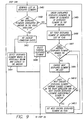
- step S4R1 a list of the displayed elements is generated.
- displayed elements which are not visible such as those fully clipped or concealed by another displayed element
- those which are disabled or not traversable and the currently selected displayed element are not included on this list.
- a step S4R2 it is determined if any of the displayed elements in that list are overlapped by the anchor in the direction of movement (i.e. right). This is accomplished by determining if any of the displayed elements in the list fall within the projection of the anchor in the right direction.
- a step S4R4 it is determined that a no overlap condition exists.
- the displayed element is selected from the list which is vertically below and closest to the anchor.
- the top left comer of each displayed element is compared to the top left corner of the anchor to determine if the diplayed element is vertically below the top of the anchor and, if below, that distance which the displayed element is below the anchor.
- step S4R2 it is determined that there are no displayed elements which are overlapped by the anchor in the right direction.
- step S4R4 it is determined that the next selected displayed element is displayed element DE8, since this displayed element is vertically below the anchor and has its top left corner closer to the top of the anchor than the other displayed elements which are vertically below the anchor (i.e. is closer than DE5 and DE6).
- step S4R5 a list of all overlapped displayed elements is generated in order of the closeness of the displayed element to the anchor.
- the closeness is based on the vertical distance between the top left corner of the displayed element to the top left corner of the anchor.
- a step S4R6 the first displayed element on this list is set as a flagged element.
- step S4R7 is determined if there are any other elements on the list. If not (i.e. there is only one displayed element on the list, and thus only one displayed element which is overlapped) then this displayed element is, in step S4R8, the next selected displayed element.
- step S4R7 If in step S4R7 it is determined that there is another element on the list, this element is chosen in step S4R9.
- step S4R10 it is determined if this next chosen displayed element both overlaps the flagged displayed element in the direction of movement (i.e. does the next element, when projected in the right direction, intersect at least a portion of the flagged displayed element) and if the next chosen displayed element is horizontally closer to the anchor. If not, then the process repeats at step S4R7. If so, then this displayed element is now set as the flag in step S4R11. The process then repeats at step S4R7.
- step S4R2 it is determined that displayed elements DE3 and DE4 are overlapped by the anchor in the left direction. These displayed elements are ordered DE4, DE3 in step S4R5 in accordance with the vertical closeness of their top left corners to the top of the anchor.
- step S4R6 displayed element DE4 is flagged.
- step S4R9 displayed element DE3 is next selected, but is not horizontally closer in step S4R10.
- step S4R7 it is determined that no other displayed elements remain on the overlapped list, and in step S4R8 displayed element DE4 is selected.
- step S5 see Figure 2 where the anchor is adjusted.
- step S4U1 a list of the displayed elements is generated.
- displayed elements which are not visible such those fully clipped or concealed by another displayed element
- those which are disabled or not traversable and the currently selected displayed element are not included on this list.
- a step S4U2 it is determined if any of the displayed elements in that list are overlapped by the anchor in the direction of movement (i.e. up). This is accomplished by determining if any of the displayed elements in the list fall within the projection of the anchor in the up direction.
- a no overlap condition exists.
- the displayed element is selected from the list which is closest both vertically and horizontally to the anchor.
- the bottom right corner of each displayed element is compared to the bottom right corner of the anchor.
- the total distance is determined by adding the horizontal and vertical distance.
- the total distance is determined in accordance with the Pythagorean theorem to find the straight line distance.
- step S4U2 it is determined that there are no displayed elements which are overlapped by the anchor in the up direction.
- step S4U4 it is determined that the next selected displayed element is displayed element DE4, since this displayed element has its bottom right corner closest to horizontally and vertically to the bottom right corner of the anchor.
- step S4U2 If in step S4U2 it is determined that at least one displayed element in the list is overlapped, then in a step S4U5 the overlapped displayed element which is vertically closest to the anchor is selected.
- the vertical closeness is based on the distance between the bottom right comer of the displayed element to the bottom right corner of the anchor.
- step S4U2 it is determined that displayed elements DE8 and DE2 are overlapped by the anchor in the up or vertical direction.
- the displayed element DE8 is selected in step S4U5 since the bottom right corner of DE8 is vertically closest to the bottom right corner of the anchor.
- step S5 see Figure 2 where the anchor is adjusted.
- step S4D1 a list of the displayed elements is generated.
- displayed elements which are not visible such as those fully clipped or concealed by another displayed element
- those which are disabled or not traversable and the currently selected displayed element are not included on this list.
- a step S4D2 it is determined if any of the displayed elements in that list are overlapped by the anchor in the direction of movement (i.e. down). This is accomplished by determining if any of the displayed elements in the list fall within the projection of the anchor in the down direction.
- a no overlap condition exists.
- the displayed element is selected from the list which is closest both vertically and horizontally to the anchor.
- the top left corner of each displayed element is compared to the top left corner of the anchor.
- the total distance is determined by adding the horizontal and vertical distance.
- the total distance is determined in accordance with the Pythagorean theorem to find the straight line distance.
- step S4D2 it is determined that there are no displayed elements which are overlapped by the anchor in the down direction.
- step S4D4 it is determined that the next selected displayed element is displayed element DE5, since this displayed element has its top left corner closest to horizontally and vertically to the top left corner of the anchor (as compared to the other closest displayed elements DE8 and DE20).
- step S4D5 the overlapped displayed element which is vertically closest to the anchor is selected.
- the vertical closeness is based on the distance between the top left comer of the displayed element to the top left corner of the anchor.
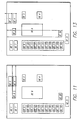
- FIG. 15 An example is illustrated in Figure 15. Assume that the currently selected displayed element is DE2 (and the anchor has the same geometry) and a down move is input by the user. In step S4D2 it is determined that displayed elements DE8, DE20 and DE21 are overlapped by the anchor in the down direction. The displayed element DE8 is selected in step S4D5 since the top left corner of DE8 is vertically closest to the top left corner of the anchor.
- step S5 see Figure 2 where the anchor is adjusted.
- the above-stated method applies to displayed elements which actually overlap one another (i.e. are positioned at least partially over the top of one another).
- displayed elements may be selected during navigation if at least partly visible.
- Figure 16 illustrates such a situation, where displayed element DE22 is located partially behind displayed element DE8.
- the same steps detailed above may be used to navigate the displayed elements.
- DE8 is the currently selected displayed element and that the anchor has the same geometry as DE8.
- displayed element DE22 is selected since this displayed element is overlapped by the anchor in the direction of input and DE8 has a top left comer which is closer to the top left corner of the anchor than the other overlapped displayed element (i.e. DE20, DE21).
- the above-described method permits navigation of displayed elements without grouping of the displayed elements. All displayed elements are navigatible with one set of inputs. This avoids, such as in the prior art, the grouping of displayed elements so that sets of elements may be navigated by use of differing inputs.
- the displayed elements DE9-19 while all positioned within a common compartment, are accessible with the same user-inputs as those outside the compartment.
- the method also does not require the assumption that all elements are of the same size or aligned along imaginary paths. Instead, the navigation is dependent on the actual size and location of the displayed elements.
- the method of the invention makes navigation predictable and guarantees navigation to all displayed elements.
- the method generally results in the same navigation path in opposite directions.
- the displayed elements all had a square or rectangular shape. It is not necessary for the displayed elements or the anchor to be limited to such a shape.
- the displayed elements are converted to a square or rectangular shape by defining the smallest such geometry which encompasses the actual shape of the displayed element.
- the actual shape of the displayed element is utilized in the above-described method. For example, if a displayed element has the shape of a triangle, the top left and top right comers of the displayed element may comprise the top point of the triangle, and the bottom left and bottom right corners the bottom two corners of the triangle.
- reference points other than those described above may be used, such as in determining the closeness of the displayed elements to the anchor. For example, in the case of a left input where no displayed elements are overlapped, the bottom left corner of each displayed element may be compared to the bottom left corner of the anchor to determine which displayed element is vertically closest to and above the anchor and is to be selected. As another example, in the case of a right input where no displayed elements are overlapped, the top right corner of each displayed element may be compared to the top right corner of the anchor to determine which displayed element is vertically closest to and below the anchor and is to be selected. In addition, the exact corner points of the displayed elements and anchor need to not be used, but other suitable points may be selected.
- An embodiment of the invention can be implemented as computer software in the form of computer readable code executed on a general purpose computer such as the computer 100 illustrated in Figure 17, or in the form of bytecode class files executable within a JavaTM runtime environment running on such a computer.
- Such a computer 100 may include, but is not limited to that illustrated in Figure 17.
- the computer 100 includes a keyboard 110 and mouse 111 coupled to a system bus 118.
- the keyboard and mouse are for introducing user input to the computer system and communicating that user input to processor 113.
- Other suitable input devices may be used in addition to, or in place of, the mouse 111 and keyboard 110.
- I/O (input/output) unit 119 coupled to system bus 118 represents such I/O elements as a printer, A/V (audio/video) I/O, etc.
- Computer 100 includes a video memory 114, main memory 115 and mass storage 112, all coupled to system bus 118 along with keyboard 110, mouse 111 and processor 113.
- the mass storage 112 may include both fixed and removable media, such as magnetic, optical or magnetic optical storage systems or any other available mass storage technology.
- Bus 118 may contain, for example, sixty-four address lines for addressing video memory 114 or main memory 115.
- the system bus 118 also includes, for example, a 64-bit data bus for transferring data between and among the components, such as processor 113, main memory 115, video memory 114 and mass storage 112. Alternatively, multiplex data/address lines may be used instead of separate data and address lines.
- the processor 113 is a microprocessor manufactured by Sun Microsystems, Inc., such as a SPARCTM microprocessor, or a microprocessor manufactured by Motorola, such as the 680X0 processor, or a microprocessor manufactured by Intel, such as the 80X86 or Pentium processor, However, any other suitable microprocessor or microcomputer may be utilized.
- Main memory 115 is comprised of dynamic random access memory (DRAM).
- Video memory 114 is a dual-ported video random access memory. One port of the video memory 114 is coupled to video amplifier 116. The video amplifier 116 is used to drive the cathode ray tube (CRT) raster monitor 117.
- Video amplifier 116 is well known in the art and may be implemented by any suitable apparatus.
- This circuitry converts pixel data stored in video memory 114 to a raster signal suitable for use by monitor 117.
- Monitor 117 is a type of monitor suitable for displaying graphic images.
- the video memory could be used to drive a flat panel or liquid crystal display (LCD), or any other suitable data presentation device.
- Computer 100 may also include a communication interface 120 coupled to bus 118.
- Communication interface 120 provides a two-way data communication coupling via a network link 121 to a local network 122.
- communication interface 120 is an integrated services digital network (ISDN) card or a modem
- ISDN integrated services digital network
- communication interface 120 provides a data communication connection to the corresponding type of telephone line, which comprises part of network link 121.
- the communication interface 120 could also be a cable modem or wireless interface.
- the communication interface 120 sends and receives electrical, electromagnetic or optical signals which carry digital data streams representing various types of information.
- Network link 121 typically provides data communication through one or more networks to other data devices.
- network link 121 may provide a connection through local network 122 to local server computer 123 or to data equipment operated by an Internet Service Provider (ISP) 124.
- ISP 124 in turn provides data communication services through the world wide packet data communication network now commonly referred to as the "Internet" 125.
- Internet 125 uses electrical, electromagnetic or optical signals which carry digital data streams.
- the signals through the various networks and the signals on network link 121 and through communication interface 120, which carry the digital data to and from computer 100, are exemplary forms of carrier waves transporting the information.
- Computer 100 can send messages and receive data, including program code, through the network(s), network link 121, and communication interface 120.
- remote server computer 126 might transmit a requested code for an application program through Internet 125, ISP 124, local network 122 and communication interface 120.
- the received code may be executed by processor 113 as it is received, and/or stored in mass storage 112, or other non-volatile storage for later execution. In this manner, computer 100 may obtain application code in the form of a carrier wave.
- Application code may be embodied in any form of computer program product.
- a computer program product comprises a medium configured to store or transport computer readable code or data, or in which computer readable code or data may be embedded.
- Some examples of computer program products are CD-ROM disks, ROM cards, floppy disks, magnetic tapes, computer hard drives, servers on a network, and carrier waves.
- An embodiment of the invention may be implemented in any type of computer system or programming or processing environment, including embedded devices (e.g., web phones, etc.) and "thin" client processing environments (e.g., network computers (NC's), etc.) that support a virtual machine.
- embedded devices e.g., web phones, etc.
- client processing environments e.g., network computers (NC's), etc.
- Appendix A contains pseudo code for implementing step S5 of the method.
- Appendix B contains pseudo code for implementing a left move selection in accordance with the method (step S4R).
- Appendix C contains pseudo code for implementing a right move selection in accordance with the method (i.e. step S4R).
- Appendix D contains pseudo code for implementing an up move selection in accordance with the method (i.e. step S4U).
- Appendix D contains pseudo code for implementing a down move selection in accordance with the method (i.e. step S4D).
- the pseudo code implements a search engine which has as inputs a list of displayed elements, the current anchor and the currently selected displayed element, The search engine is arranged to iterate through the list of displayed elements to determine the next displayed element to select in accordance with steps S4L, S4R, S4U and S4D as described and illustrated above.
- a navigator 150 may be associated with a computer such as computer 100 described above for implementing the above-described method. As illustrated in Figure 18, the navigator 150 communicates with the CPU 113 of the computer 100.
- the navigator 150 includes an anchor generator 152 and a displayed element selector 154.
- the anchor generator 152 initiates and adjusts the anchor 152.
- the displayed element selector 154 selects the displayed elements based on the anchor, currently selected displayed element and user input. In this arrangement, a user input is communicated to the displayed element selector 154 by the CPU 113.
- the displayed element selector 154 selects the displayed element, as in accordance with step S4 of the method above, and communicates this selection to the CPU 113 (whereupon the CPU 113 may make the displayed element which was selected visible, such as by highlighting on the screen 117).
- the anchor generator generates or adjusts the anchor 152, as in accordance with step S5 of the method above.
Landscapes
- Engineering & Computer Science (AREA)
- General Engineering & Computer Science (AREA)
- Theoretical Computer Science (AREA)
- Human Computer Interaction (AREA)
- Physics & Mathematics (AREA)
- General Physics & Mathematics (AREA)
- User Interface Of Digital Computer (AREA)
- Traffic Control Systems (AREA)
- Information Retrieval, Db Structures And Fs Structures Therefor (AREA)
Applications Claiming Priority (2)
| Application Number | Priority Date | Filing Date | Title |
|---|---|---|---|
| US09/201,436 US6317144B1 (en) | 1998-11-30 | 1998-11-30 | Method and apparatus for navigating displayed elements |
| US201436 | 1998-11-30 |
Publications (2)
| Publication Number | Publication Date |
|---|---|
| EP1006428A2 true EP1006428A2 (de) | 2000-06-07 |
| EP1006428A3 EP1006428A3 (de) | 2002-10-02 |
Family
ID=22745811
Family Applications (1)
| Application Number | Title | Priority Date | Filing Date |
|---|---|---|---|
| EP99123790A Withdrawn EP1006428A3 (de) | 1998-11-30 | 1999-11-30 | Verfahren und Vorrichtung zur Navigation in angezeigten Objekten |
Country Status (3)
| Country | Link |
|---|---|
| US (1) | US6317144B1 (de) |
| EP (1) | EP1006428A3 (de) |
| JP (1) | JP2000207088A (de) |
Cited By (3)
| Publication number | Priority date | Publication date | Assignee | Title |
|---|---|---|---|---|
| WO2001023991A1 (en) * | 1999-09-27 | 2001-04-05 | Koninklijke Philips Electronics N.V. | Directional navigation within a graphical user interface |
| EP1703369A3 (de) * | 2005-03-17 | 2011-08-17 | CLARION Co., Ltd. | Verfahren, Programm und Vorrichtung zur Menüanzeige |
| CN102934063A (zh) * | 2010-05-28 | 2013-02-13 | 乐天株式会社 | 显示控制程序、记录显示控制程序的记录媒体、显示控制装置及显示控制方法 |
Families Citing this family (16)
| Publication number | Priority date | Publication date | Assignee | Title |
|---|---|---|---|---|
| US6654038B1 (en) * | 2000-06-02 | 2003-11-25 | Sun Microsystems, Inc. | Keyboard navigation of non-focusable components |
| US20060122917A1 (en) * | 2000-08-14 | 2006-06-08 | Urbanpixel Inc | Real-time collaborative commerce in a multiple browser environment |
| FR2814254B1 (fr) * | 2000-09-15 | 2006-07-21 | Thomson Csf | Procede de traitement du deplacement d'un curseur sur un ecran |
| US7456823B2 (en) * | 2002-06-14 | 2008-11-25 | Sony Corporation | User interface apparatus and portable information apparatus |
| US7134089B2 (en) * | 2002-11-13 | 2006-11-07 | Microsoft Corporation | Directional focus navigation |
| US7735023B1 (en) * | 2003-09-30 | 2010-06-08 | Sap Ag | Generic keyboard navigation |
| US7712051B2 (en) * | 2003-09-30 | 2010-05-04 | Sap Ag | Keyboard navigation in hierarchical user interfaces |
| JP2006145616A (ja) * | 2004-11-16 | 2006-06-08 | Konica Minolta Photo Imaging Inc | 画像表示装置、電子機器、画像表示方法 |
| TWI380277B (en) * | 2007-12-28 | 2012-12-21 | Altek Corp | Anti-vibration system and method for display device |
| US8081224B2 (en) * | 2008-05-07 | 2011-12-20 | Aptina Imaging Corporation | Method and apparatus for image stabilization using multiple image captures |
| US8519997B2 (en) * | 2008-09-23 | 2013-08-27 | Honeywell International Inc. | Apparatus and method for display and functionality of a vehicle display system cursor control device |
| CA2781945C (en) * | 2009-11-26 | 2015-09-15 | Rakuten, Inc. | Information processing device, terminal device and program, content of interest determination method and program, recording medium on which program is recorded, and information provision system |
| US20110179390A1 (en) * | 2010-01-18 | 2011-07-21 | Robert Paul Morris | Methods, systems, and computer program products for traversing nodes in path on a display device |
| US11269500B2 (en) * | 2018-05-21 | 2022-03-08 | Samsung Electronics Co., Ltd. | Method and system for modular widgets in smart devices |
| JP6816087B2 (ja) | 2018-11-02 | 2021-01-20 | ファナック株式会社 | ロボットのアラーム通知システム |
| CN113508361B (zh) * | 2019-05-06 | 2024-12-03 | 苹果公司 | 用于呈现计算机生成现实文件的设备、方法和计算机可读介质 |
Family Cites Families (8)
| Publication number | Priority date | Publication date | Assignee | Title |
|---|---|---|---|---|
| JPS649517A (en) * | 1987-07-02 | 1989-01-12 | Toshiba Corp | Pointing device |
| US5510811A (en) * | 1992-11-25 | 1996-04-23 | Microsoft Corporation | Apparatus and method for controlling cursor movement |
| US5555354A (en) * | 1993-03-23 | 1996-09-10 | Silicon Graphics Inc. | Method and apparatus for navigation within three-dimensional information landscape |
| US5524195A (en) * | 1993-05-24 | 1996-06-04 | Sun Microsystems, Inc. | Graphical user interface for interactive television with an animated agent |
| EP0626635B1 (de) * | 1993-05-24 | 2003-03-05 | Sun Microsystems, Inc. | Graphische Benutzerschnittstelle mit Verfahren zur Schnittstellebildung mit fernsteuernden Einrichtungen |
| US5808604A (en) * | 1994-03-10 | 1998-09-15 | Microsoft Corporation | Apparatus and method for automatically positioning a cursor on a control |
| US6034689A (en) * | 1996-06-03 | 2000-03-07 | Webtv Networks, Inc. | Web browser allowing navigation between hypertext objects using remote control |
| US5977972A (en) * | 1997-08-15 | 1999-11-02 | International Business Machines Corporation | User interface component and method of navigating across a boundary coupled to a scroll bar display element |
-
1998
- 1998-11-30 US US09/201,436 patent/US6317144B1/en not_active Expired - Lifetime
-
1999
- 1999-11-30 EP EP99123790A patent/EP1006428A3/de not_active Withdrawn
- 1999-11-30 JP JP34026599A patent/JP2000207088A/ja active Pending
Cited By (7)
| Publication number | Priority date | Publication date | Assignee | Title |
|---|---|---|---|---|
| WO2001023991A1 (en) * | 1999-09-27 | 2001-04-05 | Koninklijke Philips Electronics N.V. | Directional navigation within a graphical user interface |
| US6614455B1 (en) | 1999-09-27 | 2003-09-02 | Koninklijke Philips Electronics N.V. | Directional navigation within a graphical user interface |
| EP1703369A3 (de) * | 2005-03-17 | 2011-08-17 | CLARION Co., Ltd. | Verfahren, Programm und Vorrichtung zur Menüanzeige |
| US8046714B2 (en) | 2005-03-17 | 2011-10-25 | Clarion Co., Ltd. | Method, program and device for displaying menu |
| CN102934063A (zh) * | 2010-05-28 | 2013-02-13 | 乐天株式会社 | 显示控制程序、记录显示控制程序的记录媒体、显示控制装置及显示控制方法 |
| EP2573751A4 (de) * | 2010-05-28 | 2013-11-06 | Rakuten Inc | Anzeigesteuerungsprogramm, aufzeichnungsmedium mit dem darauf aufgezeichneten anzeigesteuerungsprogramm, anzeigesteuerungsvorrichtung und anzeigesteuerungsverfahren |
| CN102934063B (zh) * | 2010-05-28 | 2016-03-23 | 乐天株式会社 | 显示控制装置及显示控制方法 |
Also Published As
| Publication number | Publication date |
|---|---|
| US6317144B1 (en) | 2001-11-13 |
| EP1006428A3 (de) | 2002-10-02 |
| JP2000207088A (ja) | 2000-07-28 |
Similar Documents
| Publication | Publication Date | Title |
|---|---|---|
| US6317144B1 (en) | Method and apparatus for navigating displayed elements | |
| US6348936B1 (en) | Method and apparatus for graphical selection of data | |
| US6271839B1 (en) | Method and system for sharing applications between computer systems | |
| US6822662B1 (en) | User selected display of two-dimensional window in three dimensions on a computer screen | |
| US6061063A (en) | Method and apparatus for providing feedback while scrolling | |
| US6344861B1 (en) | Graphical user interface for displaying and manipulating objects | |
| US7533341B2 (en) | System and method of producing user interface information messages | |
| US7176943B2 (en) | Intelligent windows bumping method and system | |
| US6456296B1 (en) | Color scheme for zooming graphical user interface | |
| US6396962B1 (en) | System and method for providing zooming video | |
| US7274382B2 (en) | Customizable background sizes and controls for changing background size | |
| US6928623B1 (en) | Method and system for selecting a target window for automatic fill-in | |
| EP0982656A1 (de) | Mechanismus für Fokusverschiebung in einer graphischen Benutzerschnittstelle | |
| US6275232B1 (en) | Polymorphic event handling for zooming graphical user interface | |
| US20050012763A1 (en) | Display controller | |
| US20090089692A1 (en) | Method And System For Presenting Information Relating To A Plurality Of Applications Using A Three Dimensional Object | |
| US6249290B1 (en) | Object oriented zooming graphical user interface | |
| EP0747805A1 (de) | Fensterverwaltung | |
| US6411292B1 (en) | Display of pointing indicator within two-dimensional window display in three dimensions on a computer screen | |
| US6275228B1 (en) | Interchangeable pick handler for zooming graphical user interface | |
| US7219331B2 (en) | Method and apparatus for lightweight support on set top box | |
| JP2003524843A (ja) | 表示面上の相補的なユーザインターフェースを制御する方法およびシステム | |
| US20090132964A1 (en) | System, method and computer-readable medium for online marketing and visual presentations of software programs | |
| US20100088648A1 (en) | System, method and computer-readable medium for visual presentation of aspect of software programs | |
| Richards et al. | Developing a motion-based input model for mobile devices |
Legal Events
| Date | Code | Title | Description |
|---|---|---|---|
| PUAI | Public reference made under article 153(3) epc to a published international application that has entered the european phase |
Free format text: ORIGINAL CODE: 0009012 |
|
| AK | Designated contracting states |
Kind code of ref document: A2 Designated state(s): AT BE CH CY DE DK ES FI FR GB GR IE IT LI LU MC NL PT SE |
|
| AX | Request for extension of the european patent |
Free format text: AL;LT;LV;MK;RO;SI |
|
| PUAL | Search report despatched |
Free format text: ORIGINAL CODE: 0009013 |
|
| AK | Designated contracting states |
Kind code of ref document: A3 Designated state(s): AT BE CH CY DE DK ES FI FR GB GR IE IT LI LU MC NL PT SE |
|
| AX | Request for extension of the european patent |
Free format text: AL;LT;LV;MK;RO;SI |
|
| 17P | Request for examination filed |
Effective date: 20030306 |
|
| 17Q | First examination report despatched |
Effective date: 20030509 |
|
| AKX | Designation fees paid |
Designated state(s): AT BE CH CY DE DK ES FI FR GB GR IE IT LI LU MC NL PT SE |
|
| STAA | Information on the status of an ep patent application or granted ep patent |
Free format text: STATUS: THE APPLICATION IS DEEMED TO BE WITHDRAWN |
|
| 18D | Application deemed to be withdrawn |
Effective date: 20040602 |