EP1014254B1 - Crayon-lecteur a balayage ayant plusieur modes d'opération et avec signalisation - Google Patents
Crayon-lecteur a balayage ayant plusieur modes d'opération et avec signalisation Download PDFInfo
- Publication number
- EP1014254B1 EP1014254B1 EP99125095A EP99125095A EP1014254B1 EP 1014254 B1 EP1014254 B1 EP 1014254B1 EP 99125095 A EP99125095 A EP 99125095A EP 99125095 A EP99125095 A EP 99125095A EP 1014254 B1 EP1014254 B1 EP 1014254B1
- Authority
- EP
- European Patent Office
- Prior art keywords
- information
- document
- pen
- input
- genre
- Prior art date
- Legal status (The legal status is an assumption and is not a legal conclusion. Google has not performed a legal analysis and makes no representation as to the accuracy of the status listed.)
- Expired - Lifetime
Links
Images










Classifications
-
- G—PHYSICS
- G06—COMPUTING OR CALCULATING; COUNTING
- G06F—ELECTRIC DIGITAL DATA PROCESSING
- G06F3/00—Input arrangements for transferring data to be processed into a form capable of being handled by the computer; Output arrangements for transferring data from processing unit to output unit, e.g. interface arrangements
- G06F3/01—Input arrangements or combined input and output arrangements for interaction between user and computer
- G06F3/03—Arrangements for converting the position or the displacement of a member into a coded form
- G06F3/033—Pointing devices displaced or positioned by the user, e.g. mice, trackballs, pens or joysticks; Accessories therefor
- G06F3/0354—Pointing devices displaced or positioned by the user, e.g. mice, trackballs, pens or joysticks; Accessories therefor with detection of two-dimensional [2D] relative movements between the device, or an operating part thereof, and a plane or surface, e.g. 2D mice, trackballs, pens or pucks
- G06F3/03545—Pens or stylus
- G06F3/03546—Pens or stylus using a rotatable ball at the tip as position detecting member
-
- G—PHYSICS
- G06—COMPUTING OR CALCULATING; COUNTING
- G06F—ELECTRIC DIGITAL DATA PROCESSING
- G06F3/00—Input arrangements for transferring data to be processed into a form capable of being handled by the computer; Output arrangements for transferring data from processing unit to output unit, e.g. interface arrangements
- G06F3/01—Input arrangements or combined input and output arrangements for interaction between user and computer
- G06F3/03—Arrangements for converting the position or the displacement of a member into a coded form
- G06F3/033—Pointing devices displaced or positioned by the user, e.g. mice, trackballs, pens or joysticks; Accessories therefor
- G06F3/0354—Pointing devices displaced or positioned by the user, e.g. mice, trackballs, pens or joysticks; Accessories therefor with detection of two-dimensional [2D] relative movements between the device, or an operating part thereof, and a plane or surface, e.g. 2D mice, trackballs, pens or pucks
- G06F3/03545—Pens or stylus
Definitions
- the invention relates to a scanning pen having multiple scanning modes, and more particularly to a scanning pen for use in an information management system having multiple modes adapted to scan and process different data types.
- the keyboard-and-screen system presents several advantages.
- the keyboard typically used with computer systems is an inexpensive item to produce. It includes only around 100 key switches, signals from which are encoded and sent to the CPU. Also, it is only slightly modified from the version used on mechanical typewriter keyboards for over a century. Hence, it is familiar to most people. Moreover, typewriter-style keyboards (or variations thereof) are usable to unambiguously input information in most Western languages.
- a keyboard is not an efficient form of input.
- training is required.
- time and effort is necessary to enter information via keyboard, particularly when the information sought to be entered is already evident in a document or some other communication from another.
- they are sensitive to spelling errors, repetitive stress injury (such as carpal tunnel syndrome and tendinitis), and inconvenience. Both hands are needed to use a traditional keyboard with any speed.
- the display screens, (or “monitors") typically used on personal (and other) computer systems have a number of advantages. They are relatively inexpensive. Years of producing television sets and computer monitors have resulted in manufacturing, and design efficiencies and improvements in quality.
- CRT-based display screens are still typically bulky, heavy, and energy inefficient. They also produce a relatively large amount of heat.
- CRT displays have not been integrated into many other environments, and computers (and their displays) are usually treated as stand-alone items.
- Other display technologies have been tried, including plasma displays and liquid crystal displays (LCDs), to name two, but have been less, successful because of their relatively high cost and low image quality in comparison to CRT displays.
- LCD prices have been dropping in recent years, and such displays are beginning to be found in a variety of applications.
- touch-screen-based systems in which a flat-panel display (such as an LCD) is overlaid with a translucent pressure-sensitive (or other type of touch-sensitive) surface, have been gaining in popularity.
- a flat-panel display such as an LCD
- a translucent pressure-sensitive (or other type of touch-sensitive) surface have been gaining in popularity.
- Such a system allows the user to directly manipulate the information that is shown on the display. For example, various gestures can be made on the surface to copy, move, annotate, or otherwise alter information on the display.
- data input Where there is no keyboard associated with a touch screen, then data must be input via interaction with the touch-sensitive surface. In some cases, this involves handwriting recognition, which is an imperfect and computationally intensive procedure, or some other means, such as "pressing" (with a stylus or fingertip) a visually displayed keyboard, or by special gestural symbols designed for data entry.
- Voice recognition input has also made some progress in recent years.
- voice recognition systems have been used primarily in experimental environments. Typically, error rates were extremely high, and to accomplish real-time recognition, the computational resources required were prohibitively high.
- voice recognition systems are speaker-dependent, and as such require a significant amount of training to attain a satisfactory level of performance and a low enough error rate.
- errors are made (such as in the recognition of homonyms and proper names), it is frequently more convenient to type the corrected word with a traditional keyboard than it is to correct the error by speaking the necessary voice commands and spelling the word for the system. Accordingly, voice recognition shows some promise for the future, but at the present time, is not a practical method of operating and providing input to a personal computer.
- OCR optical character recognition
- EP 0 840 248 discloses a scanning pen with the features of the preamble claim 1.
- the data interface is a telecommunications interface which directly connects the scanning pen to a telecommunications network.
- WO 94/10652 discloses a scanning apparatus comprising a main electronics assembly with a processor and a data interface and a pen assembly with a line CCD, indicator LEDs and a button.
- the scanning pen may be used as a point-and-click bar code reader, a bar code scanner, a mouse or as a handwritten data or text data input device.
- US 4,748,317 relates to an optical reader respectively a hand-held scanner is described, which is capable of reading both bar codes and alphanumeric characters using a single scanner unit.
- a switching gate comprised in the scanner determines whether the binary pattern seen by the scanner is derived from an alphanumeric character or a set of barcodes. After switching have been performed, the binary pattern is processed using either the character recognition circuitries or barcode recognition circuitries.
- This invention builds upon the limited successes of prior systems in an attempt to create a comprehensive document handling system and method, useful in home and office environments, that is intuitive, easy to use, powerful, and relatively ubiquitous by way of its incorporation into other traditional channels of communication.
- the invention relies upon the recognition and analysis of document genre structure rather than content.
- the document genre guides the extraction of useful information, while reducing the need to recognize and parse each document in its entirety. This reduces errors and computational expense.
- a moded scanning pen adapted for use in an information management system as described above, includes at least an on-board processor, an optical scanning head, a data interface, and an on-board user feedback device.
- the feedback device is tactile and might the additionally visual and/or audible.
- the pen has an active input mode selected from a plurality of possible input modes; the active input mode governs how the pen (or the system in which the pen is used) interprets scanned information, and is selected automatically according to the order in which data is scanned or according to characteristics of scanned data.
- a distributed network for information management and sharing is shown in schematic form.
- the present invention is adapted to facilitate the extraction and use of significant information in documents of many kinds, including (but not limited to) papers, handwritten notes, business cards, e-mail messages, audio messages, and the like, without any appreciable advance knowledge of the content or format of the documents, but with some knowledge of the "genre" or context of the documents.
- the system is adapted for distributed access and either centralized or distributed processing.
- the term "document” refers to any persistent communication or collection of information, whether fixed in a tangible medium (such as a hardcopy) or stored electronically, and whether in machine-readable or human-readable form.
- a document “genre” is a culturally defined document category that guides the document's interpretation. Genres are signaled by the greater document environment (such as the physical media, pictures, titles, etc. that serve to distinguish at a glance, for example, the National Enquirer from the New York Times ) rather than the document text. The same information presented in two different genres may lead to two different interpretations. For example, a document starting with the line "At dawn the street was peaceful ..." would be interpreted differently by a reader of Time Magazine than by a reader of a novel.
- the network 128 may be any type of known network, such as an Ethernet local-area network (LAN), a wireless LAN (either RF or infrared), a wide-area network (WAN), or even the Internet.
- LAN local-area network
- WAN wide-area network
- the network 128 may comprise only the illustrated devices, connected in a peer-to-peer topology, or may include numerous other disparate devices, whether or not designed to operate with the present invention.
- numerous other network topologies and protocols may be used in an implementation of the current invention without departing from its scope. However, the functional interoperation of the illustrated devices will be considered in detail below.
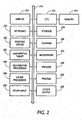
- FIG. 2 is a functional block diagram illustrating the functions performed by the physical components set forth in Fig. 1 .
- the network 128 ( Fig. 1 ) is provided in the form of a bi-directional communications link 210, to which a central processing unit (CPU) 212 and memory are attached.
- the CPU 212 is adapted to perform most of the invention's processing, but it should be noted that in an alternative embodiment of the invention, processing may be distributed over the network 128.
- the CPU 212 is attached to a memory 214, which may be used to store, among other things, genre specifications used in document analysis (explained below), character models used for character recognition, voice models used in speech recognition, and other data used by the system.
- a display 216 is also provided; it may be local to or remote from the CPU 212, and may be able to decouple from the network 128 for portability (as in a Personal Digital Assistant or PDA).
- An exemplary embodiment of the display 216 will be described in further detail below.
- Long-term storage 218 for the information database of the invention which stores, document information for later use, is also provided and connected to the communications link 210.
- Various input devices are attached to the link 210, including a keyboard 220, a pointing device 222 (such as a mouse, trackball, or light pen), a handwriting tablet 224, and a scanner 226. These devices are adapted to receive information and transmit it to the CPU 212 for processing.
- An audio interface including a microphone 228 and a loudspeaker 230, facilitate the entry and use of audio documents (such as recorded memos).
- the microphone 228 and loudspeaker 230 may be integrated into a telephone device 118 or any other convenient apparatus attached to the network 128.
- a printer 232 is provided for hardcopy output. It should be recognized that the foregoing input and output devices are exemplary only, and numerous other input devices 234 and output devices 236 may be used in accordance with the invention. Moreover, additional processors, such as a recognition processor 238 or any other processor 240 may be used to off-load some of the computational burden from the CPU 212. It is contemplated that the recognition processor. 238 would be used to process audio from the microphone 228, handwriting from the tablet 224, or printed documents from the scanner 226, for example.
- the raw input would be translated to a machine-readable counterpart (e.g., speech would be converted to recognized text via a speech recognition algorithm, handwriting would be converted to recognized text or command gestures via a handwriting recognizer; or printed documents would be converted from a bitmap to text via optical character recognition).
- a machine-readable counterpart e.g., speech would be converted to recognized text via a speech recognition algorithm, handwriting would be converted to recognized text or command gestures via a handwriting recognizer; or printed documents would be converted from a bitmap to text via optical character recognition.
- a database 310 (preferably hosted by the storage 218 and managed by the CPU 212 of Fig. 2 ) serves as a repository of document information, specifically that information which has been deemed to be significant in documents processed by the system, and is coupled to an input/output subsystem 312, functionally illustrated in Fig. 2 above.
- the input/butput subsystem 312 may include some or all of the display 216, the keyboard 220, the pointing device 222, the handwriting tablet 224, the scanner 226, the microphone and speaker 228 and 230, the printer 232, other input and output devices 234 and 236, as well as the logic used to control those devices, including the recognition processor 238, any other processor 240, and certain functions of the CPU 212.
- the input/output subsystem 312 is capable of handling documents 314, audio messages 316, and annotations 318, in accordance with detailed methods set forth below.
- Input to and output from the database 310 are processed by the system with the assistance of guidance provided by a set of genre specifications 320 (preferably stored within the memory 214 of Fig. 2 ).
- the genre specifications 320 provide information on the expected nature, structure, and content of documents handled by the system.
- the genre specifications 320 preferably indicate where certain data items are likely to be found within a document, the format of those data items, and other considerations of utility in the information extraction process.
- the genre specifications preferably indicate how to assemble data from the database 310 into human-readable documents in a manner consistent with what the user expects. The mechanics of this interaction will be considered below with reference to several detailed examples.
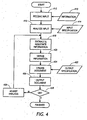
- Figure 4 represents the processes performed in a system adapted to extract appointment and other date/time information from various documents and inputs to the system, and to synthesize a calendar from the information then stored in the database 310 ( Fig. 3 ).
- Date and annotation information 410 stored as part of a calendar document, is an input to this method, which begins by receiving the date and annotation information (step 412).
- this input can occur in any of a number of ways: by scanning one or more paper documents with a sheet-fed scanner or a scanning pen, by selecting certain e-mail messages or Web pages for processing, or by providing an audio recording of a voice message, for example.
- a collection of one or more source documents is provided to the system. Consequently, the source documents can be, for example, paper or other physical documents, or can also be "raw bits," such as unrecognized image or speech data, or formatted data, such as ASCII or HTML. Each source document is assumed to represent a genre structure recognizable by the system.
- Each source document is further assumed to contain one or more key pieces of information, each such key being associated with a message that the user (or another person) would find significant.
- the keys can be dates or times, and the messages can be announcements of scheduled events corresponding to these dates or times.
- the source documents are provided to the system in physical rather than digital form.
- the system captures the documents and converts them to digital form.
- a paper document can be optically scanned by a whole page scanner or a scanning pen to produce unrecognized image data, which can then be further converted as by segmentation, optical character recognition (OCR), sketch analysis, and the like.
- OCR optical character recognition
- An audio recording can be digitized and, if the recording contains speech, the speech can be recognized by a speech recognizer.
- the documents may include data in any number of forms, such as textual, graphic, pictorial, audio, or video data. Streaming and static data are both acceptable. The greater the system's ability to accept physical rather than digital documents as input, the better it can integrate seamlessly with everyday practice.
- the genre of the document input is determinate, and is observable by the user.
- the document's genre is used to select a particular input specification 414, which is used to assist further processing of the input document.
- various means of specifying an input genre are possible; one exemplary method is described below with reference to Fig. 27 .
- the system may be programmed to expect documents having a particular genre. It is also possible for a system according to the invention to attempt to heuristically determine the genre of an input document without further user input. This is particularly possible when documents of different types and genres are being received from different sources (e.g., e-mail messages might usually have a certain genre, while facsimile messages might have a different usual genre).
- a particular input document may represent the genre of calendars.
- the characteristics of this genre are indicated by the selected input specification 414, chosen from a library of possible genre specifications.
- a system according to the.invention is able to process many different document genres, it is important to note that a single instance of the system may be equipped to only process a single genre type, such as calendars. Even so, there may be many different kinds of calendars, such as schedules, appointment books, and the like (some of which will be discussed in further detail below), all of which may be defined by a single input specification 414 or, if necessary, by multiple input specifications.
- all documents within the calendar genre are considered to have similar structures, including the key information set forth above.
- the input specification 414 is employed to analyze the input (step 416) and identify information of interest. This operation may occur automatically (see Fig. 5 ) or semi-automatically (see Fig. 6 ) with some user interaction.
- the identified information (which for the calendar genre typically includes at least a date, a time, and an event title) is then extracted and associated (step 418) into a record corresponding to a single event.
- the record is then merged (step 420) into the database 310 ( Fig. 3 ).
- the entire input document (or as much as is available) is merged into the database 310 and is indexed and referenced by its extracted records.
- an exemplary output calendar (see Fig. 12 ) may contain only a summary of information obtained from one or more input documents. When this is the case, the user can be given the opportunity to "select" an event, thereby revealing further information, possibly including a digitized bitmap of the entire input document from which the event was extracted. ' This capability provides an useful safeguard, reducing the possibility (and impact) of an error by the system.
- an output specification 422 is selected.
- the output specification identifies and describes the characteristics of the user's desired output genre. For example, the user may wish to create a monthly calendar containing all family events for the month of December, 1998.
- the output specification 422 fully describes the format of that document, but does not contain any of the information from the database 310. Accordingly, the document is created (step 424) from the information in the database,310 and the output specification 424 and is outputted (step 426) to the user.
- step 430 the analysis is adjusted (step 430), and information is extracted once again.
- this can be accomplished by several means, including but not limited to adjusting the parameters used to perform the analysis, by reverting to alternate choices in a weighted list of possibilities, or by accepting user guidance.
- the database 310 continues to contain full document instances, in addition to the analyzed information derived in steps 416-418.
- the adjustment step 430 is presented herein as occurring after output has been generated, it should be noted that adjustment by any of the means set forth above can occur in any step of the process, for example immediately after character recognition is performed, or before the information is stored in the database.
- Figure 5 illustrates the process followed by an automatic version of the input analysis aspect of Fig. 4 .
- character recognition step 5114 is performed on the input data 512, if necessary to translate the document into a machine-readable format.
- the portions of interest are identified (step 516).
- one method includes simply scanning for numerals, while another method scans for all potentially relevant types of information, such as numerals, names of months, names of days of the week, the phrase "o' clock,” etc.
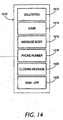
- the system extracts the necessary dates (step 518), times (step 520), and event titles and other annotations (step 522), and if necessary, the applicable person (step 524). Dates and times, in particular, have reasonably well-defined structures that assist the system in identification. These characteristics will be discussed in further detail below (see Figs. 18 , 21 , 22 , and 23 ). In a household or business, names might also be readily identifiable (for example, by checking against a list of valid names).
- Figure 6 which illustrates a semi-automatic version of the input analysis step of Fig. 4 , a date 610, a time 612, an event title 614, and a person 616 are all identified by the user. Then, to facilitate extraction and indexing into the database 310 ( Fig. 3 ), character recognition 618 is performed on the date 610, time 612, title 614, and person 616.
- At least one of the foregoing data items may not be present; for example, in a calendar might not include a time for an all-day event.
- the system may allow for the manual input of the omitted data item, or may alternatively continue to operate without it.
- the user identification of the data items 610-616 may operate by writing guiding annotations on a hardcopy document (which is then scanned), by using a scanning pen to input data fields in succession, or by any other similar method.
- user identification only requires "pointing at" a particular item; the system then uses character or pattern recognition to determine the extent of the written data field.
- the manual input called for above may be accomplished via a keyboard, handwriting recognition, or simple selection of options via a pointing device, as circumstances require.
- a detailed example of the calendaring system in operation will now be presented. It shows how a user can use one particular input mechanism, in this case a smart scanning pen (one embodiment of which will be discussed in further detail below), to analyze structure and merge calendar data from a variety of document genres.
- a scanning pen is not the only possible means of input. Rather, the scanning pen is used for ease in describing the invention, which deals more with the source documents once they have been acquired.
- the user interacts with a smart scanning pen augmented with a single button or any other user control (one embodiment of which is illustrated in Fig. 24 ) - this button, when clicked, indicates to the system that a new appointment is being entered.
- the user's primary interaction with the scanning pen once the button has been clicked, is to perform a series of "swipes" with the scanning pen across the surface of the document. Each such swipe yields a bitmapped portion of a text page. This bitmapped portion is then analyzed and converted to digital text via optical character recognition (either on the pen itself, as part of the transfer to the system, or possibly later in the process by another component of the system), and analyzed with genre-specific heuristics.
- the set of scanned events is transferred from the pen's local storage to the calendar system.
- the scanning pen bears an infrared (IR) transmitter near the end farthest from the scanning tip.
- IR infrared
- the information is transmitted to the host (which must have an IR receiver ready to receive said information).
- IR infrared
- Less exotic solutions are also possible, including but not limited to a docking station or even a serial cable.
- FIG. 4 An example of the scanning pen in use in the calendaring system operating as set forth in Fig. 4 is provided below.
- a click of the pen's button is indicated with the symbol CLICK, and a swipe of text is indicated by enclosing the text in double-quotes.
- FIG. 7 An exemplary school schedule is shown in Figure 7 .
- the structure is of the schedule is self-apparent: it is a schedule of times when something (in this case school) is "on” and times when it is “off”.
- Several additional refinements of this structure are present, including the application to particular subgroups (e.g., grades 1-3) or particular ways of being "off” (e.g., holidays).
- a user wishes to enter the daily dismissal times into the system.
- an exemplary scanning sequence to accomplish this could be:
- the system can determine that the time of the appointment recurs daily - that time, furnished in the third swipe 714, is 2:45 PM.
- the system treats the second swipe 712 as an annotation for the event, as its data is not recognizable as either a date or a time.
- the system can determine the frequency and day of the second appointment.
- the fifth swipe 718 annotates that appointment, and the sixth and final swipe 720 provides the recurring time.
- Figure 8 illustrates an exemplary program calendar. This type of calendar is similar to the school example above ( Fig. 7 ) in that it sets forth another schedule, this time oriented around the 12-month calendar rather than canonically. Suppose that the user wishes to enter into the system both events for September 816 and 822 and the Chanukah brunch 828 in December. A scanning sequence to accomplish this could be:
- swipes 812, 814, and 818 contain date/time information, and are analyzed accordingly. Swipes 810 and 816 don't, and so serve to annotate the event.
- swipe 820 In the second swipe sequence, the only date information is contained in swipe 820, "20". This is an incomplete portion of a date, so the month and year are carried over from the previous event. Swipe 822 serves to annotate the event.
- swipes 824, 826, and 828 contain the date information. Swipes 810 and 828 contain other information, and so annotate the event. Note that swipe 828 contains both date and annotation information.
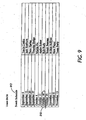
- the third calendar type, a snack schedule is shown in Figure 9 .
- This once again, is similar to the other schedules ( Figs. 7-8 ); the difference here is that only one entry is relevant to the user (the date of a particular person's snack assignment). Suppose that the user wishes to enter the October 18. event.
- a scanning sequence to accomplish this could be:
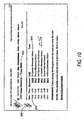
- a fourth calendar type a web page, is shown in Figure 10 .
- This is still a schedule, but one kept primarily in the digital domain (though it can be printed in hardcopy format).
- a scanning sequence to accomplish this could be:
- the second swipe 1012 serves to completely specify the date - the other swipes 1010 and 1014 serve as annotation.
- the user may wish to add additional annotation beyond that already printed on the document - for example, in this case, directions to the school, or which child is on team "B606", and so forth. This can be either done later in the process through the system's user interface (e.g., one of the terminals 110 or 112 of Fig. 1 ), or, in an alternative embodiment, by allowing the scanning pen to write as well as read - the user writes additional "swipe" text himself.
- the name "Sam” 1016 is handwritten on the calendar.
- a handwritten note like this one can be used to further annotate the record of the September 6 game.
- the scanning pen used to input the other data on the calendar of Fig. 10 is also able to write on a hardcopy document (while simultaneously recording the physical gestures that make up the handwritten note), or to "mark up" a digital document such as a Web page.
- a previously-handwritten note can be scanned and digitized with a swipe of the scanning pen.
- this handwritten information after being converted to a machine-readable format via handwriting recognition or some other means of parsing gestural symbols, is associated with the scanned record and stored in the database 310 ( Fig. 3 ).
- the pen When the pen is used to "mark up" a digital document, it should be noted that there is no need for the pen to actually scan any information in the underlying digital document, as the document is already in the digital domain. Rather, it is sufficient for the scanning pen to indicate to the system the location of each swipe, from which the underlying information can be extracted.
- the fifth calendar type a wedding announcement
- Figure 11 The fifth calendar type, a wedding announcement, is shown in Figure 11 .
- the user wishes to enter the event into the system.
- a scanning sequence to accomplish this could be:
- Swipes 1114, 1116, and 1118 specify the date and time of the event. Swipes 1110, 1112, 1122, and 1124 serve to annotate the event.
- the address is set forth in swipes 1120, 1122, and 1124 - this information can remain part of the annotation or can be extracted by the system as described below. Note that this further information can be displayed in a hierarchical fashion, concealing details until needed.
- the entire announcement of Fig. 11 (or at least an additional portion thereof) is scanned and stored as an image in the database 310 ( Fig. 3 ) in addition to the information extracted and used as an event annotation as set forth above.
- This approach has the advantage that additional information in the document (such as the bride's name, for example) is accessible and can be made available, if necessary, even if it is not expected to be needed at the time the key data items are extracted.
- An exemplary output calendar based on information derived from Figs. 7-11 is set forth below. As discussed above, the format of this calendar is described by an output specification 422 ( Fig. 4 ), and can be changed dependent on the user's preferences and on the desired level of detail.
- the entries such as the October 18 entry ("Rob Rudy, Snack Schedule")
- the entire source document is digitized and stored in the database 310, and is hence available for viewing, for example by selecting a hyperlink associated with the entry in a digital form of the output calendar.
- some of the entries such as the November 9 entry (“Marriage”)
- the additional annotations may be made available to the user via selectable options.
- some of the events i.e., the events September 6 and November 9) have an associated time. The time is set forth in the manner defined by the output specification 422 ( Fig. 4 ); some output calendars may omit this information, if desired.
- a different exemplary output calendar 1210 is presented in grid format; this format is also specified by an output specification 422 ( Fig. 4 ).
- the calendar 1210 is of a type that might be displayed on a terminal 110 ( Fig. 1 ); it is contemplated that hardcopy calendars, like the one set forth above, would contain more information.
- the calendar 1210 represents a sample monthly calendar for a family that includes at least three family members: John, Henry, and Sylvia. A dental appointment 1212 for John is shown on December 21, 1998.
- the display shows John's name, the event title, "Dentist Appointment,” as well as the time for the appointment, "9:30 a.m.”
- the date is illustrated by the placement of the appointment 1212 on the calendar 1210.
- a meeting 1214 for Henry is shown on December 11; it has a start time (1:00 p.m.) and an end time (4:00 p.m.).
- two appointments are shown, a first appointment 1216 for Sylvia and a second appointment 1218 for John.
- the symbols ">>>” indicate that more information is available; the additional information may include information on the event title, the time, etc.
- the calendar 1210 is contemplated to be displayed electronically, the user is able to select either appointment 1216 or 1218 to view the additional information. In a hardcopy version of the same calendar, the additional data should be made available.
- a document whether in physical or digital form, has a genre, which exists only within and relative to a social context.
- the notion of genre can be generalized, and in so doing, powerful new computational systems can be created.
- a collection of pre-existing input documents that includes documents from a plurality of different genres and potentially from a variety of different media.
- Each document in the collection includes various pieces of information.
- some coherent subset of these pieces of information, distributed across the various genres may form a consistent and coherent genre on its own, which can be synthesized and merged into a new document.
- This new document is of use to a particular user (or groups of users) for a particular purpose, typically at a particular time.
- the ways in which the pieces are combined can be a function of the reader(s), purpose, and time.
- this new document has its own genre, and the way in which the pieces of information are combined into the new document depends on that genre.
- This generalization and new conceptualization allows the consideration of a database system.
- a database system would facilitate the automated or semi-automated recognition of the appropriate pieces of significant information in input documents, extract these pieces from the documents, and merge or synthesize them into a unified computational representation or database.
- the computational representation can then be used to generate (re-present) an output in human-readable form (e.g., a digital display or physical printout) of a new document.
- human-readable form e.g., a digital display or physical printout
- the genre of the new document is the same whether that document is expressed in its (intermediate) computational representation or its (final) human-readable representation. Both of these are localized representations, in that all the significant information pieces have been conveniently gathered into one place, either digital or physical.
- At least one characteristic distinguishes a distributed-genre document from the raw materials that constitute its inputs.
- the inchoate form of the new output document includes not only some set of identified pieces of information still resident in multiple input documents, but also a "glue” that holds them together so that together, they provide a distributed representation of a new document (that can later be transformed into a localized representation).
- the "glue” consists of two main components, namely, social context and computation.
- a social context is defined by the intended reader(s), audience, or users of the output document, the purpose(s) for which it is being constructed, and the time at which it is being constructed. Additionally, social context is provided by the socially-constructed input and output document genres, which shape the intermediate distributed document genre, much as the dimensions of an input space and an output space affect the character of a matrix or tensor that transforms between the two spaces.
- the social context provides significant computational constraints.
- the human reader can provide hints, directives, and other guidance to the computational system of the invention.
- This information reflects the human's social context.
- the computational system includes models, heuristic algorithms, and/or other programming concerning input and output document genres and the relationships that allow information from certain input genres to be re-used in certain output genres.
- the human-provided guidance can provide an effective way to turn the user's understanding of social context into something that the system can process. This process is discussed in further detail below.
- a distributed genre document therefore includes several things beyond the "raw material" of the identified portions in the input documents. It also includes: a specification of input genres, output genres, and a mapping of information between these; a further explication of social context, specific to the user and task at hand; and a computational engine, suitably programmed, that has the capacity to represent all of the above. Only with all these things, taken together, does the distributed genre document emerge.
- the notion of distributed genre arises when a distributed collection of information derived from multiple diverse source documents is bound together in a meaningful way through computations representing social context.
- Each of these input documents comes from its own distinct genre; however, when the distributed genre formed by the calendar information found in each document is considered, a distributed genre is defined.
- the ultimate goal when analyzing this particular distributed genre might be to produce an integrated, up-to-date, full-month calendar incorporating all and only the events that household members plan to attend (see, e.g., Fig. 12 ).
- the collection of source documents is transformed from a jumble of raw source materials into a coherent, distributed-representation output document having a distributed genre via the interconnection provided by social context and by the human or computerized processing taking place in that social context.
- the social context is established by the particular group of readers in this household and by the purposes for which and timing with which they will use their new calendar, as well as by the (socially and culturally defined) genres of the input and output documents.
- the computation here takes advantage of and is facilitated - even enabled - by this social context.
- the computational system recognizes which portions of the input document are significant and how they fit together to make up the output document by taking into account:
- the intermediate distributed genre arises during the process of identifying dates and other useful information from the input documents. Soon thereafter, the computational system begins to form a localized, more unified output document, whose genre is the output genre specified by the user.
- the challenge for the computational system is to produce, from these disparate inputs, a single output document (namely, the worker's change-of-address message) that has all and only the desired addresses, preferably in a single, consistent format, placed in the "To" header field of the outgoing message.
- a single output document namely, the worker's change-of-address message
- Duplicate addresses should be eliminated, and no one inadvertently left out.
- the combined collection of electronic address book(s), digitally scanned business cards, old email messages and so forth is a collection of input documents in various genres and original media. Each contains one or more pieces of information to be recognized and extracted and merged by the system into an output document of specified genre for a particular user and purpose.
- the computational system reviews the various input documents together with the specification of the desired output genre and a set of hints or guidelines from the user, and identifies the relevant pieces of information from the input documents (as discussed in detail below). Again, as in the first example, the system also looks to the characteristics of the input genres and the relationships between these genres and the specified output genre to facilitate its task.
- a distributed-genre intermediate document is established across the input documents as the system begins to put together the output document (or, alternatively; as part and parcel of the construction of the output document). Eventually, the system constructs a unified computational representation of the new document, from which the output document can, in turn, be generated.
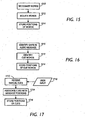
- a collection of input documents (or any type of content 1910 at all) is input into and received by the system (step 1912).
- the input is then analyzed (step 1914), either automatically or semi-automatically (with user input) to identify the document's genre, thereby determining what information in the document may be significant. Exemplary automatic and semi-automatic methods for extracting information such as dates, times, addresses, and telephone numbers are discussed above.
- guidance 1915 is provided in the form of a set of models or specifications for all expected types of input documents. These models, templates, or specifications can be pre-coded, or alternatively, can be trained (e.g., with a Hidden Markov Model) on the basis of repeated user input choices.
- the guidance 1915 is provided even when the input analysis step (step 1914) is fully automatic; the requisite user input may have been provided earlier and used to shape genre models, or may be essentially hard-coded into the system. Moreover, in either case, the guidance 1915 represents the social context of the input documents.
- the significant information in the input documents is recognized in a manner consistent with the notion of the intermediate, distributed genre document as has been described.
- the genres of the input documents are considered, and stored information (e.g., models, heuristics, statistics, etc.) about their respective characteristics and their relations to the specified output genre are employed to help direct the analysis.
- stored information e.g., models, heuristics, statistics, etc.
- the nature of the output genre, user- or task-specific guidance, and various other factors may also be considered, such as the current time, date, and other state variables.
- the analysis process may require more information if the problem to be solved is insufficiently constrained.
- the significant information is then isolated and extracted (step 1916), and stored in (or “merged into”) a database (step 1918).
- a database For a typical distributed genre document (or database), the "significant information" is all discernable information in a source document; any and all information might be used in an output document of unknown genre.
- the generation of output is illustrated in connection with the flow chart of Figure 20 .
- the generation of output involves representing the unified computational representation (in the database) to the user as a human-readable document, either physical or digital, in a specified output genre.
- there is just one output document drawn from a potentially large number of input documents.
- there could be more than one output for example, it might be beneficial to generate, for example, a set of related calendar printouts, one for each person in a group, each one slightly different according to the individual recipient.
- the process begins by receiving (step 2010) a command 2012 indicating a request for an output document.
- This command 2012 identifies a particular desired output genre specification (step 2014) selected from a group of possible genre specifications 2016.
- the information from the database required to construct the output document is extracted (step 2018), and a document consistent with the selected genre specification is generated (step 2020) and presented to the user.
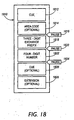
- a date whether written or spoken, commonly begins with the day of the week 2112 (i.e., Sunday through Saturday). However, this is often omitted. Then, one of two conventions is used: either a day 2114 followed by a month (or its abbreviation or numeric equivalent) 2116, or a month 2116 followed by a day 2114. Examples of the former include “the seventeenth of December,” “17 December,” or the European-style "17.12,” to name a few. Examples of the latter include “December 17,” “Dec. 17,” and the U.S.-style "12/17.” Care should be exercised to distinguish U.S.-style numeric dates from European-style numeric dates; the document's genre will provide guidance in this area.
- Figure 22 illustrates a typical written or spoken time 2210.
- An hour 2212 (1 through 12 in civilian time; 0 through 23 in military time) is followed by either an optional colon (:) and a number specifying minutes 2216, or the phrase "o' clock.” 2214.
- AM or PM In civilian time, either "AM” or “PM” 2218 usually follows, unless the time is unambiguous for other reasons (e.g., it would obviously occur during the business day).
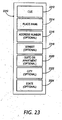
- Figure 23 shows a typical location 2310; this format is followed by the wedding invitation of Fig. 11 .
- a cue 2312, such as "at,” is followed by a place name 2314 (e.g., "Saint Andrew's Episcopal Ctiurch"), an optional address number 2316 (e.g., "13601"), a street name 2318 (e.g., "Saratoga Avenue"), an optional suite or apartment 2320 (not applicable in Fig. 11 ), an optional city 2322 (e.g., "Saratoga”), and an optional state 2324 ("California").
- place name 2314 e.g., "Saint Andrew's Episcopal Ctiurch”
- an optional address number 2316 e.g., "13601”
- street name 2318 e.g., "Saratoga Avenue
- apartment 2320 not applicable in Fig. 11
- an optional city 2322 e.g., "Saratoga”
- the power and accuracy of the extraction can be increased.
- the possible input domain for a system according to the invention can also be greatly enhanced. Users today live in a world in which their information changes constantly; it can become out-of-date very rapidly. Moreover, users cannot control, and sometimes cannot even predict, the form or forms in which new information will arrive. In contrast with traditional relational databases, with their rigidly specified forms of input and carefully controlled data entry performed by dedicated workers, users of the present invention are generalists who live in a world of dynamic (and socially constructed) information that they must manage, but do not control.
- the present invention does not attempt to automate the entire process of producing the distributed genre document.
- the user will often need to provide considerable guidance to the computer about what is most important in a given input document.
- some automation is welcome, because the busy people who will use this technology at home and in the workplace often suffer from information overload. They want and deserve some labor-saving help.
- An automatic dishwasher still requires manual loading and unloading of the dishes, yet it can be a tremendous timesaver over hand washing. So, too, a semi-automated document analysis/synthesis system is worthwhile for the present invention.
- the techniques involve marking up the input documents: a human makes marks by hand in a way that the computational system can process automatically with little or no further human intervention thereafter.
- the contemplated approaches include, but are not limited to:
- a smart scanning pen may be used as an input device in conjunction with the invention.
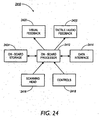
- a block diagram illustrating the functional components of such a pen 2410 is set forth as Figure 24 .
- Such a device includes an on-board processor 2412, a data interface 2414 (such as an infrared or RF wireless link), an optical scanning head 2416, manually operable controls 2418 (such as at least one push-button), a visual feedback mechanism 2420 (such as an indicator light or display screen), optionally an audio or tactile feedback mechanism 2422, and on-board storage 2424.
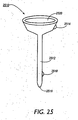
- a pen 2510 includes a traditional pen-shaped body 2512, a bi-directional infrared transceiver 2514, a scanning head 2516, a push-button 2518, and a display screen 2520..
- the display screen 2520 is operable to confirm with the user at least two items of information: (a) recognized text under the scanning head 2516, and (b) the pen's current mode.
- a scanning pen can be used to extract multiple items of information from a printed calendar, including an event title, a date, and a time. Different events are indicated by pressing the button 2518.
- the scanning pen's mode comes into play as follows: after the button is pressed, the "resets" to expect a new batch of information.
- the various information items need not be scanned in any particular order, and can be identified by the system by virtue of the differing characteristics of the different data types.
- the pen may enforce a particular order to the fields to be entered (e.g., title first, then date, then time), and such requirements can be indicated on the display screen 2520.
- the system may be expecting information from a different genre, such as a business card.
- a display of the pen's mode can be used to indicate to its user both the expected genre of the input and the particular data items to be input, either collectively or in sequence.
- manual mode changes can be brought about by scanning a digital code printed in a mode book ( Fig. 27 ).
- the screen 2520 is 1 to 2 inches in diameter. In this configuration, it is possible to read the screen as the pen 2510 is used to scan text on a printed page.
- the pen's mode is indicated by colored indicators, and scanned text is displayed on the screen as scrolling text.
- At the center of the screen is the current field of view; text already scanned appears to the left (or right, if a line is scanned from right to left).
- input is stored in the pen's storage 2424 until a command (such as holding down the button 2518) indicates that the data should be transmitted to the database 310.
- the command to transmit may be initiated by the database 310, rather than the user.
- a scanning pen 2610 with an alternative form factor is illustrated in Figure 26 .
- This version has a card-shaped body 2612 (preferably the size and shape of a credit card), a scanning head 2616 at one corner, and a button 2618 along its top edge.
- a display screen 2620 is situated on one side of the rectangular body; it is typically not visible while text is being scanned, but can be easily viewed when the pen 2610 is lifted from the paper.
- the pen also has multiple input buttons 2622, capable of facilitating mode changes or command entry.
- a mode book 2710 usable to manually alter a scanning pen's mode, is illustrated in Figure 27 .
- the mode book 2710 includes a plurality of mode cards 2712, each of which contains at least one scannable data field operative to change the pen's mode or enter a command.
- Each scannable data field comprises machine-readable information (e.g., a bar code, a two-dimensional glyph code, or easily-recognizable text) and a human-readable label.
- the illustrated mode card 2712 includes nine data fields: a "begin date” field 2714 and a "begin time” field 2716, an "end date” field 2718 and an "end date” field 2720, a "location” field 2722, a "description” (or title) field 2724, and three command fields, to set a reminder 2726, mark an event as urgent 2728, or confirm existing information 2730.
- the mode book 2710 is used as follows. If a user has been using his scanning pen 2410 to read business cards, for example, the system expects to receive data representative of a person's identity, office address, phone number, etc. However, if the user wishes to start inputting calendar information, there is no simple way to indicate that using simply the scanning pen. It is possible to use one or more input buttons to change the mode, but that method can be tedious and subject to error. Instead, using the mode book 2710, the user locates the mode card 2712 pertaining to the calendar genre, and runs the scanning pen over the selected field, such as "begin date" 2714. This indicates to the system that both a genre change and a mode change should occur.
- mode changes and genre changes are indicated and confirmed to the user by either audible or tactile feedback.
- audible beep codes or the like can be used to indicate that (a) the calendar genre is presently active, and (b) the system expects to receive a "begin date" next.
- unique tactile sensations implemented either by vibrating the pen body (as in a pager with a silent alarm) or by causing the scanning head 2416 to move in a manner simulating a texture on the paper being scanned, can express similar information to the user. Accordingly, the user need not look at the display screen 2520 or 2620 to confirm each and every mode change.
- the feedback device comprises an audio feedback generator being adapted to generate audio codes representative of the active input mode.
- the audio codes are generated when a mode change occurs.
- the feedback device comprises a tactile feedback generator, which is adapted to generate vibratory codes representative of the active input mode.
- the vibratory codes are generated when a mode change occurs.
- the tactile feedback generator is adapted to simulate a texture representative of the active input mode.
- the texture is simulated while a scanning operation is performed.
- the scanning pen further comprises a user control which preferably comprises a button. It is furthermore preferred that the active input mode is selected either automatically or by manipulating the user control, or by scanning a machine-readable data field on a mode card.
Landscapes
- Engineering & Computer Science (AREA)
- General Engineering & Computer Science (AREA)
- Theoretical Computer Science (AREA)
- Human Computer Interaction (AREA)
- Physics & Mathematics (AREA)
- General Physics & Mathematics (AREA)
- User Interface Of Digital Computer (AREA)
- Character Discrimination (AREA)
- Image Input (AREA)
- Facsimile Scanning Arrangements (AREA)
Claims (8)
- Crayon-lecteur à balayage ayant plusieurs modes d'opération (2410, 2510, 2610), dans lequel le crayon-lecteur a un mode d'entrée actif qui est choisi à partir d'une pluralité de modes et qui détermine comment une information balayée est interprétée, comprenant :un processeur (2412),une tête de balayage optique (2416),une interface de données (2414), etun bouton (2418, 2622) pour indiquer le début d'un enregistrement de données,caractérisé en ce que
ledit processeur (2412) est configuré pour sélectionner ledit mode d'entrée actif automatiquement conformément à des attributs typiques de valeurs balayées, et
le crayon-lecteur à balayage (2410, 2510, 2610) comprend un générateur de signalisation en retour tactile (2422) dans lequel le générateur de signalisation en retour tactile (2422) est configuré pour générer des codes de vibration représentatifs du mode d'entrée actif. - Crayon-lecteur à balayage selon la revendication 1, configuré pour générer des codes de vibration lorsqu'un changement de mode a lieu.
- Crayon-lecteur à balayage (2410, 2510, 2610) selon l'une des revendications 1 à 2, comprenant un écran d'affichage (2520, 2620).
- Crayon-lecteur à balayage (2410, 2510, 2610) selon la revendication 3, dans lequel l'écran d'affichage (2520, 2620) est adapté pour afficher une information représentative du mode d'entrée actif.
- Crayon-lecteur à balayage (2410, 2510, 2610) selon l'une des revendications 1 à 4, comprenant un générateur de signalisation en retour audio (2422).
- Crayon-lecteur à balayage (2410, 2510, 2610) selon la revendication 5, configuré pour générer des codes audio représentatifs du mode d'entrée actif.
- Crayon-lecteur à balayage (2410, 2510, 2610) selon la revendication 5 ou 6, configuré pour générer des codes audio lorsqu'un changement de mode a lieu.
- Procédé d'utilisation d'un crayon-lecteur à balayage ayant plusieurs modes d'opération (2410, 2510, 2610) pour entrer un enregistrement de données ayant une pluralité de valeurs incluant une première valeur et une seconde valeur, comprenant les étapes consistant à :appuyer sur un bouton (2418, 2622) pour indiquer le début de l'enregistrement de données,balayer la première valeur,interpréter la première valeur d'un manière définie par un premier mode du crayon-lecteur à balayage,balayer la seconde valeur, etinterpréter la seconde valeur d'un manière définie par un second mode du crayon-lecteur à balayage,caractérisé en ce que
lesdits premier et second modes dudit crayon-lecteur à balayage sont automatiquement sélectionnés conformément à des caractéristiques desdites première et seconde valeurs, et
des codes de vibrations représentatifs du mode d'entrée actif sont générés par un générateur de signalisation en retour tactile (2422).
Applications Claiming Priority (2)
| Application Number | Priority Date | Filing Date | Title |
|---|---|---|---|
| US21908798A | 1998-12-22 | 1998-12-22 | |
| US219087 | 1998-12-22 |
Publications (3)
| Publication Number | Publication Date |
|---|---|
| EP1014254A2 EP1014254A2 (fr) | 2000-06-28 |
| EP1014254A3 EP1014254A3 (fr) | 2004-04-28 |
| EP1014254B1 true EP1014254B1 (fr) | 2008-06-25 |
Family
ID=22817824
Family Applications (1)
| Application Number | Title | Priority Date | Filing Date |
|---|---|---|---|
| EP99125095A Expired - Lifetime EP1014254B1 (fr) | 1998-12-22 | 1999-12-16 | Crayon-lecteur a balayage ayant plusieur modes d'opération et avec signalisation |
Country Status (4)
| Country | Link |
|---|---|
| US (1) | US20020079371A1 (fr) |
| EP (1) | EP1014254B1 (fr) |
| JP (1) | JP2000231627A (fr) |
| DE (1) | DE69938958D1 (fr) |
Families Citing this family (50)
| Publication number | Priority date | Publication date | Assignee | Title |
|---|---|---|---|---|
| AUPQ131399A0 (en) * | 1999-06-30 | 1999-07-22 | Silverbrook Research Pty Ltd | A method and apparatus (NPAGE02) |
| AUPQ056099A0 (en) * | 1999-05-25 | 1999-06-17 | Silverbrook Research Pty Ltd | A method and apparatus (pprint01) |
| US20060082557A1 (en) * | 2000-04-05 | 2006-04-20 | Anoto Ip Lic Hb | Combined detection of position-coding pattern and bar codes |
| US7418160B2 (en) * | 2001-09-21 | 2008-08-26 | Anoto Ab | Method and device for processing of information |
| US7003471B2 (en) | 2001-12-12 | 2006-02-21 | Pitney Bowes Inc. | Method and system for accepting non-toxic mail that has an indication of the mailer on the mail |
| US7089210B2 (en) * | 2001-12-12 | 2006-08-08 | Pitney Bowes Inc. | System for a recipient to determine whether or not they received non-life-harming materials |
| US7076466B2 (en) * | 2001-12-12 | 2006-07-11 | Pitney Bowes Inc. | System for accepting non harming mail at a receptacle |
| US7080038B2 (en) * | 2001-12-12 | 2006-07-18 | Pitney Bowes Inc. | Method and system for accepting non-harming mail at a home or office |
| US7415667B2 (en) * | 2003-01-31 | 2008-08-19 | Ricoh Company, Ltd. | Generating augmented notes and synchronizing notes and document portions based on timing information |
| US7251786B2 (en) * | 2003-02-26 | 2007-07-31 | Microsoft Corporation | Meeting information |
| US7478756B1 (en) | 2003-03-04 | 2009-01-20 | Data Recognition Corporation | Method and apparatus for pen based data entry and storage |
| FR2853114A1 (fr) * | 2003-03-26 | 2004-10-01 | France Telecom | Dispositif de transmission sur un reseau d'informations acquises par un appareil de telecommunication distant et systeme mettant en oeuvre un tel dispositif. |
| US7542971B2 (en) * | 2004-02-02 | 2009-06-02 | Fuji Xerox Co., Ltd. | Systems and methods for collaborative note-taking |
| US20080062169A1 (en) * | 2004-08-02 | 2008-03-13 | Koninklijke Philips Electronics, N.V. | Method Of Enabling To Model Virtual Objects |
| US8760408B2 (en) * | 2004-08-02 | 2014-06-24 | Koninklijke Philips N.V. | Touch screen with pressure-dependent visual feedback |
| US8154769B2 (en) | 2005-02-15 | 2012-04-10 | Ricoh Co. Ltd | Systems and methods for generating and processing evolutionary documents |
| US8340476B2 (en) * | 2005-03-18 | 2012-12-25 | The Invention Science Fund I, Llc | Electronic acquisition of a hand formed expression and a context of the expression |
| US7791593B2 (en) * | 2005-03-18 | 2010-09-07 | The Invention Science Fund I, Llc | Machine-differentiatable identifiers having a commonly accepted meaning |
| US7809215B2 (en) * | 2006-10-11 | 2010-10-05 | The Invention Science Fund I, Llc | Contextual information encoded in a formed expression |
| US8232979B2 (en) | 2005-05-25 | 2012-07-31 | The Invention Science Fund I, Llc | Performing an action with respect to hand-formed expression |
| US8787706B2 (en) | 2005-03-18 | 2014-07-22 | The Invention Science Fund I, Llc | Acquisition of a user expression and an environment of the expression |
| US8290313B2 (en) * | 2005-03-18 | 2012-10-16 | The Invention Science Fund I, Llc | Electronic acquisition of a hand formed expression and a context of the expression |
| US8599174B2 (en) | 2005-03-18 | 2013-12-03 | The Invention Science Fund I, Llc | Verifying a written expression |
| US7873243B2 (en) * | 2005-03-18 | 2011-01-18 | The Invention Science Fund I, Llc | Decoding digital information included in a hand-formed expression |
| US8229252B2 (en) | 2005-03-18 | 2012-07-24 | The Invention Science Fund I, Llc | Electronic association of a user expression and a context of the expression |
| US8102383B2 (en) * | 2005-03-18 | 2012-01-24 | The Invention Science Fund I, Llc | Performing an action with respect to a hand-formed expression |
| US7694214B2 (en) * | 2005-06-29 | 2010-04-06 | Microsoft Corporation | Multimodal note taking, annotation, and gaming |
| US7627703B2 (en) * | 2005-06-29 | 2009-12-01 | Microsoft Corporation | Input device with audio capabilities |
| US8732570B2 (en) | 2005-09-08 | 2014-05-20 | Ricoh Co. Ltd. | Non-symbolic data system for the automated completion of forms |
| US8638319B2 (en) | 2007-05-29 | 2014-01-28 | Livescribe Inc. | Customer authoring tools for creating user-generated content for smart pen applications |
| US20090021495A1 (en) * | 2007-05-29 | 2009-01-22 | Edgecomb Tracy L | Communicating audio and writing using a smart pen computing system |
| US8194081B2 (en) | 2007-05-29 | 2012-06-05 | Livescribe, Inc. | Animation of audio ink |
| WO2008150887A1 (fr) * | 2007-05-29 | 2008-12-11 | Livescribe, Inc. | Papier d'auto-adressage |
| US8265382B2 (en) * | 2007-05-29 | 2012-09-11 | Livescribe, Inc. | Electronic annotation of documents with preexisting content |
| US8374992B2 (en) * | 2007-05-29 | 2013-02-12 | Livescribe, Inc. | Organization of user generated content captured by a smart pen computing system |
| US8054512B2 (en) * | 2007-07-30 | 2011-11-08 | Palo Alto Research Center Incorporated | System and method for maintaining paper and electronic calendars |
| KR100901020B1 (ko) * | 2007-08-23 | 2009-06-04 | 엘지전자 주식회사 | 냉장고 및 그 제어방법 |
| US7810730B2 (en) * | 2008-04-03 | 2010-10-12 | Livescribe, Inc. | Decoupled applications for printed materials |
| US8325390B2 (en) * | 2008-06-25 | 2012-12-04 | Burroughs, Inc. | System and method to cue operator response in a manually-driven document scanner |
| WO2011008862A2 (fr) * | 2009-07-14 | 2011-01-20 | Zoomii, Inc. | Création basée sur un langage de balisage et environnement dexécution pour une plateforme de contenu interactif |
| US20110205849A1 (en) * | 2010-02-23 | 2011-08-25 | Sony Corporation, A Japanese Corporation | Digital calendar device and methods |
| US9348438B2 (en) * | 2013-02-19 | 2016-05-24 | Dell Products L.P. | Advanced in-cell touch optical pen |
| US9860123B2 (en) * | 2014-04-11 | 2018-01-02 | International Business Machines Corporation | Role and proximity-based management of networks |
| US9332150B2 (en) * | 2014-08-25 | 2016-05-03 | Kabushiki Kaisha Toshiba | Text scanning system, image processing apparatus, and text scanning method |
| CN106406785B (zh) * | 2015-07-27 | 2019-11-19 | 常州市武进区半导体照明应用技术研究院 | 为人机交互提供反馈光色氛围渲染的光学方法和装置 |
| US10019839B2 (en) | 2016-06-30 | 2018-07-10 | Microsoft Technology Licensing, Llc | Three-dimensional object scanning feedback |
| CN111953860B (zh) * | 2020-08-13 | 2022-04-29 | 安徽淘云科技股份有限公司 | 扫描方法、装置、扫描笔和存储介质 |
| CN111950463B (zh) * | 2020-08-13 | 2023-03-10 | 安徽淘云科技股份有限公司 | 扫描方法、装置、扫描笔和存储介质 |
| CN113989805A (zh) * | 2021-12-07 | 2022-01-28 | 深圳市贝铂智能科技有限公司 | 一种可打电话与定位的智能扫描笔 |
| JP7348368B1 (ja) * | 2022-09-21 | 2023-09-20 | レノボ・シンガポール・プライベート・リミテッド | 情報処理システム、情報処理装置、プログラム、および、制御方法 |
Family Cites Families (7)
| Publication number | Priority date | Publication date | Assignee | Title |
|---|---|---|---|---|
| US5059778A (en) * | 1986-09-29 | 1991-10-22 | Mars Incorporated | Portable data scanner apparatus |
| US5528235A (en) * | 1991-09-03 | 1996-06-18 | Edward D. Lin | Multi-status multi-function data processing key and key array |
| WO1993012618A1 (fr) * | 1991-12-10 | 1993-06-24 | Khyber Technologies Corporation | Dispositif organisateur et de messagerie portable comprenant un poste de base |
| US5420943A (en) * | 1992-04-13 | 1995-05-30 | Mak; Stephen M. | Universal computer input device |
| US5324922A (en) * | 1993-02-25 | 1994-06-28 | Verifone, Inc. | Apparatus and method for managing transactions |
| GB2282906B (en) * | 1993-10-13 | 1996-11-06 | Dataquill Ltd | Data enty systems |
| US6088019A (en) * | 1998-06-23 | 2000-07-11 | Immersion Corporation | Low cost force feedback device with actuator for non-primary axis |
-
1999
- 1999-12-15 JP JP11355575A patent/JP2000231627A/ja not_active Withdrawn
- 1999-12-16 DE DE69938958T patent/DE69938958D1/de not_active Expired - Lifetime
- 1999-12-16 EP EP99125095A patent/EP1014254B1/fr not_active Expired - Lifetime
-
2001
- 2001-10-09 US US09/974,013 patent/US20020079371A1/en not_active Abandoned
Also Published As
| Publication number | Publication date |
|---|---|
| EP1014254A2 (fr) | 2000-06-28 |
| DE69938958D1 (de) | 2008-08-07 |
| JP2000231627A (ja) | 2000-08-22 |
| US20020079371A1 (en) | 2002-06-27 |
| EP1014254A3 (fr) | 2004-04-28 |
Similar Documents
| Publication | Publication Date | Title |
|---|---|---|
| US6342901B1 (en) | Interactive device for displaying information from multiple sources | |
| EP1014279B1 (fr) | Système et procédé pour l'extraction de données dans messages vocales enregistrées | |
| US6675356B1 (en) | Distributed document-based calendaring system | |
| US6651218B1 (en) | Dynamic content database for multiple document genres | |
| EP1014254A2 (fr) | Crayon-lecteur a balayage ayant plusieur modes d'opération et avec signalisation | |
| US7091959B1 (en) | System, computer program product, computing device, and associated methods for form identification and information manipulation | |
| US6157935A (en) | Remote data access and management system | |
| US6542623B1 (en) | Portable braille computer device | |
| US20040196313A1 (en) | Ink repurposing | |
| US6760728B1 (en) | Method and apparatus for importing and exporting directory and calendar information to and from personal information management applications | |
| US6336125B2 (en) | Method and device for generating application data and storage medium containing thereon a program for generating application data | |
| US8179563B2 (en) | Portable scanning device | |
| US7773377B2 (en) | Integrated personal information management system | |
| JP5529082B2 (ja) | レンダリングされた文書からのハンドヘルド装置を用いたデータ取得 | |
| JP4702705B2 (ja) | 情報表示処理システム、クライアント端末、管理サーバ、プログラム | |
| CN1624643A (zh) | 墨水的缩放文本替换 | |
| US20120207391A1 (en) | Interactive paper system | |
| JPH10254802A (ja) | デジタル・コードを識別子として用い一元的に相手先を指定する通信システム及び方法 | |
| JP4123928B2 (ja) | 情報表示処理システム、クライアント端末 | |
| KR20080109340A (ko) | 디지털 펜에 기반하여 취재기자용 유비쿼터스 업무 및 스케줄을 관리하기 위해 이용되는 정보관리시스템 | |
| Citrin et al. | Distributed architectures for pen-based input and diagram recognition | |
| KR100974539B1 (ko) | 전자화된 사전정보 관리장치 및 방법 | |
| JP2004110499A (ja) | 時間情報入力システム、時間情報取得装置及びプログラム、並びに電子ペン用帳票 | |
| KR20080109342A (ko) | 디지털 취재수첩용 케이스 | |
| Kasavana et al. | Making computers “people-literate” |
Legal Events
| Date | Code | Title | Description |
|---|---|---|---|
| PUAI | Public reference made under article 153(3) epc to a published international application that has entered the european phase |
Free format text: ORIGINAL CODE: 0009012 |
|
| AK | Designated contracting states |
Kind code of ref document: A2 Designated state(s): AT BE CH CY DE DK ES FI FR GB GR IE IT LI LU MC NL PT SE |
|
| AX | Request for extension of the european patent |
Free format text: AL;LT;LV;MK;RO;SI |
|
| PUAL | Search report despatched |
Free format text: ORIGINAL CODE: 0009013 |
|
| AK | Designated contracting states |
Kind code of ref document: A3 Designated state(s): AT BE CH CY DE DK ES FI FR GB GR IE IT LI LU MC NL PT SE |
|
| AX | Request for extension of the european patent |
Extension state: AL LT LV MK RO SI |
|
| RIC1 | Information provided on ipc code assigned before grant |
Ipc: 7G 06K 9/22 B Ipc: 7G 06F 3/033 B Ipc: 7G 06K 7/10 A |
|
| 17P | Request for examination filed |
Effective date: 20041028 |
|
| AKX | Designation fees paid |
Designated state(s): DE FR GB |
|
| 17Q | First examination report despatched |
Effective date: 20050315 |
|
| 17Q | First examination report despatched |
Effective date: 20050315 |
|
| GRAP | Despatch of communication of intention to grant a patent |
Free format text: ORIGINAL CODE: EPIDOSNIGR1 |
|
| GRAS | Grant fee paid |
Free format text: ORIGINAL CODE: EPIDOSNIGR3 |
|
| GRAA | (expected) grant |
Free format text: ORIGINAL CODE: 0009210 |
|
| AK | Designated contracting states |
Kind code of ref document: B1 Designated state(s): DE FR GB |
|
| REG | Reference to a national code |
Ref country code: GB Ref legal event code: FG4D |
|
| REF | Corresponds to: |
Ref document number: 69938958 Country of ref document: DE Date of ref document: 20080807 Kind code of ref document: P |
|
| PLBE | No opposition filed within time limit |
Free format text: ORIGINAL CODE: 0009261 |
|
| STAA | Information on the status of an ep patent application or granted ep patent |
Free format text: STATUS: NO OPPOSITION FILED WITHIN TIME LIMIT |
|
| 26N | No opposition filed |
Effective date: 20090326 |
|
| REG | Reference to a national code |
Ref country code: FR Ref legal event code: PLFP Year of fee payment: 17 |
|
| REG | Reference to a national code |
Ref country code: FR Ref legal event code: PLFP Year of fee payment: 18 |
|
| PGFP | Annual fee paid to national office [announced via postgrant information from national office to epo] |
Ref country code: DE Payment date: 20161121 Year of fee payment: 18 Ref country code: FR Payment date: 20161121 Year of fee payment: 18 Ref country code: GB Payment date: 20161128 Year of fee payment: 18 |
|
| REG | Reference to a national code |
Ref country code: DE Ref legal event code: R119 Ref document number: 69938958 Country of ref document: DE |
|
| GBPC | Gb: european patent ceased through non-payment of renewal fee |
Effective date: 20171216 |
|
| REG | Reference to a national code |
Ref country code: FR Ref legal event code: ST Effective date: 20180831 |
|
| PG25 | Lapsed in a contracting state [announced via postgrant information from national office to epo] |
Ref country code: FR Free format text: LAPSE BECAUSE OF NON-PAYMENT OF DUE FEES Effective date: 20180102 Ref country code: DE Free format text: LAPSE BECAUSE OF NON-PAYMENT OF DUE FEES Effective date: 20180703 |
|
| PG25 | Lapsed in a contracting state [announced via postgrant information from national office to epo] |
Ref country code: GB Free format text: LAPSE BECAUSE OF NON-PAYMENT OF DUE FEES Effective date: 20171216 |