EP1014262A2 - Localisation de produits de logiciel - Google Patents
Localisation de produits de logiciel Download PDFInfo
- Publication number
- EP1014262A2 EP1014262A2 EP99650034A EP99650034A EP1014262A2 EP 1014262 A2 EP1014262 A2 EP 1014262A2 EP 99650034 A EP99650034 A EP 99650034A EP 99650034 A EP99650034 A EP 99650034A EP 1014262 A2 EP1014262 A2 EP 1014262A2
- Authority
- EP
- European Patent Office
- Prior art keywords
- graphics
- files
- source
- product
- screen
- Prior art date
- Legal status (The legal status is an assumption and is not a legal conclusion. Google has not performed a legal analysis and makes no representation as to the accuracy of the status listed.)
- Withdrawn
Links
Images




Classifications
-
- G—PHYSICS
- G06—COMPUTING OR CALCULATING; COUNTING
- G06F—ELECTRIC DIGITAL DATA PROCESSING
- G06F9/00—Arrangements for program control, e.g. control units
- G06F9/06—Arrangements for program control, e.g. control units using stored programs, i.e. using an internal store of processing equipment to receive or retain programs
- G06F9/44—Arrangements for executing specific programs
- G06F9/451—Execution arrangements for user interfaces
- G06F9/454—Multi-language systems; Localisation; Internationalisation
Definitions
- the invention relates to localisation of software products, particularly interactive education, multimedia, and publishing products.
- US 5201042 Hewlett Packard describes an apparatus for use in such localization.
- the apparatus has a source file with format instructions, words to be translated, and contextual information.
- a translation tool selects and displays the words in a format to assist translation taking context into account.
- US 5416903 (IBM) describes a method whereby a file is separated into language-dependant and language-independent files and information is provided to assist the translator.
- US4870610 (Bell) describes a system which produces an auxiliary image which is modified to create a translated image. Mapping relationships between first and second language screens are used and the original image and the translated image are processed to generate a data file.
- US4864503 Toltran
- a system translates into a universal intermediate international language by parsing and tagging.
- US5251130 IBM an operator invokes a contextual translation procedure for displayed screens during execution of interactive software.
- One object is to achieve localization of software products in a more efficient manner.
- Another object is to produce target products which consistently reach the quality level of the source products. This object also extends to providing feedback to the source product producers to improve the methodology and cause the source product to be more readily localized. Therefore, achievement of this object would bring the localization process back into the basic production loop, rather than it being regarded as a separate translation function divorced from source product production.
- a process for localizing a software source product to produce a target product comprising the steps of:-
- the source product is executed in a design mode in which file names and sequencing information for screens is automatically displayed.
- the evaluation phase includes the additional steps of automatically carrying out a word count for text in the source product, automatically determining re-use of phrases, generating translation requirement data, and writing evaluation data to an evaluation data file.
- the evaluation phase includes the additional step of generating a storage structure for a server connected to the evaluation, screen shooting, graphics processing and technical integration workstations, the storage structure including a section for all target products of a particular language, and separate sections associated with phases of the process.
- the evaluation phase includes the additional step of automatically evaluating audio and video content of the source product to determine the extent of language spoken as a word count and a real time duration, and writing the audio and video data to an evaluation data file.
- the technical integration phase includes a separate method for processing simulation programs of the source product, in which local source screens which correspond to simulation screens are shot, edited, and executed for quality control.
- the technical integration phase includes the step of automatically validating graphics and screen files by searching through the target product code. identifying references to screens and graphics, and determining if they exist in a storage structure section for the target product.
- the technical integration phase includes the steps of executing the target product in a design mode and editing graphics which have inconsistencies as they appear on the screen.
- the technical integration phase includes the additional steps of performing a quality assurance analysis before final target product sign-off.
- the localization process of the invention is carried out by a production system having a LAN, a set of workstations, and a production control server.
- the production control server has a storage structure for storing the following production directories or folders.
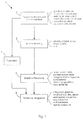
- the first step is indicated by the numeral 2, and it involves project evaluation. It involves an automatic word count with analysis of word/phrase repetition to provide a proportion for word re-use.
- the count is in text files which have been automatically converted to "Rich Text" format, and the results are written to a mapped memory section for export to a translation facility. There is one mapped section of memory for each language and each product.
- the files thus generated are referred to as evaluation data files, as referred to in step 20 of Fig. 2(a).
- evaluation involves exporting text files, which are part of the source product, for translation at a translation facility. Explanatory screens for user assistance are exported in step 22.
- step 23 Art Sample Files (ASFs) are generated. These are screens captured from the source product and which contain graphics with embedded text.
- Words which are embedded in graphics and which will need to be translated are captured in Art Text Files (ATFs) in step 24.
- the graphics are in a graphic file format and so are easily accessible.
- An operator views each graphic in succession and enters the words to be translated into the ATF in spreadsheet format.
- the entry includes screen and graphic codes of the source product.
- the source product may include graphics which are imported from a foreign source.
- the source product may include live examples from the application.
- the target product would thus require screens imported from the corresponding application in its language. This requires screen shooting and in the evaluation phase the number of screen shots required is evaluated.
- a directory structure on the disk drive of the localization system is created.
- the main folder is the source product title, and a subfolder is created for screen shots, and further subfolders for kits.
- a translation kit is a set of files generated for export to a translation facility.
- a kit includes ASFs, ATFs, the text files, the explanatory screens, and the evaluation data files. There is one kit for each source product.
- a general cultural evaluation This includes an analysis of symbols representing information and their relevance to the target country or language. It also involves a general evaluation to determine how the text files, background effects, screen shots, and graphics are contained within the course. The screen shots are also reviewed to determine the complexity and extent of any brushes or platforms, the difficulty of editing other graphic effects, and the extent of art text. At this stage there is an estimation of the expected daily number of finished translated files which can be expected.
- the source product is checked for pallette flashes, plotting problems, missing screens, missing spellings or any other technical problem which the producer of the source product should be aware of.
- the screens showing these potential issues are captured.
- the output of the second evaluation phase is written in step 26 to a cultural issues file.
- the source product has an audio or video output, all audio and video files are isolated and the file name and disk locations are listed. A note is made of the gender, age, and character of the actor's voice. This information may be guessed, or it may be determined more accurately if video files were also included. There is a count of words in the audio files which must be translated. If no accompanying text files exist, the word count can be achieved by estimating the average word count per minute spoken by the actor and multiplying this by the real time. The following information is recorded for audio content of the source product.
- step 4 the kit which has been prepared in step 2 is processed.
- the text is translated, edited, and quality assured. Translation is performed, taking not only literal translations of words into account, but also cultural issues which arise and the context of the source product.
- the translator performs this task by also executing the source product.
- Screen shots are taken where the target product requires electronic images from sources other than the source product.
- the source product includes live examples of how to execute certain commands.
- the same principle applies.
- the target product is for the French-speaking market, the target product must include electronic captured images (screen shots) from French Word 97TM. The screen shots to be taken are identified by executing the source product in development mode.
- the computer being used For screen shooting, the computer being used must be set up and running in a localized environment. For example, if the target product is for the French-speaking market, then the workstation must be running with an entirely French operating system.
- the screen shooting workstation operates according to an editing application for pasting and editing the screen shots, and a word processing application.
- the workstation also executes applications for decompression and quality assurance of the shots.
- the workstation is set with the correct regional settings for the target product. For example, in English a decimal point uses the full stop symbol, whereas in Brazilian Portuguese a comma is used for that purpose.
- the source product is executed and reviewed thoroughly by the screen shooter. Execution is in a development environment which allows the screen shooter to execute the source product in design mode to enable speedy navigation and to avoid needing to do such things as complete simulation.
- the design mode also allows the screen shooter to view at any time the graphic number for which the screen shot is a component. These numbers are called GIF numbers. Using the GIF numbers, the screen shooter makes a list of all of the shots which are to be taken for the target product, and groups them into various units. The GIF numbers are used as a way of monitoring progress of screen shooting and are used by all personnel involved in localizing the product. The screen shooter uses the directory set up during the evaluation stage for file capture and storage.
- the screen shooting workstation executes the source product, the foreign product which is the source for the required screen shots, and an image processing application such as Paint Shop ProTM.
- step 31 the screen shooter compares screens of the source and foreign products.
- the object is to replicate the process which is being described in the source product to the live localized target product.
- This is indicated in step 32 and may involve adding text to the shot, pressing radio buttons, or highlighting options in a drop down menu. Most of the necessary modifications can be made at this stage.
- the screen shooter is satisfied that the screen represents the source product, then it can be captured. This step is critical in ensuring high quality of the target product. Capturing is very simple as it is performed simply by pressing the "Print Screen" function key on IBM compatible PCs. This transfers the image to the image processing application.
- buttons are to be depressed/selected/greyed out, then they should appear like this in the target product.
- the button in the application from which the shot is being taken is depressed and the captured shot is then processed in a graphics application. This may involve cropping the shot to allow a space for a title bar at the top of the screen in the target product.
- the shot may be captured at 640 x 640 pixels and it must be cropped down to a smaller size as required.
- An important aspect of screen shooting is that the screen shooter endeavours to exactly replicate the source shot using the target software. However, from time to time it is not possible to match the requirements exactly and some editing is required after capturing.
- the source product is a WordTM training course, it may refer to a grammar checker which is actually not available in the version of Word for the target product.
- Such complications are logged to a database, which is referred to by other people involved in the localization process. This entry includes the title of the source product. the language, the number of the particular shot, and a brief explanation of why a shot or part of a shot is missing.
- step 33 More comprehensive editing to ensure that the shots are identical involve "mocking" in step 33. This may involve pasting pieces of shots together, or adding text manually. This is necessary for technical reasons when the shot is dependent on system hardware of software unavailable in the target country.
- mocking text it is very important to copy and paste from Art Sample Files supplied by the translation facility. An example is shown in Fig. 4. ASFs are used where the source product includes interactivity. In the example illustrated, the interactivity relates to an electronic mail program.
- a screen is shot in step 34, and saved in step 35.
- the directory structure referred to above is used. The following is an example of the GIF number which appears in the title bar of the source product. Getting started - Screen 2 of 8- ⁇ b01_128.gif ⁇
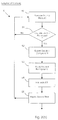
- the inputs for the graphics processing step 5 are the ATFs and the explanatory screen generated during the evaluation phase 2 in step 50.
- the graphics artist views each screen of the source product while it executes in design mode.
- a screen is encountered which needs to be localized, as indicated by step 51 the graphic is exported to an image processing application in step 52.
- the graphic component is separated in step 53 by applying it in the image processing application to a neutral colour which is not present within the component itself.
- the resulting file is referred to as a cleaned graphic component, which is reusable.
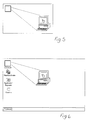
- a sample is shown in Fig. 5, in which the graphic component is a representation of a computer and a think bubble.
- step 54 the corresponding ATF, where applicable, is used to edit the graphic component in the cleaned graphic component to localize content and to accommodate differences in text size if required. This step is carried out while also viewing the corresponding screen shot.
- the edited graphic is in step 55 superimposed over the corresponding screen shot to produce a finalised graphics file for the screen.
- a sample is shown in Fig. 6, in which the graphic component of Fig. 5 is superimposed on a screen shot.
- the transparency and grid for the target product is then set.
- the required grid may be 10 x 10 and the translucency 75%.
- the position of the graphic in the screen shot is checked in the source product.
- the graphic may be retrieved from a library instead of a cleaned graphic component.
- a library is a page containing regularly used graphics components.
- localized text is applied to a graphic.
- the text may be from art text files or they may be words or phrases from an original source product graphic which were translated. Such translations are available in an ATF created during the evaluation phase.
- the relevant text is retrieved according to the naming convention for the target language, the collective title for the range of source products, and the specific source product code.
- Front screens are saved as DIBs in the source product. They are converted into PCXs. It is then converted to RGB mode.
- Production of the final graphics file in step 55 may also involve localization of standard icons such as those indicating where a user should click in the target product.
- Such images are usually saved in DIB file format.
- the file is open in the graphics application and the text is cleaned off using a brush tool or other method.
- a correct translation is located in a database, and the relevant translated text is retrieved and may then be placed onto the icon.
- the technical integration step 6 brings together the elements of the target product which have been developed, ensures that they operate correctly together, and performs quality assurance.
- the technical integration stage 6 includes an initial step 60 of importing finalised graphic files and translated text files which have been received from the translation facility. These files are imported into a technical integration workstation which is programmed with the generic program code for both the source and target products. This code executes with the localized target files because the same names are used for all screens and graphics.
- the technical integrator indicates if the source product includes a simulation program.
- a simulation program is one which emulates operation of a foreign application. For example, if the source product is a computer based training application, the application which is the subject of the training may be simulated.
- step 64 is loaded with the application which is the source for the localized simulation screens.
- a workstation executes this source until the corresponding screen is displayed.
- This screen is shot in step 65 and stored in step 66 with the same naming convention as is present in the generic program code.
- the workstation proceeds with each simulation screen of the source product in turn until all of the required screen shots have been made from the local source.
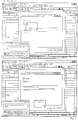
- step 68 the workstation executes the simulation program and edits the code which controls the screens with the foreign application. Examples of simulation screens are given in Fig. 7.
- step 69 the workstation automatically tests consistency of screen and graphic references in the generic code. It does this by automatically reading each line of the program code in turn and locating references to screens and graphics.
- the workstation For each reference such as "a01-101.gif" or "a02-202.dib" the workstation automatically searches the directory for this target product to determine if the corresponding graphic or screen is present. Any discrepancies are flagged with error messages to the technical integrator, who takes the appropriate action.
- step 70 the workstation executes the target product in design mode.
- the target product is a combination of the finalised graphic screen files, the imported text files, the generic program code, and simulations if present.
- some errors will arise. For example, there may be overlapping text boxes or text boxes may be too large. These errors are noted by the technical integrator and final editing is carried out by the originator of the error in step 71 to correct any of these errors.
- step 72 the technical integrator performs a final quality assurance review of all of the issues including the cultural issues which were flagged in the evaluation data files at the evaluation stage.
- the technical integrator is also responsible for ensuring that all language quality assurance issues are addressed.
- the invention provides a comprehensive process for localizing source products which include a large number of graphics and electronic images.
- An important aspect is the fact that the process is broken into phases which provide appropriate milestones for quality assurance and work organisation. In this way, the complexity of localizing such source products can be dealt with in a controlled manner.
Landscapes
- Engineering & Computer Science (AREA)
- Software Systems (AREA)
- Theoretical Computer Science (AREA)
- Human Computer Interaction (AREA)
- Physics & Mathematics (AREA)
- General Engineering & Computer Science (AREA)
- General Physics & Mathematics (AREA)
- Processing Or Creating Images (AREA)
- Image Processing (AREA)
Applications Claiming Priority (2)
| Application Number | Priority Date | Filing Date | Title |
|---|---|---|---|
| IE19981076A IE981076A1 (en) | 1998-12-21 | 1998-12-21 | Localisation of software products |
| IE981076 | 1998-12-21 |
Publications (2)
| Publication Number | Publication Date |
|---|---|
| EP1014262A2 true EP1014262A2 (fr) | 2000-06-28 |
| EP1014262A3 EP1014262A3 (fr) | 2000-07-26 |
Family
ID=11041965
Family Applications (1)
| Application Number | Title | Priority Date | Filing Date |
|---|---|---|---|
| EP99650034A Withdrawn EP1014262A3 (fr) | 1998-12-21 | 1999-04-14 | Localisation de produits de logiciel |
Country Status (3)
| Country | Link |
|---|---|
| EP (1) | EP1014262A3 (fr) |
| GB (1) | GB2345165A (fr) |
| IE (1) | IE981076A1 (fr) |
Cited By (4)
| Publication number | Priority date | Publication date | Assignee | Title |
|---|---|---|---|---|
| EP1315085A1 (fr) * | 2001-11-27 | 2003-05-28 | Sun Microsystems, Inc. | Procédé de création automatique des boutons d'image |
| US7447624B2 (en) | 2001-11-27 | 2008-11-04 | Sun Microsystems, Inc. | Generation of localized software applications |
| US7509571B2 (en) | 2001-01-03 | 2009-03-24 | Sun Microsystems, Inc. | Method and apparatus for a file format for storing spreadsheet compactly |
| WO2014209263A1 (fr) * | 2013-06-24 | 2014-12-31 | Hewlett-Packard Development Company, L.P. | Localisation contextuelle basée sur un test manuel |
Family Cites Families (5)
| Publication number | Priority date | Publication date | Assignee | Title |
|---|---|---|---|---|
| US5201042A (en) * | 1986-04-30 | 1993-04-06 | Hewlett-Packard Company | Software process and tools for development of local language translations of text portions of computer source code |
| US4870610A (en) * | 1987-08-25 | 1989-09-26 | Bell Communications Research, Inc. | Method of operating a computer system to provide customed I/O information including language translation |
| US5243519A (en) * | 1992-02-18 | 1993-09-07 | International Business Machines Corporation | Method and system for language translation within an interactive software application |
| US5579223A (en) * | 1992-12-24 | 1996-11-26 | Microsoft Corporation | Method and system for incorporating modifications made to a computer program into a translated version of the computer program |
| EP0668558B1 (fr) * | 1994-01-14 | 2002-04-17 | Sun Microsystems, Inc. | Procédé et dispositif pour automatiser l'adaptation à l'environnement d'un programme d'ordinateur |
-
1998
- 1998-12-21 IE IE19981076A patent/IE981076A1/en unknown
-
1999
- 1999-04-14 EP EP99650034A patent/EP1014262A3/fr not_active Withdrawn
- 1999-04-20 GB GB9908887A patent/GB2345165A/en not_active Withdrawn
Cited By (4)
| Publication number | Priority date | Publication date | Assignee | Title |
|---|---|---|---|---|
| US7509571B2 (en) | 2001-01-03 | 2009-03-24 | Sun Microsystems, Inc. | Method and apparatus for a file format for storing spreadsheet compactly |
| EP1315085A1 (fr) * | 2001-11-27 | 2003-05-28 | Sun Microsystems, Inc. | Procédé de création automatique des boutons d'image |
| US7447624B2 (en) | 2001-11-27 | 2008-11-04 | Sun Microsystems, Inc. | Generation of localized software applications |
| WO2014209263A1 (fr) * | 2013-06-24 | 2014-12-31 | Hewlett-Packard Development Company, L.P. | Localisation contextuelle basée sur un test manuel |
Also Published As
| Publication number | Publication date |
|---|---|
| GB2345165A (en) | 2000-06-28 |
| EP1014262A3 (fr) | 2000-07-26 |
| IE981076A1 (en) | 2000-06-28 |
| GB9908887D0 (en) | 1999-06-16 |
Similar Documents
| Publication | Publication Date | Title |
|---|---|---|
| US5745738A (en) | Method and engine for automating the creation of simulations for demonstrating use of software | |
| USRE40731E1 (en) | System and method for linking streams of multimedia data to reference material for display | |
| US7565607B2 (en) | Automatic image capture for generating content | |
| US7917839B2 (en) | System and a method for interactivity creation and customization | |
| JP4817289B2 (ja) | 穴埋めテスト問題作成プログラム、方法及び装置 | |
| US6769094B2 (en) | Method for generating multimedia projects | |
| US20250104309A1 (en) | Semantic-based image editing method and system, and medium | |
| CN112169326A (zh) | 图片处理方法、装置、电子设备和存储介质 | |
| JP2019091361A (ja) | 翻訳支援装置、翻訳支援プログラム、および情報処理装置により翻訳を支援する方法 | |
| Böhm et al. | AI-based mobile app prototyping: Status quo, perspectives, and preliminary insights from experimental case studies | |
| WO2000038052A1 (fr) | Localisation de produits logiciels | |
| EP1014262A2 (fr) | Localisation de produits de logiciel | |
| US12436953B2 (en) | Document generation system | |
| IES981077A2 (en) | Localisation of software products | |
| JPH08235024A (ja) | ソフトウェアテスト自動化装置 | |
| US20080046822A1 (en) | Apparatus and method for interactive user software interface design | |
| KR20030079836A (ko) | 파워포인트 문서를 플래시 애니메이션으로 변환하는 방법 | |
| CN120803438B (zh) | 应用开发方法、应用开发装置及xr设备 | |
| US20030033332A1 (en) | Control/display unit page builder software tool | |
| Sistrom et al. | A simple method for importing multiple image files into PowerPoint | |
| JP3112623B2 (ja) | プログラム生産支援装置 | |
| Ryan et al. | A development process for large multimedia titles | |
| CN117609238A (zh) | 一种基于bim模型轻量化数据管理与数模分离合并的方法 | |
| Rößling et al. | Software Visualization Generation Using ANIMALSCRIPT | |
| CN117909429A (zh) | 一种基于文本描述的轨迹故事叙述可视化自动生成方法 |
Legal Events
| Date | Code | Title | Description |
|---|---|---|---|
| PUAI | Public reference made under article 153(3) epc to a published international application that has entered the european phase |
Free format text: ORIGINAL CODE: 0009012 |
|
| PUAL | Search report despatched |
Free format text: ORIGINAL CODE: 0009013 |
|
| AK | Designated contracting states |
Kind code of ref document: A2 Designated state(s): AT BE CH CY DE DK ES FI FR GB GR IE IT LI LU MC NL PT SE |
|
| AX | Request for extension of the european patent |
Free format text: AL;LT;LV;MK;RO;SI |
|
| AK | Designated contracting states |
Kind code of ref document: A3 Designated state(s): AT BE CH CY DE DK ES FI FR GB GR IE IT LI LU MC NL PT SE |
|
| AX | Request for extension of the european patent |
Free format text: AL;LT;LV;MK;RO;SI |
|
| AKX | Designation fees paid | ||
| STAA | Information on the status of an ep patent application or granted ep patent |
Free format text: STATUS: THE APPLICATION IS DEEMED TO BE WITHDRAWN |
|
| 18D | Application deemed to be withdrawn |
Effective date: 20010127 |
|
| REG | Reference to a national code |
Ref country code: DE Ref legal event code: 8566 |