EP1014309A2 - Simulation multiniveaux - Google Patents
Simulation multiniveaux Download PDFInfo
- Publication number
- EP1014309A2 EP1014309A2 EP99308854A EP99308854A EP1014309A2 EP 1014309 A2 EP1014309 A2 EP 1014309A2 EP 99308854 A EP99308854 A EP 99308854A EP 99308854 A EP99308854 A EP 99308854A EP 1014309 A2 EP1014309 A2 EP 1014309A2
- Authority
- EP
- European Patent Office
- Prior art keywords
- simulation
- output
- state
- layer
- simulations
- Prior art date
- Legal status (The legal status is an assumption and is not a legal conclusion. Google has not performed a legal analysis and makes no representation as to the accuracy of the status listed.)
- Withdrawn
Links
Images


Classifications
-
- G—PHYSICS
- G06—COMPUTING OR CALCULATING; COUNTING
- G06T—IMAGE DATA PROCESSING OR GENERATION, IN GENERAL
- G06T15/00—Three-dimensional [3D] image rendering
- G06T15/10—Geometric effects
- G06T15/40—Hidden part removal
Definitions
- the present invention relates generally to systems for generating graphics and more particularly to methods and apparatus for rendering images from a multi-path simulation model.
- Programed computers can be used to edit and create movies.
- a computer program called After Effects available from Adobe Systems Incorporated of Mountain View, California provides its user the ability to edit and create movies by integrating and arranging pieces of footage.
- the process of creating a movie typically occurs in two major stages: modeling and rendering.
- Modeling is the process of creating a structure for a movie project, commonly called a composition, by defining the arrangement and timing of imported footage.
- a composition is essentially a set of instructions that define the processing of footage pieces in space and time in formation of a movie.
- Each composition includes the definition of one or more layers which are place holders for pieces of footage.
- Modeling includes the subprocesses of importing footage into layers, editing the footage, arranging or compositing the footage and animating objects or applying other effects to the composition layers.
- Imported footage may be of the form of video pictures, animations, drawings, stills, photographs or computer generated images. Each piece of imported footage is assigned to a layer. Compositing integrates the footage of respective layers using geometry masks, transparency information and effects. As the layers of a composition are integrated, animation and other effects can be applied to each layer.
- the composition To create a final output, such as a film or video tape for reviewing, the composition must be rendered.
- the rendering process transforms the footage instructions associated with each layer into fixed video frames. During the rendering process, corresponding pixels from each layer are composited on top of each other to create a final image, a frame at a time, in the output format requested by the user.
- the frames may then be written for either analog or digital storage to a recording device, such as a video tape recorder, photograph film recorder or digital disk recorder. In this way, a movie is produced.
- Animation is a subprocess of the modeling stage. Animation techniques allow a user to create apparently spontaneous lifelike movement of objects in the composition. Most movie systems allow a user to animate an object (i.e., a layer) by specifying a path of the object as it moves in a two or three dimensional space. The path is typically represented by a curve Q . Motion along this curve Q can be described by a single function (e.g., u as a function of time where u is the natural parameter of the function defining Q ).
- a traditional simulation model includes a linear progression of acting agents that operate on state information to produce an output or resultant state, where successive acting agents operate on the output produced by an acting agent just previous in time.
- the acting agents typically define functions that perform one or more operations on the data.
- a traditional simulation model 50 includes a series of actions that are applied over a window of time. Individual frames may be rendered at specific time intervals to create the frames which are to be used in generating a movie output. Typically the process is a serial process and incremental changes to the simulation state output are applied as each action is executed at a given time interval. More specifically, the traditional simulation model follows a track 50 comprised of a plurality of actions 60.
- An action 60 is a process that operates on a simulation state database or SOUP 65.
- the simulation state database is a particular set of defined attributes and values that is indicative of the simulation state.
- the simulation state database is typically a collection of dots where each dot is a collection of attribute pairs.
- the simulation state database may contain hundreds of dots where each dot may contain a horizontal position attribute and its corresponding value, a vertical position attribute and its corresponding value as well as a color (red attribute and a value, green attribute and a value, and blue attribute and a value).
- an action 60 is the process that operates on the simulation state database (i.e., the SOUP is both an input and an output).
- the action can add dots, remove dots, or modify one or more attributes or one or more values in the simulation state database.
- An action 60 can include one or more acting agents (not shown).
- An acting agent is a process that effects the simulation. Examples of actions or acting agents are gravity and wind. In traditional simulation modeling, all acting agents leave a permanent result. That is, when applied to the simulation state database, they leave an effect which is passed to the next action at a next time interval in the track.
- the invention features a method of integrating two independent simulations and includes running a first simulation simulating changes in an object over time.
- the first simulation includes a first simulation output reflective of a state of the first simulation at one or more predefined times.
- a second simulation is run concurrently simulating changes in a second object over time.
- An interaction between the first and second simulations is defined resulting in an integrated simulation output without affecting the first simulation state.
- the second simulation can provide a second simulation output reflective of a state of the second simulation at one or more predefined times.
- the step of defining the interaction results in the integrated simulation output without affecting the second simulation state.
- the integrated simulation output combines the second simulation output and a modified first simulation output where the modified first simulation output is produced by the operation of the second simulation on the first simulation output.
- the method further includes running a third simulation concurrently simulating changes in a third object over time and defining an interaction between the first, second and third simulations resulting in a second integrated simulation output without affecting the first or the second simulation state.
- the third simulation provides a third simulation output reflective of a state of the third simulation at one or more predefined times.
- the second integrated simulation output combines the third simulation output and a modified first integrated simulation output where the modified first integration simulation output is produced by the operation of the third simulation on the integrated simulation output.
- Each of the first and second simulations simulate the animation of a layer in a multi-layer composition.
- the second simulation animates a property of the object associated with the first simulation.
- the invention provides a method of integrating independent simulations including defining a first and second simulation. Each simulation runs concurrently and includes a plurality of actions defining the progression of a simulation over time and a simulation output reflective of a state of a simulation at prescribed times during the simulation. An interaction between the first and second simulations is defined including a direction of influence where the direction of influence defines how the simulation output from the first simulation is combined with the simulation output from the second simulation at each time in the second simulation.
- the step of defining an interaction includes providing the simulation output from the first simulation as an input to the second simulation, operating on the first simulation output in the second simulation to produce a modified first simulation output and combining the modified first simulation output and the simulation output of the second simulation to produce a integrated simulation output.
- the integrated simulation output can be rendered to produce a frame of data for display.
- the integrated simulation output for a given time is provided to a next action in the second simulation. Only the simulation output from the second simulation at a given time can be provided to a next action in the second simulation.
- the invention provides a method of integrating independent simulations to produce a multi-level simulation including defining a first and second simulation where each simulation runs concurrently and includes a plurality of actions defining the progression of a simulation over time and a simulation output reflective of a state of a simulation at prescribed times during the simulation.
- An interaction between the first and second simulations is defined.
- the simulation output from the first simulation is provided as an input to the second simulation.
- the first simulation output in the second simulation is operated on to produce a modified first simulation output.
- the modified first simulation output and the simulation output of the second simulation are combined to produce a integrated simulation output.
- the integrated simulation output is rendered to produce a frame of data for display.
- the invention provides a method of integrating two independent simulations and includes providing a first and second layer where each layer specifies separate but concurrent simulations and includes a plurality of actions defining the progression of a simulation over time.
- Each action includes a layer state input, a function, and a resultant layer state output where the application of the function to the layer state input results in the resultant layer state output.
- An interaction between the first and second simulations is defined. The interaction includes providing as an input to the second layer the first layer's resultant state output, operating on the first layer's resultant state output by actions specified in the second layer to produce a modified resultant state output for the first layer and combining the resultant state output for the second layer with the modified resultant state output from the first layer to produce an integrated simulation state output.
- the integrated simulation state output is rendered producing a frame for display.
- the combining step copies the resultant state output without affecting output produced by the second layer.
- Either of the resultant state outputs for the first or second layer can be rendered to reflect the state of either simulation at a given time.
- Rendering includes displaying an image representative of an interaction of the first and second layers at a particular time.
- the invention provides a simulation tool for providing multi-level simulations of concurrently running simulations and includes a simulation engine operable to designate a first and second simulation each including a simulation output, to copy a simulation output from a first simulation and provide the copy of the first simulation output to the second simulation resulting in application of actions specified in the second simulation at a same time interval to the first simulation output thereby producing a modified first simulation output, and to combine the modified first simulation output and a second simulation output for a predefined time producing an integrated simulation output.
- a render designation tool is included for designating one or more times for rendering the integrated simulation output to produce a frame for display representative of the interaction of the first and second simulations.
- the invention provides a method for animating an object that includes selecting a property of the object to animate, animating the property over a time interval including updating a value of the property and defining and animating an ephemeral property of the object over the time interval where the value of the ephemeral property is determined from the value of the property at a same time and an associated function.
- a first simulation is run simulating an animation of the property producing a first simulation output reflective of a state of the first simulation at predefined times.
- a second simulation is run concurrently simulating an animation of the ephemeral property producing a second simulation output reflective of a state of the second simulation at the predefined times without affecting the state of the first simulation.
- a frame of data is rendered at the predefined times during the time interval using the second simulation output whereby the ephemeral property is animated for each individual frame without affecting underlying values of the property produced by the first animation.
- the invention provides more control than provided by traditional simulation environments.
- the invention provides an added element of "non-destructiveness" to the simulation environment, which allows references from one point in a simulation to any point previous in execution time or real simulation time.
- the present invention may be embodied in any system that performs a simulation with a system state at a given time that is determined by the system state a moment before.
- the present invention has applicability to weather systems, fireworks simulation systems or traffic simulation systems.
- the invention has particular applicability to animation systems and will be described in terms of an embodiment in such a device, which will be simply reformed to as an animation system.
- an animation system 110 receives input from a user and transforms the input into video output frames for display in a movie.
- the animation system 110 includes tools for animating objects in a composition including an import tool 112, animation tool 114, render tool 116, a user interface 118 and multi-level simulation tool 120.
- Import tool 112 retrieves and places content into a composition.
- Import tool 112 can include a selection tool (not shown) for selecting a particular piece of content as well as methods for loading content from local and remote sites.
- Animation tool 114 includes methods and processes for animating an object in the composition. Animation tool 114 is discussed in greater detail below.
- Render tool 116 renders a frame of data representative of the composition at a particular time. Render tool 116 produces video output frames for display in a movie.
- User interface 118 includes a graphical user interface which is manipulated by various tools in animation system 110 to produce visual display for guiding a user in the creation and display of a composition.
- Multi-level simulation tool 120 includes methods and processes for invoking concurrent simulations for multiple objects in the composition.
- a process for simulating a composition is shown in FIG. 4.
- a user selects an object using a selection tool (not shown), such as layer in a movie composition for animation (202).
- the user designates a particular object property to be animated using the animation tool (204).
- Object properties that can be animated include layer position, anchor point, effect point controls and color selection.
- a layer map is used to control the interaction of an associated layer with other layers. More specifically, a layer map controls what happens when a pixel in a layer is passed over by another pixel, for example, from another layer.
- the layer map includes a user specified or default operation for defining the interaction of the pixels. Examples of operations include addition, differentiation, set, subtraction, multiplication, minimization and maximization.
- a layer map can itself be animated over time.
- a property mapper is used to control specific properties of an individual object.
- a property of an object can be modified in either a persistent or an ephemeral way in an animation.
- a persistent change to a property retains the most recent value set by a layer map for the remaining life span of the object, unless modified by another operator (action).
- An ephemeral change to an object property reverts the property to its original value after the change has been applied and a frame is rendered capturing the change. For example, if a layer map is used to modify an object's size and subsequently the layer map is animated so that it exits the frame, the object returns to its original size value as soon as no layer map pixels correspond to it.
- a persistent property manager can be used to persistently maintain the state of the properties associated with a layer consistent with changes applied during the course of the animation.
- An ephemeral property mapper can be used to maintain the original state of the properties for an object while changes are temporally applied during the course of the animation.
- the user defines an initial object property state and a final object property state, such as a starting and ending position of the object as it travels in a display area (206). Thereafter the user may define a path in the property space of the object that the object will follow between the starting and ending property states (208).
- a user may desire to animate more than one object for display to create a final composition (209). Accordingly, the animation process steps may be repeated for each object to be animated (210).
- a simulation of the final composition can be invoked to simulate the interaction of the various objects contained within a composition (212). Depending on the simulation results, re-modeling or re-animation may be performed (214). When the simulation results are satisfactory, a final composition output may be rendered (216) and the process ends (218).
- multi-level simulation tool 120 can be used to invoke a multi-level simulation process 400 that includes a user specification of object(s) whose animation is to be simulated (402). Each object is assigned to a layer in a multi-level simulation (404). The user specifies the start and stop time for the simulation (406) and designates one or more times at which a simulation state "snap-shot" is to be captured by the render tool and rendered as a video frame (408). Finally, the simulation is invoked (410).
- simulation tool 120 operates on requests received from the user to simulate object animation creating a multi-level simulation that defines the interaction of two or more concurrently running simulations.
- a multi-level simulation model is created that includes two or more simulations and the interaction therebetween.
- Each object to be simulated is assigned to a simulation track 502.
- An example of an object whose animation can be simulated is a layer in a multi-layer composition.
- Each track 502 includes a linear series of operations 504 that describe the animation effects to be applied to a given object from the user designated start time to end time for the simulation.
- zero or more actions 506, as defined using the animation tool can be applied to the object (e.g., from time t 0 to time t next ).
- Actions can define the motion of the object in display space or the application of one or more effects to the object. Examples of effects include wind, gravity, repel, wall, or explosion effects.
- An action may include the manipulation of one or more properties associated with a given object.
- a property mapper either persistent or ephemeral, can be used to control the animation process as applied to the specific properties associated with an object.
- the initial object state 508 includes attributes and information that describe the state of the object as of time t 0 and prior to the execution of any actions defined in the interval between t 0 and t 1 .
- a resultant object state 510 can be rendered to provide a visual frame for display to a user of the state of the simulation track 502 at a particular time during the simulation execution.
- the resultant object state 510 is provided as an input to a next operation 504 in track 502.
- a track 502 defines the progression of a simulation over time.
- one or more actions are applied to the object state producing a new resultant object state which may be rendered by render tool 118 to produce a visual display.
- a final output state for the simulation track can be rendered to produce a frame for display to the user.
- a simulation track 502 also includes interaction state information.
- Simulation tool 120 allows a user to define a multi-level simulation to integrate two or more concurrently running simulations. More specifically, each simulation track includes an integration state 520 which is provided as an input at each operation 504.
- the integration state 520 is provided from a simulation track at one hierarchical level higher in a multi-level simulation.
- the integration state 520 includes object state information for each simulation layer that is higher in the hierarchical structure.
- the integration state is operated on by each action 506 to produce a modified integration state 522.
- the modified integration state 522 reflects the effects applied by the various actions defined over a given time interval in the current simulation track to the integration state 520.
- one action 506 may be a gravity effect.
- Gravity effects may be applied to the simulation layer state information that is included in the integration state 522, effectively applying gravity to the objects that are included in the simulations at higher hierarchical levels in the multi-level simulation model.
- the application of the gravity effect to the integration state 520 creates a modified integration state 522.
- simulation tool 120 copies the resultant object state 508 into the modified integration state 520 to create resultant integration state information that is passed to the next lower hierarchical level in the multi-level simulation.
- the resultant integration state 524 includes state information for each layer above the current simulation layer as well as the state of the current simulation layer.
- the resultant integration state 524 may be rendered by the render tool to produce a frame representative of the integration of the current simulation layer and the higher levels in the multi-level simulation hierarchy. The interaction of the resultant integration state 520 and the resultant object state 508 is described in greater detail below.
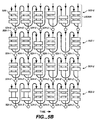
- a multi-level simulation model 530 is shown. Each object is assigned to a particular track 502.
- the first layer in a simulation includes a track 502-0 defining the animation of an object over the time interval t 0 to t end .
- the first track in a multi-level simulation includes no initial integration state 520.
- the resultant object state 510-0 is copied directly into the "empty" integration state 520 to produce a resultant integration state 524-0.
- the resultant integration state 524-0 defining the resultant state of the object animated in track 502-0 is provided as an input to a next lower layer 502-1 in the multi-level simulation architecture.
- Layers are used to specify separate but concurrent simulations.
- the output of a layer is used as an input to effect and interact with a lower layer (one that executes after it), but without any permanent changes to the upper layer simulation.
- the actions acting at a given time on a lower layer receive the previous state information of the given lower layer and that of layers above the lower layer in the current simulation.
- the resulting state produced by an action in a lower layer never goes back up to any layers above but only to the next operation (state) in the current layer and any layers below.
- the second layer in a multi-level simulation includes a track 502-1 defining the animation of a second object over the time interval t 0 to t end .
- the second track includes an initial object state 508-1 and integration state 520-1 (that is equal to the resultant integration state 524-0) which is provided from the first layer in the multi-level simulation.
- Actions over a given time interval are applied to both the object state 508-1 and the integration state 520-1 to produce a resultant object state 510-1 and modified integration state 522-1, respectively.
- the resultant object state 510-1 is passed as an input (object state input 508-1) to the next operation in the current simulation track 502-1.
- the resultant object state 510-0 is also copied directly into the modified integration state 522-1 to produce a resultant integration state 524-1.
- the resultant integration state 524-1 defining the resultant state of the integration of the objects animated in track 502-0 and track 502-1 is provided as an input to a next lower layer 502-2 in the multi-level simulation architecture.
- incremental effects produced by actions specified in a simulation as well as the interaction of the objects specified in the concurrent simulations can be captured and rendered. More specifically, the state of a current individual simulation can be viewed by rendering the resultant object state 510 at a given time. Similarly, the state of the interaction of one or more layers in the multi-level simulation can be viewed by rendering the resultant integration state 524 at a given time.
- each simulation progresses in parallel while the layer state information is provided in a flow down mechanism to the next layer as an input from above.
- the resulting state flows both down as well as across a simulation. Note that if the resulting state information is not restricted from moving both down and to the right that information may "meet itself". That is, the state information flowing right and then down may meet up with information that flows down and then right. To prevent a buildup or flow error, state information that flows down may be restricted to not flow to the right and vice versa. In addition, information that flows right may be copied into the downward flow after each action is finished.
- each action 506 may include a cross talk path to allow for the interaction of the integration state information and the object state information. More specifically, at each action, after the effect of the action has been applied to both the object in the current simulation layer and the integration state information, the object state and integration state may be copied into the integration state and the object state, respectively. In this way, the output from an action which is passed to a next operation in a current simulation may be configured to include both current object state information as well as the state information from the integration.
- object state or integration state information may be moved from a layer into the integration or conversely from an integration into an individual layer. That is, an action may include the removal of object state information from a simulation layer (or removal of data from the integration state). More interestingly, the same or another action can allow for the placement of the removed object state information into the integration (or into the simulation layer) without affecting the individual simulation layer.
- a layer can include animation for a plurality of objects, one of which may be removed by an action in the layer simulation. As the layer simulation moves forward to a next time interval, the object is no longer present in the object state information passed to a next action at a next time interval in the layer. However, a user may desire to keep the removed object in the integrated simulation. Accordingly, by adding the object into the integration state, the removed object can be passed down into a next layer and be operated on in a next time interval by any of the lower layers in the multi-level simulation.
Landscapes
- Physics & Mathematics (AREA)
- Engineering & Computer Science (AREA)
- Geometry (AREA)
- Computer Graphics (AREA)
- General Physics & Mathematics (AREA)
- Theoretical Computer Science (AREA)
- Processing Or Creating Images (AREA)
- Management, Administration, Business Operations System, And Electronic Commerce (AREA)
- Feedback Control In General (AREA)
- Testing Of Engines (AREA)
Applications Claiming Priority (2)
| Application Number | Priority Date | Filing Date | Title |
|---|---|---|---|
| US09/221,269 US6683613B1 (en) | 1998-12-23 | 1998-12-23 | Multi-level simulation |
| US221269 | 1998-12-23 |
Publications (2)
| Publication Number | Publication Date |
|---|---|
| EP1014309A2 true EP1014309A2 (fr) | 2000-06-28 |
| EP1014309A3 EP1014309A3 (fr) | 2002-06-05 |
Family
ID=22827092
Family Applications (1)
| Application Number | Title | Priority Date | Filing Date |
|---|---|---|---|
| EP99308854A Withdrawn EP1014309A3 (fr) | 1998-12-23 | 1999-11-05 | Simulation multiniveaux |
Country Status (3)
| Country | Link |
|---|---|
| US (1) | US6683613B1 (fr) |
| EP (1) | EP1014309A3 (fr) |
| JP (1) | JP4370031B2 (fr) |
Cited By (1)
| Publication number | Priority date | Publication date | Assignee | Title |
|---|---|---|---|---|
| US8600712B1 (en) | 2010-07-27 | 2013-12-03 | William Harvey | System and method for designing and simulating a fireworks show |
Families Citing this family (7)
| Publication number | Priority date | Publication date | Assignee | Title |
|---|---|---|---|---|
| US20050034148A1 (en) * | 2003-08-05 | 2005-02-10 | Denny Jaeger | System and method for recording and replaying property changes on graphic elements in a computer environment |
| US20050122328A1 (en) * | 2003-12-05 | 2005-06-09 | Peiya Liu | Method and apparatus for specifying animation styles |
| JP4361389B2 (ja) * | 2004-02-26 | 2009-11-11 | 本田技研工業株式会社 | 道路交通シミュレーション装置 |
| US8996342B1 (en) * | 2011-12-28 | 2015-03-31 | MCS.Software Corporation | Automatic variable fidelity simulation |
| US10055888B2 (en) * | 2015-04-28 | 2018-08-21 | Microsoft Technology Licensing, Llc | Producing and consuming metadata within multi-dimensional data |
| US10515665B1 (en) | 2016-08-31 | 2019-12-24 | Dataclay, LLC | System and method for automating the configuration and sequencing of temporal elements within a digital video composition |
| KR102159645B1 (ko) * | 2019-05-28 | 2020-09-25 | 서울시립대학교 산학협력단 | 시뮬레이션 장치 및 방법 |
Family Cites Families (5)
| Publication number | Priority date | Publication date | Assignee | Title |
|---|---|---|---|---|
| US5247651A (en) * | 1990-04-17 | 1993-09-21 | At&T Bell Laboratories | Interactive computer program specification and simulation system |
| JP2861619B2 (ja) * | 1991-07-12 | 1999-02-24 | 松下電器産業株式会社 | 情報提示装置及び提示情報作成装置 |
| GB9501402D0 (en) * | 1995-01-25 | 1995-03-15 | Univ College Of London | Modelling,analysis and measurement of architectural and other systems |
| US5818461A (en) * | 1995-12-01 | 1998-10-06 | Lucas Digital, Ltd. | Method and apparatus for creating lifelike digital representations of computer animated objects |
| US6115051A (en) * | 1996-08-07 | 2000-09-05 | Adobe Systems Incorporated | Arc-length reparameterization |
-
1998
- 1998-12-23 US US09/221,269 patent/US6683613B1/en not_active Expired - Lifetime
-
1999
- 1999-11-05 EP EP99308854A patent/EP1014309A3/fr not_active Withdrawn
- 1999-12-15 JP JP35659499A patent/JP4370031B2/ja not_active Expired - Fee Related
Cited By (1)
| Publication number | Priority date | Publication date | Assignee | Title |
|---|---|---|---|---|
| US8600712B1 (en) | 2010-07-27 | 2013-12-03 | William Harvey | System and method for designing and simulating a fireworks show |
Also Published As
| Publication number | Publication date |
|---|---|
| JP4370031B2 (ja) | 2009-11-25 |
| US6683613B1 (en) | 2004-01-27 |
| EP1014309A3 (fr) | 2002-06-05 |
| JP2000194873A (ja) | 2000-07-14 |
Similar Documents
| Publication | Publication Date | Title |
|---|---|---|
| AU650179B2 (en) | A compositer interface for arranging the components of special effects for a motion picture production | |
| US7336264B2 (en) | Method and system for editing or modifying 3D animations in a non-linear editing environment | |
| US8698809B2 (en) | Creation and rendering of hierarchical digital multimedia data | |
| AU2010227110B2 (en) | Integration of three dimensional scene hierarchy into two dimensional compositing system | |
| Litwinowicz | Inkwell: A 2-d animation system | |
| McCann et al. | Local layering | |
| Henne et al. | The making of toy story [computer animation] | |
| US6683613B1 (en) | Multi-level simulation | |
| US20080018665A1 (en) | System and method for visualizing drawing style layer combinations | |
| Wloka et al. | Interactive real-time motion blur | |
| US6856322B1 (en) | Unified surface model for image based and geometric scene composition | |
| US20050128220A1 (en) | Methods and apparatuses for adjusting a frame rate when displaying continuous time-based content | |
| US7046732B1 (en) | Video coloring book | |
| CN1628327A (zh) | 自动三维建模系统和方法 | |
| Durand | The “TOON” project: requirements for a computerized 2D animation system | |
| JP4260747B2 (ja) | 動画像構成方法及びシーン構成方法 | |
| US8379028B1 (en) | Rigweb | |
| GB2258790A (en) | Animation | |
| Van Reeth et al. | Advanced motion specification and stereoscopic visualization on a PC-based modelling environment | |
| US20050088458A1 (en) | Unified surface model for image based and geometric scene composition | |
| Giertsen et al. | An open system for 3D visualisation and animation of geographic information | |
| Higgins | The moviemaker's workspace: towards a 3D environment for pre-visualization | |
| Mikami et al. | Diorama engine-a 3D directing tool for 3D computer animation production | |
| Moioli | Render, Compositing, and Video Editing | |
| Sharpe | Camera Placement Utility for Dialogue Sequences |
Legal Events
| Date | Code | Title | Description |
|---|---|---|---|
| PUAI | Public reference made under article 153(3) epc to a published international application that has entered the european phase |
Free format text: ORIGINAL CODE: 0009012 |
|
| AK | Designated contracting states |
Kind code of ref document: A2 Designated state(s): AT BE CH CY DE DK ES FI FR GB GR IE IT LI LU MC NL PT SE |
|
| AX | Request for extension of the european patent |
Free format text: AL;LT;LV;MK;RO;SI |
|
| PUAL | Search report despatched |
Free format text: ORIGINAL CODE: 0009013 |
|
| AK | Designated contracting states |
Kind code of ref document: A3 Designated state(s): AT BE CH CY DE DK ES FI FR GB GR IE IT LI LU MC NL PT SE |
|
| AX | Request for extension of the european patent |
Free format text: AL;LT;LV;MK;RO;SI |
|
| STAA | Information on the status of an ep patent application or granted ep patent |
Free format text: STATUS: THE APPLICATION IS DEEMED TO BE WITHDRAWN |
|
| 18D | Application deemed to be withdrawn |
Effective date: 20020531 |