EP1026574A2 - Graphische Benutzerschnittstelle zum Einstellen des Verarbeitungszustandes mittels einer Verschiebungs- und Ablagerungsoperation - Google Patents
Graphische Benutzerschnittstelle zum Einstellen des Verarbeitungszustandes mittels einer Verschiebungs- und Ablagerungsoperation Download PDFInfo
- Publication number
- EP1026574A2 EP1026574A2 EP00300925A EP00300925A EP1026574A2 EP 1026574 A2 EP1026574 A2 EP 1026574A2 EP 00300925 A EP00300925 A EP 00300925A EP 00300925 A EP00300925 A EP 00300925A EP 1026574 A2 EP1026574 A2 EP 1026574A2
- Authority
- EP
- European Patent Office
- Prior art keywords
- icon
- information processing
- icons
- condition
- display
- Prior art date
- Legal status (The legal status is an assumption and is not a legal conclusion. Google has not performed a legal analysis and makes no representation as to the accuracy of the status listed.)
- Granted
Links
Images







Classifications
-
- G—PHYSICS
- G06—COMPUTING OR CALCULATING; COUNTING
- G06F—ELECTRIC DIGITAL DATA PROCESSING
- G06F3/00—Input arrangements for transferring data to be processed into a form capable of being handled by the computer; Output arrangements for transferring data from processing unit to output unit, e.g. interface arrangements
- G06F3/01—Input arrangements or combined input and output arrangements for interaction between user and computer
- G06F3/048—Interaction techniques based on graphical user interfaces [GUI]
- G06F3/0484—Interaction techniques based on graphical user interfaces [GUI] for the control of specific functions or operations, e.g. selecting or manipulating an object, an image or a displayed text element, setting a parameter value or selecting a range
- G06F3/0486—Drag-and-drop
Definitions
- the present invention relates to information processing apparatuses each constructed with a display device, an input device and external equipment as required that are connected thereto.
- the invention relates to an information processing apparatus having a graphical user interface for executing predetermined processing by a drag and drop operation of an icon.
- a method is prevailing by which a user manipulates an information processing apparatus in interactive manner.
- the information processing apparatus such as personal computer, portable information device and the like
- a graphical user interface is provided to display a group of icons on a screen of a display device which is connected to or placed in the information processing apparatus and accordingly perform basic operations such as execution of a program, file processing and the like.
- an icon displayed on the screen that represents a file is dragged by a pointing device such as mouse and the like for input to an icon representing an execution program for processing the file or an icon representing a file set so as to execute information processing using that file or changing the storage location of the file.
- a pointing device such as mouse and the like for input to an icon representing an execution program for processing the file or an icon representing a file set so as to execute information processing using that file or changing the storage location of the file.
- This disclosure teaches a method and a computer system for implementing a graphical user interface with enhanced operability.
- This graphical user interface enables a user to open or close an enclosure such as window by dragging an object (icon) such as file using a mouse and the like.
- an object icon
- a window including a destination icon is closed on which the icon is to be dropped, another icon is dragged to an icon which represents the closed window and then any manipulation is conducted so that the closed window is automatically opened.
- An information processing system which connects a printer as peripheral equipment and a personal computer or portable information device as information processing apparatus by means of network connection such as LAN or one-to-one connection and uses a pointing device such as mouse and an input device such as keyboard so as to output any document from the printer by dragging an icon displayed on a screen and representing the document to an icon representing the printer.
- Japanese Patent Laying-Open No. 6-59838 discloses a printer control system employed in the conventional system described above by which an icon representing a printer is changed after printing processing to display a print waiting status and then the icon is further manipulated to enable a job in a queue to be processed.
- a graphical user interface for facilitating processing between a printer and an information processing apparatus as discussed above is disclosed in Japanese Patent Laying-Open No. 9-244843.
- the invention disclosed therein aims to achieve a structure which integrates various setting items relating to the printer as desired and displays them for setting.
- An information processing system is disclosed therein, for example, by which a controller associated with sheet setting is designated and dragged to a location in a space of a user defined panel, then the controller is copied in that space. Accordingly, a plurality of controllers are displayed simultaneously on the user defined panel so that a plurality of items can be set using each controller on the user defined panel.
- the printing operation is supported by employing the graphical user interface which enables printing with a simple drag and drop operation. Nevertheless, troublesome manipulation is required in changing printing setting from the previous setting or initial setting status, by setting printer conditions first and then issuing a printing instruction by a usual manner or performing the drag and drop operation after the setting.
- One object of the present invention is to provide information processing apparatus and method which enable processing conditions to be changed easily by a drag and drop manipulation, and a medium on which a processing program thereof is recorded.
- Another object of the present invention is to provide information processing apparatus and method with enhanced operability which enable a plurality of conditions to be changed with a simple manipulation, and a medium on which a processing program thereof is recorded.
- an information processing apparatus includes a pointing device, a display unit displaying a plurality of icons, a detection unit detecting a predetermined operation performed on a first icon which has been dragged to and not been dropped on a second icon, the first icon displayed on the display unit and moved with movement of the pointing device, and a condition update unit updating a processing condition in information processing based on the detection by the detection unit.
- the condition update unit updates the processing condition in information processing according to the detection by the detection unit so that a user can update the processing condition by a simple manipulation.
- the processing condition in information processing is changed according to the result of detection so that a user can update the processing condition by a simple manipulation.
- a computer readable recording medium recorded thereon a program for executing an information processing method in an information processing apparatus which includes a pointing device and a display unit displaying a plurality of icons.
- the information processing method includes the step of detecting a predetermined operation performed on a first icon which has been dragged to and not been dropped on a second icon, the first icon moved with movement of the pointing device, and the step of changing a processing condition in information processing based on the result of detection.
- the processing condition in information processing is changed according to the result of detection so that a user can update the processing condition by a simple manipulation.
- Fig. 1 illustrates an external view of an information processing apparatus in an embodiment of the present invention.
- the information processing apparatus includes a computer body 1, a graphic display device 2, an FD (Floppy Disk) drive 3 in which an FD is placed, a keyboard 5, a mouse 6, a CD-ROM (Compact Disk-Read Only Memory) device 7 in which a CD-ROM is placed, and a printer 9.
- An information processing program is supplied by a storage medium such as an FD 4, a CD-ROM 8 and the like.
- the information processing program is executed in computer body 1, and an operator manipulates mouse 6 while watching graphic display device 2 and thus performs a drag and drop operation and the like as described below.
- the information processing program may be supplied through a communication line from another computer to computer body 1 via a communication modem (not shown).
- Fig. 2 is a block diagram illustrating a structure of the information processing apparatus of the invention.
- Computer body 1 shown in Fig. 1 includes a CPU (Central Processing Unit) 10, a ROM (Read Only Memory) 11, a RAM (Random Access Memory) 12 and a hard disk 13.
- CPU 10 executes processing while supplying and receiving data to and from graphic display device 2, FD drive 3, keyboard 5, mouse 6, CD-ROM device 7, printer 9, ROM 11, RAM 12 or hard disk 13.
- the information processing program recorded on FD 4 or CD-ROM 8 is first stored in hard disk 13 by CPU 10 via FD drive 3 or CD-ROM device 7.
- CPU 10 appropriately loads the information processing program from hard disk 13 into RAM 12 and executes the program for drag and drop processing and the like.
- Embodiments which are hereinafter described are applied to printing processing executed by printer 9 and computer body 1 as one example of the information processing and applied to processing relating to setting in the printing processing for the purpose of description.
- the information processing may be any of those which can be started with change in the setting and examples are various browsers (internet browsing processing), editor (document data processing), multimedia processing for image data, sound data and the like (display, conversion, sound recording, playback, copy, coupling etc.), communication (facsimile, electronic mail, file transmission), file processing (copy, delete, movement, share, display/not display, compression and expansion).
- various applications are of course possible within the scope of the invention.
- the input/output devices such as graphical display device 2 and mouse 6 may be integrally provided to computer body 1 or separately provided thereto.
- the portion executing processing for control may be implemented partially or totally by a program recorded on a recording medium which can be read by computer body 1 or by hardware such as gate array or by both of them.
- mouse 6 which is a commonly employed pointing device for input may be used or other various input devices such as keyboard 5, tablet and the like may be used.
- an icon representing the file is dragged to and dropped on an icon representing a printer (this manipulation is hereinafter referred to as drag and drop), and thus default printing is easily carried out. Further, printing with changed setting (sheet size, single sided/double sided, output location etc.) can be achieved by a similar manipulation as that for the default printing.
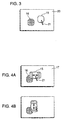
- Fig. 3 illustrates a display screen on which a pointer 21 which moves according to the movement of mouse 6 is displayed.
- a start-up icon 16 representing printer 9 and a target icon 15 representing document to be output are displayed.
- Pointer 21 can move target icon 15. Specifically, pointer 21 is first positioned on target icon 15 and then moved to an arbitrary location while the button of mouse 6 is depressed (drag operation). Target icon 15 is thus dragged to and overlaid on start-up icon 16 which is displayed at an arbitrary position on the display screen. At this time, the button of mouse 6 is released (drop operation), for example, so that the position of displayed target icon 15 is arbitrarily fixed. In this embodiment, when target icon 15 is overlaid on start-up icon 16, target icon 15 is fixed at this position.
- CPU 10 reads information on document data represented by or associated with the target icon from RAM 12 or the like so as to output the document data to printer 9 represented by start-up icon 16.
- the operation started by the drag and drop operation as described above is limited to an operation with its contents based on predetermined conditions and the printing operation is thus carried out under the predetermined conditions.
- the conditions can be changed, before target icon 15 is overlaid and dropped on start-up icon 16, by a predetermined manipulation of target icon 15, for example, by moving target icon 15 over start-up icon 16 or making target icon 15 stationary thereon for a certain time as shown in Figs 4A and 4B.
- the predetermined manipulation above is not limited to a particular one.
- target icon 15 may be moved repeatedly from side to side as shown in Fig. 4A or may be moved up and down repeatedly as shown in Fig. 4B.
- the manner of depressing the mouse button may be changed.
- the mouse has a plurality of buttons, in addition to the manipulation for the drag and drop which is done by depressing a button for dragging and (simultaneously) depressing other input means (mouse button, keyboard and the like), another operation may be performed simultaneously or at different time.
- Start-up conditions can be set in more detail in such a way that the conditions are changed depending on the number of times the icon is reciprocated.
- start-up icon 16 is arranged to change its display form according to the conditions set by a predetermined manipulation of target icon 15, as shown in Figs. 5A and 5B, the contents set by the user can easily be recognized.
- the label of start-up icon 16 is changed from "A4" to "B4."
- the color of the icon may be changed, for example, and if the display colors are just black and white, hatching or various patterns may be add to the icon so as to give change in appearance.
- the display form may be changed by changing the shape of the icon. For example, as the sheet size of B4 is larger than the A4 size, the icon labeled as B4 may be made larger relative to the icon labeled as A4. Those changes of icons may be combined.
- Start-up icon 16 may be a group of icons (16a - 16d) as shown in Fig 6. Referring to Fig. 7, suppose that a single start-up icon 16 represents processing 22 in group 1. Processing 26 in state 1 to processing 29 in state 4 are shown as conditions (member 25). If start-up icon 16 is a single icon, the manner of manipulating target icon 15 (variation) is limited. Change of processing 26 in state 1 to processing 29 in state 4 is accordingly difficult.
- start-up icon is displayed as a group of 4 icons as shown in Fig. 6, for example, 4 types of setting instructions are possible just by performing the horizontal or vertical reciprocation as shown in Figs. 4A or 4B on each of icons 16a to 16d.
- FIG. 8 Another example of the group of icons is shown in Fig. 8.
- processing 30 printinger 2, no page designation
- start-up icon 16 is represented by start-up icon 16 as a whole.
- Start-up icon 16 consists of a combination of five laterally elongate icons 16e to 16i, for example.
- Icons 16e to 16i correspond respectively to processing 31 in object 1 to processing 35 in object 5.
- Objects 1 to 5 are associated with the reading portion, body portion, tray 1, tray 2 and sorter of printer 9 and various settings of each object are possible by icons 16e to 16i.
- start-up icon 16 is a group of icons
- each icon is preferably an element icon, i.e. an icon associated with a plurality of items in condition setting.
- setting items are sheet size selection, setting of the rate of scaling up and down, designation of the number of copies to be made, page designation, and the like.
- Element icons associated respectively with these conditions are provided to form a group.
- start-up icon 16 consists of a group of such element icons, the predetermined manipulation discussed above is made for each element icon. Consequently, conditions can be set systematically and efficiently to facilitate setting manipulation.
- the element icons may be associated with a combination of setting items with their conditions frequently changed.
- start-up icon 16 represents printer 9
- four element icons 16a to 16d are associated respectively with processing 26 in state 1 to processing 29 in state 4 as shown in Fig. 9, for example.
- the sheet size is A4 as a basic condition. Under this condition, selection can be made from processing 26 in state 1 to processing 29 in state 4.
- each state is a combination of a plurality of conditions.
- conditions are set such as "Page Designation 2 to 8" in state 1, "Page Designation 30 to 40, Nup: Yes and Double Sided Printing: No" in state 2, and so on.
- Nup here denotes the number of pages printed on one sheet.
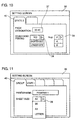
- Fig. 10 illustrates an example of setting those conditions in state 2, and a tag 40 may be provided to change the state on the same screen.
- the contents of setting in the element icons may be changed all together.
- the basic setting in a plurality of element icons having an item for double-sided printing designation are just changed to set the condition of double-sided printing in all the element icons.
- the sheet size is just changed from A4 to another size by the pull down menu in item 38 for sheet size setting on a screen 36 so that all sheet sizes in a plurality of sheet icons can be changed.
- the display manner of the icon is changed according to the change of condition as shown in Figs. 5A and 5B.
- another icon 42 may be displayed near start-up icon 16 so as to show details of the changed condition.
- target icon 15 is moved over start-up icon 16 or temporarily stopped.
- the display on the start-up icon (“A4" and "B4" labels in Figs. 5A and 5B) could become undistinguishable.
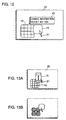
- a separate icon 42 is displayed in the vicinity of start-up icon 16 (especially in the location which does not overlap target icon 15 and start-up icon 16) as shown in Fig. 12 so as to display the information on the change (represented in Fig. 12 as "Change Information Sheet A4 ⁇ B4," the user can easily recognize the information on the change even if target icon 15 is manipulated over start-up icon 16.
- target icon 15 is dragged and subjected to a predetermined manipulation in the vicinity of start-up icon 16 so as to change processing conditions to be set.
- the processing conditions can thus be changed without deteriorating the operability of the drag and drop.
- Start-up icon 16 is displayed with its form or the like changed depending on the processing conditions, so that the user can easily recognize the contents of the set processing conditions. Further, a plurality of processing conditions can be set by providing start-up icon 16 as a group of icons.
- the operability of the information processing apparatus is improved by providing start-up icon 16 as a plurality of element icons to set a plurality of conditions in each element icon.
- the operability is further enhanced by enabling the contents of setting in the element icons to be changed all together.
- the user can easily distinguish the contents of the processing condition if the processing condition associated with start-up icon 16 is separately displayed.
- start-up icon 16 is constituted of a plurality of element icons from the start.
- the second embodiment is to provide a single start-up icon 16 initially and then change start-up icon 16 into a plurality of element icons by performing a predetermined manipulation on a target icon 15.
- start-up icon 16 is originally a group of element icons
- the display area of the element icons should be increased.
- single start-up icon 16 occupies a large display area so that a plurality of start-up icons 16 cannot be displayed.
- target icon 15 is dragged to originally single start-up icon 16, and then target icon 15 is manipulated to laterally reciprocate over start-up icon 16 repeatedly in order to change the state as shown in Fig. 13A to the group of element icons as shown in Fig. 13B.
- start-up icon 16 can be implemented as a single icon or as a group of element icons 16a to 16d as required.
- the limitations above on display and operability when conditions are set are alleviated.
- the display and user interface can accordingly be realized which are distinguishable and easy to operate by the user without complicating display on the display unit.
- start-up manipulations concerning start-up icon 16 and target icon 15 in the second embodiment are similar to those in the first embodiment and detailed description thereof is not repeated here.
- a predetermined manipulation is performed on target icon 15 in the vicinity of a single start-up icon 16 so as to display a plurality of element icons. Display which is easily distinguishable by the user and superior in operability can thus be achieved.
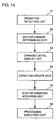
- Fig. 14 is a schematic block diagram illustrating a functional structure of the information processing apparatus in the above first and second embodiments.
- the information processing apparatus includes an operation detecting unit 51 detecting a predetermined operation performed on target icon 15 which has been dragged to start-up icon 16, a setting change determining unit 52 determining whether or not conditions are changed, a changed detail display unit 53 displaying details of change of conditions, a condition update unit 54 updating details of the condition change, an icon information acquiring unit 55 acquiring information on target icon 15 and start-up icon 16, and a processing execution unit 56 executing processing based on the information on target icon 15 and on start-up icon 16.
- Those functions are implemented by the information processing program described above.
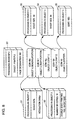
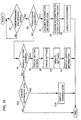
- Fig. 15 is a flow chart illustrating a processing procedure of the information processing apparatus shown in Fig. 14.
- operation detecting unit 51 determines whether or not the above predetermined operation is performed on target icon 15 which has been dragged to start-up icon 16 (S1). If the predetermined operation is not conducted (No in S1), this determination is repeated.
- start-up icon 16 If determination is made so as not to change set conditions by start-up icon 16 (No in S12), the process is completed as it is. It is noted that information on whether or not the set conditions are changed by start-up icon 16 is given by the user in advance.
- Figs. 16A and 16B are flow charts illustrating in detail the processing in step S13 in Fig. 15.
- Fig. 16A illustrates that display of the element icon only is changed (S21).
- Fig. 16B illustrates that display of a group of icons or the element icon is changed.
- a displayed icon is a group of icons. If a group of icons is displayed (Yes in S31), icons are displayed as elements of the group (S32) and this process is completed. If the displayed icon is not the group of icons (No in S31), display of the element icon is changed (S33) and this process is completed.
- Fig. 17 is a flow chart illustrating a predetermined manipulation made by the user.
- the user drags target icon 15 and places it on start-up icon 16 (S41).
- the user performs the predetermined manipulation by horizontally or vertically reciprocating target icon 15 repeatedly near start-up icon 16, or stopping target icon 15 for a predetermined time (S42).
- an information processing apparatus which is superior in operability can be achieved by implementing the processing according to the information processing program described in conjunction with the first and second embodiments.
Landscapes
- Engineering & Computer Science (AREA)
- General Engineering & Computer Science (AREA)
- Theoretical Computer Science (AREA)
- Human Computer Interaction (AREA)
- Physics & Mathematics (AREA)
- General Physics & Mathematics (AREA)
- User Interface Of Digital Computer (AREA)
Applications Claiming Priority (2)
| Application Number | Priority Date | Filing Date | Title |
|---|---|---|---|
| JP3014599A JP3798170B2 (ja) | 1999-02-08 | 1999-02-08 | グラフィカル・ユーザ・インターフェイスを備えた情報処理システム |
| JP3014599 | 1999-02-08 |
Related Child Applications (1)
| Application Number | Title | Priority Date | Filing Date |
|---|---|---|---|
| EP08003957 Division | 2008-03-04 |
Publications (3)
| Publication Number | Publication Date |
|---|---|
| EP1026574A2 true EP1026574A2 (de) | 2000-08-09 |
| EP1026574A3 EP1026574A3 (de) | 2002-12-11 |
| EP1026574B1 EP1026574B1 (de) | 2009-04-15 |
Family
ID=12295609
Family Applications (1)
| Application Number | Title | Priority Date | Filing Date |
|---|---|---|---|
| EP00300925A Expired - Lifetime EP1026574B1 (de) | 1999-02-08 | 2000-02-07 | Grafische Benutzerschnittstelle zum Einstellen von Verarbeitungsbedingungen mittels einer Drag&Drop-Operation |
Country Status (4)
| Country | Link |
|---|---|
| US (1) | US6976224B2 (de) |
| EP (1) | EP1026574B1 (de) |
| JP (1) | JP3798170B2 (de) |
| DE (1) | DE60041994D1 (de) |
Cited By (7)
| Publication number | Priority date | Publication date | Assignee | Title |
|---|---|---|---|---|
| EP1291757A3 (de) * | 2001-09-05 | 2006-08-02 | Eastman Kodak Company | Bilderzeugungssystem mit einer grafischen Benutzerschnittstelle zur Darstellung von Druckoptionen |
| CN100390718C (zh) * | 2004-09-29 | 2008-05-28 | 夏普株式会社 | 信息处理系统、以及其方法 |
| WO2008113716A3 (en) * | 2007-03-19 | 2009-01-22 | Ibm | Function switching during drag-and-drop |
| WO2011017006A1 (en) * | 2009-08-05 | 2011-02-10 | Apple Inc. | Multi-operation user interface tool |
| EP2328102A1 (de) * | 2004-11-30 | 2011-06-01 | Oculus Info Inc. | System und Verfahren für interaktive visuelle Darstellung von Informationsinhalten und Beziehungen mittels Layout und Gesten |
| CN103649899A (zh) * | 2011-07-11 | 2014-03-19 | 三星电子株式会社 | 用于使用图形对象控制内容的方法和设备 |
| US8698844B1 (en) | 2005-04-16 | 2014-04-15 | Apple Inc. | Processing cursor movements in a graphical user interface of a multimedia application |
Families Citing this family (44)
| Publication number | Priority date | Publication date | Assignee | Title |
|---|---|---|---|---|
| JP3943829B2 (ja) | 2000-12-11 | 2007-07-11 | 株式会社リコー | 印刷条件設定装置、印刷装置、印刷システム、及び、印刷条件設定用記録媒体 |
| JP4096164B2 (ja) * | 2002-06-10 | 2008-06-04 | 日本電気株式会社 | ポインティングデバイスのセットアップ方法と該方法を記録した記録媒体および携帯端末 |
| US7301662B2 (en) * | 2003-03-17 | 2007-11-27 | Kyocera Mita Corporation | Control system and control method for image processing apparatus |
| US8373875B2 (en) * | 2004-06-17 | 2013-02-12 | Sharp Laboratories Of America, Inc. | Adaptive universal symbol driver interface |
| US8281241B2 (en) | 2004-06-28 | 2012-10-02 | Nokia Corporation | Electronic device and method for providing extended user interface |
| JP4413124B2 (ja) * | 2004-10-25 | 2010-02-10 | コニカミノルタビジネステクノロジーズ株式会社 | 印刷指示方法および装置およびプログラム |
| US20060136833A1 (en) * | 2004-12-15 | 2006-06-22 | International Business Machines Corporation | Apparatus and method for chaining objects in a pointer drag path |
| US20060129945A1 (en) * | 2004-12-15 | 2006-06-15 | International Business Machines Corporation | Apparatus and method for pointer drag path operations |
| KR100750123B1 (ko) * | 2005-06-17 | 2007-08-21 | 삼성전자주식회사 | 호스트 상에서 단축키를 이용한 화상형성장치의 드라이버 호출장치 및 방법 |
| US7774713B2 (en) * | 2005-06-28 | 2010-08-10 | Microsoft Corporation | Dynamic user experience with semantic rich objects |
| US20070097417A1 (en) * | 2005-10-27 | 2007-05-03 | Yukio Shibata | Print control process device |
| US7574666B2 (en) * | 2005-10-28 | 2009-08-11 | Kyocera Mita Corporation | Electronic device and storage medium which stores a display control program |
| JP5142510B2 (ja) * | 2005-11-25 | 2013-02-13 | オセ−テクノロジーズ ビーブイ | グラフィカルユーザインターフェース提供方法及びシステム |
| JP2007249461A (ja) | 2006-03-15 | 2007-09-27 | Konica Minolta Business Technologies Inc | 情報処理装置及びプログラム |
| JP2007257256A (ja) * | 2006-03-23 | 2007-10-04 | Konica Minolta Business Technologies Inc | プリンタドライバの設定用プログラム、プリンタドライバの設定方法、および、印刷要求装置 |
| US8793605B2 (en) * | 2006-03-29 | 2014-07-29 | Yahoo! Inc. | Smart drag-and-drop |
| JP4929806B2 (ja) * | 2006-04-12 | 2012-05-09 | コニカミノルタビジネステクノロジーズ株式会社 | 情報処理装置及びプログラム |
| US20080000499A1 (en) * | 2006-06-30 | 2008-01-03 | Delta Design, Inc. | System and method for cleaning a contactor device |
| US7996789B2 (en) * | 2006-08-04 | 2011-08-09 | Apple Inc. | Methods and apparatuses to control application programs |
| USD582427S1 (en) * | 2006-10-12 | 2008-12-09 | Bystronic Laser Ag | Printed material and icon for computer display, electronic screen |
| JP4425939B2 (ja) * | 2007-03-09 | 2010-03-03 | シャープ株式会社 | 画像データ処理装置 |
| US20080229210A1 (en) * | 2007-03-14 | 2008-09-18 | Akiko Bamba | Display processing system |
| JP4843532B2 (ja) * | 2007-03-14 | 2011-12-21 | 株式会社リコー | 表示処理装置、表示処理方法、および表示処理プログラム |
| JP5063150B2 (ja) * | 2007-03-16 | 2012-10-31 | 株式会社ソニー・コンピュータエンタテインメント | データ処理プログラム、データ処理装置、及びデータ処理方法 |
| JP5490982B2 (ja) * | 2007-08-10 | 2014-05-14 | 株式会社島津製作所 | 分析装置制御システム及び分析装置制御プログラム |
| JP4643677B2 (ja) * | 2008-03-21 | 2011-03-02 | シャープ株式会社 | 印刷制御装置 |
| USD601158S1 (en) * | 2008-10-03 | 2009-09-29 | Nokia Corporation | Icon for a display screen |
| USD601159S1 (en) * | 2008-10-27 | 2009-09-29 | Microsoft Corporation | Icon for a display screen |
| JP4885256B2 (ja) * | 2009-05-25 | 2012-02-29 | シャープ株式会社 | 画像データ処理装置 |
| USD624928S1 (en) * | 2009-10-16 | 2010-10-05 | Microsoft Corporation | Graphic user interface for a display screen |
| USD624931S1 (en) * | 2009-10-16 | 2010-10-05 | Microsoft Corporation | Graphic user interface for a display screen |
| USD624929S1 (en) * | 2009-10-16 | 2010-10-05 | Microsoft Corporation | Graphic user interface for a display screen |
| US9141345B2 (en) * | 2010-01-27 | 2015-09-22 | Microsoft Technology Licensing, Llc | Simplified user controls for authoring workflows |
| US20130047110A1 (en) * | 2010-06-01 | 2013-02-21 | Nec Corporation | Terminal process selection method, control program, and recording medium |
| US20120272144A1 (en) * | 2011-04-20 | 2012-10-25 | Microsoft Corporation | Compact control menu for touch-enabled command execution |
| EP2610725B1 (de) | 2011-12-29 | 2019-10-23 | Orange | Drag-und-Drop-Betrieb auf einer grafischen Benutzerschnittstelle mit Größenveränderung des gezogenen Objekts |
| JP5263418B2 (ja) * | 2012-03-06 | 2013-08-14 | 富士通株式会社 | プログラム、編集方法、およびコンピュータ |
| JP5865811B2 (ja) * | 2012-09-24 | 2016-02-17 | 株式会社Nttドコモ | 検索指示装置、検索指示方法及びプログラム |
| JP6136321B2 (ja) * | 2013-02-06 | 2017-05-31 | 富士ゼロックス株式会社 | 情報処理装置、画像処理装置及びプログラム |
| JP5720749B2 (ja) * | 2013-09-25 | 2015-05-20 | 富士通株式会社 | 表示プログラム、表示方法、およびコンピュータ |
| JP6604142B2 (ja) * | 2015-10-27 | 2019-11-13 | コニカミノルタ株式会社 | 印刷システム、印刷制御装置、印刷方法、およびコンピュータプログラム |
| JP7172323B2 (ja) * | 2018-09-12 | 2022-11-16 | 富士フイルムビジネスイノベーション株式会社 | 情報処理装置及びプログラム |
| USD905744S1 (en) * | 2019-02-07 | 2020-12-22 | Samsung Electronics Co., Ltd. | Display screen or portion thereof with icon |
| US11263502B1 (en) | 2020-10-29 | 2022-03-01 | Tilia Labs Inc. | Method for multifunctional graphical user interface file indicia movement, and system, terminal and computer readable media for the same |
Family Cites Families (11)
| Publication number | Priority date | Publication date | Assignee | Title |
|---|---|---|---|---|
| JPH0823803B2 (ja) | 1991-10-31 | 1996-03-06 | インターナショナル・ビジネス・マシーンズ・コーポレイション | システムの挙動にアクセスする方法、アイコン表示装置及びデータ処理システム |
| JPH0659838A (ja) | 1992-08-07 | 1994-03-04 | Oki Electric Ind Co Ltd | プリンタ制御操作システム |
| US5583984A (en) | 1993-06-11 | 1996-12-10 | Apple Computer, Inc. | Computer system with graphical user interface including automated enclosures |
| US5546527A (en) * | 1994-05-23 | 1996-08-13 | International Business Machines Corporation | Overriding action defaults in direct manipulation of objects on a user interface by hovering a source object |
| JP3014286B2 (ja) * | 1994-12-16 | 2000-02-28 | インターナショナル・ビジネス・マシーンズ・コーポレイション | 直接操作のための補助装置及び方法 |
| US5721853A (en) * | 1995-04-28 | 1998-02-24 | Ast Research, Inc. | Spot graphic display element with open locking and periodic animation |
| JPH09244843A (ja) | 1996-03-04 | 1997-09-19 | Canon Inc | ユーザ・インターフェース制御方法及びその装置と該装置を含む情報処理システムと前記方法を実行するプログラムを記憶した記憶媒体 |
| US5767852A (en) * | 1996-06-12 | 1998-06-16 | International Business Machines Corporation | Priority selection on a graphical interface |
| US5777616A (en) * | 1996-08-05 | 1998-07-07 | International Business Machines Corporation | Data processing system and method for invoking a function of a multifunction icon in a graphical user interface |
| US6259448B1 (en) * | 1998-06-03 | 2001-07-10 | International Business Machines Corporation | Resource model configuration and deployment in a distributed computer network |
| US6717600B2 (en) * | 2000-12-15 | 2004-04-06 | International Business Machines Corporation | Proximity selection of selectable item in a graphical user interface |
-
1999
- 1999-02-08 JP JP3014599A patent/JP3798170B2/ja not_active Expired - Lifetime
-
2000
- 2000-02-07 US US09/499,401 patent/US6976224B2/en not_active Expired - Lifetime
- 2000-02-07 EP EP00300925A patent/EP1026574B1/de not_active Expired - Lifetime
- 2000-02-07 DE DE60041994T patent/DE60041994D1/de not_active Expired - Lifetime
Cited By (12)
| Publication number | Priority date | Publication date | Assignee | Title |
|---|---|---|---|---|
| EP1291757A3 (de) * | 2001-09-05 | 2006-08-02 | Eastman Kodak Company | Bilderzeugungssystem mit einer grafischen Benutzerschnittstelle zur Darstellung von Druckoptionen |
| CN100390718C (zh) * | 2004-09-29 | 2008-05-28 | 夏普株式会社 | 信息处理系统、以及其方法 |
| EP2328102A1 (de) * | 2004-11-30 | 2011-06-01 | Oculus Info Inc. | System und Verfahren für interaktive visuelle Darstellung von Informationsinhalten und Beziehungen mittels Layout und Gesten |
| US9177049B2 (en) | 2004-11-30 | 2015-11-03 | Uncharted Software Inc. | System and method for interactive visual representation of information content using assertions |
| US8698844B1 (en) | 2005-04-16 | 2014-04-15 | Apple Inc. | Processing cursor movements in a graphical user interface of a multimedia application |
| WO2008113716A3 (en) * | 2007-03-19 | 2009-01-22 | Ibm | Function switching during drag-and-drop |
| WO2011017006A1 (en) * | 2009-08-05 | 2011-02-10 | Apple Inc. | Multi-operation user interface tool |
| CN103649899A (zh) * | 2011-07-11 | 2014-03-19 | 三星电子株式会社 | 用于使用图形对象控制内容的方法和设备 |
| EP2732364A4 (de) * | 2011-07-11 | 2015-06-24 | Samsung Electronics Co Ltd | Verfahren und vorrichtung zur steuerung von inhalten mit graphischen objekten |
| RU2617384C2 (ru) * | 2011-07-11 | 2017-04-24 | Самсунг Электроникс Ко., Лтд. | Способ и устройство для управления контентом, используя графический объект |
| US9727225B2 (en) | 2011-07-11 | 2017-08-08 | Samsung Electronics Co., Ltd | Method and apparatus for controlling content using graphical object |
| CN103649899B (zh) * | 2011-07-11 | 2018-03-09 | 三星电子株式会社 | 用于使用图形对象控制内容的方法和设备 |
Also Published As
| Publication number | Publication date |
|---|---|
| EP1026574B1 (de) | 2009-04-15 |
| EP1026574A3 (de) | 2002-12-11 |
| DE60041994D1 (de) | 2009-05-28 |
| JP3798170B2 (ja) | 2006-07-19 |
| US20030142120A1 (en) | 2003-07-31 |
| JP2000227828A (ja) | 2000-08-15 |
| US6976224B2 (en) | 2005-12-13 |
Similar Documents
| Publication | Publication Date | Title |
|---|---|---|
| EP1026574B1 (de) | Grafische Benutzerschnittstelle zum Einstellen von Verarbeitungsbedingungen mittels einer Drag&Drop-Operation | |
| JP4637455B2 (ja) | ユーザインタフェースの利用方法並びにコンピュータで使用可能な媒体を含む製品 | |
| US4686522A (en) | Method of editing graphic objects in an interactive draw graphic system using implicit editing actions | |
| US6489951B1 (en) | Method and system for providing touch-sensitive screens for the visually impaired | |
| JP4821529B2 (ja) | 画像表示装置およびプログラム | |
| US20080229212A1 (en) | Screen data generating apparatus, image processor, screen data generating method, and computer program product | |
| JP2000242387A (ja) | 項目選択装置およびそのプログラム記録媒体 | |
| JPH1153161A (ja) | 情報処理方法及び装置及び前記方法を実行する制御プログラムを記憶した記憶媒体 | |
| JPH09244843A (ja) | ユーザ・インターフェース制御方法及びその装置と該装置を含む情報処理システムと前記方法を実行するプログラムを記憶した記憶媒体 | |
| JPH06274294A (ja) | 情報処理方法およびその装置 | |
| JP3867459B2 (ja) | ウインドウ表示制御装置およびそのプログラム記録媒体 | |
| JP3635853B2 (ja) | アイコン表示制御装置及び方法 | |
| JP4144620B2 (ja) | ウインドウ表示制御装置およびそのプログラム記録媒体 | |
| JP2006084531A (ja) | 表示制御装置、表示制御方法及び表示制御用プログラム | |
| KR20060132275A (ko) | 단축키를 이용한 드라이버 호출장치 및 방법 | |
| US20060221085A1 (en) | Information processing apparatus and program | |
| JP4738578B2 (ja) | 情報端末、情報端末の制御方法、及び記録媒体 | |
| JP2007079947A (ja) | 表示装置及びそれに用いるプログラム | |
| JPH11194756A (ja) | 画像表示装置及び画像表示方法及びコンピュータ読み出し可能なプログラム製品 | |
| JP5066877B2 (ja) | 画像表示装置、画像表示方法、およびプログラム | |
| JPH06110630A (ja) | データ処理装置 | |
| JPH1166330A (ja) | グラフ表示装置 | |
| JPS62281076A (ja) | マルチウィンドウ表示制御方式 | |
| JPH1186010A (ja) | グラフ表示装置 | |
| JPH06242760A (ja) | マルチウィンドウ切り換え方式 |
Legal Events
| Date | Code | Title | Description |
|---|---|---|---|
| PUAI | Public reference made under article 153(3) epc to a published international application that has entered the european phase |
Free format text: ORIGINAL CODE: 0009012 |
|
| AK | Designated contracting states |
Kind code of ref document: A2 Designated state(s): AT BE CH CY DE DK ES FI FR GB GR IE IT LI LU MC NL PT SE |
|
| AX | Request for extension of the european patent |
Free format text: AL;LT;LV;MK;RO;SI |
|
| PUAL | Search report despatched |
Free format text: ORIGINAL CODE: 0009013 |
|
| AK | Designated contracting states |
Kind code of ref document: A3 Designated state(s): AT BE CH CY DE DK ES FI FR GB GR IE IT LI LU MC NL PT SE |
|
| AX | Request for extension of the european patent |
Free format text: AL;LT;LV;MK;RO;SI |
|
| 17P | Request for examination filed |
Effective date: 20030226 |
|
| 17Q | First examination report despatched |
Effective date: 20030507 |
|
| AKX | Designation fees paid |
Designated state(s): DE FR GB |
|
| APBN | Date of receipt of notice of appeal recorded |
Free format text: ORIGINAL CODE: EPIDOSNNOA2E |
|
| APBR | Date of receipt of statement of grounds of appeal recorded |
Free format text: ORIGINAL CODE: EPIDOSNNOA3E |
|
| APAA | Appeal reference recorded |
Free format text: ORIGINAL CODE: EPIDOS REFN |
|
| APAF | Appeal reference modified |
Free format text: ORIGINAL CODE: EPIDOSCREFNE |
|
| APBT | Appeal procedure closed |
Free format text: ORIGINAL CODE: EPIDOSNNOA9E |
|
| GRAP | Despatch of communication of intention to grant a patent |
Free format text: ORIGINAL CODE: EPIDOSNIGR1 |
|
| GRAS | Grant fee paid |
Free format text: ORIGINAL CODE: EPIDOSNIGR3 |
|
| GRAA | (expected) grant |
Free format text: ORIGINAL CODE: 0009210 |
|
| AK | Designated contracting states |
Kind code of ref document: B1 Designated state(s): DE FR GB |
|
| REG | Reference to a national code |
Ref country code: GB Ref legal event code: FG4D |
|
| REF | Corresponds to: |
Ref document number: 60041994 Country of ref document: DE Date of ref document: 20090528 Kind code of ref document: P |
|
| PLBE | No opposition filed within time limit |
Free format text: ORIGINAL CODE: 0009261 |
|
| STAA | Information on the status of an ep patent application or granted ep patent |
Free format text: STATUS: NO OPPOSITION FILED WITHIN TIME LIMIT |
|
| 26N | No opposition filed |
Effective date: 20100118 |
|
| REG | Reference to a national code |
Ref country code: FR Ref legal event code: PLFP Year of fee payment: 17 |
|
| REG | Reference to a national code |
Ref country code: FR Ref legal event code: PLFP Year of fee payment: 18 |
|
| REG | Reference to a national code |
Ref country code: FR Ref legal event code: PLFP Year of fee payment: 19 |
|
| PGFP | Annual fee paid to national office [announced via postgrant information from national office to epo] |
Ref country code: DE Payment date: 20180219 Year of fee payment: 19 Ref country code: GB Payment date: 20180216 Year of fee payment: 19 |
|
| PGFP | Annual fee paid to national office [announced via postgrant information from national office to epo] |
Ref country code: FR Payment date: 20180222 Year of fee payment: 19 |
|
| REG | Reference to a national code |
Ref country code: DE Ref legal event code: R119 Ref document number: 60041994 Country of ref document: DE |
|
| GBPC | Gb: european patent ceased through non-payment of renewal fee |
Effective date: 20190207 |
|
| PG25 | Lapsed in a contracting state [announced via postgrant information from national office to epo] |
Ref country code: GB Free format text: LAPSE BECAUSE OF NON-PAYMENT OF DUE FEES Effective date: 20190207 Ref country code: DE Free format text: LAPSE BECAUSE OF NON-PAYMENT OF DUE FEES Effective date: 20190903 |
|
| PG25 | Lapsed in a contracting state [announced via postgrant information from national office to epo] |
Ref country code: FR Free format text: LAPSE BECAUSE OF NON-PAYMENT OF DUE FEES Effective date: 20190228 |