EP1026609A2 - Méthode et dispositif électronique pour l'affichage d'un tableau horaire sur un écran d'ordinateur - Google Patents
Méthode et dispositif électronique pour l'affichage d'un tableau horaire sur un écran d'ordinateur Download PDFInfo
- Publication number
- EP1026609A2 EP1026609A2 EP00300681A EP00300681A EP1026609A2 EP 1026609 A2 EP1026609 A2 EP 1026609A2 EP 00300681 A EP00300681 A EP 00300681A EP 00300681 A EP00300681 A EP 00300681A EP 1026609 A2 EP1026609 A2 EP 1026609A2
- Authority
- EP
- European Patent Office
- Prior art keywords
- display
- time span
- display interval
- time
- schedule
- Prior art date
- Legal status (The legal status is an assumption and is not a legal conclusion. Google has not performed a legal analysis and makes no representation as to the accuracy of the status listed.)
- Ceased
Links
Images





Classifications
-
- G—PHYSICS
- G06—COMPUTING OR CALCULATING; COUNTING
- G06F—ELECTRIC DIGITAL DATA PROCESSING
- G06F15/00—Digital computers in general; Data processing equipment in general
- G06F15/02—Digital computers in general; Data processing equipment in general manually operated with input through keyboard and computation using a built-in program, e.g. pocket calculators
- G06F15/025—Digital computers in general; Data processing equipment in general manually operated with input through keyboard and computation using a built-in program, e.g. pocket calculators adapted to a specific application
- G06F15/0266—Digital computers in general; Data processing equipment in general manually operated with input through keyboard and computation using a built-in program, e.g. pocket calculators adapted to a specific application for time management, e.g. calendars, diaries
Definitions
- the present invention generally relates to schedule display apparatus, methods for displaying a schedule and recording media recorded with a program for causing a computer to display a schedule that are used for personal computers, electronic notebooks or the like, and more particularly to a schedule display apparatus, a method for displaying a schedule and a recording medium recorded with a program for causing a computer to display a schedule in which the time scale of a schedule can be selectively changed so that the scale of an active time can be different from that of a non-active time.
- PC personal computers
- electronic notebooks or the like are software products installed in not only personal computers (hereafter called PC) but also electronic notebooks or the like.
- the display of the schedule is required to improve. For example, for users having a similar schedule each day, it is preferable that their active hours, such as regular working hours, be displayed so as to be more user-friendly than their non-active hours.
- FIG.1 shows an example of a conventional schedule display.
- a computer system or a user defines arbitrarily a scale of time.
- a conventional schedule display 60 shows a daily schedule inputted by a user, which schedule goes from 0:00 to 24:00 hours with a 30 min. per division scale. Even if there is no activity scheduled during the non-active hours of 6:00 to 9:00 hours, the non-active hours 62 are displayed with the 30 min. per division scale, which scale is the same as that of the active hours 61.
- the display 60 shows enlarged intervals for the non-active hours 62. Also, activities 63 and 64 are scheduled and displayed during the active hours 61 in FIG.1. In this case, the display 60 does not show all the information for the activity 64 that is scheduled from 14:00 to 17:00 hours, but only information until 16:00 hours because of the limitation of the display area. Accordingly, it becomes inconvenient to see the whole schedule of a day.
- a more specific object of the present invention is to provide a schedule display, a method for displaying the same and a recording medium of the same which have a schedule management function and can set a time scale for each of defined time ranges so that the frequently accessed time range has a large time scale to see information within the limited display area.
- a schedule display apparatus including a display interval defining part for defining a first display interval during a first tune span and a second display interval during a second time span, the first time span and the second time span being mutually exclusive; and a display control part for generating whole display information including first display information in accordance with the first display interval during the first time span and second display information in accordance with the second display interval during the second time span.
- time spans it is possible to define or distinguish at least two kinds of time spans, the first time span and the second time span; for example, the active hours and the non-active hours. Moreover, this makes it possible for a user to selectively define hours corresponding to the user's lifestyle.
- positions for schedule time in the display for the active hours and the non-active hours are defined based on the first display interval and the second display interval. For example, a respective number of lines may be applied to the first display interval and the second display interval. Therefore, a time span requiring a relatively large quantity of information can be shown in more detail than the other time span by defining a display interval.
- a method for displaying a schedule including the steps of: the steps of: (a) defining a first display interval during a first time span and a second display interval during a second time span, the first time span and the second time span being mutually exclusive; and (b) generating whole display information including first display information in accordance with the first display interval during the first time span and second display information in accordance with the second display interval during the second time span.
- a method for displaying a schedule can provide a method in which schedule a time span requiring a relatively large quantity of information can be shown in more detail than another time span with schedule time.
- a computer-readable recording medium recorded with a program for causing a computer to display a schedule
- the program including the codes of: (a) defining a first display interval during a first time span and a second display interval during a second time span, the first time span and the second time span being mutually exclusive; and (b) generating whole display information including first display information in accordance with the first display interval during the first time span and second display information in accordance with the second display interval during the second time span.
- a computer-readable recording medium recorded with a program for causing to display a schedule can provide a program in which schedule a time span requiring a relatively large quantity of information can be shown in more detail than another time span with schedule time.
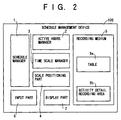
- FIG.2 shows a block diagram of a system according to an embodiment of the present invention.
- a schedule management device 100 includes a schedule manager 1 that controls the schedule management device 100 to edit and to display schedules, an active hours manager 2 that manages a user's active hours, a time scale manager 3 that manages the time scale of the active hours and that of non-active hours, a scale positioning part 4 that positions time in accordance with the scale, a recording medium 5 that records required information to control display functions including the time scale positioning, an input part 6 that controls data inputted by a user, and a display part 7 that controls the display information.
- a schedule manager 1 that controls the schedule management device 100 to edit and to display schedules
- an active hours manager 2 that manages a user's active hours
- a time scale manager 3 that manages the time scale of the active hours and that of non-active hours
- a scale positioning part 4 that positions time in accordance with the scale
- a recording medium 5 that records required information to control display functions including the time scale positioning
- an input part 6 that controls data inputted by a user
- a display part 7 that controls the display
- the schedule manager 1 controls the schedule management device 100 to edit and display schedules.
- the recording medium 5 has a table 5a and an activity details recording area 5b.
- the active hours manager 2 allows a user to set a beginning time and an ending time of the user's active hours when the user creates a new schedule or edits the created schedule.
- the active hours manager 2 saves the information about the user's active hours into the table 5a in the recording medium 5.
- the active hours manager 2 displays the beginning time and ending time of standard active hours when a new schedule is opened and displays those times defined by the user at the last time when the schedule is opened to edit it. In this manner, it is possible to define and distinguish the active hours and the non-active hours. Moreover, this makes it possible for a user to selectively define hours corresponding to the user's lifestyle.
- the time scale manager 3 allows a user to set time scales for the active hours and for the non-active hours and record the time scales defined by the user into the table 5a in the recording medium 5.
- the time scale manager 3 displays the schedule in a standard time scale when a new schedule is opened and displays the schedule in accordance with the time scale defined by the user when the schedule is opened to edit it.
- the time scale is changed, the changed time scale is saved into the table 5a in the recording medium 5.
- the scale positioning part 4 calculates the time positions to display times, 0:00 to 24:00 hours, for the schedule in accordance with the time scales of the active hours and the non-active hours defined by the user.
- each time scale can be converted into display interval per time scale among the active hours or the non-active hours and the positions of time on the display can be calculated automatically in accordance with the converted intervals so that the user can simply set the time scale in min. or hours per division.
- the input part 6 allows a user to input data needed to manage a schedule and controls the data.
- the display part 7 shows information for a user to manage a schedule and displays a user's schedule.
- the table 5a which is used to define positions indicating times according to the present invention will be explained later.
- FIG.3 shows a diagram of a hardware configuration according to the embodiment of the present invention.
- the schedule management device 100 is equipped with a CPU 11 that executes an installed program (explained later), a main memory 12 that stores instructions to execute the program and data temporarily, a storage device 13 into which the program is loaded and the needed table is stored, an input unit 14 that controls data inputted by a user, a display unit 15 that controls the display information, and a CD-ROM 16 where the program is stored.
- the medium storing the program according to the present invention is not limited to the CD-ROM, but other computer readable recording media may be used.
- the table 5a used in the schedule management device 100 will now be described.
- FIG.4 shows a diagram of a table structure according to the embodiment of the present invention.
- the table 5a includes a beginning time 5a-1, an ending time 5a-2, a time scale 5a-3 for the active hours, a time scale 5a-4 for the non-active hours, and a display start time 5a-5.
- the beginning time 5a-1 and the ending time 5a-2 are managed by the active hours manager 2.
- the time scales 5a-3 and 5a-4 are managed by the time scale manager 3.
- the display start time 5a-5 indicates the first time to display.
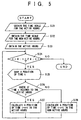
- FIG.5 shows a flowchart diagram of the scale positioning according to the embodiment of the present invention.
- the scale positioning part 4 in FIG.2 includes a step S21 that obtains the time scale for the active hours, a step S22 that obtains the time scale for the non-active hours, a step S23 that obtains the active hours, a step S24 that checks whether a time t equals 24, a step S25 that saves a position into an array for the time t, a step S26 that checks whether the time t belongs to the active hours, a step S27 that calculates a position in the display for a time t+1 in the active hours, and a step S28 that calculates a position in the display for a time t+1 in the non-active hours.
- a value of the time scale 5a-3 for the active hours is retrieved from the table 5a and is converted into a length for the display among the active hours in the step S21.
- a value of the time scale 5a-4 for the non-active hours is retrieved from the table 51 and is converted into a display interval among the non-active hours in the step S22.
- the values for the time scales 5a-3 and 5a-4 are shown in minutes and the value for the active hours is usually fewer minutes than that for the non-active hours. However, after those values are converted into the display intervals, the display interval for the active hours is longer than that for the non-active hours. In this manner, activities during the active hours can be displayed in more detail than those during the non-active hours.
- the beginning time 5a-1 and the ending time 5a-2 for the active hours are retrieved from the table 5a in the step S23.
- step S24 the time t is checked. When the time t is greater than 24, this process for the scale positioning is terminated. When the time t is less than or equal to 24, the process goes to the step S25.
- a position of a time t, calculated in the steps 27 and 28, is saved into an array n (n is one of natural numbers 0 to 24 and corresponds to the time t) in the step S25.
- the time t is checked as to whether it belongs to the active hours between the beginning time 5a-1 and the ending time 5a-2 in the step S26.
- the process goes to the step S27.
- the time t belongs to the non-active hours, the process goes to the step S28.
- the display interval length for the active hours which length is calculated in the step S23, is added to the position of the time t.
- the display interval length for the non-active hours which length is calculated in the step S22, is added to the position of the time t.
- step S27 or S28 the process returns to the step S24.
- one line in the display may apply to the display interval. That is, 30 min., 15 min., 10 min., or 5 min. scale may be converted into the display interval of 2 lines, 4 lines, 6 lines, or 12 lines, respectively.
- the time scale indicated by the user is converted into the display interval so that the user can simply set the time scale in minutes per division.
- hours from 9 AM to 6 PM (18:00 hours) are defined as the active hours and the time scale for the active hours is defined as 30 min. per division (the display interval of 2 lines)
- hours other than the active hours are defined as the non-active hours and the time scale for the active hours is defined as 60 min.
- a value of a[0] is 0 (zero) when t is 0 (0 AM)
- a value of a[t] increases by one over the previous value (a[t-1]) when t increases from 1 to 9 or from 18 (6 PM) to 24 (12 AM)
- the value of a[t] increases by two over the previous value (a[t-1]) when t increases from 9 to 18.
- FIG.6 shows a diagram of a schedule setting window according to the embodiment of the present invention.
- the schedule setting window 30 includes an active hours setting part 31 for a user to set the beginning time and the ending time of the active hours, a time scale setting part 32 for the user to set the time scales of the active hours and of the non-active hours, an OK button 33 to validate the information inputted by the user, and a cancel button 34 to invalidate the information inputted by the user.
- the active hours setting part 31 includes a dropdown list 31-1 to set the beginning time and a dropdown list 31-2 to set the ending time.
- a dropdown list 31-1 or 31-2 shows a list of predetermined hours. Thus, one of hours for the dropdown list 31-1 or 31-2 is selected by the user.
- the time scale setting part 32 includes a dropdown list 32-1 to set the time scale for the active hours and a dropdown list 32-2 to set the time scale for the non-active hours.
- a downward arrow for a dropdown list 32-1 or 32-2 is clicked by a user, the dropdown list 32-1 or 32-2 shows a list of minutes per division.
- the lists such as a list of 5 min., 10 min., 15 min., 30 min., and 60 min., per division.
- the provided lists make it possible for a user to input data with a consistent data pattern.
- the dropdown list 32-2 used to set the time scale for the non-active hours may be programmed so that a value (min.) per division for the non-active hours is selected automatically to be two or three times as much as the value per division selected by the user as the time scale for the active hours. That is, in the display, the interval for the non-active hours may be calculated by the scale positioning part 4 in FIG.2 to be half or one third of the display interval for the active hours. Alternately, the ratio of the time scale for the active hours to the time scale for the non-active hours may be determined by the user. Therefore, the time scale for the non-active hours is defined automatically so that the user can select only one time scale for the active hours. Moreover, in this approach, activities during the active hours can be displayed in more detail than those during the non-active hours.
- the OK button 33 is clicked by the user to validate all values for the active hours setting part 31 and the time scale setting part 32 that the user changed.
- the cancel button 34 is clicked by the user to invalidate all values changed by the user for the active hours setting part 31 and the time scale setting part 32 so that the previous values are still valid.
- FIG.7 shows a schedule display window according to the embodiment of the present invention.
- the schedule display 40 includes user active hours 41 indicated by a user, user non-active hours 42a and 42b that are hours other than the user active hours 41, a display start time 43 indicated by the user, activities 44 inputted by the user into the user active hours 41, an activity 45 inputted by the user into the non-active hours 42, a upward scroll button 46 to see the schedule of the preceding hours, and a downward scroll button 47 to see the schedule of the following hours.
- the schedule during the user active hours 41 is displayed at intervals of two lines.
- the schedule during the user non-active hours 41 is displayed at intervals of one line.
- the display start time 43 shows 6 AM, which time is a value of the display start time 5a-5 in the table 5a so that the user schedule starts from 6 AM.
- the user may change the display start time 43 when the user creates a new schedule or when the user opens the schedule.
- the activities 44 are planned activities, for which the user inputs items, during the active hours.
- the interval for one hour is set wide enough for the user to read the items.
- the activity 45 is a planned activity, for which the user inputs items, during the non-active hours.
- the interval for one hour is set narrower than that for the active hours.
- the upward scroll button 46 is operated.
- the current displayed schedule goes down and the preceding schedule before the display start time 43 is displayed.
- the downward scroll button 47 is operated.
- the current displayed schedule goes up and the following schedule after 9 PM (21:00 hours) is displayed.
- schedule time can be shown hourly in accordance with each time scale in the schedule display window 40.
- the present invention can provide a more user-friendly schedule display.
- time scales for the active hours and the non-active hours are applied.
- several categories of hours may be applied to the schedule display and the time scale for each category may be indicated by a user.
- the time scale may be indicated for each activity by the user.
Landscapes
- Engineering & Computer Science (AREA)
- Theoretical Computer Science (AREA)
- Computing Systems (AREA)
- Computer Hardware Design (AREA)
- Physics & Mathematics (AREA)
- General Engineering & Computer Science (AREA)
- General Physics & Mathematics (AREA)
- Management, Administration, Business Operations System, And Electronic Commerce (AREA)
- Calculators And Similar Devices (AREA)
- Electric Clocks (AREA)
- Control Of Indicators Other Than Cathode Ray Tubes (AREA)
Applications Claiming Priority (2)
| Application Number | Priority Date | Filing Date | Title |
|---|---|---|---|
| JP2923799 | 1999-02-05 | ||
| JP02923799A JP3756688B2 (ja) | 1999-02-05 | 1999-02-05 | スケジュール表示装置およびスケジュール表示方法並びに記録媒体 |
Publications (2)
| Publication Number | Publication Date |
|---|---|
| EP1026609A2 true EP1026609A2 (fr) | 2000-08-09 |
| EP1026609A3 EP1026609A3 (fr) | 2002-11-20 |
Family
ID=12270639
Family Applications (1)
| Application Number | Title | Priority Date | Filing Date |
|---|---|---|---|
| EP00300681A Ceased EP1026609A3 (fr) | 1999-02-05 | 2000-01-28 | Méthode et dispositif électronique pour l'affichage d'un tableau horaire sur un écran d'ordinateur |
Country Status (3)
| Country | Link |
|---|---|
| EP (1) | EP1026609A3 (fr) |
| JP (1) | JP3756688B2 (fr) |
| CN (1) | CN1115625C (fr) |
Cited By (7)
| Publication number | Priority date | Publication date | Assignee | Title |
|---|---|---|---|---|
| WO2003019402A1 (fr) * | 2001-08-22 | 2003-03-06 | Koninklijke Philips Electronics N.V. | Appareil d'affichage a ligne temporelle |
| CN103281441A (zh) * | 2013-05-08 | 2013-09-04 | 深圳市金立通信设备有限公司 | 一种在终端上预览日程的方法和终端 |
| WO2015134115A1 (fr) * | 2014-03-07 | 2015-09-11 | Oracle International Corporation | Système de zoom variable automatique adapté à une chronologie de plan de projet |
| US9418348B2 (en) | 2014-05-05 | 2016-08-16 | Oracle International Corporation | Automatic task assignment system |
| US9710571B2 (en) | 2014-03-07 | 2017-07-18 | Oracle International Corporation | Graphical top-down planning system |
| US10496943B2 (en) | 2015-03-30 | 2019-12-03 | Oracle International Corporation | Visual task assignment system |
| US10643157B2 (en) | 2015-02-03 | 2020-05-05 | Oracle International Corporation | Task progress update history visualization system |
Families Citing this family (1)
| Publication number | Priority date | Publication date | Assignee | Title |
|---|---|---|---|---|
| CN100407208C (zh) * | 2006-04-28 | 2008-07-30 | 华为技术有限公司 | 一种日程记录的存储与读取方法 |
Family Cites Families (6)
| Publication number | Priority date | Publication date | Assignee | Title |
|---|---|---|---|---|
| JPS6148062A (ja) * | 1984-08-14 | 1986-03-08 | Sharp Corp | スケジユ−ル管理装置 |
| US5519606A (en) * | 1992-01-21 | 1996-05-21 | Starfish Software, Inc. | System and methods for appointment reconciliation |
| US5351995A (en) * | 1992-01-29 | 1994-10-04 | Apple Computer, Inc. | Double-sided, reversible electronic paper |
| US5343446A (en) * | 1992-03-30 | 1994-08-30 | Firetime, Inc. | Platoon schedule watch and method of providing a schedule for a user of shift start times both prospective and retrospective |
| US5634100A (en) * | 1995-08-07 | 1997-05-27 | Apple Computer, Inc. | System and method for event parameter interdependence and adjustment with pen input |
| JPH09288647A (ja) * | 1996-04-22 | 1997-11-04 | Sharp Corp | 情報処理装置 |
-
1999
- 1999-02-05 JP JP02923799A patent/JP3756688B2/ja not_active Expired - Fee Related
-
2000
- 2000-01-28 EP EP00300681A patent/EP1026609A3/fr not_active Ceased
- 2000-02-04 CN CN00101994A patent/CN1115625C/zh not_active Expired - Fee Related
Cited By (9)
| Publication number | Priority date | Publication date | Assignee | Title |
|---|---|---|---|---|
| WO2003019402A1 (fr) * | 2001-08-22 | 2003-03-06 | Koninklijke Philips Electronics N.V. | Appareil d'affichage a ligne temporelle |
| CN103281441A (zh) * | 2013-05-08 | 2013-09-04 | 深圳市金立通信设备有限公司 | 一种在终端上预览日程的方法和终端 |
| CN103281441B (zh) * | 2013-05-08 | 2014-12-31 | 深圳市金立通信设备有限公司 | 一种在终端上预览日程的方法和终端 |
| WO2015134115A1 (fr) * | 2014-03-07 | 2015-09-11 | Oracle International Corporation | Système de zoom variable automatique adapté à une chronologie de plan de projet |
| US9423943B2 (en) | 2014-03-07 | 2016-08-23 | Oracle International Corporation | Automatic variable zooming system for a project plan timeline |
| US9710571B2 (en) | 2014-03-07 | 2017-07-18 | Oracle International Corporation | Graphical top-down planning system |
| US9418348B2 (en) | 2014-05-05 | 2016-08-16 | Oracle International Corporation | Automatic task assignment system |
| US10643157B2 (en) | 2015-02-03 | 2020-05-05 | Oracle International Corporation | Task progress update history visualization system |
| US10496943B2 (en) | 2015-03-30 | 2019-12-03 | Oracle International Corporation | Visual task assignment system |
Also Published As
| Publication number | Publication date |
|---|---|
| CN1115625C (zh) | 2003-07-23 |
| CN1263304A (zh) | 2000-08-16 |
| JP2000227905A (ja) | 2000-08-15 |
| JP3756688B2 (ja) | 2006-03-15 |
| EP1026609A3 (fr) | 2002-11-20 |
Similar Documents
| Publication | Publication Date | Title |
|---|---|---|
| US20080175104A1 (en) | Flexible electronic calendar integrating tasks and appointments | |
| US20080177609A1 (en) | Electronic calendar associating tasks and appointments | |
| US4626836A (en) | Method of scheduling meetings | |
| US5634100A (en) | System and method for event parameter interdependence and adjustment with pen input | |
| US5600836A (en) | System and method for processing date-dependent information which spans one or two centuries | |
| US7305491B2 (en) | Techniques for handling time zone changes in personal information management software | |
| US5778346A (en) | System and methods for appointment reconcilation | |
| US6380953B1 (en) | Method of display scrolling along a timebase and an apparatus for performing the method | |
| US20090299810A1 (en) | Combining tasks and events | |
| US6370554B1 (en) | Calendar-viewing system providing quick-access user activity information | |
| US20060004618A1 (en) | Explaining task scheduling for a project | |
| US20070239894A1 (en) | Method and device for processing a time-related data entry | |
| EP1026609A2 (fr) | Méthode et dispositif électronique pour l'affichage d'un tableau horaire sur un écran d'ordinateur | |
| US7111251B2 (en) | Schedule management apparatus, schedule management method, and computer-readable recording medium storing schedule management program | |
| US20060026137A1 (en) | Method and apparatus for integrating a list of selected data entries into a spreadsheet | |
| US6243325B1 (en) | Calendar management system and calendar display control method and computer readable record medium having calendar management program recorded thereon | |
| US20070136653A1 (en) | Spreadsheet calculation as part of workflow | |
| US6047297A (en) | Method and system for editing actual work records | |
| JP2006085646A (ja) | 予測モデル選択装置及び予測モデル選択方法並びにプログラム | |
| JP4011596B2 (ja) | スケジュール表示装置およびスケジュール表示方法並びに記録媒体 | |
| US7239234B2 (en) | Alert management | |
| JPH1166151A (ja) | 勤務シフト作成支援方式および記録媒体 | |
| US20050216440A1 (en) | Information processing apparatus and information processing method | |
| US6553267B1 (en) | Date entry apparatus for information device | |
| JP2565049B2 (ja) | 動的シナリオ提示方法 |
Legal Events
| Date | Code | Title | Description |
|---|---|---|---|
| PUAI | Public reference made under article 153(3) epc to a published international application that has entered the european phase |
Free format text: ORIGINAL CODE: 0009012 |
|
| AK | Designated contracting states |
Kind code of ref document: A2 Designated state(s): AT BE CH CY DE DK ES FI FR GB GR IE IT LI LU MC NL PT SE |
|
| AX | Request for extension of the european patent |
Free format text: AL;LT;LV;MK;RO;SI |
|
| PUAL | Search report despatched |
Free format text: ORIGINAL CODE: 0009013 |
|
| AK | Designated contracting states |
Kind code of ref document: A3 Designated state(s): AT BE CH CY DE DK ES FI FR GB GR IE IT LI LU MC NL PT SE |
|
| AX | Request for extension of the european patent |
Free format text: AL;LT;LV;MK;RO;SI |
|
| RIC1 | Information provided on ipc code assigned before grant |
Free format text: 7G 06F 17/60 A, 7G 06F 15/02 B |
|
| 17P | Request for examination filed |
Effective date: 20021120 |
|
| AKX | Designation fees paid |
Designated state(s): DE FR GB |
|
| 17Q | First examination report despatched |
Effective date: 20050124 |
|
| APBN | Date of receipt of notice of appeal recorded |
Free format text: ORIGINAL CODE: EPIDOSNNOA2E |
|
| APBR | Date of receipt of statement of grounds of appeal recorded |
Free format text: ORIGINAL CODE: EPIDOSNNOA3E |
|
| APAF | Appeal reference modified |
Free format text: ORIGINAL CODE: EPIDOSCREFNE |
|
| APBT | Appeal procedure closed |
Free format text: ORIGINAL CODE: EPIDOSNNOA9E |
|
| STAA | Information on the status of an ep patent application or granted ep patent |
Free format text: STATUS: THE APPLICATION HAS BEEN REFUSED |
|
| 18R | Application refused |
Effective date: 20080418 |