EP1056988B1 - Appareil d'entree de caracteres pour systeme de navigation - Google Patents
Appareil d'entree de caracteres pour systeme de navigation Download PDFInfo
- Publication number
- EP1056988B1 EP1056988B1 EP99909552A EP99909552A EP1056988B1 EP 1056988 B1 EP1056988 B1 EP 1056988B1 EP 99909552 A EP99909552 A EP 99909552A EP 99909552 A EP99909552 A EP 99909552A EP 1056988 B1 EP1056988 B1 EP 1056988B1
- Authority
- EP
- European Patent Office
- Prior art keywords
- symbol
- symbols
- user interface
- graphical user
- recited
- Prior art date
- Legal status (The legal status is an assumption and is not a legal conclusion. Google has not performed a legal analysis and makes no representation as to the accuracy of the status listed.)
- Expired - Lifetime
Links
Images

Classifications
-
- G—PHYSICS
- G01—MEASURING; TESTING
- G01C—MEASURING DISTANCES, LEVELS OR BEARINGS; SURVEYING; NAVIGATION; GYROSCOPIC INSTRUMENTS; PHOTOGRAMMETRY OR VIDEOGRAMMETRY
- G01C21/00—Navigation; Navigational instruments not provided for in groups G01C1/00 - G01C19/00
- G01C21/26—Navigation; Navigational instruments not provided for in groups G01C1/00 - G01C19/00 specially adapted for navigation in a road network
- G01C21/34—Route searching; Route guidance
- G01C21/36—Input/output arrangements for on-board computers
- G01C21/3605—Destination input or retrieval
- G01C21/3611—Destination input or retrieval using character input or menus, e.g. menus of POIs
-
- G—PHYSICS
- G06—COMPUTING OR CALCULATING; COUNTING
- G06F—ELECTRIC DIGITAL DATA PROCESSING
- G06F3/00—Input arrangements for transferring data to be processed into a form capable of being handled by the computer; Output arrangements for transferring data from processing unit to output unit, e.g. interface arrangements
- G06F3/01—Input arrangements or combined input and output arrangements for interaction between user and computer
- G06F3/02—Input arrangements using manually operated switches, e.g. using keyboards or dials
- G06F3/023—Arrangements for converting discrete items of information into a coded form, e.g. arrangements for interpreting keyboard generated codes as alphanumeric codes, operand codes or instruction codes
- G06F3/0233—Character input methods
- G06F3/0236—Character input methods using selection techniques to select from displayed items
-
- G—PHYSICS
- G06—COMPUTING OR CALCULATING; COUNTING
- G06F—ELECTRIC DIGITAL DATA PROCESSING
- G06F3/00—Input arrangements for transferring data to be processed into a form capable of being handled by the computer; Output arrangements for transferring data from processing unit to output unit, e.g. interface arrangements
- G06F3/01—Input arrangements or combined input and output arrangements for interaction between user and computer
- G06F3/03—Arrangements for converting the position or the displacement of a member into a coded form
- G06F3/033—Pointing devices displaced or positioned by the user, e.g. mice, trackballs, pens or joysticks; Accessories therefor
- G06F3/0338—Pointing devices displaced or positioned by the user, e.g. mice, trackballs, pens or joysticks; Accessories therefor with detection of limited linear or angular displacement of an operating part of the device from a neutral position, e.g. isotonic or isometric joysticks
Definitions
- This invention generally relates to navigation or route guidance systems and, more particularly, to a graphical user interface for a route guidance system.
- Navigation systems generally provide a recommended route from a starting point to a desired destination.
- the starting point and desired destination are selected from a large database of roads stored in a mass media storage, such as a CD ROM, which includes the roads in the area to be travelled by the user.
- the navigation system can be located in a personal computer or it can be installed in a vehicle. If the navigation system is installed in a vehicle, the starting point is typically the current position of the vehicle, which can be input to the navigation system by an associated position determining system that usually includes a GPS (Global Positioning System) receiver.
- GPS Global Positioning System
- the navigation system determines a route from the starting point to the destination utilizing an algorithm well-known to those in the art and currently in use in many navigation systems. Usually there are many potential routes between the selected starting point and the desired destination. Typical navigation systems select a recommended route based upon certain "cost" values associated with each segment of road in the road database. These cost values include the length of the road segment and the estimated time of travel through the road segment. The navigation system selects the potential route with the lowest total cost to be the recommended route. Depending upon the predetermined algorithm of the navigation system, the navigation system will recommend the route with the shortest total length, the lowest total time, or some weighted average of length and time.
- the recommended route is then displayed to the user as a map showing the starting point and desired destination and highlighting the recommended route.
- the navigation system displays the current position of the vehicle and provides turn-by-turn instructions to the driver, guiding the driver to the selected destination.
- Navigation systems typically include a graphical user interface that allows a user to input the desired destination. For example, the user must input a city name for the desired destination. Since a full keyboard is impractical in a vehicle, the typical graphical user interface includes a directional input device such as a four-way button. The user is presented with the letters of the alphabet arranged in a single large rectangular array. The typical system requires the user to scroll through the alphabet one letter at a time using the directional input device, selecting a desired letter when it becomes highlighted. These systems have the disadvantage of requiring a large number of key strokes to input a given letter and the city name. Such systems can also be very time consuming and frustrating for a user.
- a graphical user interface that allows a user to input the desired destination. For example, the user must input a city name for the desired destination. Since a full keyboard is impractical in a vehicle, the typical graphical user interface includes a directional input device such as a four-way button. The user is presented with the letters of the alphabet arranged in
- this invention provides a unique arrangement of characters in combination with a directional input device which allows a user to select one character from a large array of characters using no more than three key strokes.
- the graphical user interface generally includes a display device and a directional input device that is manipulatable by a user.
- the display device displays a plurality of groups arranged around a start position. Each group is located in a unique predetermined direction relative to the start position. Each group further includes a plurality of symbols that are arranged around a central position in the group.
- the directional input device is connected to the display device and is capable of transmitting a selection signal and a plurality of output signals, each of which is associated with one of the unique predetermined directions.
- Each of the groups is activated in response to one of the output signals.
- each symbol within an activated group is also activated in response to one of the output signals.
- An activated symbol can be selected by the user in response to the selection signal.
- the symbols include the characters of the alphabet.
- the method of the invention comprises the steps of displaying a plurality of groups including a first group, on a display device.
- Each group includes a plurality of symbols, including a first symbol, and each group is arranged in a unique predetermined direction relative to a start position.
- a first directional signal associated with one of the unique predetermined directions is transmitted from a user manipulatable directional input device to the display device.
- the first group is activated in response to the first directional signal.
- a second directional signal is then transmitted from the directional input device to the display device and the first symbol of the first group is activated in response to the second directional signal.
- a selection signal is then transmitted from the directional input device to the display device and the activated first symbol is selected. After a symbol has been selected, the start position is highlighted and a second symbol can be selected through the above steps.
- This invention allows a user to rapidly select a desired symbol from a large array of symbols with a minimal number of keystrokes.
- the invention eliminates the need to scroll through each symbol individually until the desired symbol is activated.
- the navigation system 20 of the present invention is shown schematically in Figure 1.
- the navigation system 20 includes a CPU 22 (Central Processing Unit) connected to a display device 24, such as a high resolution LCD or flat panel display.
- the CPU 22 is also connected to a directional input device 26.
- the navigation system 20 further includes a database 28 connected to the CPU 22.
- the database 28 is a mass media storage device, such as a CD ROM or hard drive, which includes a map of all the roads in the area to be travelled by the user.
- Each road in the database is divided into road segments, each having an associated set of cost values, which indicate the "cost" of traveling that road segment.
- the cost values may include the length of the road segment, the estimated time to travel the road segment, and the type of road (i.e., highway, secondary road, toll road, one way, etc.).
- the navigation system 20 can, but need not, be installed in a vehicle 32.
- the navigation system can be used in conjunction with position determining devices, such as a GPS receiver 34, a gyroscope 36, a compass 38, and a wheel speed sensor 40, all connected to the CPU 22 (connections not shown for simplicity).
- position determining devices such as a GPS receiver 34, a gyroscope 36, a compass 38, and a wheel speed sensor 40, all connected to the CPU 22 (connections not shown for simplicity).
- position determining devices are well-known and are commercially available.
- a combination of these position determining devices is utilized.
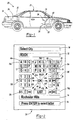
- Figure 2 is a screen display of an embodiment of the graphical user interface of the present invention illustrating the category of "select a destination city".
- the display device 24 includes a category field 50 that displays a user selected category of information. In Figure 2, the category of information selected is the destination city.
- the display device 24 further includes a type field 52, a lookahead field 54, and an instructional field 56.
- a plurality of groups 58a through 58g are arranged around a start position 60. Each group 58 is located in a unique, pre-determined direction 62a through 62g relative to the start position 60.
- a first group 58a is located in an upper left direction relative to the start position 60.
- Each group 58 includes a plurality of symbols 66.
- each group 58 are arranged around a central position 70, which also comprises a symbol 66, in the group 58.
- the first group 58a includes a first symbol 66a.
- the symbol E is shown as an activated symbol 72.
- An "activated" symbol 66 or the start position 60 may be indicated by a change in color, a brightening, an outline, flashing, or other known destructive markings.
- FIG 3 is a plan view of an eight way button shown generally at 80 which could be used as the directional input device 26 of Figure 1.
- the eight way button 80 includes an internal disk 82 having a plurality of directional arrows 84. Each of the directional arrows 84 corresponds to one of the pre-determined directions 62 shown on the display device 24.
- the internal disk 82 is pivotally mounted in the eight way button 80 and is capable of moving in the direction of any one of the directional arrows 84. Movement of the internal disk 82 in the direction of one of the directional arrows 84 transmits a directional signal that is associated with one of the pre-determined directions 62.
- the eight way button 80 further includes a central point 86, wherein pressure on the central point 86 transmits a selection signal.
- FIG 4 is a perspective view of a joy stick shown generally at 90, which could alternatively be used as the directional input device 26 of Figure 1.
- the joy stick 90 includes a base 92 and a user manipulatable handle 94.
- the handle 94 is movable in any of a number of pre-determined directions each of which corresponds to one of the pre-determined directions 62.
- FIG. 5 is a schematic view of the CPU 22 connected to the display device 24 and the directional input device 26.
- the CPU 22 includes a comparator 100, a route determination system 102, and a filter 104 preferably all of which are implemented in software.
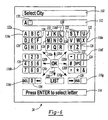
- Figure 6 is a screen display of an alternative embodiment of the graphical user interface of the present invention illustrating the category of "select a destination city.”
- the display device 24 includes a category field 110 that displays a user selected category of information. In Figure 6, the category of information selected is the destination city.
- the display device 24 further includes a selection field 112 and an instruction field 114.
- a plurality of groups 116a through 116g are arranged around a start position 118. Each group 116 is located in a unique, pre-determined direction 120a through 120g relative to the start position 118.
- a first group 116a is located in an upper left direction relative to the start 118.
- Each group 116 includes a plurality of symbols 122.
- the symbols 122 in each group 116 are arranged around a central position 126, which also comprises a symbol 122, in the group 116.
- the first group 116a includes a first symbol 122a.
- the symbols "M" and “L” are shown as enabled symbols 128, which can be selected in response to a selection signal.
- all symbols 122 that are not enabled symbols 132 are converted to disabled symbols 132, for example the letter "K” in Figure 6.
- a disabled symbol 132 can not be selected by transmitting a selection signal from the directional input device 26.
- An enabled symbol 128 or the start position 118 may be indicated by a change in color, a brightening, an outline, flashing, or other known destructive markings.
- the display device also displays a cursor 130, which may be indicated by a change in color, a brightening, an outline, flashing, or other known destructive markings.
- the display device 24 displays a screen similar to that shown in Figure 2.
- the category field 50 will be displayed the category of information.
- the type field 52 will be blank and the lookahead field 54 will display the first entry in a list of pre-arranged symbol sequences found in the database 28 and related to the selected category of information.
- the start position 60 is initially activated.
- a user selects the first letter of the desired destination city by moving the directional input device 26 in the pre-determined direction 62 associated with the group 58 containing the desired letter. This sends a first directional signal from the directional input device 26 to the display device 24.
- the central position 70 of the group 58 located in the pre-determined direction 62 is then activated. Activation of the central position 70 activates the group 58. If the user wishes to select the symbol 66 located at the central position 70 of the activated group 58, the user sends a selection signal from the directional input device 26 to the display device 24. The selected symbol 66 is then displayed in the type field 52.
- the user does not wish to select the symbol 66 located at the central position 70, then the user moves the directional input device 26 in one of the pre-determined directions 62 and thereby sends a second directional signal to the display device 24.
- the symbol 66 located in the direction relative to the central position 70 associated with the second directional signal is then activated. If the user then sends a selection signal, the activated symbol 66 is selected and is displayed in the type field 52.
- the comparator 100 in the CPU 22 compares the selected symbol 66 in the type field 52 to the list of pre-arranged symbol sequences in the database 28.
- the list would be of city names.
- the first city in the list that begins with the selected symbol 66 in the type field 52 is then displayed in the lookahead field 54.
- the start position 60 is then reactivated. If the user then sends a selection signal from the directional input device 26, the city displayed in the lookahead field 54 will be selected and it replaces the symbol 66 displayed in the type field 52.
- the user could also manipulate the directional input device 26 in the direction associated with the "list” icon in Figure 2, this sends a directional signal to the display device 24 and the "list” icon is activated.
- a popup menu with an alphabetized list of city names, centered on the first city that begins with the character in the type field 52 is then displayed on the display device 24.
- the user can scroll through the list of city names using the directional input device 26, the city that is in the centered position is shown as activated. If the user then sends a selection signal from the directional input device 26, the activated city is selected and it replaces the symbol 66 displayed in the type field 52.
- the directional input device 26 may include a view button (not shown). Pressing the view button toggles the screen shown on the display device 24 between a full screen list of city names and the display shown in Figure 2.
- the user can continue to select additional symbols 66. Subsequently selected symbols 66 are displayed in the type field 52 in the order in which they are selected. After each symbol 66 has been selected, the comparator 100 again compares the sequence of symbol 66 in the type field 52 to the lists of pre-arranged symbol sequences in the database 28 and displays in the lookahead field 54 the first pre-arranged symbol sequence that includes the sequence displayed in the type field 52.
- any symbol 66 in any group 58 shown in the display device 24 can be selected with a maximum of three key strokes.
- the maximum three key strokes are a first directional signal, a second directional signal, and a selection signal.
- the display device 24 displays a screen similar to that shown in Figure 6.
- the category field 110 will be displayed the category of information.
- the selection field 112 will be blank the start position 118 will be activated.
- a user selects the first letter of the desired destination city by moving the directional input device 26 in the pre-determined direction 120 associated with the group 116 containing the desired letter. This sends a first directional signal from the directional input device 26 to the display device 24.
- the central position 126 of the group 116 located in the pre-determined direction 120 is then activated. Activation of the central position 126 activates the group 116. If the user wishes to select the symbol 122 located at the central position 126 of the activated group 116, the user sends a selection signal from the directional input device 26 to the display device 24. The selected symbol 122 is then displayed in the selection field 112.
- the user does not wish to select the symbol 122 located at the central position 126, then the user moves the directional input device 26 in one of the pre-determined directions 120 and thereby sends a second directional signal to the display device 24.
- the symbol 122 located in the direction relative to the central position 126 associated with the second directional signal is then activated. If the user then sends a selection signal, the activated symbol 122 is selected and is displayed in the selection field 112.
- the comparator in the CPU 22 compares the selected symbol 122 in the selection field 112 to the list of pre-arranged symbol sequences in the database 28.
- the list would be of city names.
- the entire name of the first city in the list that begins with the selected symbol 122 in the selection field 112 is then displayed in the selection field 112.
- the cursor 130 will be centered on the second symbol 122 of the name of the first city in the list.
- the start position 118 is then reactivated. If the user then sends a selection signal from the directional input device 26, the city displayed in the selection field 112 will be selected.
- the cursor 130 will be displayed in the selection field 112 adjacent to the first symbol 122.
- the CPU 22 also includes a filter 104.
- the filter 104 in conjunction with the comparator 100 determines which of the symbols 122 will be enabled symbols 128 based on the list of pre-arranged symbol sequences in the database 28.
- a user will not be able to select any symbol 122 other than the enabled symbols 128. If the user then selects the letter “L” as the second symbol 122, the letter “M” will be converted by the filter 104 into a disabled symbol 132 and the letters "P" and “T” will be converted from disabled symbols 132 into enabled symbols 128. If the user then selects enabled symbol 128 "T” the graphical user interface also has an auto-fill feature wherein, once the filter 104 determines that there is only a single matching pre-arranged symbol sequence in the list in the database 28, the filter 104 in conjunction with the CPU 22 will automatically fill in the rest of the symbols 122 to complete the single available pre-arranged symbol sequence from the list. Likewise, if the user had selected enabled symbol 128 "P” the filter 104 in conjunction with the CPU 22 would automatically select the only possible matching pre-arranged symbol sequence of the city "alpha.”
- the graphical user interface of this embodiment includes the further feature that if a user deletes a previously selected symbol 122 at a point where the filter 104 determines that there are more than one possible enabled symbols 128, then the filter 104 will re-enable the symbols 122 that are possible enabled symbols 128.
- the filter 104 will re-enable the symbols 122 that are possible enabled symbols 128.
- the filter 104 would convert the symbols 122 "L” and "M” into enabled symbols 128.
- the filter 104 is only used to filter symbols 122 and convert them into enabled symbols 128 and disabled symbols 132 when the category in the category field 110 has a corresponding list of pre-arranged symbol sequences in the database 28. If the category is one without such a list, for instance a category of "address book,” then the filter 104 does not operate to limit the available symbols 122 that can be selected by a user.
- An additional feature of the graphical user interfaces shown in Figures 2 and 6 is that they include a group wrap feature. This feature operates in the following manner. Beginning from the start position 60, a user sends a first directional signal and activates the central position 70 of a group 58. The user then sends a second directional signal activating one of the symbols 66 not found in the central position 70 of a group 58. If the user then sends a third directional signal and the third directional signal is in the direction of a group 58 that is adjacent to the activated symbol 66, either physically on the display device 24 or via a wrap, then the central position 70 of that adjacent group 58 is activated.
- the user may be prompted to input additional information such as a street name, street address, or landmark.
- additional information such as a street name, street address, or landmark. The user will input this additional information using the directional input device 26.
- the navigation system 20 selects the potential route with the lowest total cost to be the recommended route. Depending upon the predetermined algorithm of the navigation system 20, the navigation system 20 will recommend the route with the shortest total length, the lowest total time, or some weighted average of length and time.
- the recommended route is then displayed to the user on the display device 24 as a map showing the starting point and desired destination and highlighting the recommended route.
- the navigation system 20 displays the current position of the vehicle 32 and provides turn-by-turn instructions to the driver, guiding the driver to the selected destination.
Landscapes
- Engineering & Computer Science (AREA)
- General Engineering & Computer Science (AREA)
- Theoretical Computer Science (AREA)
- Human Computer Interaction (AREA)
- Physics & Mathematics (AREA)
- General Physics & Mathematics (AREA)
- Radar, Positioning & Navigation (AREA)
- Remote Sensing (AREA)
- Automation & Control Theory (AREA)
- Navigation (AREA)
- Input From Keyboards Or The Like (AREA)
- Position Input By Displaying (AREA)
Claims (24)
- Procédé d'activation d'un symbole (66) à partir d'une pluralité de symboles dans une interface graphique utilisateur, ledit procédé comprenant les étapes de :a) affichage d'une pluralité de groupes (58a-58g) comprenant un premier groupe près d'un point de départ (60) sur un dispositif d'affichage (24), chaque groupe (58) ayant une pluralité de symboles (66) comprenant un premier symbole, chaque groupe étant dans une direction unique prédéfinie par rapport au point de départ (60) ;b) transmission d'un premier signal directionnel (62) associé à l'une des directions uniques prédéfinies à partir d'un dispositif d'entrée directionnel (26) ;c) activation du premier groupe en réponse au premier signal directionnel ;d) transmission d'un second signal directionnel à partir du dispositif d'entrée directionnel (26) ; ete) activation du premier symbole du premier groupe en réponse au second signal directionnel.
- Procédé d'activation d'un symbole (66) à partir d'une pluralité de symboles dans une interface graphique utilisateur selon la revendication 1 comprenant de plus l'étape d'activation d'un des symboles (66) au sein du premier groupe (58) en réponse au premier signal directionnel.
- Procédé d'activation d'un symbole (66) à partir d'une pluralité de symboles dans une interface graphique utilisateur selon la revendication 1, dans lequel chacun des groupes (58a-58g) comprend une position centrale (70) et chacun des symboles (66) au sein d'un groupe (58) est disposé dans une direction prédéfinie unique par rapport à la position centrale (70).
- Procédé d'activation d'un symbole (66) à partir d'une pluralité de symboles dans une interface graphique utilisateur selon la revendication 3, dans lequel la pluralité de symboles (66) au sein d'un groupe (58) est disposée par rapport à la position centrale (70) dans la même disposition que la pluralité de groupes par rapport au point de départ (60).
- Procédé d'activation d'un symbole (66) à partir d'une pluralité de symboles dans une interface graphique utilisateur selon la revendication 1 comprenant l'étape suivante de transmission d'un premier signal de sélection à partir du dispositif d'entrée directionnel (26), permettant ainsi la sélection du premier symbole activé.
- Procédé d'activation d'un symbole (66) à partir d'une pluralité de symboles dans une interface graphique utilisateur selon la revendication 5 comprenant les étapes suivantes de :affichage du premier symbole sélectionné dans un champ de saisie sur le dispositif d'affichage (24) ;activation d'un second symbole de l'une des pluralités de groupes ;transmission d'un second symbole de sélection, permettant ainsi la sélection du second symbole activé ; etaffichage du second symbole sélectionné dans le champ de saisie (62) à côté du premier symbole.
- Procédé d'activation d'un symbole (66) à partir d'une pluralité de symboles dans une interface graphique utilisateur selon la revendication 6 comprenant les étapes suivantes de comparaison de la séquence du premier et du second symbole dans le champ de saisie (52) à une base de données (28) d'une pluralité de séquences de symboles pré-organisés et affichage dans un champ de préanalyse (54) d'une première séquence de symboles pré-organisés comprenant la séquence de symboles du champ de saisie (52).
- Procédé d'activation d'un symbole (66) à partir d'une pluralité de symboles dans une interface graphique utilisateur selon la revendication 7 comprenant les étapes suivantes d'activation du champ de préanalyse (54) ;
transmission d'un troisième signal de sélection, permettant ainsi la sélection de la première séquence de symboles pré-organisés ; et
remplacement de la séquence du premier et second symbole dans le champ de saisie par la première séquence de symboles pré-organisés. - Procédé d'activation d'un symbole (66) à partir d'une pluralité de symboles dans une interface graphique utilisateur selon la revendication 5 comprenant les étapes suivantes de :comparaison du premier symbole sélectionné avec une liste de séquences de symboles pré-organisés dans une base de données (28) ;filtrage dans la liste d'une pluralité de séquences filtrées de symboles pré-organisés dans lequel chacune des séquences filtrées de symboles pré-organisés comprend le premier symbole sélectionné comme son premier symbole ; etaffichage dans un champ de sélection sur le dispositif d'affichage d'une première séquence filtrée de symboles pré-organisés.
- Procédé d'activation d'un symbole (66) à partir d'une pluralité de symboles dans une interface graphique utilisateur selon la revendication 9 comprenant les étapes suivantes de :filtrage d'une pluralité de symboles dans la pluralité de groupes ; etvalidation et invalidation d'une pluralité de symboles, dans laquelle chacune des pluralités des symboles validés représente un second symbole dans l'une des pluralités filtrées de séquences de symboles pré-organisés.
- Procédé d'activation d'un symbole (66) à partir d'une pluralité de symboles dans une interface graphique utilisateur selon la revendication 10 comprenant les étapes suivantes de :activation de l'un des symboles validés ;transmission d'un second signal de sélection à partir du dispositif d'entrée directionnel (26), permettant ainsi la sélection du symbole validé activé comme un second symbole ; etaffichage du second symbole dans le champ de sélection à côté du premier symbole.
- Procédé d'activation d'un symbole (66) à partir d'une pluralité de symboles dans une interface graphique utilisateur selon la revendication 11, comprenant les étapes suivantes de :filtrage dans une pluralité de séquences filtrées de symboles pré-organisés d'une seconde séquence de symboles pré-organisés, dans lequel la seconde séquence de symboles pré-organisés est différente de la première séquence filtrée de symboles pré-organisés et la seconde séquence de symboles pré-organisés comprend comme ses premiers et seconds symboles le premier symbole et le second symbole affichés dans le champ de sélection ; etremplacement de la première séquence filtrée de symboles pré-organisés par la seconde séquence de symboles pré-organisés dans le champ de sélection.
- Procédé d'activation d'un symbole (66) à partir d'une pluralité de symboles dans une interface graphique utilisateur selon la revendication 1, dans lequel la pluralité de symboles comprend les caractères du langage humain et l'étape e) comprend l'activation d'un des caractères.
- Procédé d'activation d'un symbole (66) à partir d'une pluralité de symboles dans une interface graphique utilisateur selon la revendication 1 comprenant les étapes suivantes après l'étape e) de transmission d'un troisième signal directionnel associé à l'une des directions uniques prédéfinies à partir du dispositif d'entrée directionnel et d'activation d'une des pluralités de groupes en réponse au troisième signal directionnel.
- Interface graphique utilisateur comprenant :un dispositif d'affichage (24) affichant une pluralité de groupes (58a-58g), chacun desdits groupes (58a-58g) comprenant une pluralité de symboles (66), chaque groupe (58) étant situé dans l'une des pluralités de directions prédéfinies par rapport au point de départ (60) ;ladite pluralité de symboles (66) de chacun desdits groupes (58a-58g) étant disposée autour d'une position centrale dans chacun desdits groupes ;un dispositif d'entrée (26) connecté au dit dispositif d'affichage (24), ledit dispositif d'entrée (26) disposant d'un signal de sélection et d'une pluralité de signaux de sortie directionnels (62), chacune desdites pluralités de signaux de sortie étant associée à l'une desdites pluralités de directions prédéfinies ; etchaque groupe (58) pouvant être activé en réponse à l'une desdites pluralités de signaux de sortie, chaque symbole au sein d'un groupe activé de ladite pluralité de groupes pouvant être activé en réponse à l'une desdites pluralités de signaux de sortie, un symbole activé pouvant être sélectionné en réponse au dit signal de sélection.
- Interface graphique utilisateur selon la revendication 15, dans laquelle ledit dispositif d'entrée (26) comprend une commande directionnelle à huit voies (80).
- Interface graphique utilisateur selon la revendication 15, dans laquelle lesdits symboles (66) comprennent les caractères du langage humain.
- Interface graphique utilisateur selon la revendication 15, comprenant de plus un champ de saisie (52) sur ledit dispositif d'affichage (26), ledit champ de saisie (52) affichant un symbole sélectionné.
- Interface graphique utilisateur selon la revendication 15, comprenant de plus un comparateur de séquence de symboles (100) connecté à un processeur (22), une base de données (28) de séquences de symboles pré-organisés étant accessible par ledit processeur (22), et à un champ de préanalyse (54) sur ledit dispositif d'affichage, ledit champ de préanalyse (54) affichant l'une desdites séquences de symboles pré-organisés à laquelle ledit processeur (22) a eu accès en réponse au dit symbole sélectionné dans ledit champ de saisie (54).
- Interface graphique utilisateur selon la revendication 19, dans laquelle ledit champ de préanalyse (54) peut être activé en réponse à l'un desdits signaux de sortie directionnels (62) et dans laquelle ladite séquence de symboles pré-organisés affichée dans ledit champ de préanalyse (54) peut être sélectionnée en réponse au dit signal de sélection.
- Interface graphique utilisateur selon la revendication 15, dans laquelle un premier symbole de ladite pluralité de symboles (66) au sein de chacune desdites pluralités de groupes (58) est situé à ladite position centrale (70), ledit premier symbole étant activé lorsque ledit groupe est activé.
- Interface graphique utilisateur selon la revendication 15, comprenant de plus un champ de sélection sur ledit dispositif d'affichage (24), ledit champ de sélection affichant un symbole sélectionné.
- Interface graphique utilisateur selon la revendication 22, comprenant de plus un comparateur de séquences de symboles (100) et un filtre connecté à un processeur, une base de données (28) ayant une pluralité de séquences de symboles pré-organisés accessible au dit processeur ; ledit filtre filtrant au moins une desdites pluralités de séquences de symboles pré-organisés en réponse au dit symbole sélectionné ; et
ledit processeur (22) remplaçant ledit symbole sélectionné par au moins une desdites pluralités de séquences de symboles pré-organisés dans ledit champ de sélection. - Interface graphique utilisateur selon la revendication 23, dans laquelle au moins une desdites pluralités de séquences de symboles pré-organisés affichées dans ledit champ de sélection peut être sélectionnée en réponse au dit signal de sélection.
Applications Claiming Priority (3)
| Application Number | Priority Date | Filing Date | Title |
|---|---|---|---|
| US09/037,772 US6037942A (en) | 1998-03-10 | 1998-03-10 | Navigation system character input device |
| US37772 | 1998-03-10 | ||
| PCT/US1999/003870 WO1999046563A1 (fr) | 1998-03-10 | 1999-02-23 | Appareil d'entree de caracteres pour systeme de navigation |
Publications (2)
| Publication Number | Publication Date |
|---|---|
| EP1056988A1 EP1056988A1 (fr) | 2000-12-06 |
| EP1056988B1 true EP1056988B1 (fr) | 2004-04-14 |
Family
ID=21896252
Family Applications (1)
| Application Number | Title | Priority Date | Filing Date |
|---|---|---|---|
| EP99909552A Expired - Lifetime EP1056988B1 (fr) | 1998-03-10 | 1999-02-23 | Appareil d'entree de caracteres pour systeme de navigation |
Country Status (8)
| Country | Link |
|---|---|
| US (3) | US6037942A (fr) |
| EP (1) | EP1056988B1 (fr) |
| AT (1) | ATE264494T1 (fr) |
| AU (1) | AU2873399A (fr) |
| CA (1) | CA2322754A1 (fr) |
| DE (1) | DE69916427T2 (fr) |
| NO (1) | NO20004530L (fr) |
| WO (1) | WO1999046563A1 (fr) |
Cited By (1)
| Publication number | Priority date | Publication date | Assignee | Title |
|---|---|---|---|---|
| US8554475B2 (en) | 2007-10-01 | 2013-10-08 | Mitac International Corporation | Static and dynamic contours |
Families Citing this family (140)
| Publication number | Priority date | Publication date | Assignee | Title |
|---|---|---|---|---|
| US5689667A (en) * | 1995-06-06 | 1997-11-18 | Silicon Graphics, Inc. | Methods and system of controlling menus with radial and linear portions |
| US9075136B1 (en) | 1998-03-04 | 2015-07-07 | Gtj Ventures, Llc | Vehicle operator and/or occupant information apparatus and method |
| US6037942A (en) * | 1998-03-10 | 2000-03-14 | Magellan Dis, Inc. | Navigation system character input device |
| DE19849515C1 (de) * | 1998-10-19 | 2000-12-28 | Gerhard Wergen | Verfahren zur Übergabe von Zeichen insbesondere an einen Computer und Eingabevorrichtung unter Einsatz dieses Verfahrens |
| USRE43082E1 (en) | 1998-12-10 | 2012-01-10 | Eatoni Ergonomics, Inc. | Touch-typable devices based on ambiguous codes and methods to design such devices |
| JP4154786B2 (ja) * | 1999-01-22 | 2008-09-24 | 株式会社セガ | 文字入力制御装置 |
| US7293231B1 (en) * | 1999-03-18 | 2007-11-06 | British Columbia Ltd. | Data entry for personal computing devices |
| DE60003177T2 (de) | 1999-03-18 | 2004-05-06 | 602531 British Columbia Ltd., Vancouver | Dateneingabe für personalrechnergeräte |
| US7610194B2 (en) * | 2002-07-18 | 2009-10-27 | Tegic Communications, Inc. | Dynamic database reordering system |
| ATE443946T1 (de) * | 1999-05-27 | 2009-10-15 | Tegic Communications Inc | Tastatursystem mit automatischer korrektur |
| US7286115B2 (en) * | 2000-05-26 | 2007-10-23 | Tegic Communications, Inc. | Directional input system with automatic correction |
| US7821503B2 (en) | 2003-04-09 | 2010-10-26 | Tegic Communications, Inc. | Touch screen and graphical user interface |
| US7750891B2 (en) * | 2003-04-09 | 2010-07-06 | Tegic Communications, Inc. | Selective input system based on tracking of motion parameters of an input device |
| US7030863B2 (en) * | 2000-05-26 | 2006-04-18 | America Online, Incorporated | Virtual keyboard system with automatic correction |
| US6661653B1 (en) | 1999-07-21 | 2003-12-09 | Paul M. Holmen | Apparatus for data entry |
| DE60017416T2 (de) * | 1999-08-18 | 2005-12-22 | Thomson Licensing S.A., Boulogne | Tastaturschema und methode zur dateneingabe |
| US6851877B1 (en) * | 1999-08-18 | 2005-02-08 | Thomson Licensing, S.A. | Keyboard layout and method for data entry |
| GB2355142A (en) * | 1999-10-08 | 2001-04-11 | Nokia Mobile Phones Ltd | Portable device having menu driven input |
| DE10003737A1 (de) * | 2000-01-28 | 2001-08-16 | Bosch Gmbh Robert | Verfahren zur Informationseingabe in ein elektrisches Gerät |
| US6559105B2 (en) * | 2000-04-03 | 2003-05-06 | The Lubrizol Corporation | Lubricant compositions containing ester-substituted hindered phenol antioxidants |
| DE10018195A1 (de) * | 2000-04-12 | 2001-10-25 | Bayerische Motoren Werke Ag | Vorrichtung und Verfahren zur zeichenweisen Eingabe des Zieles bei einem Navigationssystem in Kraftfahrzeugen |
| DE10022970A1 (de) * | 2000-05-11 | 2001-11-22 | Bosch Gmbh Robert | Verfahren zur Eingabe einer Zeichenfolge und Vorrichtung |
| EP1311938B1 (fr) * | 2000-08-17 | 2009-04-01 | John Molgaard | Interface graphique utilisateur |
| US6897849B2 (en) * | 2000-09-14 | 2005-05-24 | Samsung Electronics Co., Ltd. | Key input device and character input method using directional keys |
| EP1340045B1 (fr) | 2000-10-05 | 2013-04-10 | MiTAC INTERNATIONAL Corp. | Systeme de navigation avec instruction d'entrainement valorisee a l'execution |
| CA2323856A1 (fr) * | 2000-10-18 | 2002-04-18 | 602531 British Columbia Ltd. | Methode, systeme et support pour entrer des donnees dans un dispositif informatique personnel |
| US7151525B2 (en) * | 2000-11-14 | 2006-12-19 | Keybowl, Inc. | Apparatus and method for generating data signals |
| US8487872B2 (en) | 2000-11-14 | 2013-07-16 | Blue Orb, Inc. | Apparatus and method for generating data signals |
| JP2002222039A (ja) * | 2001-01-25 | 2002-08-09 | Sony Computer Entertainment Inc | 情報入力処理プログラム、情報入力処理プログラムを記録したコンピュータ読み取り可能な記録媒体、情報入力処理プログラムを実行するプログラム実行装置、情報入力装置、及び情報入力方法 |
| US20020135615A1 (en) * | 2001-01-31 | 2002-09-26 | Microsoft Corporation | Overlaid display for electronic devices |
| US20030018744A1 (en) * | 2001-02-07 | 2003-01-23 | Johanson James A. | Bluetooth device position display |
| JP2002290518A (ja) * | 2001-03-23 | 2002-10-04 | Matsushita Electric Ind Co Ltd | 携帯通信端末 |
| FI20010616L (fi) * | 2001-03-26 | 2002-09-27 | Nokia Corp | Menetelmä ja järjestely tietyn kohdan löytämiseksi indeksoidusta muistista |
| US7454714B2 (en) * | 2001-03-30 | 2008-11-18 | Aol Llc, A Delaware Limited Liability Company | Visually distinguishing menu items |
| JP4596711B2 (ja) * | 2001-09-10 | 2010-12-15 | アルパイン株式会社 | キーボード表示方法及び文字入力装置 |
| US7761175B2 (en) | 2001-09-27 | 2010-07-20 | Eatoni Ergonomics, Inc. | Method and apparatus for discoverable input of symbols on a reduced keypad |
| JP4096541B2 (ja) * | 2001-10-01 | 2008-06-04 | 株式会社日立製作所 | 画面表示方法 |
| AU2002365750A1 (en) * | 2001-12-05 | 2003-06-17 | The National University Of Singapore | Method and apparatus for inputting characters |
| JP4061094B2 (ja) * | 2002-03-15 | 2008-03-12 | インターナショナル・ビジネス・マシーンズ・コーポレーション | 音声認識装置、その音声認識方法及びプログラム |
| US7161579B2 (en) * | 2002-07-18 | 2007-01-09 | Sony Computer Entertainment Inc. | Hand-held computer interactive device |
| US7102615B2 (en) * | 2002-07-27 | 2006-09-05 | Sony Computer Entertainment Inc. | Man-machine interface using a deformable device |
| US7623115B2 (en) * | 2002-07-27 | 2009-11-24 | Sony Computer Entertainment Inc. | Method and apparatus for light input device |
| US8797260B2 (en) | 2002-07-27 | 2014-08-05 | Sony Computer Entertainment Inc. | Inertially trackable hand-held controller |
| US7883415B2 (en) | 2003-09-15 | 2011-02-08 | Sony Computer Entertainment Inc. | Method and apparatus for adjusting a view of a scene being displayed according to tracked head motion |
| US7646372B2 (en) * | 2003-09-15 | 2010-01-12 | Sony Computer Entertainment Inc. | Methods and systems for enabling direction detection when interfacing with a computer program |
| US7760248B2 (en) | 2002-07-27 | 2010-07-20 | Sony Computer Entertainment Inc. | Selective sound source listening in conjunction with computer interactive processing |
| US8686939B2 (en) | 2002-07-27 | 2014-04-01 | Sony Computer Entertainment Inc. | System, method, and apparatus for three-dimensional input control |
| US9474968B2 (en) | 2002-07-27 | 2016-10-25 | Sony Interactive Entertainment America Llc | Method and system for applying gearing effects to visual tracking |
| US7627139B2 (en) * | 2002-07-27 | 2009-12-01 | Sony Computer Entertainment Inc. | Computer image and audio processing of intensity and input devices for interfacing with a computer program |
| US9393487B2 (en) | 2002-07-27 | 2016-07-19 | Sony Interactive Entertainment Inc. | Method for mapping movements of a hand-held controller to game commands |
| US8313380B2 (en) | 2002-07-27 | 2012-11-20 | Sony Computer Entertainment America Llc | Scheme for translating movements of a hand-held controller into inputs for a system |
| US8570378B2 (en) | 2002-07-27 | 2013-10-29 | Sony Computer Entertainment Inc. | Method and apparatus for tracking three-dimensional movements of an object using a depth sensing camera |
| US20040135823A1 (en) * | 2002-07-30 | 2004-07-15 | Nokia Corporation | User input device |
| US9682319B2 (en) * | 2002-07-31 | 2017-06-20 | Sony Interactive Entertainment Inc. | Combiner method for altering game gearing |
| US7084858B2 (en) * | 2002-11-19 | 2006-08-01 | Microsoft Corporation | System and method for inputting characters using a directional pad |
| US7171498B2 (en) * | 2003-01-09 | 2007-01-30 | Sony Computer Entertainment America Inc. | Alphanumeric keyboard input system using a game controller |
| US7170496B2 (en) * | 2003-01-24 | 2007-01-30 | Bruce Peter Middleton | Zero-front-footprint compact input system |
| US9177387B2 (en) * | 2003-02-11 | 2015-11-03 | Sony Computer Entertainment Inc. | Method and apparatus for real time motion capture |
| EP1616319A4 (fr) * | 2003-04-18 | 2012-01-18 | Systems Ltd Keyless | Systemes destines a favoriser l'entree de donnees dans un environnement mobile et fixe |
| US8072470B2 (en) | 2003-05-29 | 2011-12-06 | Sony Computer Entertainment Inc. | System and method for providing a real-time three-dimensional interactive environment |
| JP4648898B2 (ja) * | 2003-06-18 | 2011-03-09 | ザイ コーポレイション オブ カナダ インコーポレイテッド | テキスト入力システム及び方法 |
| US20060291939A1 (en) * | 2003-06-27 | 2006-12-28 | Mcalindon Peter J | Apparatus And Method For Generating Data Signals |
| US8200865B2 (en) * | 2003-09-11 | 2012-06-12 | Eatoni Ergonomics, Inc. | Efficient method and apparatus for text entry based on trigger sequences |
| US7874917B2 (en) | 2003-09-15 | 2011-01-25 | Sony Computer Entertainment Inc. | Methods and systems for enabling depth and direction detection when interfacing with a computer program |
| US8287373B2 (en) | 2008-12-05 | 2012-10-16 | Sony Computer Entertainment Inc. | Control device for communicating visual information |
| US10279254B2 (en) * | 2005-10-26 | 2019-05-07 | Sony Interactive Entertainment Inc. | Controller having visually trackable object for interfacing with a gaming system |
| US8323106B2 (en) | 2008-05-30 | 2012-12-04 | Sony Computer Entertainment America Llc | Determination of controller three-dimensional location using image analysis and ultrasonic communication |
| US9573056B2 (en) * | 2005-10-26 | 2017-02-21 | Sony Interactive Entertainment Inc. | Expandable control device via hardware attachment |
| US20050132305A1 (en) * | 2003-12-12 | 2005-06-16 | Guichard Robert D. | Electronic information access systems, methods for creation and related commercial models |
| US7663689B2 (en) * | 2004-01-16 | 2010-02-16 | Sony Computer Entertainment Inc. | Method and apparatus for optimizing capture device settings through depth information |
| US7376938B1 (en) | 2004-03-12 | 2008-05-20 | Steven Van der Hoeven | Method and system for disambiguation and predictive resolution |
| US7555732B2 (en) * | 2004-03-12 | 2009-06-30 | Steven Van der Hoeven | Apparatus method and system for a data entry interface |
| JP4395408B2 (ja) * | 2004-05-07 | 2010-01-06 | Hoya株式会社 | タッチパネル付き入力装置 |
| US8547401B2 (en) * | 2004-08-19 | 2013-10-01 | Sony Computer Entertainment Inc. | Portable augmented reality device and method |
| CN1317632C (zh) * | 2004-08-30 | 2007-05-23 | 摩托罗拉公司 | 往电子设备中输入字符的方法 |
| US7430473B2 (en) * | 2004-10-01 | 2008-09-30 | Bose Corporation | Vehicle navigation display |
| US7559035B2 (en) * | 2004-11-17 | 2009-07-07 | Cisco Technology, Inc. | Method and system for navigating through a plurality of features |
| KR100651725B1 (ko) * | 2004-12-13 | 2006-12-01 | 한국전자통신연구원 | 생체 신호를 이용한 텍스트 입력 방법 및 장치 |
| KR100703390B1 (ko) * | 2004-12-24 | 2007-04-03 | 삼성전자주식회사 | 이동 통신 단말의 전화번호 검색 방법 및 장치 |
| US7908080B2 (en) | 2004-12-31 | 2011-03-15 | Google Inc. | Transportation routing |
| CN101116048B (zh) * | 2005-01-05 | 2010-07-14 | 安宰佑 | 通过定位设备输入字符的方法和装置 |
| US8552984B2 (en) * | 2005-01-13 | 2013-10-08 | 602531 British Columbia Ltd. | Method, system, apparatus and computer-readable media for directing input associated with keyboard-type device |
| US20080138135A1 (en) * | 2005-01-27 | 2008-06-12 | Howard Andrew Gutowitz | Typability Optimized Ambiguous Keyboards With Reduced Distortion |
| US20060271886A1 (en) * | 2005-05-25 | 2006-11-30 | Wenstrand John S | Character entry system and method for electronic devices |
| KR100652725B1 (ko) * | 2005-05-27 | 2006-12-01 | 엘지전자 주식회사 | 단말기의 문자 입력 방법 및 장치 |
| KR100750120B1 (ko) * | 2005-06-09 | 2007-08-21 | 삼성전자주식회사 | 원형 자판 배열을 이용한 문자 입력 방법 및 문자 입력장치 |
| US20070070090A1 (en) * | 2005-09-23 | 2007-03-29 | Lisa Debettencourt | Vehicle navigation system |
| KR100735554B1 (ko) * | 2005-10-10 | 2007-07-04 | 삼성전자주식회사 | 문자 입력 방법 및 이를 위한 장치 |
| US7649478B1 (en) | 2005-11-03 | 2010-01-19 | Hyoungsoo Yoon | Data entry using sequential keystrokes |
| US20070150840A1 (en) * | 2005-12-22 | 2007-06-28 | Andrew Olcott | Browsing stored information |
| US7590490B2 (en) * | 2006-01-09 | 2009-09-15 | Mitac International Corporation | Smart detour |
| US20070186159A1 (en) * | 2006-02-08 | 2007-08-09 | Denso International America, Inc. | Universal text input method for different languages |
| US20070250515A1 (en) * | 2006-04-21 | 2007-10-25 | Lea David H | Method and system of securing content and destination of digital download via the internet |
| US20070265075A1 (en) * | 2006-05-10 | 2007-11-15 | Sony Computer Entertainment America Inc. | Attachable structure for use with hand-held controller having tracking ability |
| WO2007148128A2 (fr) | 2006-06-19 | 2007-12-27 | Santosh Sharan | Système et procédé de saisie de données |
| US20080046839A1 (en) * | 2006-06-27 | 2008-02-21 | Pixtel Media Technology (P) Ltd. | Input mode switching methods and devices utilizing the same |
| US7945386B2 (en) * | 2006-08-25 | 2011-05-17 | Mitac International Corporation | Rerouting in vehicle navigation systems |
| USRE48417E1 (en) | 2006-09-28 | 2021-02-02 | Sony Interactive Entertainment Inc. | Object direction using video input combined with tilt angle information |
| US8781151B2 (en) | 2006-09-28 | 2014-07-15 | Sony Computer Entertainment Inc. | Object detection using video input combined with tilt angle information |
| US8310656B2 (en) | 2006-09-28 | 2012-11-13 | Sony Computer Entertainment America Llc | Mapping movements of a hand-held controller to the two-dimensional image plane of a display screen |
| US20080139181A1 (en) * | 2006-12-08 | 2008-06-12 | Magellan Navigation, Inc. | Methods and apparatus for measuring the effectiveness of advertisements presented on a mobile navigation device |
| US8225203B2 (en) | 2007-02-01 | 2012-07-17 | Nuance Communications, Inc. | Spell-check for a keyboard system with automatic correction |
| US8201087B2 (en) * | 2007-02-01 | 2012-06-12 | Tegic Communications, Inc. | Spell-check for a keyboard system with automatic correction |
| EP1959238B1 (fr) * | 2007-02-13 | 2018-05-23 | Harman Becker Automotive Systems GmbH | Procédé d'entrée d'une destination dans une unité de navigation et système de navigation correspondant |
| US7692655B2 (en) * | 2007-02-16 | 2010-04-06 | Mitac International Corporation | Apparatus and method of generating curved baseline for map labeling |
| US7783417B2 (en) * | 2007-03-09 | 2010-08-24 | Mitac International Corporation | Methods and apparatus for determining a route having an estimated minimum fuel usage for a vehicle |
| CA2581824A1 (fr) * | 2007-03-14 | 2008-09-14 | 602531 British Columbia Ltd. | Systeme, dispositif et methode d'entree de donnees au moyen de touches multifonctions |
| US8078641B2 (en) * | 2007-04-25 | 2011-12-13 | Mitac International Corporation | Adjusting spatial operations based on map density |
| GB0708720D0 (en) * | 2007-05-04 | 2007-06-13 | Nxp Bv | Road toll system likning on baord unit with vehicle |
| US7882102B2 (en) * | 2007-09-10 | 2011-02-01 | Mitac International Corporation | Nearest-neighbor geographic search |
| US8296676B2 (en) * | 2007-10-15 | 2012-10-23 | Harman International Industries, Incorporated | System for a text speller |
| US8713029B2 (en) * | 2007-11-05 | 2014-04-29 | Verizon Patent And Licensing Inc. | Method and apparatus for providing auto-completion of information |
| US20090138190A1 (en) * | 2007-11-26 | 2009-05-28 | Magellan Navigation, Inc. | System and Method of Providing Traffic Data to a Mobile Device |
| US8542907B2 (en) * | 2007-12-17 | 2013-09-24 | Sony Computer Entertainment America Llc | Dynamic three-dimensional object mapping for user-defined control device |
| US8521430B2 (en) | 2007-12-28 | 2013-08-27 | Navteq B.V. | Managing differences between geographic database versions |
| US20090171584A1 (en) * | 2007-12-31 | 2009-07-02 | Magellan Navigation, Inc. | System and Method for Accessing a Navigation System |
| US20090182498A1 (en) * | 2008-01-11 | 2009-07-16 | Magellan Navigation, Inc. | Systems and Methods to Provide Navigational Assistance Using an Online Social Network |
| US8498808B2 (en) * | 2008-01-18 | 2013-07-30 | Mitac International Corp. | Method and apparatus for hybrid routing using breadcrumb paths |
| US8700314B2 (en) | 2008-01-18 | 2014-04-15 | Mitac International Corporation | Method and apparatus to search for local parking |
| US8290703B2 (en) | 2008-01-18 | 2012-10-16 | Mitac International Corporation | Method and apparatus for access point recording using a position device |
| US20090213079A1 (en) * | 2008-02-26 | 2009-08-27 | Microsoft Corporation | Multi-Purpose Input Using Remote Control |
| WO2009108645A1 (fr) * | 2008-02-27 | 2009-09-03 | Sony Computer Entertainment America Inc. | Procédés de capture de données sur la profondeur d’une scène et application d'actions informatiques |
| US8368753B2 (en) | 2008-03-17 | 2013-02-05 | Sony Computer Entertainment America Llc | Controller with an integrated depth camera |
| US20100035631A1 (en) * | 2008-08-07 | 2010-02-11 | Magellan Navigation, Inc. | Systems and Methods to Record and Present a Trip |
| US8249804B2 (en) * | 2008-08-20 | 2012-08-21 | Mitac International Corporation | Systems and methods for smart city search |
| US8219317B2 (en) * | 2008-09-22 | 2012-07-10 | Mitac International Corporation | Route navigation via a proximity point |
| US8961313B2 (en) * | 2009-05-29 | 2015-02-24 | Sony Computer Entertainment America Llc | Multi-positional three-dimensional controller |
| US8669941B2 (en) * | 2009-01-05 | 2014-03-11 | Nuance Communications, Inc. | Method and apparatus for text entry |
| US20100207887A1 (en) * | 2009-02-17 | 2010-08-19 | Jepsen Philip M | One-handed computer interface device |
| US8527657B2 (en) * | 2009-03-20 | 2013-09-03 | Sony Computer Entertainment America Llc | Methods and systems for dynamically adjusting update rates in multi-player network gaming |
| US8342963B2 (en) * | 2009-04-10 | 2013-01-01 | Sony Computer Entertainment America Inc. | Methods and systems for enabling control of artificial intelligence game characters |
| US8142288B2 (en) | 2009-05-08 | 2012-03-27 | Sony Computer Entertainment America Llc | Base station movement detection and compensation |
| US8393964B2 (en) | 2009-05-08 | 2013-03-12 | Sony Computer Entertainment America Llc | Base station for position location |
| US20100293457A1 (en) * | 2009-05-15 | 2010-11-18 | Gemstar Development Corporation | Systems and methods for alphanumeric navigation and input |
| US20110187647A1 (en) * | 2010-02-04 | 2011-08-04 | Charles Howard Woloszynski | Method and apparatus for virtual keyboard interactions from secondary surfaces |
| US9134809B1 (en) * | 2011-03-21 | 2015-09-15 | Amazon Technologies Inc. | Block-based navigation of a virtual keyboard |
| US10228819B2 (en) | 2013-02-04 | 2019-03-12 | 602531 British Cilumbia Ltd. | Method, system, and apparatus for executing an action related to user selection |
| US9442572B2 (en) * | 2013-03-15 | 2016-09-13 | Peter James Tooch | 5-key data entry system and accompanying interface |
| WO2018206076A1 (fr) | 2017-05-08 | 2018-11-15 | Arcelik Anonim Sirketi | Système et procédé d'entrée utilisant un dispositif de commande à distance ayant un clavier non numérique |
| EP3796146A1 (fr) * | 2019-09-18 | 2021-03-24 | Advanced Digital Broadcast S.A. | Méthode de saisie pour clavier virtuel |
Family Cites Families (24)
| Publication number | Priority date | Publication date | Assignee | Title |
|---|---|---|---|---|
| US5263174A (en) * | 1988-04-01 | 1993-11-16 | Symantec Corporation | Methods for quick selection of desired items from hierarchical computer menus |
| DE69313167T2 (de) * | 1992-02-18 | 1998-01-15 | Pioneer Electronic Corp | Navigationsvorrichtung mit verbesserter Positionsanzeigefunktion |
| US5706448A (en) * | 1992-12-18 | 1998-01-06 | International Business Machines Corporation | Method and system for manipulating data through a graphic user interface within a data processing system |
| US5563630A (en) * | 1993-10-28 | 1996-10-08 | Mind Path Technologies, Inc. | Computer mouse |
| DE4343871C2 (de) * | 1993-12-22 | 2000-10-05 | Mannesmann Vdo Ag | Dateneingabegerät für Informationssysteme, insbesondere für Kraftfahrzeuge |
| EP0660083B1 (fr) * | 1993-12-27 | 2000-09-27 | Aisin Aw Co., Ltd. | Système d'affichage d'information pour véhicule |
| US5543818A (en) * | 1994-05-13 | 1996-08-06 | Sony Corporation | Method and apparatus for entering text using an input device having a small number of keys |
| US5581593A (en) * | 1994-06-10 | 1996-12-03 | Ultratec, Inc. | Combination telephone and alphanumeric entry device |
| US5841373A (en) * | 1994-07-05 | 1998-11-24 | Mason; Donny L. | Simplified alphabetic communicator for handicapped or infirmed persons |
| DE4428928A1 (de) * | 1994-08-16 | 1996-02-22 | Bosch Gmbh Robert | Verfahren zur Eingabe einer Richtungsinformation |
| WO1996009579A1 (fr) * | 1994-09-22 | 1996-03-28 | Izak Van Cruyningen | Menus surgissant a indications directionnelles |
| US5559512A (en) * | 1995-03-20 | 1996-09-24 | Venturedyne, Ltd. | Method and apparatus for entering alpha-numeric data |
| US5689667A (en) * | 1995-06-06 | 1997-11-18 | Silicon Graphics, Inc. | Methods and system of controlling menus with radial and linear portions |
| US5825306A (en) * | 1995-08-25 | 1998-10-20 | Aisin Aw Co., Ltd. | Navigation system for vehicles |
| US5819200A (en) * | 1996-02-14 | 1998-10-06 | Zexel Corporation | Method and apparatus for selecting a destination in a vehicle navigation system |
| US5661476A (en) * | 1996-02-23 | 1997-08-26 | General Wireless Communications, Inc. | Keyboard for personal information device |
| US5922041A (en) * | 1996-09-18 | 1999-07-13 | Magellan Dis, Inc. | Navigation simulator and recorder |
| FI105601B (fi) * | 1997-02-04 | 2000-09-15 | Nokia Mobile Phones Ltd | Käyttökielestä riippuva kirjainten syöttö numeronäppäimillä |
| US5991690A (en) * | 1997-07-02 | 1999-11-23 | Trimble Navigation Limited | Navigation system incorporating simplified location display |
| US5929857A (en) * | 1997-09-10 | 1999-07-27 | Oak Technology, Inc. | Method and apparatus for dynamically constructing a graphic user interface from a DVD data stream |
| US6031471A (en) * | 1998-02-09 | 2000-02-29 | Trimble Navigation Limited | Full alphanumeric character set entry from a very limited number of key buttons |
| US6016142A (en) * | 1998-02-09 | 2000-01-18 | Trimble Navigation Limited | Rich character set entry from a small numeric keypad |
| US6037942A (en) * | 1998-03-10 | 2000-03-14 | Magellan Dis, Inc. | Navigation system character input device |
| US6049755A (en) * | 1998-05-05 | 2000-04-11 | Magellan Dis, Inc. | Navigation system vehicle location display |
-
1998
- 1998-03-10 US US09/037,772 patent/US6037942A/en not_active Expired - Lifetime
-
1999
- 1999-02-23 WO PCT/US1999/003870 patent/WO1999046563A1/fr not_active Ceased
- 1999-02-23 EP EP99909552A patent/EP1056988B1/fr not_active Expired - Lifetime
- 1999-02-23 AT AT99909552T patent/ATE264494T1/de not_active IP Right Cessation
- 1999-02-23 DE DE69916427T patent/DE69916427T2/de not_active Expired - Lifetime
- 1999-02-23 AU AU28733/99A patent/AU2873399A/en not_active Abandoned
- 1999-02-23 CA CA002322754A patent/CA2322754A1/fr not_active Abandoned
- 1999-11-05 US US09/435,381 patent/US6765554B2/en not_active Expired - Lifetime
- 1999-12-22 US US09/470,438 patent/US6256029B1/en not_active Expired - Lifetime
-
2000
- 2000-09-11 NO NO20004530A patent/NO20004530L/no not_active Application Discontinuation
Cited By (1)
| Publication number | Priority date | Publication date | Assignee | Title |
|---|---|---|---|---|
| US8554475B2 (en) | 2007-10-01 | 2013-10-08 | Mitac International Corporation | Static and dynamic contours |
Also Published As
| Publication number | Publication date |
|---|---|
| US6037942A (en) | 2000-03-14 |
| DE69916427T2 (de) | 2005-05-19 |
| US6256029B1 (en) | 2001-07-03 |
| EP1056988A1 (fr) | 2000-12-06 |
| US6765554B2 (en) | 2004-07-20 |
| WO1999046563A1 (fr) | 1999-09-16 |
| CA2322754A1 (fr) | 1999-09-16 |
| US20020067335A1 (en) | 2002-06-06 |
| DE69916427D1 (de) | 2004-05-19 |
| NO20004530L (no) | 2000-11-10 |
| ATE264494T1 (de) | 2004-04-15 |
| NO20004530D0 (no) | 2000-09-11 |
| AU2873399A (en) | 1999-09-27 |
Similar Documents
| Publication | Publication Date | Title |
|---|---|---|
| EP1056988B1 (fr) | Appareil d'entree de caracteres pour systeme de navigation | |
| EP1078222B1 (fr) | Procede permettant l'affichage de la position actuelle d'un vehicule dans le cadre d'un systeme de navigation | |
| EP0978707B1 (fr) | Méthodes et appareil pour sélectionner une destination dans un système de navigation véhiculaire | |
| US5987375A (en) | Method and apparatus for selecting a destination in a vehicle navigation system | |
| US6040824A (en) | Information display system with touch panel | |
| EP1150268B1 (fr) | Méthode et appareil de sélection d'une destination dans un système de navigation pour véhicule | |
| EP0747835B1 (fr) | Méthode et appareil de sélection d'une destination dans un système de navigation pour véhicule | |
| US7567861B2 (en) | In-vehicle display apparatus | |
| KR100288284B1 (ko) | 차량용 네비게이션장치 | |
| JP2868393B2 (ja) | ナビゲーション装置 | |
| JP2758838B2 (ja) | 情報表示装置 | |
| JP2840882B2 (ja) | 車両ナビゲーションシステムにおける目的地の選択方法及び装置 | |
| JPH05313580A (ja) | ナビゲーション装置およびこの装置のためのデータ入力制御方法 | |
| EP1340045B1 (fr) | Systeme de navigation avec instruction d'entrainement valorisee a l'execution | |
| JP2891879B2 (ja) | ナビゲーション装置 | |
| JPH01136014A (ja) | ナビゲーション装置 | |
| JP3573118B2 (ja) | ナビゲーション装置 | |
| JP3769878B2 (ja) | ナビゲーション装置 | |
| JPH0511691A (ja) | 地図検索方法 | |
| JPH0642975A (ja) | 車両用地図表示装置 |
Legal Events
| Date | Code | Title | Description |
|---|---|---|---|
| PUAI | Public reference made under article 153(3) epc to a published international application that has entered the european phase |
Free format text: ORIGINAL CODE: 0009012 |
|
| 17P | Request for examination filed |
Effective date: 20001004 |
|
| AK | Designated contracting states |
Kind code of ref document: A1 Designated state(s): AT BE CH DE ES FI FR GB IT LI NL SE |
|
| 17Q | First examination report despatched |
Effective date: 20021113 |
|
| GRAP | Despatch of communication of intention to grant a patent |
Free format text: ORIGINAL CODE: EPIDOSNIGR1 |
|
| GRAS | Grant fee paid |
Free format text: ORIGINAL CODE: EPIDOSNIGR3 |
|
| GRAA | (expected) grant |
Free format text: ORIGINAL CODE: 0009210 |
|
| AK | Designated contracting states |
Kind code of ref document: B1 Designated state(s): AT BE CH DE ES FI FR GB IT LI NL SE |
|
| PG25 | Lapsed in a contracting state [announced via postgrant information from national office to epo] |
Ref country code: NL Free format text: LAPSE BECAUSE OF FAILURE TO SUBMIT A TRANSLATION OF THE DESCRIPTION OR TO PAY THE FEE WITHIN THE PRESCRIBED TIME-LIMIT Effective date: 20040414 Ref country code: LI Free format text: LAPSE BECAUSE OF FAILURE TO SUBMIT A TRANSLATION OF THE DESCRIPTION OR TO PAY THE FEE WITHIN THE PRESCRIBED TIME-LIMIT Effective date: 20040414 Ref country code: IT Free format text: LAPSE BECAUSE OF FAILURE TO SUBMIT A TRANSLATION OF THE DESCRIPTION OR TO PAY THE FEE WITHIN THE PRESCRIBED TIME-LIMIT;WARNING: LAPSES OF ITALIAN PATENTS WITH EFFECTIVE DATE BEFORE 2007 MAY HAVE OCCURRED AT ANY TIME BEFORE 2007. THE CORRECT EFFECTIVE DATE MAY BE DIFFERENT FROM THE ONE RECORDED. Effective date: 20040414 Ref country code: FI Free format text: LAPSE BECAUSE OF FAILURE TO SUBMIT A TRANSLATION OF THE DESCRIPTION OR TO PAY THE FEE WITHIN THE PRESCRIBED TIME-LIMIT Effective date: 20040414 Ref country code: CH Free format text: LAPSE BECAUSE OF FAILURE TO SUBMIT A TRANSLATION OF THE DESCRIPTION OR TO PAY THE FEE WITHIN THE PRESCRIBED TIME-LIMIT Effective date: 20040414 Ref country code: BE Free format text: LAPSE BECAUSE OF FAILURE TO SUBMIT A TRANSLATION OF THE DESCRIPTION OR TO PAY THE FEE WITHIN THE PRESCRIBED TIME-LIMIT Effective date: 20040414 Ref country code: AT Free format text: LAPSE BECAUSE OF FAILURE TO SUBMIT A TRANSLATION OF THE DESCRIPTION OR TO PAY THE FEE WITHIN THE PRESCRIBED TIME-LIMIT Effective date: 20040414 |
|
| REG | Reference to a national code |
Ref country code: GB Ref legal event code: FG4D |
|
| REG | Reference to a national code |
Ref country code: CH Ref legal event code: EP |
|
| REF | Corresponds to: |
Ref document number: 69916427 Country of ref document: DE Date of ref document: 20040519 Kind code of ref document: P |
|
| PG25 | Lapsed in a contracting state [announced via postgrant information from national office to epo] |
Ref country code: SE Free format text: LAPSE BECAUSE OF FAILURE TO SUBMIT A TRANSLATION OF THE DESCRIPTION OR TO PAY THE FEE WITHIN THE PRESCRIBED TIME-LIMIT Effective date: 20040714 |
|
| PG25 | Lapsed in a contracting state [announced via postgrant information from national office to epo] |
Ref country code: ES Free format text: LAPSE BECAUSE OF FAILURE TO SUBMIT A TRANSLATION OF THE DESCRIPTION OR TO PAY THE FEE WITHIN THE PRESCRIBED TIME-LIMIT Effective date: 20040725 |
|
| NLV1 | Nl: lapsed or annulled due to failure to fulfill the requirements of art. 29p and 29m of the patents act | ||
| REG | Reference to a national code |
Ref country code: CH Ref legal event code: PL |
|
| ET | Fr: translation filed | ||
| PLBE | No opposition filed within time limit |
Free format text: ORIGINAL CODE: 0009261 |
|
| STAA | Information on the status of an ep patent application or granted ep patent |
Free format text: STATUS: NO OPPOSITION FILED WITHIN TIME LIMIT |
|
| PG25 | Lapsed in a contracting state [announced via postgrant information from national office to epo] |
Ref country code: GB Free format text: LAPSE BECAUSE OF NON-PAYMENT OF DUE FEES Effective date: 20050223 |
|
| 26N | No opposition filed |
Effective date: 20050117 |
|
| GBPC | Gb: european patent ceased through non-payment of renewal fee |
Effective date: 20050223 |
|
| REG | Reference to a national code |
Ref country code: FR Ref legal event code: TP Ref country code: FR Ref legal event code: CJ Ref country code: FR Ref legal event code: CD Ref country code: FR Ref legal event code: CA |
|
| REG | Reference to a national code |
Ref country code: FR Ref legal event code: TP |
|
| REG | Reference to a national code |
Ref country code: FR Ref legal event code: PLFP Year of fee payment: 18 |
|
| REG | Reference to a national code |
Ref country code: DE Ref legal event code: R082 Ref document number: 69916427 Country of ref document: DE Representative=s name: SPRANGER + BURGER PATENTANWAELTE, DE Ref country code: DE Ref legal event code: R081 Ref document number: 69916427 Country of ref document: DE Owner name: DIDI (HK) SCIENCE AND TECHNOLOGY LIMITED, HK Free format text: FORMER OWNER: MITAC INTERNATIONAL CORP., KUEI-SHAN, TAO-YUAN, TW |
|
| REG | Reference to a national code |
Ref country code: FR Ref legal event code: TP Owner name: DIDI (HK) SCIENCE AND TECHNOLOGY LIMITED, HK Effective date: 20161220 |
|
| REG | Reference to a national code |
Ref country code: FR Ref legal event code: PLFP Year of fee payment: 19 |
|
| REG | Reference to a national code |
Ref country code: FR Ref legal event code: PLFP Year of fee payment: 20 |
|
| PGFP | Annual fee paid to national office [announced via postgrant information from national office to epo] |
Ref country code: DE Payment date: 20180227 Year of fee payment: 20 |
|
| PGFP | Annual fee paid to national office [announced via postgrant information from national office to epo] |
Ref country code: FR Payment date: 20180221 Year of fee payment: 20 |
|
| REG | Reference to a national code |
Ref country code: DE Ref legal event code: R071 Ref document number: 69916427 Country of ref document: DE |