EP1077413A2 - Procédé et appareil pour indiquer l'historique de l'accès à des données - Google Patents
Procédé et appareil pour indiquer l'historique de l'accès à des données Download PDFInfo
- Publication number
- EP1077413A2 EP1077413A2 EP00117033A EP00117033A EP1077413A2 EP 1077413 A2 EP1077413 A2 EP 1077413A2 EP 00117033 A EP00117033 A EP 00117033A EP 00117033 A EP00117033 A EP 00117033A EP 1077413 A2 EP1077413 A2 EP 1077413A2
- Authority
- EP
- European Patent Office
- Prior art keywords
- access
- history
- resource object
- resource
- icon
- Prior art date
- Legal status (The legal status is an assumption and is not a legal conclusion. Google has not performed a legal analysis and makes no representation as to the accuracy of the status listed.)
- Ceased
Links
Images




Classifications
-
- G—PHYSICS
- G06—COMPUTING OR CALCULATING; COUNTING
- G06F—ELECTRIC DIGITAL DATA PROCESSING
- G06F3/00—Input arrangements for transferring data to be processed into a form capable of being handled by the computer; Output arrangements for transferring data from processing unit to output unit, e.g. interface arrangements
- G06F3/01—Input arrangements or combined input and output arrangements for interaction between user and computer
- G06F3/048—Interaction techniques based on graphical user interfaces [GUI]
- G06F3/0481—Interaction techniques based on graphical user interfaces [GUI] based on specific properties of the displayed interaction object or a metaphor-based environment, e.g. interaction with desktop elements like windows or icons, or assisted by a cursor's changing behaviour or appearance
- G06F3/04817—Interaction techniques based on graphical user interfaces [GUI] based on specific properties of the displayed interaction object or a metaphor-based environment, e.g. interaction with desktop elements like windows or icons, or assisted by a cursor's changing behaviour or appearance using icons
Definitions
- the present invention relates to technology for managing various types of resource objects treated in computer systems, and in particular, to a technology for managing the state of access to each resource object by a user.
- the present invention relates to an access-state managing technology for enabling the user to visually recognize the state of user's access to each resource object on the desktop screen of the computer, and more specifically to an access-state management technology for enabling the user to visually recognize the states of referring to and updating of each resource object by the user.
- the word "access” includes the meanings of the words "reference” and "modification”.
- bitmap display function i.e., the function of rendering a display image in units of pixels
- OS operating system
- GUI graphical user interface
- CLI character user interface
- desktop images simulating the computer system and a plurality of icons are displayed on a display screen.
- the word “desktop” means a screen on which the user performs operations, and means a background on which display objects such as icons and windows are positioned.
- Each "icon” is a small image indicating a resource object usable in the computer system, and is displayed on the desktop or in a window on the desktop.
- the icons are symbols embodying resource objects on the desktop, such as applications, disk drives, folders (directories), and files.
- Each "window” is a frame displayed on the desktop in order to display resource objects.
- Windows are standardized in the computer industry, and basically consist of a window title bar and window borders.
- the title bar is a section for displaying the title of a corresponding window. The title enables identification of information displayed in the present window, that is, a resource object entity.
- network computing With recent improvements in information communications technology, "network computing” has rapidly come into wide use.
- network computing by using a network to link together a plurality of computer systems, resource objects possessed by each computer system, such as files, can be efficiently and flexibly managed.
- resource objects possessed by each computer system such as files
- operations such as sharing and transferring a file among the systems are easily realized.
- the "network” means a communications network for transferring data between computers, and there are various types from a local area network (LAN) to the Internet, which is a large worldwide network formed by linking servers together.
- LAN local area network
- the Internet is rapidly increasing, and there is remarkable progress in the development of Internet-related technology.
- the WWW is a wide-area information retrieving service that provides a resource space having a hyperlink structure formed by links among resource objects described in the Hypertext Markup Language (HTML) format.
- the WWW consists of WWW servers that provide resource objects and WWW clients that request provision of the resource objects. Between each server and its client, resource accessing is performed in accordance with the HyperText Transfer Protocol (HTTP), as is widely known.
- HTTP HyperText Transfer Protocol
- Each WWW server actually includes a general-purpose computer system that executes server applications.
- Each WWW client actually includes a general-purpose computer system in which a "user agent” (called a "WWW browser") performing resource accessing instead of the user is activated.
- a "user agent” called a "WWW browser”
- Each resource object in the WWW resource space is specified by a unique object identifier described in a form called a "uniform resource locator (URL)".
- URL uniform resource locator
- keys to input the character string of a URL designating the desired resource into the location box of the WWW browser screen
- accessing of the resource object is requested.
- a user interface operation such as using a mouse to click an anchor in which the URL of a link destination in a WWW page is embedded, accessing of the resource object can be requested.
- the WWW browser is provided with an advanced GUI, and the user can freely browse a plurality of WWW pages, just by only an intuitive operation such as clicking the anchor, as is widely known.
- the anchor on the WWW page screen is, for example, a character string or icon displayed in the form of a hot spot.
- the access history is varying time-series data.
- data or files having a low frequency of use imply that they have low value and low importance, and there may be a case where they are useless and only consume storage space on a hard disk.
- a file having a large storage size such as graphical data and a large application
- has a low frequency of use an excessive load is imposed on the hard disk.
- flies which have been used a small number of times imply that the flies are unnecessary since persons who share the files have small interest in the files.
- Files having a low frequency of use are not worth accessing, and they can be compressed, archived, or abandoned.
- resource objects provided in the WWW resource space in other words, a WWW page
- information of a link to another WWW page appears in the form of an anchor, as described above.
- This anchor is displayed in the form of a hot spot so as to be distinguished from other display objects including no link information.
- visual recognizability of the access history is enhanced.
- the WWW user can visually recognize, to some extent, new WWW pages and frequently accessed WWW pages. Nevertheless, other WWW users who exist in the WWW resource space cannot use the anchor color differentiation since the anchor color differentiation is dependent on data recorded on a local file of the WWW user. Also, in the present circumstances, more detailed information, such as the recent frequency that a specific WWW page has been accessed and updated, is almost never provided.
- Some WWW pages have an access counter, as is generally known.
- the access counter is incremented by one whenever the WWW page is accessed. Seeing the value of the access counter enables, to some extent, a grasp of the state of access to the WWW page.
- a management method using the access counter has the following problems.
- an object of the present invention to provide an access-state management technology in which the state of access to each resource object by a user is easily and intuitively visually recognized on the desktop screen of a computer.
- an access-history indicating method for indicating a history of access to a resource object on a computer screen.
- the access-history indicating method includes the steps of (a) sequentially recording the history of access to the resource object, (b) generating an access history icon time-sequentially representing the history of access to the resource object, and (c) displaying, on the computer screen, the generated history information so as to be correlated with the icon of the resource object.
- the access history icon consists of a time base and a mark representing each record of access which is disposed at the corresponding position on the time base.
- the access history icon may be formed by determining whether each record of access to the resource object represents a reference to the resource object or modification of the resource object, and disposing a reference history mark and/or a modification history mark at each corresponding position on a time base.
- the access-history indicating method may further include the step of executing, when one modification history mark in the access history icon is selected by a user, provision of a resource object entity corresponding to the selected modification history mark.
- At least one of the steps (b) and (c) may be activated when a representation of a user's interest enters an area for displaying the icon of one resource object displayed on the computer screen.
- the user's interest may be measured in accordance with the position of a displayed cursor movable on the computer screen by operating a mouse.
- At least one of the steps (b) and (c) may be activated when the icon of the resource object is displayed on the computer screen.
- the resource object may be a file in a predetermined format processible in a computer.
- an access-history indicating apparatus for indicating a history of access to a resource object on a computer screen.
- the access-history indicating apparatus includes (a) a means for sequentially recording the history of access to the resource object, (b) a means for generating an access history icon time-sequentially representing the history of access to the resource object, and (c) a means for displaying, on the computer screen, the generated history information so as to be correlated with the icon of the resource object.
- the access history icon consists of a time base and a mark representing each record of access which is disposed at the corresponding position on the time base.
- the access history icon may be formed by determining whether each record of access to the resource object represents a reference to the resource object or modification of the resource object, and disposing a reference history mark and/or a modification history mark at each corresponding position on a time base.
- the access-history indicating apparatus may further include a means for executing, when one modification history mark in the access history icon is selected by a user, provision of a resource object entity corresponding to the selected modification history mark.
- At least one of the means (b) and (c) may be activated when a representation of a user's interest enters an area for displaying the icon of one resource object displayed on the computer screen.
- the user's interest may be measured in accordance with the position of a displayed cursor movable on the computer screen by operating a mouse.
- At least one of the means (b) and (c) may be activated when the icon of the resource object is displayed on the computer screen.
- the resource object may be a file in a predetermined format processible in a computer.
- the foregoing objects are achieved through provision of a resource providing method for providing a resource object including reference information for referring to another resource object.
- the resource providing method includes the steps of (a) sequentially recording a history of access to the resource object, (b) generating a command for displaying an access history icon time-sequentially representing the history of access to the resource object, and (c) adding the command generated in the step (b) to the reference information.
- the access history icon consists of a time base and a mark representing each record of access which is disposed at the corresponding position on the time base.
- the access history icon may be formed by determining whether each record of access to the resource object represents a reference to the resource object or modification of the resource object, and disposing a reference history mark and/or a modification history mark at each corresponding position on a time base.
- the command generated in the step (b) may prescribe that, when a user's interest enters a piece of reference information on a computer screen displaying resource objects, an access history icon corresponding to a resource object to be referred to by the piece of reference information is displayed.
- the command generated In the step (b) may prescribe that, when the reference information is displayed on a computer screen, an access history icon corresponding to a resource object to be referred to by the piece of reference information is displayed.
- At least one of the steps (b) and (C) may be activated when provision of the resource object is requested.
- Each of the resource objects may be a document file described in a markup description language, and the command generated in the step (b) may be a script described in a script language.
- a resource providing apparatus for providing a resource object including information for referring to another resource object.
- the resource providing apparatus includes a recording means for sequentially recording a history of access to the resource object, a generating means for generating a command for displaying an access history icon time-sequentially representing the history of access to the resource object, and an adding means for adding the command generated by the generating means to the reference information.
- the access history icon consists of a time base and a mark representing each record of access which is disposed at the corresponding position on the time base.
- the access history icon may be formed by determining whether each record of access to the resource object represents a reference to the resource object or modification of the resource object, and disposing a reference history mark and/or a modification history mark at each corresponding position on a time base.
- the command generated by the generating means may prescribe that, when a user's interest enters a piece of reference information on a computer screen displaying resource objects, an access history Icon corresponding to a resource object to be referred to by the piece of reference information is displayed.
- the command generated by the generating means may prescribe that, when the reference information is displayed on a computer screen, an access history icon corresponding to a resource object to be referred to by the piece of reference information is displayed.
- At least one of the generating means and the adding means may be activated when provision of the resource object is requested.
- Each of the resource objects may be a document file described in a markup description language, and the command generated by the generating means may be a script described in a script language.
- a program providing medium for providing, in a material and computer-readable form, a computer program for controlling a computer to execute a process for indicating a history of access to a resource object on a computer screen.
- the computer program includes the steps of (a) sequentially recording the history of access to the resource object, (b) generating a-command for displaying an access history icon time-sequentially representing the history of access to the resource object, and (c) displaying the generated access history icon on the computer screen so as to be correlated with the icon of the resource object.
- a program providing medium for providing, in a material and computer-readable form, a computer program for controlling a computer to execute a resource providing process for providing a resource object including reference information for referring to another resource object.
- the computer program includes the steps of (a) sequentially recording the history of access to the resource object, (b) generating a command for displaying an access history icon time-sequentially representing the history of access to the resource object, and (c) adding the command generated in the step (b) to the reference information.
- an access-state management technology can be provided in which the state of user's access to each resource object can be easily and intuitively visually recognized on a desktop screen of a computer.
- the above-described program providing media are, for example, media that provide, in a material and computer-readable form, a computer program to multi-purpose computer systems that can execute various types of program codes.
- the above-described program providing media are particularly not limited to specific forms.
- Removable and portable storage media such as compact disks, floppy disks, and magneto-optical disks, and transmission media such as networks (by radio or wire, or by terrestrial waves or satellite waves), may be used as the above-described program providing media.
- an access-state management technology can be provided in which the state of access to each resource object by a user and the state of updating each resource object, which are set to be separate, are easily and intuitively visually recognized on the desktop screen of a computer.
- a user of a computer can obtain a visual and intuitive understanding about a change pattern of an access frequency during a predetermined period in the past, such as a history of reference to each resource object and a history of updating, whereby the change pattern can be used as an important key for selecting among files and WWW pages.
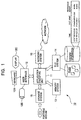
- FIG. 1 A first embodiment of the present invention in which the present invention is applied to a stand-alone computer system is described with reference to Fig. 1.
- Fig. 1 uses a block diagram to show the structure of a stand-alone computer system 10.
- the computer system 10 includes an application executing unit 11, a user interface 12, a memory system 13, a file system 14, a storage system 15, and a network system 16. Each component unit is described below.
- the application executing unit 11 is a functional module that executes application programs installed into the computer system 10 under operating environments provided by an OS.
- application programs software products adapted for various business uses can be used, such as document editing, word processing, spread sheets, communications, and information retrieving.
- Data treated in each application program are stored as files having a predetermined format.
- the user interface 12 processes characters input from a keyboard 12A or user commands input in the form of coordinate designation from a mouse 12B.
- the user interface 12 is a functional module for displaying a processing screen on a display 12C.
- a display 12C for example, a cathode-ray tube display or a liquid crystal display is used.
- the user interface 12 in the first embodiment provides GUI environments, and displays a "desktop” simulating the computer system 10 on the screen of the display 12C.
- Resource objects on the computer system 10 such as the application programs executed by the application executing unit 11 and files treated by the application programs, are embodied as display objects such as "icons” and "windows" on the desktop screen.
- a user uses the desktop screen as a workplace in which the mouse 12B is used.
- the user can input commands.
- the memory system 13 is a functional module for managing a memory space having several tens to several hundred megabytes. Specifically, the memory system 13 loads, into the memory space, a program code to be used by the application executing unit 11, and temporarily stores work data obtained while the program is being executed.
- the memory space is, for example, a volatile storage unit composed of a plurality of dynamic random access memories.
- the memory system 14 is a functional module for managing a file space having several gigabytes to several tens gigabytes.
- each application program to be executed by the application executing unit 11 is stored as an executable file.
- Resource objects such as data for use in each application program are also stored in the file space. Also codes or data whose frequency of use decreases is temporarily swapped out in the file space.
- the file space is a nonvolatile storage unit such as a hard disk drive, which is connected to the computer system 10 in accordance with a standard disk interface such as the Integrated Drive Electronics (IDE).
- IDE Integrated Drive Electronics
- the file system 14 have the function of recording history information on a history of access to each resource object (i.e., each file) stored in the file space.
- the history information includes access times and access attributes (in other words, reference only or modification).
- access times and access attributes in other words, reference only or modification.
- the storage system 15 is a functional module that accesses a portable recording medium other than a hard disk drive, in other words, reads or writes a file.
- the types of the portable medium include a CD-ROM, a digital versatile disk (DVD), a magneto-optical disk (MO), and a floppy disk (FD).
- a drive unit into which the portable medium is loaded and which drives the portable medium is connected to the computer system 10 in accordance with a standard interface such as the Small Computer System Interface (SCSI).
- SCSI Small Computer System Interface
- the resource objects that is, files such as programs and data
- the resource objects can be moved (i.e.. circulated or distributed) among a plurality of computer systems.
- a computer program for realizing the present invention can be installed into the computer system 10 via the portable recording medium.
- the network system 16 is a functional module for connecting the computer system 10 to a network.
- the network may be not only a LAN as a local and limited communications network but also a wide-area and open network such as the Internet.
- the computer system 10 is linked to another computer system (not shown) (hereinafter referred to as a "remote system") on the network in accordance with a predetermined communications protocol such as the Transmission Control Protocol/Internet Protocol (TCP/IP). Between the computer system 10 and the remote system, information can be shared and circulated via the network. For example, by downloading a computer program for realizing the present invention from he remote computer, the computer program can be installed into the computer system 10.
- a remote system a predetermined communications protocol such as the Transmission Control Protocol/Internet Protocol
- the computer system 10 of this type is specifically a PC/AT-compatible of IBM in the U.S.A. or a successive machine in accordance with OADG (PC Open Architecture Developer's Group) specifications.
- OADG PC Open Architecture Developer's Group
- Windows 95/98/NT of Microsoft Corporation is employed as an OS.
- the first embodiment has a function in which an "access management module" is activated in association with the displayed icons to generate, based on file-access-history information, icon images the visually represent the access histories and each access-history icon is positioned in the vicinity of the icon of the corresponding file.
- Each access-history icon may be displayed so as to be pop-up when the mouse cursor is positioned on the related file icon, or may be always displayed while the related file icon is being displayed on the desktop.
- the Access management module may be incorporated in another functional module such as the application executing unit 11 or the file system 14, or may exist as a separate functional module.
- Fig. 2 illustrates a process executed by the access management module. The process is described below with reference to the flowchart shown in Fig. 2.
- the access management module is activated in response to the generation of each of predetermined events on each file icon.
- the predetermined events include the emergence of a new file icon on the desktop and a disposition of the mouse cursor on a specified file icon.
- the access management module initially searches for the history information managed by the file system 14, and extracts an access history about the desired file (step S11).
- the access management module Based on the extracted access history information, the access management module generates the image of an access history icon visually representing the access history (step S12).
- the access history icon has a form which time-sequentially represents a history of access to the file and which enables visual recognition of the contents of the access history, such as reference to and modification of the file, and a temporal change pattern of an access frequency.
- Fig. 3 shows the image of the access history icon in the first embodiment.
- the access history icon is a rectangular image having a horizontal axis as a time base.
- the upper half of the access history icon from its time base is used to indicate a history of changes in the file, and the lower half is used to indicate a history of referring to the file.
- the access management module refers to the history information extracted from the file system, and puts a modification history mark at a position corresponding to each time the file is modified and/or a reference history mark at a position corresponding to each time the file is accessed.
- the form of displaying the access history icon is not always limited to the image shown in Fig. 3, but may be any type of icon which indicates the access history along its time base and which enables visual recognition of temporal change patterns of the access history and the access frequency.
- the vertical of the icon may be set as the time base, instead of the horizontal axis.
- the scale of the time base and a period in which the time is displayed on the icon are arbitrary and may be user-programmable.
- the access management module After generating the above-described access history icon image, the access management module displays the icon image in the vicinity of the corresponding file icon on the desktop (step S13).
- the access history icon may be displayed to be pop-up when the mouse cursor is positioned on a certain file icon on the desktop, and may be always displayed while each file icon is being displayed on the desktop.
- Figs. 4A and 4B show that, when the mouse cursor is positioned on one file icon, a related access history icon is displayed to be pop-up.
- the access management module When the user moves the mouse cursor on the desktop and the moved cursor enters an area for displaying the icon of predetermined file "holosig.pdf", the access management module is activated (see Fig. 4A). Then, an access history icon that describes an access history on the file appears in the vicinity of the file icon (see Fig. 4B).
- Fig. 5 shows that access history icons are displayed with a plurality of file icons displayed on the desktop (or an "Explorer” window in Windows 95/98).
- an access history icon in the case where an access history icon is displayed to be pop-up only when being required, it may be displayed so as be superimposed on the file icon. Conversely, as in the case shown in Fig. 5, in the case where the access history icons are always displayed, it is preferable in visual recognition of the file icons to dispose the access history icons so as not cover the file icons.
- the user can not only visually recognize each file icon on the desktop screen, but also intuitively grasp access and modification histories of the file and their temporal change patterns at a glance. For example, by visually and easily obtaining file-related information such as the fact that "this file has been frequently referred to since a week ago", the information can be used as an effective key for file accessing.
- a file modified corresponding to the date and time can be called.
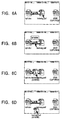
- Figs. 6A to 6D show a series of operations on the desktop screen which is related to the modification.
- the access management module When the user moves the mouse cursor on the desktop screen to enter an area for the icon of predetermined "holosig.pdf", the access management module is activated. As a result, the access management module generates an access history icon related to the file, and displays the generated icon so as to be superimposed on the file icon (see Fig. 6A).
- the file icon is front displayed to be pop-up (see Fig. 6C). It is required that the pup-up file icon be not the present entity of the file but a file entity at a date corresponding to the clicked modification history mark.
- the file entity By dragging the pop-up file icon with the mouse, the file entity can be extracted as an icon from the desktop (see Fig. 6C).
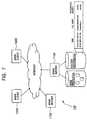
- Fig. 7 shows the structure of a network computing system 100 (in the distributed computing environments) according to the present invention.
- a network computing system 100 in the distributed computing environments
- the Internet as a wide-area and open network, a large number of computer systems are connected to one another in accordance with the TCP/IP protocol.
- WWW resource-providing space
- the resource objects provided in the WWW resource space are hypertext documents described in the HTML.
- the WWW provides a hyperlinked resource space formed by mutual relationships among linked HTML documents.
- various resource objects including the HTML documents are identified based on a type of address information described in the form of a URL.
- Some computers on the Internet operate as WWW servers 110, and offer service of providing HTML documents as resource objects.
- Some computer on the Internet operate as WWW clients 120 that each request WWW resource objects.
- resource accessing is performed in accordance with the HTTP protocol, as is widely known.
- Each of the WWW servers 110 is actually a general-purpose computer system that executes sever-use applications.
- Each of the WWW clients 120 is actually a general-purpose computer system in which a "user agent" (called a "WWW browser") performing resource accessing instead of the user is activated.
- a WWW browser is provided with "Location Box" that allows a user of each of the WWW clients 120 to input the character string of a URL with keys for requesting the accessing of the desired WWW page.
- the WWW browser tries to acquire the requested WWW resource object, that is, an HTML document by accessing a predetermined one of the WWW servers 110 in accordance with the input URL.
- the WWW browser analyzes the downloaded HTML document and generates a WWW page (also called "home page”) screen.
- the WWW browser displays a display object such as a character string or an image in which information of link to another WWW resource object is embedded, as an "anchor", in the form of a hot spot.
- an anchor By using only an intuitive operation such as clicking the anchor, the user can issue a request of access to a link destination, thereby freely searching the WWW resource space.
- each of the WWW servers 110 have not only a function of owning and providing HTML documents as WWW resource objects, that is, WWW pages, but also a function of recording information on a history of access to each WWW page.
- the history information includes access times and access attributes (in other words, reference only or modification).
- access times and access attributes in other words, reference only or modification.
- Fig. 8 shows coordinated operations performed between each of the WWW servers 110 and each of the WWW clients 120 in order that the WWW browser may acquire access history information about each access information on WWW pages.
- the user of each of the WWW clients 120 requests acquisition of a WWW page by using keys to input a URL in the Location Box on the WWW browser screen, or using the mouse to click the desired anchor in a WWW page displayed on the WWW browser screen.
- the WWW server 110 When the WWW server 110 receives a message of the page request, the WWW server 110 extracts a corresponding resource object, namely, a WWW page, from its local disk in accordance with the description of the URL character string. It is not always required that the corresponding WWW page be owned by the WWW server 110 which receives the page-requesting message.
- the WWW server 110 may request another WWW server (not shown) to provide WWW pages.
- the WWW server 110 searches the above-described history information about its managed WWW pages, and extracts an access history about each link destination which is embedded in the acquired WWW page.
- the WWW server 110 embeds a script for displaying an access history icon in a portion of HTML source codes constituting the WWW page, which defines the anchor display of each link destination.
- the script is a text-format description of a process for controlling software to execute steps.
- the script is commonly used on an application or an OS to automate a series of processes as a combination of operation steps controllable by an end user.
- the access history icon may have a representation form which time-sequentially indicates a history of referring to a link destination and which enables the user to grasp histories of reference and modifications to the link destination as time-series change patterns at a glance.
- the representation form may be an icon image as shown in Fig. 3.
- the access history icon is a rectangular image having a horizontal axis as a time base. The upper half of the access history icon from its time base is used to indicate a history of changes in the file, and the lower half is used to indicate a history of referring to the file.
- the access management module refers to the history information extracted from the file system, and puts a modification history mark at a position corresponding to each time the file is modified and/or an reference history mark at a position corresponding to each time the file is accessed.
- the script for displaying the access history icon may be described in a script language such as JavaScript or JScript.
- a technique in which a script for displaying an icon is automatically generated based on a history information and is embedded in a corresponding portion of HTML source codes is realized using the known art in the computer industry.
- the WWW server 110 at the receiving end responds to the WWW client 120, which has sent the request, with the WWW page in which the access-history-icon displaying script is embedded.
- the WWW browser of the WWW client 120 analyzes the received WWW page and displays the page on the screen.
- service unique in the present invention which uses access history icons, can be provided.
- Each access-history icon may be displayed so as to be pop-up when the mouse cursor is positioned on each anchor on the WWW-page displayed screen, or may be always displayed for each anchor while the WWW page is being displayed on the screen.
- Figs. 9A and 9B show that, when the mouse cursor is positioned on a predetermined anchor, a corresponding access history icon is displayed so as to be pop-up.
- FIGs. 9A and 9B The example shown in Figs. 9A and 9B is an application of the present invention to a bulletin board system (BBS) on the WWW.
- BBS bulletin board system
- an anchor is normally assigned to each topic (e.g., this form is employed in one of famous BBSs on the WWW, Yahoo's BBS "message.yahoo.co.jp").
- a user can trace a link by selecting an anchor based on the name of a topic.
- the embedded script is activated, whereby an access history icon that represents an access history about the file appears in the vicinity of the file icon (see Fig. 9B).
- Fig. 10 shows that, in a period in which a WWW page is displayed on the screen, access history icons are always displayed for anchors in the WWW page.
- the example shown in Fig. 10 is an application of the present invention to a BBS on the WWW similarly to the example shown in Figs. 9A and 9B.
- history information is displayed in the vicinity of an anchor corresponding to each topic, whereby a time-series change pattern, for example, at what frequency each topic is referred to and/or updated, can be grasped at a glance.
- the method according to the second embodiment may be applied to other types of services provided in the WWW resource space. For example, also when the user needs to reach a product-related WWW page from a WWW page about company information, popular goods and their freshness can be visually recognized using displayed access history icons as keys.
- the user of the WWW client 120 can not only visually recognize reference information represented by an anchor on the WWW browser screen, but also intuitively and precisely grasp, at a glance, an access history and a modification history about a WWW page as a link destination represented by the anchor. For example, by visually and instantly obtaining a history of updating, such as the information that "this WWW page is updated every three hours", the obtained information can be used as an effective key for searching the WWW resource space (i.e., "net surfing")
- Fig. 11 shows the schematic structure of a television broadcasting system 200 which serves for realizing the present invention.
- the television broadcasting system 200 includes at least one broadcast server 210 (for providing broadcasting service) and receiver/decoders 220 (for receiving broadcast contents).
- the number of the receiver/decoders 220 corresponds to the number of ordinary homes and is actually uncountable.
- one broadcast server 210 and one receiver/decoder 220 are only shown.
- broadcasting waves may be either type of terrestrial waves and satellite waves.
- the form of distribution may be not only not a method by radio but also a method by wire.
- Digital data for data broadcasting are multiplexed with real-time video and audio information (hereinafter referred to as "real-time audio-visual (AV) data") constituting the main part of a broadcasting program, and the multiplex signals are distributed as broadcasting waves in accordance with a predetermined format from the broadcast server 210.
- real-time audio-visual (AV) data real-time audio-visual
- the received broadcasting waves are processed for selection, and are digital-modulated.
- the modulated waves are separated into real-time AV data and data-broadcasting data. From the real-time AV data, pictures and sounds constituting the main part of the original broadcasting program are reproduced.
- the data-broadcasting data are computer-processed to generate data for displaying data broadcasting.
- the picture constituting the main part of the broadcasting program and display data generated by the data broadcasting are displayed so as to be superimposed on each other.
- the data for data broadcasting includes not only a function of an electronic program guide (information indicating a broadcasting schedule and program names) but also a VCR-recording reservation function.
- rating data obtained for each program is used as one of the contents of the data-broadcasting data.
- a plurality of programs (channels) are displayed in the form of icons. Each icon indicates a change pattern in the program rating during a predetermined period in the past (see Fig. 3).
- the broadcast server 210 independently sets a number of rating monitors, and uses the results of detection from the monitors. Also, program-rating data, obtained from an external program-rating search company, may be utilized.
- the rating of each broadcast program is a value representing the number of times the resource object as a broadcasting content is accessed, or an access frequency.
- the program rating is varying time-series data as its property.
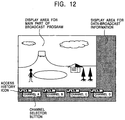
- Fig. 12 shows a television picture displayed by receiving the data broadcasting.
- the television picture is divided into a display area for the main part of the broadcast program and a display area for data-broadcast information.
- a plurality of channel selector buttons In the display area for data-broadcast information, a plurality of channel selector buttons.
- the corresponding access history icon is also displayed which represents a program-rating change pattern of a program broadcast on the channel during a predetermine period in the past.
- Viewers can visually recognize the most popular program among a list of the present programs being broadcast, and can easily select the channel.
- Japan digital satellite broadcasting is in the process of being standardized under the leadership of (Japanese) Association of Radio Industries and Businesses (ARIB).
- the data-broadcasting data can be described in a markup description language such as the Extensible Markup Language (XML), the employment of which is discussed in the standardizing process.
- XML Extensible Markup Language
Landscapes
- Engineering & Computer Science (AREA)
- General Engineering & Computer Science (AREA)
- Theoretical Computer Science (AREA)
- Human Computer Interaction (AREA)
- Physics & Mathematics (AREA)
- General Physics & Mathematics (AREA)
- User Interface Of Digital Computer (AREA)
- Information Retrieval, Db Structures And Fs Structures Therefor (AREA)
- Information Transfer Between Computers (AREA)
- Computer And Data Communications (AREA)
Applications Claiming Priority (2)
| Application Number | Priority Date | Filing Date | Title |
|---|---|---|---|
| JP22604799 | 1999-08-10 | ||
| JP22604799A JP4232283B2 (ja) | 1999-08-10 | 1999-08-10 | アクセス履歴提示方法及びアクセス履歴提示装置、資源提供方法及び資源提供装置、並びに、プログラムを記録したコンピュータ読み取り可能な記録媒体 |
Publications (2)
| Publication Number | Publication Date |
|---|---|
| EP1077413A2 true EP1077413A2 (fr) | 2001-02-21 |
| EP1077413A3 EP1077413A3 (fr) | 2006-07-26 |
Family
ID=16838966
Family Applications (1)
| Application Number | Title | Priority Date | Filing Date |
|---|---|---|---|
| EP00117033A Ceased EP1077413A3 (fr) | 1999-08-10 | 2000-08-08 | Procédé et appareil pour indiquer l'historique de l'accès à des données |
Country Status (3)
| Country | Link |
|---|---|
| US (1) | US6738973B1 (fr) |
| EP (1) | EP1077413A3 (fr) |
| JP (1) | JP4232283B2 (fr) |
Cited By (5)
| Publication number | Priority date | Publication date | Assignee | Title |
|---|---|---|---|---|
| US7424476B2 (en) | 2004-04-16 | 2008-09-09 | Aol Llc | Categorized web browsing history |
| EP1517245A4 (fr) * | 2002-06-26 | 2011-01-05 | Sony Corp | Dispositif et procede de distribution d'informations de contenus, systeme de panneau d'affichage electronique et programme informatique |
| US20140081920A1 (en) * | 2012-09-19 | 2014-03-20 | Fujitsu Limited | Medium, control method, and information processing apparatus |
| WO2014088540A1 (fr) * | 2012-12-03 | 2014-06-12 | Thomson Licensing | Interface utilisateur dynamique |
| WO2014088539A1 (fr) * | 2012-12-03 | 2014-06-12 | Thomson Licensing | Interface utilisateur dynamique |
Families Citing this family (50)
| Publication number | Priority date | Publication date | Assignee | Title |
|---|---|---|---|---|
| JP3708780B2 (ja) * | 2000-02-21 | 2005-10-19 | 日本電信電話株式会社 | ディジタル放送における嗜好データ管理方法,ディジタル放送受信装置および嗜好データ管理用プログラムの記録媒体 |
| US7184611B2 (en) * | 2000-12-26 | 2007-02-27 | Sony Corporation | Data recording apparatus and method, data reproducing apparatus and method, data recording and reproducing apparatus and method, and map image data format |
| US20020194222A1 (en) * | 2001-06-18 | 2002-12-19 | International Business Machines Corporation | Method and apparatus for disabling histories in a browser |
| US6928425B2 (en) * | 2001-08-13 | 2005-08-09 | Xerox Corporation | System for propagating enrichment between documents |
| US7284191B2 (en) | 2001-08-13 | 2007-10-16 | Xerox Corporation | Meta-document management system with document identifiers |
| US7133862B2 (en) * | 2001-08-13 | 2006-11-07 | Xerox Corporation | System with user directed enrichment and import/export control |
| JP2003108420A (ja) * | 2001-09-27 | 2003-04-11 | Hitachi Ltd | データストレージシステム及びこの制御方法 |
| DE10157487C1 (de) * | 2001-11-23 | 2003-06-18 | Sgl Carbon Ag | Faserverstärkter Verbundkörper für Schutzpanzerungen, seine Herstellung und Verwendungen |
| JP4394335B2 (ja) | 2002-07-23 | 2010-01-06 | 富士通株式会社 | サイト評価システムおよびサイト評価プログラム |
| JP3894111B2 (ja) * | 2002-11-29 | 2007-03-14 | 松下電工株式会社 | 集合住宅用テレビ付きインターホンシステム |
| US9003295B2 (en) * | 2003-03-17 | 2015-04-07 | Leo Martin Baschy | User interface driven access control system and method |
| US20050015728A1 (en) * | 2003-07-17 | 2005-01-20 | International Business Machines Corporation | Method, system, and program product for customizing a user interface |
| JP2005091197A (ja) | 2003-09-18 | 2005-04-07 | Minolta Co Ltd | 操作ガイド可変型測定機器 |
| US7895537B2 (en) * | 2003-12-29 | 2011-02-22 | International Business Machines Corporation | Method and apparatus for setting attributes and initiating actions through gestures |
| US7631276B2 (en) * | 2003-12-29 | 2009-12-08 | International Business Machines Corporation | Method for indication and navigating related items |
| US7496385B2 (en) * | 2003-12-29 | 2009-02-24 | International Business Machines Corporation | Method for viewing information underlying lists and other contexts |
| JP4185876B2 (ja) * | 2004-03-25 | 2008-11-26 | キヤノン株式会社 | 情報処理装置 |
| US7707642B1 (en) * | 2004-08-31 | 2010-04-27 | Adobe Systems Incorporated | Document access auditing |
| JP4023480B2 (ja) * | 2004-09-08 | 2007-12-19 | コニカミノルタビジネステクノロジーズ株式会社 | 画像処理装置 |
| US20070162298A1 (en) * | 2005-01-18 | 2007-07-12 | Apple Computer, Inc. | Systems and methods for presenting data items |
| JP2006236140A (ja) * | 2005-02-25 | 2006-09-07 | Toshiba Corp | 情報管理装置、情報管理方法、及び情報管理プログラム |
| US9176934B2 (en) | 2005-05-06 | 2015-11-03 | Leo Baschy | User interface for nonuniform access control system and methods |
| US9129088B1 (en) | 2005-06-04 | 2015-09-08 | Leo Martin Baschy | User interface driven access control system and methods for multiple users as one audience |
| JP2007025943A (ja) * | 2005-07-14 | 2007-02-01 | Sharp Corp | 表示装置、サーバ装置、プログラム、及び記録媒体 |
| JP2007034652A (ja) * | 2005-07-27 | 2007-02-08 | Hitachi Software Eng Co Ltd | リンク先アクセス状況表示システム |
| US20070133063A1 (en) * | 2005-12-13 | 2007-06-14 | Xerox Corporation | System and method for document tracking and security |
| US9202068B2 (en) * | 2006-03-29 | 2015-12-01 | Leo M. Baschy | User interface for variable access control system |
| JP5322442B2 (ja) * | 2007-03-14 | 2013-10-23 | キヤノン株式会社 | 文書画像管理装置および文書画像管理方法 |
| US9286309B2 (en) * | 2007-05-23 | 2016-03-15 | Adobe Systems Incorporated | Representation of last viewed or last modified portion of a document |
| US8010519B2 (en) * | 2008-07-29 | 2011-08-30 | International Business Machines Corporation | Method and system for mitigating impact of user errors in data stores |
| US9424256B2 (en) * | 2008-09-15 | 2016-08-23 | Apple Inc. | Method and apparatus for performing type-aware change tracking in a document |
| KR101510758B1 (ko) * | 2008-12-05 | 2015-04-10 | 삼성전자 주식회사 | 디스플레이장치 및 그의 사용자 인터페이스 표시방법 |
| JP5133866B2 (ja) * | 2008-12-22 | 2013-01-30 | ヤフー株式会社 | アクセス状況表示システム、および、アクセス状況表示方法 |
| JP5232710B2 (ja) * | 2009-04-17 | 2013-07-10 | 株式会社日立ソリューションズ | 文書保護システムのログ表示方法 |
| JP5234832B2 (ja) * | 2010-01-08 | 2013-07-10 | Necシステムテクノロジー株式会社 | 経歴情報管理システムおよび経歴情報管理方法 |
| JP5604741B2 (ja) * | 2010-06-08 | 2014-10-15 | 株式会社日立国際電気 | 収録編集送出システム及び映像操作端末 |
| US8819593B2 (en) * | 2010-11-12 | 2014-08-26 | Microsoft Corporation | File management user interface |
| AU343801S (en) * | 2012-01-19 | 2012-08-09 | Samsung Electronics Co Ltd | Display screen with icon for an electronic device |
| AU343782S (en) * | 2012-01-19 | 2012-08-08 | Samsung Electronics Co Ltd | Display screen with icon for an electronic device |
| JP5773947B2 (ja) * | 2012-05-31 | 2015-09-02 | 京セラドキュメントソリューションズ株式会社 | 表示装置、画像形成装置、表示制御方法及びプログラム |
| US9529629B2 (en) * | 2012-12-20 | 2016-12-27 | Bank Of America Corporation | Computing resource inventory system |
| US9542433B2 (en) | 2012-12-20 | 2017-01-10 | Bank Of America Corporation | Quality assurance checks of access rights in a computing system |
| US9537892B2 (en) | 2012-12-20 | 2017-01-03 | Bank Of America Corporation | Facilitating separation-of-duties when provisioning access rights in a computing system |
| US9483488B2 (en) | 2012-12-20 | 2016-11-01 | Bank Of America Corporation | Verifying separation-of-duties at IAM system implementing IAM data model |
| US9189644B2 (en) | 2012-12-20 | 2015-11-17 | Bank Of America Corporation | Access requests at IAM system implementing IAM data model |
| US9639594B2 (en) | 2012-12-20 | 2017-05-02 | Bank Of America Corporation | Common data model for identity access management data |
| US9495380B2 (en) | 2012-12-20 | 2016-11-15 | Bank Of America Corporation | Access reviews at IAM system implementing IAM data model |
| US9489390B2 (en) | 2012-12-20 | 2016-11-08 | Bank Of America Corporation | Reconciling access rights at IAM system implementing IAM data model |
| US9477838B2 (en) | 2012-12-20 | 2016-10-25 | Bank Of America Corporation | Reconciliation of access rights in a computing system |
| CN107690089A (zh) * | 2016-08-05 | 2018-02-13 | 阿里巴巴集团控股有限公司 | 数据处理方法、直播方法及装置 |
Family Cites Families (9)
| Publication number | Priority date | Publication date | Assignee | Title |
|---|---|---|---|---|
| US5155850A (en) * | 1990-02-23 | 1992-10-13 | International Business Machines Corporation | Method and system for maintaining a time frame selective document history log in a data processing system |
| US5119493A (en) * | 1990-02-23 | 1992-06-02 | International Business Machines Corporation | System for recording at least one selected activity from a selected resource object within a distributed data processing system |
| US5737619A (en) * | 1995-10-19 | 1998-04-07 | Judson; David Hugh | World wide web browsing with content delivery over an idle connection and interstitial content display |
| JP2861908B2 (ja) * | 1996-01-16 | 1999-02-24 | 日本電気株式会社 | ブラウジング装置 |
| US6268851B1 (en) * | 1996-09-30 | 2001-07-31 | Trellix Corporation | Hypermedia authoring and publishing system |
| US5986653A (en) * | 1997-01-21 | 1999-11-16 | Netiq Corporation | Event signaling in a foldable object tree |
| JPH11143754A (ja) * | 1997-11-05 | 1999-05-28 | Hitachi Ltd | バージョン情報・構成情報表示方法および装置およびバージョン情報・構成情報表示プログラムを記録したコンピュータ読み取り可能な記録媒体 |
| US6310630B1 (en) * | 1997-12-12 | 2001-10-30 | International Business Machines Corporation | Data processing system and method for internet browser history generation |
| US6526397B2 (en) * | 1998-06-19 | 2003-02-25 | Nortel Networks Limited | Resource management facilitation |
-
1999
- 1999-08-10 JP JP22604799A patent/JP4232283B2/ja not_active Expired - Fee Related
-
2000
- 2000-08-08 EP EP00117033A patent/EP1077413A3/fr not_active Ceased
- 2000-08-09 US US09/634,371 patent/US6738973B1/en not_active Expired - Fee Related
Cited By (6)
| Publication number | Priority date | Publication date | Assignee | Title |
|---|---|---|---|---|
| EP1517245A4 (fr) * | 2002-06-26 | 2011-01-05 | Sony Corp | Dispositif et procede de distribution d'informations de contenus, systeme de panneau d'affichage electronique et programme informatique |
| US7424476B2 (en) | 2004-04-16 | 2008-09-09 | Aol Llc | Categorized web browsing history |
| US20140081920A1 (en) * | 2012-09-19 | 2014-03-20 | Fujitsu Limited | Medium, control method, and information processing apparatus |
| US9292387B2 (en) * | 2012-09-19 | 2016-03-22 | Fujitsu Limited | Medium, control method, and information processing apparatus |
| WO2014088540A1 (fr) * | 2012-12-03 | 2014-06-12 | Thomson Licensing | Interface utilisateur dynamique |
| WO2014088539A1 (fr) * | 2012-12-03 | 2014-06-12 | Thomson Licensing | Interface utilisateur dynamique |
Also Published As
| Publication number | Publication date |
|---|---|
| JP4232283B2 (ja) | 2009-03-04 |
| EP1077413A3 (fr) | 2006-07-26 |
| US6738973B1 (en) | 2004-05-18 |
| JP2001051762A (ja) | 2001-02-23 |
Similar Documents
| Publication | Publication Date | Title |
|---|---|---|
| US6738973B1 (en) | Access-history indicating method and apparatus, resources providing method and apparatus, and program providing medium used therewith | |
| US6456307B1 (en) | Automatic icon generation | |
| US7454694B2 (en) | Method and system for organizing document information in a non-directed arrangement of documents | |
| US7194701B2 (en) | Video thumbnail | |
| TWI438682B (zh) | 用於使用結構式資料管理網頁連結的方法及電腦儲存媒體 | |
| US9286407B2 (en) | Bookmarking internet resources in an internet browser | |
| US7257777B1 (en) | System and method for automatic control of window viewing | |
| US8347225B2 (en) | System and method for selectively displaying web page elements | |
| US6549220B1 (en) | Method, system, and program for providing pages of information with navigation and content areas | |
| US20050071864A1 (en) | Systems and methods for using interaction information to deform representations of digital content | |
| US7409382B2 (en) | Information processing system, terminal device, method and medium | |
| US20090049391A1 (en) | method and system for internally identifying a specific web browser for displaying a specific web page | |
| US20110271171A1 (en) | Creating and Managing Reference Elements of Deployable Web Archive Files | |
| JP2005525628A (ja) | 電子書籍の読み方のパターンの追跡の方法及びシステム | |
| AU2011214379A1 (en) | Method and system for organizing information with a sharable user interface | |
| JP2000305835A (ja) | ウェブサイト閲覧システム | |
| JP5337317B2 (ja) | デジタルコンテンツ閲覧装置及びデジタルコンテンツ閲覧管理システム | |
| US20050125727A1 (en) | Method and apparatus for maintaining browser navigation relationships and for choosing a browser window for new documents | |
| JP5210098B2 (ja) | デジタルコンテンツ閲覧管理システム | |
| JP4386011B2 (ja) | Webページ再編集方法及びシステム | |
| JPH10269236A (ja) | ハイパーテキスト履歴記録方法と表示方法とそこで用いられる履歴ブックウィンドウ及びハイパーテキスト参照方法 | |
| US7213204B1 (en) | Method, system, and program for saving object content in a repository file | |
| JP4586652B2 (ja) | Rss文書の閲覧方法及び装置及びプログラム及びプログラムを格納した記憶媒体 | |
| KR20020045917A (ko) | 멀티미디어를 이용한 웹 광고 방법 | |
| JPWO2005006191A1 (ja) | 複数種類の情報を登録する装置および方法 |
Legal Events
| Date | Code | Title | Description |
|---|---|---|---|
| PUAI | Public reference made under article 153(3) epc to a published international application that has entered the european phase |
Free format text: ORIGINAL CODE: 0009012 |
|
| AK | Designated contracting states |
Kind code of ref document: A2 Designated state(s): AT BE CH CY DE DK ES FI FR GB GR IE IT LI LU MC NL PT SE |
|
| AX | Request for extension of the european patent |
Free format text: AL;LT;LV;MK;RO;SI |
|
| PUAL | Search report despatched |
Free format text: ORIGINAL CODE: 0009013 |
|
| AK | Designated contracting states |
Kind code of ref document: A3 Designated state(s): AT BE CH CY DE DK ES FI FR GB GR IE IT LI LU MC NL PT SE |
|
| AX | Request for extension of the european patent |
Extension state: AL LT LV MK RO SI |
|
| RIC1 | Information provided on ipc code assigned before grant |
Ipc: G06F 9/44 20060101AFI20060616BHEP |
|
| 17P | Request for examination filed |
Effective date: 20061128 |
|
| AKX | Designation fees paid |
Designated state(s): DE FR GB |
|
| 17Q | First examination report despatched |
Effective date: 20070509 |
|
| STAA | Information on the status of an ep patent application or granted ep patent |
Free format text: STATUS: THE APPLICATION HAS BEEN REFUSED |
|
| 18R | Application refused |
Effective date: 20100611 |