EP1094388A2 - Système graphique pour l'échange des données - Google Patents
Système graphique pour l'échange des données Download PDFInfo
- Publication number
- EP1094388A2 EP1094388A2 EP00309248A EP00309248A EP1094388A2 EP 1094388 A2 EP1094388 A2 EP 1094388A2 EP 00309248 A EP00309248 A EP 00309248A EP 00309248 A EP00309248 A EP 00309248A EP 1094388 A2 EP1094388 A2 EP 1094388A2
- Authority
- EP
- European Patent Office
- Prior art keywords
- icon
- screen
- server
- client
- area
- Prior art date
- Legal status (The legal status is an assumption and is not a legal conclusion. Google has not performed a legal analysis and makes no representation as to the accuracy of the status listed.)
- Withdrawn
Links
Images








Classifications
-
- G—PHYSICS
- G06—COMPUTING OR CALCULATING; COUNTING
- G06F—ELECTRIC DIGITAL DATA PROCESSING
- G06F9/00—Arrangements for program control, e.g. control units
- G06F9/06—Arrangements for program control, e.g. control units using stored programs, i.e. using an internal store of processing equipment to receive or retain programs
- G06F9/46—Multiprogramming arrangements
- G06F9/54—Interprogram communication
-
- G—PHYSICS
- G06—COMPUTING OR CALCULATING; COUNTING
- G06F—ELECTRIC DIGITAL DATA PROCESSING
- G06F15/00—Digital computers in general; Data processing equipment in general
-
- G—PHYSICS
- G06—COMPUTING OR CALCULATING; COUNTING
- G06F—ELECTRIC DIGITAL DATA PROCESSING
- G06F9/00—Arrangements for program control, e.g. control units
- G06F9/06—Arrangements for program control, e.g. control units using stored programs, i.e. using an internal store of processing equipment to receive or retain programs
- G06F9/44—Arrangements for executing specific programs
- G06F9/451—Execution arrangements for user interfaces
Definitions
- the present invention relates to a client server system comprising a server and a plurality of clients connected to the server via communication lines, wherein messages can be easily exchanged using icons.
- the present invention also relates to an authoring tool thereof and applied system thereof.
- Electronic mail is widely known as a typical message exchange means in a client server system.
- destination In conventional electronic mail, destination should be input using an address book or by other means. This operation is not graphical. Many user interfaces of current computers, on the other hand, are graphical, easily understood and have excellent operability as in systems in which icons are dragged and dropped. A graphical user interface with excellent operability has also been desired for message exchange means.
- the present invention is a client server system comprising a server and a plurality of clients which are connected to the server via communication lines, wherein common screens are displayed on the server and on the plurality of clients, common icons are displayed on the screens of the server and of the plurality of clients, the client server system has mapping which can divide areas in the background, and the common screens and common icons of the server and of the plurality of clients are created and displayed according to this mapping.
- the present invention is a client server system, comprising a server and a plurality of clients connected to the server via communication lines, wherein the above mentioned server further comprises a transmit/receive portion, an icon transfer portion which transfers an icon received by the transmit/receive portion to another client, and a screen creation portion which receives an icon from the transmit/receive portion and creates a message board screen, the above mentioned client further comprises a transmit /receive portion, an icon creation portion which sends a transmission icon to the transmit /receive portion, and a screen creation portion which receives the icon received by the transmit /receive portion and/or an icon created by the icon creation portion and creates a message board screen, when the client has newly created an icon, the client displays the icon on its own message board screen and sends the icon to the server, and the above mentioned server receives the icon, displays the icon on its own message board, and transfers the icon to another client.
- the above mentioned server further comprises a transmit/receive portion, an icon transfer portion which transfers an
- the above mentioned server judges the attributes of the received icon (message), sends the icon (message) to a corresponding client if the icon is a private icon, and sends the icon to all the clients if the icon is a multiple address message.
- the above mentioned server and/or the client further comprises a private area screen creation portion which creates a private area screen where access is allowed only for specified persons, a public area creation portion which creates a public area screen where access is allowed for all participants, an area decision portion which receives operation information on the icon and decides which one of the private area screen and the public area screen this operation is executed in, and a security control portion which allows access to the icon based on the result of the decision by the area decision portion.
- the types of the above mentioned access are, for example, read, edit, move, delete and copy.
- the above mentioned private area screen is, for example, provided to each client. That is, so to speak, a post office box.
- the above mentioned public area screen corresponds to, for example, a public bulletin board.
- the security control portion stores a permission table which shows the relationship between a user type and a permission type, and decides whether access is permitted/denied based on this table. A similar table is also used for controlling icons at the bottom of the screen.
- the above mentioned icons can be moved inside or between the private area screen and/or the public area screen by a drag and drop operation, and the area where the icon is placed corresponds to the destination of the icon and/or message.
- the above mentioned icons can be provided in advance on an icon bar on the display screen, and can be placed in an arbitrary area from the icon bar by a drag and drop operation.
- the present invention is an authoring tool for a client server system comprising a server and a plurality of clients connected to the server via communication lines, wherein common screens are displayed on the server and on the plurality of clients, common icons are displayed on the screens of the server and of the plurality of clients, the common screens and the common icons of the server and of the plurality of clients are created and displayed according to mapping, the above mentioned mapping comprises an area table where a screen is divided and defined as one or more areas, and a permission table where security is set for each combination of a user type and an access permission type, and an application is generated by setting the area table and the permission table.
- the present invention is a messaging system for a client server system comprising a server and a plurality of clients connected to the server via communication lines
- the above mentioned server further comprises a transmit /receive portion, an icon transfer portion which transfers an icon received by the transmit /receive portion to another client, and a screen creation portion which receives an icon from the transmit /receive portion and creates a message board screen
- the above mentioned client further comprises a transmit /receive portion, an icon creation portion which sends a transmission icon to the transmit /receive portion, and a screen creation portion which receives an icon received by the transmit /receive portion and/or an icon created by the icon creation portion and creates a message board screen
- the client displays the icon on its own message board screen and sends the icon to the server
- the above mentioned server receives the icon, displays the icon on its own message board screen, and transfers the icon to another client
- the above mentioned server and/or the client further comprises a private area screen
- the present invention is also an order system for a client server system comprising a server and a plurality of clients connected to the server via communication lines, wherein the above mentioned server further comprises a transmit /receive portion, and a screen creation portion which receives an icon from the transmit /receive portion and creates a message board screen, the above mentioned client further comprises a transmit /receive portion, an icon creation portion which sends a transmission icon to the transmit /receive portion, and a screen creation portion which receives an icon received by the transmit /receive portion and/or an icon created by the icon creation portion and creates a message board screen, when the above mentioned client has newly created an icon, the client displays the icon on its own message board screen and sends the icon to the server, the above mentioned server receives the icon and displays the icon on its own message board screen, the above mentioned client further comprises an information area creation portion for creating an information area screen to display information on commodities, and an icon area screen creation portion for allowing an order icon provided on the display screen in advance to be
- a question icon and a trash can icon are provided other than an order icon.
- a discount icon, new commodity icon, sold out icon, information icon and trash can icon for example, are provided other than the order confirmation icon.
- the system according to an embodiment of the present invention is an icon-driven server/client system for transmitting/receiving messages in real-time.
- the major difference from a conventional system is that a message is addressed intuitively and directly by dragging and dropping an icon.
- the system according to this embodiment provides a new communication and joint work method for the Internet/intranet community.
- This system can be used very easily.
- the user can use the later mentioned boards, such as a message board, a white board and a chess board, a map and an image can be used at any time, and can write a desired message and share it with others by dragging and dropping an icon onto a board on the Internet.
- This system is easy to install, easy to use, and easy to customize.
- This system can also be used more easily than any other communication, cooperative and joint work software, including a message board, postit software, a white board, a chat room and electronic mail.
- the server should be a CGI-supported Web server, and should support java.
- the client should be a java-supported Web browser, and should support the virtual machine/run-time environment of java.
- This system has the following major functions.
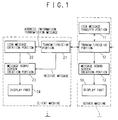
- Fig. 1 is a functional block diagram depicting a configuration of a server machine 1 and a client machine 2 used for this system.
- the server machine 1 comprises a message transfer portion 11 which transfers a received message when necessary, a transmit /receive portion 12 for communicating with a client machine, a message board screen creation portion 13 which creates a screen of a message board based on the received message, and a display part 14 which receives the output of the screen creation portion 13 and displays the screen.
- the client machine 2 comprises a transmit /receive portion 21 for communicating with the server machine, a message creation portion 22 which creates a transmission message, a message board screen creation portion 23 which receives the transmission message from the message creation portion 22, receives the receive message from the transmit /receive portion 21 and displays these messages on the message board, and a display part 24 which receives the output of the screen creation portion 23 and displays the screen.
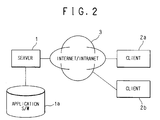
- Fig. 2 is a conceptual diagram depicting the general configuration of this system.
- the clients 2a and 2b can access the server 1 via the Internet/intranet 3.
- the server 1 stores the application software (applet of Java) for this system in the external storage device la in advance.
- the application software for the client is downloaded and the system can be used.
- Fig. 3 shows an outline of how messages are exchanged among the server 1 and the clients 2a, 2b and 2c.
- the client 2a creates a message
- the message M1 is sent to the server 1, and is also displayed on its own screen.
- the server 1 identifies the destination of the received message M1, and sends the message M1 to the destination, which is the client 2b (M2).
- the reply message is sent to the client 2a (M3, M4).
- the message M5 sent from the server 1 is also sent to all other clients 2a and 2c (M6, M7).
- the reply message M8 from the client 2a is also sent to all clients, 2b and 2c (M9, M10).
- a message can be communicated among all clients 2a, 2b and 2c via the server 1.
- Fig. 4 shows a processing flow at the client which sends a message.
- the user clicks on the message icon (S1) then the message creation dialog is displayed.
- the user can create an arbitrary message (S2).
- the user drags and drops the icon on an arbitrary position of the message board (S3).
- the message can be sent.
- the client displays the message on its own screen (S4), and sends the message (S5).
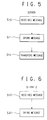
- Fig. 5 shows a processing flow at the server.
- the server receives a message (S10)
- the server opens the message (S11) and stores it in its own memory.
- the server transfers the message to a predetermined destination (S12).
- Fig. 6 shows a processing flow at a client which receives a message.
- the client receives the message from the server (S20)
- the client opens the message (S21), and displays the message on its own message board.
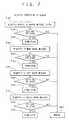
- Fig. 7 shows the flow of security processing of the server.
- the server checks whether the requesting user has the right (S32), and permits the user to access if the user has the right (S33), or denies the request if not (S43). Similar processing is also performed when moving a message (that is, changing the destination address), editing a message or deleting a message is requested (S34 - S42). For example, when this system is a bulletin board where anyone has access, accessing and moving are permitted to anyone. Editing and deleting, however, are permitted only to the message sender or to the administrator.
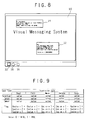
- Fig. 8 is an example of a message board screen of this system.
- the message board 30 and examples 31 and 32 of the messages to be displayed here are displayed.
- the icons 33, 34 and 35 at the bottom of the screen are the message creation icon 33, the GO icon 34 for creating a link to the related home pages, and the trash can icon 35 for deleting a message.
- a customizing tool to generate a resource file is provided.
- To define a resource file format it is important to understand that only the user interface portion can be customized.
- the user interface portion can be divided into four categories.
- the format of a resource file is as follows.
- imagepath is as follows.
- the image path can be defined as follows. imagepath images # use relative path definition Now the image map definition will be described. region [2] is a possession permission flag of Left-Top Coordinate Right-Bottom Coordinate.
- Fig. 10 is an example of the permission flags of a message board without security.
- anyone has full access that is, anyone can read, edit, move, delete and copy all message icons and postits. Since the message board is a public area, the owner is the Super User by default.
- a permission flag value of one big area covers all message board images.
- Fig. 11 is an example of the permission flags of a message board with a medium degree of security.
- Teen can read all icons and postits, but only the Super User, sender and receiver has full access.
- the permission flag value of one large area covers all message board images.
- iconpath icon path directory
- icon [n] on file name, off file name, owner, display flag
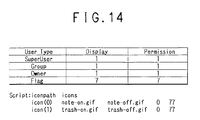
- Fig. 14 is an example of the definition of the icons of the message board shown in Fig. 13.
- the same icon layout is used for all users, and the owner is the Super User by default. The number of users is unknown or limitless. The owner of the icons need not be the sender of the message.
- the message type is POSTIT. Teen can read the message without clicking.
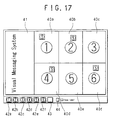
- the system according to the embodiment 2 of the present invention is a simulation of a mail box (post office box). Each user has their own post office box (areas denoted by 40a - 40f in Fig. 17) and the icons 42a - 42f.
- This post office box system is a good example of a system for performing communication and joint work among a relatively small group (e.g. 5 to 10 individuals).
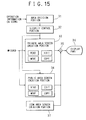
- Fig. 15 shows the functional blocks of this system.
- Fig. 15 shows the security control portion and the image display part of the system.
- the private area screen creation portion 33 creates a screen for each user area 40 a - 40f.
- the private area screen creation portion 33 may be disposed corresponding to each user area 40a - 40f.
- the private area screen creation portion 33 has functions to read, edit, move and copy icons. These functions are executed according to permission from the security control portion 32.
- the public area screen creation portion 34 on the other hand, generates a screen of the public area 41. In this area, a user can freely operate any icon. Operation information on icons is input to the area decision portion 31 where it is decided in which area an icon is to be operated.
- the security control portion 32 decides whether operation for an icon will be permitted. This output is sent to each one of the private area screen creation portions 33. When security control is required for the public area, this output is also sent to the public area screen creation portion 34.
- the output of the screen creation portions 33 and 34 are synthesized by the synthesis part 35, and is displayed on the display part 36.
- the user drags his own icon (e.g. user in area 40e drags the icon 42e) to the destination post office box (e.g. area 40a, 40b, 40d or 40f). Only the receiver can read the message of this icon. Other users cannot read, move or delete this message.
- the public area 41 at the left is for all users, and anyone can read, move or delete a message placed in this area.
- Emergency icon 43 may be dragged to a message board for an emergency message. In this case, the message itself, not the icon, may be displayed.
- an icon is copied and moved to the areas of the destination users.
- Fig. 16 shows a flow chart on security.
- the area is judged first (S41). If the decided area is a public area, access is permitted (S45). Otherwise it is checked whether the user has the right to access the area (S43), and if so, access is permitted (S45), and if not, access is denied.
- a message is handled as an icon, and a message can be transmitted by dragging and dropping an icon, so an interface which is very easily understood can be provided. Also, security control is executed based on the area on the screen, so processing is easy and clearer for the user. Users who are not the receiver cannot read the message, but can know where the icon is located, so a non-receiver user can know which users are exchanging the message.
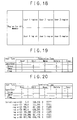
- Fig. 18 shows an area which is for all users. One postit can be fully accessed by all members.
- Fig. 19 shows the permission flags for each user area.
- Fig. 20 shows the permission flags for all users.
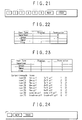
- Fig. 21 The same icon layout is provided to all users (Fig. 21). Each user sends a message using a respective unique icon.
- the NOTE and TRASH icons belong to the Super User.
- Fig. 22 shows the display/permission flags of the user icons.
- Fig. 23 shows the display/permission flags of the NOTE and TRASH icons.
- Fig. 24 shows another example of icons. This shows a post office box board having unique user icons.
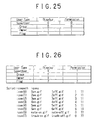
- Fig. 25 shows the display/permission flags of each user.
- Fig. 26 shows the display/permission flags of the NOTE and TRASH icons.
- Fig. 27 shows a display screen at the shop side
- Fig. 28 shows a display screen at the customer side.
- the top screen of this order system is similar to an order form, a leaflet, and a pamphlet of a shop.
- images 50a - 50f of a total of six commodities are displayed. These images correspond to a menu.
- An icon bar is below these images.
- the icon bar has an icon 51 for the shop to confirm an order, an icon 52 to indicate a discount, an icon 53 to indicate a new commodity, an icon 54 to indicate sold out, an icon 55 to indicate other information, and a trash can icon 56.
- the icon bar has an icon 57 for the customer side to place an order, an icon 58 for questions about a commodity, and a trash can icon 59.
- This system is essentially the same as the above mentioned embodiments 1 and 2, but is somewhat different in terms of security.
- the icons 51, 52, 53, 54 and 55 for the shop can be accessed only by users at the shop side, and the icons 57 and 58 for a customer can be accessed only by a customer. If there are a plurality of customers, needless to say a customer cannot access the icons of another customer. Therefore, in this system, the icons of the customer should be displayed on the screen of that respective customer, but the icons of another customer need not be displayed. It is easier to view a screen and operate the screen if only the customer's own icons are displayed. On the screen at the shop side, however, the icons of all customers should be displayed.
- the order icon 57 is dragged to one of the commodities 50a - 50f on the menu board, and the order content, name, address, and other necessary information on the order are written.
- the other customers are prohibited to read, move, delete or copy this order.
- an employee of the shop drags the acceptance icon 51, and writes such a message as "we will deliver the product within 30 minutes", and drags and drops the acceptance icon 51 over the order icon 57.
- the shop places such attribute icons as 52 - 55 in the menu. In this way, orders can be placed very easily.
- the shop can set various information, such as shop holidays, by dragging information icons as if using postits. Now the image map definitions will be described.
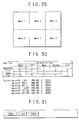
- Fig. 31 and Fig. 32 show an example of the display/permission flags of a customer (ORDER and HELP icons).
- Fig. 34 shows an example of the display/permission flags of a shop (ACCEPT, DISCOUNT, NEW, and INFO icons).
- Fig. 35 shows an example of the display/permission flag of a trash can icon.
- Fig. 36 is an example when the present invention is applied to a destination display panel.
- each one of employees A, B, C and D has their own display area, and predetermined icons x, y and z are placed in this area. These icons, x, y and z, correspond, for example, to the destination an employee has embarked for.
- a white board is used to indicate the destination of an employee. Before an employee departs, that employee writes their destination and return time to the company on the white board using such a writing tool as a magic marker. If this invention is used, a destination display panel having the same functions as a white board can be constructed on the client server system. For example, when Mr.
- A departs his company, he places icon x, corresponding to the destination, in his area by dragging and dropping the icon x from the icon bar. If necessary, Mr. A writes a message indicating the return time and other important matters in the icon.
- destinations can be displayed.
- a photographic destination display can be confirmed by anyone at any location. It is preferable that, excluding the administrator, dragging and dropping an icon are possible only in the user's own area.
- Fig. 37 is an example when the present invention is applied to a position information display panel.
- the current position of Mr. A and the current position of Mr. B are displayed on the screen where a map is displayed.
- the user When the user knows their own position, that user drags and drops their own icon. If the user does not know their own position, an individual who does know the position drags and drops the corresponding icon. This icon may be automatically set up using GPS, for example.
- the present invention can be applied to the games of go, shogi and chess.
- a player can place a game piece icon in an appropriate position on the screen of the present invention by dragging and dropping via the Internet.
- the game can be easily viewed.
- a player can access only their own game piece icons. Spectators cannot access the game piece icons at all.
Landscapes
- Engineering & Computer Science (AREA)
- Theoretical Computer Science (AREA)
- Software Systems (AREA)
- Physics & Mathematics (AREA)
- General Engineering & Computer Science (AREA)
- General Physics & Mathematics (AREA)
- Human Computer Interaction (AREA)
- Computer Hardware Design (AREA)
- User Interface Of Digital Computer (AREA)
- Data Exchanges In Wide-Area Networks (AREA)
- Information Transfer Between Computers (AREA)
- Computer And Data Communications (AREA)
Applications Claiming Priority (2)
| Application Number | Priority Date | Filing Date | Title |
|---|---|---|---|
| JP30174499A JP2001125840A (ja) | 1999-10-22 | 1999-10-22 | クライアントサーバシステム及びそのオーサリングツール並びにその応用装置 |
| JP30174499 | 1999-10-22 |
Publications (2)
| Publication Number | Publication Date |
|---|---|
| EP1094388A2 true EP1094388A2 (fr) | 2001-04-25 |
| EP1094388A3 EP1094388A3 (fr) | 2003-08-13 |
Family
ID=17900651
Family Applications (1)
| Application Number | Title | Priority Date | Filing Date |
|---|---|---|---|
| EP00309248A Withdrawn EP1094388A3 (fr) | 1999-10-22 | 2000-10-20 | Système graphique pour l'échange des données |
Country Status (4)
| Country | Link |
|---|---|
| EP (1) | EP1094388A3 (fr) |
| JP (1) | JP2001125840A (fr) |
| KR (1) | KR20010051158A (fr) |
| CA (1) | CA2324173A1 (fr) |
Cited By (8)
| Publication number | Priority date | Publication date | Assignee | Title |
|---|---|---|---|---|
| US6633846B1 (en) | 1999-11-12 | 2003-10-14 | Phoenix Solutions, Inc. | Distributed realtime speech recognition system |
| US6665640B1 (en) | 1999-11-12 | 2003-12-16 | Phoenix Solutions, Inc. | Interactive speech based learning/training system formulating search queries based on natural language parsing of recognized user queries |
| EP1278366A3 (fr) * | 2001-06-26 | 2005-02-23 | Eastman Kodak Company | Procédé et système de gestion d'images à travers un réseau de communication |
| US7050977B1 (en) | 1999-11-12 | 2006-05-23 | Phoenix Solutions, Inc. | Speech-enabled server for internet website and method |
| US7139714B2 (en) | 1999-11-12 | 2006-11-21 | Phoenix Solutions, Inc. | Adjustable resource based speech recognition system |
| WO2007063041A1 (fr) * | 2005-11-30 | 2007-06-07 | Roberto Della Pasqua S.R.L. | Service de messagerie instantanee comportant une interface utilisateur reduite a un minimum |
| US7376556B2 (en) | 1999-11-12 | 2008-05-20 | Phoenix Solutions, Inc. | Method for processing speech signal features for streaming transport |
| US7392185B2 (en) | 1999-11-12 | 2008-06-24 | Phoenix Solutions, Inc. | Speech based learning/training system using semantic decoding |
Families Citing this family (2)
| Publication number | Priority date | Publication date | Assignee | Title |
|---|---|---|---|---|
| JP4765182B2 (ja) * | 2001-01-19 | 2011-09-07 | ソニー株式会社 | 双方向テレビ通信方法および、双方向テレビ通信用クライアント装置 |
| US7721216B2 (en) * | 2002-06-18 | 2010-05-18 | Microsoft Corporation | Visual group interface for group connectivity |
Family Cites Families (3)
| Publication number | Priority date | Publication date | Assignee | Title |
|---|---|---|---|---|
| EP0410378A3 (en) * | 1989-07-26 | 1992-08-05 | Hitachi, Ltd. | Multimedia telemeeting terminal device, communication system and manipulation method thereof |
| US6608636B1 (en) * | 1992-05-13 | 2003-08-19 | Ncr Corporation | Server based virtual conferencing |
| DE4408738A1 (de) * | 1994-03-15 | 1995-09-21 | Sel Alcatel Ag | Kommunikationssystem |
-
1999
- 1999-10-22 JP JP30174499A patent/JP2001125840A/ja active Pending
-
2000
- 2000-10-20 KR KR1020000061824A patent/KR20010051158A/ko not_active Withdrawn
- 2000-10-20 EP EP00309248A patent/EP1094388A3/fr not_active Withdrawn
- 2000-10-23 CA CA002324173A patent/CA2324173A1/fr not_active Abandoned
Cited By (29)
| Publication number | Priority date | Publication date | Assignee | Title |
|---|---|---|---|---|
| US7831426B2 (en) | 1999-11-12 | 2010-11-09 | Phoenix Solutions, Inc. | Network based interactive speech recognition system |
| US7725320B2 (en) | 1999-11-12 | 2010-05-25 | Phoenix Solutions, Inc. | Internet based speech recognition system with dynamic grammars |
| US9190063B2 (en) | 1999-11-12 | 2015-11-17 | Nuance Communications, Inc. | Multi-language speech recognition system |
| US7050977B1 (en) | 1999-11-12 | 2006-05-23 | Phoenix Solutions, Inc. | Speech-enabled server for internet website and method |
| US7139714B2 (en) | 1999-11-12 | 2006-11-21 | Phoenix Solutions, Inc. | Adjustable resource based speech recognition system |
| US7203646B2 (en) | 1999-11-12 | 2007-04-10 | Phoenix Solutions, Inc. | Distributed internet based speech recognition system with natural language support |
| US7225125B2 (en) | 1999-11-12 | 2007-05-29 | Phoenix Solutions, Inc. | Speech recognition system trained with regional speech characteristics |
| US9076448B2 (en) | 1999-11-12 | 2015-07-07 | Nuance Communications, Inc. | Distributed real time speech recognition system |
| US7277854B2 (en) | 1999-11-12 | 2007-10-02 | Phoenix Solutions, Inc | Speech recognition system interactive agent |
| US7376556B2 (en) | 1999-11-12 | 2008-05-20 | Phoenix Solutions, Inc. | Method for processing speech signal features for streaming transport |
| US7392185B2 (en) | 1999-11-12 | 2008-06-24 | Phoenix Solutions, Inc. | Speech based learning/training system using semantic decoding |
| US7555431B2 (en) | 1999-11-12 | 2009-06-30 | Phoenix Solutions, Inc. | Method for processing speech using dynamic grammars |
| US7624007B2 (en) | 1999-11-12 | 2009-11-24 | Phoenix Solutions, Inc. | System and method for natural language processing of sentence based queries |
| US7647225B2 (en) | 1999-11-12 | 2010-01-12 | Phoenix Solutions, Inc. | Adjustable resource based speech recognition system |
| US6665640B1 (en) | 1999-11-12 | 2003-12-16 | Phoenix Solutions, Inc. | Interactive speech based learning/training system formulating search queries based on natural language parsing of recognized user queries |
| US7702508B2 (en) | 1999-11-12 | 2010-04-20 | Phoenix Solutions, Inc. | System and method for natural language processing of query answers |
| US7657424B2 (en) | 1999-11-12 | 2010-02-02 | Phoenix Solutions, Inc. | System and method for processing sentence based queries |
| US7725321B2 (en) | 1999-11-12 | 2010-05-25 | Phoenix Solutions, Inc. | Speech based query system using semantic decoding |
| US7725307B2 (en) | 1999-11-12 | 2010-05-25 | Phoenix Solutions, Inc. | Query engine for processing voice based queries including semantic decoding |
| US7672841B2 (en) | 1999-11-12 | 2010-03-02 | Phoenix Solutions, Inc. | Method for processing speech data for a distributed recognition system |
| US7729904B2 (en) | 1999-11-12 | 2010-06-01 | Phoenix Solutions, Inc. | Partial speech processing device and method for use in distributed systems |
| US6633846B1 (en) | 1999-11-12 | 2003-10-14 | Phoenix Solutions, Inc. | Distributed realtime speech recognition system |
| US7873519B2 (en) | 1999-11-12 | 2011-01-18 | Phoenix Solutions, Inc. | Natural language speech lattice containing semantic variants |
| US7912702B2 (en) | 1999-11-12 | 2011-03-22 | Phoenix Solutions, Inc. | Statistical language model trained with semantic variants |
| US8229734B2 (en) | 1999-11-12 | 2012-07-24 | Phoenix Solutions, Inc. | Semantic decoding of user queries |
| US8352277B2 (en) | 1999-11-12 | 2013-01-08 | Phoenix Solutions, Inc. | Method of interacting through speech with a web-connected server |
| US8762152B2 (en) | 1999-11-12 | 2014-06-24 | Nuance Communications, Inc. | Speech recognition system interactive agent |
| EP1278366A3 (fr) * | 2001-06-26 | 2005-02-23 | Eastman Kodak Company | Procédé et système de gestion d'images à travers un réseau de communication |
| WO2007063041A1 (fr) * | 2005-11-30 | 2007-06-07 | Roberto Della Pasqua S.R.L. | Service de messagerie instantanee comportant une interface utilisateur reduite a un minimum |
Also Published As
| Publication number | Publication date |
|---|---|
| EP1094388A3 (fr) | 2003-08-13 |
| JP2001125840A (ja) | 2001-05-11 |
| KR20010051158A (ko) | 2001-06-25 |
| CA2324173A1 (fr) | 2001-04-22 |
Similar Documents
| Publication | Publication Date | Title |
|---|---|---|
| US6654032B1 (en) | Instant sharing of documents on a remote server | |
| US6557027B1 (en) | System and method for managing on-line discussion having multiple topics in a collaborative data processing environment | |
| Prinz | NESSIE: An awareness environment for cooperative settings | |
| US6223177B1 (en) | Network based groupware system | |
| US6345290B2 (en) | Chat system displaying attribute information, number of statements or amount of statements in registered channel | |
| US6351777B1 (en) | Computer software for converting a general purpose computer network into an interactive communications system | |
| KR20010062120A (ko) | 클라이언트 서버시스템 및 클라이언트 서버시스템의데이터전송방법 및 그 프로그램을 기록한 매체 | |
| Richardson et al. | Teleporting in an X window system environment | |
| US20030076353A1 (en) | Graphical user interface for collaboration | |
| CN102725748A (zh) | 用于空间通信环境的网络浏览器接口 | |
| US20020126144A1 (en) | Apparatus and method for communicating graphical display data in a network-based windowing system | |
| EP1128634A2 (fr) | Système client serveur et sa méthode de communication | |
| JP3840195B2 (ja) | 描画装置及びその制御方法 | |
| EP1094388A2 (fr) | Système graphique pour l'échange des données | |
| KR100559984B1 (ko) | 인증 시스템 및 인증 방법 | |
| Anumba et al. | Information and communications technologies to facilitate concurrent engineering in construction | |
| CA2221790C (fr) | Systeme de logiciels de groupe axe sur un reseau | |
| EP0838761A2 (fr) | Cartes dynamiques et édition de carte basée sur serveur | |
| JP3309758B2 (ja) | コンピュータネットワークにおける情報の管理方法および情報管理システム | |
| JPH10134002A (ja) | 共同作業支援システム、計算機、表示情報作成者連絡方法および記憶媒体 | |
| JPH1146194A (ja) | 電子会議システム | |
| JP2003345953A (ja) | グループ間情報共有システム、グループ内情報共有装置及びプログラム | |
| NO319725B1 (no) | Fremgangsmate og anordning ved et apent datamaskinnettverk | |
| JP3461191B2 (ja) | 電子メール装置 | |
| Whitescarver et al. | A network environment for computer-supported cooperative work |
Legal Events
| Date | Code | Title | Description |
|---|---|---|---|
| PUAI | Public reference made under article 153(3) epc to a published international application that has entered the european phase |
Free format text: ORIGINAL CODE: 0009012 |
|
| AK | Designated contracting states |
Kind code of ref document: A2 Designated state(s): AT BE CH CY DE DK ES FI FR GB GR IE IT LI LU MC NL PT SE |
|
| AX | Request for extension of the european patent |
Free format text: AL;LT;LV;MK;RO;SI |
|
| RAP1 | Party data changed (applicant data changed or rights of an application transferred) |
Owner name: KIZNA CORPORATION |
|
| PUAL | Search report despatched |
Free format text: ORIGINAL CODE: 0009013 |
|
| AK | Designated contracting states |
Designated state(s): AT BE CH CY DE DK ES FI FR GB GR IE IT LI LU MC NL PT SE |
|
| AX | Request for extension of the european patent |
Extension state: AL LT LV MK RO SI |
|
| RIC1 | Information provided on ipc code assigned before grant |
Ipc: 7G 06F 9/46 B Ipc: 7G 06F 9/44 A |
|
| AKX | Designation fees paid | ||
| REG | Reference to a national code |
Ref country code: DE Ref legal event code: 8566 |
|
| STAA | Information on the status of an ep patent application or granted ep patent |
Free format text: STATUS: THE APPLICATION IS DEEMED TO BE WITHDRAWN |
|
| 18D | Application deemed to be withdrawn |
Effective date: 20040214 |