EP1107100A1 - Verfahren und Vorrichtung zur Auswahl von Software mittels einer graphischen Benutzerschnittstelle - Google Patents
Verfahren und Vorrichtung zur Auswahl von Software mittels einer graphischen Benutzerschnittstelle Download PDFInfo
- Publication number
- EP1107100A1 EP1107100A1 EP00119938A EP00119938A EP1107100A1 EP 1107100 A1 EP1107100 A1 EP 1107100A1 EP 00119938 A EP00119938 A EP 00119938A EP 00119938 A EP00119938 A EP 00119938A EP 1107100 A1 EP1107100 A1 EP 1107100A1
- Authority
- EP
- European Patent Office
- Prior art keywords
- grid
- lines
- software
- link
- software item
- Prior art date
- Legal status (The legal status is an assumption and is not a legal conclusion. Google has not performed a legal analysis and makes no representation as to the accuracy of the status listed.)
- Withdrawn
Links
Images


Classifications
-
- G—PHYSICS
- G06—COMPUTING OR CALCULATING; COUNTING
- G06F—ELECTRIC DIGITAL DATA PROCESSING
- G06F3/00—Input arrangements for transferring data to be processed into a form capable of being handled by the computer; Output arrangements for transferring data from processing unit to output unit, e.g. interface arrangements
- G06F3/01—Input arrangements or combined input and output arrangements for interaction between user and computer
- G06F3/048—Interaction techniques based on graphical user interfaces [GUI]
- G06F3/0481—Interaction techniques based on graphical user interfaces [GUI] based on specific properties of the displayed interaction object or a metaphor-based environment, e.g. interaction with desktop elements like windows or icons, or assisted by a cursor's changing behaviour or appearance
- G06F3/0482—Interaction with lists of selectable items, e.g. menus
-
- G—PHYSICS
- G06—COMPUTING OR CALCULATING; COUNTING
- G06F—ELECTRIC DIGITAL DATA PROCESSING
- G06F2203/00—Indexing scheme relating to G06F3/00 - G06F3/048
- G06F2203/048—Indexing scheme relating to G06F3/048
- G06F2203/04802—3D-info-object: information is displayed on the internal or external surface of a three dimensional manipulable object, e.g. on the faces of a cube that can be rotated by the user
Definitions
- the present invention relates to a graphical user interface (GUI) and in particular to a method and apparatus for selecting a Software Item from a collection of Software Items using the GUI.
- GUI graphical user interface
- Software Item shall mean a piece of data, for example the contents of a database field or an Internet web page, which when processed by a computer program provides a sensible (i.e. detected by sight or sound) output conveying information to a user; or a piece of software coding, for example a program sub-routine or an executable program, which when run causes a computer system to perform in a particular manner; and the term “Identifier” shall mean a visual prompt which when displayed on a computer screen provides to a user a graphical metaphor for the type, the content or the function of a Software Item.
- GUIs Graphical User Interfaces
- Identifiers such as icons or labels
- icon images of intensive care equipment available from a manufacturer may be displayed in their correct positions relative to a background depicting an intensive care room or operating theatre. Selecting an icon, for example by using a computer mouse or other known pointing device, will typically reveal a second tier of the interface, for example a scroll-menu listing, showing what information is available for user selection and subsequent viewing.
- a method of permitting user selection of a Software Item from a computer accessible collection of Software Items by means of a GUI in the form of a grid in which each grid line forming the grid is visually related to its own Identifier.
- Each grid node, or a collection of grid nodes is associated with a link to a unique Software Item, such as the contents of a database record field or an Internet Web page, represented by Identifiers of the intersecting grid lines forming the node.
- the grid lines are divided into two sets with each line of one set disposed to intersect the lines of the other set only once and with the two sets mutually arranged in a flat or a globate grid to provide links to Software Items identified by two Identifiers.
- a computer program product loadable into a computer memory and comprises software code portions adapted to cause the performance by the computer of the method according to the first aspect of the present invention.
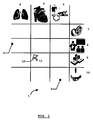
- a flat grid GUI 1 of a computer system for a collection of Software Items providing information on a medical product range.
- This collection may be available remotely at a manufacturer's Internet web-site, locally in a database supplied to a potential customer and recorded on a computer readable medium, or a combination of the two.
- the grid is defined by an intersecting arrangement of a horizontal set 2 and vertical set 3 of grid lines and has arranged about its periphery icons 4-10 as graphical Identifiers associated with each of the grid lines.
- the icons 4-6 of the vertical set 2 of grid lines indicate product type and the icons 7-10 of the horizontal set 3 of grid lines indicate information type. It can be seen from the Fig.
- a Software Item for example regarding the costs 8 for the heart monitoring systems 5, can also be intiutively selected in a single operation by selecting the appropriate intersection of the associated grid lines, that is to say node 11.
- the user may conveniently make a selection by dragging a cursor 12 to an area of the computer screen defined by a desired grid node using a known user interface such as computer keyboard cursor keys, a touch screen or a computer mouse and then confirming a selection, by for example clicking a mouse button or pressing "ENTER" on the computer keyboard.
- a known user interface such as computer keyboard cursor keys, a touch screen or a computer mouse
- the GUI has associated with this node (and indeed every node) a link which, in the case of Internet accessible information, is processable by the user's web browser program, such as the commercially available NetscapeTM Navigator or MicrosoftTM Explorer, to locate the selected Software Item and present its information for the user.
- the GUI may be adapted to permit multiple node selections so that groups of Software Items may be located and the information displayed to a user.
- multiple node combinations may also have associated with them a unique link in the manner of the single nodes discussed above. Selection of all grid nodes down a column or along a row may be facilitated by selecting the appropriate icon 4,5 or 6 and 7,8,9 or 10 respectively.
- each Software Item associated with each node of the row or column may be then displayed at once.
- a new piece of information corresponding to a Software Item identified by a link associated with the particular combination of selected nodes may be displayed.
- the underlying link may be an indirect link to a Software Item, in that selection of a grid node presents the user with a second tier selection such as a further GUI as described above for Fig. 1 or below for Fig. 2 containing appropriate iconised Identifiers or even a scroll menu.
- FIG. 2 an alternative computer GUI 12 is shown which may be substituted for that of Fig. 1 and which is, for illustrative purposes, adapted to provide user access to the same Software Items and in the same manner as described with respect to Fig. 1.
- the grid 13 is here arranged to represent a globe with grid lines associated with product type represented by lines of longitude 14 and grid lines associated with information type represented by lines of latitude 15.
- Textual labels 16-22 are provided as Identifiers which here indicate that a user has access to Software Items concerning animated presentations ("PRESENTATION” 16); training requirements ("TRAINING” 17); costs (“COSTS” 18) and service/maintenance provisions ("TECH SUPPORT” 19) for the products ventilators/anaesthesia machines (“LIFE SUPPORT” 20); heart monitors ("ECG” 21) and home care systems (“HOME CARE” 22).
- the arrangement of the Identifiers 16-22 leads a user to intuitively select an intersection of two grid lines in order to access a Software Item related to the combination of Identifiers made by the intersecting lines, for example the selection of the node 23 provides user access to cost information for heart monitors through a link processable by an underlying program.
- Figure 1 may be exchanged with the point nodes 23 of Figure 2 simply by shifting the visual link between Identifier and grid line (as shown by the broken line 20' of Figure 2).
- FIG. 3 provides an overview of the operational steps implemented on the computer system when running the software code.
- a GUI 1 or 12 is generated on a computer display (step 24) as described above with respect to Figs. 1 or 2 and mouse activity of a user is monitored (step 25).
- movements of the mouse are translated to related movements of a cursor on the display and mouse button activity is continuously monitored for a user activation or "click" indicating a user selection of a grid node of the GUI 1,12.
- the location of the cursor on the screen is identified and compared with the locations of the grid nodes. If the cursor lies within a grid node (e.g. node 11 of Fig. 1) or within a predetermined number of pixels of a node (e.g. node 23 of Fig. 2) then an identification of a selected grid node is made (step 26).
- a grid node e.g. node 11 of Fig. 1
- a predetermined number of pixels of a node e.g. node 23 of Fig. 2
- the identification of a node is reported to the user (step 27) such as by highlighting the area of the display corresponding to the identified node.
- This step 27 may be refined to alternately apply and remove the highlighting in correspondance with consecutive selections of the same node.
- it may be useful to record and store identified grid nodes (step 28) for subsequent retrieval (step 29) and reporting (step 27). This serves as a reminder of nodes already 'visited' by the user. This may be particularly usefully employed between one user session and the next session.
- step 30 If detection (step 30) of a depression of a designated computer keyboard key, such as the "SHIFT" key, is made during the click then the steps of monitoring 25, of identifying 26 and of reporting 27 are repeated until either all of the nodes are selected (step 31) or the SHIFT key is released (step 30).
- Links to Software Items are identified and retrieved (step 32) for all selected nodes and/or combinations using a lookup table accessible to the computer (e.g. stored within the internal memory of a computer).
- a lookup table could comprise an index of hypertext links, one for each node or group of nodes, or could comprise an index of pointers, each one to a different data field of a database record, and each identifiable by a different associated node.
- the retrieved links are then processed within the computer to locate the Software Item and access the information contents of that item (step 33) for subsequent display or other presentation (if in audio format for example) of the information (step 34) to the user.
- FIG. 4 a globate GUI 35 is shown for use in selecting program code Software Information in a particular example of equipment user training.
- Each grid-line of a first set of grid-lines has associated with it an Identifier 36-39 indicating a different training area.
- a second set of grid-lines has associated with each member line an Identifier 10-43 indicating a different stage of training.
- the underlying program code which generates and controls the GUI will, in common with that shown in Fig. 3, include the steps of retrieving 32 and processing 33 a link to a Software Item which is associated with the selected node 44.
- the Software Item is a piece of program coding so that the information presentation step 34 of Fig. 3 will be replaced by a step of running the relevant piece of program coding which modifies the computer system operating the GUI 35 to run a selected training program such as is common to computer based training.
Landscapes
- Engineering & Computer Science (AREA)
- General Engineering & Computer Science (AREA)
- Theoretical Computer Science (AREA)
- Human Computer Interaction (AREA)
- Physics & Mathematics (AREA)
- General Physics & Mathematics (AREA)
- User Interface Of Digital Computer (AREA)
- Stored Programmes (AREA)
Applications Claiming Priority (2)
| Application Number | Priority Date | Filing Date | Title |
|---|---|---|---|
| SE9904380 | 1999-12-02 | ||
| SE9904380A SE9904380D0 (sv) | 1999-12-02 | 1999-12-02 | Method and apparatus for selecting a software item using a graphical user interface |
Publications (1)
| Publication Number | Publication Date |
|---|---|
| EP1107100A1 true EP1107100A1 (de) | 2001-06-13 |
Family
ID=20417948
Family Applications (1)
| Application Number | Title | Priority Date | Filing Date |
|---|---|---|---|
| EP00119938A Withdrawn EP1107100A1 (de) | 1999-12-02 | 2000-09-13 | Verfahren und Vorrichtung zur Auswahl von Software mittels einer graphischen Benutzerschnittstelle |
Country Status (3)
| Country | Link |
|---|---|
| EP (1) | EP1107100A1 (de) |
| JP (1) | JP2001202171A (de) |
| SE (1) | SE9904380D0 (de) |
Cited By (5)
| Publication number | Priority date | Publication date | Assignee | Title |
|---|---|---|---|---|
| US7194698B2 (en) | 1999-11-15 | 2007-03-20 | Elliot A. Gottfurcht | Method to advertise and search on television for web content using a simplified interface |
| US7441196B2 (en) | 1999-11-15 | 2008-10-21 | Elliot Gottfurcht | Apparatus and method of manipulating a region on a wireless device screen for viewing, zooming and scrolling internet content |
| WO2010028461A1 (fr) * | 2008-08-22 | 2010-03-18 | Turan Cicecki | Sphere numerique reliee a son navigateur faisant office de bureau en 3 dimensions et de navigateur internet. |
| US8452653B1 (en) | 2000-03-15 | 2013-05-28 | Personal Data Network Corporation | Method for providing information and recommendations based on user activity |
| US11360652B2 (en) | 2013-10-22 | 2022-06-14 | Nokia Technologies Oy | Apparatus and method for providing for receipt of indirect touch input to a touch screen display |
Citations (4)
| Publication number | Priority date | Publication date | Assignee | Title |
|---|---|---|---|---|
| GB2301758A (en) * | 1995-06-03 | 1996-12-11 | Ibm | Icon driven data processing system |
| US5731844A (en) * | 1994-05-12 | 1998-03-24 | Microsoft Corporation | Television scheduling system for displaying a grid representing scheduled layout and selecting a programming parameter for display or recording |
| WO1999030223A1 (en) * | 1997-11-25 | 1999-06-17 | Essen-Möller Consulting Ab | A method and an interface for providing information |
| WO2000004440A1 (en) * | 1998-07-13 | 2000-01-27 | Koninklijke Philips Electronics N.V. | Virtual 3d object control |
-
1999
- 1999-12-02 SE SE9904380A patent/SE9904380D0/xx unknown
-
2000
- 2000-09-13 EP EP00119938A patent/EP1107100A1/de not_active Withdrawn
- 2000-11-29 JP JP2000363630A patent/JP2001202171A/ja active Pending
Patent Citations (4)
| Publication number | Priority date | Publication date | Assignee | Title |
|---|---|---|---|---|
| US5731844A (en) * | 1994-05-12 | 1998-03-24 | Microsoft Corporation | Television scheduling system for displaying a grid representing scheduled layout and selecting a programming parameter for display or recording |
| GB2301758A (en) * | 1995-06-03 | 1996-12-11 | Ibm | Icon driven data processing system |
| WO1999030223A1 (en) * | 1997-11-25 | 1999-06-17 | Essen-Möller Consulting Ab | A method and an interface for providing information |
| WO2000004440A1 (en) * | 1998-07-13 | 2000-01-27 | Koninklijke Philips Electronics N.V. | Virtual 3d object control |
Cited By (5)
| Publication number | Priority date | Publication date | Assignee | Title |
|---|---|---|---|---|
| US7194698B2 (en) | 1999-11-15 | 2007-03-20 | Elliot A. Gottfurcht | Method to advertise and search on television for web content using a simplified interface |
| US7441196B2 (en) | 1999-11-15 | 2008-10-21 | Elliot Gottfurcht | Apparatus and method of manipulating a region on a wireless device screen for viewing, zooming and scrolling internet content |
| US8452653B1 (en) | 2000-03-15 | 2013-05-28 | Personal Data Network Corporation | Method for providing information and recommendations based on user activity |
| WO2010028461A1 (fr) * | 2008-08-22 | 2010-03-18 | Turan Cicecki | Sphere numerique reliee a son navigateur faisant office de bureau en 3 dimensions et de navigateur internet. |
| US11360652B2 (en) | 2013-10-22 | 2022-06-14 | Nokia Technologies Oy | Apparatus and method for providing for receipt of indirect touch input to a touch screen display |
Also Published As
| Publication number | Publication date |
|---|---|
| SE9904380D0 (sv) | 1999-12-02 |
| JP2001202171A (ja) | 2001-07-27 |
Similar Documents
| Publication | Publication Date | Title |
|---|---|---|
| US5799318A (en) | Method and apparatus for collecting and displaying information from diverse computer resources | |
| JP4006036B2 (ja) | グラフィカル・ユーザ・インタフェースに表示される限定機能へのビジュアル・アクセス | |
| CA2736493C (en) | Displaying menu for accessing hierarchial content data including caching multiple menu states | |
| EP0793185B1 (de) | Verfahren und Gerät zur Planung klinischer Bestellungen in einem medizinischen Informationssystem | |
| US7810045B2 (en) | Configurable user interface system for processing patient medical data | |
| US20020080187A1 (en) | Enhanced method and system for category selection | |
| US20090216341A1 (en) | Method and System for Providing a User Interface | |
| EP0495015A1 (de) | Maske zur bearbeitung einer oberfläche und lasergerät für augenchirurgie oder zur herstellung einer optischen linse | |
| EP0592046A2 (de) | Ein Computer-System und Verfahren zum interaktiven Verwalten eines verteilten Datenbanksystems | |
| US20080262870A1 (en) | Computerized Treatment Order and Associated Alert Processing System | |
| US20120159359A1 (en) | System and method for generating graphical dashboards with drill down navigation | |
| GB2407177A (en) | Asset management system in which user places icons on a floor plan | |
| US5897630A (en) | System and method for efficient problem determination in an information handling system | |
| US8127245B2 (en) | Multi-dimensional systems and controls | |
| US6718341B1 (en) | Store employee locator system | |
| EP2893465A1 (de) | Computerinstallation zur verwaltung eines dateisatzes, verfahren, programm und damit assoziiertes computermedium | |
| EP1107100A1 (de) | Verfahren und Vorrichtung zur Auswahl von Software mittels einer graphischen Benutzerschnittstelle | |
| US12001652B2 (en) | System and method for analysis and visualization of incident data | |
| EP0558223A1 (de) | Fensterverwaltungssystem in einem Computerterminal | |
| US20020175940A1 (en) | Data cylinder for managing ad-hoc data sets | |
| JP3712749B2 (ja) | 情報処理装置におけるウィンドウ表示処理方式 | |
| JPH03504544A (ja) | データ処理装置 | |
| JP3644166B2 (ja) | 電子掲示システムおよび電子掲示方法 | |
| US20040066413A1 (en) | Navigation system for data structures | |
| JP2001142895A (ja) | 分散型制御システム |
Legal Events
| Date | Code | Title | Description |
|---|---|---|---|
| PUAI | Public reference made under article 153(3) epc to a published international application that has entered the european phase |
Free format text: ORIGINAL CODE: 0009012 |
|
| AK | Designated contracting states |
Kind code of ref document: A1 Designated state(s): DE FR |
|
| AX | Request for extension of the european patent |
Free format text: AL;LT;LV;MK;RO;SI |
|
| 17P | Request for examination filed |
Effective date: 20010919 |
|
| AKX | Designation fees paid |
Free format text: DE FR |
|
| RAP1 | Party data changed (applicant data changed or rights of an application transferred) |
Owner name: MAQUET CRITICAL CARE AB |
|
| STAA | Information on the status of an ep patent application or granted ep patent |
Free format text: STATUS: THE APPLICATION IS DEEMED TO BE WITHDRAWN |
|
| 18D | Application deemed to be withdrawn |
Effective date: 20051215 |