EP1111543A2 - Verfahren und Gerät zum Malen von Objektgruppen - Google Patents
Verfahren und Gerät zum Malen von Objektgruppen Download PDFInfo
- Publication number
- EP1111543A2 EP1111543A2 EP00311343A EP00311343A EP1111543A2 EP 1111543 A2 EP1111543 A2 EP 1111543A2 EP 00311343 A EP00311343 A EP 00311343A EP 00311343 A EP00311343 A EP 00311343A EP 1111543 A2 EP1111543 A2 EP 1111543A2
- Authority
- EP
- European Patent Office
- Prior art keywords
- attributes
- electronic document
- artwork
- editing
- stroke
- Prior art date
- Legal status (The legal status is an assumption and is not a legal conclusion. Google has not performed a legal analysis and makes no representation as to the accuracy of the status listed.)
- Withdrawn
Links
Images



Classifications
-
- G—PHYSICS
- G06—COMPUTING OR CALCULATING; COUNTING
- G06T—IMAGE DATA PROCESSING OR GENERATION, IN GENERAL
- G06T11/00—Two-dimensional [2D] image generation
- G06T11/10—Texturing; Colouring; Generation of textures or colours
Definitions
- the present invention relates to computer graphics.
- Computer programs can be used to produce graphical images that can be rendered and displayed on an output device.
- Two such classes of programs are illustration applications and animation applications.
- An illustration application can be used to generate original graphics or combine original and existing graphics to produce a graphics image (an electronic document or illustration) that can be displayed on a static output device.
- An animation application can be used to produce a composition that includes graphics that can be animated using one or more effects to produce a result that can be played on a dynamic output device.
- Illustrations and compositions produced using conventional illustration and animation applications include simple objects that are combined to form a final illustration or composition.
- a simple object can be a path, text, or other vector art object or an image art object and typically includes several properties. Properties can include paint effects such as strokes and fills for paths, vector effects such as zig-zag and scale, color blending effects such as transparency and darkening, and image effects such as fade, blur, and watercolor.
- a stroke is a representation that follows the outline of a path. Strokes can have attributes such as color, width and dash pattern. For example, in the Adobe Illustrator® program, available from Adobe Systems Incorporated of San Jose, California, a stroke can be a solid color, a pattern or a brush and can include attributes such as weight, cap, join and dashed.
- a fill is an instruction for painting the interior of a path with a solid or variegated color, such as a repeating pattern, a color gradation or a randomized arrangement. A fill might be a solid color, a gradient, a gradient mesh or a pattern. In conventional illustration and animation programs, every simple object can have a single stroke and a single fill.
- objects When objects are combined ⁇ into a layer, for example ⁇ the rendered appearance of the objects can be affected by properties attached to the combination. Otherwise, objects are typically rendered for display in accordance with their individual properties.
- the invention provides a computer-implemented application for applying a style to an aggregation.
- a style includes a set of operations to be applied to artwork including a set of pre-paint operations followed by a set of paint operations as modified by the pre-paint operations.
- the method includes receiving an aggregation, the aggregation comprising one or more simple objects.
- the simple objects include at least a first object having an object style.
- the object style includes a set of pre-paint operations followed by a set of paint operations.
- An aggregation style is received and applied to the aggregation including applying at least one of the operations of the aggregation style to the first object before applying all operations of the object style to the first object.
- the invention provides a method for displaying style information including displaying artwork comprising a hierarchy of one or more aggregations, receiving a user input where the input identifying a leaf object in the artwork.
- the leaf object is a simple object containing no other objects, having one or more aggregation ancestors in the hierarchy and having properties.
- Each of the aggregation ancestors has an ancestor style.
- the method includes displaying a set of properties of the leaf object and the styles of the aggregation ancestors of the leaf object.
- the invention provides a method for displaying property information about a selected simple artwork object and includes displaying a detailed representation of style properties of the simple object while displaying a succinct representation of styles of artwork aggregations that affect the appearance of the simple object.
- the invention provides a method for editing an electronic document that includes a simple artwork object and includes associating with one artwork object two or more stroke attributes.
- the invention provides a method for editing an electronic document that includes a simple artwork object and includes associating with one artwork object two or more fill attributes.
- the invention provides a method for editing an electronic document that includes an artwork object and includes associating with one artwork object two or more stroke attributes and two or more fill attributes.
- the invention provides a method for editing an electronic document that includes an artwork object.
- the artwork object has a first attribute and one or more other attributes.
- the first attribute is either a fill attribute or a stroke attribute.
- the other attributes are either fill or stroke attributes.
- the method includes receiving a user input selecting for the first attribute an ordinal position among the other attributes where the ordinal position determines when the first attribute is applied in relation to the other attributes when the artwork object is rendered.
- the invention provides a method of editing an electronic document and includes identifying one or more objects to be included in an aggregation, one or more of the objects including an associated object style and defining an aggregation style including one or more operations to be applied to the aggregation to produce a renderable representation of the aggregation including identifying a time to apply the object style to an object in the aggregation.
- the invention provides a method for editing an electronic document that includes an artwork object includes associating a named style with the artwork object, the named style including an effect and rendering the artwork object with the named style.
- the invention provides a method for defining a named style for artwork in a computer graphics system where the method includes including an effect in the named style.
- the invention provides a method for editing an electronic document.
- the method includes applying a vector operation to a non-vector artwork object to produce a renderable representation of the non-vector artwork object without modifying the underlying non-vector artwork object.
- the invention provides a method for editing digital graphics in response to user input and includes receiving a user selection applying a style change to an aggregation, the aggregation being an aggregation of two or more other artwork objects and automatically determining whether to apply the style change to the aggregation as an aggregate or to the other artwork objects within the aggregation.
- the invention provides a method for editing digital graphics in response to user input and includes receiving a user selection of a first artwork object having a first shape and a first paint style and a second artwork object having a second shape and a second paint style, receiving a user request to generate a blend between the first object and the second object, generating intermediate objects having shapes changing from the first shape to the second shape and having paint styles changing from the first paint style to the second paint style.
- the intermediate paint styles is constructed of two layers. The first layer has the first paint style and the second layer has the second paint style. The top one of the two layers has a transparency. The blend effect is created by varying the transparency of the top layer from opaque to transparent.
- the invention provides a method for editing an electronic document and includes applying a recipe of vector effects to an original path in an electronic document and displaying a first modified path, being the original path as modified by the recipe, rather than the original path, when rendering the electronic document.
- the invention provides a method for editing an electronic document and includes automatically reapplying multiple vector effects to a path when a user changes the path.
- the invention provides a method for editing an electronic document and includes automatically reapplying multiple vector effects to a path when a user changes any parameter of any of the multiple vector effects.
- the invention provides a method for editing an electronic document and includes automatically reapplying multiple vector effects to a path when a user changes an order of application of the multiple vector effects.
- the invention provides a method for editing an electronic document and includes attaching an effect to a first aggregation.
- An aggregation is an aggregate of two or more other objects.
- the effect is an operation that can be applied to an object having a visual appearance defined by source data to change the visual appearance without changing the source data.
- the invention provides a method for processing digital graphics and includes placing a content proxy as an operation in an ordered set of operations to be applied to an aggregation where an aggregation is an aggregate of two or more other objects and performing the operations in order on the aggregation including applying the content proxy operation at a time indicated by the order.
- the invention provides a system operable to have multiple operations attached to a graphic object and includes a method for creating an operation.
- the method includes steps of including in a definition of the operation a preferred position of the operation in an ordered set of multiple operations.
- the invention provides a method for inserting an operation into a set of attached operations and includes receiving an input identifying a first operation to be added to an ordered set of multiple operations and placing the first operation in a position in the order according to a preferred position defined for the first operation.
- FIG. 1 is a block diagram of a computer system for creating illustrations in accordance with one aspect of the present invention.
- FIGs. 2A and 2B are a data structure for representing an object including its properties and an applied style in accordance with one aspect of the present invention.
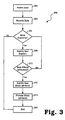
- FIG. 3 is a flow diagram for a process for producing a renderable representation of an object.
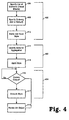
- FIG. 4 is a flow diagram showing a process for generating an image that includes an aggregation where the process includes defining a style for the aggregation, grouping elements in the aggregation and rendering a representation of the aggregation.
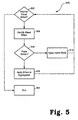
- FIG. 5 is a flow diagram for a method of executing an aggregation style.
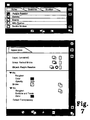
- FIG. 6 is a diagram showing a user interface presented for an object style.
- FIG. 7 is a diagram showing alternate view of a user interface presented for an object style.
- FIG. 1 shows a computing system 100 for generating graphics for display or output on a conventional output device 102.
- the computing system 100 includes one or more computer program applications 104 stored in a memory 106 which can be executed by a general purpose processor (CPU) 108 to perform the methods described herein.
- an illustration application 104a is provided that can be invoked by a user to generate an electronic document (illustration) that can be displayed, printed or otherwise processed by output device 102.
- Illustration application 104a includes a user interface that allows a user to manipulate one or more tools 110 to generate, manipulate, display and output illustrations.
- illustration application 104a includes plural tools 110 for creating original content or retrieving and manipulating content previously produced.
- illustration application 104a includes plural object generation tools including a text object tool 112a, a drawing tool 112b and graphics tool 112c. Each object generation tool can be manipulated to produce or retrieve an object for inclusion in an illustration.
- illustration application 104a can include an aggregation tool 114 for use in combining elements into an aggregation for inclusion in an illustration. The operation of the aggregation tool 114 is described in greater detail below in reference to FIG. 4.
- Each object has properties that can be manipulated through a user interface. As shown in FIG. 2a, each object 202 has one or more properties. Examples of properties include URL 204, vector property 205, note property 206, image property 207 and style 210.
- URL 204 can define a uniform resource locator (URL) associated with the object
- Vector property 205 defines a path associated with the object.
- a textual note can be attached to the object using note property 206. If the object is an image, then the image data (e.g. RGB image data and alpha data) can be attached to the object as part of the image property 207 definition.
- Each property can have one or more attributes 205A (e.g., overprint attribute attached to the vector property 205).
- a user can define and attach a style 210 to object 202.
- a style is a recipe that defines one or more operations to be performed on an object.
- a style receives as an input a representation of an object (and its associated properties) and produces as an output a representation of the object, which can be rendered to produce an appearance on an output device.
- the representation is distinct from the object. That is, producing and possibly further manipulating the representation does not change the properties of the underlying object.
- the style is "live", meaning that after an object is edited, the style can be executed again to produce a new representation of the object.
- a recipe 214 includes one or more elements 212. Elements can be selected from various effects including pre-paint effects, paint effects and post-paint effects.
- the elements in recipe 214 are processed in accordance with an ordering. In one implementation, the elements are processed in sequential order where each element in the recipe receives as an input the output produced by its predecessor element in the order. More particularly, when the style is executed, the first element in the list receives as an input an object including its various properties (e.g., object 202) and produces as an output a representation of the object. Because the style is live, a copy of the original object is provided as an input when processing the first element in recipe 214 so as to maintain the integrity of the original object 202.
- the second element in the recipe 214 receives as an input the resultant representation of the object produced when executing the first element of the recipe and produces as an output a representation of the object.
- Element 212 can be of various types.
- element 212 can be an effect 212A, a fill attribute element 212B, and a stroke attribute element 212C.
- Each element defines a visual effect.
- a visual effect is any operation that changes the visual appearance of an object without changing its underlying source data and that can be described in such a way that there is a recipe for applying it to any object of the appropriate kind, no matter what the shape or location of the object. This includes, but is not limited to, paint effects such as strokes and fills, vector effects such as zig-zag or scale operations, color blending effects and image effects.
- Fill attribute element 212B is an element that can be used to define a fill operation. Fill attribute 212B can itself include one or more effect attributes.
- Stroke attribute element 212C can be used to define a stroke operation. Stroke attribute 212C can itself include one or more effect attributes.
- the fill and stroke attribute elements have been separately identified here because they are subject to special treatment as described below.
- Recipe 214 can include multiple fill attribute elements and stroke attribute elements.
- the recipe 214 can include a sequence 216 of consecutive fill-or-stroke attribute elements.
- a "fill-or-stroke" attribute element is either a fill attribute element or a stroke attribute element.
- the sequence 216 can be treated as a singular element for processing purposes. More specifically, when executing a sequence 216 of fill-or-stroke attribute elements, each element receives the same input representation of an object produced as a result of the execution of the immediately preceding element in recipe 214) and produces a resultant object. The resultant objects produced from executing each element in the sequence are aggregated to produce a representation that is passed as input to the next element in the recipe or that is the output of the recipe.
- a user can assign any number of fill-or-stroke attributes elements to a style.
- the final appearance of the object depends not only on the fills specified, but also on the order in which the user places them in an associated sequence 216 (e.g., the order of fill or stoke attribute elements define a paint order).
- the recipe can include plural elements arranged and processed in series or parallel as described above in order to meet a particular implementation objective.
- FIG. 2a and 3 show, a process 300 for producing a renderable representation of an object begins by receiving an object (step 302) and its style (step 303). A check is made to determine if any (other) elements of the style (recipe) are to be processed (step 304). If no more elements in the recipe remain to be processed at 304, the process ends (step 306), having produced a renderable representation of the object. The renderable representation of the object can be rendered by a render engine and displayed as appropriate. Otherwise, a next element is identified and processed (step 308).
- Each element can include one or more attributes (effects).
- a check is made to determine if any other attributes associated with the current element are to be processed (step 310). If no more attributes remain to be processed the process continues with a next element in the recipe (step 304). Otherwise, a next attribute is identified (step 312) and processed (step 314).
- Elements can be placed in a recipe in any order. However, some effects can be identified as having a natural place in an order, and this identification can be used to assist a user building a recipe. For example, nearly all raster effects and color or transparency-modifying effects should be applied to an object after the object has been painted, because the color of the object is necessary as an input. Other effects, such as vector effects, vary as to when application will produce the results desired. As will be described, the ordering of elements and attributes in a recipe is inferred by the program from the types of effects proposed. More specifically, elements and attributes can include a default ordering. While a user has tremendous control over element order, many users prefer not to think about this when adding a visual effect to a recipe. However, if the results produced are not satisfactory, then the flexibility to change the ordering of the effects is desirable.
- each element that can be included in a recipe can be automatically placed into the recipe in accordance with a default characterization of the element.
- each element is characterized as a paint effect, a pre-paint effect, or a post-paint effect.
- Each category can optionally be further refined.
- paint effects are classified as either fill effects and stokes effects, and an order is specified for each of these types of paint property attributes.
- Post-paint effects are classified as pre-rasterization effects, path-to-raster conversion effects, post-rasterization effects and transparency effects. A default ordering among these classes is defined.
- Pre-paint effects are classified as order sensitive or order insensitive.
- the effect is automatically added at an appropriate location in the recipe according to the classification of the effect.
- the effect is classified, or position information is obtained from the effect, and the effect is then placed into the recipe at an appropriate location.
- illustration application 104A includes an aggregation tool 114.
- a user can use the aggregation tool 114 to produce one or more aggregations.
- An aggregation includes multiple items, such as simple objects, groups of objects, layers, or other aggregations.
- An aggregation can be named and can have its own style (an aggregation style or recipe).
- An optional element of an aggregation recipe is a placeholder element.
- a placeholder element identifies a time at which the style for an underlying item of the aggregation should be executed.
- FIG. 4 shows a process for creating an aggregation and applying an aggregation style to the aggregation to produce a representation of the aggregation.
- the process includes three parts: a creation phase 400, a specification phase 402 and a render phase 404.
- a user controls the creation phase 400 and specifies one or more elements (e.g., effects) for the aggregation recipe (step 406).
- the specification of elements can include the designation of one or more placeholders for specifying when the style of an individual item of the aggregation is to be applied during the style execution process.
- the operation and designation of placeholders are described in greater detail below.
- an ordering for the application of the elements is defined (step 408). The ordering can be specified by the user, or can be inferred by the system from the type of effect using a default characterization scheme, as described above.
- Some elements behave differently depending on whether they are applied to an aggregation as a whole or to its items individually (e.g., rotation).
- a predefined convention is implemented to distinguish when effects should be applied to the aggregation or the individual item.
- the following convention is applied: if the effect can make a change in transparency (such as opacity or blending mode) or is identified as a "live" effect, then the effect will be applied to the aggregation.
- a live effect defines an operation that receives as an input a representation of an object and produces as an output a new representation of the object without modifying the original properties of the object. Examples of live effects include drop-shadow and distortion.
- live effects are similar to conventional filters in that a conventional filter defines an operation to be applied to an object producing as an output a renderable representation of the object.
- the application of a filter to an object destroys the original object.
- the application of a live effect to an object allows a user to still edit the underlying original object.
- a live effect can be implemented by keeping a copy of the original object along with the renderable representation produced when applying a live effect to the original object.
- the element does not affect transparency or define a live effect, the element is applied to the individual items.
- the element changes fill or stroke attributes where no aggregation fill or strokes have been defined, then the element is applied to the individual items.
- the convention can be used whenever a user selects an aggregation and applies a visual effect change or a named set of visual effect changes (a style).
- each document includes a list of any named styles.
- the named styles are saved to disk any time the document is itself saved.
- Each named style contains information about one or more visual effects that can be applied to art objects, including fill and stroke attributes and vector and stroke effects.
- the information included within a named style includes the name of the filter, a reference to the plug-in, and a parameter list for that filter.
- the second phase 402 of the process includes applying an aggregation style to the aggregation. More specifically, one or more items are identified as included in the aggregation (step 412).
- the user attaches the style to the aggregation (step 414).
- the object or aggregation stores a reference to the named style. If the style is to be applied live, the object or aggregation subscribes itself as a listener to that named style.
- a style can be applied in a non-live fashion (e.g. as a filter).
- the final phase 404 includes executing the style and providing a visual output. More specifically, a check is made to determine whether the output needs updating (step 416). In one implementation, the output needs updating when a style is initially applied to an aggregation or changes are made to the style and when any changes are made to any item in an aggregation. Other conditions can prompt an update, for example, when one or more parameters associated with user preferences or the electronic document change. If the output needs updating, then the style is executed (step 417).
- the named style When a user redefines any properties (visual effects) of a named style through the user interface, such as the parameters for a specific vector or stoke effect, then the named style notifies any listeners that the style has changed. These listeners are the objects or the aggregations that contain a reference to the given named style. When an object or aggregation is notified that an associated named style has changed, the object or aggregation passes itself through the named style once again, which in turn generates new art that can be rendered and displayed.
- properties visual effects
- the process of rendering includes attaching to each simple object in an aggregation a flag and a subordinate object that is the result of applying a visual effect to the source object.
- the flag indicates whether the visual effect has been applied and the visual appearance art generated and saved since the last time the user edited the object
- appropriate flags can be set to indicate that items in the aggregation are invalid.
- the appearance art is valid (flag not set) then the appearance art is displayed rather than re-executing a style and generating new appearance art for a given aggregation. If the art is not valid, then the aggregation style is reapplied to the aggregation, the appearance art generated and marked as valid (set flag).
- the appearance art is also regenerated if any other operation is performed that would require it to be valid (e.g., other non-rendering operations, such as asking the object what its visual bounding box is).
- memory can be conserved by not storing the appearance art (the renderable representation produced as a result of the execution of a style), because it can be easily generated from the source art (e.g., an aggregation) and the specified visual effect (e.g., the recipe).
- the process of creating an aggregation style can include defining one or more placeholders.
- Each item in an aggregation can include a style.
- the aggregation style can include an election for designating at what point in processing (if any) the individual object properties should be applied.
- the placeholder can be undefined, such that the aggregation style overrides any individual item style (property definition). Alternatively, multiple placeholders can be specified and at each placeholder, the individual item style can be applied.
- a method 500 for executing an aggregation style to produce a renderable representation of the aggregation includes checking if another element (i.e., visual effect) in the aggregation recipe is specified (step 502). If none remain, the process ends (step 504). Otherwise, the next element (i.e., visual effect) is identified (step 506). The current element is checked to determine if it is a placeholder (step 508). If so, then the underlying style(s) associated with the item(s) in the aggregation is (are) applied (step 510). If the current element is not a placeholder, then the element (i.e., visual effect) is applied to the aggregation (either individually or in the aggregate depending on the visual effect) (step 512). Thereafter, the process continues at step 502.
- another element i.e., visual effect
- the process ends (step 504). Otherwise, the next element (i.e., visual effect) is identified (step 506).
- the current element is checked to determine if it
- each aggregation recipe includes a placeholder that is located in a default place in the sequence of elements in the aggregate recipe, either at the beginning of the aggregate recipe or the end.
- a priority indicator can be specified for each visual effect in an aggregation recipe or in a simple object style recipe. Depending on the priority level assigned to a visual effect, either the visual effect defined for the aggregation or the individual object definition can take precedence when applying an effect to an item.
- the strict ordering for processing visual effects described above is slightly modified. That is, rather than applying the visual effects in strict order, the effects to be applied to an object (simple object or aggregation) are classified (as described above) and applied based on the classification level. In one implementation, all pre-pait effects are applied to an object (whether specified at the aggregate or individual level) prior to any paint effects or post-paint effects. In one implementation, the pre-paint effects for the aggregation are applied, followed by the pre-paint effects for the individual items, the paint effects for the aggregation, then the paint effects for the individual items. Other orderings based on type of effect irrespective of hierarchical level can be made.
- the when generating a representation for a fill or stroke attribute all pre-paint operations defined for an aggregation and any individual items are applied before any paint effects. Thereafter, all paint effects for both the aggregation and the individual items are in turn applied before any post-painting effects (for either the aggregation or the individual item) are applied.
- the user interface can show the relationship of the various definitions.
- the user interface displays a floating palette window as shown in FIGs. 6 and 7.
- the details of the object's style are shown including the fill, stroke and transparency attributes of the paint property.
- the properties and attributes are shown in a list-like fashion. Above these properties, another list is provided that shows any parents (e.g., ancestors) of the selected object and any properties (properties, attributes, or styles) inherited from them. The two lists can be separated in the window.
- the ancestors are container objects that contain the selected object, directly or indirectly. Optionally, not all of the aggregate ancestors are shown, only those that affect the appearance of the object selected.
- each individual effect can be selected in the window and properties modified as desired.
- the program can automatically delete the previously generated subordinate objects (e.g., previously saved renderable representations of objects produced with the old recipe), apply the changed effects, save the new subordinate object representation, and display the results.
- previously generated subordinate objects e.g., previously saved renderable representations of objects produced with the old recipe
- the original art is displayed for editing (using the original art for the object).
- the original art is displayed highlighted, and the user can edit the art using the full set of editing tools (text tool 112A, drawing tool 1123 and graphics tool 12C of FIG.1) provided with the illustration application.
- each time an effect is applied to the original object a subordinate object that includes the result of the effect is produced.
- plural effects can be applied to the original object without having to reproduce the original object after the first effect is applied.
- individual effects can be applied to the original object and then the results produced by the individual effects can be combined to produce a desired result
- plural resultant objects can be temporarily stored prior to producing a final resultant object representation. Again, if memory space is limited, only the resultant representation can be stored in lieu of the intermediate representations.
- the effect receives as an input the output produced from the previous visual effect, if any, or the original object if the effect is the first visual effect in a recipe, and any saved parameters.
- the system invokes the effect on the received input, and produces as an output a representation of the object that is passed as an input to the next effect If no more effects are specified, then the final result is saved as a subordinate object and attached to the original art for the object.
- stroke or fill operations can be defined for objects that do not traditionally include these constructs.
- a stroke or fill can be defined for a group of objects and for image and mesh objects.
- a path can be automatically generated for the non-traditional objects and modified as appropriate. The generated path can be associated with the non-traditional object and can be automatically regenerated if the underlying image or mesh changes.
- the stroke or fill defined for the object (group) can be automatically changed if the user changes the stroke or fill attributes of the non-traditional object (image object or mesh).
- a user can exploit a paint style that includes multiple stroke or fill definitions. More specifically, when morphing between two objects having two different paint styles, a blended paint style for the intermediate objects can be produced as part of the morph.
- the intermediate object paint style includes two layers. The top layer is the fill style of one end object, and the second layer is the fill style for the other end object (in the morph). Varying the transparency of the top fill layer between fully opaque at one end (making the bottom layer invisible) and fully transparent at the other end (making the top layer completely invisible) can create a blended effect.
Landscapes
- Physics & Mathematics (AREA)
- General Physics & Mathematics (AREA)
- Engineering & Computer Science (AREA)
- Theoretical Computer Science (AREA)
- Processing Or Creating Images (AREA)
- Image Generation (AREA)
Applications Claiming Priority (4)
| Application Number | Priority Date | Filing Date | Title |
|---|---|---|---|
| US47025599A | 1999-12-22 | 1999-12-22 | |
| US470255 | 1999-12-22 | ||
| US56916000A | 2000-05-11 | 2000-05-11 | |
| US569160 | 2000-05-11 |
Publications (2)
| Publication Number | Publication Date |
|---|---|
| EP1111543A2 true EP1111543A2 (de) | 2001-06-27 |
| EP1111543A3 EP1111543A3 (de) | 2002-11-27 |
Family
ID=27043024
Family Applications (1)
| Application Number | Title | Priority Date | Filing Date |
|---|---|---|---|
| EP00311343A Withdrawn EP1111543A3 (de) | 1999-12-22 | 2000-12-18 | Verfahren und Gerät zum Malen von Objektgruppen |
Country Status (3)
| Country | Link |
|---|---|
| EP (1) | EP1111543A3 (de) |
| JP (1) | JP2001222721A (de) |
| CA (1) | CA2329323A1 (de) |
Cited By (10)
| Publication number | Priority date | Publication date | Assignee | Title |
|---|---|---|---|---|
| EP1643451A1 (de) * | 2004-09-30 | 2006-04-05 | Microsoft Corporation | Beibehaltung der vom Benutzer vorgegebenen Eigenschaften graphischer Objekte |
| US7348982B2 (en) | 2004-09-30 | 2008-03-25 | Microsoft Corporation | Method, system, and computer-readable medium for creating and laying out a graphic within an application program |
| US7379074B2 (en) | 2004-09-30 | 2008-05-27 | Microsoft Corporation | Semantically applying formatting to a presentation model |
| WO2009014595A1 (en) | 2007-07-20 | 2009-01-29 | Eastman Kodak Company | Method and system for converting a document |
| US7743325B2 (en) | 2005-03-15 | 2010-06-22 | Microsoft Corporation | Method and computer-readable medium for fitting text to shapes within a graphic |
| US7747944B2 (en) | 2005-06-30 | 2010-06-29 | Microsoft Corporation | Semantically applying style transformation to objects in a graphic |
| US7750924B2 (en) | 2005-03-15 | 2010-07-06 | Microsoft Corporation | Method and computer-readable medium for generating graphics having a finite number of dynamically sized and positioned shapes |
| US8438486B2 (en) | 2006-02-09 | 2013-05-07 | Microsoft Corporation | Automatically converting text to business graphics |
| US8799325B2 (en) | 2010-03-12 | 2014-08-05 | Microsoft Corporation | Reordering nodes in a hierarchical structure |
| WO2022099362A1 (en) * | 2020-11-10 | 2022-05-19 | Optrix Pty Ltd | Systems and methods for optimised rendering |
Families Citing this family (3)
| Publication number | Priority date | Publication date | Assignee | Title |
|---|---|---|---|---|
| US8464170B2 (en) * | 2005-09-09 | 2013-06-11 | Microsoft Corporation | 2D editing metaphor for 3D graphics |
| TW201115362A (en) | 2009-10-29 | 2011-05-01 | Ibm | System, method, and program for editing electronic document |
| FR3047597B1 (fr) * | 2016-01-04 | 2018-01-19 | Laoviland Experience | Procede de traitement graphique d'images |
Family Cites Families (4)
| Publication number | Priority date | Publication date | Assignee | Title |
|---|---|---|---|---|
| JPH02227781A (ja) * | 1989-02-28 | 1990-09-10 | Hitachi Ltd | 合成図形作成方法および装置 |
| US5404439A (en) * | 1992-04-15 | 1995-04-04 | Xerox Corporation | Time-space object containment for graphical user interface |
| WO1996013006A1 (en) * | 1994-10-20 | 1996-05-02 | Mark Alan Zimmer | Digital mark-making method |
| JPH08212362A (ja) * | 1995-02-06 | 1996-08-20 | Hitachi Ltd | 文字図形作成装置 |
-
2000
- 2000-12-18 EP EP00311343A patent/EP1111543A3/de not_active Withdrawn
- 2000-12-20 CA CA002329323A patent/CA2329323A1/en not_active Abandoned
- 2000-12-22 JP JP2000390878A patent/JP2001222721A/ja active Pending
Cited By (29)
| Publication number | Priority date | Publication date | Assignee | Title |
|---|---|---|---|---|
| AU2005203711B2 (en) * | 2004-09-30 | 2010-11-18 | Microsoft Technology Licensing, Llc | Maintaining graphical presentations based on user customizations |
| US9747710B2 (en) | 2004-09-30 | 2017-08-29 | Microsoft Technology Licensing, Llc | Method, system, and computer-readable medium for creating and laying out a graphic within an application program |
| US7379074B2 (en) | 2004-09-30 | 2008-05-27 | Microsoft Corporation | Semantically applying formatting to a presentation model |
| US10573038B2 (en) | 2004-09-30 | 2020-02-25 | Microsoft Technology Licensing, Llc | Editing the text of an arbitrary graphic via a hierarchical list |
| RU2389069C2 (ru) * | 2004-09-30 | 2010-05-10 | Майкрософт Корпорейшн | Поддержка графических представлений, основанная на пользовательских настройках |
| US10319125B2 (en) | 2004-09-30 | 2019-06-11 | Microsoft Technology Licensing, Llc | Method, system, and computer-readable medium for creating and laying out a graphic within an application program |
| US10297061B2 (en) | 2004-09-30 | 2019-05-21 | Microsoft Technology Licensing, Llc | Maintaining graphical presentations based on user customizations |
| EP1643451A1 (de) * | 2004-09-30 | 2006-04-05 | Microsoft Corporation | Beibehaltung der vom Benutzer vorgegebenen Eigenschaften graphischer Objekte |
| US7348982B2 (en) | 2004-09-30 | 2008-03-25 | Microsoft Corporation | Method, system, and computer-readable medium for creating and laying out a graphic within an application program |
| US9489359B2 (en) | 2004-09-30 | 2016-11-08 | Microsoft Technology Licensing, Llc | Editing the text of an arbitrary graphic via a hierarchical list |
| AU2005202720B2 (en) * | 2004-09-30 | 2011-02-24 | Microsoft Technology Licensing, Llc | Editing the text of an arbitrary graphic via a hierarchical list |
| US8134575B2 (en) | 2004-09-30 | 2012-03-13 | Microsoft Corporation | Maintaining graphical presentations based on user customizations |
| US8269790B2 (en) | 2004-09-30 | 2012-09-18 | Microsoft Corporation | Maintaining graphical presentations based on user customizations |
| US9619910B2 (en) | 2004-09-30 | 2017-04-11 | Microsoft Technology Licensing, Llc | Maintaining graphical presentations based on user customizations |
| US8510657B2 (en) | 2004-09-30 | 2013-08-13 | Microsoft Corporation | Editing the text of an arbitrary graphic via a hierarchical list |
| TWI410887B (zh) * | 2004-09-30 | 2013-10-01 | 微軟公司 | 基於使用者客製化來維護各圖形表示的方法及系統 |
| RU2524473C2 (ru) * | 2004-09-30 | 2014-07-27 | Майкрософт Корпорейшн | Поддержка графических представлений, основанная на пользовательских настройках |
| US8791955B2 (en) | 2004-09-30 | 2014-07-29 | Microsoft Corporation | Method, system, and computer-readable medium for creating and laying out a graphic within an application program |
| US7750924B2 (en) | 2005-03-15 | 2010-07-06 | Microsoft Corporation | Method and computer-readable medium for generating graphics having a finite number of dynamically sized and positioned shapes |
| US7743325B2 (en) | 2005-03-15 | 2010-06-22 | Microsoft Corporation | Method and computer-readable medium for fitting text to shapes within a graphic |
| US7747944B2 (en) | 2005-06-30 | 2010-06-29 | Microsoft Corporation | Semantically applying style transformation to objects in a graphic |
| US9529786B2 (en) | 2006-02-09 | 2016-12-27 | Microsoft Technology Licensing, Llc | Automatically converting text to business graphics |
| US8438486B2 (en) | 2006-02-09 | 2013-05-07 | Microsoft Corporation | Automatically converting text to business graphics |
| US10956660B2 (en) | 2006-02-09 | 2021-03-23 | Microsoft Technology Licensing, Llc | Automatically converting text to business graphics |
| US7990574B2 (en) | 2007-07-20 | 2011-08-02 | Eastman Kodak Company | Method and system for converting a document |
| WO2009014595A1 (en) | 2007-07-20 | 2009-01-29 | Eastman Kodak Company | Method and system for converting a document |
| US8799325B2 (en) | 2010-03-12 | 2014-08-05 | Microsoft Corporation | Reordering nodes in a hierarchical structure |
| US9514105B2 (en) | 2010-03-12 | 2016-12-06 | Microsoft Technology Licensing, Llc | Reordering nodes in a hierarchical structure |
| WO2022099362A1 (en) * | 2020-11-10 | 2022-05-19 | Optrix Pty Ltd | Systems and methods for optimised rendering |
Also Published As
| Publication number | Publication date |
|---|---|
| JP2001222721A (ja) | 2001-08-17 |
| EP1111543A3 (de) | 2002-11-27 |
| CA2329323A1 (en) | 2001-06-22 |
Similar Documents
| Publication | Publication Date | Title |
|---|---|---|
| US7995071B2 (en) | Method and apparatus for painting group of objects | |
| US6870535B2 (en) | Font architecture and creation tool for producing richer text | |
| US6986107B2 (en) | Dynamic generation of visual style variants for a graphical user interface | |
| US6504545B1 (en) | Animated font characters | |
| US6057858A (en) | Multiple media fonts | |
| JP7455161B2 (ja) | 線画自動着色プログラム、線画自動着色装置及びグラフィカルユーザインターフェース用プログラム | |
| Cantrell et al. | Digital drawing for landscape architecture: contemporary techniques and tools for digital representation in site design | |
| US6310621B1 (en) | Extended support for numerical controls | |
| CN101375277B (zh) | 电子文档内所选对象的半透明突出显示 | |
| US20010020956A1 (en) | Graphic image design | |
| CN109035381B (zh) | 基于ue4平台的卡通画头发渲染方法、存储介质 | |
| EP0680018B1 (de) | Rechnerunterstützte Farbauswahl und farbgebendes System | |
| US20010034668A1 (en) | Virtual picture hanging via the internet | |
| JPH1097648A (ja) | 3dオブジェクトディスプレイの更新方法、3dオブジェクトの視覚特性を修正するためのコンピュータ実施システム、ディスプレイ上に3dオブジェクトを再びレンダリングする方法、及び製品 | |
| CA2329323A1 (en) | Method and apparatus for painting groups of objects | |
| CN112257406A (zh) | 一种基于web前端的内容封面生成器及方法 | |
| US6580823B1 (en) | Image maps | |
| JP4127140B2 (ja) | 文書処理装置及び文書処理プログラム、並びに文書処理装置の制御方法 | |
| US20090031213A1 (en) | System and method for website colorization | |
| JPH096573A (ja) | イメージ画配色調整方法及びシステム | |
| Gerr | The Comic Artist’s Tools Suite: Centralized and Intuitive Non-Photorealistic Computer Graphics Renderings | |
| KR20000052433A (ko) | 2차원 형상 그리기 시스템 | |
| AU728961B2 (en) | A font architecture and creation tool for producing richer text | |
| AU745947B2 (en) | Color advisor | |
| AU730473B2 (en) | Animated font characters |
Legal Events
| Date | Code | Title | Description |
|---|---|---|---|
| PUAI | Public reference made under article 153(3) epc to a published international application that has entered the european phase |
Free format text: ORIGINAL CODE: 0009012 |
|
| AK | Designated contracting states |
Kind code of ref document: A2 Designated state(s): AT BE CH CY DE DK ES FI FR GB GR IE IT LI LU MC NL PT SE TR |
|
| AX | Request for extension of the european patent |
Free format text: AL;LT;LV;MK;RO;SI |
|
| PUAL | Search report despatched |
Free format text: ORIGINAL CODE: 0009013 |
|
| AK | Designated contracting states |
Kind code of ref document: A3 Designated state(s): AT BE CH CY DE DK ES FI FR GB GR IE IT LI LU MC NL PT SE TR |
|
| AX | Request for extension of the european patent |
Free format text: AL;LT;LV;MK;RO;SI |
|
| 17P | Request for examination filed |
Effective date: 20030522 |
|
| AKX | Designation fees paid |
Designated state(s): AT |
|
| RBV | Designated contracting states (corrected) |
Designated state(s): DE |
|
| REG | Reference to a national code |
Ref country code: DE Ref legal event code: 8566 |
|
| 17Q | First examination report despatched |
Effective date: 20030828 |
|
| RBV | Designated contracting states (corrected) |
Designated state(s): DE GB |
|
| 17Q | First examination report despatched |
Effective date: 20030828 |
|
| STAA | Information on the status of an ep patent application or granted ep patent |
Free format text: STATUS: THE APPLICATION IS DEEMED TO BE WITHDRAWN |
|
| 18D | Application deemed to be withdrawn |
Effective date: 20140603 |