EP1118929A2 - Entrée interactive avec surveillance de valeur limite et aide en ligne pour un ordinateur de poche - Google Patents
Entrée interactive avec surveillance de valeur limite et aide en ligne pour un ordinateur de poche Download PDFInfo
- Publication number
- EP1118929A2 EP1118929A2 EP01101000A EP01101000A EP1118929A2 EP 1118929 A2 EP1118929 A2 EP 1118929A2 EP 01101000 A EP01101000 A EP 01101000A EP 01101000 A EP01101000 A EP 01101000A EP 1118929 A2 EP1118929 A2 EP 1118929A2
- Authority
- EP
- European Patent Office
- Prior art keywords
- parameter
- subset
- displayed
- screen
- virtual keys
- Prior art date
- Legal status (The legal status is an assumption and is not a legal conclusion. Google has not performed a legal analysis and makes no representation as to the accuracy of the status listed.)
- Ceased
Links
Images


Classifications
-
- G—PHYSICS
- G06—COMPUTING OR CALCULATING; COUNTING
- G06F—ELECTRIC DIGITAL DATA PROCESSING
- G06F3/00—Input arrangements for transferring data to be processed into a form capable of being handled by the computer; Output arrangements for transferring data from processing unit to output unit, e.g. interface arrangements
- G06F3/01—Input arrangements or combined input and output arrangements for interaction between user and computer
- G06F3/048—Interaction techniques based on graphical user interfaces [GUI]
- G06F3/0487—Interaction techniques based on graphical user interfaces [GUI] using specific features provided by the input device, e.g. functions controlled by the rotation of a mouse with dual sensing arrangements, or of the nature of the input device, e.g. tap gestures based on pressure sensed by a digitiser
- G06F3/0489—Interaction techniques based on graphical user interfaces [GUI] using specific features provided by the input device, e.g. functions controlled by the rotation of a mouse with dual sensing arrangements, or of the nature of the input device, e.g. tap gestures based on pressure sensed by a digitiser using dedicated keyboard keys or combinations thereof
- G06F3/04895—Guidance during keyboard input operation, e.g. prompting
-
- G—PHYSICS
- G06—COMPUTING OR CALCULATING; COUNTING
- G06F—ELECTRIC DIGITAL DATA PROCESSING
- G06F3/00—Input arrangements for transferring data to be processed into a form capable of being handled by the computer; Output arrangements for transferring data from processing unit to output unit, e.g. interface arrangements
- G06F3/01—Input arrangements or combined input and output arrangements for interaction between user and computer
- G06F3/048—Interaction techniques based on graphical user interfaces [GUI]
- G06F3/0484—Interaction techniques based on graphical user interfaces [GUI] for the control of specific functions or operations, e.g. selecting or manipulating an object, an image or a displayed text element, setting a parameter value or selecting a range
- G06F3/04847—Interaction techniques to control parameter settings, e.g. interaction with sliders or dials
-
- G—PHYSICS
- G06—COMPUTING OR CALCULATING; COUNTING
- G06F—ELECTRIC DIGITAL DATA PROCESSING
- G06F3/00—Input arrangements for transferring data to be processed into a form capable of being handled by the computer; Output arrangements for transferring data from processing unit to output unit, e.g. interface arrangements
- G06F3/01—Input arrangements or combined input and output arrangements for interaction between user and computer
- G06F3/048—Interaction techniques based on graphical user interfaces [GUI]
- G06F3/0487—Interaction techniques based on graphical user interfaces [GUI] using specific features provided by the input device, e.g. functions controlled by the rotation of a mouse with dual sensing arrangements, or of the nature of the input device, e.g. tap gestures based on pressure sensed by a digitiser
- G06F3/0488—Interaction techniques based on graphical user interfaces [GUI] using specific features provided by the input device, e.g. functions controlled by the rotation of a mouse with dual sensing arrangements, or of the nature of the input device, e.g. tap gestures based on pressure sensed by a digitiser using a touch-screen or digitiser, e.g. input of commands through traced gestures
- G06F3/04886—Interaction techniques based on graphical user interfaces [GUI] using specific features provided by the input device, e.g. functions controlled by the rotation of a mouse with dual sensing arrangements, or of the nature of the input device, e.g. tap gestures based on pressure sensed by a digitiser using a touch-screen or digitiser, e.g. input of commands through traced gestures by partitioning the display area of the touch-screen or the surface of the digitising tablet into independently controllable areas, e.g. virtual keyboards or menus
Definitions
- the present invention is related to inputting information into a palmtop device in an interactive manner. Specifically, the present invention provides a technique for inputting information related to values of parameters into a palmtop device interactively where the palmtop device has no associated keyboard.
- the present invention is embodied in a method for inputting information; a palmtop system that receives information interactively; a computer program product enabling a palmtop device to accept interactive input.
- Palmtop PCs belong to one of the smallest classes of general purpose computing devices. Palmtop PCs typically run general purpose operating systems, for example, Windows CE® by Microsoft®. A typical palmtop PC has four to eight Mbyte RAM, an 80 MHz MIPS processor, a 240x320 pixel black and white display. Desktop and laptop PCs use a mouse-like device and a keyboard combination to input data. On the other hand, data is typically input into a palmtop PC using a pen and touch screen. The palmtop PCs typically communicate with their peripherals using protocols such as RS232, IrDa, etc. A compact flash slot is provided for making hardware expansions. The palmtop PCs boot from ROMs installed within them.
- Palmtop PCs typically have only a black and white display of only 240 ⁇ 320 pixels. Therefore, the dialogs and other interactions with the palmtop PCs must be adapted to these restrictions in terms of size, coloring and spatial distribution. Most importantly, the user interface needs to be designed considering the relatively small display screens.
- a palmtop PC the user is provided with a pen. The pen is used in combination with the touch screen and a small number of physical entry keys (as opposed to virtual keys that are discussed hereunder). Palmtop PCs are not provided with a mouse-like device or a keyboard. In lieu of a regular keyboard, a virtual keyboard is displayed on the touch-sensitive screen. The users interface with the palmtop PC using the pen to make selections from the virtual keyboard.
- Palmtop devices are often used for interfacing with control systems used in manufacturing facilities such as chemical plants. Data related to various parameters related to the control of the manufacturing facility is input using these palmtop devices.
- FIG.1 shows a typical palmtop screen display, where a current Ie1 is required to be set by the user. 1.1 is a first current that is required to be set by the user. 1.2 is a second current Ie2 that is required to be set by the user. 1.3 shows an upper limit value for the current. Likewise, 1.4 shows a lower limit value for the current. On the lower part of the screen a virtual keyboard 1.5 is displayed which is used by a plant operator to set the values of the current.
- conventional palmtop PCs at least have a problem in that the use of the virtual keyboard occupies a substantial portion of the display screen, often overlaying at least some information that the user needs to see.
- a computer system with a screen, memory and a set of parameters, said system comprising an interactive input field for at least one parameter of said set of parameters, a set of information items for said at least one parameter, said set of information items being stored in the memory and a set of virtual keys stored in the memory, wherein on selecting said at least one parameter displayed on the screen, the interactive input field associated with the selected parameter and a subset of virtual keys is displayed on the screen, and wherein the subset of virtual keys are created dynamically based on said selected parameter.
- the computer system is a palm-held PC.
- Preferably said subset of keys comprise only those keys that are relevant to changing a value of the selected parameter.
- the displayed subset of virtual keys does not overlay the displayed interactive input field.
- the set of information items comprise parameter name, parameter type, and limit values for the parameter.
- system further comprises an interactive input field each for each of said set of parameters and a set of information items each for each of said set of parameters.
- the set of information items further comprises help information associated with the parameter.
- an error message is displayed when a user enters a value for the parameter that is outside of the limit values for the parameter.
- help information is a help information in a Windows 95® format.
- Another aspect of the present invention is a computer system comprising a palm-held computer and a memory, said memory comprising instructions, said instructions enabling the computer to enable a user to select a parameter by touching a touch-sensitive screen, said instructions further enabling the computer to display a subset of virtual keys that are dynamically created based on the parameter and said subset of virtual keys being sufficient to change the value of the parameter.
- said instructions further enable the computer to monitor a value entered by the user so that said value is within a preset range of values for the selected parameter.
- said instructions further enable the computer to display help information for the selected parameter on indication by the user.
- Another aspect of the present invention is a method of inputting values for a parameter into a computer system comprising: selecting the displayed parameter on a screen; displaying a dialog including an interactive input field associated with the parameter on the screen; displaying a subset of virtual keys on the screen; and using the subset of virtual keys to input values for the parameter, wherein the subset of virtual keys are created dynamically based on said selected parameter.
- the displayed subset of virtual keys does not overlay the interactive input field.
- the subset of virtual keys comprises only those keys that are relevant to changing the value of the parameter.
- said parameter is associated with a set of information including parameter name, parameter type and limit values for the parameter.
- the set of information further comprises help information.
- an error message is displayed on entering a value outside the limit values for the parameter.
- the help information associated with the parameter is displayed using a Windows 95® help format.
- Another aspect of the present invention is a computer program product, including a computer readable medium comprising instructions, said instructions comprising a selector code to enable a user to select a parameter displayed on a screen, a dialog code to display a dialog associated with the parameter on the screen, an information code to store information associated with the parameter, a keyboard code to display a subset of virtual keys on the screen, a data receiving code, to enable a user to input parameter values using the subset of virtual keys, wherein, the subset of virtual keys are created dynamically based on the selected parameter.
- the displayed subset of virtual keys do not overlay an interactive input field associated with the parameter.
- said subset of virtual keys comprises only those keys that are relevant to changing the value of the parameter.
- said information comprises parameter name, parameter type and limit values of the parameter.
- said information further comprises help information.
- an error message is displayed on entering a value outside the limit values for the parameter.
- FIG.4 A preferred embodiment of the computer system according to the present invention is shown in FIG.4.
- a palmtop PC computer system 4.1 is used to interface with a chemical plant 4.2.
- the chemical plant is controlled using a large number of parameters, for example, temperature, pressure, electrical current, etc.
- a plant operator or an automatic system sets a value for a specific parameter.
- the control system operates to ensure that the actual value of the parameter is within a certain range of the set point.
- the palmtop computer system comprises a screen 4.11, a CPU 4.13 and a memory 4.12.
- the memory further comprises information 4.121 on the parameters and further detailed information on each of the parameters.
- the memory also comprises information on a set of virtual keys that are used by the computer system.
- the plant operator uses the palmtop PC computer system 4.1 to input values for parameters. For example, an aspect of the plant control requires input for the value of current.
- the plant operator selects the parameter from the screen. Once the parameter is selected, a dialog is displayed on the screen.
- FIG.2 shows a preferred embodiment of the screen showing a dialog box 2.1 for inputting the value of a parameter and a virtual keyboard 2.2 with only the relevant keys displayed.
- the value of the current is a number, only 0-9 number keys, a decimal point key and a clear key are required to-be displayed.
- An interactive input field 2.3 is used to input parameter values.
- the virtual keyboard could appear much as shown in FIG.1, except having, for example, the letter keys "a" througj "z” omitted. The remaining keys could be repositioned to fill in the gaps that would otherwise result.
- Such a keyboard could have keys of the same size as shown in FIG.1, thereby reducing the screen area taken up by the virtual keyboard by roughly 50% and thereby avoiding overlaying the information shown on the base screen.
- the individual keys could be enhanced in size compared to those shown in FIG.1, since the number of keys is greatly reduced.
- the parameter itself is stored in memory 4.12 with a number of information items 4.121, including:
- the actual appearance of the input fields on the screen depends on the nature and type of the parameters.
- the dialog 2.1 shows only the parameter name for the parameter that is to be changed, and its present value. Additionally, only those virtual keys 2.2 from the set of virtual keys that are required for the parameter type are available to the user.
- the alphanumeric characters are redundant. Therefore, only the integer keys and related keys are displayed. As a result, the keys that are displayed can be displayed larger.
- the larger display of virtual keys makes the system more user-friendly.
- the information for the set of virtual keys 4.122 is stored in memory.
- An important improvement according to one aspect of the present invention is the limit-value-monitoring feature. If an input entered by the user is outside a specified range, the dialog preferably advises the user by means of a descriptive flag and prevents the value from being transferred to the system.
- help provided includes additional information related to the type, purpose and interrelationships with other parameters.
- the user by means of a help button, may also explicitly request this help.
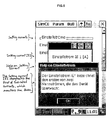
- FIG.5 shows a preferred embodiment of a screen with help information displayed. As is clearly shown, context-sensitive help is displayed when requested by the user.
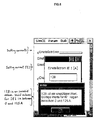
- FIG.6 shows a preferred embodiment of a screen with error information displayed. When a value that is outside of the allowed range of values for a parameter, such an error message is displayed.
- FIG.3 shows a flowchart depicting a preferred embodiment of the method for inputting parameter values according to the present invention.
- the user selects a parameter from the screen for which the value is to be changed.
- the system checks if there are any more parameters to be changed at step 3.1. If not, the system waits and continues checking in step 3.10 until a parameter is selected by the user.
- step 3.2 the system receives the selected parameter. A subset of required keys from the set of keys are selected in step 3.3.
- step 3.4 A dialog is created in step 3.4 with an optimal display size with the parameter name and the required set of virtual keys.
- this dialog is displayed.
- step 3.6 the system receives an input from the user.
- step 3.7 the system checks to see if the value entered by the user is within the allowable range of values for the parameter. If not, an error message is displayed in step 3.9 and the system proceeds to receive anther input from the user. If the value is within the allowable range, the system registers the value in step 3.8. After the value is registered, the system proceeds to wait for the user to make a new selection by returning to step 3.10.
- a further important aspect of the present invention is a computer program product.
- the computer program product comprises a computer readable medium.
- This computer readable medium includes, but is not limited to, floppy disks, hard disks, CDs, tapes, etc. Downloading the software through the Internet or other data transmission medium is also within the scope of the present invention.
- the computer readable medium comprises a selector code, a dialog code, a keyboard code and a data receiving code.
- the selector code enables a user to select a parameter displayed on a screen.
- the dialog code displays the dialog associated with the parameter on the screen.
- the keyboard code enables the computer to display a virtual keyboard on the screen.
- the data receiving code enables a user to input parameter values using the virtual keyboard,
- the virtual keyboard that is displayed comprises only those keys that are relevant to changing the value of the parameter.
- the computer code is not restricted to any particular type of code.
- the code may include, but is not limited to any one of: source code, object code, executable code, etc. Further, the code could be in any type of language including, but not limited to at least any one of: higher level languages, assembly language, machine language, etc.
Landscapes
- Engineering & Computer Science (AREA)
- General Engineering & Computer Science (AREA)
- Theoretical Computer Science (AREA)
- Human Computer Interaction (AREA)
- Physics & Mathematics (AREA)
- General Physics & Mathematics (AREA)
- User Interface Of Digital Computer (AREA)
- Input From Keyboards Or The Like (AREA)
- Digital Computer Display Output (AREA)
Applications Claiming Priority (2)
| Application Number | Priority Date | Filing Date | Title |
|---|---|---|---|
| US487725 | 1983-04-22 | ||
| US48772500A | 2000-01-19 | 2000-01-19 |
Publications (2)
| Publication Number | Publication Date |
|---|---|
| EP1118929A2 true EP1118929A2 (fr) | 2001-07-25 |
| EP1118929A3 EP1118929A3 (fr) | 2004-04-07 |
Family
ID=23936867
Family Applications (1)
| Application Number | Title | Priority Date | Filing Date |
|---|---|---|---|
| EP01101000A Ceased EP1118929A3 (fr) | 2000-01-19 | 2001-01-17 | Entrée interactive avec surveillance de valeur limite et aide en ligne pour un ordinateur de poche |
Country Status (1)
| Country | Link |
|---|---|
| EP (1) | EP1118929A3 (fr) |
Cited By (5)
| Publication number | Priority date | Publication date | Assignee | Title |
|---|---|---|---|---|
| GB2370900A (en) * | 2001-01-05 | 2002-07-10 | Research Machines Plc | System for displaying a keyboard |
| WO2007097644A3 (fr) * | 2006-02-21 | 2007-10-04 | Unltd Realities Ltd | Améliorations concernant des outils manipulateurs d'objets virtuels |
| CN105511792A (zh) * | 2015-12-08 | 2016-04-20 | 刘炳林 | 一种表单在位手写输入方法及系统 |
| CN108255381A (zh) * | 2016-12-29 | 2018-07-06 | 苏州普源精电科技有限公司 | 电子产品的区域参数修改方法及装置 |
| CN112988032A (zh) * | 2021-04-07 | 2021-06-18 | 北京字节跳动网络技术有限公司 | 控件展示方法、装置和电子设备 |
Family Cites Families (4)
| Publication number | Priority date | Publication date | Assignee | Title |
|---|---|---|---|---|
| US4763356A (en) * | 1986-12-11 | 1988-08-09 | AT&T Information Systems, Inc. American Telephone and Telegraph Company | Touch screen form entry system |
| US5276794A (en) * | 1990-09-25 | 1994-01-04 | Grid Systems Corporation | Pop-up keyboard system for entering handwritten data into computer generated forms |
| US5754176A (en) * | 1995-10-02 | 1998-05-19 | Ast Research, Inc. | Pop-up help system for a computer graphical user interface |
| CA2264167A1 (fr) * | 1996-08-28 | 1998-03-05 | Via, Inc. | Systemes et procedes relatifs a un ecran tactile |
-
2001
- 2001-01-17 EP EP01101000A patent/EP1118929A3/fr not_active Ceased
Cited By (6)
| Publication number | Priority date | Publication date | Assignee | Title |
|---|---|---|---|---|
| GB2370900A (en) * | 2001-01-05 | 2002-07-10 | Research Machines Plc | System for displaying a keyboard |
| GB2370900B (en) * | 2001-01-05 | 2005-02-02 | Research Machines Plc | System for displaying a keyboard |
| WO2007097644A3 (fr) * | 2006-02-21 | 2007-10-04 | Unltd Realities Ltd | Améliorations concernant des outils manipulateurs d'objets virtuels |
| CN105511792A (zh) * | 2015-12-08 | 2016-04-20 | 刘炳林 | 一种表单在位手写输入方法及系统 |
| CN108255381A (zh) * | 2016-12-29 | 2018-07-06 | 苏州普源精电科技有限公司 | 电子产品的区域参数修改方法及装置 |
| CN112988032A (zh) * | 2021-04-07 | 2021-06-18 | 北京字节跳动网络技术有限公司 | 控件展示方法、装置和电子设备 |
Also Published As
| Publication number | Publication date |
|---|---|
| EP1118929A3 (fr) | 2004-04-07 |
Similar Documents
| Publication | Publication Date | Title |
|---|---|---|
| US6714220B2 (en) | Interactive input with limit-value monitoring and on-line help for a palmtop device | |
| US6469722B1 (en) | Method and apparatus for executing a function within a composite icon and operating an object thereby | |
| US6208339B1 (en) | User-interactive data entry display system with entry fields having distinctive and changeable autocomplete | |
| US6301626B1 (en) | System for dynamic configuration of an input device by downloading an input device layout from server if the layout is not already display on the input device | |
| US6441824B2 (en) | Method and apparatus for dynamic text resizing | |
| US6844887B2 (en) | Alternate reduced size on-screen pointers for accessing selectable icons in high icon density regions of user interactive display interfaces | |
| US6924797B1 (en) | Arrangement of information into linear form for display on diverse display devices | |
| US5936614A (en) | User defined keyboard entry system | |
| US20040183834A1 (en) | User-configurable soft input applications | |
| US6388685B1 (en) | Method for displaying a window | |
| US20020030683A1 (en) | Method for graphically annotating a waveform display in a signal-measurement system | |
| US20020175955A1 (en) | Graphical user interface having contextual menus | |
| EP1174787A2 (fr) | Changement d'échelle d'ícones dans un système de traitement de données | |
| US20030090473A1 (en) | Multiple screen automatic programming interface | |
| US20040212595A1 (en) | Software keyboard for computer devices | |
| CN1466745A (zh) | 自动银行机系统和方法 | |
| US5247614A (en) | Method and apparatus for distributed processing of display panel information | |
| US5781193A (en) | Graphical interface method, apparatus and application for creating multiple value list from superset list | |
| US20070143324A1 (en) | Graphical user interface icon for documents with status indicator | |
| US20020076109A1 (en) | Method and apparatus for context sensitive text recognition | |
| EP0475744A2 (fr) | Méthode pour l'obtention au moyen de symboles illustrés de fonctions | |
| US20030210272A1 (en) | System and method for providing a user interface | |
| EP1118929A2 (fr) | Entrée interactive avec surveillance de valeur limite et aide en ligne pour un ordinateur de poche | |
| US7173630B2 (en) | Information processing apparatus and method, and information processing program | |
| US5796383A (en) | Method and system for presenting contents of a container object within a graphical user interface in a data processing system |
Legal Events
| Date | Code | Title | Description |
|---|---|---|---|
| PUAI | Public reference made under article 153(3) epc to a published international application that has entered the european phase |
Free format text: ORIGINAL CODE: 0009012 |
|
| AK | Designated contracting states |
Kind code of ref document: A2 Designated state(s): AT BE CH CY DE DK ES FI FR GB GR IE IT LI LU MC NL PT SE TR |
|
| AX | Request for extension of the european patent |
Free format text: AL;LT;LV;MK;RO;SI |
|
| PUAL | Search report despatched |
Free format text: ORIGINAL CODE: 0009013 |
|
| AK | Designated contracting states |
Kind code of ref document: A3 Designated state(s): AT BE CH CY DE DK ES FI FR GB GR IE IT LI LU MC NL PT SE TR |
|
| AX | Request for extension of the european patent |
Extension state: AL LT LV MK RO SI |
|
| RIC1 | Information provided on ipc code assigned before grant |
Ipc: 7G 06F 3/033 B Ipc: 7G 06F 3/023 A |
|
| 17P | Request for examination filed |
Effective date: 20040504 |
|
| 17Q | First examination report despatched |
Effective date: 20040721 |
|
| AKX | Designation fees paid |
Designated state(s): AT BE CH CY DE DK ES FI FR GB GR IE IT LI LU MC NL PT SE TR |
|
| STAA | Information on the status of an ep patent application or granted ep patent |
Free format text: STATUS: THE APPLICATION HAS BEEN REFUSED |
|
| 18R | Application refused |
Effective date: 20041120 |