EP1118930A2 - Einhändige Betätigung eines tragbaren Rechners - Google Patents
Einhändige Betätigung eines tragbaren Rechners Download PDFInfo
- Publication number
- EP1118930A2 EP1118930A2 EP01101001A EP01101001A EP1118930A2 EP 1118930 A2 EP1118930 A2 EP 1118930A2 EP 01101001 A EP01101001 A EP 01101001A EP 01101001 A EP01101001 A EP 01101001A EP 1118930 A2 EP1118930 A2 EP 1118930A2
- Authority
- EP
- European Patent Office
- Prior art keywords
- key
- keys
- menu
- hand
- menus
- Prior art date
- Legal status (The legal status is an assumption and is not a legal conclusion. Google has not performed a legal analysis and makes no representation as to the accuracy of the status listed.)
- Ceased
Links
Images


Classifications
-
- G—PHYSICS
- G06—COMPUTING OR CALCULATING; COUNTING
- G06F—ELECTRIC DIGITAL DATA PROCESSING
- G06F1/00—Details not covered by groups G06F3/00 - G06F13/00 and G06F21/00
- G06F1/16—Constructional details or arrangements
- G06F1/1613—Constructional details or arrangements for portable computers
- G06F1/1633—Constructional details or arrangements of portable computers not specific to the type of enclosures covered by groups G06F1/1615 - G06F1/1626
- G06F1/1662—Details related to the integrated keyboard
-
- G—PHYSICS
- G06—COMPUTING OR CALCULATING; COUNTING
- G06F—ELECTRIC DIGITAL DATA PROCESSING
- G06F1/00—Details not covered by groups G06F3/00 - G06F13/00 and G06F21/00
- G06F1/16—Constructional details or arrangements
- G06F1/1613—Constructional details or arrangements for portable computers
- G06F1/1626—Constructional details or arrangements for portable computers with a single-body enclosure integrating a flat display, e.g. Personal Digital Assistants [PDAs]
-
- G—PHYSICS
- G06—COMPUTING OR CALCULATING; COUNTING
- G06F—ELECTRIC DIGITAL DATA PROCESSING
- G06F3/00—Input arrangements for transferring data to be processed into a form capable of being handled by the computer; Output arrangements for transferring data from processing unit to output unit, e.g. interface arrangements
- G06F3/01—Input arrangements or combined input and output arrangements for interaction between user and computer
- G06F3/048—Interaction techniques based on graphical user interfaces [GUI]
- G06F3/0481—Interaction techniques based on graphical user interfaces [GUI] based on specific properties of the displayed interaction object or a metaphor-based environment, e.g. interaction with desktop elements like windows or icons, or assisted by a cursor's changing behaviour or appearance
- G06F3/0482—Interaction with lists of selectable items, e.g. menus
Definitions
- the present invention is related to navigating through a hierarchy of menus using only function keys in a palmheld PC. Specifically, the present invention provides a technique for inputting information into a palmheld device interactively using one hand.
- the present invention is embodied in methods for one-handed operation of a palmheld device; a palmheld system that enables navigating through a hierarchy of menus using function keys in a single-handed operation; and a computer program product enabling a palmheld device to be used with a single hand.
- Palmheld PCs belong to one of the smallest classes of general purpose computing devices. Palmheld PCs typically run general purpose operating systems, for example, Windows CE® by Microsoft®. A typical palmheld PC has four to eight Mbyte RAM, an 80 MHz MIPS processor, and a 240x320 pixel black and white display. Desktop and laptop PCs use a mouse-like device and a keyboard combination to input data. On the other hand, data is typically input into a palmheld PC using a pen and touch screen. The palmheld PCs typically communicate with their peripherals using protocols such as RS232, IrDa, etc. A compact flash slot is provided for making hardware expansions. The palmheld PCs boot from ROMs installed within them.
- Palmheld PCs typically have only a black and white display of only 240 x 320 pixels. Therefore, the dialogs and other interactions with the palmheld PCs must be adapted to these restrictions in terms of size, coloring and spatial distribution. Most importantly, the user interface needs to be designed considering the relatively small display screens.
- the user For interacting with a palmheld PC, the user is provided with a pen. The pen is used in combination with the touch screen, and a small number of physical entry keys.
- a Palmheld PC is not provided with a mouse-like device or a keyboard. In lieu of a regular keyboard, a virtual keyboard is displayed on the touch-sensitive screen. The users interface with the palmheld PC using the pen to make selections from the virtual keyboard.
- Palmheld devices are often used for interfacing with control systems used in manufacturing facilities, such as, chemical plants. Data related to various parameters related to the control of the manufacturing facility is input using these palmheld devices.
- small devices like palmheld devices which need two hands to operate them are often used for interfacing.
- An operator requires one hand to hold the device while the other hand is used to operate the device. Additionally, if the operator uses an operation manual he/she has to continually change over between the palmheld device and the document.
- the palmheld PC is operated using a control pen in conjunction with the touch-sensitive screen.
- the control pen replaces both the mouse-like device and the keyboard.
- the device has to be held with one hand and the pen moved with the other hand.
- an object of the present invention is to provide a palmheld computing system that can be operated using one hand.
- a further object of the present invention is to provide a technique for interfacing with a control system for a manufacturing facility using a palmheld device using only one hand.
- a hand-held computer system with a screen, a set of function keys and a set of menus, wherein said set of menus is organized in a hierarchical fashion to form a hierarchy of menus, and wherein said set of keys comprises keys for navigating through the hierarchy of menus and for selecting from the hierarchy of menus.
- said set of keys comprises an up key, a down key, an enter key and an escape key.
- said computer is configured to be held in one hand and operated completely using said one hand and wherein said keys are accessible for operation using said one hand.
- said keys are located on only one side of the screen.
- said up key and said down key are used to move up and down, respectively, through a current menu.
- said escape key is used to return to a menu in a higher level of hierarchy than the current menu.
- said enter key is used to move to a menu in a lower level of hierarchy than the current menu.
- a method of one-handed operation of a palmheld computer system comprising a palmheld PC with a set of keys accessible using said one hand, said method comprising: displaying a top-level menu; and navigating through a hierarchy of menus arising from said top-level menu using said set of keys, said navigating being performed using only said one hand.
- the set of keys comprises an enter key, an escape key, an up key and a down key.
- the method further comprises: selecting an escape key to return to a higher level menu; and selecting an enter key to select a menu item.
- the method further comprises: using said up key and said down key to move up and down, respectively, through the current menu.
- Yet another aspect of the present invention is a method of one-handed interfacing with a control system in a manufacturing facility using a palmheld PC with a set of keys, said set of keys being accessible to said one hand, said method comprising: holding the palmheld PC with one hand; and navigating through a hierarchy of menus using said one hand, wherein said navigating is performed using the set of keys accessible to said one hand.
- the set of keys comprises an enter key, an escape key, an up key and a down key.
- Still another aspect of the present invention is a computer program product including a computer readable medium, said medium containing instructions comprising: a menu code to display a hierarchy of menus in a palmsized PC; and a navigation code that enables a user to navigate through said hierarchy of menus using a set of keys completely accessible by a same hand that holds said palmsized PC.
- the set of keys comprises an enter, an escape key, an up key and a down key.
- said up key and said down key are used to move up and down, respectively, through a current menu.
- said escape key is used to return to a menu in a higher level of hierarchy than the current menu.
- Still preferably said enter key is used to select a menu item.
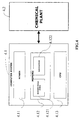
- FIG.4 The preferred embodiment of the computer system according to the present invention is shown in FIG.4.
- a palmheld PC computer system 4.1 is used to interface with a chemical plant 4.2.
- the chemical plant is controlled using a large number of parameters, for example, temperature, pressure, electrical current, etc.
- a plant operator or an automatic system sets a value for a specific parameter.
- the palmheld computer system comprises a screen 4.11, a CPU 4.13 and a memory 4.12.
- the memory further comprises information 4.121 on the hierarchical menus.
- the navigation instructions 4.122 help the computer system to navigate through the hierarchical menus using only a set of function keys that are operable using the same hand that holds the palmsized PC.
- the plant operator uses the function keys in the palmheld PC computer system 4.1 to navigate through a hierarchy of menus.
- FIG.5 shows a preferred embodiment of a palmsized PC.
- the palmsized PC of this embodiment has only four function keys. They are the escape key 5.1, the up key 5.2, the down key 5.3 and the enter key 5.4.
- FIG.1 shows a preferred embodiment of a hierarchy of menus according to a preferred embodiment.
- the screens are arranged in a two-level hierarchy. Initially a top-level menu 1.1 is displayed. The operator can move up and down the menu choices using the up key 5.2 and down key 5.3.
- the top-level menu comprises entry into a set of sub-menus that are in the second-level of hierarchy.
- the user selects a sub-menu by pressing the enter key 5.4.
- the selected submenu one of submenu 1.2-1.6 is then displayed. The user can go back to the top-level menu using the escape key 5.1.
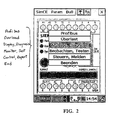
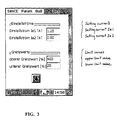
- FIGs. 2 and 3 show the top-level menu and one of the sub-menus 1.3, respectively, in greater detail.
- Another important aspect of the present invention is a method for using a palmsized PC with the same hand that is used to hold the palmsized PC.
- a palmsized PC that is used to interface with a control system would advantageously be operated using the same hand that is used to hold the palmsized PC. For instance, when the user may need to hold a document in one hand and the palmsized PC in the other. Such a situation occurs commonly when a plant operator needs to perform adjustments to actual instruments by referring to a document while at the same time interfacing with the facility control system using the palmsized PC.
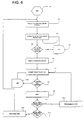
- FIG.6 A preferred embodiment of a method for a single-handed operation of the palmsized PC of FIG.5 is illustrated in FIG.6.
- a top-level menu is displayed in step 6.2. By looping through steps 6.4, 6.5 and 6.3, a desired sub-menu is highlighted. In step 6.6 the desired sub-menu is selected by actuating the enter key. Once the sub-menu is selected, the user navigates through the sub-menu in step 6.7. By looping through steps 6.8, 6.13 and 6.7 a desired item within the sub-menu is highlighted. The desired menu item is selected in step 6.9. If the user needs a different menu item in step 6.10, an escape key is depressed once to go back and navigate through the sub-menu. Step 6.11 determines if the user needs to select an item from a different sub-menu; in which case the escape key is pressed twice to go back and start over from step 6.2.
- the computer program product comprises a computer readable medium.
- This computer readable medium includes, but is not limited to, floppy disks, hard disks, CDs, tapes, etc. Downloading the software through a data transmission medium, e. g., the Internet, is also within the scope of the present invention.
- the computer readable medium comprises a menu code and a navigation code.
- the menu code enables the palmheld PC to create and display a hierarchical menu.
- the navigation code enables a user to navigate through the hierarchical menus using only the function keys provided.
- the computer code is not restricted to any particular type of code.
- the code includes, but is not limited to, source code, object code, executable code, etc. Further, the code could be in any type of language including, but not limited to, higher level languages, assembly language, machine language, etc.
Landscapes
- Engineering & Computer Science (AREA)
- Theoretical Computer Science (AREA)
- General Engineering & Computer Science (AREA)
- Human Computer Interaction (AREA)
- Physics & Mathematics (AREA)
- General Physics & Mathematics (AREA)
- Computer Hardware Design (AREA)
- User Interface Of Digital Computer (AREA)
- Digital Computer Display Output (AREA)
- Input From Keyboards Or The Like (AREA)
Applications Claiming Priority (2)
| Application Number | Priority Date | Filing Date | Title |
|---|---|---|---|
| US487727 | 2000-01-19 | ||
| US09/487,727 US6714220B2 (en) | 2000-01-19 | 2000-01-19 | Interactive input with limit-value monitoring and on-line help for a palmtop device |
Publications (2)
| Publication Number | Publication Date |
|---|---|
| EP1118930A2 true EP1118930A2 (de) | 2001-07-25 |
| EP1118930A3 EP1118930A3 (de) | 2002-07-17 |
Family
ID=23936874
Family Applications (1)
| Application Number | Title | Priority Date | Filing Date |
|---|---|---|---|
| EP01101001A Ceased EP1118930A3 (de) | 2000-01-19 | 2001-01-17 | Einhändige Betätigung eines tragbaren Rechners |
Country Status (2)
| Country | Link |
|---|---|
| US (1) | US6714220B2 (de) |
| EP (1) | EP1118930A3 (de) |
Cited By (1)
| Publication number | Priority date | Publication date | Assignee | Title |
|---|---|---|---|---|
| EP1557744A1 (de) * | 2004-01-20 | 2005-07-27 | Sony International (Europe) GmbH | Haptische tastengesteuerte Dateneingabe |
Families Citing this family (32)
| Publication number | Priority date | Publication date | Assignee | Title |
|---|---|---|---|---|
| US6590588B2 (en) * | 1998-05-29 | 2003-07-08 | Palm, Inc. | Wireless, radio-frequency communications using a handheld computer |
| US6343318B1 (en) | 1998-05-29 | 2002-01-29 | Palm, Inc. | Method and apparatus for communicating information over low bandwidth communications networks |
| JP4434467B2 (ja) * | 2000-11-01 | 2010-03-17 | キヤノン株式会社 | ユーザインタフェース制御装置 |
| US7039877B2 (en) * | 2001-01-04 | 2006-05-02 | Intel Corporation | Conserving space on browser user interfaces |
| US7168046B2 (en) * | 2001-04-26 | 2007-01-23 | Lg Electronics Inc. | Method and apparatus for assisting data input to a portable information terminal |
| USRE47442E1 (en) * | 2001-04-26 | 2019-06-18 | Lg Electronics Inc. | Method and apparatus for assisting data input to a portable information terminal |
| US20030074647A1 (en) * | 2001-10-12 | 2003-04-17 | Andrew Felix G.T.I. | Automatic software input panel selection based on application program state |
| US6882337B2 (en) * | 2002-04-18 | 2005-04-19 | Microsoft Corporation | Virtual keyboard for touch-typing using audio feedback |
| US20040046742A1 (en) * | 2002-09-06 | 2004-03-11 | Deanna Johnson | Keyboard for tablet computers |
| DE602004006733T2 (de) * | 2003-02-26 | 2008-01-31 | Tomtom International B.V. | Navigationseinheit und verfahren zum anzeigen alternativer routen |
| US7533351B2 (en) * | 2003-08-13 | 2009-05-12 | International Business Machines Corporation | Method, apparatus, and program for dynamic expansion and overlay of controls |
| US7877363B2 (en) * | 2004-01-29 | 2011-01-25 | Sap Aktiengesellschaft | Using limit variables in a computer system |
| US20060007178A1 (en) * | 2004-07-07 | 2006-01-12 | Scott Davis | Electronic device having an imporoved user interface |
| US20060012821A1 (en) * | 2004-07-12 | 2006-01-19 | Kevin Franklin | Laser marking user interface |
| EP1691259A1 (de) * | 2005-02-09 | 2006-08-16 | Siemens Aktiengesellschaft | Automatische Eingabehilfe in Computerprogrammen |
| JP4747792B2 (ja) * | 2005-11-10 | 2011-08-17 | ソニー株式会社 | 情報処理装置及びその設定項目の初期化方法 |
| US8312372B2 (en) * | 2006-02-10 | 2012-11-13 | Microsoft Corporation | Method for confirming touch input |
| US20080088590A1 (en) * | 2006-04-18 | 2008-04-17 | Ronald Brown | Display Input Equipped Data Entry Device and Methods |
| US7941760B2 (en) * | 2006-09-06 | 2011-05-10 | Apple Inc. | Soft keyboard display for a portable multifunction device |
| US8564544B2 (en) | 2006-09-06 | 2013-10-22 | Apple Inc. | Touch screen device, method, and graphical user interface for customizing display of content category icons |
| EP1947561B1 (de) * | 2007-01-19 | 2019-06-19 | Microsoft Technology Licensing, LLC | Verfahren zum Anzeigen eines Browsers und dieses verwendende Endgerät |
| KR20080068491A (ko) * | 2007-01-19 | 2008-07-23 | 엘지전자 주식회사 | 터치 방식 정보 입력 단말기 및 그 방법 |
| KR20080078291A (ko) | 2007-02-23 | 2008-08-27 | 엘지전자 주식회사 | 브라우저 디스플레이 방법 및 이를 구현할 수 있는 단말기 |
| USD595302S1 (en) * | 2008-01-11 | 2009-06-30 | Samsung Electronics Co., Ltd. | Video image display for portable phone |
| US8589374B2 (en) | 2009-03-16 | 2013-11-19 | Apple Inc. | Multifunction device with integrated search and application selection |
| US20100241983A1 (en) * | 2009-03-17 | 2010-09-23 | Walline Erin K | System And Method For Accelerometer Based Information Handling System Keyboard Selection |
| USD652838S1 (en) * | 2011-04-13 | 2012-01-24 | Minebea Co., Ltd. | Touch sensor type keyboard for computer |
| USD652837S1 (en) * | 2011-04-13 | 2012-01-24 | Minebea Co., Ltd. | Touch sensor type keyboard for computer |
| US20130111391A1 (en) * | 2011-11-01 | 2013-05-02 | Microsoft Corporation | Adjusting content to avoid occlusion by a virtual input panel |
| USD682876S1 (en) * | 2012-01-06 | 2013-05-21 | Microsoft Corporation | Display screen with graphical user interface |
| EP3005210B1 (de) * | 2013-05-24 | 2018-02-14 | McAfee, LLC | Sicherer, automatischer und autorisierter zugriff auf beliebige anwendung über einen drittanbieter |
| US10990420B1 (en) * | 2019-10-24 | 2021-04-27 | Dell Products L.P. | Customizing user interface components |
Family Cites Families (19)
| Publication number | Priority date | Publication date | Assignee | Title |
|---|---|---|---|---|
| US4763356A (en) * | 1986-12-11 | 1988-08-09 | AT&T Information Systems, Inc. American Telephone and Telegraph Company | Touch screen form entry system |
| US5260697A (en) * | 1990-11-13 | 1993-11-09 | Wang Laboratories, Inc. | Computer with separate display plane and user interface processor |
| US5475835A (en) * | 1993-03-02 | 1995-12-12 | Research Design & Marketing Inc. | Audio-visual inventory and play-back control system |
| US5561446A (en) * | 1994-01-28 | 1996-10-01 | Montlick; Terry F. | Method and apparatus for wireless remote information retrieval and pen-based data entry |
| JPH08307954A (ja) * | 1995-05-12 | 1996-11-22 | Sony Corp | 座標入力装置および方法、並びに情報処理装置 |
| US5748177A (en) * | 1995-06-07 | 1998-05-05 | Semantic Compaction Systems | Dynamic keyboard and method for dynamically redefining keys on a keyboard |
| US5867223A (en) * | 1995-07-17 | 1999-02-02 | Gateway 2000, Inc. | System for assigning multichannel audio signals to independent wireless audio output devices |
| US6236743B1 (en) * | 1995-09-15 | 2001-05-22 | Greg Pratt | Three-dimensional digitizing system and method |
| US5909372A (en) * | 1996-06-07 | 1999-06-01 | Danfoss A/S | User interface for programming a motor controller |
| US5973612A (en) | 1996-09-19 | 1999-10-26 | Microsoft Corporation | Flexible object notification |
| US6144863A (en) | 1996-11-26 | 2000-11-07 | U.S. Philips Corporation | Electronic device with screen comprising a menu which can be customized by a user |
| US6069326A (en) * | 1997-03-10 | 2000-05-30 | Dresser Industries, Inc. | Hand held measurement instrument with touch screen display |
| US6046742A (en) * | 1997-05-13 | 2000-04-04 | Micron Electronics, Inc. | Display of system information |
| US6026233A (en) * | 1997-05-27 | 2000-02-15 | Microsoft Corporation | Method and apparatus for presenting and selecting options to modify a programming language statement |
| DE19723815A1 (de) | 1997-06-06 | 1998-12-10 | Philips Patentverwaltung | System zur menügeführten Befehlseingabe |
| US6211870B1 (en) * | 1997-07-07 | 2001-04-03 | Combi/Mote Corp. | Computer programmable remote control |
| US6359572B1 (en) * | 1998-09-03 | 2002-03-19 | Microsoft Corporation | Dynamic keyboard |
| US6320577B1 (en) * | 1998-11-03 | 2001-11-20 | Agilent Technologies, Inc. | System and method for graphically annotating a waveform display in a signal-measurement system |
| US6516227B1 (en) * | 1999-07-27 | 2003-02-04 | Advanced Bionics Corporation | Rechargeable spinal cord stimulator system |
-
2000
- 2000-01-19 US US09/487,727 patent/US6714220B2/en not_active Expired - Lifetime
-
2001
- 2001-01-17 EP EP01101001A patent/EP1118930A3/de not_active Ceased
Cited By (2)
| Publication number | Priority date | Publication date | Assignee | Title |
|---|---|---|---|---|
| EP1557744A1 (de) * | 2004-01-20 | 2005-07-27 | Sony International (Europe) GmbH | Haptische tastengesteuerte Dateneingabe |
| US7890862B2 (en) | 2004-01-20 | 2011-02-15 | Sony Deutschland Gmbh | Haptic key controlled data input |
Also Published As
| Publication number | Publication date |
|---|---|
| US20030103066A1 (en) | 2003-06-05 |
| EP1118930A3 (de) | 2002-07-17 |
| US6714220B2 (en) | 2004-03-30 |
Similar Documents
| Publication | Publication Date | Title |
|---|---|---|
| EP1118930A2 (de) | Einhändige Betätigung eines tragbaren Rechners | |
| US5805167A (en) | Popup menus with directional gestures | |
| Blanch et al. | Semantic pointing: improving target acquisition with control-display ratio adaptation | |
| US6462760B1 (en) | User interfaces, methods, and computer program products that can conserve space on a computer display screen by associating an icon with a plurality of operations | |
| US6816176B2 (en) | Temporarily moving adjacent or overlapping icons away from specific icons being approached by an on-screen pointer on user interactive display interfaces | |
| US6844887B2 (en) | Alternate reduced size on-screen pointers for accessing selectable icons in high icon density regions of user interactive display interfaces | |
| US7055110B2 (en) | Common on-screen zone for menu activation and stroke input | |
| US8607149B2 (en) | Highlighting related user interface controls | |
| US7600197B2 (en) | Graphical user interface having contextual menus | |
| US6859908B1 (en) | Automated text entry for processor-based system | |
| US6918091B2 (en) | User definable interface system, method and computer program product | |
| US6886138B2 (en) | Directing users′ attention to specific icons being approached by an on-screen pointer on user interactive display interfaces | |
| EP1377902B1 (de) | Multifunktioneller applikations-launcher mit integriertem status | |
| US6515687B1 (en) | Virtual joystick graphical user interface control with one and two dimensional operation | |
| US20030222915A1 (en) | Data processor controlled display system with drag and drop movement of displayed items from source to destination screen positions and interactive modification of dragged items during the movement | |
| US6374272B2 (en) | Selecting overlapping hypertext links with different mouse buttons from the same position on the screen | |
| US20120036476A1 (en) | Multidirectional expansion cursor and method for forming a multidirectional expansion cursor | |
| WO2006078316A1 (en) | Assigning shortcut keys | |
| JP2005235188A (ja) | データ入力装置 | |
| JP2003186614A (ja) | アプリケーションプログラムの状態に基づく自動的なソフトウェア入力パネル選択 | |
| GB2351639A (en) | Touch screen region assist for hypertext links | |
| EP0475744B1 (de) | Verfahren zur Funktionenerzeugung durch Bildsymbolanwendung | |
| US20030210272A1 (en) | System and method for providing a user interface | |
| KR20000049575A (ko) | 마우스를 이용한 키입력 방법 및 장치 | |
| US20030043213A1 (en) | Computer controlled user interactive display interface implementation for modifying the scope of selectivity of an on-screen pointer |
Legal Events
| Date | Code | Title | Description |
|---|---|---|---|
| PUAI | Public reference made under article 153(3) epc to a published international application that has entered the european phase |
Free format text: ORIGINAL CODE: 0009012 |
|
| AK | Designated contracting states |
Kind code of ref document: A2 Designated state(s): AT BE CH CY DE DK ES FI FR GB GR IE IT LI LU MC NL PT SE TR |
|
| AX | Request for extension of the european patent |
Free format text: AL;LT;LV;MK;RO;SI |
|
| PUAL | Search report despatched |
Free format text: ORIGINAL CODE: 0009013 |
|
| AK | Designated contracting states |
Kind code of ref document: A3 Designated state(s): AT BE CH CY DE DK ES FI FR GB GR IE IT LI LU MC NL PT SE TR |
|
| AX | Request for extension of the european patent |
Free format text: AL;LT;LV;MK;RO;SI |
|
| RIC1 | Information provided on ipc code assigned before grant |
Free format text: 7G 06F 3/023 A, 7G 06F 3/033 B |
|
| 17P | Request for examination filed |
Effective date: 20030117 |
|
| AKX | Designation fees paid |
Designated state(s): AT CH DE ES FR GB LI |
|
| 17Q | First examination report despatched |
Effective date: 20070102 |
|
| APBN | Date of receipt of notice of appeal recorded |
Free format text: ORIGINAL CODE: EPIDOSNNOA2E |
|
| APBR | Date of receipt of statement of grounds of appeal recorded |
Free format text: ORIGINAL CODE: EPIDOSNNOA3E |
|
| APAF | Appeal reference modified |
Free format text: ORIGINAL CODE: EPIDOSCREFNE |
|
| APBT | Appeal procedure closed |
Free format text: ORIGINAL CODE: EPIDOSNNOA9E |
|
| STAA | Information on the status of an ep patent application or granted ep patent |
Free format text: STATUS: THE APPLICATION HAS BEEN REFUSED |
|
| 18R | Application refused |
Effective date: 20120224 |