EP1189156B1 - Rechnergestütztes Entwurfssystem - Google Patents
Rechnergestütztes Entwurfssystem Download PDFInfo
- Publication number
- EP1189156B1 EP1189156B1 EP00830557A EP00830557A EP1189156B1 EP 1189156 B1 EP1189156 B1 EP 1189156B1 EP 00830557 A EP00830557 A EP 00830557A EP 00830557 A EP00830557 A EP 00830557A EP 1189156 B1 EP1189156 B1 EP 1189156B1
- Authority
- EP
- European Patent Office
- Prior art keywords
- microstep
- display
- selection
- selection means
- block
- Prior art date
- Legal status (The legal status is an assumption and is not a legal conclusion. Google has not performed a legal analysis and makes no representation as to the accuracy of the status listed.)
- Expired - Lifetime
Links
Images


Classifications
-
- G—PHYSICS
- G06—COMPUTING OR CALCULATING; COUNTING
- G06F—ELECTRIC DIGITAL DATA PROCESSING
- G06F30/00—Computer-aided design [CAD]
-
- G—PHYSICS
- G05—CONTROLLING; REGULATING
- G05B—CONTROL OR REGULATING SYSTEMS IN GENERAL; FUNCTIONAL ELEMENTS OF SUCH SYSTEMS; MONITORING OR TESTING ARRANGEMENTS FOR SUCH SYSTEMS OR ELEMENTS
- G05B2219/00—Program-control systems
- G05B2219/30—Nc systems
- G05B2219/35—Nc in input of data, input till input file format
- G05B2219/35494—Online documentation, manual, procedures, operator, user guidance, assistance
-
- G—PHYSICS
- G05—CONTROLLING; REGULATING
- G05B—CONTROL OR REGULATING SYSTEMS IN GENERAL; FUNCTIONAL ELEMENTS OF SUCH SYSTEMS; MONITORING OR TESTING ARRANGEMENTS FOR SUCH SYSTEMS OR ELEMENTS
- G05B2219/00—Program-control systems
- G05B2219/30—Nc systems
- G05B2219/35—Nc in input of data, input till input file format
- G05B2219/35499—Model of process, machine and parameters
Definitions
- the present invention relates to a computer-assisted design system.
- the computer-assisted design system according to the present invention may be used to advantage by companies, in particular medium-large companies, engaged in the design and possibly also the manufacture of products and/or components.
- the system can be implemented on a known central processing unit connected over a data network (e.g. local data network) to a number of terminal stations (e.g. personal computers), each with a central unit, keyboard, video terminal and mouse.
- a data network e.g. local data network
- terminal stations e.g. personal computers
- Each station is manned by at least one operator.
- Figure 1 shows a simplified block diagram of the operations performed by the system according to the present invention.
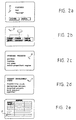
- a first block 100 displays a first video page (HOME PAGE, Figure 2a) showing general information about the computer-assisted design system, such as the system name and reference, system title, and any confidentiality clauses governing use of the system and the system-stored data.
- HOME PAGE Figure 2a
- Block 100 allows the operator at least two system operation choices:
- Blocks 110 and 120 are selected using normal graphic environment (e.g. WINDOWS environment) means, i.e. using a mouse to manually position the cursor P at distinct points on the screen corresponding to initiation of the manual inquiry (MANUAL) and system enquiry (SYSTEM) procedures, and then manually operating, e.g. double clicking, the mouse to select block 110 or 120.
- normal graphic environment e.g. WINDOWS environment
- MANUAL manual inquiry
- SYSTEM system enquiry
- block 110 goes back to block 100.
- Block 120 displays a second video page (MAIN PAGE, Figure 2b) from which the operator can choose between at least three operating modes:
- blocks 130, 140, 150 are selected using normal graphic environment (e.g. WINDOWS environment) means, i.e. using a mouse to manually position the cursor P at distinct points on the screen corresponding to the first, second and third operating modes, and then manually operating, e.g. double clicking, the mouse to select block 130, 140 or 150.
- normal graphic environment e.g. WINDOWS environment
- component is intended to mean a distinct physical entity, which may comprise several parts (e.g. a casting, gear, bearing, shaft); while “product” is intended to mean an assembled group of components (e.g. a gearbox comprising a casting and several gears, bearings and shafts).
- Block 130 displays a third video page (PRODUCT PAGE, Figure 2c) showing a list of n standard in-house products, such as:
- Each product in the block 130 list is also selected using normal known graphic environment means.
- block 130 goes on to a block 136, which displays a fourth video page (PRODUCT DEVELOPMENT STEPS PAGE, Figure 2d) showing a list of m steps necessary to develop the standard product selected:
- One or more of the block 136 steps can be selected by the operator, again using known graphic environment selection means.
- block 136 When a given step in the list is selected, block 136 is followed by a block 137, which displays a fifth video page (MICROSTEP PAGE, Figure 2e) showing a number of microsteps, which together define the selected step.
- the order in which the microsteps are listed corresponds to the logical and/or time sequence of the jobs involved in performing the selected step; and each microstep indicates the procedures to be performed in the microstep itself, as characterized by mathematical formulas and input and output parameters.
- microstep sequence and content are based on previous in-house design experience.
- block 137 goes on to a block 139, which provides for expanding the selected microstep, i.e. indicates, in as much detail as the system allows, the operations involved in the microstep according to previous in-house design experience.
- design may be intended in the sense of the ISO 10303 STEP specification, i.e. that company process which commences with identification of customer requirements, and terminates when all the information, tools and materials are available for product manufacture and marketing.
- Expansion of the selected microstep may, for example, comprise displaying tables based on past in-house design experience.
- Block 139 may display for each microstep:
- Block 139 is followed by a block 141 enabling operator access to:
- Block 141 also permits access to a data base (DB) (block 145 after block 141) containing further past in-house design data relative to the microstep parameters. Any other data is selected in a block 146 following block 145, and which also provides for returning to the expanded microstep display in block 139.
- DB data base
- Block 140 displays a sixth video page (COMPONENT PAGE) showing a list of n standard in-house components, such as:
- Each component in the block 140 list is also selected using normal known graphic environment means.
- block 140 goes on to a block 156, which displays a seventh video page (COMPONENT DEVELOPMENT STEPS PAGE) showing a list of m steps necessary to develop the standard component selected, for example:
- One or more of the block 156 steps can be selected by the operator, again using known graphic environment selection means.
- block 156 When a given step in the list is selected, block 156 is followed by a block 157, which displays an eighth video page (MICROSTEP PAGE) showing a number of microsteps, which together define the selected step.
- MICROSTEP PAGE an eighth video page showing a number of microsteps, which together define the selected step.
- the order in which the microsteps are listed corresponds to the logical and/or time sequence of the jobs involved in performing the selected step; and each microstep indicates the procedures to be performed in the microstep itself, as characterized by mathematical formulas and input and output parameters.
- the microstep sequence and content are based on previous in-house design experience.
- block 157 goes on to a block 159, which provides for expanding the selected microstep, i.e. indicates, in as much detail as the system allows, the operations involved in the microstep according to previous in-house design experience.
- Block 159 may display for each microstep:
- Block 159 is followed by a block 160 enabling operator access to:
- Block 160 also permits access to a data base (block 165 after block 160) containing further data relative to the microstep parameters. Any other data is selected in a block 166 following block 165, and which also provides for returning to the expanded microstep display in block 159.
- Block 150 displays a ninth video page (DISCIPLINE PAGE) showing a list of company-related disciplines, such as:
- Each discipline in the block 150 list is also selected using normal known graphic environment means.
- block 150 goes on to a block 170, which displays a tenth video page (DISCIPLINE SUBSECTION SELECTION) showing a list of subsections of the selected discipline:
- a given discipline in the list e.g. material analysis
- Each subsection in the block 170 list is also selected using normal known graphic environment means.
- block 170 supplies detailed technical-scientific information - information used in past design work - relative to the selected subsection of the selected discipline.
- block 170 is followed by a block 177, which provides for:
- the system operator can either select access to the manual (block 110) or make a system inquiry (block 120). If the first operating mode (block 130) is selected, a list of standard in-house products is displayed for selection by the operator. Following selection, the necessary steps to develop the selected product are displayed (block 136); the operator selects the pertinent step (block 136), i.e. the one relevant to current design requirements, and is then provided with the various microsteps indicating as a whole the logical and/or time sequence of design jobs to be performed.
- the system therefore provides for directing and organizing the design work of the operator.
- Each expanded microstep (block 139) provides the operator with further detailed design tools, so that the operator is provided with all the technical "means” by which to do the job.
- the operator is allowed access to:
- the operator also has access to a large data base (block 145) containing further microstep parameter data.
- the system according to the present invention may also be equipped with a processing device featuring meta languages (e.g. XML language) and for automatically receiving into its data base (blocks 145, 165) parameter data relative to a completed project developed according to the system, so that new projects developed according to the system of the present invention provide for automatically loading the data bases.
- a processing device featuring meta languages (e.g. XML language) and for automatically receiving into its data base (blocks 145, 165) parameter data relative to a completed project developed according to the system, so that new projects developed according to the system of the present invention provide for automatically loading the data bases.
- meta languages e.g. XML language
- the data bases of blocks 145 and 165 may be replaced by a single data base accessed by the operator from both blocks 141 and 160.
Landscapes
- Engineering & Computer Science (AREA)
- Physics & Mathematics (AREA)
- Theoretical Computer Science (AREA)
- Computer Hardware Design (AREA)
- Evolutionary Computation (AREA)
- Geometry (AREA)
- General Engineering & Computer Science (AREA)
- General Physics & Mathematics (AREA)
- Management, Administration, Business Operations System, And Electronic Commerce (AREA)
Claims (10)
- Computergestütztes Konstruktionssystem zum Einsatz in einem Unternehmen, mitErsten Anzeige- und Auswahlmitteln (130) zum Steuern der Bildschirmanzeige (PRODUKTSEITE) einer Liste von hausinternen Standardprodukten; wobei die ersten Anzeige- und Auswahlmittel (130) die Auswahl der verschiedenen angezeigten Standardprodukte erlauben;Zweiten Anzeige- und Auswahlmitteln (136), die infolge der Auswahl eines angezeigten Produkts aktiviert werden, um die Bildschirmanzeige (PRO-DUKTSCHRITT-SEITE) einer Liste von Schritten zu steuern, die zur Entwicklung des ausgewählten Standardprodukts notwendig sind; wobei die zweiten Anzeige- und Auswahlmittel (136) die Auswahl der verschiedenen angezeigten Schritte ermöglichen, weiterhin gekennzeichnet durchDritte Anzeige- und Auswahlmittel (137), die infolge der Auswahl eines angezeigten Schritts aktiviert werden, um die Anzeige (MIKROSCHRITT-SEITE) einer Anzahl von Mikroschritten zu steuern, die im Ganzen genommen, den davor ausgewählten Schritt definieren; wobei die Reihenfolge der Mikroschritte der logischen und/oder zeitlichen Folge der mit der Durchführung des ausgewählten Schritts verbundenen Arbeiten entspricht; wobei jeder Mikroschritt die im Mikroschritt durchzuführenden Verfahren - typisch Formeln, Eingabeparameter und Ausgabeparameter - angibt; und wobei die Folge der Mikroschritte auf hausinternen Konstruktionserfahrungen beruht, um den das System benutzenden Bedienenden mit technischen Informationen zu versorgen, die bei der Konstruktion des Produktes zum Einsatz kommen können.
- System nach Anspruch 1, ferner gekennzeichnet durch erste Auswahlmittel zur Auswahl der Mikroschritte und Ermöglichung der Auswahl von mindestens einem Mikroschritt, um erste Erweiterungsmittel (139) zum Erweitern des ausgewählten Mikroschritts auszuwählen und um die durch den Mikroschritt definierten Arbeiten in so viel Detail, wie das System erlaubt; auf der Basis der hausinternen Konstruktionserfahrungen anzuzeigen.
- System nach Anspruch 2, dadurch gekennzeichnet, dass die ersten Erweiterungsmittel (139) für jeden Mikroschritt Folgendes anzeigen:Eingabeparametertabellen, die bei der Durchführung des Mikroschritts zum Einsatz kommen;Ausgabeparametertabellen, die bei der Durchführung des Mikroschritts zum Einsatz kommen;Verarbeitungsverfahren, die bei der Durchführung der Arbeiten im Mikroschritt zum Einsatz kommen; undWerkzeuge zum Einsatz in dem Mikroschritt, wie zum Beispiel eine Programmliste und eine Verarbeitungscodeliste.
- System nach Anspruch 3, dadurch gekennzeichnet, dass die ersten Erweiterungsmittel (139) Zugriff (141) auf eine Datenbank (145) erlauben, in der weitere frühere hausinterne Erfahrungsdaten gespeichert sind, die sich auf Mikroschritt-Parameter beziehen.
- System nach einem der vorhergehenden Ansprüche, gekennzeichnet durch:Vierte Anzeige- und Auswahlmittel (140) zum Steuern der Bildschirmanzeige (BAUTEIL-SEITE) einer Liste von hausinternen Standardbauteilen; wobei die vierten Anzeige- und Auswahlmittel (140) die Auswahl der verschiedenen angezeigten Standardbauteile erlauben;fünfte Anzeige- und Auswahlmittel (156), die nach Auswahl eines angezeigten Bauteils aktiviert werden, um die Bildschirmanzeige (BAUTEILSCHRITT-SEITE) einer Liste von Schritten zu steuern, die zur Entwicklung des ausgewählten Standardbauteils notwendig sind; wobei die fünften Anzeige- und Auswahlmittel (156) die Auswahl der verschiedenen angezeigten Schritte erlauben;sechste Anzeige- und Auswahlmittel (157) die nach Auswahl eines angezeigten Schritts aktiviert werden, um die Anzeige (MIKROSCHRITT-SEITE) einer Anzahl von Mikroschritten zu steuern, die im Ganzen genommen, den davor ausgewählten Schritt definieren; wobei die Reihenfolge der Mikroschritte der logischen und/oder zeitlichen Folge den mit der Durchführung des ausgewählten Schritts verbundenen Arbeiten entspricht; wobei jeder Mikroschritt die in dem Mikroschritt durchzuführenden Verfahren - typisch Formeln, Eingabeparameter und Ausgabeparameter - angibt; und wobei die Folge der Mikroschritte auf den hausinternen Konstruktionserfahrungen beruht, um einen das System benutzenden Bedienenden mit technischen Informationen zu versorgen, die bei der Konstruktion des Bauteils zum Einsatz kommen können.
- System nach Anspruch 5, ferner gekennzeichnet durch zweite Auswahlmittel zur Auswahl der Mikroechritte und Ermöglichung der Auswahl von mindestens einem Mikroschritt, um zweite Erweiterungsmittel zum Erweitern des ausgewählten Mikroschritts auszuwählen, und um die in dem Mikroschritt definierten Arbeiten in so viel Detail, wie das System erlaubt, auf der Basis der früheren hausinternen Konstruktionserfahrungen anzuzeigen.
- System nach Anspruch 5, dadurch gekennzeichnet, dass die zweiten Erweiterungsmittel (159) für jeden Mikroschritt Folgendes anzeigen:Eingabeparametertabellen, die bei der Durchführung des Mikroschritts zum Einsatz kommen;Ausgabeparametertabellen, die bei der Durchführung des Mikroschritts zum Einsatz kommen;Verarbeitungsverfahren, die bei der Durchführung der Arbeiten im Mikroschritt zum Einsatz kommen;Werkzeuge zum Einsatz in dem Mikroschritt, wie zum Beispiel eine Programmliste und eine Verarbeitungscodeliste.
- System nach Anspruch 7, dadurch gekennzeichnet dass die zweiten Erweiterungsmittel (159) Zugriff (160) auf eine Datenbank (165) erlauben, in der weitere frühere hausinternen Erfahrungsdaten gespeichert sind, die sich auf die Mikroschrittparameter beziehen.
- System nach einem der vorhergehenden Ansprüche, gekennzeichnet durch:Siebte Anzeige- und Auswahlmittel (150) zur Anzeige einer Liste mit unternehmensbezogenen wissenschaftlichen Disziplinen; wobei die siebten Anzeigeund Auswahlmittel (150) die Auswahl verschiedener angezeigter Disziplinen erlauben; undAchte Anzeige- und Auswahlmittel (170), die nach Auswahl einer Disziplin aktiviert werden, um die Bildschirmanzeige (DISZIPLIN-UNTERABSCHNITT-AUSWAHL) einer Anzahl von Unterabschnitten der ausgewählten Disziplin zu steuern; wobei die achten Anzeige- und Auswahlmittel (170) die Auswahl der verschiedenen angezeigten Unterabschnitte erlauben, um detaillierte technischwissenschaftliche Informationen bereitzustellen, die sich auf den ausgewählten Unterabschnitt der davor ausgewählten Disziplin beziehen.
- System nach einem der vorhergehenden Ansprüche, gekennzeichnet durch ein Verarbeitungsgerät, das Metasprachen, insbesondere die XML-Sprache aufweist, und das automatisch Daten in seine Datenbank (145, 165) aufnimmt, die sich auf die Parameter eines fertig gestellten, nach dem System entwickelten Projekts beziehen, so dass neue Projekte, die nach dem erfindungsgemäßen System entwickelt werden, die Datenbank automatisch laden können.
Priority Applications (2)
| Application Number | Priority Date | Filing Date | Title |
|---|---|---|---|
| DE60005951T DE60005951T2 (de) | 2000-08-03 | 2000-08-03 | Rechnergestütztes Entwurfssystem |
| EP00830557A EP1189156B1 (de) | 2000-08-03 | 2000-08-03 | Rechnergestütztes Entwurfssystem |
Applications Claiming Priority (1)
| Application Number | Priority Date | Filing Date | Title |
|---|---|---|---|
| EP00830557A EP1189156B1 (de) | 2000-08-03 | 2000-08-03 | Rechnergestütztes Entwurfssystem |
Publications (2)
| Publication Number | Publication Date |
|---|---|
| EP1189156A1 EP1189156A1 (de) | 2002-03-20 |
| EP1189156B1 true EP1189156B1 (de) | 2003-10-15 |
Family
ID=8175438
Family Applications (1)
| Application Number | Title | Priority Date | Filing Date |
|---|---|---|---|
| EP00830557A Expired - Lifetime EP1189156B1 (de) | 2000-08-03 | 2000-08-03 | Rechnergestütztes Entwurfssystem |
Country Status (2)
| Country | Link |
|---|---|
| EP (1) | EP1189156B1 (de) |
| DE (1) | DE60005951T2 (de) |
Family Cites Families (2)
| Publication number | Priority date | Publication date | Assignee | Title |
|---|---|---|---|---|
| DE69031758T2 (de) * | 1990-04-13 | 1998-05-28 | Koninkl Philips Electronics Nv | Verfahren zur Organisation von und zum Zugriff auf Produkt beschreibenden Daten in Zusammenhang mit einem technischen Prozess |
| JP3064469B2 (ja) * | 1991-04-19 | 2000-07-12 | 株式会社日立製作所 | Cad部品管理システム |
-
2000
- 2000-08-03 EP EP00830557A patent/EP1189156B1/de not_active Expired - Lifetime
- 2000-08-03 DE DE60005951T patent/DE60005951T2/de not_active Expired - Fee Related
Also Published As
| Publication number | Publication date |
|---|---|
| EP1189156A1 (de) | 2002-03-20 |
| DE60005951T2 (de) | 2005-01-27 |
| DE60005951D1 (de) | 2003-11-20 |
Similar Documents
| Publication | Publication Date | Title |
|---|---|---|
| US7571392B2 (en) | User definable task based interface | |
| CN101604243B (zh) | 一种用于提供上下文相关用户界面的方法及其系统 | |
| US4862376A (en) | Bill of material interface to CAD/CAM environment | |
| US5167011A (en) | Method for coodinating information storage and retrieval | |
| US7092934B1 (en) | Method and apparatus for associating information with an object in a file | |
| US6901407B2 (en) | System and method for updating project management scheduling charts | |
| US7260772B2 (en) | System and method for creating a pert chart | |
| US20080243930A1 (en) | System and Method for Automated Customization of a Workflow Management System | |
| US20050235206A1 (en) | User interface for a quick activity window | |
| US8151202B1 (en) | Providing a workflow guide | |
| WO2008033648A1 (en) | Efficient navigation of search results | |
| US20050235208A1 (en) | User interface for a guided activity window | |
| US20050235223A1 (en) | User interface adaptable by an end user | |
| WO2000054185A1 (en) | Method and apparatus for building a user-defined technical thesaurus using on-line databases | |
| Palmqvist et al. | Concepts for digitalisation of assembly instructions for short takt times | |
| US20050086044A1 (en) | System and method of identifying a translation resource | |
| EP1189156B1 (de) | Rechnergestütztes Entwurfssystem | |
| US20040051737A1 (en) | Method and system of interface editing and online real-time accessing for a personal mobile device | |
| US20170076243A1 (en) | Profile searching and matching system | |
| EP1591889A1 (de) | System und Verfahren um einem Computerbenutzer stufenweise Informationen bekannt zu geben | |
| JP3926496B2 (ja) | プロジェクト管理システム | |
| US6260046B1 (en) | Product architecture retrieval information system | |
| JP7230393B2 (ja) | 設計支援装置、プログラム | |
| JPH02300917A (ja) | キーワード入力方式 | |
| John | A requirements specification for next-generation CAD systems |
Legal Events
| Date | Code | Title | Description |
|---|---|---|---|
| PUAI | Public reference made under article 153(3) epc to a published international application that has entered the european phase |
Free format text: ORIGINAL CODE: 0009012 |
|
| AK | Designated contracting states |
Kind code of ref document: A1 Designated state(s): AT BE CH CY DE DK ES FI FR GB GR IE IT LI LU MC NL PT SE Kind code of ref document: A1 Designated state(s): DE FR GB IT |
|
| AX | Request for extension of the european patent |
Free format text: AL;LT;LV;MK;RO;SI |
|
| GRAH | Despatch of communication of intention to grant a patent |
Free format text: ORIGINAL CODE: EPIDOS IGRA |
|
| 17P | Request for examination filed |
Effective date: 20020918 |
|
| AKX | Designation fees paid |
Free format text: DE FR GB IT |
|
| GRAH | Despatch of communication of intention to grant a patent |
Free format text: ORIGINAL CODE: EPIDOS IGRA |
|
| GRAA | (expected) grant |
Free format text: ORIGINAL CODE: 0009210 |
|
| AK | Designated contracting states |
Kind code of ref document: B1 Designated state(s): DE FR GB IT |
|
| REG | Reference to a national code |
Ref country code: GB Ref legal event code: FG4D |
|
| REG | Reference to a national code |
Ref country code: IE Ref legal event code: FG4D |
|
| REF | Corresponds to: |
Ref document number: 60005951 Country of ref document: DE Date of ref document: 20031120 Kind code of ref document: P |
|
| RAP2 | Party data changed (patent owner data changed or rights of a patent transferred) |
Owner name: AVIO S.P.A. |
|
| REG | Reference to a national code |
Ref country code: GB Ref legal event code: 732E |
|
| ET | Fr: translation filed | ||
| PG25 | Lapsed in a contracting state [announced via postgrant information from national office to epo] |
Ref country code: GB Free format text: LAPSE BECAUSE OF NON-PAYMENT OF DUE FEES Effective date: 20040803 |
|
| PLBE | No opposition filed within time limit |
Free format text: ORIGINAL CODE: 0009261 |
|
| STAA | Information on the status of an ep patent application or granted ep patent |
Free format text: STATUS: NO OPPOSITION FILED WITHIN TIME LIMIT |
|
| 26N | No opposition filed |
Effective date: 20040716 |
|
| PG25 | Lapsed in a contracting state [announced via postgrant information from national office to epo] |
Ref country code: DE Free format text: LAPSE BECAUSE OF NON-PAYMENT OF DUE FEES Effective date: 20050301 |
|
| GBPC | Gb: european patent ceased through non-payment of renewal fee |
Effective date: 20040803 |
|
| PG25 | Lapsed in a contracting state [announced via postgrant information from national office to epo] |
Ref country code: FR Free format text: LAPSE BECAUSE OF NON-PAYMENT OF DUE FEES Effective date: 20050429 |
|
| REG | Reference to a national code |
Ref country code: IE Ref legal event code: MM4A |
|
| REG | Reference to a national code |
Ref country code: FR Ref legal event code: ST |
|
| PG25 | Lapsed in a contracting state [announced via postgrant information from national office to epo] |
Ref country code: IT Free format text: LAPSE BECAUSE OF NON-PAYMENT OF DUE FEES Effective date: 20050803 |