EP1199624A2 - Système électronique d'authentification, système d'entrée URL, dispositif d'entrée URL, et système d'enregistrement de données - Google Patents
Système électronique d'authentification, système d'entrée URL, dispositif d'entrée URL, et système d'enregistrement de données Download PDFInfo
- Publication number
- EP1199624A2 EP1199624A2 EP01308752A EP01308752A EP1199624A2 EP 1199624 A2 EP1199624 A2 EP 1199624A2 EP 01308752 A EP01308752 A EP 01308752A EP 01308752 A EP01308752 A EP 01308752A EP 1199624 A2 EP1199624 A2 EP 1199624A2
- Authority
- EP
- European Patent Office
- Prior art keywords
- url
- authentication
- terminal device
- authentication information
- data
- Prior art date
- Legal status (The legal status is an assumption and is not a legal conclusion. Google has not performed a legal analysis and makes no representation as to the accuracy of the status listed.)
- Withdrawn
Links
Images






Classifications
-
- G—PHYSICS
- G06—COMPUTING OR CALCULATING; COUNTING
- G06Q—INFORMATION AND COMMUNICATION TECHNOLOGY [ICT] SPECIALLY ADAPTED FOR ADMINISTRATIVE, COMMERCIAL, FINANCIAL, MANAGERIAL OR SUPERVISORY PURPOSES; SYSTEMS OR METHODS SPECIALLY ADAPTED FOR ADMINISTRATIVE, COMMERCIAL, FINANCIAL, MANAGERIAL OR SUPERVISORY PURPOSES, NOT OTHERWISE PROVIDED FOR
- G06Q20/00—Payment architectures, schemes or protocols
- G06Q20/30—Payment architectures, schemes or protocols characterised by the use of specific devices or networks
- G06Q20/36—Payment architectures, schemes or protocols characterised by the use of specific devices or networks using electronic wallets or electronic money safes
- G06Q20/367—Payment architectures, schemes or protocols characterised by the use of specific devices or networks using electronic wallets or electronic money safes involving electronic purses or money safes
- G06Q20/3674—Payment architectures, schemes or protocols characterised by the use of specific devices or networks using electronic wallets or electronic money safes involving electronic purses or money safes involving authentication
-
- G—PHYSICS
- G06—COMPUTING OR CALCULATING; COUNTING
- G06F—ELECTRIC DIGITAL DATA PROCESSING
- G06F21/00—Security arrangements for protecting computers, components thereof, programs or data against unauthorised activity
- G06F21/30—Authentication, i.e. establishing the identity or authorisation of security principals
- G06F21/31—User authentication
- G06F21/34—User authentication involving the use of external additional devices, e.g. dongles or smart cards
Definitions
- the present invention relates to improvements to data input techniques when accessing the WWW (World Wide Web) through a network.
- typical browser software for accessing the WWW registers the user's favorite URLs. Once a URL of a desired page has been registered, that page can be accessed by only a few mouse operations. However, to access a page whose URL is not registered, the user has to type the URL using a keyboard.
- Japanese Laid-Open Patent Application No. H11-161717 discloses a method for placing an order for an item.
- a client sends authentication information to a server, which in turn sends a client ID to the client.
- the client sends the client ID instead of the authentication information, each time it accesses the server. This makes it unnecessary for the user to input a long ID or password after the first access, thereby reducing the trouble of inputting authentication information.
- this technique is effective only when the authentication information has redundancy, and cannot be used if the authentication information does not have redundancy.
- the buyer is required to input his/her address, name, credit card number, and the like as the authentication information in EC, these information can be replaced with the client ID.
- these information cannot be replaced with a small piece of information such as the client ID, since these information is not particularly redundant.
- the client ID may be stored in a terminal in the form invisible to the user, like a cookie in the WWW.
- the user has to once again type the authentication information to obtain the client ID.
- the level of security decreases.
- the present invention was conceived in view of the problems described above, and has a primary object of providing an electronic authentication system which makes it easy for users to perform data input/output when accessing the WWW, and in particular saves the inconvenience of having to input URLs and authentication information.
- the present invention is a uniform resource locator (URL) input device including: a terminal device connecting unit which is connected to a terminal device that accesses a network object; a URL reading unit for reading a URL corresponding to the network object from a URL storage device; and an access facilitating unit for facilitating the access by the terminal device, by having the terminal device use the read URL.
- a uniform resource locator URL
- an IC card storing URLs is inserted to a PDA that is equipped with an IC card reader, and the PDA is connected to a PC.
- the PC can access a network object corresponding to a URL which is read from the IC card by the PDA. This saves the user the trouble of typing the URL.
- the present invention is an electronic authentication system including a server device, a terminal device, and an external storage device, the server device executing authentication, the terminal device being connected to the server device via a network, and the external storage device being connected to the terminal device, the external storage device including: an authentication information storing unit for storing authentication information, the server device including: an authentication command sending unit for sending an authentication command to the terminal device, the authentication command instructing the terminal device to read the authentication information from the external storage device and send the read authentication information to the server device; and an authentication information receiving unit for receiving the authentication information from the terminal device, and the terminal device including: a reading unit for reading the authentication information from the external storage device according to the authentication command; and a sending unit for sending the read authentication information to the server device according to the authentication command.
- the server device has the terminal device send the authentication information stored in the external storage device. This saves the user the trouble of typing the authentication information. Also, the authentication information can be automatically input regardless of which terminal device is used.
- the terminal device needs to be equipped with a device for reading information from the recording medium (e.g. a floppy disk drive device).
- the invention provides the IC card reader itself that can read such URLs from the IC card. Therefore, the user can access the desired page from any terminal device using the IC card reader which he/she carries, even if an IC card reader is not equipped in the terminal device.
- FIG. 1 shows a construction of an electronic authentication system (hereinafter simply referred to as "authentication system") to which the first embodiment of the present invention relates.
- An authentication system 1 has the following construction.
- a WWW client device (hereafter “terminal") 2 and a WWW server device (hereafter “server”) 4 are connected to each other via a network 3.
- the terminal 2 is equipped with a WWW browser (hereafter “browser”).
- the server 4 launches an electronic authentication procedure for the terminal 2.
- URL refers to a notation used for specifying a location of a network object (e.g. files, newsgroups, Telnet sites, and other tools and various resources) on a network such as the Internet, or to a location specified by such a notation.
- a network object e.g. files, newsgroups, Telnet sites, and other tools and various resources
- the term is mainly used to refer to the latter.
- FIG. 2 shows a construction of the terminal 2.
- the terminal 2 includes a PDA (personal digital assistant) 10 and a PC (personal computer) 13 which are connected to each other by a USB (universal serial bus) cable 12.
- the PC 13 is also connected to the network 3 via a cable 14.
- the PDA 10 is a contact-type IC card reader/writer to which a contact-type IC card 11 is inserted.
- FIG. 3 shows an outward appearance of the PDA 10.
- the PDA 10 has an IC card insertion slot (not illustrated) on the left side.
- the IC card 11 is inserted in this IC card insertion slot.
- the PDA 10 has a connector 21 for connecting to the USB cable 12 on the right side.
- a display panel 20, a numeric keypad 22, and four cursor keys 23 made up of UP, DOWN, LEFT, and RIGHT buttons are provided on the main surface of the PDA 10, together with an ON button 24 and an OK button 25. Note that the numeric keypad 22, the cursor keys 23, the ON button 24, and the OK button 25 form an input panel.
- FIG. 4 shows a device construction of the PDA 10.
- the PDA 10 has the following construction.
- a CPU (central processing unit) 35 is connected to an IC card interface 30, an input panel 31, a display panel 32, and a USB interface 33 via an internal bus 34.
- the USB interface 33 is connected to the connector 21.
- the CPU 35 is also connected to a RAM (random access memory) 37, a ROM (read only memory) 38, and an EEPROM (electrically erasable programmable ROM) 39 via a memory bus 36.
- a RAM random access memory
- ROM read only memory
- EEPROM electrically erasable programmable ROM
- FIG. 5 shows a device construction of the IC card 11.
- the IC card 11 has the following construction.
- a terminal interface 41, a RAM 42, a ROM 43, an EEPROM 44, a CPU 46, and the like are connected via an internal bus 45.
- the PDA 10 accesses the EEPROM 44, via an external contact terminal 40 and the terminal interface 41.
- the external contact terminal 40 is roughly made up of a Vcc terminal, a clock terminal, a ground terminal, a data input/output signal terminal, and a reset terminal.
- the Vcc terminal receives power supply from the PDA 10.
- the clock terminal receives clock signal supply.
- the data input/output signal terminal transfers data.
- the reset terminal enables the PDA 10 to reset the CPU 46.
- FIG. 6 is a flowchart showing an operational procedure of the authentication system 1.
- the user of the authentication system 1 presses the ON button 24 to activate the PDA 10 (S1), and inserts the IC card 11 which stores authentication information into the PDA 10 (S2). As a result, a URL is displayed on the display panel 20 (S3).
- the user displays other URLs on the display panel 20 by operating the UP and DOWN buttons (S5).
- the user presses the OK button 25 (S6) and connects the PDA 10 to the PC 13 using the USB cable 12 (S7).
- the PC 13 accesses the designated URL and requests data. Note that the PC 13 has been activated prior to this operational procedure.
- the server 4 sends an HTML (hypertext markup language) document to the PC 13.
- This HTML document contains a Java applet (Java is a registered trademark of Sun Microsystems, Inc).
- the browser of the PC 13 performs the following operation in accordance with the Java applet.
- FIG. 7 is a flowchart showing the operation of the browser.
- the browser accesses the designated URL and requests the HTML document (S10).
- the browser Upon receiving the HTML document (S11), the browser requests authentication information from the IC card 11, according to the Java applet contained in the received HTML document (S12).
- the browser Having obtained the authentication information from the IC card 11 (S13), the browser sends the authentication information to the server 4 (S14). If access is granted as a result of the server 4 authenticating the authentication information, the browser receives an HTML document from the server 4 (S15) and displays it.
- This HTML document which is sent from the server 4 after the grant of access is a specific HTML document that corresponds to the authentication information or an HTML document that contains specific data corresponding to the authentication information. If the authentication information is invalid, the browser cannot access this HTML document.
- FIG. 8 shows the operation of the PDA 10.
- the PDA 10 initializes the IC card 11 (S21).
- the PDA 10 applies a circuit voltage to the Vcc terminal, and supplies a clock signal to the clock terminal.
- the PDA 10 then inputs a reset signal to the reset terminal, to reset the CPU 46 of the IC card 11.
- the PDA 10 initializes internal counter N to 0 (S22), and reads the "N"th URL from the IC card 11 (S23). The PDA 10 displays the read URL on the display panel 20 (S24). The PDA 10 then checks whether input is made through the input panel 31. If the UP button is pressed (S25:YES), the PDA 10 decrements N by 1, where the lower limit is 0 (S29).
- step S25 If the judgement "NO” is given in step S25 and the DOWN button is pressed (S26:YES), the PDA 10 increments N by 1, where the upper limit is 49 (S30).
- the upper and lower limits of N, i.e., 49 and 0, correspond to the capacity of the IC card 11 that is capable of storing fifty URLs at the maximum.
- step S26 If the judgement "NO” is given in step S26 and the OK button 25 is pressed (S27:YES), the PDA 10 stores the URL into a predetermined buffer (S28), before ending the processing.
- the predetermined buffer is provided on the EEPROM 39. If the judgement "NO” is given in step S27, the processing returns to step S25. Also, when step S29 or S30 ends, the processing returns to step S23.
- FIG. 9 is a flowchart showing the operation of the IC card 11.
- the IC card 11 When the PDA 10 inputs the reset signal to reset the IC card 11, the IC card 11 reads a boot program stored in the ROM 43 and activates it (S40). After this, upon receiving the request to read the "N"th URL from the PDA 10 (S41), the IC card 11 reads the requested URL and its data length from a corresponding record in a URL memory buffer provided on the EEPROM 44 (S42), and sends the URL and the data length to the PDA 10 (S43).
- FIG. 10 shows the URL memory buffer provided on the EEPROM 44.
- the URL memory buffer is a buffer of 6400 bytes composed of fifty 128-byte records. Each record is made up of a 1-byte URL length field and a 127-byte URL field. URL information is stored from the first byte of the URL field, and the part of the URL field which is left unoccupied after storing the URL information is used as a padding unit storing zeros.
- the URL memory buffer has a predetermined address on the EEPROM 44 as its start address, and uses consecutive 6400 bytes beginning with the start address.
- the CPU 46 of the IC card 11 Upon receiving the request to read the "N"th URL from the PDA 10, the CPU 46 of the IC card 11 reads a URL length from a URL length field of the "N"th record in the URL memory buffer. The CPU 46 then reads data for the read URL length from a URL field of the "N"th record, and sends the read URL length and URL to the PDA 10.
- FIG. 11 shows a software construction of the PDA 10.
- the PDA 10 is equipped with USB drivers 1 and 2, a CD-ROM emulator, a URL management program, and the like.
- This software construction can be roughly divided into two blocks.
- the first block includes the USB driver 1 and the CD-ROM emulator. When accessed by the PC 13, this block responds as if it were a CD-ROM device.
- FIG. 12 is a flowchart showing an operation of the PC 13 when the PDA 10 is connected.
- the PC 13 checks the type of the connected device according to a predetermined procedure defined by the USB standard (S50). If the connected device is not a CD-ROM device (S51:NO), the PC 13 terminates the operation.
- the PC 13 reads the contents of a CD-ROM which is set in the CD-ROM device (S52). That is to say, the CD-ROM emulator in the PDA 10 sends data stored in the EEPROM 39 to the PC 13, as if the data were read from the CD-ROM.
- the PC 13 examines the data, to find an automatic execution file named autorun.inf which is stored in a root folder of the CD-ROM. If autorun.inf cannot be found (S53:NO), the PC 13 terminates the operation. If autorun.inf is found in the root folder (S53:YES), the PC 13 executes the contents of autorun.inf (S54).
- the first line of autorun.inf stores a predetermined character string "[autorun]" which denotes an automatic execution file.
- the contents of the batch file are "iexplore http://www.jpo.go.jp" as an example.
- iexplore iexplore is a registered trademark of Microsoft Corporation
- the second block includes the USB driver 2, an authentication information management program, the URL management program, and the like.
- the USB driver 2 drives the USB interface 33, and passes requests from the PC 13 to the URL management program or authentication information management program according to the contents of the requests.
- the USB driver 2 also passes data from the URL management program or authentication information management program to the PC 13.
- the authentication information management program is a program that reads authentication information from the IC card 11 based on a request by the PC 13.
- the authentication information management program reads the authentication information from the IC card 11 through an IC card interface driver.
- the authentication information management program then sends the read authentication information to the PC 13 through the USB driver 2.
- FIG. 13 shows an authentication information memory buffer that is provided on the EEPROM 44 of the IC card 11 and stores authentication information.
- the authentication information memory buffer has fifty records that are in a one-to-one correspondence with the records in the URL memory buffer.
- the authentication information memory buffer is a buffer of 1600 bytes where the size of each record is 32 bytes.
- Each record stores authentication information, such as an account identifier and a password, that is requested when accessing a URL of a corresponding record in the URL memory buffer.
- authentication information memory buffer has a predetermined address on the EEPROM 44 as its start address, and uses consecutive 1600 bytes beginning with the start address.
- the URL management program is a program which executes the operation of FIG. 8.
- the predetermined buffer on the EEPROM 39 to which the URL is stored in step S28 is the automatic execution file autorun.inf. Which is to say, the URL management program stores the URL designated by the user of the PDA 10, into autorun.inf.
- the terminal 2 accesses the home page of the server 4 and is asked to present authentication information
- the authentication information is automatically sent from the IC card 11. This saves the inconvenience of typing the authentication information, no matter what size the authentication information is and what terminal is used to access the home page.
- the server 4 has the terminal 2 read the authentication information from the IC card 11 using the browser, thereby eliminating the need for the user to type the authentication information. This prevents the authentication information which is being typed from being stolen by someone sneaking a look at it. Hence the level of security increases.
- the server 4 provides EC services over the WWW, and has the browser of the terminal 2 display trade information.
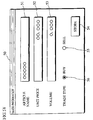
- FIG. 14 shows an example display screen of trade information displayed by the browser.
- a trade information display screen 50 includes a text area 51 for displaying a name of an article, a text area 52 for displaying a unit price of the article, a text area 53 for displaying a trading volume, and radio buttons 55 and 56 for displaying the types of trading, each of which shows trade information.
- the trade information is stored in a corresponding variable.
- STORE button 54 a Java applet that accompanies the trade information display screen 50 stores the trade information in the IC card 11.
- the request for storing the trade information is sent from the Java applet to the PDA 10 via the USB interface 33.
- the PDA 10 of this embodiment has a data management program in addition to the software shown in FIG. 11.
- FIG. 15 shows a software construction of the PDA 10 that particularly relates to the data management program.
- the data management program receives data from the PC 13 via the USB driver 2, and writes the data to the EEPROM 44 of the IC card 11 via the IC card interface driver.
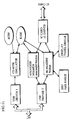
- FIG. 16 shows a data memory buffer provided on the EEPROM 44.
- the data memory buffer has fifty records that are in a one-to-one correspondence with the records in the URL memory buffer.
- the data memory buffer is a buffer of 6400 bytes where the size of each record is 128 bytes.
- Each record has sixteen 8-byte data fields, and stores one set of data in each data field. The set of data is held in the form of ASCII.
- the data management program When storing data to the data memory buffer, the data management program indicates a URL number (0 to 49) and a data number (0 to 15) and requests the data to be stored in 32-digit ASCII representation.
- the URL number is the number of the URL which is designated by the user when accessing the home page
- the data number is one of the numbers which are assigned to sets of data received from the PC 13 in the reception order.
- an input panel hander in the PDA 10 has two modes, namely, a URL selection mode and a data display mode.
- a URL selection mode When the UP button and the OK button 25 are simultaneously pressed on the input panel 31, the input panel handler switches one mode to the other.
- the default is the URL selection mode.
- the URL selection mode information input from the input panel 31 is all sent to the URL management program.
- the data display mode information input from the input panel 31 is all sent to the data management program.
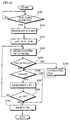
- FIG. 17 is a flowchart showing an operation of the data management program when receiving input information from the input panel handler (i.e. when the input panel hander is in the data display mode).
- the data management program performs initialization, by setting variables i and j to 0 and a flag to OFF (S60).
- Variable i shows a URL number
- variable j shows a data number.
- the display panel driver displays the "i"th URL on the display panel 20 when the flag is OFF, and displays the "j"th data in a record in the data memory buffer which corresponds to the "i"th URL (hereafter referred to as '"j"th data of the "i"th URL') when the flag is ON.
- the data management program reads the "j"th data of the "i”th URL from the EEPROM 44 of the IC card 11, and stores it to the RAM 37 (S61).
- the flag is OFF (S62:NO)
- the "i"th URL is displayed on the display panel 20 (S63).
- the flag is ON (S62;YES)
- the "j"th data of the "i"th URL is displayed on the display panel 20 (S68).
- the data management program checks the flag. If the flag is ON (S69:YES), the data management program decrements j by 1, where the lower limit is 0 (S73). If the flag is OFF (S69:NO), the data management program decrements i by 1, where the lower limit is 0 (S70).
- step S64 When the result "NO” is given in step S64 and the DOWN button is pressed (S65:YES), the data management program checks the flag. If the flag is ON (S71:YES), the data management program increments j by 1, where the upper limit is 15 (S74). If the flag is OFF (S71:NO), the data management program increments i by 1, where the upper limit is 49 (S72). After any of steps S70 and S72-S74 ends, the operation returns to step S61.
- step S65 When the result "NO” is given in step S65 and the OK button 25 is pressed (S66:YES), the data management program inverts the flag. Which is to say, if the flag is ON it is switched to OFF, whereas if the flag is OFF it is switched to ON.
- step S66 or after step S67 ends the operation returns to step S62. In this way, desired data stored in the EEPROM 44 of the IC card 11 can be displayed on the display panel 20 of the PDA 10.
- the user conventionally has to either access a home page which shows the trade information or take hand-written notes when conducting the trade.
- the user can store the trade information onto the IC card 11 only by clicking a predetermined button on the page that displays the trade information.
- the user can refer to the trade information anywhere and anytime, by inserting the IC card 11 into the PDA 10. This enables the storing and referencing of data to be conducted much more easily.
- the input panel handler and the display panel driver may be used to scroll the display on the display panel 20 from side to side.
- Such a scroll operation can be made using the RIGHT and LEFT buttons.
- FIG. 18 shows a display data buffer held on the RAM 37 by the display panel driver.
- the display data buffer is used to store a URL or data which the URL management program or data management program requests to display.
- the display data buffer is made up of a data length field for storing a data length and a display data field for storing display data.
- the display panel driver displays the first 11 characters of the display data on the display panel 20 by default.
- the display data field stores only a resource name of the URL.
- the display data field does not store a protocol name ("http”, “nttp”, “ftp”, “telnet”, “file”, etc.) and a delimiter ("://") that separates the protocol name from the resource name.
- FIG. 19 is a flowchart showing an operation of the display panel driver which involves scroll operations.
- the display panel driver sets variable k to 0 (S80).
- Variable k specifies a position of the first character of a character string to be displayed on the display panel 20, in display data.
- the display panel driver then reads data that begins with the "k"th character in the display data and is equal to the length of the display panel 20, from the display data buffer.
- the display panel driver displays the read data on the display panel 20 (S81).
- the display panel driver decrements k by 1, where the lower limit is 0 (S84). If the result "NO” is given in step S82 and the RIGHT button is pressed (S83:YES), the display panel driver increments k by 1, where the upper limit is a predetermined value (S85).
- the predetermined value here is a value obtained by subtracting the length of the display panel 20 from the data length stored in the display data buffer. If the calculation result is a negative value, 0 is set as the predetermined value. After step S84 or S85 ends, the operation returns to step S81 to display data based on variable k.
- the above embodiments may be modified as follows.
- the server 4 has the user input authentication data for updating the authentication information, and sends new authentication information generated using the authentication data to the terminal 2.
- the terminal 2 stores the new authentication information to a corresponding record in the IC card 11.
- FIG. 20 is a sequence diagram showing a procedure of updating the authentication information.
- the server 4 has the terminal 2 display an authentication data input screen.
- the authentication data input screen includes text areas that are used for the user to input authentication data for updating authentication information. These text areas include a text area for inputting an address of the user and a text area for inputting a password.
- the authentication data input screen also includes an UPDATE button.
- UPDATE button When the user clicks the UPDATE button after inputting the authentication data to the text areas, a confirmation window is displayed through a Java applet that accompanies the authentication data input screen. This window asks the user to input once again whether to update the authentication information using the input authentication data.
- the confirmation window is provided with an OK button and a CANCEL button. If the user clicks the CANCEL button, the display returns to the authentication data input screen. If the user clicks the OK button, the input authentication data is sent to the server 4. Upon receiving the authentication data, the server 4 creates new authentication information using the authentication data, and sends the new authentication information to the terminal 2.
- the server 4 sends a Web page that contains the new authentication information and a Java applet for storing the new authentication information to the IC card 11, to the terminal 2.
- the browser of the terminal 2 Upon receiving the Web page, stores the new authentication information to a predetermined record in the authentication information memory buffer on the IC card 11, in accordance with the Java applet.
- the terminal 2 notifies the server 4 of the completion.
- the server 4 Upon being notified of the completion, the server 4 updates the authentication information by replacing it with the new authentication information. This new authentication information is put to use for subsequent authentication procedures. Meanwhile, having notified the server 4 of the completion, the terminal 2 displays a message indicating the completion of the authentication information update, according to the Java applet.
- the predetermined record in the authentication information memory buffer to which the new authentication information is stored may be a record corresponding to the URL which is designated by the user in step S6 shown in FIG. 6.
- the server 4 may send a URL together with the new authentication information to the terminal 2 so that the new authentication information is stored in a record corresponding to this URL.
- the authentication data input screen may be linked from the HTML document received in step S15 in FIG. 7, or from another Web page. In this way, authenticat ion information can be updated easily through the network. When doing so, authentication for the authentication information has been automatically performed beforehand as described in the above embodiments, so that the authentication information can be updated safely.
- the password can be set in the following manner.
- an authentication program stored in the ROM 38 is activated first, and accepts input of a password from the numeric keypad 22 or the like.
- the authentication program verifies the input password against a password which is stored in the ROM 38 in advance. When they match, the user is permitted to proceed to a URL selection operation. When they do not match, the user is asked to input the password once again.
- the above embodiments describe the case where the IC card 11 is a contact-type IC card and the PDA 10 is a contact-type IC card reader/writer. However, the effects described in the embodiments can still be achieved even if they are contactless-type. Also, the above embodiments describe the case where the PDA 10 is connected to the PC 13 via the USB interface 33, but they may be connected using another type of interface. In such a case, it is preferable to employ an interface that has a plug-and-play function.
- a construction of an authentication system to which the third embodiment relates is roughly the same as that in the first embodiment, but the third embodiment has a notable feature relating to the handling of URL information. Accordingly, the third embodiment differs with the first embodiment in the structure of the URL memory buffer and the operation of the PDA 10.
- FIG. 21 shows a URL memory buffer provided on the EEPROM 44 in this embodiment.
- this URL memory buffer is a buffer of 6400 bytes made up of fifty 128-byte records. Each record is composed of a 1-byte URL length field, a 1-byte access counter, and a 126-byte URL field. URL information is stored from the first byte of the URL field.
- the part of the URL field that is left unoccupied after storing the URL information is used as a padding unit storing zeros.
- the URL memory buffer has a predetermined address on the EEPROM 44 as its start address, and uses consecutive 6400 bytes beginning with the start address. Note that an integer from 0 to 126 is stored in the URL length field, while an integer from 0 to 255 is stored in the access counter.
- FIG. 22 is a flowchart showing an operational procedure for storing URLs to the URL memory buffer.
- a file manager e.g. Explorer (registered trademark)
- the contents of the EEPROM 39 in the PDA 10 are displayed on the file manager, as if electronic files stored in a CD-ROM set in a CD-ROM drive were displayed.
- the user activates a URL storage program out of the displayed electronic files (S161).
- the URL storage program generates a window which displays a list of URLs registered by the browser on the PC 13.
- the URL storage program generates a window that displays a list of files which come under a folder "C:/Windows/Favorites”.
- the display of the URL is inverted (S162). If URLs which the user wants to store are all displayed in inverse (S163:YES), the user clicks a TRANSFER button displayed on the window so that the URLs are stored in the IC card 11 (S164). If the judgement "NO" is given in step S163, the user returns to step S162 to click other URLs which he/she wants to store so that all desired URLs are displayed in inverse.
- FIG. 23 is a flowchart showing an operation of the PDA 10 that is associated with the operation shown in FIG. 22.
- the PDA 10 When requested to store Q URLs to the IC card 11 as a result of the above operation, the PDA 10 first sets variable q at Q, and clears a temporary buffer on the RAM 37 (S170). The PDA 10 then refers to the value of the access counter of each record in the URL memory buffer in the IC card 11 (S171), and stores the number of the record with the smallest access counter value into the temporary buffer (S172).
- the PDA 10 decrements variable q by 1 (S173). If variable q is a positive value (S174:YES), the operation returns to step S171. If variable q is 0 (S174:NO), the PDA 10 stores the URLs whose storage is requested by the user, into URL fields of records specified by the numbers stored in the temporary buffer (S175). The PDA 10 then initializes the access counters of the records specified by the numbers stored in the temporary buffer, to 0 (S176).
- FIG. 24 is a flowchart showing an operation of the PDA 10 when designating a URL in this embodiment.
- the PDA 10 initializes the IC card 11 (S181). Which is to say, the PDA 10 applies a circuit voltage to the Vcc terminal, and supplies a clock signal to the clock terminal.
- the PDA 10 then inputs a reset signal to the reset terminal of the IC card 11, to reset the CPU 46 of the IC card 11.
- the PDA 10 initializes internal counters p, N, and C to 0 (S182).
- the PDA 10 reads a counter value of the "p"th URL from the URL memory buffer of the IC card 11 (S183), and compares the read counter value with the value of counter C. If the read counter value is greater than counter C (S184:YES), the PDA 10 stores the read counter value to counter C, and the value of counter p to counter N (S185). If the judgement "NO" is given in step S184 or after step S185 ends, the value of counter C is compared with the access counter maximum value 255. If counter C reaches 255 (S186:YES), the operation proceeds to step S189.
- step S186 the PDA 10 increments counter p by 1 (S187). After this, the PDA 10 compares the value of counter p with the value 50. If counter p is below 50 (S188:NO), the PDA 10 returns to step S183, judging that there still remain URLs which need be processed. If counter p is 50 (S188:YES), the PDA 10 proceeds to step S189, judging that all URLs have been processed.
- step S189 The processing contents of step S189 are similar to steps S25-S30 of FIG. 8, but differs in part of step S28. Which is to say, in addition to storing the selected URL to the predetermined buffer, the access counter of the record in which the URL is stored is incremented by 1 where the upper limit is 255.
- URLs can be stored in the IC card 11 easily. Especially since new URLs are automatically stored to records with smaller access counter values, the contents of the IC card 11 can be updated while retaining frequently-accessed URLs.
- Installer software for installing necessary software programs is stored in the EEPROM 39 of the PDA 10 beforehand.
- the automatic execution file autorun.inf checks whether the necessary software programs are installed in the PC 13. If any of the software programs is not installed, the installer in the EEPROM 39 installs that software program into the PC 13.
- Fingerprint authentication may be used instead of password authentication.
- a fingerprint reading device is provided on the back of the PDA 10. After power-up, the user presses his/her fingers to the fingerprint reading device so that the fingerprint reading device reads his/her fingerprint pattern. The read fingerprint pattern is compared with a fingerprint pattern which is stored in the ROM 38 beforehand. If they match, the user is permitted to proceed to a URL selection operation. Otherwise, the user is asked to fingerprint again.
- a rewritable nonvolatile memory such as an EEPROM, as the ROM 38 for storing a password or fingerprint pattern used for authentication.
- the PDA 10 emulates a CD-ROM device to have the PC 13 access a predetermined URL using autorun.inf.
- the PDA 10 may have the PC 13 execute the batch file stored in the EEPROM 39, instead of emulating a CD-ROM device.
- the PDA 10 is capable of having the file manager (e.g. Explorer (registered trademark)) of the PC 13 display an electronic file that contains the batch file stored in the EEPROM 39. Therefore, the PDA 10 may have the PC 13 activate the batch file and access a desired URL. In this case, the batch file is given a description such as "iexplore http://www.jpo.go.jp".
- the file manager e.g. Explorer (registered trademark)
- autorun.inf is described as an example automatic execution file, but the invention is not limited to such. The effects of the invention may still be achieved if an automatic execution file other than autorun.inf is used for the terminal 2 to access a desired network object.
Landscapes
- Engineering & Computer Science (AREA)
- Business, Economics & Management (AREA)
- Theoretical Computer Science (AREA)
- Accounting & Taxation (AREA)
- Finance (AREA)
- Physics & Mathematics (AREA)
- General Physics & Mathematics (AREA)
- Computer Security & Cryptography (AREA)
- Computer Networks & Wireless Communication (AREA)
- Strategic Management (AREA)
- General Business, Economics & Management (AREA)
- Computer Hardware Design (AREA)
- Software Systems (AREA)
- General Engineering & Computer Science (AREA)
- Information Transfer Between Computers (AREA)
Applications Claiming Priority (4)
| Application Number | Priority Date | Filing Date | Title |
|---|---|---|---|
| JP2000315504A JP2002123439A (ja) | 2000-10-16 | 2000-10-16 | Url入力補助装置およびurl入力補助システム |
| JP2000315505A JP2002123495A (ja) | 2000-10-16 | 2000-10-16 | 電子認証システムおよびデータ記録システム |
| JP2000315504 | 2000-10-16 | ||
| JP2000315505 | 2000-10-16 |
Publications (2)
| Publication Number | Publication Date |
|---|---|
| EP1199624A2 true EP1199624A2 (fr) | 2002-04-24 |
| EP1199624A3 EP1199624A3 (fr) | 2006-04-19 |
Family
ID=26602172
Family Applications (1)
| Application Number | Title | Priority Date | Filing Date |
|---|---|---|---|
| EP01308752A Withdrawn EP1199624A3 (fr) | 2000-10-16 | 2001-10-15 | Système électronique d'authentification, système d'entrée URL, dispositif d'entrée URL, et système d'enregistrement de données |
Country Status (3)
| Country | Link |
|---|---|
| US (1) | US20020046338A1 (fr) |
| EP (1) | EP1199624A3 (fr) |
| CN (1) | CN1349172A (fr) |
Cited By (2)
| Publication number | Priority date | Publication date | Assignee | Title |
|---|---|---|---|---|
| WO2006075917A3 (fr) * | 2005-01-11 | 2007-04-05 | Encap As | Procede de production de code de securite et ses procedes d'utilisation, et dispositif programmable correspondant |
| WO2007137166A3 (fr) * | 2006-05-19 | 2008-04-24 | Identity Alliance | Système et procédé de services web dynamique pour l'utilisation de dispositifs personnels de confiance et jetons d'identité |
Families Citing this family (20)
| Publication number | Priority date | Publication date | Assignee | Title |
|---|---|---|---|---|
| US7171560B2 (en) | 1998-06-22 | 2007-01-30 | Semtek Solutions, Inc. | Method and apparatus for securing and authenticating encoded data and documents containing such data |
| US20030065734A1 (en) * | 2001-09-29 | 2003-04-03 | Sundaram Ramakesavan | Method and apparatus for an integrated computer and PDA |
| US7509499B2 (en) * | 2002-02-12 | 2009-03-24 | Semtek Innovative Solutions Corporation | Secure token access distributed database system |
| US7383386B1 (en) * | 2004-05-21 | 2008-06-03 | Mcm Portfolio Llc | Multi partitioned storage device emulating dissimilar storage media |
| US7506812B2 (en) | 2004-09-07 | 2009-03-24 | Semtek Innovative Solutions Corporation | Transparently securing data for transmission on financial networks |
| CN100373853C (zh) * | 2005-10-10 | 2008-03-05 | 中兴通讯股份有限公司 | 一种流媒体服务请求认证方法和系统 |
| GB0600207D0 (en) * | 2006-01-05 | 2006-02-15 | Bishop Durrell G B | Apparatus for direct automated access to a task or content |
| US8769275B2 (en) | 2006-10-17 | 2014-07-01 | Verifone, Inc. | Batch settlement transactions system and method |
| US9123042B2 (en) * | 2006-10-17 | 2015-09-01 | Verifone, Inc. | Pin block replacement |
| US9361617B2 (en) | 2008-06-17 | 2016-06-07 | Verifone, Inc. | Variable-length cipher system and method |
| KR100782113B1 (ko) * | 2006-11-13 | 2007-12-05 | 삼성전자주식회사 | 메모리 카드 시스템 및 그것의 호스트 식별 정보 전송 방법 |
| KR100841982B1 (ko) * | 2007-02-08 | 2008-06-27 | 삼성전자주식회사 | 호스트 식별 정보를 저장하는 메모리 카드 및 그것의액세스 방법 |
| US20080288403A1 (en) * | 2007-05-18 | 2008-11-20 | Clay Von Mueller | Pin encryption device security |
| US8355982B2 (en) | 2007-08-16 | 2013-01-15 | Verifone, Inc. | Metrics systems and methods for token transactions |
| US8271736B2 (en) * | 2008-02-07 | 2012-09-18 | International Business Machines Corporation | Data block frequency map dependent caching |
| US8144940B2 (en) | 2008-08-07 | 2012-03-27 | Clay Von Mueller | System and method for authentication of data |
| US8251283B1 (en) | 2009-05-08 | 2012-08-28 | Oberon Labs, LLC | Token authentication using spatial characteristics |
| JP6561501B2 (ja) | 2015-03-10 | 2019-08-21 | 株式会社リコー | 機器、認証システム、認証処理方法、認証処理プログラム、及び記憶媒体 |
| JP6547357B2 (ja) * | 2015-03-20 | 2019-07-24 | 株式会社リコー | 機器、認証システム、認証処理方法及び認証処理プログラム |
| JP7514068B2 (ja) * | 2019-10-04 | 2024-07-10 | キヤノン株式会社 | 情報処理装置とその制御方法、及びプログラム |
Family Cites Families (5)
| Publication number | Priority date | Publication date | Assignee | Title |
|---|---|---|---|---|
| US5590199A (en) * | 1993-10-12 | 1996-12-31 | The Mitre Corporation | Electronic information network user authentication and authorization system |
| MY119618A (en) * | 1996-12-06 | 2005-06-30 | Nippon Telegraph & Telephone | Internet accessing system using card readers and dual cards with information pertaining to log on |
| US7272723B1 (en) * | 1999-01-15 | 2007-09-18 | Safenet, Inc. | USB-compliant personal key with integral input and output devices |
| JP2000235538A (ja) * | 1999-02-15 | 2000-08-29 | Nec Corp | インターネット接続方法 |
| JP3946931B2 (ja) * | 2000-04-25 | 2007-07-18 | 船井電機株式会社 | タブレット式情報端末装置及びそれを用いたホームページ閲覧システム |
-
2001
- 2001-10-15 EP EP01308752A patent/EP1199624A3/fr not_active Withdrawn
- 2001-10-15 US US09/978,875 patent/US20020046338A1/en not_active Abandoned
- 2001-10-16 CN CN01139396A patent/CN1349172A/zh active Pending
Cited By (3)
| Publication number | Priority date | Publication date | Assignee | Title |
|---|---|---|---|---|
| WO2006075917A3 (fr) * | 2005-01-11 | 2007-04-05 | Encap As | Procede de production de code de securite et ses procedes d'utilisation, et dispositif programmable correspondant |
| WO2007137166A3 (fr) * | 2006-05-19 | 2008-04-24 | Identity Alliance | Système et procédé de services web dynamique pour l'utilisation de dispositifs personnels de confiance et jetons d'identité |
| US8364968B2 (en) | 2006-05-19 | 2013-01-29 | Symantec Corporation | Dynamic web services systems and method for use of personal trusted devices and identity tokens |
Also Published As
| Publication number | Publication date |
|---|---|
| EP1199624A3 (fr) | 2006-04-19 |
| CN1349172A (zh) | 2002-05-15 |
| US20020046338A1 (en) | 2002-04-18 |
Similar Documents
| Publication | Publication Date | Title |
|---|---|---|
| EP1199624A2 (fr) | Système électronique d'authentification, système d'entrée URL, dispositif d'entrée URL, et système d'enregistrement de données | |
| US6282618B1 (en) | Secure variable storage for internet applications | |
| US7321917B2 (en) | Customizing a client application using an options page stored on a server computer | |
| US7234107B1 (en) | System for customizing web page | |
| JP2996937B2 (ja) | サーバ | |
| US6651217B1 (en) | System and method for populating forms with previously used data values | |
| JP4636694B2 (ja) | アプリケーションのコンテキストにおけるブラウザ機能の制御方法及び装置 | |
| US5784058A (en) | User-controllable persistent browser display pages | |
| US7328245B1 (en) | Remote retrieval of documents | |
| US6112228A (en) | Client inherited functionally derived from a proxy topology where each proxy is independently configured | |
| US6411996B1 (en) | Method and apparatus maintaining a to-be-visited site bookmark file | |
| US20050033968A1 (en) | Secure digital key for automatic login | |
| US7188240B1 (en) | Method and system for encryption of web browser cache | |
| US6820236B1 (en) | Click ahead browser function | |
| WO2001001285A2 (fr) | Systeme et procede d'acces aux rubriques d'aide pour composants d'un systeme informatique | |
| WO2009079666A1 (fr) | Système de sécurité et procédé de contrôle d'accès à des ressources informatiques | |
| US20040104893A1 (en) | Interactive keyboard | |
| US20020193142A1 (en) | System and method for controlling access to personal information | |
| US7330876B1 (en) | Method and system of automating internet interactions | |
| US7428578B1 (en) | Remotely initiated document transmission | |
| KR20020059764A (ko) | 소프트웨어 또는 서비스에 대한 데이타 애플리케이션을인증하기 위한 컴퓨터 장치 | |
| WO2001039031A2 (fr) | Procede et appareil d'entree automatique de donnees dans un formulaire | |
| WO2001057651A2 (fr) | Systeme et procede de traduction d'une interface utilisateur | |
| WO2008086209A2 (fr) | Système et procédé de gestion des objets indépendamment de l'emplacement | |
| JP2002123495A (ja) | 電子認証システムおよびデータ記録システム |
Legal Events
| Date | Code | Title | Description |
|---|---|---|---|
| PUAI | Public reference made under article 153(3) epc to a published international application that has entered the european phase |
Free format text: ORIGINAL CODE: 0009012 |
|
| AK | Designated contracting states |
Kind code of ref document: A2 Designated state(s): AT BE CH CY DE DK ES FI FR GB GR IE IT LI LU MC NL PT SE TR |
|
| AX | Request for extension of the european patent |
Free format text: AL;LT;LV;MK;RO;SI |
|
| PUAL | Search report despatched |
Free format text: ORIGINAL CODE: 0009013 |
|
| AK | Designated contracting states |
Kind code of ref document: A3 Designated state(s): AT BE CH CY DE DK ES FI FR GB GR IE IT LI LU MC NL PT SE TR |
|
| AX | Request for extension of the european patent |
Extension state: AL LT LV MK RO SI |
|
| AKX | Designation fees paid | ||
| REG | Reference to a national code |
Ref country code: DE Ref legal event code: 8566 |
|
| STAA | Information on the status of an ep patent application or granted ep patent |
Free format text: STATUS: THE APPLICATION IS DEEMED TO BE WITHDRAWN |
|
| 18D | Application deemed to be withdrawn |
Effective date: 20061020 |