EP1237094A1 - Verfahren zur Feststellung von "Rubies" - Google Patents
Verfahren zur Feststellung von "Rubies" Download PDFInfo
- Publication number
- EP1237094A1 EP1237094A1 EP01101380A EP01101380A EP1237094A1 EP 1237094 A1 EP1237094 A1 EP 1237094A1 EP 01101380 A EP01101380 A EP 01101380A EP 01101380 A EP01101380 A EP 01101380A EP 1237094 A1 EP1237094 A1 EP 1237094A1
- Authority
- EP
- European Patent Office
- Prior art keywords
- text
- ruby
- locations
- rubies
- base
- Prior art date
- Legal status (The legal status is an assumption and is not a legal conclusion. Google has not performed a legal analysis and makes no representation as to the accuracy of the status listed.)
- Withdrawn
Links
Images


Classifications
-
- G—PHYSICS
- G06—COMPUTING OR CALCULATING; COUNTING
- G06F—ELECTRIC DIGITAL DATA PROCESSING
- G06F40/00—Handling natural language data
- G06F40/10—Text processing
- G06F40/166—Editing, e.g. inserting or deleting
- G06F40/169—Annotation, e.g. comment data or footnotes
Definitions
- the present invention relates to a method for determining rubies, and in particular it relates to a ruby dialogue for determining, entering and editing ruby characters.
- Ruby is the commonly used name for a run of text that appears in the immediate vicinity of another run of text, referred to as the "base”. Ruby serve as a pronunciation guide or a short annotation associated with the base text. Rubies are used frequently in Japan in most kinds of publications, such as books and magazines, but also in China or in Korea.
- a ruby functionality is needed for computer programs which deal with Chinese, Japanese or Korean characters. Those characters - contrary to Western or Roman characters - often represent a word by a single character. Such Chinese characters (or Kanji) may be difficult to read because there are so many of them and one may not expect everybody to know all of them. Consequently, there is a need for expressing the way of reading a Chinese character by its phonetic transcription in order to enable people who do not recognize the character to nevertheless read it.
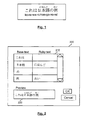
- Figure 1 gives an example of a simple Japanese sentence in which the Chinese characters are superposed by their phonetic transcriptions. Those phonetic transcriptions are written using relatively simple characters which only represent the phonetic content of the Chinese character rather than its semantic meaning. Those characters which are used for the phonetic transcription are called “rubies”, or in Japanese they are called “furigana”.
- the present invention relates to the determination of which individual rubies (which ruby characters) should be displayed for a certain base text.
- a conventional ruby handling in this respect will now be illustrated in connection with Figure 2.
- a user selects a text portion for which he desires to generate rubies which then should be displayed superposed to (or above) the base text.
- the base text for which a ruby generation should be performed is the same as the text in Figure 1.
- a user may then start the ruby functionality and subsequently a window as shown in Figure 2 pops up.
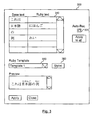
- a window 200 one can see a table 210 which contains two columns, a first column for the selected base text and a second column for the corresponding rubies.
- an automatic ruby determination function for detecting individual words in the base text and for identifying corresponding ruby characters. Each individual word which is recognized as having corresponding rubies is displayed in a different row in table 210.
- the characters which are displayed in the first and the third base text row do not have corresponding ruby characters, therefore the corresponding ruby text cell is left empty.
- preview window 220 the user is provided with a display of the base text together with the corresponding rubies. If the user does not agree with the proposed rubies, then he can edit the individual ruby text cells and consequently the preview also will change.
- the display in the preview window 220 is found to be correct by the user, then he may press the ok button and subsequently in the text document from which the base text has been selected there will be displayed the base text together with its corresponding rubies as it has been shown in the preview window 220.
- a method for determining rubies for generating the display of a ruby annotation to an electronic document comprising: receiving a user input by a first process running on a computer and operating on said electronic document as a working document to thereby select at least a portion of said electronic document as a base text for which a ruby annotation is to be generated; providing information on said at least one selected portion of said electronic document to a second process running on a computer, said second process enabling the display of a ruby dialogue window on a computer, said ruby dialogue window comprising a display mask comprising locations which are arranged in pairs, a first location of each pair for displaying a base text portion and a second location of each pair for displaying and editing corresponding rubies, said second process comprising: in case of an automatic ruby determination mode being set active, parsing said selected base text to detect individual words in said base text, identifying their corresponding rubies, if any, enabling the display of the detected words of said base text and enabling the display
- the text selection functionality comprises the capability of multi-selection for selecting multiple text portions. This enables a user to arbitrarily select text portions in a text document which can then simultaneously be handled in a single ruby dialogue.
- the text selection functionality offers an option to search for all occurrences of a certain text string (or a certain word) in a text document. For all occurrences of such a text string or a word the ruby handling can then be carried out in the same ruby dialogue without the necessity to repeatedly carry out the ruby dialogue.
- a ruby text which has been inserted or edited once for a certain text string can be applied to all other occurrences of this text string in the text document. This facilitates an easy ruby handling for multiple occurrences of a certain base text for which the same ruby text should be generated.
- a formatting option for formatting the ruby text according to formatting templates which may be generated and selected by a user. This allows for a high flexibility of the style in which the display of the ruby characters is carried out.
- Figure 1 shows an example of a Japanese base text together with corresponding rubies.
- Figure 2 illustrates an example of a conventional ruby handling procedure.
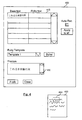
- Figure 3 illustrates a ruby handling according to a first embodiment of the invention with automatic recognition being switched on.
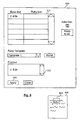
- Figure 4 illustrates a ruby handling according to an embodiment of the invention if automatic recognition is switched off.
- Figure 5 illustrates the ruby dialogue of Figure 4 after an amendment of the base text selection.
- Figure 6 illustrates the ruby dialogue window of Figure 5 after multi-selection has been used.
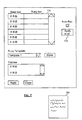
- Figure 7 illustrates the ruby dialogue window of Figure 5 after a "search-for-all" has been performed.
- Figure 8 shows a flow chart illustrating the ruby functionality according to an embodiment of the invention.
- Figure 9 illustrates a multi-selection process according to an embodiment of the invention.
- Figure 10 illustrates a ruby editing process in an embodiment according to the invention.
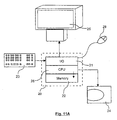
- Figure 11A schematically illustrates a computer system which can be used in connection with an embodiment of the present invention.
- Figure 11B illustrates a computer system which can be used in connection with the present invention.
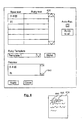
- a ruby dialogue window according to an embodiment of the present invention is schematically illustrated in Figure 3.
- the window shown in Figure 3 resembles the window as shown in Figure 2.
- the table 310 in window 300 has the same contents as the table 210 in the window shown in Figure 2. This is because Figure 3 shows the status where the same base text is selected in a document for a ruby functionality, moreover, in the case of Figure 3 the automatic recognition function (automatic ruby determination) is switched "on" by toggle 320.
- FIG 4 there is shown the status after in the window shown in Figure 3 the toggle 320 has been pushed in order to switch the automatic ruby determination mode "off'.
- the preview window only shows the base text and does not display any ruby characters.
- the base text shown in this row of table 410 corresponds to a text portion 460 which has been selected in a text document 450 schematically illustrated in Figure 4.
- the selection can e.g. be carried by marking the text portion 460 which is to be selected by the mouse.
- the ruby dialogue according to this embodiment is so-called mode-less dialogue.
- Both windows 450 and 400 may be displayed simultaneously on a screen, and a user may just change focus between the two windows as in the conventional windows technology and may work in any of both windows which is in the focus. Contrary to a modal dialogue which restricts the user to the specific functions offered by the dialogue a modeless dialogue does not contain such limitations.
- a text portion 560 is smaller than the text portion 460 of Figure 4 has been selected by the user in text document 550. Consequently in the first row of table 510 only a part of the base text which has been shown in table 410 of Figure 4 is displayed.
- Working document 500 may be any document on which some operation is performed, such as a text document edited by a word processor, a website displayed by a browser, an image containing some text, or any other document containing some text which can be selected as base text for the ruby generation.
- a user may according to his preferences enter the corresponding ruby text into table 510. If the user is satisfied with the selected base text and the ruby text which he has inputted he may push button 540 to apply the ruby functionality to the text document 550. Then for portion 560 of text document 550 the ruby characters as may have been shown in preview window 530 will be displayed.
- Figure 6 illustrates the ruby dialogue according to an embodiment of the present invention in connection with the so-called multi-selection capability.
- the multi-selection capability is a feature which is well known and which is offered by the Star Office Software produced by Sun Microsystems.
- a user By pressing the Ctrl-key on the keyboard a user can using the left mouse button select multiple text portions in a text document. This is exemplarily shown in connection with the ruby dialogue in Figure 6.
- text document 600 two text portions 660 and 665 have been selected using the multi-selection functionality.
- the first selected portion 660 is displayed as base text in the first row in table 610
- the second selected text portion 665 is displayed in the second row of table 610.
- Preview window 640 shows a preview of the selected base text and the corresponding rubies. In case of Figure 6 no rubies have been inputted yet, consequently no rubies are displayed.
- a particular feature of the multi-selection functionality is the so-called "search for all” option which is also known from the StarOffice Software produced by Sun Microsystems. Using the "search” option in the task bar and selecting the option "search for all” a user can select for all occurrences of a certain word or a certain text in a text document.
- each row contains the same base text, namely the term "nihongo". This is a result of searching for all occurrences of the term "nihongo" in text document 750.
- a user may now enter a corresponding ruby text into the first row of table 710, he may then press the "apply to all” button and consequently the ruby text inserted into the first row of table 710 will be pasted into all other rows. Thereby a user can easily generate an arbitrary ruby text for each occurrence of a certain word or a certain text string in a text document 750.
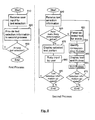
- Figure 8 shows a flowchart illustrating the ruby functionality according to an embodiment of the present invention.
- the left-hand-side of Figure 8 illustrates a first process running on a computer
- the right-hand side illustrates a second process running on a computer
- the first process may for example correspond to a part of an application program by means of which some operations on a working document are performed.
- the second process may e.g. correspond to operations performed by a ruby dialogue (or a ruby dialogue window).
- the process 1 may be a parent process (or a parent window) and process 2 may be a child process (or child window) which is called from parent process 1.
- child process 2 may be called from parent process 1 by pressing a certain key of the keyboard or by selecting a menu item from the task bar which may e.g. be labeled "ruby functionality".
- step 810 the first process receives a user input from a user. Thereby a text portion of the working document 500 of Fig. 5 is selected. This can e.g. be done by using the mouse for marking some text portion in the well known manner.
- step 820 some information on the selected text is provided to the second process. This can be done in many ways. E.g. the selected text may directly be copied into the second process, or a pointer to a starting location of the selected text together with a length of the selected text could be passed over from the first to the second process. Another possibility would be to deliver a stream from process 1 to process 2, with an EOF marker indicating the end of the selected text.
- step 840 belonging to process 2 the information on the selected text is received.
- step 845 it is then determined whether the automatic ruby detection mode is set active. If yes, then in steps 850 to 865 a conventional ruby handling is performed.
- the selected text is parsed to detect individual words by any known parsing method, then corresponding rubies are identified by looking in a database whether for the detected words the exist any rubies. The rubies so identified are then displayed together with the corresponding base text as shown e.g. in Fig. 3
- step 845 If in step 845 the automatic determining mode is detected to be inactive, then in step 875 all the selected text portion is displayed in the first row of table 510 as shown in Fig. 5. Since no automatic detection is carried out no individual words are detected, consequently in step 875 the whole selected text is displayed in a single row of table 510 and no rubies are displayed.
- Table 510 is a mask for displaying the base text and the corresponding rubies. Each row of table 510 comprises two cells, the left cell for the base text and the right cell for the corresponding rubies. If a single base text portion has been selected and the corresponding selection information has been received by process 2, and if further the automatic determination mode is set inactive, then the whole base text portion is displayed in the left cell of the first row of table 510. The right cell is provided for allowing a user to input the rubies corresponding to the selected base text.
- step 880 a user may then input the rubies corresponding to the selected base text into the second cell of the first row of table 510.
- a user may amend the text selection in process 1. This can be done because process 1 and process 2 do not block each other but rather are running in parallel to each other. E.g. by changing the focus window as in the conventional windows system a user may switch focus between process 1 (which may be a word processing operation) and process 2 (the ruby dialogue window). After having changed focus to process 1 or to its corresponding window (which is a well known operation and is therefore not shown in Fig. 8) a user may request to alter the text selection (e.g. by pressing the left mouse button and marking some text). This operation is detected in step 830, the corresponding user input is received in step 810 and passed over to process 2 in step 820. Such an alteration of the selected text portion will be recognized by step 885 (or step 870 in case of automatic recognition) of process 2 and will cause process 2 to be reexecuted.
- step 885 or step 870 in case of automatic recognition
- a further check (not shown in Fig. 8) whether the automatic recognition is still active. If no, the procedure would then jump to step 875 and the operation will proceed as described before. Since no automatic recognition would be performed, the column for the rubies (right column in table 510 of Fig. 5) would then become empty as soon as the automatic recognition function would have been switched of, furthermore the whole selected base text would move into the first row of table 510 (because no words are detected). If the automatic recognition would still be active, then process 2 would end.
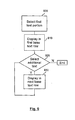
- Figure 9 shows a flowchart illustrating the text selection of multiple text portions in connection with its display in the ruby table of the ruby dialogue window.
- multiple text portions can be selected as base text.
- a first text portion is selected, this first portion is displayed in the first base text row as illustrated in step 910. If additional text is selected in step 920, then this text is displayed in the next base text row of the table in the ruby dialogue window according to step 930 and the procedure returns to step 920 due to the mode-less character of the ruby dialogue. If no additional text is selected, then the procedure ends.
- the ruby dialogue window is generated by process 2 and it comprises a mask in which locations for display and editing are arranged in pairs, each pair comprising a first location for a base text portion and a second location for corresponding rubies (if any). If multiple text portions are passed over to process 2, then they are displayed in correspondingly different first locations. If the mask takes the form of a table, as in Figures 1 to 7, then each individual selected base text portion is displayed in a different row in the left cell of said row.
- Figure 10 shows a flowchart illustrating the "search for all" option in connection with the ruby dialogue.
- a ruby text in the first row of the table in the ruby dialogue window is edited in step 100.
- Check box 110 checks whether or not other rows are to be edited (step 120 if yes), if no then check box 130 asks whether or not the first ruby text row should be applied to all other ruby text rows. If yes, then in step 140 the text of the first ruby text row is pasted into all other ruby text rows, the result may again be amended by the user by returning to step 120 and then the procedure ends.
- a certain ruby text can be easily generated for multiple occurrences of a certain base text in a text document.
- Figure 3 shows a pull-down menu 350 from which a user can select a certain template.
- the concept of templates is known from the StarOffice Software produced by Sun Microsystems. It offers the user the possibility to define and select certain formats which then are applied to a text.
- a template may e.g. consist in the selection of a certain font, a certain font size, whether or not the style is bold-faced or not, courier or not, etc.
- Such templates may be generated using the stylist-option 360 shown in Figure 3. This option is known from the StarOffice Software already and will therefore not be explained in detail here.
- the base text and the corresponding rubies After the base text and the corresponding rubies have been determined as described before (and accepted by the user, e.g. by pressing an OK button not shown), they may be displayed in the working document.
- the display of the rubies can be carried out in a conventional manner and will therefore not be described in detail here.
- the present invention is applicable to a hardware configuration like a personal computer or a work station as illustrated schematically in Figure 11A.
- the computer may comprise a central processing unit CPU 26, an input output I/O unit 21, an internal memory 22 and an external memory 24.
- the computer may further comprise standard input devices like a keyboard 23, a mouse 28 or a speech processing means (not illustrated).
- the invention may also be applied to a client-server configuration as illustrated in Figure 11B.
- the document may be displayed on a display screen of a client device 60 while some or all steps of the method as illustrated before in connection with Figures 1 to 7 are carried out on one or more server computer accessible by a client device over a data network such as the internet using a browser application or the like.
Landscapes
- Engineering & Computer Science (AREA)
- Theoretical Computer Science (AREA)
- Health & Medical Sciences (AREA)
- Artificial Intelligence (AREA)
- Audiology, Speech & Language Pathology (AREA)
- Computational Linguistics (AREA)
- General Health & Medical Sciences (AREA)
- Physics & Mathematics (AREA)
- General Engineering & Computer Science (AREA)
- General Physics & Mathematics (AREA)
- Document Processing Apparatus (AREA)
Priority Applications (3)
| Application Number | Priority Date | Filing Date | Title |
|---|---|---|---|
| EP01101380A EP1237094A1 (de) | 2001-01-22 | 2001-01-22 | Verfahren zur Feststellung von "Rubies" |
| US10/054,545 US7080316B2 (en) | 2001-01-22 | 2002-01-18 | Method for determining rubies |
| JP2002012777A JP2002304388A (ja) | 2001-01-22 | 2002-01-22 | ルビ表示判定方法 |
Applications Claiming Priority (1)
| Application Number | Priority Date | Filing Date | Title |
|---|---|---|---|
| EP01101380A EP1237094A1 (de) | 2001-01-22 | 2001-01-22 | Verfahren zur Feststellung von "Rubies" |
Publications (1)
| Publication Number | Publication Date |
|---|---|
| EP1237094A1 true EP1237094A1 (de) | 2002-09-04 |
Family
ID=8176271
Family Applications (1)
| Application Number | Title | Priority Date | Filing Date |
|---|---|---|---|
| EP01101380A Withdrawn EP1237094A1 (de) | 2001-01-22 | 2001-01-22 | Verfahren zur Feststellung von "Rubies" |
Country Status (3)
| Country | Link |
|---|---|
| US (1) | US7080316B2 (de) |
| EP (1) | EP1237094A1 (de) |
| JP (1) | JP2002304388A (de) |
Families Citing this family (9)
| Publication number | Priority date | Publication date | Assignee | Title |
|---|---|---|---|---|
| US20040236581A1 (en) * | 2003-05-01 | 2004-11-25 | Microsoft Corporation | Dynamic pronunciation support for Japanese and Chinese speech recognition training |
| US7288068B2 (en) | 2003-12-15 | 2007-10-30 | Siemens Medical Solutions Usa, Inc. | Automatic optimization for ultrasound medical imaging |
| US8321786B2 (en) * | 2004-06-17 | 2012-11-27 | Apple Inc. | Routine and interface for correcting electronic text |
| US20060010378A1 (en) * | 2004-07-09 | 2006-01-12 | Nobuyoshi Mori | Reader-specific display of text |
| EP1672483A1 (de) * | 2004-12-20 | 2006-06-21 | Siemens Aktiengesellschaft | Erfassung von Daten in einem Datenverarbeitungssystem |
| JP4859101B2 (ja) * | 2006-01-26 | 2012-01-25 | インターナショナル・ビジネス・マシーンズ・コーポレーション | テキストに付与する発音情報の編集を支援するシステム |
| KR20120054921A (ko) * | 2010-11-22 | 2012-05-31 | 삼성전자주식회사 | 전자책 서비스를 제공하기 위한 장치 및 방법 |
| KR20120102262A (ko) * | 2011-03-08 | 2012-09-18 | 삼성전자주식회사 | 휴대용 단말기가 열람하는 텍스트에서 원하는 내용을 선택하는 방법 및 장치 |
| US9460089B1 (en) * | 2012-11-07 | 2016-10-04 | Amazon Technologies, Inc. | Flow rendering of annotation characters |
Citations (1)
| Publication number | Priority date | Publication date | Assignee | Title |
|---|---|---|---|---|
| US5594642A (en) * | 1993-12-22 | 1997-01-14 | Object Technology Licensing Corp. | Input methods framework |
Family Cites Families (6)
| Publication number | Priority date | Publication date | Assignee | Title |
|---|---|---|---|---|
| US5604897A (en) * | 1990-05-18 | 1997-02-18 | Microsoft Corporation | Method and system for correcting the spelling of misspelled words |
| US5576955A (en) * | 1993-04-08 | 1996-11-19 | Oracle Corporation | Method and apparatus for proofreading in a computer system |
| US6092068A (en) * | 1997-08-05 | 2000-07-18 | Netscape Communication Corporation | Marked document tutor |
| US6782510B1 (en) * | 1998-01-27 | 2004-08-24 | John N. Gross | Word checking tool for controlling the language content in documents using dictionaries with modifyable status fields |
| US6567830B1 (en) * | 1999-02-12 | 2003-05-20 | International Business Machines Corporation | Method, system, and program for displaying added text to an electronic media file |
| US6424982B1 (en) * | 1999-04-09 | 2002-07-23 | Semio Corporation | System and method for parsing a document using one or more break characters |
-
2001
- 2001-01-22 EP EP01101380A patent/EP1237094A1/de not_active Withdrawn
-
2002
- 2002-01-18 US US10/054,545 patent/US7080316B2/en not_active Expired - Lifetime
- 2002-01-22 JP JP2002012777A patent/JP2002304388A/ja active Pending
Patent Citations (1)
| Publication number | Priority date | Publication date | Assignee | Title |
|---|---|---|---|---|
| US5594642A (en) * | 1993-12-22 | 1997-01-14 | Object Technology Licensing Corp. | Input methods framework |
Non-Patent Citations (1)
| Title |
|---|
| "How to put Hurigana (Rubi)", INTERNET CITATION, 2000, XP002205187, Retrieved from the Internet <URL:http://www.research-j.org/e-japanese/english/japanese-computing/how-to-rubi.html> [retrieved on 20020705] * |
Also Published As
| Publication number | Publication date |
|---|---|
| US20020116414A1 (en) | 2002-08-22 |
| JP2002304388A (ja) | 2002-10-18 |
| US7080316B2 (en) | 2006-07-18 |
Similar Documents
| Publication | Publication Date | Title |
|---|---|---|
| KR102345001B1 (ko) | 특허 문서 작성 장치, 방법, 컴퓨터 프로그램, 컴퓨터로 판독 가능한 기록매체, 서버 및 시스템 | |
| RU2358311C2 (ru) | Документ текстовой обработки, хранящийся в едином файле xml, которым могут манипулировать приложения, понимающие язык xml | |
| US7913191B2 (en) | Common input/output interface for application programs | |
| CN100489841C (zh) | 用于开发自然语言理解应用的方法和集成开发工具 | |
| US8196037B2 (en) | Method and device for extracting web information | |
| US20030237053A1 (en) | Function-based object model for web page display in a mobile device | |
| CN100440222C (zh) | 用于文本易读性增强的系统和方法 | |
| CN111753503B (zh) | 一种面向盲人的数学公式编辑方法及装置 | |
| JPH01180062A (ja) | 文書整形装置 | |
| US20120221324A1 (en) | Document Processing Apparatus | |
| EP1237094A1 (de) | Verfahren zur Feststellung von "Rubies" | |
| US6976214B1 (en) | Method, system, and program for enhancing text composition in a text editor program | |
| US20090083300A1 (en) | Document processing device and document processing method | |
| US11514241B2 (en) | Method, apparatus, and computer-readable medium for transforming a hierarchical document object model to filter non-rendered elements | |
| JP4012047B2 (ja) | 電子文書作成装置、電子文書作成方法およびその方法をコンピュータに実行させるプログラム | |
| JP2005173999A (ja) | 電子ファイル検索装置、電子ファイル検索システム、電子ファイル検索方法、プログラムおよび記録媒体 | |
| CN117634425A (zh) | 网页文本标记方法、装置、终端设备以及存储介质 | |
| US20080005662A1 (en) | Server Device and Name Space Issuing Method | |
| JP2002288175A (ja) | 文書の標準化 | |
| JP6114090B2 (ja) | 機械翻訳装置、機械翻訳方法およびプログラム | |
| JP2005011301A (ja) | 文書処理装置及び文書処理プログラム | |
| KR20100014116A (ko) | 탭을 위한 규칙 기반의 사용자 정의된 wi-메카니즘 | |
| JP2002140338A (ja) | 辞書構築支援装置および辞書構築支援方法 | |
| US20080005085A1 (en) | Server Device and Search Method | |
| JPH07134720A (ja) | 文章作成システムにおける関連情報提示方法及び装置 |
Legal Events
| Date | Code | Title | Description |
|---|---|---|---|
| PUAI | Public reference made under article 153(3) epc to a published international application that has entered the european phase |
Free format text: ORIGINAL CODE: 0009012 |
|
| AK | Designated contracting states |
Kind code of ref document: A1 Designated state(s): AT BE CH CY DE DK ES FI FR GB GR IE IT LI LU MC NL PT SE TR |
|
| AX | Request for extension of the european patent |
Free format text: AL;LT;LV;MK;RO;SI |
|
| RAP1 | Party data changed (applicant data changed or rights of an application transferred) |
Owner name: SUN MICROSYSTEMS, INC. |
|
| 17P | Request for examination filed |
Effective date: 20030303 |
|
| AKX | Designation fees paid |
Designated state(s): AT BE |
|
| RBV | Designated contracting states (corrected) |
Designated state(s): DE GB |
|
| REG | Reference to a national code |
Ref country code: DE Ref legal event code: 8566 |
|
| STAA | Information on the status of an ep patent application or granted ep patent |
Free format text: STATUS: THE APPLICATION HAS BEEN WITHDRAWN |
|
| 18W | Application withdrawn |
Effective date: 20050113 |