EP1257109A2 - Passerelle de communication d'image - Google Patents
Passerelle de communication d'image Download PDFInfo
- Publication number
- EP1257109A2 EP1257109A2 EP20020253267 EP02253267A EP1257109A2 EP 1257109 A2 EP1257109 A2 EP 1257109A2 EP 20020253267 EP20020253267 EP 20020253267 EP 02253267 A EP02253267 A EP 02253267A EP 1257109 A2 EP1257109 A2 EP 1257109A2
- Authority
- EP
- European Patent Office
- Prior art keywords
- image
- images
- message
- server
- portable telephone
- Prior art date
- Legal status (The legal status is an assumption and is not a legal conclusion. Google has not performed a legal analysis and makes no representation as to the accuracy of the status listed.)
- Withdrawn
Links
Images






Classifications
-
- H—ELECTRICITY
- H04—ELECTRIC COMMUNICATION TECHNIQUE
- H04W—WIRELESS COMMUNICATION NETWORKS
- H04W28/00—Network traffic management; Network resource management
- H04W28/02—Traffic management, e.g. flow control or congestion control
- H04W28/06—Optimizing the usage of the radio link, e.g. header compression, information sizing, discarding information
-
- H—ELECTRICITY
- H04—ELECTRIC COMMUNICATION TECHNIQUE
- H04N—PICTORIAL COMMUNICATION, e.g. TELEVISION
- H04N7/00—Television systems
- H04N7/14—Systems for two-way working
-
- H—ELECTRICITY
- H04—ELECTRIC COMMUNICATION TECHNIQUE
- H04L—TRANSMISSION OF DIGITAL INFORMATION, e.g. TELEGRAPHIC COMMUNICATION
- H04L67/00—Network arrangements or protocols for supporting network services or applications
- H04L67/50—Network services
- H04L67/56—Provisioning of proxy services
- H04L67/565—Conversion or adaptation of application format or content
-
- H—ELECTRICITY
- H04—ELECTRIC COMMUNICATION TECHNIQUE
- H04L—TRANSMISSION OF DIGITAL INFORMATION, e.g. TELEGRAPHIC COMMUNICATION
- H04L67/00—Network arrangements or protocols for supporting network services or applications
- H04L67/50—Network services
- H04L67/56—Provisioning of proxy services
- H04L67/568—Storing data temporarily at an intermediate stage, e.g. caching
- H04L67/5683—Storage of data provided by user terminals, i.e. reverse caching
-
- H—ELECTRICITY
- H04—ELECTRIC COMMUNICATION TECHNIQUE
- H04L—TRANSMISSION OF DIGITAL INFORMATION, e.g. TELEGRAPHIC COMMUNICATION
- H04L9/00—Cryptographic mechanisms or cryptographic arrangements for secret or secure communications; Network security protocols
- H04L9/40—Network security protocols
-
- H—ELECTRICITY
- H04—ELECTRIC COMMUNICATION TECHNIQUE
- H04N—PICTORIAL COMMUNICATION, e.g. TELEVISION
- H04N1/00—Scanning, transmission or reproduction of documents or the like, e.g. facsimile transmission; Details thereof
- H04N1/00127—Connection or combination of a still picture apparatus with another apparatus, e.g. for storage, processing or transmission of still picture signals or of information associated with a still picture
-
- H—ELECTRICITY
- H04—ELECTRIC COMMUNICATION TECHNIQUE
- H04N—PICTORIAL COMMUNICATION, e.g. TELEVISION
- H04N1/00—Scanning, transmission or reproduction of documents or the like, e.g. facsimile transmission; Details thereof
- H04N1/00127—Connection or combination of a still picture apparatus with another apparatus, e.g. for storage, processing or transmission of still picture signals or of information associated with a still picture
- H04N1/00132—Connection or combination of a still picture apparatus with another apparatus, e.g. for storage, processing or transmission of still picture signals or of information associated with a still picture in a digital photofinishing system, i.e. a system where digital photographic images undergo typical photofinishing processing, e.g. printing ordering
- H04N1/00148—Storage
-
- H—ELECTRICITY
- H04—ELECTRIC COMMUNICATION TECHNIQUE
- H04N—PICTORIAL COMMUNICATION, e.g. TELEVISION
- H04N1/00—Scanning, transmission or reproduction of documents or the like, e.g. facsimile transmission; Details thereof
- H04N1/00127—Connection or combination of a still picture apparatus with another apparatus, e.g. for storage, processing or transmission of still picture signals or of information associated with a still picture
- H04N1/00204—Connection or combination of a still picture apparatus with another apparatus, e.g. for storage, processing or transmission of still picture signals or of information associated with a still picture with a digital computer or a digital computer system, e.g. an internet server
-
- H—ELECTRICITY
- H04—ELECTRIC COMMUNICATION TECHNIQUE
- H04N—PICTORIAL COMMUNICATION, e.g. TELEVISION
- H04N1/00—Scanning, transmission or reproduction of documents or the like, e.g. facsimile transmission; Details thereof
- H04N1/00127—Connection or combination of a still picture apparatus with another apparatus, e.g. for storage, processing or transmission of still picture signals or of information associated with a still picture
- H04N1/00204—Connection or combination of a still picture apparatus with another apparatus, e.g. for storage, processing or transmission of still picture signals or of information associated with a still picture with a digital computer or a digital computer system, e.g. an internet server
- H04N1/00244—Connection or combination of a still picture apparatus with another apparatus, e.g. for storage, processing or transmission of still picture signals or of information associated with a still picture with a digital computer or a digital computer system, e.g. an internet server with a server, e.g. an internet server
-
- H—ELECTRICITY
- H04—ELECTRIC COMMUNICATION TECHNIQUE
- H04N—PICTORIAL COMMUNICATION, e.g. TELEVISION
- H04N1/00—Scanning, transmission or reproduction of documents or the like, e.g. facsimile transmission; Details thereof
- H04N1/00127—Connection or combination of a still picture apparatus with another apparatus, e.g. for storage, processing or transmission of still picture signals or of information associated with a still picture
- H04N1/00249—Connection or combination of a still picture apparatus with another apparatus, e.g. for storage, processing or transmission of still picture signals or of information associated with a still picture with a photographic apparatus, e.g. a photographic printer or a projector
- H04N1/00251—Connection or combination of a still picture apparatus with another apparatus, e.g. for storage, processing or transmission of still picture signals or of information associated with a still picture with a photographic apparatus, e.g. a photographic printer or a projector with an apparatus for taking photographic images, e.g. a camera
-
- H—ELECTRICITY
- H04—ELECTRIC COMMUNICATION TECHNIQUE
- H04N—PICTORIAL COMMUNICATION, e.g. TELEVISION
- H04N1/00—Scanning, transmission or reproduction of documents or the like, e.g. facsimile transmission; Details thereof
- H04N1/00127—Connection or combination of a still picture apparatus with another apparatus, e.g. for storage, processing or transmission of still picture signals or of information associated with a still picture
- H04N1/00281—Connection or combination of a still picture apparatus with another apparatus, e.g. for storage, processing or transmission of still picture signals or of information associated with a still picture with a telecommunication apparatus, e.g. a switched network of teleprinters for the distribution of text-based information, a selective call terminal
-
- H—ELECTRICITY
- H04—ELECTRIC COMMUNICATION TECHNIQUE
- H04N—PICTORIAL COMMUNICATION, e.g. TELEVISION
- H04N1/00—Scanning, transmission or reproduction of documents or the like, e.g. facsimile transmission; Details thereof
- H04N1/00127—Connection or combination of a still picture apparatus with another apparatus, e.g. for storage, processing or transmission of still picture signals or of information associated with a still picture
- H04N1/00281—Connection or combination of a still picture apparatus with another apparatus, e.g. for storage, processing or transmission of still picture signals or of information associated with a still picture with a telecommunication apparatus, e.g. a switched network of teleprinters for the distribution of text-based information, a selective call terminal
- H04N1/00312—Connection or combination of a still picture apparatus with another apparatus, e.g. for storage, processing or transmission of still picture signals or of information associated with a still picture with a telecommunication apparatus, e.g. a switched network of teleprinters for the distribution of text-based information, a selective call terminal with a digital transmission apparatus, e.g. a switched network of teleprinters for the distribution of text-based information, SMS or ISDN device
-
- H—ELECTRICITY
- H04—ELECTRIC COMMUNICATION TECHNIQUE
- H04N—PICTORIAL COMMUNICATION, e.g. TELEVISION
- H04N1/00—Scanning, transmission or reproduction of documents or the like, e.g. facsimile transmission; Details thereof
- H04N1/32—Circuits or arrangements for control or supervision between transmitter and receiver or between image input and image output device, e.g. between a still-image camera and its memory or between a still-image camera and a printer device
- H04N1/32101—Display, printing, storage or transmission of additional information, e.g. ID code, date and time or title
- H04N1/32128—Display, printing, storage or transmission of additional information, e.g. ID code, date and time or title attached to the image data, e.g. file header, transmitted message header, information on the same page or in the same computer file as the image
-
- H—ELECTRICITY
- H04—ELECTRIC COMMUNICATION TECHNIQUE
- H04L—TRANSMISSION OF DIGITAL INFORMATION, e.g. TELEGRAPHIC COMMUNICATION
- H04L67/00—Network arrangements or protocols for supporting network services or applications
- H04L67/50—Network services
- H04L67/56—Provisioning of proxy services
- H04L67/565—Conversion or adaptation of application format or content
- H04L67/5651—Reducing the amount or size of exchanged application data
-
- H—ELECTRICITY
- H04—ELECTRIC COMMUNICATION TECHNIQUE
- H04L—TRANSMISSION OF DIGITAL INFORMATION, e.g. TELEGRAPHIC COMMUNICATION
- H04L69/00—Network arrangements, protocols or services independent of the application payload and not provided for in the other groups of this subclass
- H04L69/30—Definitions, standards or architectural aspects of layered protocol stacks
- H04L69/32—Architecture of open systems interconnection [OSI] 7-layer type protocol stacks, e.g. the interfaces between the data link level and the physical level
- H04L69/322—Intralayer communication protocols among peer entities or protocol data unit [PDU] definitions
- H04L69/329—Intralayer communication protocols among peer entities or protocol data unit [PDU] definitions in the application layer [OSI layer 7]
-
- H—ELECTRICITY
- H04—ELECTRIC COMMUNICATION TECHNIQUE
- H04N—PICTORIAL COMMUNICATION, e.g. TELEVISION
- H04N1/00—Scanning, transmission or reproduction of documents or the like, e.g. facsimile transmission; Details thereof
- H04N1/00127—Connection or combination of a still picture apparatus with another apparatus, e.g. for storage, processing or transmission of still picture signals or of information associated with a still picture
- H04N1/00281—Connection or combination of a still picture apparatus with another apparatus, e.g. for storage, processing or transmission of still picture signals or of information associated with a still picture with a telecommunication apparatus, e.g. a switched network of teleprinters for the distribution of text-based information, a selective call terminal
- H04N1/00307—Connection or combination of a still picture apparatus with another apparatus, e.g. for storage, processing or transmission of still picture signals or of information associated with a still picture with a telecommunication apparatus, e.g. a switched network of teleprinters for the distribution of text-based information, a selective call terminal with a mobile telephone apparatus
-
- H—ELECTRICITY
- H04—ELECTRIC COMMUNICATION TECHNIQUE
- H04N—PICTORIAL COMMUNICATION, e.g. TELEVISION
- H04N2201/00—Indexing scheme relating to scanning, transmission or reproduction of documents or the like, and to details thereof
- H04N2201/0077—Types of the still picture apparatus
- H04N2201/0084—Digital still camera
-
- H—ELECTRICITY
- H04—ELECTRIC COMMUNICATION TECHNIQUE
- H04N—PICTORIAL COMMUNICATION, e.g. TELEVISION
- H04N2201/00—Indexing scheme relating to scanning, transmission or reproduction of documents or the like, and to details thereof
- H04N2201/32—Circuits or arrangements for control or supervision between transmitter and receiver or between image input and image output device, e.g. between a still-image camera and its memory or between a still-image camera and a printer device
- H04N2201/3201—Display, printing, storage or transmission of additional information, e.g. ID code, date and time or title
- H04N2201/3225—Display, printing, storage or transmission of additional information, e.g. ID code, date and time or title of data relating to an image, a page or a document
-
- H—ELECTRICITY
- H04—ELECTRIC COMMUNICATION TECHNIQUE
- H04W—WIRELESS COMMUNICATION NETWORKS
- H04W28/00—Network traffic management; Network resource management
- H04W28/02—Traffic management, e.g. flow control or congestion control
- H04W28/10—Flow control between communication endpoints
- H04W28/14—Flow control between communication endpoints using intermediate storage
-
- H—ELECTRICITY
- H04—ELECTRIC COMMUNICATION TECHNIQUE
- H04W—WIRELESS COMMUNICATION NETWORKS
- H04W4/00—Services specially adapted for wireless communication networks; Facilities therefor
-
- H—ELECTRICITY
- H04—ELECTRIC COMMUNICATION TECHNIQUE
- H04W—WIRELESS COMMUNICATION NETWORKS
- H04W88/00—Devices specially adapted for wireless communication networks, e.g. terminals, base stations or access point devices
- H04W88/16—Gateway arrangements
Definitions
- the present invention relates to an image communication server and image communication method which can deliver images simply to portable telephones or personal computers which are connectable to a computer network, including the Internet.
- Electronic mail is widely known as a typical message exchange means in a client server system.
- an Internet portable telephone Unlike a conventional portable telephone, an Internet portable telephone allows not only voice calls but also convenient access to online services, including checking bank account balances and bank transfer information, restaurant guides, and telephone directory searches. Also via the Internet, electronic mail can be sent/received, and home pages supported by the Internet portable telephone can be viewed on this portable telephone itself.
- the feature of the Internet portable telephone is that not only conventional Internet portable telephone services but also Internet portable telephone-supported home pages on the Internet can be viewed at will.
- desired information is automatically received if registered in the message service of each site.
- Messages include the requested message, which requires registration in advance, and a free message. Both are automatically received just like receiving electronic mail.
- the Internet portable telephone is convenient because various Internet information services can be accessed without using such computer equipment as a personal computer and PDA (Personal Data Assistant: portable information terminal).
- PDA Personal Data Assistant: portable information terminal
- An object of the present invention is to provided an image communication server and image communication method which makes it easy to exchange images between servers, clients, and Internet portable telephones.
- the image communication server is one which transmits images to clients through a computer network and comprises an image input part, a memory for storing the images received by above-mentioned image input part, and a gateway which switches alternatively between an interface for normal computers and an interface for Internet portable telephones which are the recipients of the above-mentioned images, and which processes the above-mentioned images to match the display capacity of the above-mentioned Internet portable telephones.
- the image communication method comprises the following steps: first step: acquire image; second step: upload acquired image to server; third step: receive transmission request from client; fourth step: determine whether the source of the transmission request is a normal computer or an Internet portable telephone; fifth step: in the case that the source of the transmission request is a normal computer, transmit the requested image; sixth step: in the case that the source of the transmission request is an Internet portable telephone, convert the image to match the display capability of the source of the transmission request; and, seventh step: transmit the converted image.
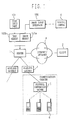
- Fig. 1 is an overall configuration diagram of the system.
- Client 2 can access server 1 via Internet/intranet 4.
- server 1 has stored in advance in an external memory device the application software for this system (Java Applets).
- application software for this system Java Applets
- client-use application software is downloaded, and the system becomes usable.
- Internet portable telephone 6 or a beeper
- Image input interface 100 obtains images from an image acquisition means, such as digital camera C, a scanner, or other device, and stores the image data in image memory 102a. Meanwhile, the text corresponding to this image is inputted through text input part 101 and stored in text memory 102b. Text input part 101 is typically a keyboard or touch panel, but it is not limited to those. Instead of directly inputting at the text input part 101, previously created text may be inputted by methods such as "copy and paste," etc.
- images and/or text may be transmitted from client 2 to server 1 and stored in memories 102a and 102b. The images and text stored in memories 102a and 102b are stored in association with each other. It is possible to acquire either one of the data and, and by accessing it, to obtain the other data. In addition, it is possible when transmitting image data to prepare data in the optimal form depending on the display capability of the receiving side. Detailed explanations of these aspects are provided later.
- the system of Fig. 1 (in particular, server 1, image input interface 100, text input part 101, and memories 102a and 102b) can function as all-purpose photo-boards.
- server 1 can be used as a common display panel and, if a user uploads images to server 1, any other user can view those images on his own personal computer or portable telephone. Moreover, when uploading images, one can readily catalog images (content) common to all devices in server 1, without worrying about the display capacity of the recipient.
- This system can be positioned as an inexpensive, fast information transmission medium.
- the system can be applied to tourist information systems based on the recording of tourist destination images which change daily, to product guide systems based on the recording of product images and prices which change daily, and to personnel recruiting systems based on the recording of candidate photos and "self introductions" which change daily.
- the i-Mode system and the J-SkyWeb system can be described in HTML just like a regular web page, but the type of tags used in HTML are limited. Therefore the web page described in these systems can be accessed by the browser running on a regular personal computer.
- the WAP/HDML system and P mail DX system are similar to HTML since tags are embedded in the text, but uses a unique description method designed especially for portable telephone services.
- All the above four systems can implement the text-based message system of the present embodiment since these systems can use HTTP as the transfer protocol (that is, service can be provided by Java Servlets), and have little difference in functions.
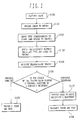
- S100 Images are acquired using digital camera C.
- S101 The acquired images (for example, images showing the appearance of tourist destinations, images of people, images of products, etc.) are uploaded to server 1 through image input interface 100. specifically, the acquired image data is stored in image memory 102a.
- S102 The text corresponding to the acquired images is inputted using text input part 101, etc. Alternatively, text stored in advance is uploaded to server 1.
- Text is stored in text memory 102b.
- S103 The text is associated with the images stored in memories 102a and 102b. In other words, linking information is prepared, so that from one of the two, the other can be accessed. In cases where images and text are transmitted to the client in separate steps, the above indicated linking information is important.
- S104 Server 1 receives a transmission request from a client.
- S105 A determination is made as to whether the source of the transmission request is a personal computer or a portable telephone.
- S106 When the transmission request source is a personal computer, because the transmission request source has sufficient display capability, the requested images and text are transmitted as is.
- S107 When the transmission request source is a portable telephone, the data (primarily images) are converted to match the display capability of the transmission request source. For example, instead of the image itself, an icon-type image of it is prepared and transmitted. In general, icon images are smaller than the original images.
- the size of the icon data can be made smaller by decreasing the resolution of the image data of the original, and further increasing the compression ratio of image data compression.
- What size level to make the image data for an icon is determined based on the relationship between the size of the icon displayed on the screen and the display capability of the screen.
- an image for portable telephone use may be prepared in advance, the data size of which is smaller than the data of the original image.
- What size level to make the data size is determined based on the display capability of the portable telephone screen.
- the color data of the image may be compressed, based on the color display capability of the portable telephone screen. For example, if the screen is monochrome, color information is not necessary.
- S108 Transmit the converted images and text.
- the image was inputted from a digital camera, but it need not be limited to that.
- a digital camera it is also possible to receive an image attached to an email from a user or to fetch an image designated thereby and store it in memory.
- a server it is also acceptable for a server to receive an instruction from a user and for the specified database and/or server, based on the instruction from the user, to generate an image (by means of CAD, for example) and store this in memory. It is also possible to search the Internet and to acquire the specified image and store it in memory.
- the embodiments include a broad range of general image acquisition methods.
- the above-described embodiment of the invention was one which uploaded the image of a digital camera to the server (image memory).
- the system of this embodiment of the invention is one which samples the images of a camera connected to the server and stores them in an image memory.
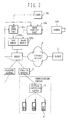
- Fig. 3 is an overall configuration diagram of this system.
- server 1, client 2, wireless gateway 3, Internet/intranet 4, protocol conversion server 5 and Internet portable telephone 6 (or beeper) are the same as those shown in Fig. 1.
- Image sampling part 104 samples appropriate images from the image acquisition means such as camera 103 and stores image data in image memory 102a. Meanwhile, the text corresponding to the image is inputted from the text input part 101 and is stored in the text memory 102b.
- Text input part 101 is typically a keyboard or touch panel, but it is not limited to these. Instead of direct inputting through text input part 101, previously created text may be inputted through methods such as copy and paste.
- images and/or text may be transmitted from client 2 to server 1 and stored in memories 102a and 102b. The images and text stored in memories 102a and 102b are stored in association with each other. If the data of either one is acquired, then, by accessing that, the data of the other one can be acquired. In addition, when image data is transmitted, data is prepared which is in the ideal form depending on the display capability of the receiving side. A detailed explanation of these aspects will be provided later.
- Image sampling part 104 samples images according to a schedule determined in advance by timer 105, or image sampling may be done according to commands from server 1 (commands can also be received via Internet 4). For example, in the case that camera 105 is fixed and is recording a fixed location, images of the location are acquired at fixed time intervals or at predetermined time intervals. For example, images of the specified location may be acquired based on directions from the client.
- Text input part 101 receives comments, etc. about the sampled images.
- the text which is inputted may, for example, be explanations about the sampled images, the time of the sampling (receiving information from timer 105), text stored in advance in server 1, text which server 1 searched from the Internet based on key words such as the sampling time, location where camera is installed, etc.
- the system of Fig. 3 (especially, server 1, text input part 101, memories 102a and 102b, image sampling part 104) can function as an all-purpose monitoring apparatus.
- an image of that location can be acquired at any time.
- This system for example, can be applied to child-monitoring systems where, by installing a camera in a child care center or one's own home, a parent can check on their child's situation via their portable telephone screen anytime and anywhere, or to a monitoring system for checking images from a crime prevention camera via a portable telephone screen, etc.
- images could be sampled periodically during the time the youngster is kept at the care center or images could be sampled at any time in response to a request from the portable telephone.
- images could be sampled through the actions of someone at the childcare center and those images could be sent to the portable telephone of the parent.
- the images obtained with this system are not the kind of processed images one sees on television or video, but are raw images, so that one can see the current situation of the place and the object being recorded, just as they are.
- S110 Sample images from camera 103 at the desired timing. Sampling is executed according to a schedule set in advance by timer 105. Alternatively, sampling may be executed according to a command from server 1 (a command can also be received via Internet 4.) For example, when the user wants to see an image, he first sends a sampling command to server 1 from a portable telephone. Receiving that, server 1 samples the image and also transmits the sampled image to the user.
- S114 Server 1 receives a transmission request from a client.
- This transmission request may be a request simply to transmit a sampled image, or it may be a request to do sampling and transmit that newly sampled image, or etc. in the case of the former, multiple users share multiple images, while in the latter case, a different image is sent to each user.
- both of these types may be combined.
- the user checks the image according to the command of the former case, and afterward, specifying the prescribed place and/or timing, the desired images are obtained (for example, initially receiving an overall image of a location and next specifying the desired location and timing.)
- S115 Determine whether the transmission request source is a personal computer or a portable telephone.
- S116 When the transmission request source is a personal computer, the transmission request source has sufficient display capability, so the requested images and text are transmitted as is.
- S117 When the transmission request source is a portable telephone, data (primarily images) is converted to match the display capability of the transmission request source. For example, instead of the image itself, an icon-type image of it is prepared and transmitted. In general, icon images are smaller than the original images.
- the size of the icon data can be made smaller by decreasing the resolution of the image data of the original and by further increasing the compression ratio of image data compression.
- What size level to make the image data for an icon is determined based on the relationship between the size of the icon displayed on the screen and the display capability of the screen.
- an image for portable telephone use may be prepared in advance, the data size of which is smaller than the data of the original image.
- What size level to make the data size (pixel count) is determined based on the display capability of the portable telephone screen.
- the color data of the image may be compressed based on the color display capability of the portable telephone screen. For example, if the screen is monochrome, color information is not necessary.
- S118 The converted images and text data are transmitted.
- the system of the embodiments of this invention is an "icon driven" server/client system (the term “message” here includes images and text, as in the above-indicated embodiments 1 and 2 of this invention. And the same below.)
- the point which is different from conventional systems is that the addressing of messages in done intuitively and directly by means of dragging and dropping icons.
- the system according to the embodiments of this invention provides a new method for communication and collaborative-work in Internet/intranet communities.
- This system can be used very easily.
- the user merely accesses the server, then boards, described later, such as a message board, white board, chess board, and maps and images, can be used any time, and can be used to write a desired message and share this message with others, by dragging and dropping icons on a board, over the Internet.
- boards, described later such as a message board, white board, chess board, and maps and images, can be used any time, and can be used to write a desired message and share this message with others, by dragging and dropping icons on a board, over the Internet.
- this system is easy installation, easy use and easy customization. Also this system is used more easily than any other communication, collaboration and joint operation software, including a message board, labeling software, white board, chat and electronic mail.
- the server must be a CGI-supported Web server, and Java also must be supported.
- the client side must be a Java-supported Web browser and must support the virtual machine/run-time environment of Java.
- This system has the following major functions.
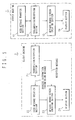
- Fig..5 is a functional block diagram depicting the general configuration of the server machine 1 and the client machine 2 used for this system.
- the server machine 1 comprises a message transfer section 11 which transfers a received message when necessary, a transmission/reception section 12 for communicating with the client machine, a message board screen creation section 13 which creates a screen of the message board based on the received message, and a display section 14 which receives the output of the screen creation section 13 and displays the screen.
- the client machine 2 comprises a transmission/reception section 21 for communicating with the server machine, a message creation section 22 which creates a transmission message, a message board screen creation section 23 which receives the transmission message from the message creation section 22, receives the reception message from the transmission/reception section 21, and displays these messages on the message board, and a display section 24 which receives the output of the screen creation section 23 and displays it on the screen.
- Fig.6 is a functional block diagram of a wireless gateway 3 which performs 2-way conversion of the interface for a personal computer and the interface for the Internet portable telephone to be used for this system.
- the wireless gateway is an interface conversion device for the Internet portable telephone which performs wireless communication.
- This device comprises a transmission/reception section 31 for communicating with the server machine 1, a transmission/reception section 32 for communicating with the protocol conversion server of the communication carrier, and a conversion section 32 which performs 2-way conversion of the interface for a personal computer and the interface for the Internet portable telephone.
- the conversion section 32 converts the display screen interface for a personal computer to the interface for the Internet portable telephone or vice versa.
- the wireless gateway 3 comprises a data base, which is not illustrated, for storing information on the correspondence between graphics and characters. Or this data on correspondence is received from the server 1.
- the current position displayed on a map is converted to longitude/latitude information and/or the address display information by characters.
- a database for storing the correspondence between positions on maps, and longitude/latitude information and/or address display information is provided in advance.
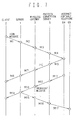
- Fig.7 shows an exchange of messages between the server 1, the client 2 and the Internet portable telephones 6a and 6b.
- the message M1 is transmitted to the server 1, and is also displayed on the self screen.
- the server 1 identifies the destination of the received message M1, and transmits it to the destination-Internet portable telephone 6a (M2 to M4).
- the Internet portable telephone 6a creates a reply message
- the replay message is transmitted to the client 2 (M5 to M8).
- the message is a broadcast message
- the message M11, transmitted from the Internet portable telephone 6a is also transmitted to all the other clients 2 and 6b (M12 to M17). In this way, message communication via the server 1 is possible among all the clients 2 and 6a and 6b.
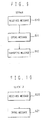
- Fig.8 shows the processing flow in the client 2 which transmits a message.
- a message icon S1
- S2 a message creation dialog
- the user can create an arbitrary message here (S2).
- S3 The user drags and drops the icon on to an arbitrary position of the message board (S3).
- the message can be transmitted by this operation.
- the client displays the message on the self screen (S4), and also transmits the message (S5).
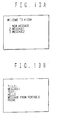
- Fig.13 (a) and (b) are displayed on the display screen of the Internet portable telephone 6.
- Fig.13 (a) shows a screen when the user has accessed the server 1.
- the menu 1 is for creating a new message to transmit.
- the menus 2 and 3 are for reading the message 1 or 2, which is addressed to the user or is for broadcasting.
- Fig. 13 (b) shows a screen when the menu 1 is selected and the message 1 is displayed.
- the processing flow in the Internet portable telephone 6 will now be described with reference to the flow chart in Fig.8.
- the user selects menu 1 "new message" (S1), then the message creation dialog is displayed.
- the user can create an arbitrary message here (S2).
- the user specifies the transmission destination of the created message (S3).
- the message can be transmitted without any relationship to an existent message, or can be transmitted in association with an existent message (e.g. as a reply to a message).
- the Internet portable telephone 6 displays a message on the self screen (S4), and also transmits the message (S5).
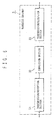
- Fig.9 shows a processing flow in the server.
- the server receives a message (S10)
- the server opens the message (S11), and stores it to the self memory.
- the server transfers the message to a predetermined destination (S12).
- Fig. 10 shows a processing flow in the client which receives a message.
- the client receives a message from the server (S20)
- the client opens the message (S21), and displays the message on the message board thereof.
- the Internet portable telephone 6 creates a new menu 4 and displays the menu.
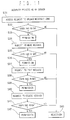
- Fig. 11 shows a security processing flow of the server.
- the server checks whether the requesting user has the right (S32), permits access if the user has the right (S33), and rejects the request if not (S43).
- Similar processing is also executed when moving a message (that is, changing the transmission destination address), editing a message, and deleting a message are requested (S34 - S42). For example, if this system is a bulletin board which anyone can access, accessing and moving are permitted to anyone. But editing and deleting are permitted only to the user who transmitted the message or to the administrator.
- Fig. 12 shows an example of a message board screen of this system.
- the message board 30 and examples of the message, 31 and 32, to be displayed here, are displayed on the screen.
- the icons 33, 34 and 35 at the bottom of the screen are a message creation icon 33, GO icon 34, whicn creating a link to a related home page, and a trash can icon 35, which deletes à message respectively.
- the icons 31a and 31b indicate messages from clients of a personal computer, and icons 32a and 32c are messages from Internet portable telephones. By changing the type of icon, a message from a personal computer client and a message from an Internet portable telephone can be easily identified on the message board 30.
- the server 1 selects a type of icon by checking whether the message is from the wireless gateway 3.
- the Internet portable telephone 6 accesses the server 1 via the protocol conversion server 5 and the wireless gateway 4, the screen shown in Fig. 13 (a), for example, is displayed, where messages on the message board can be known. The user can read any message in a range permitted by the terms of security.
- the relationship between messages may be indicated on the message board.
- lines are drawn between the response to a message, and a plurality of related messages are displayed as a group.
- symbols A1, A2, . . . may be added to the branches of a message. By referring to these symbols, a desired message can be directly opened.
- Such a reference method is particularly useful with the Internet portable telephone. On the display of the Internet portable telephone, messages are displayed in a hierarchical structure, where it takes time to reach the message to be read if the message is deep in the hierarchy. If reference symbols are added, as shown in Fig. 14, then the message can be directly selected and read using a symbol as a search key.
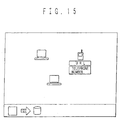
- the URL or telephone number of the user who transmitted the message may be displayed with the icon of the message, as Fig. 15 shows. By this display, the user who transmitted of the message can be specified.
- the telephone call may be made to the telephone number by double clicking the icon.
- Fig. 16 is a block diagram of this system.
- Fig. 16 corresponds to Fig. 1 and Fig. 3 described above.
- image server 5 image memory 5a connected thereto, image memory for icons 5b, image memory 5c for portable telephones are newly provided.
- Image server 5 receives from client 2 image data alone or together with messages and stores it in image memory 5a.
- Image server 5 converts the received image data into images for use as icons and images for portable telephone use and stores these respectively in icon use image memory 5b and portable telephone use memory 5c.
- image server 5 is provided separately from server 1, but the invention is not limited to that.
- Server 1 may be configured to perform the function of image server 5.
- a message and image data are transmitted from the client 2 to the server 1 (S50).
- the message and image data are separated (S51).
- the separated message is distributed to each client, as described above (see Fig. 17).
- the image data and/or the pointer e.g. URL
- the pointer of the image is generated (S52), and the message and the pointer of the image are transmitted to the client 2a and the Internet portable telephone 6 (S53). It is predetermined that the image data will be stored to the image server 5, and the pointer is the URL of the image server 5.
- the image data is specified by the name or address of the transmitter or title, so the URL includes the name and address of the transmitter and title, for example.
- the pointer of the image includes information indicating the storage location of the original image, information indicating the storage location of the image for icons, and information indicating the storage location of the image for a portable telephone. This information is not always transmitted together. For example, only the storage location of the image for a portable telephone may be transmitted to a portable telephone.
- the image data is transmitted from the server 1 to the image server 5 (S54).
- the image server 5 stores the received image data to the image memory 5a, generates the image data for the icons and image data for a portable telephone from the received image data (S55, S56), and stores the image data to the image memory for icons 5b and the image memory for a portable telephone 5c respectively.
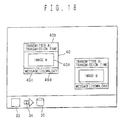
- the image data for icons is incorporated into the icon 40 of the message, as shown in Fig. 18.
- the image for icons is generally smaller than the original message. So it is preferable to decrease the size of the original image data by lowering the resolution of the data and increasing the compression rate of image compression.
- the size (number of pixels) of the image data for icons is determined depending on the relationship between the size of the icon displayed on the screen and the display capability of the screen.
- the image data for a portable telephone is generally smaller than the original image as well. So, just like the case of icons, the size of the data is decreased.
- the size (number of pixels) of the image data for a portable telephone is determined depending on the display capability of the screen of the portable telephone. Also, depending on the color display capability of the screen of the portable telephone, the color data of the image is compressed. For example, if the screen of the portable telephone is monochrome, color information is unnecessary.
- the client 2a When the message and the pointer of the image are transmitted to the client 2a, the client 2a requests the image for icons to the image server 5 (S57). The client 2a accesses the image server 5 using the pointer of the image received in S53. Then the image server 5 transmits the image for icons to the client 2a (S58). And the client 2a incorporates the received image for icons to the icon 40.
- the Internet portable telephone 6 When the message and the image pointer are displayed on the Internet portable telephone 6, the Internet portable telephone 6 requests the image for portable telephone to the image server 5 (S61). The image server 5 transmits the image for portable telephone to the Internet portable telephone 6 (S62). Then the Internet portable telephone 6 displays the received image on its screen.
- Fig. 18 shows an example of the screen of the client 2 in the fourth embodiment.
- the icon 40 of the message is displayed, where the icon 40 includes the image 40a, and also includes the display 40b to identify the transmitter, a message button 40c and the download button 40d.
- the message can be received by clicking the message button 40c.
- the original image can be downloaded by clicking the download button 40d.
- the message transmission procedure will now be briefly described.
- the message creation icon 33 is clicked.
- the dialog box for inputting an image is displayed, and the message is input there.
- the image button is clicked in order to display the dialog box for inputting an image.
- the image file is selected in this dialog box.
- the dialog box is closed, the icon is displayed, so this icon is dragged and dropped onto a predetermined location.
- the image included in the icon may be created by the client 2, who is the transmitter, or may be obtained from the image server 5 using the image pointer received from the server 1.
- an image can be transmitted along with a message. Since the image to be transmitted is included in the icon, the receiver can know the content intuitively. Unlike conventional electronic mail, messages can be easily exchanged among a plurality of users. Operation is also easy by using a drag and drop operation of icons.
- means does not always mean a physical means, but includes the case when the functions of each means are implemented by software.
- the functions of a means may be implemented by two or more physical means, or the functions of two or more means may be implemented by one physical means.
Landscapes
- Engineering & Computer Science (AREA)
- Signal Processing (AREA)
- Multimedia (AREA)
- Computer Networks & Wireless Communication (AREA)
- General Engineering & Computer Science (AREA)
- Computing Systems (AREA)
- Human Computer Interaction (AREA)
- Computer Security & Cryptography (AREA)
- Information Transfer Between Computers (AREA)
- Telephonic Communication Services (AREA)
- Data Exchanges In Wide-Area Networks (AREA)
- Editing Of Facsimile Originals (AREA)
- Facsimiles In General (AREA)
- Storing Facsimile Image Data (AREA)
- Facsimile Transmission Control (AREA)
Applications Claiming Priority (2)
| Application Number | Priority Date | Filing Date | Title |
|---|---|---|---|
| JP2001139383A JP2002342217A (ja) | 2001-05-09 | 2001-05-09 | 画像通信用サーバ及び画像通信方法 |
| JP2001139383 | 2001-05-09 |
Publications (2)
| Publication Number | Publication Date |
|---|---|
| EP1257109A2 true EP1257109A2 (fr) | 2002-11-13 |
| EP1257109A3 EP1257109A3 (fr) | 2004-01-02 |
Family
ID=18986165
Family Applications (1)
| Application Number | Title | Priority Date | Filing Date |
|---|---|---|---|
| EP20020253267 Withdrawn EP1257109A3 (fr) | 2001-05-09 | 2002-05-09 | Passerelle de communication d'image |
Country Status (5)
| Country | Link |
|---|---|
| US (1) | US20020167522A1 (fr) |
| EP (1) | EP1257109A3 (fr) |
| JP (1) | JP2002342217A (fr) |
| KR (1) | KR20020085848A (fr) |
| CA (1) | CA2385707A1 (fr) |
Cited By (3)
| Publication number | Priority date | Publication date | Assignee | Title |
|---|---|---|---|---|
| GB2413735A (en) * | 2004-04-30 | 2005-11-02 | Canon Europa Nv | Mobile phone image display system |
| WO2008034149A3 (fr) * | 2006-09-15 | 2008-05-29 | Der Merwe Willem J Van | Système d'hébergement et de dissémination de données pour dispositifs mobiles |
| CN1627821B (zh) * | 2003-12-09 | 2010-10-13 | Lg电子株式会社 | 保留图像的传输系统和方法 |
Families Citing this family (33)
| Publication number | Priority date | Publication date | Assignee | Title |
|---|---|---|---|---|
| US6453348B1 (en) | 1998-11-06 | 2002-09-17 | Ameritech Corporation | Extranet architecture |
| JP2004072613A (ja) * | 2002-08-08 | 2004-03-04 | Fujitsu Ltd | 画像転送方法、画像転送装置、コンピュータプログラム及び記録媒体 |
| FR2852769B1 (fr) * | 2003-03-20 | 2005-09-16 | Eastman Kodak Co | Procede de partage de donnees multimedia |
| JP2004336343A (ja) * | 2003-05-07 | 2004-11-25 | Canon Inc | 画像処理システム |
| US8938506B2 (en) * | 2003-12-29 | 2015-01-20 | International Business Machines Corporation | System and method for addressing messages |
| JP4241484B2 (ja) * | 2004-04-14 | 2009-03-18 | 日本電気株式会社 | 携帯端末装置、着信応答メッセージ送信方法およびサーバ装置 |
| JP2007536634A (ja) * | 2004-05-04 | 2007-12-13 | フィッシャー−ローズマウント・システムズ・インコーポレーテッド | プロセス制御システムのためのサービス指向型アーキテクチャ |
| US8090361B2 (en) * | 2006-05-26 | 2012-01-03 | At&T Intellectual Property I, Lp | Methods and systems for monitoring computer systems using wireless devices |
| KR100784095B1 (ko) * | 2006-09-15 | 2007-12-10 | 에스케이 텔레콤주식회사 | 다중화상 제어 시스템 및 방법 |
| US8090694B2 (en) * | 2006-11-02 | 2012-01-03 | At&T Intellectual Property I, L.P. | Index of locally recorded content |
| JP2008005518A (ja) * | 2007-07-23 | 2008-01-10 | Fuji Xerox Co Ltd | 画像処理システム |
| JP5041905B2 (ja) * | 2007-08-06 | 2012-10-03 | パナソニック株式会社 | 画像生成装置、画像表示装置、画像生成方法、画像表示方法、画像生成プログラム、および画像表示プログラム |
| US9275247B2 (en) | 2007-09-24 | 2016-03-01 | Gregory A. Pearson, Inc. | Interactive networking systems with user classes |
| US20090083115A1 (en) * | 2007-09-24 | 2009-03-26 | Pearson Gregory A | Interactive networking systems |
| JP4770995B2 (ja) * | 2010-04-05 | 2011-09-14 | 富士ゼロックス株式会社 | 画像処理システム |
| US8918453B2 (en) * | 2012-01-03 | 2014-12-23 | Qualcomm Incorporated | Managing data representation for user equipments in a communication session |
| US20130218704A1 (en) * | 2012-02-22 | 2013-08-22 | Elwha Llc | Systems and methods for accessing camera systems |
| JP5382176B2 (ja) * | 2012-07-26 | 2014-01-08 | 富士ゼロックス株式会社 | サービス処理システム |
| US9077647B2 (en) | 2012-10-05 | 2015-07-07 | Elwha Llc | Correlating user reactions with augmentations displayed through augmented views |
| US9141188B2 (en) | 2012-10-05 | 2015-09-22 | Elwha Llc | Presenting an augmented view in response to acquisition of data inferring user activity |
| US10180715B2 (en) | 2012-10-05 | 2019-01-15 | Elwha Llc | Correlating user reaction with at least an aspect associated with an augmentation of an augmented view |
| US10269179B2 (en) | 2012-10-05 | 2019-04-23 | Elwha Llc | Displaying second augmentations that are based on registered first augmentations |
| US10713846B2 (en) | 2012-10-05 | 2020-07-14 | Elwha Llc | Systems and methods for sharing augmentation data |
| US9215428B2 (en) * | 2013-01-07 | 2015-12-15 | Dorel Juvenile Group, Inc. | Child-monitoring system |
| US9639964B2 (en) | 2013-03-15 | 2017-05-02 | Elwha Llc | Dynamically preserving scene elements in augmented reality systems |
| US20140267411A1 (en) * | 2013-03-15 | 2014-09-18 | Elwha Llc | Indicating observation or visibility patterns in augmented reality systems |
| US10025486B2 (en) | 2013-03-15 | 2018-07-17 | Elwha Llc | Cross-reality select, drag, and drop for augmented reality systems |
| US10109075B2 (en) | 2013-03-15 | 2018-10-23 | Elwha Llc | Temporal element restoration in augmented reality systems |
| US9936114B2 (en) | 2013-10-25 | 2018-04-03 | Elwha Llc | Mobile device for requesting the capture of an image |
| WO2015166564A1 (fr) * | 2014-04-30 | 2015-11-05 | 富士通株式会社 | Dispositif de distribution, système de distribution, et procédé de distribution |
| US9485637B2 (en) * | 2015-02-12 | 2016-11-01 | International Business Machines Corporation | Intermediated data entry in a shared message board through a mobile computing device |
| US20170153791A1 (en) * | 2015-12-01 | 2017-06-01 | Linkedln Corporation | Conditional animation of an icon |
| JP6622654B2 (ja) * | 2016-06-07 | 2019-12-18 | 株式会社エクサ | 画像管理プログラム |
Family Cites Families (8)
| Publication number | Priority date | Publication date | Assignee | Title |
|---|---|---|---|---|
| JP3943674B2 (ja) * | 1996-10-25 | 2007-07-11 | キヤノン株式会社 | カメラ制御システム並びにカメラサーバ及びその制御方法 |
| US6564263B1 (en) * | 1998-12-04 | 2003-05-13 | International Business Machines Corporation | Multimedia content description framework |
| US6345279B1 (en) * | 1999-04-23 | 2002-02-05 | International Business Machines Corporation | Methods and apparatus for adapting multimedia content for client devices |
| US20010047517A1 (en) * | 2000-02-10 | 2001-11-29 | Charilaos Christopoulos | Method and apparatus for intelligent transcoding of multimedia data |
| JP2001312446A (ja) * | 2000-04-28 | 2001-11-09 | Sony Corp | 情報処理装置及び方法、情報処理システム、並びに媒体 |
| US20020093678A1 (en) * | 2000-10-17 | 2002-07-18 | Skidgel John M. | Managing and searching digital images |
| US6453361B1 (en) * | 2000-10-27 | 2002-09-17 | Ipac Acquisition Subsidiary I, Llc | Meta-application architecture for integrating photo-service websites |
| US20020138279A1 (en) * | 2001-03-21 | 2002-09-26 | Binnur Al-Kazily | On-line digital imaging services |
-
2001
- 2001-05-09 JP JP2001139383A patent/JP2002342217A/ja active Pending
-
2002
- 2002-05-08 US US10/140,331 patent/US20020167522A1/en not_active Abandoned
- 2002-05-08 KR KR1020020025241A patent/KR20020085848A/ko not_active Withdrawn
- 2002-05-09 CA CA 2385707 patent/CA2385707A1/fr not_active Abandoned
- 2002-05-09 EP EP20020253267 patent/EP1257109A3/fr not_active Withdrawn
Non-Patent Citations (6)
| Title |
|---|
| BICKMORE T ET AL: "WEB PAGE FILTERING AND RE-AUTHORING FOR MOBILE USERS" COMPUTER JOURNAL, OXFORD UNIVERSITY PRESS, SURREY, GB, vol. 42, no. 6, 1999, pages 534-546, XP000920338 ISSN: 0010-4620 * |
| BRITTON K H ET AL: "Transcoding: extending e-business to new environments" SERIAL PUBBLICATION, 17 September 2001 (2001-09-17), XP002205526 Retrieved from the Internet: <URL:http://www.research.ibm.com/journal/s j/401/britton.html> [retrieved on 2002-07-10] * |
| MA WEI-YING ET AL: "Framework for adaptive content delivery in heterogeneous network environments" SERIAL PUBBLICATION, 24 January 2000 (2000-01-24), XP002168331 Retrieved from the Internet: <URL:http://www.cooltown.hp.com/papers/adc on/MMCN2000> [retrieved on 2001-05-28] * |
| MOGUL J C: "Server-directed transcoding" COMPUTER COMMUNICATIONS, ELSEVIER SCIENCE PUBLISHERS BV, AMSTERDAM, NL, vol. 24, no. 2, 1 February 2001 (2001-02-01), pages 155-162, XP004228456 ISSN: 0140-3664 * |
| MOHAN R ET AL: "CONTENT ADAPTATION FRAMEWORK: BRINGING THE INTERNET TO INFORMATION APPLIANCES" 1999 IEEE GLOBAL TELECOMMUNICATIONS CONFERENCE. GLOBECOM'99. SEAMLESS INTERCONNECTION FOR UNIVERSAL SERVICES. RIO DE JANEIRO, BRAZIL, DEC. 5-9, 1999, IEEE GLOBAL TELECOMMUNICATIONS CONFERENCE, NEW YORK, NY: IEEE, US, vol. 4, 5 December 1999 (1999-12-05), pages 2015-2021, XP000951336 ISBN: 0-7803-5797-3 * |
| RUDOLF ZEILHOFER: "Webcam Advanced" NETZHAUT - RUDOLF ZEILHOFER'S HOMEPAGE, [Online] 14 January 1999 (1999-01-14), XP002238257 München Retrieved from the Internet: <URL:http://www.lrz-muenchen.de/~netzhaut/ webcam/webcam_applet_adv.html> [retrieved on 2003-04-11] * |
Cited By (5)
| Publication number | Priority date | Publication date | Assignee | Title |
|---|---|---|---|---|
| CN1627821B (zh) * | 2003-12-09 | 2010-10-13 | Lg电子株式会社 | 保留图像的传输系统和方法 |
| USRE46644E1 (en) | 2003-12-09 | 2017-12-19 | Lg Electronics Inc. | Reserved image transmission system and method |
| USRE46677E1 (en) | 2003-12-09 | 2018-01-16 | Lg Electronics Inc. | Reserved image transmission system and method |
| GB2413735A (en) * | 2004-04-30 | 2005-11-02 | Canon Europa Nv | Mobile phone image display system |
| WO2008034149A3 (fr) * | 2006-09-15 | 2008-05-29 | Der Merwe Willem J Van | Système d'hébergement et de dissémination de données pour dispositifs mobiles |
Also Published As
| Publication number | Publication date |
|---|---|
| US20020167522A1 (en) | 2002-11-14 |
| KR20020085848A (ko) | 2002-11-16 |
| CA2385707A1 (fr) | 2002-11-09 |
| JP2002342217A (ja) | 2002-11-29 |
| EP1257109A3 (fr) | 2004-01-02 |
Similar Documents
| Publication | Publication Date | Title |
|---|---|---|
| EP1257109A2 (fr) | Passerelle de communication d'image | |
| JP4774185B2 (ja) | ディジタルメディアフレームとインターフェースする方法及びシステム | |
| US9203879B2 (en) | Offline alerts mechanism | |
| US7133919B2 (en) | System and method for providing status information from multiple information sources in a single display | |
| US8095609B1 (en) | Targeted notification of users of a communications system based on geographic location | |
| US6938076B2 (en) | System, computer product and method for interfacing with a private communication portal from a wireless device | |
| EP1128634A2 (fr) | Système client serveur et sa méthode de communication | |
| EP1199856A2 (fr) | Serveur télématique | |
| JP5535067B2 (ja) | 3aベースの多様なアプリケーションの状態を提供するユビキタスプレゼンスサービス方法およびシステム | |
| WO2001075646A1 (fr) | Systeme de services complet internet et interface utilisateur graphique permettant d"acceder a ce systeme | |
| JP2003532171A (ja) | 電子ネットワークを通じて連続的且つインタラクティブな通信を行う方法とシステム | |
| US20060212818A1 (en) | Method for providing multimedia message | |
| US20130144938A1 (en) | State change alerts mechanism | |
| JP2002132618A (ja) | 情報処理装置、情報提供媒体、情報処理方法及び情報処理システム | |
| JPH11328059A (ja) | サーバ装置、情報通信システムおよび情報通信方法 | |
| EP1372320B1 (fr) | Equipement d'un réseau local sans fil enregistrant et renvoyant des données Internet à un terminal mobile | |
| JP2003281030A (ja) | 情報提供サーバ、情報提供方法 | |
| JP2005196493A (ja) | スケジュール管理システム | |
| KR20020074236A (ko) | 원클릭 접속 아이콘의 이메일 발송을 통한 인터넷폰서비스 제공 시스템 및 그 방법 | |
| JP3459907B2 (ja) | 情報配信システム | |
| JP2005057708A (ja) | インスタントメッセージ送受信システム,サーバ装置,端末装置,プログラム,プログラムを記録した媒体及びインスタントメッセージ送受信方法 | |
| JP2001312654A (ja) | インターネット上の広告・情報提供システム | |
| JPH1168747A (ja) | 情報通信方法および情報通信システム | |
| JP3800042B2 (ja) | 情報転送システム、情報転送方法、プロキシサーバ及びプロキシサーバプログラム | |
| KR20010086906A (ko) | 접속자 위치 정보를 제공하는 채팅 서비스 시스템 및 방법 |
Legal Events
| Date | Code | Title | Description |
|---|---|---|---|
| PUAI | Public reference made under article 153(3) epc to a published international application that has entered the european phase |
Free format text: ORIGINAL CODE: 0009012 |
|
| AK | Designated contracting states |
Kind code of ref document: A2 Designated state(s): AT BE CH CY DE DK ES FI FR GB GR IE IT LI LU MC NL PT SE TR |
|
| AX | Request for extension of the european patent |
Free format text: AL;LT;LV;MK;RO;SI |
|
| RIN1 | Information on inventor provided before grant (corrected) |
Inventor name: MIYAZAWA,TAKEO |
|
| RIC1 | Information provided on ipc code assigned before grant |
Ipc: 7G 06F 17/30 B Ipc: 7H 04N 1/41 B Ipc: 7H 04N 1/393 B Ipc: 7H 04L 12/56 B Ipc: 7H 04L 29/06 A |
|
| PUAL | Search report despatched |
Free format text: ORIGINAL CODE: 0009013 |
|
| AK | Designated contracting states |
Kind code of ref document: A3 Designated state(s): AT BE CH CY DE DK ES FI FR GB GR IE IT LI LU MC NL PT SE TR |
|
| AX | Request for extension of the european patent |
Extension state: AL LT LV MK RO SI |
|
| AKX | Designation fees paid | ||
| REG | Reference to a national code |
Ref country code: DE Ref legal event code: 8566 |
|
| STAA | Information on the status of an ep patent application or granted ep patent |
Free format text: STATUS: THE APPLICATION IS DEEMED TO BE WITHDRAWN |
|
| 18D | Application deemed to be withdrawn |
Effective date: 20040703 |