EP1262899A2 - Méthode et système de dépistage de cas médicaux - Google Patents
Méthode et système de dépistage de cas médicaux Download PDFInfo
- Publication number
- EP1262899A2 EP1262899A2 EP02010734A EP02010734A EP1262899A2 EP 1262899 A2 EP1262899 A2 EP 1262899A2 EP 02010734 A EP02010734 A EP 02010734A EP 02010734 A EP02010734 A EP 02010734A EP 1262899 A2 EP1262899 A2 EP 1262899A2
- Authority
- EP
- European Patent Office
- Prior art keywords
- icons
- sequence
- images
- image
- computer system
- Prior art date
- Legal status (The legal status is an assumption and is not a legal conclusion. Google has not performed a legal analysis and makes no representation as to the accuracy of the status listed.)
- Granted
Links
Images





Classifications
-
- G—PHYSICS
- G16—INFORMATION AND COMMUNICATION TECHNOLOGY [ICT] SPECIALLY ADAPTED FOR SPECIFIC APPLICATION FIELDS
- G16H—HEALTHCARE INFORMATICS, i.e. INFORMATION AND COMMUNICATION TECHNOLOGY [ICT] SPECIALLY ADAPTED FOR THE HANDLING OR PROCESSING OF MEDICAL OR HEALTHCARE DATA
- G16H40/00—ICT specially adapted for the management or administration of healthcare resources or facilities; ICT specially adapted for the management or operation of medical equipment or devices
- G16H40/60—ICT specially adapted for the management or administration of healthcare resources or facilities; ICT specially adapted for the management or operation of medical equipment or devices for the operation of medical equipment or devices
- G16H40/63—ICT specially adapted for the management or administration of healthcare resources or facilities; ICT specially adapted for the management or operation of medical equipment or devices for the operation of medical equipment or devices for local operation
-
- G—PHYSICS
- G06—COMPUTING OR CALCULATING; COUNTING
- G06F—ELECTRIC DIGITAL DATA PROCESSING
- G06F16/00—Information retrieval; Database structures therefor; File system structures therefor
- G06F16/50—Information retrieval; Database structures therefor; File system structures therefor of still image data
- G06F16/51—Indexing; Data structures therefor; Storage structures
-
- G—PHYSICS
- G06—COMPUTING OR CALCULATING; COUNTING
- G06T—IMAGE DATA PROCESSING OR GENERATION, IN GENERAL
- G06T7/00—Image analysis
- G06T7/0002—Inspection of images, e.g. flaw detection
- G06T7/0012—Biomedical image inspection
-
- G—PHYSICS
- G16—INFORMATION AND COMMUNICATION TECHNOLOGY [ICT] SPECIALLY ADAPTED FOR SPECIFIC APPLICATION FIELDS
- G16H—HEALTHCARE INFORMATICS, i.e. INFORMATION AND COMMUNICATION TECHNOLOGY [ICT] SPECIALLY ADAPTED FOR THE HANDLING OR PROCESSING OF MEDICAL OR HEALTHCARE DATA
- G16H30/00—ICT specially adapted for the handling or processing of medical images
- G16H30/40—ICT specially adapted for the handling or processing of medical images for processing medical images, e.g. editing
-
- G—PHYSICS
- G16—INFORMATION AND COMMUNICATION TECHNOLOGY [ICT] SPECIALLY ADAPTED FOR SPECIFIC APPLICATION FIELDS
- G16H—HEALTHCARE INFORMATICS, i.e. INFORMATION AND COMMUNICATION TECHNOLOGY [ICT] SPECIALLY ADAPTED FOR THE HANDLING OR PROCESSING OF MEDICAL OR HEALTHCARE DATA
- G16H40/00—ICT specially adapted for the management or administration of healthcare resources or facilities; ICT specially adapted for the management or operation of medical equipment or devices
- G16H40/20—ICT specially adapted for the management or administration of healthcare resources or facilities; ICT specially adapted for the management or operation of medical equipment or devices for the management or administration of healthcare resources or facilities, e.g. managing hospital staff or surgery rooms
-
- G—PHYSICS
- G16—INFORMATION AND COMMUNICATION TECHNOLOGY [ICT] SPECIALLY ADAPTED FOR SPECIFIC APPLICATION FIELDS
- G16H—HEALTHCARE INFORMATICS, i.e. INFORMATION AND COMMUNICATION TECHNOLOGY [ICT] SPECIALLY ADAPTED FOR THE HANDLING OR PROCESSING OF MEDICAL OR HEALTHCARE DATA
- G16H50/00—ICT specially adapted for medical diagnosis, medical simulation or medical data mining; ICT specially adapted for detecting, monitoring or modelling epidemics or pandemics
- G16H50/70—ICT specially adapted for medical diagnosis, medical simulation or medical data mining; ICT specially adapted for detecting, monitoring or modelling epidemics or pandemics for mining of medical data, e.g. analysing previous cases of other patients
Definitions
- the present invention relates to the field of screening of medical cases, and more specifically to a method, apparatus and computer system, which has a user interface to facilitate the screening.
- U.S. Pat. No. 5,917,929 shows a user interface for a computer aided diagnosis system.
- a touch sensitive display screen is provided to display status information and to receive instruction from an operator.
- the display screen displays miniature images of the films having colour-coded borders so that the operator monitors the processing of the radiologic films.
- the interface includes view selection buttons to allow the operator to select certain x-ray images. This interface requires that the user select the images and the view of the images during the ongoing screening procedure.
- U.S. Pat. No. 5,987,345 shows a method and system for displaying of medical images and computer output from various computer aided diagnosis (CAD) schemes on the images. Images are loaded into the display system and displayed in a main viewing area. Individual abnormality from CAD schemes can be viewed by clicking buttons with minified (postage stamp size) images with CAD annotation rendered into them. The images and results are then shown on a high-speed monitor. Again this prior art system is deficient or has disadvantages as the complexity of the user interface requires a substantial amount of the radiologist's attention and concentration during the screening.
- CAD computer aided diagnosis
- a method and a system that utilizes a user interface enabling a user to pre-program a typical sequence of images to be reviewed in the workflow of the screening procedure of a number of medical cases.
- the pre-programming is advantageously achieved by means of symbols or icons being provided by a graphical user interface.
- An individual icon can specify a certain view and/or a certain image processing algorithm to be performed, activate the marking of a region of interest (ROI) or the entering of a diagnosis / annotation, or activate the display of computer assisted diagnosis (CAD) markers.
- the user can select an icon by clicking on it and by moving the icon to a sequence bar by means of a drag-and-drop operation.
- a sequence of icons results that specifies the sequence of images to be rendered, including images for prompting a user action, images for inputting an annotation and/or another sequence of actions, and images resulting from an image processing operation to be performed for the screening of an individual medical case.
- image is used for all kinds of images, including raw data mammograms, views of images, images resulting from image processing operations, image processing and other operations and user operations, prompts for user actions and other screens for the purposes of workflow management.
- the user can start the screening process.
- a stack of medical cases is assigned to the user for review.
- the user can go from one image, such as a view or an operation, to the next by performing a single action input operation, such as a mouse click, pressing on a "next-step" button, touching an area of a touch-screen or by natural language, if speech recognition is available.
- the user has to do the pre-programming only once.
- the pre-programmed sequence can be stored in conjunction with the user's profile. When the user logs on, the pre-programmed sequence is retrieved and re-activated. Further, it is possible for the user to edit the pre-programmed sequence in order to modify the sequence.
- the throughput of a radiologic workstation can be optimised in two ways. First, this is due to the fact that the time required for the review of an individual medical case is minimised by the user interface of the invention. Second, the computer system can anticipate the next user interaction, thus shortening the system response time. In particular this enables prefetching of consecutive images into the image cache as it is disclosed in co-pending EP Patent Application (1) entitled “A Method And Computer System For Prefetching Of Images", filed May 14, 2002, here incorporated by reference.
- the radiologist needs to perform actions during the screening procedure, which are not contained in the pre-programmed sequence, this can be done by means of a keypad and / or keyboard.
- the specific action can be, for example, a particular image processing algorithm, a particular view, entering of an annotation or a diagnosis, marking of regions of interest or the like.
- Fig. 1 shows a block diagram of the computer system according to the invention.
- the computer system has a computer 1 comprising a graphical user interface 2.
- the graphical user interface 2 is coupled to a workflow memory 3.
- the workflow memory 3 has a stack 4 for storing a stack of cases to be reviewed in the screening procedure.
- cases case i, case i+1, ... case n are contained in the stack 4 in this order.
- Each of the cases has a unique identifier ("case ID").
- the current case to be reviewed is identified by a pointer 5.
- the pointer 5 is directed to the first case i in the stack 4.
- the workflow memory 3 has a memory 6.
- the memory 6 has a number of L data fields of which data fields 7, 8, 9, 10 and 11 are shown in Fig. 1. Each of the data fields stores a specification of an image reviewed of each of the cases.
- the current image in the sequence is identified by a pointer 12 which points to the current image, in the example considered here, image 1 of the sequence.
- the workflow memory is coupled to an image processing (IP) module 13 and to retrieval module 14.
- IP image processing
- the IP module 13 is also coupled to the retrieval module 14 for retrieval of image data on which an image processing operation, such as a computer aided diagnosis (CAD) operation, is to be performed.
- CAD computer aided diagnosis
- Both the IP module 13 and the retrieval module 14 have an output which is coupled to display system 15.
- the computer system of Fig. 1 has a database 16 that is coupled to the retrieval module 14.
- the database 16 can be part of the computer 1 or it can be an external database as in the example depicted in Fig. 1.
- the database 16 contains an image memory and / or archive for a number of cases 1 to m. In the example considered here each of the medical cases comprises a number of 4 images: image a, image b, image c, and image d.
- the images of a medical case of the database 16 can be a right MLO image (image a), a left MLO image (image b), a right CC image (image c), and a left CC image (image d).
- each of the individual cases forming part of the screening program is structured in the same way as explained above.
- the computer system has a monitor 17 and a monitor 18.
- the monitor 17 and the monitor 18 are coupled to the display system 15.
- the icons 19 which belong to the graphical user interface 2 are displayed on the monitor 18 and/or 17.
- a sequence bar 20 is displayed on the monitor 18 enabling the user to pre-program the sequence of images by drag-and-drop of icons 19 onto the sequence bar 20.
- the user interface 2 is coupled to a keypad 21 having a next-step button 22.
- the next-step button 22 By pressing the next-step button 22, the user goes from the current image to a consecutive image.
- the pointer 12 is shifted to the next consecutive data field of the memory 6, such that the next consecutive image is retrieved and / or generated for display on one of the monitors 17 and / or 18.
- the user interface 2 is coupled to a keyboard 23 and to a mouse 24.
- the computer system To prepare the screening of the cases, the computer system first needs to be initialised by loading the cases to be reviewed into the stack 4.
- the pointer 5 is set to the first case - case i - of the stack 4.
- the user For the pre-programming of the sequence of images the user sequentially selects a number of icons 19 and performs drag-and-drop operations to move selected icons to the sequence bar 20.
- An individual icon 19 can be selected on the monitor 18 by clicking on the icon 19 by means of the mouse 24 and moving the icon to the sequence bar 20 by making a corresponding move of the mouse 24.
- Each of the icons 19 can be selected several times for the pre-programming.
- sequence of icons in the sequence bar 20 When the sequence of icons in the sequence bar 20 is complete the user performs an enter operation by pressing the enter button of the keyboard 23 or clicking on an ok button or the like. This way the sequence of icons of the sequence bar 20 is transformed into data contained in the data fields 7 to 11 of the memory 6. In other words, each of the icons 19 which have been selected by the user specifies a particular image in the sequence of images to be rendered for each individual case.
- the pointer 12 is set to the first element of the sequence of images contained in the data field 7.
- the screening procedure can start.
- the first image 1 of the sequence of images of case i is displayed in accordance with the specification stored in the data field 7.
- the data field 7 can specify a right craniocaudal image with a contrast limited adaptive histogram equalisation (CLAHE).
- CLAHE contrast limited adaptive histogram equalisation
- To display the first image 1 a request is made to the retrieval module 14 in order to retrieve the left craniocaudal image of the case i.
- the retrieval is made with the case ID of case i as a key to perform the database access of database 16.
- the IP module 13 When the corresponding image data is available the IP module 13 performs a CLAHE operation on the image data and outputs the result to the display system 15 for display on monitor 17 or 18.
- the radiologist After the radiologist has reviewed image 1 he or she presses the next-step button in order to go to the next image in the sequence - which is the image 2.
- the next-step button 22 When the radiologist presses the next-step button 22 the pointer 12 is shifted to the data field 8 containing the specification for the image 2.
- the image data corresponding to the specification contained in the data field 8 is retrieved and / or generated by the computer system and the image 2 is displayed on monitor 17 or 18.
- the next-step button 22 By repeatedly pressing the next-step button 22 the user of the computer system can go through an entire medical case in accordance with the pre-programmed sequence stored in the memory 6.
- pressing the next-step button 22 will move the pointer 5 to the next case "case i+1" and the pointer 12 is reset to the initial position of data field 7. This way the complete display sequence is repeated for the next case i+1 without a requirement for a user action other than pressing the next-step button 22.
- Fig. 2 shows the sequence of steps performed by a user in the configuration phase of the computer system for the pre-programming of the sequence of images to be reviewed for each individual case of the screening program.
- the user selects an icon I 1 corresponding to a particular image specification. This icon is moved to the sequence bar by a drag- and-drop operation in step 21c.
- step 22c and 23c are performed with respect to the same or another icon I 2 until the last icon I n is selected in step 24c and moved to the sequence bar in step 25c.
- step 26c To complete the pre-programming of the sequence of images the user performs an enter operation in step 26c.
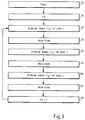
- Fig. 3 illustrates the operation of the computer system of Fig.1 after the configuration phase.
- the user presses a start button in step 30c.
- step 31c the variable j is initialised to be equal to 1.
- step 32c the first image of the sequence is retrieved and / or generated in accordance with the specification provided by the first icon I 1 of the sequence of icons of the sequence bar. After review of the first image, which is displayed for the current case, the user presses the next-step button in step 33c such that the consecutive image in the sequence is displayed in accordance with the specification provided by the consecutive icon I 2 of the sequence of icons of the sequence bar 20.
- step 37c When the next-step button is pressed in step 37c after the display of the last image for the current case in step 36c, the variable j is incremented and the control goes back to step 32c in order to repeat the steps 32c to 38c with respect to the consecutive case of the case stack 4. By incrementing the variable j the corresponding pointer (cf. pointer 5 of Fig. 1) is shifted to the consecutive case.
- steps 32c, 34c...36c can be performed in the operation of the computer system such as making a diagnosis, marking of a region in the image, entering an annotation, performing an image processing operation and/or entering a diagnosis or other actions - depending on the particular pre-programmed sequence.
- the use or activity can always deviate from the pre-programmed sequence by directly inputting, requesting and/or performing an action by means of the key pad, key board, touch screen or by voice control.
- Fig. 4 shows an example for the display and screen layout of the monitors 17 and 18 of the computer system of Fig. 1.
- the right monitor 17 shows a mammogram 25; the left monitor 18 shows a mammogram 26.
- the display fields 27 and 28 show CAD status information for the mammograms 25 and 26, respectively.
- the display fields 29 and 30 show image type information for the mammograms 25 and 26, respectively, including image enhancement status information, if any.
- buttons or icons are buttons or icons.
- Each of the buttons or icons of the tool bar 31 corresponds to a particular selection of a tool, such as image magnification, CLAHE or wavelet enhancement.
- a corresponding tool bar 32 is displayed on the left monitor 18 for specifying particular views of images.
- the user can pre-program the sequence of images to be displayed for each individual case by drag-and-drop of the icons of the toolbars 31 and 32 to the sequence bar 20.
- the pre-programming can also be performed without a drag-and-drop operation, for example, by sequentially selecting the buttons of the tool bars 31 and / or 32.
- the tool bars 31 and 32 can also be implemented by means of pop-up or pull-down menus. During the screening operation the user can still directly use the icons or buttons to divert from the pre-programmed workflow sequence.
- the user has utilised an ellipse contour tool provided by the tool bar 31 in order to highlight the regions 33 and 34 of the mammograms 25 and 26, respectively.
- the user has utilised the freehand contour tool to highlight the regions 35 and 36 of the mammograms 25 and 26 respectively.
- Fig. 5 shows three different tilings of the display in a single monitor mode.
- the display 37 shows a single tiling and the display 38 a half tiling with a look-up table window 39.
- the look-up table window 39 can be used in order to change or adjust the brightness and / or the contrast of the image.
- Fig. 5 shows a display 40 with a quarter tiling.
- the quarter tiling enables displaying four different views at the same time.
- Fig. 6 shows corresponding display modes when using two monitors.
- the display mode 1 provides an overview for the radiologist.
- the tilings 41, 42, 43 and 44 can be used to display of prior images MLO right, MLO left, CC right, CC left.
- the tilings 45, 46, 47 and 48 of the lower row can be used to display the current images MLO right, MLO left, CC right and CC left, respectively of the current case.
- tilings 49, 50, 51 and 52 as apparent from Fig. 6. These tilings allow an overview of a set of current or prior images.
- the full screen of each monitor is used to display an image.
- the icons as listed in table 1 can be utilised.
- a separate icon can be provided for each of the available functions as defined in respective rows of the table 2.
- CAD on turns display of CAD results for all images of the current case on CAD off turns display of CAD resuits for all images of the current case off ROAMING on is only possible for single tilings: displays the 50 micron images of the currently dispiayed images. The 50 micron images are larger than one monitor, so moving Is needed to see all parts of the image ROAMING off is only possible for single tilings: changes the roaming images back into the single filings.
- CLAHE off changes the images of the current image arrangement back to original. recycle deletes the step
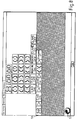
- Fig. 7 shows an embodiment of the graphical user interface in accordance with the invention which functions based on the icons as explained with respect to the tables 1 and 2.
- the graphical user interface contains a region 53 in which is shown all the icons that can be selected by a user for pre-programming the sequence of images. This is done by selecting one of the icons at a time and moving the selected icon to the region 54 that corresponds to the sequence bar 20 of Fig. 1.
- the pre-programming is complete the user clicks on the OK button 55.
- Fig. 8 shows the graphical user interface of Fig. 7 after a pre-programming has been performed.
- the resulting sequence of icons 56 is depicted in Fig. 8.
- the user can correct the sequence 56 by selecting an icon from the sequence 56 and moving the icon to the trash symbol 57.
- the Fig. 9 shows an example of a layout for the keypad 21.
- the keypad 21 has a next-step button 22 (cf. Fig. 1).
- the menu button 58 serves to switch on and off the tool bars.
- the reset button 59 resets all tools and brings the computer system into the overview display mode.
- the roaming left button 60 activates the roaming for the left monitor; the roaming right button 61 activates the roaming for the right monitor.
- the MLO CC button 62 serves to select an overview current view in double tiling and the MLO button 63 serves to select a MLO current view.
- the CC button 64 serves to select a CC current view. Pressing the CLAHE button 65 start a CLAHE enhancement for both monitors.
- the wavelet button 66 starts a wavelet enhancement for both monitors; the LUT button 67 serves to select the brightness / contrast mode as well as to deselect this mode.
- the overview button 68 serves to select an overview of all images of a case with both monitors in quarter tiling.
- the CAD button 69 shows all CAD results for all images.
- the previous button 70 serves to go back to the preceding case; the annotation button 71 selects the annotation mode in order to highlight specific regions of interest in an image.
- the diagnosis window is displayed in order to input a diagnosis for the current case.
- the computer system automatically goes to the consecutive case.
- buttons 22 and 58 to 72 of the keypads 21 are arranged such that the most frequently used buttons are located in an upper portion of the keypad 21. Lower buttons of the keypad 21 have decreasing degrees of importance in terms of their respective usage frequencies.
Landscapes
- Engineering & Computer Science (AREA)
- Health & Medical Sciences (AREA)
- General Health & Medical Sciences (AREA)
- Medical Informatics (AREA)
- Public Health (AREA)
- Biomedical Technology (AREA)
- Epidemiology (AREA)
- Primary Health Care (AREA)
- Theoretical Computer Science (AREA)
- Nuclear Medicine, Radiotherapy & Molecular Imaging (AREA)
- Radiology & Medical Imaging (AREA)
- Physics & Mathematics (AREA)
- Business, Economics & Management (AREA)
- General Business, Economics & Management (AREA)
- General Physics & Mathematics (AREA)
- Data Mining & Analysis (AREA)
- General Engineering & Computer Science (AREA)
- Databases & Information Systems (AREA)
- Software Systems (AREA)
- Quality & Reliability (AREA)
- Computer Vision & Pattern Recognition (AREA)
- Measuring And Recording Apparatus For Diagnosis (AREA)
- Medical Treatment And Welfare Office Work (AREA)
- Processing Or Creating Images (AREA)
- Memory System Of A Hierarchy Structure (AREA)
- Image Processing (AREA)
Applications Claiming Priority (6)
| Application Number | Priority Date | Filing Date | Title |
|---|---|---|---|
| US870386 | 2001-05-29 | ||
| US09/870,386 US7050611B2 (en) | 2001-05-29 | 2001-05-29 | Method and computer system for screening of medical cases |
| US09/870,389 US6895128B2 (en) | 2001-05-29 | 2001-05-29 | Method and computer system for prefetching of images |
| US09/870,388 US7366676B2 (en) | 2001-05-29 | 2001-05-29 | Method and system for in-service monitoring and training for a radiologic workstation |
| US870389 | 2001-05-29 | ||
| US870388 | 2001-05-29 |
Publications (3)
| Publication Number | Publication Date |
|---|---|
| EP1262899A2 true EP1262899A2 (fr) | 2002-12-04 |
| EP1262899A3 EP1262899A3 (fr) | 2004-12-08 |
| EP1262899B1 EP1262899B1 (fr) | 2006-08-16 |
Family
ID=27420459
Family Applications (3)
| Application Number | Title | Priority Date | Filing Date |
|---|---|---|---|
| EP02010734A Expired - Lifetime EP1262899B1 (fr) | 2001-05-29 | 2002-05-14 | Méthode et système de dépistage de cas médicaux |
| EP02010735A Ceased EP1262900A3 (fr) | 2001-05-29 | 2002-05-14 | Méthode et système de surveillance et d'entraînement en service pour un poste de travail radiologique |
| EP02010733A Withdrawn EP1262882A3 (fr) | 2001-05-29 | 2002-05-14 | Méthode et système informatique de préchargement d'images |
Family Applications After (2)
| Application Number | Title | Priority Date | Filing Date |
|---|---|---|---|
| EP02010735A Ceased EP1262900A3 (fr) | 2001-05-29 | 2002-05-14 | Méthode et système de surveillance et d'entraînement en service pour un poste de travail radiologique |
| EP02010733A Withdrawn EP1262882A3 (fr) | 2001-05-29 | 2002-05-14 | Méthode et système informatique de préchargement d'images |
Country Status (4)
| Country | Link |
|---|---|
| EP (3) | EP1262899B1 (fr) |
| AT (1) | ATE336746T1 (fr) |
| DE (1) | DE60213908T2 (fr) |
| ES (1) | ES2269551T3 (fr) |
Cited By (1)
| Publication number | Priority date | Publication date | Assignee | Title |
|---|---|---|---|---|
| US7606404B2 (en) * | 2004-07-14 | 2009-10-20 | Siemens Aktiengesellschaft | Method for optimizing procedures in radiological diagnostics |
Families Citing this family (6)
| Publication number | Priority date | Publication date | Assignee | Title |
|---|---|---|---|---|
| EP1455518A3 (fr) * | 2003-03-04 | 2006-03-15 | Ricoh Company, Ltd. | Dispositif de formation d'images et dispositif de traitement d'images |
| US8078695B2 (en) * | 2008-07-16 | 2011-12-13 | Sony Corporation | Media on demand using an intermediary device to output media from a remote computing device |
| WO2011161306A1 (fr) * | 2010-06-23 | 2011-12-29 | Nokia Corporation | Procédé, dispositif et produit-programme informatique pour accéder à des images |
| CN103098087B (zh) * | 2010-08-23 | 2019-01-04 | 皇家飞利浦电子股份有限公司 | 基于动态评估者简介将案例分配给案例评估者 |
| TWI490723B (zh) | 2011-03-23 | 2015-07-01 | Hologic Inc | 自樣本感興趣的物體影像中自動編排先前已分類過之影像的方法 |
| EP3636134A4 (fr) * | 2017-05-25 | 2021-03-10 | Nec Corporation | Dispositif de traitement d'informations, procédé de commande et programme |
Family Cites Families (11)
| Publication number | Priority date | Publication date | Assignee | Title |
|---|---|---|---|---|
| US4807110A (en) | 1984-04-06 | 1989-02-21 | International Business Machines Corporation | Prefetching system for a cache having a second directory for sequentially accessed blocks |
| US5557515A (en) | 1989-08-11 | 1996-09-17 | Hartford Fire Insurance Company, Inc. | Computerized system and method for work management |
| US5452416A (en) * | 1992-12-30 | 1995-09-19 | Dominator Radiology, Inc. | Automated system and a method for organizing, presenting, and manipulating medical images |
| US5623592A (en) * | 1994-10-18 | 1997-04-22 | Molecular Dynamics | Method and apparatus for constructing an iconic sequence to operate external devices |
| WO1996031829A1 (fr) * | 1995-04-06 | 1996-10-10 | Avid Technology, Inc. | Systeme de creation multimedia graphique |
| US5867163A (en) * | 1995-12-01 | 1999-02-02 | Silicon Graphics, Inc. | Graphical user interface for defining and invoking user-customized tool shelf execution sequence |
| US5978841A (en) | 1996-03-08 | 1999-11-02 | Berger; Louis | Look ahead caching process for improved information retrieval response time by caching bodies of information before they are requested by the user |
| US5917929A (en) | 1996-07-23 | 1999-06-29 | R2 Technology, Inc. | User interface for computer aided diagnosis system |
| US5974201A (en) | 1996-10-01 | 1999-10-26 | Siemens Corporate Research, Inc. | Smart image system |
| US5987345A (en) * | 1996-11-29 | 1999-11-16 | Arch Development Corporation | Method and system for displaying medical images |
| CN1378677A (zh) * | 1999-08-09 | 2002-11-06 | 韦克森林大学 | 生成电子多媒体报告的一种方法和计算机实现程序 |
-
2002
- 2002-05-14 AT AT02010734T patent/ATE336746T1/de not_active IP Right Cessation
- 2002-05-14 ES ES02010734T patent/ES2269551T3/es not_active Expired - Lifetime
- 2002-05-14 DE DE60213908T patent/DE60213908T2/de not_active Expired - Lifetime
- 2002-05-14 EP EP02010734A patent/EP1262899B1/fr not_active Expired - Lifetime
- 2002-05-14 EP EP02010735A patent/EP1262900A3/fr not_active Ceased
- 2002-05-14 EP EP02010733A patent/EP1262882A3/fr not_active Withdrawn
Cited By (1)
| Publication number | Priority date | Publication date | Assignee | Title |
|---|---|---|---|---|
| US7606404B2 (en) * | 2004-07-14 | 2009-10-20 | Siemens Aktiengesellschaft | Method for optimizing procedures in radiological diagnostics |
Also Published As
| Publication number | Publication date |
|---|---|
| EP1262882A2 (fr) | 2002-12-04 |
| ATE336746T1 (de) | 2006-09-15 |
| EP1262900A3 (fr) | 2007-03-07 |
| EP1262899A3 (fr) | 2004-12-08 |
| EP1262882A3 (fr) | 2006-01-11 |
| DE60213908D1 (de) | 2006-09-28 |
| ES2269551T3 (es) | 2007-04-01 |
| EP1262900A2 (fr) | 2002-12-04 |
| DE60213908T2 (de) | 2007-08-30 |
| EP1262899B1 (fr) | 2006-08-16 |
Similar Documents
| Publication | Publication Date | Title |
|---|---|---|
| US7050611B2 (en) | Method and computer system for screening of medical cases | |
| US10599883B2 (en) | Active overlay system and method for accessing and manipulating imaging displays | |
| US20020082484A1 (en) | Image display control system and method | |
| US6734880B2 (en) | User interface for a medical informatics systems | |
| US5987345A (en) | Method and system for displaying medical images | |
| CN104981798B (zh) | 生物标志表达的选择和显示 | |
| US6469717B1 (en) | Computerized apparatus and method for displaying X-rays and the like for radiological analysis including image shift | |
| JP4405172B2 (ja) | 医用システム | |
| US5548692A (en) | Method for layout of arbitrarily sized and shaped icons in a display | |
| KR101474768B1 (ko) | 의료기기 및 이를 이용한 영상표시방법 | |
| US20030071829A1 (en) | Display system and method for the display of images | |
| WO2020105248A1 (fr) | Dispositif, procédé et programme de commande d'affichage d'image médicale | |
| EP1262899B1 (fr) | Méthode et système de dépistage de cas médicaux | |
| US20210241896A1 (en) | Radiography control apparatus, radiography system, display control method, and storage medium | |
| US7023364B2 (en) | Medical keyboard | |
| EP4704109A1 (fr) | Affichage d'images médicales groupées pour examen | |
| JP2008510247A (ja) | マンモグラフィの評価のための表示システム | |
| JP2005275034A (ja) | 画像処理装置及び画像処理方法 | |
| US20060222225A1 (en) | Image processing apparatus, image processing method and image processing program | |
| KR101806816B1 (ko) | 의료기기 및 이를 이용한 영상표시방법 | |
| JP2962271B2 (ja) | 候補選択用ユーザインタフェース装置 | |
| JP2018180797A (ja) | 医療情報表示システム | |
| JP6750988B2 (ja) | 読影レポート作成装置 | |
| US20060229748A1 (en) | Method and apparatus for dynamic comparison of data sets | |
| JP3252002U (ja) | 医用画像処理装置 |
Legal Events
| Date | Code | Title | Description |
|---|---|---|---|
| PUAI | Public reference made under article 153(3) epc to a published international application that has entered the european phase |
Free format text: ORIGINAL CODE: 0009012 |
|
| AK | Designated contracting states |
Kind code of ref document: A2 Designated state(s): AT BE CH CY DE DK ES FI FR GB GR IE IT LI LU MC NL PT SE TR |
|
| AX | Request for extension of the european patent |
Free format text: AL;LT;LV;MK;RO;SI |
|
| PUAL | Search report despatched |
Free format text: ORIGINAL CODE: 0009013 |
|
| AK | Designated contracting states |
Kind code of ref document: A3 Designated state(s): AT BE CH CY DE DK ES FI FR GB GR IE IT LI LU MC NL PT SE TR |
|
| AX | Request for extension of the european patent |
Extension state: AL LT LV MK RO SI |
|
| RIC1 | Information provided on ipc code assigned before grant |
Ipc: 7G 06F 19/00 B Ipc: 7G 06F 9/44 A Ipc: 7G 06F 3/023 B |
|
| 17P | Request for examination filed |
Effective date: 20050608 |
|
| 17Q | First examination report despatched |
Effective date: 20050706 |
|
| AKX | Designation fees paid |
Designated state(s): AT BE CH CY DE DK ES FI FR GB GR IE IT LI LU MC NL PT SE TR |
|
| GRAP | Despatch of communication of intention to grant a patent |
Free format text: ORIGINAL CODE: EPIDOSNIGR1 |
|
| GRAS | Grant fee paid |
Free format text: ORIGINAL CODE: EPIDOSNIGR3 |
|
| GRAA | (expected) grant |
Free format text: ORIGINAL CODE: 0009210 |
|
| AK | Designated contracting states |
Kind code of ref document: B1 Designated state(s): AT BE CH CY DE DK ES FI FR GB GR IE IT LI LU MC NL PT SE TR |
|
| PG25 | Lapsed in a contracting state [announced via postgrant information from national office to epo] |
Ref country code: IT Free format text: LAPSE BECAUSE OF FAILURE TO SUBMIT A TRANSLATION OF THE DESCRIPTION OR TO PAY THE FEE WITHIN THE PRESCRIBED TIME-LIMIT;WARNING: LAPSES OF ITALIAN PATENTS WITH EFFECTIVE DATE BEFORE 2007 MAY HAVE OCCURRED AT ANY TIME BEFORE 2007. THE CORRECT EFFECTIVE DATE MAY BE DIFFERENT FROM THE ONE RECORDED. Effective date: 20060816 Ref country code: LI Free format text: LAPSE BECAUSE OF FAILURE TO SUBMIT A TRANSLATION OF THE DESCRIPTION OR TO PAY THE FEE WITHIN THE PRESCRIBED TIME-LIMIT Effective date: 20060816 Ref country code: CH Free format text: LAPSE BECAUSE OF FAILURE TO SUBMIT A TRANSLATION OF THE DESCRIPTION OR TO PAY THE FEE WITHIN THE PRESCRIBED TIME-LIMIT Effective date: 20060816 Ref country code: NL Free format text: LAPSE BECAUSE OF FAILURE TO SUBMIT A TRANSLATION OF THE DESCRIPTION OR TO PAY THE FEE WITHIN THE PRESCRIBED TIME-LIMIT Effective date: 20060816 Ref country code: AT Free format text: LAPSE BECAUSE OF FAILURE TO SUBMIT A TRANSLATION OF THE DESCRIPTION OR TO PAY THE FEE WITHIN THE PRESCRIBED TIME-LIMIT Effective date: 20060816 Ref country code: FI Free format text: LAPSE BECAUSE OF FAILURE TO SUBMIT A TRANSLATION OF THE DESCRIPTION OR TO PAY THE FEE WITHIN THE PRESCRIBED TIME-LIMIT Effective date: 20060816 |
|
| REG | Reference to a national code |
Ref country code: GB Ref legal event code: FG4D |
|
| REG | Reference to a national code |
Ref country code: CH Ref legal event code: EP |
|
| REG | Reference to a national code |
Ref country code: IE Ref legal event code: FG4D |
|
| REF | Corresponds to: |
Ref document number: 60213908 Country of ref document: DE Date of ref document: 20060928 Kind code of ref document: P |
|
| PG25 | Lapsed in a contracting state [announced via postgrant information from national office to epo] |
Ref country code: DK Free format text: LAPSE BECAUSE OF FAILURE TO SUBMIT A TRANSLATION OF THE DESCRIPTION OR TO PAY THE FEE WITHIN THE PRESCRIBED TIME-LIMIT Effective date: 20061116 |
|
| REG | Reference to a national code |
Ref country code: SE Ref legal event code: TRGR |
|
| PG25 | Lapsed in a contracting state [announced via postgrant information from national office to epo] |
Ref country code: PT Free format text: LAPSE BECAUSE OF FAILURE TO SUBMIT A TRANSLATION OF THE DESCRIPTION OR TO PAY THE FEE WITHIN THE PRESCRIBED TIME-LIMIT Effective date: 20070116 |
|
| NLV1 | Nl: lapsed or annulled due to failure to fulfill the requirements of art. 29p and 29m of the patents act | ||
| REG | Reference to a national code |
Ref country code: CH Ref legal event code: PL |
|
| ET | Fr: translation filed | ||
| REG | Reference to a national code |
Ref country code: ES Ref legal event code: FG2A Ref document number: 2269551 Country of ref document: ES Kind code of ref document: T3 |
|
| PLBE | No opposition filed within time limit |
Free format text: ORIGINAL CODE: 0009261 |
|
| STAA | Information on the status of an ep patent application or granted ep patent |
Free format text: STATUS: NO OPPOSITION FILED WITHIN TIME LIMIT |
|
| 26N | No opposition filed |
Effective date: 20070518 |
|
| PG25 | Lapsed in a contracting state [announced via postgrant information from national office to epo] |
Ref country code: MC Free format text: LAPSE BECAUSE OF NON-PAYMENT OF DUE FEES Effective date: 20070531 |
|
| PG25 | Lapsed in a contracting state [announced via postgrant information from national office to epo] |
Ref country code: GR Free format text: LAPSE BECAUSE OF FAILURE TO SUBMIT A TRANSLATION OF THE DESCRIPTION OR TO PAY THE FEE WITHIN THE PRESCRIBED TIME-LIMIT Effective date: 20061117 |
|
| PG25 | Lapsed in a contracting state [announced via postgrant information from national office to epo] |
Ref country code: IE Free format text: LAPSE BECAUSE OF NON-PAYMENT OF DUE FEES Effective date: 20070514 |
|
| PG25 | Lapsed in a contracting state [announced via postgrant information from national office to epo] |
Ref country code: CY Free format text: LAPSE BECAUSE OF FAILURE TO SUBMIT A TRANSLATION OF THE DESCRIPTION OR TO PAY THE FEE WITHIN THE PRESCRIBED TIME-LIMIT Effective date: 20060816 Ref country code: LU Free format text: LAPSE BECAUSE OF NON-PAYMENT OF DUE FEES Effective date: 20070514 |
|
| PG25 | Lapsed in a contracting state [announced via postgrant information from national office to epo] |
Ref country code: TR Free format text: LAPSE BECAUSE OF FAILURE TO SUBMIT A TRANSLATION OF THE DESCRIPTION OR TO PAY THE FEE WITHIN THE PRESCRIBED TIME-LIMIT Effective date: 20060816 |
|
| REG | Reference to a national code |
Ref country code: DE Ref legal event code: R082 Ref document number: 60213908 Country of ref document: DE Representative=s name: EISENFUEHR, SPEISER & PARTNER, DE Ref country code: DE Ref legal event code: R082 Ref document number: 60213908 Country of ref document: DE Representative=s name: EISENFUEHR SPEISER PATENTANWAELTE RECHTSANWAEL, DE |
|
| REG | Reference to a national code |
Ref country code: FR Ref legal event code: PLFP Year of fee payment: 15 |
|
| REG | Reference to a national code |
Ref country code: FR Ref legal event code: PLFP Year of fee payment: 16 |
|
| REG | Reference to a national code |
Ref country code: FR Ref legal event code: PLFP Year of fee payment: 17 |
|
| PGFP | Annual fee paid to national office [announced via postgrant information from national office to epo] |
Ref country code: DE Payment date: 20210421 Year of fee payment: 20 Ref country code: FR Payment date: 20210421 Year of fee payment: 20 |
|
| PGFP | Annual fee paid to national office [announced via postgrant information from national office to epo] |
Ref country code: ES Payment date: 20210601 Year of fee payment: 20 Ref country code: GB Payment date: 20210422 Year of fee payment: 20 Ref country code: SE Payment date: 20210421 Year of fee payment: 20 Ref country code: BE Payment date: 20210421 Year of fee payment: 20 |
|
| REG | Reference to a national code |
Ref country code: DE Ref legal event code: R071 Ref document number: 60213908 Country of ref document: DE |
|
| REG | Reference to a national code |
Ref country code: BE Ref legal event code: MK Effective date: 20220514 |
|
| REG | Reference to a national code |
Ref country code: GB Ref legal event code: PE20 Expiry date: 20220513 |
|
| REG | Reference to a national code |
Ref country code: ES Ref legal event code: FD2A Effective date: 20220629 |
|
| PG25 | Lapsed in a contracting state [announced via postgrant information from national office to epo] |
Ref country code: GB Free format text: LAPSE BECAUSE OF EXPIRATION OF PROTECTION Effective date: 20220513 Ref country code: ES Free format text: LAPSE BECAUSE OF EXPIRATION OF PROTECTION Effective date: 20220515 |