EP1272923B1 - Procede et systeme pour traiter des donnees d'impression avec un reperage - Google Patents
Procede et systeme pour traiter des donnees d'impression avec un reperage Download PDFInfo
- Publication number
- EP1272923B1 EP1272923B1 EP01936222A EP01936222A EP1272923B1 EP 1272923 B1 EP1272923 B1 EP 1272923B1 EP 01936222 A EP01936222 A EP 01936222A EP 01936222 A EP01936222 A EP 01936222A EP 1272923 B1 EP1272923 B1 EP 1272923B1
- Authority
- EP
- European Patent Office
- Prior art keywords
- displayed
- print data
- check means
- page
- Prior art date
- Legal status (The legal status is an assumption and is not a legal conclusion. Google has not performed a legal analysis and makes no representation as to the accuracy of the status listed.)
- Expired - Lifetime
Links
Images


Classifications
-
- G—PHYSICS
- G06—COMPUTING OR CALCULATING; COUNTING
- G06F—ELECTRIC DIGITAL DATA PROCESSING
- G06F3/00—Input arrangements for transferring data to be processed into a form capable of being handled by the computer; Output arrangements for transferring data from processing unit to output unit, e.g. interface arrangements
- G06F3/12—Digital output to print unit, e.g. line printer, chain printer
- G06F3/1201—Dedicated interfaces to print systems
- G06F3/1202—Dedicated interfaces to print systems specifically adapted to achieve a particular effect
- G06F3/1203—Improving or facilitating administration, e.g. print management
- G06F3/1208—Improving or facilitating administration, e.g. print management resulting in improved quality of the output result, e.g. print layout, colours, workflows, print preview
-
- G—PHYSICS
- G06—COMPUTING OR CALCULATING; COUNTING
- G06F—ELECTRIC DIGITAL DATA PROCESSING
- G06F3/00—Input arrangements for transferring data to be processed into a form capable of being handled by the computer; Output arrangements for transferring data from processing unit to output unit, e.g. interface arrangements
- G06F3/12—Digital output to print unit, e.g. line printer, chain printer
- G06F3/1201—Dedicated interfaces to print systems
- G06F3/1223—Dedicated interfaces to print systems specifically adapted to use a particular technique
- G06F3/1237—Print job management
- G06F3/1253—Configuration of print job parameters, e.g. using UI at the client
- G06F3/1256—User feedback, e.g. print preview, test print, proofing, pre-flight checks
-
- G—PHYSICS
- G06—COMPUTING OR CALCULATING; COUNTING
- G06F—ELECTRIC DIGITAL DATA PROCESSING
- G06F3/00—Input arrangements for transferring data to be processed into a form capable of being handled by the computer; Output arrangements for transferring data from processing unit to output unit, e.g. interface arrangements
- G06F3/12—Digital output to print unit, e.g. line printer, chain printer
- G06F3/1201—Dedicated interfaces to print systems
- G06F3/1278—Dedicated interfaces to print systems specifically adapted to adopt a particular infrastructure
- G06F3/1285—Remote printer device, e.g. being remote from client or server
Definitions
- the invention relates to a method and a system for Processing of print data. It particularly affects systems for processing larger print jobs where a print job a variety of documents and / or Pages included. It is therefore in print production environments, as they occur in larger data centers or also Suitable for use in the so-called “Printing on Demand” (PoD) market.
- Such print production systems are, for example in the publication "Das Druckerbuch” from Dr. Gerd Goldmann, Océ Printing Systems GmbH, Issue 4a, May 1999 (ISBN 3-00-001019-x) on the pages 12-1 to 12-17.
- print job manager In this release on pages 12-9 to 12-11 a so-called print job manager described, with the print jobs (job tickets) in one any computer connected to a computer network (Client PC) can be generated and the so generated Print jobs to a system component (order distribution System) for further processing and the final printout can be transferred.
- a system component order distribution System
- the Preview function particularly important. This is especially true for print data streams in which the print data consists of several Data sources, for example from a variable data stream and static resource data to be included consists. Examples of such data streams are the so-called advanced function presentation data stream (AFPDS) or the Mixed Object Documents Contents Architecture data stream (MO: DCA).
- AFPDS advanced function presentation data stream
- MO Mixed Object Documents Contents Architecture data stream
- the AFPDS data stream and a suitable image viewer for this are, for example, in documentation no. S544-5285-00 from "International Business Machines Corporation "(IBM) entitled” AFP Convertion and Index Facility (ACIF) Users Guide ".
- the MO: DCA data stream is, for example, in IBM document No. SC31-6802-04 entitled “Mixed Object Document Content Architecture Reference ".
- Networked devices are increasingly being used in printing processes and the devices through standard computer programs like e.g. controlled browser programs known per se or supervised.
- Such internet browsers are e.g. the under Microsoft Internet operating system Windows Explorer®, the Netscape Navigator® or the one under the Linux operating system, Opera browser.
- Such Browser programs are often standard equipment of personal computers and are therefore on almost every staff Newer design computers available.
- the Netscape Navigator browser supports one in the Programming language JavaScript programmable, so-called Layer technology. With the layers object in the Java Script® object hierarchy below the document object there is the possibility of access to all Get layers that are defined in an HTML file.
- a new layer object is created automatically when that Browser program finds a layer in the HTML file.
- a layer can be addressed with an index number and "document.layers" can be specified. Behind it is in square Parentheses, how many layers in the file are called should. Every layer in HTML with the ⁇ layer> tag or with the ⁇ ilayer> day is counted. The layers can too can be addressed with "document.LayerName" and the name given the definition of the graphic in the introduction ⁇ layer> / ⁇ ilayer> tag specified in the "name" attribute has been.
- CAD system computer-aided drawing system
- PoD applications especially in the generation of bound Brochures that require consecutive pages of a Document can be printed in register.
- the print data to be processed a print job before printing on a display device displayed.
- the print data are combined displayed with a test device that on the display device is movable.
- the display is made with a Browser program such as Netscape Navigator, which uses the above Layer technology supported. The invention can thus be advantageous Way without much effort in a wide range be used.
- the print data are already in a rasterized print data format such as. MO: DCA, TIF, JPG or IOCA before, in which they later fed to a printing device for printing become.
- a rasterized print data format such as. MO: DCA, TIF, JPG or IOCA
- Both this print data and the test equipment in the Browsers are used especially as transparent layers (Layer) processed in a browser.
- the invention is based on the realization that with such layers dynamic Elements can be generated in browsers and that such Elements as test equipment in the processing of Print data can be used.
- the test equipment is in particular a cross hair, the two arranged along perpendicular axes Has lines that are each independently parallel are dynamically displaceable to the other axis and their Positions along the other axis can be fixed independently of each other.
- Each of the two lines thus represents a partial element of the test equipment (crosshair) It is advantageous if each of these Sub-elements processed in the browser as a separate layer becomes.
- the lines of the crosshair are particular in one of the other display areas graphic representation, e.g. colored (red), displayed.
- the invention makes it possible in particular to Print data of a print job (job) that consists of several pages is divided, page by page and also within one Page regarding their registration accuracy or register accuracy to check.
- the test equipment (crosshairs) at one by the edge of the displayed print data positioned and fixed predetermined position. Then it will be the next or the following pages are displayed and their position relative to the fixed test equipment detected. If there is a discrepancy, e.g.
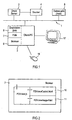
- FIG. 1 shows a print production environment, in which one of several user computers 2, a print server 3, a printing device 4 and a separate print data source 5 (host computer) over a computer network, such as for example a local area network (LAN) or a Wide area network (WAN) are connected.
- the user computer 2 communicates in particular with the print server 3 via special connection software, such as that in the OCE printer book mentioned above on the pages Software PRISMA + POD described in 12-1 to 12-17 runs under the PRISMA PRO system.
- a browser software is on the user PC 2 6 (Netscape Communicator) installed.
- the browser software 6 communicates with the print job manager 7, the PRISMA + POD software.
- print data can be buffered by the print job manager 7 from the print server 3 or the host computer 5 were retrieved.
- the user computer 2 also includes a screen 7 and a mouse 8 used for input control.
- This Java Script program 9 accesses the one HTML code "PDVViewControl.Html” 10 as well as on the HTML code “PDVViewImage.Html” 11 return as Appendices 2 and 3 are attached.
- HTML means Hyper Text Markup Language and in the listings crosshair references are defined as “grid”; the layer-related definitions and functions are also clearly recognizable.
- Figure 7 are essential system components and the corresponding Flow illustrated in the course of the creation, the further processing and printing of a document to be used.
- a word processing program Objects 72, 73 can be stored in a storage domain 70, which, for example, in the print server 3 (FIG. 1) or also are distributed over several computers of the network 1, by uploading from the client PC 2 to the corresponding memory computer transferred and stored there become.
- the storage domain 70 includes a or several upload directories 74 and a library for print files 75 (Print File Library), in which already completed print jobs can be saved.
- the Storage takes place in particular on permanent storage like a hard drive of the print server 3.
- One stored in library 75 (Print File Library) Document file 75a can be operated by pressing the Button 61 (see Figure 4) in a transfer process 129 are transferred to the client PC 2.
- data format that can be displayed by the browser 6, such as IOCA, TIF, GIF or JPG is available. If it’s not, e.g. if the file stored in library 75 in an AFP, PCL or Postscript format is encoded them with a grid module 76 in a predetermined grid Format such as JPG implemented before being sent to the client PC 5 transmitted or displayed by the browser can be. The one transmitted or converted in this way The file is then displayed with the browser 6 (see Figures 5 and 6).
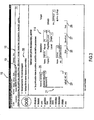
- a display window 15 is shown, which after calling the browser software 6 and the print job manager (PJM) Software 7 on the screen 17 of the user computer 2 is displayed.
- the window 15 has upper area 16 the typical features of an Internet browser, namely the Netscape menu line with functions such as "File”, “Edit” and “Reload”, as well as the specification the currently called http network address in Box 19.
- selection field 25 it can be selected whether in the Selection list 21 stored in the upload directory 74 Files or the files stored in library 75 be displayed. In that shown in Figure 3 State in the list 21 are the files of the Upload directory 74 displayed.
- area 114 there are properties a file activated in the upload area, e.g. their format "PS" for a postscript file.
- the desired print parameters are displayed in area 14 and selectable, e.g. the number of copies per copy or the output type single-sided / double-sided printing (simplex / duplex).
- buttons 26, 27 and 28 you can output in file (store) and / or output to a printer Start (Print).
- a display area 20 of the current document "Pjmadmin.html” can have various documents in a document selection box 21 can be selected.
- area 22 become typical properties of the currently selected documents like their name, their print data language, the number of copies, page size, layout information as well Impositioning parameters shown.
- Typical information is stored in area 23 printer-specific are required for the print job, such as. the resolution.
- Local files of the client PC can be displayed in the display area 14 2 displayed and managed.
- the button 13 can print documents in permanent storage (drives) of the client PC 2 are searched.
- field 12 can the name of an existing file can be entered for the search.
- the button 24 a file of the client PC can 2 are transferred to the print server 3 (upload process), so that it appears in the upload directory 74.
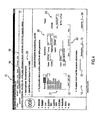
- FIG. 5 shows how a browser (Netscape Navigator) loaded document and the display using the Java Script module "PDVView.js" 9 (Appendix 1) is controlled.
- the document is e.g. page by page, in a display area 31 of the display window 30 shown.
- This display is through the program "PDVV-iewImage.html” 11 (Appendix 3) controlled.
- the files loaded in this way e.g. the file "Frame / A4.ps" are in a rasterized format in the browser (JPG) is available, whereby it is ensured that the for Display brought information identical pixel by pixel the information is when you print the same file arises in the printed image.
- the viewer-specific menu line 32 is shown in a display area lying above the display area 31 .
- the display in the document display area 31 can be via several control functions can be changed. For one, can in the document using the scroll bar 33 or the associated ones Arrow keys 34, 35 as usual in the standard browser a movement up or down within the document be carried out.
- Another way to view the document in the To change area 31 use the arrow keys 36 (to Start of document), 37 (up), 38 (down) and 39 (at the end of the document) to hike in the document.
- a certain page number can also be entered in the input field 40 can be entered to go directly to a specific one Side.
- the zoom factor can be specified in field 41 with which the document is represented in area 31 becomes.
- the crosshair 46 By pressing the button 45 you can within of the display area 31, the crosshairs 46 optionally displayed and be hidden.
- the crosshair 46 is there a vertical line 47 and a horizontal line Line 48.
- the current coordinates can be selected with the marking key 51 of the crosshairs held, saved and in the Coordinate fields 49, 50 are displayed. A then move the crosshair horizontally or the vertical direction changes the X or Y coordinate values in the displayed coordinate display fields 49, 50 no more until the highlight button is pressed again becomes. By pressing the highlight button again the saved X or Y coordinates of the current Crosshair position shown again.
- the display text 43 of the document to be viewed which is in a first layer is embedded to see.
- Such layers are in one Browser programming environment Carrier of graphic information.
- the layers are advantageously in browser environments however movable.
- the first layer in which the graphic information of the document is saved are not changed locally.
- the second line 48 of the cross hairs 46, also as graphic, one pixel wide Any information is embedded in a third layer vertically along direction B. The line is carried out from a file with one pixel Aspect is shown.
- the crosshair 46 is data-technically with the mouse 18 (FIG 1) coupled and becomes like a known mouse pointer automatically together with a mouse movement within the display surface 31 moves. With a click of the mouse with the left mouse button, the crosshairs 46 from the Mouse will be decoupled and will remain at the current position stand within the document display area.
- the instantaneous values within the X-Y coordinates (horizontal, vertical) of the crosshairs 46 can be selected on the button 51 in the text fields behind it 49, 50 are displayed.
- the status bar 60 of the The current position of the crosshair is visible in the browser.
- the crosshairs must be visible and fixed. Becomes the crosshair 46 after clicking inside again display field 31 has been made movable again, then moved again, so the displayed remain Get values in fields 49, 50.
- the coordinate values correspond to individual pick values on the X-Y axes.
- the crosshairs can go directly to the specified coordinate position be positioned.
- the basis for the representation of the crosshairs 46 is on the one hand the above layer technique and the other two Image files with a specially marked, consisting of a red colored pixel for the two lines 47, 48. By stretching in horizontal or lines 47, 48, which each up to the edges of the display area 31 pass.
- the crosshair is within area 31 dynamically shiftable.
- Such dynamic elements can in web browsers like Netscape Communicator in particular can be realized through the layer technique.
- the invention is both as a computer program and Computer program product or integrated in a computer to realize and especially in printing systems with connected Print servers particularly beneficial. she can thereby on a server, a client PC, a printer or another computer integrated in a data network expire. Corresponding program files can be saved on a Data carriers saved or via LAN and WAN networks how the internet will be spread.
Landscapes
- Engineering & Computer Science (AREA)
- Theoretical Computer Science (AREA)
- Human Computer Interaction (AREA)
- Physics & Mathematics (AREA)
- General Engineering & Computer Science (AREA)
- General Physics & Mathematics (AREA)
- Quality & Reliability (AREA)
- User Interface Of Digital Computer (AREA)
- Record Information Processing For Printing (AREA)
- Information Transfer Between Computers (AREA)
Claims (18)
- Procédé de traitement de données d'impression d'une tâche d'impression qui est divisée en plusieurs pages, dans lequel les données d'impression sont affichées sur un dispositif d'affichage (17) avant l'impression, en vue de vérifier page par page leur repérage, les données d'impression d'une première page étant affichées conjointement avec un moyen de vérification (46) déplaçable sur le dispositif d'affichage (17), de façon à pouvoir positionner et en particulier fixer le moyen de vérification (46) à une première position prédéterminée par le bord des données d'impression affichées, puis de façon à afficher les données d'impression d'une page suivante et à déterminer leur position par rapport au moyen de vérification (46).
- Procédé selon la revendication 1, dans lequel les données d'impression sont dans un format tramé dans lequel elles sont amenées à un appareil d'impression en vue de l'impression.
- Procédé selon l'une des revendications 1 ou 2, dans lequel les données d'impression sont affichées au moyen d'un navigateur (6).
- Procédé selon l'une des revendications précédentes, dans lequel la position du moyen de vérification (46) peut être fixée sur le dispositif d'affichage (17).
- Procédé selon l'une des revendications précédentes, dans lequel le moyen de vérification (46) comporte une ligne.
- Procédé selon la revendication 5, dans lequel le moyen de vérification (46) est un réticule à croisillon, et les deux axes (47, 48) du réticule à croisillon (46) sont déplaçables indépendamment l'un de l'autre sur le dispositif d'affichage (17).
- Procédé selon la revendication 6, dans lequel les positions des deux axes (46, 47) du réticule à croisillon (46) peuvent être fixées indépendamment l'une de l'autre sur le dispositif d'affichage (17).
- Procédé selon l'une des revendications précédentes, dans lequel le moyen de vérification (46) est déplacé et/ou fixé au moyen d'un dispositif d'entrée (18) sur le dispositif d'affichage (17).
- Procédé selon la revendication 8, dans lequel les données d'impression sont affichées dans une zone d'affichage de document (31), et en ce que le moyen de vérification (46) peut être découplé du dispositif d'entrée (18) de façon à rester à la position actuelle à l'intérieur de la zone d'affichage de document (31) en dépit d'un mouvement de déplacement du dispositif d'entrée (18).
- Procédé selon l'une des revendications précédentes, dans lequel la position du moyen de vérification (46) est détectée automatiquement sur le dispositif d'affichage (17) dans un système de coordonnées, et les valeurs de coordonnées (x, y), correspondant à la position, sont mémorisées.
- Procédé selon l'une des revendications précédentes, dans lequel les données d'impression sont traitées dans une première couche transparente, et le moyen de vérification (46) est traité dans au moins une deuxième couche transparente.
- Procédé selon la revendication 11, dans lequel le moyen de vérification (46) comporte un premier élément partiel (48) et un deuxième élément partiel (47), et chaque élément partiel est traité dans une couche séparée.
- Procédé selon l'une des revendications précédentes, dans lequel la présentation du moyen de vérification (46) peut être arrêtée.
- Procédé selon l'une des revendications précédentes, dans lequel les pages prédéterminées d'un document correspondant aux données d'impression peuvent être affichées avec un sélecteur de page (40) affiché sur le dispositif d'affichage (17).
- Procédé selon l'une des revendications précédentes, dans lequel le moyen de vérification (46) est affiché à une position prédéterminée au moyen de valeurs qui sont entrées ou sélectionnées sur un sélecteur de position (51) affiché sur le dispositif d'affichage (17).
- Logiciel qui commande lors du chargement sur un ordinateur (2) le déroulement d'un procédé selon l'une des revendications 1 à 15.
- Système informatique qui commande le déroulement d'un procédé selon l'une des revendications 1 à 15.
- Système d'impression comportant un système informatique selon la revendication 17.
Applications Claiming Priority (3)
| Application Number | Priority Date | Filing Date | Title |
|---|---|---|---|
| DE10017928 | 2000-04-11 | ||
| DE10017928 | 2000-04-11 | ||
| PCT/EP2001/004114 WO2001077806A1 (fr) | 2000-04-11 | 2001-04-10 | Procede et systeme pour traiter des donnees d'impression avec un reperage |
Publications (2)
| Publication Number | Publication Date |
|---|---|
| EP1272923A1 EP1272923A1 (fr) | 2003-01-08 |
| EP1272923B1 true EP1272923B1 (fr) | 2004-06-30 |
Family
ID=7638325
Family Applications (1)
| Application Number | Title | Priority Date | Filing Date |
|---|---|---|---|
| EP01936222A Expired - Lifetime EP1272923B1 (fr) | 2000-04-11 | 2001-04-10 | Procede et systeme pour traiter des donnees d'impression avec un reperage |
Country Status (4)
| Country | Link |
|---|---|
| US (2) | US7269790B2 (fr) |
| EP (1) | EP1272923B1 (fr) |
| DE (1) | DE50102743D1 (fr) |
| WO (1) | WO2001077806A1 (fr) |
Families Citing this family (7)
| Publication number | Priority date | Publication date | Assignee | Title |
|---|---|---|---|---|
| DE10123411A1 (de) * | 2001-05-14 | 2002-11-28 | Oce Printing Systems Gmbh | Verfahren, Gerätesystem und Computerprogrammsystem zum visuellen Überprüfen eines Druckdatenstroms |
| DE10212890A1 (de) * | 2002-03-22 | 2003-10-23 | Oce Printing Systems Gmbh | Dokumenten-Bearbeitungsauftragssteuerungssystem, Verfahren zum Steuern von Dokumenten-Bearbeitungsaufträgen und Softwareprodukt zum Ausführen eines solchen Verfahrens |
| US8705141B2 (en) * | 2004-07-16 | 2014-04-22 | Ricoh Production Print Solutions | Method and system for efficiently printing simple data using a complex page data stream |
| US20060170957A1 (en) * | 2005-02-03 | 2006-08-03 | Kim Niebling | System and method for automated control of computer printing features |
| US20090303512A1 (en) * | 2008-06-04 | 2009-12-10 | Xerox Corporation | Automated imposition for print jobs with exception pages |
| US8619269B2 (en) * | 2007-07-13 | 2013-12-31 | Ricoh Production Print Solutions | Processing a group of jobs substantially independently while synchronizing and maintaining the original order of the jobs at appropriate points in a workflow |
| US9844956B2 (en) * | 2015-10-07 | 2017-12-19 | Intermec Technologies Corporation | Print position correction |
Family Cites Families (22)
| Publication number | Priority date | Publication date | Assignee | Title |
|---|---|---|---|---|
| US5233685A (en) * | 1990-06-12 | 1993-08-03 | Wordperfect Corporation | Method and apparatus for integrated graphical and textual character printing |
| DE69328522T2 (de) * | 1992-08-27 | 2001-01-11 | Sun Microsystems, Inc. | Verfahren und Vorrichtung zur Benutzung von Browsern für Sammlungen |
| US5682541A (en) * | 1994-05-26 | 1997-10-28 | Canon Business Machines, Inc. | Preview system for printed documents |
| US5864332A (en) * | 1994-06-29 | 1999-01-26 | Canon Business Machines, Inc. | Scalable edit window and displayable position indicators for an electronic typewriter |
| US5675753A (en) * | 1995-04-24 | 1997-10-07 | U.S. West Technologies, Inc. | Method and system for presenting an electronic user-interface specification |
| US5963641A (en) | 1995-09-12 | 1999-10-05 | Markzware, Inc. | Device and method for examining, verifying, correcting and approving electronic documents prior to printing, transmission or recording |
| US5995985A (en) * | 1995-11-16 | 1999-11-30 | Starfish Software, Inc. | Information management system with improved methods and interface for printing data |
| JP4046370B2 (ja) | 1996-01-12 | 2008-02-13 | 富士通株式会社 | 3次元形状の作図方法 |
| JP3061765B2 (ja) * | 1996-05-23 | 2000-07-10 | ゼロックス コーポレイション | コンピュータベースの文書処理方法 |
| US6012083A (en) * | 1996-09-24 | 2000-01-04 | Ricoh Company Ltd. | Method and apparatus for document processing using agents to process transactions created based on document content |
| US7242487B2 (en) * | 1997-06-04 | 2007-07-10 | Agfa Corporation | Print driver system having a user interface and a method for processing raster data |
| US5953007A (en) * | 1997-09-15 | 1999-09-14 | International Business Machines Corporation | System, method, and program for using animations to show page layout combinations in a user interface for submitting print jobs |
| JP3408124B2 (ja) * | 1997-11-06 | 2003-05-19 | シャープ株式会社 | コンピュータシステムを利用した印刷処理装置 |
| US6727999B1 (en) * | 1998-10-07 | 2004-04-27 | Canon Kabushiki Kaisha | Image formation system |
| US6694487B1 (en) * | 1998-12-10 | 2004-02-17 | Canon Kabushiki Kaisha | Multi-column page preview using a resizing grid |
| US6353450B1 (en) * | 1999-02-16 | 2002-03-05 | Intel Corporation | Placing and monitoring transparent user interface elements in a live video stream as a method for user input |
| US6400845B1 (en) * | 1999-04-23 | 2002-06-04 | Computer Services, Inc. | System and method for data extraction from digital images |
| US6903839B1 (en) * | 1999-09-03 | 2005-06-07 | Imagex, Inc. | Apparatus for washing of graphic image files |
| US6766495B1 (en) * | 1999-09-27 | 2004-07-20 | International Business Machines Corporation | Apparatus and method for improving line-to-line word positioning of text for easier reading |
| US6832351B1 (en) * | 1999-10-01 | 2004-12-14 | Microsoft Corporation | Method and system for previewing and printing customized business forms |
| US6859909B1 (en) * | 2000-03-07 | 2005-02-22 | Microsoft Corporation | System and method for annotating web-based documents |
| TW533142B (en) * | 2001-09-12 | 2003-05-21 | Basevision Technology Corp | Composing device and method for name card |
-
2001
- 2001-04-10 WO PCT/EP2001/004114 patent/WO2001077806A1/fr not_active Ceased
- 2001-04-10 US US10/239,968 patent/US7269790B2/en not_active Expired - Fee Related
- 2001-04-10 DE DE50102743T patent/DE50102743D1/de not_active Expired - Lifetime
- 2001-04-10 EP EP01936222A patent/EP1272923B1/fr not_active Expired - Lifetime
-
2007
- 2007-08-08 US US11/835,652 patent/US20080239370A1/en not_active Abandoned
Also Published As
| Publication number | Publication date |
|---|---|
| EP1272923A1 (fr) | 2003-01-08 |
| US20080239370A1 (en) | 2008-10-02 |
| US20030090714A1 (en) | 2003-05-15 |
| US7269790B2 (en) | 2007-09-11 |
| DE50102743D1 (de) | 2004-08-05 |
| WO2001077806A1 (fr) | 2001-10-18 |
Similar Documents
| Publication | Publication Date | Title |
|---|---|---|
| EP1389329B1 (fr) | Procede, systeme, et programme informatique destines a produire un document electronique a partir de donnees d'image tramees | |
| DE69820413T2 (de) | Gebraucherschnittstelle für einen drucker/kopierer, an einer entfernten stelle eines internet/intranetzes | |
| US7295336B2 (en) | Document-management printing system having a displaying unit, and its control method | |
| EP1573505B1 (fr) | Procede, ensemble et logiciel informatique pour imprimer un intercalaire a l'aide d'une imprimante ou d'un copieur electrophotographique | |
| EP1388042B1 (fr) | Procede, systeme d'appareillage et systeme de programmes informatiques permettant de controler visuellement un flux de donnees d'impression | |
| DE10309241A1 (de) | Drucken mit variablen Daten unter Verwendung einer dynamischen Ausschießvorlage | |
| DE10250842A1 (de) | Verfahren, Computerprogrammprodukt und Vorrichtung zum Verarbeiten eines Dokumentendatenstroms eines Eingangsformates zu einem Ausgangsformat | |
| DE202014010906U1 (de) | Vorrichtung für zweidimensionale Dokumentennavigation | |
| EP1161731B1 (fr) | Procede, produit programme d'ordinateur et systeme permettant le transfert de donnees informatiques a un appareil de sortie | |
| US20080239370A1 (en) | Method and system for in-register processing of print data | |
| DE102007037032B4 (de) | Verfahren zum Erzeugen eines Templates | |
| DE10335124B4 (de) | Drucksystem, Druckdatenerzeugungsvorrichtung des Drucksystems, Druckverfahren, Programm zum Betreiben der Druckdatenerzeugungsvorrichtung | |
| DE102007036985B4 (de) | Verfahren, System und Computerprogrammprodukt zum automatischen Aufbereiten von Dokumentenbearbeitungsdaten | |
| EP1470472B1 (fr) | Procede pour la reception automatique et l'acheminement d'instructions de traitement des documents | |
| DE102004047327A1 (de) | Verfahren und System zum automatischen Bearbeiten eines Jobtickets für einen Druckprozess | |
| DE102004047326B4 (de) | Verfahren und System zum Übermitteln von Dokumentenbearbeitungsaufträgen von einem Client zu einem Gerätes zum Bearbeiten eines Dokumentenbearbeitungsauftrages über ein Netzwerk | |
| WO2003065198A2 (fr) | Procede, systeme informatique et module de programme d'ordinateur pour l'etablissement d'instructions de traitement de documents a partir de donnees variables, individuelles par page et a partir de donnees de ressources | |
| EP2163983A1 (fr) | Procédé de production de fichier d'impression à partir d'objets de données d'une mémoire | |
| EP2164000A1 (fr) | Procédé de conversion d'informations textuelles dans un document au format pdf | |
| EP1163574B1 (fr) | Procede, produit programme d'ordinateur et systeme permettant le transfert de donnees informatiques a un appareil de sortie | |
| DE10223926A1 (de) | Verfahren, Computersystem und Computerprogrammprodukt zum Übertragen eines Druckauftrages von einem Host Computer an einen Druckserver | |
| DE102007036986A1 (de) | Verfahren zum automatischen Aufbereiten und Trennen von in einem Dokumentendatenstrom enthaltenen Dokumentenbearbeitungsdaten | |
| DE10252576B4 (de) | Graphische Benutzeroberfläche, Verfahren, das in einem Druckgerät implementiert ist, und Druckgerät | |
| DE102017103394A1 (de) | Verfahren zum computergestützten Verarbeiten von Dokumenten | |
| WO2007110389A1 (fr) | Procédé, programme informatique et système informatique permettant de créer un composant de commande de pilote pour un périphérique de sortie dans un système de gestion des sorties de document |
Legal Events
| Date | Code | Title | Description |
|---|---|---|---|
| PUAI | Public reference made under article 153(3) epc to a published international application that has entered the european phase |
Free format text: ORIGINAL CODE: 0009012 |
|
| 17P | Request for examination filed |
Effective date: 20020910 |
|
| AK | Designated contracting states |
Kind code of ref document: A1 Designated state(s): AT BE CH CY DE DK ES FI FR GB GR IE IT LI LU MC NL PT SE TR |
|
| 17Q | First examination report despatched |
Effective date: 20030516 |
|
| GRAP | Despatch of communication of intention to grant a patent |
Free format text: ORIGINAL CODE: EPIDOSNIGR1 |
|
| GRAS | Grant fee paid |
Free format text: ORIGINAL CODE: EPIDOSNIGR3 |
|
| GRAA | (expected) grant |
Free format text: ORIGINAL CODE: 0009210 |
|
| AK | Designated contracting states |
Kind code of ref document: B1 Designated state(s): DE FR GB |
|
| PG25 | Lapsed in a contracting state [announced via postgrant information from national office to epo] |
Ref country code: FR Free format text: LAPSE BECAUSE OF FAILURE TO SUBMIT A TRANSLATION OF THE DESCRIPTION OR TO PAY THE FEE WITHIN THE PRESCRIBED TIME-LIMIT Effective date: 20040630 Ref country code: GB Free format text: LAPSE BECAUSE OF FAILURE TO SUBMIT A TRANSLATION OF THE DESCRIPTION OR TO PAY THE FEE WITHIN THE PRESCRIBED TIME-LIMIT Effective date: 20040630 |
|
| REG | Reference to a national code |
Ref country code: GB Ref legal event code: FG4D Free format text: NOT ENGLISH |
|
| REG | Reference to a national code |
Ref country code: IE Ref legal event code: FG4D Free format text: GERMAN |
|
| REF | Corresponds to: |
Ref document number: 50102743 Country of ref document: DE Date of ref document: 20040805 Kind code of ref document: P |
|
| GBV | Gb: ep patent (uk) treated as always having been void in accordance with gb section 77(7)/1977 [no translation filed] |
Effective date: 20040630 |
|
| REG | Reference to a national code |
Ref country code: IE Ref legal event code: FD4D |
|
| PLBE | No opposition filed within time limit |
Free format text: ORIGINAL CODE: 0009261 |
|
| STAA | Information on the status of an ep patent application or granted ep patent |
Free format text: STATUS: NO OPPOSITION FILED WITHIN TIME LIMIT |
|
| 26N | No opposition filed |
Effective date: 20050331 |
|
| EN | Fr: translation not filed | ||
| REG | Reference to a national code |
Ref country code: DE Ref legal event code: R082 Ref document number: 50102743 Country of ref document: DE Representative=s name: PATENTANWAELTE SCHAUMBURG, THOENES, THURN, LAN, DE |
|
| REG | Reference to a national code |
Ref country code: DE Ref legal event code: R082 Ref document number: 50102743 Country of ref document: DE Representative=s name: PATENTANWAELTE SCHAUMBURG, THOENES, THURN, LAN, DE Effective date: 20130819 Ref country code: DE Ref legal event code: R081 Ref document number: 50102743 Country of ref document: DE Owner name: OCE PRINTING SYSTEMS GMBH & CO. KG, DE Free format text: FORMER OWNER: OCE PRINTING SYSTEMS GMBH, 85586 POING, DE Effective date: 20130819 Ref country code: DE Ref legal event code: R082 Ref document number: 50102743 Country of ref document: DE Representative=s name: SCHAUMBURG & PARTNER PATENTANWAELTE GBR, DE Effective date: 20130819 Ref country code: DE Ref legal event code: R082 Ref document number: 50102743 Country of ref document: DE Representative=s name: SCHAUMBURG UND PARTNER PATENTANWAELTE MBB, DE Effective date: 20130819 |
|
| REG | Reference to a national code |
Ref country code: DE Ref legal event code: R082 Ref document number: 50102743 Country of ref document: DE Representative=s name: SCHAUMBURG & PARTNER PATENTANWAELTE GBR, DE Ref country code: DE Ref legal event code: R082 Ref document number: 50102743 Country of ref document: DE Representative=s name: SCHAUMBURG UND PARTNER PATENTANWAELTE MBB, DE |
|
| PGFP | Annual fee paid to national office [announced via postgrant information from national office to epo] |
Ref country code: DE Payment date: 20170526 Year of fee payment: 17 |
|
| REG | Reference to a national code |
Ref country code: DE Ref legal event code: R119 Ref document number: 50102743 Country of ref document: DE |
|
| PG25 | Lapsed in a contracting state [announced via postgrant information from national office to epo] |
Ref country code: DE Free format text: LAPSE BECAUSE OF NON-PAYMENT OF DUE FEES Effective date: 20181101 |