EP1274002A2 - Méthode pour imprimer sur un réseau - Google Patents
Méthode pour imprimer sur un réseau Download PDFInfo
- Publication number
- EP1274002A2 EP1274002A2 EP02014084A EP02014084A EP1274002A2 EP 1274002 A2 EP1274002 A2 EP 1274002A2 EP 02014084 A EP02014084 A EP 02014084A EP 02014084 A EP02014084 A EP 02014084A EP 1274002 A2 EP1274002 A2 EP 1274002A2
- Authority
- EP
- European Patent Office
- Prior art keywords
- printer
- server computer
- printers
- client
- communication session
- Prior art date
- Legal status (The legal status is an assumption and is not a legal conclusion. Google has not performed a legal analysis and makes no representation as to the accuracy of the status listed.)
- Withdrawn
Links
Images







Classifications
-
- G—PHYSICS
- G06—COMPUTING OR CALCULATING; COUNTING
- G06F—ELECTRIC DIGITAL DATA PROCESSING
- G06F3/00—Input arrangements for transferring data to be processed into a form capable of being handled by the computer; Output arrangements for transferring data from processing unit to output unit, e.g. interface arrangements
- G06F3/12—Digital output to print unit, e.g. line printer, chain printer
- G06F3/1201—Dedicated interfaces to print systems
- G06F3/1202—Dedicated interfaces to print systems specifically adapted to achieve a particular effect
- G06F3/1222—Increasing security of the print job
-
- G—PHYSICS
- G06—COMPUTING OR CALCULATING; COUNTING
- G06F—ELECTRIC DIGITAL DATA PROCESSING
- G06F21/00—Security arrangements for protecting computers, components thereof, programs or data against unauthorised activity
- G06F21/60—Protecting data
- G06F21/606—Protecting data by securing the transmission between two devices or processes
- G06F21/608—Secure printing
-
- G—PHYSICS
- G06—COMPUTING OR CALCULATING; COUNTING
- G06F—ELECTRIC DIGITAL DATA PROCESSING
- G06F3/00—Input arrangements for transferring data to be processed into a form capable of being handled by the computer; Output arrangements for transferring data from processing unit to output unit, e.g. interface arrangements
- G06F3/12—Digital output to print unit, e.g. line printer, chain printer
- G06F3/1201—Dedicated interfaces to print systems
- G06F3/1223—Dedicated interfaces to print systems specifically adapted to use a particular technique
- G06F3/1237—Print job management
- G06F3/1238—Secure printing, e.g. user identification, user rights for device usage, unallowed content, blanking portions or fields of a page, releasing held jobs
-
- G—PHYSICS
- G06—COMPUTING OR CALCULATING; COUNTING
- G06F—ELECTRIC DIGITAL DATA PROCESSING
- G06F3/00—Input arrangements for transferring data to be processed into a form capable of being handled by the computer; Output arrangements for transferring data from processing unit to output unit, e.g. interface arrangements
- G06F3/12—Digital output to print unit, e.g. line printer, chain printer
- G06F3/1201—Dedicated interfaces to print systems
- G06F3/1278—Dedicated interfaces to print systems specifically adapted to adopt a particular infrastructure
- G06F3/1285—Remote printer device, e.g. being remote from client or server
- G06F3/1288—Remote printer device, e.g. being remote from client or server in client-server-printer device configuration
-
- H—ELECTRICITY
- H04—ELECTRIC COMMUNICATION TECHNIQUE
- H04L—TRANSMISSION OF DIGITAL INFORMATION, e.g. TELEGRAPHIC COMMUNICATION
- H04L63/00—Network architectures or network communication protocols for network security
- H04L63/04—Network architectures or network communication protocols for network security for providing a confidential data exchange among entities communicating through data packet networks
- H04L63/0428—Network architectures or network communication protocols for network security for providing a confidential data exchange among entities communicating through data packet networks wherein the data content is protected, e.g. by encrypting or encapsulating the payload
- H04L63/0464—Network architectures or network communication protocols for network security for providing a confidential data exchange among entities communicating through data packet networks wherein the data content is protected, e.g. by encrypting or encapsulating the payload using hop-by-hop encryption, i.e. wherein an intermediate entity decrypts the information and re-encrypts it before forwarding it
-
- G—PHYSICS
- G06—COMPUTING OR CALCULATING; COUNTING
- G06F—ELECTRIC DIGITAL DATA PROCESSING
- G06F2221/00—Indexing scheme relating to security arrangements for protecting computers, components thereof, programs or data against unauthorised activity
- G06F2221/21—Indexing scheme relating to G06F21/00 and subgroups addressing additional information or applications relating to security arrangements for protecting computers, components thereof, programs or data against unauthorised activity
- G06F2221/2115—Third party
-
- H—ELECTRICITY
- H04—ELECTRIC COMMUNICATION TECHNIQUE
- H04L—TRANSMISSION OF DIGITAL INFORMATION, e.g. TELEGRAPHIC COMMUNICATION
- H04L63/00—Network architectures or network communication protocols for network security
- H04L63/08—Network architectures or network communication protocols for network security for authentication of entities
- H04L63/0823—Network architectures or network communication protocols for network security for authentication of entities using certificates
-
- H—ELECTRICITY
- H04—ELECTRIC COMMUNICATION TECHNIQUE
- H04L—TRANSMISSION OF DIGITAL INFORMATION, e.g. TELEGRAPHIC COMMUNICATION
- H04L63/00—Network architectures or network communication protocols for network security
- H04L63/16—Implementing security features at a particular protocol layer
- H04L63/166—Implementing security features at a particular protocol layer at the transport layer
Definitions
- the present invention relates to a method of printing realized by a client computer and a printer over a network, and particularly to a printing method using a server computer that relays between the client computer and the printer.
- the Internet consists of network systems and various computers that are interconnected by the network systems. Computers that are interconnected by the Internet can exchange information by using various systems such as mail systems and WWW systems.
- SSL Secure Socket Layer
- both the client computer and the server computer must support the SSL functions.
- a typical client program includes such functions by default.
- the server computers although a Web server program has such functions, to actually use those functions the Web server program must also incorporate a server certificate (digital certificate) that is acquired from a certificate authority.
- the SSL enables a secure network communication service even if the Internet is used.
- the first object of the present invention is to provide a scheme in which even in the case where a lot of print sites, are constructed on a network, each of which provides a printing service by secure network communication, the print sites can be managed easily, as well as to provide a system to implement such a scheme.
- a print site that provides a printing service is located inside a firewall (F/W)
- the print site cannot receive a print request from an external client computer that is sent by a secure network communication. This is because firewalls deny outside-to-inside access though it permits inside-to-outside access.
- the second object of the invention is to provide a scheme that enables a printing service by receiving a print request that is sent by a secure network communication even in the case where the print site is located inside a firewall, as well as to provide a system to implement such scheme.
- the gist of the present invention is as follows.
- the server computer establishes sessions in response to secure communication session establishment requests from a client computer and a printer, respectively.
- the server computer establishes a single session by connecting the two sessions, and the client computer sends a print job to the printer via the server computer and thereby causes the printer to perform a printing operation.
- a first aspect of the invention provides a printing method using a server computer for a relay between one or more client computers and one or more printers that are connected to each other via a network, comprising the steps, executed by the server computer, of receiving a printer secure communication session establishment request from a printer and managing the printer as a usable printer; receiving a client secure communication session establishment request from a client computer and establishing a client secure communication session with the client computer; receiving, from the client computer, a print job in which the printer is designated as an output destination printer; and sending the received print job to the printer as the output destination printer.
- a second aspect of the invention provides a printing method using a server computer for a relay between one or more client computers and one or more printers that are connected to each other via a network, comprising the steps, executed by the server computer, of receiving one or more registration requests from printers and managing, as usable printers, the printers that have sent the registration requests; receiving, from a client computer, a first secure communication session establishment request that is directed to an output destination printer that is one of the usable printers; sending, to the output destination printer, a request for sending a second secure communication session establishment request; receiving a second secure communication session establishment request that is sent from the output destination printer in response to the request from the server computer; establishing a secure communication session between the client computer and the output destination printer by connecting the first and second secure communication session establishment requests; and transferring, to the output destination printer with which the secure communication session has been established, a print job that is sent from the client computer.
- the client computer, the printer, and the server computer exchange information using a prescribed communication protocol.
- a Web system can also be used.
- the secure communication be SSL communication.
- the client computer does not directly establish the SSL communication session with the printer. Instead, the client computer sends, via the server computer, a print job to the printer after establishing the SSL communication session with the printer via the server computer that serves as a relay.
- This makes it possible to request a printer on the network to perform a printing operation by secure communication.
- the printer In establishing the SSL communication session between the printer and the server computer, the printer is regarded as a client of the server computer. Therefore, the printer need not incorporate, into itself, a digital certificate for establishment of an SSL communication session. As a result, even where a lot of sites each having such a printer are constructed on a network, it is not necessary to acquire digital certificates for the respective sites and incorporate the certificates into the respective sites; the management of the sites is made easier. Also, a client computer that uses part of those sites need not acquire digital certificates for the respective sites and incorporate the certificates into itself; the management is made easier.
- the server computer send a list of usable printers to the client computer.
- the printing methods further comprise the step of receiving registration requests from client computers on the network and managing the client computers that have sent the registration requests.
- each of the client computers be assigned its own usable printers .
- the printing methods further comprise the step of the server computer's checking whether the usable printers are active or not.
- the server computer acquire status information of prescribed items from the usable printers.
- the server computer establish communication sessions with respective printers and maintain those communication sessions when receiving registration requests from the respective printers.
- the server computer terminates an established communication session if the server computer has not received any prescribed communications from the printer for a predetermined period. Therefore, it is preferable that each printer send its own status information until the communication session is terminated. When a communication session has been terminated, it is preferable that the printer send a registration request to have a communication session established again.
- the above-described invention can be considered as a method or apparatus invention, or an invention of a program for causing a computer to perform a prescribed function or a recording medium on which such a program is recorded.
- Fig. 1 shows the entire system for realizing a printing method according to a first embodiment of the invention.
- a server computer 1 a client computer 2, and a network printer (hereinafter referred to simply as "printer") 3 are interconnected so as to be able to communicate with each other over the Internet.
- a plurality of client computers 2 and printers 3 exist on the Internet and Fig. 1 shows only one of those client computers 2 and only one of those printers 3.
- the server computer 1, the client computer 2, and the printer 3 are arranged at different sites.
- the server computer 1, the client computer 2, and the printer 3 are configured in such a manner as to be able to communicate with each other using a prescribed communication protocol. It is preferable that each of the server computer 1, the client computer 2, and the printer 3 be equipped with a Web system. Typically, the server computer 1, the client computer 2, and the printer 3 establish a session (connection) by designating a port of the other party according to TCP/IP communication. Further, in this embodiment, the SSL is used to realize secure communication on this communication protocol. It is assumed that the server computer 1 incorporates a digital certificate that has been acquired from a prescribed certificate authority.
- the server computer 1 relays information between the client computer 2 that requests printing of document data and the printer 3 that prints the document data in response to the request, and carries a central core in realizing printing by secure network communication.
- the printing method according to the first embodiment will be outlined below and will be described later in detail.
- the printer 3 logs in to the server computer 1 by the SSL communication and maintains a resulting session (indicated by symbol (1) in Fig. 1).
- the server computer 1 receives such log-in requests from various printers 3 on the network.
- the client computer 2 sends the SSL communication session establishment request to the server computer 1 (indicated by symbol (2) in Fig. 1).
- the server computer 1 establishes the SSL communication session with the client computer 2.
- the client computer 2 sends, to the server computer 1, a print request (print job) that specifies the printer 3 as an output destination.
- the server computer 1 transfers the print request to the printer 3 under the SSL communication (indicated by symbol (3) in Fig. 1).
- the client computer 2 establishes an SSL communication session via the server computer 1 that serves as a relay rather than directly with the printer 3.
- the printer 3 is regarded as a client of the server computer 1.
- each site need not acquire a digital certificate for the printer 3 and incorporate the certificate into the printer 3; the management of the sites is made easier.
- the client computer 2 that uses part of those sites need not acquire digital certificates corresponding to the respective sites and incorporate the certificates into itself; the management is made easier.
- SSL communication can be used even if one or both of the client computer 2 and the printer 3 are located inside a firewall.
- Various network-related settings are made in advance in the printer 3 that intends to log in to the server computer 1.
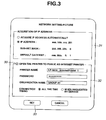
- Fig. 2 shows an exemplary network setting screen for the printer 3 according to the embodiment.
- Such network-related settings for the printer 3 can be made in such a manner that a management computer that functions as a Web client remotely accesses the printer 3 that is caused to function as a Web server for this setting purpose.
- the network setting screen has an IP address setting area 21 and an Internet printer setting area 22.
- General setting data that are necessary to use the network are input to the IP address setting area 21.
- the user who manages the printer 3 wants to open the printer 3 as an Internet printer, he checks a check box 23 in the Internet printer setting area 22, inputs a printer name, a password, and the name of an organization to which the printer 3 belongs, and specifies connection timing.
- connection timing the user specifies one of various modes of connection such as a mode in which connection is made upon application of power and maintained thereafter without interruption (all-time connection), a mode in which connection is made only when a connection request is received from the service computer 1, a mode in which connection is made immediately, and a mode in which connection is made for a certain number of minutes (to be specified) every certain period (to be specified) .
- a mode in which connection is made upon application of power and maintained thereafter without interruption all-time connection
- a mode in which connection is made only when a connection request is received from the service computer 1 a mode in which connection is made immediately
- a mode in which connection is made for a certain number of minutes (to be specified) every certain period (to be specified) the user manipulates a "Set" button 24, whereupon the data thus set are reflected in the printer 3.
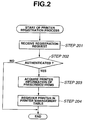
- Fig. 3 is a flowchart showing a printer registration process according to the embodiment that is executed by the server computer 1.
- the server computer 1 receives a registration request that is sent from the printer 3 on the network according to SSL communication (step 301).
- the printer 3 is so set as to send a registration request to the server computer 1 (specified in advance) according to an initialization program that is started upon application of power.
- the registration request contains a printer name and a password, for example.
- the server computer 1 judges whether to authenticate the printer 3 (step 302). If the printer 3 was authenticated at step 302, the server computer 1 acquires printer information of prescribed items from the printer 3 (step 303).
- the printer information is information that is mainly used by a user in selecting a printer to be designated as an output destination.
- the printer information includes a logical printer name of the printer 3, a network position information (i.e., an IP address or a domain name) indicating a logical position of the printer 3 on the network, the name of an organization such as a company or a group to which the printer 3 belongs, a printer type, a printer model, and the number of print jobs.
- the logical printer name is a printer name that is uniquely given to the printer 3 in the organization.
- the organization name may be the same as or similar to a domain name on the Internet.
- the organization name is used in judging whether a print request has come from a client computer 2 that belongs to the same organization as the printer does.
- a client computer 2 belonging to a certain organization can request only printers 3 belonging to the same organization to perform printing.
- an exception may be made in which an organization "Public," for example, is defined and printers 3 belonging to it are allowed to receive print requests from client computers 2 belonging to any organizations.
- the printer type indicates whether the printer 3 is a laser printer or an ink jet printer and whether it is a monochrome printer or a color printer.
- the printer model name indicates a printer type number.
- the number of print jobs is the number of print jobs that are currently spooled in the printer 3. For example, the number of print jobs of the printer 3 is zero if it has accessed the server computer 1 immediately after being powered on.
- the server computer 1 Upon acquiring the printer information from the printer 3, the server computer 1 registers the printer 3 as a usable printer in a printer management table (step 304). The printer 3 sends status information of prescribed items to the server computer 1 every predetermined period. For example, the status information includes the number of print jobs that are currently spooled. In this manner, the server computer 1 recognizes that the printer 3 is active and the SSL communication session is maintained.
- Fig. 4 shows an exemplary printer management table according to the embodiment.
- the printer management table is formed based on printer information that is acquired from printers 3 that logged in to the server computer 1. That is, the printer management table contains a list of printers 3 that logged in to the server computer 1 and information of those printers 3.
- the printer management table consists of items of "logical printer name,” "IP address,” “port number,” “printer type,” “printer model,” “number of queueing jobs” indicating the number of print jobs that are spooled in a printer, and "state” indicating the state of the printer. These pieces of information are managed by using a unique printer management ID that is issued by the server computer 1.
- the server computer 1 updates the contents of the printer management table by receiving status information that is sent from each printer 3 every predetermined period and includes the number of print jobs currently spooled. If the connection to a printer 3 has been broken or the server computer 1 has not received any information from a printer 3 for a predetermined period, the server computer 1 judges that the printer 3 is not active and changes the "state" item of the printer 3 to "sleep" in the printer management table.
- the sleep state means that users cannot use the printer 3 though it is registered in the printer management table. Conceivable reasons why no response comes from a printer 3 are the printer 3's being powered off, a network failure, etc. If judging that a sleep state has lasted for a long time, the server computer 1 deletes the printer 3 from the printer management table.
- the client computer 2 Before executing a print request process, the client computer 2 executes a process of registering usable printers 3 according to interactive manipulations. For example, this registration process is realized by a printer addition program that is prepared in an operating system in advance.
- Figs. 5A-5C and 6 show exemplary pictures through which the client computer 2 registers usable printers. This example is such that a user acquires a list of Internet printers as usable printers from the server computer 1 and registers a desired Internet printer.
- the client computer 2 displays a dialogue box as shown in Fig. 5A and urges the user to select a type of printer he is going to add. If the user selects an item "Internet printer,” the client computer 2 displays a dialogue box as shown in Fig. 5B and requests the user to input a specific logical printer name of the Internet printer.
- the client computer 2 displays a dialogue box as shown in Fig. 5C and urges the user to input "a user name”, "a password", and "a group” that are necessary to log in to the server computer 1. If the user inputs proper character strings and manipulates a "Log in” button, the client computer 2 establishes a session with the server computer 1 and sends a log-in request to the server computer 1. In response, the server computer 2 performs log-in authentication processing. In this case, it is preferable that the client computer 2 and the server computer 1 establish an SSL communication session.
- the server computer 1 If the server computer 1 has log-in-authenticated the client computer 2, the server computer 1 refers to the printer management table, extracts printers that can be used by the client computer 2, and sends a list of printer information of the usable printers to the client computer 2. That is, in this example, the server computer 1 extracts, as usable printers, printers that belong to the same organization as the user does and sends information of those printers 3. In response, the client computer 2 displays a dialogue box as shown in Fig. 6.
- the dialogue box shown in Fig. 6 has a usable printer name display area 61 and a registered printer name display area 62.
- the client computer 2 displays already registered ones in the right-hand, registered printer name display area 62 and displays the other ones on the left-hand, usable printer name display area 61.
- the client computer 2 registers the current setting and terminates the session with the server computer 2.
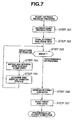
- Fig. 7 is a flowchart showing a print request process according to the embodiment that is executed by the client computer 2. If the user gives a print instruction while an application program is being executed on the client computer 2, the application program calls a printer driver and passes application data as a subject of printing to the printer driver (step 701). The printer driver that has been called by the application program displays a print dialogue box on the screen of the client computer 2 (step 702), whereupon a state of waiting for an input from the user is established (step 703).
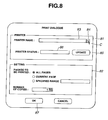
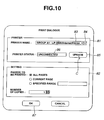
- Fig. 8 shows an exemplaryprint dialogue box being displayed on the screen, which has a printer selection area 81 and a setting area 82.
- the printer selection area 81 has a printer name display space 83 and a pull-down button 84. If the user manipulates the pull-down button 84 with the mouse cursor C, the client computer 2 displays a list of usable printers.
- the printer driver displays a list of already registered, usable printers as a pull-down menu in the print dialogue box. If the user selects an output destination printer from the pull-down menu, the print dialogue box becomes as shown in Fig. 10. If the user manipulates an "Update" button 85 in this state, a log-in authentication dialogue box (described above; see Fig. 5C) is displayed. Then, the client computer 2 establishes an SSL communication session with the server computer 1 (step 704), acquires status information of the selected output destination printer, and displays it in a printer status space 86 (step 705).
- Examples of the status information of the output destination printer that is acquired and displayed at this stage are "ready” indicating that the printer is waiting for print job data, "printing” indicating that the printer is performing a printing operation based on print job data, and the number of print jobs being spooled.
- the printer driver If the user manipulates an "OK" button 87 in a state that an Internet printer is selected as an output destination printer, the printer driver generates print job data based on application data (step 706). Then, the printer driver sends the generated print job data to the server computer 1 together with output destination printer designation information according to SSL communication (step 707).
- the server computer 1 receives the print job data from the client computer 2 and transfers it to a printer 3 corresponding to the output destination printer designation information. More specifically, the server computer 1 identifies an IP address and a port number of the output destination printer based on the output destination printer designation information that is sent from the client computer 2 by referring to the printer management table, and connects a session corresponding to the identified IP address and port number and the session of the client computer 2.
- the server computer 1 transfers, to the specified output destination printer, the print job data that is sent from the client computer 2.
- the printer 3 receives the print job data that is sent from the server computer 1 and performs a printing operation based on the received print job data.
- the client computer 2 terminates the session with the server computer 1 upon sending the print job data.
- the client computer 2 acquires the names of usable printers from the server computer 1 and registers printers in advance
- the client computer 2 may acquire the names of usable printers from the server computer 1 and select a printer at the time of making a print request.
- the printer driver requests the server computer 1 to send a list of printers 3 that have logged in to the server computer 1.
- the server computer 1 refers to the printer management table and sends, to the client computer 2, a list of printers that can be used by the client computer 2.
- the client computer 2 receives the list of usable printers, and displays their names and the names of other, preset usable printers such as printers on LAN as a pull-down menu in the print dialogue box. The user selects an output destination printer from the printers of the pull-down menu.
- the printer driver If the user manipulates the "OK" button 87 in a state that an output destination printer is selected, as described above the printer driver generates print job data based on application data and sends the generated print job data to the server computer 1 together with output destination printer designation information according to SSL communication.
- the server computer 1 receives the print job data from the client computer 2 and transfers it to a printer 3 corresponding to the output destination printer designation information.
- the printer 3 receives the print job data and performs a printing operation based on the print job data.
- the server computer 1 manages the states of printers 3 in a unified manner using the printer management table based on pieces of status information that are sent from the respective printers 3.
- a modification is possible in which when receiving, from the client computer 2, a request for acquiring status information of a specified printer 3, the server computer 1 acquires status information from the printer 3 and sends back the acquired status information to the request source client computer 2.
- the client computer 2 does not directly establish an SSL communication session with a printer 3. Instead, the client computer 2 sends, via the server computer 1, a print job to a printer 3 that has already established an SSL communication session with the server computer 1. This makes it possible to request a printer 3 on the network to perform a printing operation by secure communication.
- the printer 3 is regarded as a client of the server computer 1. Therefore, the printer need not incorporate, into itself, a digital certificate for establishment of an SSL communication session. As a result, even where a lot of sites each having such a printer 3 are constructed on a network, it is not necessary to acquire digital certificates for the respective printers 3 and incorporate the certificates into the respective printers 3; the management of the sites is made easier.
- FIG. 11 shows the entire system for realizing a printing method according to the second embodiment of the invention.
- a server computer 1, a client computer 2, and a printer 3 are configured in such a manner as to be able to exchange information with each other using a Web system.
- SSL is used for realizing secure communication in the Web system.
- the printing method according to the second embodiment will be outlined below and will be described later in detail.
- the second embodiment is different from the first embodiment in that the printer 3 sends an SSL session request in response to an SSL session request sending request that is sent from the server computer 1.
- the client computer 2 sends an SSL communication session establishment request to the server computer 1 (indicated by symbol (1) in Fig. 11).
- the server computer 1 establishes an SSL communication session with the client computer 2 and sends, to the printer 3, a request for sending an SSL communication session establishment request (indicated by symbol (2) in Fig. 11).
- the printer 3 sends an SSL communication session establishment request to the server computer 1 (indicated by symbol (3) in Fig. 11).
- the server computer 1 establishes an SSL communication session with the printer 3.
- the server computer 1 connects the sessions that are established with the client computer 2 and the printer 3, respectively.
- the client computer 2 sends, to the server computer 1, by SSL communication, a print request (print job) that is directed to the printer 3.
- the server computer 1 transfers the print request to the printer 3 by SSL communication (indicated by symbol (4) in Fig. 11).
- the client computer 1 establishes an SSL communication session via the server computer 1 that serves as a relay rather than directly with the printer 3.
- the printer 3 is regarded as a client of the server computer 1.
- the printer 3 sends a registration request to the server computer 1 and registered in a printer management table of the server computer 1.
- the printer 3 does not maintain this SSL communication session with the server computer 1 and establishes an SSL communication session again at the time of a print request.
- the server computer 1 checks whether the printers 3 registered in the printer management table are currently active by sending commands to those printers 3 with prescribed timing. If the server computer 1 does not receive any response from a printer 3 in this activeness check, the server computer 1 judges that the printer 3 is not active and deletes the printer 3 from the printer management table. Conceivable reasons why no response comes from a printer 3 are the printer 3's being powered off, a network failure, etc. It is preferable that in the activeness check the server computer 1 ask the printers 3 about status information such as the number of spooled print jobs and update the contents of the printer management table in accordance with answers.
- Fig. 12 is a flowchart showing a client computer registration process according to the embodiment that is executed by the server computer 1.
- the user of the client computer 2 wants to request a certain printer 3 on the network to perform a printing operation, he accesses the server computer 1 by performing interactive manipulations through a Web browser and causes a log-in picture for requesting a print operation to be displayed on the Web browser.
- SSL communications are performed between the client computer 2 and the server computer 1. That is, the client computer 2 sends an HTTP connection request to the server computer 1 according to the https scheme.
- the client computer 2 sends a log-in request containing those input pieces of information to the server computer 1.
- the server computer 1 receives the log-in request that is sent from the client computer 2 (step 1201).
- the server computer 1 judges whether to authenticate the client computer 2 (step 1202). If the client computer 2 was authenticated at step 1202, the server computer 1 acquires client information of prescribed items from the client computer 2 (step 1203).
- the client information includes a network position information (IP address) indicating a logical position of the client computer 3 on the network and the name of an organization to which the client computer 3 belongs.
- IP address network position information
- the server computer 1 Upon acquiring the client information from the client computer 2, the server computer 1 generates a client management table for the client computer 2 (step 1204).
- the server computer 1 searches the printer management table for printers 3 that can be used by the client computer 2 using the organization name as a key and extracts those printers 3 (step 1205). This is to allow the client computer 2 to request only the printers 3 belonging to the same organization to perform a printing operation.
- the server computer 1 registers the extracted printers 3 in the client management table to assign the extracted printers 3 to the client computer 2 (step 1206).
- the server computer 1 Upon completing the log-in processing for the client computer 2, the server computer 1 causes a usable printer list picture to be displayed on the client computer 2 according to the contents of the client management table.
- Fig. 13 shows an exemplary client management table according to the embodiment.
- a client management table is generated for each client computer 2 that has logged in to the server computer 1.
- the client management table contains printer management IDs indicating respective usable printers in the printer management table shown in Fig. 4. Information relating to a printer in the printer management table can be referred to by using its printer management ID.
- the printer management table shows a list of printers 3 that can be used by the associated client computer 2, the list being provided by the server computer 1.
- the client management table corresponding to a log-in name "shima" shows that printers 3 indicated by printer management IDs "011,” "012,” and "013" in the printer management table can be used.
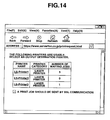
- Fig. 14 shows an exemplary usable printer list page according to the embodiment.
- a list of printer names are displayed on the Web browser of the client computer 2 together with categories and the numbers of waiting jobs of the respective printers 3.
- the printer names are given printer management IDs as parameters, respectively. If the user selects one of the printers 3 thus shown, a printer selection request containing its printer management ID is sent to the server computer 1, whereupon processing of requesting a printing operation proceeds.
- Fig. 15 is a sequence diagram showing a processing flow of the printing method according to the embodiment. It is assumed that before execution of the following process the server computer 1 has received registration requests from a plurality of printers 3 and those printers 3 have been registered in the printer management table as usable printers.
- the client computer 2 that has been manipulated by the user sends, to the server computer 1, a log-in page acquisition request for requesting a printing operation that contains an SSL communication session establishment request (indicated by symbol (1) in Fig. 15). From this time onward, communications between the client computer 2 and the server computer 1 are performed according to SSL communication. Receiving this connection request, the server computer 1 sends a log-in page to the server computer 2 (indicated by symbol (2) in Fig. 15). Given the log-in page, the user inputs a user name, a password, etc. and manipulates a log-in button, whereupon the client computer 2 sends a log-in request containing the input information to the server computer 1 (indicated by symbol (3) in Fig. 15).
- the server computer 1 judges whether to authenticate the client computer 2 (indicatedby symbol (4) in Fig. 15). If the client computer 2 has been authenticated, the server computer 1 generates a client management table for the client computer 2 (indicated by symbol (5) in Fig. 15). The server computer 1 generates a usable printer list page showing a list of printers 3 that can be used by the client computer 2 and sends it to the client computer 2 (indicated by symbol (6) in Fig. 15). Given the usable printer list page (see Fig. 14), the user selects a desired one from the printers 3 shown in the list.
- the client computer 2 sends a printer selection request containing the printer management ID of the selected printer 3 to the server computer 1 (indicated by symbol (7) in Fig. 15).
- the server computer 1 refers to the printer management table based on the printer management ID contained therein and sends, to the printer 3, a request for sending an SSL communication session establishment request (indicated by symbol (8) in Fig. 15). This is to request the printer 3 to send an SSL communication session establishment request to the server computer 1 itself.
- the printer 3 sends an SSL communication session establishment request to the server computer 1 (indicated by symbol (9) in Fig. 15).
- the server computer 1 receives the SSL communication session establishment request from the printer 3, the server computer 1 establishes an SSL communication session and assigns this session with the printer 3 to the session that is established with the client computer 2 (indicated by symbol (10) in Fig. 15). That is, the server computer 1 connects the sessions with the client computer 2 and the printer 3, respectively. As a result, the client computer 2 is connected to the printer 3 via the server computer 1 by means of the single session.
- the server computer 1 send, to the client computer 2, a print file specification page to be used for specifying a file (document data) to be printed (indicated by symbol (11) in Fig. 15).
- the user selects document data to be printed and manipulates a printing execution button, whereupon the client computer 2 generates print job data based on the document data and sends it to the server computer 1 as a print job (indicated by symbol (12) in Fig. 15).
- the server computer 1 transfers it to the session-connected printer 3 (indicated by symbol (13) in Fig. 15).
- the printer 3 performs printing according to the print job (indicated by symbol (14) in Fig. 15).
- the client computer 2 does not directly establish an SSL communication session with a printer 3. Instead, the client computer 2 sends, via the server computer 1, a print job to a printer 3 after establishing an SSL communication session with the printer 3 via the server computer 1 that serves as a relay.
- This makes it possible to request a printer 3 on the network to perform a printing operation by secure communication.
- the printer 3 is regarded as a client of the server computer 1. Therefore, the printer need not incorporate, into itself, a digital certificate for establishment of an SSL communication session. As a result, even where a lot of sites each having such a printer 3 are constructed on a network, it is not necessary to acquire digital certificates for the respective printers 3 and incorporate the certificates into the respective printers 3; the management of the sites is made easier.
- the server computer 1 sends a request for sending an SSL communication session establishment request directly to a printer 3 that has been selected as an output destination using its global IP address.
- the output destination printer 3 is located inside what is called a firewall, there is a possibility that the request for sending an SSL communication session establishment request is interrupted by the firewall and an SSL communication session cannot be established between the server computer 1 and the printer 3.
- printer 3 not only is a printer 3 registered in the printer management table of the server computer 1, but also a TCP session that was established by printer 3's logging in to the server computer 1 by HTTP communication (HTTP connection request), for example, is maintained and an SSL communication session is established when necessary.
- HTTP connection request HTTP connection request
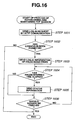
- Fig. 16 is a flowchart showing a process according to the embodiment that is executed by a printer 3 to establish and maintain a TCP session.
- a printer 3 starts an initialization program upon being powered on.
- the printer 3 sends a log-in request to the server computer 1 by HTTP communication (step 1601).
- this log-in request is not necessarily an SSL communication session establishment request, the invention does not exclude such a case.
- the printer 3 Upon receiving a log-in permission message that is sent from the server computer 1 as a result of authentication ("yes" at step 1602), the printer 3 sends printer information of prescribed items to the server computer 1 (step 1603).
- the server computer 1 starts to manage the printer 3 by registering it in the printer management table.
- the processing that is performed by the server computer 1 to register the printer 3 is the same as in the first embodiment and hence will not be described.
- the printer 3 establishes a TCP session with the server computer 1 by sending the log-in request by HTTP communication and logs in to the server computer 1.
- the server computer 1 that allowed the printer 3 to log in has not received any prescribed communications from the printer 3 for a predetermined period, that is, if a time limit has passed, typically the server computer 1 terminates the TCP session and causes the printer 3 to log out. Therefore, after logging into the server computer 1, the printer 3 sends its own status information to the server computer 1 by HTTP communication every predetermined period until the TCP session is forced to finish by, for example, turning off the power (steps 1604-1606). If the time interval at which the printer 3 sends status information is shorter than the time limit, the TCP session is not terminated and the state established by the logging-in is maintained.
- the status information includes the number of print jobs that are currently spooled in the printer 3.
- the server computer 1 updates the contents of the printer management table in accordance with the contents of the status information.
- the server computer 1 While receiving a log-in request from the printer 3 in the above-described manner, if the printer 3 is selected as an output destination printer by the client computer 2, the server computer 1 sends, to the printer 3, by using the current TCP session, a request for sending an SSL communication session establishment request. Receiving the sending request, the printer 3 operates in the same manner as described in the second embodiment, that is, the printer sends an SSL communication session establishment request to the server computer 1. Then, the printer 3 receives a print job that is sent from the client computer 2 via the server computer 1, and performs a printing operation.
- the printer 3 after the printer 3 has established a TCP session with the server computer 1 by HTTP communication and has logged in to the server computer 1, the printer 3 sends status information every predetermined period to keep the TCP session effective. Therefore, the TCP session is not terminated and the state that was established by the printer 3's logging in to the server computer 1 is maintained.
- the server computer 1 sends a request for sending an SSL communication session establishment request using a TCP session that has been established by a request from the printer 3. Therefore, even if the printer 3 is located inside a firewall, the sending request reaches the printer 3 reliably without being interrupted by the firewall.
- TCP sessions may be established intermittently at regular intervals.
- the sites can be managed easily.
- the print site can provide a printing service by receiving a print request by secure network communication.
Landscapes
- Engineering & Computer Science (AREA)
- Theoretical Computer Science (AREA)
- General Engineering & Computer Science (AREA)
- Physics & Mathematics (AREA)
- General Physics & Mathematics (AREA)
- Computer Security & Cryptography (AREA)
- Human Computer Interaction (AREA)
- Computer Hardware Design (AREA)
- Computing Systems (AREA)
- Signal Processing (AREA)
- Computer Networks & Wireless Communication (AREA)
- Health & Medical Sciences (AREA)
- Bioethics (AREA)
- General Health & Medical Sciences (AREA)
- Software Systems (AREA)
- Accessory Devices And Overall Control Thereof (AREA)
- Computer And Data Communications (AREA)
Applications Claiming Priority (4)
| Application Number | Priority Date | Filing Date | Title |
|---|---|---|---|
| JP2001201169 | 2001-07-02 | ||
| JP2001201169 | 2001-07-02 | ||
| JP2002139016 | 2002-05-14 | ||
| JP2002139016A JP3888452B2 (ja) | 2001-07-02 | 2002-05-14 | ネットワークを介した印刷方法 |
Publications (2)
| Publication Number | Publication Date |
|---|---|
| EP1274002A2 true EP1274002A2 (fr) | 2003-01-08 |
| EP1274002A3 EP1274002A3 (fr) | 2006-07-19 |
Family
ID=26617996
Family Applications (1)
| Application Number | Title | Priority Date | Filing Date |
|---|---|---|---|
| EP02014084A Withdrawn EP1274002A3 (fr) | 2001-07-02 | 2002-07-01 | Méthode pour imprimer sur un réseau |
Country Status (4)
| Country | Link |
|---|---|
| US (3) | US7215437B2 (fr) |
| EP (1) | EP1274002A3 (fr) |
| JP (1) | JP3888452B2 (fr) |
| CN (1) | CN1244047C (fr) |
Cited By (3)
| Publication number | Priority date | Publication date | Assignee | Title |
|---|---|---|---|---|
| WO2013126570A1 (fr) * | 2012-02-21 | 2013-08-29 | Zih Corp. | Méthodes, appareils et produits programmes informatiques pour la mise en œuvre d'imprimantes raccordées par un nuage et d'un cadre d'applications adaptatif basé sur une imprimante |
| WO2017121998A1 (fr) * | 2016-01-11 | 2017-07-20 | Osirium Limited | Commande d'accès à des dispositifs à distance |
| US10187545B2 (en) | 2016-09-07 | 2019-01-22 | Zih Corp. | Method and apparatus to communicate data associated with media processing devices |
Families Citing this family (93)
| Publication number | Priority date | Publication date | Assignee | Title |
|---|---|---|---|---|
| US6804705B2 (en) | 2001-01-30 | 2004-10-12 | Paul V. Greco | Systems and methods for providing electronic document services |
| JP3634784B2 (ja) * | 2001-09-14 | 2005-03-30 | キヤノン株式会社 | 情報処理方法及び印刷制御装置 |
| JP4262025B2 (ja) * | 2002-08-06 | 2009-05-13 | キヤノン株式会社 | 印刷制御装置、画像形成装置管理サーバ、印刷制御方法、及びコンピュータプログラム |
| US20040156071A1 (en) * | 2003-02-06 | 2004-08-12 | Lay Daniel Travis | Language preferences for printer status strings and configuration menus |
| US20040184070A1 (en) * | 2003-03-18 | 2004-09-23 | Microsoft Corporation | Network printer connection update scheme for printer clients |
| US20040257610A1 (en) * | 2003-03-20 | 2004-12-23 | Masanori Itoh | Service providing apparatus that shares print environments |
| US7529823B2 (en) * | 2003-03-27 | 2009-05-05 | Microsoft Corporation | Notifications for shared resources |
| US20040196486A1 (en) * | 2003-04-01 | 2004-10-07 | Atsushi Uchino | Addressbook service for network printer |
| KR100432367B1 (ko) * | 2003-04-30 | 2004-05-20 | 푸른정보기술(주) | 네트웍/로컬/공유 프린터들의 관리 및 인쇄 제어시스템 |
| KR100529335B1 (ko) * | 2003-07-09 | 2005-11-17 | 삼성전자주식회사 | 네트워크 인쇄 제어 방법 및 장치와 컴퓨터 프로그램을저장하는 컴퓨터로 읽을 수 있는 기록 매체 |
| CN100431310C (zh) * | 2003-09-22 | 2008-11-05 | 夏普株式会社 | 集线装置、中继控制方法、以及信息处理装置 |
| JP2005100270A (ja) * | 2003-09-26 | 2005-04-14 | Minolta Co Ltd | プリント制御プログラムおよび印刷装置 |
| JP3762402B2 (ja) * | 2003-10-07 | 2006-04-05 | キヤノン株式会社 | データ処理装置及び方法 |
| US20050111029A1 (en) * | 2003-11-25 | 2005-05-26 | Dehart Dave R. | Systems and methods for providing printer status information to users |
| KR100584587B1 (ko) * | 2003-12-03 | 2006-05-30 | 삼성전자주식회사 | 네트워크 스캐너 및 네트워크 스캔 시스템 구성 및 유지방법 |
| JP3885798B2 (ja) * | 2003-12-15 | 2007-02-28 | セイコーエプソン株式会社 | ネットワークシステム |
| KR100571928B1 (ko) * | 2004-01-17 | 2006-04-17 | 삼성전자주식회사 | 무선 네트워크 검색 결과 출력 방법 및 프린팅기기 |
| JP2005222234A (ja) * | 2004-02-04 | 2005-08-18 | Seiko Epson Corp | メディア変換装置、ネットワーク型ダイレクト出力システム、および出力処理指示の転送方法 |
| JP5095922B2 (ja) * | 2004-05-04 | 2012-12-12 | ハイデルベルガー ドルツクマシーネン アクチエンゲゼルシヤフト | 印刷機の遠隔診断システム |
| JP4194532B2 (ja) * | 2004-06-16 | 2008-12-10 | キヤノン株式会社 | 情報処理装置及びジョブ転送制御方法 |
| JP2006040133A (ja) * | 2004-07-29 | 2006-02-09 | Canon Inc | 情報処理方法及びそのシステムと装置 |
| JP3856029B2 (ja) * | 2004-11-09 | 2006-12-13 | コニカミノルタビジネステクノロジーズ株式会社 | 画像処理システム、画像処理装置、及び画像処理プログラム |
| US7603698B2 (en) * | 2004-12-10 | 2009-10-13 | Kabushiki Kaisha Toshiba | Image forming apparatus and image forming method |
| JP2006235912A (ja) * | 2005-02-24 | 2006-09-07 | Seiko Epson Corp | リモートプリントシステム、クライアント、情報機器及びリモートプリントプログラム |
| JP2006246356A (ja) * | 2005-03-07 | 2006-09-14 | Canon Inc | データ受信システム及びそのデータ出力方法、受信装置、並びに制御プログラム |
| JP2006285750A (ja) * | 2005-04-01 | 2006-10-19 | Matsushita Electric Ind Co Ltd | 印刷処理装置、印刷処理システム及び印刷処理方法 |
| KR100727945B1 (ko) * | 2005-06-29 | 2007-06-14 | 삼성전자주식회사 | 도구단추를 이용하여 인쇄하는 장치 및 방법 |
| KR100678914B1 (ko) | 2005-10-25 | 2007-02-06 | 삼성전자주식회사 | 홈 네트워크에서 인터넷 인화 서비스를 제공하는 장치,시스템 및 그 방법 |
| US8042166B2 (en) * | 2005-10-26 | 2011-10-18 | Hewlett-Packard Development Company, L.P. | Printing via user equipment |
| JP4745822B2 (ja) * | 2005-12-27 | 2011-08-10 | キヤノン株式会社 | 情報処理方法およびその装置 |
| JP4626527B2 (ja) * | 2006-02-06 | 2011-02-09 | 株式会社日立製作所 | 印刷処理システムおよび印刷処理装置 |
| JP4781125B2 (ja) * | 2006-02-17 | 2011-09-28 | キヤノン株式会社 | 情報処理システム、情報処理装置、及び周辺装置 |
| JP4259529B2 (ja) * | 2006-02-24 | 2009-04-30 | コニカミノルタビジネステクノロジーズ株式会社 | 情報処理システムおよびデータ送受信方法 |
| JP2007257038A (ja) * | 2006-03-20 | 2007-10-04 | Ricoh Co Ltd | 情報処理装置、処理装置、プログラム及び記録媒体 |
| JP4917947B2 (ja) * | 2006-04-24 | 2012-04-18 | 株式会社リコー | プリントサーバ |
| JP4986689B2 (ja) * | 2006-05-22 | 2012-07-25 | キヤノン株式会社 | 情報処理装置、印刷システム、ジョブ処理方法及びプログラム |
| JP4187010B2 (ja) * | 2006-05-31 | 2008-11-26 | ブラザー工業株式会社 | ネットワーク機器及び情報処理装置並びにプログラム |
| US20070285704A1 (en) * | 2006-06-09 | 2007-12-13 | Yuwen Wu | Automatic printer registration |
| JP2008040841A (ja) * | 2006-08-07 | 2008-02-21 | Konica Minolta Business Technologies Inc | 出力管理サーバおよびデータ出力システム |
| JP2008040840A (ja) * | 2006-08-07 | 2008-02-21 | Konica Minolta Business Technologies Inc | データ出力制御方法及び出力管理サーバ、データ出力システム |
| JP5063253B2 (ja) * | 2006-09-15 | 2012-10-31 | 株式会社リコー | ネットワークシステムおよび通信方法 |
| JP5125358B2 (ja) * | 2006-10-02 | 2013-01-23 | セイコーエプソン株式会社 | 送信装置及び受信装置 |
| KR20080054158A (ko) * | 2006-12-12 | 2008-06-17 | 삼성전자주식회사 | 화상형성장치 및 그 제어방법 |
| JP2009053867A (ja) * | 2007-08-24 | 2009-03-12 | Sharp Corp | プリントシステムおよびプリント方法 |
| JP4966137B2 (ja) * | 2007-09-07 | 2012-07-04 | キヤノン株式会社 | 画像処理装置、その制御方法、及びプログラム |
| JP4505861B2 (ja) * | 2008-03-25 | 2010-07-21 | 富士ゼロックス株式会社 | 情報処理装置と情報処理システムおよびプログラム |
| US20100165379A1 (en) * | 2008-12-30 | 2010-07-01 | Erik Nils Ackerman | System For And Method Of Transmitting Device Status Information Via Syndication Services |
| JP5203978B2 (ja) | 2009-01-06 | 2013-06-05 | キヤノン株式会社 | プリンタ、クライアント端末及びそれらの制御方法、プログラム |
| US9542139B2 (en) * | 2009-01-13 | 2017-01-10 | Canon Europa N.V. | Network printing system having a print server and a logon server |
| JP2010244464A (ja) * | 2009-04-09 | 2010-10-28 | Canon Inc | 情報処理装置、ネットワークインターフェース装置、それらの制御方法、プログラム |
| JP4723008B2 (ja) * | 2009-04-16 | 2011-07-13 | シャープ株式会社 | ネットワーク印刷システム、その印刷システムに用いられるサーバコンピュータ、コンピュータプログラム、そのプログラムを記録した記録媒体及びプリンタドライバ |
| WO2010141920A2 (fr) | 2009-06-04 | 2010-12-09 | Genomatica, Inc. | Micro-organismes pour la production de 1,4-butanediol et procédés afférents |
| US20110004653A1 (en) * | 2009-07-06 | 2011-01-06 | Barry Richard Cavill | Method for activation of a media processing device to a web server |
| JP5484010B2 (ja) * | 2009-11-16 | 2014-05-07 | キヤノン株式会社 | 情報処理装置、情報処理装置の制御方法、及びコンピュータプログラム |
| WO2011062596A1 (fr) * | 2009-11-23 | 2011-05-26 | Hewlett-Packard Development Company, L.P. | Affectation de ressources dans un environnement informatique partagé |
| JP5152242B2 (ja) * | 2010-03-30 | 2013-02-27 | ブラザー工業株式会社 | 端末装置及びコンピュータプログラム |
| JP5761923B2 (ja) * | 2010-04-28 | 2015-08-12 | キヤノン株式会社 | 印刷システム、情報処理装置及びその方法 |
| US20110317199A1 (en) * | 2010-06-28 | 2011-12-29 | Toshiba Tec Kabushiki Kaisha | Printer server-type printing system |
| JP5750844B2 (ja) | 2010-07-30 | 2015-07-22 | ブラザー工業株式会社 | デバイスおよびプログラム |
| JP2012063944A (ja) * | 2010-09-15 | 2012-03-29 | Canon Inc | 印刷システム、制御方法、クライアント端末、プリントサーバ、及びプログラム |
| US8970873B2 (en) * | 2010-09-17 | 2015-03-03 | Printeron Inc. | System and method for managing printer resources on an internal network |
| JP5895471B2 (ja) | 2011-01-17 | 2016-03-30 | 株式会社リコー | 情報処理装置、プログラム |
| JP5698557B2 (ja) * | 2011-02-17 | 2015-04-08 | キヤノン株式会社 | 印刷システムおよび印刷システムにおける制御方法 |
| JP5673200B2 (ja) * | 2011-02-23 | 2015-02-18 | ブラザー工業株式会社 | デバイス選択プログラム、及び、デバイス |
| JP5852320B2 (ja) * | 2011-04-13 | 2016-02-03 | キヤノン株式会社 | 画像形成装置及びその制御方法 |
| JP5780136B2 (ja) * | 2011-11-30 | 2015-09-16 | ブラザー工業株式会社 | サーバ |
| JP2013125349A (ja) * | 2011-12-13 | 2013-06-24 | Canon Inc | 印刷システム、中継サーバ、処理装置、制御方法、およびコンピュータプログラム |
| US9092165B2 (en) * | 2012-01-31 | 2015-07-28 | Konica Minolta Laboratory U.S.A., Inc. | Printing an electronic document using a printer and a mobile device |
| CN102609852A (zh) * | 2012-02-16 | 2012-07-25 | 南京邮电大学 | 远程打印印刷电子商务平台的实现方法 |
| JP2013183352A (ja) | 2012-03-02 | 2013-09-12 | Canon Inc | 情報処理装置、情報処理装置の制御方法、プログラムおよびコンピュータ読取可能な記録媒体 |
| JP6140937B2 (ja) * | 2012-05-23 | 2017-06-07 | キヤノン株式会社 | ネットワークデバイス、プログラム、システムおよび方法 |
| JP6011167B2 (ja) * | 2012-09-03 | 2016-10-19 | ブラザー工業株式会社 | 通信中継プログラム、及び、通信中継装置 |
| JP6024314B2 (ja) * | 2012-09-07 | 2016-11-16 | 株式会社リコー | 情報処理装置、プログラム及びシステム |
| JP6167502B2 (ja) | 2012-10-31 | 2017-07-26 | ブラザー工業株式会社 | 通信中継プログラム、通信中継装置、及び、画像処理装置 |
| US9442679B2 (en) * | 2013-01-31 | 2016-09-13 | Xerox Corporation | Network discovery using unicast communications |
| EP2979166B1 (fr) * | 2013-03-29 | 2020-05-06 | Hewlett-Packard Development Company, L.P. | Impression en réseau |
| JP5962690B2 (ja) * | 2014-02-21 | 2016-08-03 | コニカミノルタ株式会社 | 管理サーバー、接続支援方法および接続支援プログラム |
| CN103955347B (zh) * | 2014-05-06 | 2017-02-15 | 丁四涛 | 一种网络打印设备、服务器、系统和方法 |
| CN103955348B (zh) * | 2014-05-06 | 2018-12-18 | 南京四八三二信息科技有限公司 | 一种网络打印系统和打印方法 |
| CN104035734A (zh) * | 2014-05-21 | 2014-09-10 | 杭州鹏远网络科技有限公司 | 一种用户端远程多选择打印终端的自动打印系统及方法 |
| US11474767B1 (en) * | 2014-05-28 | 2022-10-18 | Amazon Technologies, Inc. | Print from web services platform to local printer |
| JP5839102B2 (ja) * | 2014-12-25 | 2016-01-06 | セイコーエプソン株式会社 | 印刷システムおよびプリンター |
| JP5967236B2 (ja) * | 2015-02-26 | 2016-08-10 | ブラザー工業株式会社 | 印刷システム、ウェブサーバ、および印刷方法 |
| JP6589314B2 (ja) * | 2015-03-19 | 2019-10-16 | 富士ゼロックス株式会社 | 画像形成システム、画像処理装置、画像形成方法およびプログラム |
| JP2015222946A (ja) * | 2015-05-20 | 2015-12-10 | ブラザー工業株式会社 | デバイスおよびプログラム |
| JP6507854B2 (ja) * | 2015-05-28 | 2019-05-08 | 株式会社リコー | 情報処理システム、情報処理装置、電子証明書の管理方法、及びプログラム |
| CN106775508A (zh) * | 2015-11-20 | 2017-05-31 | 北京奇虎科技有限公司 | 一种云打印方法和云打印终端设备 |
| US20170310765A1 (en) * | 2016-04-20 | 2017-10-26 | Kabushiki Kaisha Toshiba | System and method for location-based access to document processing devices |
| JP2018032298A (ja) * | 2016-08-26 | 2018-03-01 | スター精密株式会社 | デバイス状態監視システム、デバイス状態監視装置およびデバイス状態監視方法 |
| JP6703310B2 (ja) * | 2017-06-30 | 2020-06-03 | 京セラドキュメントソリューションズ株式会社 | リモート通信制御システム、リモートメンテナンスシステムおよびリモートメンテナンスプログラム |
| US10338864B2 (en) * | 2017-06-30 | 2019-07-02 | Kyocera Document Solutions Inc. | Remote communication system that improves security of remote session between image forming apparatus and connection terminal, and session management system |
| JP6751269B2 (ja) * | 2017-06-30 | 2020-09-02 | 京セラドキュメントソリューションズ株式会社 | リモート通信制御システム、セッション管理システムおよびセッション管理プログラム |
| JP7095256B2 (ja) * | 2017-10-30 | 2022-07-05 | セイコーエプソン株式会社 | プリンター、及び、プリンターの制御方法 |
Family Cites Families (16)
| Publication number | Priority date | Publication date | Assignee | Title |
|---|---|---|---|---|
| JP3208963B2 (ja) | 1993-10-27 | 2001-09-17 | 富士ゼロックス株式会社 | プリント指示システムおよびその方法 |
| US5881213A (en) | 1994-10-05 | 1999-03-09 | Microsoft Corporation | Deferred printing |
| JP3262689B2 (ja) | 1995-05-19 | 2002-03-04 | 富士通株式会社 | 遠隔操作システム |
| JPH10283130A (ja) | 1997-04-02 | 1998-10-23 | Seiko Epson Corp | プリンタ制御装置、プリンタ制御方法および記録媒体 |
| JP3612935B2 (ja) | 1997-04-30 | 2005-01-26 | ブラザー工業株式会社 | 印刷管理システム、印刷管理方法、印刷管理制御プログラムを記録したコンピュータ読み取り可能な記録媒体、並びに印刷管理システムに用いられるクライアント装置及びプリンタ装置 |
| JP3731980B2 (ja) * | 1997-08-20 | 2006-01-05 | 富士通株式会社 | コンピュータネットワークシステム及び携帯型コンピュータ |
| EP0935182A1 (fr) * | 1998-01-09 | 1999-08-11 | Hewlett-Packard Company | Impression sécurisée |
| EP0929023B1 (fr) | 1998-01-09 | 2005-06-01 | Hewlett-Packard Company, A Delaware Corporation | Impression securisée |
| JPH11234270A (ja) | 1998-02-16 | 1999-08-27 | Nippon Telegr & Teleph Corp <Ntt> | ネットワーク間のデータベースの複製・更新方法 |
| JP3639772B2 (ja) * | 1999-06-30 | 2005-04-20 | キヤノン株式会社 | 情報処理装置および印刷システムおよび印刷制御方法およびコンピュータが読み出し可能なプログラムを格納した記憶媒体 |
| US6930788B1 (en) | 1999-07-20 | 2005-08-16 | Canon Kabushiki Kaisha | Secure printing over cable network to home printer |
| US6862583B1 (en) * | 1999-10-04 | 2005-03-01 | Canon Kabushiki Kaisha | Authenticated secure printing |
| ATE374402T1 (de) | 2000-01-28 | 2007-10-15 | Safecom As | System und verfahren zur sicheren übermittlung eines dokumentes zwischen einem client-rechner eines computer-netzes und einem drucker |
| US6795205B1 (en) * | 2000-03-15 | 2004-09-21 | Canon Kabushiki Kaisha | Third-party authorization for home-based printing |
| US6859843B1 (en) * | 2000-11-20 | 2005-02-22 | Hewlett-Packard Development Company, L.P. | Systems and methods for reconfiguring network devices |
| US7552239B2 (en) * | 2001-05-14 | 2009-06-23 | Canon Information Systems, Inc. | Network device mimic support |
-
2002
- 2002-05-14 JP JP2002139016A patent/JP3888452B2/ja not_active Expired - Lifetime
- 2002-06-25 US US10/178,485 patent/US7215437B2/en not_active Expired - Lifetime
- 2002-07-01 EP EP02014084A patent/EP1274002A3/fr not_active Withdrawn
- 2002-07-02 CN CN02142569.8A patent/CN1244047C/zh not_active Expired - Fee Related
-
2006
- 2006-12-06 US US11/634,130 patent/US7606880B2/en not_active Expired - Fee Related
- 2006-12-06 US US11/634,125 patent/US7460266B2/en not_active Expired - Fee Related
Cited By (10)
| Publication number | Priority date | Publication date | Assignee | Title |
|---|---|---|---|---|
| WO2013126570A1 (fr) * | 2012-02-21 | 2013-08-29 | Zih Corp. | Méthodes, appareils et produits programmes informatiques pour la mise en œuvre d'imprimantes raccordées par un nuage et d'un cadre d'applications adaptatif basé sur une imprimante |
| CN104115468A (zh) * | 2012-02-21 | 2014-10-22 | Zih公司 | 用于实现云连接打印机和适应性的基于打印机的应用程序框架的方法、设备和计算机程序产品 |
| US9335958B2 (en) | 2012-02-21 | 2016-05-10 | Zih Corp. | Methods, apparatuses, and computer program products for implementing cloud connected printers and an adaptive printer-based application framework |
| CN104115468B (zh) * | 2012-02-21 | 2018-04-17 | Zih公司 | 用于实现云连接打印机和适应性的基于打印机的应用程序框架的方法、设备和计算机程序产品 |
| US10318216B2 (en) | 2012-02-21 | 2019-06-11 | Zebra Technologies Corporation | Methods, apparatuses, and computer program products for implementing cloud connected printers and an adaptive printer-based application framework |
| US11526313B2 (en) | 2012-02-21 | 2022-12-13 | Zebra Technologies Corporation | Methods, apparatuses, and computer program products for implementing cloud connected printers and an adaptive printer-based application framework |
| US12026412B2 (en) | 2012-02-21 | 2024-07-02 | Zebra Technologies Corporation | Methods, apparatuses and computer program products for implementing cloud connected printers and an adaptive printer-based application framework |
| WO2017121998A1 (fr) * | 2016-01-11 | 2017-07-20 | Osirium Limited | Commande d'accès à des dispositifs à distance |
| US10187545B2 (en) | 2016-09-07 | 2019-01-22 | Zih Corp. | Method and apparatus to communicate data associated with media processing devices |
| US10764466B2 (en) | 2016-09-07 | 2020-09-01 | Zebra Technologies Corporation | Method and apparatus to communicate data associated with media processing devices |
Also Published As
| Publication number | Publication date |
|---|---|
| US7606880B2 (en) | 2009-10-20 |
| JP2003084931A (ja) | 2003-03-20 |
| CN1402117A (zh) | 2003-03-12 |
| EP1274002A3 (fr) | 2006-07-19 |
| US20070076252A1 (en) | 2007-04-05 |
| JP3888452B2 (ja) | 2007-03-07 |
| US7215437B2 (en) | 2007-05-08 |
| CN1244047C (zh) | 2006-03-01 |
| US7460266B2 (en) | 2008-12-02 |
| US20030002077A1 (en) | 2003-01-02 |
| US20070076253A1 (en) | 2007-04-05 |
Similar Documents
| Publication | Publication Date | Title |
|---|---|---|
| US7606880B2 (en) | Method of printing over a network | |
| JP4803116B2 (ja) | 仮想ネットワーク接続装置及びプログラム | |
| JP5043455B2 (ja) | 画像形成装置、その制御方法、システム、プログラム及び記憶媒体 | |
| US10050940B2 (en) | Connection control system, management server, connection support method, and non-transitory computer-readable recording medium encoded with connection support program | |
| JP5936366B2 (ja) | 印刷システム、画像形成装置、中間処理装置、ウェブサービス提供装置、印刷システムの制御方法およびコンピュータプログラム | |
| US7474862B2 (en) | Job display control method | |
| JP3610341B2 (ja) | ネットワーク機器及び遠隔制御中継サーバ | |
| JP2015194885A (ja) | 通信システムおよび中継装置 | |
| US7865933B2 (en) | Authentication agent apparatus, authentication method, and program product therefor | |
| JP2022021123A (ja) | システム、制御方法、並びにプログラム | |
| JP2022146326A (ja) | 情報処理システム、画像形成装置及びプログラム | |
| JP4189602B2 (ja) | 画像形成装置、画像処理システム、画像形成装置の機能拡張方法、および仮想ネットワークの形成方法 | |
| JP7673413B2 (ja) | 画像処理システム及びプログラム | |
| JP4650181B2 (ja) | 画像処理装置およびその制御方法ならびにコンピュータプログラム | |
| JP2011071588A (ja) | 画像処理装置およびその使用制限方法ならびにコンピュータプログラム | |
| JP7490405B2 (ja) | 画像形成装置、印刷システム、制御方法、およびプログラム | |
| US20050071768A1 (en) | Method, apparatus, system, and program for providing a virtual office, and a medium storing the program | |
| JP2023111773A (ja) | 処理装置、コンピュータプログラム、および、方法 | |
| JP2022114574A (ja) | 画像処理システム及びプログラム | |
| JP7604863B2 (ja) | 画像処理システム及びプログラム | |
| JPH1185701A (ja) | 情報処理装置 | |
| JP2008177898A (ja) | 画像処理装置、画像処理システム、画像処理装置連携方法、およびコンピュータプログラム | |
| CN113741825A (zh) | 信息处理系统 | |
| JP2005167957A (ja) | 通信装置 | |
| JP2006178879A (ja) | 認証システム、及びクライアント装置 |
Legal Events
| Date | Code | Title | Description |
|---|---|---|---|
| PUAI | Public reference made under article 153(3) epc to a published international application that has entered the european phase |
Free format text: ORIGINAL CODE: 0009012 |
|
| AK | Designated contracting states |
Kind code of ref document: A2 Designated state(s): AT BE BG CH CY CZ DE DK EE ES FI FR GB GR IE IT LI LU MC NL PT SE SK TR |
|
| AX | Request for extension of the european patent |
Free format text: AL;LT;LV;MK;RO;SI |
|
| PUAL | Search report despatched |
Free format text: ORIGINAL CODE: 0009013 |
|
| AK | Designated contracting states |
Kind code of ref document: A3 Designated state(s): AT BE BG CH CY CZ DE DK EE ES FI FR GB GR IE IT LI LU MC NL PT SE SK TR |
|
| AX | Request for extension of the european patent |
Extension state: AL LT LV MK RO SI |
|
| 17P | Request for examination filed |
Effective date: 20060829 |
|
| AKX | Designation fees paid |
Designated state(s): DE FR GB |
|
| 17Q | First examination report despatched |
Effective date: 20080407 |
|
| STAA | Information on the status of an ep patent application or granted ep patent |
Free format text: STATUS: THE APPLICATION IS DEEMED TO BE WITHDRAWN |
|
| 18D | Application deemed to be withdrawn |
Effective date: 20100303 |