EP1315362A2 - Terminal de communication muni de moyens de sélection d'une distorsion d'un signal acoustique d'entrée par un utilisateur - Google Patents
Terminal de communication muni de moyens de sélection d'une distorsion d'un signal acoustique d'entrée par un utilisateur Download PDFInfo
- Publication number
- EP1315362A2 EP1315362A2 EP02026155A EP02026155A EP1315362A2 EP 1315362 A2 EP1315362 A2 EP 1315362A2 EP 02026155 A EP02026155 A EP 02026155A EP 02026155 A EP02026155 A EP 02026155A EP 1315362 A2 EP1315362 A2 EP 1315362A2
- Authority
- EP
- European Patent Office
- Prior art keywords
- communication terminal
- user
- distortion
- acoustic signal
- processor
- Prior art date
- Legal status (The legal status is an assumption and is not a legal conclusion. Google has not performed a legal analysis and makes no representation as to the accuracy of the status listed.)
- Withdrawn
Links
Images







Classifications
-
- G—PHYSICS
- G10—MUSICAL INSTRUMENTS; ACOUSTICS
- G10L—SPEECH ANALYSIS TECHNIQUES OR SPEECH SYNTHESIS; SPEECH RECOGNITION; SPEECH OR VOICE PROCESSING TECHNIQUES; SPEECH OR AUDIO CODING OR DECODING
- G10L13/00—Speech synthesis; Text to speech systems
- G10L13/02—Methods for producing synthetic speech; Speech synthesisers
- G10L13/033—Voice editing, e.g. manipulating the voice of the synthesiser
-
- H—ELECTRICITY
- H04—ELECTRIC COMMUNICATION TECHNIQUE
- H04M—TELEPHONIC COMMUNICATION
- H04M1/00—Substation equipment, e.g. for use by subscribers
- H04M1/60—Substation equipment, e.g. for use by subscribers including speech amplifiers
- H04M1/6008—Substation equipment, e.g. for use by subscribers including speech amplifiers in the transmitter circuit
-
- H—ELECTRICITY
- H04—ELECTRIC COMMUNICATION TECHNIQUE
- H04M—TELEPHONIC COMMUNICATION
- H04M1/00—Substation equipment, e.g. for use by subscribers
- H04M1/72—Mobile telephones; Cordless telephones, i.e. devices for establishing wireless links to base stations without route selection
- H04M1/724—User interfaces specially adapted for cordless or mobile telephones
- H04M1/72448—User interfaces specially adapted for cordless or mobile telephones with means for adapting the functionality of the device according to specific conditions
-
- G—PHYSICS
- G10—MUSICAL INSTRUMENTS; ACOUSTICS
- G10L—SPEECH ANALYSIS TECHNIQUES OR SPEECH SYNTHESIS; SPEECH RECOGNITION; SPEECH OR VOICE PROCESSING TECHNIQUES; SPEECH OR AUDIO CODING OR DECODING
- G10L21/00—Speech or voice signal processing techniques to produce another audible or non-audible signal, e.g. visual or tactile, in order to modify its quality or its intelligibility
- G10L21/003—Changing voice quality, e.g. pitch or formants
- G10L21/007—Changing voice quality, e.g. pitch or formants characterised by the process used
- G10L21/013—Adapting to target pitch
- G10L2021/0135—Voice conversion or morphing
Definitions
- the invention relates to a communication terminal provided with means for a user to selectively distort an acoustic signal inputted by the user to the communication terminal during a call to another user of a communication terminal.
- SMS short message service
- chat picture messaging
- animations animations
- ringing tunes operator logos
- vibrations exchangeable covers and picture holders for personal pictures.
- Users have however found out that there are some limitations with these features, and have been looking for something more advanced.
- communication between the young there is often used different kinds of fantasy-languages or other peculiar ways of addressing each other.
- the claimed invention provides a communication terminal having means for permitting a user to distort an inputted acoustic signal during a call with a user of another communication terminal.
- An object of the invention is to provide a method for enabling personalised communication between users of communication terminals.
- this objective is obtained by a method of enabling a user of a first communication terminal to selectively distort an acoustic signal inputted into the first communication terminal during a call with a user of a second communication terminal.
- Another object of the invention is to provide a method for enabling a user to personalise the communication between users of communication terminals.
- this objective is obtained by a method for enabling a user of a first communication terminal to selectively distort an acoustic signal inputted into the first communication terminal during a call with a user of a second communication terminal, where the method includes that the user of the first communication terminal inputs an acoustic signal.
- a processor in the first communication terminal distorts the signal according to a selection in the first communication terminal, where the selection is user defined or selected.
- the processor transfers the distorted signal and transmits the signal via a communication network to the second communication terminal, where a processor of the second communication terminal receives the distorted signal and uses the distorted signal as output acoustic signal in the second communication terminal to the user of the second communication terminal.
- a third object of the invention is to provide a communication terminal having means for enabling personalised communication between user of communication terminals.
- this objective is obtained by a communication terminal having input and output interfaces provided with means for distorting an acoustic signal, where the communication terminal includes a processor for distortion of an acoustic signal inputted from a user, and where the distortion is made according to a user selected setting of the distortion in the communication terminal.
- the communication terminal has a user interface, where the user can select the distortion settings and where the processor provides means for transmitting the distorted signal to a second communication terminal.
- a hand portable phone preferably a cellular/mobile phone.
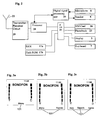
- An embodiment of this phone is shown in Fig. 1, where a cellular/mobile phone 1 is shown in perspective.
- the phone is provided with a front cover 2 having a window frame 3 encircling the protection window of the display assembly 3.
- the cellular/mobile phone comprises a user interface having an on/off button 4, a speaker 5 (only openings are shown), a keypad 7, a battery 14, a display/LCD 3 and a microphone 6 (only openings are shown).
- the keypad 7 has a first group of keys 8 as alphanumeric keys, by means of which the user can enter a telephone number, write a text message (SMS), write a name (associated with the phone number), etc.
- Each of the twelve alphanumeric keys 8 is provided with a numeral "0-9" or a sign "#” or "*", respectively.
- each key is associated with a number of letters and special signs used in the text editing.
- the keypad 7 additionally comprises two menu selections or soft-keys 9, two call handling keys 12, and a navigation-key 10.
- the functionality of the soft-key 9 depends on the state of the phone and the navigation in the menu by using a navigation-key.
- the present functionality of the menu selection keys 9 is shown in separate fields in the display 3 just above the keys 9.
- the two call handling keys 12 are used for establishing a call or a conference call, terminating a call or rejecting an incoming call. This key layout is characteristic of e.g. the Nokia 6210TM phone.
- the navigation-key 10 is an up/down key and is placed centrally on the front surface of the phone between the display 3 and the group of alphanumeric keys 8.
- the user is able to control this key with his thumb.
- This is the best site to place an input key requiring precise motor movements.
- Many experienced phone users are used to one-hand handling. They place the phone in the hand between the fingertips and the palm of the hand. Hereby the thumb is free for inputting information.
- Fig. 2 schematically shows the most important parts of a preferred embodiment of the phone/terminal, these parts being essential to the understanding of the invention.
- the microphone 6 records the user's speech, and the analogue signals formed thereby are A/D converted in an A/D converter (not shown) before the speech is encoded in an audio part 20.
- the encoded speech signal is transferred to a processor 18 (physical layer processor), which e.g. supports GSM terminal software.
- the processor 18 also forms the interface to the peripheral terminals of the apparatus, including RAM and ROM memories 17a and 17b, a SIM card 16, the display 3 and the keypad 7 (from Fig. 1) as well as data, power supply, etc.
- the processor 18 controls the communication with the network via the transmitter/receiver circuit 19 and an antenna 21.
- the audio part 20 speech-decodes the signal, which is transferred from the processor 18 to the speaker 5 via a D/A converter (not shown).
- the processor 18 is via a bus 24 connected to a RAM memory 17a and a Flash ROM memory 17b, a SIM card 16, the display 3 and the keypad 7 (as well as data, power supply, etc.).
- a phonebook 23 is furthermore connected to the processor 18 via the bus 24. The phonebook 23 may be stored on the SIM card 16, and/or in the Flash ROM memory 17a.
- the processor 18 is connected to the user interface of the mobile phone. Thus, it is the processor 18, which monitors the activity in the phone and controls the display 3 in response thereto.
- Non user events comprise status change during call set-up, change in battery voltage, change in antenna conditions, message on reception of SMS, etc.
- the functionality of distortion of an acoustic signal in a communication terminal is basically included in the menu structure and will be explained in connection with the menu structure.
- the starting point in each embodiment is idle mode, which means that the communication terminal is turned on and ready to be used for any possible operation.
- the idle mode display differs from embodiment to embodiment depending on the number of soft-keys 9 that are used in each embodiment.
- the communication terminal has two soft-keys, but it is obvious that communication terminals having one, three or more soft-keys can also be provided with the functionality of distortion of an acoustic signal in a communication terminal according to the invention.
- Fig. 3a-3c the idle mode displays of communication terminals having different numbers of soft-keys have been shown.
- the other displays (not shown) of the communication terminal having a different number of soft-keys are also changed accordingly to suit the inventive concept.
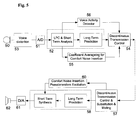
- Fig. 4 the general principles of speech encoding and decoding in a GSM system is shown.
- GSM Global System for Mobile communications
- An acoustic signal is transcoded to an analogue signal in the microphone 50 of a communication terminal.
- the analogue signal is thereafter converted to a digital signal in the A/D-converter 51, and inputted into a speech encoder 52, where the signal is sampled, filtered, compressed etc. to be transmitted via a network/RF channel to a receiving communication terminal.
- the process also includes a voice activity detector 56, a comfort noise generator 55 for averaging the background noise so that it is continuous and a discontinuous transmission control 54 for adjusting the efficiency of the speech encoder to the presence of information to be transmitted.
- a voice activity detector 56 After the signal has been received at the receiving communication terminal the signal is sampled, filtered, expanded etc. in a speech decoder 58, whereafter it is converted to an analogue signal in a D/A-converter 61 and be made to sound in a speaker 62.
- the receiving communication terminal also has means for adapting for background noise 60 and discontinuous transmission 57.
- a voice distortion unit 53 has been included in the speech encoding of an acoustic signal inputted to the microphone 50.
- the voice distortion unit 53 is analogue and includes filters to distort the acoustic signal in a preferred way. After the acoustic signal has been distorted in the voice distortion unit 53, the acoustic signal is speech encoded in the normal way.
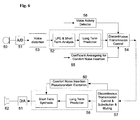
- a digital voice distortion unit 53 has been included in the speech coding of the acoustic signal.
- the digital voice distortion unit 53 differs from the analogue voice distortion unit in that the distortions of the acoustic signal are more freely varied.
- the digital voice distortion unit 53 could be a digital signal processor of known type.
- Fig. 7 a third preferred embodiment is shown where the digital voice distortion unit 53 has been incorporated in the speech encoder unit 52.
- the distortion can be made according to many different algorithms or methods.
- a simple distortion method is using low-or high pass filters, where the speech has been cut-off above or below a certain frequency.
- Other examples could be adding an echo, add simulated background noise, removing background noise etc.
- the speech can also be distorted by using more advanced algorithms like Fourier or Doppler transformation giving a rather strange speech.
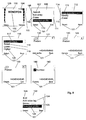
- Fig. 8 an idle display 100 for the communication terminal or phone 1, which includes two bars indicating the signal strength 105 and the battery level 103. Furthermore there is a time indication 104, an identification 102 of the operator or the network to which the phone 1 is presently connected, and two labels 101 indicating the present functionality (Menu: access to the Menu structure; Names: access to the Phonebook) of the two soft-keys 9.
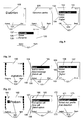
- the user can access the phonebook options by pressing the right soft-key 9 "Names" (shown in Fig. 8), step 220, and a display 106 appears including a list of options 107-110, step 221. These are the options in the phonebook 23. There are more options available by scrolling up or down in the list with the navigation-key 10.
- the display 106 also includes an indicator line 111 in the display's right part that indicates with a bend on the line, where a highlighted option 110 is located in the list.
- the highlighted option 110 "Distortion profile" can be selected by pressing the soft-key 9 "Select", step 222, whereafter a display 112 appears indicating with a list a number of options 113-115, step 223.
- the first option 113 "Add distortion prof.”, in display 112, is used to add a distortion profile to an entry 140 in the phonebook 23. This selecton is made by pressing the left soft-key 9 "Select" in display 112, step 224, whereafter a display 116 indicating a list of different distortion profiles 119-120, step 227. There could obviously be more profiles and these can be accessed by scrolling up or down in the list with the navigation-key 10.
- One of the profiles 117-120, the highlighted one, is selected with the left soft-key 9, step 228, and a display 121 where the first entry 140 is shown.
- the other entries in the phonebook can be accessed by scrolling up and down with the navigation-key 10 or by using the alphanumeric keys 8 corresponding to the initial letter of the desired phonebook entry 140.
- display 121 a single entry 140 is shown, but it could also be a list of entries (not shown).
- the distortion profile is added to a selected entry 140 by pressing the left soft-key 9 "Select", step 229 and the display 121 changes to appear such as in display 141, where the indication 101 of the left soft-key 9 has changed to "Options". With these options (not shown) the user can delete the added profile or change to another profile. If the user scrolls down to the next entry the left soft-key 9 changes to be as indicated in display 121.
- step 229 the left soft-key changes to be indicated as in display 141.
- the user can see by the left soft-key 9 if the entry has a distortion profile added or not.
- the left soft-key 9 "Option" as indicated in display 141 the user can see what profile has been added. If instead the left soft-key 9 is selected while being in display 121 the terminal is returned to display 116, where another distortion profile 117-120 can be selected. The function is ended by pressing the right soft-key "Back" while being in display 112, step 230.
- step 225 display 116 appears, step 227, where the previous selected distortion profile 117 is highlighted.
- a new selection can be made by scrolling up or down to the preferred profile with the navigation-key 10 and executing the selection by pressing the left soft-key 9, "Select”, step 231.
- the communication terminal 1 proceeds to display 106, step 232.
- step 226 the entries in the phonebook having distortion profiles appears (not shown), step 233.
- the user can erase the distortion profiles from the entries by pressing the left soft-key 9, step 234.
- a confirmation display appears (not shown), where the user can confirm that the distortion profile should be deleted from the selected phonebook entry 140.
- the terminal proceeds to the next phonebook entry 140 having a distortion profile, step 235.
- the deletion of the distortion profiles can be continued until the profiles are erased from all phonebook entries, whereafter the terminal proceeds to display 106, step 232.
- Another way of adding a distortion profile to a phone entry is to access the entries of the phonebook directly. This is made by pressing the navigation-key 10, step 240, while being in idle mode, display 100. If the navigation-key 10 is pressed a display 142 appears, step 241, indicating the first entry 140 in the phonebook. The entries in the phonebook can as stated earlier be presented as a list as well. The details of the entry can be viewed by pressing the left soft-key 9 "Details", step 242, and a display 143 appears indicating a first detail 144 of the entry 140. If the right soft-key "Exit" is pressed instead the phonebook 23 is closed and the communication terminal proceeds to idle mode, display 100.
- the left soft-key 9 "Options" is pressed and a display 122 appears, step 243 indicating a list of options 123-126 how to change the entry 140.
- a display 122 appears, step 243 indicating a list of options 123-126 how to change the entry 140.
- the list of display 122 only a couple of options are indicated, more options are shown by scrolling up or down with the navigation-key 10.
- the left soft-key 9 "Select” while option 126 is highlighted, the Distortion profile sub-menu is entered, step 244, display 112, where the options 113-115 are indicated, step 245.
- step 246 If the first option 113 "Add distortion prof.” is selected, step 246, from the list by pressing the left soft-key 9 "Select”, a display 116 appears, step 247, indicating a list of different distortion profiles 119-120 that can be added to the phonebook entry 140.
- the distortion profile is added to a selected entry 140 by the pressing the left soft-key 9 "Select”, step 248, and the terminal is proceeds display 122, step 249.
- the second option 114 "Modify" is selected, step 250, in a similar way and the display 116 appears, step 251, where present selection 117 is highlighted. A new selection can be made by scrolling up or down to the preferred profile with the navigation-key 10 and executing the selection by pressing the left soft-key 9, "Select", step 252.
- the communication terminal 1 proceeds to display 122 after the selection, step 253.
- the third option 115 "Erase”, is also selected, step 254, while being highlighted.
- a confirmation display appears, step 255, (not shown) so that the user can confirm that the distortion profile should be erased from the phonebook entry 140.
- the terminal 1 returns to display 122, step 256.
- the function is ended by pressing the right soft-key three times.
- the settings for distortion profiles can be located in many places in the menu structure, e.g. as main menu directly below idle mode or as a sub-menu in another main menu.
- the display 127 and 129 gives an example of this. Either menu is selected by pressing the left soft-key 9 "Menu", step 200, in idle mode and using the navigation-key 10 to locate the main menu and making another pressing of left soft-key 9, step 201, when the function is located in a sub-menu.
- step 202 From any of the displays 127 or 129 the function is started, step 202, by pressing the left soft-key 9, "Select”, and a display 136 appears, step 203, indicating a list of options 137-139.
- the first option 137, "Activate”, is used to select a default distortion profile, and is selected by pressing the left soft-key 9, "Select”, step 204, while the first option 137 is highlighted.
- a display 131 indicating a list of the distortion profiles 132-135 is shown, step 205.
- the preferred distortion profile is selected by pressing the left soft-key 9, "OK”, step 206, and the terminal returns to display 127 or 129 respectively, step 207. If the selection is invoked the right soft-key 9, "Back”, can be pressed and the terminal returns to display 136, step 208.
- the second option 138 is used to delete distortion profiles from the archive. It is activated by pressing the left soft-key 9, "Select”, step 209, while being highlighted and the display 131 indicating a list of the distortion profiles 132-135 is shown, step 205.
- the distortion profile to be erased is highlighted with the navigation-key 10 and selected by pressing left soft-key 9, step 210.
- a confirmation display appears, step 211, (not shown) so that the user can confirm that the distortion profile should be erased from the phonebook entry 140. After confirmation is selected the distortion profile is erased and the terminal 1 returns to display 136, step 212.
- the third option 139 is used to rename distortion profiles.
- step 205 It is activated by pressing the left soft-key 9, "Select", step 213, while being highlighted and the display 131 indicating a list of the distortion profiles 132-135 is shown, step 205.
- the distortion profile to be renamed is highlighted with the navigation-key 10 and selected by pressing left soft-key 9, step 214.
- a display (not shown) for renaming the distortion profile appears, step 215, where the alphanumeric keys 8 is used to enter new letters, the right soft-key 9 to erase letters and the left soft-key 9 to end the renaming of the distortion profile.
- the terminal returns to display 136, step 216.
- Other options could be included in this menu like: fetch profile from WAP server, create profile, timed profiles etc.
- Fig. 10 a couple of displays are shown that shows how settings for a distortion profile for a single call can be set.
- the first display 150 shows how a user has entered a phone number 151, step 260, and that the indication 101 of the left and the right soft-key 9 has changed to "Options" and"Clear" respectively.
- the right soft-key 9 is used to clear the entered phone number 151 or parts of the entered phone number 151.
- the left soft-key 9 is used to access a display 152, step 261, indicating a list of options 153-156 that can be used for the entered phone number 151. These options can be saved with the number in the phonebook 23, add to already existing entry in the phonebook 23, e.g.
- the call set-up is also initiated according to the normal call set-up process, step 270.
- the communication terminal can also be set so that the default distortion profile as described earlier can be automatically selected when selecting option 156, "Distort call", step 264, in display 152.
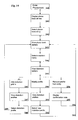
- Fig. 11 shows displays with examples of distortion of how a call can be started or ended during a call.
- a first display 162 indicates with a symbol 164 that a call is on-going, step 280 and with a header 163 the name of the called or calling party. The name of the called or calling party is only shown if the party is one of the entries in the phonebook 23.
- different options can be executed, which can be accessed by pressing the left soft-key 9, "Options", and a display 165 appears, step 281, indicating a couple of options 166-169 that the user can select during an on-going call.
- step 282 the terminal 1 checks, step 283, if a distortion is on-going. If a distortion of the call is on-going a display 170 appears, step 284, indicating a list of distortion options 172-173. By executing the option 173 the distortion of the on-going call is ended, step 285, and the terminal returns to display 162, step 286, and the voice call continued step 300.
- the option 172 "Select dist. Profile”, is used when the user of the communication terminal wants to select another distortion profile for the on-going call. It can be executed by pressing the left soft-key 9, "Select”, step 287, while the option 172 is highlighted.
- a display 157 appears, step 288, indicating a list of some available distortion profiles 158-161.
- a preferred distortion profile is executed by scrolling up or down with the navigation-key 10 to highlight the preferred distortion profile and selecting it by pressing the left soft-key 9, "OK", step 289. After the execution of the preferred distortion profile, the new distortion is started and the terminal returns to display 162, step 290, and the voice call is continued, step 300.
- step 291 indicating a list of distortion options 171-172.
- the option 171, "Distort call”, is used to start distortion, step 292, of the on-going call using the default distortion profile, step 293. It is executed by pressing the left soft-key 9, "Select”, when option 171 is highlighted (as shown in display 170). After the left soft-key 9 is pressed the distortion of the call is started and the terminal returns to display 162 and the voice call continued, step 300.
- the option 172 "Select dist. Profile” is used when the user of the communication terminal wants to select a specific distortion profile for the on-going call.
- step 287 It can be executed by pressing the left soft-key 9, "Select”, step 287, while the option 172 is highlighted.
- a display 157 appears, step 288, indicating a list of some available distortion profiles 158-161.
- a preferred distortion profile is executed by scrolling up or down with the navigation-key 10 to highlight the preferred distortion profile and selecting it by pressing the left soft-key 9, "OK”, Step 289.
- the distortion is started, step 290, and the terminal returns to display 162 and the voice call is continued, step 300. If instead the right soft-key 9, "Back", is pressed while in display 170, the terminal returns to display 165, step 294.
- the distortion profiles are preferably included into the software of the communication terminal. They could either be standard profiles that are included in the software delivered from the factory or profiles that can be downloaded to the communication terminal in after delivery from the factory.
- the downloaded profiles can possibly be created by the user with certain software available on the Internet or software provided by the communicator manufacturer.
- the invention has been described as been as being a part of the software in the communication terminal, but it should be noted that the distortion profiles could also be located in the network. From liability point it could be advantageous to locate the distortion profiles in the network, since users that do not want to be exposed to distortion making the calling unrecognisable can select a reverse distortion as default.
Landscapes
- Engineering & Computer Science (AREA)
- Human Computer Interaction (AREA)
- Signal Processing (AREA)
- Physics & Mathematics (AREA)
- Audiology, Speech & Language Pathology (AREA)
- Health & Medical Sciences (AREA)
- Computational Linguistics (AREA)
- Acoustics & Sound (AREA)
- Multimedia (AREA)
- Computer Networks & Wireless Communication (AREA)
- Telephone Function (AREA)
- Mobile Radio Communication Systems (AREA)
- Transceivers (AREA)
Applications Claiming Priority (2)
| Application Number | Priority Date | Filing Date | Title |
|---|---|---|---|
| US993664 | 2001-11-27 | ||
| US09/993,664 US7020273B2 (en) | 2001-11-27 | 2001-11-27 | Communication terminal provided for a user selected distortion of an acoustic input |
Publications (2)
| Publication Number | Publication Date |
|---|---|
| EP1315362A2 true EP1315362A2 (fr) | 2003-05-28 |
| EP1315362A3 EP1315362A3 (fr) | 2006-07-05 |
Family
ID=25539807
Family Applications (1)
| Application Number | Title | Priority Date | Filing Date |
|---|---|---|---|
| EP02026155A Withdrawn EP1315362A3 (fr) | 2001-11-27 | 2002-11-25 | Terminal de communication muni de moyens de sélection d'une distorsion d'un signal acoustique d'entrée par un utilisateur |
Country Status (2)
| Country | Link |
|---|---|
| US (1) | US7020273B2 (fr) |
| EP (1) | EP1315362A3 (fr) |
Cited By (4)
| Publication number | Priority date | Publication date | Assignee | Title |
|---|---|---|---|---|
| EP1553750A1 (fr) * | 2004-01-08 | 2005-07-13 | Alcatel | Terminal de communication à caractérisitiques ajustables d'audition et/ou de parole |
| WO2008062198A1 (fr) * | 2006-11-22 | 2008-05-29 | Apple Dynamics Intellectual Property Ltd | Generateur de bruit de fond |
| EP1913590A4 (fr) * | 2005-07-28 | 2009-11-25 | Motorola Inc | Procede et systeme de deformation d'appels vocaux |
| EP4068287A1 (fr) * | 2017-05-31 | 2022-10-05 | Snap Inc | Procédés et systèmes de menus dynamiques à commande vocale |
Families Citing this family (10)
| Publication number | Priority date | Publication date | Assignee | Title |
|---|---|---|---|---|
| JP4147016B2 (ja) * | 2001-10-16 | 2008-09-10 | 富士通株式会社 | 携帯端末 |
| WO2005114365A1 (fr) * | 2004-05-13 | 2005-12-01 | Flextronics Ap, Llc. | Principe de navigation par menu principal pour utilisateur de téléphone mobile |
| US7599719B2 (en) * | 2005-02-14 | 2009-10-06 | John D. Patton | Telephone and telephone accessory signal generator and methods and devices using the same |
| US8478345B2 (en) * | 2007-03-26 | 2013-07-02 | Research In Motion Limited | System and method for providing a user interface that facilitates user selection of a communication line for an outgoing call on a mobile device |
| US8463325B2 (en) * | 2007-03-26 | 2013-06-11 | Research In Motion Limited | System and method for providing calling feature icons in a user interface that facilitates user selection of a communication line for an outgoing call on a mobile device |
| US7860489B2 (en) * | 2007-03-26 | 2010-12-28 | Research In Motion Limited | System and method for providing a user interface for managing calls received at a mobile device |
| US7929998B1 (en) * | 2008-03-04 | 2011-04-19 | Sprint Communications Company L.P. | Depicting signal strength and battery level of a mobile communications device |
| US9270800B2 (en) * | 2008-03-04 | 2016-02-23 | Blackberry Limited | Systems and methods for providing alternate line selection information on a mobile device |
| TW201438452A (zh) * | 2013-03-18 | 2014-10-01 | Kuo-Ching Chiang | 情境合成與聲音模擬的通訊方法 |
| KR102013438B1 (ko) * | 2013-07-23 | 2019-08-22 | 한국전자통신연구원 | 전파신호와 음파신호의 전송 지연 시간 차를 이용한 공간 필터링 장치 및 방법 |
Family Cites Families (8)
| Publication number | Priority date | Publication date | Assignee | Title |
|---|---|---|---|---|
| US5559792A (en) * | 1994-04-20 | 1996-09-24 | Lucent Technologies Inc. | Sound modification for use in simultaneous voice and data communications |
| US5802164A (en) * | 1995-12-22 | 1998-09-01 | At&T Corp | Systems and methods for controlling telephone sound enhancement on a per call basis |
| GB2313981B (en) | 1996-06-06 | 2001-04-18 | Roke Manor Research | Assymetric communications channel for a portable computer |
| WO1999018684A1 (fr) | 1997-10-03 | 1999-04-15 | Anglin Richard Jr | Systeme interactif de diffusion de donnees numeriques |
| SE513018C2 (sv) | 1997-12-19 | 2000-06-19 | Teracom Ab | Metod för överföring av information |
| US6148175A (en) * | 1999-06-22 | 2000-11-14 | Freedland; Marat | Audio entertainment system |
| EP1109379A1 (fr) * | 1999-12-16 | 2001-06-20 | Ascom AG | Procédé et terminal téléphonique pour optimiser un signal utile |
| EP1139337A1 (fr) * | 2000-03-31 | 2001-10-04 | Telefonaktiebolaget L M Ericsson (Publ) | Procédé de transmission d'information de parole et dispositif de communication correspondant |
-
2001
- 2001-11-27 US US09/993,664 patent/US7020273B2/en not_active Expired - Fee Related
-
2002
- 2002-11-25 EP EP02026155A patent/EP1315362A3/fr not_active Withdrawn
Cited By (7)
| Publication number | Priority date | Publication date | Assignee | Title |
|---|---|---|---|---|
| EP1553750A1 (fr) * | 2004-01-08 | 2005-07-13 | Alcatel | Terminal de communication à caractérisitiques ajustables d'audition et/ou de parole |
| EP1913590A4 (fr) * | 2005-07-28 | 2009-11-25 | Motorola Inc | Procede et systeme de deformation d'appels vocaux |
| WO2008062198A1 (fr) * | 2006-11-22 | 2008-05-29 | Apple Dynamics Intellectual Property Ltd | Generateur de bruit de fond |
| EP4068287A1 (fr) * | 2017-05-31 | 2022-10-05 | Snap Inc | Procédés et systèmes de menus dynamiques à commande vocale |
| US11640227B2 (en) | 2017-05-31 | 2023-05-02 | Snap Inc. | Voice driven dynamic menus |
| EP4266309A1 (fr) * | 2017-05-31 | 2023-10-25 | Snap Inc. | Procédés et systèmes pour menus dynamiques commandés par la voix |
| US11934636B2 (en) | 2017-05-31 | 2024-03-19 | Snap Inc. | Voice driven dynamic menus |
Also Published As
| Publication number | Publication date |
|---|---|
| US20030099344A1 (en) | 2003-05-29 |
| US7020273B2 (en) | 2006-03-28 |
| EP1315362A3 (fr) | 2006-07-05 |
Similar Documents
| Publication | Publication Date | Title |
|---|---|---|
| US7512399B2 (en) | Mobile telecommunications device | |
| US7643619B2 (en) | Method for offering TTY/TDD service in a wireless terminal and wireless terminal implementing the same | |
| EP1662767A2 (fr) | Serveur de tonalité d'appel, terminal de réseau mobile, et procédé pour régler l'avis d'appel entrant dans un terminal de réseau mobile | |
| US7020273B2 (en) | Communication terminal provided for a user selected distortion of an acoustic input | |
| US6931258B1 (en) | Radiophone provided with an operation key with multiple functionality for handling access to a menu structure | |
| CN101480025B (zh) | 手机的来电通知方法 | |
| US20080161058A1 (en) | Method and Mobile Communication Terminal for Providing Function of Hyperlink Telephone Number Including Short Message Service | |
| JP2001517890A (ja) | 携帯電話用のグラフィカル・ユーザ・インタフェース | |
| US20060167677A1 (en) | Mobile communication terminal | |
| WO2006135204A1 (fr) | Methode et terminal mobile de communication assurant la fonction de gestion de l'integration du service sms (short message service) | |
| EP1753214A1 (fr) | Procédé et appareil pour fournir un effet d'arrière-plan à un message dans un terminal de communication mobile | |
| EP3352437B1 (fr) | Procédé de commande d'un dispositif de communications et dispositif de communications | |
| JP2003530024A (ja) | 無線個人的ディジタル補助装置における英数字住所録変換の方法及び装置 | |
| KR20050103130A (ko) | 휴대단말기의 상태 정보 표시방법 | |
| KR20010046956A (ko) | 이동 무선 단말기의 발신측 사용자 알림 방법 | |
| EP1758349A2 (fr) | Interface utilisateur pour un terminal de communication mobile et méthode associée | |
| EP1841242A2 (fr) | Appareil et procédé pour stocker des numéros de téléphone sur un terminal mobile et effectuer des appels | |
| KR20080084155A (ko) | 휴대단말기에서 진동 발생 방법 및 장치 | |
| JP2002300241A (ja) | 携帯型通信端末 | |
| WO2007036760A1 (fr) | Configuration de numerotation abregee d'un terminal mobile pour un reseau de telecommunications mobiles a partir d'un service eloigne | |
| KR20030024684A (ko) | 데이터 처리 통신 단말기 | |
| KR100850991B1 (ko) | 휴대 단말기의 단축 다이얼을 이용하는 방법 | |
| CN100370861C (zh) | 改变便携式终端上的数据和背景的颜色的设备和方法 | |
| KR100834624B1 (ko) | 이동통신 단말기에서 숫자/문자 변환키 이용 방법 | |
| KR100556855B1 (ko) | 이동통신 단말기의 메시지 전송 방법 |
Legal Events
| Date | Code | Title | Description |
|---|---|---|---|
| PUAI | Public reference made under article 153(3) epc to a published international application that has entered the european phase |
Free format text: ORIGINAL CODE: 0009012 |
|
| AK | Designated contracting states |
Designated state(s): AT BE BG CH CY CZ DE DK EE ES FI FR GB GR IE IT LI LU MC NL PT SE SK TR |
|
| AX | Request for extension of the european patent |
Extension state: AL LT LV MK RO SI |
|
| PUAL | Search report despatched |
Free format text: ORIGINAL CODE: 0009013 |
|
| AK | Designated contracting states |
Kind code of ref document: A3 Designated state(s): AT BE BG CH CY CZ DE DK EE ES FI FR GB GR IE IT LI LU MC NL PT SE SK TR |
|
| AX | Request for extension of the european patent |
Extension state: AL LT LV MK RO SI |
|
| AKX | Designation fees paid | ||
| REG | Reference to a national code |
Ref country code: DE Ref legal event code: 8566 |
|
| STAA | Information on the status of an ep patent application or granted ep patent |
Free format text: STATUS: THE APPLICATION IS DEEMED TO BE WITHDRAWN |
|
| 18D | Application deemed to be withdrawn |
Effective date: 20070109 |