EP1349366A2 - Appareil de prise de vue ayant une fonction de stockage de données d'images - Google Patents
Appareil de prise de vue ayant une fonction de stockage de données d'images Download PDFInfo
- Publication number
- EP1349366A2 EP1349366A2 EP03006959A EP03006959A EP1349366A2 EP 1349366 A2 EP1349366 A2 EP 1349366A2 EP 03006959 A EP03006959 A EP 03006959A EP 03006959 A EP03006959 A EP 03006959A EP 1349366 A2 EP1349366 A2 EP 1349366A2
- Authority
- EP
- European Patent Office
- Prior art keywords
- image data
- file
- format
- data
- storage
- Prior art date
- Legal status (The legal status is an assumption and is not a legal conclusion. Google has not performed a legal analysis and makes no representation as to the accuracy of the status listed.)
- Granted
Links
- 238000003384 imaging method Methods 0.000 title claims abstract description 66
- 238000003860 storage Methods 0.000 claims abstract description 424
- 238000000034 method Methods 0.000 claims description 211
- 230000005540 biological transmission Effects 0.000 claims description 60
- 238000006243 chemical reaction Methods 0.000 claims description 28
- 238000012545 processing Methods 0.000 claims description 20
- 238000004891 communication Methods 0.000 claims description 17
- 230000006870 function Effects 0.000 claims description 17
- 238000001514 detection method Methods 0.000 claims description 8
- 230000006835 compression Effects 0.000 claims description 4
- 238000007906 compression Methods 0.000 claims description 4
- 230000000994 depressogenic effect Effects 0.000 description 53
- 238000007726 management method Methods 0.000 description 11
- 230000014759 maintenance of location Effects 0.000 description 9
- 238000007639 printing Methods 0.000 description 7
- 230000002093 peripheral effect Effects 0.000 description 5
- 238000010187 selection method Methods 0.000 description 5
- 238000012217 deletion Methods 0.000 description 4
- 230000037430 deletion Effects 0.000 description 4
- 238000010586 diagram Methods 0.000 description 4
- 230000008859 change Effects 0.000 description 2
- 230000000881 depressing effect Effects 0.000 description 2
- 230000000977 initiatory effect Effects 0.000 description 2
- 230000008569 process Effects 0.000 description 2
- KNMAVSAGTYIFJF-UHFFFAOYSA-N 1-[2-[(2-hydroxy-3-phenoxypropyl)amino]ethylamino]-3-phenoxypropan-2-ol;dihydrochloride Chemical compound Cl.Cl.C=1C=CC=CC=1OCC(O)CNCCNCC(O)COC1=CC=CC=C1 KNMAVSAGTYIFJF-UHFFFAOYSA-N 0.000 description 1
- 238000013523 data management Methods 0.000 description 1
- 238000005516 engineering process Methods 0.000 description 1
- 239000004973 liquid crystal related substance Substances 0.000 description 1
- 238000012986 modification Methods 0.000 description 1
- 230000004048 modification Effects 0.000 description 1
- 230000004044 response Effects 0.000 description 1
- 230000005236 sound signal Effects 0.000 description 1
Images












Classifications
-
- H—ELECTRICITY
- H04—ELECTRIC COMMUNICATION TECHNIQUE
- H04N—PICTORIAL COMMUNICATION, e.g. TELEVISION
- H04N1/00—Scanning, transmission or reproduction of documents or the like, e.g. facsimile transmission; Details thereof
- H04N1/32—Circuits or arrangements for control or supervision between transmitter and receiver or between image input and image output device, e.g. between a still-image camera and its memory or between a still-image camera and a printer device
- H04N1/333—Mode signalling or mode changing; Handshaking therefor
- H04N1/33307—Mode signalling or mode changing; Handshaking therefor prior to start of transmission, input or output of the picture signal only
-
- H—ELECTRICITY
- H04—ELECTRIC COMMUNICATION TECHNIQUE
- H04N—PICTORIAL COMMUNICATION, e.g. TELEVISION
- H04N1/00—Scanning, transmission or reproduction of documents or the like, e.g. facsimile transmission; Details thereof
- H04N1/32—Circuits or arrangements for control or supervision between transmitter and receiver or between image input and image output device, e.g. between a still-image camera and its memory or between a still-image camera and a printer device
- H04N1/333—Mode signalling or mode changing; Handshaking therefor
- H04N1/3333—Mode signalling or mode changing; Handshaking therefor during transmission, input or output of the picture signal; within a single document or page
-
- H—ELECTRICITY
- H04—ELECTRIC COMMUNICATION TECHNIQUE
- H04N—PICTORIAL COMMUNICATION, e.g. TELEVISION
- H04N2201/00—Indexing scheme relating to scanning, transmission or reproduction of documents or the like, and to details thereof
- H04N2201/0077—Types of the still picture apparatus
- H04N2201/0094—Multifunctional device, i.e. a device capable of all of reading, reproducing, copying, facsimile transception, file transception
-
- H—ELECTRICITY
- H04—ELECTRIC COMMUNICATION TECHNIQUE
- H04N—PICTORIAL COMMUNICATION, e.g. TELEVISION
- H04N2201/00—Indexing scheme relating to scanning, transmission or reproduction of documents or the like, and to details thereof
- H04N2201/32—Circuits or arrangements for control or supervision between transmitter and receiver or between image input and image output device, e.g. between a still-image camera and its memory or between a still-image camera and a printer device
- H04N2201/3201—Display, printing, storage or transmission of additional information, e.g. ID code, date and time or title
- H04N2201/3225—Display, printing, storage or transmission of additional information, e.g. ID code, date and time or title of data relating to an image, a page or a document
-
- H—ELECTRICITY
- H04—ELECTRIC COMMUNICATION TECHNIQUE
- H04N—PICTORIAL COMMUNICATION, e.g. TELEVISION
- H04N2201/00—Indexing scheme relating to scanning, transmission or reproduction of documents or the like, and to details thereof
- H04N2201/32—Circuits or arrangements for control or supervision between transmitter and receiver or between image input and image output device, e.g. between a still-image camera and its memory or between a still-image camera and a printer device
- H04N2201/333—Mode signalling or mode changing; Handshaking therefor
- H04N2201/33307—Mode signalling or mode changing; Handshaking therefor of a particular mode
- H04N2201/33378—Type or format of data, e.g. colour or B/W, halftone or binary, computer image file or facsimile data
Definitions
- the present invention relates to an imaging apparatus having an image data storing function.
- MFP multi-function peripheral
- An example of such an MFP is an imaging device which has functions of printer, image scanner and facsimile devices.
- the MFP is can be connected with a personal computer or the like (hereinafter referred to as a PC), and functions as peripheral devices of the PC.
- a PC personal computer or the like
- MFPs configured to use a removable external storage such as a compact flash®, smart media®, memory stick® and the like.
- an external storage may be used as a backup storage for storing facsimile data transmitted/received with the facsimile function.
- the data transmitted/received is made in accordance with a specific encoding format in accordance with a method known as an MH method, MR method, MMR method or the like. Therefore, the backup data stored in the external storage may also have such a specific (dedicated) format.
- data management system i.e., file operating system
- the external storage connected to the MFP may function to provide image data for printing. That is, the printer function of the MFP may retrieves image data stored in the external storage, and print out corresponding images.
- Such an MFP is typically configured such that, when it functions as the image scanner, image data is created by reading an image formed on an original sheet and is stored in the external storage or an internal storage. Typically, an image formed on one sheet is read, and one image file is created and stored. Therefore, in such an MFP, if images formed on a plurality of sheets are scanned, corresponding number of image files are created regardless whether the plurality of images are scanned subsequently within one scanning job or discontinuously (i.e., at different times, dates). Such a configuration is very inconvenient since in order to view the contents of the image files, every image files should be opened, and further, file operation becomes very troublesome.
- the present invention is advantageous in that an MFP is suggested, which enables a relatively easy handling of image files stored in the removable external storage.
- an imaging apparatus capable of storing image data in a storage, which is provided with an image obtaining system that obtains image data, and an image data writing system that stores the image data obtained by the image obtaining system in the storage.
- the imaging apparatus is configured such that a format to be used when the image data is stored is selected in accordance with the number of pages of images represented by the image data.
- the imaging apparatus may configured such that decision is made whether a format which is designated by a user to store the image is to be changed in accordance with the number of pages of images represented by the image data and the format as designated.
- the image data writing system is capable of storing the image data in a first format and in a second format, a file having the first format being capable of including a plurality of pages of images in one file.
- the storage may include an electrically connectable removable storage.
- the imaging apparatus may further include an N-in-1 image composing system that composes an N-in-1 image having reduced N pages of images in one page of image, the writing system storing selecting the format to be used in accordance with the number of pages of N-in-1 images.
- the imaging apparatus may be configured to function as a facsimile machine.
- the image data may include facsimile transmission and/or reception data.
- the storage may include a removable storage, said image data writing system stores the facsimile transmission and/or reception data in said removable storage in a versatile image format, which can be read by PCs or the like (not a dedicated facsimile format).
- the image obtaining system may include a scanning system.
- the storage may include an internal storage provided in the imaging apparatus and an external storage which is detachably coupled to the imaging apparatus, the image data writing system may store the image data in said internal storage and in said external storage in different formats.
- an imaging apparatus which scans an original image to obtain image data having predetermined format.
- the imaging apparatus is further provided with a connecting system capable of detachably holding an external storage, the connecting system capable of transmitting image data to the external storage, a file format selecting system that selects a file format to be employed when the data is stored in the external storage, a data conversion system that converts the image data into converted data having a predetermined file format, and a controlling system that changes the file format to an alternative file format if the number of pages of the image data satisfies a predetermined condition, and controls the data conversion system to convert the image data in accordance with the file format selected by the file format selecting system or the alternative file format when the image data is stored in the external storage through the connecting system.
- controlling system controls the data conversion system to convert a first page of the image data in accordance with the format selected by said file format selecting system.
- controlling system may control the data conversion system to convert the image data in accordance with a specific format if the image data includes a plurality of pages.
- the imaging apparatus may further include a communication device capable of communicating with another communication device through a communication line.
- the imaging apparatus may be capable of storing the image data transmitted/received in the communication with another communication device.
- the imaging apparatus may further include a storing system that stores the image data.
- the storing system stores the image data in a dedicated facsimile transmission/reception format if the external storage is not connected to said imaging apparatus or if the external storage is connected to said imaging apparatus but does not have sufficient remaining capacity.
- an image data processing apparatus which is provided with an original reading unit that scans an image on an original to generate first image data having a predetermined data format, a file conversion unit capable of converting the first image data having the predetermined data format into a file having a predetermined file format, a storage capable of storing the converted file that is converted by the file conversion unit, and a storing system that stores first image data newly generated by the original reading unit in the storage by adding the newly generated first image data at the end of a file having the predetermined file format and stored in the storage as a succeeding page.
- the storage is capable of storing image data having the predetermined data format.
- the image data processing apparatus may include a file designating system which is used to designate a specific file from among a plurality of files stored in the storage. If the specific file is designated by the file designating system, the storing system adds the newly generated first image data at the end of the specific file designated by the file designating system as a succeeding page.
- a file designating system which is used to designate a specific file from among a plurality of files stored in the storage. If the specific file is designated by the file designating system, the storing system adds the newly generated first image data at the end of the specific file designated by the file designating system as a succeeding page.
- the original reading unit is capable of generating image data having the predetermined data format and representing an area of 1/N of one page area, N being an integer
- the image data processing apparatus further includes an N-in-1 image data composing system that combines a plurality of pieces of image data each representing an area of 1/N times of one page area to compose an N-in-1 type second image data.
- the image data processing apparatus may further include an image data name inputting system through which a name of the first image data generated by the original reading unit can be input, and a file name detection system that detects names of files stored in the storage. If the file name detection system detects a file having the same name as a name input through the image data name inputting system, the storing system adds the first image data at the end of the file having the same name as a succeeding page.
- the image data processing apparatus may include an external storage receiving unit to which an external storage can be detachably coupled, the storage including the external storage which can be coupled to the external storage receiving unit.
- Fig. 1 is a block diagram showing a configuration of an MFP (multi-function peripheral) 100 according to a first embodiment of the invention.
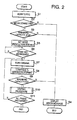
- Fig. 2 is a flowchart illustrating a SCANNING procedure executed by the MFP shown in Fig. 1.
- the MFP 100 includes a control unit 175 which controls the entire operation of the MFP 100.
- the MFP 100 includes an original reading unit 110 which reads an image on an original via a scanner interface unit 105, a communication unit 115 which communicates with an external device through a communication line, a display unit 120 which displays various information for a user, an operation unit 125 to be operated by the user, an interface unit 135 which transmits data to an external storage medium 137, an image processing unit 140 that processes the image data read by the original reading unit 110 and converts the same into converted data having a predetermined format, a CODEC 145 which encodes/decodes image data received through the communication line and/or scanned by the original reading unit 110, a sensor unit 150 that detects an operation condition of the MFP 100, a driving unit 155 including a motor and the like for driving the MFP 100, a storage unit 160 which stores the data of the original, a speaker unit 165 that outputs a sound signal as audible sound, a printing unit 170 which
- the storage unit 160 includes an image memory which functions as an internal storage 162 for storing received image data having the predetermined format, scanned data and the like, and a system RAM (Random Access Memory) 164 storing parameters defining a performance of the MFP 100, and a ROM (Read Only Memory) 166 defining a specification of the MFP 100.
- an image memory which functions as an internal storage 162 for storing received image data having the predetermined format, scanned data and the like
- a system RAM (Random Access Memory) 164 storing parameters defining a performance of the MFP 100
- ROM Read Only Memory
- the internal storage 162 stores image data, facsimile numbers of customers (receiving stations) and the like in respective folders.
- the image data is mainly stored in the folders having names of the customers.
- the facsimile numbers of the customers are the numbers assigned to abbreviated dialing keys such as one-touch keys or speed-dialing keys.
- the interface unit 135 can be connected with a removable external storage 137 and read/write image data or the like from/to the external storage 137.
- Examples of the external storage 137 are floppy disk®, compact flash®, smart media® and the like.
- the operation unit 125 and a display unit 120 are provided on the operation panel 27 to allow a user to input commands and the like.
- the operation unit 125 includes function keys, ten keys, one-touch keys, speed dialing key, start key and the like.
- the ten keys include depression switches for inputting numbers 0-9, respectively, and mainly used for inputting facsimile numbers. To the one touch keys and the speed dialing keys, abbreviated numbers are assigned.
- the display unit 120 includes an LCD (liquid crystal display).
- the function keys are the depression switches for assigning the abbreviated numbers to the one-touch keys or the speed dialing keys.
- the one-touch keys are, for example, depression switches having numbers 0-9, respectively.
- a facsimile number can be assigned to each of the one-touch keys.
- the facsimile number assigned to the key can be selected.
- the speed dialing key is used with ten-keys. A combination of the speed dialing key and two-digit number input through the ten-keys, a facsimile number is designated. With use of the speed dialing keys, facsimile numbers of the customers can be assigned to abbreviated numbers 10-99, respectively.
- the control unit 175 controls operations of the MFP 100.
- the control by the control unit 175 is executed in accordance with control programs.
- the control programs are stored in a system RAM 164 and/or a ROM 166 of the memory unit 160.
- the control unit 175 is capable of executing a various programs depending on operation status of the MFP 100.
- the control programs include, for example, but not limited to, a storing program for storing image data of an original into the internal storage 162 of the storage unit 160 or the external storage 137, a readout program for reading out the image data of the original stored in the internal storage 162 and/or the external storage 137, a data converting program for converting the data transmitted/received through the communication unit 115 into data having a predetermined format and a control program which controls the entire operation.
- FIG. 2-10 an operation of the MFP 100 will be described.
- the procedures shown in Figs. 2-10 are executed under the control of the control unit 175, and are initiated when the MFP 100 is powered on.
- Fig. 2 is a flowchart illustrating a SCAN TO PCC procedure.
- the SCAN TO PCC procedure is a procedure for scanning an original to generate image data having a predetermined format, and stores the image data (scan data) in the external storage 37.
- the operation unit 125 is provided with a depression switch for starting the control.
- S2 it is judged whether the external storage 137 is coupled to the MFP 100. If the external storage 137 is coupled (S2: YES), control proceeds to S3. If the external storage 137 is not coupled to the MFP 100 (S2: NO), control proceeds to S4.
- a remaining capacity of the external storage 137 i.e., capacity for additionally storing data
- a predetermined capacity Ca a remaining capacity of the external storage 137 (i.e., capacity for additionally storing data) is larger than a predetermined capacity Ca. If the remaining capacity is equal to or larger than the predetermined capacity Ca (S3: YES), control proceeds to S5. If the remaining capacity is smaller than the predetermined capacity Ca (S3: NO), control proceeds to S4.
- the predetermined capacity Ca may be determined as the capacity in which a page of color image can be stored in the JPEG format. With this judgment, whenever control proceeds to S5, at least one page of image data can be stored.
- conditions for storing image data which includes resolution, size and color format, is determined. For example, one of JPEG, PDF, GIF, BMP or the like is selected, and a selection of color or monochromatic, scanning resolution (e.g., one of 200dpi, 300dpi, 600dpi and the like) and a selection of a sheet size (e.g., A4, postcard and the like) are made. Further, a file name for storing the image data is designated.
- control waits for depression of the start key provided on the operation unit 125.
- control may be configured such that by depression of another predetermined key, control may return to S5 to allow the user to change the settings.
- S7 scanning of the original with the original reading unit 10 is started.
- S8 image data obtained by scanning the original is converted in accordance with the conditions set in S5 to generate original data.
- the amount of the original data generated in S8 is examined to check whether the amount is less than the remaining capacity of the external storage 137. If the amount of the original data is equal to or larger than the remaining capacity of the external storage 137 (S9: NO), control proceeds to S4 to display the error message. If the amount of the original data is less than the remaining capacity of the external storage 137 (S9: YES), control proceeds to S10.
- S11 it is judged whether all pages of the original has been processed. If there are remaining pages of the original (S11: NO), control returns to S7 to repeat the steps thereafter. If all the pages of the original have been processed (S11: YES), the procedure shown in Fig. 2 is terminated.
- Fig. 3 shows a flowchart illustrating the WRITING procedure, which is called in S10 of Fig. 2, for writing data in the external storage 137.
- a predetermined file name is defined for use in the process of the SCAN TO PCC procedure (e.g., TEMP.DAT or the like), and in S21, it is checked whether the file name same as the file name which will be created exists, and whether a file having the predetermined file name (e.g., TEMP.DAT) exists.
- S22 it is judged whether the data of the previous page is stored in the PDF format. If the data format is the PDF (S22: YES), control proceeds to S24. If the data format is not the PDF (S22: NO), control proceeds to S23.
- the PDF file is a file which defines a data structure in the PDF format with which a plurality of pages of data can be handled as a single file. Because of this characteristic, the PDF file is widespread as a document file.
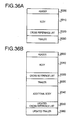
- Fig. 36A shows a basic data structure of the PDF file.
- the PDF file includes a header 2000 which is used for identifying the file specification, a body 2010 which is image data or document data, a cross reference list 2020 for referring to a page in the file, and a trailer 2030 indicating the end of the file.
- a page is added, as shown in Fig. 36B, at the end of the file, the additional body 2040, an updated cross reference list 2050, and an updated trailer 2060 are added.
- the data of the previous page is converted into the PDF format.
- the conversion of the page stored in the external storage 137 into the PDF data is executed as follows. If the page is not stored in the JPEG format, the page is once converted into an original format, which is then converted in the JPEG format. Then, a header 2000 representing header information is written at a top of the file, and a cross reference list 2020 and a trailer 2030 indicative of file information are written at the end of the file. With this operation, the JPEG format data is converted into the PDF format data.
- the scanned original data is converted into the JPEG format.
- a body 2040 representing the image data converted in S24 is added.
- an updated cross reference list 2050 and an updated trailer 2060 representing updated file information are added at the end of the file, thereby an updated PDF file is formed and stored.
- the original data is converted into data file in accordance with the conditions set in S5, and the data file is stored in the external storage 137 as a file having the predetermined name (e.g., TEMP.DAT) indicating the file is being written under control of the SCAN TO PCC procedure.
- the predetermined name e.g., TEMP.DAT
- the file name indicative of an intermediate file is used at this stage so that whether the all the pages of the original have been scanned by the reading unit 110 can be judged from the file name.
- data storing in the external storage 137 is executed such that the first page is converted into the data format designated by the user (S26). If a plurality of pages of data are to be stored in the external storage 137, the data is once converted into a predetermined file format, and then converted into a specified file format (e.g., JPEG format) (S22-S25). With this control, when the user has designated the PDF format, even if only one page data is to be stored, the data is stored in the PDF format.
- a predetermined file format e.g., JPEG format
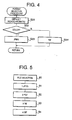
- Fig. 4 shows a flowchart illustrating a FORMAT SELECTION procedure in which a file format to be used is automatically determined as a user selects an image type. This procedure may be executed as a part of the procedure executed in S5 of Fig. 2.
- S32 it is judged whether the user designates the color setting, i.e., an image of the original is to be scanned as a color image. If it is judged that the color setting is designated (S32: YES), control proceeds to S33 where the JPEG format is selected as the file format. If it is judged that the monochromatic setting is designated (S32: NO), control proceeds to S34 where the TIFF format is selected as the file format.
- Fig. 4 is an exemplary and simplified procedure, and more candidates may be provided as the file formats to be used. With the control as exemplified in Fig. 4, an appropriate file format is selected in accordance with color settings. It should be noted again that the file formats to be used need not be limited to JPEG and TIFF.
- Fig. 5 shows an exemplary indication on the operation panel when a file format is directly selected in S5 of Fig. 2.
- a message indicating the a file type should be selected is displayed (80), and then, file types "JPEG”, "PDF”, "TIFF” and "GIF” are subsequently displayed ((81-84) on the display panel upon operation of a predetermined key (e.g., an arrow key or the like).
- a predetermined key e.g., an arrow key or the like.
- Fig. 6 is a flowchart illustrating a BACKUP procedure for storing the transmission data of the facsimile in the external storage 137 as backup data.
- S41 it is judged that the backup is instructed by the user. If it is judged that the user has instructed the backup operation (S41: YES), control proceeds to S43. If the user has not designated the backup operation (S41: NO), control proceeds to S42, where the backup operation for storing the facsimile transmission data in the external storage 137 is interrupted, and a normal facsimile transmission procedure is executed.
- S43 it is judged whether the external storage 137 is attached. If it is judged that the external storage 137 is currently attached to the MFP 100, control proceeds to S46, otherwise to S44.
- S44 an error message is displayed, and the backup operation for storing the backup data in the external storage 137 is interrupted.
- S45 an INTERNAL STORAGE FACSIMILE TRANSMISSION DATA BACKUP procedure is executed, which will be described later.
- the remaining storage capacity of the external storage 137 is detected. It should be noted that the remaining capacity can be detected by referring to a memory map, which is a well-known technology and will not be described herein.
- S47 it is judged whether the remaining storage capacity of the external storage 137 is equal to or greater than the predetermined capacity Ca or less than the predetermined capacity Ca. If the remaining storage area is the predetermined capacity Ca or more (S47: YES), control proceeds S50. If the remaining capacity is less than the predetermined capacity Ca (S47: NO), control proceeds to S48, where an error message is displayed, and the backup operation is interrupted. In S49, the INTERNAL STORAGE FACSIMILE TRANSMISSION DATA BACKUP procedure is executed.
- the predetermined capacity Ca may be a size in which one page of JPEG color image data file can be stored therein.
- the modes include, for example, file formats, resolution, image size, color and the like which are used for storing the image data.
- a procedure for setting the modes will be described later. It should be noted that, in the mode setting procedure executed in S50, predetermined conditions may be set in advance or a user may be required to input/select desired settings.
- the original is scanned by the original reading unit 10 in accordance with the mode set in S50.
- a page of the original is scanned, and in S53, a encoding of the scanned original image is executed by the CODEC 145 to generate an original data.
- the converted data is transmitted to an other end of the line (i.e., a facsimile receiving station).
- the original data is decoded by the CODEC 145, and then, in S56, the decoded original data is converted (compressed) in accordance with the file format designated in S50.
- S57 it is judged whether the amount Cb of the original data generated in S56 is less than the remaining capacity of the external storage 137. If the remaining capacity is greater than the data amount Cb (S57: YES), control proceeds to S60, where the image data corresponding to the transmission data (transmitted through the communication unit 115) is stored in the external storage 137. If the remaining size is not greater than the data amount Cb (S58: NO), control proceeds to S58. In S58, an error message is displayed on the display unit 120, and the backup operation for storing the backup data in the external storage 137 is interrupted, and in S59, the normal facsimile transmission procedure (which is a procedure similar to a case when the backup is not instructed in S41) is executed.
- the backup data is stored in the external storage 137.
- This storing procedure is executed in accordance with the procedure shown in Fig. 3.
- S61 it is judged whether all the data of the original has been read. If it is judged that all the data has been read (S61: YES), the procedure shown in Fig. 6 is terminated. If it is judged that all the data has not been read (S61: NO), control returns to S52 and steps S52 through S61 are repeated.
- the file name is changed from a tentative one (e.g., TEMP.DAT) to a user's desired file name.
- file information is registered with a management file 90 (see Fig. 11) which will be described later.
- the a file name may be serial numbers, for example, or may be a combination of identifier indicative of a destination (i.e., a receiving station) and a serial number, for another example. Information related to date/time of the transmission may be used for the file name.
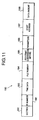
- Fig. 11 shows a file structure of the management file 90 for the backup operation.
- the management file 90 includes an FAT (file allocation table) from which the file storing status of the external storage 137 can be known. Specifically, as shown in Fig. 11, the management file 90 is provided with a section segment 191 indicative of whether the backup data is for the facsimile transmission or the facsimile reception, the ID number 192 indicative of the telephone number or station ID, the time data 193 indicative of the time when the transmission/reception of the facsimile transmission is started, a file number 194 which is a serial number (which is normally assigned automatically) of the management file 90, a type 195 of the file indicative of the file format (i.e., TIFF, JPEG, PDF, GIF and the like), parameters (e.g., compression parameter indicating a compression rate) 196, a start address 197, and a data amount 198.
- file operation such as deletion of a file, which will be described later, can be executed.
- identifier information indicating one of transmission data, reception data and scanned data is stored in the section segment 191
- a start time is stored in the time data segment 193 of the management file 190
- the data of the section segment 191 and the time data 193 of the management file 190 can be used as history information. For example, by collecting management files 190 whose sections 191 indicate the transmission, transmission history can be obtained easily.
- the designated file is detected referring to the file number 194 of the management file 190, and then the designated file is re-transmitted, deleted or printed.
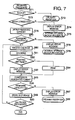
- Fig. 7 is a flowchart illustrating a FACSIMILE RECEIVING procedure, wherein the received data is stored in the external storage 137 as backup data.
- the file format and the like should be designated in advance, and the received data is stored in accordance with the designated file format and the like.
- the file format may be determined in accordance with the type of the image data as in the procedure shown in Fig. 4.
- a predetermined format e.g., JPEG format ro the like
- a predetermined format may be used as a fixed format setting.
- the file name may be automatically assigned as in the case where the transmission data is stored. In the case where the received data is stored, it may be convenient if the file name includes information regarding transmitting station. Alternatively or optionally, the external storage 137 may be configured to have separate storing areas for storing data separately by the transmitting stations.
- S71 it is judged whether the received data is to be stored in the external storage 137 as the backup data, which is set by the user in advance. If it is judged that the backup data should be stored in the external storage 137 (S71: YES), control proceeds to S73, otherwise to S72 where the backup is interrupted and a normal facsimile receiving operation is performed.
- S73 it is judged whether the external storage 137 is attached to the MFP 100. If the external storage 137 is attached (S73: YES), control proceeds to S76. If the external storage 137 is not attached to the MFP 100 (S73: NO), control proceeds to S74, where an error message is displayed on the display unit 120, the backup operation is interrupted, and in S75, control proceeds to the main storage receiving data backup procedure, which will be described later, is executed.
- S77 it is judged whether the remaining storage capacity of the external storage 137 is equal to or greater than a predetermined capacity Ca. If it is judged that the remaining storage capacity is equal to or larger than the predetermined capacity Ca (S77: YES), control proceeds to S80, otherwise (S77: NO) to S78. In S78, an error message is displayed on the display unit 120, the backup operation is interrupted, and control proceeds to S79 where the INTERNAL STORAGE RECEIVED DATA BACKUP procedure is executed.
- the predetermined capacity Ca is determined as a capacity for storing one page of color JPEG image data file.
- the received facsimile data is decoded by the CODEC 145 to convert the same to image data, and in S82, it is judged whether the converted image data can be printed by the printing unit 170. If the image data can be printed by the printing unit 170 (S81: YES), control proceeds to S84. If the image data cannot be printed by the printing unit 170 (S81: NO), control proceeds to S83, where the error message is displayed on the display unit 120.
- the image data is converted and/or compressed in accordance with a predetermined (designated) file format.
- S86 it is judged whether the amount Cb of the data generated in S85 is less than the remaining storage capacity of the external storage 137. If the amount Cb is less than the remaining storage capacity (S86: YES), control proceeds to S89. If the amount Cb is equal to or greater than the remaining storage capacity (S86; NO), control proceeds to S88, where the normal facsimile receiving procedure is performed.
- the compressed received data is stored in the external storage 137.
- the procedure for storing the received data is similar to the procedure shown in Fig. 3.
- S90 it is judged whether all the pages of the facsimile data are received by the communication unit 115. If the data of all the pages has been received (S90: YES), the procedure shown in Fig. 7 is terminated. If the data of all the pages of the facsimile data have not been received (S90: NO), control returns to S80, and steps S80-S90 are repeated. When the procedure shown in Fig. 7 is terminated, the file name is changed from the tentative one to the desired one, which is similar to the procedure described with reference to Figs. 2 and 3.
- the data is transmitted/received on a page basis (i.e., page by page), and at every transmission/reception of data for a page, it is judged whether the remaining storage capacity of the external storage 137 is sufficient for storing at least one page of the transmission/reception data until the data for the last page is transmitted/received.
- the data is stored in the external storage 137
- the data of the first page is stored in accordance with the format designated by the user using the operation unit 125.
- the data for a plurality of pages is stored in the external storage 137, the data is converted into a predetermined file format and then converted into a specified file format and stored in the external storage 137 under control of the control unit 75 (S22-S25).
- Fig. 8 is a flowchart illustrating an INTERNAL STORAGE TRANSMISSION DATA BACKUP procedure for storing the transmission data in the internal storage 162 which is executed during a normal transmission procedure.
- S102 it is judged whether the remaining storage capacity of the internal storage 162 is equal to or greater than a predetermined capacity Cc. If the remaining storage capacity of the internal storage 162 is equal to or larger than the predetermined capacity Cc (S102: YES), control proceeds to S105. If the remaining storage capacity is not greater than the predetermined capacity Cc (S102: NO), control proceeds to S103. In S103, the error message is displayed on the display unit 20, and the backup operation to the internal storage 162 is interrupted. In S104, the normal facsimile transmission procedure is operated. It should be noted that the predetermined capacity Cc is determined such that the data corresponding to one page of the file format employed in the normal facsimile machines (e.g., MH coding format) can be stored.
- the predetermined capacity Cc is determined such that the data corresponding to one page of the file format employed in the normal facsimile machines (e.g., MH coding format) can be stored.
- the data may be stored in the format which is generally supported by PCs (e.g., JPEG, Tiff and the like).
- PCs e.g., JPEG, Tiff and the like.
- the internal storage 162 will not be detached from the MFP 100 and the stored data will not be printed by external printers. Therefore, if the data is stored in accordance with the dedicated facsimile machine format, when the re-transmission and/or re-print is required, the request can easily be dealt with without converting the stored data.
- the mode settings include, for example, a setting of resolution, image size and the like, which define conditions when the data is stored. It should be noted that the step is similar to S50 in Fig. 6.
- S106 it is judged whether the scanning of the original should be started based on the mode set in S105. If it is judged that the scanning should be started (S106: YES), control proceeds to S107. If it is judged that the scanning should not be started (S106: NO), control returns to S105.
- a page of the original is scanned.
- the obtained data by scanning is converted, by the CODEC 145, into an original data having a predetermined format in S108.
- the original data is transmitted to the other end of the line (i.e., the facsimile receiving station).
- the original data as transmitted is stored in the internal storage 162.
- the format of the data stored in the internal storage 162 is a dedicated format, which is the format normally employed in the known facsimile machines, such as MH format, FR format and MMR format.
- the remaining storage capacity of the internal storage 162 is detected, and it is judged whether the remaining storage capacity is equal to or greater than the predetermined capacity Cc. If the remaining capacity is equal to or greater than the predetermined capacity Cc (S111: YES), control proceeds to S114. If the remaining capacity is less than the predetermined capacity Cc (S111: NO), control proceeds to S112. In S112, an error message is displayed on the display unit 120, and the backup operation in the internal storage 162 is interrupted. Then in S113, the normal facsimile transmission operation is executed.
- the predetermined capacity Cc corresponds to a page of the facsimile data (e.g., MH format data) employed in the known facsimile machines.
- S114 it is judged whether all the pages of the original have been read (scanned). If the all the pages of the original have been scanned (S114: YES), the procedure shown in Fig. 8 is terminated. If the all the pages have not yet been scanned (S114: NO), control returns to S107, and steps S107 through S111 are repeated. It should be noted that in this procedure, the stored data can have any kind of file format (including a format dedicated to facsimile machines) since the data need not be read by the PC and the like. Therefore, a file conversion operation is not included.
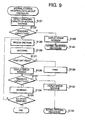
- Fig. 9 is a flowchart illustrating a RECEPTION DATA BACKUP procedure for storing the received facsimile data in the internal storage 162 of the MFP 100.
- S122 it is judged whether the remaining capacity of the internal storage 162 is equal to or greater than the predetermined capacity Cc. If it is judged that the remaining capacity of the internal storage 162 is equal to or greater than the predetermined capacity Cc (S121: YES), control proceeds to S125. Otherwise (S121: NO), control proceeds to S123, where an error message is displayed on the display unit 120, the backup procedure is interrupted, and in S124, the normal facsimile receiving procedure is executed.
- the predetermined capacity Cc corresponds to one page of the facsimile data (e.g., MH format data) employed in the known facsimile machines.
- the received data is sequentially decoded by the CODEC 145 to image data.
- S127 it is judged whether the converted iamge data can be printed by the printing unit 170. If it is judged that the converted data can be printed (S127: YES), control proceeds to 129. If it is judged that the converted data cannot be printed (S127: NO), control proceeds to S128, where an error message is displayed on the display unit 129.
- the remaining storage capacity of the internal storage 162 is detected, and is judged whether the remaining capacity is equal to or greater than the predetermined capacity Cc. If it is judged that the remaining capacity is equal to or greater than the predetermined capacity Cc (S131: YES), control proceeds to S134. If it is judged that the remaining capacity is less than the predetermined capacity Cc (S131: NO), control proceeds to S132, where the error message is displayed on the display unit 120, and the backup operation in the internal storage 162 is interrupted. In S133, the normal facsimile reception procedure is executed. It should be noted that the predetermined capacity Cc corresponds to one page of facsimile data in the known format (e.g., the MH format).
- the received data is stored in the internal storage 162.
- the format of the received data stored in the internal storage 162 is the normal facsimile data format, or the format dedicated to the facsimile transmission/reception (e.g., MH format, MR format, MMR format).
- S135 it is judged whether all the pages of the facsimile data has been received by the communication unit 115. If it is judged that all the pages of the facsimile data have been received (S135: YES), the procedure shown in Fig. 9 is terminated. If not (S135: NO), control returns to S125, and the steps S125 through S135 are repeated.
- the transmitted and/or received data can be stored in the internal storage 162 as the backup data.
- the transmission/reception data is processed page by page, and examine whether the remaining storage area of the internal storage 162 is sufficient for storing at least one page of transmission/reception data at every transmission/reception of a page of the data, until the last page of the data is transmitted/received.
- the data is stored in the internal storage 162 in accordance with the format, which is generally employed in the facsimile machines such as the MH format, MR format, MMR format and the like.
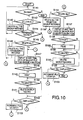
- Fig. 10 is a flowchart illustrating a DATA DELETION procedure for deleting the backup data.
- S141 it is judged whether the backup data is stored in the internal storage 62 or the external storage 137. If there is backup data in the internal storage 62 or the external storage 137 (S141: YES), control proceeds to S142. If there is no backup data (S141: NO), the procedure shown in Fig. 10 is terminated.
- control inquires the user whether all the backup data is to be deleted. If the user has instructed that all the backup data is to be deleted (S142: YES), control proceeds to S143. If not (S142: NO), control proceeds to S144. In S143, all the backup data is deleted, and control returns to S141.
- the data to be deleted includes file(s) having the dedicated facsimile transmission/reception formats and the file(s) which can be used in the PCs.
- control inquires the user whether the file to be deleted is the backup file of the facsimile transmission. If the user has instructed that the file to be deleted is the backup file of the facsimile transmission (S144: YES), control proceeds to S145. If not (S144: NO), control proceeds to S154.
- control inquires the user whether all the facsimile backup files are to be deleted. If it is judged in accordance with the user's instruction that all the backup files are to be deleted (S145: YES), control proceeds to S146. If not (S145: NO), control proceeds to S147. In S146, all the transmission backup files are deleted, and control returns to S141.
- the transmission backup files to be deleted include the files having the formats dedicated facsimile transmission formats and the files which can be used in the PCs.
- the ID number and time of the backup file of the transmission history is displayed with reference to the management files 90. From the displayed data, to whom and when the transmission was executed can be known.
- control inquires the user whether the files displayed in S147 are to be printed. If it is judged, in accordance with the user's instruction, that the files are to be printed (S148: YES), control proceeds to S149, where the files are printed. If the files need not be printed (S148: NO), control proceeds to S150.
- control inquires the user whether the files displayed in S147 are to be deleted. If it is judged, in accordance with the user's instruction, that the files are to be deleted (S150: YES), control proceeds to S151, where the files are deleted.
- the files to be deleted includes the files of the dedicated facsimile transmission format and the files readable by the PC and the like. If the files need not be deleted, control proceeds to S152.
- S152 it is judged whether all the files included in the backup file of the transmission history has been displayed. If it is judged that all the files have been displayed (S152: YES), control proceeds to S154. If not (S152: NO), control proceeds to S153. In S153, in order to display the next file which has not been displayed, a file number is incremented and control returns to S147.
- control inquires the user whether all the reception backup files are to be deleted. If all the reception backup files are to be deleted (S153: YES), control proceeds to S156. If not (S153: NO), control proceeds to S157. In S156, all the reception backup files are deleted, and then control returns to S141.
- the reception backup files to be deleted include the files having a dedicated facsimile transmission format, and the files which can be readable by the PCs or the like.
- control inquires the user whether the files displayed in S157 are to be printed. If the user has instructed that the files are to be printed (S158: YES), control proceeds to S159. If not (S157: NO), control proceeds to S160. In S159, the files displayed in S157 are printed.
- control inquires the user whether the files displayed in S147 are to be deleted. If the user has instructed that the files are to be deleted (S160: YES), control proceeds to S161. If not (S160: NO), control proceeds to S162. In S161, the files are deleted. It should be noted that the files to be deleted include files having the dedicated file transmission format, and files readable by the PCs.
- S162 it is judged that all the backup files indicating the reception history have been displayed. If it is judged that all the files has been displayed (S162: YES), the procedure shown in Fig. 10 is terminated. If not (S162: NO), control proceeds to S163, where the file number is incremented in order to display the data which has not yet been displayed on the display unit 20.
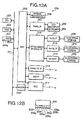
- Fig. 12A is a block diagram schematically showing a configuration of an MFP 200 according to a second embodiment
- Fig. 12B schematically shows a structure of a keyboard 209 of the MFP 200.
- the MFP 200 has a image reading function (scanning function), and capable of scanning an image using an original reading unit 206 in accordance with instructions input by a user through the keyboard 209, and storing image data representing the scanned image in an external storage (218, 219 or 220).
- new image data can be added at the end of a file having a predetermined document-like format.
- the document-like format refers to a format having a plurality of pages in a single file, and data can be added to the document-like format as a new page in the same file.
- the image data may include JPEG, GIF, TIFF, PNG (Portable Network Graphics), BMP data, for example.
- JPEG Joint Photographic Experts Group
- GIF graphics processing unit
- TIFF Temporal Component Interconnect Express
- PNG Portable Network Graphics
- BMP data for example.
- the PDF format suggested by the Adobe Systems is known.
- the MFP 200 includes a CPU 202 which controls the entire operation of the MFP 200, ROM 203 and RAM 204 storing control programs and various data, ASIC (Application Specific Integrated Circuit) 205, MODEM 216 are interconnected through a bus 201.
- ASIC Application Specific Integrated Circuit
- the RAM 204 includes a storage section functioning as an internal storage 204a and a flag storage area 204b storing a N-in-1 flag set by a user.
- a value "1" is stored when the N-in-1 function is ON, while a value "0" is stored when the N-in-1 function is OFF.
- the original reading unit 6 for reading the original as an image, a panel interface 207, a detachable storage interface 210, a parallel interface 214, a USB interface 215 are electrically connected.
- the original reading unit 206 is provided with an ADF (Automatic Document Feeder) and a plurality of sheets of the original can be subsequently fed on an image reading position of the original reading unit 206.
- the original reading unit 206 may be configured such that a sheet of original is manually placed by the user.
- the panel interface 207 is connected with an LCD 208 for displaying information for the user and the keyboard 209 through which the user can input various instructions.
- the removable storage interface 210 is connected with a first slot 211, a second slot 212 and a third slot 213.
- First through third external storages 218-220 can be detachably coupled to the first through third slots 211-213, respectively.
- first slot 211 and the first external storage 218 will be described. However, the description can apply to each of the slots and the external storages.
- the external storage 218 may be, but not limited to, a compact flash®, a smart media®, a memory stick® and the like. Of course, the external storage 218 is not limited to such media, and floppy® disk, MO, CD-R, CD-RW, DVDOR, DVD-RAM, DVD-RW and the like can be used. Depending on the type of the external storage 218, the slot 211 should be replaced with an appropriate drive.
- the parallel interface 214 and USB interface 215 can be connected with other electronic devices, when necessary, through parallel cable and USB cable, respectively.
- the NCU (Network Control Unit) 217 is connected, and the MODEM 216 is connected to the NCU 217.
- the NCU 217 is connected with a public telephone line network.
- the keyboard 209 is provided with a various keys. As schematically indicated in Fig. 12B, the keyboard 209 has ten-keys 209a, a SCAN TO PCC key 209b for initiating a SCAN TO PCC procedure, arrow keys 209c, an enter key 209d used for establishing a selection or the like, a transmission key 209e for initiating a facsimile transmission, a delete key 209f for deleting files/image data stored in the memory/storages, N-in-1 key 209g for composing an N-in-1 image including N pages of images in one page, and a start key 209h for starting respective operations.
- the ten-keys 209a may be provided with alphanumeric keys, and the user may input series of alphanumeric characters to the MFP 200 through the ten-keys 209a for various settings/instructions.
- the SCAN TO PCC procedure is the procedure for storing image data obtained with the original reading unit 206 in the external storage 218.
- Fig. 13 is a flowchart illustrating a main procedure of the MFP 200 according to the second embodiment.
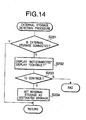
- Fig. 14 is a flowchart illustrating an EXTERNAL STORAGE DETECTION procedure
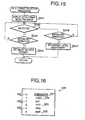
- Fig. 15 shows a flowchart illustrating a FORMAT SELECTION procedure called at S204 of Fig. 13.
- Fig. 16 shows a screen for selecting a data format.
- Fig. 17 is a flowchart illustrating an N-IN-1 SETTING procedure, and Figs. 18A and 18B show screen images for setting the number N of the N-in-1 setting.
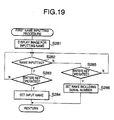
- Fig. 19 is a flowchart illustrating a FIRST NAME INPUTTING procedure.
- Fig. 20 is a flowchart illustrating an IMAGE DATA NEWLY STORING procedure.
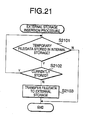
- Fig. 21 is a flowchart illustrating an EXTERNAL STORAGE RECEPTION procedure.
- a subroutine EXTERNAL STORAGE DETECTING procedure which is shown in Fig. 14, is executed. In this procedure, it is judged whether the external storage 218 is attached to the first slot 211 of the MFP 200. Further, a device (i.e., the external storage 218) in which the image data obtained by the original reading unit 206 is stored is set.
- S231 of Fig. 14 it is judged whether the external storage 218 is coupled to (i.e., inserted in) the first slot 211. If the external storage 218 is coupled (S231: YES), the subroutine shown in Fig. 14 is terminated promptly, and control goes to S204 of Fig. 13. If the external storage 218 is not coupled to the first slot 211 (S231: NO), control proceeds to S232, where a message inquiring the user whether the procedure should be continued is displayed on the LCD 208. The message may read, for example, "NO EXTERNAL MEMORY IN THE SLOT. DEPRESS [1] TO CONTINUE, or [2] TO TERMINATE".
- an image for selecting the data format to be used is displayed on the LCD 208.
- An example of such an image is shown in Fig. 16.
- the highlighting cursor 257 initially highlights the default format, which may have been set to a predetermined format or may be set by the user.
- the selecting image is displayed on the LCD 208, the user can select one of the format by moving the highlighting cursor 257 with the arrow keys or one of ] keys of the ten-keys 209a (S242: YES). If the [6]-[9] keys or other unrelated keys are depressed, control judges that the selection has not been made (S242: NO).
- the format of the image data is determined.
- S205 it is judged whether the N-in-1 key 209g is depressed. If the N-in-1 key 209g has not been depressed (S205; NO), control proceeds to S207. If the N-in-1 key 209g has been depressed (s205: YES), control proceeds to S205, where a subroutine, N-IN-1 SETTING procedure is called. In the N-IN-1 SETTING procedure, the number N of pages to be included in one page of the N-IN-1 image is determined by the user.
- the N-IN-1 SETTING procedure shown in Fig. 17 will be described.
- S261 an image for inputting the number N for the N-in-1 image is displayed on the LCD 208.
- An example of the image is shown in Fig. 18A.
- six item numbers 231 and five selections 230 and a selection 230a for directly inputting the number N are provided.
- a highlighting cursor 232 is also displayed to highlight the currently selected item. The user can select a desired item by moving the highlighting cursor 232 using the arrow keys 209c or directly inputting the item number using the ten-keys 209a (] keys).
- S262 it is judged whether the number N is selected from the items 0-5 as described above, or the enter key 209d is operated. If the user operates the arrow keys 209c, ten-keys 209a, or the enter key 209d (S262: YES), control proceeds to S263. If it is judged that no keys are operated or keys unrelated to the selection of the items are operated (S262: NO), control repeats S262. In S263, it is judged whether the operated key is the enter key 209d.
- the number N corresponding to the item on which the highlighting cursor 232 is located is stored as the number N for the N-in-1 image, and the N-in-1 flag is set. If the number N is two or greater, the N-in-1 flag is set to ON (i.e., "1" is stored in the N-in-1 flag storage area 204b). It should be noted that, when item of o N-in-1 image) is selected, the N-in-1 flag is set to OFF (i.e. , "0" is stored in the N-in-1 flag storage area 204b).
- S207 of Fig. 13 it is judged whether the start key 209h is depressed. If the start key 209h is not depressed (S207: NO), control returns to S205. If the start key 209h has been depressed by the user (S207: YES), control proceeds so that the SCAN TO PCC procedure is executed in accordance with the settings input in steps S203, S204 and S206.
- a parameter P representing the number of sheets of the original is set to 1. This parameter P is stored in a predetermined area of the RAM 204. Then, using the original reading unit 206, a page of the original is read (S209). In S210, it is judged whether the N-in-1 flag is ON (i.e., whether "1" is stored in the N-in-1 flag storage area 204b). If the N-in-1 flag is set to ON (S210: YES), control proceeds to S211, where image data whose area is 1/N of the area of one page of the original is generated in accordance with the data format set in S204. If the N-in-1 image is not set (S210: NO), control proceeds to S212, where image data having the same area as one page of the original is generated in accordance with the data format set in S204.
- S213 it is judged whether all the pages of the original have been read. This judgment is performed using a well-known paper sensor or manual input by the user. If all the pages of the original have not been completed (S213: NO), control proceeds to S214, where the parameter P is incremented by one and control goes to S209. Until all the pages of the original are read, steps S209 through S214 are repeatedly executed. If all the pages of the original have been read (S213: YES), control proceeds to S215. In S215, it is judged whether the N-in-1 setting is effected again.
- N-in-1 setting is effective (S215: YES)
- a page of N-in-1 image data is generated in accordance with the format set in S204 (S216). For example, if the number N is set to 4 (four), image data whose area is 1/4 of a page of the original is generated in S211, and a page of 4-in-1 image is generated using four pages of image data each having a 1/4 page area (S216). In this case, if the image data generated in S211 includes four or less than four pages of images, only one page of 4-in-1 image is generated in S216.
- the image data generated in S211 includes more than four pages of images, a plurality of pages of 4-in-1 images are generated in S216. If the number of images generated in S211 is not a multiple number of four, a white image (i.e., an area which does not have an image thereon) whose size is 1/4 of a page of the original is inserted when the N-in-1 image is generated. For example, if three pages of the images are generated in S211, a white image is inserted as the fourth page when the 4-in-1 image is generated in S216. If it is judged, in S215, that the N-in-1 setting is OFF (S215: NO), control proceeds to S217.
- S215 that the N-in-1 setting is OFF
- S217 it is judged whether a PDF file is currently stored in the external storage 218. If it is judged in S203 that the external storage 218 is not attached, and that the user intended to continue the SCAN TO PCC procedure, then, in S217, it is judged whether a PDF file is currently stored in the internal storage 204a. If the PDF file is stored in the external storage 218 or the internal storage 204a (S217: YES), it is further judged whether the new image data generated in S212 or S216 is JPEG format image data (S218). If the data is not the JPEG format data (S218: NO), the image data is converted into the JPEG format data in S219, and control proceeds to S220.
- S220 If the data generated in S212 or S216 is the JPEG format image data (S218: YES), control proceeds to S220.
- the JPEG format image data is added at the end of the PDF file stored in the external storage 218 or the internal storage 204a to update the PDF file, and the updated PDF file is re-stored in the external storage 218 or the internal storage 204a. After the PDF file is updated, the procedure shown in Fig. 13 is terminated.
- the new data name or the new PDF file name is set by the user.
- a subroutine IMAGE DATA NEWLY STORING procedure for newly storing the image data is executed (S226), with which the image data read by the original reading unit 206 is stored in the external storage 218 or the internal storage 204a as the new image data of new PDF file having the name determined in S225.
- S291 it is judged whether the N-in-1 setting is ON. Specifically, in S291, it is judged whether the value "1" is stored in the N-in-1 flag storage area 204b of the RAM 204. If the N-in-1 flag is ON (S291: YES), the number P of pages of the original stored in the RAM 204 and the number N for N-in-1 stored in the RAM 204 are compared, and it is judged whether the number P is greater than the number N (S292).
- the image data (the new image data) generated as an image is scanned by the original reading unit 206 is the JPEG format data. If the new data is the JPEG format data (S293: YES), the new data is further converted into the PDF file (S295). If the new data is not the JPEG format data (S293: NO), the new image data is converted into the JPEG format data (S294), and then converted into the PDF file (S295).
- the thus converted PDF file is stored (S296) in the external storage 218 or the internal storage 204a with the name set in the S225 of Fig. 13, and the subroutine shown in Fig. 20 is terminated and control returns to the main procedure shown in Fig. 13.
- the number of the pages of the original is one, and the image data generated from the one page of the original is stored as it is in the external storage 218 or the internal storage 204a with the name input in S225 of Fig. 13. Thereafter, control proceeds to the main procedure shown in Fig. 13.
- the image data when image data is added to the PDF file, the image data is converted into the JPEG format data.
- JPEG format data it is known that another type of encoded image data can also be added to the PDF file as data for succeeding pages, and the data type need not be limited to the JPEG format data.
- GIF data instead of the JPEG data, GIF data may be used for composing the PDF file.
- image data of some type is stored in the external storage 218 or the internal storage 204a, and new image data is to be stored, the previously stored image data is converted into the JPEG data, and then into the PDF file. Thereafter, the newly stored image data is converted to the JPEG data, if necessary, and is added at the end of the PDF file.
- the PDF file is given priority, and newly added image data is added to the end of the PDF file after, if necessary, converted into the JPEG data.
- the newly stored image data is stored as a PDF file or as it is with the name set in S225 of the SCAN TO PCC procedure. Specifically, if the newly stored image data is a page of data, it is stored as it is (i.e. , with the data format designated by the user). IF the newly stored data include a plurality of pages of data, the image data is converted into a PDF file and then stored with the name set in the SCAN TO PCC procedure.
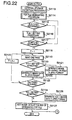
- Fig. 22 is a flowchart illustrating the SCAN TO PCC procedure (i.e., the main procedure) of the MFP 200 according to the third embodiment.
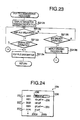
- Fig. 23 is a flowchart illustrating a PDF DESIGNATING procedure and Fig. 24 shows a screen image for designating a PDF file.
- Fig. 25 is a flowchart illustrating IMAGE DATA NEWLY STORING procedure and
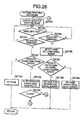
- Fig. 26 is a flowchart illustrating a SECOND NAME INPUTTING procedure.
- Step S2113 is similar to S203 in Fig. 13, and description thereof will be omitted.
- the PDF DESIGNATING procedure which is a subroutine, is called.
- this PDF DESIGNATING procedure if there area plurality of PDF files in the external storage 218 or internal storage 204a, one PDF file, to which the new image data is to be added, is specified by the user.
- an image 234 showing a plurality of PDF files stored in the external storage 218 or the internal storage 204a are listed on the LCD 208 as shown in Fig. 24.
- the image 234 shows a plurality of items 235 and 236, item numbers 237 corresponding to the items 235 and 236, and a highlighting cursor 238 indicating the currently selected item 235 or 236 (in Fig. 24, item 236 is selected).
- item 236 is selected, a newly storing procedure is executed, which will be described later.
- Each of items 235 indicates a file name 235a and its extension 235b. Since the listed file are PDF files, the extensions 235b may be hidden.
- the user may operate the arrow keys 209c to move the cursor 238 or operate ten-keys 209a to designate the item number 237 to select the desired file 235 or the newly storing option 236.
- S2132 of Fig. 23 it is judged whether the user select one of the PDF files. If the user operates the arrow keys 209c or ten-keys 209a to select one of items 235 and 236 (S2132: YES), control proceeds to S2133, where it is judged whether the user depresses the enter key 209d. If it is judged that the user does not depress the enter key 209d (S2133: NO), control returns to S2132. If it is judged that the user depressed the enter key 209d (S2133: YES), the PDF file selected by the user in S2132 is set as the PDF file to which the new image data is added (S2134). Thereafter, control returns to the main procedure shown in Fig. 22.
- the new image data is stored in the external storage 218 or the internal storage 204a as it is, or as a new PDF file.
- SECOND NAME INPUTTING procedure When the NEWLY STORING procedure shown in Fig. 25 is initiated, a subroutine of SECOND NAME INPUTTING procedure (shown in Fig. 26) is called in S2141.
- SECOND NAME INPUTTING procedure a name of new image data, which is generated as the original reading unit 206 scans the original, is stored in the external storage 218 or the internal storage 204a as it is or as converted into a PDF file is set.
- S2158 an image for inputting a name of the PDF file or the image data when stored in the external storage 218 or the internal storage 204a is displayed on the LCD 208.
- S2159 it is judged whether the user inputs alphanumeric characters using the ten-keys 209a and the like as the name of the PDF file or the image data in S2159. If it is judged that some alphanumeric characters have been input (S2159: YES), it is further judged whether the enter key 209d is depressed in S2160. If the user has depressed the enter key 209d (S2160: YES), control proceeds to S2161.
- S2161 it is judged whether PDF file or image data having the same name as input in S2159 in the external storage 218 or the internal storage 204a. If it is judged that the PDF file or the image data having the same name as input by the user does not exist in the external storage 218 or the internal storage 204a (S2161: NO), the name input by the user in steps S2159 and S2160 is set to be used as the name when the PDF file or the image data is stored in the external storage 218 or the internal storage 204a in S2164.
- a name including an initial value of the serial number is assigned as the new name of the PDF file or the image data to be stored (S2169). For example, "img0001" is assigned as the name of the new PDF file or the image data. Thereafter, control returns to the NEWLY STORING procedure shown in Fig. 25.
- the MFP 200 if a plurality of PDF files have been stored in the external storage 218 or the internal storage 204a, one of the files is designated by the user, and the new image data is added to the designated PDF file.
- the image data is stored as it is or as a new PDF file with a new name input by the user in the external storage 218 or the internal storage 204a.
- the image data is stored as it is (i.e., without changing the format thereof) in the external storage 218 or the internal storage 204a with the new name.
- the image data is converted into a PDF file, and then stored in the external storage 218 or the internal storage 204a with the new name.
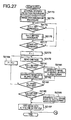
- Fig. 27 is a flowchart illustrating the SCAN TO PCC procedure according to the fourth embodiment.
- Fig. 28 shows a flowchart illustrating an IMAGE DATA DESIGNATING procedure which is called in the SCAN TO PCC procedure shown in Fig. 27.
- S2173 is similar to step S203 of the second embodiment, it will not be described herein.
- a subroutine IMAGE DATA DESIGNATING procedure is called in S2174 for designating image data.
- this subroutine from among a plurality of pieces of image data stored in the external storage 218 or the internal storage 204a, one piece of image data is designated by the user.
- IMAGE DATA DESIGNATING procedure shown in Fig. 28 firstly, an image for selecting one of a plurality of pieces of image data stored in the external storage 218 or the internal storage 204a is displayed on the LCD 208 (S2191).
- the image is, although not shown, similar to that shown in Fig. 24 except that the names of the PDF files (items 235) are replaced with names of the pieces of image data, each of which includes a data name and an extension representative of its data format.
- S2192 it is judged whether one of the pieces of image data is selected. That is, it is judged whether the user operates the arrow keys 209c to move the highlighting cursor on the LCD display or directly inputs the item number with the ten-keys 209a to select one of the pieces of the image data. If the user operates the arrow keys 209c or ten-keys 209a (S2192: YES), it is further judged whether the user has depressed the enter key 209d (S2193). If it is judged that the user has not depressed the enter key 209d (S2193: NO), control returns to S2192.
- the image data generated in S2186 or S2182 is added to the PDF file, which has been converted from the image data previously stored in the external storage 218 or the internal storage 204a, then the updated PDF file is re-stored in the external storage 218 or the internal storage 204a, and the SCAN TO PCC procedure according to the fourth embodiment is finished.
- the user selects one of the previously stored image data. Then, the selected image data is converted into a PDF file, to which new image data is added to update the PDF file.
- the updated PDF file is re-stored in the external storage 218 or the internal storage 204a.
- the new data can be stored in the external storage 218 or the internal storage 204a as new image data or a new PDF file with a new name thereof.
- the new data include a page of data, then the image data is stored as is, while the new image data includes a plurality of pages of data, then the image data is converted into the PDF file and is stored in the external storage 218 or the internal storage 204a with a new name.
- Fig. 29 is a flowchart illustrating the SCAN TO PCC procedure according to the fifth embodiment.
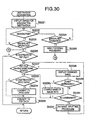
- Fig. 30 shows a flowchart illustrating an OBJECTIVE FILE DESIGNATING procedure which is called in the SCAN TO PCC procedure shown in Fig. 29.
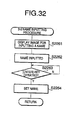
- Fig. 32 is a flowchart illustrating a THIRD NAME INPUTTING procedure. It should be noted that all the steps other than steps S2204 and S2217 of Fig. 29 are similar to those in the third or fourth embodiment, and description thereof will be omitted.
- a subroutine OBJECTIVE FILE DESIGNATING procedure is called, which is shown in Fig. 30.
- OBJECTIVE FILE DESIGNATING procedure one of a plurality of PDF files or a plurality of pieces of image data stored in the external storage 218 or the internal storage 204a is designated as a file/data, to which new image data is added, by the user.
- Fig. 30 firstly an image for selecting a plurality of PDF files and/or a plurality of pieces of image data stored in the external storage 218 or the internal storage 204a is displayed on the LCD 208 (S2221). Although the image is not shown in a drawing, it is similar to the image shown in Fig. 24, and the items 235 are replaced with a plurality of PDF files and a plurality of pieces of image data.
- a PDF file i.e., new image data is to be added at the end of the designated PDF file.
- S2226 If the designated item is not a PDF file (S2226; NO), control proceeds to S2227.
- the item designated in S2222 and S2223 represents image data of some format.
- S2227 it is judged whether there is a PDF file having the same name as the designated image data in the external storage 218 or the internal storage 204a. If a PDF file having the same name as the designate image data is not stored in the external storage 218 or the internal storage 204a (S2227: NO), it is judged whether the data format of the designated image data is a JPEG format (S2233). If the data format is the JPEG format, control proceeds to S2235, where the designated image data is converted into a PDF file.
- JPEG format JPEG format
- the designated image data is not of the JPEG format data (S2233: NO)
- the designated image data is converted into JPEG format data (S2234), and then is converted into the PDF file (S2235). Thereafter, control returns to the SCAN TO PCC procedure shown in Fig. 29.
- a PDF file having the same name as the designated image data is stored in the external storage 218 or the internal storage 204a (S2227: YES)
- the name of the designated image data is changed, and the changed name is displayed on the LCD 208 (S2228).
- the name AAA in the above example is automatically generated and no file/data stored in the external storage 218 or internal storage 204a does not have the name AAA. Following the message displayed on the LCD 208, the user is capable of changing the name of the designated image data.
- Fig. 32 firstly, an image for inputting the new name is displayed on the LCD 208 (S2261). Then, the user inputs the new name through the ten-keys 209a and the like (S2262). After the input of the new name, the user depresses the enter key 209d to validate the new name. Accordingly, in S2263, it is judged whether the enter key 209d is depressed. Until the enter key 209d is depressed, control stays at S2263, and when the enter key 209d is depressed (S2263: YES), the name is validated (S2264). Then, control returns to S2227 of Fig. 30.
- the user's intention is to newly store the new image data in the external storage 218 or the internal storage 204a.
- the new data is stored as it is or after converted into the PDF file. Since the procedure shown in Fig. 25 is described above, it will not be explained again. It should be noted that, when the NEWLY STORING procedure is called at S2225, when the decision at S2163 of Fig. 26 is YES, control proceeds to S2226 of Fig. 30. If S2156 of Fig. 25 is finished, then the procedure shown in Fig. 29 is terminated.
- steps S2205 through S2216 are the same as steps S2115 through S2126 of the third embodiment or steps S2175 through S2186 of the fourth embodiment, and will not be described again.
- the JPEG format data created in S2216 or S2212 is added at the end of the PDF file designated in S2204 or the PDF file which is converted from the image data designated in S2204 to update the PDF file. Then the updated PDF file is stored in the external storage 218 or the internal storage 204a, and the procedure shown in Fig. 29 is terminated.
- a candidate of the new name is automatically presented to the user.
- the user can accept the candidate, overwrite the old PDF file with the new PDF file or save the new PDF file with a new name, which is input by the user.
- FIG. 31 shows a flowchart illustrating the SCAN TO PCC procedure according to the sixth embodiment.
- Fig. 32 is, as described above, a flowchart illustrating the THIRD NAME INPUTTING procedure.
- steps S2243 and S2245 through S2256 are similar to those in the second, third and fourth embodiments, and description thereof is not repeated. Further, S2244 is similar to S2232 (Fig. 30) and S2259 is similar to S226 (Fig. 13). Thus, description thereof will also be omitted.
- the new data is added at the end of the PDF file having the same name.
- the thus updated PDF file is re-stored in the external storage 218 or the internal storage 204a.
- the new image data is stored in the external storage 218 or the internal storage 204a as image data of the PDF file with the new name input by the user.
- Fig. 33 shows a flowchart illustrating the SCAN TO PCC procedure.
- Steps S2273 through S2286 of Fig. 33 are similar to S2243 through S2256 (Fig. 31) of the sixth embodiment, and the description thereof will be omitted.
- the JPEG format data is converted into the PDF file. Then, in S2291. the newly stored image data is added to the end of the thus converted PDF file. The updated PDF file is then re-stored in the external storage 218 or the internal storage 204a, and the procedure shown in Fig. 33 is terminated.
- the subroutine has been explained in the foregoing description. After the NEWLY STORING procedure is finished, the procedure shown in Fig. 33 is terminated.
- the image data having the same name as the data to be newly stored is converted into JPEG data (if necessary), and then the JPEG data is converted into the PDF file. Then, the newly stored image data is added at the end of the thus converted PDF file.
- Figs. 34 and 35 show a flowchart illustrating the SCAN TO PCC procedure according to the eighth embodiment.
- Steps S2303 through S2316 of Fig. 34 are similar to S2243 through S2256 of the sixth embodiment or S2273 through S2286 of the seventh embodiment, and accordingly, description thereof will not be repeated, and S2137 and the following steps will be described in detail.
- the PDF files and/or the image data having the same name are listed on the LCD 208 (S2320) and ask the user to designate one of the listed PDF files and/or image data.
- designation of one of the PDF files and/or image data can be done with use of a highlighting cursor, arrow keys 209c and ten-keys 209a (S2321).
- S2319: NO If it is judged that a plurality of PDF files or the image data having the same name as was set in S2304 are not stored in the external storage 218 or the internal storage 204a (i.e., a single PDF file or the image data having the same name is found) (S2319: NO), S2320 and S2321 are skipped, and control proceeds to S2322.
- S2322 it is judged whether the new image data is to be added to a PDF file. If so (S2322: YES), control proceeds to S2332. If the designation to which the new image data is added is not the PDF file (S2322: NO), control proceeds to S2323. Steps S2322 through S2331 are similar to S2226 through S2235 of Fig. 30, and therefore, will not be described in detail.
- the PDF file to which the new image data is added is the PDF file (S2322: YES), to the PDF file, or if the destination to which the new image data is added is the image data (S2322: NO), and the image data is converted to the PDF file (S2331) to the converted PDF file, the new image is added at the end thereof (S2332). Then, the PDF file to which the new image data is added is re-stored in the external storage 218 or the internal storage 204a, and the procedure shown in Figs. 34 and 35 is terminated.
- the eighth embodiment if the name of the image data to be newly stored is input and PDF files and/or image data having the same name have already been stored in the external storage 218 or the internal storage 204a, they are informed to the user so that one of them is selected. Then, the new image data is added to the selected PDF file/image data. In this case, if the PDF file is selected as the destination, the new image data is added at the end of the selected PDF file. If the image data is selected, it is converted into the PDF file, and then the new image data is added to the end of the converted PDF file.
- both the PDF files and image data having the same name as the name of the image data to be newly stored are stored in the external storage 218 or the internal storage 204a, selection is made by the user.
- priority may be given to the PDF files and image data in such a case. If the user selects the image data to which the new image is to be added, and there exists a PDF file having the same name of the selected image data, the name of the selected image data may be changed, and then the image data is converted into image data having a predetermined format, and is further converted into a PDF file. Then, the new image data is added at the end of the thus created PDF file.
- each of the embodiments can be modified such that the user can select a desired one of the slots/external storages.
- a predetermined slot/external storage may be specified as default slot/external storage.
- the internal storage 204a may be used as a temporary storage if the remaining capacity of the external storage 218 is insufficient. In such a case, it is preferable that a message indicating the external storage 218 should be exchanged is displayed.
- the user designate only one PDF file or one piece of image data as a destination to which the new image data is added.
- the invention need not be limited to such a configuration, and each embodiment may be modified such that the user can select a plurality of PDF files and/or image data and the new image data may be added to all of the selected PDF files/image data.
- the MFPs and procedures according to the present invention can be realized when appropriate programs are provided and executed by a personal computer or the like.
- Such programs may be stored in recording medium such as a flexible disk, CD-ROM, memory cards and the like and distributed. Alternatively or optionally, such programs can be distributed through networks such as the Internet.
Landscapes
- Engineering & Computer Science (AREA)
- Multimedia (AREA)
- Signal Processing (AREA)
- Storing Facsimile Image Data (AREA)
- Facsimiles In General (AREA)
- Information Retrieval, Db Structures And Fs Structures Therefor (AREA)
- Processing Or Creating Images (AREA)
- Control Or Security For Electrophotography (AREA)
- Television Signal Processing For Recording (AREA)
- Ultra Sonic Daignosis Equipment (AREA)
- Camera Data Copying Or Recording (AREA)
- Projection-Type Copiers In General (AREA)
Applications Claiming Priority (4)
| Application Number | Priority Date | Filing Date | Title |
|---|---|---|---|
| JP2002092494 | 2002-03-28 | ||
| JP2002092494 | 2002-03-28 | ||
| JP2002202608A JP2004048349A (ja) | 2002-07-11 | 2002-07-11 | 画像データ処理装置 |
| JP2002202608 | 2002-07-11 |
Publications (3)
| Publication Number | Publication Date |
|---|---|
| EP1349366A2 true EP1349366A2 (fr) | 2003-10-01 |
| EP1349366A3 EP1349366A3 (fr) | 2005-07-20 |
| EP1349366B1 EP1349366B1 (fr) | 2008-12-31 |
Family
ID=27807034
Family Applications (1)
| Application Number | Title | Priority Date | Filing Date |
|---|---|---|---|
| EP03006959A Expired - Lifetime EP1349366B1 (fr) | 2002-03-28 | 2003-03-26 | Appareil de prise de vue ayant une fonction de stockage de données d'images |
Country Status (5)
| Country | Link |
|---|---|
| US (1) | US7911643B2 (fr) |
| EP (1) | EP1349366B1 (fr) |
| CN (2) | CN2697728Y (fr) |
| AT (1) | ATE419711T1 (fr) |
| DE (1) | DE60325522D1 (fr) |
Cited By (1)
| Publication number | Priority date | Publication date | Assignee | Title |
|---|---|---|---|---|
| EP3337151A1 (fr) * | 2005-08-29 | 2018-06-20 | Canon Kabushiki Kaisha | Procédé d'affichage d'une interface utilisateur conformément à l'intention de l'utilisateur |
Families Citing this family (43)
| Publication number | Priority date | Publication date | Assignee | Title |
|---|---|---|---|---|
| US7746510B2 (en) * | 2001-02-01 | 2010-06-29 | Pandipati Radha K C | Receipts scanner and financial organizer |
| US10453151B2 (en) | 2001-02-01 | 2019-10-22 | Kris Engineering, Inc. | Receipts scanner and financial organizer |
| US7081819B2 (en) | 2002-07-09 | 2006-07-25 | Neology, Inc. | System and method for providing secure identification solutions |
| JP4419393B2 (ja) * | 2003-01-15 | 2010-02-24 | パナソニック株式会社 | 情報表示装置及び情報処理装置 |
| JP2004272439A (ja) * | 2003-03-06 | 2004-09-30 | Konica Minolta Holdings Inc | ディレクトリ検索方法、ディレクトリ検索装置、記憶媒体及びプログラム |
| US20060209333A1 (en) * | 2003-07-11 | 2006-09-21 | Yoshiaki Takida | Next-generation facsimile machine of internet terminal type |
| US20050033769A1 (en) * | 2003-08-08 | 2005-02-10 | Kyocera Mita Corporation | File processing apparatus, file processing method, and file processing program product |
| EP1580976A3 (fr) * | 2004-03-19 | 2010-04-21 | Ricoh Company, Ltd. | Appareil de traitement d'images, méthode de génération et de transmission de données d'images et programme de génération et de transmission de données d'images |
| US8259338B2 (en) | 2004-09-21 | 2012-09-04 | Samsung Electronics Co., Ltd. | Image forming apparatus and method of file conversion |
| US20060203281A1 (en) * | 2005-03-08 | 2006-09-14 | Lexmark International, Inc. | Multi-function device with user selectable copy and scan mode |
| US20060215205A1 (en) * | 2005-03-22 | 2006-09-28 | Maki Ohyama | Image processing apparatus, image processing method and image processing program |
| JP2006270796A (ja) * | 2005-03-25 | 2006-10-05 | Fuji Xerox Co Ltd | 印刷システムおよび画像読取装置およびその制御方法 |
| US7548337B2 (en) * | 2005-10-27 | 2009-06-16 | Kyocera Mita Corporation | Image forming device |
| US7583402B2 (en) * | 2005-10-27 | 2009-09-01 | Kyocera Mita Corporation | Image forming device and image forming system |
| US20070097418A1 (en) * | 2005-10-27 | 2007-05-03 | Keizen Kanazawa | Job management system and program for the same |
| JP2007174335A (ja) * | 2005-12-22 | 2007-07-05 | Fuji Xerox Co Ltd | 画像読取装置および画像読取装置における電子文書作成方法および電子文書作成プログラム |
| JP4492542B2 (ja) * | 2006-01-06 | 2010-06-30 | セイコーエプソン株式会社 | 印刷用プログラム、印刷方法、及びホスト装置 |
| JP4750589B2 (ja) * | 2006-03-13 | 2011-08-17 | 株式会社沖データ | 複合装置 |
| EP1936946B1 (fr) * | 2006-12-22 | 2019-06-19 | Brother Kogyo Kabushiki Kaisha | Processeur de données |
| JP4311460B2 (ja) * | 2007-02-28 | 2009-08-12 | ブラザー工業株式会社 | 画像読取装置 |
| JP5159126B2 (ja) * | 2007-03-09 | 2013-03-06 | キヤノン株式会社 | 多機能処理装置及びその制御方法 |
| US9224073B2 (en) * | 2007-03-28 | 2015-12-29 | Brother Kogyo Kabushiki Kaisha | Data processor saving data indicating progress status of printing process retrievable by client |
| JP4544257B2 (ja) * | 2007-03-28 | 2010-09-15 | ブラザー工業株式会社 | 印刷装置、印刷指令プログラム、及び印刷方法 |
| JP2008271091A (ja) * | 2007-04-19 | 2008-11-06 | Ricoh Co Ltd | 画像配信装置および画像形成装置 |
| JP5064943B2 (ja) | 2007-09-05 | 2012-10-31 | 株式会社リコー | 情報処理装置、情報処理方法及び情報処理プログラム |
| JP2009070308A (ja) * | 2007-09-17 | 2009-04-02 | Brother Ind Ltd | コンテンツ閲覧端末及びコンテンツ閲覧プログラム |
| JP4407737B2 (ja) * | 2007-09-28 | 2010-02-03 | コニカミノルタビジネステクノロジーズ株式会社 | 画像形成装置及びプログラム |
| TW201115347A (en) * | 2009-10-30 | 2011-05-01 | Avision Inc | Apparatus for storing data to portable storage with high priority |
| US20110242578A1 (en) | 2010-03-31 | 2011-10-06 | Konica Minolta Systems Laboratory, Inc. | Small aio (all in one) printer that uses external storage for the purpose of paper collation |
| KR20120043437A (ko) * | 2010-10-26 | 2012-05-04 | 삼성전자주식회사 | 화상형성장치를 이용하여 문서를 저장하는 방법 및 이를 수행하는 시스템 |
| JP5482679B2 (ja) | 2011-01-27 | 2014-05-07 | ブラザー工業株式会社 | 制御装置 |
| JP5353932B2 (ja) * | 2011-03-25 | 2013-11-27 | ブラザー工業株式会社 | 情報処理プログラム、情報処理装置、および情報処理方法 |
| JP5360106B2 (ja) | 2011-03-25 | 2013-12-04 | ブラザー工業株式会社 | 情報処理プログラム、情報処理装置、および情報処理方法 |
| JP5801650B2 (ja) * | 2011-08-25 | 2015-10-28 | キヤノン株式会社 | 画像処理装置、制御方法およびプログラム |
| JP6183025B2 (ja) | 2013-07-23 | 2017-08-23 | ブラザー工業株式会社 | 情報処理プログラム、情報処理装置、および情報処理装置の制御方法 |
| JP5842883B2 (ja) | 2013-08-28 | 2016-01-13 | コニカミノルタ株式会社 | 携帯端末装置、画像処理装置からの読み取りデータの取得方法及び取得プログラム |
| JP6244876B2 (ja) | 2013-12-17 | 2017-12-13 | ブラザー工業株式会社 | 情報処理プログラム、情報処理装置、および情報処理装置の制御方法 |
| JP6379783B2 (ja) * | 2014-07-17 | 2018-08-29 | 富士ゼロックス株式会社 | 情報処理装置、情報処理システム及び情報処理プログラム |
| JP6384387B2 (ja) * | 2015-03-31 | 2018-09-05 | ブラザー工業株式会社 | 画像読取装置、及びプログラム |
| CN104715070A (zh) * | 2015-04-01 | 2015-06-17 | 武汉中科通达高新技术股份有限公司 | 一种大图像文件及生成和读取方法 |
| JP6674216B2 (ja) * | 2015-09-15 | 2020-04-01 | キヤノン株式会社 | 画像通信装置とその制御方法、及びプログラム |
| US10970779B2 (en) * | 2017-09-10 | 2021-04-06 | Braustin Homes, Inc. | System for facilitating mobile home purchase transactions |
| US11303846B2 (en) * | 2017-12-06 | 2022-04-12 | Medicapture, Inc. | Imaging system and method capable of processing multiple imaging formats |
Family Cites Families (18)
| Publication number | Priority date | Publication date | Assignee | Title |
|---|---|---|---|---|
| US5027221A (en) * | 1990-10-10 | 1991-06-25 | Fuji Xerox Co., Ltd. | Digital image recording system with preset control for selecting output formats based on the selected amount of pixel color and density data |
| US5299018A (en) | 1992-03-20 | 1994-03-29 | Xerox Corporation | System and method for storing received facsimile image data in computer memory |
| US5461488A (en) * | 1994-09-12 | 1995-10-24 | Motorola, Inc. | Computerized facsimile (FAX) system and method of operation |
| US5956158A (en) * | 1997-04-01 | 1999-09-21 | Storm Technology, Inc. | Scanner powered by peripheral bus |
| JP3375852B2 (ja) | 1997-06-13 | 2003-02-10 | 三洋電機株式会社 | ディジタルカメラ |
| JPH11219423A (ja) | 1998-02-03 | 1999-08-10 | Matsushita Electric Ind Co Ltd | 画像処理装置 |
| JP2000016833A (ja) | 1998-06-30 | 2000-01-18 | Central Glass Co Ltd | 絶縁性被膜形成用結晶性ガラスおよび該ガラスを熱処理してなる結晶質被膜 |
| US6594650B2 (en) * | 1998-09-04 | 2003-07-15 | Canon Kabushiki Kaisha | File management system and its method and storage medium |
| JP4146950B2 (ja) * | 1998-11-04 | 2008-09-10 | キヤノン株式会社 | 画像形成装置、画像形成装置における表示制御方法及び記憶媒体 |
| CN1295306A (zh) * | 1999-11-09 | 2001-05-16 | 全友电脑股份有限公司 | 具有便携式数据存储媒体的扫描器 |
| US6961139B1 (en) * | 1999-11-30 | 2005-11-01 | Konica Corporation | Image forming system, method for storing image data and memory media |
| US6980331B1 (en) * | 1999-12-02 | 2005-12-27 | Lucent Technologies Inc. | Automatic send to embedded fax/e-mail address |
| EP1257967A2 (fr) * | 2000-02-09 | 2002-11-20 | Moore Wallace North America, Inc. | Imagerie de document a contenu statique et a donnees variables |
| JP4497733B2 (ja) | 2000-02-22 | 2010-07-07 | キヤノン株式会社 | データ処理装置及びデータ処理方法 |
| JP4794718B2 (ja) | 2000-06-13 | 2011-10-19 | キヤノン株式会社 | 情報処理装置 |
| US7336378B2 (en) | 2000-08-07 | 2008-02-26 | Minolta Co., Ltd. | Image processing with recognized character codes |
| JP4374752B2 (ja) | 2000-08-07 | 2009-12-02 | コニカミノルタビジネステクノロジーズ株式会社 | 画像形成装置 |
| US7224491B2 (en) * | 2001-03-28 | 2007-05-29 | Minolta Co., Ltd. | Data communication apparatus, data communication system, data communication method, control program, and computer readable storage medium stored with control program |
-
2003
- 2003-03-25 CN CNU032415761U patent/CN2697728Y/zh not_active Expired - Lifetime
- 2003-03-25 CN CNB031107427A patent/CN100550967C/zh not_active Expired - Fee Related
- 2003-03-26 AT AT03006959T patent/ATE419711T1/de not_active IP Right Cessation
- 2003-03-26 DE DE60325522T patent/DE60325522D1/de not_active Expired - Lifetime
- 2003-03-26 EP EP03006959A patent/EP1349366B1/fr not_active Expired - Lifetime
- 2003-03-26 US US10/396,344 patent/US7911643B2/en not_active Expired - Fee Related
Cited By (2)
| Publication number | Priority date | Publication date | Assignee | Title |
|---|---|---|---|---|
| EP3337151A1 (fr) * | 2005-08-29 | 2018-06-20 | Canon Kabushiki Kaisha | Procédé d'affichage d'une interface utilisateur conformément à l'intention de l'utilisateur |
| US10795546B2 (en) | 2005-08-29 | 2020-10-06 | Canon Kabushiki Kaisha | Method for displaying user interface in accordance with device connection |
Also Published As
| Publication number | Publication date |
|---|---|
| HK1056959A1 (en) | 2004-03-05 |
| DE60325522D1 (de) | 2009-02-12 |
| ATE419711T1 (de) | 2009-01-15 |
| EP1349366B1 (fr) | 2008-12-31 |
| US7911643B2 (en) | 2011-03-22 |
| EP1349366A3 (fr) | 2005-07-20 |
| CN2697728Y (zh) | 2005-05-04 |
| US20030184803A1 (en) | 2003-10-02 |
| CN1449181A (zh) | 2003-10-15 |
| CN100550967C (zh) | 2009-10-14 |
Similar Documents
| Publication | Publication Date | Title |
|---|---|---|
| EP1349366B1 (fr) | Appareil de prise de vue ayant une fonction de stockage de données d'images | |
| US7339695B2 (en) | Data processing device, data processing method, and data processing program for recognizing characters in a URL | |
| JP4086393B2 (ja) | 通信システム、通信装置及びそれらの制御方法 | |
| US7161697B2 (en) | Method and apparatus for transmitting information to different destinations | |
| US7440131B2 (en) | Internet facsimile apparatus and e-mail receiving method | |
| US20020048046A1 (en) | Method of processing data in various applications | |
| JP2008193682A (ja) | 画像処理装置、画像処理方法 | |
| US20060050297A1 (en) | Data control device, method for controlling the same, image output device, and computer program product | |
| US20090141305A1 (en) | Data processing apparatus | |
| US20060050292A1 (en) | Data management device and method, image output device, and computer program product | |
| US20060061843A1 (en) | Image filing apparatus | |
| JP3452234B2 (ja) | 画像入力装置 | |
| CN100452821C (zh) | 具有图像数据存储功能的图像装置 | |
| US7376637B2 (en) | Image transmission apparatus which transmits image data as an image file or a plurality of image files | |
| US20040030684A1 (en) | Data processing device capable of outputting data as desired by users | |
| HK1056959B (en) | Imaging apparatus having image data storing function | |
| JP2009094597A (ja) | 文書管理装置、文書管理プログラム、しおり画像付原稿生成装置、しおり画像付原稿生成プログラム | |
| JP3872963B2 (ja) | 画像入力装置 | |
| US7656549B2 (en) | Image forming apparatus | |
| JP2003108496A (ja) | 画像送信装置 | |
| JP2008193588A (ja) | 画像処理装置,プログラム,および記録媒体 | |
| JP2005078490A (ja) | 画像処理装置 | |
| JP4337277B2 (ja) | データ送信装置、データ送信方法、データ送信プログラムおよびデータ送信プログラムを記録したコンピュータ読み取り可能な記録媒体 | |
| JP2005065067A (ja) | 画像処理装置 | |
| JP2003319125A (ja) | データ送信装置、データ送信方法及びプログラム |
Legal Events
| Date | Code | Title | Description |
|---|---|---|---|
| PUAI | Public reference made under article 153(3) epc to a published international application that has entered the european phase |
Free format text: ORIGINAL CODE: 0009012 |
|
| AK | Designated contracting states |
Kind code of ref document: A2 Designated state(s): AT BE BG CH CY CZ DE DK EE ES FI FR GB GR HU IE IT LI LU MC NL PT RO SE SI SK TR |
|
| AX | Request for extension of the european patent |
Extension state: AL LT LV MK RO |
|
| PUAL | Search report despatched |
Free format text: ORIGINAL CODE: 0009013 |
|
| AK | Designated contracting states |
Kind code of ref document: A3 Designated state(s): AT BE BG CH CY CZ DE DK EE ES FI FR GB GR HU IE IT LI LU MC NL PT RO SE SI SK TR |
|
| AX | Request for extension of the european patent |
Extension state: AL LT LV MK RO |
|
| 17P | Request for examination filed |
Effective date: 20050728 |
|
| AKX | Designation fees paid |
Designated state(s): AT BE BG CH CY CZ DE DK EE ES FI FR GB GR HU IE IT LI LU MC NL PT RO SE SI SK TR |
|
| 17Q | First examination report despatched |
Effective date: 20070604 |
|
| GRAP | Despatch of communication of intention to grant a patent |
Free format text: ORIGINAL CODE: EPIDOSNIGR1 |
|
| GRAS | Grant fee paid |
Free format text: ORIGINAL CODE: EPIDOSNIGR3 |
|
| GRAA | (expected) grant |
Free format text: ORIGINAL CODE: 0009210 |
|
| AK | Designated contracting states |
Kind code of ref document: B1 Designated state(s): AT BE BG CH CY CZ DE DK EE ES FI FR GB GR HU IE IT LI LU MC NL PT RO SE SI SK TR |
|
| REG | Reference to a national code |
Ref country code: GB Ref legal event code: FG4D Ref country code: CH Ref legal event code: EP |
|
| REF | Corresponds to: |
Ref document number: 60325522 Country of ref document: DE Date of ref document: 20090212 Kind code of ref document: P |
|
| REG | Reference to a national code |
Ref country code: IE Ref legal event code: FG4D |
|
| PG25 | Lapsed in a contracting state [announced via postgrant information from national office to epo] |
Ref country code: SI Free format text: LAPSE BECAUSE OF FAILURE TO SUBMIT A TRANSLATION OF THE DESCRIPTION OR TO PAY THE FEE WITHIN THE PRESCRIBED TIME-LIMIT Effective date: 20081231 Ref country code: FI Free format text: LAPSE BECAUSE OF FAILURE TO SUBMIT A TRANSLATION OF THE DESCRIPTION OR TO PAY THE FEE WITHIN THE PRESCRIBED TIME-LIMIT Effective date: 20081231 Ref country code: NL Free format text: LAPSE BECAUSE OF FAILURE TO SUBMIT A TRANSLATION OF THE DESCRIPTION OR TO PAY THE FEE WITHIN THE PRESCRIBED TIME-LIMIT Effective date: 20081231 |
|
| REG | Reference to a national code |
Ref country code: HK Ref legal event code: GR Ref document number: 1056959 Country of ref document: HK |
|
| NLV1 | Nl: lapsed or annulled due to failure to fulfill the requirements of art. 29p and 29m of the patents act | ||
| PG25 | Lapsed in a contracting state [announced via postgrant information from national office to epo] |
Ref country code: EE Free format text: LAPSE BECAUSE OF FAILURE TO SUBMIT A TRANSLATION OF THE DESCRIPTION OR TO PAY THE FEE WITHIN THE PRESCRIBED TIME-LIMIT Effective date: 20081231 Ref country code: ES Free format text: LAPSE BECAUSE OF FAILURE TO SUBMIT A TRANSLATION OF THE DESCRIPTION OR TO PAY THE FEE WITHIN THE PRESCRIBED TIME-LIMIT Effective date: 20090411 Ref country code: BE Free format text: LAPSE BECAUSE OF FAILURE TO SUBMIT A TRANSLATION OF THE DESCRIPTION OR TO PAY THE FEE WITHIN THE PRESCRIBED TIME-LIMIT Effective date: 20081231 Ref country code: RO Free format text: LAPSE BECAUSE OF FAILURE TO SUBMIT A TRANSLATION OF THE DESCRIPTION OR TO PAY THE FEE WITHIN THE PRESCRIBED TIME-LIMIT Effective date: 20081231 |
|
| PG25 | Lapsed in a contracting state [announced via postgrant information from national office to epo] |
Ref country code: AT Free format text: LAPSE BECAUSE OF FAILURE TO SUBMIT A TRANSLATION OF THE DESCRIPTION OR TO PAY THE FEE WITHIN THE PRESCRIBED TIME-LIMIT Effective date: 20081231 Ref country code: SE Free format text: LAPSE BECAUSE OF FAILURE TO SUBMIT A TRANSLATION OF THE DESCRIPTION OR TO PAY THE FEE WITHIN THE PRESCRIBED TIME-LIMIT Effective date: 20090331 Ref country code: PT Free format text: LAPSE BECAUSE OF FAILURE TO SUBMIT A TRANSLATION OF THE DESCRIPTION OR TO PAY THE FEE WITHIN THE PRESCRIBED TIME-LIMIT Effective date: 20090601 Ref country code: CZ Free format text: LAPSE BECAUSE OF FAILURE TO SUBMIT A TRANSLATION OF THE DESCRIPTION OR TO PAY THE FEE WITHIN THE PRESCRIBED TIME-LIMIT Effective date: 20081231 |
|
| PG25 | Lapsed in a contracting state [announced via postgrant information from national office to epo] |
Ref country code: SK Free format text: LAPSE BECAUSE OF FAILURE TO SUBMIT A TRANSLATION OF THE DESCRIPTION OR TO PAY THE FEE WITHIN THE PRESCRIBED TIME-LIMIT Effective date: 20081231 |
|
| PG25 | Lapsed in a contracting state [announced via postgrant information from national office to epo] |
Ref country code: DK Free format text: LAPSE BECAUSE OF FAILURE TO SUBMIT A TRANSLATION OF THE DESCRIPTION OR TO PAY THE FEE WITHIN THE PRESCRIBED TIME-LIMIT Effective date: 20081231 Ref country code: MC Free format text: LAPSE BECAUSE OF NON-PAYMENT OF DUE FEES Effective date: 20090331 |
|
| REG | Reference to a national code |
Ref country code: CH Ref legal event code: PL |
|
| PLBE | No opposition filed within time limit |
Free format text: ORIGINAL CODE: 0009261 |
|
| STAA | Information on the status of an ep patent application or granted ep patent |
Free format text: STATUS: NO OPPOSITION FILED WITHIN TIME LIMIT |
|
| 26N | No opposition filed |
Effective date: 20091001 |
|
| PG25 | Lapsed in a contracting state [announced via postgrant information from national office to epo] |
Ref country code: IE Free format text: LAPSE BECAUSE OF NON-PAYMENT OF DUE FEES Effective date: 20090326 Ref country code: CH Free format text: LAPSE BECAUSE OF NON-PAYMENT OF DUE FEES Effective date: 20090331 Ref country code: BG Free format text: LAPSE BECAUSE OF FAILURE TO SUBMIT A TRANSLATION OF THE DESCRIPTION OR TO PAY THE FEE WITHIN THE PRESCRIBED TIME-LIMIT Effective date: 20090331 Ref country code: LI Free format text: LAPSE BECAUSE OF NON-PAYMENT OF DUE FEES Effective date: 20090331 |
|
| PG25 | Lapsed in a contracting state [announced via postgrant information from national office to epo] |
Ref country code: GR Free format text: LAPSE BECAUSE OF FAILURE TO SUBMIT A TRANSLATION OF THE DESCRIPTION OR TO PAY THE FEE WITHIN THE PRESCRIBED TIME-LIMIT Effective date: 20090401 |
|
| PG25 | Lapsed in a contracting state [announced via postgrant information from national office to epo] |
Ref country code: IT Free format text: LAPSE BECAUSE OF FAILURE TO SUBMIT A TRANSLATION OF THE DESCRIPTION OR TO PAY THE FEE WITHIN THE PRESCRIBED TIME-LIMIT Effective date: 20081231 |
|
| PG25 | Lapsed in a contracting state [announced via postgrant information from national office to epo] |
Ref country code: LU Free format text: LAPSE BECAUSE OF NON-PAYMENT OF DUE FEES Effective date: 20090326 |
|
| PG25 | Lapsed in a contracting state [announced via postgrant information from national office to epo] |
Ref country code: HU Free format text: LAPSE BECAUSE OF FAILURE TO SUBMIT A TRANSLATION OF THE DESCRIPTION OR TO PAY THE FEE WITHIN THE PRESCRIBED TIME-LIMIT Effective date: 20090701 |
|
| PG25 | Lapsed in a contracting state [announced via postgrant information from national office to epo] |
Ref country code: TR Free format text: LAPSE BECAUSE OF FAILURE TO SUBMIT A TRANSLATION OF THE DESCRIPTION OR TO PAY THE FEE WITHIN THE PRESCRIBED TIME-LIMIT Effective date: 20081231 |
|
| PG25 | Lapsed in a contracting state [announced via postgrant information from national office to epo] |
Ref country code: CY Free format text: LAPSE BECAUSE OF FAILURE TO SUBMIT A TRANSLATION OF THE DESCRIPTION OR TO PAY THE FEE WITHIN THE PRESCRIBED TIME-LIMIT Effective date: 20081231 |
|
| REG | Reference to a national code |
Ref country code: FR Ref legal event code: PLFP Year of fee payment: 14 |
|
| REG | Reference to a national code |
Ref country code: FR Ref legal event code: PLFP Year of fee payment: 15 |
|
| REG | Reference to a national code |
Ref country code: FR Ref legal event code: PLFP Year of fee payment: 16 |
|
| PGFP | Annual fee paid to national office [announced via postgrant information from national office to epo] |
Ref country code: GB Payment date: 20180223 Year of fee payment: 16 |
|
| PGFP | Annual fee paid to national office [announced via postgrant information from national office to epo] |
Ref country code: FR Payment date: 20180223 Year of fee payment: 16 |
|
| PGFP | Annual fee paid to national office [announced via postgrant information from national office to epo] |
Ref country code: DE Payment date: 20190215 Year of fee payment: 17 |
|
| GBPC | Gb: european patent ceased through non-payment of renewal fee |
Effective date: 20190326 |
|
| PG25 | Lapsed in a contracting state [announced via postgrant information from national office to epo] |
Ref country code: GB Free format text: LAPSE BECAUSE OF NON-PAYMENT OF DUE FEES Effective date: 20190326 |
|
| PG25 | Lapsed in a contracting state [announced via postgrant information from national office to epo] |
Ref country code: FR Free format text: LAPSE BECAUSE OF NON-PAYMENT OF DUE FEES Effective date: 20190331 |
|
| REG | Reference to a national code |
Ref country code: DE Ref legal event code: R119 Ref document number: 60325522 Country of ref document: DE |
|
| PG25 | Lapsed in a contracting state [announced via postgrant information from national office to epo] |
Ref country code: DE Free format text: LAPSE BECAUSE OF NON-PAYMENT OF DUE FEES Effective date: 20201001 |