EP1351477A1 - Système et méthode pour construire une représentation de données structurées pour une interface vocale - Google Patents
Système et méthode pour construire une représentation de données structurées pour une interface vocale Download PDFInfo
- Publication number
- EP1351477A1 EP1351477A1 EP02252422A EP02252422A EP1351477A1 EP 1351477 A1 EP1351477 A1 EP 1351477A1 EP 02252422 A EP02252422 A EP 02252422A EP 02252422 A EP02252422 A EP 02252422A EP 1351477 A1 EP1351477 A1 EP 1351477A1
- Authority
- EP
- European Patent Office
- Prior art keywords
- text
- page
- user
- block
- information
- Prior art date
- Legal status (The legal status is an assumption and is not a legal conclusion. Google has not performed a legal analysis and makes no representation as to the accuracy of the status listed.)
- Withdrawn
Links
Images








Classifications
-
- H—ELECTRICITY
- H04—ELECTRIC COMMUNICATION TECHNIQUE
- H04M—TELEPHONIC COMMUNICATION
- H04M3/00—Automatic or semi-automatic exchanges
- H04M3/42—Systems providing special services or facilities to subscribers
- H04M3/42136—Administration or customisation of services
- H04M3/42153—Administration or customisation of services by subscriber
-
- G—PHYSICS
- G10—MUSICAL INSTRUMENTS; ACOUSTICS
- G10L—SPEECH ANALYSIS TECHNIQUES OR SPEECH SYNTHESIS; SPEECH RECOGNITION; SPEECH OR VOICE PROCESSING TECHNIQUES; SPEECH OR AUDIO CODING OR DECODING
- G10L15/00—Speech recognition
- G10L15/26—Speech to text systems
-
- H—ELECTRICITY
- H04—ELECTRIC COMMUNICATION TECHNIQUE
- H04M—TELEPHONIC COMMUNICATION
- H04M3/00—Automatic or semi-automatic exchanges
- H04M3/42—Systems providing special services or facilities to subscribers
- H04M3/487—Arrangements for providing information services, e.g. recorded voice services or time announcements
- H04M3/493—Interactive information services, e.g. directory enquiries ; Arrangements therefor, e.g. interactive voice response [IVR] systems or voice portals
- H04M3/4938—Interactive information services, e.g. directory enquiries ; Arrangements therefor, e.g. interactive voice response [IVR] systems or voice portals comprising a voice browser which renders and interprets, e.g. VoiceXML
-
- H—ELECTRICITY
- H04—ELECTRIC COMMUNICATION TECHNIQUE
- H04M—TELEPHONIC COMMUNICATION
- H04M3/00—Automatic or semi-automatic exchanges
- H04M3/42—Systems providing special services or facilities to subscribers
- H04M3/42025—Calling or Called party identification service
- H04M3/42034—Calling party identification service
- H04M3/42059—Making use of the calling party identifier
- H04M3/42068—Making use of the calling party identifier where the identifier is used to access a profile
Definitions
- the present invention relates to a user interface for accessing structured data or information such as that accessible over the Internet as Web pages. It finds particular application in a voice-based interface for user access to the Internet.
- Stored data or information is generally structured to be accessed using an interface of a particular type.
- Web pages are generally structured using a markup language such as Hypertext Markup Language (HTML) or Extensible Markup Language (XML).
- HTML Hypertext Markup Language
- XML Extensible Markup Language
- Such documents are generally made up of storage units called entities which contain either parsed or unparsed data. Parsed data is made up of characters, some of which form character data and some of which form "markup”. "Markup" encodes information relating to the document's layout and logical structure.
- a known user interface for accessing such documents is an application running on a client PC, the application relying on a processor to read the data and provide information to the application about the documents.
- WAP Wireless Applications Protocol
- a markup language which is tailored to the WAP technology. That is, special WAP data is embedded server-side, within the Web page itself, either as an extension or a replacement to the markup language in which the page is normally constructed. The special WAP data is then read by client software which responds by presenting the page in a manner suitable for the screen available.
- client software which responds by presenting the page in a manner suitable for the screen available.
- client-side applications are known which remove some or all system data (i.e. tag blocks) and return simplified on-screen text, or only the on-screen text, from an HTML page.
- a formatting engine for formatting structured information which contains both content and descriptive material which describes that content, the formatting engine comprising:
- the content might for instance be the material intended for display to the user and the descriptive material might be markup material, constituting instructions concerning layout and logical structure of the displayed content, the instructions being for use by equipment receiving the structured information for delivery to a user.
- a page prepared using a markup language for display on a screen will usually contain material for display plus tag blocks as the descriptive, or markup, material.
- the tag blocks have related attributes which tell the receiving equipment such things as how big the displayed material should be, whether bold, italic or underlined, where it should appear on the screen and whether it performs a function such as providing a link to another file.
- An embodiment of the invention might provide a re-formatting engine which takes structured information formatted for a first type of user interface and reformats it for access with a second type of interface.
- Interface "type" as referred to here is intended to indicate a method of delivery of information to the user and/or a method of receipt of inputs from the user.
- the first type of user interface may for instance be generally screen-based, such as a PC which delivers visual information to the user, and the second type of interface may comprise a voice-based interface such as a telephone line which delivers and receives information by audio link.
- a useful embodiment of the invention might be used to access Web pages over the Internet and to reformat them prior to delivery to the user so that they can be presented in a manner intelligible via a voice interface such as a telephone line.
- the voice interface may be supported by at least a limited visual display, such as that of a WAP phone, or may stand alone.
- Embodiments of the present invention can be used with unmodified Web pages, and can therefore potentially access any page available over the Internet, but go significantly further than the client-side applications mentioned above which simply remove system data and return the on-screen text.
- Client-side applications of that type could not realistically be used to produce a useful form of Web page over a voice interface because very few Web pages are designed to be accessed in that way and the user would simply be faced with a long monologue.
- the information assembly means assembles a representation of the information which provides an overview of the layout of the information.
- the overview contains at least one link to another location in the information, in the manner of a link in an HTML document, which link can be selected and activated by a voice command. This allows a user to move around a page efficiently with just voice commands if necessary.
- the overview may also or instead contain at least one link to another document or file which can be selected and activated by a voice command.
- the structured information may contain more than one item of content and the descriptive material may contain values for the same attribute of at least two different items of content.
- the information processor may then process the descriptive material by comparing values for that attribute for the items of content so that the information assembly means can assemble a representation of the information which includes the result of the comparison.
- Such a comparison is particularly useful where the information processor processes the values for an attribute so as to get a measure of an average for a whole piece of descriptive material. It is then possible to assemble a representation of the information which picks out aspects which depart significantly from the average.
- the structured information contains text having different font sizes.
- An attribute contained in the descriptive material may then be font size and the information processor would compare the values given for font size so that the representation of the information could include an indication of relative font size. If the information processor assesses the average font size across the structured information, it becomes possible for the representation of the information to be, or to include, the following:
- the descriptive material in the structured information may also contain an indication of type for more than one item of content. For instance, where the structured information has been prepared in a markup language, there will usually be indications where items of content are headings or links or body text.
- the information processor may then process the descriptive material by collating data on indications of type for items of content so that the information assembly means can assemble a representation of the information which includes such data.
- An example of a representation of information including such data might then be, or include, the following: "There are three headings, three pieces of body text and four links.” The user could then potentially select the links and/or the headings and/or the body text for reading out over a voice interface.
- the information assembly means is arranged to provide a personalised framework from which structured information from more than one source can be preselected for access via the user interface.
- the personalised framework may itself comprise one or more files consituting a Web page, stored at an Internet site.
- the Web page could incorporate links to other Internet sites, or to preselected locations in other Web pages, so that the user can access dynamic content from several sources via their respective personalised framework.
- a Web page in this context is simply a file or a collection of files at an accessible URL and might include text, graphics, sound or any other content.
- a Web page may comprise one or more frames, each of which is a file, plus additional files such as style sheet definitions.
- a representation of the structured information might conveniently be assembled as a hierarchy of software objects.
- Objects might represent respective components of the structured information and the information processor might be arranged to recognise one or more prespecified properties of the components so that components with one or more prespecified properties can be recognised and dealt with in a particular way in an assembled representation.
- the information processor may be adapted to recognise, from the descriptive material in the structured information, the type of each component of an Internet page, and thus its relative importance. It might recognise whether it is a menu, a link or a table. Where a component of a Web page is a section or block of text, the information processor may recognise characteristics of the section or block which enable it to identify it as having a particular character. For instance, if the font size is much higher than the average for the Web page, the information processor can identify that section or block as being of relatively high importance.
- the information processor recognises information component type, it may be adapted to derive a title for a grouping of components of the same type for use in an assembled representation of the structured information.
- a title might be based on content or on the information component type. For instance, if the component type is hyperlinks, then the title for the grouping might be "Menu" or "List”.
- Particularly useful embodiments of the invention can be designed to present an Internet page to a user in a way that supports an easily comprehensible and maintainable mental model of the data, even if this is being done through a single channel interface, such as voice.
- a method of building a representation of one or more files, for use in an audio description of a Web page comprising the step of processing code for use in screen presentation of the file(s), said processing comprising:
- a property generated for a section might be relative.
- said processing of attributes of content component(s) associated with at least one section may comprise comparing said attributes with one or more attributes for one or more other sections, perhaps for all the sections associated with the file or files for which a representation is being built.
- a section can be described in relation to the rest of a Web page.
- a property might be generated with reference to a predetermined value or range of values for the property. If the latter is the case, and a collection of Web pages is being processed in which all of the Web pages share a particular feature, that feature can still be identified in the description.
- the step of assembling the set of one or more page sections might comprise the steps of:
- page blocks in this way allows a file or Web page to be divided up according to the code structure, and then to be manipulated further to create sections which reflect for instance an even, or a logical, distribution of contents. For instance, a Web page might be broken up into blocks of which some contain a high proportion of content components which are Hyperlinks. If those blocks are neighbouring on the page, a section might be created which includes all the blocks containing Hyperlinks and this section might then be described to the user as a menu.
- the code might be written in a markup language and the set of page blocks may be based on a nested table structure of the code.
- the number of sections in a set can be automated, for instance determined according to an algorithm, or can be determined manually by a user.
- a method according to this second aspect of the present invention may further comprise the step of referring to one or more grammars for use in the description of the at least one section.
- Such grammars can be static, for instance encoded as part of a speech interface, or dynamic.
- a user might embed a grammar in a file, for instance a Web page, which the system makes reference to during an interchange with a user. This is useful for instance where multiple users might have different meanings for the same variable in an interchange with the system, such as the phrase "My page”.
- User specific data, including data of this type may be provided as a configurable user profile. Such a user profile might be configured by the individual user or by a system administrator for one or more communities of user.
- Embodiments of the present invention can benefit from one or more of the following important characteristics:
- a possible general network context for the reformatting engine may be an Internet-based environment.
- the Internet 120 provides connectivity to data sources 105, 140 and servers 100, 135 for access by client devices, often via local networks 110.
- the client devices might be for instance personal computers 115, 125 or telephones 145.
- the personal computers 115, 125 will usually be connected to the Internet 120 via a local network 110 or directly.
- the telephones 145 may also be connected via a local network 110 or directly, using for example a "Voice over Internet Protocol" (VoIP), or may be connected via a conventional telephone network (not shown) using a voice and data bridge.
- VoIP Voice over Internet Protocol
- the reformatting engine 200 (sometimes alternatively referred to herein as "VoiceWeb”) comprises software installed on a server 100, 135.
- the server supporting the reformatting engine might be a server 100 in a local network 110, in which case client devices can dial in via the local network 110 without going beyond a network firewall, or might be a server 135 attached to the Internet 120 and thus potentially accessible more widely to client devices.
- the reformatting engine 200 is installed on a server 100 in a local network 110. It can receive inputs from client devices such as personal computers 115, 125 and telephones 145 and it can access Web pages over the Internet 120 or other network, or directly from a local file store 105.
- the reformatting engine 200 can receive inputs from either end users or system administrators operating either personal computers 115, 125 or telephones 145, for instance for personalisation and configuration purposes. Importantly, it can provide speech-based outputs to users which can comprise Web-based textual information reformatted for a voice channel.
- a personal computer 115, 125 can conveniently be used in an arrangement of known type.
- the personal computer 115, 125 acts as a client device provided with a screen user interface for viewing and/or downloading files, data or applications from appropriate servers 100, 135.
- the personal computer 115, 125 makes a connection to a port on the server machine which a server process is monitoring in order to respond to incoming client requests. Where the server machine is supporting the reformatting engine 200, an incoming client request at the monitored port is directed by the server process to the reformatting engine 200.
- the reformatting engine 200 of embodiments of the present invention is then capable of interactive use via a voice-based client device 150, 155 with no screen interface at all.
- the voice-based client device 150, 155 may for instance be of a standard type, such as an ordinary desk or mobile telephone. It can be represented as shown in Figures 1 and 2 as simply a microphone 155 together with a speaker 150 and it communicates with the reformatting engine via a speech interface 210.
- the reformatting engine 200 acts as a client device in respect of pages requested by a user. It can do that in respect of pages stored on its own server 100 or pages stored on any server accessible over the Internet 120.
- the reformatting engine 200 is a speech-based Web browsing application, sometimes referred to herein as "VoiceWeb", which is based on three primary sets of processes, the "Object Oriented Web Reformatting Framework" (“OOWRF”) 205, a speech interface 210 and user management processes 215. These three processes have access to data stored either as text documents or in a system database 105, via a known form of data interface 220.
- VoiceWeb Voice Object Oriented Web Reformatting Framework
- the main function of the reformatting engine 200 is to reformat text-based Web pages for voice access and this is provided by the OOWRF 205 which is an application for formatting the source code of an Internet page into a set of easily manipulated structures.
- the speech interface 210 delivers the reformatted Internet data to the user and provides the mechanisms for spoken communication using speech recognition and synthesis.
- the user management processes 215 support tasks such as personalisation or customisation and interaction in this context is usually via the data interface 220.
- the OOWRF 205 is object-oriented, but the speech interface 210 is developed primarily in the language known as "C" (without object use).
- the speech interface 210 allows a user to interact with the reformatting engine 200, for instance on a mobile phone, and get spoken access to any page over the Internet. Once the user has dialled in, they need to be able to interact with the system so as to identify the page they require access to. Thus the reformatting engine 200 needs to provide a way for the user to activate a link and the speech interface 210 together with the user management software 215 do this.
- the data interface 220 is usually preferable, in terms of speed and flexibility, and it can be used for customisation and personalisation.
- the data interface can be used to configure the speech interface 210 to offer preselected links. This can be done for instance either by a system administrator, acting for a community of users, or by individual users. One or more preselected links might go to a customised or personalised page and again the data interface 220 can be used to customise such a page.
- the data interface 220 itself is of known type and is therefore not discussed in detail.
- Data which can be loaded to, or is generated in use of, the system for administration, personalisation/customisation and to support the OOWRF 205 comprises:
- a set of HTML pages is selected as start pages for either an individual user or for a community of users. These pages are stored at URLs, local or remote, and each page is given a Web label, or title, which uniquely identifies it.
- the system stores a list of Web labels against URLs for the start pages. When a user wants to use the system, they dial in. The system responds with a voice message asking the user which start page they wish to select. The user responds by saying one of the Web labels and the system uses the list to find the page.
- the page is then processed by the reformatting engine 200, using the OOWRF 205, and described to the user who can then use the system to navigate around the processed page and/or activate links to other pages. Any other page the user selects is processed in the same way.
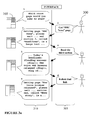
- the user 300 uses their client device 150, 155 to access VoiceWeb 200 on its server machine 100.
- VoiceWeb 200 responds by sending a speech message 310 to the user 300 and there is an interaction of speech messages 310, 305 in each direction.
- the initial response by VoiceWeb 200 to the user 300 allows the user to select a Web page to be read: "Which start page would you like to read?".
- the user has a list of "start pages” accessible by the system, each of which has a "Web label” which is a word or set of words entered as the user's title for the page. For instance, this list might be stored in the system database 105 or on the server machine 100 as a list of each start page's URL and Web label.
- the user responds by speaking the Web label for the start page they select. In the example shown in Figure 3a, the Web label selected is " BBC News ".
- VoiceWeb 200 downloads the selected start page, meanwhile informing the user by outputting the message "Getting page "BBC News", please wait" and processes it using the OOWRF 205 to convert it for use over a voice interface. For instance, the OOWRF 205 splits the page into numbered sections. Each of these sections is then briefly summarised in some way and reported to the user 300. The user can choose a section to be read out by saying its assigned title or the number of the section. For instance, in the example shown Voice Web has offered a section 3 called "Headlines”. The user can select this section by saying “ Read Section 3 ", " Read the third section” or " Read Headlines” and VoiceWeb 200 responds by reading out the selected section.
- any embedded link is identified to the user 300 by a short sound.
- the user 300 can select one of these indicated links by making a predetermined sound in response, such as saying "Follow that link”.
- VoiceWeb responds by activating the selected link either to move to a different place on the current page or to retrieve the page that the link refers to. In the example shown in Figure 3a, the selected link has been to another page and VoiceWeb responds by saying “Getting page "New voice browser released", please wait ".
- VoiceWeb 200 processes it in the same manner as a start page, described above, and so converts it for use over the voice interface, again by splitting it into numbered sections for selection by the user.
- the user 300 can use VoiceWeb 200 to browse the Internet.
- VoiceWeb 200 has the potential for a user 300 to personalise its response.
- the list of start pages might be user-specific in at least two different ways. Firstly, each user might select their own list of start pages and this would be influenced by individual factors such as each user's role in the workplace. Secondly, a given Web label might be used by two different users for two different URLs. An example of the latter is the Web label "My Page". Such a Web page would necessarily be located at different URLs for different users.
- Personalisation of this type can be managed within VoiceWeb 200 by a set of user management processes 215 supported by user data held by the VoiceWeb system.
- user data might include for example, for each user identity, a list of Web labels against URLs and one or more grammars (or lexicons) which the user might use to interact with non-customised pages.
- a user management process can ensure that the system refers to the user data so that it interacts with the user appropriately, for instance by downloading a page from the correct URL for that user and then by using a correct grammar in respect of the page.
- VoiceWeb 200 requires identification data in respect of the user. This could be acquired automatically, for instance using calling line identity ("CLI") where the user accesses VoiceWeb by telephone, or it could be done by requiring the user to input a personal identifier, such as a user name and/or password.
- CLI calling line identity
- Web server 135 delivering the Web pages is responding to the VoiceWeb application 200 as a client and not to something associated with the user, such as an application running on a user's PC.
- a Web server 135 often identifies the client by looking for a cookie from a requested Web site on the client machine 100.
- the client machine 100 is the machine 100 supporting VoiceWeb, which fetches and processes pages for multiple end users.
- identification cookie Since only one identification cookie can exist for each requested Web site, it is not possible to use cookie functionality to identify individual users. However, for any site that requests identification data entry (e.g. username entry for personal email and/or password), it would again be possible to identify individual users and thus to provide personalised Web pages.
- This form of personalised access can be done on behalf of the user by the VoiceWeb system 200 by storing the identification data entry for the relevant Web site and user, and using it when the user logs on to the site via VoiceWeb.
- the identification data could for instance be entered into a VoiceWeb system database 105 by the user via the personal computer 115, 125 and data interface mentioned above.
- personalized or customised pages are just like any other pages as far as the OOWRF 205 is concerned.
- the user management software 215 determines the identity of the user and dynamically generates the start page using data stored in respect of that user in the system database 105.
- the generated start page is then processed by the OOWRF 205 and sent to the user's client device 150, 155 in the same way as a Web page accessed over the Internet and containing static data would be sent. Therefore no special actions need to be taken for dynamically generated (e.g. personalized) pages. (An example of such a page is shown in Figure 17.)
- System configuration is primarily the loading of data mentioned above and includes loading user-related information 225, OOWRF supporting information 230 which will be used by the system in processing Web-based pages to reformat them, and data specific to configured pages 235.
- a VoiceWeb Internet configuration tool is provided for use in configuring a user's VoiceWeb profile, allowing the user to set up pages they want to be able to visit using a voice label from the voice interface.
- Data may be stored in a system database 105, as indicated in Figure 2, but in practice data may also be stored in other forms.
- dynamic grammars such as lists of page labels or section titles which are specific to a user/page combination, might be stored in separate files which are compiled at runtime in response to user speech input.
- HTML-related definition files including data of that general type such as style sheet to tag mappings and character code mappings, can be stored and accessed as text files.
- Figure 2 shows rules for property and title assignment and algorithms for separating blocks and sections. These might conveniently be provided as an integral part of the OOWRF code rather than stored as data. However, if this is the case, it is preferable that they are designed to be logically apart from other code so that they can be easily amended.
- the data stored in the database 105 to support the configuration tool 215 is indicated in Figure 3b and includes user specific data such as recorded preferences for page refresh, page lists with voice labels and URLs, and section data for the individual pages.
- the output text file for a page contains the following data:
- the configuration tool 215 and text files support interaction using a graphical user interface ("GUI") which lists the pages which the user can select for configuration.
- GUI graphical user interface
- the GUI shows its current voice label for that user and the number of sections it contains. It lists the sections by name and the user can select a section from the list.
- the GUI then shows the voice label for the selected section and its text contents, together with the date and time on which it was last refreshed.
- the user can change voice labels, request automatic selection of the number of sections in a page, or can manually reset the number, can add or delete pages, including pre-configured pages optionally prepared by a system administrator, and can select regular or immediate refreshing of the page.
- OOWRF 205 which is an object-oriented ("OO") framework.
- Frameworks are the basis of a known technique for constructing reusable code.
- An OO framework can be used to generate applications for a particular domain.
- a framework itself is not executable. It contains some implemented code but it also contains points of flexibility which are abstract classes or methods. These must be instantiated by implementing application specific code before an application can be run.
- Abstract classes and abstract methods are both terms known in object-oriented programming and the same usage is intended herein, unless the context clearly indicates otherwise.
- an abstract class is a form of superclass, used to model a concept which in practice is only instantiated via its subclasses.
- An abstract class may contain some methods common to all the subclasses which can be directly implemented but it may also contain abstract methods which are only implemented via subclasses.
- the aim of the OOWRF 205 is to be able to analyse visual aspects of a Web page in a way that enables a clear description of the page to be given to the user using a non-visual interface and so that the user can interact with the page using the non-visual interface.
- the OOWRF 205 operates by converting the HTML code which constitutes a Web page into a set of objects.
- HTML code contains all the information necessary for displaying the content of the Web page. It therefore contains the content itself, information about the content such as size and colour, and information about the position of the content in the Web page.
- the OOWRF 205 takes this information and not only converts it to a set of objects but also analyses it to arrive at relative properties of different parts of the Web page. This analysis allows VoiceWeb 200 to inform the user about visual aspects of the Web page which are not directly expressed in the HTML code at all. For instance, a particularly large piece of text will be described in the HTML code because it has a large size attribute, but the size attribute per se does not give the information that the piece of text is larger than other pieces of text.
- Such relative information is not necessary where a screen interface is to be used since a visible Web page shows relative sizes of text to the user visually.
- the analysis done by the OOWRF 205 allows it to extract relative information of this type and thus to inform the user via the voice interface 210 for instance that one piece of text is larger than other pieces of text.
- the analysis performed by the OOWRF 205 has two aspects. In a first aspect, it represents each piece of text in a Web page as a software object called a text object and associates with the text object properties which characterise the piece of text, at least some of which properties are relative between pieces of text. In a second aspect, it breaks a Web page into sensible sections for description to the user. It does this in part by using table information embedded in the HTML tags. This is possible because in practice the layout of a Web page in almost all cases is expressed in nested tables which therefore give a good indication of related pieces of text.
- the OOWRF 205 extracts characteristics of the text. For example, a headline on a news site could usually be defined by the following characteristics:
- VoiceWeb could describe this as "One small piece of large , bold text”.
- VoiceWeb 200 might describe that to the user as "One large piece of small text”.
- a piece of text is identified for representation as a text object if it is the only text lying between one set of tags in the HTML code for the Web page. All the text in one text object must share a set of tags that apply to it.
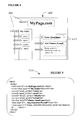
- each piece of text which will be represented by the OOWRF 205 as a text object is identified by a box 410 and arrow 405 and these pieces of text can be seen as content usually shown in bold in the HTML code in Figure 5.
- the code contains text, tags, tag attributes and data for the attributes.
- the third line down can be separated out as follows:
- the fifth line down can be separated out as follows:
- tags that start with a forward-slash (“/") in actual code are conventionally closing tags; these terminate the description of what the tag does (eg "B” for bold) that was declared by the last opening tag of the same type.
- the text "MyPage.com” will be identified for representation as a text object because it lies between opening and closing versions of tags "html”, “body”, “font” and "b".
- CSSDefFile CSSPropertyDef
- CSSDataDef CSSDefFile
- StylePropertyContainer ClassDefContainer, TagBindDefContainer, StyleProperty:
- the WebControl class 1625 acts as an interface to all the Web data objects. It provides a simple way to retrieve Web pages, and contains functions to return data from the page grouped into sections. It can also be used to retrieve a Page object representing the page which can then be used to perform more complex functions if necessary.
- the class 1625 has a constructor which constructs a WebControl object, and fetches and processes the data with the tag, character, and CSS style sheet definition files.
- the methods of the class 1625 provide the following functions:
- the "Get_Page” method includes both a ⁇ url> parameter and a ⁇ base_url> parameter. If a value for ⁇ base_url> is supplied, this is used as the "base” URL for the page. For example, to get the page "www.mysite.com/mypage”, it would be possible to call Get_Page ("mypage", " www . mysite . com ”) .
- the "Get_Page" command which calls the method for fetching and processing a page includes an ⁇ ideal_num_sections> parameter which allows the user to input a preferred number of sections that the page should be split into, or to input a default value "0" which allows the OOWRF to set the number of sections.
- An approximate number of section objects is determined automatically by the number of tables and characters in the Web page, that is its size and complexity, and the algorithm for generating section objects is further discussed later in this specification.
- the number of sections returned is equal to ⁇ ideal_num_sections> unless that is too high, in which case the maximum number of sections possible is returned.
- Get_Page returns true if the page is fetched successfully and is not empty, else returns false and a subsequent call to Get_Page_Object will return NULL. Error status code pages such as the "404 page not found" are not returned; any status code other than 200 (success) results in this method returning false .
- the status code from a frame retrieval attempt can be fetched using the "Frame::Get_Status()" method if required.
- One Web Page object consists of a set of one or more Frames objects (a frame is a portion of a Web page which has its own URL).
- Each frame object contains a set of text objects, which each store one piece of text.
- Each text object also stores the set of Tags that apply to it, and each tag object stores the set of Attributes that are given with the tag.
- This structure can represent any Web page written at least in part using HTML.
- the classes Attribute and Tag 620, 615 are simple container classes which accommodate methods to search for the data within them.
- the Text and Page classes 610, 600 contain tags and frames respectively.
- the Frame class 605 includes a method that can fetch pages from the Internet. This can be implemented relatively easily by using the MFC (Microsoft Foundation Class) library which contains classes with which to do it.
- MFC Microsoft Foundation Class
- the WebControl class 1625 is the top-level interface class - it is there to simplify operations that are performed by other classes. However, there is internal task delegation and dispersed functionality amongst the classes, in known manner.
- An example is the WebControl::Get_Page method which in practice creates a Page object for the page and asks it to get a page. The Page object in turn creates Frame objects for each frame in the page, which are asked to parse the HTML at their respective URLs, creating Text objects, and so on. The WebControl object then asks the Page object to try different section division methods until one is satisfactory, and so on.
- the arguments ⁇ in_tag_definitions>, ⁇ in_char_definitions> and ⁇ in_css_definitions> are pointers to the singleton TagDefFile, CharDefFile and CSSDefFile objects used to represent the definition (. def ) files for the framework.
- the methods of the Page class 600 provide the following functions:
- a Page object Upon calling the method retrieve_Page , a Page object first creates a Frame object for the URL given and it is this Frame object which actually retrieves the page. The Page object then scans the tags in the page for one that declares a new frame within the page. New Frame objects are then created for each of the frames declared, and are stored in a vector in the order in which the declarations are encountered. This method returns 0 if a page is fetched from the Internet and contains some data, otherwise it returns an error code determined by the MFC Internet classes. -1 is returned if the page is fetched successfully but doesn't contain any data.
- the method Retrieve_Page also causes the Page object to create Table and Block objects. If the user of the Page class 600 calls the method Form_Sections, then Sections are also formed.
- the Page object stores the sets of Table, Block and Section objects. The contents of each of these sets represent a complete set of references to all the Text objects in the entire page (across all of its composite Frames). These objects arrange references to Text objects into special structures or groups, and are all subclasses of the abstract class TextStructure.
- the first method calculates the approximate number of sections to create according to the number of characters and the number of Tables in the page. For an "average" page, this would be about 3 to 5 sections. The exact number of sections always depends on the structure of the Tables in the page. More than one algorithm might be available for forming sections and an algorithm could then be selected by setting a SECTION_GENERATION_METHOD definition in GlobalDefs.h , a global definitions header file that all classes include. An algorithm used in embodiments of the present invention uses the Blocks structure. A section algorithm is further discussed later in this specification.
- ⁇ in_url> is the URL of the page, either absolute or relative to ⁇ in_base_url>. Even if ⁇ in_url> is absolute, ⁇ in_base_url> is still used should any HREFs in the Web page be relative. It should be noted that the base URL can be changed by the contents of the Web page (i.e. BASE tags), and can therefore be different from the string passed to the constructor.
- a Frame object represents one frame in a Web page. It contains a vector of Text objects.
- the Frame class 605 contains the code that fetches and parses Web pages (either on-line or off-line, as defined by GlobalDefs.h ), and as such could be considered the most important class in the OOWRF framework.
- the Frame object constructor is as follows:
- ⁇ in_tag_definitions>, ⁇ in_char_definitions> and ⁇ in_css_definitions> are pointers to the singleton TagDefFile, CharDefFile and CSSDefFile objects.
- the methods of the Frame class 605 provide the following functions:
- the Text class 610 is designed to store a piece of Text from a Web page.
- a Text object usually contains text from a Web page that is enclosed by two tags, e.g. ⁇ B > a piece of bold text ⁇ / B>.
- a Text object also stores the set of tags that apply to it as a vector of Tag objects and, in the example, the vector's last entry would be a Tag object of type B with no attributes.
- the Text object automatically performs special character conversion (e.g. "&nsbc;" is converted to its equivalent as defined in the CharDefs.def file, whose default value is a space character). All Text objects used to directly represent text in a Web page have a unique ID so as to differentiate themselves from other Text objects. Also, Text objects store a reference back to the Frame and Table objects that directly own them.
- Text objects are "empty". These contain no text but represent a set of properties that may not apply to a piece of text. Empty Text objects are created when a tag is found on a Web page that has been declared in TagDefs.def as not having a "closing tag”.
- Text object constructors are as follows:
- ⁇ in_tags> is supplied as a pointer to a CObArray, this array containing pointers exclusively to Tag objects.
- the contents of the CObArray are copied so the object passed in can be safely deleted after the Text object is created.
- the argument ⁇ in_owner_frame> is a pointer to the Frame object that owns the relevant Text object.
- the methods of the Text class 610 provide the following functions:
- the Tag class 615 represents an HTML tag and the data it contains.
- a Tag object contains methods to directly retrieve or search for any Attribute objects contained within it.
- the tag object constructors are as follows:
- a function of embodiments of the present invention is to keep a tally of current tags in order to search for the associated end tags. This is further discussed under the heading "The "Current Tags" Algorithm” below.
- ⁇ in_additional_term_tag_name> is the name of a tag that, if encountered in the current_tags stack vector in the Frame::Create_Text_Objects method, terminates the search for end tags for this tag object.
- the methods of the Tag class 615 provide the following functions:
- the Attribute class is a simple container class used to hold a single tag attribute's name and data.
- the attribute object constructors are as follows:
- the methods of the Attribute class 620 provide the following functions:
- the Table class 1600 embodies HTML data relating to tables and is relevant to the layout of text objects identified by VoiceWeb 200 in processing a Web page.
- the HTML table tags TABLE, TR, TH and TD are almost universally used throughout the Internet. Although originally intended to assist the display of data tables, they are now usually used to define the structure of a Web page. Each part in a page is usually grouped into a table, and each of these parts is often broke into several sub-parts, which are also each grouped into tables. This means that a Web page can often be seen to be a hierarchical structure of nested tables. The way in which HTML tables are used like this can assist in representing Web pages as software objects greatly, as each of these tables can be represented as an object in the OOWRF framework 205.
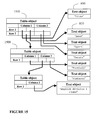
- Figure 14 shows a typical HTML table structure and Figure 15 shows how the framework would represent this structure.
- the Table class 1600 stores a hierarchical structure of Text objects, and is a subclass of the TextStructure class 1610.
- the structure of the Table class 1600 is defined by the HTML table tags (TABLE, TR, TH & TD).
- a Table is made up of a set of rows (TR), each of which contains a set of columns (TH / TD).
- Each column contains a set of data objects, which can be either Text or other Tables.
- Each Page contains one Table, called the master or root table, which represents the entire page. This table contains all other tables within the page.
- Each Table object assigns itself a set of properties (upon a call to the method Process_Properties) by analysing the data within them.
- the list of possible table properties are listed in the Table_Properties enumeration in GlobalDefs.h.
- the Table class supplies many methods to retrieve objects. Some methods only get Direct objects - those that are specifically owned by this Table, not by another Table object that is in turn owned by this Table.
- the Table object constructor is as follows:
- the methods of the Table class 1600 provide the following functions:
- Each Block object is composed of, firstly, zero or more references to Text objects, and then zero or more child Block objects. Block objects are therefore recursive and form a hierarchy, much like tables.
- Block hierarchy can be formed by analysing the Table hierarchy (see also under the heading "7.1.1 Table Structure Representation " below) and a description of this follows.
- Alternative ways of forming a block hierarchy are: creating a new block for every table row; creating a new block for every table row and for every new DIV tag encountered; and creating a new block for every table row and for every new P tag encountered.
- Blocks differ from Tables in that they are simpler - they do not have rows/columns, and they are, before they have been manipulated at least, always of the same format (0-* Texts followed by 0-* Blocks).
- Block objects due to their simplicity, allow more complex operations to be performed on them: Blocks can be quickly copied, moved or split up. Because of this, they are much better suited for use in the Section generation process, and can be thought of as an interim stage in this process, i.e: HTML->Frames->Page->Tables->Blocks->Sections.
- the constructor for a Block object is as follows:
- the owner of the Block (the Block object that is creating this Block) is given by ⁇ owner_block_in> . If this is the master block, ⁇ owner_block_in> must be set to NULL .
- Block class 1620 An example of a set of functions provided by methods of the Block class 1620 is as follows:
- the indexing of recursive objects in the Block hierarchy is performed in the same way as that of the Block hierarchy, for example:
- a block is composed of a number of Text objects followed by one or more child Block objects.
- a current Block is split to produce a new Block as follows: Take the number of direct child blocks (blocks owned directly by the current block). If this is 1 or over, then the division point used for the split is the one where the bodies of text belonging to the Block to be split either side of the division point are the most similar size to each other. Size is determined by the size index statistic in the TextStructure superclass.
- the Text objects owned directly by the block to be split always form the first part of the first of the two Blocks that result from the split.
- the division point can be at 0, i.e.
- the initial Text in the current Block as the first resultant block from the split as above, and then use all the child Blocks of the Block to be split as the other resultant Block of the split.
- the division point is 1, then the initial set of owned text objects and the first Block in the Block to be split are put in the first resultant Block of the split, and the other Blocks owned by the Block to be split are used for the second resultant Block of the split.
- the block to be split contains 1 child block but no Text objects, then the split algorithm is applied to the child block. If the number of direct child blocks (blocks owned directly by the current block), is 0, the current block cannot be split.
- the Section class 1605 is used to represent one part of a Web page.
- a section can be any size, but ideally the number of sections a page is composed of should be a function of its size and complexity. Size is calculated according to statistics: primarily the total number of characters on the page is analysed. Complexity is determined by the number of tables and/or blocks it is composed of.
- the most important aspect of section generation is determining the point at which one section is separated from the next. This point is determined by using the table hierarchy of the page and assigning relative properties to tables which are based on analysis of the whole Web page.
- a Section object is a TextStructure object that contains a set of references to Text objects that collectively represent a specific part of a Web page. Section objects can also be used to store a list of Table objects. Page objects generate a set of Sections in an attempt to sensibly split up the contents of a Web page.
- the constructor for the Section object simply creates an empty Section object.
- the methods of the Section class 1605 provide the following functions:
- the Title class stores references to a set of Text objects that represent a potential full or partial title for a TextStructure. Each title has a set of reasons associated with it which dictate why the Text objects stored within it are thought to be important. Title objects are not necessarily used as the title for anything, they are used to represent the ways in which a set of Text objects are important in relation to their peers in their specific TextStructure. The best of these can then be selected for use as an actual title which might for instance be spoken to the user in describing part of a page.
- the constructor for the Title object simply creates an empty Title object. "Title (Title* source)" can construct a copy of the Title object given by ⁇ source>.
- the Title object has a static method which checks whether the string ⁇ title> is valid, for example whether it has enough letters and is not an unsuitable phrase such as "click here" or "go to top”.
- the key types of property assigned to a table are its type, size, and importance. In order to assess these qualities, statistics concerning the whole Web page need to be collated.
- the TextStructure class 1610 is used to contain these statistics, and Tables , Blocks and Sections inherit this class. The full set of statistics stored can be seen under the Heading "TextStructure Statistics" below.
- the TextStructure class is designed as an abstract framework for a structured collection of Text objects, with properties related to these collective Text objects.
- the class is not designed to be instantiated but is inherited by the Table, Block and Section classes. It contains some methods, which perform the following functions:
- TextStructure superclass also has some abstract methods, listed as follows:
- This class is not designed to be instantiated. It is inherited by the TagDefFile, CharDefFile and CSSDefFile classes and contains methods which simplify the retrieval of data from the OOWRF .def files. These methods provide the following functions:
- a CharDefFile object reads and stores all information in the CharDefs.def file.
- This file stores mappings for special characters (such as "&nsbc;” or "„”).
- the file contains information about how to amend these mappings. Any special characters encountered are converted by the Text class to their mapped replace_symbol value.
- CharDefFile When a CharDefFile object is constructed, using the constructor "CharDefFile ()", it causes the CharDefs.def file to be opened and parsed. The data in the file is automatically stored in a vector of CharDef objects.
- a CharDefFile object has methods which provide the following functions:
- CharDef is a simple container class used to store the data from one entry in the CharDefs.def file. It is constructed using the following constructor:
- a TagDefFile object reads and stores all information in the TagDefs.def file. This file stores information about each type of HTML tag. The information is stored as a set of TagDef objects
- a TagDefFile object is constructed using the constructor "TagDefFile ()". This causes the TagDefs.def file to be opened and parsed. The data in the file is automatically stored in a vector of TagDef objects.
- a TagDefFile object has methods which provide the following functions:
- TagDef is a simple container class used to store the data from one entry in a TagDefs.def file.
- a TagDef object is created using the constructor:
- the CSSDefFile class represents the contents of the CSSDefs . def file (CSS1 style sheet mappings). It stores the file as a set of CSSPropertyDef objects, which each represent a set of data->tag mappings for one CSS property in the file.
- a CSSDefFile object is created using the constructor CSSDefFile () .
- a CSSDefs.def file is opened and read (using the inherited DefFileReader class), and the set of CSSPropertyDef objects used to represent the file are created and stored.
- the data->tag mappings for each property in the file are added to their corresponding CSSPropertyDef object as CSSDataDef objects.
- a CSSDefFile object has just one method which searches for a CSSPropertyDef object with the property name given by ⁇ property_name> . If found, it is returned, else NULL is returned.
- a CSSPropertyDef object contains one set of data->tag mappings for a property from the CSSDefs.def file. It is created using the constructor "CSSPropertyDef (CString* in_name )" with property name ⁇ in_name>.
- a CSSPropertyDef object has methods which provide the following functions:
- the CSSDataDef object stores one CSS Property data -> HTML Tag mapping from the CSSDefs . def file. It can be created using the constructor:
- the equivalent tag name that this data item is mapped to is given by ⁇ tag_name>.
- the attribute name to use with this tag is given by ⁇ tag_attribute_name>, and its data is given by ⁇ tag_attribute_data>.
- the argument ⁇ tag_action> defines whether to add the mapped tag to the current_tags vector whenever the style definition is used, or whether to remove the first occurrence of the tag found in the vector.
- a CSSDataDef object has methods which provide the following functions:
- This class stores the definitions contained in the style sheet in the TagBindDefContainer and ClassDefContainer objects given to it upon construction.
- a StyleSheetParser object has a method which analyses the style sheet given by the string ⁇ style_source> to produce a set of StyleProperty objects and stores them in the ClassDefContainer and TagBindDefContainer objects given by ⁇ in_class_defs> and ⁇ in_tag_bind_defs>.
- StylePropertyContainer ClassDefContainer, TagBindDefContainer, StyleProperty 1675, 1685, 1670, 1680
- These classes store the style information for a page.
- StylePropertyContainer class 1675 An object that inherits the StylePropertyContainer class 1675 stores a set of StyleProperties objects and contains methods to add and retrieve them.
- StylePropertyContainer class 1675 is not designed to be constructed: it is inherited by the TagBindDefContainer and ClassDefContainer classes (although these do not alter the functionality in any way; they are used simply for naming conventions). It has methods which provide the following functions:
- the ClassDefContainer class 1685 simply inherits the StylePropertyContainer class 1675. It does not add any additional functionality, and is present for usability (class naming) reasons only. It is used to store style sheet class definitions (as StyleProperty objects), as opposed to style sheet tag bind definitions, which are stored by objects of the TagBindDefContainer class.
- Objects are created using the constructor "ClassDefContainer (CSSDefFile* in_def_file) ".
- the argument ⁇ in_def_file> points to the CSSDefFile object.
- This class contains no additional methods. All methods are inherited from the StylePropertyContainer class 1675.
- This class 1670 simply inherits the StylePropertyContainer class 1675. It does not add any functionality and is present for usability (class naming) reasons only. It is used to store style sheet tag bind definitions (as StyleProperty objects), as opposed to style sheet class definitions, which are stored by objects of the ClassDefContainer class.
- TagBindDefContainer Objects in the TagBindDefContainer class 1670 are created using the constructor "TagBindDefContainer (CSSDefFile* in_def_file )".
- the argument ⁇ in_def_file> points to the CSSDefFile object.
- StyleProperty object stores one style property (either a tag bind definition or a class definition). Style properties are declared in a Web page's style sheet definition section, and found and created by the StyleSheetParser class.
- a StyleProperty object is created using the constructor "StyleProperty (CString* in_name, CString* in type, CString* in_data, CSSDefFile* def_file )".
- This constructs with name ⁇ in_name> (either the name of the tag this applies to, or a style sheet class name).
- the ⁇ type> argument is a property name
- ⁇ data> is the data for this property.
- the argument ⁇ def_file> is a pointer to the CSSDefFile object.
- the CSS1 definition file is used to get an equivalent HTML tag to use for this particular property/data combination.
- a StyleProperty object has methods to retrieve pieces of data, such as the following:
- the speech interface 210 The speech interface 210
- the speech interface 210 must support the navigation of Web pages as described above with reference to Figure 3a. In order to do that, it must be able to identify the user and to look up personalised or customised information, such as the list of start pages for that user and any grammar which might be relevant for instance in identifying section types to the user, in receiving selections from the user, or in receiving entries for document fields from the user.
- the speech interface 210 uses a grammar-based natural language system for speech recognition at each state in the dialogue flow between user and system.
- a grammar is the body of words and phrases which must be understood by the system in relation to a particular situation, such as interaction with a selected user in relation to a selected document.
- Grammars can be generated dynamically from data from the customisation profile of a page, stored as configured page data 235. (A customisation grammar might have been loaded by a user or by a system administrator and therefore might be personalised for a particular user or customised for all users of the system.) These grammars are then used to allow the system to understand names the user or administrator may have assigned to parts of the page.
- the grammar might be a general grammar accessible by the system or generated by it and stored as OOWRF supporting data 230 in the system database 105.
- Natural language interfaces are known and the technology of the interface itself in terms of speech recognition and/or text-to-speech processes is not described herein. Relevant products based on grammars are available for instance from Nuance Communications. However, there are one or two aspects of behaviour of the speech interface 210 which are special to an embodiment of the present invention and these are further described below.
- General grammars for the speech interface 210 can be designed to produce initially a "skeleton" grammar of commands available to the user.
- a known natural language tool such as "nl-tool” provided by Nuance Communications can then be used to gradually test and improve the grammar. This tool attempts to parse typed sentences using the current grammar files and returns whether the sentence is valid. Additional options are added to the grammar as more suitable sentences are found that represent each system command.
- the dialogue for the speech interface 210 incorporates the following special features to improve usability:
- Help a "help" sub-grammar is part of every top-level grammar, i.e. the user can always use the same words get help at any point.
- the "help" command must therefore be recognized and catered for at each dialogue menu (each point in the code where a question is posed to the user), and a help prompt (message) must be recorded for each of these menus.
- a "change page" sub-grammar exists for each top-level grammar.
- Errors a generic error prompt is played to the user, and an error counter specific to the menu is incremented. If the counter reaches 5, an additional error prompt is played and the system hangs up.
- the speech interface 210 can track its own speech as it is being said, and simultaneously listen out for any input from the user. Tracking is necessary for the system to know the last link that had been read out, for use particularly when the system needs to start reading from where it left off after a user interruption, such as a request for help.
- the text to be spoken is separated into logical sentences by the VoiceWeb application. This can be done by analysing the sequence of characters in the text and splitting it up when certain sets of characters were found (such as a dot followed by a space; a full-stop).
- the general arrangement is that all communications from VoiceWeb 200 to the user 300 are spoken and go via the speech synthesiser 705. All communications from the user 300 to VoiceWeb 200 are received via the speech recognition process 210a. (In practice, this is not necessarily the case, as mentioned elsewhere, but it is shown here for simplicity.)
- the communications from VoiceWeb to the user 300 include both prepared dialogue, and sentences in respect of Web pages.
- the sentences in respect of Web pages will include descriptions of a Web page, prepared after analysis of the Web page by VoiceWeb, and text from the Web page.
- the following covers the fetching of a page from the Internet, and the analysis of its HTML code to create software objects that represent the page.
- the fetched page will usually consist of more than one frame. Each frame typically contains hundreds of text objects, each text object contains several tags and each tag often in turn contains a set of attributes. Objects are created to represent each of these.
- UML Unified Modelling Language
- an object 800 of the Page class 600 creates an object 805 of the Frame class 605 which retrieves the page at that URL.
- This first task is fairly simple: Microsoft code from the MFC (Microsoft Foundation Class) library can be used.
- the Frame object 805 scans the retrieved page to detect each piece of text with its associated tags and creates an object 810 of the Text class 610 for each piece of text.
- the Text objects 810 in turn create an object 815 of the Tag class 615 for each of their associated tags.
- Two are shown in Figure 8, a Tag object 815 for the property "HTML” and a Tag object 816 for the property "Font". There is no attribute associated with the "HTML" Tag object 815 but the Text object 810 will detect the attribute "SIZE" for the "Font” Tag object 816 and will call on the "Font” Tag object 816 to create an Attribute object 820 to store the value "5".
- Frame object 805 In order for the Frame object 805 to create Text objects 810, it has to keep track of the tags that apply to each character in the HTML source code for the relevant frame. This is done using a "current tags" algorithm.
- An object vector stores the set of Tag objects 815, 816 that are active at each point in the source code.
- Tag objects are created and added to the top of this vector when each new opening tag is found in the code.
- the matching Tag object is removed from the "current tags" vector and deleted from memory, as it no longer has any effect on any subsequent entities in the Web page.
- the algorithm in practice is complex because it needs to keep track of the properties that apply to the position in the source code that it is looking at. It does this by continuously updating a set of flags :
- flags monitor whether the current character is part of a tag, an attribute, a piece of text, and so on.
- tags can be closed in more than one way. It is not always necessary to close a tag block with a closing tag of the same type. Sometimes, tag blocks can be closed by closing tags of a different type to their opening tag, and even by opening tags of a different type. Also, a single tag can close more than one tag block, so every time a tag is found the "current tags" vector needs to be searched to find all the tags that should be removed. When doing this, the system could end up removing every tag of a certain type when only one or two of them should be removed. To stop this, a specific type of tag can be elected to terminate the search if and when it is found while scanning through the "current tags" vector. This tag is called the "search terminator tag".
- Figure 10 shows the tag blocks 1000 in a sample section of HTML source code. Note that often end tags are not used to close the tag blocks. For example, the first TD tag block is explicitly terminated by a " ⁇ /TD>" tag but the next two TD tag blocks are closed by the proceeding ⁇ TD> or ⁇ TR> tags. (The HTML standard maintained by the W3 Consortium no longer includes code of this type but in practice the code is still used and conventional browsers display it perfectly.)
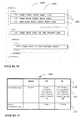
- Figure 11 shows a table 1100 that defines tags that have the ability to close each of the types of tag block 1000 shown in Figure 10.
- the table is stored in the TagDefs.def file. Any of the tag names in a tag's "terminating tags" section 1105 will close a block opened by that tag 1110.
- Search termination tags 1115 are those tags that will stop the search for tag blocks to close if found in the vector of active tags.
- the TABLE tag is in this row so that no tag blocks from previously declared active tables are closed, only tag blocks from the current table.
- the TagDefs.def file can contain definitions like those above for every type of tag recognized by VoiceWeb 200. It can also define other properties, such as whether to ignore a tag, replace it with a given string of text, or store it immediately in an empty text object (for when the tag is supposed to declare something instead of opening a tag block).
- the TagDefFile class 1635 is used to read the file and store a set of objects of the TagDef class 1650 which each store the definitions for one tag. By fetching the TagDef object for each tag found and checking the definitions it stores, the "current tags" algorithm can reliably keep track of the active set of tags throughout the HTML source code file.
- the "current tags” algorithm updates flags that represent the properties of the character being looked at. One of these flags is set when the character is part of a piece of text in the HTML code. Each character in the piece of text is added to a string when it is scanned. When the algorithm reaches the end of the text, it creates a new Text object 810 to contain the string. It assigns the new Text object 810 the set of tags stored at that exact time in the "current tags” vector. The Text object 810 then calculates a set of properties for itself based on the tags it is created with. Property assignment is discussed below under the heading "Object Property Analysis and Assignment" .
- the CharDefFile class 1615 is used to represent the contents of this file as a set of objects of the CharDef class 1645.
- the contents of each text object are automatically scanned upon creation for special character codes. These can be a named entity (for example "&nsbc;”) or a numbered entity (for example "”). If a string matching the format of either of these is found, the CharDefFile class 1615 is instructed to search for a matching CharDef object. If one is found, its representative character given by the CharDef object replaces the character code in the text object.
- Figure 9 shows a UML sequence diagram to illustrate how the objects of the relevant classes interact in a typical scenario.
- a Frame object 805 creates a new Text object 810.
- the relevant text is scanned for a string matching the format of a named or numbered entity. If such a string is found, an object 9005 of the CharDefFile class 1615 is instructed to search for a matching CharDef object. If one is found, the CharDefFile object 9005 returns a pointer for the correct CharDef object 9000 to the Text object 810 which can then substitute the character from the CharDef object 9000, for instance a trade mark symbol, for the string in the text.
- the Page object 800 searches for "FRAME" tag objects with an "SRC" (source) attribute. This will contain the URL to a new frame, which is used to create a new Frame object 805 that will retrieve the page at that URL. Each newly retrieved page will be processed as described above.
- Style sheets contain information about how a page is displayed on-screen and thus can provide information about the size and formatting of text. Such information is fundamental in calculating the importance of blocks of text and can add much to the usability of the voice interface 200 in identifying key areas of a Web page. It can therefore be important to process style sheets in order to extract this information.
- CSS1 style sheet declarations assign a set of specialised property and data attributes to either a particular tag type or a user defined "class". Whenever one of these tags or classes is used subsequently in the HTML page, the style sheet attributes assigned to it are applied to the text it encompasses.
- CSSDefs . def This file stores a set of mappings, each from a supported style sheet property's data item to a Tag object. In the file, all supported style sheet properties are listed, and beneath each of these is a list of the data items that can be used with the property (a wildcard character (*) can be used in order to represent groups of data). Next to each of these data items is the tag name to be used to represent it, and possibly also a tag attribute and its data. There are over 50 properties specified under CSS1, but only those that are important to the effective functioning of the VoiceWeb system 200 need to be defined in the file.
- Style sheets declarations themselves are stored in two classes: ClassDefContainer 1685 and TagBindDefContainer 1670, both of which are simply empty subclasses of the StylePropertyContainer class 1675 (they do not add any additional functionality).
- An object of the StylePropertyContainer class 1675 is designed to contain a set of objects of the StyleProperty class 1680, each of which represents either a user-defined class style definition, or a tag style definition.
- Figure 12 shows a sample style sheet 1200.
- the first four lines bind style definitions to certain tag types and the last line declares a user-defined style definition, identifiable because it starts with a dot.
- the formatting of style sheets is often irregular in a similar way to that of the one shown here.
- Style sheet information can be fetched from an external file at a specified URL, from a specially defined part of the HTML code for a specific document, or from a string specific to one tag block of the HTML code. Once style sheet information is fetched, it is parsed - the string containing the style sheet is analysed and split up into its semantic components, which are the pieces of data that need to be extracted from it. To do this, the syntax of supported style sheets must be defined.
- the precise CSS1 grammar is publicly available from the W3 Consortium.
- Figure 13 shows a sequence diagram of the way in which objects are created to represent the style sheet 1200 of Figure 12, once it has been fetched and parsed by an object of the StyleSheetParser class 1665. Once the objects have been created, a Frame object 805 can then search objects of the TagBindDefContainer and ClassDefContainer classes 1670, 1685 for style mappings to tags and user classes as it analyses a Web page.
- Web pages are represented simply as a list of Text objects 810 stored by the Frame object 805 that owns them. Although this is useful in its own right, it fails to convey any representation of the structure of the Web page as it would appear if viewed on a conventional browser. In order for the voice interface 210 to read a summary of a Web page, it must know something about this visual structure. To enable this, Table, Block and Section classes are included in the framework 205.
- tables are determined by the table tags in the markup code of an HTML page, blocks are generated by analysing the table structure and sections are built from blocks to create a required number of sections for presentation to the user.
- a new block is initially generated to represent each table on the page. They are generated in such a way that they consist firstly of a set of zero or more Text objects, and then zero or more Block objects that represent additional tables (or any text that appears in the table after any child tables). These blocks are split up (depending on the algorithm used) at each table row, and then possibly at either each new ⁇ P> tag or each new ⁇ DIV> tag.
- the blocks structure then undergoes manipulation in order to generate sections, based on a) the relative properties of the contents of the blocks and the blocks themselves, and b) any configuration information stored in the database for the page.
- the title of a table is a part of the table, as is everything else contained within the ⁇ TABLE> ... ⁇ /TABLE> tags.
- the data contents of each cell is included between the ⁇ TD> ... ⁇ /TD> pair. Only textual data has been used in table shown above but graphics can also be used, to create special effects.
- the ⁇ TR> ... ⁇ /TR> pair defines rows.
- the ⁇ TH> ... ⁇ /TH> tag pair defines heading elements while the ⁇ CAPTION> ... ⁇ /CAPTION> centres a top title.
- Normal textual tags such as ⁇ BR>, ⁇ P>, or the ⁇ B>.... ⁇ /B> pair may be used within the individual cells.
- Each table cell may be looked upon as its own HTML document, opening up many areas for creative expression.
- Figure 14 shows a sample piece of HTML code showing how table tags are commonly used.
- Figure 15 is an object reference map showing how the structure of the Web page code from Figure 14 can be represented as a set of object pointers. Rows and their columns are represented as vectors of pointers. Each item in a column vector is an object pointer that references either text objects 810 or other table objects 1500. Since text objects 810 are only ever referenced, not copied, a table structure uses very little memory and can be created very quickly.
- each table is an object 1500
- each part of the hierarchy can be given the ability to search its own contents.
- a client of the Table class 1600 may wish to search for a Text object 810 directly owned by the table object 1500; on other occasions, a client may wish to search every Table that appears under a specific Table object in the hierarchy.
- a depth-first, recursive method is adopted to search a Table object's contents:
- Searches are done in this way primarily to allow a client to view the contents of a Table object 1500 as a simple sequence of Text objects 810.
- a client might call the method Get_Num_Text_Objects() on a Table object 1500 to retrieve the number of different Text objects 810 referenced by the collective members of the Table object 1500.
- the client might then call Get_Text_Object_At_Index( x ) in a loop to retrieve each Text object 810 owned by the Table object 1500 in the correct order.
- Each object type (be it text or table) is polymorphisised to the generic C++ CObject type when its reference is stored in one of a Table object's vectors.
- each object found is classified using the CObject::IsKindOf method.
- an action is taken which depends on the specific search request being carried out.
- Many searches involve the passing of status indicators to objects as they are searched, and all involve the passing of the search target attribute.
- Table class 1600 contains by far the most methods of any class in the framework 205.
- the following table hierarchy demonstrates the order in which Table objects are searched.
- the Block structure is recursive in the same manner as Tables. Each block can contain one or more other blocks, which are called its "child” blocks. Parent blocks are sometimes called “owner blocks”.
- the block formation algorithm can be found in the Block: :Populate_Block(Table start_table ) method. Therefore each block populates itself using the Table pointer passed to it by the caller.
- Populate_Block is called on it with the root Table passed in.
- the Page class 600 performs the following steps in order to form the Blocks structure:
- step 3 Set block_index counter to 0 If block_index ⁇ the number of blocks owned by this block, go to step 3. Else End. Set current_block to the block owned by this block at index block_index . If current_block owns no text object, go to step 5. Else go to step 7. Insert the contents of current_block into the parent of current_block at the index of current_block in the parent block + 1.
- Text objects 810 store not only text but also the tags and attributes that have been applied to that text in the Web page. This is useful, but does not satisfactorily reformat Web pages from HTML into an easily understandable object representation.
- Tags and attributes are HTML codes, not high-level descriptive properties. What is needed is a way of taking a Text object's tags and attributes and generating a set of simple properties that can be used to describe that Text object 810. Once a practice for calculating and assigning these properties is in place, it becomes easy to add additional properties that utilise more complex methods in their assessment of the data related to each Text object 810. Property assignment need not stop at Text objects 810: Table and Section objects can be given properties based on the Text objects 810 within them. By assigning properties to objects in this way, the framework's representation of a Web page becomes more usable, understandable and maintainable.
- a property is simply an integer bound to an enumeration; the enumeration names are defined in the global header file " GlobalDefs.h " that all classes include. This allows a set of properties to be stored as a simple integer array, which is very memory efficient.
- Text object property assignment is simple in the main, as its tags represent quite clearly the features it possesses: a "B" tag means the text is bold, an "I” tag indicates it is italic, a "SIZE” attribute represents its size, and so on.
- tables are assigned properties based on not only the Text objects 810 within them, but also on the way that text compares with the page's entire set of Text objects 810. For example, if a table's text is small on average, but the average text size for the whole page is tiny, then that table is given a greater importance rating.
- TextStructure class 1610 is used to contain these statistics, and Tables and Sections both inherit this class.
- the TextStructure statistics stored are further discussed below under the heading "TextStructure Statistics". Examples are the number of bold characters and an average size rating.
- a table's type can be determined by the number of hyperlinks it contains and the average size of the text objects within it.
- Tables that are assigned the type of "link list” or “list” use the number of non-empty text objects belonging to them to determine their size.
- Tables assigned the "text box” type classification are given a "size score” and this is mapped to a rating from “tiny” to "massive”.
- the importance level can be determined by accumulating "priority points”. Varying numbers of these are given for many features such as the number of text objects exclusively containing upper-case letters, the number of particularly large text objects, and the number of bold characters. Sections can be assigned properties in a similar manner.
- Tables and Sections are also given a title, which consists of a set of up to four text objects.
- the title is calculated by searching through the text objects in the table for the first set that exhibits properties that indicate importance. This is assessed by comparing the size of each object against the average for the table, and by looking for high usage of special text formatting such as bold and italic.
- TextStructure properties can be assigned in different ways.
- the rule-based approach is simple and fairly effective, but it may be preferable to use a different approach, especially if more properties are added. For instance, a trained back-propagation neural network could perform this property assignment task.
- TextStructure objects have the following statistics:
- Each TextStructure object can own one or more Title objects, each of which store pointers to one or more Text objects that represent one potential title. Each of these Title objects also store a set of "Reasons", which represent why the Text object(s) could be considered a title in the structure. Using these reasons, a higher level class can then decide which title to use for each TextStructure object if one is needed.
- each Section uses the "best” title from each of the Blocks that were used to form it. The "best” title can be simply taken to be the one with the most title reasons. If any of the Blocks do not own any Title objects, then a generic title is used based on the type of the Block and the number of unnamed Blocks that have been used previously, for example: "Text area 2" or "Menu 4".
- the purpose of this process is to generate a title that is based on the sub-components of each TextStructure.
- a root TextStructure (one that encompasses the entire page) would have a very long title, eg "Menu 1, news, sports, menu 2, weather and text area 1".
- a TextStructure that is based on only one table would have only one element to its title, e.g. "share prices”.
- MORE_BOLD If a Text object is bold, and most text in this structure isn't, then add this Reason.
- MORE_ITALIC If a Text object is italic, and most text in this structure isn't, then add this Reason.
- MORE_UNDERLINED If a Text object is underlined, and most text in this structure isn't, then add this Reason.
- MORE_CAPS If a Text object consists of 4 or more letters and all letters in the text are upper-case, and this is not true of most text in this structure, then add this Reason.
- LARGER This Text is larger than most other Text in this structure (the definition for "most" is not used for this one).
- “Larger” is calculated as follows: if current text has property SMALL_TEXT_SIZE & average_size ⁇ 1.5, or current text has property MEDIUM_TEXT_SIZE & average_size ⁇ 2.5, or current text has property LARGE_TEXT_SIZE & average_size ⁇ 3.5, or current text has property MASSIVE_TEXT_SIZE & average_size ⁇ 4.5, then add this Reason.
- MUCH_LARGER This Text is much larger than most other text in this structure (the definition for "most” is not used for this one).
- “Much_larger” is calculated as follows: if current Text has property MEDIUM_TEXT_SIZE & average_size ⁇ 2, or current text has property LARGE_TEXT_SIZE & average_size ⁇ 3, or current text has property MASSIVE_TEXT_SIZE & average_size ⁇ 4, then add this Reason.
- DIFFERENT_BACKGROUND_COLOUR If this Text's background colour is different to most others in this structure, add this Reason.
- DIFFERENT_FOREGROUND_COLOUR If this Text's foreground colour is different to most others in this structure, add this Reason.
- TOP_OF_STRUCTURE If this Text is the first valid text object in this structure, add this reason.
- NOT_A_LINK_IN_LINK_LIST If this structure is a LINK_LIST, but this text is not a link, then add this reason.
- PICTURE_AMONGST_TEXT If this is ALT text for a picture, and most other text in the structure has no picture, then add this reason.
- HAS_COLON_OR_HYPHEN If this text has a colon or a hyphen as its last visible character, then add this reason.
- a unit of size in the range 1 to 5 is used for the reasons “LARGER” and “MUCH_LARGER” .
- Figure 17 shows a typical Web page that might be accessed by a user.
- the sequence of steps that might be taken by the VoiceWeb reformatting engine are described below. (It might be noted that parts 1) to 3) of the following description relate directly to Figure 17 but parts 4) to 6) relate to a page which is of a generally similar layout but has somewhat different content.)
- Tag objects and their Attribute objects are put into a temporary vector, like a queue, as they are encountered in the HTML source code. When a piece of text is encountered and a Text object created, it is added with a copy of those Tag objects that are currently in this temporary vector. When a tag block is terminated in the HTML source code, the Tag object representing it is deleted from the temporary vector and this can be seen above where the Tag object "TITLE" is shown being deleted.
- the definitions for static grammars for the system can be stored on the hard drive as ordinary text files. These describe the various combinations of words the user can use in order to perform a certain task at a certain point in a dialogue (i.e. the ways in which a user can respond to a question posed to them by the voice interface 210). These definition files can be compiled much like source code for an application, and the resultant files are loaded by a "Recognition server" application on start up. Therefore, the static grammar of an application cannot be changed unless the application and recognition server are shut-down and the grammar files are re-compiled.
- dynamic grammars are not stored anywhere; they are generated by the application itself.
- An example of where dynamic grammars are used is when the user is prompted to say the voice label for a Web page they have in their profile. Before asking the question, the application looks up the labels of each page in the user's profile 225 in the database, and these are then temporarily added to the current grammar. The system will then understand the user when they say one of the voice labels and go to the page the recognized label represents.
- Dynamic grammars are used for the voice labels for Web pages, the titles of sections, and when the user wants to search for a particular word or phrase on the Web page.
- Lines 1 to 7 show the grammar based phrases ("help”, “what are my options", “what can I do") the user can input which will be recognised.
- the system responds by sending ⁇ action "help”> ⁇ to the software process running the dialogue with the user and the value "help” is picked up by the dialogue software for the action on this menu. It then plays a help message to the user.
- Lines 9 - 12 are similar to the "help" definition, except they define what can be said by the user in order to return to the main menu.
- Lines 14-17 define what the user can say to trigger the action "get_page”. Because users can define page labels via their user profiles, it is now necessary to trigger use of a dynamic grammar to interpret a valid page name for that user.
- the grammar compiler sees Page_name as the name of a grammar as it starts with a capital letter. In line 20, Page_name is identified as a dynamic grammar (so there is no definition for it).
- Page_name is identified as a dynamic grammar (so there is no definition for it).
- the software process that is running the dialogue with the user will now get the current user's page names from the database and use them to define the Page_name grammar. It will also add an interpretation for each one, for instance one might be: (b b c news) ⁇ page_url "http://www.bbc.co.uk/news"> ⁇ .
- the dialogue software gets sent two pieces of information: the action (“get_page"), and the page URL ("http://www.bbc.co.uk/news” ).
- the grammar file contains similar definitions for each menu in the system, for example where the user can choose what section to read, or when the page is being read out and the user can choose to skip, pause, etc...
- a major problem of grammar-based recognition is that the system must have some idea of the kind of things the user can say when a question is asked. For a text input field on a page, the user could input anything.
- a user or system administrator In order to generate a dynamic grammar of the things a user can say when asked what they want to enter into a field, it is also possible to enable a user or system administrator to use the Web interface to point at a particular URL for a grammar for a particular field. i.e. a page that just lists all the possible items. The system could take the words from the Web page at that URL and the user could then say any word appearing on the Web page to have the word entered into the input field.
- An example of a scenario suitable for using the Web interface to point to a URL for a specialised grammar is a product ordering system.
- the grammar for this input field might be generated by looking at a Web page whose URL is given for that input field in the Web interface. That Web page may just be a list of the products available, which could be generated specially by the author of the Web site by looking at their database of products and inserting the product names from the database into a Web page.
- a "spider" process could be used to crawl the Web looking for services and their names. For example, a process could be set up to go through the contents of a Web directory service and store the names of links to services for use as a grammar.
- a system administrator it is also possible for a system administrator to define a grammar and these can be made available in a pre-defined list for the user to add to their profile 225. The user can get access to such pages by selecting for instance a screen button labelled "Add pre-configured page". The data from the selected page will be copied to the user's profile 225 and can optionally be edited by the user.
- SMS simple messaging
- Section 3 This is a consequence of the use of sections as described above. Presentation of a page to the user can be expressed in logical regions of the page particularly where the sections are assigned titles based on their contents because the page can be presented in terms of the numbers of different sections and of what their titles indicate.
- the user can also be given information to keep them signposted during reading of a page. For instance, when reading a new page the page name is read out e.g. "Page: BBC News". When reading a new section the user is told, e.g. "End of section 2. Reading section 3". The user can also be told the type of block being read.
- a logical region such as a section or a block, can be navigated independently.
- the user can select a block or region to be presented to them and can skip between them by saying "skip” or “skip back”. Otherwise the contents of the blocks and sections will usually be read in the order they appear.
- Voice cookies can be used to enter predetermined labelled strings, such as e-mail addresses or a person's name. This can be set up via the Web interface.
- the user adds a voice cookie to their user profile 225 by selecting it from a list, e.g. "E mail", or creating it manually if it is obscure.
- the user gives the data for the voice cookie, e.g. "user.name@bt.com”.
- the voice interface searches the text associated with fields on a Web page for the text automatically associated with each voice cookie (e.g. "email” or "e-mail”). The user is then asked if they want to insert the data for that voice cookie into the field.
- Such voice cookies can be global (active in every case) or local (active only on a page or URL root). For example, a user might have two Web email accounts each with a different password, so the user would set up two "password" local voice cookies, one for each Web email site. They would likely want their name however to be input the same for every page they visit, so this would be a global voice cookie.
- Macros are a series of operations that would be automatically performed by the system upon activation by the user (by using a name for the macro set up in the Web interface).
- Possibilities also arise to have "pre-configured" macros in the same vein as pre-configured pages, where the user has only to enter their specific information (e.g. username and password). This is potentially a powerful aspect of the present invention.
Landscapes
- Engineering & Computer Science (AREA)
- Signal Processing (AREA)
- Computational Linguistics (AREA)
- Health & Medical Sciences (AREA)
- Audiology, Speech & Language Pathology (AREA)
- Human Computer Interaction (AREA)
- Physics & Mathematics (AREA)
- Acoustics & Sound (AREA)
- Multimedia (AREA)
- Information Transfer Between Computers (AREA)
Priority Applications (1)
| Application Number | Priority Date | Filing Date | Title |
|---|---|---|---|
| EP02252422A EP1351477A1 (fr) | 2002-04-03 | 2002-04-03 | Système et méthode pour construire une représentation de données structurées pour une interface vocale |
Applications Claiming Priority (1)
| Application Number | Priority Date | Filing Date | Title |
|---|---|---|---|
| EP02252422A EP1351477A1 (fr) | 2002-04-03 | 2002-04-03 | Système et méthode pour construire une représentation de données structurées pour une interface vocale |
Publications (1)
| Publication Number | Publication Date |
|---|---|
| EP1351477A1 true EP1351477A1 (fr) | 2003-10-08 |
Family
ID=27838151
Family Applications (1)
| Application Number | Title | Priority Date | Filing Date |
|---|---|---|---|
| EP02252422A Withdrawn EP1351477A1 (fr) | 2002-04-03 | 2002-04-03 | Système et méthode pour construire une représentation de données structurées pour une interface vocale |
Country Status (1)
| Country | Link |
|---|---|
| EP (1) | EP1351477A1 (fr) |
Cited By (22)
| Publication number | Priority date | Publication date | Assignee | Title |
|---|---|---|---|---|
| EP1947573A1 (fr) * | 2007-01-16 | 2008-07-23 | Xerox Corporation | Flux de travail d'informations de document |
| US8289333B2 (en) | 2008-03-04 | 2012-10-16 | Apple Inc. | Multi-context graphics processing |
| US8345835B1 (en) | 2011-07-20 | 2013-01-01 | Zvi Or-Bach | Systems and methods for visual presentation and selection of IVR menu |
| US8406388B2 (en) | 2011-07-18 | 2013-03-26 | Zvi Or-Bach | Systems and methods for visual presentation and selection of IVR menu |
| US8477143B2 (en) | 2008-03-04 | 2013-07-02 | Apple Inc. | Buffers for display acceleration |
| US8537989B1 (en) | 2010-02-03 | 2013-09-17 | Tal Lavian | Device and method for providing enhanced telephony |
| US8548135B1 (en) | 2010-02-03 | 2013-10-01 | Tal Lavian | Systems and methods for visual presentation and selection of IVR menu |
| US8548131B1 (en) | 2010-02-03 | 2013-10-01 | Tal Lavian | Systems and methods for communicating with an interactive voice response system |
| US8553859B1 (en) | 2010-02-03 | 2013-10-08 | Tal Lavian | Device and method for providing enhanced telephony |
| US8572303B2 (en) | 2010-02-03 | 2013-10-29 | Tal Lavian | Portable universal communication device |
| US8594280B1 (en) | 2010-02-03 | 2013-11-26 | Zvi Or-Bach | Systems and methods for visual presentation and selection of IVR menu |
| US8625756B1 (en) | 2010-02-03 | 2014-01-07 | Tal Lavian | Systems and methods for visual presentation and selection of IVR menu |
| US8681951B1 (en) | 2010-02-03 | 2014-03-25 | Tal Lavian | Systems and methods for visual presentation and selection of IVR menu |
| US8687777B1 (en) | 2010-02-03 | 2014-04-01 | Tal Lavian | Systems and methods for visual presentation and selection of IVR menu |
| US8731148B1 (en) | 2012-03-02 | 2014-05-20 | Tal Lavian | Systems and methods for visual presentation and selection of IVR menu |
| US8867708B1 (en) | 2012-03-02 | 2014-10-21 | Tal Lavian | Systems and methods for visual presentation and selection of IVR menu |
| US8879698B1 (en) | 2010-02-03 | 2014-11-04 | Tal Lavian | Device and method for providing enhanced telephony |
| US8996384B2 (en) | 2009-10-30 | 2015-03-31 | Vocollect, Inc. | Transforming components of a web page to voice prompts |
| US9001819B1 (en) | 2010-02-18 | 2015-04-07 | Zvi Or-Bach | Systems and methods for visual presentation and selection of IVR menu |
| US9418171B2 (en) | 2008-03-04 | 2016-08-16 | Apple Inc. | Acceleration of rendering of web-based content |
| CN112540758A (zh) * | 2020-12-08 | 2021-03-23 | 杭州讯酷科技有限公司 | 一种基于语音识别的ui界面智能构建方法 |
| CN113035194A (zh) * | 2021-03-02 | 2021-06-25 | 海信视像科技股份有限公司 | 一种语音控制方法、显示设备及服务器 |
Citations (4)
| Publication number | Priority date | Publication date | Assignee | Title |
|---|---|---|---|---|
| EP0848373A2 (fr) * | 1996-12-13 | 1998-06-17 | Siemens Corporate Research, Inc. | Système de communication interactive |
| US5884262A (en) * | 1996-03-28 | 1999-03-16 | Bell Atlantic Network Services, Inc. | Computer network audio access and conversion system |
| WO2001050453A2 (fr) * | 2000-01-04 | 2001-07-12 | Heyanita, Inc. | Systeme de reponse vocale interactif |
| EP1168799A2 (fr) * | 2000-06-30 | 2002-01-02 | Fujitsu Limited | Système de traitement de données avec le mécanisme de vocalisation |
-
2002
- 2002-04-03 EP EP02252422A patent/EP1351477A1/fr not_active Withdrawn
Patent Citations (4)
| Publication number | Priority date | Publication date | Assignee | Title |
|---|---|---|---|---|
| US5884262A (en) * | 1996-03-28 | 1999-03-16 | Bell Atlantic Network Services, Inc. | Computer network audio access and conversion system |
| EP0848373A2 (fr) * | 1996-12-13 | 1998-06-17 | Siemens Corporate Research, Inc. | Système de communication interactive |
| WO2001050453A2 (fr) * | 2000-01-04 | 2001-07-12 | Heyanita, Inc. | Systeme de reponse vocale interactif |
| EP1168799A2 (fr) * | 2000-06-30 | 2002-01-02 | Fujitsu Limited | Système de traitement de données avec le mécanisme de vocalisation |
Cited By (26)
| Publication number | Priority date | Publication date | Assignee | Title |
|---|---|---|---|---|
| EP1947573A1 (fr) * | 2007-01-16 | 2008-07-23 | Xerox Corporation | Flux de travail d'informations de document |
| US8593467B2 (en) | 2008-03-04 | 2013-11-26 | Apple Inc. | Multi-context graphics processing |
| US8289333B2 (en) | 2008-03-04 | 2012-10-16 | Apple Inc. | Multi-context graphics processing |
| US9418171B2 (en) | 2008-03-04 | 2016-08-16 | Apple Inc. | Acceleration of rendering of web-based content |
| US8477143B2 (en) | 2008-03-04 | 2013-07-02 | Apple Inc. | Buffers for display acceleration |
| US8842133B2 (en) | 2008-03-04 | 2014-09-23 | Apple Inc. | Buffers for display acceleration |
| US8996384B2 (en) | 2009-10-30 | 2015-03-31 | Vocollect, Inc. | Transforming components of a web page to voice prompts |
| US8625756B1 (en) | 2010-02-03 | 2014-01-07 | Tal Lavian | Systems and methods for visual presentation and selection of IVR menu |
| US8537989B1 (en) | 2010-02-03 | 2013-09-17 | Tal Lavian | Device and method for providing enhanced telephony |
| US8572303B2 (en) | 2010-02-03 | 2013-10-29 | Tal Lavian | Portable universal communication device |
| US8594280B1 (en) | 2010-02-03 | 2013-11-26 | Zvi Or-Bach | Systems and methods for visual presentation and selection of IVR menu |
| US8548131B1 (en) | 2010-02-03 | 2013-10-01 | Tal Lavian | Systems and methods for communicating with an interactive voice response system |
| US8548135B1 (en) | 2010-02-03 | 2013-10-01 | Tal Lavian | Systems and methods for visual presentation and selection of IVR menu |
| US8681951B1 (en) | 2010-02-03 | 2014-03-25 | Tal Lavian | Systems and methods for visual presentation and selection of IVR menu |
| US8687777B1 (en) | 2010-02-03 | 2014-04-01 | Tal Lavian | Systems and methods for visual presentation and selection of IVR menu |
| US8879698B1 (en) | 2010-02-03 | 2014-11-04 | Tal Lavian | Device and method for providing enhanced telephony |
| US8553859B1 (en) | 2010-02-03 | 2013-10-08 | Tal Lavian | Device and method for providing enhanced telephony |
| US9001819B1 (en) | 2010-02-18 | 2015-04-07 | Zvi Or-Bach | Systems and methods for visual presentation and selection of IVR menu |
| US8406388B2 (en) | 2011-07-18 | 2013-03-26 | Zvi Or-Bach | Systems and methods for visual presentation and selection of IVR menu |
| US8903073B2 (en) | 2011-07-20 | 2014-12-02 | Zvi Or-Bach | Systems and methods for visual presentation and selection of IVR menu |
| US8345835B1 (en) | 2011-07-20 | 2013-01-01 | Zvi Or-Bach | Systems and methods for visual presentation and selection of IVR menu |
| US8867708B1 (en) | 2012-03-02 | 2014-10-21 | Tal Lavian | Systems and methods for visual presentation and selection of IVR menu |
| US8731148B1 (en) | 2012-03-02 | 2014-05-20 | Tal Lavian | Systems and methods for visual presentation and selection of IVR menu |
| CN112540758A (zh) * | 2020-12-08 | 2021-03-23 | 杭州讯酷科技有限公司 | 一种基于语音识别的ui界面智能构建方法 |
| CN112540758B (zh) * | 2020-12-08 | 2024-05-07 | 杭州讯酷科技有限公司 | 一种基于语音识别的ui界面智能构建方法 |
| CN113035194A (zh) * | 2021-03-02 | 2021-06-25 | 海信视像科技股份有限公司 | 一种语音控制方法、显示设备及服务器 |
Similar Documents
| Publication | Publication Date | Title |
|---|---|---|
| EP1351477A1 (fr) | Système et méthode pour construire une représentation de données structurées pour une interface vocale | |
| US6678867B2 (en) | Method and apparatus for providing a graphical user interface for creating and editing a mapping of a first structural description to a second structural description | |
| US7406659B2 (en) | Smart links | |
| US7917888B2 (en) | System and method for building multi-modal and multi-channel applications | |
| US7490313B2 (en) | System and method for making user interface elements known to an application and user | |
| US6665642B2 (en) | Transcoding system and method for improved access by users with special needs | |
| US7055094B2 (en) | Virtual tags and the process of virtual tagging utilizing user feedback in transformation rules | |
| US8365203B2 (en) | Method for creating a native application for mobile communications device in real-time | |
| US6476828B1 (en) | Systems, methods and computer program products for building and displaying dynamic graphical user interfaces | |
| US20020032706A1 (en) | Method and system for building internet-based applications | |
| US7505978B2 (en) | Aggregating content of disparate data types from disparate data sources for single point access | |
| US20070192674A1 (en) | Publishing content through RSS feeds | |
| US20070288853A1 (en) | Software, methods and apparatus facilitating presentation of a wireless communication device user interface with multi-language support | |
| US7930182B2 (en) | Computer-implemented tool for creation of speech application code and associated functional specification | |
| JP2002541555A (ja) | アプリケーションのコンテキストにおけるブラウザ機能の制御方法及び装置 | |
| KR20000006096A (ko) | 표시제어정보생성방법및컴퓨터 | |
| CN101021862A (zh) | 用于集中内容管理的方法和系统 | |
| US7730395B2 (en) | Virtual tags and the process of virtual tagging | |
| US8108829B2 (en) | Method for automating variables in end-user programming system | |
| WO2001057652A2 (fr) | Procede et systeme de developpement d'applications accessibles sur internet | |
| CN1316782C (zh) | 在b/s结构中实现树型结构的方法 | |
| US20050188295A1 (en) | Systems and methods for an extensible administration tool | |
| GB2354851A (en) | Web browser extension and method for processing data content of Web pages | |
| CA2100589C (fr) | Methode pour definir les interfaces utilisateur et systeme de programmation utilisant un ordinateur a interface a utilisateurs multiples | |
| US20050015780A1 (en) | Method and system for providing information related to elements of a user interface |
Legal Events
| Date | Code | Title | Description |
|---|---|---|---|
| PUAI | Public reference made under article 153(3) epc to a published international application that has entered the european phase |
Free format text: ORIGINAL CODE: 0009012 |
|
| AK | Designated contracting states |
Kind code of ref document: A1 Designated state(s): AT BE CH CY DE DK ES FI FR GB GR IE IT LI LU MC NL PT SE TR |
|
| AX | Request for extension of the european patent |
Extension state: AL LT LV MK RO SI |
|
| STAA | Information on the status of an ep patent application or granted ep patent |
Free format text: STATUS: THE APPLICATION IS DEEMED TO BE WITHDRAWN |
|
| 18D | Application deemed to be withdrawn |
Effective date: 20030805 |