EP1377006A1 - Bilderzeugungsgerät, Verfahren und Programmspeichermedium zur Erzeugung von Albumdateien - Google Patents
Bilderzeugungsgerät, Verfahren und Programmspeichermedium zur Erzeugung von Albumdateien Download PDFInfo
- Publication number
- EP1377006A1 EP1377006A1 EP03013747A EP03013747A EP1377006A1 EP 1377006 A1 EP1377006 A1 EP 1377006A1 EP 03013747 A EP03013747 A EP 03013747A EP 03013747 A EP03013747 A EP 03013747A EP 1377006 A1 EP1377006 A1 EP 1377006A1
- Authority
- EP
- European Patent Office
- Prior art keywords
- file
- creating
- image data
- mode
- album
- Prior art date
- Legal status (The legal status is an assumption and is not a legal conclusion. Google has not performed a legal analysis and makes no representation as to the accuracy of the status listed.)
- Granted
Links
Images






Classifications
-
- G—PHYSICS
- G06—COMPUTING OR CALCULATING; COUNTING
- G06Q—INFORMATION AND COMMUNICATION TECHNOLOGY [ICT] SPECIALLY ADAPTED FOR ADMINISTRATIVE, COMMERCIAL, FINANCIAL, MANAGERIAL OR SUPERVISORY PURPOSES; SYSTEMS OR METHODS SPECIALLY ADAPTED FOR ADMINISTRATIVE, COMMERCIAL, FINANCIAL, MANAGERIAL OR SUPERVISORY PURPOSES, NOT OTHERWISE PROVIDED FOR
- G06Q50/00—Information and communication technology [ICT] specially adapted for implementation of business processes of specific business sectors, e.g. utilities or tourism
- G06Q50/10—Services
-
- H—ELECTRICITY
- H04—ELECTRIC COMMUNICATION TECHNIQUE
- H04N—PICTORIAL COMMUNICATION, e.g. TELEVISION
- H04N1/00—Scanning, transmission or reproduction of documents or the like, e.g. facsimile transmission; Details thereof
- H04N1/00127—Connection or combination of a still picture apparatus with another apparatus, e.g. for storage, processing or transmission of still picture signals or of information associated with a still picture
- H04N1/00132—Connection or combination of a still picture apparatus with another apparatus, e.g. for storage, processing or transmission of still picture signals or of information associated with a still picture in a digital photofinishing system, i.e. a system where digital photographic images undergo typical photofinishing processing, e.g. printing ordering
- H04N1/00185—Image output
- H04N1/00196—Creation of a photo-montage, e.g. photoalbum
-
- H—ELECTRICITY
- H04—ELECTRIC COMMUNICATION TECHNIQUE
- H04N—PICTORIAL COMMUNICATION, e.g. TELEVISION
- H04N1/00—Scanning, transmission or reproduction of documents or the like, e.g. facsimile transmission; Details thereof
- H04N1/21—Intermediate information storage
- H04N1/2104—Intermediate information storage for one or a few pictures
-
- H—ELECTRICITY
- H04—ELECTRIC COMMUNICATION TECHNIQUE
- H04N—PICTORIAL COMMUNICATION, e.g. TELEVISION
- H04N2101/00—Still video cameras
-
- H—ELECTRICITY
- H04—ELECTRIC COMMUNICATION TECHNIQUE
- H04N—PICTORIAL COMMUNICATION, e.g. TELEVISION
- H04N2201/00—Indexing scheme relating to scanning, transmission or reproduction of documents or the like, and to details thereof
- H04N2201/32—Circuits or arrangements for control or supervision between transmitter and receiver or between image input and image output device, e.g. between a still-image camera and its memory or between a still-image camera and a printer device
- H04N2201/3201—Display, printing, storage or transmission of additional information, e.g. ID code, date and time or title
- H04N2201/3225—Display, printing, storage or transmission of additional information, e.g. ID code, date and time or title of data relating to an image, a page or a document
- H04N2201/3247—Data linking a set of images to one another, e.g. sequence, burst or continuous capture mode
-
- H—ELECTRICITY
- H04—ELECTRIC COMMUNICATION TECHNIQUE
- H04N—PICTORIAL COMMUNICATION, e.g. TELEVISION
- H04N2201/00—Indexing scheme relating to scanning, transmission or reproduction of documents or the like, and to details thereof
- H04N2201/32—Circuits or arrangements for control or supervision between transmitter and receiver or between image input and image output device, e.g. between a still-image camera and its memory or between a still-image camera and a printer device
- H04N2201/3201—Display, printing, storage or transmission of additional information, e.g. ID code, date and time or title
- H04N2201/3225—Display, printing, storage or transmission of additional information, e.g. ID code, date and time or title of data relating to an image, a page or a document
- H04N2201/325—Modified version of the image, e.g. part of the image, image reduced in size or resolution, thumbnail or screennail
Definitions
- the present invention relates to an imaging apparatus with a function of creating HTML files using images, a method of creating album files in the imaging apparatus, and a storage medium that records method of creating the album files .
- An electronic camera has been introduced, which is provided with functions of taking a picture to generate an image, sorting the images into separate folders by uses, and recording the sorted images. Further, another electronic camera has been available, which has a function of creating HTML (Hyper Text Markup Language) files using images for displaying a list of all of the images.
- HTML Hyper Text Markup Language
- HTML files are created using previously photographed and retained images (a preview image, an original image or a photographed image), and images that are displayed in a list form in the HTML file are preview images and a chosen preview image is linked to an original photographed image, an enlarged view of which is displayed.
- various types of HTML file (for instance, type 1 through type 4) are prepared for selection by a user to his or her liking, that is, some type of the HTML file is displayed on a menu screen to provide conditions for taking a picture, and other type is displayed for performing a slide show function.
- HTML file of the type selected by the user is created.
- HTML files are created from all of the images photographed by the user. Therefore, it is not allowed to create HTML files only for the images that the user chooses, and since HTLM file of all of the images will require a vast amount of memory, it will cause some trouble in storing or transmitting these files.
- the extent that the user is allowed to reflect his or her intention to HTML file will be somewhat limited to selection of the type of HTML file, and the user is not allowed to create HTLM file to include an image to which his or her intention is reflected.
- the image to be linked with in HTLM file is the photographed image. Therefore, when thus created HTLM file is reviewed on a screen of a personal computer, if the photographed image includes a vast amount of data, such vast amount of data must be processed, requiring much time until the image appears on the screen. On the contrary, when a preview image is reviewed, only a little amount of data are processed, requiring not so much time till the preview image appears on the screen, but the image displayed on the screen is not so clear or sharp as the user wants, resulting in giving dissatisfaction to the user.
- an imaging apparatus which comprises a storage for storing image data of a subject, a file creating section for creating an album file using the image data stored in the storage, when an album mode is set, and a mode setting section for setting the file creating section to the album mode.
- an imaging apparatus with a display which comprises an imaging section for taking a picture of a subject to generate an image signal of the subject, a mode setting section for selectively setting one of plural photograph modes, a processing section for processing the image signal generated by the imaging section in accordance with the photograph mode set by the mode setting section to obtain image data; a storage for storing the image data obtained by the processing section, and an file creating section for creating an album file using the image data stored in the storage to display on the display the image data in a list form for each of the photograph modes.
- an imaging apparatus with a display which comprises an imaging section for taking a picture of a subject to generate an image signal of the subject, a mode setting section for selectively setting one of plural photograph modes, a processing section for processing the image signal generated by the imaging section in accordance with the photograph mode set by the mode setting section to obtain image data, a storage for storing image data obtained by the processing section; a condition setting section responsive to operation of a user for setting conditions for creating an album file from the image data stored in the storage, and a file creating section for creating the album file based on the conditions set by the condition setting section using the image data stored in the storage to display on the display the image data in a list form.
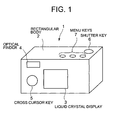
- FIG. 1 is a perspective view of an external appearance of a digital camera 1 according to embodiments of the present invention.
- the digital camera 1 has a substantially rectangular parallelepiped body (camera body) 2.
- An optical lens 8 (not shown ) is mounted on a front surface of the camera body 2, and a liquid crystal display 3, an optical finder 4 and a cross cursor key 5 are provided on a rear surface of the camera body 2.
- On a top surface of the camera body 2 are provided a shutter key 6 and various menu keys 7.
- FIG. 2 is a block diagram of an electronic circuit configuration of the digital camera 1 according to the embodiments.
- the digital camera 1 has the optical lens 8 mounted on the front surface of the camera body 2, an imaging device 9 on which an image of a subject is focused through the optical lens 8, a timing signal generator (TG) 10 for driving the imaging device 9, and a unit circuit 11.
- the unit circuit 11 includes a Correlated Double Sampling circuit (CDS) for suppressing noises involved in an image signal output from the imaging device 9, an automatic gain control amplifier (AGC) for amplifying the image signal, and analog/digital converter (A/D) for converting the image signal into a digital signal.
- CDS Correlated Double Sampling circuit
- AGC automatic gain control amplifier
- A/D analog/digital converter
- the image signal output from the imaging device 9 is sampled, amplified and digitized into the digital signal in the unit circuit 11, and further supplied to a control section 12, in which the digital signal is converted into a luminance signal by an image processing circuit 121, subjected to an integration process and a histogram process.
- the optical lens 8 is supported by a lens driving mechanism including a lens driving circuit 13 and an automatic focusing motor (AF motor).
- the optical lens 8 is driven by the lens driving circuit 13 under control of the control section 12 to move along its optical axis for adjustment of focus of the subject image on the imaging device 9.
- AE mode Auto Exposure mode
- the imaging device 9 is driven by TG 10 based on shutter pulses sent from the control section 12, whereby a charge storage time of the imaging device 9 is controlled, and an electronic shutter function is realized.
- the control section 12 is provided to control operations of various sections of the digital camera 1, and has functions for processing a signal and an image in respective photograph modes set in the digital camera 1, such as a normal mode, a scenery mode, a portrait mode, a macro mode, and a panorama mode.
- the control section 12 generates a video signal based on the digital signal output from the unit circuit 11, and displays a through image of the subject photographed by the imaging device 9 on a liquid crystal display 3 including a TFT liquid crystal display monitor.
- the control section 12 compresses the image signal of the subject which has been subjected to the signal process and image process corresponding to the above modes to generate an image file in JPEG format and stores the image file on a detachable image recording medium (recording section) 14 comprising a flash memory and the like.
- the compressed image file is read out from the recording section 14 and expanded to be displayed on the liquid crystal display 3.
- the control section 12 has various sections, including a creating-mode setting section 122 for setting a mode for creating an album file (HTML file), a file creating section 123 for creating a album file, a photograph-mode setting section 124 for selectively setting one of plural photograph modes, a user setting section 125 for reflecting user's intention to create an album file, a reduced-size image creating section 126 for creating a reduced-size image to be exclusively connected with the album file and a command-file creating section 127 for creating a command file to instruct a computer to automatically start up the album file.
- a creating-mode setting section 122 for setting a mode for creating an album file (HTML file)
- a file creating section 123 for creating a album file
- a photograph-mode setting section 124 for selectively setting one of plural photograph modes
- a user setting section 125 for reflecting user's intention to create an album file
- a reduced-size image creating section 126 for creating a reduced-size image to be exclusively connected with the album file
- control section 12 is connected with an operation-key section 15 including the cross cursor key 5, the shutter key 6, and the various menu keys 7, a memory 16, and RAM 17.
- the memory 16 is a program ROM on which operation program and other program and data are recorded.
- the operation program is necessary for the control section 12 to control various sections and to process data, and above other program and data are used for executing processes shown in the flow charts as set forth below.
- RAM 17 is used by the control section 12 for creating an HTML file.
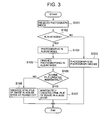
- the control section 12 runs the operation program to perform a photograph-mode selecting process at step S101 in the flow chart of FIG. 3.
- a photograph-mode selecting process on the liquid crystal display 3 are sequentially displayed a photograph-mode menu including indications such as the "normal mode”, “scenery mode”, “portrait mode”, “macro mode”, “panorama mode”, and “album mode” in response to operation of the menu keys 7, and a photograph mode which is selected on the display section 3 by operation of the cross key 5 is set to the digital camera 1.
- step S102 it is judged at step S102 if the album mode has been set at step S101.
- a photographing operation is performed at step S103.
- the image signal is processed and compressed in response to operation of the shutter key 6 in accordance with the mode that has been set at step S101, whereby an image file in JPEG format is created and stored with a filename on the image storage medium 14.
- step S101 When it is determined at step S101 that the album mode has been set, the photographing operation is performed in the album mode at step S104. Then, the image signal is processed and compressed in response to operation of the shutter key 6 in a similar manner to the normal mode, whereby an image file in JPEG format is created and stored with a filename on the image storage medium 14.
- step S106 When the photographing operation is finished in the album mode by user's manipulation of the menu keys at step S105, it is judged at step S106 if HTML file is immediately created.
- HTML file is immediately created using only the image file which has been stored on the image storage medium 14 at step S104 and the created HTML file is stored on the image storage medium 14 at step S107.
- HTML file is not created immediately but at the time of power shutdown, using only the image file which has been stored at step S104 on the image storage medium 14 and the HTML file created at the time of power shutdown is stored on the image storage medium 14 at step S108.
- HTML file of the image which is photographed only in the album mode that has been intentionally set by the user is created in the first embodiment.
- the user can reflect his or her intention to the images to be included in HTML files, reducing an amount of data in a file and allowing easy treatment (store and transfer) of the files.
- FIG. 4 through FIG. 12 are views for illustrating a second embodiment of the present invention.
- the process for selecting the photograph mode is executed at step S201 in the flow chart of FIG. 4, in a similar manner to the process at step S101 in the flow chart of FIG. 1.
- step S202 it is judged if the album mode has been set. When the album mode is not set but a photograph mode other than the album mode is set, the photographing operation is performed in the photograph mode that has been set at step S203.
- the photographing operation is performed in the album mode to generate an image signal at step S204.
- the generated image signal is compressed to create an image file in JPEG format, and the created image file is stored on the image storage medium 14.
- the photographing operation is finished by certain operation of the menu keys in the album mode at step S205, various setting processes for HTML file are executed in sequence at step S206.
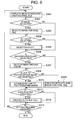
- FIG. 6A is a view illustrating a sample of the menu screen 301 to be displayed on the liquid crystal display 3, which includes indications such as "IMAGE SELECTION”, “LAYOUT”, “BACKGROUND COLOR”, “LINK” and "AUTO RUN FILE” displayed on the display 3 for selecting conditions.
- step S302 it is judged if the indication of "IMAGE SELECTION” is selected.
- a process is performed at step S303 for selecting an image which the user wants to include in HTML file.
- step S303 of FIG. 3 plural images P1, P2 ⁇ are displayed in a reduced size on the liquid crystal display 3 as shown in FIG. 7, which plural images have been photographed in the album mode and stored in the image storage medium 14 at step 204.
- file names of the selected images are stored on RAM 17.
- step S304 a process for selecting a layout is performed at step S305.
- plural samples of layout patterns L1, L2, L3, L4 ⁇ are displayed on the liquid crystal display 3, as shown in FIG. 8.
- the chosen layout pattern is stored on RAM 17.
- step S306 it is judged if the indication of "BACKGROUND COLOR" is chosen on the menu screen 301.
- a process for choosing a background color is performed at step S307.
- plural color samples such as C1, C2, C3 are displayed on the liquid crystal display 3, as shown in FIG. 9.
- the chosen background color is stored on RAM 17.
- step S308 it is judged if a link to the photographed image is established.
- an indication including "ON” and “OFF” is displayed on the liquid crystal display 3, as shown in FIG. 10.
- the indication of "ON” is chosen by key operation
- the above photographed image is the image that has been photographed in the album mode, and stored on the image storage medium 14 at step S204.
- the indication of "OFF" is chosen by key operation, it is determined at step S308 (NO) to choose to establish the link to a reduced size image, and a process for establishing the link to the reduced size image for HTML file is performed at step S309.
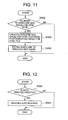
- step S402 it is judged if the link to the reduced size image for HTML file has been established. As described above, since the indication of "OFF" has been chosen and the link to the reduced size image for HTML file has been established, a reduced size image for HTML file is created from the photographed image which is to be included in the HTML file, and the created reduced size image is stored on the image storage medium 14 at step S403. Establishment of link to the reduced size image is written on RAM 17 at step S404.
- the auto run file is a program file that automatically runs for setting HTML file to start up, when the camera is connected to a personal computer.
- step S311 when the indication of "AUTO RUN FILE" is chosen on the menu screen 301, the indications of "ON” and “OFF” are displayed on the liquid crystal display 3 as shown in FIG. 10.
- the indication of "ON” is chosen by key operation, it is determined to create the auto run file, and a process for creating the auto run file is performed at step S312.
- the process for creating the auto run file at step S312 is performed in accordance with a flow chart of FIG. 12.
- step S502 in the flow chart of FIG. 12 it is judged if the auto run file is created. Since the indication of "ON" is chosen to create the auto run file, the auto run file is created and stored on the image storage medium 14 at step S503.
- step S313 in the flow chart of FIG. 5 it is judged if operation for ceasing the setting operation has been performed, and the processes at step S301 through step S313 are repeatedly performed until it is determined at step S313 that the operation for ceasing the setting operation has been performed.
- the setting process of FIG. 5 finishes.
- step S206 When various conditions for creating HTML file have been set, the process advances from step S206 to step S207, where it is judged if the HTML file is immediately created.
- HTML files to include only the images that have been photographed in the album mode and stored on the image storage medium 14 at step S204 or HTML files to include only the images that have been photographed in the album mode and chosen at step 302 are immediately created in accordance with the conditions set at step S206 (FIGs 5, 11, 12), and the created HTLM files are stored on the image storage medium 14 at step S208.
- HTML files to include only the images that have been photographed in the album mode and stored on the image storage medium 14 at step S204 or HTML files to include only the images that have been photographed in the album mode and chosen at step 302 are created, at the time of power-off, in accordance with the conditions set at step S206 (FIGs 5, 11, 12), and the created HTLM files are stored on the image storage medium 14 at step S209.
- the present embodiment allows the user to create HTLM file to the user's intention regarding the image selection, layout, background color, link and auto run file. Since the image to be linked with HTML file is the reduced size image for HTML file, a load of processing data and the time required before displaying the HTML file on the display screen are reduced or shortened. As the reduced size image is created for HTML file separately, the image is displayed sharp and clearly, giving satisfaction to viewers.
- the album mode is prepared as one of the photograph modes such as "normal mode”, “scenery mode”, “portrait mode”, “macro mode”, “panorama mode”, and “album mode”, but this album mode may be prepared independently of the photograph mode.
- the album mode may be set after one of the photograph modes has been chosen. For instant, when the scenery mode is chosen, then it is judged if the album mode is set (at step S102 or step S202), and thereafter the processes are performed in accordance with the flow charts of FIG. 3 and FIG. 4. As describe above, it may be judged in each of the photograph modes, if the album mode is set.
- the album mode may be set at first before one of the photograph modes is chosen. That is, the photograph mode may be chosen (at step S101 or step S201), after it is judged if the album mode has been set (at step S102 or step S202). Thereafter, the same processes as those shown in FIG. 3 or FIG 4 are performed.
- HTML file may be created only based on the images that the user desires to link the HTLM files to.
- FIG. 13 is a flow chart of processes performed in the third embodiment of the invention.
- the process for choosing the photograph mode is performed.
- the photograph-mode menu including indications such as "NORMAL MODE”, “SCENERY MODE”, “PORTRAIT MODE”, “MACRO MODE”, and PANORAMA MODE” is displayed on the liquid crystal display 3 by operation of the menu keys 7.
- the chosen photograph mode is set to the camera 1.
- a picture of a subject is taken in response to operation of the shutter key 6 at step S602, whereby an image signal of the subject is generated.
- the image signal is processed and compressed in accordance with the photograph mode set at step S601, whereby an image file in JPEG format is created and stored on the image storage medium 14.
- One image file of the image that is photographed in the photograph mode is stored on the image storage medium 14 every operation of the shutter 6.
- step S603 When the user operates the menu keys 7 at step S603 (YES) to enter an instruction to create an album file after taking several pictures in a certain photograph mode or in another photograph mode, the process advances to step S604, where it is judged if HTML file is immediately created.
- HTML files for images that have been photographed in respective photograph modes and stored on the image storage medium 14 at step S602 are immediately created for each of the photograph modes and are stored on the image storage medium 14 at step S605.
- HTML files for images that have been photographed in respective photograph modes and stored on the image storage medium 14 at step S602 are created at the time of power-off for each of the photograph modes and are stored on the image storage medium 14 at step S606.
- HTML files only for the images that are photographed in the photograph modes set by the user are created for each of the photograph modes.
- HTML files only for the images that have been photographed in the photograph modes that the user desires may be created, whereby the user intention may be reflected to images to be included in HTML file, and an amount of data size in a file is reduced, which allows easy treatment (store and transfer) of the files.
- FIG. 14 is a flow chart of processes performed in the forth embodiment of the invention.
- the process for choosing the photograph mode is performed.
- the photograph-mode menu including indications such as "NORMAL MODE”, “SCENERY MODE”, “PORTRAIT MODE”, “MACRO MODE”, and PANORAMA MODE” is displayed on the liquid crystal display 3 by operation of the menu keys 7.
- the chosen photograph mode is set to the camera 1.
- a picture of a subject is taken in response to operation of the shutter key 6 in the chosen photograph mode at step S702, whereby an image signal of the subject is generated.
- the image signal is processed and compressed in accordance with the photograph mode set at step S701, whereby an image file in JPEG format is created and stored on the image storage medium 14.
- One image file of the image that is photographed in the photograph mode is stored on the image storage medium 14 every operation of the shutter 6.
- step S703 When the user operates the menu keys 7 at step S703 (YES) to enter the instruction to create an album file after taking several pictures in a certain photograph mode or in another photograph mode, the process advances to step S704, where the process for setting conditions for HTML file is performed.
- step S704 The process for setting conditions for HTML file at step S704 is the same process as that at step S206 in the flow chart of FIG. 4. More specifically, the process of step 8704 is performed in accordance with the flowchart of FIG. 5, and the process of step S309 is performed in accordance with the flow chart of FIG. 11, and further the process of step S312 is performed in accordance with the above mentioned flow chart of FIG. 12.
- HTML file When the process for setting conditions for HTML file has been performed at step S704, it is judged at step S705 if HTML file is immediately created.
- HTML files for the images that have been photographed in each photograph mode at step S702 and stored in the image storage medium 14 are created for each of the photograph modes in accordance with the conditions sete at step S704 and stored in the image storage medium 14 at step S706.
- HTML files for the images that have been photographed in respective photograph modes at step S702 and stored in the image storage medium 14 are created at the time of power-off for each of the photograph modes in accordance with the conditions set at step S704 and stored in the image storage medium 14 at step S707.
- the present embodiment allows the user to create HTLM file to the user's intention regarding the image selection, layout, background color, link and auto run file. Since the image to be linked with HTML file is the reduced size image for HTML file, a load of processing data and the time required before displaying the HTML file on the display screen are reduced or shortened. As the reduced size image is created for HTML file separately, the image is displayed sharp and clearly, giving satisfaction to viewers.
- FIG. 15 is a flow chart of processes performed in the fifth embodiment of the invention.
- the process for choosing the photograph mode is performed.
- the photograph-mode menu including indications such as "NORMAL MODE”, “SCENERY MODE”, “PORTRAIT MODE”, “MACRO MODE”, and PANORAMA MODE” is displayed on the liquid crystal display 3 by operation of the menu keys 7.
- the chosen photograph mode is set to the camera 1.
- a picture of the subject is taken in response to operation of the shutter key 6 in the chosen photograph mode at step S802, whereby an image signal of the subject is generated.
- the image signal is processed and compressed in accordance with the photograph mode set at step S801, whereby an image file in JPEG format is created and stored on the image storage medium 14.
- One image file of the image that is photographed in the photograph mode is stored on the image storage medium 14 every operation of the shutter 6.
- the process advances to step S804, where a process for setting conditions for HTML file is performed.
- the process for setting conditions for HTML file at step S804 is the same process as that at step S206 in the flow chart of FIG. 4. More specifically, the process of step S804 is performed in accordance with the flowchart of FIG. 5, and the process of step S309 is performed in accordance with the flow chart of FIG. 11, and further the process of step S312 is performed in accordance with the above mentioned flow chart of FIG. 12.
- HTML file When the HTML setting process has been performed at step S804, it is judged at step S805 if HTML file is immediately created.
- HTML files of all the images that have been photographed in each photograph mode and stored in the image storage medium 14 at step S802 are created in accordance with the settings made at step S804 and stored in the image storage medium 14 at step S806.
- HTML files of all of the images that have been photographed in each photograph mode at step S802 and stored in the image storage medium 14 are created at the time of power-off in accordance with the settings made at step S804 and stored in the image storage medium 14 at step S807.
- the present embodiment allows the user to create HTLM file to the user's intention regarding the image selection, layout, background color, link and auto run file. Since the image to be linked with HTML file is the reduced size image for HTML file, a load of processing data and the time required before displaying the HTML file on the display screen are reduced or shortened As the reduced size image is created for HTML file separately, the image is displayed sharp and clearly, giving satisfaction to viewers.
Landscapes
- Engineering & Computer Science (AREA)
- Multimedia (AREA)
- Signal Processing (AREA)
- Business, Economics & Management (AREA)
- Tourism & Hospitality (AREA)
- Human Resources & Organizations (AREA)
- Economics (AREA)
- General Health & Medical Sciences (AREA)
- Health & Medical Sciences (AREA)
- Marketing (AREA)
- Primary Health Care (AREA)
- Strategic Management (AREA)
- Physics & Mathematics (AREA)
- General Business, Economics & Management (AREA)
- General Physics & Mathematics (AREA)
- Theoretical Computer Science (AREA)
- Television Signal Processing For Recording (AREA)
- Studio Devices (AREA)
Applications Claiming Priority (2)
| Application Number | Priority Date | Filing Date | Title |
|---|---|---|---|
| JP2002179029A JP4093544B2 (ja) | 2002-06-19 | 2002-06-19 | 撮像装置、撮像装置におけるアルバムファイル作成方法及びアルバムファイル作成プログラム |
| JP2002179029 | 2002-06-19 |
Publications (2)
| Publication Number | Publication Date |
|---|---|
| EP1377006A1 true EP1377006A1 (de) | 2004-01-02 |
| EP1377006B1 EP1377006B1 (de) | 2008-09-03 |
Family
ID=29717501
Family Applications (1)
| Application Number | Title | Priority Date | Filing Date |
|---|---|---|---|
| EP03013747A Expired - Lifetime EP1377006B1 (de) | 2002-06-19 | 2003-06-17 | Bilderzeugungsgerät, Verfahren und Programmspeichermedium zur Erzeugung von Albumdateien |
Country Status (7)
| Country | Link |
|---|---|
| US (1) | US7483060B2 (de) |
| EP (1) | EP1377006B1 (de) |
| JP (1) | JP4093544B2 (de) |
| KR (1) | KR100576770B1 (de) |
| CN (1) | CN1243445C (de) |
| DE (1) | DE60323298D1 (de) |
| TW (1) | TWI231429B (de) |
Families Citing this family (6)
| Publication number | Priority date | Publication date | Assignee | Title |
|---|---|---|---|---|
| US20050120055A1 (en) * | 2003-11-27 | 2005-06-02 | Olympus Corporation | Image management apparatus and image managing method |
| JP4235541B2 (ja) * | 2003-12-15 | 2009-03-11 | キヤノン株式会社 | デジタルカメラおよびデジタルカメラの制御方法およびプログラム |
| US20050225647A1 (en) * | 2004-04-09 | 2005-10-13 | Gossweiler Richard Iii | Method and system of creating photo vignettes |
| JP2006279925A (ja) * | 2005-03-03 | 2006-10-12 | Fuji Photo Film Co Ltd | 撮像装置、撮像方法、及び撮像プログラム |
| JP4762762B2 (ja) * | 2006-03-07 | 2011-08-31 | 富士フイルム株式会社 | アルバム作成装置、アルバム作成方法、及びプログラム |
| JP2014067310A (ja) * | 2012-09-26 | 2014-04-17 | Olympus Imaging Corp | 画像編集装置、画像編集方法、およびプログラム |
Citations (4)
| Publication number | Priority date | Publication date | Assignee | Title |
|---|---|---|---|---|
| EP0860980A2 (de) * | 1997-02-20 | 1998-08-26 | Eastman Kodak Company | Elektronische Kamera mit Verwendungsselektionsfähigkeit |
| US6202061B1 (en) * | 1997-10-24 | 2001-03-13 | Pictra, Inc. | Methods and apparatuses for creating a collection of media |
| US20010028394A1 (en) * | 1993-10-21 | 2001-10-11 | Kiyoshi Matsumoto | Electronic photography system |
| US20010048534A1 (en) * | 2000-05-23 | 2001-12-06 | Hiroshi Tanaka | Image data communication method |
Family Cites Families (17)
| Publication number | Priority date | Publication date | Assignee | Title |
|---|---|---|---|---|
| US5633678A (en) * | 1995-12-20 | 1997-05-27 | Eastman Kodak Company | Electronic still camera for capturing and categorizing images |
| US6031964A (en) | 1996-06-20 | 2000-02-29 | Apple Computer, Inc. | System and method for using a unified memory architecture to implement a digital camera device |
| US6249316B1 (en) * | 1996-08-23 | 2001-06-19 | Flashpoint Technology, Inc. | Method and system for creating a temporary group of images on a digital camera |
| US6035323A (en) * | 1997-10-24 | 2000-03-07 | Pictra, Inc. | Methods and apparatuses for distributing a collection of digital media over a network with automatic generation of presentable media |
| US6567122B1 (en) * | 1998-03-18 | 2003-05-20 | Ipac Acquisition Subsidiary I | Method and system for hosting an internet web site on a digital camera |
| US6223190B1 (en) * | 1998-04-13 | 2001-04-24 | Flashpoint Technology, Inc. | Method and system for producing an internet page description file on a digital imaging device |
| US20010012062A1 (en) * | 1998-07-23 | 2001-08-09 | Eric C. Anderson | System and method for automatic analysis and categorization of images in an electronic imaging device |
| US6965410B1 (en) * | 1998-12-03 | 2005-11-15 | Canon Kabushiki Kaisha | Image sensing apparatus employing dark image data to correct dark noise |
| US6779153B1 (en) * | 1998-12-11 | 2004-08-17 | Microsoft Corporation | Creation of web pages through synchronization |
| US6738075B1 (en) * | 1998-12-31 | 2004-05-18 | Flashpoint Technology, Inc. | Method and apparatus for creating an interactive slide show in a digital imaging device |
| US6571271B1 (en) * | 1999-05-03 | 2003-05-27 | Ricoh Company, Ltd. | Networked appliance for recording, storing and serving digital images |
| US6636648B2 (en) * | 1999-07-02 | 2003-10-21 | Eastman Kodak Company | Albuming method with automatic page layout |
| JP3978530B2 (ja) | 1999-12-07 | 2007-09-19 | 富士フイルム株式会社 | 電子カメラ |
| US6862038B1 (en) * | 2000-02-11 | 2005-03-01 | Ipac Acquisition Subsidiary I, Llc | Efficient image categorization |
| JP3750462B2 (ja) | 2000-02-22 | 2006-03-01 | コニカミノルタフォトイメージング株式会社 | デジタルカメラおよび記録媒体 |
| JP3945985B2 (ja) * | 2000-12-28 | 2007-07-18 | 株式会社リコー | デジタルカメラ装置 |
| US6937275B2 (en) * | 2001-12-20 | 2005-08-30 | Hewlett-Packard Development Company, L.P. | Contact sheet file-generating digital camera |
-
2002
- 2002-06-19 JP JP2002179029A patent/JP4093544B2/ja not_active Expired - Fee Related
-
2003
- 2003-06-11 US US10/460,977 patent/US7483060B2/en not_active Expired - Lifetime
- 2003-06-17 EP EP03013747A patent/EP1377006B1/de not_active Expired - Lifetime
- 2003-06-17 DE DE60323298T patent/DE60323298D1/de not_active Expired - Lifetime
- 2003-06-18 TW TW092116490A patent/TWI231429B/zh not_active IP Right Cessation
- 2003-06-18 KR KR1020030039298A patent/KR100576770B1/ko not_active Expired - Fee Related
- 2003-06-19 CN CNB031491499A patent/CN1243445C/zh not_active Expired - Fee Related
Patent Citations (4)
| Publication number | Priority date | Publication date | Assignee | Title |
|---|---|---|---|---|
| US20010028394A1 (en) * | 1993-10-21 | 2001-10-11 | Kiyoshi Matsumoto | Electronic photography system |
| EP0860980A2 (de) * | 1997-02-20 | 1998-08-26 | Eastman Kodak Company | Elektronische Kamera mit Verwendungsselektionsfähigkeit |
| US6202061B1 (en) * | 1997-10-24 | 2001-03-13 | Pictra, Inc. | Methods and apparatuses for creating a collection of media |
| US20010048534A1 (en) * | 2000-05-23 | 2001-12-06 | Hiroshi Tanaka | Image data communication method |
Also Published As
| Publication number | Publication date |
|---|---|
| EP1377006B1 (de) | 2008-09-03 |
| DE60323298D1 (de) | 2008-10-16 |
| TW200404227A (en) | 2004-03-16 |
| JP2004023669A (ja) | 2004-01-22 |
| JP4093544B2 (ja) | 2008-06-04 |
| US7483060B2 (en) | 2009-01-27 |
| CN1243445C (zh) | 2006-02-22 |
| CN1469642A (zh) | 2004-01-21 |
| TWI231429B (en) | 2005-04-21 |
| KR20040002620A (ko) | 2004-01-07 |
| KR100576770B1 (ko) | 2006-05-08 |
| US20030234875A1 (en) | 2003-12-25 |
Similar Documents
| Publication | Publication Date | Title |
|---|---|---|
| KR100634565B1 (ko) | 촬영장치 및 촬영방법 | |
| US6781629B2 (en) | Digital camera and image reproducing apparatus and method | |
| EP2541902B1 (de) | Bildverarbeitungsvorrichtung und Bildverarbeitungsverfahren | |
| JP4085255B2 (ja) | デジタルカメラ及び画像通信方法 | |
| US7233356B2 (en) | Digital camera and image editing system | |
| JP4340806B2 (ja) | 画像処理装置、方法及びプログラム | |
| US20080129842A1 (en) | Photographing Method and Camera Device Equipped with Temporary Photographing | |
| CN101102407A (zh) | 摄像装置、直通图像显示控制方法以及记录介质 | |
| JP2003242004A (ja) | 画像表示装置及び画像管理プログラム | |
| JP3925054B2 (ja) | カメラ装置 | |
| EP1377006B1 (de) | Bilderzeugungsgerät, Verfahren und Programmspeichermedium zur Erzeugung von Albumdateien | |
| US20050057678A1 (en) | Digital camera and control method for digital camera | |
| JP2000295562A (ja) | デジタルカメラ | |
| JP3630104B2 (ja) | カメラ装置及びその見本画像表示方法、並びに記録媒体 | |
| JP4355852B2 (ja) | カメラ装置、カメラ制御プログラム及びカメラシステム | |
| JP4725854B2 (ja) | 画像表示装置及び画像表示方法 | |
| JP2004056707A (ja) | フォルダの作成方法及びプログラム | |
| JP3913046B2 (ja) | 撮像装置 | |
| JP2002262170A (ja) | カメラ装置、データ供給装置及びカメラ・システム、並びに方法及び記録媒体 | |
| JP2005045650A (ja) | 画像抽出装置及び画像抽出方法 | |
| JP2003189160A (ja) | デジタルカメラ | |
| JP2003298907A (ja) | デジタルカメラ及び画像表示装置 | |
| JP2005101951A (ja) | 表示部を備えたデジタルカメラ | |
| JP2003333514A (ja) | 撮像装置 | |
| JP2003250115A (ja) | カメラ及び画像の付加情報記録装置 |
Legal Events
| Date | Code | Title | Description |
|---|---|---|---|
| PUAI | Public reference made under article 153(3) epc to a published international application that has entered the european phase |
Free format text: ORIGINAL CODE: 0009012 |
|
| 17P | Request for examination filed |
Effective date: 20030617 |
|
| AK | Designated contracting states |
Kind code of ref document: A1 Designated state(s): AT BE BG CH CY CZ DE DK EE ES FI FR GB GR HU IE IT LI LU MC NL PT RO SE SI SK TR |
|
| AX | Request for extension of the european patent |
Extension state: AL LT LV MK |
|
| 17Q | First examination report despatched |
Effective date: 20040608 |
|
| AKX | Designation fees paid |
Designated state(s): DE FR GB IT |
|
| 17Q | First examination report despatched |
Effective date: 20040608 |
|
| GRAP | Despatch of communication of intention to grant a patent |
Free format text: ORIGINAL CODE: EPIDOSNIGR1 |
|
| GRAS | Grant fee paid |
Free format text: ORIGINAL CODE: EPIDOSNIGR3 |
|
| GRAA | (expected) grant |
Free format text: ORIGINAL CODE: 0009210 |
|
| AK | Designated contracting states |
Kind code of ref document: B1 Designated state(s): DE FR GB IT |
|
| REG | Reference to a national code |
Ref country code: GB Ref legal event code: FG4D |
|
| REF | Corresponds to: |
Ref document number: 60323298 Country of ref document: DE Date of ref document: 20081016 Kind code of ref document: P |
|
| PLBE | No opposition filed within time limit |
Free format text: ORIGINAL CODE: 0009261 |
|
| STAA | Information on the status of an ep patent application or granted ep patent |
Free format text: STATUS: NO OPPOSITION FILED WITHIN TIME LIMIT |
|
| 26N | No opposition filed |
Effective date: 20090604 |
|
| REG | Reference to a national code |
Ref country code: FR Ref legal event code: PLFP Year of fee payment: 13 |
|
| PGFP | Annual fee paid to national office [announced via postgrant information from national office to epo] |
Ref country code: GB Payment date: 20150618 Year of fee payment: 13 Ref country code: DE Payment date: 20150619 Year of fee payment: 13 |
|
| PGFP | Annual fee paid to national office [announced via postgrant information from national office to epo] |
Ref country code: FR Payment date: 20150619 Year of fee payment: 13 Ref country code: IT Payment date: 20150622 Year of fee payment: 13 |
|
| REG | Reference to a national code |
Ref country code: DE Ref legal event code: R119 Ref document number: 60323298 Country of ref document: DE |
|
| GBPC | Gb: european patent ceased through non-payment of renewal fee |
Effective date: 20160617 |
|
| REG | Reference to a national code |
Ref country code: FR Ref legal event code: ST Effective date: 20170228 |
|
| PG25 | Lapsed in a contracting state [announced via postgrant information from national office to epo] |
Ref country code: FR Free format text: LAPSE BECAUSE OF NON-PAYMENT OF DUE FEES Effective date: 20160630 Ref country code: DE Free format text: LAPSE BECAUSE OF NON-PAYMENT OF DUE FEES Effective date: 20170103 |
|
| PG25 | Lapsed in a contracting state [announced via postgrant information from national office to epo] |
Ref country code: GB Free format text: LAPSE BECAUSE OF NON-PAYMENT OF DUE FEES Effective date: 20160617 |
|
| PG25 | Lapsed in a contracting state [announced via postgrant information from national office to epo] |
Ref country code: IT Free format text: LAPSE BECAUSE OF NON-PAYMENT OF DUE FEES Effective date: 20160617 |