EP1377009A2 - Verfahren und System zur Bildverteilung über ein Übertragungsnetzwerk zwischen mehreren Benutzern - Google Patents
Verfahren und System zur Bildverteilung über ein Übertragungsnetzwerk zwischen mehreren Benutzern Download PDFInfo
- Publication number
- EP1377009A2 EP1377009A2 EP03076795A EP03076795A EP1377009A2 EP 1377009 A2 EP1377009 A2 EP 1377009A2 EP 03076795 A EP03076795 A EP 03076795A EP 03076795 A EP03076795 A EP 03076795A EP 1377009 A2 EP1377009 A2 EP 1377009A2
- Authority
- EP
- European Patent Office
- Prior art keywords
- user
- images
- image
- sharing
- computer
- Prior art date
- Legal status (The legal status is an assumption and is not a legal conclusion. Google has not performed a legal analysis and makes no representation as to the accuracy of the status listed.)
- Ceased
Links
Images














Classifications
-
- H—ELECTRICITY
- H04—ELECTRIC COMMUNICATION TECHNIQUE
- H04N—PICTORIAL COMMUNICATION, e.g. TELEVISION
- H04N1/00—Scanning, transmission or reproduction of documents or the like, e.g. facsimile transmission; Details thereof
- H04N1/21—Intermediate information storage
- H04N1/2166—Intermediate information storage for mass storage, e.g. in document filing systems
- H04N1/2179—Interfaces allowing access to a plurality of users, e.g. connection to electronic image libraries
- H04N1/2183—Interfaces allowing access to a plurality of users, e.g. connection to electronic image libraries the stored images being distributed among a plurality of different locations, e.g. among a plurality of users
-
- G—PHYSICS
- G06—COMPUTING OR CALCULATING; COUNTING
- G06F—ELECTRIC DIGITAL DATA PROCESSING
- G06F16/00—Information retrieval; Database structures therefor; File system structures therefor
- G06F16/10—File systems; File servers
-
- H—ELECTRICITY
- H04—ELECTRIC COMMUNICATION TECHNIQUE
- H04N—PICTORIAL COMMUNICATION, e.g. TELEVISION
- H04N1/00—Scanning, transmission or reproduction of documents or the like, e.g. facsimile transmission; Details thereof
- H04N1/00127—Connection or combination of a still picture apparatus with another apparatus, e.g. for storage, processing or transmission of still picture signals or of information associated with a still picture
-
- H—ELECTRICITY
- H04—ELECTRIC COMMUNICATION TECHNIQUE
- H04N—PICTORIAL COMMUNICATION, e.g. TELEVISION
- H04N1/00—Scanning, transmission or reproduction of documents or the like, e.g. facsimile transmission; Details thereof
- H04N1/00127—Connection or combination of a still picture apparatus with another apparatus, e.g. for storage, processing or transmission of still picture signals or of information associated with a still picture
- H04N1/00132—Connection or combination of a still picture apparatus with another apparatus, e.g. for storage, processing or transmission of still picture signals or of information associated with a still picture in a digital photofinishing system, i.e. a system where digital photographic images undergo typical photofinishing processing, e.g. printing ordering
- H04N1/00137—Transmission
-
- H—ELECTRICITY
- H04—ELECTRIC COMMUNICATION TECHNIQUE
- H04N—PICTORIAL COMMUNICATION, e.g. TELEVISION
- H04N1/00—Scanning, transmission or reproduction of documents or the like, e.g. facsimile transmission; Details thereof
- H04N1/00962—Input arrangements for operating instructions or parameters, e.g. updating internal software
- H04N1/00973—Input arrangements for operating instructions or parameters, e.g. updating internal software from a remote device, e.g. receiving via the internet instructions input to a computer terminal
-
- H—ELECTRICITY
- H04—ELECTRIC COMMUNICATION TECHNIQUE
- H04N—PICTORIAL COMMUNICATION, e.g. TELEVISION
- H04N1/00—Scanning, transmission or reproduction of documents or the like, e.g. facsimile transmission; Details thereof
- H04N1/00127—Connection or combination of a still picture apparatus with another apparatus, e.g. for storage, processing or transmission of still picture signals or of information associated with a still picture
- H04N1/00132—Connection or combination of a still picture apparatus with another apparatus, e.g. for storage, processing or transmission of still picture signals or of information associated with a still picture in a digital photofinishing system, i.e. a system where digital photographic images undergo typical photofinishing processing, e.g. printing ordering
-
- H—ELECTRICITY
- H04—ELECTRIC COMMUNICATION TECHNIQUE
- H04N—PICTORIAL COMMUNICATION, e.g. TELEVISION
- H04N1/00—Scanning, transmission or reproduction of documents or the like, e.g. facsimile transmission; Details thereof
- H04N1/00127—Connection or combination of a still picture apparatus with another apparatus, e.g. for storage, processing or transmission of still picture signals or of information associated with a still picture
- H04N1/00204—Connection or combination of a still picture apparatus with another apparatus, e.g. for storage, processing or transmission of still picture signals or of information associated with a still picture with a digital computer or a digital computer system, e.g. an internet server
Definitions
- the present invention is directed to a method and system for sharing images over a communication network between individuals.
- the sharing of digital images over a communication network is accomplished by attaching a file to an e-mail whereby the recipient must detach the image file, store it and then view it. If the recipient wishes to send the image file to another individual, they must know the electronic address and go through a process of opening a new document and attach the received image file, and optionally adding any images of their own to the attachment. This is a relatively cumbersome process. The problem of sharing multiple images with additional users and attachments becomes even more complex.
- Kodak's Photoquilt is an example of a prior art system wherein multiple users upload images to a web-based application and allow multiple users to view the images independently.
- the user must upload their own pictures which can be a complex process. Pictures are manually screened for objectionable content and then loaded to the quilt overnight. The content is not managed in a theme based manner but may be searched for a theme.
- a user wishing to view the images must constantly connect and reconnect to see any updates.
- the present invention is directed to solve many of the problems in the prior art whereby images may be shared among a plurality of users.
- the system according to the present invention allows the providing of comments and editorials with regard to specific images that can be directed to a specific individual or to the group as a whole.
- a method for setting up a system for sharing images among a plurality of users in a first image sequence comprising the steps of:
- a computer software program for sharing images over a communication network the computer software program when loaded onto a computer will cause the computer to perform the steps of:
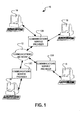
- FIG. 1 there is illustrated a diagram of a system 10 for sharing digital images in accordance with the present invention.
- the system 10 is capable of sharing digital images or application specific computer files represented by digital images among a plurality of remote users having computers 14, 16, 18 and 20 over a communication network 12.
- each of the computers 14, 16, 18 and 20 are associated with a plurality of communication service providers 13A, 13B and 13C that allow access to the communication network 12, which in the embodiment illustrated comprises the Internet.
- the communication network 12 may be any appropriate system that allows individual computers to communicate electronically with each other. It will be understood that access to communication network 12 provided by communication service providers 13A, 13B, 13C can be accomplished through one communication service provider or any number of communication service providers depending upon the individual users and their preferences.
- one of the computers 14, 16, 18, 20 will be hosting the sharing of the images among the designated users over communication network 12.
- computer 14 is the hosting/controlling computer and computers 16, 18, and 20 form a list of participating users that can be used in a sequential manner as will be evident from further discussion. It is to be understood the controlling computer 14 need not be directly associated with any of the designated users viewing the image as will also be discussed later herein.
- Appropriate sharing software for permitting the sharing of images in accordance with the invention is provided on the controlling computer 14 and each of the computers 16, 18, and 20.
- an initiating or host user In order to share digital images among designated user/users, an initiating or host user must first initiate the sharing software program (step 22) of the host computer, which in this example is controlling computer 14 to register an image sharing event.
- the image sharing event can be, but is not limited to, a period of time during which digital images are to be shared defined by a start time and date and a time duration.
- the controlling computer 14 Upon creation of the image sharing event, the controlling computer 14 assigns a unique event number associated with the initiating or hosting user.
- the next step 24 of this initiation process involves the host user providing information or event criteria to the controlling computer 14 that further defines the image sharing event such as a theme of the digital images to be shared.
- a theme can be for an example, but not by way of limitation, a category of pictures such as "baby” pictures or "birthday” pictures, a common event such as Christmas, Easter, Independence Day, a specific product offered for sale, vacation, specific products being auctioned or any other way of categorizing information to be viewed in accordance with the present invention.
- Further information or event criteria such as the minimum number of times that the shared images cycle through the list of participating users, hereafter referred to as a round, also contribute to the definition of the image sharing event.
- a round does not imply that each participating user views the digital images being shared.
- An image sharing event can have criterion like a specified minimum number of rounds that can cause the image sharing event to exceed the maximum event duration. Likewise, the image sharing event duration may exceed the time necessary for the sharing software to collect all the images to be shared in the specified minimum number of rounds. In either of these cases, the host can provide instructions to the controlling computer 14 on how to handle these exceptions.
- a host user can provide payment means such as a credit card number or an account to debit in exchange for the providing of goods and/or services with respect to any of the images to be shared that the hosting user may select during the viewing of the event.
- the group of images to be shared shall be referred as a compilation of digital images.
- the presentation format of the compilation of digital images can be anything desired and shall be referred to as a sequence of images or imagettes.
- the sequence of imagettes can move in a sequential display stream (see FIGS. 8A-8E) across the display device of the computers involved in the sharing event.
- images occupy a fixed area of the display device one at a time with each ensuing imagette replacing the previously displayed imagette.
- the controlling computer 14 issues a unique event number for the purposes of controlling and tracking the image sharing event and related activities such as the ordering of goods and/or services.
- the initiating user makes a determination whether the image sharing event that he/she is creating is to be shared with anyone with installed sharing software and will be referred to as a public event. If the sharing event is not public, then it is by definition private, and the user provides a list of guest users to be invited in step 30.
- the guest list includes an electronic address of the guest users such as an email address or an instant message address such as the "Buddy List" implemented in the Instant Messaging software from America OnlineTM.
- step 32 the controlling computer sends out event e-mail invitations to the designated guest users, which in the embodiment illustrated, are represented by computers 16, 18, and 20 of FIG. 1.
- event e-mail invitations typically would identify the hosting user inviting the sharing of images along with instructions for participating in the event.
- the instructions include directions to acquire the sharing software, in the form of a electronic address, from which sharing software can be downloaded.
- the electronic address can be of the hyperlink type which permits a user to activate the link and cause the computer to go directly to the site of the encoded electronic address thereby eliminating further involvement of a user.
- the event e-mail instructions can include an attachment containing the sharing software.
- the sharing software may be forwarded to the recipients in any desired manner. For example, they may be forwarded on a computer storage medium such as a computer disk or CD whereby the user may manually install the software
- the controlling computer 14 creates the unique image sharing event number into a public event list (step 34) for viewing by anyone with the sharing software and schedules the newly created image sharing event to run in accordance with the information provided in step 24.
- Step 36 the invited guest receives an electronic invitation such as an email with the participation instructions as described with respect to FIG. 2 above.
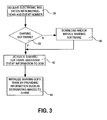
- the invitation includes event information such as theme, event number, and event owner (host). If the invited guest user (step 38) doesn't have the sharing software, he/she proceeds to follow the instructions of the electronic invitation to acquire the software also described with respect to FIG. 2 which is installed in step 40.
- step 42 the guest user activates the sharing software which prompts the guest user to enter a name (email address) and password which may have been provided as part of the instructions.
- a user registers with a host who then provides a password to the specified address for enhanced security as is common in the art.
- the sharing software can use either approach without departing from the scope of the invention.
- the event specific information such as the event number.
- the sharing software on the guest user's computer causes the transmission of the computer's electronic address such as an Internet Protocol (IP) address from the computer 16 to the controlling computer 14.
- IP Internet Protocol
- the guest user provides further information to initialize the sharing software such as the designation of which images that are to be shared (See FIG. 5) and optionally payment means such as a credit card number to charge in case the guest user desires to order goods and/or services with respect to the shared image. This completes the process of joining a specific private image sharing event.
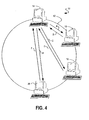
- the controlling computer 14 controls the communication of imagette sequences and data among the designated users as illustrated by arrows A, B, C, D, E, and F.
- the controlling computer 14 initiates the sharing event and can provide a plurality of imagettes in a predetermined sequence to the first designated user at computer 16 as represented by the path designated by arrow A.
- the controlling computer 14 can provide the first imagettes of the sequence. If the controlling computer 14 belongs to a business user, this imagette can be an advertisement, trademarked graphic image belonging to the business (See FIGS.
- the controlling computer 14 can collect a fee for the display of such imagettes pursuant to the information collected from the hosting user in step 24 of FIG. 2. These fees can be assessed as a function of the number of invited guests, the number of times the imagette sequence is sent and viewed by participating users, or any other parameter of the event that the sharing software of computer 14 can measure. It should also be appreciated that the first sequence of imagettes need not be constrained to a single imagette.
- the hosting user may choose to pre-populate the imagette sequence with more than one imagette related to the theme such that the first user, in this case represented by computer 16, sees more than one imagette on the first round.
- the imagette sequence is viewed by the user of computer 16. While the images are being displayed on the display device of computer 16 and viewed by the user, the sharing software also locates digital images that the user of computer 16 has designated to share and selects at least one image to become the next part of the imagette sequence. It will be appreciated that images are frequently taken in both landscape and portrait modes and rarely are the portrait (vertically oriented) images oriented properly.
- the sharing software uses an algorithm to automatically rotate the images that are to be shared. The properly rotated image is submitted to the imagette sequence on the user's display device and then transmitted back to controlling computer 14 along the path designated by arrow B where the submitted image is added to the compilation of digital images of shared images maintained by controlling computer 14.
- the sharing software resizes the selected image to the reduced size appropriate to the imagette sequence. If a good and/or service is subsequently requested of this particular image by a user, the controlling computer 14 maintains a list of images, their owners, and their storage location (which may or may not be on computer 16) for retrieval in conjunction with the providing of the good and/or service requested. In an alternate embodiment, the sharing software transmits a copy of the full resolution shared image back to the controlling computer 14 which stores the full size shared image to facilitate the providing of goods and/or services that any participating user may request.
- Sharing software can also be configured to calculate the number of images of a user to be selected and added to the compilation of digital images in each round. For example, if the hosting user defines the sharing event to have 10 rounds and the invited guest user has 20 digital images to share, then the sharing software of the invited guest selects 2 images to add to the compilation of digital images each round. In this manner, the controlling computer 14 collects all the designated images to be shared by all the participating users. In the case that an invited guest user has no images to share, the sharing software of this particular invited guest simply displays the current imagette sequence and sends a control signal to the controlling computer 14 to indicate that there are no images to add to the compilation of digital images.
- the imagette (or image) is received by the controlling computer 14 along the path designated by arrow B as described above and the imagette is placed in the compilation of digital images.
- the list of images in the compilation of digital images can be maintained and displayed as a sequential list of images.
- Controlling computer 14 looks up the next participating user that has joined the image sharing event which in this case is represented by computer 18. Using the IP address provided by computer 18 when the sharing software of computer 18 joined the image sharing event, the controlling computer 14 forwards the new imagette sequence along the path designated by arrow C to computer 18 where a similar process occurs.
- the imagette sequence continues to grow with the addition of a shared imagette (or image) which is transmitted back to controlling computer 14 along the path designated by arrow D where it is added to the compilation of digital images. Likewise, the imagette sequence is then forwarded to the next participating user at computer 20 by the path designated by arrow E and the new imagette (or image) is then returned to the controlling computer 14 by the path designated by arrow F and added to the compilation of digital images. It is of course understood that any desired number of users may be connected as a part of the event sharing system. In the particular embodiment illustrated, it is the hosting/controlling computer 14 that controls the sharing of the images and the sequence by which they are shared. In order to better understand how the system works a discussion of one manner in which the sharing of images may be accomplished will now be discussed in detail.
- controlling computer 14 may wish to share pictures of a recent vacation taken with his/her relatives that own computers 16, 18 and 20. Therefore, the user initiates the sharing software program which results in invitations being sent to each of these designated individuals to determine whether they wish to be a part of the image sharing event. If they do, appropriate software will be provided as previously discussed so that each of them may share the images as set forth. Since the controlling computer 14 is the hosting computer, computer 14 is preferably accessible over communication network 12 at all times. Computer 16, 18 and 20 will each have the ability to view images by the activation of their respective sharing software allowing them to be actively engaged in the sharing process.
- the controlling computer 14 forms a predetermined sharing sequence or list of participating users that is used to determine the order in which the imagette sequence proceeds between participating users.
- the user of computer 16 would be the first user to see the imagette sequence.
- the imagettes are preferably sent to computer 16 such that they are overlaid over the current working screen of the display device of computer 16 (FIGS. 8A-8E) being used by the user.
- the imagette sequence proceeds from computer 18 and henceforth onto computer 20 to complete a round. If the specified minimum number of rounds has not been met, the sequence repeats along the paths described above.
- the sharing software of computer 14 continues to collect images from each participating user's computer by collaborating with the sharing software of the respective guest computers 16, 18, and 20.
- the imagettes will be sent to the next user in the sequence that desired to view the images. For example, if computer 16 is not on-line or its user does not wish to view the images that are being offered for sharing, the second individual to view the compilation of digital images would be the user at computer 18. Thereafter, the next user would be user at computer 20.
- the compilation of digital images is preferably viewed from the beginning and then will continue as modified by each of the users that have already seen the images in the compilation of digital images. For example, if the users at computers 18 and 20 are on-line, user at computer 18 is the first to use the sharing system, and if users at computers 18 and/or 20 decide to add additional images and/or comments, these additional images and/or comments will be placed in the compilation of digital images. Thus, when user of computer 16 selected to view the compilation of digital images, the user at computer 16 will view the sequence of the images from the beginning and will include any additions and/or comments made by previous users at computers 18 and 20.
- a popular application such as sharing images can create a large number of users and subsequently a large number of images.
- a user who is further down the list of registered users may have to wait an unacceptable amount of time to receive the compilation of digital images.
- the sharing software of controlling computer 14 can send a subset or subcompilation of images to each computer that is participating in the image sharing event.
- the number of images in this subcompilation can be adjusted by the user of the controlling computer 14 or it can be automatically adjusted as a function of the number of images in the compilation of digital images. In this manner, each user is viewing images simultaneously. However, the subcompilation of images being viewed by each user is unique to that user until the subcompilation of images being viewed is passed to the next sequential user.
- Another important consideration with image sharing events having a large quantity of images is a user who drops out of the event at a point where he/she has viewed many hundreds of images. When that user decides to re-enter the event, he/she doesn't necessarily want to see the images that he/she has already viewed.
- the user's sharing software can keep track of the point in the compilation of digital images where the last image was viewed. This information is transferred to the controlling computer 14 upon returning to the image sharing event.
- the user is permitted to specify the last image viewed (done automatically as described above) or specify any point in the compilation of digital images that they would like to begin at. In this case of a specified start point, controlling computer 14 must place the user at a point in the sequential list of users that is next to view a specific segment.
- Other aspects of image sharing events with large numbers of images will be discussed later in the specification with respect to FIG. 23.
- a user activates (Step 46) their sharing software wishing to determine if there are any public image sharing events that he/she is interested in participating in.
- Activating the sharing software connects the user to the controlling computer 14 which in turn, asks the user if they wish to search the event database by theme (Step 48) or by specific user (Step 52). If the user specifies the theme or user in Steps 50 and/or 54, the event database is searched (Step 60) and controlling computer 14 returns a sorted event list to the user in Step 56.
- Step 56 a complete list of events from the event database that are sorted using a default criteria.
- a default sorting criteria can be, for example but not by way of limitation, the starting time of the events or simply an alphabetical list by owner, theme, etc.
- the user views the returned list of events and selects the events of interest to join in step 58.
- the user is not limited to joining only one image sharing event.
- step 59 the user can choose to join another event by returning to step 58 or simply end the process in step 61.
- the process of designating the images that are to be shared begins (Step 62).
- the sharing software of the user's computer searches the file system of the computer (Step 64) for the presence of a database structure for managing images. If no database structure is found, the sharing software of the user asks the user if he/she wishes to use the default folder (Step 74). If the default folder is the designated folder (Step 78), the user is reminded that he/she must locate and move the images to be shared to the default folder. If the user doesn't wish to use the default folder, he/she designates a folder (Step 76) containing the images to be shared. It should be noted that the user may designate a folder that is stored a remote location.
- Step 64 the sharing software of the user retrieves the event theme (Step 66) stored by the sharing software of the user as described with respect to FIG. 5.
- the theme is then applied to the database to search and retrieve images that are associated with the theme. This association is typically achieved by matching the theme to keywords often referred to as metadata that are stored in correlation with images.
- One such commercially available example is the database used by Image Expert 2000 from Sierra Imaging.
- the set of images that have been found and retrieved are then displayed (Step 68) for the user to confirm that these are the images to be shared (Step 70). Upon confirmation of the found set of images, the process of designating images is complete (Step 78).
- Step 72 an alternate method is automatically initiated on behalf of the user to find appropriate images to share.
- Each found set is displayed again in Step 68 and the cycle of searching and confirming repeats until the desired set of images has been designated (Step 78).
- One such alternate method involves commonly used natural language processing techniques such as looking for synonyms of the theme and searching on those terms.
- Another alternate method of searching the database is to use the theme to search image filenames.
- a still further method involves providing the user with a list of searchable terms to select from or merely providing a text entry box for the user to manually enter search terms.
- Step 80 the controlling computer 14 forms a sequential list of users that have chosen to participate in a particular image sharing event.
- the sequence of users can be formed from the order in which each user joined or it can be formed from any other criteria such as, for example but not by way of limitation, the frequency in which a user participates in image sharing events or an alphabetical listing or a specific geographic progression determined by the network origination of the user's network connection. There are unlimited ways in which this sequence of users can be formed.
- controlling computer 14 After initializing the round count in step 82, controlling computer 14 then begins to execute a software loop that checks the round count (Step 84), checks to see if the next user is the last user in the sequence (Step 86), check to see if the user is still online (Step 92), sends the compilation of digital images to the user (Step 94) and retrieves a new image, preferably low resolution, from each participating user (Step 96) and adds the image to the compilation of digital images to be shared.
- Steps 88 and 98 are counting steps that serve to insure that each sequential user is counted before the round count is changed.
- controlling computer 14 finds that the user is no longer on line, controlling computer 14 marks (step 95) the point in the image sequence where the last image was viewed and automatically sends the user an email (step 97) message containing an electronic link to that point in the image sequence. At a future time, the user upon receiving the email message can re-enter the image sequence at the appropriate point. Incrementing the user count in step 98, controlling computer 14 returns to the next user in the sequence in step 86 as previously described.
- a display device 100 such as would be used by the first user to view images at computer 16 or used by any of the other users at computers 14, 18, 20 to view the images being shared.
- the forwarded images are displayed in a designated pattern.
- a plurality of imagettes small images
- the first imagette 104 is just simply an icon representing the business sponsoring the image sharing event that is running. This icon may provide additional information such as the name of the images, the hosting computer, or some other desired information such as a promotion, brand message, or other predetermined image the presence of which may be paid for by the owner of said information.
- Imagettes 106, 108, and 110 are images in the compilation of digital images that is being shared between the controlling computer 14 and computer 16.
- the imagettes 104, 106, 108, and 110 are preferably designed to move along the display screen from left to right, for example but not by way of limitation, for a predetermined period of time at a predetermined rate. As illustrated in FIG. 8A, these imagettes 104, 106, 108, and 110 move along a presentation path designated by arrow 101 on the display device 100.
- the path designated by arrow 101 on which the imagettes 104, 106, 108, and 110 travel may be any pattern desired.
- path designated by arrow 101 may be solely along the bottom portion of the display device 100 or as illustrated in FIG. 8B, it may be along the top of display device 100.
- FIG. 8A The imagettes 104, 106, 108, and 110 move along a presentation path designated by arrow 101 on the display device 100.
- the path designated by arrow 101 on which the imagettes 104, 106, 108, and 110 travel may be any pattern desired.
- path designated by arrow 101 may be solely along the bottom portion of the display device
- the path designated by arrow 101 is a pattern that follows the outer periphery of the display device 100.
- the sharing software of computer 16 displays the imagettes along the path designated by arrow 101 in a manner that permits the user to continue to work on a document in the primary application window 102 commonly referred to as "work on top".
- the primary application window 102 is a word processing application and the user continues to work on the document while the imagettes 104, 106, 108, and 110 are displayed along the path designated by arrow 101.
- An advantage of this type of presentation is that the user at computer 16 can still work on other applications, allowing the user to simply view the imagettes as they pass by in a non-obtrusive manner.
- FIGS. 8B and 8C illustrate various other paths designated by arrow 101 that the imagettes may take as they are presented on the display device 100. It is of course understood that the particular path, size of the imagettes, and presentation may be varied as desired.
- FIG. 8D shows a similar path as illustrated in FIG. 8A, however, a different style presentation format is depicted. In FIG. 8D, for example but not by way of limitation, a filmstrip style presentation is shown.
- the sharing software permits the user to select a presentation style from a plurality of presentation styles that are installed as part of the installation of the sharing software or that are installed at a later date to compliment the default installation selections.
- the sharing software permits the user to manually move the path.
- the user simply uses a commonly understood "click-drag" sequence with a mouse (not shown) to move the cursor on the display device 100 over the image sequence and drag the presentation path to a portion of display device 100 that is less obtrusive.
- any desired number of imagettes may be presented on display device 100 including anywhere from just a few as illustrated to a maximum predetermined number. It is anticipated that the number of images to be shared in a compilation of digital images can comprise more than the maximum number of imagettes that are allowed to be displayed on display device 100. In such a situation, the imagettes will move (scroll) along the display device 100 in the pre-selected pattern.
- the particular rate at which the imagettes travel along the screen can be varied as desired.
- the sequence of imagettes may be shown for a relatively short period of time, for example, for few seconds to a relatively long period of time such as twenty or thirty minutes.
- the imagettes move along the screen at a rate such that each of the imagettes are on the screen for about 30 seconds.
- FIG. 8E an alternate embodiment of the presentation format is shown.
- a specific viewing position is shown wherein imagettes are shown one at a time in their proper sequence.
- Arrows 103, 105 depict the imagettes moving onto the display device 100 to the viewing position occupied in the example by imagette 106 and then off the display device.
- the sharing software permits the user to move the viewing position in a manual fashion as described above.
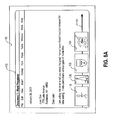
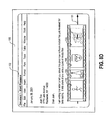
- an information box 114 may be presented in which information may be provided with respect to the image.
- the information display 114 provides comments in comment box 116 originating from the owner of the image.
- comments may also be provided by the user in the comment entry box 120 that can be read by the owner and/or subsequent users of the imagettes.
- the user actuates the "ADD" button 118 which causes the sharing software to add the entered text into comment box 116 and to add an indicator 112 to the display imagette 106 in the sequence of images.
- Indicator 112 is a visual indication of at least one criterion assigned to that specific image by the sharing software which, in the example of FIG. 9 is the availability of comments such as found in comment box 116.
- Other examples of criteria assigned to images can include 1) item pictured is for sale, 2) image is for sale, 3) image or image content is the most popular and any other information that can be associated with the image.
- Indicator 112 can take many different shapes such as common icons to convey different information. For example but not by way of limitation, imagette 106 is shown as a "dog-ear". In FIG. 14, indicator 112 is shown as a award ribbon. Furthermore, indicator 112 can be presented with different characteristics such as for example, but not by way of limitation, the color of the icon where one color may indicate that the owner of the indicated image is available online for chat. Image specific information 132 is also shown which can provide information such as the unique image sharing event number, the identity of the image owner, or any other information that is associated with the image and desired by the user.
- buttons 124, 125 126, 127, 128 and 130 for causing the sharing software to initiate other functionality.
- Button 130 permits the user to rotate an image to its proper orientation if the sharing software hasn't properly rotated the image automatically as described earlier.
- Button 126 when actuated, notifies the controlling computer 14 that the selected image is to be added to a CD that is to be produced for the selecting user at the end of the image sharing event.
- the CD comprises a compilation of images that the selecting user has selected throughout the duration of the image sharing event. The user can select such a service as described earlier with respect to FIG. 4.
- button 128 allows a user to order a print of the selected image.
- Controlling computer 14 creates a list of print requests for each user throughout the duration of the image sharing event aggregating the images selected for printing by each individual user.
- Button 127 causes the selected image to be transferred from the image owner's computer to the computer of the requesting user. This functionality is dependent upon permission that may be granted by participants during the registration process. If a user is sharing inappropriate or offensive images, another user can actuate button 125 to either ban the offending user or send a request to the controlling computer to ban the offending user. Obviously the owner/initiator of the image sharing event has the privilege to ban other users, but participants in the image sharing event can only request that an offending user is banned. In a further embodiment, an initiator can designate another user to watch for offensive material and ban the user who contributed that material.
- controlling computer 14 must retrieve high resolution images from the various participant's computers when the imagettes associated with those images have been selected for printing or other goods and/or services.
- the sharing software of each user keeps track of the individual images selected by the user and retrieves the high resolution images from the computer on which they originated. This retrieval is facilitated by the controlling computer 14 supplying the electronic address of the participant's computer where the image of interest is stored. Retrieval of the high resolution image can optionally include a permission step required of the image owner.
- the sharing software of each user returns the high resolution image to be shared to the controlling computer 14 and which is stored by the controlling computer 14 in anticipation of possible use for the fulfillment of various goods and/or services.
- the imagettes stop their movement when the user selects one of the images.
- a time period in which to add the comment by the current user.
- the imagettes would continue moving along the presentation path.
- the movement of the imagettes are stopped, thus a limited period is provided for the addition of comments by the user which in the present case is less than 5 minutes.
- the limited time period may be any desired time period.
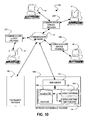
- FIG. 10 there is illustrated a modified system 10A made in accordance with the present invention.
- a network photoservice provider 134 which is hosting the image sharing event.
- An example of such a network photoservice provider 134 is Ofoto Inc.
- Computers 15, 17, 19, and 21 are connected to the communications network 12 via communication service providers 23A, 23B, and 23C.
- the network photoservice provider 134 is provided for managing the presentation of many sequences of imagettes for many different users concurrently.
- any particular user can connect electronically to this network photoservice provider 134 and set up a private image sharing event specifically for that individual and their invited guests.
- the advantage of this particular system is that the initiating user does not have to maintain the hosting system on their computer thus freeing up their computer for other tasks.
- the photoservice provider 134 can offer this service for a multitude of different individuals concurrently, each having their own separate image sharing events and thus allows for economy of use and provides services that an individual may not be capable or able to provide.
- the network photoservice provider 134 can also concurrently host a plurality of public image sharing events that can be provided in association with a sponsoring business if so desired as described earlier.
- the network photoservice provider 134 may, for example, be able to provide high speed communication capabilities that the initiating individual may not have.
- the network photoservice provider 134 can also provide goods and/or services to the users at a professional level.
- network photoservice provider 134 can provide shipping, and billing services for goods and/or services ordered. Furthermore, network photoservice provider 134 can have additional business relationships with at least one fulfillment provider 146 that facilitates the providing of goods and/or services based on the images shared during the image sharing event. Fulfillment provider 146 is shown as a separate business entity, but the invention is not so limited. Network photoservice provider 134 can additionally fulfill the role of the fulfillment provider 146. Furthermore, information can be supplied from the network photoservice provider 134 to the users regarding discounts on image products of the displayed images or advice where additional images, goods and/or services may be obtained with respect to a particular theme that may be associated with the shared images.
- network photoservice provider 134 includes a web server 136 for communicating with the users via communication network 12 and a computer 142 for managing the image sharing events registered by multitudes of users.
- Computer 142 includes an event database 138 which correlates specific events to registered users maintained in the user list 140. Event database 138 also includes information with regard to public image sharing events.
- computer 142 also includes an order building and tracking block 144 which tracks the specific events, and for each event, it tracks the participants, the location of the images being shared, the order information for each participant as well as the content of each participant's order. In this manner, network photoservice provider 134 fills the role of the controlling computer 14 of FIG. 1. All other aspects of the operation of system 10A are similar to the previously described system 10.
- network photoservice provider 134 contracts with a user of computer 19, for example, to insure that certain moral and ethical standards or themes are adhered to on behalf of network photoservice provider 134.
- the user of computer 19 can participate in the image sharing event and observe the types of images contributed by various participating users. If an image is not properly related to the theme of the image sharing event, the user of computer 19 with event administrative privileges makes that judgment and can remove the imagette in question. If the user whose picture has been removed continues to add similar pictures, the administrative user of computer 19 can remove the offending user from the list of participating users and prevent the offending user from rejoining the event.
- the network photoservice provider 134 in cooperation with the sharing software of each participating computer can sequentially collect digital images from each participating computer to form the compilation of digital images without forwarding the sequence of images to each participant. After the compilation of digital images has been formed, it can be presented as part of a web site whereby the presentation can be simultaneously viewed by hundreds and even thousands of viewers. In this embodiment, there is no forwarding action of the network photoservice provider of the image sequence. All modifications to the compilation of images are done via a web site that is hosting the presentation of the image sequence.
- network photoservice provider 134 manages an image sharing event between a plurality of users with different electronic devices, each device capable of displaying a digital image file.
- a first user with computer 150 is connected to a communication network 12 such as the Internet via a communication service provider 148A in a conventional manner.
- a second user with an Internet capable (web) phone 152 is connected to the communications network 12 via communication service provider 148B.
- the communication service provider 148B is a digital telecommunications provider with digital Internet access provided to phone users such as Sprint PCS and their Wireless WebTM.
- PDA Personal Digital Assistant
- the fourth user in the system 10B is connected to the communication network 12 by communication service provider 148D which in this case is the cable television network provider.
- Digital cable network equipment manufacturers such as Scientific Atlanta Inc. in cooperation with independent cable company owners currently permit television users access to a communications network such as the Internet. In such a manner, images from the sharing event are viewed on the television system 156 which includes a digital cable set top box such as manufactured by Scientific Atlanta Inc. and a standard television set for receiving signals from the digital cable set top box.
- FIG. 12 there is illustrated yet another modified system 10C made in accordance with the present invention.
- user computers 160, 162, 164, 166 are all connected to an online community service provider 170 such as America OnlineTM (AOL).
- AOL America OnlineTM
- members of such communities use local communication networks to effectively connect computers 160, 162, 164, and 166 to the online community service provider 170.
- Online community service provider 170 can also provide connection to the broader communication network 12 such as the Internet for providing other content to the community members and for passing fulfillment orders for goods and/or services to third party fulfillment providers 146.
- system 10C The unique aspects of system 10C include the fact the community members already provide their electronic addresses to the online community service provider 170 in the process of connecting to the community with a login name and password. This process supports the widely popular instant messaging form of communication such as AOL Instant Messenger. Being part of this community eliminates several of the steps required by the other systems 10,10A, and 10B since the user's electronic address is already established. The user's sharing software is then appropriately modified to eliminate those unnecessary steps.
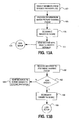
- FIG. 13A shows the remaining steps necessary for the sharing software to manage the image sharing event for a community member who wishes to create such an event.
- a member In step 172, a member must select other community members with whom he/she wishes to share images with.
- This list can be, for example but not by way of limitation, the "buddy list" as provided by AOL Instant Messenger. Such a list already establishes which members are online and their respective electronic addresses and therefore, their availability to participate in an instantaneous image sharing event.
- the creating member then provides information (step 174) about the event such as a theme etc. as described earlier. After providing the event information, the creating member then designates (step 176) the images that he/she wishes to share.
- the sharing software causes an instant message to be sent (step 177) to the invited users and the process ends in step 178 where the creating member simply waits for the images to be shared in a manner consistent with the earlier description.
- FIG. 13B shows the remaining steps for an invited community member to take to participate in an image sharing event.
- the invited community member Upon receiving an instant message (step 180) to join an image sharing event, the invited community member chooses (step 182) to join the image sharing event and designates (step 186) images to share. If the invited community member chooses not to join the image sharing event in step 182, an instant message is automatically generated to the event owner declining the invitation in step 184.
- step 188 set up is complete.
- FIG. 14 there is illustrated display device 100 with a first application 102 running in the background which in this example is a word processing application.
- the forwarded images are displayed in a designated pattern along a path indicated by arrow 101 as described in previous embodiments with like parts indicating like operation.
- the sharing software is being used to manage a photo contest, and in particular, for tracking the user's voting for a particular images.
- Imagette 106 includes indicator 112 for indicating that a particular image is a significant image in terms of votes gathered by various users participating in the image sharing event.
- an information window 190 is provided by the sharing software that includes a larger representation (imagette 106') of imagette 106 and a title box 192 for displaying the title of the image.
- Information window 190 further includes buttons 194, 196, and 198, which when actuated by the user causes their vote to be registered.
- a button overlay mark 200 which overlays button 198 displays to the user of the sharing software that he/she has already used their third place vote. Voting on the imagettes 106,108,110 etc. can be used for voting on the images as in a contest or for the person represented by the imagette or for any other dimension associated with the images forwarded to users with the sharing software.
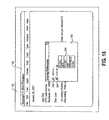
- FIG. 15 there is illustrated display device 100 with a first application 102 running in the background.
- a word processing application is shown as the first application 102 with like parts indicating like operation.
- the imagette sequence is not displayed as it is being viewed at another user's computer. As such, it is desirable for a user to determine where the imagette sequence is being viewed and other valuable information concerning the status of the image sharing event.
- a status window 210 can be displayed by the sharing software by the actuation of a tray icon (not shown) which is a typical implementation for software written for Windows95TM, Windows98TM, or any other Windows operating system offered by Microsoft Inc. While this is the preferred embodiment, the invention is not so limited.
- Status window 210 can be displayed using a variety of techniques specific to other operating systems in which the sharing software can run.
- Status window 210 includes larger imagette 106' which pursuant to the voting mechanism described with respect to FIG. 14 is the current favorite image.
- Image sharing event status information 212 is shown in status window 210 and includes the current round number and the time remaining in the image sharing event where the images will be forwarded in the presentation format. At the conclusion of the image sharing event, all of the images can be collected and displayed in one compilation at a web site such as Ofoto Inc.
- a user table 214 which includes all the users email addresses (or screen names), their online status, and the current viewer of the compilation of digital images. This serves to alert the waiting user as to timing of their next viewing opportunity.
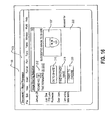
- FIG. 16 there is illustrated display device 100 of a computer such as computer 17 of FIG. 10 running a first application 102 which in this example is a word processing application.
- image sharing software running on the computer 17 causes a window 222 to be displayed for the user alerting the user to the randomly selected image to be shared in the image sharing event.
- the image to be shared is represented by imagette 106' in this example.
- the window 222 also presents the user with multiple choices with respect to imagette 106' represented by buttons 216, 218, and 220.
- Selecting button 216 tells the sharing software that imagette 106' can be shared in the image sharing event defined by image sharing event status information 212.
- selecting button 218 requests the sharing software to choose another random image and selecting button 220 permits the user to choose the image they wish to share.
- FIG. 17 there is illustrated display device 100 of a computer such as computer 17 of FIG. 10 running a first application 102 which in this example is a word processing application.
- image sharing software running on the computer 17 causes a window 224 to be displayed which alerts the user to the impending arrival of the display of the image sharing event on user computer 17.
- Event information 132 identifies the content of the event to the user and the total picture count 226 informs the user of the size of the image sharing event. Based on this information, the user selects an action represented by buttons 228, 230, 232, and 234. If the user has no images to share, button 234 is selected which causes the sharing software to display the image sequence without adding an image from the user computer 17.
- Selecting button 228 causes the image sequence to effectively skip computer 17 being neither displayed nor added to.
- the image sequence is displayed and an image from computer 17 is added to the image sequence as described earlier.
- selecting button 230 causes an image from computer 17 to be added to the image sequence without the sequence being displayed on computer 17. In this mode, the user has decided to participate in sharing images without visually disrupting his/her work on computer 17.
- An action button 236 may also be provided requesting that the dialog not be displayed again.
- FIG. 18 there is illustrated display device 100 of a computer such as computer 17 of FIG. 10 running a first application 102 which, in this example, is a word processing application.
- image sharing software running on the computer 17 causes a viewing preferences window 240 to be displayed which permits a user to sort the images in an image sharing event according to a selected criterion in a list 246. Criteria in list 246 can include generic categories that further include sub-categories or the other attributes of the image sharing event. List 246 is presented to the user upon the user's selection of selection box 244. The default mode for this window 240 is to be displayed with selection box 242 pre-selected causing the sharing software to display all the images in the sequence without sorting.
- visual indicator 252 indicates that imagette 108 is representing an audio file of the type ".mp3" which is a common audio file for playing music on a computer.
- imagettes 104, 106, 108, and 110 can represent different types of news stories in a news sharing event and are provided by a content provider 306 (See FIG. 24).
- visual indicators 256, 254, 252, and 250 give a visual indication to the user of the type of new story portrayed by the imagettes 104, 106, 108, and 110. The user can thus select news stories to get further information about by selecting the individual imagettes 104, 106, 108, and 110 in a manner previously described.
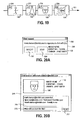
- a chat request window 258 is shown that is caused by the sharing software reacting to a requesting user who has previously selected button 124 (FIG. 9).
- Button 124 is a request to chat with the owner (receiving user) of the picture in the image sharing event as shown in image information window 114.
- the requesting user of the chat session is identified in chat field 260.
- Image event information 132 along with the information in chat field 260 help the receiving user determine whether or not to chat with the requesting user.
- the receiving user selects button 262 to accept the request for chat or button 264 to deny the request. If the request is denied, a message (not shown) is returned to the requesting user. Otherwise in FIG.
- chat window 266 is provided to both users within which the dialog box 268 is displayed as is typical with chat and instant messaging systems.
- the imagette 106' is further identified with image event information 132. Chat comments are added by the user typing information into chat entry box 270 followed by the selection of the send button 272.
- the sharing software of the receiving user can store this dialog in association with the imagette 106'.
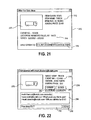
- FIG. 21 illustrates an alternate embodiment within system 10A, 10B, 10C, or 10D of the chat session discussed with respect to FIGS. 20A and 20B.
- images belonging to a specific image sharing event represent items that the image owner is offering for sale. These items can be personal items offered by an individual or they can be catalog items offered by a business which will be discussed later with respect to FIG. 23.
- a user operating the sharing software fills out a form contained within an offer creating window 310 and provides item sale information 312 that will effectively promote the item which is being offered for sale.
- window 310 is the appropriate sale event information 314 which is assigned by the network photoservice provider 134.
- the user after providing item sale information 312, saves the offer to a location specified in a storage location box 316 on user computer 17.
- negotiation chat session is occurring in a negotiating window 274 where an imagette 276 is representative of a truck that the image owner is offering for sale.
- Imagette 276 is part of an image sharing event as identified by the image sharing sale event information 278.
- Negotiation box 284 is provided for the buyer (requesting user) and the seller (receiving user) to negotiate a price for the item represented by imagette 276.
- the negotiation dialog box 284 can also be used for answering questions about the condition of the item, the shipping and payment requirements and any other item of interest that can be necessary to negotiate a successful deal.
- the content of negotiation dialog box 284 is necessary documentation that is maintained by network photoservice provider 134.
- a negotiating comment entry box 290 is provided for each user to enter negotiating comments into the negotiation dialog box 290.
- Comments entered into negotiation dialog box 290 are added to the negotiation dialog box 284 when the sending user selects the send button 286.
- Also included in negotiating window 274 are confirmation buttons 280 and 282 for confirming the comments in the negotiating window.
- the photoservice provider can supply a printed confirmation to each party and effect the transfer the funds required between the two parties to complete the negotiations based on information supplied at the point of joining the sharing event.
- the image sharing event can include any desired number of images.
- the controlling 14 computer can remember the last image that was viewed by the user and restart viewing of the compilation of digital images at the same point where the user left off.
- the user would again see any additional updates that anyone has made since the compilation of digital images was last viewed in the default mode.
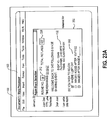
- the user who rejoins the image sharing event can select a starting point as shown in FIG. 23A.
- FIG. 23A there is illustrated display device 100 of a computer such as computer 17 of FIG.
- image sharing software running on the computer 17 causes a rejoining event selection window 350 to be displayed which welcomes the user back to an event that the user had previously participated in.
- Event information 132 identifies the content of the event to the user and the total picture count 226 informs the user of the size of the image sharing event.
- Sharing software running on computer 17 stores the event information including an identifier of the last image viewed by the user.
- the network photoservice provider 134 can track this information and provide it to the sharing software when the user attempts to rejoin an event that he had previously participated in.
- window 350 Also provided in window 350 is a list 352 of criterion that the user can select from which determines where the user begins viewing images in the compilation of digital images being shared. In the default mode, the user begins viewing the sequence of images from the point in which he left off. Other choices include, but are not limited to, starting with a specific image, starting with images added after a specific date and/or time, or any other criterion that further includes sorting by image content (i.e. only show me the images that have dogs and were added after a specific time and date).
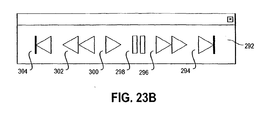
- a control panel 292 is shown for controlling the viewing of the compilation of digital images. Included in the control panel 292 are control buttons 294,296,298, 300, 302, and 304. Control buttons 294,296, 298, 300, 302, and 304 are used to control the flow of imagettes in the presentation format as depicted earlier in FIGS. 8A-8E. For example, control button 298 causes the image sequence to pause. Likewise, control button 302 causes the image sequence to rapidly scan backwards while actuated, and control button 296 causes the image sequence to rapidly scan forward while actuated. Control buttons 304 and 294 cause the presentation format to return to the beginning or to jump to the end of the image sequence respectively. These controls are especially useful when an image sharing event has a large compilation of digital images being shared.
- network photoservice provider 134 can implement the sharing of the compilation as previously described where the sequence of digital images is sequentially sent to users in a list. At some point, however, the time it takes to view a large number of digital images in the sequence makes the remaining users in the event list have to wait too long to view the sequence. For example, but not by way of limitation, the network photoservice provider can begin the sharing event in the manner just described by providing the whole sequence of images to each user in the event list in turn until the number of images exceeds 25 images.
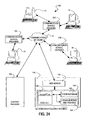
- content provider 306 is shown connected to the communications network 12 for providing content to the network photoservice provider 134.
- the content provider 306 can provide all the images being shared to the network photoservice provider 134 who manages the sharing event.
- content provider 306 can provide news stories represented by imagettes 104, 106, 108, and 110 (See FIG. 19) in the image sequence.
- content provider 306 publishes content for selection by users of computers 15, 17, 19, and 21. Users of computers 15,17,19, and 21 select images from the image sequence that they are interested in viewing in greater detail or are interested in seeking further information about.
- the network photoservice provider 134 can track various parameters such as the number of unique users participating in the event, the number of times any specific image has been accessed or selected for more information, or any other parameter of the sharing event.
- a report can be generated in exchange for a fee and provided to the content provider which includes statistical analysis or breakdowns of the data tracked by the network photoservice provider 134.
- a display 100 displays a first application 102 running on a computer who is participating in an image sharing event open to the public.
- a user actuating a feature of the sharing software causes an image event route trace window 340 to be displayed.
- a visual path representation 342 is included which provides the user with a map view, in this example, that correlates to the approximate physical locations of all the users participating in the image sharing event.
- Each user location is denoted by a point P, and each point P is connected sequentially to the points P that immediately precede and immediately follow it.
- the resulting visual path representation 342 gives the requesting user an idea of how far the image sequence is traveling as it makes its way between users.
- the points P can change color or flash or provide any other visually distinctive and indicative technique which shows the user where the image sequence is currently being displayed.
- the sharing software can provide a hardcopy output of visual path 342 if so desired.
- a display 100 displays a first application 102 running on a computer which is participating in an image sharing event.
- a user actuating a feature of the sharing software causes a post event process window 364 to be displayed.
- Window 364 includes event information 132, an enlarged imagette 106' of selected imagette 106, a buttons 358, 360, and 362.
- a user may wish to view the compilation asynchronously from the occurrence of the actual event.
- the user can supply information upon registration that he/she desires to receive a compressed compilation of digital images as an email for viewing asynchronously.
- a typical application for compressing a plurality of files into a single file is the well known WinZip application which produces a compressed file with a ".zip" file extension.
- actuation of button 362 instructs the network photoservice provider 134 to email a compressed compilation to the requesting user.
- Such a compressed compilation can be provided by the network photoservice provider 134 on a periodic basis, such as once per day, if the image sharing event transpires over several days.
- Button 360 works in conjunction with button 358 to specify images to mark with button 358. By marking an image, a user is indicating that he/she wishes to take a future action with respect to either the marked image or the information represented by the marked image.
- marking the image can be accomplished by selecting it with a right mouse click and further selecting an option from a resulting list (not shown).
- Button 360 permits the user to selectively request a compressed subcompilation of the compilation of digital images belonging to the image sharing event.
- a display 100 displays a first application 102 running on a computer which is participating in a plurality of image sharing events, three of which are displayed on top of the first application 102.
- a user can participate in multiple image sharing events and the sharing software running on user computer 17, for example, can display multiple image sequences resulting from the participation in the plurality of image sharing events.
- a first image sharing event 380 is shown which includes imagettes 104, 106, 108, and 110 following path 101.
- a second image sharing event 382 follows path 101' and includes imagettes 366, 368, and 370.
- a third image event 384 is shown which includes imagettes 372, 374,376, and 378 following a path 101".
- the number of concurrent image sharing events that a user can participate in is only limited by the size of the display before more image sharing events begin to visually overlap on the display screen 100 and obscure the user's ability to effectively participate in the image sharing event.
- Integrated image sharing event 390 with an interleaved presentation format for displaying a plurality of concurrent image sharing events.
- Integrated image sharing event 390 includes imagettes 104, 366, 372, 106, 368 and 374 following path 101.
- the sharing software on computer 17, for example can provide the interleaved presentation format to permit the user to optimize the working area of the display screen 100.
- the sharing software provides visual framing indicators 386 and 388. While shown as heavier framing lines and including dashed lines, any visually distinguishing characteristic can be used and considered within the scope of the invention. For example but not by way of limitation, the color of the frame may be specific to a particular image sharing event.
Landscapes
- Engineering & Computer Science (AREA)
- Multimedia (AREA)
- Signal Processing (AREA)
- General Engineering & Computer Science (AREA)
- Theoretical Computer Science (AREA)
- Data Mining & Analysis (AREA)
- Databases & Information Systems (AREA)
- Physics & Mathematics (AREA)
- General Physics & Mathematics (AREA)
- Library & Information Science (AREA)
- Information Transfer Between Computers (AREA)
Applications Claiming Priority (2)
| Application Number | Priority Date | Filing Date | Title |
|---|---|---|---|
| US174602 | 2002-06-19 | ||
| US10/174,602 US8307046B2 (en) | 2002-06-19 | 2002-06-19 | Method and system for setting up a system for sharing images over a communication network between multiple users |
Publications (2)
| Publication Number | Publication Date |
|---|---|
| EP1377009A2 true EP1377009A2 (de) | 2004-01-02 |
| EP1377009A3 EP1377009A3 (de) | 2006-05-17 |
Family
ID=29717806
Family Applications (1)
| Application Number | Title | Priority Date | Filing Date |
|---|---|---|---|
| EP03076795A Ceased EP1377009A3 (de) | 2002-06-19 | 2003-06-10 | Verfahren und System zur Bildverteilung über ein Übertragungsnetzwerk zwischen mehreren Benutzern |
Country Status (2)
| Country | Link |
|---|---|
| US (1) | US8307046B2 (de) |
| EP (1) | EP1377009A3 (de) |
Cited By (3)
| Publication number | Priority date | Publication date | Assignee | Title |
|---|---|---|---|---|
| WO2007072371A3 (en) * | 2005-12-20 | 2007-10-25 | Koninkl Philips Electronics Nv | Apparatus, method and system for tracking shared information |
| WO2012047078A1 (ru) * | 2010-10-04 | 2012-04-12 | Shilikbayeva Arna | Способ управления процессом реализации службы доставки товаров |
| CN114164602A (zh) * | 2021-12-10 | 2022-03-11 | 珠海格力电器股份有限公司 | 一种具有等离子风发生器的洗衣机及其控制方法 |
Families Citing this family (71)
| Publication number | Priority date | Publication date | Assignee | Title |
|---|---|---|---|---|
| US7970854B2 (en) * | 2003-01-15 | 2011-06-28 | Qurio Holdings, Inc. | Method and system for requesting image prints in an online photosharing system |
| CN1871594B (zh) * | 2003-06-02 | 2010-11-17 | 精工爱普生株式会社 | 图像显示设备和通过网络与图像显示设备通信的方法 |
| US7978716B2 (en) | 2003-11-24 | 2011-07-12 | Citrix Systems, Inc. | Systems and methods for providing a VPN solution |
| ATE359646T1 (de) * | 2003-12-08 | 2007-05-15 | Research In Motion Ltd | Verfahren und vorrichtung für sofortigen nachrichtendienst |
| US8234414B2 (en) | 2004-03-31 | 2012-07-31 | Qurio Holdings, Inc. | Proxy caching in a photosharing peer-to-peer network to improve guest image viewing performance |
| US8499248B1 (en) | 2004-04-29 | 2013-07-30 | Paul Erich Keel | Methods and apparatus for managing and exchanging information using information objects |
| US8739274B2 (en) | 2004-06-30 | 2014-05-27 | Citrix Systems, Inc. | Method and device for performing integrated caching in a data communication network |
| US8495305B2 (en) | 2004-06-30 | 2013-07-23 | Citrix Systems, Inc. | Method and device for performing caching of dynamically generated objects in a data communication network |
| US7757074B2 (en) | 2004-06-30 | 2010-07-13 | Citrix Application Networking, Llc | System and method for establishing a virtual private network |
| US8657606B2 (en) * | 2004-07-02 | 2014-02-25 | Paul Fisher | Asynchronous art jurying system |
| CA2572401A1 (en) | 2004-07-23 | 2006-02-02 | Citrix Systems, Inc. | A method and systems for securing remote access to private networks |
| KR20070045282A (ko) | 2004-07-23 | 2007-05-02 | 사이트릭스 시스템스, 인크. | 네트워크 노드 간의 통신을 최적화하기 위한 시스템 및방법 |
| US8150617B2 (en) | 2004-10-25 | 2012-04-03 | A9.Com, Inc. | System and method for displaying location-specific images on a mobile device |
| US7698386B2 (en) * | 2004-11-16 | 2010-04-13 | Qurio Holdings, Inc. | Serving content from an off-line peer server in a photosharing peer-to-peer network in response to a guest request |
| US8549149B2 (en) | 2004-12-30 | 2013-10-01 | Citrix Systems, Inc. | Systems and methods for providing client-side accelerated access to remote applications via TCP multiplexing |
| US8954595B2 (en) | 2004-12-30 | 2015-02-10 | Citrix Systems, Inc. | Systems and methods for providing client-side accelerated access to remote applications via TCP buffering |
| US7810089B2 (en) | 2004-12-30 | 2010-10-05 | Citrix Systems, Inc. | Systems and methods for automatic installation and execution of a client-side acceleration program |
| US8700695B2 (en) | 2004-12-30 | 2014-04-15 | Citrix Systems, Inc. | Systems and methods for providing client-side accelerated access to remote applications via TCP pooling |
| US8706877B2 (en) | 2004-12-30 | 2014-04-22 | Citrix Systems, Inc. | Systems and methods for providing client-side dynamic redirection to bypass an intermediary |
| US8255456B2 (en) | 2005-12-30 | 2012-08-28 | Citrix Systems, Inc. | System and method for performing flash caching of dynamically generated objects in a data communication network |
| US20060174203A1 (en) | 2005-01-31 | 2006-08-03 | Searete Llc, A Limited Liability Corporation Of The State Of Delaware | Viewfinder for shared image device |
| US9489717B2 (en) | 2005-01-31 | 2016-11-08 | Invention Science Fund I, Llc | Shared image device |
| US9082456B2 (en) | 2005-01-31 | 2015-07-14 | The Invention Science Fund I Llc | Shared image device designation |
| US8902320B2 (en) | 2005-01-31 | 2014-12-02 | The Invention Science Fund I, Llc | Shared image device synchronization or designation |
| US20060170956A1 (en) | 2005-01-31 | 2006-08-03 | Jung Edward K | Shared image devices |
| US9325781B2 (en) | 2005-01-31 | 2016-04-26 | Invention Science Fund I, Llc | Audio sharing |
| US9124729B2 (en) | 2005-01-31 | 2015-09-01 | The Invention Science Fund I, Llc | Shared image device synchronization or designation |
| US9910341B2 (en) | 2005-01-31 | 2018-03-06 | The Invention Science Fund I, Llc | Shared image device designation |
| US7920169B2 (en) | 2005-01-31 | 2011-04-05 | Invention Science Fund I, Llc | Proximity of shared image devices |
| US7876357B2 (en) | 2005-01-31 | 2011-01-25 | The Invention Science Fund I, Llc | Estimating shared image device operational capabilities or resources |
| US8606383B2 (en) | 2005-01-31 | 2013-12-10 | The Invention Science Fund I, Llc | Audio sharing |
| US20060176324A1 (en) * | 2005-02-08 | 2006-08-10 | International Business Machines Corporation | Display system having demand-based resolution and method therefor |
| US9942511B2 (en) | 2005-10-31 | 2018-04-10 | Invention Science Fund I, Llc | Preservation/degradation of video/audio aspects of a data stream |
| US9451200B2 (en) | 2005-06-02 | 2016-09-20 | Invention Science Fund I, Llc | Storage access technique for captured data |
| US8681225B2 (en) | 2005-06-02 | 2014-03-25 | Royce A. Levien | Storage access technique for captured data |
| US9093121B2 (en) | 2006-02-28 | 2015-07-28 | The Invention Science Fund I, Llc | Data management of an audio data stream |
| US10003762B2 (en) | 2005-04-26 | 2018-06-19 | Invention Science Fund I, Llc | Shared image devices |
| US9001215B2 (en) | 2005-06-02 | 2015-04-07 | The Invention Science Fund I, Llc | Estimating shared image device operational capabilities or resources |
| US9819490B2 (en) | 2005-05-04 | 2017-11-14 | Invention Science Fund I, Llc | Regional proximity for shared image device(s) |
| US9967424B2 (en) | 2005-06-02 | 2018-05-08 | Invention Science Fund I, Llc | Data storage usage protocol |
| US7782365B2 (en) | 2005-06-02 | 2010-08-24 | Searete Llc | Enhanced video/still image correlation |
| US7567553B2 (en) | 2005-06-10 | 2009-07-28 | Swift Creek Systems, Llc | Method, system, and data structure for providing a general request/response messaging protocol using a presence protocol |
| US8688801B2 (en) | 2005-07-25 | 2014-04-01 | Qurio Holdings, Inc. | Syndication feeds for peer computer devices and peer networks |
| US20070033142A1 (en) * | 2005-08-05 | 2007-02-08 | Microsoft Corporation | Informal trust relationship to facilitate data sharing |
| US7853483B2 (en) * | 2005-08-05 | 2010-12-14 | Microsoft Coporation | Medium and system for enabling content sharing among participants associated with an event |
| US7715586B2 (en) * | 2005-08-11 | 2010-05-11 | Qurio Holdings, Inc | Real-time recommendation of album templates for online photosharing |
| US8447828B2 (en) * | 2005-09-21 | 2013-05-21 | Qurio Holdings, Inc. | System and method for hosting images embedded in external websites |
| US7933972B1 (en) | 2005-09-29 | 2011-04-26 | Qurio Holdings, Inc. | Method and system for organizing categories of content in a distributed network |
| US9098832B1 (en) | 2005-11-15 | 2015-08-04 | Qurio Holdings, Inc. | System and method for recording a photo chat session |
| US7512880B2 (en) * | 2005-12-23 | 2009-03-31 | Swift Creek Systems, Llc | Method and system for presenting published information in a browser |
| US8788572B1 (en) | 2005-12-27 | 2014-07-22 | Qurio Holdings, Inc. | Caching proxy server for a peer-to-peer photosharing system |
| US8301839B2 (en) | 2005-12-30 | 2012-10-30 | Citrix Systems, Inc. | System and method for performing granular invalidation of cached dynamically generated objects in a data communication network |
| US7921184B2 (en) | 2005-12-30 | 2011-04-05 | Citrix Systems, Inc. | System and method for performing flash crowd caching of dynamically generated objects in a data communication network |
| US9367832B2 (en) * | 2006-01-04 | 2016-06-14 | Yahoo! Inc. | Synchronizing image data among applications and devices |
| US7587450B2 (en) | 2006-02-01 | 2009-09-08 | Swift Creek Systems, Llc | HTTP publish/subscribe communication protocol |
| JPWO2007097253A1 (ja) * | 2006-02-27 | 2009-07-09 | 京セラ株式会社 | 画像情報共有システム |
| US8341219B1 (en) * | 2006-03-07 | 2012-12-25 | Adobe Systems Incorporated | Sharing data based on tagging |
| US9330190B2 (en) | 2006-12-11 | 2016-05-03 | Swift Creek Systems, Llc | Method and system for providing data handling information for use by a publish/subscribe client |
| US20080263449A1 (en) * | 2007-04-20 | 2008-10-23 | Microsoft Corporation | Automated maintenance of pooled media content |
| US7778973B2 (en) * | 2007-05-18 | 2010-08-17 | Tat Kuen Choi | System, method, and program for sharing photos via the internet |
| US8788379B1 (en) * | 2007-12-21 | 2014-07-22 | Amazon Technologies, Inc. | Providing configurable pricing for execution of software images |
| JP5684992B2 (ja) * | 2010-02-26 | 2015-03-18 | キヤノン株式会社 | 情報処理システム、情報処理装置、処理方法及びプログラム |
| US20120324002A1 (en) * | 2011-02-03 | 2012-12-20 | Afolio Inc. | Media Sharing |
| US11611595B2 (en) | 2011-05-06 | 2023-03-21 | David H. Sitrick | Systems and methodologies providing collaboration among a plurality of computing appliances, utilizing a plurality of areas of memory to store user input as associated with an associated computing appliance providing the input |
| US10402485B2 (en) * | 2011-05-06 | 2019-09-03 | David H. Sitrick | Systems and methodologies providing controlled collaboration among a plurality of users |
| WO2014142814A1 (en) * | 2013-03-12 | 2014-09-18 | Intel Corporation | Content sharing device management |
| US20140365432A1 (en) | 2013-06-10 | 2014-12-11 | Dropbox, Inc. | Dropsite for shared content |
| US20160050704A1 (en) * | 2014-08-12 | 2016-02-18 | Lyve Minds, Inc. | Image linking and sharing |
| US10540059B2 (en) * | 2016-08-19 | 2020-01-21 | Dropbox, Inc. | User interface for content sharing client in a desktop file system context |
| US11782587B1 (en) | 2018-01-23 | 2023-10-10 | Paul Erich Keel | Computer-implemented environment for creating, sharing, and storing documents in a modular format |
| US12309328B2 (en) * | 2023-03-06 | 2025-05-20 | Awes.Me, Inc. | Dynamic upload and automated workflows for hosted images and videos |
Family Cites Families (12)
| Publication number | Priority date | Publication date | Assignee | Title |
|---|---|---|---|---|
| US5008853A (en) | 1987-12-02 | 1991-04-16 | Xerox Corporation | Representation of collaborative multi-user activities relative to shared structured data objects in a networked workstation environment |
| US5724508A (en) * | 1995-03-09 | 1998-03-03 | Insoft, Inc. | Apparatus for collaborative computing |
| WO1998044733A1 (en) * | 1997-03-31 | 1998-10-08 | Broadband Associates | Method and system for providing a presentation on a network |
| US20020013852A1 (en) * | 2000-03-03 | 2002-01-31 | Craig Janik | System for providing content, management, and interactivity for thin client devices |
| US7546353B2 (en) * | 1999-12-02 | 2009-06-09 | Western Digital Technologies, Inc. | Managed peer-to-peer applications, systems and methods for distributed data access and storage |
| US6742023B1 (en) * | 2000-04-28 | 2004-05-25 | Roxio, Inc. | Use-sensitive distribution of data files between users |
| US6812962B1 (en) | 2000-05-11 | 2004-11-02 | Eastman Kodak Company | System and apparatus for automatically forwarding digital images to a service provider |
| US6741586B1 (en) * | 2000-05-31 | 2004-05-25 | 3Com Corporation | System and method for sharing computer screens over a telephony network |
| CA2414088A1 (en) | 2000-06-22 | 2001-12-27 | Radvault, Inc. | Medical image management system and method |
| TW493342B (en) * | 2000-11-10 | 2002-07-01 | Acer Comm & Multimedia Inc | Image catching device with on-line image transmission function |
| EP1348165A4 (de) * | 2000-12-26 | 2009-01-28 | Polycom Inc | System und verfahren zum koordinieren einer konferenz unter verwendung eines fest zugeordneten servers |
| US7058689B2 (en) * | 2001-10-16 | 2006-06-06 | Sprint Communications Company L.P. | Sharing of still images within a video telephony call |
-
2002
- 2002-06-19 US US10/174,602 patent/US8307046B2/en not_active Expired - Fee Related
-
2003
- 2003-06-10 EP EP03076795A patent/EP1377009A3/de not_active Ceased
Non-Patent Citations (1)
| Title |
|---|
| None * |
Cited By (3)
| Publication number | Priority date | Publication date | Assignee | Title |
|---|---|---|---|---|
| WO2007072371A3 (en) * | 2005-12-20 | 2007-10-25 | Koninkl Philips Electronics Nv | Apparatus, method and system for tracking shared information |
| WO2012047078A1 (ru) * | 2010-10-04 | 2012-04-12 | Shilikbayeva Arna | Способ управления процессом реализации службы доставки товаров |
| CN114164602A (zh) * | 2021-12-10 | 2022-03-11 | 珠海格力电器股份有限公司 | 一种具有等离子风发生器的洗衣机及其控制方法 |
Also Published As
| Publication number | Publication date |
|---|---|
| EP1377009A3 (de) | 2006-05-17 |
| US20030236831A1 (en) | 2003-12-25 |
| US8307046B2 (en) | 2012-11-06 |
Similar Documents
| Publication | Publication Date | Title |
|---|---|---|
| EP1377008B1 (de) | System und verfahren zur bildverteilung über einen kommunikationsnetzwerk zwischen mehrere nutzer | |
| US7392296B2 (en) | Method and computer software program for sharing images over a communication network among a plurality of users in accordance with a criteria | |
| US8307046B2 (en) | Method and system for setting up a system for sharing images over a communication network between multiple users | |
| US7725398B2 (en) | Method and system for selling goods and/or services over a communication network between multiple users | |
| US20030236830A1 (en) | Method and system for sharing images over a communication network among a plurality of users | |
| US7617279B2 (en) | Image-printing system using peer-to-peer network | |
| US7860747B2 (en) | Method system of software for publishing images on a publicly available website and for ordering of goods or services | |
| US7715586B2 (en) | Real-time recommendation of album templates for online photosharing | |
| US9769313B2 (en) | Systems and methods for screening communications based on receiver programmable pins | |
| US20020065741A1 (en) | Distributing images to multiple recipients | |
| US20050063613A1 (en) | Network based system and method to process images | |
| MX2009001638A (es) | Sistema de computo para monetizar aplicaciones de calendario. | |
| US7403912B2 (en) | Computer software product and method for sharing images and ordering image goods or services | |
| US20080022210A1 (en) | Wedding Ceremony Information Distribution System | |
| JP4223206B2 (ja) | プリント注文処理方法および装置並びにプログラム | |
| US20020103718A1 (en) | Print order system, printing system, order terminal and recording medium | |
| US20070058032A1 (en) | Virtual film providing method, server, and mobile terminal with camera | |
| US20060069574A1 (en) | Selling system and selling method for pictures through internet and computer solftware thereof | |
| JP2020030716A (ja) | コンテンツ提供装置、方法およびプログラム | |
| KR20000054409A (ko) | 온라인 및 오프라인망을 이용한 개인 사진 판촉물 광고마케팅 및 고객 관리 시스템 | |
| JP7410611B1 (ja) | コンテンツ配信サーバー、及びコンテンツ配信システム | |
| JP2002218429A (ja) | 映像配信方法 | |
| HK1061097A (en) | Method and system for selling goods and/or services sharing over a communication network between multiple users | |
| JP2002109248A (ja) | 画像編集システム、受付サーバ、画像編集サーバ、端末、画像データベース、情報分析サーバ、画像編集方法及び画像編集プログラムを記録した記録媒体 | |
| JP2002328870A (ja) | 画像配信システム |
Legal Events
| Date | Code | Title | Description |
|---|---|---|---|
| PUAI | Public reference made under article 153(3) epc to a published international application that has entered the european phase |
Free format text: ORIGINAL CODE: 0009012 |
|
| AK | Designated contracting states |
Kind code of ref document: A2 Designated state(s): AT BE BG CH CY CZ DE DK EE ES FI FR GB GR HU IE IT LI LU MC NL PT RO SE SI SK TR |
|
| AX | Request for extension of the european patent |
Extension state: AL LT LV MK |
|
| PUAL | Search report despatched |
Free format text: ORIGINAL CODE: 0009013 |
|
| AK | Designated contracting states |
Kind code of ref document: A3 Designated state(s): AT BE BG CH CY CZ DE DK EE ES FI FR GB GR HU IE IT LI LU MC NL PT RO SE SI SK TR |
|
| AX | Request for extension of the european patent |
Extension state: AL LT LV MK |
|
| AKX | Designation fees paid |
Designated state(s): DE FR GB IT |
|
| 17P | Request for examination filed |
Effective date: 20070108 |
|
| 17Q | First examination report despatched |
Effective date: 20070829 |
|
| RAP1 | Party data changed (applicant data changed or rights of an application transferred) |
Owner name: INTELLECTUAL VENTURES FUND 83 LLC |
|
| STAA | Information on the status of an ep patent application or granted ep patent |
Free format text: STATUS: THE APPLICATION HAS BEEN REFUSED |
|
| 18R | Application refused |
Effective date: 20170110 |