EP1408421A2 - Sytème et procédé de conversion entre formatage de texte ou de langue de balisage et structure de plan - Google Patents
Sytème et procédé de conversion entre formatage de texte ou de langue de balisage et structure de plan Download PDFInfo
- Publication number
- EP1408421A2 EP1408421A2 EP20030022953 EP03022953A EP1408421A2 EP 1408421 A2 EP1408421 A2 EP 1408421A2 EP 20030022953 EP20030022953 EP 20030022953 EP 03022953 A EP03022953 A EP 03022953A EP 1408421 A2 EP1408421 A2 EP 1408421A2
- Authority
- EP
- European Patent Office
- Prior art keywords
- data
- computer
- outline
- indicia
- level
- Prior art date
- Legal status (The legal status is an assumption and is not a legal conclusion. Google has not performed a legal analysis and makes no representation as to the accuracy of the status listed.)
- Ceased
Links
Images


Classifications
-
- G—PHYSICS
- G06—COMPUTING OR CALCULATING; COUNTING
- G06F—ELECTRIC DIGITAL DATA PROCESSING
- G06F40/00—Handling natural language data
- G06F40/10—Text processing
- G06F40/12—Use of codes for handling textual entities
- G06F40/137—Hierarchical processing, e.g. outlines
-
- G—PHYSICS
- G06—COMPUTING OR CALCULATING; COUNTING
- G06F—ELECTRIC DIGITAL DATA PROCESSING
- G06F40/00—Handling natural language data
- G06F40/10—Text processing
- G06F40/12—Use of codes for handling textual entities
- G06F40/151—Transformation
-
- G—PHYSICS
- G06—COMPUTING OR CALCULATING; COUNTING
- G06F—ELECTRIC DIGITAL DATA PROCESSING
- G06F40/00—Handling natural language data
- G06F40/10—Text processing
- G06F40/166—Editing, e.g. inserting or deleting
Definitions
- Computing systems have achieved widespread acceptance as a means for creating and manipulating a wide variety of types of documents. For instance, users routinely create word processing documents, drawing documents, spreadsheet documents, database documents, and the like. Even among word processing documents there may be various types. For instance, some word processing applications may be designed to provide rich formatting and page layout functionality, such as a desktop publishing application. Other word processing applications may be designed as simple text editors. Still other word processors may be designed as tools for organizing textual data or notes into useful information.
- the present invention is directed at a mechanism for importing data into an outline aware application if the data does not include outline structure, and for creating outline structure in the data based on indicia of visual structure that may be present in the data.
- data is selected for import into the outline application.
- the data is devoid of outline structure, such as relative level information or parent/child relationship information.
- the data includes indicia of visual structure, such as markup attributes or tab characters.
- the outline application (or some related component) transforms the selected data into outline structured data based on the indicia of visual structure.
- levels in the outline structure may be based on a number of tab characters associated with a portion (e.g., a paragraph) of the selected data.
- levels in the outline structure may be based on an aggregate indentation described in markup associated with a portion (e.g., a tag or element) of the data.
- the invention provides a mechanism for manipulating data between a first format and a second format where the first format does not include outline structure and the second format does.
- the mechanism transforms data from non-outline format to outline format based on indicia included in the data that suggests what the outline structure should be. For example, if the data includes "tab" formatting to provide visual structure, the mechanism may create outline structure by interpreting the tab formatting. If the data includes markup formatting, the mechanism may create outline structure by interpreting information within the markup formatting. Conversely, the mechanism may transform outline-structured data into textual data by converting the outline structure into tab formatting.
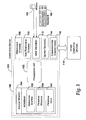
- FIGURE 1 illustrates a computing device that may be used in illustrative implementations of the present invention.
- computing device 100 typically includes at least one processing unit 102 and system memory 104.
- system memory 104 may be volatile (such as RAM), non-volatile (such as ROM, flash memory, etc.) or some combination of the two.
- System memory 104 typically includes an operating system 105, one or more program modules 106, and may include program data 107.
- This basic configuration of computing device 100 is illustrated in FIGURE 1 by those components within dashed line 108.
- Computing device 100 may have additional features or functionality.
- computing device 100 may also include additional data storage devices (removable and/or non-removable) such as, for example, magnetic disks, optical disks, or tape.
- additional storage is illustrated in FIGURE 1 by removable storage 109 and non-removable storage 110.
- Computer storage media may include volatile and nonvolatile, removable and non-removable media implemented in any method or technology for storage of information, such as computer readable instructions, data structures, program modules, or other data.
- System memory 104, removable storage 109 and non-removable storage 110 are all examples of computer storage media.
- Computer storage media includes, but is not limited to, RAM, ROM, EEPROM, flash memory or other memory technology, CD-ROM, digital versatile disks (DVD) or other optical storage, magnetic cassettes, magnetic tape, magnetic disk storage or other magnetic storage devices, or any other medium which can be used to store the desired information and which can be accessed by computing device 100. Any such computer storage media may be part of device 100.
- Computing device 100 may also have input device(s) 112 such as keyboard 122, mouse 123, pen, voice input device, touch input device, etc.
- Output device(s) 114 such as a display, speakers, printer, etc. may also be included. These devices are well known in the art and need not be discussed at length here.
- Computing device 100 may also contain communication connections 116 that allow the device to communicate with other computing devices 118, such as over a network.
- Communication connections 116 is one example of communication media.
- Communication media may typically be embodied by computer readable instructions, data structures, program modules, or other data in a modulated data signal, such as a carrier wave or other transport mechanism, and includes any information delivery media.
- modulated data signal means a signal that has one or more of its characteristics set or changed in such a manner as to encode information in the signal.
- communication media includes wired media such as a wired network or direct-wired connection, and wireless media such as acoustic, RF, infrared and other wireless media.
- the term computer readable media as used herein includes both storage media and communication media.
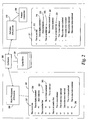
- FIGURE 2 is a functional block diagram generally illustrating components of a system implementing the present invention.
- the non-outlining application 250 may be any software application capable of creating, editing, or manipulating electronic data such as text. Examples of the non-outlining application 250 may be a word processor, a spreadsheet application, a database application, or the like.
- the non-outlining application 250 may also include web-browsing software of the type used for viewing markup-based (e.g., HyperText Markup Language or extensible Markup Language) pages or the like.
- the non-outlining application 250 includes the capability to insert characters or data into the text that delineates one portion of the data from another portion of the data. For example, a tab character may be inserted at the beginning of a line of text to provide a visual distinction between that line of text and another line of text. For simplicity of discussion only, portions of data will be uniformly described here as text although the present invention is not so limited.
- a text document 251 including, in this example, many lines of text.
- the text document 251 includes separate lines of text that have been given visual structure (as distinguished from outline structure described later) through the use of tab characters, such as tab character 255.
- tab character 255 Although visible in FIGURE 2, it is commonly understood that the icon used to illustrate the existence of a tab character (a hollow arrow in this example) may be hidden and typically does not appear in a printed version of the text document 251.
- Tab characters are commonly used to indent a line of text from one edge of the page. To provide a visual distinction between lines of text (or paragraphs), a different number of tab characters may be used, resulting in a visual distinction between the lines. For instance, a first line 257 does not include a tab character, and hence the text begins at the leftmost portion (commonly called the left margin) of the text document 251. However, a second line 259 includes a tab character, thus causing the second line 259 to begin at some defined position indented from the leftmost portion of the text document 251. In this way, a visual distinction exists between the first line 257 and the second line 259. Additional tab characters further indent lines of text and may be used to provide additional visual distinctions between lines. It should be noted that although described here as being indented from the left margin, it will be appreciated that some languages are right-to-left languages and that the text may be indented from the right margin.
- tab characters also enables visual grouping of lines of text.
- the absence of tab characters on the first line 257 and the fourth line 261 makes the two lines appear to have the same level of dignity.
- the second line 259 is indented and thus appears to be related to the first line 257.
- the fifth line 265 is indented and thus appears to be related to the fourth line 261 but not the first line 257.
- HTML tags may be created in a document that describe text or other content of the HTML document. Those tags may include a style property that defines where the text begins in relation to the edge of the document. For example, the margin, indentation, and tab count of an HTML tag can be set using a style property.
- ⁇ p style 'margin-left:.5in;text-indent:.5in' >Tag content ⁇ /p> creates another paragraph while setting the left margin 0.5 inches from the left edge of the document, and then indents the text of the paragraph by another 0.5 inches.
- ''text-indent'' and "margin-left” are Cascade Style Sheet (CSS) properties.
- Other similar tags and style properties such as a tab count property, may also be used to define the visual structure of the tag content.
- Each of those settings may affect the visual structure of the HTML document in much the same way as tab characters in a textual document.
- using the style properties to create visual structure only affects the appearance of the document as a whole, and relationships between the elements of the document are not created.
- the outlining application 210 may be any software application that includes the ability to create, edit, or manipulate data, such as text, and to add outline structure to that data.
- the outline structure describes relationships between portions of the data, such as different paragraphs or lines of text. Typically, the data is described in a hierarchical manner. Again, text will be used here as one illustration of such data, but the invention is not so limited. In many cases, each portion of text is assigned a level within the outline structure, and many portions of text are assigned a parent. Thus, a passage of text may exist at a first level. That passage of text may have one or more children at a second or lower level. Those children may then have their own children at a next lower (e.g., third) level.
- the outline structure relates to the creation of a hierarchy of parent/child relationships between elements of a document such that a particular element may exist in a family of related elements and at any of a plurality of levels.
- the outlining application 210 maintains documents, such as outline document 211, that include data (e.g., text) arranged in outline structure.
- a first element 212 includes the text "This is one line" at a first or highest level.
- Other elements may also exist at the first or highest level, such as a second element 220 and a third element 230.
- an element of the outline document 211 may have children.
- a first sub element 214 is a child of the first element 212.
- the first sub element 214 is at a second level.
- a second sub element 216 is a child of the first sub element 214 and is at a third level.
- the outlining application 210 maintains information that describes each of the several relationships between each element of the outline document 211. Certain of the advantages of the outline structure over the visual structure are described later in conjunction with FIGUREs 3-5.
- the non-outlining application 250 may include outlining functionality and, conversely, the outlining application 210 may be used without adding outline structure to the data within the outline document 211.
- the non-outlining application 250 may be capable of creating parent/child relationships with no visual distinction.
- any outlining functionality that the non-outlining application 250 may have is not being used to create outline structure within the text document 251, or more specifically, outline structure within data that may be shared between the non-outlining application 250 and the outlining application 210.
- a clipboard component 260 is a software component that enables information to be shared between two or more applications executing on a computing system. For instance, all or a portion of the information within the text document 251 may be "copied” or “cut” from the text document 251 by the non-outlining application 250. This operation causes a replica of that portion of the information to be passed to the clipboard component 260 by the non-outlining application. The clipboard component 260 then makes that information available for insertion (or "pasting") into any other application on the computing system.
- the clipboard component 260 may make the information available in one or more different formats of copied data 261. For example, if the information is copied from a Web browser, the clipboard component 260 may make the information available in both markup format or plain text format. In that way, when pasted into another application, the copied data can maintain whatever formatting has been applied to it, or that formatting can be cast off when the data is pasted.
- the format converter 205 is a component that interacts with the outlining application 210 to transform information that is received by the outlining application 210 into outline structure when pasted into the outline document 211.
- the format converter 205 is configured to transform information provided to the outline application 210, such as by the clipboard component 260, from another application. One graphical representation of the results of such a conversion is illustrated in FIGURE 3 and described later.
- the format converter 205 is also configured to transform data created by the outlining application 210 from outline structure into another format, such as textual.
- the format converter 205 converts information from one format to another based on rules that anticipate what outline structure might have been desired based on the visual structure that exists, and vice versa. Certain of these rules are described here.
- the format converter 205 converts textually-formatted data as follows: When text data is received, the format converter 205 evaluates the received text data to identify any tab characters. If a tab character does not exist at the beginning of a line of text, that line of text is converted into a node level in the outline structure. The node level is the highest level of the outline structure. If a tab character does exist at the beginning of a line, then that line of text is assigned a level in the outline structure in proportion to the number of tab characters at the beginning of the line. Thus, if a single tab character exists at the beginning of a line, then that line is assigned to the second level in the outline structure. In addition, that line is identified as a child element of the immediately-preceding line of text of greater level.
- the first line 257 does not begin with a tab character, and so the format converter 205 is configured to convert the first line 257 to a node element (first-level element) in the outline document 211 (i.e., the first element 212).
- the second line 259 of the text document 251 begins with a single tab character, so it is converted to the second-level element sub element 214.
- the immediately-preceding element of greater level than the sub element 214 is the first element 212 and so the sub element 214 is created as a child of the first element 212.
- the progression need not be one level at a time. For example, if the format converter 205 encounters the fifth line 265 of the text document 251 it finds two leading tab characters. Thus, the fifth line 265 is converted to a third-level element 221 in the outline document 211 even though the immediately-preceding element of greater level is a first-level element (i.e., the second element 220). Thus, the immediate parent of the third-level element 221 is two levels greater in the hierarchy.
- a nested heading may be created with the content to the left of the tab character as the parent node and the content to the right of the tab character as the child node.
- a nested heading (also called a Cornell outline) is a horizontally laid out outline structure. Take the following outline structure: One Two Three A Three B Laid out as a nested heading, it looks like: One Two Three A Three B
- the format converter 205 may sum each of the properties of a tag that affect the indentation of the tag content. Examples of such properties in HTML may be the margin properties, the indentation properties, and the tab count properties.
- the tab count may be converted to an appropriate unit, such as pixels, inches, or the like. In the disclosed embodiment, a 0.5 inch value is assigned to each tab count. That summation results in a total amount of indentation for each tag. Those amounts could be rounded down to some normal value, such as the nearest 0.5 inches.
- a relative level is assigned to each node in the data being pasted.
- the level increases for each portion of data that is greater than some increment of indentation from the previous level. For example, the level may be incremented by one for every 0.5 inches of indentation. Thus, a difference of 1.0 inches between two nodes results in a difference of two levels.
- the format converter 205 is also configured to convert data from the outline structure to textual format. For instance, if a selection of data from the outline document 211 is copied and pasted to the text document 251, the format converter 205 may be configured to transform each level into a tab character. Thus, a first-level element in the outline document 211 may not receive any tab characters, a second-level element may have a single tab character inserted at the beginning of its line, a third-level element may have two tab characters inserted at the beginning of its line, and so on. In this way, if content from the outlining application 210 is copied and pasted into a non-outlining application without the outline structure, at least the resulting data will have some visual structure that simulates the original outline structure even if no visual distinction existed in the outlining application.
- FIGURE 3 is a graphical representation 300 of the outline structure of the content of the outline document 211.
- the graphical representation 300 includes pseudo-markup language to illustrate the relationships between individual elements of the data. Each element is enclosed by a pseudo-tag that begins with a " ⁇ L#>” and ends with a " ⁇ /L#>” where the "#" symbol indicates the relative level of that element.
- the first element 212 of.the outline document 211 is enclosed in a first level tag 301.
- the second element 220 is also enclosed in another first level tag 303.
- the third element 230 is also enclosed in yet another first level tag 305.
- Each of these elements has been identified at the first level because they came from the text document 251 without any leading tab characters or other indentation indicia.
- the sub element 307 is clearly identified as belonging to the second level, as indicated by the ⁇ L2> tag, but is also identified as a child element of the third element 305 by being nested entirely within the ⁇ L1> tag of the third element 305.
- These parent/child relationships are unascertainable in a definitive fashion from visual structure alone.
- This meta information about the content of the outline document 211 provides the user with rich functionality that is not available with only visual structure. For instance, the encapsulation of children with their parents allows each family of elements to be easily manipulated as a unit.
- the level assignments enables a user to very easily adjust the view of the outline document 211 to reflect more or less information to the user's liking.
- FIGUREs 4 and 5 together illustrate one of the many advantages of outline structure and its distinction from simple visual structure. Illustrated in both FIGURES is the outline document 211 from FIGURE 2.
- a toolbar 401 is included that provides the user of the outline application 210 with options about how much of the content to display. More specifically, the toolbar 401 includes a series of buttons 403 corresponding to several levels that may be displayed in the outline document 211. Separate buttons are illustrated for each of levels 1 to 5, and an "all" button 405 identifies all of the levels. As shown in FIGURE 4, the all button 405 is highlighted (shown in bold line style) to indicate its selection. Selecting the all button 405 causes all of the levels of the outline document 211 to be displayed.
- a "2" button 407 has been selected, indicating that the user desires to view only those elements of level 2 or higher (numerically lesser). Because each element in the outline document 211 has been assigned a particular level, multiple elements may be acted on in tandem regardless of the particular elements' parents. Thus, as shown in FIGURE 5, selecting the 2 button 407 causes the elements lower than level 2 (numerically higher) to be hidden. For instance, the second sub element 216 (FIGURE 4) resides at level 3 and is hidden in the view of FIGURE 4. Likewise, other elements below level 3 are all hidden when the 2 button 407 is selected (e.g., elements 221, 415, 416, and 417). This ability to manipulate multiple elements of the outline document 211 that share a relative level in the outline hierarchy does not exist with only visual structure.
- FIGURE 6 is a logical flow diagram generally illustrating a process for converting data from non-outline format to outline format, such as may occur when pasting data from a non-outlining application into an outlining application.
- the process enters at block 601, where data is pasted into an outline-aware application, such as the outlining application 210 described above.
- the data may be pasted from a clipboard or similar component and originate with an application that did not include outline structure information in the data. However, the data may include indicia of visual structure, such as tab characters or markup language tags that define the visual structure of the data.
- the data received at block 601 is converted from visual structure to outline structure. If the data was created by a non-outlining application, the data may be evaluated to discern indicia of visual structure and create new outline structure based on those visual structure indicia. In this way, data created without outline structure, such as by a non-outlining application, may be shared with an outlining application without losing any visual structure applied and while gaining the functionality typically associated with outlining structure. A more detailed process for performing the conversion is illustrated in FIGURE 7 and described below.
- the data converted to outline structure is presented to a user.
- the enhanced functionality associated with outline structure is now available to the user with respect to the received data.
- the converted data may now be manipulated as levels and groups of data, a capability that was previously unavailable for the data.
- FIGURE 7 is a logical flow diagram illustrating in greater detail a process for converting data from non-outline format to outline format, in accordance with one implementation of the invention.
- the process enters at starting block 701, where data has been received from another application, such as through a clipboard component or the like.
- the process begins at decision block 703.
- the textual data is evaluated to identify indicia of visual structure, such as tab characters.
- Other indicia of visual structure may also be present that is considered, such as space characters or the like.
- each portion of the data with unique indicia of visual structure is assigned an appropriate location in outline structure. For instance, paragraphs without a leading tab character may be assigned to level 1. Paragraphs with one leading tab character may be assigned to level 2, and so on. Other rules for handling tab characters may also be employed, and similarly, other rules for handling non tab-character visual indicia may also be employed.
- any parent/child relationships that can be discerned from the visual structure are created in the outline structure. For example, successive paragraphs that have been assigned decreasing levels may be identified as children of the paragraph at the highest level. Moreover, each paragraph may be identified as a child of its immediately preceding paragraph at a higher level.
- decision block 703 if the received data is not textual data, the process continues at decision block 711.
- the markup is evaluated to identify properties of tags that affect the visual structure of the data.
- examples of the indicia may include margin or indentation attributes of tags that set the position of a particular passage of data relative to the document edge.
- an aggregate value is determined for the properties affecting the visual structure of the data.
- the values for any indentation attributes, margin attributes, and the like may be summed to achieve a total indentation for the contents of each tag.
- the aggregate value for each tag describes the relative positions of each tag, and hence the visual structure of the data. The process then continues at block 717.
- the outline structure is created by assigning levels to each element of the markup based on the aggregate value of indentation.
- levels may be associated with a particular amount of indentation, and assigned to the data accordingly. For instance, a new level may be associated with each element at roughly 0.5 inch increments.
- the process arrives at block 719, then the received data is neither textual or markup, and some processing may be performed as an alternative to that just described.
- other indicia of visual structure may exist in addition to those described in this document. It is envisioned that those indicia may be evaluated in some fashion and converted to outline structure in a manner consistent with the teachings presented here. Accordingly, at block 719, some other equivalent form of conversion may be performed on the data consistent with the type of visual structure present, if any. Alternatively, an error may be generated and reported to the user.
- FIGURE 8 is a logical flow diagram generally illustrating a process for converting data that includes outline structure to data with visual structure indicia for use in non-outlining applications.
- the process begins at block 801, where a request has been received to copy selected data from within an outlining application.
- the selected data includes outline structure through which levels have been assigned to various portions of the data, and parent/child relationships may also have been created.
- the process continues at block 803.
- the selected data is converted from the outline structure to visual structure.
- this step is achieved by analyzing the outline structure and inserting tab characters or the like to produce visual distinctions between data at each level in the outline structure.
- margin or indentation attributes may be set on tags associated with each element in the outline structure to create a marked-up version of the selected data that will have visual structure. Other alternatives will also become apparent.
- the converted data is provided to a copy mechanism in visual structure format.
- the selected data may be presented to a clipboard component as text data with tab characters or the like.
- the act of presenting the selected data may include identifying to a clipboard component that data has been selected and identifying various possible formats for providing that selected data to the clipboard component. Then when a paste command is received, the selected data is provided in whatever format has been identified by the clipboard component.
Landscapes
- Engineering & Computer Science (AREA)
- Theoretical Computer Science (AREA)
- Health & Medical Sciences (AREA)
- Artificial Intelligence (AREA)
- Audiology, Speech & Language Pathology (AREA)
- Computational Linguistics (AREA)
- General Health & Medical Sciences (AREA)
- Physics & Mathematics (AREA)
- General Engineering & Computer Science (AREA)
- General Physics & Mathematics (AREA)
- Document Processing Apparatus (AREA)
- Information Retrieval, Db Structures And Fs Structures Therefor (AREA)
Applications Claiming Priority (2)
| Application Number | Priority Date | Filing Date | Title |
|---|---|---|---|
| US10/268,150 US7539940B2 (en) | 2002-10-09 | 2002-10-09 | System and method for converting between text formatting or markup language formatting and outline structure |
| US268150 | 2002-10-09 |
Publications (2)
| Publication Number | Publication Date |
|---|---|
| EP1408421A2 true EP1408421A2 (fr) | 2004-04-14 |
| EP1408421A3 EP1408421A3 (fr) | 2007-03-28 |
Family
ID=32030362
Family Applications (1)
| Application Number | Title | Priority Date | Filing Date |
|---|---|---|---|
| EP03022953A Ceased EP1408421A3 (fr) | 2002-10-09 | 2003-10-09 | Sytème et procédé de conversion entre formatage de texte ou de langue de balisage et structure de plan |
Country Status (3)
| Country | Link |
|---|---|
| US (1) | US7539940B2 (fr) |
| EP (1) | EP1408421A3 (fr) |
| JP (1) | JP4303079B2 (fr) |
Families Citing this family (18)
| Publication number | Priority date | Publication date | Assignee | Title |
|---|---|---|---|---|
| US6154757A (en) * | 1997-01-29 | 2000-11-28 | Krause; Philip R. | Electronic text reading environment enhancement method and apparatus |
| WO2007052680A1 (fr) * | 2005-10-31 | 2007-05-10 | Justsystems Corporation | Dispositif de traitement de document et méthode de traitement de document |
| US7721198B2 (en) * | 2006-01-31 | 2010-05-18 | Microsoft Corporation | Story tracking for fixed layout markup documents |
| US7676741B2 (en) * | 2006-01-31 | 2010-03-09 | Microsoft Corporation | Structural context for fixed layout markup documents |
| JP2007299348A (ja) * | 2006-05-08 | 2007-11-15 | Showa Insatsu Kk | Xml化変換方法及びxml化変換のための装置 |
| US8370423B2 (en) | 2006-06-16 | 2013-02-05 | Microsoft Corporation | Data synchronization and sharing relationships |
| US8429551B2 (en) * | 2007-02-15 | 2013-04-23 | Microsoft Corporation | Application-based copy and paste operations |
| US9507651B2 (en) | 2008-04-28 | 2016-11-29 | Microsoft Technology Licensing, Llc | Techniques to modify a document using a latent transfer surface |
| US20100070848A1 (en) * | 2008-09-15 | 2010-03-18 | Apple Inc. | Preserving the structure of a list in a document while displaying an outline view of the document |
| KR101064143B1 (ko) * | 2010-08-20 | 2011-09-15 | 주식회사 파수닷컴 | Drm 환경에서의 클립보드 보호 시스템 및 그 방법을 컴퓨터에서 실행시키기 위한 프로그램을 기록한 기록매체 |
| WO2013009898A1 (fr) | 2011-07-11 | 2013-01-17 | Paper Software LLC | Système et procédé de traitement de document |
| HK1198218A1 (en) * | 2011-07-11 | 2015-03-13 | Paper Software LLC | System and method for processing document |
| CA2840229A1 (fr) | 2011-07-11 | 2013-01-17 | Paper Software LLC | Systeme et procede de traitement de document |
| JP5991376B2 (ja) * | 2012-07-12 | 2016-09-14 | 富士通株式会社 | プログラム、文書変換装置および文書変換方法 |
| US10783012B2 (en) | 2018-04-20 | 2020-09-22 | CopyBucket, Inc. | Systems and methods for efficient inter-device data exchange |
| CN110737782B (zh) * | 2018-07-03 | 2023-05-09 | 阿里巴巴集团控股有限公司 | 用于生成文本导图的方法以及装置 |
| US11328025B1 (en) * | 2019-04-26 | 2022-05-10 | Bank Of America Corporation | Validating mappings between documents using machine learning |
| US11822792B2 (en) * | 2020-10-29 | 2023-11-21 | EMC IP Holding Company LLC | Transforming application-instance specific data |
Citations (3)
| Publication number | Priority date | Publication date | Assignee | Title |
|---|---|---|---|---|
| US5446896A (en) | 1990-12-17 | 1995-08-29 | Next, Inc. | Method and apparatus for inter-program communication |
| US5530794A (en) | 1994-08-29 | 1996-06-25 | Microsoft Corporation | Method and system for handling text that includes paragraph delimiters of differing formats |
| US5734905A (en) | 1993-05-06 | 1998-03-31 | Board Of Trustees Of The Leland Stanford Junior University | User interface in object oriented computer system for performing intuitive object transformations |
Family Cites Families (20)
| Publication number | Priority date | Publication date | Assignee | Title |
|---|---|---|---|---|
| US4495490A (en) * | 1981-05-29 | 1985-01-22 | Ibm Corporation | Word processor and display |
| US5111398A (en) * | 1988-11-21 | 1992-05-05 | Xerox Corporation | Processing natural language text using autonomous punctuational structure |
| US5276793A (en) * | 1990-05-14 | 1994-01-04 | International Business Machines Corporation | System and method for editing a structured document to preserve the intended appearance of document elements |
| US5920877A (en) * | 1996-06-17 | 1999-07-06 | Kolster; Page N. | Text acquisition and organizing system |
| US6038573A (en) * | 1997-04-04 | 2000-03-14 | Avid Technology, Inc. | News story markup language and system and process for editing and processing documents |
| US6260044B1 (en) * | 1998-02-04 | 2001-07-10 | Nugenesis Technologies Corporation | Information storage and retrieval system for storing and retrieving the visual form of information from an application in a database |
| IE980959A1 (en) * | 1998-03-31 | 1999-10-20 | Datapage Ireland Ltd | Document Production |
| US6298446B1 (en) * | 1998-06-14 | 2001-10-02 | Alchemedia Ltd. | Method and system for copyright protection of digital images transmitted over networks |
| US6691281B1 (en) * | 1999-06-15 | 2004-02-10 | Microsoft Corporation | Publishing/republishing data tables in HTML documents while maintaining formatting and functionality for restoring back the data tables |
| JP3941292B2 (ja) * | 1999-07-26 | 2007-07-04 | 日本電気株式会社 | ページ情報表示方法及び装置並びにページ情報表示用のプログラム又はデータを記憶した記憶媒体 |
| US20010014899A1 (en) * | 2000-02-04 | 2001-08-16 | Yasuyuki Fujikawa | Structural documentation system |
| US6757870B1 (en) * | 2000-03-22 | 2004-06-29 | Hewlett-Packard Development Company, L.P. | Automatic table detection method and system |
| US6853997B2 (en) * | 2000-06-29 | 2005-02-08 | Infoglide Corporation | System and method for sharing, mapping, transforming data between relational and hierarchical databases |
| JP4657432B2 (ja) * | 2000-09-28 | 2011-03-23 | 富士通株式会社 | 階層構造の構造化文書を変換する装置 |
| US20020184269A1 (en) * | 2001-03-14 | 2002-12-05 | Satoshi Imagou | Document management systems for and methods of sharing documents |
| JP4843867B2 (ja) * | 2001-05-10 | 2011-12-21 | ソニー株式会社 | 文書処理装置、文書処理方法および文書処理プログラム、ならびに、記録媒体 |
| US20020010715A1 (en) * | 2001-07-26 | 2002-01-24 | Garry Chinn | System and method for browsing using a limited display device |
| US7992088B2 (en) * | 2002-03-12 | 2011-08-02 | International Business Machines Corporation | Method and system for copy and paste technology for stylesheet editing |
| US7120622B2 (en) * | 2002-06-10 | 2006-10-10 | Xerox Corporation | Authoring tools, including content-driven treetables, for fluid text |
| US20040139400A1 (en) * | 2002-10-23 | 2004-07-15 | Allam Scott Gerald | Method and apparatus for displaying and viewing information |
-
2002
- 2002-10-09 US US10/268,150 patent/US7539940B2/en not_active Expired - Fee Related
-
2003
- 2003-10-09 EP EP03022953A patent/EP1408421A3/fr not_active Ceased
- 2003-10-09 JP JP2003351123A patent/JP4303079B2/ja not_active Expired - Fee Related
Patent Citations (3)
| Publication number | Priority date | Publication date | Assignee | Title |
|---|---|---|---|---|
| US5446896A (en) | 1990-12-17 | 1995-08-29 | Next, Inc. | Method and apparatus for inter-program communication |
| US5734905A (en) | 1993-05-06 | 1998-03-31 | Board Of Trustees Of The Leland Stanford Junior University | User interface in object oriented computer system for performing intuitive object transformations |
| US5530794A (en) | 1994-08-29 | 1996-06-25 | Microsoft Corporation | Method and system for handling text that includes paragraph delimiters of differing formats |
Non-Patent Citations (7)
| Title |
|---|
| ANONYMOUS: "Convert text files to HTML or RTF tables", WEB ARCHIVE ONLINE PUBLICATION, 27 August 1999 (1999-08-27) |
| ANONYMOUS: "VersaPro Programming Software - User Guide", ONLINE PUBLICATION, November 2000 (2000-11-01) |
| BOZE, A: "ONLINE COPY OF ITAL: INFORMATION TECHNOLOGY AND LIBRARIES", vol. 20, March 2001, article "SOFTWARE REVIEWS - WYSIWYG (What You See Is What You Get) HTML Editors (p. 51-55)", pages: 51 - 55 |
| BURTON T: "Re: writing mathematica data to a tab delimited file??", ONLINE PUBLICATION, 30 June 1999 (1999-06-30) |
| JESSE SHANKS: "More AppleScript and OmniOutliner: OmniOutliner as a Script Analysis and Management Tool", WEB ARCHIVE COPY OF WEBPAGE, 25 August 2002 (2002-08-25), pages 1 - 4, XP055116861, Retrieved from the Internet <URL:http://web.archive.org/web/20020825052516/http://www.blankreb.com/studioarticles.php?ID=10> [retrieved on 20140508] * |
| SLOCOMBE D ET AL.: "There are no unstructured documents", PROCEEDING OF XML EUROPE CONFERENCE, 20 May 2002 (2002-05-20) |
| STEVE LITT: "Vim 6: A Great Linux Outliner", WEB ARCHIVE COPY OF WEBPAGE, 9 August 2002 (2002-08-09), pages 1 - 9, XP055116845, Retrieved from the Internet <URL:http://web.archive.org/web/20020809104430/http://www.troubleshooters.com/linux/olvim.htm> [retrieved on 20140508] * |
Also Published As
| Publication number | Publication date |
|---|---|
| US7539940B2 (en) | 2009-05-26 |
| JP2004133943A (ja) | 2004-04-30 |
| EP1408421A3 (fr) | 2007-03-28 |
| US20040070607A1 (en) | 2004-04-15 |
| JP4303079B2 (ja) | 2009-07-29 |
Similar Documents
| Publication | Publication Date | Title |
|---|---|---|
| US7539940B2 (en) | System and method for converting between text formatting or markup language formatting and outline structure | |
| US8434014B1 (en) | System and method for editing information | |
| US7409673B2 (en) | XML document editor | |
| US8850306B2 (en) | Techniques to create structured document templates using enhanced content controls | |
| US7114123B2 (en) | User controllable data grouping in structural document translation | |
| US8442998B2 (en) | Storage of a document using multiple representations | |
| US8375293B2 (en) | Method and apparatus for defining documents | |
| CA2000014C (fr) | Methode de contraction des marques d'element dans un document structure | |
| US7480859B2 (en) | Tree construction for XML to XML document transformation | |
| US7080083B2 (en) | Extensible stylesheet designs in visual graphic environments | |
| CA1320000C (fr) | Methode de creation et d'elargissement de marques d'element dans un document structure | |
| US7480861B2 (en) | System and method for converting between text format and outline format | |
| US7743325B2 (en) | Method and computer-readable medium for fitting text to shapes within a graphic | |
| US20030074636A1 (en) | Enabling easy generation of XML documents from XML specifications | |
| US20050102265A1 (en) | Word-processing document stored in a single XML file that may be manipulated by applications that understand XML | |
| KR20060050408A (ko) | 응용 프로그램 내에 그래픽을 생성하고 레이아웃하기 위한방법, 시스템 및 컴퓨터 판독가능한 매체 | |
| KR20080053930A (ko) | 문서 레이아웃의 적응을 용이하게 하는 시스템과, 콘텐트를배열하는 컴퓨터 구현 방법 및 컴퓨터 구현 시스템 | |
| JP2004046848A (ja) | ワードプロセッサドキュメントのネイティブxml内の非ネイティブxmlを支援するためのシステムおよび方法 | |
| US7287219B1 (en) | Method of constructing a document type definition from a set of structured electronic documents | |
| EP1477896A2 (fr) | Méthode et système pour forcer sélectivement des thèmes de présentation | |
| US8225217B2 (en) | Method and system for displaying information on a user interface | |
| US7505987B2 (en) | Method and system for providing interface defaults | |
| Withrow | Site diagrams: Mapping an information space | |
| WO2001093078A2 (fr) | Procede et systeme pour effectuer le mappage entre un document source et un document de transformation | |
| Kuo et al. | Handling syntactic constraints in a DTD-compliant XML editor |
Legal Events
| Date | Code | Title | Description |
|---|---|---|---|
| PUAI | Public reference made under article 153(3) epc to a published international application that has entered the european phase |
Free format text: ORIGINAL CODE: 0009012 |
|
| AK | Designated contracting states |
Kind code of ref document: A2 Designated state(s): AT BE BG CH CY CZ DE DK EE ES FI FR GB GR HU IE IT LI LU MC NL PT RO SE SI SK TR |
|
| AX | Request for extension of the european patent |
Extension state: AL LT LV MK |
|
| PUAL | Search report despatched |
Free format text: ORIGINAL CODE: 0009013 |
|
| AK | Designated contracting states |
Kind code of ref document: A3 Designated state(s): AT BE BG CH CY CZ DE DK EE ES FI FR GB GR HU IE IT LI LU MC NL PT RO SE SI SK TR |
|
| AX | Request for extension of the european patent |
Extension state: AL LT LV MK |
|
| RIC1 | Information provided on ipc code assigned before grant |
Ipc: G06F 17/24 20060101AFI20070219BHEP |
|
| 17P | Request for examination filed |
Effective date: 20070924 |
|
| AKX | Designation fees paid |
Designated state(s): AT BE BG CH CY CZ DE DK EE ES FI FR GB GR HU IE IT LI LU MC NL PT RO SE SI SK TR |
|
| 17Q | First examination report despatched |
Effective date: 20090223 |
|
| STAA | Information on the status of an ep patent application or granted ep patent |
Free format text: STATUS: THE APPLICATION HAS BEEN REFUSED |
|
| 18R | Application refused |
Effective date: 20140925 |