EP1424648A2 - Verfahren zum Lesen von Bildern - Google Patents
Verfahren zum Lesen von Bildern Download PDFInfo
- Publication number
- EP1424648A2 EP1424648A2 EP20030026398 EP03026398A EP1424648A2 EP 1424648 A2 EP1424648 A2 EP 1424648A2 EP 20030026398 EP20030026398 EP 20030026398 EP 03026398 A EP03026398 A EP 03026398A EP 1424648 A2 EP1424648 A2 EP 1424648A2
- Authority
- EP
- European Patent Office
- Prior art keywords
- clinical
- images
- clinical application
- protocol
- workstation
- Prior art date
- Legal status (The legal status is an assumption and is not a legal conclusion. Google has not performed a legal analysis and makes no representation as to the accuracy of the status listed.)
- Withdrawn
Links
Images


Classifications
-
- G—PHYSICS
- G06—COMPUTING OR CALCULATING; COUNTING
- G06T—IMAGE DATA PROCESSING OR GENERATION, IN GENERAL
- G06T19/00—Manipulating three-dimensional [3D] models or images for computer graphics
-
- G—PHYSICS
- G06—COMPUTING OR CALCULATING; COUNTING
- G06T—IMAGE DATA PROCESSING OR GENERATION, IN GENERAL
- G06T1/00—General purpose image data processing
-
- G—PHYSICS
- G06—COMPUTING OR CALCULATING; COUNTING
- G06T—IMAGE DATA PROCESSING OR GENERATION, IN GENERAL
- G06T2200/00—Indexing scheme for image data processing or generation, in general
- G06T2200/24—Indexing scheme for image data processing or generation, in general involving graphical user interfaces [GUIs]
-
- G—PHYSICS
- G06—COMPUTING OR CALCULATING; COUNTING
- G06T—IMAGE DATA PROCESSING OR GENERATION, IN GENERAL
- G06T2210/00—Indexing scheme for image generation or computer graphics
- G06T2210/41—Medical
Definitions
- the present invention relates to a method for reading in a workstation a sequence of images obtained during an exam of a portion of a human body to facilitate the handling of the images for an operator and to make a diagnose simpler and more rapid.
- DDPs Dynamic Display Protocols
- DDP digital data processing
- Different implementations of DDPs support different degrees of flexibility. Some of these simply check what type of image series is currently displayed and select a preset way of displaying the images. Other implementations take a lot of variables into consideration, such as, which user is viewing the images, what kind of examination has been performed, what kind of prior exams are available for comparison etc.
- a DDP selected contain information about how the image material shall be presented. This information may be as simple as setting rules regarding how a screen on a monitor is divided to display a single series or it may contain quite complicated settings regarding which prior images to display together with the actual images, how to organize the images over the available monitors and image settings for individual images.
- This presentation specification associated with the Dynamic Display Protocol is called, in this connection, a hanging protocol.
- the hanging protocol usually includes information regarding the image series placement, viewing mode, layout, window width-level (W/L) settings, zoom and pan, image orientation, sorting of the series, splitting of the series into pseudo-series, stages etc.
- a clinical application is, in this context, a special application that performs a set of specific clinical tasks on a set of images.
- the clinical applications are not part of the diagnostic workstation software, but are external applications installed afterwards as helpware. However, the clinical applications may be started with a command available inside the diagnostic workstation software, whereby the desired clinical application is started and runs in a clinical context that is the same as for that of the workstation software in use.
- the context of the clinical application may include, such information as, patient, examinations and images.
- Some examples of clinical applications are: 3D rendering applications, Multi Planar Reconstruction and Orthopedic tools.
- Further examples of clinical applications are: Advanced measurement tools, Cardiology tools, Treatment planning, Image processing and analysis applications, CT and MR tools, Nuclear medicine tools, Teaching files and encyclopeida types of applications, Reporting tools. Computer Aided Diagnosis tools.
- a clinical application can be an in-process plug-in, typically a dynamically loaded library or an external application running in its own address space. The important part is that it is started from inside the diagnostic workstation and automatically runs in the correct clinical context indicated by the user.
- DDPs today allow the diagnostic workstation software to present images series from examinations in a pre-defined way based on user preference and other criteria. However, if a certain clinical application is used regularly in the clinical work, that certain application needs to be started manually every time.
- the hanging protocols are typically stored centrally on a server and are distributed on request to the diagnostic workstation.
- the workstation software will automatically start the clinical application in the correct clinical context if the criteria of the specific clinical application matches the criteria of the actual Dynamic Display Protocol running.
- the new part in this scheme is the storage of a unique identifier of a clinical application in a hanging protocol, which allows the clinical application to be automatically started in the correct clinical context decided from a standard set of DDP matching criteria.
- the advantage for a user is that clinical applications that are routinely used, can be incorporated in the normal automated workflow of a department, leading to improved efficency.
- the scheme above is combined with an automatic download and installation of the clinical application from a server, in case it is not already installed on the workstation host, when the hanging protocol indicates that the clinical application referred to should be applied.
- the server is either the server where the hanging protocol is stored and fetched, or another server indicated by an identifier also stored in the hanging protocol together with the unique identifier of the clinical application itself.
- the configurations and settings made for one or more clinical applications and image specific settings inside one or more clinical applications are stored centrally on the same server as the hanging protocols. These configurations and settings can be viewed as manual modifications on the user level of the hanging protocol and are automatically fetched from the server and applied when the clinical applications are started. This is valuable since the clinical environment is very dynamic and it is common for users to access images from different workstation hosts at different times.
- a series type definition is used to sort actual series into slots given in the examination types (see below).
- the definition is given on the form of criteria, as in the examination type case.
- the attributes are almost exclusively DICOM elements.
- a DDP definition window is started from a tools menu of an information window.
- a dialog regarding series types is reached from a file menu.
- the series type definition consists of a number of criteria.
- the criteria are presented in a tree view of the series type dialog.
- a criteria is defined by selecting among a number of predefined criteria.
- An existing criteria can be edited by selecting it and performing desired editing.
- An example of the setting of criterias by use of a window displayed at the workstation is shown in fig. 1, wherein criteria, in this example for coronal with contrast, are set. As shown it is an option if the criteria listed may be matched as anyone from the group or that all criterias listed should be matched.
- An Examination type definition has two purposes. Firstly, it must make it possible to match an actual examination to an examination type. This is used to see if an examination can be a part of a certain DDP. Secondly, it must list the included series. This is used when defining which series to be hung where in the DDP definition.
- the first part to describe distinctive characteristics, is given in the form of criteria.
- Each criterion consists of an attribute, a relation and a value, e.g. "Modality equals CR”.
- the second part, to list included series types, is simply an ordered list of references to predefined series types.
- the DDP definition window is started from the tools menu of the information window.
- a dialog for the examination types is reached from a file menu available at the workstation.
- One part of the examination type is a number of criteria.
- the criteria are handled by a bottom part of the dialog. The handling is exactly the same as for series type criteria.
- the other part of the examination type is the list of series types, handled by a top part of the dialog.
- a left list box displayed on the screen of the workstation lists the available series types.
- a right list box displayed on the screen of the workstation shows the ordered list of series types in the examination type. By use of an add-button the selected series type in the left list is added to the right list.
- An example of how this is handled on a displayed window at a workstation is illustrated in fig. 2.
- the DDP definition window is started from the tools menu of the information window.
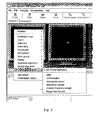
- FIG 3 An example of a DDP editor is shown in figure 3.
- a miniature monitor view is at the top and at the bottom there are examinations types, each containing a row of series types.
- the examination type is CR Chest and the series types are AP and Lateral (not shown).
- the image being viewed is AP.
- a new DDP can be created completely from scratch, but it is also possible to edit and remove existing DDPs.
- clinical applications is an option in the list of the DDP series types. The types of clinical applications available are listed in the window to the right in figure 3.
- Figure 3 displays the pop-up menu available to configure specific settings for a monitor and an image in a particular hanging. It also shows how a particular Clinical Application is selected to run for a particular image.
Landscapes
- Engineering & Computer Science (AREA)
- Physics & Mathematics (AREA)
- General Physics & Mathematics (AREA)
- Theoretical Computer Science (AREA)
- Computer Graphics (AREA)
- Computer Hardware Design (AREA)
- General Engineering & Computer Science (AREA)
- Software Systems (AREA)
- Medical Treatment And Welfare Office Work (AREA)
- Measuring And Recording Apparatus For Diagnosis (AREA)
Applications Claiming Priority (2)
| Application Number | Priority Date | Filing Date | Title |
|---|---|---|---|
| SE0203545 | 2002-11-29 | ||
| SE0203545A SE524847C2 (sv) | 2002-11-29 | 2002-11-29 | Metod för att tolka bilder |
Publications (2)
| Publication Number | Publication Date |
|---|---|
| EP1424648A2 true EP1424648A2 (de) | 2004-06-02 |
| EP1424648A3 EP1424648A3 (de) | 2006-04-19 |
Family
ID=20289722
Family Applications (1)
| Application Number | Title | Priority Date | Filing Date |
|---|---|---|---|
| EP20030026398 Withdrawn EP1424648A3 (de) | 2002-11-29 | 2003-11-19 | Verfahren zum Lesen von Bildern |
Country Status (3)
| Country | Link |
|---|---|
| US (1) | US7162623B2 (de) |
| EP (1) | EP1424648A3 (de) |
| SE (1) | SE524847C2 (de) |
Cited By (3)
| Publication number | Priority date | Publication date | Assignee | Title |
|---|---|---|---|---|
| WO2006094862A1 (en) * | 2005-03-08 | 2006-09-14 | Agfa Inc | Comparative medical image review system and method |
| DE102005017337A1 (de) * | 2005-04-14 | 2006-11-02 | Siemens Ag | Verfahren und Vorrichtung zur Analyse von dreidimensionalen digitalen Bilddaten |
| US7657566B2 (en) * | 2006-01-10 | 2010-02-02 | Siemens Aktiengesellschaft | Computer implemented method and system for hanging protocol configuration simulator displaying desired order of medical images data |
Families Citing this family (35)
| Publication number | Priority date | Publication date | Assignee | Title |
|---|---|---|---|---|
| US7787672B2 (en) | 2004-11-04 | 2010-08-31 | Dr Systems, Inc. | Systems and methods for matching, naming, and displaying medical images |
| US7970625B2 (en) | 2004-11-04 | 2011-06-28 | Dr Systems, Inc. | Systems and methods for retrieval of medical data |
| US7660488B2 (en) | 2004-11-04 | 2010-02-09 | Dr Systems, Inc. | Systems and methods for viewing medical images |
| US7885440B2 (en) | 2004-11-04 | 2011-02-08 | Dr Systems, Inc. | Systems and methods for interleaving series of medical images |
| US7920152B2 (en) | 2004-11-04 | 2011-04-05 | Dr Systems, Inc. | Systems and methods for viewing medical 3D imaging volumes |
| US7522175B2 (en) * | 2004-11-23 | 2009-04-21 | General Electric Company | Workflow engine based dynamic modification of image processing and presentation in PACS |
| US7576757B2 (en) * | 2004-11-24 | 2009-08-18 | General Electric Company | System and method for generating most read images in a PACS workstation |
| DE102004062432A1 (de) * | 2004-12-20 | 2006-06-29 | Abb Research Ltd. | System und Verfahren zum automatischen Erstellen, Installieren und Konfigurieren von Erweiterungen der Funktionalitäten in den Systemknoten eines verteilten Netzwerks |
| US7525554B2 (en) * | 2005-01-03 | 2009-04-28 | General Electric Company | Content based hanging protocols facilitated by rules based system |
| US20070076929A1 (en) * | 2005-10-05 | 2007-04-05 | General Electric Company | System and method for automatic post processing image generation |
| US20070140536A1 (en) * | 2005-12-19 | 2007-06-21 | Eastman Kodak Company | Medical image processing method and apparatus |
| US20070197909A1 (en) * | 2006-02-06 | 2007-08-23 | General Electric Company | System and method for displaying image studies using hanging protocols with perspectives/views |
| US8280483B2 (en) * | 2006-06-14 | 2012-10-02 | Koninklijke Philips Electronics N.V. | Multi-modality medical image viewing |
| US20080117230A1 (en) * | 2006-11-22 | 2008-05-22 | Rainer Wegenkittl | Hanging Protocol Display System and Method |
| US7953614B1 (en) | 2006-11-22 | 2011-05-31 | Dr Systems, Inc. | Smart placement rules |
| US8254648B2 (en) * | 2007-01-04 | 2012-08-28 | General Electric Company | Method for providing adaptive hanging protocols for image reading |
| US20080240524A1 (en) * | 2007-03-30 | 2008-10-02 | General Electric Company | Organ based hanging protocol for a diagnostic reading workstation |
| US20080275734A1 (en) * | 2007-05-04 | 2008-11-06 | Siemens Medical Solutions Usa, Inc. | Method and Apparatus for Picture Archiving Communication System With STAT Workflow |
| US8566119B2 (en) * | 2007-05-04 | 2013-10-22 | Siemens Medical Solutions Usa, Inc. | Method of Picture Archiving Communication System messaging intelligent update mechanism |
| US20080275736A1 (en) * | 2007-05-04 | 2008-11-06 | Siemens Medical Solutions Usa, Inc. | System of Picture Archiving and Communication System With Message Broadcasting Mechanism |
| US20090276392A1 (en) * | 2008-05-02 | 2009-11-05 | John Yan | Dynamic sequencing display protocols for medical imaging data |
| US20090276245A1 (en) * | 2008-05-05 | 2009-11-05 | General Electric Company | Automated healthcare image registration workflow |
| US20090287500A1 (en) * | 2008-05-14 | 2009-11-19 | Algotec Systems Ltd. | Distributed integrated image data management system |
| JP5016553B2 (ja) * | 2008-05-28 | 2012-09-05 | 京セラ株式会社 | 携帯通信端末および端末操作方法 |
| US20100054555A1 (en) * | 2008-08-29 | 2010-03-04 | General Electric Company | Systems and methods for use of image recognition for hanging protocol determination |
| US20100114597A1 (en) * | 2008-09-25 | 2010-05-06 | Algotec Systems Ltd. | Method and system for medical imaging reporting |
| US8165368B2 (en) | 2008-09-29 | 2012-04-24 | General Electric Company | Systems and methods for machine learning based hanging protocols |
| US8380533B2 (en) | 2008-11-19 | 2013-02-19 | DR Systems Inc. | System and method of providing dynamic and customizable medical examination forms |
| US8712120B1 (en) | 2009-09-28 | 2014-04-29 | Dr Systems, Inc. | Rules-based approach to transferring and/or viewing medical images |
| DE102009043253A1 (de) * | 2009-09-28 | 2011-03-31 | Siemens Aktiengesellschaft | Verfahren zur Verminderung der Wartezeit bei erstmaliger Durchführung von Arbeitsschritten |
| US9092551B1 (en) | 2011-08-11 | 2015-07-28 | D.R. Systems, Inc. | Dynamic montage reconstruction |
| US9495604B1 (en) | 2013-01-09 | 2016-11-15 | D.R. Systems, Inc. | Intelligent management of computerized advanced processing |
| DE102013226332A1 (de) * | 2013-12-18 | 2015-06-18 | Siemens Aktiengesellschaft | Verfahren zur Bearbeitung eines insbesondere medizinischen Bilddatensatzes |
| US9734286B2 (en) * | 2014-11-28 | 2017-08-15 | RamSoft Inc. | System and method for splitting DICOM medical image series into framesets |
| US10929508B2 (en) | 2015-04-30 | 2021-02-23 | Merge Healthcare Solutions Inc. | Database systems and interactive user interfaces for dynamic interaction with, and indications of, digital medical image data |
Family Cites Families (3)
| Publication number | Priority date | Publication date | Assignee | Title |
|---|---|---|---|---|
| EP1207683A3 (de) * | 2000-11-20 | 2006-04-05 | Eastman Kodak Company | Verfahren und System zur Zeitenzusammensetzung von digitalen medizinischen Bildern |
| US20030187689A1 (en) * | 2002-03-28 | 2003-10-02 | Barnes Robert D. | Method and apparatus for a single database engine driven, configurable RIS-PACS functionality |
| US7058901B1 (en) * | 2002-10-29 | 2006-06-06 | Koninklijke Philips Electronics N.V. | Methods and apparatus for controlling the display of medical images |
-
2002
- 2002-11-29 SE SE0203545A patent/SE524847C2/sv not_active IP Right Cessation
-
2003
- 2003-11-19 EP EP20030026398 patent/EP1424648A3/de not_active Withdrawn
- 2003-11-26 US US10/721,762 patent/US7162623B2/en not_active Expired - Lifetime
Non-Patent Citations (1)
| Title |
|---|
| DANIEL J VALENTINO ET AL: "Application development environment for advanced digital workstations", PROCEEDINGS OF SPIE, vol. 3335, 26 June 1998 (1998-06-26), XP055185490, ISSN: 0277-786X, DOI: 10.1117/12.312538 * |
Cited By (5)
| Publication number | Priority date | Publication date | Assignee | Title |
|---|---|---|---|---|
| WO2006094862A1 (en) * | 2005-03-08 | 2006-09-14 | Agfa Inc | Comparative medical image review system and method |
| US7859549B2 (en) | 2005-03-08 | 2010-12-28 | Agfa Inc. | Comparative image review system and method |
| DE102005017337A1 (de) * | 2005-04-14 | 2006-11-02 | Siemens Ag | Verfahren und Vorrichtung zur Analyse von dreidimensionalen digitalen Bilddaten |
| DE102005017337B4 (de) * | 2005-04-14 | 2008-06-19 | Siemens Ag | Verfahren, Vorrichtung und Datenträger mit einem Computerprogrammprodukt zur Analyse von dreidimensionalen digitalen Bilddaten |
| US7657566B2 (en) * | 2006-01-10 | 2010-02-02 | Siemens Aktiengesellschaft | Computer implemented method and system for hanging protocol configuration simulator displaying desired order of medical images data |
Also Published As
| Publication number | Publication date |
|---|---|
| US7162623B2 (en) | 2007-01-09 |
| SE524847C2 (sv) | 2004-10-12 |
| US20040202387A1 (en) | 2004-10-14 |
| EP1424648A3 (de) | 2006-04-19 |
| SE0203545L (sv) | 2004-05-30 |
| SE0203545D0 (sv) | 2002-11-29 |
Similar Documents
| Publication | Publication Date | Title |
|---|---|---|
| US7162623B2 (en) | Method for reading images | |
| US8165368B2 (en) | Systems and methods for machine learning based hanging protocols | |
| US6785410B2 (en) | Image reporting method and system | |
| AU777440B2 (en) | A method and computer-implemented procedure for creating electronic, multimedia reports | |
| US20070064984A1 (en) | System and method for dynamic configuration of PACS workstation displays | |
| US7834891B2 (en) | System and method for perspective-based procedure analysis | |
| CN101657819A (zh) | 挂片协议显示系统和方法 | |
| EP2989575B1 (de) | Bildvisualisierung | |
| US20090164247A1 (en) | Data and Display Protocols | |
| US20070197909A1 (en) | System and method for displaying image studies using hanging protocols with perspectives/views | |
| US8923582B2 (en) | Systems and methods for computer aided detection using pixel intensity values | |
| US20060034521A1 (en) | Computer program product and method for analysis of medical image data in a medical imaging system | |
| US20100054555A1 (en) | Systems and methods for use of image recognition for hanging protocol determination | |
| US20210407671A1 (en) | Method and system for automatically morphing and repairing medical image tags based on a centralized collection of rules | |
| US20080120140A1 (en) | Managing medical imaging data | |
| US8326089B2 (en) | Method for representing a file structure | |
| JP2013506900A (ja) | 画像に基づくクエリを使用したドキュメント識別 | |
| WO2009007909A1 (en) | Grouping of measurements for clinical reporting | |
| KR20230125871A (ko) | 진료 차트 관리 방법 및 장치 | |
| CN102609175B (zh) | 使用略图导航器施加序列级操作和比较图像的系统和方法 | |
| US20060234196A1 (en) | Method and apparatus for body part filters of comparison studies | |
| CN102609175A (zh) | 使用略图导航器施加序列级操作和比较图像的系统和方法 |
Legal Events
| Date | Code | Title | Description |
|---|---|---|---|
| PUAI | Public reference made under article 153(3) epc to a published international application that has entered the european phase |
Free format text: ORIGINAL CODE: 0009012 |
|
| AK | Designated contracting states |
Kind code of ref document: A2 Designated state(s): AT BE BG CH CY CZ DE DK EE ES FI FR GB GR HU IE IT LI LU MC NL PT RO SE SI SK TR |
|
| AX | Request for extension of the european patent |
Extension state: AL LT LV MK |
|
| 17P | Request for examination filed |
Effective date: 20041103 |
|
| PUAL | Search report despatched |
Free format text: ORIGINAL CODE: 0009013 |
|
| AK | Designated contracting states |
Kind code of ref document: A3 Designated state(s): AT BE BG CH CY CZ DE DK EE ES FI FR GB GR HU IE IT LI LU MC NL PT RO SE SI SK TR |
|
| AX | Request for extension of the european patent |
Extension state: AL LT LV MK |
|
| AKX | Designation fees paid |
Designated state(s): AT BE BG CH CY CZ DE DK EE ES FI FR GB GR HU IE IT LI LU MC NL PT RO SE SI SK TR |
|
| 17Q | First examination report despatched |
Effective date: 20100226 |
|
| STAA | Information on the status of an ep patent application or granted ep patent |
Free format text: STATUS: THE APPLICATION HAS BEEN WITHDRAWN |
|
| 18W | Application withdrawn |
Effective date: 20150610 |