EP1424649A2 - Système, procédé et programme d'assistance au service médical - Google Patents
Système, procédé et programme d'assistance au service médical Download PDFInfo
- Publication number
- EP1424649A2 EP1424649A2 EP03026660A EP03026660A EP1424649A2 EP 1424649 A2 EP1424649 A2 EP 1424649A2 EP 03026660 A EP03026660 A EP 03026660A EP 03026660 A EP03026660 A EP 03026660A EP 1424649 A2 EP1424649 A2 EP 1424649A2
- Authority
- EP
- European Patent Office
- Prior art keywords
- preprocedure
- information
- examination
- patient
- inputting
- Prior art date
- Legal status (The legal status is an assumption and is not a legal conclusion. Google has not performed a legal analysis and makes no representation as to the accuracy of the status listed.)
- Withdrawn
Links
Images





Classifications
-
- G—PHYSICS
- G16—INFORMATION AND COMMUNICATION TECHNOLOGY [ICT] SPECIALLY ADAPTED FOR SPECIFIC APPLICATION FIELDS
- G16H—HEALTHCARE INFORMATICS, i.e. INFORMATION AND COMMUNICATION TECHNOLOGY [ICT] SPECIALLY ADAPTED FOR THE HANDLING OR PROCESSING OF MEDICAL OR HEALTHCARE DATA
- G16H10/00—ICT specially adapted for the handling or processing of patient-related medical or healthcare data
- G16H10/20—ICT specially adapted for the handling or processing of patient-related medical or healthcare data for electronic clinical trials or questionnaires
-
- G—PHYSICS
- G16—INFORMATION AND COMMUNICATION TECHNOLOGY [ICT] SPECIALLY ADAPTED FOR SPECIFIC APPLICATION FIELDS
- G16H—HEALTHCARE INFORMATICS, i.e. INFORMATION AND COMMUNICATION TECHNOLOGY [ICT] SPECIALLY ADAPTED FOR THE HANDLING OR PROCESSING OF MEDICAL OR HEALTHCARE DATA
- G16H10/00—ICT specially adapted for the handling or processing of patient-related medical or healthcare data
- G16H10/60—ICT specially adapted for the handling or processing of patient-related medical or healthcare data for patient-specific data, e.g. for electronic patient records
-
- G—PHYSICS
- G16—INFORMATION AND COMMUNICATION TECHNOLOGY [ICT] SPECIALLY ADAPTED FOR SPECIFIC APPLICATION FIELDS
- G16H—HEALTHCARE INFORMATICS, i.e. INFORMATION AND COMMUNICATION TECHNOLOGY [ICT] SPECIALLY ADAPTED FOR THE HANDLING OR PROCESSING OF MEDICAL OR HEALTHCARE DATA
- G16H40/00—ICT specially adapted for the management or administration of healthcare resources or facilities; ICT specially adapted for the management or operation of medical equipment or devices
- G16H40/20—ICT specially adapted for the management or administration of healthcare resources or facilities; ICT specially adapted for the management or operation of medical equipment or devices for the management or administration of healthcare resources or facilities, e.g. managing hospital staff or surgery rooms
-
- G—PHYSICS
- G16—INFORMATION AND COMMUNICATION TECHNOLOGY [ICT] SPECIALLY ADAPTED FOR SPECIFIC APPLICATION FIELDS
- G16H—HEALTHCARE INFORMATICS, i.e. INFORMATION AND COMMUNICATION TECHNOLOGY [ICT] SPECIALLY ADAPTED FOR THE HANDLING OR PROCESSING OF MEDICAL OR HEALTHCARE DATA
- G16H20/00—ICT specially adapted for therapies or health-improving plans, e.g. for handling prescriptions, for steering therapy or for monitoring patient compliance
- G16H20/10—ICT specially adapted for therapies or health-improving plans, e.g. for handling prescriptions, for steering therapy or for monitoring patient compliance relating to drugs or medications, e.g. for ensuring correct administration to patients
Definitions
- the present invention relates to a system, a method, and a program for making the effective use of patient information on a medical scene.
- an electronic endoscope where a solid-state image capturing element is used as an image capturing means at the tip has come into widespread use as a replacement for a fiber scope that observes a coelom by using an image guide formed with an optical fiber.
- a shot image is stored in a storage device such as a hard disk (HDD) as electronic data.
- a storage device such as a hard disk (HDD)
- information of a person being tested (patient) is also corresponded to the image, and stored.
- Those information items are used in various situations of medical diagnosis and treatment within a hospital, and contribute to an increase in the efficiency of medical services.
- Japanese Patent Publication No. 2002-73615 discloses a medical filing system that can handle necessary information at right timing in a service flow for making an examination.
- examination request information, etc. are firstly input, and a drug, etc. used for a preprocedure (a procedure preparatory to an examination prior to the examination), and contents of the preprocedure (such as anesthesia medication, injection, purgative medication, etc.) are input. Thereafter, information accompanying the conduct of the examination is input, and an image shot with an endoscope is correlated with these pieces of data, and stored.
- a drug, etc. used for a preprocedure a procedure preparatory to an examination prior to the examination
- contents of the preprocedure such as anesthesia medication, injection, purgative medication, etc.
- a medical service assisting system assisting in a service rendered in a medical institution comprises:
- the above described medical service assisting system further comprises a correlated information presenting unit presenting the correlation among the preprocedure information, the patient condition information, and the time of the preprocedure, which are stored in the storing unit.
- the above described medical service assisting system further comprises:
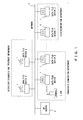
- Fig. 1 schematically shows the configuration of an endoscopic information system according to the present invention.
- various departments such as an outpatient diagnosis and treatment department, an endoscopic examination department, etc. exist on this system, and each of the departments has one or a plurality of personal computers and data file devices (hereinafter referred to as PCs) 1.
- PCs 1 are connected by a network such as a LAN (Local Area network) 3, etc., and comprise an input device such as an OCR 2, a keyboard, a mouse, etc.
- LAN Local Area network
- a database server 4 exists on the network, and stores patient information and image data, which are input from each of the PCs 1.
- the endoscopic examination department is described in this preferred embodiment.
- Fig. 2 schematically shows the fundamental configuration of the main body of each of the PCs 1.
- the main body of each of the PCs 1 is configured by: a data controlling unit 12 performing a process or an arithmetic operation in accordance with a program; a data storing unit 10 storing various pieces of data such as image data, patient information, etc.; a data displaying unit 11 making a PC monitor display image data, etc.; a data inputting unit 13 intended to input a command, data, etc.
- a network I/F (interface) 14 which is an interface for connecting with a network such as a LAN 3, etc.
- a printer I/F (interface) 15 which is an interface for outputting data to a printer.
- the portable reading device which is one of input devices and typified by the OCR 2, may be connected to the main body of the PC 1 wiredly or wirelessly.
- a PDA Personal Digital Assistant
- an RFID Radio Frequency IDentification
- a transponder a medium that can read and write information wirelessly
- an RFID reader etc.
- a mechanically readable identifier, a mechanically readable means, or an optically reading means is used as the reading device.
- Fig. 3 shows a screen displayed when this system running on a PC 1 is started up.
- This screen is configured by: service selection buttons 20 composed of a "patient acceptance” button 20a, a “preprocedure input” button 20b, a “conduct input” button 20c, a “report input” button 20d, and an "examination status list” button 20e; a date display part 21; a display part 22; a "logout” button 23; a login user name display part 24; and a date change part 25.
- service selection buttons 20 composed of a "patient acceptance” button 20a, a "preprocedure input” button 20b, a “conduct input” button 20c, a “report input” button 20d, and an "examination status list” button 20e; a date display part 21; a display part 22; a "logout” button 23; a login user name display part 24; and a date change part 25.
- the date of a current day is displayed in the date display part 21, and the date can be changed by operating the date change part 25. With the click of the "logout" button 23, the system can be terminated.
- the login user name display part 24 the name of a user who currently logs in to the system is displayed.
- the "patient acceptance” button 20a, the "preprocedure input” button 20b, and the “conduct input” button 20c among the service selection buttons 20 will be described later.
- the "report input” button 20d is intended to input diagnostic findings, etc.
- the “examination status list” button 20e is intended to display an examination status list. However, since these buttons do not relate to the present invention, they are not referred to further.
- an operator of the system clicks the "preprocedure input” button 20b to display a "preprocedure input list” screen (not shown).
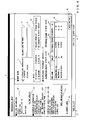
- a "preprocedure input” screen shown in Fig. 4 is displayed.
- This "preprocedure input” screen is configured by: a "patient information” display field 30; an “examination information” display field 31; an "order notes” field 32 (a "preprocedure abnormality occurrence” checkbox 33, an "abnormality information description” text box 34, a “previous history” text box 35, and a “notes” field 36); a "preprocedure performance contents” field 37; a “preprocedure performance contents list” 38; a “registration” button 39; a "to-conduct-input” button 40; a “back-to-list” button 41; and a "login user name display part” 42.
- a "patient ID”, "name”, “date of birth”, “sex”, etc. are displayed.
- a "patient profile” button 30a further exists. With the click of the "patient profile” button 30a, a screen on which information items such as a "blood type”, “height/weight”, “allergies”, “disabilities”, “infectious diseases”, “diseases”, “notes”, “sample test result”, “previous medication information”, etc. can be referenced is displayed.
- the "examination information” display field 31 information items such as an "examination type”, an “examination item”, a “requested disease name”, “examination scheduled date and time”, a “requested department”, a “requested doctor”, etc. are displayed.
- an "order information details” button 31a further exists. With the click of the "order information details” button 31a, detailed information such as a requesting department, etc. are displayed.
- Information displayed in the "patient information" display field 30 and the “examination information” display field 31 are information provided from an HIS (Hospital Information System), which is a higher-order system, to a department system.
- HIS Hespital Information System
- the "order notes” field 32 is described. If the "preprocedure abnormality occurrence" checkbox 33 is checked to be set to ON, this enables an input to the "abnormality information description” text box 34. Or, if the "preprocedure abnormality occurrence” checkbox 32 is set to OFF, this disables an input to the "abnormality information description” text box 34. Additionally, contents input in the past up to the preceding time to the "abnormality information description" text box 34 or an "abnormality information description” text box 58 to be described later, and an "examination cancellation reason" text box 61 are displayed in the "previous history" display part 35.
- a checkbox of a corresponding item is set to ON among items such as "xylocaine shock”, “buscopan shock”, “enlarged prostate”, “heart disease”, “glaucoma”, “diabetes”, and "anticoagulant platelet therapy”.
- an "instructing doctor”, a “performing person”, a “preprocedure performance contents list” 38 are displayed.
- the name of a doctor who instructs a preprocedure is displayed.
- the “performing person” the name of a person who performs the preprocedure is displayed.
- the “preprocedure performance contents list” 38 is composed of items such as a "drug name” 38a, an “amount” 38b, a “performing person” 38c, and a “performance time” 38d.
- the login user name display part 42 is similar to the login user name display part 24 shown in Fig. 3.
- the preprocedure input process is described step by step with reference to the flow of Fig. 5.
- step S1 When the "preprocedure input" screen is displayed, this system initializes an abnormality information flag to be reset to 0 (step S1.
- step S1 step is abbreviated to S).
- an operator determines whether or not a preprocedure for the patient A can be performed as scheduled.
- "whether or not a preprocedure for the patient A can be performed as scheduled” assumes, for example, that the preprocedure for the patient A cannot be performed within a scheduled timeframe due to some reason. If the preprocedure can be performed as scheduled in S2, the process proceeds to S5.
- the operator checks the "preprocedure abnormality occurrence" checkbox 33, and inputs this information to the "abnormality information description” text box 34 (S3). At this time, the abnormality information flag is set to 1 (S4), and the process proceeds to S5.
- the operator performs the preprocedure for the patient (S5), and records preprocedure information such as the name of a drug used, the amount of the drug, a medication time, etc. (S6).
- preprocedure information such as the name of a drug used, the amount of the drug, a medication time, etc.
- S6 is specifically described.
- a label read by an OCR is affixed to a bottle of a medicated drug.
- its OCR information is read with the OCR 2.
- For a single-use drug even its use amount (quantity) can be read with the OCR 2.
- its use amount (quantity) can be obtained by separately reading a list, in which only use amounts (quantities) are put into OCR information, with the OCR 2. Also a time required to read the amount with the OCR 2 is obtained at this time.
- the read information is displayed in the "preprocedure performance contents list" 38.
- “drug name: gascon drop”, “amount: 2cc”, “performing person: Olympus Ichiro”, “performance time: 9:50” are displayed.
- the operator determines whether or not an abnormality occurs in the condition of the patient (S7). If an abnormality does not occur in the condition of the patient in S7, the process proceeds to S10. If an abnormality occurs in the condition of the patient in S7, the operator checks the "preprocedure abnormality occurrence" checkbox 33, and inputs this information to the "abnormality information description” text box 34 (S8). At this time, the abnormality information flag is set to 1 (S9), and the process proceeds to S10.
- the operator determines whether or not the preprocedure is terminated (S10). If the preprocedure is not terminated yet, the operations in S5 to S10 are repeated. When the entire preprocedure is completed, the preprocedure is determined to be terminated.
- Fig. 4 three drugs are used for the preprocedure, and a description that "the drug named buscopan (which is administered at 10:30) does not work" is provided in the "abnormality information description” text box 34.
- the operator Upon termination of the preprocedure, the operator clicks the "registration" button 39, so that the contents input to the "preprocedure abnormality occurrence” checkbox 33, the "abnormality information description” text box 34, the “notes” 36, the “preprocedure performance contents list” 38 (including also the “instructing doctor” information, and the “performing person” information) are correlated and registered to the database server 4.
- an item such as an "appliance used” may be newly added to this screen so that an appliance used can be input on the screen of Fig. 4.
- an appliance name input to the "appliance used” item is registered to the database server 4 similar to the other items.
- Verification made before an examination is started is described next. After the preprocedure is terminated, the patient A is guided to an examination room, and undergoes an examination. Prior to the examination, it is verified whether or not the patient A is in a state where he or she can undergo the examination. The verification made before the examination is started is described step by step.
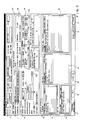
- the "performance contents entry” screen is configured by a "basic patient information” field 50, an "order information” field 51, a “performance information” field 52, a “preprocedure performance item” field 53, and an "accounting information” field 62.
- the "basic patient information” field 50 a "patient ID”, a "patient name in kana”, a “patient name”, “sex”, “date of birth”, “age”, inpatient/outpatient distinction (distinction between an inpatient and an outpatient), and a “hospital ward” (displayed only for an inpatient) are displayed.
- the “order information” field 51 an "examination type”, and an “examination item” are displayed.
- the “basic patient information” field 50 and the "order information” field 51 are information provided from the HIS.
- performance information field 52 To the "performance information” field 52, "performance date”, “performance time”, a “performance registrant”, a "responsible doctor”, an “assisting doctor”, a “nurse”, a “scope number”, and a “room number” are input.
- a screen on which a responsible doctor is selected is displayed with the click of a responsible doctor selection button 52a, and a responsible doctor can be also selected on that screen.
- a screen on which a nurse is selected is displayed with the click of a nurse selection button 52b, and a nurse can be also selected on that screen.
- a "technique list” 63 In the "accounting information” field 62, a "technique list” 63, an “addition list” 64, an “appliance list” 65, and an “examination drug list” 66 are displayed. Corresponding items within the lists, which are used for an examination, are checked to be set to ON. Furthermore, at the bottom of the screen, a "performance contents change” button 67, a “print” button 68, an “item addition” button 69, a “conduct completion” button 70, and a “pending” button 71 are provided.
- the preprocedure performance item 53 is configured by: a "notes” field 54 where a plurality of notes such as “xylocaine shock”, “buscopan shock”, “enlarged prostate”, “heart disease”, “glaucoma”, “diabetes”, and “anticoagulant platelet therapy” are represented as checkboxes; a “preprocedure performance contents list” 55 (composed of a “performance item” 55a, a “performance amount” 55b, a “performance time” 55c, a “performance place” 55d, a “performing person” 55e, etc.); a “preprocedure result” field 56 composed of an “abnormality occurrence” checkbox 57, and an "abnormality information description” text box 58; and a "verification-before-examination” field 59 composed of an “examination cancellation” checkbox 60, and an “examination cancellation reason” text box 61.
- a "notes” field 54 where a plurality of notes such as “x
- the "preprocedure performance item” 53 is based on the information input on the "preprocedure input” screen described with reference to Fig. 4, and the information registered to the database server 4 on that screen is displayed in this item.
- the "notes” field 54 corresponds to the “notes” field 36 on the “preprocedure input” screen.
- the "preprocedure performance contents list” 55 corresponds to the “preprocedure performance contents list” 38.
- the "abnormality occurrence” checkbox 57 corresponds to the "preprocedure abnormality occurrence” checkbox 33.
- the "abnormality information description” text box 58 corresponds to the "abnormality information description” text box 35.
- the process for making verification before an examination is started is described step by step with reference to Fig. 7.
- the operator determines whether or not an abnormality occurs in the condition of the patient A (S20). If an abnormality is determined not to occur in the condition of the patient as a result of the determination made in S20, the process proceeds to S23. If an abnormality is determined to occur in the condition of the patient as a result of the determination made in S20, the operator checks the "abnormality occurrence" checkbox 57, and inputs this information to the "abnormality information description" text box 58 (S21). At this time, the abnormality information flag is set to 1 (S22), and the process proceeds to S23.
- the operator determines whether or not an examination can be conducted for the patient (S23). If it is determined in S23 that the examination can be conducted for the patient, this flow is terminated. Or, if it is determined in S23 that the examination cannot be conducted for the patient, the operator checks the "examination cancellation" checkbox 60, and inputs this information to the "examination cancellation reason" text box 61 (S24). At this time, the abnormality information flag is set to 1 (S25), and the verification made before the examination is started is terminated.
- the examination is conducted or canceled, and information corresponding to the contents of the examination is input. Then, with the click of a "conduct completion” button 70 or a “pending” button 71, this information is correlated with the preprocedure performance item 53, and registered to the database server 4.
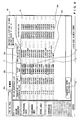
- the "patient acceptance list” screen is configured by: a patient acceptance list 80 composed of an "examination reservation time" 80a, a "patient ID” 80b, a "patient name” 80c, an "inpatient/outpatient distinction” 80d, and an "examination item” 80e; and an "examination order registration” button 81.
- a logout button and a login user name display part which are positioned at the bottom of this screen, are similar to the logout button 23 and the login user name display part 24, which are shown in Fig. 3.
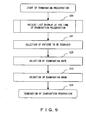
- the service or the process flow on the "patient acceptance list” screen is in accordance with an examination reservation flow shown in Fig. 9.
- patient information is displayed in the patient acceptance list (S30).
- this reservation information is provided from the HIS, reservation information can be also input on this screen.
- a patient for whom an examination reservation is to be made is selected from the patient acceptance list 80 (the patient A is selected in this preferred embodiment), and the "examination order registration" button 81 is clicked, so that a screen for reserving an examination is displayed.
- the date of the next examination of the patient is selected on that screen (S32), an examination room is selected (S33), and the examination reservation is terminated.
- FIG. 10 The process flow shown in Fig. 10 is intended to display patient information with abnormality information in reverse video so as to make a distinction between patient information with abnormality information and that without abnormality information, when patient information is displayed in the patient acceptance list 80.
- the process flow of Fig. 10 is described below.
- a PC 1 obtains reservation/acceptance information of the patient (patient information to be displayed on the "patient acceptance list" screen), which is provided from the HIS, further obtains abnormality information, etc. correlated with that information from the database server 4, and stores the obtained number of pieces of patient information as a variable M (M is a positive number). Then, a variable N (N is a positive number) is initialized to 1 (S40).
- variable N is incremented. If the variable N is equal to or smaller than the number of pieces of patient information to be displayed M in S45, the flow returns to S41. Then, the operations in S41 to S45 are repeated. If the variable N becomes larger than the number of pieces of patient information to be displayed M in S45, this flow is terminated, and the process proceeds to S31 of Fig. 9.
- Patients A, B, C in Fig. 8 indicate patient information displayed in reverse video in accordance with the flow of Fig. 10.
- abnormality information possessed by the patient information is displayed in a popup window 82 as shown in Fig. 8.
- This abnormality information is abnormality information that is input in the "preprocedure performance item" field 53 on the "preprocedure input” screen or the "performance contents entry” screen.
- abnormality information is effectively used at the time of the next preprocedure.
- a history of abnormality information (abnormality information obtained from the database server 4) until the preceding preprocedure is displayed on the "previous history” display part 35. Therefore, a suitable preprocedure in consideration of that information can be performed. Accordingly, the recorded previous preprocedure information is fed back and displayed on a screen, etc. at the time of the next examination. This prevents a problem where anesthesia is difficult to work due to the performance of the same preprocedure as before, or the repetitive use of the same drug.
- using the system according to the present invention facilitates the recording of preprocedure activities. Furthermore, attention is made not to cause problems similar those to that have occurred in the past, at the next or subsequent times, and the safety and the efficiency of a preprocedure can be improved.
- the name of a drug used for a preprocedure the name of a person who uses the drug, and the time point when the drug is used, and the amount of the drug are accurately recorded, and can be referenced depending on need. Therefore, the contents of the preprocedure can be accurately traced.
- using the present invention facilitates the recording of preprocedure activities. Additionally, its recorded information is fed back and displayed at the time of an examination conducted after the preprocedure, or a reservation of the next examination, whereby a problem similar to that at the time of the preprocedure can be prevented.
- information items such as the type and the amount of a drug used for a preprocedure, an appliance used, the name of a person who performs the preprocedure, and a preprocedure time are correlated and stored. Therefore, the name of a person who uses a drug for a preprocedure, the time point when the drug is used, the name and the amount of the drug, etc. can be accurately recorded. Besides, these information items can be referenced depending on need, whereby the contents of the preprocedure can be accurately traced.
- abnormality information of particular patient information can be referenced, so that a reservation in consideration of that information can be made.
- information required for a preprocedure can be input regardless of location at the time of the preprocedure. This can improve the real-time nature of a preprocedure information input, leading to improvements in data realiability.
- information required for a preprocedure can be mechanically input with an OCR, thereby reducing time taken for an input. This can improve the real-time nature. Besides, manual input errors can be prevented from occurring, leading to improvements in data reliability.
- predetermined information possessed by predetermined patient information is displayed in a popup window for the patient information on an examination reservation list screen.
- predetermined information of a previous preprocedure is displayed on the preprocedure input screen, whereby a problem similar to that at the time of the preprocedure can be prevented from occurring.
Landscapes
- Health & Medical Sciences (AREA)
- Engineering & Computer Science (AREA)
- General Health & Medical Sciences (AREA)
- Epidemiology (AREA)
- Medical Informatics (AREA)
- Primary Health Care (AREA)
- Public Health (AREA)
- General Business, Economics & Management (AREA)
- Business, Economics & Management (AREA)
- Biomedical Technology (AREA)
- Medical Treatment And Welfare Office Work (AREA)
- Measuring And Recording Apparatus For Diagnosis (AREA)
- Management, Administration, Business Operations System, And Electronic Commerce (AREA)
Applications Claiming Priority (2)
| Application Number | Priority Date | Filing Date | Title |
|---|---|---|---|
| JP2002345814A JP4229683B2 (ja) | 2002-11-28 | 2002-11-28 | 医療業務支援システム、医療業務支援、及びプログラム |
| JP2002345814 | 2002-11-28 |
Publications (2)
| Publication Number | Publication Date |
|---|---|
| EP1424649A2 true EP1424649A2 (fr) | 2004-06-02 |
| EP1424649A3 EP1424649A3 (fr) | 2006-04-05 |
Family
ID=32290471
Family Applications (1)
| Application Number | Title | Priority Date | Filing Date |
|---|---|---|---|
| EP03026660A Withdrawn EP1424649A3 (fr) | 2002-11-28 | 2003-11-19 | Système, procédé et programme d'assistance au service médical |
Country Status (3)
| Country | Link |
|---|---|
| US (1) | US20040107119A1 (fr) |
| EP (1) | EP1424649A3 (fr) |
| JP (1) | JP4229683B2 (fr) |
Families Citing this family (18)
| Publication number | Priority date | Publication date | Assignee | Title |
|---|---|---|---|---|
| US9246975B2 (en) | 2000-03-17 | 2016-01-26 | Facebook, Inc. | State change alerts mechanism |
| US7624172B1 (en) | 2000-03-17 | 2009-11-24 | Aol Llc | State change alerts mechanism |
| US8077333B2 (en) * | 2002-09-09 | 2011-12-13 | Canon Kabushiki Kaisha | Printing control apparatus and printing control method |
| AU2003287671A1 (en) | 2002-11-18 | 2004-06-15 | America Online, Inc. | People lists |
| US7428580B2 (en) | 2003-11-26 | 2008-09-23 | Aol Llc | Electronic message forwarding |
| US7899862B2 (en) | 2002-11-18 | 2011-03-01 | Aol Inc. | Dynamic identification of other users to an online user |
| US8005919B2 (en) | 2002-11-18 | 2011-08-23 | Aol Inc. | Host-based intelligent results related to a character stream |
| US7640306B2 (en) | 2002-11-18 | 2009-12-29 | Aol Llc | Reconfiguring an electronic message to effect an enhanced notification |
| US7590696B1 (en) | 2002-11-18 | 2009-09-15 | Aol Llc | Enhanced buddy list using mobile device identifiers |
| US8122137B2 (en) | 2002-11-18 | 2012-02-21 | Aol Inc. | Dynamic location of a subordinate user |
| US8965964B1 (en) | 2002-11-18 | 2015-02-24 | Facebook, Inc. | Managing forwarded electronic messages |
| US8701014B1 (en) | 2002-11-18 | 2014-04-15 | Facebook, Inc. | Account linking |
| US20040205127A1 (en) | 2003-03-26 | 2004-10-14 | Roy Ben-Yoseph | Identifying and using identities deemed to be known to a user |
| US7653693B2 (en) | 2003-09-05 | 2010-01-26 | Aol Llc | Method and system for capturing instant messages |
| US7629989B2 (en) * | 2004-04-02 | 2009-12-08 | K-Nfb Reading Technology, Inc. | Reducing processing latency in optical character recognition for portable reading machine |
| JP4839771B2 (ja) * | 2005-10-20 | 2011-12-21 | ソニー株式会社 | ディジタル放送受信装置、ディジタル放送受信方法及びプログラム |
| JP5271659B2 (ja) * | 2008-10-09 | 2013-08-21 | 富士フイルム株式会社 | 医療業務支援システム、医療業務支援方法、及びプログラム |
| CN113053508B (zh) * | 2021-03-29 | 2024-07-26 | 深圳市科曼医疗设备有限公司 | 基于触控屏的交互控制方法及装置 |
Family Cites Families (8)
| Publication number | Priority date | Publication date | Assignee | Title |
|---|---|---|---|---|
| GB9312849D0 (en) * | 1993-06-22 | 1993-08-04 | Richards John | Data acquisition and processing system |
| US6014630A (en) * | 1993-08-26 | 2000-01-11 | Patient Education Services, Inc. | Customized system for providing procedure-specific patient education |
| US5737539A (en) * | 1994-10-28 | 1998-04-07 | Advanced Health Med-E-Systems Corp. | Prescription creation system |
| FR2780179B3 (fr) * | 1998-06-23 | 2000-09-08 | Joseph Ifergan | Systeme de collecte des donnees par patient en milieu hospitalier |
| US7171371B2 (en) * | 1999-09-03 | 2007-01-30 | Smg Trust | Method and system for providing pre and post operative support and care |
| US6542902B2 (en) * | 2000-03-24 | 2003-04-01 | Bridge Medical, Inc. | Method and apparatus for displaying medication information |
| US20020095424A1 (en) * | 2001-01-17 | 2002-07-18 | Chris Chung | Method for tracking patients |
| US6475146B1 (en) * | 2001-09-24 | 2002-11-05 | Siemens Medical Solutions Usa, Inc. | Method and system for using personal digital assistants with diagnostic medical ultrasound systems |
-
2002
- 2002-11-28 JP JP2002345814A patent/JP4229683B2/ja not_active Expired - Fee Related
-
2003
- 2003-11-19 EP EP03026660A patent/EP1424649A3/fr not_active Withdrawn
- 2003-11-26 US US10/723,228 patent/US20040107119A1/en not_active Abandoned
Also Published As
| Publication number | Publication date |
|---|---|
| JP2004178406A (ja) | 2004-06-24 |
| JP4229683B2 (ja) | 2009-02-25 |
| US20040107119A1 (en) | 2004-06-03 |
| EP1424649A3 (fr) | 2006-04-05 |
Similar Documents
| Publication | Publication Date | Title |
|---|---|---|
| EP1424649A2 (fr) | Système, procédé et programme d'assistance au service médical | |
| US20050075544A1 (en) | System and method for managing an endoscopic lab | |
| US8554480B2 (en) | Treatment data processing and planning system | |
| US20180211728A1 (en) | Computer-Aided Multiple Standard-Based Functional and Medical Reporting System | |
| US20190320900A1 (en) | Telemedicine system | |
| US8560335B2 (en) | Viewing clinical activity details within a selected time period | |
| US20070197882A1 (en) | Integrated method and system for diagnosis determination | |
| US8355924B2 (en) | Patient activity coordinator | |
| KR20160147753A (ko) | 메디컬 서비스 추적 시스템 및 방법 | |
| US20040199404A1 (en) | Integrated system and method for documenting and billing patient medical treatment and medical office management | |
| JP5443704B2 (ja) | 医療情報管理装置 | |
| JP4409206B2 (ja) | 医療具管理支援システム、および医療具管理支援プログラム | |
| US20090132279A1 (en) | Method and apparatus for significant and key image navigation | |
| US8050946B2 (en) | Clinical activity navigator | |
| US20060195484A1 (en) | System and method for providing a dynamic user interface for workflow in hospitals | |
| KR20070117166A (ko) | 전자의무기록 시스템 | |
| US8224129B2 (en) | Auto-deletion of image related data in an imaging system | |
| US20070260126A1 (en) | Medical information acquisition and display system | |
| US8589185B2 (en) | Acknowledgement of previous results for medication administration | |
| CA3083090A1 (fr) | Dispositif d'aide aux soins medicaux et procede et programme de fonctionnement associes | |
| US8423384B2 (en) | Providing multidisciplinary activities in context of clinician's role relevant activities | |
| EP1287781B1 (fr) | Système et méthode d'archivage d' images endoscopiques | |
| JP4590180B2 (ja) | 医療用画像ファイリングシステム | |
| JP4943193B2 (ja) | 診療支援システム及びプログラム | |
| US20040088213A1 (en) | Medical service assisting system |
Legal Events
| Date | Code | Title | Description |
|---|---|---|---|
| PUAI | Public reference made under article 153(3) epc to a published international application that has entered the european phase |
Free format text: ORIGINAL CODE: 0009012 |
|
| 17P | Request for examination filed |
Effective date: 20031119 |
|
| AK | Designated contracting states |
Kind code of ref document: A2 Designated state(s): AT BE BG CH CY CZ DE DK EE ES FI FR GB GR HU IE IT LI LU MC NL PT RO SE SI SK TR |
|
| AX | Request for extension of the european patent |
Extension state: AL LT LV MK |
|
| PUAL | Search report despatched |
Free format text: ORIGINAL CODE: 0009013 |
|
| AK | Designated contracting states |
Kind code of ref document: A3 Designated state(s): AT BE BG CH CY CZ DE DK EE ES FI FR GB GR HU IE IT LI LU MC NL PT RO SE SI SK TR |
|
| AX | Request for extension of the european patent |
Extension state: AL LT LV MK |
|
| STAA | Information on the status of an ep patent application or granted ep patent |
Free format text: STATUS: THE APPLICATION HAS BEEN WITHDRAWN |
|
| 18W | Application withdrawn |
Effective date: 20060515 |