EP1431977A2 - Synchronisation de la musique et des images dans un système de dispositif numérique multimédia - Google Patents
Synchronisation de la musique et des images dans un système de dispositif numérique multimédia Download PDFInfo
- Publication number
- EP1431977A2 EP1431977A2 EP03078829A EP03078829A EP1431977A2 EP 1431977 A2 EP1431977 A2 EP 1431977A2 EP 03078829 A EP03078829 A EP 03078829A EP 03078829 A EP03078829 A EP 03078829A EP 1431977 A2 EP1431977 A2 EP 1431977A2
- Authority
- EP
- European Patent Office
- Prior art keywords
- images
- audio
- image
- criterion
- audio files
- Prior art date
- Legal status (The legal status is an assumption and is not a legal conclusion. Google has not performed a legal analysis and makes no representation as to the accuracy of the status listed.)
- Withdrawn
Links
Images





Classifications
-
- G—PHYSICS
- G11—INFORMATION STORAGE
- G11B—INFORMATION STORAGE BASED ON RELATIVE MOVEMENT BETWEEN RECORD CARRIER AND TRANSDUCER
- G11B27/00—Editing; Indexing; Addressing; Timing or synchronising; Monitoring; Measuring tape travel
- G11B27/02—Editing, e.g. varying the order of information signals recorded on, or reproduced from, record carriers
- G11B27/031—Electronic editing of digitised analogue information signals, e.g. audio or video signals
- G11B27/034—Electronic editing of digitised analogue information signals, e.g. audio or video signals on discs
-
- G—PHYSICS
- G06—COMPUTING OR CALCULATING; COUNTING
- G06F—ELECTRIC DIGITAL DATA PROCESSING
- G06F16/00—Information retrieval; Database structures therefor; File system structures therefor
- G06F16/40—Information retrieval; Database structures therefor; File system structures therefor of multimedia data, e.g. slideshows comprising image and additional audio data
-
- H—ELECTRICITY
- H04—ELECTRIC COMMUNICATION TECHNIQUE
- H04N—PICTORIAL COMMUNICATION, e.g. TELEVISION
- H04N5/00—Details of television systems
- H04N5/76—Television signal recording
- H04N5/84—Television signal recording using optical recording
-
- H—ELECTRICITY
- H04—ELECTRIC COMMUNICATION TECHNIQUE
- H04N—PICTORIAL COMMUNICATION, e.g. TELEVISION
- H04N9/00—Details of colour television systems
- H04N9/79—Processing of colour television signals in connection with recording
- H04N9/80—Transformation of the television signal for recording, e.g. modulation, frequency changing; Inverse transformation for playback
- H04N9/82—Transformation of the television signal for recording, e.g. modulation, frequency changing; Inverse transformation for playback the individual colour picture signal components being recorded simultaneously only
- H04N9/8205—Transformation of the television signal for recording, e.g. modulation, frequency changing; Inverse transformation for playback the individual colour picture signal components being recorded simultaneously only involving the multiplexing of an additional signal and the colour video signal
- H04N9/8211—Transformation of the television signal for recording, e.g. modulation, frequency changing; Inverse transformation for playback the individual colour picture signal components being recorded simultaneously only involving the multiplexing of an additional signal and the colour video signal the additional signal being a sound signal
Definitions
- the present invention relates to devices having music and image playback capabilities. Specifically, the present invention concerns detection of a predominate characteristic(s) of audio (and/ or image) files and the use of these characteristics to automate provision of image files to accompany said audio file (or audio files to accompany said image files).
- What is needed is an improved method that can collect data about an image collection and/ or audio collection, collect data about user preferences, and intelligently author multimedia shows tailored to the content of the media and to the user's preferences but with little direct user input... thus allowing a user to showcase her visual and audio creativity without requiring much time, effort or specialized skill.
- a method for automatically associating images with audio for presentation in a multimedia show comprising the steps of:
- a method for automatically associating a of images with audio for presentation in a multimedia show comprising the steps of:
- the Multimedia Device 100 comprises a memory and control unit 104, an audio input mechanism 118, and image input mechanism 120, keyboard 116 and a remote control 117 used for inputting instructions and data to the control unit 104.
- Inputs 102 in the form of audio files 110, image files 112 and user-determined criterion/criteria 114 are loaded into the memory and control unit 104 where they are stored in memory 126.
- the memory and control unit 104 applies software 122 to the audio files 110, image files 112, and user-determined criterion/criteria 114 to create a new multimedia file 106 which is outputted from the multimedia device 100 to the audio output 130 and video output 132.
- the audio files 110 are digital files that can be originally accessed via CD-ROM, DVD, MP3, or over a network or the World Wide Web. They are input to the memory and control unit 104 via one or more audio input mechanisms 118.
- the audio input mechanisms 118 may be either ports to link to external audio system components, ports to link to networks or the Internet, or may be internal to the hardware of the memory and control unit 104 (i.e. an integrated CD player or memory card slot).
- the image files 112 are still or moving image digital files that can be originally accessed via memory card, USB or Firewire ports, network access to images stored in a remote memory locale (i.e. networked PC or online storage such as the Ofoto site.) They are input to the memory and control unit 104 via one or more image input mechanisms 120.
- the image input mechanisms 120 may be either ports linked to external image storage locations or components (i.e. a digital camera, PC hard drive, or Internet access) or may be internal to the hardware of the memory and control unit 104 (i.e. an integrated CD-RW drive to read Picture CDs, a memory card slot, or receiver of wirelessly transmitted data.)
- the input mechanisms for audio and image files may in fact be one in the same.
- the selection of files for inclusion in the multimedia show may be based on either user-determined criterion/criteria 114 or predetermined criterion/criteria 122 that reside in the software 122. As described later herein, the user has the option to input specific criterion/criteria for the inclusion of audio, images and/ or creative effects in the multimedia show. These are the three types of "user-determined criterion/criteria" 114, and the user inputs this data to the memory and control unit 104 using a keyboard 116 or remote control 117 to select from options presented on-screen (as described in Fig. 3).
- the software will automatically select audio, image(s), and/or creative effects that are deemed appropriate according to the "predetermined criterion/criteria" 124 that reside in the software 122.
- the "predetermined criterion/criteria” comprise a mapping among image characteristics, audio characteristics, and creative effects that have been preprogrammed as appropriate complements to one another. This process is described later herein in Figs. 4, 5 and 6.
- the multimedia device thus comprises one or more audio input mechanisms 118, one or more image input mechanisms 120 and the memory and control unit 104.
- the control unit 104 is provided with RAM memory 126, and the software 122.
- the memory 126 stores all of the inputs 102 and makes them available to the software 122 needed.
- the software 122 provides the capabilities described in Figs. 1 through 7, and includes a set of predetermined criterion/criteria 124 that guides the automatic authoring of multimedia shows in the absence of user-determined criterion/criteria to guide the authoring of the multimedia shows
- the memory and control unit 104 exports the newly compiled file 106 to an output system 108 comprising both audio output 130 and video output 132.
- This output system 108 can take the form, for example, of a television, an integrated home entertainment system, or an output system that is networked to the memory and control unit 104 such as a PC or wireless device with audio-visual capabilities.
- the user views the show she may choose to save it to memory 126, save it to a networked memory location, share the show via a network connection, or write it to a CD or DVD on a writer that is either networked or integrated into the memory and control unit 104.
- Fig. 2 is a block diagram illustrating the software architecture 204, which interacts with memory and control unit 104.
- the software 204 receives audio files 210, image files 212 and user-determined criterion/criteria 214. It then uses the predetermined criterion/criteria 224 to take the actions described in Figs. 3 through 7 to compile a new file comprised of a multimedia show.
- the software 204 resides in memory and control unit 104 located in the multimedia device 100.
- the software 204 can reside in any type of memory and control unit, which may take the form of a hardware component of the home entertainment system, a handheld wireless device, or any networked CPU 128 or memory unit.
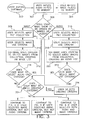
- the user begins use of the multimedia device 100 by entering the software at step 300, then loading one or a plurality of audio files at step 302 into the memory 126 and loading one or a plurality of image files at step 304 into memory 126.
- Loading of the files into the memory 126 may occur in a variety of ways, including but not limited to: wireless transmission from either capture device or another storage device, direct cable connection from either capture device or another storage device (USB, Fire Wire), a network that accesses an image collection stored elsewhere in the network (i.e.
- the user then responds to a software prompt at step 306 asking whether she wants to prioritize images or audio in the multimedia show.
- she then indicates a collection of image files at step 308 from among those stored in memory 126. For example, she could indicate that all images stored in memory 126 are part of the collection; she could select a series of specific individual images; she could indicate one or a plurality of image folders in memory 126.
- the user then inputs user-determined image use criterion/criteria/criterion at step 310 that will be used by the software to select specific images for inclusion in the show. She indicates these user-determined criterion/criteria/criterion by selecting among on-screen options, inputting data using the keyboard 116 or remote control 117.
- Examples of user-determined image use criterion/criteria may include, but are not limited to: information about image metadata such as time of image capture, location of image capture, keywords in title or captioning of image, image author, inclusion of specific subjects (i.e. images that include a specific individual as determined by image recognition software) or event identification.
- the software then at step 312 applies the user-determined image use criterion selected by the user at step 310 to the selected image file collection at step 308 and creates an image list or folder of images that are now qualified for inclusion in the multimedia show.
- An example of how the user determined criterion/criteria is applied to the collection may comprise using metadata information that may contain information about the dates or times or subjects of the images supplied in the collection. This information may be used to group the images in the show in a certain way, or present them in a particular order. This grouping can be achieved using an event clustering algorithm such as the one described in US Patent 6,351,556, to Loui and Pavie, which discloses a method for automatically comparing the content of images for classification by event.
- the image content can be analyzed using computer vision and image understanding algorithms to detect a main subject of interest, or to classify it into different scenes, e.g., birthday party, graduation, wedding, picnic, beach activities, etc.
- the user If the user answers "yes" to this question at step 314 or answers "audio" to the initial question of image-driven vs. audio-driven at step 306, the user then indicates a collection of audio files at step 316 from among those stored in memory 126. For example, she could indicate that all audio files in memory are part of the collection; she could select a series of specific individual audio files; she could indicate one or a plurality of audio folders in memory 126.
- the user selects audio use criterion at step 318, which may include but is not limited to information about audio metadata such as artist, genre, rhythm type, track duration, musical instrument inclusion, copyright date, date of loading the audio track into memory, or ownership of music (in the case that multiple users use the same Multimedia Device, the system can track which user "owns" which tracks in memory 126).
- audio metadata such as artist, genre, rhythm type, track duration, musical instrument inclusion, copyright date, date of loading the audio track into memory, or ownership of music (in the case that multiple users use the same Multimedia Device, the system can track which user "owns" which tracks in memory 126).
- the software then applies the user-determined audio use criterion 318 to the selected audio file collection at step 316 and creates an audio list or folder of images at step 320 that are now qualified for inclusion in the multimedia show.
- beat identification may be required. Identification of the music beat can be accomplished using the method disclosed in U.S. 4,594,930, titled “Apparatus for Synchronizing Playback Rates of Music Sources," by Murakami, which discloses " a discriminating circuit operative in response to the music signal to produce a beat signal representative of extracted beats.”
- the user responds to a software prompt asking whether she wants to also select image preferences at step 322. If the user answers "yes” she moves to the beginning of the image preference process at step 308 and progresses through it.
- the user responds to a software prompt asking if she wants to input creative preferences at step 324. If she indicates "yes,” the software prompts the user to input the criterion for creative treatments in the multimedia show at step 326.
- This may take the form of the user selecting from among a plurality of creative templates that provide a combination of creative effects that fit a mood or theme such as described in EPO pending patent application entitled SOFTWARE AND SYSTEM FOR CUSTOMIZING A PRESENTATION OF DIGITAL IMAGES, of Joseph A.
- a creative template is a predetermined set of creative elements that may include, but is not limited to: a background, font style, style of transitioning from one image to the next and image filters.
- Examples of a “creative template” include themes such as “Beach Vacation,” “Christmas,” or “Wedding” or moods such as “Romantic,” “Nostalgic,” or “Edgy.")
- the user might input the user-determined criterion for creative effects by selecting among options for specific elements of the creative treatment-- for example selecting among ten options for image transitions, then among ten options for backgrounds, then ten options for on-screen fonts.
- the software advances to prepare the content for the multimedia show compilation, as described in Fig. 4, 5 or 6.
- the software will select at random one of the audio tracks from the selected audio file list from step 320 in Fig. 3.
- the software analyzes said audio track at step 402. This analysis may include but is not limited to information about audio metadata such as artist, genre, rhythm type, track duration, musical instrument inclusion, copyright date, date of loading the audio track into memory 126, or the owner of the audio track.
- the software uses the analysis of the audio track from step 402 to select a predetermined criterion/criteria from among a plurality of predetermined criterion/criteria that are preprogrammed in the software 122.
- the selected predetermined criterion/criteria will guide the software to identify images that "fit" with the metadata and content characteristics of said audio track.
- predetermined criterion/criteria are stored in the software 124 and comprise a mapping of image characteristics to audio characteristics that have been preprogrammed as appropriate complements to one another.
- the predetermined image criterion/criteria may include: image ownership by user A, image transitions to occur "with the beat" (i.e. every two seconds) which thus dictates the number of images that should be selected from the qualified image list step 312 of Fig. 3, (i.e. forty-five images are needed in order to transition every 2 seconds for the duration of the 90 second audio track), images that involve one or more faces or are titled, captioned or organized in a folder that includes the keyword "party.”
- the predetermined image criterion/criteria may be for images in any folder that includes images with a beach.
- Data on the image content, such as a beach, party, vacation, etc. may be determined using event clustering methods as described in US 6,351,556 and/or image content parsing methods as described in US 6,147,742.
- the software identifies images on the qualified image list step 312 of Fig. 3 that fit said predetermined criterion/criteria at step 406.
- the software then creates a folder or list containing all the images that meet said predetermined criterion/criteria, with the files listed in chronological order at step 408.
- the software now determines whether the user has previously input user-determined creative criterion/criteria during step 326 of Fig. 3. If "yes," the software progresses directly to the logic flowchart depicted in Fig. 7. If not, the software uses the output of the audio analysis to select among predetermined creative criterion/criteria at step 412. For example, if the audio is the techno genre track previously mentioned, the predetermined creative criterion/criteria stored in the software 124 may include specific distortion image filters, spinning special effects and transitions, and modernistic backgrounds. If the audio is the steel drum band track previously mentioned, the predetermined creative criterion/criteria may include faded transitions, a background that depicts waves and water, and/ or on-screen fonts that look like casual handwriting.
- the software Once the software has collected criterion/criteria for audio, image and creative treatments based on either user-determined criterion/criteria or predetermined criterion/criteria, it begins to collate the files to compile the multimedia show, thus progressing to the continuation of the logic flowchart referred to in Fig. 7.
- the software links the first image in the image list (as previously determined based on either user preference at step 312 in Fig. 3 or predetermined criterion/criteria at step 408 in Fig. 4) to the selected audio track (as previously determined based on either user preference step 400 in Fig. 4 or predetermined criterion/criteria step 506 in Fig. 5) using the creative criterion/criteria (as previously determined based on either user preference step 326 in Fig. 3 or predetermined criterion/criteria steps 412/ 510/ 608) at step 700.
- the software then links the second image on said image list to said audio using said creative criterion/criteria at step 702. This process repeats until the first of two events occurs: either the qualified image collection from step 312 in fig. 3 is exhausted or the audio selected in step 400 or 506 or 602 finishes.
- the software then compiles the multimedia show from the total collection of linked images and audio at step 704 and caches the show file in memory 126 at step 706.
- the memory and control unit 104 then outputs an audio-visual signal to the visual display 132 and audio playback 130 systems so that the user can experience the multimedia show at step 708.
- the user can edit the show in realtime using the remote control 117 to indicate, for example, that the image display duration should be longer or shorter or that a specific image should be deleted from the show.
- the software may automatically begin to author a second show comprised of the images on the qualified image list 312 set to another of the audio tracks on the qualified audio list 320. This process continues until either the qualified image list 312 or the qualified audio list 320 is exhausted.
- the software collects user input regarding the future of the show at step 710.
- the software then executes the user command at step 712, which may include deleting the show from memory 126 at step 716, saving the show to a hard drive (either the memory in the unit 126 or an external memory source) at step 718, saving the show to a disc (possibly burning a CD or DVD on either a drive integrated into the memory and control unit 100 or accessed externally via a network) at step 720, or sharing the show with others via a network connection at step 722.
- the user can also choose to edit the show at step 714 by returning to choose new audio use criterion/criteria step 318 Fig. 3, image use criterion/criteria step 310 Fig.
- Fig. 5 refers to the situation where the user has input user-determined criterion/criteria for image use, but not audio use.
- the software 204 at step 500 analyzes the images on the qualified image list as previously determined at step 312 to determine a dominant pattern in the data. This analysis may include but is not limited to event clustering, image content analysis, and metadata identification and analysis such as previously discussed. For example, the software 204 analysis of the qualified image previously obtained at step 312 may find that all of the images were captured by user B, that most of the images involve landscape shots, and that the capture location of the majority of the images lies in France.
- the software 204 uses the output of the image analysis to select predetermined audio criterion/criteria at step 502.
- the predetermined criterion/criteria may be that the audio track is in user B's audio collection and that the title is in French or includes the keyword "Paris.” Or, it may be that the dominance of landscape images links to a predetermined criterion/criteria for an audio track of the classical genre.
- the software identifies any audio tracks stored in memory 126 that fit the predetermined criterion/criteria and generates a list of qualified audio tracks at step 504.
- the software then pulls one audio track randomly from the list of qualified tracks previously generated at step 504.
- the software now determines whether the user has previously input user-determined creative criterion/criteria during step 326 t. If not, the software 204 uses the output of the audio analysis to select among predetermined creative criterion/criteria at step 510. For example, if the audio is the track with "Paris" in the title as previously mentioned and has a slow rhythm, the predetermined creative criterion/criteria may include simple transitions, a transition from one image to the next on only alternate beats, and backgrounds that incorporate images from France.
- the software Once the software has collected or assigned criterion/criteria for audio, image and creative treatments, it begins to collate the files to compile the multimedia show, thus progressing to the continuation at step 700 of the logic flowchart in Fig. 7 described above.
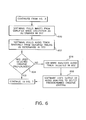
- the logic flow of Fig. 6 may be substituted.
- the user has selected both image use criterion/criteria and audio use criterion/criteria.
- step 600 the software pulls images from the qualified image list as previously determined i, and then at step 602 the software pulls an audio track randomly from the list of qualified tracks as previously determined at step 320.
- the software 204 determines whether the user has previously input user-determined creative criterion/criteria during step 326. If not, the software 204 analyzes the selected audio track at step 606 in the manner described relative to Fig. 4, and uses the output of the audio analysis to select among predetermined creative criterion/criteria at step 608 in the manner described earlier relative to Fig. 4.
- the software 204 Once the software 204 has collected or assigned creative criterion/criteria for the user-determined audio and image lists, it begins to collate the files to compile the multimedia show, thus progressing to the continuation of the logic flowchart as previously described in Fig. 7.
Landscapes
- Engineering & Computer Science (AREA)
- Multimedia (AREA)
- Signal Processing (AREA)
- Theoretical Computer Science (AREA)
- General Engineering & Computer Science (AREA)
- Physics & Mathematics (AREA)
- Databases & Information Systems (AREA)
- General Physics & Mathematics (AREA)
- Data Mining & Analysis (AREA)
- Television Signal Processing For Recording (AREA)
- Information Retrieval, Db Structures And Fs Structures Therefor (AREA)
- Management Or Editing Of Information On Record Carriers (AREA)
- Processing Or Creating Images (AREA)
Applications Claiming Priority (2)
| Application Number | Priority Date | Filing Date | Title |
|---|---|---|---|
| US326456 | 2002-12-20 | ||
| US10/326,456 US20040122539A1 (en) | 2002-12-20 | 2002-12-20 | Synchronization of music and images in a digital multimedia device system |
Publications (2)
| Publication Number | Publication Date |
|---|---|
| EP1431977A2 true EP1431977A2 (fr) | 2004-06-23 |
| EP1431977A3 EP1431977A3 (fr) | 2008-05-14 |
Family
ID=32393124
Family Applications (1)
| Application Number | Title | Priority Date | Filing Date |
|---|---|---|---|
| EP03078829A Withdrawn EP1431977A3 (fr) | 2002-12-20 | 2003-12-08 | Synchronisation de la musique et des images dans un système de dispositif numérique multimédia |
Country Status (3)
| Country | Link |
|---|---|
| US (1) | US20040122539A1 (fr) |
| EP (1) | EP1431977A3 (fr) |
| JP (1) | JP2004206711A (fr) |
Cited By (8)
| Publication number | Priority date | Publication date | Assignee | Title |
|---|---|---|---|---|
| WO2006106596A1 (fr) | 2005-03-02 | 2006-10-12 | Sony Corporation | Dispositif et procede de reproduction de contenu |
| EP1877936A2 (fr) * | 2005-04-13 | 2008-01-16 | Impact Engine, Inc. | Procede et systeme de communication multimedia |
| EP1750270A3 (fr) * | 2005-08-05 | 2008-01-16 | Samsung Electronics Co., Ltd. | Procédé et appareil de création et reproduction de données media dans un terminal mobile |
| US20090125571A1 (en) * | 2007-11-11 | 2009-05-14 | Microsoft Corporation | Arrangement for synchronizing media files with portable devices |
| EP1821306A3 (fr) * | 2006-02-20 | 2009-12-23 | Nikon Corporation | Procédé de lecture d'images, procédé de traitement de musique, appareil de lecture d'images, et produit de programme informatique |
| US8145034B2 (en) | 2005-03-02 | 2012-03-27 | Sony Corporation | Contents replay apparatus and contents replay method |
| CN101640058B (zh) * | 2009-07-24 | 2012-05-23 | 王祐凡 | 多媒体同步方法、播放器以及多媒体数据制作设备 |
| CN112530470A (zh) * | 2015-06-22 | 2021-03-19 | 玛诗塔乐斯有限公司 | 具有输入和输出的媒体内容增强系统,以及组成媒体产品的方法 |
Families Citing this family (47)
| Publication number | Priority date | Publication date | Assignee | Title |
|---|---|---|---|---|
| JP4973899B2 (ja) | 2000-07-06 | 2012-07-11 | ソニー株式会社 | 送信装置、送信方法、受信装置、受信方法、記録媒体、および通信システム |
| US7882258B1 (en) * | 2003-02-05 | 2011-02-01 | Silver Screen Tele-Reality, Inc. | System, method, and computer readable medium for creating a video clip |
| JP2004295541A (ja) * | 2003-03-27 | 2004-10-21 | Victor Co Of Japan Ltd | 画像作成プログラム及び画像再生プログラム |
| US20050281541A1 (en) * | 2004-06-17 | 2005-12-22 | Logan Beth T | Image organization method and system |
| WO2006025209A1 (fr) * | 2004-08-30 | 2006-03-09 | Pioneer Corporation | Controleur d’affichage d’images et procede d’affichage d’images |
| JP4274087B2 (ja) * | 2004-09-14 | 2009-06-03 | ソニー株式会社 | 情報処理装置および方法、並びにプログラム |
| US7505051B2 (en) * | 2004-12-16 | 2009-03-17 | Corel Tw Corp. | Method for generating a slide show of an image |
| US7236226B2 (en) * | 2005-01-12 | 2007-06-26 | Ulead Systems, Inc. | Method for generating a slide show with audio analysis |
| JP4277218B2 (ja) * | 2005-02-07 | 2009-06-10 | ソニー株式会社 | 記録再生装置、その方法及びプログラム |
| US20060190824A1 (en) * | 2005-02-23 | 2006-08-24 | Memory Matrix, Inc. | Systems and methods for sharing screen-saver content |
| US7805679B2 (en) * | 2005-02-24 | 2010-09-28 | Fujifilm Corporation | Apparatus and method for generating slide show and program therefor |
| JP2006303612A (ja) * | 2005-04-15 | 2006-11-02 | Konica Minolta Photo Imaging Inc | 記録装置及び画像閲覧方法 |
| US7403642B2 (en) * | 2005-04-21 | 2008-07-22 | Microsoft Corporation | Efficient propagation for face annotation |
| US20070038671A1 (en) * | 2005-08-09 | 2007-02-15 | Nokia Corporation | Method, apparatus, and computer program product providing image controlled playlist generation |
| WO2007021277A1 (fr) * | 2005-08-15 | 2007-02-22 | Disney Enterprises, Inc. | Systeme et procede permettant la creation automatique de contenu multimedia sur mesure |
| US8201073B2 (en) | 2005-08-15 | 2012-06-12 | Disney Enterprises, Inc. | System and method for automating the creation of customized multimedia content |
| JP2007104153A (ja) * | 2005-10-03 | 2007-04-19 | Sony Corp | 画像制御装置 |
| US8171016B2 (en) * | 2005-11-21 | 2012-05-01 | Koninklijke Philips Electronics N.V. | System and method for using content features and metadata of digital images to find related audio accompaniment |
| KR100725411B1 (ko) * | 2006-02-06 | 2007-06-07 | 삼성전자주식회사 | 컨텐츠 검색을 위한 사용자 인터페이스, 사용자 인터페이스제공 방법, 및 컨텐츠 검색 장치 |
| KR100726258B1 (ko) * | 2006-02-14 | 2007-06-08 | 삼성전자주식회사 | 휴대단말의 사진파일 및 음성파일을 이용한 영상물 제작방법 |
| IL174750A0 (en) * | 2006-04-03 | 2007-08-19 | Dalit Rozen Atzmon | Photo album |
| JP4717734B2 (ja) * | 2006-06-30 | 2011-07-06 | キヤノン株式会社 | データ再生装置及びデータ再生方法 |
| US7669132B2 (en) * | 2006-10-30 | 2010-02-23 | Hewlett-Packard Development Company, L.P. | Matching a slideshow to an audio track |
| US20080228298A1 (en) * | 2006-11-09 | 2008-09-18 | Steven Rehkemper | Portable multi-media device |
| US20080189591A1 (en) * | 2007-01-31 | 2008-08-07 | Lection David B | Method and system for generating a media presentation |
| US20080244373A1 (en) * | 2007-03-26 | 2008-10-02 | Morris Robert P | Methods, systems, and computer program products for automatically creating a media presentation entity using media objects from a plurality of devices |
| US20110144780A1 (en) * | 2007-03-27 | 2011-06-16 | Hiromu Ueshima | Timing control device and timing control method |
| US9361941B2 (en) * | 2007-08-02 | 2016-06-07 | Scenera Technologies, Llc | Method and systems for arranging a media object in a media timeline |
| JP4433025B2 (ja) * | 2007-09-10 | 2010-03-17 | ソニー株式会社 | 画像再生装置及び画像記録装置と画像再生方法及び画像記録方法 |
| US7569761B1 (en) * | 2007-09-21 | 2009-08-04 | Adobe Systems Inc. | Video editing matched to musical beats |
| KR101483995B1 (ko) * | 2008-09-04 | 2015-01-20 | 삼성전자주식회사 | 전자 앨범 및 전자 앨범의 재생 방법 |
| WO2010041166A1 (fr) * | 2008-10-07 | 2010-04-15 | Koninklijke Philips Electronics N.V. | Procédé et appareil destinés à générer une séquence d'une pluralité d'images devant être affichées tout en étant accompagnées par des éléments audio |
| US8996538B1 (en) | 2009-05-06 | 2015-03-31 | Gracenote, Inc. | Systems, methods, and apparatus for generating an audio-visual presentation using characteristics of audio, visual and symbolic media objects |
| US8542982B2 (en) * | 2009-12-22 | 2013-09-24 | Sony Corporation | Image/video data editing apparatus and method for generating image or video soundtracks |
| KR101737081B1 (ko) * | 2010-02-10 | 2017-05-17 | 삼성전자주식회사 | 디지털 촬영 장치 및 그 제어 방법과 이를 기록한 기록 매체 |
| US20130080896A1 (en) * | 2011-09-28 | 2013-03-28 | Yi-Lin Chen | Editing system for producing personal videos |
| US20140362290A1 (en) * | 2013-06-06 | 2014-12-11 | Hallmark Cards, Incorporated | Facilitating generation and presentation of sound images |
| US20170118501A1 (en) * | 2014-07-13 | 2017-04-27 | Aniview Ltd. | A system and methods thereof for generating a synchronized audio with an imagized video clip respective of a video clip |
| US9870451B1 (en) | 2014-11-25 | 2018-01-16 | Emmi Solutions, Llc | Dynamic management, assembly, and presentation of web-based content |
| JP6583285B2 (ja) * | 2014-12-15 | 2019-10-02 | ソニー株式会社 | 情報処理方法、映像処理装置及びプログラム |
| FR3035294A1 (fr) * | 2015-04-15 | 2016-10-21 | Soclip ! | Procede de generation d'un diaporama synchronise avec des evenements audio |
| US10269035B2 (en) | 2015-06-30 | 2019-04-23 | Marketing Technology Limited | On-the-fly generation of online presentations |
| US10743041B1 (en) | 2019-01-31 | 2020-08-11 | DISH Technologies L.L.C. | Systems and methods for facilitating adaptive content splicing |
| US11638049B2 (en) | 2019-10-16 | 2023-04-25 | Dish Network L.L.C. | Systems and methods for content item recognition and adaptive packet transmission |
| US10880351B1 (en) | 2019-10-16 | 2020-12-29 | Dish Network L.L.C. | Systems and methods for adapting content items to endpoint media devices |
| US11245946B2 (en) | 2020-01-21 | 2022-02-08 | Dish Network L.L.C. | Systems and methods for adapting content items to secured endpoint media device data |
| US11012737B1 (en) * | 2020-04-27 | 2021-05-18 | Dish Network L.L.C. | Systems and methods for audio adaptation of content items to endpoint media devices |
Family Cites Families (8)
| Publication number | Priority date | Publication date | Assignee | Title |
|---|---|---|---|---|
| CA2081762C (fr) * | 1991-12-05 | 2002-08-13 | Henry D. Hendrix | Methode et appareil pour ameliorer les signaux video |
| JPH06118977A (ja) * | 1991-12-28 | 1994-04-28 | Edetsuto:Kk | 演奏装置および記録媒体 |
| JPH11308513A (ja) * | 1998-04-17 | 1999-11-05 | Casio Comput Co Ltd | 画像再生装置及び画像再生方法 |
| JP2002082684A (ja) * | 2000-09-07 | 2002-03-22 | Sony Corp | プレゼンテーションシステム及びプレゼンテーションデータ生成方法、並びに記録媒体 |
| JP4299472B2 (ja) * | 2001-03-30 | 2009-07-22 | ヤマハ株式会社 | 情報送受信システム及び装置並びに記憶媒体 |
| US6639649B2 (en) * | 2001-08-06 | 2003-10-28 | Eastman Kodak Company | Synchronization of music and images in a camera with audio capabilities |
| WO2003017145A1 (fr) * | 2001-08-21 | 2003-02-27 | Yesvideo, Inc. | Creation d'un diaporama base sur les caracteristiques d'un contenu audio servant a produire une presentation audio d'accompagnement |
| US7236226B2 (en) * | 2005-01-12 | 2007-06-26 | Ulead Systems, Inc. | Method for generating a slide show with audio analysis |
-
2002
- 2002-12-20 US US10/326,456 patent/US20040122539A1/en not_active Abandoned
-
2003
- 2003-12-08 EP EP03078829A patent/EP1431977A3/fr not_active Withdrawn
- 2003-12-18 JP JP2003421457A patent/JP2004206711A/ja not_active Withdrawn
Cited By (28)
| Publication number | Priority date | Publication date | Assignee | Title |
|---|---|---|---|---|
| EP1855473A4 (fr) * | 2005-03-02 | 2010-01-06 | Sony Corp | Dispositif et procede de reproduction de contenu |
| WO2006106596A1 (fr) | 2005-03-02 | 2006-10-12 | Sony Corporation | Dispositif et procede de reproduction de contenu |
| US8868585B2 (en) | 2005-03-02 | 2014-10-21 | Sony Corporation | Contents replay apparatus and contents replay method |
| US8145034B2 (en) | 2005-03-02 | 2012-03-27 | Sony Corporation | Contents replay apparatus and contents replay method |
| US11587117B2 (en) | 2005-04-13 | 2023-02-21 | Impact Engine, Inc. | Multimedia communication system and method |
| US10565618B2 (en) | 2005-04-13 | 2020-02-18 | Impact Engine, Inc. | Multimedia communication system and method |
| US7870497B2 (en) | 2005-04-13 | 2011-01-11 | Impact Engine, Inc. | Multimedia communication system and method |
| US12450627B2 (en) | 2005-04-13 | 2025-10-21 | Impact Engine, Inc. | Multimedia communication system and method |
| US12248964B2 (en) | 2005-04-13 | 2025-03-11 | Impact Engine, Inc. | Multimedia communication system and method |
| EP1877936A2 (fr) * | 2005-04-13 | 2008-01-16 | Impact Engine, Inc. | Procede et systeme de communication multimedia |
| US11798031B2 (en) | 2005-04-13 | 2023-10-24 | Impact Engine, Inc. | Multimedia communication system and method |
| US11803876B1 (en) | 2005-04-13 | 2023-10-31 | Impact Engine, Inc. | Multimedia communication system and method |
| US8930832B2 (en) | 2005-04-13 | 2015-01-06 | Impact Engine, Inc. | Multimedia communication system and method |
| US9361632B2 (en) | 2005-04-13 | 2016-06-07 | Impact Engine, Inc. | Multimedia communication system and method |
| US11978088B2 (en) | 2005-04-13 | 2024-05-07 | Impact Engine, Inc. | Multimedia communication system and method |
| US9805393B2 (en) | 2005-04-13 | 2017-10-31 | Impact Engine, Inc. | Multimedia communication system and method |
| US10068253B2 (en) | 2005-04-13 | 2018-09-04 | Impact Engine, Inc. | Multimedia communication system and method |
| US11669863B1 (en) | 2005-04-13 | 2023-06-06 | Impact Engine, Inc. | Multimedia communication system and method |
| US10572898B2 (en) | 2005-04-13 | 2020-02-25 | Impact Engine, Inc. | Multimedia communication system and method |
| EP1750270A3 (fr) * | 2005-08-05 | 2008-01-16 | Samsung Electronics Co., Ltd. | Procédé et appareil de création et reproduction de données media dans un terminal mobile |
| EP1821306A3 (fr) * | 2006-02-20 | 2009-12-23 | Nikon Corporation | Procédé de lecture d'images, procédé de traitement de musique, appareil de lecture d'images, et produit de programme informatique |
| US8345122B2 (en) | 2006-02-20 | 2013-01-01 | Nikon Corporation | Image playback method, music processing method, image playback apparatus, and computer program product |
| US8818941B2 (en) * | 2007-11-11 | 2014-08-26 | Microsoft Corporation | Arrangement for synchronizing media files with portable devices |
| US9544369B2 (en) | 2007-11-11 | 2017-01-10 | Microsoft Technology Licensing, Llc | Arrangement for synchronizing media files with portable devices |
| US20090125571A1 (en) * | 2007-11-11 | 2009-05-14 | Microsoft Corporation | Arrangement for synchronizing media files with portable devices |
| CN101640058B (zh) * | 2009-07-24 | 2012-05-23 | 王祐凡 | 多媒体同步方法、播放器以及多媒体数据制作设备 |
| CN112530470B (zh) * | 2015-06-22 | 2022-03-18 | 玛诗塔乐斯有限公司 | 媒体内容增强系统,以及组成媒体产品的方法 |
| CN112530470A (zh) * | 2015-06-22 | 2021-03-19 | 玛诗塔乐斯有限公司 | 具有输入和输出的媒体内容增强系统,以及组成媒体产品的方法 |
Also Published As
| Publication number | Publication date |
|---|---|
| US20040122539A1 (en) | 2004-06-24 |
| EP1431977A3 (fr) | 2008-05-14 |
| JP2004206711A (ja) | 2004-07-22 |
Similar Documents
| Publication | Publication Date | Title |
|---|---|---|
| EP1431977A2 (fr) | Synchronisation de la musique et des images dans un système de dispositif numérique multimédia | |
| CN112562747B (zh) | 一种确定起始及其在数码信号中的位置的方法、数码信号处理器以及声频系统 | |
| JP5060303B2 (ja) | オーディオセレクションに基づいたビデオクリップの記録及び再生 | |
| US6933432B2 (en) | Media player with “DJ” mode | |
| US8280920B2 (en) | Navigating media content by groups | |
| RU2440606C2 (ru) | Способ и устройство автоматического генерирования сводки множества изображений | |
| US7203702B2 (en) | Information sequence extraction and building apparatus e.g. for producing personalised music title sequences | |
| US20050123886A1 (en) | Systems and methods for personalized karaoke | |
| RU2322654C2 (ru) | Способ и система для обогащения аудиосигнала | |
| US20030085913A1 (en) | Creation of slideshow based on characteristic of audio content used to produce accompanying audio display | |
| US20040052505A1 (en) | Summarization of a visual recording | |
| US20210082382A1 (en) | Method and System for Pairing Visual Content with Audio Content | |
| US20080101762A1 (en) | Method of Automatically Editing Media Recordings | |
| EP1241673A2 (fr) | Système et procédé d'édition vidéo automatisée | |
| US20040175159A1 (en) | Searchable DVD incorporating metadata | |
| US20020097983A1 (en) | Selective viewing of video based on one or more themes | |
| US20090052734A1 (en) | Moving image creating apparatus, moving image creating method, and program | |
| JP2006500704A (ja) | 自動再生リスト生成 | |
| JP2001184371A (ja) | ユーザの使用に便利な多段階の要約ストリームの提供方法 | |
| US20060292537A1 (en) | System and method for conducting multimedia karaoke sessions | |
| JP4373467B2 (ja) | 編集方法 | |
| CN1799099B (zh) | 用于元数据管理的装置和方法 | |
| RU2466470C2 (ru) | Устройство для воспроизведения ав данных с носителя | |
| Madhwacharyula et al. | Information-integration approach to designing digital video albums | |
| Kaiser et al. | Metadata-based Adaptive Assembling of Video Clips on the Web |
Legal Events
| Date | Code | Title | Description |
|---|---|---|---|
| PUAI | Public reference made under article 153(3) epc to a published international application that has entered the european phase |
Free format text: ORIGINAL CODE: 0009012 |
|
| AK | Designated contracting states |
Kind code of ref document: A2 Designated state(s): AT BE BG CH CY CZ DE DK EE ES FI FR GB GR HU IE IT LI LU MC NL PT RO SE SI SK TR |
|
| AX | Request for extension of the european patent |
Extension state: AL LT LV MK |
|
| PUAL | Search report despatched |
Free format text: ORIGINAL CODE: 0009013 |
|
| AK | Designated contracting states |
Kind code of ref document: A3 Designated state(s): AT BE BG CH CY CZ DE DK EE ES FI FR GB GR HU IE IT LI LU MC NL PT RO SE SI SK TR |
|
| AX | Request for extension of the european patent |
Extension state: AL LT LV MK |
|
| RIC1 | Information provided on ipc code assigned before grant |
Ipc: H04N 5/232 20060101ALI20080404BHEP Ipc: G06F 17/30 20060101ALI20080404BHEP Ipc: G11B 27/034 20060101AFI20080404BHEP |
|
| AKX | Designation fees paid | ||
| REG | Reference to a national code |
Ref country code: DE Ref legal event code: 8566 |
|
| STAA | Information on the status of an ep patent application or granted ep patent |
Free format text: STATUS: THE APPLICATION IS DEEMED TO BE WITHDRAWN |
|
| 18D | Application deemed to be withdrawn |
Effective date: 20081115 |