EP1435567A2 - Representation d'element interface utilisateur avec vue simplifiée. - Google Patents
Representation d'element interface utilisateur avec vue simplifiée. Download PDFInfo
- Publication number
- EP1435567A2 EP1435567A2 EP03004803A EP03004803A EP1435567A2 EP 1435567 A2 EP1435567 A2 EP 1435567A2 EP 03004803 A EP03004803 A EP 03004803A EP 03004803 A EP03004803 A EP 03004803A EP 1435567 A2 EP1435567 A2 EP 1435567A2
- Authority
- EP
- European Patent Office
- Prior art keywords
- user interface
- node
- interface element
- nodes
- simplified view
- Prior art date
- Legal status (The legal status is an assumption and is not a legal conclusion. Google has not performed a legal analysis and makes no representation as to the accuracy of the status listed.)
- Ceased
Links
Images








Classifications
-
- G—PHYSICS
- G06—COMPUTING OR CALCULATING; COUNTING
- G06F—ELECTRIC DIGITAL DATA PROCESSING
- G06F8/00—Arrangements for software engineering
-
- G—PHYSICS
- G06—COMPUTING OR CALCULATING; COUNTING
- G06F—ELECTRIC DIGITAL DATA PROCESSING
- G06F9/00—Arrangements for program control, e.g. control units
- G06F9/06—Arrangements for program control, e.g. control units using stored programs, i.e. using an internal store of processing equipment to receive or retain programs
- G06F9/44—Arrangements for executing specific programs
- G06F9/451—Execution arrangements for user interfaces
Definitions
- the technical field relates to internal representation of user interface elements.
- User interface elements can take many forms: edit boxes, list boxes, scroll bars, pick lists, pushbuttons, and the like. Although the user interface element may appear to the user as a single composite item, it may actually be represented in the computer as a number of separate items or sub-elements that have been combined together. Furthermore, each of these sub-elements themselves can be composited from other sub-elements. In this manner, user interface elements can serve as building blocks for building other, more complex, user interface elements. Such an approach is useful because the software managing the user interface (e.g., the user interface framework) can re-use the definitions of certain common elements when assembling them into composite elements.
- the software managing the user interface e.g., the user interface framework
- a simplified view of a representation of one or more user interface elements can be provided.
- some nodes representing user interface elements in a hierarchical representation can be selectively exposable. Such nodes can be exposed under certain circumstances and unexposed under other circumstances.
- a simplified representational view e.g., not exposing the selectively exposable nodes
- various operations can be performed on a simplified view of a representation of the user interface. For example, when performing operations, selectively exposable nodes can be unexposed. Such an approach can be useful for a programmer who does not wish to become acquainted with the details of the representation.
- plural user interface elements can be composited into a single composite unit upon which operations can be performed.
- the fact that the composite unit is composed of plural user interface elements can be transparent in a simplified view of the user interface elements' representation.
- a program can thus investigate and manipulate the representation without regard to the unexposed nodes.
- a programmer can write simpler code or markup.
- the programmer need not be completely familiar with the underlying structure, which may contain more than one node for the composite unit.
- a user interface service providing a simplified view can thus provide a powerful tool by which software re-use is encouraged, and unsophisticated users can interact with the user interface elements on a basic level.
- User interface elements can take many forms, such as graphical pushbuttons, edit boxes, scroll bars, picklists, drop down menus, ACTIVEX controls, images and the like.
- User interface elements can appear as part of a program (e.g., to control functionality of the program) or within a document.
- a simplified view of the internal representation of such user interface elements can make programming for user interface elements simpler. For example, a casual or unsophisticated programmer can write a program interacting with the simplified view without having to become familiar with certain complexities. Also, a more sophisticated programmer may wish to be shielded from such complexities to avoid possible programming mistakes.
- the technologies described herein can be provided as part of a user interface service. Programs interacting with the service can thus take advantage of the features as desired.
- a user interface element can be defined as having a hierarchical representation with a simplified view. Such a definition can be invoked to create the hierarchical representation with the simplified view. Subsequently, an operation can be performed on the hierarchical representation. Such an operation can be performed on either a full or a simplified view of the hierarchical representation.
- a user interface element is a composite user interface element comprising plural user interface elements
- a principal (e.g., parent) node can be exposed, and the other nodes for the composite user interface element can be defined as selectively exposable.
- the view of the representation shows the principal node, but not the other, selectively exposable nodes.
- one node can be exposed for the composite user interface element rather than a plurality of nodes.
- the full view of a representation of a composite user interface element may be relatively complex in that there may be a plurality of nodes in the hierarchical representation representing the user interface element.
- a programmer wishing to manipulate the full view is faced with becoming acquainted with the various nodes and their hierarchical relationships.
- a program can instead perform operations using the simplified view.
- unexposed nodes can be ignored when performing operations on a node (e.g., a parent or child node in a hierarchy). For example, when adding children to a node, unexposed intermediate nodes can be ignored or skipped.
- a request to add children to a node in the simplified view of the hierarchical representation of the user interface can actually result in an addition of the children to an appropriate child node (e.g., representing an element of the composite user interface element) of the node.
- an appropriate child node e.g., representing an element of the composite user interface element
- a list box may be represented as a plurality of nodes in a hierarchical relationship, and one of the nodes may be designated as the particular node to receive displayed choices for the list box as children nodes.
- a programmer might not wish to become familiar with such complexities.
- such an operation can easily be performed by adding the additional user choices as children of the principal node of the user interface element (e.g., via the simplified view).
- the request to add children to the principal node is implemented as a request to add children to the appropriate node (e.g., a descendant of the principal node).
- the program can use the simplified representation of the user interface element to perform operations on the user interface element.
- the programmer need not become acquainted with the complexities of the full view, and simpler code or markup can be used.
- One way of implementing a simplified view is to define various nodes in the representation as encapsulating parents or encapsulating containers.
- a particular node can be designated as a principal node (e.g., the encapsulating parent), and another (e.g., child) node can be designated as the particular node to receive children (e.g., if the parent node has or will have children in the simplified view).
- Another way of implementing the simplified view is to define a selectively exposable node in such a way that its children are considered siblings of the siblings of the selectively exposable node in the simplified view.
- a number of operations other than adding children can be performed to learn about or manipulate a user interface element representation.
- operations can be performed on any node in the representation and still take advantage of the simplified view.
- property values can be determined (e.g., for added nodes) in light of the selectively exposable nodes. In some cases, it may be desirable to use property values associated with a principal node (e.g., ignoring the selectively exposable nodes), the immediate (e.g., unexposed) parent, or a combination thereof.
- the principal node and the selectively exposable nodes for a composite user interface element are sometimes said to form an "encapsulated" user interface element.
- a program or markup language interacting with the simplified view can be shielded from some of the complexity of the underlying representation.
- a composite user interface element can be assembled of a plurality of user interface element without introducing additional complexity for the program using the composite user interface.
- Such an approach can be useful in that it can encourage user interface element developers to re-use existing user interface elements when creating new ones without introducing unnecessary complexity when dealing with the user interface element.
- nesting of definition specifying selectively exposable nodes can be supported.
- FIG. 1 shows an exemplary hierarchical representation 100 of a user interface element.
- the nodes 110 and 120 are shown as having a parent-child relationship.
- the node 110 is a parent element of the child element 120.
- the representation 100 includes more than one node, it is sometimes said to represent a "composite" user interface element.
- the node 110 may correspond to one visual presentation, and the node 120 may correspond to another visual presentation. However, at least one of the nodes 110 or 120 may have no visual depiction.
- One or more nodes in the representation 100 may be designated as selectively exposable.
- the node 120 is so designated.
- the selectively exposable node 120 is unexposed.
- the exposed node 110 is sometimes called the "principal" node.
- Much more complex user interfaces comprising multiple elements can be represented in the manner shown in FIG. 1.
- Each of the elements can themselves comprise other user interface elements adding additional layers of complexity (e.g., more nodes, including selectively exposable nodes) not depicted in FIG. 1.
- various child nodes may be principal nodes for representations of other user interface elements.
- FIG. 1 shows a full view of the hierarchical representation of the user interface element, including selectively exposable child nodes (e.g., the node 120).
- the full view of the hierarchical representation 100 may not be desirable when performing various operations for the representation of the user interface element. For example, direct interaction with the node 120 may be unnecessary in certain circumstances. If so, an exemplary simplified view 200 of the representation as shown in FIG. 2 can be presented.
- the exemplary simplified view 200 shows only one node 210.
- the node 210 can be either a combined representation of the nodes 110 and 120 of the full view (e.g., where the node 120 is encapsulated within the node 110) or simply a representation of the node 110 of the full view.
- FIG. 3 Another exemplary hierarchical representation 300 is shown in FIG. 3.
- the nodes 310, 320, and 325 are a set of nodes 330 representing a composite user interface element. Out of the set of nodes 330, the node 310 is the principal node, and the remaining nodes 320 and 325 are defined as selectively exposable.
- Another node 340 is not selectively exposable and is shown as a child of one of the selectively exposable nodes 320.
- the representation 300 includes the selectively exposable nodes and is provided if a full view is requested.
- FIG. 4 A corresponding simplified view is shown in FIG. 4.
- the selectively exposable nodes 320 and 325 are not exposed when a simplified view is requested. Instead, the simplified view 400 shows the node 410 (e.g., the node 310 or a combination of the nodes 310, 320, and 325) and the node 340.
- the node 410 e.g., the node 310 or a combination of the nodes 310, 320, and 325
- one of the nodes 320 can be designated as the node under which simplified view children (e.g., the node 340) are stored.
- Such a node is sometimes called a "container" node (e.g., for the encapsulated nodes).
- a relatively complex representation of a user interface can thus be presented in simplified form is desired.
- a full view 300 of a hierarchical representation of such a complex user interface may not need to be provided for a program written by a user who has no interest in the selectively exposable nodes in the hierarchical representation.
- a programmer may not be interested in the existence of or defining the functionality or appearance of the user interface elements relating to the selectively exposable nodes 320 and 325.
- the program may need to interact with the node 340.
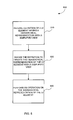
- FIG. 5 shows an exemplary method 500 for implementing a simplified view of a representation of a user interface element (e.g., in a user interface service).
- a user interface element having a hierarchical representation is defined.
- the definition can include a plurality of nodes, some of which are selectively exposable.
- the definition After the definition is created, it can be invoked at 520 to create the user interface. For example, a hierarchical representation of the defined user interface element can be created via the definition and stored.
- One or more operations can be performed on the representation at 530. Such operations can be performed via the simplified view of the hierarchical representation without exposing the selectively exposable nodes in the representation.
- invocation of the definition and performing operations on the representation can be done without reference to the full view of the representation.
- programmers can write code or markup with out having to acquaint themselves with the details of the full view.
- any one of the pictured actions can be independently useful and need not be performed all at once or by the same program.
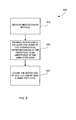
- FIG. 6 shows an exemplary method for receiving a definition of a user interface element having a hierarchical representation with a simplified view.
- the definition may be created using various languages such as markup language (e.g. XML or HTML) or programming languages (e.g. Java or C++).
- markup language e.g. XML or HTML
- programming languages e.g. Java or C++.
- the definition can be received from a program or specified in a markup document.
- an indication of the one or more nodes that will be stored for the representation of the user interface element is received.
- user interface elements e.g., sub-elements
- the definition can indicate the hierarchical relationships between elements. Such a definition may include node definitions for various elements forming a composite user interface element.
- an indication of at least one selectively exposable node is received. If desired, the selectively exposable nodes could be chosen automatically instead of specified in the definition. When a simplified view of a representation of the defined user interface element is provided, the selectively exposable nodes are unexposed. The definition can then be stored at 630 for later invocation.
- An instance of the user interface element can be created by invoking the definition (e.g., such as that defined via the method shown in FIG. 6).
- FIG. 7 shows an exemplary method for invoking a definition of a user interface element having a simplified view.
- a request to create a user interface element is received.
- Such a request can be received programmatically (e.g., from a software program) or from a markup document. The request need not be received from the same entity that defined the user interface element.
- the definition of the hierarchical representation of a user interface element is used to create the appropriate nodes in the hierarchical representation of the user interface (e.g., corresponding to the user interface elements forming a composite user interface element).
- the created nodes are provided if a full view of the representation is requested.
- the appropriate nodes are designated as selectively exposable. Such selectively exposable nodes are not exposed (e.g., are not encountered) when a simplified view (e.g., of the representation in which the user interface element is represented) is requested.
- Whether a node is exposed in a view of the representation of a user interface element is independent of whether or not the corresponding user interface element is displayed (e.g., is hidden) on a display device when the user interface element is rendered.
- operations can be performed for the representation. Such operation may be performed for either the full or the simplified view of the representation.
- the operations performed on the simplified view include, for example, enumerating children of a node, adding children to a node, removing children of a node, and navigating within the hierarchical representation.
- FIG. 8 An exemplary method for performing an operation on a simplified view of a representation of a user interface element is shown in FIG. 8.
- a request to perform an operation on the user interface element e.g., the principal node of a composite user interface element
- the requested operation is performed using the simplified view of the hierarchical representation of the user interface element.
- the operation may result in a modification of the hierarchical representation (e.g., when adding or removing nodes), or the representation may not be changed (e.g., when enumerating or navigating within nodes).
- a request to enumerate children of a node using the simplified view can result in enumeration of the children stored in a child node (or a grandchild node) of the node, if the child node is designated as selectively exposable.
- a request to add a child to a parent node having selectively exposable children in the simplified view can result in the child being added to its appropriate place in the hierarchy of the full view of the representation of the user element which may or may not be the parent node visible in the simplified view.
- the definition of the hierarchical representation of the user interface element can be used to find the appropriate place to add or find children within the full view of hierarchical representation.
- a program can be written to interact with the simplified view, and the programmer is shielded from the trouble of having to know the details of the full view including the hidden nodes and their arrangement within the hierarchy.
- FIG. 9 shows an exemplary user interface element 905 commonly known as a combo box.
- the combo box 905 is a composite user interface element comprising several user interface elements, which in turn comprise further user interface elements.
- the combo box 905 comprises an input box 910, a drop down button 930, and a pop up window 920.
- the pop up window 920 contains a list box 925 (e.g., visually indistinguishable from the pop up window 920).
- the pop up window 920 may contain alternative or additional user interface elements (e.g., a drop down menu).
- the list box 925 is also a composite user interface element with its own elements, such as the scroll viewer 926 (e.g., also visually indistinguishable from the pop up window 920) containing the grid panel 935 and the scrollbar 945 for scrolling through the list items 940, which are contained within the grid panel 935.
- the scroll viewer 926 e.g., also visually indistinguishable from the pop up window 920
- the list box element 925 is depicted as visually indistinguishable from the scroll viewer element 926 and the pop up element 920.
- the illustration shows that the pop up window 920 contains the list box element 925 which is formed by adding a grid panel 935 to an empty place holder contained within the scroll viewer 926.
- the scroll viewer 926 it is possible for a pop window 920 to contain user elements other than a list box 925.
- the scroll viewer 926 it is also possible for the scroll viewer 926 to have elements (e.g. a menu) other than a grid panel 935 contained within its empty place holder.
- the scrollbar 945 can also be represented as a composite user interface element containing elements such as the scroll buttons 950, 951, 955, and 956 and a scroll thumb 960. Any number of variations can be used instead of the pictured combo box 905. For example, elements can be removed, additional elements can be added, or alternative elements can be defined. For example, a horizontal scroll bar (not shown) may also be added to aid the user in scrolling through list items that are horizontally long.
- FIG. 10A depicts an exemplary hierarchical representation 1000 of a combo box (e.g., that shown in FIG. 9) to be provided (e.g., by a user interface service) when a full view is requested.
- the nodes are arranged in a tree structure in hierarchical fashion.
- the principal node for the combo box is represented at 1005 as the top most node of the hierarchy.
- the other elements of the combo box e.g., such as those shown in FIG. 9 are also represented as nodes within the hierarchical representation as the pop up 1020, the input box 1010, and the drop down button 1030.
- the pop up 1020 is shown as comprising the list box 1025.
- the list box 1025 is a parent node of the hierarchical representation which further comprises a scroll viewer 1026.
- the scroll viewer 1026 is itself a parent node within the hierarchical representation.
- the scroll viewer node 1026 is a parent node to a place holder element 1035, the vertical scroll bar 1030 and the horizontal scroll bar 1040.
- other child nodes can be added under the place holder elements for using the scroll viewer 1026 in combination with other user elements to form other more complex user interface elements.
- the list items 1050A, 1050B, and 1050C are children of the grid panel 1045.
- a list box composite user interface element can be defined as the list box node 1025 and its descendant nodes.
- the input node 1010, the popup node 1020, and the button node 1030 can be combined under the combo box node 1005.
- the list box composite user interface element e.g., the list box node 1020 and its descendants
- the nodes related to list items e.g., the nodes 1050A, 1050B, and 1050C
- the multiple nesting of nodes shown in the example can add to the complexity of defining and manipulating a user interface element.
- the combo box representation is relatively complex, even more complex examples can be implemented. However, the technologies can also be applied to more simple examples.
- the set of nodes 1060 comprising nodes 1010, 1020, 1025, 1026, 1030, 1031A, 1031B, 1033, 1034A, 1034, 1035, 1040, 1041A, 1041B, 1043, 1044A, 1044B, and 1045 have been defined as selectively exposable.
- the selectively exposable nodes are not exposed.
- a simplified view of the hierarchical representation of the user interface element may be desired. For example, it may be desirable to add additional list items without having to deal with the relative complexities of the hierarchical representation (e.g., where to add the list items as children).
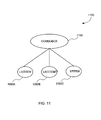
- FIG. 11 shows an exemplary hierarchical representation 1100 (e.g., corresponding to the representation 1000 of FIG. 10A) provided when a simplified view of a combo box (e.g., such as that of FIG. 9) is requested.
- the nodes 1050A, 1050B, and 1050C for the list items are shown as the direct children of the principal node 1105 of the combo box.
- the other nodes not shown are sometimes said to be "encapsulated by" the combo box node 1105.
- a program concerned with manipulating the list items can regard the list items as children of the principal node 1110 and need not contain logic concerning the other elements in the composite user interface element.
- the definition of the combo box user interface element can contain sufficient information by which operations for the simplified view can be translated into appropriate operations for the full view of the hierarchical representation.
- nesting there may be user interface elements having selectively exposable nodes within other user interface elements, which themselves have selectively exposable nodes.
- nesting can be resolved in a variety of ways. For example, although some of the nodes in a composite user interface element may be designated as exposed (e.g., viewable in a simplified view), if the user interface element is made part of (e.g., encapsulated within) another composite user interface element, such nodes may be considered selectively exposable (e.g., not visible in a simplified view) by virtue of the fact that they are within a region of the hierarchy representing the encapsulating composite user interface element that is designated as selectively exposable (e.g., by the encapsulating composite user interface element).
- nodes may or may not be considered selectively exposable depending upon the node on which a request to perform an operation is made.
- a request to perform an operation on a node encapsulated within another user interface element may result in a view that shows nodes not seen when performing an operation on the encapsulating user interface element.
- FIG. 10B shows an exemplary hierarchical representation of a combo box, such as that represented in FIG. 10A. For the sake of brevity, some of the nodes related to scroll bars are omitted.
- a scroll viewer node 1026 is the principal node of a composite user interface element comprising the scroll viewer node 1026, the container element node 1035, and the various scrollbar nodes (e.g., the node 1030).
- the other nodes of the composite user interface element are considered to be selectively exposable (e.g., are skipped) and encapsulated by the scroll viewer node 1026.
- a request to add a child node to the scroll viewer node 1026 in a simplified view would result in a child node being added to the container element node 1035. In this way, an encapsulation boundary 1090 is defined.
- the list box node 1025 is the principal node of a composite user interface element comprising the scroll viewer node 1026 (e.g., and the nodes encapsulated thereby) and the grid panel 1045.
- the other nodes of the composite user interface element are considered to be selectively exposable (e.g., are skipped) and encapsulated by the list box node 1025. In this way, an encapsulation boundary 1080 is defined.
- the combo box node 1005 is the principal node of a composite user interface comprising an input node 1010, a pop up node, 1020, a button node 1030, and the list box node 1025 (e.g., and the nodes encapsulated thereby).
- the other nodes of the composite user interface element are considered to be selectively exposable (e.g., are skipped) and encapsulated by the combo box node 1005.
- an encapsulation boundary 1070 is defined. Because the list box node 1025 is itself part of an encapsulation boundary, the effective encapsulation boundary 1095 takes effect.
- the nodes shown except the combo box node 1005 and the list item nodes 1050A-C are considered to be selectively exposable (e.g., are skipped) and encapsulated by the combo box 1005.
- a request to add a child node to the combo box node 1005 in a simplified view would result in a child node being added to the grid panel node 1045.
- a variety of methods can be used to provide a simplified view.
- One such method is to store within the representation of the user interface element various properties for the nodes.
- the following example describes using properties (e.g., "Encapsulating Parent” and "Encapsulating Container”) to designate which nodes in a representation are selectively exposable.
- nodes below the node in the hierarchy are designated as selectively exposable (e.g., not exposed in the simplified view).
- such a node is sometimes called the "principal" node.
- a particular node below the principal node in the hierarchy has an appropriate property (e.g., "Encapsulating Container") set to TRUE, children of the particular node are designated as not selectively exposable (e.g., are exposed in the simplified view). In such a case, children of the particular node are considered to be the children of the principal node for purposes of the simplified view. So, if children are added to the principal node via the simplified view, they are actually added as children of the particular node having the property (e.g., "Encapsulating Container") set to TRUE.
- the property e.g., "Encapsulating Container
- a node at the top of an encapsulation boundary e.g., a principal node
- an appropriate property e.g., the "Encapsulating Parent” property
- a node at the bottom of the encapsulation boundary can have an appropriate property (e.g., the "Encapsulating Container” property) set.
- encapsulation boundaries can be defined via property setting.
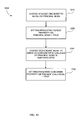
- FIG. 12 shows an exemplary method 1200 for representing a user interface element with a simplified view via denoting values of various properties of nodes within a hierarchical representation of the user interface element.
- the nodes of the hierarchical representation can have properties related to selectively exposing the node itself, its children, or its parents. By setting such properties, a user interface element having a simplified view can be represented, and operations can be performed on the representation via the simplified view.
- At 1210 at least one node of the hierarchical representation of the user interface is chosen to serve as a principal node (e.g., that encapsulates the selectively unexposed nodes).
- the IsEncapsulatingParent property on the chosen node is set to 'TRUE'.
- a descendant of the principal node is chosen to serve as a container for any children (e.g., now present or subsequently added) of the principal node in the simplified view.
- the IsEncapsulatingContainer property of the descendant node is set to 'TRUE.'
- the container and any intermediate descendants (e.g., children) between the principal node and the container are thereby defined as selectively exposable (e.g., skipped the simplified view or "encapsulated” within the parent). Child nodes underneath the container will be exposed (e.g., visible) in the simplified view.
- leaf node there may not yet be any child elements. In such a case, the appropriate property of a leaf node can be set. Subsequently, when children are added via the simplified view, they are placed underneath the leaf node.
- a user interface element having a simplified view of its representation can be defined in a variety of ways.
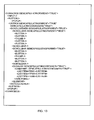
- One such way is via a markup language (e.g. HTML or XML), which can be processed and stored for later invocation.
- FIG. 13 shows an exemplary definition of a combo box with a simplified view (e.g., such as that shown in FIG. 11) written in XML.
- FIG. 13 In the example, nesting is achieved.
- the definition of FIG. 13 can result in the arrangement shown in FIG. 10B.
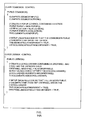
- a user interface element having a simplified view can also be defined programmatically (e.g., in a programming language such as C++ or Java).
- FIGs. 14A and 14B show a programmatic definition of the hierarchical representation of a combo box with a simplified view.
- Both the mark up definition of FIG. 13 and the programmatic definition of FIGS. 14A and 14B show a combo box defined as having a pop up element containing a list box element for holding the children of the combo box exposed in the simplified view (i.e. the list items).
- the list box element (which is a composite control itself) is further defined as having a scroll viewer element containing a grid panel for holding the children of the list box that are exposed in the simplified view (i.e. the list items).
- FIGS. 14A and 14B can result in the arrangement shown in FIG. 10B.
- a composite user interface element e.g., a combo box
- assembly of various user interface elements each of which can have provisions for selectively exposable nodes.
- nesting can be handled in such a way that the details of how selectively exposable nodes are defined within the encapsulated user interface elements remains transparent when operating on an outer level (e.g., encapsulating) user interface element.
- a user interface element e.g., such as those shown in FIGS. 13 and 14
- a representation of the user interface element including any selectively exposable nodes that remain unexposed in the simplified view.
- Such invocation can be achieved in a variety of ways (e.g., via markup language or programmatically).
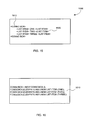
- FIG. 15 An exemplary invocation 1500 of a definition (e.g., such as those shown in FIGS. 13 and 14) is shown in FIG. 15 as written in XML.
- the invocation makes use of the previously created definition of the combo box which facilitates a simplified view of the hierarchical representation of the combo box.
- the only other effort on the part of invocation is to specify the list items 1520 without having any knowledge of the full hierarchical representation of the combo box.
- the structure of the invocation in FIG. 15 can thus correspond to the simplified view of the hierarchical representation of the combo box, even though the combo box is actually composed of plural other user interface elements. In this way, the re-use of user interface elements to create composite controls is encouraged.
- a simplified view can be used by the system by virtue of the fact that the invocation is performed in XML.
- the scheme of invoking the combo box carries over to the programmatic invocation 1600 of the definition as shown in FIG. 16.
- the example can be implemented in a variety of programming languages (e.g., Java and C++).
- the advantages described above for the markup version also apply to the programmatic invocation.
- Other language can be used (e.g., "COMBOBOX.FULLVIEW.ELEMENTS" or the like).
- a hierarchical representation of the user interface element having a simplified view is created and available for operations. Operations include adding children, removing children, enumerating children, inquiring what is the parent node of a node in the simplified view, and various operations for navigating the hierarchical representation of the user interface element. The results of these operations may differ according to whether they are performed using the simplified view of the hierarchical representation or the full view.
- a program can specify whether the simplified view is desired. Or, in some scenarios, it may be assumed from the context that a simplified view is desired.
- the definition of the hierarchical representation of the user interface element may be used to determine how the operations should be performed on the full view.
- FIG. 17 shows an exemplary method 1700 for performing an operation on a simplified view, namely adding a child to a user interface element (e.g., a node representing such an element).
- a user interface element e.g., a node representing such an element.
- an indication to add children to a node on the simplified view of the hierarchical representation of a user interface element is received.
- selectively exposable nodes are skipped, and the new child node is added to the appropriate node according to definition (e.g., to the node having the "Encapsulating Container" property set to 'TRUE') at 1730.
- the process illustrated in FIG. 17 may be used as shown in FIG. 18 to add a new child 1850 to the simplified view of the hierarchical representation of a combo box.
- new children such as new child 1850D may be added to the simplified view of the hierarchical representation of the combo box, as shown in FIG. 19.
- the addition of the new child 1850D in the simplified view of FIG. 19 will be translated as an addition to the appropriate place in the full view of the hierarchical representation as shown in FIG. 18.
- FIG. 18 An exemplary hierarchical representation 1800 of a combo box user interface element is shown in FIG. 18.
- the "Encapsulating Parent" property is detected on the node 1005, and traversal proceeds to an associated descendant node having the "Encapsulating Container” property.
- traversal can be achieved via a pointer 1855.
- traversal continues to proceed to an associated descendant node having the "Encapsulating Container” property.
- traversal can be achieved via a pointer 1860 to the node 1045.
- the new child is then added as a child node 1850D to the node 1045.
- a direct pointer 1880 can be implemented to more directly navigate to the appropriate node where children are to be added. Additionally, a pointer 1885 back to the principal node can be included.
- Nesting can be handled in a variety of ways. For example, pointers can be used as shown to skip over intermediate levels of encapsulation. Or, a level of nesting can be tracked while traversing the hierarchical representation. Based on the level, it can be determined which nodes are to be skipped. Traversal can also proceed from the bottom of the hierarchy to the top (e.g., in a request by a child node to enumerate its parent).
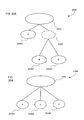
- FIG. 20A An alternative representation 2000 of selectively exposable nodes is shown in FIG. 20A.
- a particular node 2020 is specially designated as selectively exposable in a full view of the representation.
- the corresponding simplified view 2050 is shown in FIG. 20B.
- children 2030B and 2030C of the particular node 2020 are considered to be siblings of the children (e.g., the node 2030A) of the parent node 2010.
- the children 2030B and 2030C of the particular node 2020 are considered to be siblings of the siblings of the particular node 2020 (e.g., the sibling 2030A in the full view).
- a special property (e.g., "Hidden Container") is set to true for the particular node 2020, which is not exposed when a simplified view is requested.
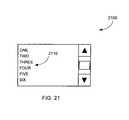
- FIG. 21 illustrates an exemplary list box 2100. It may be desirable to generate one or more of the list items 2110 from a database or other data source.
- One such method of generating content from a database is to include a special element within the hierarchical representation of a user interface element.
- the special element can remain unexposed for the simplified view but still operate to generate the content and be present in the full view. If desired, the special element can be bound to a data source to automatically insert the content into user interface elements, such as the list items 2110.
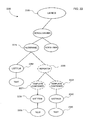
- FIG. 22 illustrates a hierarchical representation 2200 of a list box (e.g., such as that shown in FIG. 21) comprising a repeater node 2220 inserted into the hierarchical representation for automatically generating some of the list items such as list items 2230 and 2240.
- a list box e.g., such as that shown in FIG. 21
- a repeater node 2220 inserted into the hierarchical representation for automatically generating some of the list items such as list items 2230 and 2240.
- template containers 2221 and 2222 can be associated with a repeater 2220 to contain information related to the specific record in a database that is generating content for a specific child of the repeater.
- the list items 2230 and 2240 are bound to records of a data source to generate text content 2235 and 2245 (e.g., name, location, or another field of a record).
- FIG. 22 shows only a single child element (list items 2235 and 2240) associated with each of the template containers 2221 and 2222, it is possible to have multiple children elements (e.g. a phone number, name, and image of a person).
- the repeater 2220 is one of the child nodes of the list box node 2205 and the flow panel node 2210.
- the template containers 2221 and 2222 appear as children of the repeater 2220.
- programs invoking the definition of the list box may not expect to see a repeater as a child of the flow panel node 2210.
- the definition of a list box may have rules set so that it not accept anything other than a list item as a child of the flow panel 2210. Therefore, the repeater 2220 and the template containers 2221 and 2222 are not desired to be exposed (e.g., should be hidden) within the hierarchical representation of a list box when a simplified view is used.
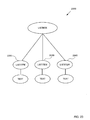
- the list items 2230 and 2240 are effectively promoted as siblings of the siblings of their parent, the repeater 2220 (e.g., siblings of the list item node 2250).
- Such a simplified view 2300 is shown in FIG. 23 where the repeater 2220 of FIG. 22 is not exposed, and the list items 2230, 2240 and 2250 appear as siblings in FIG. 23.
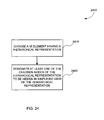
- FIG. 24 An exemplary method 2400 for creating an alternative representation of a selectively exposable node (e.g., a repeater) is shown in FIG. 24.
- a user interface element having a hierarchical representation is chosen.
- at least one node of the hierarchical representation is designated to be selectively exposable (e.g., not exposed in a simplified view of the hierarchical representation).
- such a designation can be achieved by setting the "Hidden Container" property of the designated node to 'TRUE.' The repeater's class constructor can set such a property, so that the property is set whenever a repeater is instantiated.
- the repeater can be activated as desired (e.g., automatically upon invocation of a user interface element defined as having the repeater).
- the invoking program need not account for the unexposed repeater, which automatically populates the list items.
- the invoking program is concerned it is only invoking the definition of a user interface element and it has no knowledge that the user interface element is defined as having a repeater.
- FIG. 25 illustrates an exemplary 2500 a list box containing a repeater node using XML. This invocation of the repeater relies on the earlier definition of the repeater class (e.g., including an appropriate constructor) and thus, it is not necessary to designate the repeater's "Hidden Container” property as 'TRUE.'
- a repeater can also be invoked programmatically (e.g., in a programming language such as C++ or JAVA) for use in user interface elements.
- FIG. 26 illustrates code 2600 having an exemplary programmatic invocation of a repeater for a list box.
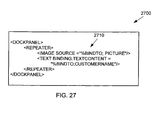
- FIG. 27 illustrates markup language including an alternative markup invocation 2710 of a repeater in a user interface element.
- the example shown would result in plural (e.g., two) child nodes for a template container (e.g., the template containers 2221 and 2222): one for the picture and one for the customer name.
- a template container e.g., the template containers 2221 and 2222
- the invoking user or process need define only one list item (e.g., indicating a source) at 2710 to complete the list box, the resulting list items are generated by the repeater automatically upon the invocation (e.g., via reference to the source).
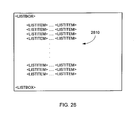
- FIG. 28 shows an exemplary definition of a list box with multiple list items without using the repeater feature. Accordingly, the list items 2810 are explicitly listed in the markup and will not be updated when the corresponding database is updated.
- the availability of a repeater e.g., including the ability to bind to a data source
- the appropriately designated node e.g., the repeater node designated as a "Hidden Container" is not exposed.
- the list items 2230 and 2240 can behave as any other list item and may be selected by the user of the rendered list box.
- a request for the parent of the list item 2230 via the simplified view will be answered by indicating that the parent node of 2230 is the flow panel node 2210 (not the repeater 2220 or the template 2221).
- the nodes 2220 and 2221 e.g., designated as a "Hidden Container”
- the parent of the list item 2230 would be the list box 2205 in the simplified view.
- Certain functionality can be inhibited if desired. For example, it may be prohibited to add to or delete the list items 2230 and 2240 that were populated by the repeater 2220.
- Another exemplary representation of a user interface element with selectively exposable nodes may be achieved by designating a node such that only the designated node is exposed in the simplified view. For example, the descendants (e.g., all descendants) of the node are considered selectively exposable and not shown in the simplified view. Such a representation would have only one node exposed for the user interface element in the simplified view.
- the descendants e.g., the nodes 2020, 2030A, 2030B, and 2030C
- the resulting representation would have only the node 2010 (e.g., the principal node) exposed in its simplified view.
- an operation to add a child to such a simplified view may result in an error because the node 2010 is defined as not supporting simplified view child nodes. Performing an enumerate children operation using such a simplified view may be erroneous for the same reason, or an empty set can be provided.
- Such representations can be useful to shield details of the full of view of those user interfaces that are of little interest to certain users.
- the described representation can be achieved in a number of ways. For example, a single property indicating that the descendants are selectively exposable can be set.
- the "Encapsulating Parent" container property can be set to TRUE to result in such an arrangement (e.g., if there is no corresponding node with "Encapsulating Container” set to TRUE).
- Another exemplary implementation of the technologies is to implement an internal representation of an image as having a selectively exposable child with text indicating text to be presented if the image is unavailable.
- the principal node can contain the image, and the selectively exposable child can represent the corresponding text. In this way, the simplified view can be manipulated without knowledge of the selectively exposable child.
- the selectively exposable nodes can be taken into account. If desired, such nodes can be ignored (e.g., and properties taken from the principal node), such nodes can determine property values to be taken on, or the selectively exposable nodes can work in combination with the principal node to determine which property values are to be taken on. Such determination can be relevant, for example, when adding nodes to the representation.
- a node in the hierarchy can indicate desired properties for other nodes via property rules (e.g., set via a style sheet). For example, a node may specify that the font property of children is to be "bold.”
- the property rules say that the font property of children of the principal node 1005 is to be 'bold,' but the property rules associated with the list box node 1025 call for its children to have a font property of 'italic,' it is ambiguous as to what the property of a list item such as 1050A should be.
- the inheritable property of a child node that is not selectively exposable is inherited from the nearest parent in the simplified view.
- the nearest parent in the simplified view for the list items 1050A, 1050B, and 1050C is the principal node 1105. Therefore, in this embodiment the font property of the combo box will be taken on by the list items.
- the nearest parent in the simplified view may include rules for inquiring whether any of the property rules of any of its selectively exposable child nodes should be applied to the children nodes that are not selectively exposable.
- a process applying property rules may inquire whether the property rules associated with the list box need to be applied to the list items instead of the property rules associated with the combo box.
- the properties of the children nodes of a hidden container as described above may be determined from property rules set by the hidden container itself and not the immediate parent node in the simplified view of the hierarchical representation.
- an invocation can be a simple indication of a particular user interface element that happens to be a composite user interface.
- the invocation can result in the creation of plural nodes to represent the user interface element.
- the programmer defining the composite user interface element can take steps to indicate that various of the nodes are selectively exposable.
- a programmer invoking the definition may choose to program to the simplified view (or by default be provided such a view) in which such nodes are not exposed. In such a case, the programmer invoking the definition need not be aware that the composite control is indeed composed of plural nodes.
- those defining additional controls can nest composite controls within their control definitions.
- the indication of which nodes are to be selectively exposable can be preserved so that nesting can be easily accomplished.
- a first composite control can be defined as containing a second composite control, and the simplified view will be presented correctly (e.g., nodes designated as selectively exposable for the second composite control will be selectively exposable for the second composite control).
- the principal node of the second composite control can also be indicated to be selectively exposable.
- nesting includes the programmatic definition of a combo box shown in FIGS. 14A and 14B.
- the combo box is composed of a list box.
- the list box definition includes setting properties to achieve selectively exposed nodes within the list box.
- the list box itself invokes the definition of a scroll viewer, which itself sets properties to achieve selectively exposed nodes within the scroll view.
- nesting can be implemented so that the internal details of the list box (e.g., including the selectively exposable nodes therein) do not appear (e.g., when accessing the simplified view of the combo box).
- operations performed on the list box can still take advantage of the fact that nodes therein are selectively exposable (e.g., when performing an operation on the list box in a simplified view).
- selective exposability can be both nestable and relative.
- various user interface elements can be combined together and nested to provide more complex representations.
- the user interface element can be provided as part of an interface to a program or embedded within a document (e.g., a web page or a word processing document).
- a document e.g., a web page or a word processing document.
- the technologies described herein may also be applied to any other document or file that can be represented in a hierarchical form.
Landscapes
- Engineering & Computer Science (AREA)
- Software Systems (AREA)
- Theoretical Computer Science (AREA)
- General Engineering & Computer Science (AREA)
- Physics & Mathematics (AREA)
- General Physics & Mathematics (AREA)
- Human Computer Interaction (AREA)
- User Interface Of Digital Computer (AREA)
- Stored Programmes (AREA)
- Input From Keyboards Or The Like (AREA)
- Circuit For Audible Band Transducer (AREA)
- Two-Way Televisions, Distribution Of Moving Picture Or The Like (AREA)
- Digital Computer Display Output (AREA)
Applications Claiming Priority (2)
| Application Number | Priority Date | Filing Date | Title |
|---|---|---|---|
| US323504 | 2002-12-18 | ||
| US10/323,504 US7337401B2 (en) | 2002-12-18 | 2002-12-18 | User interface element representation with simplified view |
Publications (2)
| Publication Number | Publication Date |
|---|---|
| EP1435567A2 true EP1435567A2 (fr) | 2004-07-07 |
| EP1435567A3 EP1435567A3 (fr) | 2008-02-13 |
Family
ID=23259480
Family Applications (1)
| Application Number | Title | Priority Date | Filing Date |
|---|---|---|---|
| EP03004803A Ceased EP1435567A3 (fr) | 2002-12-18 | 2003-03-03 | Representation d'element interface utilisateur avec vue simplifiée. |
Country Status (14)
| Country | Link |
|---|---|
| US (1) | US7337401B2 (fr) |
| EP (1) | EP1435567A3 (fr) |
| JP (1) | JP4694107B2 (fr) |
| KR (1) | KR100863125B1 (fr) |
| CN (1) | CN100351822C (fr) |
| AU (1) | AU2003200656B2 (fr) |
| BR (1) | BR0300828A (fr) |
| CA (1) | CA2422417C (fr) |
| MX (1) | MXPA03009824A (fr) |
| MY (1) | MY140453A (fr) |
| NO (1) | NO327715B1 (fr) |
| RU (2) | RU2314559C2 (fr) |
| TW (1) | TWI221990B (fr) |
| ZA (1) | ZA200301626B (fr) |
Cited By (2)
| Publication number | Priority date | Publication date | Assignee | Title |
|---|---|---|---|---|
| US7523129B1 (en) * | 2004-09-15 | 2009-04-21 | Microsoft Corporation | Data-binding enhancements |
| CN104503769A (zh) * | 2015-01-07 | 2015-04-08 | 山东鲁能智能技术有限公司 | 一种基于xml配置文件的字符点阵液晶界面实现方法 |
Families Citing this family (53)
| Publication number | Priority date | Publication date | Assignee | Title |
|---|---|---|---|---|
| US7949957B2 (en) * | 2002-12-31 | 2011-05-24 | International Business Machines Corporation | Edit selection control |
| US9715678B2 (en) | 2003-06-26 | 2017-07-25 | Microsoft Technology Licensing, Llc | Side-by-side shared calendars |
| US8799808B2 (en) | 2003-07-01 | 2014-08-05 | Microsoft Corporation | Adaptive multi-line view user interface |
| US7707255B2 (en) * | 2003-07-01 | 2010-04-27 | Microsoft Corporation | Automatic grouping of electronic mail |
| DE602004030621D1 (de) * | 2004-02-03 | 2011-01-27 | Corizon Ltd | Verfahren und Vorrichtung zur Erzeugung von zusammengesetzen Benutzeroberflächen |
| US7913177B1 (en) | 2004-03-08 | 2011-03-22 | Adobe Systems Incorporated | System and method for managing instantiation of interface elements in rich internet applications |
| US7860838B2 (en) * | 2004-06-04 | 2010-12-28 | Hewlett-Packard Development Company, L.P. | Dynamic hierarchical data structure tree building and state propagation using common information model |
| US8146016B2 (en) | 2004-08-16 | 2012-03-27 | Microsoft Corporation | User interface for displaying a gallery of formatting options applicable to a selected object |
| US8117542B2 (en) | 2004-08-16 | 2012-02-14 | Microsoft Corporation | User interface for displaying selectable software functionality controls that are contextually relevant to a selected object |
| US8255828B2 (en) | 2004-08-16 | 2012-08-28 | Microsoft Corporation | Command user interface for displaying selectable software functionality controls |
| US7895531B2 (en) | 2004-08-16 | 2011-02-22 | Microsoft Corporation | Floating command object |
| US9015621B2 (en) | 2004-08-16 | 2015-04-21 | Microsoft Technology Licensing, Llc | Command user interface for displaying multiple sections of software functionality controls |
| US7703036B2 (en) | 2004-08-16 | 2010-04-20 | Microsoft Corporation | User interface for displaying selectable software functionality controls that are relevant to a selected object |
| US7574677B2 (en) * | 2004-09-13 | 2009-08-11 | Sap Ag | System and method for a transparent record |
| US7747966B2 (en) | 2004-09-30 | 2010-06-29 | Microsoft Corporation | User interface for providing task management and calendar information |
| US7543278B2 (en) * | 2004-10-15 | 2009-06-02 | Microsoft Corporation | System and method for making a user interface element visible |
| US8713063B2 (en) * | 2005-01-13 | 2014-04-29 | International Business Machines Corporation | Method and system for automatically hiding irrelevant parts of hierarchical structures in computer user interfaces |
| US7886290B2 (en) | 2005-06-16 | 2011-02-08 | Microsoft Corporation | Cross version and cross product user interface |
| KR100774874B1 (ko) * | 2005-07-30 | 2007-11-08 | 엘지전자 주식회사 | 플라즈마 표시장치와 그 구동방법 |
| US8239882B2 (en) | 2005-08-30 | 2012-08-07 | Microsoft Corporation | Markup based extensibility for user interfaces |
| US8689137B2 (en) | 2005-09-07 | 2014-04-01 | Microsoft Corporation | Command user interface for displaying selectable functionality controls in a database application |
| US9542667B2 (en) | 2005-09-09 | 2017-01-10 | Microsoft Technology Licensing, Llc | Navigating messages within a thread |
| US20070061745A1 (en) * | 2005-09-09 | 2007-03-15 | Microsoft Corporation | Nested views in an electronic file system |
| US8627222B2 (en) | 2005-09-12 | 2014-01-07 | Microsoft Corporation | Expanded search and find user interface |
| US8605090B2 (en) | 2006-06-01 | 2013-12-10 | Microsoft Corporation | Modifying and formatting a chart using pictorially provided chart elements |
| US9727989B2 (en) | 2006-06-01 | 2017-08-08 | Microsoft Technology Licensing, Llc | Modifying and formatting a chart using pictorially provided chart elements |
| US20070288854A1 (en) * | 2006-06-13 | 2007-12-13 | Nokia Corporation | Reusable XForms processor |
| KR100879983B1 (ko) * | 2006-09-01 | 2009-01-23 | 삼성전자주식회사 | Htc를 이용한 독립 컴포넌트 제공 시스템 및 독립컴포넌트를 이용한 이벤트 처리 방법 |
| KR101288970B1 (ko) * | 2006-11-28 | 2013-07-24 | 삼성전자주식회사 | 렌더링 장치 및 방법 |
| CN100504771C (zh) * | 2007-06-08 | 2009-06-24 | 腾讯科技(深圳)有限公司 | 一种生成应用程序界面的方法及系统 |
| US8762880B2 (en) | 2007-06-29 | 2014-06-24 | Microsoft Corporation | Exposing non-authoring features through document status information in an out-space user interface |
| US8484578B2 (en) | 2007-06-29 | 2013-07-09 | Microsoft Corporation | Communication between a document editor in-space user interface and a document editor out-space user interface |
| US8201103B2 (en) | 2007-06-29 | 2012-06-12 | Microsoft Corporation | Accessing an out-space user interface for a document editor program |
| US8782555B2 (en) | 2007-08-30 | 2014-07-15 | Microsoft Corporation | Nested user interfaces for multiple displays |
| US9588781B2 (en) | 2008-03-31 | 2017-03-07 | Microsoft Technology Licensing, Llc | Associating command surfaces with multiple active components |
| US9665850B2 (en) | 2008-06-20 | 2017-05-30 | Microsoft Technology Licensing, Llc | Synchronized conversation-centric message list and message reading pane |
| US8402096B2 (en) | 2008-06-24 | 2013-03-19 | Microsoft Corporation | Automatic conversation techniques |
| JP5896741B2 (ja) * | 2008-07-23 | 2016-03-30 | コーニンクレッカ フィリップス エヌ ヴェKoninklijke Philips N.V. | 複数の階層レベルでの音楽メタデータの表示 |
| WO2010107476A1 (fr) * | 2009-03-19 | 2010-09-23 | Duke University | Inhibition de gsnor |
| US8799353B2 (en) | 2009-03-30 | 2014-08-05 | Josef Larsson | Scope-based extensibility for control surfaces |
| US9046983B2 (en) | 2009-05-12 | 2015-06-02 | Microsoft Technology Licensing, Llc | Hierarchically-organized control galleries |
| US8302014B2 (en) | 2010-06-11 | 2012-10-30 | Microsoft Corporation | Merging modifications to user interface components while preserving user customizations |
| CN102479212B (zh) * | 2010-11-30 | 2016-06-22 | 国际商业机器公司 | 识别网页上键盘不可访问节点的方法以及装置 |
| EP3040946B1 (fr) * | 2014-12-30 | 2019-11-13 | Dassault Systèmes | Sélection d'un point de vue pour le rendu d'un ensemble d'objets |
| US9685142B2 (en) * | 2015-11-03 | 2017-06-20 | International Business Machines Corporation | Obtaining and displaying relationships between elements |
| CN107454478B (zh) * | 2017-08-01 | 2020-06-16 | 武汉斗鱼网络科技有限公司 | 网络直播客户端中弹幕输入框卡顿处理方法及系统 |
| EP3803563A1 (fr) * | 2018-06-03 | 2021-04-14 | Apple Inc. | Cadre fournissant une interface de programmation d'application pour des interfaces utilisateur et une animation |
| CN111782210B (zh) * | 2019-04-04 | 2024-10-18 | 阿里巴巴集团控股有限公司 | 页面管理方法、装置、电子设备及计算机可读介质 |
| CN110516205B (zh) * | 2019-07-19 | 2023-04-07 | 平安科技(深圳)有限公司 | 数据结构图的展示方法、装置、计算机设备及存储介质 |
| CN113064971A (zh) * | 2021-04-12 | 2021-07-02 | 苏州城方信息技术有限公司 | 一种基于交互式图结构的政策文本关系的挖掘与表达方法 |
| CN113885766B (zh) * | 2021-09-24 | 2024-02-09 | 远光软件股份有限公司 | 组织架构图的展示方法、装置、存储介质及终端设备 |
| CN113849247B (zh) * | 2021-09-26 | 2024-04-30 | 上海哔哩哔哩科技有限公司 | 直播间页面元素的显示方法、装置及系统 |
| US12147559B1 (en) * | 2023-12-29 | 2024-11-19 | Fmr Llc | Secure geolocation-based data access control in a distributed computing environment |
Citations (1)
| Publication number | Priority date | Publication date | Assignee | Title |
|---|---|---|---|---|
| US5600778A (en) | 1992-09-08 | 1997-02-04 | International Business Machines Corporation | Graphical resource editor for software customization |
Family Cites Families (40)
| Publication number | Priority date | Publication date | Assignee | Title |
|---|---|---|---|---|
| EP0529121A1 (fr) * | 1991-08-24 | 1993-03-03 | International Business Machines Corporation | Outil pour l'affichage de graphique |
| CA2271555C (fr) * | 1992-12-09 | 2003-11-11 | Discovery Communications, Inc. | Commande a distance pour systeme de television cable |
| EP0603425A1 (fr) * | 1992-12-22 | 1994-06-29 | International Business Machines Corporation | Représentation d'arbres N-aires |
| DE69402955T2 (de) * | 1994-02-08 | 1997-08-14 | Belle Gate Investment B.V., Den Haag | Datenauswechselsystem mit tragbaren Datenverarbeitungseinheiten |
| US5588099A (en) * | 1994-09-01 | 1996-12-24 | Microsoft Corporation | Method and system for automatically resizing tables |
| US5649222A (en) * | 1995-05-08 | 1997-07-15 | Microsoft Corporation | Method for background spell checking a word processing document |
| US5860073A (en) * | 1995-07-17 | 1999-01-12 | Microsoft Corporation | Style sheets for publishing system |
| US5923328A (en) * | 1996-08-07 | 1999-07-13 | Microsoft Corporation | Method and system for displaying a hierarchical sub-tree by selection of a user interface element in a sub-tree bar control |
| JPH10124280A (ja) * | 1996-10-22 | 1998-05-15 | Toshiba Corp | ウィンドウシステムにおける表示方法 |
| US6128016A (en) * | 1996-12-20 | 2000-10-03 | Nec Corporation | Graphic user interface for managing a server system |
| KR100241881B1 (ko) * | 1997-04-09 | 2000-02-01 | 윤종용 | 모티프위젯의 일괄생성 방법 및 장치 |
| JP3760580B2 (ja) * | 1997-07-25 | 2006-03-29 | 富士ゼロックス株式会社 | 階層構造表示装置及び階層構造表示方法 |
| US5953724A (en) * | 1997-11-24 | 1999-09-14 | Lowry Software, Incorporated | Global database library data structure for hierarchical graphical listing computer software |
| US6029170A (en) * | 1997-11-25 | 2000-02-22 | International Business Machines Corporation | Hybrid tree array data structure and method |
| US6061679A (en) | 1997-11-25 | 2000-05-09 | International Business Machines Corporation | Creating and searching a data structure ordered by ranges of key masks associated with the data structure |
| US6356920B1 (en) * | 1998-03-09 | 2002-03-12 | X-Aware, Inc | Dynamic, hierarchical data exchange system |
| US6169984B1 (en) * | 1998-04-01 | 2001-01-02 | Microsoft Corporation | Global incremental type search navigation directly from printable keyboard character input |
| US6169546B1 (en) * | 1998-04-01 | 2001-01-02 | Microsoft Corporation | Global viewer scrolling system |
| US6249284B1 (en) * | 1998-04-01 | 2001-06-19 | Microsoft Corporation | Directional navigation system in layout managers |
| US6363404B1 (en) * | 1998-06-26 | 2002-03-26 | Microsoft Corporation | Three-dimensional models with markup documents as texture |
| US6285366B1 (en) * | 1998-06-30 | 2001-09-04 | Sun Microsystems, Inc. | Hierarchy navigation system |
| US6108698A (en) * | 1998-07-29 | 2000-08-22 | Xerox Corporation | Node-link data defining a graph and a tree within the graph |
| US8232995B2 (en) * | 1998-07-29 | 2012-07-31 | SAP America, Inc. | Local relative layout of node-link structures in space with negative curvature |
| US6348935B1 (en) * | 1998-11-30 | 2002-02-19 | International Business Machines Corporation | Programmable tree viewer graphical user interface with integrated control panel |
| JP2000259303A (ja) * | 1999-03-05 | 2000-09-22 | Hitachi Information Systems Ltd | データ表示装置およびデータ表示方法ならびに該方法を記録した記録媒体 |
| US6381605B1 (en) * | 1999-05-29 | 2002-04-30 | Oracle Corporation | Heirarchical indexing of multi-attribute data by sorting, dividing and storing subsets |
| US6671853B1 (en) * | 1999-07-15 | 2003-12-30 | International Business Machines Corporation | Method and system for selectively streaming markup language documents |
| US7039863B1 (en) * | 1999-07-23 | 2006-05-02 | Adobe Systems Incorporated | Computer generation of documents using layout elements and content elements |
| US6662342B1 (en) * | 1999-12-13 | 2003-12-09 | International Business Machines Corporation | Method, system, and program for providing access to objects in a document |
| US7072896B2 (en) * | 2000-02-16 | 2006-07-04 | Verizon Laboratories Inc. | System and method for automatic loading of an XML document defined by a document-type definition into a relational database including the generation of a relational schema therefor |
| US6775678B1 (en) * | 2000-04-11 | 2004-08-10 | Microsoft Corporation | Data structure and method of storing a digital document |
| US6883137B1 (en) * | 2000-04-17 | 2005-04-19 | International Business Machines Corporation | System and method for schema-driven compression of extensible mark-up language (XML) documents |
| GB2363044A (en) * | 2000-05-16 | 2001-12-05 | Ibm | Method and computer system for selecting and displaying graphic objects |
| ATE297571T1 (de) * | 2000-05-16 | 2005-06-15 | Garrett O'carroll | System und verfahren zur dokumentverarbeitung |
| KR100694238B1 (ko) * | 2000-09-28 | 2007-03-14 | 가부시키가이샤 리코 | 구조편집방법, 영상구조편집방법, 오브젝트의 내용구조관리방법, 오브젝트의 내용구조표시방법, 컨텐츠관리방법 및 기록매체 |
| CN1401188B (zh) * | 2000-10-17 | 2011-06-08 | 皇家菲利浦电子有限公司 | Mpeg-7样品的二进制格式 |
| US6912538B2 (en) * | 2000-10-20 | 2005-06-28 | Kevin Stapel | System and method for dynamic generation of structured documents |
| US7073137B2 (en) * | 2000-10-30 | 2006-07-04 | Microsoft Corporation | System and method for user interface mirroring utilizing a layout manager |
| US6732109B2 (en) * | 2001-01-31 | 2004-05-04 | The Eon Company | Method and system for transferring information between a user interface and a database over a global information network |
| US6910040B2 (en) * | 2002-04-12 | 2005-06-21 | Microsoft Corporation | System and method for XML based content management |
-
2002
- 2002-12-18 US US10/323,504 patent/US7337401B2/en not_active Expired - Fee Related
-
2003
- 2003-02-25 AU AU2003200656A patent/AU2003200656B2/en not_active Ceased
- 2003-02-25 MY MYPI20030645A patent/MY140453A/en unknown
- 2003-02-27 ZA ZA200301626A patent/ZA200301626B/xx unknown
- 2003-03-03 EP EP03004803A patent/EP1435567A3/fr not_active Ceased
- 2003-03-04 NO NO20031008A patent/NO327715B1/no not_active IP Right Cessation
- 2003-03-10 KR KR1020030014754A patent/KR100863125B1/ko not_active Expired - Fee Related
- 2003-03-12 RU RU2003106852/09A patent/RU2314559C2/ru not_active IP Right Cessation
- 2003-03-17 CA CA2422417A patent/CA2422417C/fr not_active Expired - Fee Related
- 2003-03-26 BR BR0300828-2A patent/BR0300828A/pt not_active IP Right Cessation
- 2003-04-03 CN CNB031077854A patent/CN100351822C/zh not_active Expired - Fee Related
- 2003-04-30 JP JP2003125922A patent/JP4694107B2/ja not_active Expired - Fee Related
- 2003-06-02 TW TW092114951A patent/TWI221990B/zh not_active IP Right Cessation
- 2003-10-24 MX MXPA03009824A patent/MXPA03009824A/es not_active Application Discontinuation
-
2007
- 2007-04-23 RU RU2007115294/09A patent/RU2383918C2/ru not_active IP Right Cessation
Patent Citations (1)
| Publication number | Priority date | Publication date | Assignee | Title |
|---|---|---|---|---|
| US5600778A (en) | 1992-09-08 | 1997-02-04 | International Business Machines Corporation | Graphical resource editor for software customization |
Cited By (3)
| Publication number | Priority date | Publication date | Assignee | Title |
|---|---|---|---|---|
| US7523129B1 (en) * | 2004-09-15 | 2009-04-21 | Microsoft Corporation | Data-binding enhancements |
| CN104503769A (zh) * | 2015-01-07 | 2015-04-08 | 山东鲁能智能技术有限公司 | 一种基于xml配置文件的字符点阵液晶界面实现方法 |
| CN104503769B (zh) * | 2015-01-07 | 2017-06-20 | 山东鲁能智能技术有限公司 | 一种基于xml配置文件的字符点阵液晶界面实现方法 |
Also Published As
| Publication number | Publication date |
|---|---|
| US20040122789A1 (en) | 2004-06-24 |
| JP2004206668A (ja) | 2004-07-22 |
| NO20031008D0 (no) | 2003-03-04 |
| MXPA03009824A (es) | 2004-06-30 |
| NO327715B1 (no) | 2009-09-14 |
| JP4694107B2 (ja) | 2011-06-08 |
| RU2007115294A (ru) | 2008-10-27 |
| MY140453A (en) | 2009-12-31 |
| CA2422417A1 (fr) | 2004-06-18 |
| CA2422417C (fr) | 2011-06-28 |
| AU2003200656A1 (en) | 2004-07-08 |
| RU2383918C2 (ru) | 2010-03-10 |
| ZA200301626B (en) | 2004-02-26 |
| CN1508704A (zh) | 2004-06-30 |
| TWI221990B (en) | 2004-10-11 |
| CN100351822C (zh) | 2007-11-28 |
| RU2314559C2 (ru) | 2008-01-10 |
| NO20031008L (no) | 2004-06-21 |
| EP1435567A3 (fr) | 2008-02-13 |
| KR20040054465A (ko) | 2004-06-25 |
| US7337401B2 (en) | 2008-02-26 |
| BR0300828A (pt) | 2004-08-17 |
| TW200411419A (en) | 2004-07-01 |
| AU2003200656B2 (en) | 2010-09-16 |
| KR100863125B1 (ko) | 2008-10-15 |
Similar Documents
| Publication | Publication Date | Title |
|---|---|---|
| CA2422417C (fr) | Representation d'elements d'interface utilisateur avec vue simplifiee | |
| US5991534A (en) | Method and apparatus for editing a software component | |
| US5933139A (en) | Method and apparatus for creating help functions | |
| JP4972254B2 (ja) | リフレッシュ可能なWebクエリを作成するための統合された方法 | |
| US5579466A (en) | Method and system for editing and formatting data in a dialog window | |
| RU2365978C2 (ru) | Интерфейс программирования для компьютерной платформы | |
| US6804686B1 (en) | System and methodology for providing fixed UML layout for an object oriented class browser | |
| US6925598B2 (en) | Customization of object property layout for a user interface | |
| US6275227B1 (en) | Computer system and method for controlling the same utilizing a user interface control integrated with multiple sets of instructional material therefor | |
| US6342907B1 (en) | Specification language for defining user interface panels that are platform-independent | |
| Vanderdonckt et al. | Flexible reverse engineering of web pages with vaquista | |
| JP2000003274A (ja) | コンピュータ上で実行可能なエディタのテキスト要素生成方法及びエディタのテキスト要素生成装置並びにエディタ上にテキスト要素を生成させるように構成されたプログラムを記憶したコンピュータ読み取り可能な記憶媒体 | |
| CA2443454A1 (fr) | Methode d'association de donnees dans un systeme d'acheminement du travail | |
| JP2006506698A (ja) | マルチメディア・ファイルのツールチップ | |
| CA2786385A1 (fr) | Interface d'utilisateur a base de modele | |
| Ferrans et al. | HyperWeb: a framework for hypermedia-based environments | |
| US20080005752A1 (en) | Methods, systems, and computer program products for generating application processes by linking applications | |
| WO2002021314A2 (fr) | Environnement conceptuel integre destine a un systeme de serveur commercial | |
| JP4577847B2 (ja) | コンテンツを作成するためのオーサリング・システム、ソフトウェア、および方法 | |
| US7404004B2 (en) | Page function architectural framework | |
| HK1065612A (en) | User interface element representation with simplified view | |
| KR102743354B1 (ko) | 사용자 인터페이스 플랫폼 개발 시스템에서의 확장형 컴포넌트 생성 방법 및 이를 수행하는 프로그램 | |
| Ding | A design tool for object-oriented development | |
| Grönlund et al. | Application Recipes | |
| JPH02270025A (ja) | データ処理装置のプログラム編集処理方式 |
Legal Events
| Date | Code | Title | Description |
|---|---|---|---|
| PUAI | Public reference made under article 153(3) epc to a published international application that has entered the european phase |
Free format text: ORIGINAL CODE: 0009012 |
|
| AK | Designated contracting states |
Kind code of ref document: A2 Designated state(s): AT BE BG CH CY CZ DE DK EE ES FI FR GB GR HU IE IT LI LU MC NL PT RO SE SI SK TR |
|
| AX | Request for extension of the european patent |
Extension state: AL LT LV MK |
|
| REG | Reference to a national code |
Ref country code: HK Ref legal event code: DE Ref document number: 1065612 Country of ref document: HK |
|
| PUAL | Search report despatched |
Free format text: ORIGINAL CODE: 0009013 |
|
| AK | Designated contracting states |
Kind code of ref document: A3 Designated state(s): AT BE BG CH CY CZ DE DK EE ES FI FR GB GR HU IE IT LI LU MC NL PT RO SE SI SK TR |
|
| AX | Request for extension of the european patent |
Extension state: AL LT LV MK |
|
| 17P | Request for examination filed |
Effective date: 20080304 |
|
| 17Q | First examination report despatched |
Effective date: 20080514 |
|
| AKX | Designation fees paid |
Designated state(s): AT BE BG CH CY CZ DE DK EE ES FI FR GB GR HU IE IT LI LU MC NL PT RO SE SI SK TR |
|
| STAA | Information on the status of an ep patent application or granted ep patent |
Free format text: STATUS: THE APPLICATION HAS BEEN REFUSED |
|
| 18R | Application refused |
Effective date: 20121108 |
|
| REG | Reference to a national code |
Ref country code: HK Ref legal event code: WD Ref document number: 1065612 Country of ref document: HK |