EP1463294A2 - Bilderzeugungsgerät und Verfahren zur Steuerung des Bilderzeugungsgeräts mittels einer Fernanwendung - Google Patents
Bilderzeugungsgerät und Verfahren zur Steuerung des Bilderzeugungsgeräts mittels einer Fernanwendung Download PDFInfo
- Publication number
- EP1463294A2 EP1463294A2 EP20040251677 EP04251677A EP1463294A2 EP 1463294 A2 EP1463294 A2 EP 1463294A2 EP 20040251677 EP20040251677 EP 20040251677 EP 04251677 A EP04251677 A EP 04251677A EP 1463294 A2 EP1463294 A2 EP 1463294A2
- Authority
- EP
- European Patent Office
- Prior art keywords
- application
- image forming
- forming apparatus
- management part
- terminal apparatus
- Prior art date
- Legal status (The legal status is an assumption and is not a legal conclusion. Google has not performed a legal analysis and makes no representation as to the accuracy of the status listed.)
- Ceased
Links
Images






Classifications
-
- H—ELECTRICITY
- H04—ELECTRIC COMMUNICATION TECHNIQUE
- H04N—PICTORIAL COMMUNICATION, e.g. TELEVISION
- H04N1/00—Scanning, transmission or reproduction of documents or the like, e.g. facsimile transmission; Details thereof
- H04N1/32—Circuits or arrangements for control or supervision between transmitter and receiver or between image input and image output device, e.g. between a still-image camera and its memory or between a still-image camera and a printer device
- H04N1/32561—Circuits or arrangements for control or supervision between transmitter and receiver or between image input and image output device, e.g. between a still-image camera and its memory or between a still-image camera and a printer device using a programmed control device, e.g. a microprocessor
-
- G—PHYSICS
- G06—COMPUTING OR CALCULATING; COUNTING
- G06F—ELECTRIC DIGITAL DATA PROCESSING
- G06F8/00—Arrangements for software engineering
- G06F8/60—Software deployment
Definitions
- the present invention relates to techniques for operating an image forming apparatus by using a Java application.
- an image forming apparatus (to be referred to as a compound machine hereinafter) that includes functions of a printer, a copier, a facsimile, a scanner and the like in a cabinet is generally known.
- the compound machine includes a display part, a printing part and an image pickup part and the like in a cabinet.
- pieces of software corresponding to the printer, copier and facsimile respectively are provided, so that the compound machine functions as the printer, the copier, the scanner and the facsimile respectively by switching the pieces of software.
- the applicant has developed a compound machine including hardware resources, a plurality of applications, and a platform including various control services provided between the applications and the hardware resources.
- the hardware resources are used for image forming processes for a display part, a printing part and an image pickup part.
- the applications perform processes intrinsic for user services of printer, copier and facsimile and the like.
- the platform includes various control services for performing management of hardware resources necessary for at least two applications commonly, and for performing execution control of the applications and image forming processes, when a user service is executed.
- the applications and the control services are provided separately.
- users or third party venders can develop new applications to install on the compound machine without changing the system side software.
- Java applications As a conventional technology relating to the Java application, a technology described in Japanese laid open patent application No.2002-287990 is known, for example.
- a module is necessary for managing the Java applications.
- it is necessary to evaluate the developed application whether the application actually operates on the compound machine after the Java application is developed on a PC and the like.
- it is troublesome to install and execute the Java application on the compound machine every time when the evaluation is performed.
- an environment is required in which the developed application can be directly executed on the compound machine from the PC on which the application is developed.
- remotely executed Java application can operate the compound machine, user convenience increases for using the Java application.
- An object of the present invention is to provide an environment in which the Java application can be easily executed in the compound machine and to provide an environment in which the compound machine can be operated by a Java application that is executed on a terminal apparatus such as the PC.
- an image forming apparatus that includes a control part that provides common services on control of hardware resources to a plurality of applications so as to be able to include a plurality of applications, the image forming apparatus including:
- the Java application that can be executed by the virtual machine can be executed.
- the application management part is provided, it is easy to add, delete, and manage Java applications.
- the Java application can be easily executed on the image forming apparatus.
- the application that is executed by the virtual machine can operate the image forming apparatus by using classes for controlling the image forming apparatus.
- the classes include an operation panel class for outputting information to an operation panel of the image forming apparatus and for inputting information from the operation panel.
- the application management part includes execution management functions that include a function for launching the application executed by the virtual machine.
- the application management part downloads the application when the application is not installed in the image forming apparatus.
- the application management part refers to an application information file associated with the application, and updates the application on the basis of information in the application information file. Since the application can be updated on the basis of the setting of the application information file, the application can be automatically updated.
- the application management part can compare a first version described in the application information file associated with the application with a second version described in another application information file associated with an update application, and the application management part replaces the application with the update application if the second version is newer than the first version.
- an old application can be automatically updated.
- the application management part may download the application from a memory card or from a Web site. In addition, the application management part may download the application from a location described in the application information file associated with the application.
- the application management part can check whether the application is executable in the image forming apparatus before downloading the application, and the application management part can check whether the application is executable on the basis of information described in the application information file associated with the application.
- the application management part can check items including a resource item in the image forming apparatus necessary for executing the application. Therefore, the application can be safely installed and updated.
- the image forming apparatus may include a server application that receives an operation request from a terminal apparatus connected to the image forming apparatus and that operates the image forming apparatus according to the operation request. According to the present invention, the image forming apparatus can be operated by the application executed in the terminal apparatus.
- the application management part communicates with the terminal apparatus.
- a terminal apparatus that operates an image forming apparatus configured to be able to include a plurality of applications, the terminal apparatus including:
- the image forming apparatus can be operated by the application executed in the terminal apparatus.
- the terminal apparatus is connected to the image forming apparatus via a network, and the application that is executed by the virtual machine operates the image forming apparatus by using classes for controlling the image forming apparatus.
- the terminal apparatus can operate the image forming apparatus by using a Java based distributed object processing technique.
- the image forming apparatus can be operated by an application executed in an apparatus on a network.
- the classes may include a function for displaying, on the terminal apparatus, an emulated screen of a screen displayed on an operation panel of the image forming apparatus.
- the user can operate the image forming apparatus from the terminal apparatus as if to operate the image forming apparatus directly.
- the terminal apparatus may have a function for allowing a user to select whether to access a hard disk of the image forming apparatus or to access a hard disk of the terminal apparatus. For example, the user can select a file stored in the hard disk of the image forming apparatus from the terminal apparatus.
- the application management part may include execution management functions that include a function for launching the application, and may download the application when the application is not installed in the terminal apparatus by communicating with the image forming apparatus.
- the application management part can refer to an application information file associated with the application, and update the application on the basis of information in the application information file.
- the application management part can download the application from a memory card that is inserted in the image forming apparatus or from a Web site.
- the application management part can receive file information stored in the memory card and displays the file information on the terminal apparatus.
- the application management part can send URL information input into the terminal apparatus to the image forming apparatus, so that the image forming apparatus downloads the application from the Web site by using the URL information. Since the application management part communicates with the image forming apparatus for performing processes, the management function for applications in the image forming apparatus can be extended to the terminal apparatus.
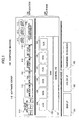
- Fig.1 is a block diagram of a compound machine 100 according to an embodiment of the present invention.
- the compound machine 100 includes hardware resources 103 and a software group 110.
- the hardware resources 103 include a black and white laser printer (B&W LP) 101, a color laser printer 102, and hardware resources such as a scanner, a facsimile, a hard disk, memory (RAM, NV-RAM, ROM and the like) and a network interface.
- the software group 110 includes a platform 120, and applications 130.
- the platform 120 includes control services for interpreting a process request from an application to issue an acquiring request for the hardware resources, a system resource manager (SRM) 123 for managing one or more hardware resources and arbitrating the acquiring requests from the control services, and a general-purpose OS 121.
- SRM system resource manager
- the control services include a plurality of service modules, which are a system control service (SCS) 122, an engine control service (ECS) 124, a memory control service (MCS) 125, an operation panel control service (OCS) 126, a fax control service (FCS) 127, and a network control service (NCS) 128.
- the platform 120 has application program interfaces (API) that can receive process requests from the applications 130 by using predetermined functions.
- API application program interfaces
- the general purpose OS 121 is a general purpose operating system such as UNIX, and can execute each piece of software of the platform 120 and the applications 130 concurrently as respective processes.
- the process of the SRM 123 is for performing control of the system and performing management of resources with the SCS 122.
- the process of the SRM 123 performs arbitration and execution control for requests from the upper layer that uses hardware resources including engines such as the scanner part and the printer part, a memory, a HDD file, and a host I/Os (Centronics I/F, network I/F IEEE1394 I/F, RS232C I/F and the like).
- the process of the SCS 122 performs application management, control of the operation panel, display of system screen, LED display, resource management, and interrupt application control.
- the process of the ECS 124 controls engines of hardware resources including the white and black laser printer (B&W LP) 101, the color laser printer (Color LP) 102, the scanner, and the facsimile and the like.
- the process of the MCS 125 obtains and releases an area of the image memory, uses the hard disk apparatus (HDD), and compresses and expands image data.
- the process of the FCS 127 provides APIs for sending and receiving facsimile by using PSTN/ISDN network from each application layer, registering/referring of various kinds of facsimile data managed by BKM (backup SRAM), facsimile reading, facsimile receiving and printing, and mixed sending and receiving.
- the NCS 128 is a process for providing services commonly used for applications that need network I/O.
- the NCS 128 distributes data received from the network to a corresponding application, and acts as mediation between the application and the network when sending data to the network. More specifically, the process of the NCS 128 includes server daemon such as ftpd, httpd, lpd, snmpd, telnetd, smtpd, and client function of the protocols.
- the process of the OCS 126 controls an operation panel that is a means for transferring information between the operator (user) and control parts of the machine.
- the OCS 126 includes an OCS process part and an OCS function library part.
- the OCS process part obtains an key event, which indicates that the key is pushed, from the operation panel, and sends a key event function corresponding to the key event to the SCS 122.
- the OCS function library registers drawing functions and other functions for controlling the operation panel, in which the drawing functions are used for outputting various images on the operation panel on the basis of a request from an application that has control right or from a control service.
- functions in the OCS function library is linked to an object program that is generated by compiling a source code file of the application, so that an executable file of the application is generated.
- the applications 130 include a printer application 111 that is an application for a printer having page description language (PDL) and PCL and post script (PS), a copy application 112, a fax application 113 that is an application for facsimile, a scanner application 114 that is an application for a scanner, and a network file application 115.
- a Java execution environment 116 and a Java application 117 are included.
- the compound machine 100 shown in Fig.1 includes a plurality of Java applications.
- Interprocess communication is performed between a process of the application and a process of the control service, in which a function is called, a returned value is sent, and a message is sent and received.
- the compound machine 100 of this embodiment includes a plurality of applications 130 and a plurality of control services, and each of those operates as processes. In each process, one or more threads are generated and the threads are executed in parallel.
- the control services provide common services to the applications 130.
- User services on image formation such as copying, printing, scanning and sending facsimile are provided while the processes are executed in parallel, the threads are executed in parallel, and interprocess communication is performed.
- a third party vendor can develop new applications for the compound machine 100, and can execute the applications in the application layer on the control service layer in the compound machine 100.
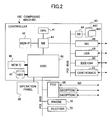
- Fig.2 shows an example of a hardware configuration of the compound machine 100.
- the compound machine 100 includes a controller 40, an operation panel 60, a fax control unit (FCU) 65, and an engine 70 and a plotter 75.
- the controller 40 includes a CPU 41, a MEM-P (system memory) 42, a north bridge (NB) 43, a south bridge (SB) 44, an ASIC 45, a MEM-C (local memory) 46, an HDD 47, a network interface card (NIC) 48, a USB device 49, an IEEE1394 device 50, and a Centronics 51.
- the operation panel 60 is connected to the ASIC 45 of the controller 40 directly.
- the FCU 65, interfaces, the engine 70 and the plotter 75 are connected to the ASIC 45 in the controller 40 via a PCI bus.
- the CPU 41 controls the compound machine 100.
- the NB 43 is a bridge for connecting the CPU 41, the MEM-P 42 and the ASIC 45.
- the MEM-P 42 is a system memory used as a drawing memory for example.
- the SB 44 is a bridge for connecting the NB 43 and peripheral devices.
- a memory card slot 441 is provided in which a memory card 442 can be inserted.
- the MEM-C 46 is a local memory used as a copy image buffer, a code buffer and the like.
- the ASIC 45 is an IC for image processing including hardware for image processing.
- the HDD 47 is a storage for storing image data, programs, font data and the like.
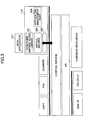
- Fig.3 shows a configuration example of the Java execution environment 116 according to the first embodiment.
- the Java execution environment 116 includes a compound machine class library 201, a virtual machine 202, a native program interface 203 and an application management part 204.
- the compound machine class library 201 is a class library used for the Java application 117 to easily operate the compound machine 100, so that the Java application 117 can access APIs of the compound machine 100 by using the mechanism of the native program interface 203.
- the compound machine class library 201 By the compound machine class library 201, machine-dependent functions can be identified, simple operation functions are provided, and various object oriented classes can be provided.
- the compound machine class library 201 includes a basic Java class library, event classes for processing events, network transaction classes for performing processes for network communications, operation panel classes for drawing images on the operation panel of the compound machine 100, compound machine control classes for controlling the compound machine 100 and the like.
- the operation panel class and the compound machine control class are classes specific for the compound machine 100 of this embodiment.
- the operation panel class and the compound machine control class may be referred to as "compound machine class” hereinafter, and other classes (the basic Java class library, event classes, network transaction classes) may be referred to as "Java core class".
- a Java source code program is compiled into intermediate code (byte code).
- the virtual machine 202 has functions for interpreting and executing the byte code.
- the native program interface 203 has functions for the Java code executed by the virtual machine 202 to be interoperable with applications and libraries written by a different programming language such as the C language.
- the application management part 204 has functions for managing the Java applications.
- the application management part 204 has functions for displaying a list of Java applications, installing and updating the Java applications, deleting installed Java applications, setting a password for registering applications, storing Java applications and the like.
- the application management part 204 performs Java application execution management such as launch, forced termination, suspend, and resume for the Java application.
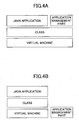
- the application management part 204 is implemented in the compound machine 100 as a component independent from the virtual machine 202, so that the application management part 204 cannot be controlled from the Java application 117. As shown in Figs.4A and 4B, the application management part 204 can be implemented as a Java application (Fig.4A), or can be implemented as a C language program (Fig.4B) or the like.
- the Java execution environment 116 is an application mounted on the compound machine 100
- the Java execution environment 116 can be installed into the compound machine 100 in the same way as other applications.
- the Java execution environment 116 can be installed into the compound machine 100 from a memory card.
- Fig.5 shows an example of a hierarchy structure of the operation panel class used by the Java application.
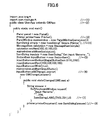
- Fig.6 shows a program list of the Java application.
- the application program may be referred to as "simple printer”.
- This program causes the compound machine 100 to display a user interface screen on the operation panel of the compound machine 100, receive a specified print file name from the operation panel, and print the specified file.
- the outline of the operation of the program is as follows.
- a screen shown in Fig.7 is displayed on the operation panel.
- a character string "Simple Printer” is displayed on the upper part of the screen, and a button of "Get input filename" is displayed on the center part of the screen.
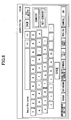
- a software keyboard shown in Fig.8 as an example is shown on the operation panel.
- a title : "Input file name” is displayed, so that the user inputs a name of a file that the user wants to print.
- the program causes the compound machine 100 to print the "photo.tiff” file that is stored in a directory : “/usr/hdd”.
- GWApp is inherited, in which GWApp is a prototype (abstraction) of the application of the compound machine on initial setting and end processing. Accordingly, the user does not need to write complicated initial setting code and end processing code, and processes for receiving a message and the like can be hidden from the user.
- the result of the button operation is received by the program as a message, and the program performs a process corresponding to the button operation in response to receiving the message.
- the process is set in addChangeListener() of (6).
- Installing and launching of the Java application is managed by the application management part 204.
- processes from download to launch can be performed in the following way. The procedure is described taking a case for launching the simple printer as an example with reference to a flowchart shown in Fig.9.
- the application management part 204 is launched when the compound machine 100 is launched like other applications. By pushing an application selection key corresponding to the application management part 204, a user interface screen for operating the application management part 204 is displayed on the operation panel of the compound machine 100 in step S1. When the user identifies, on the user interface screen, that the simple printer is installed as a Java application, the user selects the simple printer to execute it in step S2.
- an application load screen is displayed by specifying load of application from the user interface screen in step S3.
- the user selects whether to download the simple printer from a Web site or to download it from a memory card inserted into the compound machine in step S4.
- the application management part 204 checks files in the memory card, and displays file names stored in the memory card on the operation panel in step S5.
- the application management part 204 checks if the application can be executed on the compound machine 100 in step S7. According to the result of the check, if the application can be executed, the application is downloaded and installed into the hard disk.
- the application management part 204 obtains the application name (simple printer) and add it to an application list in step S9, in which the application list is a file managed by the application management part 204 for the user to recognize installed Java applications.
- the simple printer is downloaded from the Web server
- Web is selected in the step S4, so that a screen for specifying a URL is displayed from which screen the user inputs a URL of a Web site having the simple printer program in step S10.
- the application management part 204 accesses the Web site in step S11, and checks if the simple printer can be executed on the compound machine in step S12, and downloads the simple printer in step S13.
- the application management part 204 installs the simple printer into the hard disk, obtains the application name (simple printer) and adds the name to the application list in step S14.
- the application management part 204 may automatically searches for the memory card or the Web server to install the application into the hard disk.
- the Java application is not necessarily installed into the hard disk to execute the Java application.
- the application management part 204 checks program size, version of the program, program latest update information, use memory work size, use storage size, use network address, the term of validity (usable number), application program name and the like. These items of information are associated with the Java application. As described later, the items of information may be obtained from a JNLP file corresponding to the Java application.
- the downloaded simple printer can be used, so that the user launches the simple printer from the user interface screen in step S15. Accordingly, the virtual machine 202 is launched and the simple printer is executed.
- the launched simple printer operates the compound machine 100 by using the Java core class and the compound machine class so as to display the before-mentioned user interface screen for the simple printer.
- the user inputs a name of a file that the user wants to print, so that the file is printed.
- "/usr/hdd/photo.tiff” is input, and a "photo.tiff” file that is stored in a "/usr/hdd” directory in the hard disk in the compound machine 100 is printed.
- the application management part 204 terminates execution of the simple printer.
- the compound machine 100 can automatically update a Java application that is installed in the compound machine 100 by using JNLP (Java Networking Language Protocol).
- JNLP Java Networking Language Protocol
- automatic update of the Java application by using JNLP is described. Following processes are controlled by the application management part 204.
- JNLP file (to be also referred to as "application information file”) is used in the following processes, a description is given first for the JNLP file.
- the JNLP file is in a one-to-one correspondence with a Java application, and includes information on definitions of the Java application. That is, a JNLP file is attached to each Java application.
- Fig.10 shows an example of a syntax of the JNLP file.
- the JNLP file is a XML(eXtensible Markup Language) file.
- the format of the JNLP file is in conformity with JNLP standard. However, the JNLP used in this embodiment is extended. Following is the extension.
- the description 1 is an information element which includes a title element (description 1A) indicating an application name, a vender element (description 1B) indicating a vender name, a telephone element (description 1C) indicating a telephone number of the vender, a fax element (description 1D) indicating a fax number of the vender, and a product ID element (description 1E) indicating a product ID of the application.
- the description 2 indicates a security element.
- the description 3 indicates a resource element which includes a jsdk element (description 3A) indicating a version of a Java application, a jar element (description 3B) indicating a Jar file (execution file of the Java application) and the version, and a sub-jnlp element (description 3C) indicating a SUB-JNLP file.
- the description 4 is an update element which is an element for setting an execution method of update. If the element is "auto”, update of the application is automatically performed. If the element is "manual”, update of the application is performed manually. If the element is "mail”, an update notification mail is delivered when update of the application can be performed.
- the description 5 indicates an install element which indicates an execution method for install. If the element is "auto”, an install destination of the application is automatically selected. If the element is "manual”, the install destination of the application is manually selected. The description 6 indicates whether the type of the application is "GUI present” or "GUI absent".
- Information of the JNLP file corresponding to the Java application generally has a tree structure as shown in Fig.11.
- a JNLP file referred to from an upper JNLP file corresponds to a module that is used in execution of a Java program corresponding to the upper JNLP file.
- an installed Java application is a target of update.
- automatic update for automatically updating the installed Java application is described.
- Fig.12 is a flowchart for automatically updating a Java application (update target application) in an SD card (which is an example of a memory card) or in a HDD to a Java application (update application) from a SD card.
- the application management part 204 obtains a JNLP file of the update application in the SD card in step S101.
- the update element of the JNLP file is "auto" and when the compound machine 100 includes an update target application same as the update application corresponding to the JNLP file (steps S102, S103)
- the application management part 204 compares versions of the update application and the update target application in step S104.
- the application management part 204 updates the update target application to the update application in step S106 (replaces the update target application with the update application). That is, the application management part 204 updates the Jar file and the JNLP file.
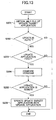
- Fig.13 is a flowchart for automatically updating a Java application (update target application) in the SD card or in the HDD with a Java application (update application) from a Web server.
- the application management part 204 obtains a JNLP file of the update target application in step S201.
- the update element of the JNLP file is "auto" and when the Web server that is connected to the compound machine 100 includes an update application same as the update target application (step S202, S203), the application management part 204 compares versions of the update target application and the update application in step S204.
- the application management part 204 updates the update target application with the update application in step S206.
- the destination that the compound machine 100 accesses for accessing the update application can be obtained by referring to the JNLP file.
- the JNLP file is the tree structure, the above-mentioned process is performed for JNLP files of each layer.
- the trigger for starting the update may be an elapsed time from power on of the compound machine 100, a predetermined time, power ON/OFF of the compound machine 100, before running/while running/after running application, an elapsed time while idling, and the like.
- the JNLP file can be used before downloading the Java application.
- the compound machine 100 can check if the Java application is executable according to information in the JNLP file.
- the JNLP file includes information used for determining whether the Java application is executable in the compound machine 100.
- the JNLP file includes information for authentication, device configurations (color supported, for example) necessary for executing the Java application, use resource information and the like in addition to the program size and the like described in the first embodiment.
- the information in the JNLP file are compared with resource information and the like in the compound machine 100. As a result, if the compound machine 100 determines that the Java application is not executable, a warning is output, for example.
- the Jar file may include a digital signature for authentication, so that the application management part 204 may verify the signature.
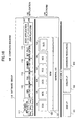
- Fig.14 shows a system configuration for executing the Java application according to this embodiment.
- the system includes a PC 300 and a compound machine 100 that are connected via a network 400.
- the PC 300 is a PC used for developing a Java application for the compound machine 100, for example.
- the PC 300 includes a simple printer 301 that is a Java application, a Java core class 304, a client compound machine class 303 for operating the compound machine class in the compound machine 100, a remote application management part 302 for managing applications by communicating with the application management part 204 of the compound machine 100, a virtual machine 305 and a OS 306.
- the compound machine 100 includes a server compound machine application 210 in addition to the Java execution environment 116.
- the server compound machine application 210 is an application executed in the compound machine 100 for providing remote operation service from the PC 300.
- the native program interface is not shown in Fig.14.
- the client compound machine class 303 in the PC 300 communicates with the server compound machine application 210, so that the client compound machine class 303 operates objects in the compound machine 100. Accordingly, the compound machine 100 can be operated remotely from the PC 300, and distributed processing of applications can be realized.
- the technique for operating objects in the compound machine 100 from the remote PC 300 can be realized by using Java based distributed object processing technology, for example.
- the remote application management part 302 communicates with the application management part 204 of the compound machine 100 so that the Java application management function for the compound machine 100 can be extended to the PC 300.
- the remote application management part 302 includes functions same as those of the application management part 204 of the compound machine 100. That is, the remote application management part 302 includes functions for the Java application execution management (launch / forced termination / suspend / resume and the like), install and update of the Java application, delete of installed Java application, password setting for application registration, storing Java application, display list of installed Java applications and the like.
- the above-mentioned processes are performed by communicating with the application management part 204 of the compound machine 100 as necessary.
- the client compound machine class 303 in the PC 300 also includes a function for emulating a part of functions of the compound machine 100.
- the client compound machine class 303 can emulate operations of the operation panel of the compound machine 100.
- the compound machine 100 For operating the compound machine 100 by using an application executed in the PC 300, it can be selected whether to use the operation panel of the compound machine 100 or to use the emulation function in the PC 300.
- the screen to be displayed on the operation panel of the compound machine 100 is displayed on the PC 300.
- the keyboard and the mouse of the PC 300 are used for operating the operation buttons displayed on the PC 300.
- the selection between using the operation panel of the compound machine 100 and using the keyboard and the mouse of the PC 300 is performed by sending a request from the remote application management part 302 to the application management part 204 of the compound machine 100.
- the application management part 204 controls the compound machine 100 such that screen display information generated by operating the compound machine 100 is sent to the PC 300 instead of displaying on the compound machine 100.
- the user can select one between the remote PC 300 and the compound machine 100.
- the remote PC 300 and the compound machine 100 For example, as to "hard disk” that is included in both of the PC 300 and the compound machine 100, the user can select whether using a hard disk of the PC 300 or a hard disk of the compound machine 100 from the PC 300.
- Other such resources are resources for networking, I/O(USB, ilink, RS 232C) and the like.
- the remote application management part 302 is launched in the PC 300.
- the Java execution environment 116 including the application management part 204, and the server compound machine application 210 are already executed.
- the remote application management part 302 displays a screen for selecting an application on the PC 300 in step S21. At this time, it is checked whether the Java application is installed in the hard disk in the compound machine 100 or in the hard disk in the PC 300. In the check of the Java application, for example, the remote application management part 302 checks the Java application in the PC 300, and the application management part 204 in the compound machine 100 checks the Java application in the compound machine 100 and the application management part 204 notifies the remote application management part 302 of the check result. When the Java application exists, the Java application name is displayed on the screen. When the user selects the simple printer, the simple printer is launched in step S22.
- an application load screen is displayed by specifying application load from the screen in step S23.
- the user selects, from the application load screen, whether to download the simple printer from a Web site or from a memory card inserted in the compound machine 100 in step S24.
- the application management part 204 When the user select to install the Java application from the memory card, the application management part 204 recognizes the memory card when the memory card is inserted into the compound machine 100, and the application management part 204 checks file information in the memory card, and notifies the remote application management part 302 of the file information in step S25.
- the remote application management part 302 displays the notified file information on the screen of the PC 300 in step S26, so that the user selects the simple printer in step S27. Then, the remote application management part 302 notifies the application management pat 204 that the simple printer is a target for downloading.
- the application management part 204 sends information on the application (simple printer) to the remote application management part 302.
- the remote application management part 302 checks whether the simple printer is executable in the environment of the system in step S28.
- the remote application management part 302 determines that the simple printer is executable, the remote application management part 302 instructs the application management part 204 to download the simple printer, so that the simple printer is downloaded in step S29 and installed into an install destination (hard disk of the PC 300 or the hard disk of the compound machine 100) that is already specified in step S30. In addition, the simple printer is added to the application list.
- the check items in the step S28 are, for example, program size, version, program latest update information, use memory work size, use storage size, use network address, the term of validity (usable number), application program name and the like.
- the remote application management part 302 displays a screen for allowing the user to specify a URL of the Web server, so that the user inputs the URL from the screen in step S31. Then, the remote application management part 302 notifies the application management part 204 in the compound machine 100 of the URL in step S32. Then, the application management part 204 accesses the Web site of the URL in step S33, and checks whether the application (simple printer) in the Web site can operate the compound machine 100 from the PC 300 in step S34. This check can be also performed by the remote application management part 302. In this case, the application management part 204 obtains predetermined information (JNLP file for example) and send the information to the remote application management part 302.
- predetermined information JNLP file for example
- the simple printer is downloaded in step S35, and installed in a specified hard disk. Then, the simple printer is added to the application list in step S36.
- the simple printer When the simple printer is installed, the simple printer can be selected from a screen of step S21. When the simple printer is selected, the remote application management part 302 loads the simple printer in the virtual machine 305 in the PC 300, so that the simple printer is executed in step S37.
- the simple printer operates the compound machine 100 by using the Java core class 304 and the client compound machine class 303.
- the simple printer 301 sends a message to the server compound machine application 210 in the compound machine 100, so that the server compound machine application 210 operates objects in the Java execution environment in the compound machine 100 so as to operate the compound machine 100.
- the simple printer 301 initially displays the graphical interface screen. Whether displaying the screen on the PC 300 or on the operation panel of the compound machine 100 can be selected. For example, after the user selects the simple printer, the remote application management part 302 displays a screen for selecting whether displaying the screen on the PC 300 or on the operation panel of the compound machine 100, so that the selection is realized. In this embodiment, the PC 300 is selected and a screen that is an emulation screen of the operation panel is displayed on the PC 300.
- the user selects, from the screen of the PC 300, a name of a file to be printed.
- the user can selects one among the hard disk of the PC 300 and the hard disk of the compound machine 100 as a storage of the file that the user wants to print. Since the user can selects the hard disk of the compound machine 100, the user can perform operations on the PC 300 as if to operate the compound machine 100 on the operation panel.
- the selection can be performed by displaying a screen for selecting between the hard disks when the simple printer is selected by the remote application management part 302.
- the user specifies a file to print as "/hdd/ts/photo.tiff" for example from the screen of the PC 300.
- the file in the hard disk of the compound machine 100 is selected so that the file is printed.
- the remote application management part 302 requests the application management part 204 of the compound machine 100 to end or pause the application, and ends communications with the compound machine 100.
- the Java application can be automatically updated by using the JNLP file.
- the compound machine 100 is configured as shown in Fig.16.
- the Java execution environment 116 and the Java application 117 are changed to a JSDK application 147 and a JSDK platform 148.
- the JSDK platform 148 is for performing mediation with other software and application management and the like.
- SDK means a specific software development kit, and an application developed by using the SDK is called “SDK application”.
- SDK application As a specific SDK, for example, "JSDK” is provided for developing an application by using Java language.
- JSDK application An application developed by using the JSDK is called “JSDK application”.
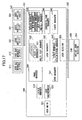
- Fig.17 shows classes of the JSDK application 147 and the JSDK platform 148 in Fig.16.
- the JSDK application 147 and the JSDK platform 148 are compiled from source code to byte code by a Java compiler, and are executed by a Java virtual machine step by step.
- the JSDK application 147 and the JSDK platform 148 are based on Personal Basis Profile of Java 2 Micro Edition.
- the JSDK application 147 includes a user application 501, a JSDK GUI Manager 511, and a Task Bar Manager 512.
- the user application 501 is a JSDK application developed by using the JSDK by a user (a software vender, for example) of the compound machine 100.
- the JSDK GUI Manager 511 is a JSDK application for displaying operation screens for operating JSDK applications.
- the Task Bar Manager 512 is a JSDK application for displaying task bars for operating JSDK applications.
- the user application 501 is "Xlet” that is a Java application.
- Each of the JSDK GUI Manager 511 and the Task Bar Manager 512 is "Xlet (XletEx)" that is extended from the Xlet.
- the JSDK platform 148 includes classes such as a JSDK Main 521, a JSDK Environment 522, a Locale Manager 523, a Xlet Manager 531, a Multi Xlet Manager 532, a JSDK Manager 533, a Send Manager 541, an Event Manager 542, a System Event Manager 543, a Panel Manager 544, an Install Manager 545, a Server/Client Manager546 and the like.
- the JSDK Main 521 is a class for launching the JSDK Environment 522.
- the JSDK Environment 522 is a class for performing launch environment setting for the JSDK system.
- the Locale Manager 523 is a class for performing foreign language supporting and the like.
- the Xlet Manager 531 is a class for managing life cycle of the Xlet.
- the life cycle of the five Xlets are managed by five Xlet Managers.
- the five Xlets are in a one-to-one correspondence with the five Xlet Managers.
- All of the life cycle of the all Xlet managers are managed by the Multi Xlet Manager 532.
- the JSDK Manager 533 is a class for managing the life cycle of the whole of the JSDK system. For example, the life cycles of the Multi Xlet Manager 532, the Send Manager 541, the Event Manager 542, the System Event Manager 543, the Panel Manager 544, the Install Manager 545 and the Server/Client Manager 546 are managed by the JSDK Manager 533.
- the life cycle of the Xlet is state transitions, for example, initialization state (Loaded), paused state (Paused), active state (Active), end state (Destroyed) and the like.
- the System Event Manager 543 is a class for managing system events (such as power mode) from the platform 120.
- the Panel Manager 544 is a class for performing mediation and the like when one Xlet occupies the screen of the operation panel.
- the Install Manager 545 is a class for managing install or uninstall of applications from the SD card and the Web server.
- the JSDK system of Fig.17 includes JSDK API 551 and JSDK API 552.
- the difference between the Xlet and the XletEx is that the XletEx can use the JSDK API 551 for accessing objects and can access the JSDK platform.
- the compound machine 100 of Fig.16 further includes a JSDK Session 553 and a Native JSDK Session 554 that are interfaces between C language and Java language.
- the compound machine 100 of Fig.16 further includes a CVM 555 that is a Java virtual machine.
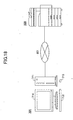
- the compound machine 100 is connected to a PC 701.
- the PC 701 functions as an emulator of the compound machine 100.
- the PC 701 in Fig.18 includes, for example, a keyboard 712, a mouse 713, a display 714 and the like.
- the body 711 includes a CPU, a ROM, a RAM, a NVRAM, a HDD, a MODEM, and a NIC and the like.
- the keyboard 712 and the mouse 713 are hardware (operation part) used by an operator for inputting data.
- the display 714 is hardware (display part) for outputting data.
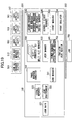
- Fig.19 shows classes of the JSDK application 147 and the JSDK platform 148 in the PC 701 in Fig.18.
- the PC 701 of Fig.19 includes the JSDK application 147 and the JSDK platform 148 same as those shown in Fig.16.
- the Panel Manager 544 in Fig.17 is replaced by a Panel Manager Emulator 744 in Fig.19.
- the JSDK Session 553 in Fig.17 is replaced by the Emulator JSDK Session 753 in Fig.19.
- the Native JSDK Session 554 of Fig.17 is replaced by an Event Emulator 754 in Fig.19.
- the CVM 555 of Fig.17 is replaced by the JVM 755 of Fig.19.
- the Panel Manager Emulator 744 is a class for emulating the Panel Manager 544 to change operations of the operation panel to operations of the keyboard 712 and the mouse 713.
- the Emulator JSDK Session 753 is a class for establishing communication routes.
- the Event Emulator 754 is a class for emulating operations of the compound machine 100.
- the JVM 755 is a Java virtual machine for executing the JSDK application 147 and the JSDK platform 148.
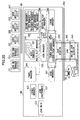
- Fig.20 is a figure for explaining execution procedure of preparation processes for remote operation in the compound machine 100.
- a communication session is established between the Server/Client Manager 546 in the compound machine 100 and the Server/Client Manager 546 in the PC 701 (1).
- the establishment of the session is performed by a protocol similar to SIP (Session Initiation Protocol).
- the Server/Client Manager 546 in the compound machine 100 asks the JSDK Manager 533 in the compound machine 100 whether the compound machine 100 can change to the remote operation mode, so as to determine whether the remote operation can be performed (2) .
- the Server/Client Manager 546 in the compound machine 100 sends a request message necessary for remote operation to the PC 701 via the Send Manager 541 (3), and receives a response message necessary for remote operation from the PC 701 via the Event Manager 542 in the compound machine 100 (4).
- the Server/Client Manager 546 in the compound machine 100 requests the Panel Manager 544 to send information for remote operation to the PC 701 (5).
- Each program described in the first to fourth embodiments can be stored in a recording medium such as a memory card. From the recording medium, the program can be installed in the compound machine 100.
- a program for constituting the Java execution environment such as the virtual machine can be also stored in a recording medium such as a CD-ROM, and can be installed in the PC 300 from the CD-ROM.
- the Java application can be easily installed and launched on the compound machine 100. Therefore, the Java application can be easily executed.
- the compound machine 100 can be operated by executing a Java application in a terminal apparatus connected to the compound machine 100 via a network.
Landscapes
- Engineering & Computer Science (AREA)
- Theoretical Computer Science (AREA)
- Software Systems (AREA)
- General Engineering & Computer Science (AREA)
- Computer Hardware Design (AREA)
- General Physics & Mathematics (AREA)
- Physics & Mathematics (AREA)
- Microelectronics & Electronic Packaging (AREA)
- Multimedia (AREA)
- Signal Processing (AREA)
- Stored Programmes (AREA)
- Facsimiles In General (AREA)
- Accessory Devices And Overall Control Thereof (AREA)
- Devices For Executing Special Programs (AREA)
Applications Claiming Priority (4)
| Application Number | Priority Date | Filing Date | Title |
|---|---|---|---|
| JP2003082908 | 2003-03-25 | ||
| JP2003082908 | 2003-03-25 | ||
| JP2004078979 | 2004-03-18 | ||
| JP2004078979A JP2004312711A (ja) | 2003-03-25 | 2004-03-18 | 画像形成装置及び画像形成装置を遠隔のアプリケーションにより操作する方法 |
Publications (2)
| Publication Number | Publication Date |
|---|---|
| EP1463294A2 true EP1463294A2 (de) | 2004-09-29 |
| EP1463294A3 EP1463294A3 (de) | 2006-04-05 |
Family
ID=32829037
Family Applications (1)
| Application Number | Title | Priority Date | Filing Date |
|---|---|---|---|
| EP20040251677 Ceased EP1463294A3 (de) | 2003-03-25 | 2004-03-24 | Bilderzeugungsgerät und Verfahren zur Steuerung des Bilderzeugungsgeräts mittels einer Fernanwendung |
Country Status (4)
| Country | Link |
|---|---|
| US (1) | US7533381B2 (de) |
| EP (1) | EP1463294A3 (de) |
| JP (1) | JP2004312711A (de) |
| CN (1) | CN100377011C (de) |
Cited By (3)
| Publication number | Priority date | Publication date | Assignee | Title |
|---|---|---|---|---|
| JP2004312711A (ja) * | 2003-03-25 | 2004-11-04 | Ricoh Co Ltd | 画像形成装置及び画像形成装置を遠隔のアプリケーションにより操作する方法 |
| EP1855199A3 (de) * | 2006-05-12 | 2008-05-14 | Canon Kabushiki Kaisha | Bilderzeugungsvorrichtung für eine Verwaltungsanwendung und Steuerverfahren dafür |
| US9870522B2 (en) | 2008-10-27 | 2018-01-16 | Sato Holdings Kabushiki Kaisha | Label printer API using LUA program scripting language |
Families Citing this family (126)
| Publication number | Priority date | Publication date | Assignee | Title |
|---|---|---|---|---|
| US6631247B1 (en) | 1999-09-29 | 2003-10-07 | Ricoh Co., Ltd. | Method and system for remote diagnostic, control and information collection based on various communication modes for sending messages to a resource manager |
| JP4523991B2 (ja) * | 2003-03-25 | 2010-08-11 | 株式会社リコー | 端末装置、方法、システム、及びプログラム |
| GB2403105B (en) * | 2003-06-17 | 2006-10-18 | Imagine Broadband Ltd | Method and system for selectively distributing data to a set of network devices |
| JP4625343B2 (ja) * | 2004-02-17 | 2011-02-02 | 株式会社リコー | 画像形成装置、端末装置、情報処理方法、情報処理プログラム、及び記録媒体 |
| US8432562B2 (en) | 2004-02-17 | 2013-04-30 | Ricoh Company, Ltd. | Image processing apparatus, method, program, and computer readable recording medium for controlling operation switching and displaying at occurrence of error conditions |
| JP4691197B2 (ja) * | 2004-02-17 | 2011-06-01 | 株式会社リコー | 画像形成装置、端末装置、情報処理方法、情報処理プログラム、及び記録媒体 |
| JP4769515B2 (ja) * | 2004-09-07 | 2011-09-07 | 株式会社リコー | アプリケーション実行方法、情報処理装置、画像形成装置、アプリケーション実行プログラム、記録媒体、及び情報処理システム |
| US7397362B2 (en) | 2004-10-08 | 2008-07-08 | Sharp Laboratories Of America, Inc. | Methods and systems for imaging device credential submission and receipt |
| US8156424B2 (en) | 2004-10-08 | 2012-04-10 | Sharp Laboratories Of America, Inc. | Methods and systems for imaging device dynamic document creation and organization |
| US7970813B2 (en) | 2004-10-08 | 2011-06-28 | Sharp Laboratories Of America, Inc. | Methods and systems for imaging device event notification administration and subscription |
| US8120799B2 (en) | 2004-10-08 | 2012-02-21 | Sharp Laboratories Of America, Inc. | Methods and systems for accessing remote, descriptor-related data at an imaging device |
| US8001183B2 (en) | 2004-10-08 | 2011-08-16 | Sharp Laboratories Of America, Inc. | Methods and systems for imaging device related event notification |
| US8115947B2 (en) | 2004-10-08 | 2012-02-14 | Sharp Laboratories Of America, Inc. | Methods and systems for providing remote, descriptor-related data to an imaging device |
| US7870185B2 (en) | 2004-10-08 | 2011-01-11 | Sharp Laboratories Of America, Inc. | Methods and systems for imaging device event notification administration |
| US8060921B2 (en) | 2004-10-08 | 2011-11-15 | Sharp Laboratories Of America, Inc. | Methods and systems for imaging device credential authentication and communication |
| US8035831B2 (en) | 2004-10-08 | 2011-10-11 | Sharp Laboratories Of America, Inc. | Methods and systems for imaging device remote form management |
| US8065384B2 (en) | 2004-10-08 | 2011-11-22 | Sharp Laboratories Of America, Inc. | Methods and systems for imaging device event notification subscription |
| US8032608B2 (en) | 2004-10-08 | 2011-10-04 | Sharp Laboratories Of America, Inc. | Methods and systems for imaging device notification access control |
| US7519307B2 (en) * | 2004-10-08 | 2009-04-14 | Sharp Laboratories Of America, Inc. | Methods and systems for configuration-based imaging device accounting |
| US8018610B2 (en) | 2004-10-08 | 2011-09-13 | Sharp Laboratories Of America, Inc. | Methods and systems for imaging device remote application interaction |
| US7684074B2 (en) | 2004-10-08 | 2010-03-23 | Sharp Laboratories Of America, Inc. | Methods and systems for imaging device metadata management |
| US8001586B2 (en) | 2004-10-08 | 2011-08-16 | Sharp Laboratories Of America, Inc. | Methods and systems for imaging device credential management and authentication |
| US8024792B2 (en) | 2004-10-08 | 2011-09-20 | Sharp Laboratories Of America, Inc. | Methods and systems for imaging device credential submission |
| US8213034B2 (en) | 2004-10-08 | 2012-07-03 | Sharp Laboratories Of America, Inc. | Methods and systems for providing remote file structure access on an imaging device |
| US8032579B2 (en) | 2004-10-08 | 2011-10-04 | Sharp Laboratories Of America, Inc. | Methods and systems for obtaining imaging device notification access control |
| US8384925B2 (en) | 2004-10-08 | 2013-02-26 | Sharp Laboratories Of America, Inc. | Methods and systems for imaging device accounting data management |
| US8051140B2 (en) | 2004-10-08 | 2011-11-01 | Sharp Laboratories Of America, Inc. | Methods and systems for imaging device control |
| US8006292B2 (en) | 2004-10-08 | 2011-08-23 | Sharp Laboratories Of America, Inc. | Methods and systems for imaging device credential submission and consolidation |
| US8120798B2 (en) | 2004-10-08 | 2012-02-21 | Sharp Laboratories Of America, Inc. | Methods and systems for providing access to remote, descriptor-related data at an imaging device |
| US8120797B2 (en) * | 2004-10-08 | 2012-02-21 | Sharp Laboratories Of America, Inc. | Methods and systems for transmitting content to an imaging device |
| US7532835B2 (en) * | 2004-10-08 | 2009-05-12 | Sharp Laboratories Of America, Inc. | Methods and systems for remote configuration-based imaging device accounting |
| US8115944B2 (en) | 2004-10-08 | 2012-02-14 | Sharp Laboratories Of America, Inc. | Methods and systems for local configuration-based imaging device accounting |
| US8120793B2 (en) | 2004-10-08 | 2012-02-21 | Sharp Laboratories Of America, Inc. | Methods and systems for displaying content on an imaging device |
| US8171404B2 (en) | 2004-10-08 | 2012-05-01 | Sharp Laboratories Of America, Inc. | Methods and systems for disassembly and reassembly of examination documents |
| US7633644B2 (en) | 2004-10-08 | 2009-12-15 | Sharp Laboratories Of America, Inc. | Methods and systems for imaging device job management |
| US7920101B2 (en) | 2004-10-08 | 2011-04-05 | Sharp Laboratories Of America, Inc. | Methods and systems for imaging device display standardization |
| US7969596B2 (en) | 2004-10-08 | 2011-06-28 | Sharp Laboratories Of America, Inc. | Methods and systems for imaging device document translation |
| US8060930B2 (en) | 2004-10-08 | 2011-11-15 | Sharp Laboratories Of America, Inc. | Methods and systems for imaging device credential receipt and authentication |
| US8006176B2 (en) | 2004-10-08 | 2011-08-23 | Sharp Laboratories Of America, Inc. | Methods and systems for imaging-device-based form field management |
| US8230328B2 (en) | 2004-10-08 | 2012-07-24 | Sharp Laboratories Of America, Inc. | Methods and systems for distributing localized display elements to an imaging device |
| US8006293B2 (en) | 2004-10-08 | 2011-08-23 | Sharp Laboratories Of America, Inc. | Methods and systems for imaging device credential acceptance |
| US7873553B2 (en) | 2004-10-08 | 2011-01-18 | Sharp Laboratories Of America, Inc. | Methods and systems for authorizing imaging device concurrent account use |
| US7934217B2 (en) | 2004-10-08 | 2011-04-26 | Sharp Laboratories Of America, Inc. | Methods and systems for providing remote file structure access to an imaging device |
| US7826081B2 (en) | 2004-10-08 | 2010-11-02 | Sharp Laboratories Of America, Inc. | Methods and systems for receiving localized display elements at an imaging device |
| US7966396B2 (en) * | 2004-10-08 | 2011-06-21 | Sharp Laboratories Of America, Inc. | Methods and systems for administrating imaging device event notification |
| US8015234B2 (en) | 2004-10-08 | 2011-09-06 | Sharp Laboratories Of America, Inc. | Methods and systems for administering imaging device notification access control |
| US8115945B2 (en) | 2004-10-08 | 2012-02-14 | Sharp Laboratories Of America, Inc. | Methods and systems for imaging device job configuration management |
| US8115946B2 (en) | 2004-10-08 | 2012-02-14 | Sharp Laboratories Of America, Inc. | Methods and sytems for imaging device job definition |
| US7978618B2 (en) | 2004-10-08 | 2011-07-12 | Sharp Laboratories Of America, Inc. | Methods and systems for user interface customization |
| US8051125B2 (en) | 2004-10-08 | 2011-11-01 | Sharp Laboratories Of America, Inc. | Methods and systems for obtaining imaging device event notification subscription |
| US8125666B2 (en) | 2004-10-08 | 2012-02-28 | Sharp Laboratories Of America, Inc. | Methods and systems for imaging device document management |
| US7738808B2 (en) * | 2004-10-08 | 2010-06-15 | Sharp Laboratories Of America, Inc. | Methods and systems for imaging device concurrent account use with remote authorization |
| US8001587B2 (en) | 2004-10-08 | 2011-08-16 | Sharp Laboratories Of America, Inc. | Methods and systems for imaging device credential management |
| US8023130B2 (en) | 2004-10-08 | 2011-09-20 | Sharp Laboratories Of America, Inc. | Methods and systems for imaging device accounting data maintenance |
| US8237946B2 (en) | 2004-10-08 | 2012-08-07 | Sharp Laboratories Of America, Inc. | Methods and systems for imaging device accounting server redundancy |
| US8049677B2 (en) | 2004-10-08 | 2011-11-01 | Sharp Laboratories Of America, Inc. | Methods and systems for imaging device display element localization |
| US7873718B2 (en) | 2004-10-08 | 2011-01-18 | Sharp Laboratories Of America, Inc. | Methods and systems for imaging device accounting server recovery |
| JP4575860B2 (ja) * | 2004-10-21 | 2010-11-04 | 株式会社リコー | 画像形成装置、インストール方法、インストールプログラム、及び記録媒体 |
| US8428484B2 (en) | 2005-03-04 | 2013-04-23 | Sharp Laboratories Of America, Inc. | Methods and systems for peripheral accounting |
| JP4704245B2 (ja) | 2005-03-31 | 2011-06-15 | 株式会社リコー | 画像形成装置、情報処理方法、プログラム、及び記録媒体 |
| JP4876188B2 (ja) * | 2005-03-31 | 2012-02-15 | 株式会社リコー | 画像形成装置、情報処理方法、プログラム、及び記録媒体 |
| JP4843386B2 (ja) * | 2005-07-11 | 2011-12-21 | 株式会社リコー | 機器、情報処理方法、情報処理プログラム、及び記録媒体 |
| JP5218601B2 (ja) * | 2005-07-11 | 2013-06-26 | 株式会社リコー | 装置、情報処理システム、情報処理方法、情報処理プログラム、及び記録媒体 |
| US8264717B2 (en) | 2005-07-11 | 2012-09-11 | Ricoh Company, Ltd. | Image forming apparatus, information processing apparatus, information processing method, information processing program and storage medium |
| JP5019817B2 (ja) * | 2005-08-15 | 2012-09-05 | 株式会社リコー | 情報処理装置、情報処理方法、情報処理プログラム、及び記録媒体 |
| JP4791910B2 (ja) | 2005-08-26 | 2011-10-12 | 株式会社リコー | 画像形成装置、情報処理方法、情報処理プログラム、及び記録媒体 |
| JP5025192B2 (ja) * | 2005-09-16 | 2012-09-12 | 株式会社リコー | 機器、情報処理方法、情報処理プログラム、及び記録媒体 |
| US9141374B2 (en) * | 2005-09-16 | 2015-09-22 | Ricoh Company, Ltd. | Image forming device, information processing method, information processing program, and recording medium |
| JP5025193B2 (ja) * | 2005-09-16 | 2012-09-12 | 株式会社リコー | 機器、情報処理方法、情報処理プログラム、及び記録媒体 |
| JP5013742B2 (ja) | 2005-12-15 | 2012-08-29 | 株式会社リコー | 通信装置、情報処理システム、アプリケーション実行方法、アプリケーション実行プログラム及び記録媒体 |
| JP5068987B2 (ja) * | 2006-12-15 | 2012-11-07 | 株式会社リコー | 画像処理装置、画像処理方法及び画像処理プログラム |
| US8250518B2 (en) * | 2006-03-30 | 2012-08-21 | Microsoft Corporation | Per user file associations |
| JP4778830B2 (ja) | 2006-04-20 | 2011-09-21 | 株式会社東芝 | 表示制御システム、画像処理装置、表示制御方法 |
| JP4848212B2 (ja) * | 2006-07-04 | 2011-12-28 | 株式会社リコー | 画像形成装置、画像形成方法および画像形成プログラム |
| US8314945B2 (en) | 2006-08-11 | 2012-11-20 | Brother Kogyo Kabushiki Kaisha | Terminal device |
| US8345272B2 (en) | 2006-09-28 | 2013-01-01 | Sharp Laboratories Of America, Inc. | Methods and systems for third-party control of remote imaging jobs |
| JP2008191901A (ja) * | 2007-02-05 | 2008-08-21 | Kyocera Mita Corp | 電子機器、制御プログラム及び電子機器の制御方法。 |
| JP4337900B2 (ja) * | 2007-03-30 | 2009-09-30 | コニカミノルタビジネステクノロジーズ株式会社 | 画像形成システム、サーバ装置、画像形成装置、画像形成装置制御方法及び同制御プログラム |
| US8448193B2 (en) | 2007-04-27 | 2013-05-21 | Ricoh Company, Ltd. | Image forming device, information processing method, and information processing program |
| WO2009003264A1 (en) * | 2007-06-29 | 2009-01-08 | Research In Motion Limited | System and method for communication protocol mapping |
| CN101523864B (zh) * | 2007-06-29 | 2012-08-08 | 捷讯研究有限公司 | 用于访问应用服务器提供的特征的系统和方法 |
| JP5065805B2 (ja) * | 2007-08-10 | 2012-11-07 | 京セラドキュメントソリューションズ株式会社 | 電子機器、サービス提供方法及びプログラム |
| US8438567B2 (en) * | 2007-11-07 | 2013-05-07 | Ricoh Company, Ltd. | Information processing device and image processing apparatus |
| BRPI0822100A2 (pt) | 2007-12-20 | 2015-06-30 | Hsbc Technologies Inc | Método e sistema para administrar automaticamente processos no desenvolvimento paralelo de um aplicativo por uma interface de usuário gráfica, sistema de desenvolvimento de aplicativo de computador, e, meio legível por computador de instruções |
| JP5020121B2 (ja) * | 2008-02-21 | 2012-09-05 | 京セラドキュメントソリューションズ株式会社 | 情報処理装置、画像形成装置および情報処理方法 |
| JP4969480B2 (ja) | 2008-02-21 | 2012-07-04 | 株式会社リコー | 画像形成装置、情報処理方法、及び情報処理プログラム |
| JP5266863B2 (ja) * | 2008-05-09 | 2013-08-21 | 株式会社リコー | 画像形成装置、及び、画面描画制御方法 |
| JP5171466B2 (ja) * | 2008-08-05 | 2013-03-27 | キヤノン株式会社 | 画像処理装置、画像処理装置で実行される方法、プログラムおよび記録媒体 |
| JP5365237B2 (ja) * | 2009-02-16 | 2013-12-11 | 株式会社リコー | エミュレーション装置及びエミュレーションシステム |
| JP2011008488A (ja) * | 2009-06-25 | 2011-01-13 | Ricoh Co Ltd | 画像形成装置、情報処理方法、及びプログラム |
| JP5440252B2 (ja) | 2009-07-24 | 2014-03-12 | 株式会社リコー | 情報処理装置、外部装置、情報処理システム、情報処理方法、及びプログラム |
| JP4810598B2 (ja) * | 2009-08-03 | 2011-11-09 | シャープ株式会社 | 複合機及びシステム |
| JP5614017B2 (ja) * | 2009-09-14 | 2014-10-29 | 株式会社リコー | 画像形成装置、印刷ジョブ実行方法、プログラム、記憶媒体 |
| KR101644416B1 (ko) * | 2009-12-17 | 2016-08-02 | 삼성전자주식회사 | 화상형성장치 및 그 로컬 유저 인터페이스 제공방법 |
| JP5661617B2 (ja) * | 2010-02-10 | 2015-01-28 | サトーホールディングス株式会社 | プリンタエミュレーションシステム及び方法 |
| US8627426B2 (en) | 2010-04-26 | 2014-01-07 | Vmware, Inc. | Cloud platform architecture |
| US9772831B2 (en) | 2010-04-26 | 2017-09-26 | Pivotal Software, Inc. | Droplet execution engine for dynamic server application deployment |
| US9448790B2 (en) | 2010-04-26 | 2016-09-20 | Pivotal Software, Inc. | Rapid updating of cloud applications |
| JP5671880B2 (ja) | 2010-08-25 | 2015-02-18 | 株式会社リコー | 画像形成装置、プログラム状態判定方法、プログラム状態判定プログラム、及びプログラム状態判定システム |
| JP2012155401A (ja) * | 2011-01-24 | 2012-08-16 | Canon Inc | 印刷システム、印刷装置、印刷システムの制御方法、印刷装置の制御方法、プログラム |
| US9015710B2 (en) | 2011-04-12 | 2015-04-21 | Pivotal Software, Inc. | Deployment system for multi-node applications |
| JP5632802B2 (ja) * | 2011-07-12 | 2014-11-26 | 株式会社沖データ | 通信端末装置 |
| US9170798B2 (en) | 2012-03-02 | 2015-10-27 | Vmware, Inc. | System and method for customizing a deployment plan for a multi-tier application in a cloud infrastructure |
| EP2592811B1 (de) | 2011-11-09 | 2015-12-09 | BlackBerry Limited | System und Verfahren zur Zuordnung von Kommunikationsprotokollen |
| US10031783B2 (en) | 2012-03-02 | 2018-07-24 | Vmware, Inc. | Execution of a distributed deployment plan for a multi-tier application in a cloud infrastructure |
| US9052961B2 (en) | 2012-03-02 | 2015-06-09 | Vmware, Inc. | System to generate a deployment plan for a cloud infrastructure according to logical, multi-tier application blueprint |
| US9047133B2 (en) | 2012-03-02 | 2015-06-02 | Vmware, Inc. | Single, logical, multi-tier application blueprint used for deployment and management of multiple physical applications in a cloud environment |
| US9348652B2 (en) | 2012-07-02 | 2016-05-24 | Vmware, Inc. | Multi-tenant-cloud-aggregation and application-support system |
| JP2014119770A (ja) * | 2012-12-13 | 2014-06-30 | Ricoh Co Ltd | 通信装置、及びシステム |
| CN103763401A (zh) * | 2014-02-20 | 2014-04-30 | 北京七星华创电子股份有限公司 | 半导体工厂设备的分布式管理系统 |
| US9544473B2 (en) * | 2014-10-20 | 2017-01-10 | Ricoh Company, Ltd. | Information processing system and information processing method |
| EP3086254A1 (de) * | 2015-04-22 | 2016-10-26 | Gemalto Sa | Verfahren zur verwaltung von applikationen in einem sicheren element wenn das betriebsystem aktualisiert wird |
| JP2017004175A (ja) * | 2015-06-08 | 2017-01-05 | キヤノン株式会社 | 管理システムおよびその制御方法、情報処理装置、並びにプログラム |
| KR20180080519A (ko) * | 2017-01-04 | 2018-07-12 | 에이치피프린팅코리아 주식회사 | 애플리케이션을 백업하기 위한 화상 형성 장치 및 그 동작 방법 |
| US10404783B2 (en) * | 2017-08-16 | 2019-09-03 | Vmware, Inc. | Outside-of-network management of a component in a virtual data center |
| JP7119844B2 (ja) | 2018-03-05 | 2022-08-17 | 株式会社リコー | 情報処理システム、情報処理装置、情報処理方法及びプログラム |
| US11025453B2 (en) | 2018-03-23 | 2021-06-01 | Vmware, Inc. | Outside-of-network management of a component in a virtual data center using a remote display on a host management server |
| EP3629167A1 (de) | 2018-09-27 | 2020-04-01 | Ricoh Company, Ltd. | Informationsverarbeitungssystem, informationsverarbeitungsvorrichtung, verfahren zur verarbeitung von informationen und trägermittel |
| US11153401B2 (en) | 2018-09-28 | 2021-10-19 | Ricoh Company, Ltd. | Information processing system, information processing apparatus, and method of processing information |
| US10884815B2 (en) | 2018-10-29 | 2021-01-05 | Pivotal Software, Inc. | Independent services platform |
| US11431874B2 (en) | 2018-11-28 | 2022-08-30 | Ricoh Company, Ltd. | Information processing system to securely upload image data |
| JP7188024B2 (ja) | 2018-11-29 | 2022-12-13 | 株式会社リコー | 情報処理装置、情報処理システム、情報処理方法及びプログラム |
| US10911624B2 (en) | 2018-11-30 | 2021-02-02 | Ricoh Company, Ltd. | Server, method of controlling data communication, and storage medium |
| WO2023053234A1 (ja) * | 2021-09-29 | 2023-04-06 | 三菱電機株式会社 | 電子機器および高速通信方法 |
| KR20240064262A (ko) * | 2022-11-04 | 2024-05-13 | 주식회사 엘지에너지솔루션 | 배터리 관리 장치 및 방법, 그리고 이를 포함하는 배터리 시스템 |
| GB2631763A (en) * | 2023-07-13 | 2025-01-15 | Canon Europa Nv | A multifunction peripheral device, a program for a multifunction peripheral device and a storage medium |
Citations (2)
| Publication number | Priority date | Publication date | Assignee | Title |
|---|---|---|---|---|
| US20020144257A1 (en) * | 2001-03-28 | 2002-10-03 | Hiroyuki Matsushima | Image formation system, software acquisition method, and computer product |
| US20030195952A1 (en) * | 2002-04-15 | 2003-10-16 | Henry Steven G. | Digital transmitter device configuration |
Family Cites Families (58)
| Publication number | Priority date | Publication date | Assignee | Title |
|---|---|---|---|---|
| US5109515A (en) * | 1987-09-28 | 1992-04-28 | At&T Bell Laboratories | User and application program transparent resource sharing multiple computer interface architecture with kernel process level transfer of user requested services |
| US5333286A (en) * | 1989-12-13 | 1994-07-26 | Joseph Weinberger | Two way copier monitoring system |
| JPH04347733A (ja) * | 1991-05-24 | 1992-12-02 | Hitachi Ltd | 計算機プログラム保守方式 |
| JP3428711B2 (ja) * | 1993-12-29 | 2003-07-22 | キヤノン株式会社 | 情報処理システム |
| US5699494A (en) * | 1995-02-24 | 1997-12-16 | Lexmark International, Inc. | Remote replication of printer operator panel |
| JPH09292980A (ja) * | 1996-04-25 | 1997-11-11 | N T T Data Tsushin Kk | ファイル配布システム |
| JPH1021060A (ja) * | 1996-07-05 | 1998-01-23 | Ricoh Co Ltd | プログラム自動更新処理機能を有する通信システムおよびプログラム更新処理を実行するプログラムを備えた記録媒体 |
| JPH10301874A (ja) * | 1997-04-22 | 1998-11-13 | Internatl Business Mach Corp <Ibm> | 遠隔操作方法、ネットワークを介して端末から遠隔操作されるサーバ及びhtmlファイルを格納する記憶媒体 |
| US6453127B2 (en) * | 1997-09-26 | 2002-09-17 | Nexpress Solutions Llc | Establishment at a remote location of an internet/intranet user interface to a copier/printer |
| US6023586A (en) * | 1998-02-10 | 2000-02-08 | Novell, Inc. | Integrity verifying and correcting software |
| US7197570B2 (en) * | 1998-07-22 | 2007-03-27 | Appstream Inc. | System and method to send predicted application streamlets to a client device |
| JP2000075989A (ja) * | 1998-09-03 | 2000-03-14 | Canon Inc | リモート操作可能な装置及びそのリモート操作方法並びにリモート操作システム |
| JP3897497B2 (ja) * | 1998-10-02 | 2007-03-22 | 株式会社リコー | 画像形成装置 |
| JP2000122853A (ja) * | 1998-10-14 | 2000-04-28 | Canon Inc | 複合装置及び前記装置における制御方法 |
| US7017116B2 (en) * | 1999-01-06 | 2006-03-21 | Iconics, Inc. | Graphical human-machine interface on a portable device |
| US6430570B1 (en) * | 1999-03-01 | 2002-08-06 | Hewlett-Packard Company | Java application manager for embedded device |
| JP2000341772A (ja) * | 1999-05-25 | 2000-12-08 | Sony Corp | Avシステム |
| JP2001051917A (ja) * | 1999-08-06 | 2001-02-23 | Matsushita Graphic Communication Systems Inc | 通信装置および受信通知方法 |
| JP3548065B2 (ja) * | 1999-11-15 | 2004-07-28 | インターナショナル・ビジネス・マシーンズ・コーポレーション | リモートコントロールシステム、サーバ・クライアントシステム、製品端末機器の制御用サーバ、製品端末機器操作方法、機器情報共有方法、および記憶媒体 |
| US7143144B2 (en) * | 1999-11-30 | 2006-11-28 | Ricoh Company, Ltd. | System, method and computer readable medium for certifying release of electronic information on an internet |
| US20020019891A1 (en) * | 1999-12-30 | 2002-02-14 | James Morrow | Generic device controller unit and method |
| US6498611B1 (en) * | 2000-01-28 | 2002-12-24 | Lexmark International, Inc. | System and method for providing a virtual operator panel for a peripheral device |
| JP2001249815A (ja) * | 2000-03-07 | 2001-09-14 | Fuji Xerox Co Ltd | ネットワーク接続装置 |
| US7418439B2 (en) * | 2000-03-17 | 2008-08-26 | Twin Peaks Software, Inc. | Mirror file system |
| JP3679349B2 (ja) * | 2000-07-05 | 2005-08-03 | 株式会社リコー | 画像形成装置、画像形成方法、画像形成プログラムおよびアプリケーションプログラム |
| JP2002032331A (ja) * | 2000-07-13 | 2002-01-31 | Cross Head Kk | コンテンツ配信システム、コンテンツ配信方法、コンテンツ配信のための複合機能付複写機、本システムに用いられる複合機能付複写機及び携帯情報端末等のユーザーインターフェイス |
| US20030033514A1 (en) * | 2000-07-20 | 2003-02-13 | John Appleby-Allis | System, method and article of manufacture for controlling peripherals and processing data on a system having no dedicated storage program and no central processing unit. |
| JP4136325B2 (ja) * | 2000-08-31 | 2008-08-20 | 株式会社リコー | 画像形成システム、ソフトウエア取得方法、画像形成装置およびその方法をコンピュータに実行させるプログラムを記録したコンピュータ読み取り可能な記録媒体 |
| JP3494967B2 (ja) * | 2000-09-12 | 2004-02-09 | 株式会社デジタル | 制御システム、および、そのプログラムが記録された記録媒体 |
| US20020073410A1 (en) * | 2000-12-13 | 2002-06-13 | Arne Lundback | Replacing software at a telecommunications platform |
| JP2002189594A (ja) * | 2000-12-21 | 2002-07-05 | Mcn:Kk | 最新バージョン自動設定システム、及び自動設定方法 |
| JP2002244754A (ja) * | 2001-02-15 | 2002-08-30 | Ricoh Co Ltd | イメージ入出力システム |
| JP2002251261A (ja) * | 2001-02-23 | 2002-09-06 | Canon Inc | 画像出力装置および情報処理装置およびデータ処理方法および記憶媒体 |
| US7080373B2 (en) * | 2001-03-07 | 2006-07-18 | Freescale Semiconductor, Inc. | Method and device for creating and using pre-internalized program files |
| EP1372063A4 (de) * | 2001-03-19 | 2008-03-19 | Sony Corp | "softwareaktualisierungssystem, softwareaktualisierungsverfahren und softwareaktualisierungsprogramm" |
| JP2002287990A (ja) | 2001-03-26 | 2002-10-04 | Canon Inc | アプリケーション管理装置、アプリケーション管理方法、記憶媒体及びプログラム |
| JP2002314749A (ja) * | 2001-04-16 | 2002-10-25 | Canon Inc | ネットワークデバイス制御装置及び文書入力装置及び分散処理システム |
| US7240106B2 (en) * | 2001-04-25 | 2007-07-03 | Hewlett-Packard Development Company, L.P. | System and method for remote discovery and configuration of a network device |
| JP2002342198A (ja) * | 2001-05-16 | 2002-11-29 | Victor Co Of Japan Ltd | 電子機器システム及び電子機器 |
| JP2002351854A (ja) * | 2001-05-30 | 2002-12-06 | Omron Corp | プログラム実行装置および携帯型情報処理装置 |
| JP2002368954A (ja) * | 2001-06-07 | 2002-12-20 | Matsushita Electric Ind Co Ltd | プログラム取得システム |
| CN1529847A (zh) * | 2001-07-16 | 2004-09-15 | 任宇清 | 内嵌软件更新系统 |
| JP2003030072A (ja) * | 2001-07-18 | 2003-01-31 | Matsushita Electric Ind Co Ltd | 遠隔制御代理方法および遠隔制御代理装置 |
| JP2003036217A (ja) * | 2001-07-24 | 2003-02-07 | Mitsubishi Denki Information Technology Corp | Javaアプレットバージョン管理装置 |
| US20030023700A1 (en) * | 2001-07-27 | 2003-01-30 | Lightsurf Technologies, Inc. | System and methodology providing on-board user interface |
| US20030030664A1 (en) * | 2001-08-13 | 2003-02-13 | Parry Travis J. | Customizable control panel software |
| KR100412358B1 (ko) * | 2001-08-24 | 2003-12-31 | 엘지전자 주식회사 | 제어데이터 제공시스템 및 그 방법 |
| US7146412B2 (en) * | 2001-08-27 | 2006-12-05 | Hewlett-Packard Development Company, L.P. | System and methods for the automatic discovery, notification and installation of firmware upgrades |
| KR100408654B1 (ko) * | 2001-08-31 | 2003-12-06 | 주식회사 현대시스콤 | 제어국 시스템에서 호처리 시뮬레이션 장치 및 방법 |
| US20030051012A1 (en) * | 2001-09-07 | 2003-03-13 | Via Technologies, Inc. | Method and system for online plug-and-play driver installation |
| US6959437B2 (en) * | 2001-09-07 | 2005-10-25 | Sharp Laboratories Of America, Inc. | System and method for installing printer driver software |
| US20030051077A1 (en) * | 2001-09-10 | 2003-03-13 | Lynda Fengler | System and method for providing instruction to a peripheral device user |
| JP2003271388A (ja) * | 2002-03-14 | 2003-09-26 | Victor Co Of Japan Ltd | 通信システム |
| JP2004005612A (ja) * | 2002-04-26 | 2004-01-08 | Ricoh Co Ltd | リソース情報を取得する装置及び方法 |
| US7213241B2 (en) * | 2002-07-02 | 2007-05-01 | Intel Corporation | Methods and apparatus for dispatching Java™ software as an application managed by an operating system control manager |
| JP2004185593A (ja) * | 2002-07-26 | 2004-07-02 | Ricoh Co Ltd | 画像形成装置およびアプリケーション実行方法 |
| US7260624B2 (en) * | 2002-09-20 | 2007-08-21 | American Megatrends, Inc. | Systems and methods for establishing interaction between a local computer and a remote computer |
| JP2004312711A (ja) * | 2003-03-25 | 2004-11-04 | Ricoh Co Ltd | 画像形成装置及び画像形成装置を遠隔のアプリケーションにより操作する方法 |
-
2004
- 2004-03-18 JP JP2004078979A patent/JP2004312711A/ja active Pending
- 2004-03-24 EP EP20040251677 patent/EP1463294A3/de not_active Ceased
- 2004-03-24 US US10/807,323 patent/US7533381B2/en active Active
- 2004-03-25 CN CNB2004100639793A patent/CN100377011C/zh not_active Expired - Lifetime
Patent Citations (2)
| Publication number | Priority date | Publication date | Assignee | Title |
|---|---|---|---|---|
| US20020144257A1 (en) * | 2001-03-28 | 2002-10-03 | Hiroyuki Matsushima | Image formation system, software acquisition method, and computer product |
| US20030195952A1 (en) * | 2002-04-15 | 2003-10-16 | Henry Steven G. | Digital transmitter device configuration |
Cited By (4)
| Publication number | Priority date | Publication date | Assignee | Title |
|---|---|---|---|---|
| JP2004312711A (ja) * | 2003-03-25 | 2004-11-04 | Ricoh Co Ltd | 画像形成装置及び画像形成装置を遠隔のアプリケーションにより操作する方法 |
| EP1855199A3 (de) * | 2006-05-12 | 2008-05-14 | Canon Kabushiki Kaisha | Bilderzeugungsvorrichtung für eine Verwaltungsanwendung und Steuerverfahren dafür |
| US8094334B2 (en) | 2006-05-12 | 2012-01-10 | Canon Kabushiki Kaisha | Image forming apparatus for managing application and control method therefor |
| US9870522B2 (en) | 2008-10-27 | 2018-01-16 | Sato Holdings Kabushiki Kaisha | Label printer API using LUA program scripting language |
Also Published As
| Publication number | Publication date |
|---|---|
| EP1463294A3 (de) | 2006-04-05 |
| US7533381B2 (en) | 2009-05-12 |
| CN1570777A (zh) | 2005-01-26 |
| CN100377011C (zh) | 2008-03-26 |
| JP2004312711A (ja) | 2004-11-04 |
| US20040255263A1 (en) | 2004-12-16 |
Similar Documents
| Publication | Publication Date | Title |
|---|---|---|
| US7533381B2 (en) | Image forming apparatus and method for operating image forming apparatus by using remote application | |
| US8767244B2 (en) | Image forming apparatus, information processing apparatus, information processing method, information processing program and storage medium | |
| US7554685B2 (en) | Image forming apparatus, information processing apparatus, program execution method and program producing method | |
| US8605298B2 (en) | Application executing method, information processing apparatus, image forming apparatus, terminal equipment, information processing method and computer-readable storage medium | |
| US9167113B2 (en) | Image forming apparatus and methods used in the image forming apparatus | |
| US8621040B2 (en) | Image forming apparatus for determining the availability of application program interfaces | |
| US10296401B2 (en) | Apparatus and method that determine whether the apparatus can execute an application program | |
| JP4625343B2 (ja) | 画像形成装置、端末装置、情報処理方法、情報処理プログラム、及び記録媒体 | |
| JP2004185595A (ja) | 情報処理装置およびそのプログラム | |
| JP2004118237A (ja) | 画像形成装置およびアプリケーションインストール方法 | |
| JP5664692B2 (ja) | 電子機器、画像形成装置、情報処理方法、情報処理プログラム、及び記録媒体 | |
| JP4198551B2 (ja) | 画像形成装置およびプログラム実行方法 | |
| JP4523991B2 (ja) | 端末装置、方法、システム、及びプログラム | |
| JP2004185593A (ja) | 画像形成装置およびアプリケーション実行方法 | |
| JP2005269439A (ja) | 画像形成装置、情報処理方法、情報処理プログラム、及び記録媒体 | |
| JP4512565B2 (ja) | 画像形成装置およびアプリケーションインストール方法 | |
| JP4542180B2 (ja) | 画像形成装置、プログラム、及び記録媒体 | |
| JP2010218469A (ja) | 情報処理装置、情報処理方法、プログラムおよび記録媒体 | |
| JP2006271005A (ja) | 画像形成装置およびアプリケーションインストール方法 |
Legal Events
| Date | Code | Title | Description |
|---|---|---|---|
| PUAI | Public reference made under article 153(3) epc to a published international application that has entered the european phase |
Free format text: ORIGINAL CODE: 0009012 |
|
| 17P | Request for examination filed |
Effective date: 20040407 |
|
| AK | Designated contracting states |
Kind code of ref document: A2 Designated state(s): AT BE BG CH CY CZ DE DK EE ES FI FR GB GR HU IE IT LI LU MC NL PL PT RO SE SI SK TR |
|
| AX | Request for extension of the european patent |
Extension state: AL HR LT LV MK |
|
| PUAL | Search report despatched |
Free format text: ORIGINAL CODE: 0009013 |
|
| AK | Designated contracting states |
Kind code of ref document: A3 Designated state(s): AT BE BG CH CY CZ DE DK EE ES FI FR GB GR HU IE IT LI LU MC NL PL PT RO SE SI SK TR |
|
| AX | Request for extension of the european patent |
Extension state: AL LT LV MK |
|
| 17Q | First examination report despatched |
Effective date: 20060831 |
|
| AKX | Designation fees paid |
Designated state(s): DE ES FR GB IT NL |
|
| STAA | Information on the status of an ep patent application or granted ep patent |
Free format text: STATUS: EXAMINATION IS IN PROGRESS |
|
| STAA | Information on the status of an ep patent application or granted ep patent |
Free format text: STATUS: THE APPLICATION HAS BEEN REFUSED |
|
| 18R | Application refused |
Effective date: 20181107 |