EP1491992A1 - Empfangseinrichtung, drucker und firmwareaktualisierungssystem - Google Patents
Empfangseinrichtung, drucker und firmwareaktualisierungssystem Download PDFInfo
- Publication number
- EP1491992A1 EP1491992A1 EP03715640A EP03715640A EP1491992A1 EP 1491992 A1 EP1491992 A1 EP 1491992A1 EP 03715640 A EP03715640 A EP 03715640A EP 03715640 A EP03715640 A EP 03715640A EP 1491992 A1 EP1491992 A1 EP 1491992A1
- Authority
- EP
- European Patent Office
- Prior art keywords
- firmware
- content
- update
- data
- Prior art date
- Legal status (The legal status is an assumption and is not a legal conclusion. Google has not performed a legal analysis and makes no representation as to the accuracy of the status listed.)
- Ceased
Links
Images











Classifications
-
- G—PHYSICS
- G06—COMPUTING OR CALCULATING; COUNTING
- G06F—ELECTRIC DIGITAL DATA PROCESSING
- G06F8/00—Arrangements for software engineering
- G06F8/60—Software deployment
- G06F8/65—Updates
-
- G—PHYSICS
- G06—COMPUTING OR CALCULATING; COUNTING
- G06F—ELECTRIC DIGITAL DATA PROCESSING
- G06F3/00—Input arrangements for transferring data to be processed into a form capable of being handled by the computer; Output arrangements for transferring data from processing unit to output unit, e.g. interface arrangements
- G06F3/12—Digital output to print unit, e.g. line printer, chain printer
- G06F3/1201—Dedicated interfaces to print systems
- G06F3/1202—Dedicated interfaces to print systems specifically adapted to achieve a particular effect
- G06F3/1203—Improving or facilitating administration, e.g. print management
- G06F3/1204—Improving or facilitating administration, e.g. print management resulting in reduced user or operator actions, e.g. presetting, automatic actions, using hardware token storing data
-
- G—PHYSICS
- G06—COMPUTING OR CALCULATING; COUNTING
- G06F—ELECTRIC DIGITAL DATA PROCESSING
- G06F3/00—Input arrangements for transferring data to be processed into a form capable of being handled by the computer; Output arrangements for transferring data from processing unit to output unit, e.g. interface arrangements
- G06F3/12—Digital output to print unit, e.g. line printer, chain printer
- G06F3/1201—Dedicated interfaces to print systems
- G06F3/1223—Dedicated interfaces to print systems specifically adapted to use a particular technique
- G06F3/1229—Printer resources management or printer maintenance, e.g. device status, power levels
- G06F3/123—Software or firmware update, e.g. device firmware management
-
- G—PHYSICS
- G06—COMPUTING OR CALCULATING; COUNTING
- G06F—ELECTRIC DIGITAL DATA PROCESSING
- G06F3/00—Input arrangements for transferring data to be processed into a form capable of being handled by the computer; Output arrangements for transferring data from processing unit to output unit, e.g. interface arrangements
- G06F3/12—Digital output to print unit, e.g. line printer, chain printer
- G06F3/1201—Dedicated interfaces to print systems
- G06F3/1278—Dedicated interfaces to print systems specifically adapted to adopt a particular infrastructure
- G06F3/1285—Remote printer device, e.g. being remote from client or server
- G06F3/1288—Remote printer device, e.g. being remote from client or server in client-server-printer device configuration
-
- G—PHYSICS
- G06—COMPUTING OR CALCULATING; COUNTING
- G06F—ELECTRIC DIGITAL DATA PROCESSING
- G06F3/00—Input arrangements for transferring data to be processed into a form capable of being handled by the computer; Output arrangements for transferring data from processing unit to output unit, e.g. interface arrangements
- G06F3/12—Digital output to print unit, e.g. line printer, chain printer
- G06F3/1201—Dedicated interfaces to print systems
- G06F3/1202—Dedicated interfaces to print systems specifically adapted to achieve a particular effect
- G06F3/1203—Improving or facilitating administration, e.g. print management
- G06F3/1206—Improving or facilitating administration, e.g. print management resulting in increased flexibility in input data format or job format or job type
Definitions
- the present invention relates to a firmware updating system for updating a firmware of a printer.
- the STB or the DTV is connected to the printer via an I/F such as an IEEE1394 bus or the like.
- I/F such as an IEEE1394 bus or the like.
- the broadcast content delivered through the TV broadcast as mentioned above is described with Broadcast Markup Language (BML) so as to start the broadcasting. It is, however, possible to use other markup language, for instance, Hyper Text Markup Language (HTML).
- BML Broadcast Markup Language
- HTML Hyper Text Markup Language
- Each file in the broadcast content described with these languages is objectified by a Document Object Model (DOM), a general-purpose Application Programming Interface (API), in the STB, and is transferred to an application. Consequently, the content on the website can be distributed through the TV broadcast without needing any special processing. It is therefore natural to use the markup language, as in these cases, in order to have the printer print when content for printing which is necessary for the printer to print is described in such broadcast content.
- DOM Document Object Model
- API Application Programming Interface
- a receiving apparatus or a printing apparatus it is necessary for a receiving apparatus or a printing apparatus to analyze the print content described in the markup languages and perform rasterizing to it so as to create picture data.
- a system consisting of a personal computer and an ink jet printer connected to it as an example of such a system in which a host apparatus creates picture data.
- the receiving apparatus performs the aforementioned picture data generating processing as it causes a decline in performance of original functions of the receiving apparatus such as a display of broadcast data while printing processing is under way. Also, not all the receiving apparatuses are connected to the printing apparatus, which necessitates installing of a picture data generating processing module to the receiving apparatus that is not connected to the printing apparatus, which is a disadvantage in terms of cost.
- an STB is by nature an apparatus to display the received broadcasting content on a TV monitor, therefore, it does not include a mechanism to update firmware of various peripheral apparatuses such as a printer. There arises a problem of needing a significant system change in the STB in order to implement the system to update firmware of various peripheral apparatuses.
- the present invention has been devised in view of these circumstances and it is an object of the present invention to provide a firmware updating system, which realizes an updating of a firmware of a printer without adding any special components in the STB, together with a receiving apparatus and a printing apparatus.
- the receiving apparatus is a receiving apparatus to be used in a printing system including a printing apparatus and a receiving apparatus.
- the receiving apparatus comprises a reception unit operable to receive externally: (i) update data for updating a firmware of the printing apparatus; and (ii) a display content which includes a description indicating that the update data is to be printed; a display unit operable to display the display content; a command obtainment unit operable to obtain a print command for the display content; and an output unit operable to output the update data as data to be printed, according to the description, when the command obtainment unit obtains the print command.
- the receiving apparatus of the present invention it is possible to display for guiding the user to update a firmware based on the display content, and also, the update data can be outputted to a printing apparatus in the same manner as in the case of normal print processing in accordance with the print command for the display content.
- a firmware of the printer can be updated without adding, to the receiving apparatus, a new component for updating the firmware of the printing apparatus. Furthermore, the display errors occurred in the receiving apparatus can be prevented by allowing the receiving apparatus to print, but not to display, the firmware update data. The present invention is therefore of great significance.
- a printing apparatus is a printing apparatus used in a system including a receiving apparatus which receives from a server update data to update a firmware of the printing apparatus and outputs the received update data to the printing apparatus and the printing apparatus, said printing apparatus comprising: an obtainment unit operable to obtain the update data from the receiving apparatus in the case where the receiving apparatus receives a display content containing a description indicating that the update data is to be printed, and outputs to the printing apparatus the update data as data to be printed according to the print command for the display content; and an updating unit operable to update the firmware using the obtained update data.
- the server according to the present invention is a server to be used under a firmware updating system including a server that distributes a content, a receiving apparatus that receives the content from the server, and a printing apparatus that operates according to a firmware stored in a ROM, and prints a print content inputted from the receiving apparatus, the server comprising: a content generation unit operable to generate a content that includes a firmware update file, as a print content which is not to be displayed, said file being a file in which data for updating a firmware of the printing apparatus is described; and a content sending unit operable to send the generated content to the receiving apparatus.
- the present invention can be realized not only as the server, the receiving apparatus and the printing apparatus as described above, but also as a system configured by these apparatuses or as a method which includes the above-mentioned characteristic units included in each of the apparatuses as steps, and even as a program which causes a computer to execute these steps.
- the characteristic broadcast content composed of the update data and the display content can surely be distributed by delivering it not only through a broadcasting network but also through a communication network like the Internet, or by storing it in a storage medium like a CD-ROM.
- Fig. 1 is a functional block diagram showing a structure of a firmware updating system 100 according to the first embodiment of the present invention.
- the firmware updating system 100 is a system in which firmware update data for printing is sent from a delivery server at a broadcasting station as a print-only content which is not to be displayed on the TV and is received by a home STB, while a printer receives, from the STB, the firmware update data as print-only content and uses it to update its own firmware.
- the system includes a delivery server 110, an STB 120 and a printer 130.
- the print-only content is a content to be used exclusively for printing and cannot be displayed on a TV 123.
- the delivery server 110 a server placed in the broadcasting station for TV broadcast, generates the broadcast content which allows the firmware update data to be a print-only content and sends the created broadcast content t o each household t hrough data broadcasting, for instance.
- the delivery server 110 includes three Data Bases (a firmware DB111, a display content DB112 and a print-only content DB113) made up of a hard disk or the like as well as three processing units (a content generation unit 114, an input unit 115 and a send unit 116) made up of a CPU or the like.
- the firmware DB111 stores firmware update data of various types of printers generated in advance.
- the print-only content DB113 stores print-only content generated beforehand.
- the content generation unit 114 combines the firmware, the display content and the print-only content stored in each of the DBs according to an input from an operator so as to generate a broadcast content.
- the input unit 115 equipped with an operation unit such as a keyboard, a mouse and a remote controller which are not shown in the diagram, inputs the signals gained from the operator who operates the operation unit.
- the send unit 116 broadcasts the generated broadcast content on the TV complying with a communication protocol defined by Standards after having converted it into a format for transmission use.
- a bus 117 is a parallel data transmission line that is set in the delivery server 110.
- the STB 120 is a receiving terminal which includes functions such as a picture processing function, a data processing function, a user interface function and the like, for outputting the print-only content contained in the received broadcast content to the printer 130 without performing processing related to display and includes four units (a reception unit 121, a display data generation unit 122, a remote control reception unit 125 and a print output unit 127), a bus 128 which facilitates transmission of data among them, as well as a TV (Television) 123 and a remote controller 124 which are external apparatuses.
- a reception unit 121 a display data generation unit 122, a remote control reception unit 125 and a print output unit 127
- a bus 128 which facilitates transmission of data among them
- TV (Television) 123 and a remote controller 124 which are external apparatuses.
- the reception unit 121 receives electric waves for TV broadcast so as to extract the broadcast content and stores each file contained in the extracted broadcast content in each directory of the hard disk 126, which is specified in compliance with the communication protocol for data broadcasting.
- the display data generation unit 122 includes a browser which can analyze BML and execute the print command indicated in the print-only content. It should be noted that it may be a browser which can analyze the XHTML1.0 which is defined by eXtensible Markup Language (XML) instead of BML.
- XHTML1.0 is a reworked HTML4.0 acknowledged by The World Wide Web Consortium (W3C) according to an XML system.
- the display data generation unit 122 reads out, from the hard disk 126, the files of the display content, according to the input received by the remote control reception unit 125, and generates display data in order to activate the TV 123.
- the TV 123 is a TV equipped only with a display function realized with CRT, PDP, LCD or the like and displays the display data generated by the display data generation unit 122.
- the remote controller 124 inputs what is contained in the input such as the print instruction operated by the user to the remote control reception unit 125 by means of infra-red radiation. Then, the remote control reception unit 125 receives the input from the remote controller 124.
- the hard disk 126 is a storage device for storing the broadcast content received from the delivery server 110.
- the print output unit 127 reads out the print-only content from the hard disk 126 according to the print output instructions sent from the browser responding to the input from the remote control reception unit 125, and outputs it to the printer 130.
- the bus 128 is a parallel data transmission line for exchanging data between each of the units in the STB 120.
- the printer 130 that is a printer which is connected to the STB 120 via the IEEE1394 interface or the like, determines whether or not the print-only content received from the STB 120 is a print-only content for firmware updating use, obtains a data file necessary for updating from the hard disk 126 in the STB 120, in the case where the received print-only content is identified as a print-only content for firmware updating use, and then writes it into a ROM so as to update a firmware.
- the printer 130 includes a judgment unit 133, a print processing unit 134, a printer engine 135, a firmware updating unit 136 and a control unit 137.
- the interface unit 131 is internally equipped with a buffer 132 and exchanges data between the printer 130 and the STB 120.
- the buffer 132 is a memory realized with a RAM and can be used with a view to reduce a speed differential between a processing speed of the printer 130 and a speed of inputting data from the STB 120 and also can be used for temporarily storing a firmware update file.
- the judgment unit 133 analyzes the data described in XHTMLP which is for printer-use, examines each file of the print-only content inputted from the STB 120 so as to determine whether or not the file is for firmware updating use.
- the judgment unit 133 outputs it to the firmware updating unit 136, otherwise, to the print processing unit 134.
- the XHTML-P used for printers is a specification for print use which defines that the elements regarded as unnecessary for printing are deleted from the XHTML 1.0 specification and furthermore defines that a style sheet regarding printing such as a page break, a printing margin or others should be made reference.
- the print processing unit 134 analyzes the file inputted from the judgment unit 133, generates printing data in order to activate a printer head by rasterizing it or the like so as to output the generated printing data to the printer engine 135.
- the printer engine 135 prints the inputted print data.
- the firmware updating unit 136 updates a firmware by writing the firmware update data file inputted from the judgment unit 133 into an unused ROM of the two ROMs which compose a firmware storage unit 138 in the control unit 137.
- the firmware updating unit 136 writes in a new firmware into a ROM which is not presently used for booting. Once the writing is completed, the firmware updating unit 136 switches the ROM where the new firmware is written with the ROM for booting use. Moreover, if the writing fails because of power failure during the writing, the original ROM for booting use remains to be used. Also, during the writing of the new firmware, the firmware updating unit 136 shall not respond to a print request from the STB 120 or shall only send back a notice telling that it is busy.
- the control unit 137 is internally equipped with the firmware storage unit 138 and controls operations at each unit in the printer 130 in accordance with the firmware stored in the firmware storage unit 138.
- the firmware storage unit 138 is made up of two ROMs, including one ROM where a firmware is already written before the shipping of the printer 130, and the printer 130 operates by reading this firmware written in the ROM.
- the other ROM is a free space for writing an updated firmware and can prevent problems at the printer 130 caused by writing errors to the ROM by keeping in the booting ROM the older version of the firmware which is presently in use.
- the two ROMs are used in turn: one for storing a running program and the other for storing a firmware for updating use.
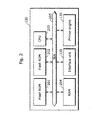
- Fig. 2 is a block diagram showing a hardware configuration of the printer 130 shown in Fig. 1.
- the printer 130 is a double-ROM-specified printer as shown in the diagram and includes a flash ROM 201, a flash ROM 202, a CPU 203, a RAM 204, a bus 205, the interface unit 131 and the printer engine 135.
- An explanation of the interface unit 131 and the printer engine 135 is omitted here as they are already mentioned.
- a firmware containing a boot program and a font figure is already written in either of the flash ROM 201 or the flash ROM 202 (for instance, the flash ROM 201) and the other (for instance, the flash ROM 202) is used as a backup for updating a firmware of the printer 130.
- the CPU 203 realizes the functions of each processing unit shown in Fig. 1 (a judgment unit 133, a print processing unit 134, a firmware updating unit 136 and a control unit 137) by executing the firmware stored in the flash ROM 201 which is for booting use.
- the RAM 204 is used as a work area for the CPU 203 other than for the buffer 132 shown in Fig. 1.
- the bus 205 is a parallel data transmission line for exchanging data between the units in the printer 130.
- Fig. 3A and 3B are diagrams showing the contents used in the firmware updating system 100 presented in Fig. 1 as well as a processing flow at each unit.
- Fig. 3A is a diagram showing the flow of processing at each unit in the firmware updating system 100 when the printer 130 shown in Fig. 1 prints normal print-only content.
- Fig. 3B is a diagram showing the flow of processing at each unit in the firmware updating system 100 when the printer 130 updates the firmware.
- the delivery server 110 firstly sends, through data broadcasting, a broadcast content consisting of a display content and a print-only content as shown in Fig. 3A.
- the STB 120 on the receipt of it, once stores the files included in the received broadcast content respectively to a specified directory in the hard disk 126, (2) reads out the display content so as to generate display data and outputs the generated display data to the TV 123.
- a print button written "Print" as in the diagram, for example, is displayed together with a guiding phrase like "Please press the print button for printing print content".
- the printer 130 When a user presses the print button following the displayed guiding phrase, the file constituting the print-only content is read out from the hard disk 126 and (4) the read-out print-only content is sent to the printer 130.
- the printer 130 (5) searches a tag indicating update of firmware in the print-only content inputted from the STB 120. Unless the tag is identified, the printer 130 generates print data analyzing the print-only content and (6) outputs sequentially the generated print data to the printer engine 135 so as to execute printing.
- the delivery server 110 To update the firmware of the printer 130 under the firmware updating system 100, the delivery server 110, as a start, (1) sends the broadcast content consisting of the display content for firmware updating and the print-only content, that is, files for firmware updating use.
- the STB 120 on the receipt of it, stores the files included in the broadcast content to a specified directory as in the case of normal printing, (2) generates display data based on the display content and displays the generated display data on the screen of the TV 123.
- an updating button "Update" for example, is displayed together with a guiding phrase like "Please press the updating button for updating the firmware.”
- the printer 130 When the user presses the updating button following the displayed guiding phrase, the files constituting the print-only content is read out from the hard disk 126 and (4) the readout print-only content is sent to the printer 130.
- the STB 120 handles files in the same way regardless of what is written inside, namely, whether it is files for firmware updating use or a print-only content.
- the printer 130 searches for a tag indicating update of firmware in the print-only content. Since the tag indicating update of firmware is written at the head of the text in the file, the printer 130 determines the print-only content as files for firmware updating use, and (6) starts updating the firmware. Note that, in the case where the description in the content is identified as an instruction for printing, the printer 130 generates print data analyzing the detail of the content and outputs the generated print data to the printer engine 135 so as to execute printing.
- the STB 120 under the firmware updating system 100 can perform the printing of the print-only content as well as the update of the firmware of the printer 130, using the same processing, both of the operations can be performed without installing a new component for firmware updating in the STB 120.
- Fig. 4A and 4B are diagrams showing examples of broadcast content sent from the delivery server 110 shown in Fig. 1.
- Fig. 4A is a diagram showing an example of the broadcast content in the case where the printer 130 carries out normal printing.
- Fig. 4B is a diagram showing an example of the broadcast content in the case where the printer 130 updates the firmware.
- "arib-file://DirA/start.bml” shows a top page included in the broadcast content.
- This file is a page firstly read out from the hard disk 126 with a browser included in the display data generation unit 122, and then started up. Note that in this page, however, a link for showing the browser a page to be firstly displayed is described in BML.
- the broadcast content for normal printing consists of a display content made up of files such as “shopping.bml,” “a_btn.png,” “b_btn.png,” “print_btn.png” and “/50” as well as a print-only content which made up of files such as “top_print.xhtmlp” and "image.jpg”.
- the file “shopping.bml” of the display content is a file in which the detail of display for TV shopping or the like is described in BML.
- A_btn.png "b_btn.png” and “print_btn.png” are Portable Network Graphics (PNG) files showing respectively a button A, a button B and a print button, displayed on the screen.
- the file “top_print.xhtmlp” of the print-only content is a file in which the detail of printing is described in XHTML, while the file “image.jpg” is a file for JPEG images cited in the file “top_print.xhtmlp”.
- the broadcast content for updating a firmware as shown in Fig. 4B consists of, for example, a display content made up of “update.bml” and “update_btn.png", and a print-only content made up of "top_update.xhtmlp” and "update.data”.
- the file “update.bml” of the display content is a file in which the detail of display showing an operating procedure for updating the firmware is described in BML whereas "update_btn.png" is a PNG file which shows the updating button to be displayed on the screen.
- top_update.xhtmlp of the print-only content is a file in which the detail of the processing for firmware updating operated by the printer 130 is described in XHTML, and, is also associated with the printer whereas the "update.data” is a data file for firmware update which is cited in the "top_update.xhtmlp".
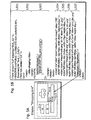
- Fig. 5A and 5B are diagrams showing an example of the file of the display content shown in Fig. 4A as well as an example of its display.
- Fig. 5A is a diagram showing an example of the screen displayed on the TV 123 based on the file "shopping.bml" shown in Fig. 4A.
- Fig. 5B is a diagram showing an example of the file "shopping.bml” shown in Fig. 4A. It should be noted that for coding which is not directly related to the present invention, its graphic display and explanation are omitted here.
- Version information for XML, an encode type of character code, a document type as well as on version information for BML (L501), a title “shopping” (L502) and others are described at the beginning of the file “shopping.bml” as shown in Fig. 5B.
- processing carried out by the browser is defined as a function "keydown()". What is defined here is that the browser prints the file “top_print.xhtmlp” (actually an output of the file “top_print.xhtmlp” to the printer 130) (L503).
- a display of the data file "/50" described with a MPEG2 video is to be displayed in a position starting from the 528th pixel from the left and the 40th pixel from the top with a size of 360 pixels in width and 202 pixels in height (L504).
- a display of a button A 511 represented in a PNG file “a_btn.png” (L505) and a display of a button B 512 represented in a PNG file “print_btn.png” (L506) are described in the same way.
- a display of a print button 513 represented in a PNG file "print_btn.png” and a function of "keydown()" in the case where the print button 513 is pressed are further described (L507).
- the screen shown in Fig. 5A is displayed on the TV 123.
- a video 510 of an automobile is displayed on the upper right on the screen of the TV 123 when a description of 504 is executed whereas the buttons A 511 and B 512 are displayed on the left-hand side on the screen of the TV 123 when the descriptions of L505 and L506 are executed.
- the print button 513 is displayed in the lower center of the screen when the description of L507 is executed and the function "keydown()" is executed when the print button 513 is pressed.
- Fig. 6 shows an example of the file “top_print.xhtmlp” outputted to the printer 130 when the print button 513 is pressed on the display screen shown in Fig. 5A.
- the file of print-only content "top_print.xhtmlp” As is shown in the diagram, as for the file of print-only content "top_print.xhtmlp,” the version information for the XML, the document type of coding and the title are described at the beginning of the file “top_print.xhtmlp", as is same for the file of the display content shown in Fig.5B, and character string information to be printed is described in the area between a tag " ⁇ P>" and a tag " ⁇ /P>” in the text, for instance, "data broadcast TV shopping ... (omission) ... end of printing” or the like (L601).
- Fig. 7A and 7B are diagrams showing an example of the file "update.bml” shown in Fig. 4B and an example of its display.
- Fig. 7A is a diagram showing an example of the screen displayed on the TV 123 based on the file "update.bml” in Fig. 4B.
- Fig. 7B is a diagram showing an example of the file "update.bml” in Fig. 4B. It should be noted that for coding which is not directly related to the present invention, its graphic display and explanation are omitted.
- the TV 123 continues to display the character string 710 "Updating on-line the firmware of your printer. Please press the 'Firmware update' button” described in the L702 as shown in Fig. 7A, and the updating button 711 is displayed below it.
- this updating button 711 is pressed, the file of the print-only content "top_update.xhtmlp" is outputted to the printer 130 in accordance with the function "keydown()", as is already explained above.
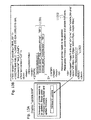
- Fig. 8 is a diagram showing an example of the file “top_update.xhtmlp” outputted to the printer 130 when the updating button 711 is pressed on the display screen shown in Fig. 7A.
- the same is described in the first part of the file “top_update.xhtmlp", that is, a print-only content for firmware updating, as is described in the file “top_print.xhtmlp” shown in Fig. 6B.
- the difference is that a tag starting with "update” is described in the beginning of the text (L801).
- This tag contains attribute information such as "MEI” which represents vendor information of the printer and is to be updated in firmware updating process, "5.0.1” which represents version information of the updated firmware, "cefiro2002” which represents model ID to be updated and option information.
- the judgment unit 133 having read this tag, compares the attribute information described in the tag and its own attribute information written in the booting ROM in the firmware storage unit 138. If the printer 130 corresponds to the target model for firmware updating of the target vendor, has the specified options, and, its own firmware version is older than the version information in the tag, the judgment unit 133 obtains from the hard disk 126 a firmware update data file "update.data" (L 802) specified by version-upgrade data source attribute described in the L801 so as to output it to the firmware updating unit 136. The firmware updating unit 136 writes this file into the ROM which is not for booting included in the firmware storage unit 138 and updates the firmware. In the firmware update data file "update.data", the firmware of the latest version, for example, is described in a machine language.
- the judgment unit 133 can determine promptly whether the processing to be carried out, indicated in the print-only content, is printing or updating of firmware by describing the tag " ⁇ update>" at an early stage in the analysis of the top page of the print-only content "top_update.xhtmlp", which means at the head of the text here, and can start promptly respective processing.
- the STB 120 displays the display screen indicating update of firmware, waits for the update button to be pressed, and has the browser execute the print instruction indicated in the file "top_update.xhtmlp".
- the present invention is not restricted to this and the print instruction directed to the browser "browser.print(.top_update.xhtmlp")" may be described at the head of the file "update.bml" of the display content.
- the browser of the STB 120 executes the print instruction without receiving an input for instructing printing from the user. Namely, the STB 120 receives the print instruction directly from the delivery server 110.
- the printer 130 can start promptly the updating processing of the firmware without waiting for the display processing performed by the STB 120 as well as the user's input to the display screen. Since the STB 120 can display other display content instead of inquiring the user of the update of the firmware, the firmware of the printer 130 can be updated in the background.
- the judgment unit 133 judges whether the processing of the print-only content is for printing or for updating firmware based on a presence of the tag " ⁇ update>".
- the present invention is not restricted to this and another method may be used, for example, the names of the files of print-only content.
- the STB 120 may output files by notifying the file names of all the files outputted to the printer 130 so that the judgment unit 133 may determine to update the firmware in the case where the name of the file inputted from the STB 120 is the one specified beforehand, for instance, "update.xhtmlp," and may determine to perform print processing if it is other file name.
- it does not matter whether the file name of the file for updating firmware use is "update.xhtmlp" or not, however, an absolute file name whose application is already defined in a markup language as well as in a communication protocol shall not be used.
- the judgment unit 133 may once open only the file whose file name corresponds to the specified file name, search the tag " ⁇ update>" so as to perform the updating processing of the firmware only when the tag " ⁇ update>” is found, after the determination of the processing by comparing the file names in order to prevent malfunctions due to the errors in the file names.
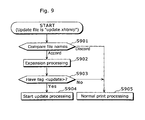
- Fig. 9 is a flowchart showing the procedure operated by the judgment unit 133 for judging whether to update the firmware or not by comparing the file names.
- the judgment unit 133 compares a file name of the inputted print-only content with a file name which is specified in advance as a file name of a file for updating firmware use (S901), and once opens the file in question in the case where they correspond (S902).
- the judgment unit 133 searches for the tag " ⁇ update>" in the unfolded file (S903) and begins updating processing of the firmware when it is found (S904). If not, a normal printing processing (S905) starts. In the case where the file name of the inputted print-only content does not correspond to the specified file name, the normal printing processing begins. As mentioned above, the judgment unit 133 opens only the files estimated as those for firmware updating use when the file names match and then searches for the tag " ⁇ update>". This realizes a prompt detection of the tag " ⁇ update>" in the case where the file name of the inputted print-only content is correct. It can also prevent malfunctions in executing firmware updating processing based on the file in spite that the file is for printing.
- the judgment unit 133 of the printer 130 obtains, from the hard disk 126 in the STB 120, the firmware update data file "update.data” whose file name is cited straightly after the tag " ⁇ update>” so as to output it to the firmware updating unit 136.
- the present invention is not restricted to this method, and instead, the contents of the firmware update data file "update.data” may be described with in-line expansion in the top page file "top_update.xhtmlp" for firmware updating use.
- the firmware updating is performed without any problems even if the printer 130 does not have a (PULL) function to obtain a target file from the hard disk 126 in the STB 120.
- the character string for printing the notice of the completion of firmware updating is described in the update data file. It is, however, not always necessary to describe it in the update data file.
- a print file notifying the completion of firmware updating may be stored beforehand in the ROM so that the contents of printing may be printed out each time the update of firmware is completed.
- appropriate character strings may be stored beforehand in the ROM so that these character strings and attribute information like the version information in the tag" ⁇ update>" may be combined so as to create phrases notifying the completion of firmware updating each time the update of firmware is completed.
- Fig. 10 is a functional block diagram showing a structure of a firmware updating system 1000 according to the second embodiment of the present invention.
- the firmware updating system 1000 is a system in which the firmware update data for printing, which is one of the above-mentioned print-only contents is sent as an attached file to a broadcast e-mail that is described in a BML format from a delivery server placed in a broadcasting station for TV broadcast, a home STB which has received it saves the data once in a storage medium like a PC card so that a firmware of the printer is updated off-line.
- the system includes a delivery server 1010, an STB 1020 and a printer 1030. The same referential marks are put for the components which are as same as those composing the firmware updating system 100 described in the first embodiment, and the description is omitted as is already explained in the first embodiment.
- the delivery server 1010 is a server, which generates a broadcast e-mail in a BML format in which a firmware update file of the printer is regarded as an attached file, and sends the generated broadcast e-mail to each household through TV broadcast.
- the delivery server 1010 includes three Data Bases (DB) (the firmware DB111, the display content DB112 and the print-only content DB113) consisting of a hard disk or the like and three processing units (the input unit 115, the send unit 116 and a content generation unit 1011) consisting of a CPU or the like.
- DB Data Bases
- the input unit 115, the send unit 116 and a content generation unit 1011 consisting of a CPU or the like.
- the content generation unit 1011 incorporates in advance the firmware update data file of the printer in the firmware DB111 in a firmware updating program in the print-only content DB 113 and generates print-only content for firmware updating use. Furthermore, the content generation unit 1011 reads out from the display content in the firmware DB112 a broadcast e-mail that guides to update the firmware of the printer so as to generate a display content.
- the STB 1020 is a communication terminal with a function to receive the TV broadcast so as to acquire the broadcast e-mail addressed to it; a function of data reading/writing from and in a storage medium such as a PC card; and a function to write print-only content attached to the broadcast e-mail in the PC card when a memory writing instruction of the print-only content is sent from the remote controller 124 while the display content of the received broadcast e-mail is displayed.
- the STB 1020 includes the hard disk 126 realized with four processing units (a reception unit 121, a remote control reception unit 125, a display data generation unit 1022 and a print output unit 1023) realized with the CPU; a bus 128 which transfers data between them; and a TV 123, a remote controller 124 as well as a PC card 1024 which are external apparatuses.
- the display data generation unit 1022 includes a browser compatible with XHTML and BML which can identify a file of the print-only content using file extensions so as to execute saving commands.
- the print output unit 1023 reads out the print-only content from the hard disk 126 following the saving commands directed to the browser responding to an input from the remote control reception unit 125, and writes the readout print-only content in the PC card 1024.
- the PC card 1024 is a portable storage medium in which an IC chip is embedded.
- the printer 1030 is a printer that reads out, from the PC card 1024, a print-only content for firmware updating use, and updates an internal firmware according to the readout print-only content for firmware updating use.
- the printer 1030 includes the firmware storage unit 138 realized with two ROMs, the buffer 132 realized with a RAM, five processing units (the judgment unit 133, the print processing unit 134, the firmware updating unit 136, a PC card reader 1031 and a control unit 1032) to be realized with a CPU or the like and a printer engine 135.
- the PC card reader 1031 reads out the print-only content from the PC card 1024 and outputs it to the judgment unit 133.
- the PC card reader 1031 also reads out from the PC card 1024 a data file for firmware update use as requested from the judgment unit 133, and outputs it to the judgment unit 133.
- the control unit 1032 controls processing at each unit in the printer 1030 in accordance with the firmware written in the boosting ROM included in the firmware storage unit 138.
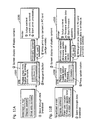
- Fig. 11A and 11B show respectively contents and a processing flow at each unit under the firmware updating system 1000 shown in Fig. 10.
- Fig. 11A shows a flow of processing at each unit in the case where the printer 1030 shown in Fig. 10 prints normal print-only content.
- Fig. 11B shows a flow of processing at each unit in the case where the printer 1030 shown in Fig. 10 updates the firmware.
- the printer 1030 prints normal print-only content under the firmware updating system 1000
- a display content in which a print-only content is regarded as an attached file is sent as a broadcast e-mail from the delivery server 1010.
- the STB 1020 having received the data broadcasting, examines a destination address of the broadcast e-mail and incorporates it inside when it is identified as the one addressed to itself. Then, the STB 1020 once stores the incorporated broadcast e-mail as well as the attached file respectively to a specified directory in the hard disk 126, (2) reads out the display content so as to generate display data and outputs the generated display data onto the TV 123.
- a button "Print” is displayed as in the diagram together with a guiding phrase "Press the print button for printing print content".
- the files constituting the print-only content is read out from the hard disk 126, and (4) the readout file is written in the PC card 1024.
- the printer 1030 (5) reads out the print-only content from the PC card 1024, searches for a tag indicating update of firmware in the readout print-only content and then generates printing data by analyzing the detail of the content unless the tag is identified.
- the printer 1030 (6) executes printing by outputting sequentially the generated printing data to the printer engine 135.
- the delivery server 1010 sends, to the STB 1020 through data broadcasting, a broadcast e-mail in which a print-only content, that is, files for firmware updating use, is regarded as an attached file.
- a broadcast e-mail in which a print-only content, that is, files for firmware updating use, is regarded as an attached file.
- the phrases announcing a firmware update are displayed.
- the STB 1020 upon a receipt of it, stores the display content and the print-only content respectively in a specified directory in the hard disk 126 as in the case of normal printing, generates display data based on the display content and displays the generated display data on the screen of the TV 123.
- an updating button "Update” is displayed together with a guiding phrase that goes "Please press the updating button for updating the firmware".
- the updating button following the displayed guiding phrase the files constituting the print-only content are read out from the hard disk 126, and the readout print-only content is written in the PC card 1024.
- the printer 1030 When this PC card 1024 is inserted into the printer 1030, the printer 1030 reads out the print-only content from the PC card 1024 and searches for a tag indicating update of firmware in the readout file. In the file, the tag indicating update of firmware is written at the head of the text; therefore, the printer 1030 can rapidly judge the print-only content as a firmware update file. Then, update of the firmware starts according to the firmware update file. However, the printer 1030 generates printing data and executes printing in the case where a description instructs for printing is found in the content.
- the STB 1020 under the firmware updating system 1000 can save in the PC card 1024 either print-only content or firmware update data in the same way and execute processing off-line in the printer 1030, therefore, a firmware can be updated without adding any new components to the STB 1020.
- Fig. 12A and 12B are diagrams showing a file of a broadcasting e-mail "shopping.bml” and an example of its display in the case where normal print-only content is printed off-line.
- Fig. 12A shows an example of the screen displayed on the TV 123 based on the file of the broadcast e-mail "shopping.bml” which is also a display content.
- Fig. 12B shows an example of the display content file “shopping.bml”.
- the display content file “shopping.bml” as shown in Fig. 12B is almost as same as the display content file "shopping.bml” shown in Fig. 5B.
- Fig. 13A and 13B show a file of the broadcast e-mail "update.bml" and an example of its display in the case where the firmware is updated off-line.
- Fig. 13A shows an example of the screen displayed on the TV 123 based on the file of the broadcast e-mail "update.bml” which is also a display content.
- Fig. 13B shows an example of the display content file “update.bml” for updating the firmware.
- the display content file “update.bml” is almost as same as the display content file "update.bml” shown in Fig. 7B.
- the STB 1020 operates the same processing as is performed for print-only content, however, a character string that goes "The firmware of your printer needs to be updated. Please press the updating button and update the firmware.” is described in the area between the tag " ⁇ P>” and the tag “ ⁇ /P>” (L1302), and the same guiding phrase as this character string is displayed on the screen of the TV 123.
- the user operates the remote controller 124 following the guiding phrase, then the function "keydown ()" is executed when the button "Firmware update" displayed on the screen shown in Fig. 13A is pressed.
- the browser executes the saving commands of "browser.save(./top_update.xhtmlp”,"SD")” and "browser.save(./update.data”,”SD”” following the function so that the files “top_update,xhtmlp” and “update.data” are written in the PC card 1024.
- the files "top_update.xhtmlp” and “update.data” are as same as those described in Fig. 4B as well as in Fig. 8, and the updating processing performed by the printer 1030 is as same as the one described in the first embodiment.
- the "SD” is a character string representing the type of the PC memory card, and in the case of using a different memory card, the one corresponding to it shall be set.
- the print-only content and the print-only content for firmware updating use are regarded as the files attached to the broadcast e-mail.
- these print-only contents are not always necessarily to be attach and selected files or all of the files in such print only contents may be stored in a server on the Internet and a link may be described in the text of the broadcasting e-mail or a URL which leads to these print-only contents may be described at the head of the broadcast e-mail.
- the amount of the data of the file attached to the broadcast e-mail may be limited.
- the delivery server 1010 can send the print-only content and the print-only content for firmware updating use to the STB 1020, without having a limitation in the amount of data.
- the printer 1030 includes a communicating function for a connection to the Internet, the printer 1030 can straightly obtain from the Internet the target print-only content and the target print-only content for firmware updating use, without going through the STB 1020.
- Fig. 14 shows an example of the data file of the print-only content for firmware updating use "top_update.xhtmlp" in the case where the data file for firmware update "firm.data” is specified at a URL.
- a URL "http://www.virtual.co.jp/firm.data” is described indicating a location of the data file "firm.data” for firmware updating use on the Internet defined with an attribute "src” and an element “update” (L1401).
- the printer obtains a data file "firm.data” from the URL http://www.virtual.co.jp/firm.data via the Internet and can update the firmware.
- the print button and the updating button should be displayed in the text of the broadcast e-mail. It is not always necessary, however, to display each of the buttons in the text, and e-mail software, for instance, may display them.
- the firmware update data of the printer 1030 is sent as an attached file of the broadcast e-mail and the firmware is updated off-line using the PC card 1024 with a PC card slot placed in the STB 1020 and the printer 1030, however, it is not always necessary to update the firmware off-line.
- the firmware may be updated on-line while connecting the STB 1020 to the printer 1030 with use of the interface IEEE1394 or the like, as in the first embodiment.
- the STB 120 and the printer 130 described in the first embodiment, equipped respectively with the slot for the PC card 1024, may send the firmware update data of the printer as a print content from the delivery server at the broadcasting station so as to update off-line the firmware of the printer 130.
- the PC card 1024 is used as a bridge media to transfer the firmware update file from the STB 1020 to the printer 1030, however, the present invention should not be limited to this, and a flash memory card may be used instead.
- the print-only content and the print-only content for firmware updating use are sent as attachments to the broadcast e-mail, however, it is not always the case that the print-only contents are sent by attaching them to the broadcast e-mail, and may be sent as attachments to an e-mail from the delivery server on the Internet.
- response processing (a brunch processing due to error processing or the like) corresponded to various types of printers in the STB is explained as a variation of the above-mentioned embodiment.
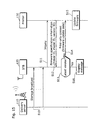
- Fig. 15 is a sequence diagram showing the response processing between the STB 120 and the printer 130 under the firmware updating system 100.
- the latest firmware update data corresponding to each type of the printers is stored in the STB 120 through storage broadcast, and examples of the processing necessary for the STB 120 according to the model of the printer 130 being connected to the STB 120 and the version of the firmware are shown.
- the delivery server 110 is a broadcasting station which performs storage broadcast or the like, and delivers the firmware update data of the latest version for all the types of the printers connectable to the STB 120, as broadcast data (S10).
- the STB 120 stores all of the firmware update data in the hard disk 126.
- the STB 120 When obtaining from the user an instruction to update the firmware of the printer, the STB 120 firstly inquires firmware specification information to the printer 130 being connected (S11) so as to obtain the information from the printer 130 (S12).
- the firmware specification information is information for specifying the firmware included in a target printer out of all the types of the printers connectable to the STB, and includes, for example, a maker ID identifying a maker of the printer, a model ID identifying a model of the printer (uniquely assigned by the maker), a version ID identifying a version of the firmware (uniquely assigned by the maker), and others.
- the STB 120 compares the firmware specification information obtained from the printer 130 and the information related to the latest version distributed in advance from the delivery server 110 so as to judge whether or not the version of the firmware installed in the printer 130 being connected is the latest one (S13). In the case where the version of the firmware is not the latest (No at S13), the STB 120 reads out the corresponding firmware update data from the hard disk 126 and outputs it as a print-only content to the printer 130 (S14). Thus, the updating of the firmware is operated by the printer 130 as in the above-mentioned embodiment (S15).
- the STB 120 terminates the processing by presenting a message "There is no need to update the firmware.” to the user (S16).
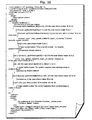
- Fig. 16 shows an example of the display content which realizes the brunch processing (S11 ⁇ S14, S16 in Fig. 15) performed by the STB 120 as mentioned above.
- the display content shown in the diagram is what is included in the broadcast content distributed from the delivery server 110 like the display content in Fig. 7B in the first embodiment, in which a script aiming at outputting the firmware update data as a print-only content to the printer 130 is described.
- the script which aims at obtaining the firmware specification information (an output of firmware update data or a display of an error message telling that the update of the firmware is not needed or the like) from the printer 130 so as to execute the brunch processing corresponded to the information, is described in an area between the tag " ⁇ script>" and the tag " ⁇ /script>".
- a function “browser.getPrinterMakerID()” is a function for obtaining a maker ID of the printer being connected or the like.
- a function “browser.getPrinterTypeID() is a function for obtaining a model ID of the printer being connected or the like.
- a function "browsergetPrinterSoftwareVersion() is a function for obtaining a version ID of the firmware installed in the printer being connected or the like.
- the STB 120 can output the firmware update data corresponded to the printer actually connected to the STB 120 and can perform an error processing if this is not necessary only by carrying out the operations according to the received display content.
- the firmware update data which STB 120 receives and stores will have an increase in amount of data as the time goes by.
- the STB 120 may, for example, delete the firmware update data which has been stored over a certain period of time so that the amount of the data may not surpass a storage capacity of the hard disk 126.
- the first method is to specify beforehand one printer by the user with use of a device management function ("device navigation" or the like) installed in the STB 120 so that the STB 120 may identify the specified printer to be updated during the firmware updating processing.
- a device management function (“device navigation" or the like) installed in the STB 120 so that the STB 120 may identify the specified printer to be updated during the firmware updating processing.
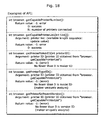
- the second method is to distribute to the STB 120 the display content which includes a program in which a plurality of printers are to be updated during firmware updating by using various functions (i.e., API which obtains information on a plurality of printers connected to the STB 120) as shown in Fig. 18, and let the STB 120 execute it.
- various functions i.e., API which obtains information on a plurality of printers connected to the STB 120
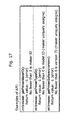
- the number of the printers connected to the STB 120 is specified using the function "browser.getCapablePrinterNumber()" as a start, and then a list of IDs (printer ID) for distinguishing the printers being connected is obtained using the function "browser.getCapablePrinterList(int List[]), and furthermore, by calling up the functions "browser.getPrinterMakerID(int printerID), "browser.getPrinterType ID()” and "browser.getPrinterSoftwareVersion()" which regard each ID as an argument, the maker ID, the model ID and the version ID of each printer are obtained so that a script to update the firmware for all these printers can be incorporated in the display content.
- the STB 120 having obtained such display content, can update all at once the firmware for a plurality of the printers connected to the STB 120, by operating in accordance with the script.
- the present firmware updating system resembles to the first embodiment in the respect that the STB updates the firmware installed in the printer by outputting the firmware update data as a print-only content to the printer. However, the difference is that the STB does not receive the firmware update data as broadcast data but obtains the data on-demand from a specified website via the Internet.
- Fig. 19 is a diagram showing the whole configuration of the firmware updating system 100a according to the present embodiment.
- the system 100a includes a firmware-providing site 140, that is, a portal site for providing services to update a firmware of the printer, is addition to the components included in the firmware updating system 100 described in the first embodiment.
- the delivery server 110 and the printer 130 are as same as those described in the first embodiment, but the STB 120a includes a communication interface 129 such as a modem which communicates with the firmware-providing site 140 via the Internet, in addition to the components included in the STB 120 according to the first embodiment.
- the firmware-providing site 140 is a website which stores the latest firmware update data for the printers of all sorts of makers and models so as to provide the user with such data.
- Fig. 20 is a diagram showing a sequence of firmware updating of the printer 130 under the firmware updating system 100a.
- the STB 120a firstly obtains instructions to update a firmware of the printer 130 (S20) from the user, requests the printer 130 to send firmware specification information using the API shown in Fig. 17 or the like (S21) so as to obtain it (S22).
- the STB 120a then gains an access to the firmware-providing site 140 via the communication interface 129 and the Internet, requests the firmware specified by the firmware specification information (maker ID, model ID and version ID) obtained from the printer 130 (S23) so as to output the firmware as a print-only content to the printer 130 (S25) while downloading the firmware from the firmware-providing site 140 (S24), and lets the printer 130 execute printing (it is actually an update of the firmware) (S26).
- the firmware specification information maker ID, model ID and version ID
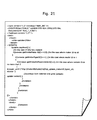
- Fig. 21 shows an example of the display content which enables the STB 120a described above to acquire firmware update data (S21 ⁇ S25 in Fig. 20).
- the display content shown in the diagram is what is included in the broadcast content distributed from the delivery server 110, like the display content shown in Fig 7B in the first embodiment, and a script which aims at obtaining the firmware update data from the firmware-providing site 140 so as to output the data as a print-only content to the printer 130 is described.
- a program i.e., "browser.print()" that aims at obtaining the firmware specification information from the printer 130 so as to output for printing, to the printer 130, the firmware update data (http://maker10/typel/v2/top_update_maker10_type1_v2.xhtmlp ) specified according to the firmware specification information while downloading it from the firmware-providing site 140 is described.
- the firmware of the latest version of the printer 130 connected to the STB 120a is downloaded to the STB 120 via the Internet, and then, outputted to the printer 130 for printing so that the firmware of the printer 130 is updated.
- the STB 120a does not distribute (broadcast) the firmware update data of all sorts of models as broadcast content, but keeps it at a specific site on the Internet and downloads only those targeted for updating the firmware of the printer 130. There is, therefore, no need to consider a problem of limitation in a broadcasting band when broadcasting the firmware update data of the printers of all sorts of models.
- the present embodiment is preferable as a route for obtaining the firmware update data especially when the communication interface 129 installed in the STB 120a is an always-connected interface adapted to the broadband Internet.
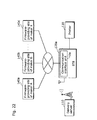
- the firmware update data of all sorts of printer makers is kept in one place on the Internet (firmware-providing site). However, it may be scattered at websites 140a ⁇ 140c which differ depending on the maker.
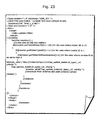
- a firmware updating system with an on-demand method adapted to the case of having plural websites 140a ⁇ 140c is realized by distributing in advance the display content as shown in Fig. 23 from the delivery server 110 to the STB 120a so as to allow the STB 120a to execute it.
- Fig. 24 is a flowchart showing the procedure operated by the STB 120a that executes the display content shown in Fig. 23.
- the STB 120a receives the instruction to update the firmware of the printer from the user (S30), obtains the firmware specification information from the printer 130 being connected (S31), specifies, according to the obtained firmware specification information, the firmware-providing sites 140a ⁇ 140c which are websites uniquely created by a maker who provides the latest firmware of the printer 130 (S32), downloads the latest firmware update data from the website and stores it in the hard disk 126 (S33). Then, the STB 120a reads out the downloaded firmware update data from the hard disk 126 and outputs it to the printer 130 (S 34). Thus, the version of the firmware is updated to the latest one in the printer 130.
- the obtainment of the firmware corresponds to the functions "browser.getPrinterMakerID()", “browser.getPrinterTypeID()” and “browser.getPrinterSoftwareVersion()" which are used for the display content in Fig.
- the firmware of the printer 130 consists of a plurality of program files written in a format capable of dynamic linking, for example, like a shared library format of Linux and a DLL of Windows or the like, and in the case where the program files are partly modified for firmware updating, all that is needed to do is to replace partly the existing files with the modified files for the printer 130.
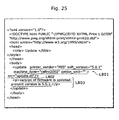
- Fig. 25 shows an example of the print-only content "top_update.xhtmlp” including the firmware update data that is a program DLL file.
- the firmware update data represented in the dynamic link DLL format shown in Fig. 25 the program file “update.dll” is placed in a section indicated with the tags “ ⁇ update>” and “ ⁇ /update>”, as is obvious compared to the firmware update data "update.data” which is a normal data file, as shown in Fig 8.
- the size of the files to be downloaded becomes smaller and little time is needed for its transfer, and furthermore, the time to the flash ROM is shortened by keeping the firmware update data formatted as a program file.
- a timing to update the firmware of the printer (a notice that a firmware of a certain model is revised and a release of the latest firmware update data is realized), it may be notified to the user by the broadcast e-mail sent from the delivery server 110 and the e-mail sent from the printer maker.
- the top page file of the display content is explained as a BML file in the above-mentioned embodiments.
- the description language is not necessarily limited to the BML, and the HTML, or even another language may be used as long as the browser in the STB can analyze them.
- the firmware update data is a dynamic link file
- the present invention is not limited to this and the firmware update data may be constructed in a format different from the former firmware update data.
- the STB 120a does not output the firmware update data to the printer 130 while downloading it at the same time, but outputs it to the printer after having stored it once in the hard disk 126. Therefore, the firmware update data to be downloaded can be kept as a difference file with respect to the firmware update data of the former version.
- a difference file obtained based on the difference between the firmware of the new version and that of the older version may be included in the firmware update data.
- This does not mean to straightly replace the firmware of the older version with that of the new version, but to store the information for specifying the modified part within the firmware of the older version, as a difference file, in the firmware update data.
- it is not the STB 120a but the printer 130 who conflates the difference file.
- the conflation method for example, is to copy the firmware of the older version to the ROM which is not for booting use and specify the changes made within the firmware based on the information in the difference file so as to rewrite the specified part accordingly.
- a receiving apparatus which receives the display content and print content sent from the delivery server (or firmware update data), and provides a printer with the print content
- an STB may be a communication apparatus such as a personal computer, a personal digital assistance, a cell phone and the like.
- the receiving apparatus which receives the firmware update data is not restricted to an STB, and it may be a cell phone, a personal digital assistance, or the like, each being equipped with a function to output to the printer.
- the printer obtains a print content (or firmware update data) via the STB or the bridge media.
- the printer may PULL a print content (firmware update data in the present embodiment) from a web server on the Internet so as to execute update of the firmware.
- the printer 130 may download the print content (or firmware update data) from the web server and print it out (or update the firmware). There is, therefore, no need for the STB to either relay firmware update data to the printer or perform buffering.
- firmware update data files in the above embodiments such as "update.data” and “update.dll” may be compressed files. It is efficient to have firmware update data as a compression file especially for transferring firmware update data from the STB to the printer through the bridge media with low cost and small storage capacity. Then, these files may be kept as files in a self-unpacking format.
- a link of the difference DLL file is not restricted to be operated by the STB and it may be the printer which performs the linking operation.
- the printer having obtained firmware update data as a difference DLL file via the STB, the bridge media, the Internet or the like, may generate a firmware of the latest version by linking to the firmware of the existing version stored in the firmware storage unit 138 and write the generated firmware into the firmware storage unit 138 so as to update the existing version.
- firmware is mainly a program for controlling the printer.
- the firmware may include not only a program but also data such as a font for printing, external character data and others.
- the firmware update data for updating such firmware may be just the font and external character data themselves or just difference data for updating data by adding them to the existing set of font data.
- the rules may be defined beforehand in order to identify firmware update data as either a program only, a program that includes data or data only, using a file name, an extension or a tag of the firmware update data.
- the program included in the firmware update data is not limited to OS such as a control program or the like, and may be an application program or an in-between program of the OS and the application.
- firmware update data may include an off-set address for updating an address of the control program within a ROM as well as data for updating the control program.
- a firmware or firmware update data may include a plurality of different programs or plural pieces of different data.
- the firmware update data shall include an address indicating each location within the ROM for each data to be written.
- a control unit includes a firmware storage unit in a printer and controls operations at each unit in the printer by executing the firmware stored in it.
- the present invention is not limited to this, and furthermore, a printer engine may include two ROMs for firmware storage use which are independent of the control unit, and may have a configuration in which the printer engine operates independently of the control unit by executing a firmware for printer engine use.
- the printer engine in this case includes not a configuration consisting of mechanical parts only but a control unit exclusively for printer engine use which analyzes the firmware for printer engine use so as to execute it. What is more, in this case, a firmware for control unit use and a firmware for printer engine use shall be identified using file names which are defined in advance based on the specific rules.
- the firmware updating unit writes it in the ROM which is not for booting included in the printer engine.
- the case where the firmware update data inputted from the judgment unit is a firmware for control unit use is as already explained.
- the printer according to the present invention can update the firmware for control unit use as well as the firmware for printer engine use without any problems even in the case where the printer engine includes two ROMs for storing the firmware which are set independently from the control unit.
- the firmware update data explained as one data in the above-mentioned embodiments can be divided into two types: one for control unit use; and the other for printer engine use. This therefore reduces the amount of firmware update data received or downloaded at one time by updating them respectively in different timings.
- the STB obtains, from the printer, the firmware specification information including the version ID of the firmware so as to download the latest firmware update data is explained.
- the present invention is not limited to this.
- the STB may gain an access to the server based on the maker ID and the model ID obtained from the printer so as to download the firmware update data presented as "latest" on the server.
- the STB includes the hard disk 126 as a storage medium for storing the received display content and print-only content.
- the STB may include instead a semiconductor memory like RAM or a storage medium like a removable memory card or the like.
- firmware data for one model is described in the firmware update file, written in the markup language and outputted as print data to the printer.
- the firmware data for a plurality of models may be described in advance so that the printer may identify and select a firmware for itself based on the firmware specification information or the like so as to update the firmware.
- the server of the present invention is useful as a content delivery server at the broadcasting station where data including a print content is broadcasted or as a delivery server for distributing a print content to a portable terminal such as a mobile phone via mobile phone lines or the like.
- the receiving apparatus of the present invention is useful as a mobile phone and a portable terminal which receives contents including a print content or the like.
- the printing apparatus of the present invention is useful as a printer exclusively connected to a receiving apparatus such as an STB and a DTV as well as to a portable terminal or the like.
Landscapes
- Engineering & Computer Science (AREA)
- Theoretical Computer Science (AREA)
- General Engineering & Computer Science (AREA)
- Physics & Mathematics (AREA)
- General Physics & Mathematics (AREA)
- Software Systems (AREA)
- Human Computer Interaction (AREA)
- Computer Security & Cryptography (AREA)
- Accessory Devices And Overall Control Thereof (AREA)
- Stored Programmes (AREA)
- Record Information Processing For Printing (AREA)
Applications Claiming Priority (5)
| Application Number | Priority Date | Filing Date | Title |
|---|---|---|---|
| JP2002099420 | 2002-04-01 | ||
| JP2002099420 | 2002-04-01 | ||
| JP2003053507A JP3863118B2 (ja) | 2002-04-01 | 2003-02-28 | 受信装置、印刷装置およびファームウェア更新システム |
| JP2003053507 | 2003-02-28 | ||
| PCT/JP2003/004062 WO2003083639A1 (en) | 2002-04-01 | 2003-03-31 | Receiving device, printer, and firmware update system |
Publications (2)
| Publication Number | Publication Date |
|---|---|
| EP1491992A1 true EP1491992A1 (de) | 2004-12-29 |
| EP1491992A4 EP1491992A4 (de) | 2008-06-25 |
Family
ID=28677608
Family Applications (1)
| Application Number | Title | Priority Date | Filing Date |
|---|---|---|---|
| EP03715640A Ceased EP1491992A4 (de) | 2002-04-01 | 2003-03-31 | Empfangseinrichtung, drucker und firmwareaktualisierungssystem |
Country Status (4)
| Country | Link |
|---|---|
| US (1) | US7595902B2 (de) |
| EP (1) | EP1491992A4 (de) |
| JP (1) | JP3863118B2 (de) |
| WO (1) | WO2003083639A1 (de) |
Families Citing this family (75)
| Publication number | Priority date | Publication date | Assignee | Title |
|---|---|---|---|---|
| JP2004185096A (ja) * | 2002-11-29 | 2004-07-02 | Toshiba Corp | 記録再生装置及び記録再生方法 |
| US7644288B2 (en) * | 2003-03-19 | 2010-01-05 | Ricoh Company, Ltd. | Image forming apparauts that checks authenticity of an update program |
| JP4278434B2 (ja) * | 2003-05-19 | 2009-06-17 | パナソニック株式会社 | 通信装置、情報共有システムおよび情報共有方法 |
| JP4693363B2 (ja) * | 2003-05-28 | 2011-06-01 | キヤノン株式会社 | テレビジョン装置及びその制御方法 |
| JP4261986B2 (ja) * | 2003-05-30 | 2009-05-13 | キヤノン株式会社 | 制御装置、制御方法、および記録媒体 |
| US8460243B2 (en) | 2003-06-10 | 2013-06-11 | Abbott Diabetes Care Inc. | Glucose measuring module and insulin pump combination |
| KR100524026B1 (ko) * | 2003-06-20 | 2005-10-26 | 삼성전자주식회사 | 시리즈 모델 지원 펌웨어를 구비한 인쇄 장치 및 시리즈모델 지원 방법 |
| US7722536B2 (en) | 2003-07-15 | 2010-05-25 | Abbott Diabetes Care Inc. | Glucose measuring device integrated into a holster for a personal area network device |
| EP1580658A1 (de) * | 2003-10-24 | 2005-09-28 | Deutsche Thomson-Brandt GmbH | Abnehmbares Speichergerät für audiovisuellen Daten |
| JP4492251B2 (ja) * | 2003-11-28 | 2010-06-30 | セイコーエプソン株式会社 | 印刷システム、印刷要求装置、印刷装置管理装置、印刷装置、印刷装置管理プログラムおよび印刷制御プログラム、並びに印刷方法 |
| US7197634B2 (en) * | 2004-01-16 | 2007-03-27 | Dell Products L.P. | System and method for updating device firmware |
| JP2005223438A (ja) * | 2004-02-03 | 2005-08-18 | Seiko Epson Corp | 操作信号送信機用プログラム、遠隔操作システム |
| JP4617167B2 (ja) * | 2004-02-04 | 2011-01-19 | キヤノン株式会社 | 放送受信装置及びその制御方法 |
| EP1723498A2 (de) * | 2004-03-11 | 2006-11-22 | Preh KeyTec GmbH | Tastatur, insbesondere kassentastatur, und verfahren zur inbetriebnahme sowie zum austausch und update von firmware der tastatur |
| US20050223373A1 (en) * | 2004-04-05 | 2005-10-06 | Dell Products L.P. | Method for updating the firmware of a device |
| US20050262497A1 (en) * | 2004-05-19 | 2005-11-24 | Microsoft Corporation | System and method for generating embedded resource updates for output device |
| CA2572455C (en) | 2004-06-04 | 2014-10-28 | Therasense, Inc. | Diabetes care host-client architecture and data management system |
| EP1764679A1 (de) * | 2004-06-24 | 2007-03-21 | Matsushita Electric Industrial Co., Ltd. | Druckvorrichtung und firmware-aktualisierungsverfahren dafür |
| JP4929726B2 (ja) * | 2005-03-07 | 2012-05-09 | 富士ゼロックス株式会社 | 画像処理システム |
| US20060235949A1 (en) * | 2005-04-15 | 2006-10-19 | Ta-Wen Tai | Firmware update method for automatically updating firmware of a plurality of electronic devices and network thereof |
| JP4577162B2 (ja) * | 2005-09-05 | 2010-11-10 | セイコーエプソン株式会社 | プリンタシステムの制御ソフトウェアの更新 |
| US7814480B2 (en) | 2005-09-05 | 2010-10-12 | Seiko Epson Corporation | Control software updating technique for a network apparatus |
| US8554748B1 (en) * | 2005-11-30 | 2013-10-08 | Netapp, Inc. | Method and apparatus for differential file based update for embedded systems |
| JP2007157014A (ja) * | 2005-12-08 | 2007-06-21 | Konica Minolta Business Technologies Inc | データ処理装置 |
| JP2007210162A (ja) * | 2006-02-08 | 2007-08-23 | Fujifilm Corp | デジタル放送用印刷装置 |
| JP4157890B2 (ja) * | 2006-03-29 | 2008-10-01 | 東日本電信電話株式会社 | 電子メール配送システム及び電子メール配送プログラム |
| US20080052702A1 (en) * | 2006-07-07 | 2008-02-28 | Inventec Multimedia & Telecom Corporation | Firmware update method and system utilizing digital broadcasting system |
| US20080048838A1 (en) * | 2006-07-18 | 2008-02-28 | Hewlett-Packard Development Company Lp | Code upgrade |
| US7880590B2 (en) | 2006-07-18 | 2011-02-01 | Hewlett-Packard Development Company, L.P. | Method and apparatus for localization of configurable devices |
| US20080127159A1 (en) * | 2006-10-02 | 2008-05-29 | Mark Van Regenmorter | Multi-function peripheral device capable of independent firmware updating |
| JP4881145B2 (ja) * | 2006-12-18 | 2012-02-22 | キヤノン株式会社 | 画像処理装置及びその制御方法、並びにコンピュータプログラム |
| US8019794B2 (en) * | 2007-04-02 | 2011-09-13 | Sharp Laboratories Of America, Inc. | Firmware repository for MFP devices |
| JP4910857B2 (ja) * | 2007-04-19 | 2012-04-04 | ブラザー工業株式会社 | 印刷システム、印刷データ作成装置及びコンピュータプログラム |
| JP4329843B2 (ja) * | 2007-05-28 | 2009-09-09 | 船井電機株式会社 | 受信装置 |
| JP4958692B2 (ja) * | 2007-08-31 | 2012-06-20 | キヤノン株式会社 | 配信装置、配信方法、及びコンピュータプログラム |
| US8321538B2 (en) * | 2007-09-24 | 2012-11-27 | Hewlett-Packard Development Company, L.P. | Autonomous network device configuration method |
| JP5137520B2 (ja) * | 2007-10-02 | 2013-02-06 | キヤノン株式会社 | デジタル放送受信装置及びデジタル放送受信装置の制御方法 |
| TW200923781A (en) * | 2007-11-29 | 2009-06-01 | Qisda Corp | Firmware updating system for updating firmware of a display device and method thereof |
| JP5188164B2 (ja) * | 2007-12-10 | 2013-04-24 | キヤノン株式会社 | 情報処理装置、情報処理方法及びプログラム |
| JP5213428B2 (ja) * | 2007-12-13 | 2013-06-19 | キヤノン株式会社 | 画像形成装置監視システム、画像形成装置、ファームウェア変更方法、及びプログラム |
| US8788634B2 (en) * | 2008-02-28 | 2014-07-22 | Broadcom Corporation | Portable device upgrade via a content transfer protocol |
| US8671215B2 (en) * | 2008-02-28 | 2014-03-11 | Broadcom Corporation | Portable communications framework |
| JP5164649B2 (ja) * | 2008-04-11 | 2013-03-21 | キヤノン株式会社 | 処理フロー実行装置及びその制御方法、並びにプログラム |
| JP2010146291A (ja) * | 2008-12-18 | 2010-07-01 | Seiko Epson Corp | コンテンツ情報配信システム |
| US8477350B2 (en) | 2010-03-16 | 2013-07-02 | Google Inc. | Cloud-based print service |
| US20120002237A1 (en) * | 2010-06-30 | 2012-01-05 | Toshiba Tec Kabushiki Kaisha | Printer and control method therefor |
| US10136845B2 (en) | 2011-02-28 | 2018-11-27 | Abbott Diabetes Care Inc. | Devices, systems, and methods associated with analyte monitoring devices and devices incorporating the same |
| US8953192B2 (en) | 2011-10-17 | 2015-02-10 | Google Inc. | Roving printing in a cloud-based print service using a mobile device |
| US8854669B1 (en) | 2011-12-06 | 2014-10-07 | Google Inc. | Printer search and selection for a cloud-based print service |
| US8988716B1 (en) | 2012-02-17 | 2015-03-24 | Google Inc. | Customized printer identifier with embedded access rights |
| US9152366B2 (en) | 2012-02-17 | 2015-10-06 | Google Inc. | Remote printing management for cloud printing |
| US8988713B2 (en) | 2012-06-28 | 2015-03-24 | Google Inc. | Secure printing in a cloud-based print system |
| US8804147B2 (en) | 2012-07-31 | 2014-08-12 | Google Inc. | Semantic printing options |
| US8711416B1 (en) | 2012-07-31 | 2014-04-29 | Google Inc. | Server providing pseudo print preview and final regular preview to device |
| US8826126B1 (en) | 2012-07-31 | 2014-09-02 | Google Inc. | Print preview with cloud printing |
| JP5995602B2 (ja) * | 2012-08-10 | 2016-09-21 | キヤノン株式会社 | 画像処理装置、情報処理方法及びプログラム |
| JP6041588B2 (ja) * | 2012-09-07 | 2016-12-14 | キヤノン株式会社 | 画像形成装置、プログラム更新方法及びプログラム |
| US8983849B2 (en) * | 2012-10-17 | 2015-03-17 | Nuance Communications, Inc. | Multiple device intelligent language model synchronization |
| JP6033067B2 (ja) * | 2012-12-07 | 2016-11-30 | キヤノン株式会社 | 画像処理装置、情報処理方法及びプログラム |
| FR2999845A1 (fr) * | 2012-12-14 | 2014-06-20 | Thomson Licensing | Methode d'activation d'un mode de maintenance dans un dispositif electronique et dispositif associe |
| JP6210789B2 (ja) * | 2013-08-08 | 2017-10-11 | キヤノン株式会社 | ネットワークシステム、配信システム、制御方法、及びプログラム |
| JP6305069B2 (ja) * | 2014-01-10 | 2018-04-04 | キヤノン株式会社 | 画像形成装置及びその制御方法、並びにプログラム |
| US9959110B2 (en) * | 2014-05-28 | 2018-05-01 | Starview International, Pte. Ltd | Firmware updating methods and apparatus for optical transceiver |
| JP6362503B2 (ja) * | 2014-10-02 | 2018-07-25 | キヤノン株式会社 | ネットワークシステム、及び、ネットワークシステムの制御方法 |
| JP6459814B2 (ja) * | 2015-07-17 | 2019-01-30 | スター精密株式会社 | プリンタの設定状態更新システム |
| JP6579966B2 (ja) * | 2016-01-19 | 2019-09-25 | キヤノン株式会社 | ネットワークシステム及びその制御方法 |
| JP6675081B2 (ja) * | 2016-07-22 | 2020-04-01 | 株式会社沖データ | 画像形成装置のファームウェア更新システム及びドライバプログラム |
| CN111104149A (zh) * | 2018-10-25 | 2020-05-05 | 华为技术有限公司 | 一种固件升级方法、装置及终端 |
| JP7368140B2 (ja) * | 2019-08-19 | 2023-10-24 | サトーホールディングス株式会社 | データ更新システム、プリンタ及び制御プログラム |
| KR102806884B1 (ko) * | 2019-08-22 | 2025-05-14 | 에스케이하이닉스 주식회사 | 런타임 오버레이를 통해 펌웨어를 관리하는 장치 및 방법 |
| JP7377893B2 (ja) * | 2019-12-24 | 2023-11-10 | 京セラ株式会社 | 通信機器及びプログラム |
| KR20220166020A (ko) * | 2021-06-09 | 2022-12-16 | 휴렛-팩커드 디벨롭먼트 컴퍼니, 엘.피. | 펌웨어 업데이트를 위한 조치 커맨드의 실행 및 펌웨어 업데이트 |
| US20220156205A1 (en) * | 2021-06-25 | 2022-05-19 | Intel Corporation | Methods and apparatus to support post-manufacturing firmware extensions on computing platforms |
| US12001560B2 (en) * | 2021-10-28 | 2024-06-04 | Quanta Computer Inc. | Method and system for avoiding boot failure from platform firmware resilience execution |
| WO2026004131A1 (ja) * | 2024-06-28 | 2026-01-02 | Ntt株式会社 | 通信装置および通信方法 |
Family Cites Families (20)
| Publication number | Priority date | Publication date | Assignee | Title |
|---|---|---|---|---|
| JPH08101605A (ja) | 1994-09-30 | 1996-04-16 | Ricoh Co Ltd | 画像形成装置 |
| JPH08194510A (ja) | 1995-01-19 | 1996-07-30 | Fuji Electric Co Ltd | プログラミング装置 |
| JPH10269107A (ja) | 1997-03-24 | 1998-10-09 | Satoo Nishigaki | パーソナルコンピュータ周辺機器の自動保守システム |
| JP3201319B2 (ja) * | 1997-11-01 | 2001-08-20 | 日本電気株式会社 | ネットワークに接続可能な電子機器 |
| US20020022660A1 (en) * | 1998-01-20 | 2002-02-21 | Hanuman B. Jampani | Deep penetrating antimicrobial compositions |
| JPH11212891A (ja) | 1998-01-26 | 1999-08-06 | Fuji Xerox Co Ltd | プリンタおよびネットワークシステム |
| AU4169099A (en) | 1998-06-19 | 2000-01-05 | Matsushita Electric Industrial Co., Ltd. | Data transmitting/receiving method and device, and program recorded medium |
| JP3665509B2 (ja) | 1998-06-19 | 2005-06-29 | 松下電器産業株式会社 | 送信方法、受信方法、およびそれらの装置 |
| JP2000006497A (ja) | 1998-06-22 | 2000-01-11 | Canon Inc | 印刷装置、その制御方法、及び記憶媒体 |
| US6981214B1 (en) * | 1999-06-07 | 2005-12-27 | Hewlett-Packard Development Company, L.P. | Virtual editor and related methods for dynamically generating personalized publications |
| EP1071007A3 (de) * | 1999-07-20 | 2005-02-09 | Canon Kabushiki Kaisha | Zuhausedrucken aus Internet-Quellen |
| JP3854436B2 (ja) | 1999-10-15 | 2006-12-06 | 三菱重工業株式会社 | 料金収受システムにおける車載器アプリケーションの更新方法、更新設備及び同設備の地上機、車載器 |
| JP2001175551A (ja) * | 1999-12-10 | 2001-06-29 | Internatl Business Mach Corp <Ibm> | 保守管理システム、遠隔保守管理方法およびシート部材処理装置およびプリンタの遠隔保守管理方法 |
| JP3872278B2 (ja) | 2000-01-19 | 2007-01-24 | セイコーエプソン株式会社 | カートリッジを利用してユーザに利益を供与する画像形成システム |
| JP2001216115A (ja) | 2000-02-02 | 2001-08-10 | Brother Ind Ltd | 画像形成装置および情報送信方法 |
| US6930785B1 (en) * | 2000-03-17 | 2005-08-16 | Hewlett-Packard Development Company, L.P. | Automatic remote firmware upgrade |
| JP2001275069A (ja) | 2000-03-24 | 2001-10-05 | Matsushita Electric Ind Co Ltd | デジタル放送受信再生装置 |
| JP2001290611A (ja) | 2000-04-05 | 2001-10-19 | Toshiba Tec Corp | ラベルプリンタ |
| JP3745207B2 (ja) | 2000-08-23 | 2006-02-15 | キヤノン株式会社 | ネットワークプリントシステム及び情報処理装置及びその制御方法 |
| US7246348B1 (en) * | 2000-10-13 | 2007-07-17 | International Business Machines Corp. | Method and apparatus for using print jobs for downloading and executing printer controller code |
-
2003
- 2003-02-28 JP JP2003053507A patent/JP3863118B2/ja not_active Expired - Lifetime
- 2003-03-31 EP EP03715640A patent/EP1491992A4/de not_active Ceased
- 2003-03-31 US US10/508,813 patent/US7595902B2/en not_active Expired - Fee Related
- 2003-03-31 WO PCT/JP2003/004062 patent/WO2003083639A1/ja not_active Ceased
Also Published As
| Publication number | Publication date |
|---|---|
| US7595902B2 (en) | 2009-09-29 |
| EP1491992A4 (de) | 2008-06-25 |
| WO2003083639A1 (en) | 2003-10-09 |
| JP3863118B2 (ja) | 2006-12-27 |
| JP2004005454A (ja) | 2004-01-08 |
| US20050158100A1 (en) | 2005-07-21 |
Similar Documents
| Publication | Publication Date | Title |
|---|---|---|
| US7595902B2 (en) | Receiving device, printer, and firmware update system | |
| US6477549B1 (en) | Transmission document editing device, a server device in a communication document processing system, and a computer-readable record medium that stores the function thereof | |
| US8510731B2 (en) | Device driver updating method and program, information processing apparatus and server apparatus using the same, and storage for storing device driver updating program | |
| US7380206B1 (en) | Data distribution method and apparatus, and data reception method and apparatus | |
| US7808672B2 (en) | Image forming device and image formation control method | |
| JP2003036152A (ja) | 情報印刷システム | |
| US20040111670A1 (en) | Server and client terminal for presenting device management data of XML data | |
| JP2001007840A (ja) | データ配信方法及び装置、並びに、データ受信方法及び装置 | |
| US20030081240A1 (en) | Method and apparatus for adjusting print settings for a file | |
| EP1914986A1 (de) | Verfahren zur individuellen einstellung einer elektronischen programmleit-schnittstelle, server, empfänger und system | |
| JP2008217685A (ja) | 画像処理装置 | |
| JP2007199779A (ja) | 印刷装置及び印刷制御方法と印刷システム | |
| US8521831B2 (en) | Data processing apparatus, data input control method thereof, information processing device, and program for implementing the method | |
| US20020060802A1 (en) | Image forming apparatus and image forming method for processing data described with structured description language | |
| CN100409166C (zh) | 接收装置、打印装置和固件更新系统 | |
| US20060290965A1 (en) | Data processing apparatus, data processing method, and program | |
| JP4174918B2 (ja) | データ配信方法及び装置、並びに、データ受信方法及び装置 | |
| CN101751472B (zh) | 定型格式数据管理服务器装置、定型文档生成系统 | |
| JP2006163993A (ja) | データ処理システムおよびデータ処理装置およびデータ処理方法およびコンピュータが読み取り可能なプログラムを格納した記憶媒体およびプログラム | |
| JP2010041401A (ja) | 中継装置、通信中継方法、そのプログラム、及び中継システム | |
| JP2005070924A (ja) | サービス提供システム、サービス提供方法、サービス提供装置および属性情報提供装置 | |
| JP4428942B2 (ja) | 出力制御装置及び出力制御方法 | |
| CN120386945A (zh) | 低代码页面的渲染方法、装置、电子设备及存储介质 | |
| US9182929B2 (en) | Computer readable medium, information processing device, and printing device | |
| JP2001270175A (ja) | 印刷制御装置、データ処理装置、印刷システム、データ取得方法及び記憶媒体 |
Legal Events
| Date | Code | Title | Description |
|---|---|---|---|
| PUAI | Public reference made under article 153(3) epc to a published international application that has entered the european phase |
Free format text: ORIGINAL CODE: 0009012 |
|
| 17P | Request for examination filed |
Effective date: 20040910 |
|
| AK | Designated contracting states |
Kind code of ref document: A1 Designated state(s): DE FR GB |
|
| RIN1 | Information on inventor provided before grant (corrected) |
Inventor name: MATSUNAGA, SHIGEKI Inventor name: YAMAGUCHI, TAKEHITO |
|
| A4 | Supplementary search report drawn up and despatched |
Effective date: 20080526 |
|
| RAP1 | Party data changed (applicant data changed or rights of an application transferred) |
Owner name: PANASONIC CORPORATION |
|
| 17Q | First examination report despatched |
Effective date: 20081031 |
|
| REG | Reference to a national code |
Ref country code: DE Ref legal event code: R003 |
|
| STAA | Information on the status of an ep patent application or granted ep patent |
Free format text: STATUS: THE APPLICATION HAS BEEN REFUSED |
|
| 18R | Application refused |
Effective date: 20120710 |